



Overview

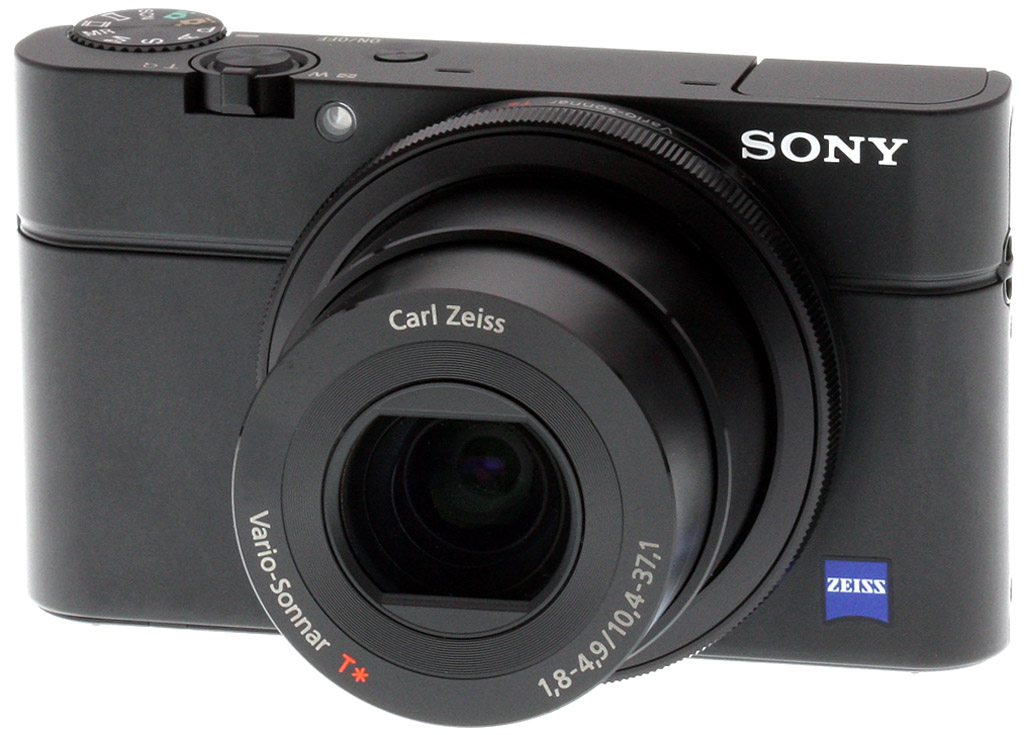
Sony finally did what so many of us have wanted: They've built a pocketable camera with a large sensor and a bright lens. It's the Sony Cyber-shot RX100, and it'll send other camera makers back to their drawing boards for next season. The Sony RX100 sets a 20.2-megapixel, 1-inch sensor behind a bright 3.6x, f/1.8 lens, and wraps it in a small body not much bigger than a Canon S100.
Indeed, the special magic of the Sony RX100 is how closely they stuck to the stronger points of the S100, one of Canon's more successful premium pocket cameras. For many of us who own a camera in this particular pocket category, the Sony RX100 embodies what we wanted when we laid down our cash for the S100, LX5, or XZ-1: a larger sensor, a bright lens, and a small body.
Many will rightly note how slavishly Sony copied the S90, S95, and S100 digital cameras, much as Nikon heavily imitated the Canon G11 with the Nikon P7000. As a Canon S95 owner, I found it easy to compare the two designs by reaching into my bag. Let's have a quick look. (I wouldn't normally lead with this comparison, and I'm not being cheeky by doing so, it's just such a striking similarity I can't go on talking about the Sony RX100's design without either getting this out of the way, or repeating ad nauseam how similar each element is to the S95.)
 |
As you can see, because the sensor is so much larger, the lens has to be larger too, and sticks out further when powered on as a result. Sony did an impressive job of keeping the RX100 thin when switched off, though, as you can see in the shot below. On the front, the position of the AF-assist lamp and the inclusion of the multi-purpose ring are only the first similarities on the pleasingly simple designs. |
 |
Flash really can't go anywhere else, so not much to say there, but the recessed Power button, Shutter button, and Zoom toggles seem to be designed to make the Canon S-shooter feel right at home. The Mode dial is also in just the right place, recessed well for rear thumb access, yet reduced likelihood of accidental activation in a pocket. |
 |
Finally, the back has a similar four-way navigator with an integrated scroll disk and set button in the middle, flanked by four other buttons. It's a common arrangement, however, so this is less noteworthy overall. But the dual control offered by the front ring and rear dial arrangement was unique to the Canon S-series until now. |
I don't present the Sony RX100's close resemblance to the Canon S-series as a scandalous development any more than making an SLR with a grip and a hump on top is a scandal. Seems more like good business to me, making a camera that is built the way people seem to want, but with better imaging capability inside. According to what we've seen so far, Sony's done just that.

Since we're making comparisons to other cameras, it's important to note that the sensor in the Sony RX100, a 1-inch design, is essentially the same size as that in the Nikon 1 series compact system cameras. As Sony puts it, that makes the sensor about four times larger than the average 1/2.3-inch sensor. Many were upset that Nikon's compact system camera had a smaller sensor than its CSC competition, but I think the compactness of the Sony RX100 more than makes up for any concern about sensor size: The Sony RX100 is where use of the 1-inch sensor can be hailed as an engineering milestone.
From the front, the Sony Cyber-shot RX100 speaks to its seriousness. The band offsetting the top third of the camera subtly evokes the Leica rangefinder ethos without going overboard. Note the Carl Zeiss badge and name on the lens. The front lens element is concave rather than convex.

The ring surrounding the lens turns freely--without click-stops, unlike the S-series. But when the Sony RX100 is powered on, the speaker emits a clicking sound. As shown in the tech info section, the flash pops up on a hinged mechanical support like we've seen on several Micro Four Thirds cameras, as well as the Sony NEX-F3. It's a tiny flash that's pretty effective at wide angle, but anemic at full telephoto, according to our tests (see the results in our Flash section). Two microphone holes tell of the RX100's stereo recording.
An amber LED lights in the center of the Power button to indicate charging. The Sony RX100 comes with no battery charger, just a small USB power supply with flip prongs. An included standard micro USB cable serves to charge the camera and transfer images. That's convenient for travel, but a little painful to keep two batteries maintained, as we've had to do while reviewing the RX100. The USB port is hidden behind a door to the right of the Movie button in the rear image below.

The 3-inch LCD is pretty nice, a 1,229K-dot design they call Xtra Fine LCD. Sony says they added a new feature they call WhiteMagic, which uses additional white pixels to boost brightness and show more detail on the screen. The screen is so very fine, it's hard to see anything like white pixels, even looking very closely.
A decent rubber thumbpad rises to subtly shield the Movie record button. These buttons are very small, but most are raised sufficiently to actuate easily; the Playback button is flush, as it turns on the camera in Playback mode without extending the lens. The rear dial also functions as a four-way navigator. The ? button brings up a pretty extensive tip menu with contextual help and suggestions for different types of photographic situations. This doesn't seem like it would be useful for the intended target market, but it can't hurt.
Overall, the Sony RX100's form factor is excellent, with a tight build, aluminum body, and high-quality, responsive buttons and dials. And as a regular S95 user, I indeed feel right at home.
Note: We've completed our analysis of Optics, Exposure, and Performance, and posted our suite of Test Images and Gallery shots. Click the links here or use the tabs above to see what we think of the Sony RX100!
In the Box
- Cyber-shot DSC-RX100 camera
- NP-BX1 battery
- AC-UD10/11 AC adaptor
- Micro USB cable
- Wrist strap
- Shoulder strap adaptor
- Instruction manual
- Software CDROM
Recommended Accessories
- Extra battery pack for extended outings
- Fast, large capacity SDHC/SDXC memory card. These days, 8GB is a good tradeoff between cost and capacity, but if you plan to capture many movie clips or RAW files, consider larger.
- Camera case
Optics
Lens Test Results
Zoom
Good performance with the 28-100mm equivalent lens.


The Sony RX100 is equipped with a 10.4-37.1mm lens, offering a somewhat limited optical zoom ratio of about 3.6x for a premium subcompact, with a 35mm equivalent focal range of about 28-100mm. The beauty of this lens is its speed at wide-angle, offering a fast f/1.8 maximum aperture which is excellent in low-light and provides reduced depth-of-field for better subject isolation. Aperture drops off fairly quickly when you zoom, though. At the telephoto end, maximum aperture is f/4.9 which is on the slow side. The following table reflects the maximum and minimum apertures as reported by the camera:
|
Focal length (eq.)
|
28mm
|
35mm
|
50mm
|
70mm
|
100mm
|
|
Max. aperture
|
f/1.8
|
f/2.8
|
f/3.5
|
f/4.0
|
f/4.9
|
|
Min. aperture
| f/11 at all focal lengths | ||||
Far-field lens performance in general is pretty good at f/5.6, with decent sharpness and contrast across most of the frame, low chromatic aberration (the RX100 suppresses it), though some minor flare and vignetting is visible. See below for comments on macro performance, geometric distortion, corner softness, etc.
Macro
A larger than average sized minimum coverage area, with very good detail. Flash throttled down well, but coverage is not centered and the lens casts a strong shadow at minium distance.


The Sony RX100 captured a slightly larger than average sized minimum area measuring 3.02 x 2.02 inches (76 x 51 millimeters). Detail was quite good in the center, and corners only showed a bit of softness (most lenses show some softening in the corners at macro distances, so the RX100 does better than most). The flash did a good job throttling down, but coverage is not centered and the lens casts a strong shadow in the lower right. You'll likely want to use external lighting for the closest RX100 macro shots.
Geometric Distortion
Very low distortion in camera JPEGs, much higher in uncorrected RAW files.
| Camera JPEGs |
| Pincushion distortion at wide-angle is less than 0.1 percent |
 |
| Distortion at telephoto is essentially nonexistent |
 |
| Uncorrected RAW |
| Barrel distortion at wide-angle is about 3.8 percent |
 |
| Barrel distortion at telephoto is about 0.5 percent |
 |
Thanks to in-camera distortion correction, there's almost no geometric distortion in the RX100's JPEG files. At wide-angle, we measured just 0.08% pincushion distortion, and at telephoto, it was essentially unmeasurable (0.02% or less). This is the tendency for the lens to bend straight lines outward (like a barrel -- usually at wide-angle) or inward (like a pincushion -- usually at telephoto).
To see how much correction is taking place in the camera, we converted RAW files from the above shots with dcraw, which does not correct for distortion. As you can see, at wide-angle, the barrel distortion is extremely high at about 3.8%, while barrel distortion at telephoto is a relatively low 0.5%.
It's not at all unusual these days to see fairly significant distortion in uncorrected RAW files, as this gives the lens designers greater flexibility in optimizing center sharpness and other aberrations, as well as in reducing cost, size, and weight. The downside is that the distortion correction contributes additional blurring to the corners of the frame, where lenses are usually already a bit soft. Also, if you're using a RAW converter that doesn't understand the embedded "opcodes" to perform distortion corrections automatically, you'll have to make the corrections manually in your image-editing software. Most RAW converters these days are capable of applying distortion correction automatically, as specified by the manufacturer.
Chromatic Aberration and Corner Sharpness
Moderately low chromatic aberration at wide-angle; even lower levels at full telephoto. The lens produced some soft corners wide-open, though corner sharpness improved stopped-down.
|
Aperture: maximum
|
|
 |
 |
| Wide at f/1.8: Upper left C.A.: Moderately low Softness: Very soft |
Wide at f/1.8: Center C.A.: Low Softness: Sharp |
 |
 |
| Tele at f/4.9: Upper right C.A.: Low Softness: Very soft, with lower contrast |
Tele at f/4.9: Center C.A.: Very low Softness: Sharp |
Chromatic Aberration. Thanks to in-camera aberration correction, there's very little to virtually no chromatic aberration to be seen in the corners with the RX100's lens at either wide-angle or telephoto settings. Note that the RX100 suppresses CA, as uncorrected RAW files show a good bit more CA than seen above.
Corner Softness. Wide-open at full wide-angle, the lens showed a little decentering, with the lower right corner quite sharp, and the upper left one rather blurry. At telephoto, corner sharpness was better all around, but the pattern changed, with the lower left corner being the sharpest, and the upper right the softest.
There's some vignetting (shading) as well, shown by how much darker the corner crops above are than those from the center. You can also notice a color shift from wide-angle to full telephoto, especially in the corners, but that's a fairly common occurrence, made worse when you set manual white balance at one end and shoot at the other.
|
Aperture: f/4 (W) and f/8 (T)
|
|
 |
 |
| Wide at f/4: Upper left C.A.: Moderately low Softness: Slightly soft |
Wide at f/4: Center C.A.: Low Softness: Sharp |
 |
 |
| Tele at f/8: Upper right C.A.: Low Softness: Moderately soft |
Tele at f/8: Center C.A.: Very low Softness: Sharp |
As is usually the case, stopping down a couple clicks significantly improved corner performance at both wide-angle and telephoto, however the same corners were still softer than the others due to decentering. We can also still see some vignetting as well as the color shift mentioned previously.
Sony RX100 Viewfinder
Viewfinder Test Results
Coverage
Excellent accuracy from the LCD monitor.


The Sony RX100's LCD monitor showed essentially 100% coverage at full wide-angle and telephoto. This is excellent performance, especially considering the amount of geometric distortion correction taking place at wide-angle.
The images above were taken from our standardized test shots. For a collection of more pictorial photos, see our Sony Cyber-shot DSC-RX100 Photo Gallery .
Exposure
Color
Saturation & Hue Accuracy
Realistic saturation levels, but with slightly below average hue accuracy.
 |
| In the diagram above, the squares show the original color, and the circles show the color that the camera captured. More saturated colors are located toward the periphery of the graph. Hue changes as you travel around the center. Thus, hue-accurate, highly saturated colors appear as lines radiating from the center. Click for a larger version. |
Saturation. Like many cameras, the Sony RX100 pushes strong reds, dark blues, dark greens, purples and browns, but just a little, and it actually undersaturates light green, yellow, orange and aqua tones slightly. The RX100's overall color saturation (6.8% oversaturated) is a little lower than average these days, but still produces attractive images. You can of course tweak saturation to your liking, or choose a different color mode. Most consumer digital cameras produce color that's more highly saturated (more intense) than found in the original subjects. This is simply because most people like their color a bit brighter than life.
Skin tones. Here, when adjusted for optimal white balance, the Sony RX100 did well, producing fairly natural-looking Caucasian skin tones. Where oversaturation is most problematic is on Caucasian skin tones, as it's very easy for these "memory colors" to be seen as too bright, too pink, too yellow, etc.
Hue. The Sony RX100 pushed cyan toward blue, orange toward yellow, and yellow toward green by moderate amounts, but most other shifts were pretty minor. The cyan to blue shift is very common among the digital cameras we test; we think it's a deliberate choice by camera engineers to produce better-looking sky colors, and we don't find the resulting color objectionable. The RX100's handling of yellows and yellow-orange colors is one of its real weaknesses: Yellows are rendered closer to a yellow-green, and significantly undersaturated as well. With a mean "delta-C" color error of 6.04 after correction for saturation, overall hue accuracy was a touch below average, but still well within acceptable limits. Hue is "what color" the color is.
Saturation Adjustment
The Sony RX100 has a total of seven saturation settings available, three above and three below the default saturation. This covers a pretty wide range of saturation levels. Saturation had little effect on contrast, which is how it should work.
| Saturation Adjustment Examples | ||||
 |
 |
 |
 |
 |
| -3 | -1 | 0 | +1 | +3 |
The table above shows results with five of the seven saturation settings, including the default and the two extremes. Click on any thumbnail above, then click again to see the full-sized image.


Sensor
Exposure and White Balance
Indoors, incandescent lighting
Auto setting produced warmest results, but Incandescent and Manual were also a bit too warm, while the 2,600 Kelvin setting was too cool. Average exposure compensation required.


Indoors, under normal incandescent lighting, color balance was warm and orange with the Auto white balance setting. Results with the Incandescent setting were also warm, though not quite as warm as Auto. The Manual setting was the most accurate, but still warmer than we'd like. The 2,600 Kelvin setting which matches the color temperature of our lights resulted in a cool, slightly bluish image. The Sony RX100 required +0.3 EV positive exposure compensation here, which is about average. (Our test lighting for this shot is a mixture of 60 and 100 watt household incandescent bulbs, a pretty yellow light source, but a very common one in typical home settings here in the U.S.)
Outdoors, daylight
Very good results under harsh lighting, with good handling of contrast, color, and exposure.
Outdoors, the Sony RX100 performed well. +0.3 EV compensation was required to keep the model's face bright in our "Sunlit" Portrait shot. The average among the cameras we've tested is +0.7 EV, so the RX100 performed better than average here, especially considering Dynamic Range Optimization (DRO) was disabled for these shots which tends to brighten shadows. (More on DRO below.) Contrast is a little high, as you might expect under such harsh lighting, but the camera does an excellent job of holding onto detail in bright highlights and shadows, even without the help of DRO. Auto white balance rendered the model's face a touch too warm, though, so we preferred results from the Manual white balance setting. Colors are just a touch cool in our Far-field shot using Auto white balance, though still quite pleasant. Exposure is quite good with virtually no blown highlights, though some shadows are very deep.
See full set of test images with explanations
See thumbnails of all test images
Resolution
Very high resolution, ~2,300 lines of strong detail from JPEGs.


In camera JPEGs of our laboratory resolution chart revealed sharp, distinct line patterns down to about 2,300 lines per picture height in both the horizontal and vertical directions. Some may argue for more, but aliasing artifacts start to interfere at that point. Complete extinction of the pattern didn't occur until about 2,800 to 3,000 lines. Use these numbers to compare with other cameras of similar resolution, or use them to see just what higher resolution can mean in terms of potential detail.
See full set of test images with explanations
See thumbnails of all test images
Sharpness & Detail
Very good detail and sharpness, though some sharpening artifacts are visible around high-contrast elements. Low to moderate levels of noise suppression visible in the shadows and areas of low contrast.


Sharpness. The Sony RX100 captures sharp, detailed images, though there are some mild to moderate edge enhancement artifacts on high-contrast elements such as the sharpening halos seen around the text in the crop above left. Still, pretty good results here. Edge enhancement creates the illusion of sharpness by enhancing colors and tones right at the edge of a rapid transition in color or tone.
Detail. The crop above right shows good detail with low to moderate levels noise suppression in the darkest areas of the model's hair. Quite a few individual strands are smudged together in areas of low contrast at base ISO, but performance is actually quite good considering the size and resolution of the sensor. Noise-suppression systems in digital cameras tend to flatten-out detail in areas of subtle contrast. The effects can often be seen in shots of human hair, where the individual strands are lost and an almost "watercolor" look appears.
ISO & Noise Performance
Very good noise vs detail performance, with good results up to ISO 800.
|
Default High ISO Noise Reduction
|
 |
 |
 |
| ISO 80 | ISO 100 | ISO 125 |
 |
 |
 |
| ISO 200 | ISO 400 | ISO 800 |
 |
 |
 |
| ISO 1,600 | ISO 3,200 | ISO 6,400 |
As you'd expect, the Sony RX100's high-ISO performance isn't up to the level of the best APS-C sensor size SLRs, but it's head and shoulders above anything remotely approaching its diminutive size. The camera's high resolution means that the crops above are at a larger scale than those of many cameras you might compare it to, but there's no denying that cameras with larger sensors will beat it in the ISO sweepstakes.
When you compare to digicams that the RX100 competes with in the size category, though, there really is no comparison. Noise levels are a good two stops better than even high-end pocketable digicams.
Perhaps thanks to the very high sensor resolution, we see very few of the demosaicing errors we've come to expect in the hair above the mannequin's forehead, and little to no moiré in her jacket.
The camera holds onto good detail in the strong reds of the rose in the vase on the table up through ISO 400, and it softens gracefully from there on up. Detail in the difficult hair area decreases more or less steadily from base ISO on up, but it's a pretty graceful degradation, and the high pixel count means that parts that look rough on-screen at 1:1 print surprisingly well.
We find two things particularly appealing about the Sony RX100's high-ISO performance: There's virtually no chroma noise, and what luminance noise there is, is very fine-grained, making it much less obtrusive than it might otherwise be.
One negative we do note, though, is that color saturation does fall off pretty significantly at the really high ISO settings. This is a common tactic to keep noise under control, and the RX100 isn't as bad as some cameras in this regard, but it's pretty noticeable nonetheless.
As always, check the Print Quality section below for the final word on how the RX100's images appear in print. As you'll see there, the printed output is pretty impressive.
Extremes: Sunlit, dynamic range and low light tests
Very high resolution with good dynamic range for a compact. Very good low-light performance, capable of capturing bright images in near darkness. Special modes make it possible to capture low-light images without a tripod.


Sunlight. The Sony RX100 handled the deliberately harsh lighting in the test above very well. It was a tough call between the 0 EV and +0.3 EV shot here. The mannequin's face is a little dim at the default exposure, so we'd probably go with the +0.3 exposure for everyday pictures. We used the 0 EV setting for our Contrast and DRO example series, though, because it did do the best job of holding onto the strong highlights in the mannequin's shirt.
Contrast is a little high, but highlight detail is excellent, and shadow detail pretty good. Despite the apparent brightness, there are actually almost no clipped highlights in the model's face and shirt at 0 EV, with just a little clipping occurring in specific color channels in the flowers (mostly in the red channel), or in specular highlights where you'd expect it. There were only a few shadows that were completely lost, but if you work too hard to pull up detail, the shadows break apart into discrete levels.
Of course it's best to use fill flash in situations like the one shown above, and better still to shoot in the shade when possible.
Because digital cameras are more like slide film than negative film (in that they tend to have a more limited tonal range), we test them in the harshest situations to see how they handle scenes with bright highlights and dark shadows, as well as what kind of sensitivity they have in low light. The shot above is designed to mimic the very harsh, contrasty effect of direct noonday sunlight, a very tough challenge for most digital cameras. (You can read details of this test here. In actual shooting conditions, be sure to use fill flash in situations like the one shown here; it's better to shoot in open shade whenever possible.)
Dynamic Range Analysis
A key parameter in a digital camera is its Dynamic Range, the range of brightness that can be faithfully recorded. At the upper end of the tonal scale, dynamic range is dictated by the point at which the RGB data "saturates" at values of 255, 255, 255. At the lower end of the tonal scale, dynamic range is determined by the point at which there ceases to be any useful difference between adjacent tonal steps. Note the use of the qualifier "useful" in there: While it's tempting to evaluate dynamic range as the maximum number of tonal steps that can be discerned at all, that measure of dynamic range has very little relevance to real-world photography. What we care about as photographers is how much detail we can pull out of the shadows before image noise becomes too objectionable. This, of course, is a very subjective matter, and will vary with the application and even the subject matter in question. (Noise will be much more visible in subjects with large areas of flat tints and subtle shading than it would in subjects with strong, highly contrasting surface texture.)
What makes most sense then, is to specify useful dynamic range in terms of the point at which image noise reaches some agreed-upon threshold. To this end, Imatest computes a number of different dynamic range measurements, based on a variety of image noise thresholds. The noise thresholds are specified in terms of f-stops of equivalent luminance variation in the final image file, and dynamic range is computed for noise thresholds of 1.0 (low image quality), 0.5 (medium image quality), 0.25 (medium-high image quality) and 0.1 (high image quality). For most photographers and most applications, the noise thresholds of 0.5 and 0.25 f-stops are probably the most relevant to the production of acceptable-quality finished images, but many noise-sensitive shooters will insist on the 0.1 f-stop limit for their most critical work.
JPEG. The graph at right (click for a larger version) was generated using Imatest's dynamic range analysis for an in-camera Sony RX100 JPEG file with a nominally-exposed density step target (Stouffer 4110). At the base ISO of 125 (the optimal ISO) with DRO and HDR settings turned off, the graph shows 9.63 f-stops of total dynamic range, with 7.05 f-stops at the "High" Quality level. Roll-off at the highlight end of the curve was gradual, and at the low end extends pretty linearly towards zero, but the steps get rather spread out, indicative of a tendency of the deepest shadows to break up into discrete levels if you try to brighten them too much. These are are good numerical results, with the total range detected as good as that of the Sony NEX-5N, although the dynamic range at the best quality level fell somewhat short. Considering the much smaller sensor size of the RX100, this is a pretty impressive performance. Note though that this measurement has a margin of error of about 1/3 f-stop, so differences of less than 0.33 can be ignored when comparing.
Raw.  The graph at right is from the same Stouffer 4110 stepchart image captured as a raw (.ARW) file, processed with Adobe Camera Raw using the Auto setting. The Sony RX100's dynamic range scores from raw files are surprisingly good especially for a compact camera, matching and even besting some popular APS-C SLRs. Total dynamic range came in at 12.3 f-stops, a hugh improvement over the JPEG's 9.63 f-stops, and better than a quite a few SLRs and CSCs with much larger sensors. Dynamic range at the highest quality level also improved though less dramatically, from 7.05 to 7.51 f-stops. That's not as good as most recent SLRs and CSCs, limited by the RX100's higher noise levels generated by its smaller photosites. Still, this is a remarkable performance from a compact camera. As always, it's worth noting here is that ACR's default noise reduction settings reduced overall noise somewhat (see the plot in the lower left-hand corner) relative to the levels in the in-camera JPEG, which would tend to boost the dynamic range numbers for the High Quality threshold. Also, the extreme highlight recovery being performed by ACR here would likely produce color errors in strong highlights of natural subjects.
Contrast Adjustment
We really like it when a camera gives us the ability to adjust contrast and saturation to our liking. It's even better when those adjustments cover a useful range, in steps small enough to allow for precise tweaks. Just as with its saturation adjustment, the Sony RX100's contrast setting meets both challenges.
At its lowest contrast setting, the RX100 did a really excellent job of preserving highlight detail, maintaining natural-looking skin tones, and holding reasonable detail in the shadows. Overall, very good results here.
| Contrast Adjustment Examples | ||||
 |
 |
 |
 |
 |
| -3 | -1 | 0 | +1 | +3 |
The table above shows five of the seven contrast setting, including the default and two extremes. It's pretty hard to evaluate small differences in contrast on small thumbnails like these, so click on any thumbnail to go to the full-size image.
One very nice feature of Sony's contrast adjustment is that it has very little effect on color saturation. Contrast and saturation are actually fairly closely coupled, it's a good trick to be able to vary one with out the other changing as well. Sony did a good job here.

Dynamic Range Optimization is Sony's name for their dynamic range enhancement technology. DRO divides the image into small areas, analyzes the range of brightness of each area, and adjusts the camera's image processing parameters accordingly to make the best use of the available dynamic range. Auto DRO is enabled by default on the Sony RX100. You can also set the level manually, from 1 ("weak") to 5 ("strong"), or turn it off. As one would expect, DRO is only available for JPEG files.
The above thumbnails and histograms show the effects of the various levels of DRO on our "Sunlit" Portrait shot with no exposure compensation. Mouse over the links to load the associated thumbnail and histogram, and click on the links to visit the full resolution image. As you can see from the thumbnails and associated histograms, DRO had only a slight effect on the highlights in this shot, though few highlights were clipped to begin with at default. The bulk of the difference between different levels of DRO is found in the shadows and darker midtones. The stronger the DRO level, the more boost is applied to darker areas. That usually results in more visible noise in boosted areas of the image, but the RX100 produces images with reasonably low shadow noise for its class, so increased noise wasn't really an issue even at the highest DRO levels.
High Dynamic Range. The Sony RX100 HDR mode takes three images in rapid succession, one nominally exposed , one underexposed, and one overexposed, then combines them into one high dynamic range JPEG automatically. Lighter areas from the underexposed image are combined in-camera with darker areas from the overexposed image to produce an image with increased dynamic range. The overlaid images are micro-aligned by the camera, but it can only correct for so much movement. If it can't micro-align successfully, an icon indicating HDR capture failed will appear. For best results, the subject should be static or there could be "ghost" images, though the RX100 seems to do a good job at avoiding them. There is also a manual mode where you can select 1 EV ("weak") to 6 EV ("strong") difference in exposures.
Mouse over the above links to load the associated thumbnail, and click on the links to visit the full resolution image. As you can see the effect can be quite subtle with no difference between some of the settings, however the Auto setting did a pretty good job at boosting shadows, reducing highlights, while still retaining enough contrast.
| 1 fc 11 lux |
1/2 fc 5.5 lux |
1/4 fc 2.7 lux |
1/8 fc 1.3 lux |
1/16 fc 0.67 lux |
1/16 fc No NR |
|
|---|---|---|---|---|---|---|
| ISO 80 |
 1.6 s f2.8 |
 3.2 s f2.8 |
 6 s f2.8 |
 13 s f2.8 |
 25 s f2.8 |
 25 s f2.8 |
| ISO 125 |
 1 s f2.8 |
 2 s f2.8 |
 4 s f2.8 |
 8 s f2.8 |
 15 s f2.8 |
 15 s f2.8 |
| ISO 200 |
 0.6 s f2.8 |
 1.3 s f2.8 |
 2.5 s f2.8 |
 5 s f2.8 |
 10 s f2.8 |
 10 s f2.8 |
| ISO 400 |
 0.3 s f2.8 |
 0.6 s f2.8 |
 1.3 s f2.8 |
 2.5 s f2.8 |
 5 s f2.8 |
 5 s f2.8 |
| ISO 800 |
 1/6 s f2.8 |
 0.3 s f2.8 |
 0.6 s f2.8 |
 1.3 s f2.8 |
 2.5 s f2.8 |
 2.5 s f2.8 |
| ISO 1600 |
 1/13 s f2.8 |
 1/6 s f2.8 |
 0.3 s f2.8 |
 0.6 s f2.8 |
 1.3 s f2.8 |
 1.3 s f2.8 |
| ISO 3200 |
 1/25 s f2.8 |
 1/13 s f2.8 |
 1/6 s f2.8 |
 0.3 s f2.8 |
 0.6 s f2.8 |
 0.6 s f2.8 |
| ISO 6400 |
 1/50 s f2.8 |
 1/25 s f2.8 |
 1/13 s f2.8 |
 1/6 s f2.8 |
 0.3 s f2.8 |
 0.3 s f2.8 |
Low Light. The Sony RX100 performed well in our low light tests, producing bright images down to the lowest light level we test at (1/16 fc) at all ISO settings. Noise is remarkably well-controlled, with essentially zero chroma noise, and very fine-grained luminance noise that is surprisingly unobtrusive. Even the shots with noise reduction disabled are very appealing, even at the highest ISO settings and lowest light levels. We didn't see any significant issues with uncorrected hot pixels or banding.
Auto white balance did a very good job here, producing a fairly neutral, just slightly cool color balance at all ISOs and light levels, though darker colors were a bit cooler than lighter ones. We also saw little to no evidence of banding, even at ISO 6,400, and at least at first inspection, no sign of hot pixels either.
The camera's autofocus system was able to focus on the subject down to the lowest light level shown here (about 4 stops down from typical city street lighting at night), and it can focus in complete darkness with its built-in focus assist lamp enabled. We found, though, that if your subject is close, the assist lamp may actually be too bright, overwhelming the autofocus system. You can always turn it off if that's an issue.
| Multi-Shot Mode (All shots taken at 1/16 foot-candle) |
||||
|---|---|---|---|---|
 8 s f2.8 ISO 200 |
 5 s f2.8 ISO 400 |
 2.5 s f2.8 ISO 800 |
 1.3 s f2.8 ISO 1600 |
 0.6 s f2.8 ISO 3200 |
 0.3 s f2.8 ISO 6400 |
 1/6 s f2.8 ISO 12800 |
 1/8 s f2.8 ISO 16000 |
 1/13 s f2.8 ISO 25600 |
|
Crazy Low Light. In common with their SLR and CSC models, the Sony RX100 goes even further for low-light shooting, taking advantage of its fast multi-shot capability to boost ISO and reduce noise even further. It does this by grabbing multiple shots of a subject in rapid succession, and then micro-aligning and adding or "stacking" them together to produce the final image. The results are shots built from shorter individual exposures that are easy to hand-hold, and significantly reduced noise as a result of the summing procedure. The thumbnails in the table above link to examples of this, captured in the camera's Multi-frame Noise Reduction mode.
How bright is this? The one foot-candle light level that this test begins at roughly corresponds to the brightness of typical city street-lighting at night. Cameras performing well at that level should be able to snap good-looking photos of street-lit scenes.
NOTE: This low light test is conducted with a stationary subject, and the camera mounted on a sturdy tripod. Most digital cameras will fail miserably when faced with a moving subject in dim lighting. (For example, a child's ballet recital or a holiday pageant in a gymnasium.) Thanks to their larger sensors, compact system cameras like the Sony RX100 tend to do better than point & shoots, but you still shouldn't expect a quick autofocus lock with moving subjects. (A useful trick is to just prop the camera on a convenient surface, and use its self-timer to release the shutter. This avoids any jiggling from your finger pressing the shutter button, and can work quite well when you don't have a tripod handy.)
Output Quality
Print Quality
Outputs 24 x 36-inch prints from ISO 80 to 200; ISO 1,600 shots look great at 11 x 14; and even ISO 6,400 prints make a good 5 x 7.
 Though its official base ISO starts at 125, the Sony RX100's ISO 80 images looked good printed at 24 x 36 inches. Color was muted, particularly yellows and greens, as we also found in our MacBeth test target.
ISO 125 shots also looked quite good at 24 x 36, with excellent detail, but the muted color persisted.
ISO 200 images also looked very good at 24 x 36, if a little softer than ISO 125. Not enough to require a smaller print size.
ISO 400 images printed very nicely at 20 x 30 inches, with sharp detail.
ISO 800 shots were soft enough at 20 x 30 that we preferred the 16 x 20-inch prints, though we'd still call the 20 x 30-inch prints usable for most subjects. By ISO 800, the red leaf swatch appeared soft.
ISO 1,600 shots are usable at 13 x 19 inches, but look better at a still fairly large 11 x 14 inch size. The red leaf swatch was somewhat soft at this point.
ISO 3,200 images look good at 8 x 10 inches, with the exception of the difficult red leaf swatch.
ISO 6,400 images are a bit soft for 8 x 10 inch prints, but look quite good at 5 x 7 inches.
Overall, the Sony RX100 stands out as a pocket camera that can produce good quality 24 x 36 inch prints from ISO 80 to 200, and even its highest ISO of 6,400 outputs a good quality 5 x 7. Impressive!
The images above were taken from our standardized test shots. For a collection of more pictorial photos, see our Sony Cyber-shot DSC-RX100 Photo Gallery .
Not sure which camera to buy? Let your eyes be the ultimate judge! Visit our Comparometer(tm) to compare images from the Sony Cyber-shot DSC-RX100 with those from other cameras you may be considering. The proof is in the pictures, so let your own eyes decide which you like best!
Performance
Timing and Performance
Generally good to excellent performance in our tests.
| Startup/Shutdown | ||
|---|---|---|
|
Power on |
2.8 seconds
|
Time it takes to turn on and capture a shot. |
|
Shutdown |
~2 seconds
|
How long it takes camera to turn off before you can remove the memory card. |
|
Buffer clearing time |
~6 seconds
(JPEG) |
Worst case buffer clearing time. -- This is the delay after a set of shots before you can remove the card. |
|
~2 seconds
(RAW) |
||
|
~9 seconds
(RAW+ LF JPEG) |
||
|
*Note: Buffer clearing times measured with a SanDisk Extreme Pro 95MB/s UHS-1 SDHC card. Slower cards will produce correspondingly slower clearing times. Slow cards may also limit length of bursts in continuous mode. ISO sensitivity and noise reduction settings can also affect cycle times and burst mode performance.
|
||
Startup time was much slower than an SLR, but reasonable for a point & shoot. Buffer clearing times were pretty good for its class, especially considering the buffer depth and its 20 megapixel images. (Particularly impressive was the ~2 second clearing time for RAW images with a sufficiently fast memory card. RAW shooters rejoice!)
| Mode Switching | ||
|---|---|---|
| Play to Record, |
1.1 seconds
|
Time until first shot is captured. |
| Record to Play |
2.2 seconds
|
Time to display a large/fine JPEG file immediately after capture. |
| Display |
0.6 second
|
Time to display a large/fine JPEG file already on the memory card. |
Mode switching performance was pretty good for its class, though Record to Play was a bit sluggish.
| Shutter Response (Lag Time) | ||
|---|---|---|
|
Full Autofocus, |
0.153 second
|
Time from fully pressing shutter button to image capture, with the lens already at the proper focal distance setting, at the wide-angle end of the lens' range. |
|
Full Autofocus, |
0.266 second
|
Time from fully pressing shutter button to image capture, with the lens already at the proper focal distance setting, at the telephoto end of the lens' range |
|
Flash |
0.372 second
|
Using the flash slows the shutter release because the metering pre-flash has to occur before the shutter opens. Compare this number to the Full AF Wide Angle case above. |
| Continuous AF |
0.314 second
|
This mode usually shows no speed increase with our static subject; we have no way to measure performance with moving subjects. In the case of the RX100, it seemed to significantly slow the focus speed. |
| Manual Focus |
0.032 second
|
For most cameras, shutter lag is less in manual focus than autofocus, but usually not as fast as when the camera is "prefocused". There was about 11% variation between shots in this test. |
|
Prefocused |
0.013 second
|
Time to capture, after half-pressing and holding shutter button. There was about 7% variation between iterations on this particular measurement. |
Looking at the Sony RX100's ability to determine that it's properly focused when shooting the same target multiple times, its autofocus speed is very fast for it class. The Sony RX100's full-autofocus shutter lag (with the subject at a fixed distance) was only 0.153 second in Single-area AF mode. This increased slightly to 0.266 second in Multi-area AF mode. That's much faster than the average CSC, and competitive with many SLRs.
The one significant anomaly we found in our shutter lag tests was that the AF is very slow to lock on in continuous AF mode when the lens is set to its widest aperture: We measured very consistent lag times of ~1.2 seconds in that condition. Stopping down to f/4 reduced continuous-AF lag to the 0.314 second shown in the table above.
With the flash enabled, the RX100's full AF shutter lag increased to 0.403s, to account for the preflash metering. Shutter lag was 0.315 second in continuous mode AF. When manually focused, the Sony RX100's lag time dropped to 0.032 second, which is very fast. The Sony RX100's prefocused lag time was only 0.013 second, among the fastest we've seen in cameras we've tested.
To minimize the effect of different lens' focusing speed, we test AF-active shutter lag with the lens already set to the correct focal distance.
| Cycle Time (shot to shot) | ||
|---|---|---|
|
Single Shot mode |
0.36 second
|
Time per shot, averaged over 20+ shots*. (JPEG shot to shot time was highly variable. Some were on the order of 0.3 second, others were 0.4-0.6) |
|
Single Shot mode |
0.66 second
|
Time per shot, averaged over 20+ shots*. |
|
Single Shot mode |
0.62 seconds
|
Time per shot, averaged over 20+ shots*. (The slightly faster time for RAW+JPEG vs RAW alone isn't significant: The range of variation was +/- 0.05 second for RAW and +/- 0.02 second for RAW+JPEG, so the 0.04 difference is within the margin of error.) |
|
Early shutter |
No
|
Some cameras don't snap another shot if you release and press the shutter too quickly in Single Shot mode, making "No" the preferred answer. |
|
Continuous mode |
0.40 second (2.5 frames per second);
33 frames total; 6 seconds to clear* |
Time per shot, averaged over 33 shots, then slows to an average of about 0.63s or 1.59 fps when buffer is full. |
|
Continuous mode |
0.45 second (2.22 frames per second);
16 frames total; 2 seconds to clear* |
Time per shot, averaged over buffer length of 16 frames, then slows to an average of about 1.32s or 0.76 fps when buffer is full. |
|
Continuous mode |
0.45 second (2.22 frames per second);
11 frames total; 9 seconds to clear* |
Time per shot, averaged over buffer length of 11 frames, then slows to 1.90s or 0.53 fps when buffer is full. |
|
Speed Priority Continuous mode |
0.10 second (10 frames per second); 13 frames total; 6 seconds to clear* |
Time per shot, averaged over 13 shots, then slows to an average of about 0.51s or 1.96 fps when buffer is full. (Sometimes significant variation between shots, though) |
|
Speed Priority Continuous mode |
0.10 second (10 frames per second); 13 frames total; 2 seconds to clear* |
Time per shot, averaged over 13 shots, then slows to an average of 1.32 fps when buffer is full. (Sometimes significant variation between shots, though) |
|
Speed Priority Continuous mode |
0.10 second (10 frames per second); 10 frames total; 9 seconds to clear* |
Time per shot, averaged over 10 shots, then slows to an average of 1.84 fps when buffer is full. (Sometimes significant variation between shots, though) |
|
Flash Recycling |
7.2 seconds
|
Flash at maximum output. |
|
*Note: Buffer clearing times measured with a SanDisk Extreme Pro 95MB/s UHS-1 SDHC card. Slower cards will produce correspondingly slower clearing times. Slow cards may also limit length of bursts in continuous mode. ISO sensitivity and noise reduction settings can also affect cycle times and burst mode performance.
|
||
Single-shot cycle time was quite good with just large/fine JPEGs, at 0.36 second, increasing to just 0.66 second when shooting RAW and 0.62 second for RAW + large/fine JPEG files. (As noted above, the difference between RAW and RAW+JPEG is within the margin of error.) Standard continuous mode performance was about average at 2.5 frames/second for JPEG and 2.22 frames/second for RAW and RAW+JPEG. Speed Priority Continuous mode was outstanding at 10 frames per second, though autofocus and exposure are fixed at the first frame of a burst in that mode.
Buffer depth for large/fine JPEGs was excellent, at 33 frames in standard continuous mode. Note, though, that our test target for this is designed to be difficult to compress, so users can expect longer JPEG burst lengths with typical subjects. When shooting with RAW files, buffer depth dropped to 16 RAW frames or 10 RAW+L/F JPEG frames, both still pretty good. Buffer depth in Speed Priority Continuous mode was 13 large/fine JPEG or RAW frames in our tests, and 9 JPEG+RAW frames, but as mentioned, you should do better with typical subjects.
Flash recycling was a significant shortcoming of the RX100, at 7.2 seconds from a full discharge. While not at all uncommon in small-body cameras with reasonable flash ranges, this is still a significant step down from what enthusiasts are accustomed to with either high-end (and bulky) point & shoots or interchangeable-lens cameras.
| Download Speed | ||
|---|---|---|
| Windows Computer, USB 2.0 |
8,666 KBytes/sec
|
Typical Values: |
Download speeds were relatively fast, quick enough that you won't feel the need for a separate card reader, even with large memory cards. (Note that this test was performed with a SanDisk Extreme Pro 95MB/s SD card: Slower cards would likely show slower transfer times.)
Bottom line, the Sony RX100's performance was really excellent for a high-resolution point & shoot. Autofocus is on par with even fast SLRs, prefocused shutter lag is very much in the top tier regardless of camera type, and Speed Priority burst mode was faster than most professional SLRs (though the RX100 won't track focus or adjust exposure in that mode). While not quite as dramatic as Speed Priority burst mode, single-shot cycle times were very good as well. Buffer depth was very good in all modes, especially considering the 20 megapixel resolution of the RX100. The two disappointments were the rather slow flash recycling and very slow AF when using continuous AF mode with the lens a the maximum f/1.8 aperture.
Battery
Battery Life
Good battery life for a compact camera.
| Operating Mode | Battery Life |
|---|---|
|
Still Capture,
(CIPA standard) |
330 shots
|
The Sony RX100 uses a custom rechargeable lithium-ion battery pack for power, and comes with a single battery and AC adapter (charging is in-camera via USB). The battery is rated for 330 shots per charge using the CIPA standard, which includes 50% flash shots. Battery life is above average for a compact model, but we do recommend getting a second battery for your RX100 if you plan any extended outings or shoot a lot of video.
The table above shows the number of shots the camera is capable of (on a fully-charged rechargeable battery), based on CIPA battery-life and/or manufacturer standard test conditions.
(Interested readers can find an English translation of the CIPA DC-002 standards document here. (180K PDF document))
Image Quality
The crops below compare the Sony RX100 to the Canon S100, Canon G1 X, Nikon J1, Samsung NX200 and Sony NEX-5N. Though we normally start with ISO 1,600 here, we thought we'd start with base ISO to show the best that each camera can do.
Note that these images are best quality JPEGs straight out of the camera, at default settings including noise reduction. Each camera was shot with the sharpest lens on hand, though the "point and shoot" cameras we've included here obviously used their fixed lenses.
Sony RX100 versus Canon S100 at base ISO
 |
 |
 |
 |
 |
 |
Sony RX100 at ISO 125 |
Canon S100 at ISO 80 |
Though the Canon S100 does an admirable job for its sensor size, the Sony RX100 clearly has more resolution and better detail, quite noticeable in the mosaic detail. The RX100 even finds threads in the pink swatch below the red leaf swatch. |
|
Sony RX100 versus Canon G1 X at base ISO
|
 |
|
 |
|
 |
Sony RX100 at ISO 125 |
Canon G1 X at ISO 100 |
Going up against the nearly APS-C-sized G1 X, it's a considerably closer match. Both offer excellent detail, and while the RX100 has more pixels, the G1 X's sensor is larger, so it'll be interesting to see how they compare as ISO rises. Both capture sharp detail in the pink swatch, but the G1 X seems to do a little better with the red leaf swatch. |
|
Sony RX100 versus Nikon J1 at base ISO
|
 |
|
 |
|
 |
Sony RX100 at ISO 125 |
Nikon J1 at ISO 100 |
It's perhaps unfair to pit the RX100 against the J1, given that it's a 20.2-megapixel sensor going against a 10-megapixel design. But they're both the same sensor size, so it's interesting all the same. The Sony RX100 clearly has greater resolution, but the Nikon delivers more vibrant color. |
|
Sony RX100 versus Samsung NX200 at base ISO
|
 |
|
 |
|
 |
Sony RX100 at ISO 125 |
Samsung NX200 at ISO 100 |
Finally another 20-megapixel competitor to look at, the NX200 has an APS-C sensor. The NX200's JPEG engine struggles as ISO rises (though its RAWs are quite good), so expect this picture to change a bit in the next set of crops. The NX200 really struggles with the red leaf swatch, even at base ISO, but appears a little sharper elsewhere. |
|
Sony RX100 versus Sony NEX-5N at base ISO
|
 |
|
 |
|
 |
Sony RX100 at ISO 125 |
Sony NEX-5N at ISO 100 |
Going Sony against Sony now, the RX100's 20-megapixel sensor seems to deliver a little more detail overall, but the APS-C-based NEX-5N handles the red leaf swatch better, offering a more even approach, mostly thanks to its larger image area. |
|
Most decent cameras produce very good results at base ISO, so we like to see what they can do at higher settings. Recent advances in sensor technology have made ISO 1,600 look a lot more like ISO 100, but there are still cameras whose quality starts to fall apart at this setting. We also choose 1,600 because we like to be able to shoot at least at this level when indoors and at night.
Sony RX100 versus Canon S100 at ISO 1,600
 |
 |
 |
 |
 |
 |
Sony RX100 at ISO 1,600 |
Canon S100 at ISO 1,600 |
Since we're used to doing this analysis on SLRs, it's a bit surprising just how soft ISO 1,600 images look. Still, it's clear what the Sony RX100's larger sensor area gets you in terms of resolution. It's soft, but still quite good by comparison. The red leaf swatch, our most difficult element, is a mess, though. |
|
Sony RX100 versus Canon G1 X at ISO 1,600
|
 |
|
 |
|
 |
Sony RX100 at ISO 1,600 |
Canon G1 X at ISO 1,600 |
The Canon G1 X proves why a larger sensor is a little better, offering less noise, less softening from noise suppression, and slightly less softening in the red leaf swatch. |
|
Sony RX100 versus Nikon J1 at ISO 1,600
|
 |
|
 |
|
 |
Sony RX100 at ISO 1,600 |
Nikon J1 at ISO 1,600 |
Even with more pixels, the Sony RX100 manages to hold chroma noise in check very well compared to the Nikon J1. Unfortunately, the RX100's images offer noticeably less color overall, particularly in the yellows and greens. |
|
Sony RX100 versus Samsung NX200 at ISO 1,600
|
 |
|
 |
|
 |
Sony RX100 at ISO 1,600 |
Samsung NX200 at ISO 1,600 |
Sony's aggressive approach to noise suppression does soften the image, but also gets rid of most of the chroma (color) noise in the shadows and other dark areas, which the Samsung NX200 leaves behind. The Samsung's yellows are brighter, though, which also shows up in the red tones. (Note that the poor high ISO performance for the NX200 has a lot to do with the JPEG engine; its RAW output is competitive with other APS-C compact system cameras.) |
|
Sony RX100 versus Sony NEX-5N at ISO 1,600
|
 |
|
 |
|
 |
Sony RX100 at ISO 1,600 |
Sony NEX-5N at ISO 1,600 |
And finally a clearer illustration of why you want that larger sensor. The Sony NEX-5N, though only 16 megapixels, manages to find the threads in the pink swatch, as well as sharper detail in the mosaic bottle and the Mas Portel bottle. |
|
Today's ISO 3,200 is yesterday's ISO 1,600 (well, almost), so below are the same crops at ISO 3,200.
Sony RX100 versus Canon S100 at ISO 3,200
 |
 |
 |
 |
 |
 |
Sony RX100 at ISO 3,200 |
Canon S100 at ISO 3,200 |
More softness still at ISO 3,200, but the RX100 images still offer more detail than the Canon S100. |
|
Sony RX100 versus Canon G1 X at ISO 3,200
|
 |
|
 |
|
 |
Sony RX100 at ISO 3,200 |
Canon G1 X at ISO 3,200 |
Overall, the Canon G1 X still does a little better than the Sony RX100, preserving a little more detail in all elements. |
|
Sony RX100 versus Nikon J1 at ISO 3,200
|
 |
|
 |
|
 |
Sony RX100 at ISO 3,200 |
Nikon J1 at ISO 3,200 |
The Nikon J1 does fairly well with the mosaic image, but suffers from a lot of noise suppression artifacts in the shadows. |
|
Sony RX100 versus Samsung NX200 at ISO 3,200
|
 |
|
 |
|
 |
Sony RX100 at ISO 3,200 |
Samsung NX200 at ISO 3,200 |
The Samsung NX200 manages to pull out a little more detail, but with extra sharpening and leaving behind quite a bit more chroma noise. Its red leaf swatch looks a little better than the RX100. |
|
Sony RX100 versus Sony NEX-5N at ISO 3,200
|
 |
|
 |
|
 |
Sony RX100 at ISO 3,200 |
Sony NEX-5N at ISO 3,200 |
Again, the RX100 doesn't obsolete its brother NEX cameras, with the NEX-5N turning out more detail with less noise suppression and better color at ISO 3,200. |
|
Detail: Sony RX100 vs. Canon S100, Canon G1 X, Nikon J1, Samsung NX200, and Sony NEX-5N
 |
 |
 |
 |
 |
 |
 |
 |
 |
 |
 |
 |
 |
 |
 |
 |
 |
 |
| Sony RX100 ISO 125 ISO 3,200 ISO 6,400 |
Canon S100 ISO 80 ISO 3,200 ISO 6,400 |
Canon G1 X ISO 100 ISO 3,200 ISO 6,400 |
Nikon J1 ISO 100 ISO 3,200 ISO 6,400 |
Samsung NX200 ISO 100 ISO 3,200 ISO 6,400 |
Sony NEX-5N ISO 100 ISO 3,200 ISO 6,400 |
| Detail comparison. High-contrast details are often sharper as ISO rises, so they're worth a look as well. As with the low-contrast crops, the high-contrast crops show the Sony RX100 besting the S100 and Nikon J1, but not faring quite as well as the G1X and NEX-5N, both larger-sensor cameras. At ISO 6,400, the G1 X actually does a little better than all others here, including the NEX-5N, especially with the lines inside the letters, while maintaining a truer red color in the text. Overall the Sony RX100 does about as well as we'd expected, as a very high resolution sensor that's smaller than some, larger than others. Considering its extremely high resolution, it's impressive it does so well. | |||||
Though its official base ISO starts at 125, the Sony RX100's ISO 80 images looked good printed at 24 x 36 inches. Color was muted, particularly yellows and greens, as we also found in our MacBeth test target.
ISO 125 shots also looked quite good at 24 x 36, with excellent detail, but the muted color persisted.
ISO 200 images also looked very good at 24 x 36, if a little softer than ISO 125. Not enough to require a smaller print size.
ISO 400 images printed very nicely at 20 x 30 inches, with sharp detail.
ISO 800 shots were soft enough at 20 x 30 that we preferred the 16 x 20-inch prints, though we'd still call the 20 x 30-inch prints usable for most subjects. By ISO 800, the red leaf swatch appeared soft.
ISO 1,600 shots are usable at 13 x 19 inches, but look better at a still fairly large 11 x 14 inch size. The red leaf swatch was somewhat soft at this point.
ISO 3,200 images look good at 8 x 10 inches, with the exception of the difficult red leaf swatch.
ISO 6,400 images are a bit soft for 8 x 10 inch prints, but look quite good at 5 x 7 inches.
Overall, the Sony RX100 stands out as a pocket camera that can produce good quality 24 x 36 inch prints from ISO 80 to 200, and even its highest ISO of 6,400 outputs a good quality 5 x 7. Impressive!
Field Test
by Shawn Barnett

Bokeh. I made this shot searching for bokeh. I found it, but it was at f/4.9 as I'd zoomed to telephoto.
Nothing's more fun for a reviewer than looking at a camera we would buy for ourselves. Sony has finally refocused on the enthusiast user--something they haven't done with much traction since the unique F828--and the results are quite good.
Form. Sony nailed it in the physical simplicity department, largely by conforming to an already popular, well-thought-out design. Though there's no grip on the front, the Sony RX100 is thick enough to hold easily. The larger lens ring leaves a little less room for your fingers, so I recommend using the wrist strap and both hands whenever possible. At $650, you don't want to drop this little beauty. Sony also included strap lugs for both sides of the RX100, so a solitary neck strap is also likely to be available.
The shirt-pocketable design is a little thick, so it's not going to disappear into a pocket like a Sony T-series camera, but it'll fit in a pinch, and rides well in the looser pockets of slacks or handbags.

The position of the thumbgrip, Mode dial, Zoom toggle and Power button are ideal. The Rear dial, too, is well-positioned for easy access and its detents are clear. The Mode dial, on the other hand, is a little mushy for my taste; rather than snapping into position, it's reluctant to leave its position, then moves slowly to its next setting. Stiff is good, unyielding isn't. That's probably my only complaint about the Sony RX100's physical operation, though, which is good.
Lens. Ranging from 28-100mm equivalents, the Sony RX100's 3.6x lens is a big part of the camera. You can tell what I mean when you power on this solid-feeling camera and the weight shifts toward the front; much of the overall weight is the lens itself. If holding the camera without a strap, it's important to hold it well because the weight shift could cause you to lose your grip. What's amazing is how well it collapses inside the camera body. The lens zooms about as quickly as I'd like, with a slight, low-frequency buzz; not exactly silent, but low enough that it won't attract too much attention.

Picture Effects. I like this surreal Illustration effect. I was disappointed that the level feature left the shot a little off kilter, though.
Optical quality at the center is quite good. Our tests show some noticeable softening in the corners, likely related to the extreme distortion correction the camera has to perform out toward the corners. It also does this correction in video, unlike a few older Sony cameras, though we doubt it'll affect the corners as much given the lower resolution of HD video. The Canon S100's uncorrected RAW images are even more distorted than the RX100's images, which could also cause much of the softening we see in the corners on that camera, in addition to the usual suspects of coma, curvature of field, and chromatic aberration. Chromatic aberration is also low overall, probably processed out by the camera.
We also noticed an unusual color shift when zooming from wide to telephoto in Manual White Balance mode, going from a purple cast at wide angle to a green cast at telephoto, primarily around the edges. This is partially due to our use of Manual White Balance on most of these setups, and can be seen in other cameras, including the S100. See our Optics page for more on the Sony RX100's optical performance.

Autofocus is very quick on the Sony RX100, ranging from 0.153 second at wide angle and 0.266 second at telephoto. That's deep into phase-detect SLR territory, and is a major advantage over the Canon S100, whose shutter lag improved over its predecessor, but still hovered around 0.571 second. Prefocused shutter lag on the RX100 is a remarkable 0.013 second.
As a result, the Sony RX100 surprised me with its readiness. I almost always half-press to prefocus, and the Sony RX100's shutter release works on a hair trigger, surprising you when it goes off. That's just what you want for catching the right moment once you get used to the camera, but at first you get surprised by taking a picture before you meant to. That's not a bad problem to have.
The Sony RX100 also focused extremely well in low light, actually working better without the AF assist lamp in our lowest light test. There were a few baubles, however, in our testing, with the lens hunting excessively between shots in Continuous mode with the aperture wide open to f/1.8. Stopping down gradually reduced the issue until it went away at f/4.

Flash. Though it's mechanical and springloaded, the Sony RX100's flash is deployed electronically by the camera. You have to set the Flash mode to Auto or Forced and the camera will pop up the flash when you half-press the shutter if settings/conditions warrant. You have to push it back down manually to lock it back in place. We found it pretty good with the lens set to wide angle, but deficient even at six feet at the camera's 100mm equivalent setting. With a camera like this, I'd superglue it shut and shoot available light, myself.

Rings and complexity. The front ring is both a blessing and a curse; it's great once you decide how you want to use it, but once you switch modes its function can change. Indeed, so many changes affect other operating factors, that the Sony RX100's many options become something of a burden. After shooting with the Sony RX100, in some ways I'm drawn back to my S95 and its more limited, better-focused options. Sony poured a lot of very cool features into the RX100, and once you get used to them, you'll see what a powerful camera it is; the flip side is that even with lots of experience using Sony cameras, it's easy to get lost and lose track of how one setting affects the availability of another. We found that true of Sony NEX cameras as well. Working with a team on one camera, I too often found that the camera's abilities and behaviors changed each time it was returned to me, which is a more unique problem reserved to teams of reviewers.


HDR mode. A little HDR brought out the interior of this yogurt shop, and also cut some of the glare from the front of the building. Zoomed in you can see the face of a patron inside apparently thinking I could see him better than I could (without the magic of HDR, that is). This was the same exposure, even though his expression differs.
With that tangle of explanation out of the way, the front ring works very well in its default mode. I don't think I've ever seen a better expression of Program shift mode than what the RX100 offers. Just leave the camera in Program, and turn the front ring. A graphic appears as an arc onscreen, with numerical aperture values turning in one direction while shutter speeds turn in the opposite direction. Oddly, this option is not offered on the S95 or its brothers without having to press multiple buttons. Since this is a lens that offers a little more bokeh, it's an absolutely natural way to shoot, giving you access to two critical exposure factors with a turn of the ring.
In Manual mode, the front ring controls aperture while the rear adjusts shutter speed, as it should be. You also get a real-time exposure preview on the screen. Bravo. When in Aperture or Shutter priority, both dials control the same parameter: either both control aperture or both control shutter speed. Makes sense. Switch to Superior or Intelligent Auto, on the other hand, and the front ring switches to controlling zoom. Press the down arrow (the one with the sparkly camera) in either of these Auto modes, and the dials change again. This time the front dial does nothing, but the rear controls simplified features like background defocus, Brightness, Color (tone), Vividness, and the rather deep well of Picture effects. Again, I'm surprised these modes are on a relatively intermediate-focused camera like this, but they can be avoided.

Ring menu. Pressing the Function button brought up the Ring menu. By default, the ring menu was set to adjust ISO, but if you use the arrow keys to scroll left and right, you can select EV, White Balance, DRO/HDR options, Picture effects, and Focus mode. I landed on Picture Effects, and started turning the ring to shoot a series. 20 shots later, I was getting tired, sure the "Off" option would swing around any moment. But all 33 options are available for the 13 types of Picture effects. You can access Picture effects in at least three different ways I found, speaking to the complexity I mentioned.
In general, though, I think this Function button method works well. It leaves the Ring free to do a single task that you set with just a turn, then it serves to adjust other settings after you press the Function button. Not bad. Just don't expect it to always do the same thing, depending on what other settings you've made, because it can surprise you.
LCD. Sony's not just boasting about the LCD with its high-res WhiteMagic display, it really is vibrant and detailed, even in sunlight; so long as it's clean, that is. Speaking of which, I'd like to say how pleased I am that it's not a touchscreen. I'm getting more accustomed to touchscreens, but I really don't want them on premium cameras like this without the ability to completely disable them. Physical controls are more important to the enthusiast shooter; and most don't like the unpredictability of touchscreens along with that.

Leveling. One of the four Display options includes a two-axis level, measuring pitch (aiming up or down) and roll (tilting left and right). I used this a lot while shooting. It's helpful particularly trying to capture from an odd angle while keeping things aligned with the rest of the world. Unfortunately, some of the shots I took on a tripod showed as level, but clearly were not. Even one degree off looks like a lot, though, so I'm sure the level is designed more to get you in the ballpark. Since we haven't a manual yet, we can't be sure whether the leveling feature can be calibrated.
Lab concerns. In addition to the strange seeking behavior in Continuous mode at wide apertures, the lab also found a peculiar difficulty setting Manual white balance in low light conditions. The camera just declares a Custom White Balance error if the light is too low, the ISO is set too low, the aperture is too small, the lens is zoomed in, etc.; ultimately, whatever circumstance is causing the camera to not capture enough light to determine a white balance setting. If it doubt, open up the aperture and zoom to wide angle. The Set Custom White Balance screen draws its reading from a small circle in the center of the image area when you press the shutter button, so focal length is less important.
Panorama. Shooting a panorama is about as easy as it's ever been with the Sony cameras, and the results are great. From what I can tell, the Sony RX100 uses intelligent sweep panorama, omitting elements of frames where someone's obviously moved.

Above, there's only one error where a person is half-missing, where it's clear the camera had little choice thanks to a nearby obstacle. Not bad. This is set to Standard, shooting Down with the RX100 oriented vertically.

You can shoot in the four directions, but you have to choose which first. Because I wanted to get this tall building, I switched to "Down" as the option, then swept with the camera rotated left. You don't get quite 180 degrees, but I got all of the building.

This is what you get when panning with the camera in horizontal orientation in Wide mode. The railroad tracks are running in a straight line. Shooting these with the Leveling display selected helped keep the camera level as I panned.
DRO and HDR. We shot DRO images in the lab, which you can see on the Exposure page, but I also shot some HDR samples to show what the Sony RX100 can do with shadows and highlights with its various settings, including Auto, then ranging from 1.0EV to 6.0EV of exposure. All were shot on a tripod to keep it framed accurately. Results don't seem to step up neatly for some reason, with some shadows appearing darker than others, though the reported exposure remains the same, and the last two shots seem the same.


Filters. As I mentioned, there's a ridiculous number of filters available, 33 in all with their various permutations. That doesn't even include the Scene modes. Here's a subset of the modes, highlighting some of the more interesting ones. Overall, it's a pretty interesting set of filters. I really liked the Painting and Illustration modes.


Lens flare. I found some lens flare while shooting wide open at night. It's not uncommon for such a bright lens, just be aware of your bright highlights when shooting wide open.
Night. As you can see from the samples above, I took quite a few night shots. The camera focused quickly and functioned just fine in very low light, just as we found in the lab, and its exposure preview showed me exactly what I'd get when I pressed the shutter. Wide open, there was some noticeable lens flare, as you can see in the crop at right, taken from the first shot in the series above. You can also see the flare in the night video below. It's pretty common among fast lenses, so be sure to stop down a bit if bright lights will be part of your image.
Multi-Frame Noise Reduction. It took me a little time to find the Multi-Frame NR mode. Just bring up the Ring Function menu, select ISO, and turn the dial past Auto to ISO. I suppose it's good in certain situations, like when the camera will obviously choose a lower ISO, but my test showed that the really high ISO settings, like ISO 25,600, were too soft to use. I shot this scene at 3,200 and 6,400, then switched to Multi-Frame Noise Reduction and shot several takes. The camera chose ISO 16,000, 20,000, and 25,600. 25,600 was overexposed, so I left it out of this series.


Above are crops of the deck chairs near a dimly lit gazebo in my neighbor's yard on a dark night. The exposure times don't make much sense, but they're what Adobe Bridge reports. ISO 6,400 looks the best, despite the slower shutter speed, and the two Multi-Frame shots don't look worth the effort, at least not in this light, with less detail and less color. Other scenarios will likely be different.

Full HD night vid. Click to download 34.3MB .MTS file.
Video. Video quality looks pretty good. There's more information on our detailed video page, but my overall experience with the RX100's video was pretty uneventful; it worked pretty well. You can set ISO manually or let it gain up automatically in ISO Auto mode. Dynamic Range Optimization is also available, as are many of the picture effects. The results with all of them are pretty surprising. You can even select among Program, Aperture, Shutter-priority, and Manual shooting modes.
I only had a short time with the Sony RX100, but it's enough to say that I like it a lot. Among the scads of special features and modes, I'd probably keep to Program and Aperture priority, using the Ring in its Standard mode, and I'd probably occasionally play with the HDR mode in special circumstances. I'm sure I'd use Panorama more often. It's cool that it can rip off 10 frames per second, but this isn't the kind of camera I turn to for that kind of photography. Ultimately, I'd use the Sony RX100 for its large, light-sucking lens; its larger, high-res sensor; and its gorgeous LCD, and ignore the rest. I'm just glad a big camera manufacturer finally heard us clearly and gave us a pocket camera with some serious guts.
Video
Check out the links below for more sample images, videos and image quality analysis:
- Sony Cyber-shot DSC-RX100 Optics page (Crops from images shot with the camera's kit lens, if sold as a kit)
- Sony Cyber-shot DSC-RX100 Sample Images page (Index to all standard test shots, with explanations)
- Sony Cyber-shot DSC-RX100 Thumbnails page (Thumbnails of all shots, including RAWs, with EXIF data)
- Sony Cyber-shot DSC-RX100 Gallery page (Regular photos taken with the Sony Cyber-shot DSC-RX100)

Video capability. Although there is a separate video recording mode on the Sony RX100, capture can still be initiated from any still-image mode by pressing the Movie button at top right on the rear panel.
High-definition video capture is now a must-have feature in large-sensor cameras, and essentially all the major manufacturers now provide some form of video capture in their interchangeable-lens cameras, as do the few making large-sensor fixed lens models. Sony's RX100 falls into the latter camp, and its feature set is pretty comprehensive. Capture is possible at up to Full HD resolution at a rate of 60 frames per second, with both optical zoom and autofocus available during capture. Exposure can be adjusted automatically or manually, both before and during capture. A control ring around the lens barrel allows adjustments with relatively little handling noise and jostling during capture, which is rather a bonus--many cameras that allow exposure adjustment during capture require use of physical controls that cause noticeable clicks and bumps. Audio comes courtesy of a stereo microphone on the top deck, and a wind noise filter is available. Unusually, you can capture high-res stills during video capture, without any interruption to the video itself. There are also some fun creative options such as Picture Effects and a background defocus tool which let you tweak the look of videos in-camera.
While it lacks a 720p capture mode, as well as the external microphone connectivity, manual audio levels control, and fine-grained frame rate control that professionals and more experienced enthusiasts will crave, the Sony RX100's video functionality is uncommonly comprehensive for a fixed-lens camera, and will doubtless satisfy most users.
Sony RX100 Basic Video Specs
- 1080p / 1080i (1,920 x 1,080) high definition video at 59.94p (progressive-scan) frames/second, or 59.94i (interlaced) fields / second (50p/i for European versions)
- 28 Mbps recording at 59.94p / 50p, choice of 24Mbps or 17 Mbps for 59.94i / 50i video modes
- HDV 1080i (1,440 x 1,080 rectangular pixels), 29.97 fps, 12 Mbps, HD recording (25 fps in European versions)
- VGA (640 x 480), 29.97 fps, 3Mbps standard-definition recording (25 fps in European versions)
- 1,920 x 1,080 video uses AVCHD compression (MPEG-4 AVC / H.264 w/ Dolby Digital audio) in a .MTS container; lower resolutions are MPEG-4 with AAC-LC audio in .MP4 container
- Maximum clip length is approximately 29 minutes; MPEG-4 video also stops after 2GB, but AVCHD spans new files every 2GB
- Full-time contrast-detect autofocus with tracking during video capture; manual focus also available
- Face detection available so long as digital zoom isn't in use
- Automatic, priority, or manual exposure modes
- Lens zoom, focus, shutter, aperture, ISO, and exposure compensation are all adjustable before or during video capture
- Both zoom and focus are relatively quiet, inducing only a fairly unobtrusive whirring sound
- Digital zoom is available, and cannot be disabled, although there is a brief pause between optical and digital zoom
- Control ring makes adjusting one exposure variable quiet and relatively shake-free
- Maximum sensitivity limited to ISO 3,200 equivalent for video capture
- SteadyShot image stabilization available, operates in Active mode for video capture, with greater corrective ability
- Exposure mode, white balance, creative style, some picture effects, metering mode, DRO, and image stabilization can be set before movie capture begins
- Stereo audio recording via built-in microphones on top deck
- Audio recording can be disabled altogether, and wind cut filter is available
- Still images can be captured without interrupting movie recording, except if using 60/50p modes; aspect matches that of movie, for maximum 17 megapixel resolution
- Smile shutter is available during movie recording, can be used to trigger still capture automatically
Sony RX100 Video: Image Size, Frame Rate, and Encoding
The Sony RX100 records at three different video resolutions, and can record high-definition movies in either AVCHD or MPEG-4 formats. Stereo audio is recorded during movie capture, encoded as Dolby Digital (AC-3) for AVCHD and AAC-LC for MPEG-4. No spec is provided for the sampling rate of the audio tracks, though video players report 16-bit, 48 kHz at 256 kbps for AVCHD and 16-bit, 48 kHz at 128 kbps for MPEG-4.
The table below shows the specs for various video recording options.
|
Sony RX100 Video Options
|
|||
|---|---|---|---|
|
AVCHD Format (.MTS files)
|
|||
|
Menu Designation
|
Resolution
|
Frame Rate
|
Approx. Bitrate
|
|
60i / 50i 24M (FX) |
1,920 x 1,080 |
59.94i / 50i |
24 Mbps
|
60i / 50i 17M (FH) |
59.94i / 50i |
17 Mbps |
|
60p / 50p 28M (PS) |
59.94p / 50p |
28 Mbps |
|
|
MPEG-4 Format (.MP4 files)
|
|||
|
Menu Designation
|
Resolution
|
Frame Rate
|
Approx. Bitrate
|
|
1440x1080 12M |
1,440 x 1,080 |
29.97p |
12 Mbps
|
|
VGA 3M |
640 x 480 |
29.97p |
3 Mbps
|
As noted above, the Sony RX100 offers two video recording formats, either the HD-only AVCHD format or the less space-efficient but more computer-friendly MPEG-4. The MPEG-4 file format is a bit less efficient in its use of memory card space for a given image quality level, but is more widely supported, and seems to be a bit easier for older computers to read. AVCHD is the best choice if your primary output is going to be directly to a HD television, but MPEG-4 probably a better choice for your computer, particularly if it's more than a couple of years old.
In AVCHD mode, the pixel resolution is 1,920 x 1,080, with a choice of either progressive-scan or interlaced capture. The highest 28Mbps bitrate is not surprisingly in the 60 frames-per-second progressive scan mode, and here you have no choice of lower bitrate. For interlaced video, though, you have two choices of bit rate; either 24 Mbps, or 17Mbps. The Full HD 60p 'PS' mode is beautiful--very smooth, with no interlacing and very few compression artifacts, but it does result in very large file sizes. (Our standard dog / frisbee shot came in at 3.6 megabytes / second.)
MPEG-4 mode offers a choice of two resolutions both recorded at 30 frames/second (progressive), with data rates and compression ratios as detailed in the table above. Note that the 1,440 x 1,080 pixel mode has rectangular pixels, meaning that it plays back with a standard 16:9 aspect ratio, but with reduced resolution on the horizontal axis. This less-common format hails from HDV camcorders. The MP4 mode offers very good rendering of subtle detail.
Unusually, the RX100 forgoes a 1,280 x 720 pixel mode altogether, and doesn't offer a choice of frame rate (beyond that dictated by your choice of NTSC or PAL versions, anyway) at any resolution.
Sony recommends use of a Memory Stick PRO-HG Duo, PRO Duo Mark 2 or Micro Mark 2 card, or SD / SDHC / SDXC / MicroSD / MicroSDHC Class 4 rated memory cards for movie recording, to ensure that card write speed isn't a limiting factor in clip length. (Slower cards will likely still work to some degree, but with a reduction in clip length, especially in AVCHD mode at the highest bit rates; many competitors actually recommend a minimum of Class 6 SD cards.)
Here are some examples of video shot with our sample of the Sony RX100:
|
Sony RX100: Video Samples
|
|---|
Sony RX100 Video-Mode Focusing
Autofocusing is traditionally something of a bugbear for large-sensor cameras. Very few indeed can offer phase-detect autofocus during video capture, and with most interchangeable lenses having been designed with still imaging in mind, they typically bring drawbacks such as excessive AF drive noise when used for video capture.
With a fixed lens that was designed specifically for the camera, the Sony RX100 has less issues than most. It's still a contrast-detect system, and so there's some slight but noticeable hunting around the point of focus, as you'd expect. Its AF algorithm can also be a little slow to decide your subject's distance has changed enough to warrant a change of focus distance. That's likely better than the alternative of a hyperactive AF system that departs from your subject at the slightest provocation, though. Once an AF change is needed, the RX100 does so reasonably smoothly and quickly, and with little to no focus noise noticeable in your video clip.
It's worth noting that the RX100 also implements both autofocus tracking, and face detection--and both are available for video capture. However, there's a slight proviso with the latter: face detection is no longer available as soon as you stray beyond the limit of the optical zoom, and into the camera's digital zoom. (And you can't disable digital zoom entirely for video capture, so it's quite easy to use it by mistake.) You also can't change the focus point size.
Of course, you can choose to focus manually, and if you do so then this function is assigned to the control ring that encircles the outside of the lens barrel. It's a nice control that's pretty easy to turn without objectionable noise, but the fly-by-wire design and very long throw for manual focus make it a little tricky not to jostle the camera unless you're only making a very minor focus adjustment.
Sony RX100 Video-Mode Zoom
As noted, the key area in which the RX100 differs from typical large-sensor cameras is its built-in optical zoom lens. The lens doesn't have a mechanical zoom control, but it offers two methods in which to control zoom electronically, both functional during video capture. You can either use the zoom rocker on the top deck, surrounding the shutter button, or you can configure the control ring to adjust zoom level. We found the control ring to be easier to use for small zoom adjustments, but the zoom rocker better if you wanted to make a larger adjustment without jostling the camera.
Either way, the optical zoom adjusts rather more slowly during video capture than it does for stills, which leads to smoother and less distracting zoom operations. Fortunately the zoom motor is pretty quiet (or perhaps electronically damped), as well, because optical zoom operation causes only a faint whirring to be recorded on the audio track of RX100 videos.
Sony RX100 Video Exposure Control
|
Sony RX100: Aperture Control / Depth-of-Field
|
|---|
While the Sony RX100 lets you record movies directly from any of its still-image exposure modes, including aperture-priority, shutter-priority, and full manual exposure modes, the shutter speed, aperture, and ISO settings for video recording are always automatically controlled except when the Mode dial is in the Movie position, and autofocus is disabled.
In the dedicated Movie mode, it does provide direct control over the shutter speed, aperture, ISO, and exposure compensation settings for video recording, as appropriate to the current exposure mode. Perhaps even more unusually, it also provides these controls not only before capture starts, but actually during capture. It also previews the video aspect ratio in this mode, where in other modes there's no way to preview video framing until capture starts.
There are, of course, some provisos. The ISO sensitivity range is reduced to ISO 125 to 3,200 equivalents during video capture, and Auto ISO isn't available in Manual mode. The slowest available shutter speed is 1/4 second, and if a shutter speed below the video framerate is selected, this obviously has an effect on the perceived frame rate. (The actual video frame rate isn't reduced to match the shutter speed, however.) By using the control ring, handling noise when changing these exposure variables can be kept to a minimum, and the steps between exposure levels--while certainly still noticeable--are reasonably smooth as well, rather than the instantaneous changes found on some competing cameras.
The ability to quickly make adjustments to exposure settings without first having to stop video recording is pretty cool, and extremely rare for a fixed-lens camera.
White balance settings also carry over to video mode, as do the tone/color aspects of the camera's various scene modes.
Sony RX100 Movie-Mode Image Stabilization
The Sony RX100 includes the company's lens-based Optical SteadyShot image stabilization technology. Sony hasn't yet stated a claimed corrective range for the system in the RX100, but for video use the correction can be generous indeed--enough to correct for motion when walking, for example. That's because the system can operate in either Normal or Active modes, the latter being available only for movie use. The Active mode does, however, involve a greater focal length crop, resulting in 35mm-equivalent focal lengths ranging from 33 to 120mm, versus 29mm to 105mm for standard or unstabilized 16:9 video.
Since the RX100 uses sensor data to provide a live view feed on the LCD display or electronic viewfinder during video capture, the effect of stabilization can be monitored.
Sony RX100 Video: Audio recording
The Sony RX100 can record audio via an internal, stereo microphone, comprised of two separate microphones located on the top panel, adjacent to the popup flash and Power button. (Although we don't have an objective way to test this, the greater separation compared to that of the stereo mic designs in some competing models seems like it may provide better stereo effect.) As you'd expect in a camera aimed at keeping body size to a bare minimum, the RX100 doesn't provide for recording via external microphones, so if you want off-camera sound, you'll need to resort to a separate audio recorder, and switch audio tracks in post processing.
Sony's only published spec for the RX100's audio recording capability simply says Dolby Digital (AC-3) for AVCHD and AAC-LC for MPEG-4, so we don't officially know the sampling rate or number of bits of A/D resolution employed, although third-party MPEG players suggest a 16-bit, 48 KHz sample rate at either 256 kbps for AVCHD clips, or 128 kbps for MPEG-4 clips. Audio recorded with the camera's internal mic sounded very clear, but we do no tests to measure frequency response or sensitivity, so can't comment quantitatively.
We noticed only a fairly subtle hiss in audio tracks recorded with the in-camera mic, even in very quiet environments, where competing models sometimes introduce a significant level of hiss. The camera's auto-gain system also did a good job of adjusting sensitivity as sound levels got louder or softer, with no evident "breathing" in transitions from high to low sound levels. As noted above, the autofocus system on the RX100's lens was close to silent, and there was only a faint whirring when zooming the lens.
As with most of its competitors, the Sony RX100 doesn't have any provision for manual audio level control. While we don't think this will be an issue for most potential RX100 buyers, it's perhaps something of a shame given the exceptional level of control elsewhere. It is, however, possible to disable audio capture altogether, and there's also an optional Wind Cut filter function.
Sony RX100 Video: Creative Options
Several of the RX100's Picture Effect functions are applicable not only to still images, but also to movies. These include Toy Camera, Pop Color, Posterization, Retro Photo, Soft High-key, Partial Color, and High Contrast Monochrome. There is a proviso, however. When using a Picture Effect, the Dual Record function--we'll come to that in a moment--is not available. Picture Effects available for still image shooting only include Soft Focus, HDR Painting, Rich-tone Mono, Miniature, Watercolor, and Illustration; none of these can be used for movie shooting.
Additionally, the RX100's Background Defocus function, part of the Photo Creativity mode, can be used for video capture. Background Defocus can be adjusted both before and during recording. The other Photo Creativity tools--Brightness, Color, Vividness, and Picture Effect--apply only to still images, however.
Sony RX100 Video: Dual Record
The RX100 is extremely unusual in being able to capture high-resolution images during video capture, without interruption to its video feed--"Dual Record" in Sony parlance. These images can be captured at the camera's full sensor resolution, but with an aspect ratio crop identical to that used for video. That translates to a maximum resolution of 17 megapixels when shooting 16:9 video, or 13 megapixels when shooting VGA (4:3) video. You can also opt for a reduced resolution of 4.2 megapixels in 16:9 aspect, or 3.2 megapixels in 4:3 aspect.
If that's rare, another feature of the Dual Record function is downright unheard-of. (Or at least, we can't think of a camera which has offered it before.) The RX100's Smile Shutter function can continue to operate during movie recording, and will capture high-res still images whenever your subject smiles, without interruption to the video feed. Since it's based on face detection, which doesn't work when digital zoom is active, the Smile Shutter function will also stop working as soon as you've used the digital zoom. The Smile Shutter functionality for movies is available only while the video is currently being recorded, and with the camera in the dedicated movie mode. In other modes, and when movie capture isn't currently active, photos won't be captured.
Sony RX100 Movie Recording/Playback User Interface
The Sony RX100 makes movie recording very easy, as you can initiate it at any time, regardless of the mode-dial setting: Simply press the prominent Movie Record button with the red dot at its center at top right of the camera's rear panel, and the camera will start recording video. Of course, if you want to record with manual exposure control and a preview of your aspect ratio, as well as with some of the more advanced functionality such as Dual Record, you can jump to the dedicated Movie position. You get the best of both worlds--quick access while shooting stills, but total control when needed.
The RX100's dedicated Movie menu is short and sweet. A full list of options can be found below:
Sony RX100 Movie Menu:

| Movie Menu 1 Options | ||
|
Top-Level Selection |
Second-Level |
Notes |
File Format |
- AVCHD - MP4 |
|
|
Record Setting |
- 60i / 50i 24M (FX) - 60i / 50i 17M (FH) - 60p / 50p 28M (PS) - 1440x1080 12M - VGA 3M |
Available options depend upon File Format setting |
Image Size (Dual Rec) |
- L (17M / 13M) - S (4.2M / 3.2M) |
Capture resolution depends upon video aspect ratio |
SteadyShot |
- Active - Standard - Off |
|
|
Audio Recording |
- On - Off |
|
Wind Noise Reduction |
- On - Off |
|
Playback mode on the Sony RX100 is--as in other recent Sony interchangeable-lens cameras--decidedly odd. The reason is that the RX100's playback is an either/or (well, either/either/or) proposition, relative to stills and videos: If you've just shot a video and press the playback button, you'll see only movies that are stored on the card; not the still images. (And for that matter, only videos recorded with the same compression type you last used.) Likewise, if you've just shot a still image, you'll only see other stills when you hit the playback button.
To switch between the still, MP4, and AVCHD playback modes, you have several options -- either drop into thumbnail view and scroll over to the left, then press the four-way controller to get the Still / Movie Select screen, or visit the Playback menu and access Still / Movie Select there, or simply grab a throwaway exposure of the type you want to view. We actually found it much more convenient to hit the Movie Record button twice (to record a brief video clip) than to navigate through the playback menu to change the playback mode.
Sony introduced this playback mode in its NEX-series SLD cameras, where it caused us some consternation until we figured out what was going on. "Where'd all my movies/stills go?" RTM, as they say, but we can only imagine the dismay many users will experience (if only until they read the manual) when they think all their vacation photos disappeared after they'd finally shot a video. Since so few people actually do read manuals, we still suspect this is the source of a lot of service calls to Sony's support centers. Perhaps even more than ever for the RX100, because it doesn't come with a full manual, even as a PDF file, and the very abbreviated manual glosses over it very quickly indeed. (To get to the detailed, HTML manual, you have to open your web browser and visit the Sony Support website.)
Suffice to say, we're getting a bit tired of complaining about this design; it's unintuitive, awkward, and we find ourselves disliking it a little more with every generation of cameras that retains it. ;-)
We also still miss another playback option that's utterly commonplace on both digicams and SLDs from most manufacturers; namely the "trim" function. Whenever you record a short video clip, it's inevitable that you'll start earlier and keep recording longer than the action you're interested in. (If you don't do this, you're quite likely to miss action you're interested in.) While "padding" like this is important and necessary, we like to keep our videos concise by trimming away the extraneous material at the beginning or end of the clip after they're recorded. Many cameras support doing this in-camera these days, but the RX100 does not. You could certainly import the video clips to your computer and do the trimming there, but that's awfully cumbersome. Far easier to simply trim and toss away the unwanted footage on the camera.
Rolling Shutter Artifacts
|
Sony RX100: Video Samples
|
|---|
Although rolling shutter is present in the Sony RX100's video, it's controlled pretty well. Not the best we've seen, by any means, but considerably better than most.
Essentially every video capable digital SLR/SLD currently on the market exhibits some level of motion-related distortion called rolling shutter artifacts. These are caused because the image data is captured and then read off the chip sequentially by rows, rather than each frame's data being captured all at once. In the case of the Sony RX100, this means that image data for the last row of a given frame is captured and read out anywhere from 1/30th to 1/60th second after the data for the top row was captured. The effect on moving objects is like that of a focal plane shutter in an SLR, but more pronounced, because the video frame is read out much more slowly than the slit of a focal plane shutter moves across the sensor.
For a camera that scans video frames vertically (as all do that we're aware of), rolling shutter artifacts will be most noticeable for subjects that are moving rapidly side to side, or when the camera itself is being panned horizontally. Verticals in the scene will appear tilted to the right or left, depending on the direction of camera motion. As an example, consider the case of a camera being panned from left to right, with a flagpole or other vertical object in the middle of the scene when recording for a particular frame begins: If the top of the object was centered horizontally when the first line of the video frame is acquired, by the time the last line of the frame has been captured, the bottom of the object will have shifted to somewhere left of center: As a result, the vertical object would appear to be leaning to the right.
Computer Requirements for Viewing HD Video
A typical computer these days has little trouble dealing with still images, but high-definition video can be another matter. Depending on the file format involved, it can take a pretty beefy computer to handle HD-resolution video playback without stuttering or dropping frames. The Sony RX100 supports both AVCHD and MPEG-4 recording formats, but the choice is dictated for you by resolution. The AVCHD format used at the highest resolution is slightly more space-efficient on the memory card, and displays well on HD television sets, but is one of the more compute-intensive formats, and its 1,920 x 1,080 (1080p) resolution with 60 frames per second capture rate means there's a lot of data to deal with. The net result is that you'll want a recent, powerful computer to play full-res, 60p high-def video files from the RX100 on your computer. For lower resolution MPEG-4 video, the requirements will be somewhat more modest. You can, of course, view your movies on an HDTV via the HDMI output.
Flash
Sony RX100 Flash
Flash Test Results
Coverage and Range
Very good flash range at wide-angle due to the bright lens, but with somewhat narrow coverage. Range at telephoto is poor, as expected for a tiny flash.


Coverage. Flash coverage was quite uneven at wide-angle, leaving very dark corners in our flash coverage test image. Narrow coverage at wide-angle isn't unusual, though, and some of the corner darkening is likely from the lens itself. Coverage was more uniform at telephoto, but quite dim here.
Exposure. Our Indoor Portrait test scene was a little dim in our normal flash test at f/4 and ISO 200, even with +1.0 EV flash compensation. Slow-sync mode was brighter as you'd expect, with its slow shutter speed of 1/6s capturing more of the warm, ambient light. Results with auto flash mode were bright, though the Sony RX100 raised ISO to 320 to achieve that. The RX100 tends to use a slightly slow shutter speed of 1/30s with the flash in dim situations, which could lead to some subject motion blur.
| Flash Range: Wide Angle | |||||
|---|---|---|---|---|---|
| 6 ft | 7 ft | 8 ft | 9 ft | 10 ft | 11 ft |
 1/30 sec f1.8 ISO 200 |
 1/30 sec f1.8 ISO 200 |
 1/30 sec f1.8 ISO 200 |
 1/30 sec f1.8 ISO 200 |
 1/30 sec f1.8 ISO 200 |
 1/30 sec f1.8 ISO 200 |
| 12 ft | 13 ft | 14 ft | 15 ft | 16 ft | |
 1/30 sec f1.8 ISO 200 |
 1/30 sec f1.8 ISO 200 |
 1/30 sec f1.8 ISO 200 |
 1/30 sec f1.8 ISO 200 |
 1/30 sec f1.8 ISO 200 |
|
| Flash Range: Telephoto | |||||
|---|---|---|---|---|---|
| 6 ft | 7 ft | 8 ft | 9 ft | 10 ft | 11 ft |
 1/30 sec f4.9 ISO 200 |
 1/30 sec f4.9 ISO 200 |
 1/30 sec f4.9 ISO 200 |
 1/30 sec f4.9 ISO 200 |
 1/30 sec f4.9 ISO 200 |
 1/30 sec f4.9 ISO 200 |
| 12 ft | 13 ft | 14 ft | 15 ft | 16 ft | |
 1/30 sec f4.9 ISO 200 |
 1/30 sec f4.9 ISO 200 |
 1/30 sec f4.9 ISO 200 |
 1/30 sec f4.9 ISO 200 |
 1/30 sec f4.9 ISO 200 |
|
ISO 200 Range. With the lens at maximum aperture, flash exposures started out quite bright at 6 feet at wide-angle, and actually increased in brightness to about 13 feet. Brightness remained good all the way to the 16 foot limit of our test, thanks to the really fast f/1.8 aperture. At full telephoto, flash exposure started out slightly dim at 6 feet, and decreased in brightness from then on.
| Manufacturer-Specified Flash Range | |
|---|---|
| Wide Angle | Telephoto |
 14.0 feet ISO 200 |
 5.2 feet ISO 200 |
Manufacturer Specified Flash Test. The Sony RX100's flash range is rated 24.2m at wide-angle, and 8.9m at telephoto, with ISO sensitivity set to 6,400. That works out to about 14 feet and 5.2 feet respectively, at ISO 200. In the test shots above at those distances, the Sony RX100 performed to specification, producing properly exposed images. Our standard test method for flash range uses a fixed setting of ISO 200, to provide a fair basis of comparison between cameras. We've now also begun shooting two shots using the manufacturer-specified camera settings, at the range the company claims for the camera, to assess the validity of the specific claims.
High ISO Noise Reduction
Sony RX100 High ISO Noise Reduction
The Sony RX100 offers three high ISO noise reduction settings: Low, Normal and High, with Normal being the default. Sony didn't say at what ISO noise reduction kicks in, so we've included crops starting from the lowest ISO.
See for yourself how the three levels of noise reduction works under daylight-balanced lighting. Click on any of the crops below to see the corresponding full-sized image.
| High ISO Noise Reduction Comparison Daylight-balanced illumination |
|||
|
Low
|
Normal
|
High
|
|
| I S O 8 0 |
 |
 |
 |
 |
 |
 |
|
 |
 |
 |
|
| I S O 1 0 0 |
 |
 |
 |
 |
 |
 |
|
 |
 |
 |
|
| I S O 1 2 5 |
 |
 |
 |
 |
 |
 |
|
 |
 |
 |
|
| I S O 2 0 0 |
 |
 |
 |
 |
 |
 |
|
 |
 |
 |
|
| I S O 4 0 0 |
 |
 |
 |
 |
 |
 |
|
 |
 |
 |
|
| I S O 8 0 0 |
 |
 |
 |
 |
 |
 |
|
 |
 |
 |
|
| I S O 1 6 0 0 |
 |
 |
 |
 |
 |
 |
|
 |
 |
 |
|
| I S O 3 2 0 0 |
 |
 |
 |
 |
 |
 |
|
 |
 |
 |
|
| I S O 6 4 0 0 |
 |
 |
 |
 |
 |
 |
|
 |
 |
 |
|
It appears that the Sony RX100 already applies "High ISO" noise reduction at the lowest ISO, as there are differences in noise between the three settings starting at ISO 80. That's not unusual, though, especially for a compact camera.
Technical Info
Sony RX100 Technical Info
by Mike Tomkins
 |
 |
One of the defining features of the Sony RX100 is its new 1.0"-type Exmor CMOS image sensor, with a resolution of 20.2 megapixels. Sony's first sensor in this format, it's the same size as those used by Nikon's 1-series (CX-mount) compact system cameras. Note that it's not a backside-illuminated design; according to Sony, it's large enough that a standard sensor structure suffices. Sensitivity ranges from ISO 125 to 6,400 equivalents, with the ability to extend to ISO 80 or 100. The Multi-Frame NR function can raise the upper limit to ISO 25,600. |
The new sensor has double the area of the 2/3"-type sensor used by the Fuji X10, and nearly triple the area of 1/1.7"-type sensors used in most premium compacts. Compared to typical point-and shoots on a 1/2.3"-type sensor, the difference is vast: the RX100's sensor is almost 4.1x larger. Its area is a little less than half that of the sensor in the Canon G1 X, and about one-third the size of an APS-C sensor, as used by most DSLRs and some CSCs. |
 |
 |
The new sensor is coupled with Sony's current-generation BIONZ image processor, as seen in recent Alpha-series models. According to the company, the latest BIONZ chip enables a variety of unusual features such as fully manual movie exposure, auto portrait framing, and picture effect functions. |
Sony rates the RX100 as capable of 10 fps in Speed Priority Advance mode, which locks focus and exposure from the first frame. Burst depth is 13 JPEG or 10 raw / raw+JPEG frames. In regular continuous burst shooting, the rate falls to 2.5 frames per second. |
 |
 |
The 3.6x optical zoom lens carries Carl Zeiss Vario-Sonnar T* branding. The 28mm-equivalent wide angle matches that of the Canon G1 X, but the 100mm-equivalent telephoto is just a little shorter than the 112mm of the Canon. The optical formula includes seven elements in six groups. Four elements are aspherics, one of them described as an advanced aspheric. The T* coating reduces ghosting and flare. |
Compared to Canon's camera, the RX100 offsets its smaller sensor somewhat with a lens that's brighter across the board, ranging from f/1.8 at wide angle to f/4.9 at telephoto. The seven bladed aperture is almost round when near the fully open position, for pleasing bokeh. Macro focus is possible to as close as 1.9 inches (wide) / 21.6 inches (tele). |
 |
 |
As you'd expect, Sony's Optical SteadyShot lens-based image stabilization is included. Sony hasn't yet stated the range of correction available. For video capture, the system has a greater corrective range, aka Active Mode. |
Like almost all mirrorless cameras, the RX100 uses contrast detection autofocus. There's an AF assist lamp, and 25 autofocus points are available, plus center spot, flexible spot, and tracking modes. You can also focus manually, with both peaking and an optional AF operation to get you in the ballpark (aka Direct Manual Focus.) |
 |
 |
The RX100 forgoes a viewfinder, a sensible decision that helps achieve a more compact body. The LCD panel has a three-inch diagonal, and VGA (640 x 480 pixel) resolution. |
Sounds pretty standard, until you look at the dot count. It's a WhiteMagic display with four dots per pixel, for a total of 1,228,800 dots. As well as red, green, and blue dots, there are white dots used to boost brightness outdoors, and reduce power consumption indoors. |
 |
|
The RX100's twin-dial design is accompanied by a very intuitive on-screen interface, which shows what's being adjusted by the dial around the base of the lens. |
It's not just aperture that can be adjusted in this manner. A wide variety of functions can be controlled with the dial--even lens zoom, although there's a dedicated control for this too. |
 |
|
A built-in auto popup flash strobe is included. Range is rated at 24.2m at wide-angle and 8.9m at telephoto with ISO sensitivity set to 6,400, or about 14 and 5.2 feet at ISO 200. Maximum sync speed seems to be 1/2000s. Like most compact cameras, the RX100 forgoes any provision for external flash strobes. |
The RX100 includes a dual-axis level display function, making it easy to avoid tilted horizons and converging verticals. It's a function that's pretty common on interchangeable-lens cameras these days, but much less so in fixed-lens models. |
 |
 |
The Sony RX100 includes the usual array of operating modes you'd find on a consumer-oriented SLR or system camera, plus the single-shot Intelligent Auto and multi-shot Superior Auto modes often found on Cyber-shot models. Helpfully, there's also a Memory Recall function. |
Metering modes are much as you'd expect. There's a selection of Multi-Segment, Center-weighted, and Spot options. We don't currently have any information as to how many zones the Multi-segment metering system uses. |
 |
 |
The RX100 uses a mechanical shutter, and doesn't have an electronic first curtain function. Shutter speeds range from 1/2,000 to 30 seconds, plus Bulb. |
Much like an interchangeable-lens model, there are a healthy selection of white balance presets, an Auto mode, plus Manual and Color Temperature options. |
 |
 |
Sony includes its Multi-Frame Noise Reduction function in the RX100. This is similar to the Handheld Twilight mode, but allows direct control of sensitivity. By combining multiple shots in-camera, a much greater sensitivity limit of ISO 25,600 equivalent is unlocked. |
Sony's 2x Clear Image Zoom is a variant of digital zoom that tries to improve quality by using pattern matching. It's still interpolating (read: guessing) the missing data, but it's doing so in a more intelligent manner that Sony claims is "nearly equivalent" to optical zoom. |


Clear Image Zoom. Top image uses standard 2x digital zoom, bottom employs Sony's 'Clear Image Zoom' which uses pattern matching during interpolation. Click crops for full images.
'Clear Image Zoom' is based on Sony's rather clumsily-named 'By Pixel Super Resolution' algorithms, and so is the Auto Portrait Framing function, seen previously in the SLT-A37 and A57, as well as the NEX-F3. When enabled, this saves two copies of each image you capture. The first image is untouched; the second uses face detection to locate your subject, and then crops the image based on a rule-of-thirds algorithm for what the camera feels to be a more pleasing layout. Your dominant subject will always face towards the center of the frame, and the orientation of the recropped image won't necessarily match that of the original shot. You might shoot a landscape image, for example, which the camera decides would have been better as a portrait. So... where does 'By Pixel Super Zoom' fit into the picture? The answer is that the Sony RX100 will--after finishing cropping your image to create its masterpiece--resample the result back up to the same resolution as the original shot, thereby making it seem as if the camera has simply gone back in time and retaken the image with different framing.
A related feature that debuted in the NEX-F3 also reappears in the RX100, but it's rather less versatile here. The Self Portrait Self-timer function automatically starts a countdown timer when either one or two faces are detected in the scene, saving you the trouble of pressing the shutter button at all. Since there's no tilt/swivel display, you're flying blind with this function, though.


The Sony Cyber-shot DSC-RX100 is slated to ship in the US market from July 2012. Pricing is set at around US$650 for the camera with battery, AC adapter, USB cable, hand strap, and neck strap adapters. List pricing for additional NP-BX1 batteries is set at US$50, and additional accessories include a handsome two-part leather case with neck strap for about US$85, and a screen protector for the LCD display priced at about US$12.
Conclusion
| Pro: | Con: |
|---|---|
|
|
Shaking up the premium pocket camera market, the Sony Cyber-shot RX100 made quite an impact here at Imaging-Resource.com. Not only did it make a lot of big claims, the Sony RX100 actually lived up to most of them, packing an astonishing amount of imaging power into a small package. It couldn't possibly escape us that they were aiming squarely at Canon's successful S-series of pocket cameras in their design, but it also seemed like a wise move. Since what we all want from a pocket camera is better image quality, Sony took the right tack by picking a sensor that's large enough to make a difference in image quality, yet small enough to still fit into a pocketable body.
Adding a lens that's brighter than all but two cameras in the category also hits a good note. We found a little bit of lens flare, but overall the optic looks quite nice thanks to a little extra processing from the Bionz processor. Corner softening is present, as expected, but considering the very high resolution, it's not as big a factor as it looks at 100 percent onscreen. At wide-angle, we suspect some of the softening is due to the geometric distortion correction (See the Optics page for more).
Color was a little muted for our tastes, particularly yellows, which also shifted in hue toward green. This affected the entire image, making our still life shots print a little less vibrant than we're accustomed to seeing. A good percentage of Sony RX100 shooters will likely shoot RAW and process in a program like Lightroom, though, so we don't consider it a huge problem.
The Sony RX100's SLR-class autofocus speeds and very fast buffer clearing means it has fewer of the compromises we're used to seeing in small cameras. Sony also chose to use their Alpha menu system rather than the more annoying NEX menu system, a move we applaud. While it's impressive that Sony included so many of their special features, though, we have to wonder if it isn't a little too much here and there. We were also frustrated more than once when changing one setting unexpectedly locked us out of a range of features or behaviors without warning. Sometimes less is more.
What wasn't disappointing was the Sony RX100's image quality. It doesn't quite rival the quality of most compact system cameras, but it does exceed the capabilities of most of its major rivals in the pocket premium camera space, capable of printing a 24 x 36-inch print at ISO 125 and an 8 x 10 at ISO 3,200. All things considered, we think the Sony RX100 is an impressive achievement and we give it a rating of 5 out of 5 points, as well as an enthusiastic Dave's Pick.
Be sure to visit our Optics, Exposure, and Performance, pages, as well as our suite of Test Images and Gallery shots!
Pros
- Excellent high-ISO performance for such a compact model
- Smart controls
- Small body
- Bright lens
- 10fps full-res burst mode
- Very fast shutter response
- Excellent LCD.
Cons
- Lens flare at night
- Poor rendering of yellows
- Slow flash recycling
- Soft corners wide open
- Continuous AF mode slow to lock.