
Overview
Canon G10
Overview
Reviewed by Mike Pasini, Mike Tomkins, and Shawn Barnett
Posted: 01/30/09
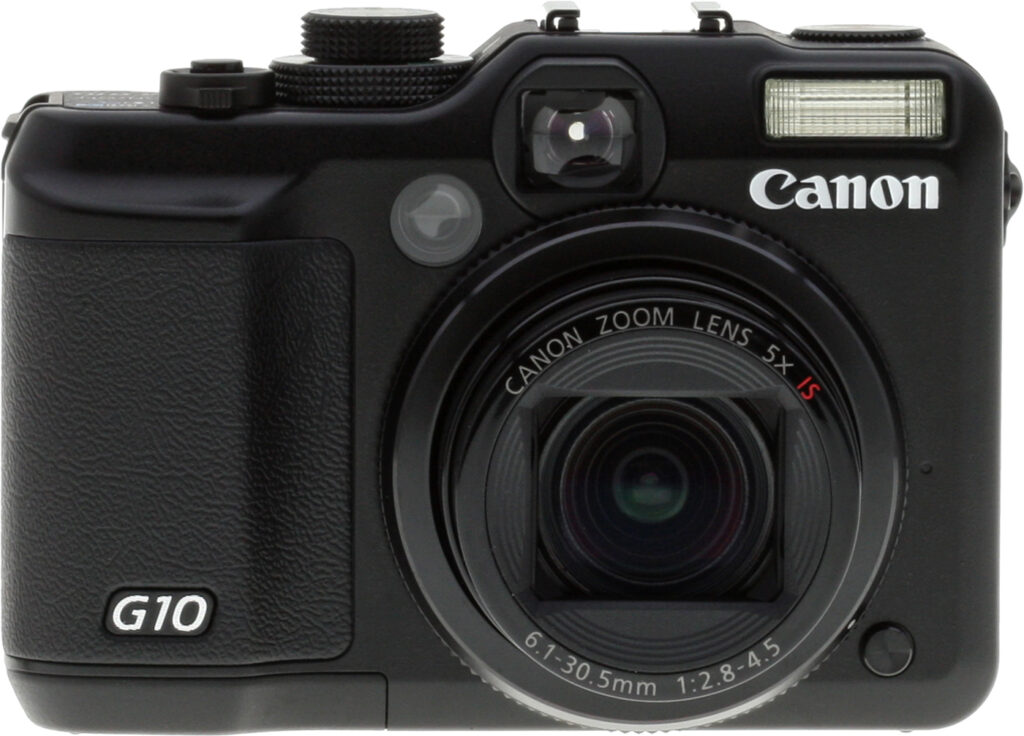
Canon's PowerShot G10 digital camera is a direct successor to the company's previous PowerShot G9 model, and at a quick glance the cameras are pretty similar externally. The Canon G10 has grown just a little larger than the G9 in all directions, though, with the biggest increase being an extra third of an inch (6mm) of height. The Canon G10's handgrip and optical viewfinder have been reprofiled, and probably the biggest visual difference is that the right hand control dial on the camera's top panel is now a double-decker. The smaller upper dial controls camera modes, and the wider lower dial allows control of ISO sensitivity on the camera body -- a bit more photographer friendly than hiding this important setting somewhere in the menu system as many cameras do.
Internally, the Canon G10 retains the same 1/1.7-inch CCD image sensor size as its predecessor, but boosts resolution from 12.1 to 14.7 megapixels, along with upgrading the previous model's DIGIC III processor to a DIGIC 4 type that allows for servo AF tracking. At the same time the zoom lens loses a little reach, dropping from a 6x optical zoom in the previous camera to a 5x zoom in the PowerShot G10. This is probably an acceptable tradeoff for most uses though, as the G9's rather restricting 35mm wide angle becomes a useful 28mm wide angle in the newer camera.
Thankfully, as with the previous camera, the Canon G10 includes true optical image stabilization to help combat blur from camera shake. Maximum aperture is now f/2.8 to f/4.5 across the zoom range. As well as the previously mentioned AF tracking, the G10's autofocus system now has improved face detection capability. Canon says the camera will now recognize faces at most angles, and has included a Face Detection self timer which automatically takes a photo two seconds after an additional face enters the scene. The Canon PowerShot G10's LCD display retains the previous 3.0-inch diagonal size, but its resolution increases from 230,000 to a higher-than-average 461,000 dots.
The ISO sensitivity range offered by the Canon G10 is unchanged from the previous camera, with a minimum of ISO 100 through to a maximum of ISO 1,600 (and ISO 3,200 possible in a special high sensitivity scene mode). Available PowerShot G10 shutter speeds range from 1/4,000 to 15 seconds, besting the G9's fastest 1/2,500 shutter speed noticeably. Metering modes are unchanged, evaluative, center-weighted and spot all being offered. Likewise, exposure modes are unchanged with the Canon G10 including program, aperture- or shutter-priority, or a fully manual mode. Flash range when set to Auto ISO increases quite a bit, now being rated at 12 inches to 15 feet (30cm to 4.6m) at wide angle, and 1.6 to 9.2 feet (50cm to 2.8m) at telephoto. There are eighteen scene modes, including a new Sunset scene mode, and the G10 also offers a new Intelligent Contrast Correction function.
Where the Canon G9 offered Motion JPEG AVI movies, the Canon G10 opts for H.264 MOV instead, a newer format which generally offers significantly improved compression (and hence smaller file sizes) for equivalent video quality. As with the previous camera, sound is recorded along with movie clips. The Canon PowerShot G10 is unchanged from its predecessor in storing its Raw OR JPEG images and movies on Secure Digital cards, and offering both NTSC / PAL video and USB 2.0 High Speed computer connectivity. The battery type does change from an NB-2LH to an NB-7L lithium-ion rechargeable, however.
The Canon PowerShot G10 will ship in the USA from October 2008, priced at US$500 or less.
Canon PowerShot G10
User Report
by Mike Pasini
Three digicams have made it to the top of the mountain. The PowerShot G10 joins the previously reviewed Panasonic LX3 and the Nikon P6000 that breathe the thin mountain air reserved for the best digicams going.
They are not without their limitations, even if I can't quite call those limitations faults. Instead, the combination of features and foibles give each model its own personality.
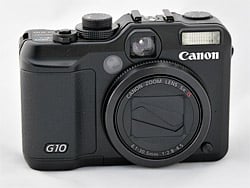
Closed. A self-contained lens cap.
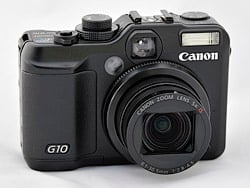
Open. Fully extends in two seconds.
And they each have their fans. Fans tend to be blind to the foibles and cherish the features in ways reviewers find embarrassing. And yet I've become a fan of this class, if only because I cherish the foibles, even if I'm a bit unimpressed with the features.
The Canon G10 traces its heritage back to the G1 of 2000. At $999 and with a 3.34-megapixel sensor, Imaging Resource even then noticed the G1's "beautiful pictures!" The price has come down and the megapixel count has risen, but the pictures are still beautiful, perhaps more than ever.
Look and Feel. Oddly enough all three of these competitors have chosen a retro rangefinder design -- and stuck with it. That may make it easy to distinguish these high-end digicams from the companies' low-end digital SLRs, but it also tends to inhibit design innovations.
The chief of the inhibited innovations is the viewfinder. To its credit, Canon formerly outfitted the G-series with an articulated LCD that could be swiveled into a variety of positions. But those days are long gone, starting with the G7. I never found myself needing the optical viewfinder, however. Good thing, too, because it only covers 82 percent of the frame at wide angle and just 79 percent at telephoto.
Another rangefinder-like design feature is a bit more beneficial. These cameras, perhaps with the exception of the P6000, rely more on dials and buttons (even a joystick in the case of the LX3) than menu systems or (shudder) touch screens to control the camera. There is a mechanical interface to them, in short, that most photographers prefer over the arbitrary menu systems that are so hard to remember.
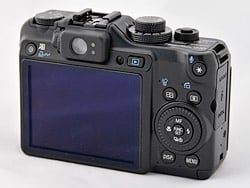
Back. The large LCD yawns wide beneath the optical viewfinder.
The Canon G10 pushes that concept much further than either of its competitors. You'll find a dial for EV, another for ISO, and a wheel to control aperture and shutter speed.
All of these cameras offer a slightly thicker right-hand side that passes for a grip. And every one of them is quite comfortable to hold. But that's no truer than on the G10 which is twice as heavy as the LX3. The G10 needs a grip.
In fact, size is the one design aspect of the G10 with which Canon seems not to have concerned itself. Not only is it much heavier than its competitors, it's really too big for a pocket. I was uncomfortable carrying it even in a jacket pocket, although I used it mostly with a wrist strap rather than the included shoulder strap. Why? Because I didn't want to advertise that I was carrying a camera.
And like rangefinders of days gone by, all three of these cameras have hot shoes for an external flash. But unlike rangefinders, these are all intelligent hot shoes, ready for high-tech flashes, like the Canon 430EX.
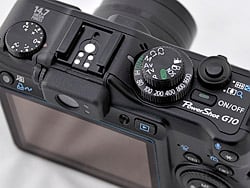
Top. The top panel has some interesting manual controls.
Another way in which these digicams surpass their rangefinder inspirations is in optics. The primes of rangefinder days have given way to zoom lenses, and, in all three cases, to converter lenses as well. Canon offers a tele converter, Panasonic a wide angle converter, and Nikon offers both.
But the built-in zooms are quite different themselves. Canon's 28-140mm 35mm equivalent is unmatched for its 5x range. The LX3's 24-60mm range is the widest angle (making the even wider converter an odd accessory), but shortest "tele," reaching only a normal angle of view. The P6000 manages a 28-112mm equivalent, just 4x.
Zoom ranges have to be matched to optical defects to be appreciated, but with the LX3, in-camera processing to correct some flaws has even gone so far as to affect RAW captures. And, distressingly, even third party converters like the included Silkypix and the venerable Adobe Camera RAW honor those conventions.
Finally, to appreciate the G10 design among its competitors, you have to look at the sensor and image processor combination. While the we're all weary of the megapixel war, Canon's 14.7 megapixels on its 1/1.7-inch CCD outranks the 13.5 on the 1/1.7-inch Nikon CCD and 10.1 on the 1/1.63-inch Panasonic CCD.
Add to it the new DIGIC 4 processor and you've got a dogfight with Nikon's database-enhanced Exceed system.
Interface. Using a camera is often quite different from admiring its specifications. At this level, any of these cameras is a comfortable fit in the hand with a responsive shutter and gratifying image capture. But I'm not just talking family snapshots. I mean how difficult is it to adapt the settings to various situations? How flexible does the camera feel in the field?
While this is a question that begs for a subjective answer, there are a few simple questions to be asked. Just how hard is it to set the three factors that affect any exposure: aperture, shutter speed and ISO?
On a digital SLR there are simple, dedicated manual controls for those options that save you from going to a menu system. On a digicam, the controls generally serve double duty and can be obscure.
On the G10, Canon has taken the digital SLR approach. The LX3 takes the digicam approach with its joystick, and the P6000 manages to live in both worlds, taking a subdial from the digital SLR world and using the menu system for ISO.
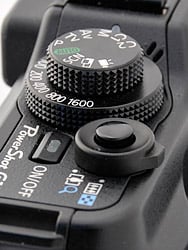
Shutter, Zoom. The small Shutter button and Zoom ring could have been more fun.
The G10's ISO is controlled with a dial that rings the Mode dial. Settings include Auto, Hi, 80, 100, 200, 400, 800 and 1,600. (A special Scene mode that shoots smaller resolution images can capture at ISO 3,200, but that's not on the dial.) At a glance, you can see the ISO setting and quickly change it if you like. It's something we wish not only every digicam offered, but every digital SLR, as most digital cameras of all types still use a button/LCD combination to set ISO.
Setting aperture and shutter speed is done with the wheel that rings the four-way navigator on the back panel. My preference for this job is a subdial like you'll find on any digital SLR. The wheel works but requires you to press a button above it generally reserved for metering mode to switch between aperture, shutter speed, and metering mode when in Manual mode. In Aperture Priority or Shutter Priority mode, you just spin the wheel to control the only aspect you can in those modes. It's the same wheel you spin in Scene mode to change scenes, though, so while it works, you have to remember what mode you're in to use it correctly.
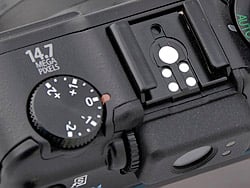
EV Dial. A great idea, even for Manual mode. Note the smart hot shoe.
That isn't true of the very special single-purpose EV dial on the top panel of the G10 that we came to love as much as the dedicated ISO dial. While it ranges from -2 to +2 in third stop increments, Canon has also graced it with a small orange LED so you can read the active setting very easily. EV is often obscured on a digicam, so this dial is very much appreciated.
What's it do in Manual mode? It simply shifts the target up or down from zero on the exposure scale in the LCD. Actual exposure is indicated with a white/red bar and the target is indicated with a green bar.
If there's a button that should have gotten more attention, it's the Shutter button. It's a little too rangefinder for me, with a cupped ring for the zoom control and a small black plastic button within it to fire the shutter. It certainly works and I had no trouble with it at all, but it's one button and ring that could have been more pleasurable to use.
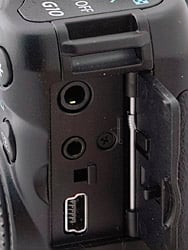
Ports. The AV out, remote terminal, and USB ports.
There is a Print/Share button above the left corner of the LCD (which also functions as a Shortcut button) and a Playback button above its right corner. Pressing Playback turns the camera on without extending the lens. Pressing it again (or the Power button) turns the camera off.
The Power button itself on the top panel is a small, slightly raised rectangle with a green LED that I found to be a helpful reminder. I applaud Canon for making it different in shape and size from the Shutter button, something not every manufacturer thinks of. Again, I would have preferred something like the LX3's switch rather than a button, but it works just fine.
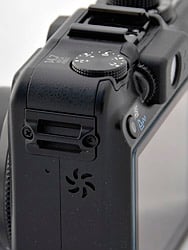
Left Side. The starfish is really the speaker. Note also the dioptric adjustment next to the optical viewfinder and the Shortcut button above the LCD.
Apart from the wheel, the main buttons on the back panel will be familiar to PowerShot users. At the center of the navigator is the familiar Function/Set button to access the most immediate controls of the active mode. Below right is the Menu button to get to the more general camera controls. Below left is the Display button to toggle through the LCD states (including a live histogram). Above left is the Autofocus mode button (which cycles through the Face Detect, AiAF, FlexiZone options as you press the famous asterisk/star button) and to the right of it the Metering mode button (Evaluative, Center-Weighted, Spot). In the top right corner of the back panel is the Canon asterisk/star button to lock exposure and/or focus and control the microphone and do other odd jobs.
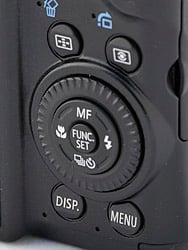
Controls. Familiar PowerShot layout.
The four-way navigator itself uses the Up arrow to switch into Manual Focus mode, the Right arrow to cycle through Flash modes, the Down arrow to cycle through Shutter release modes (including the Self-timer options) and the Left arrow to toggle Macro and Normal Focus modes.
The menu system will be familiar to PowerShots users. In Record mode, there are four tabs: Shooting, Tools, Themes, and My Menu settings. In Playback mode, Tools, and Themes are joined by Playback and Print tabs. These control general camera settings and functions like card formatting.
For more specific options when shooting, the Function button in the middle of the four-way navigator brings up a menu with White Balance, My Colors, Bracketing, Flash exposure compensation, Neutral Density filter, Image compression, and image size options. Which ones are active depend on what mode has been set on the Mode dial.
The Mode dial has the familiar green Auto mode where the camera controls almost every exposure option, Programmed Auto, Shutter Priority (Tv -- for Time value), and Aperture Priority (Av), Manual, plus two Custom settings. There is also a Movie option, a Panorama option that helps align shots, and a Scene mode that cycles through the G10's 17 Scene modes, which include Portrait, Landscape, Night Scene, Sports, Foliage, Snow, Beach, Sunset, Fireworks, Aquarium, Underwater, Indoor, ISO 3200, Kids & Pets, Night Snapshot, Color Accent, and Color Swap.
Storage and Battery. The G10 has one SD memory card slot that supports SD/SDHC, MultiMediaCard, MMC Plus, and HC MMC Plus memory cards. There is no usable built-in memory.
Our gallery images ranged from about 3MB to 5MB with RAW captures taking approximately 14MB to 17MB. Movies, in H.264 format, can be recorded up to 4GB or 60 minutes.
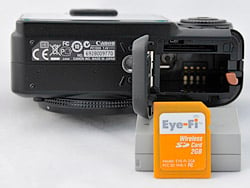
Bottom. A large battery. The metal tripod socket is right next to compartment door hinge, which is bad for card and battery changes while the camera's mounted on a tripod. The G10 works well with the WiFi Eye-Fi SD card.
The Canon G10's battery is a large rechargeable lithium-ion NB-7L. A small recharger with a flip-out plug is included. Canon estimates that you can get about 400 shots with the LCD on and about 1,000 without it, using CIPA testing standards that include many more flash shots than I typically take. I found the battery capacity to be generous. I often took the Canon G10 on shoots days apart without recharging it first.
There is an AC adapter with a DC coupler (or dummy battery) available.
Performance. You would expect above average rankings for any flagship digicam, and the Canon G10 doesn't disappoint. In fact, there isn't a single spec that isn't among the best in high-res prosumer digicams.
That starts with a quick two-second startup time and a faster 1.2 second shutdown time. In the field that meant we never waited for the G10, either to get the shot or to return to our jacket pocket.
Wide-angle autofocus shutter lag was 0.57 second, and telephoto was 0.67, both above average. Wide-angle was marginally quicker but telephoto didn't penalize us noticeably. And unlike the Panasonic LX3, the G10 does have a telephoto range to its zoom. Enabling the flash increases lag to 0.92 second (you can credit the preflash exposure check for that).
Prefocus lag was even above average for a digital SLR at 0.068 second, although that's becoming more common these days. Autofocus capability is one of the distinguishing traits between digital SLR and digicam shooting, with the SLR having a significant edge. Prefocusing can even the playing field.


Zoom Range. 28mm to 140mm to 4x digital zoom.
Shot-to-shot cycle times are a bit on the slow side, at about 2.15 seconds for large/superfine JPEGs, but the camera does capture frames continuously at this rate. When shooting RAW, this slows to 2.53 seconds per frame, and RAW + large/fine JPEG is 2.66 seconds. The Canon G10's continuous shooting modes were also on the slow side, capturing large/superfine JPEGs at about 1.37 frames per second. This rate slows to 0.80 frames per second with RAW, and 0.71 frames per second with RAW + large/fine JPEG. Buffer sizes were good though, at over 20 frames in any quality.
Flash cycling was a full 10 seconds after a full-power flash, ranking the Canon G10 below average -- but on a small camera that's an indicator of a more powerful flash than the weak afterthoughts on most digicams. The Canon G10 can light up a room 16 feet across at ISO 100 in either wide-angle or telephoto. Many compact digicams resort to ISO 400 to make it to 10 feet.
Download speed was a spry 5,680.2 Kb/s using a USB 2.0 Hi-Speed port. We confess to relying on an Eye-Fi wireless card for all but our movie captures. The Canon G10 is compatible with the Eye-Fi and it worked very well, transferring its large images very quickly over our network to our laptop.
The 3-inch LCD sports an usually high resolution with 461,000 pixels and a wide viewing angle.
Optical zoom is 5x, which is not quite above average in these days of increasingly long-zoom cameras, but quite good compared to its chief competitors among flagships. The Nikon P6000 and the Panasonic LX3 both offer only 4x.
Weight is 14.14 ounces, almost a pound, and a good deal heavier than the 9.1 ounce LX3 and 9.5 ounce Nikon P6000.
Shooting. "Don't forget the brick," I would remind myself as I headed for the door. The Canon G10 isn't as big as a brick, but it is big and heavy enough to make me consider picking up a digital SLR instead. That's not necessarily a good thing.
I took the Canon G10 on a variety of outings. Those included just local photo safaris looking for interesting compositions (there are a few Holy Hill shots from Berkeley in the gallery), Macworld Expo (a few of which ended up in our Expo gallery), Christmas dinner (an image or two of which were stolen by near relations for use on greeting cards), the usual ISO closeups of the Rumbolino's stick shift, and more.
Two aspects of those images stick out. First is the detail the Canon G10 captures with its 14.7 megapixel sensor. The Canon G10's performance rivaled digital SLRs of similar or slightly less resolution. Second is the noise that crept into the images, which is where the digital SLRs left the G10 behind.

A Star 'IS' Born. Image stabilization saves this ISO 200 shot at 1/10 second handheld.
It's worth mentioning photographer Joe McNally's observation after using a Nikon D3x, "I never wanna be seduced by all those pixels to the point that I confuse a detailed picture with a good picture."
By the same token, you never want to skip a good shot because you might have to raise the ISO above 400. Some of my favorite shots showed plenty of noise but I'm not one to complain about noise, having spent many happy years pushing Tri-X. The question is whether or not you got the shot.
If resolution is a wash and noise an argument for using a digital SLR rather than the Canon G10, then size should be the G10's real advantage. It is indeed smaller than a digital SLR, but it just doesn't feel like it. That perception really dampened my enthusiasm for using the camera.
But I found I could treat it much like a digital SLR as far as shooting was concerned. And my favorites tended to be images I slaved over a bit, trying various settings until I got what I was looking for. That often involved RAW shooting, something the Canon G10 does well.
RAW processing was a lot of fun, and there are a few you can play with in the gallery, too. While several digicams offer RAW capture, it's usually not a very practical option because the large files take so long to copy to the memory card.
But the Canon G10's DIGIC 4 processor handles the huge CR2 RAW files from the G10 very nimbly, even when writing a large JPEG along with the CR2 file. And there was a lot of information to mine from the Canon G10's RAW images.


JPEG from RAW. Top image is the camera JPEG. Bottom is the image after our manipulations to the RAW data.
On a stormy day, I shot a picture of a church on a hill (YIMG_0088.JPG) surrounded by dark clouds and framed by some trees. I captured the scene using Aperture Priority mode, my walkaround mode, at f/8, 1/320 second (camera selected) and ISO 125 as RAW+JPEG. The image was captured in an sRGB color space, the only option on the G10.
The JPEG is a dramatic shot, the trees in the foreground silhouetting the scene with almost no detail, while the sky, which represents the highlight area of the image, retains the threatening tonal display that attracted me to the scene in the first place. The Noah's Ark-like church seems imperiled by the very object of its worship, and you wonder if it will weather the storm intact, it is so exposed to the elements and far less resilient than the darkened trees framing the scene.
Still, the JPEG is a bit muddy, mainly because of the need to retain some detail in the stormy sky. It's the kind of shot that cries out for RAW capture so you can make some intelligent choices about which tones to retain in the final image, how to handle noise, and what colors should be muted or vibrant.
So I opened the image in Lightroom 2 and played around with it. Lightroom 2 uses essentially the same RAW processing engine as Adobe Camera Raw and I might have used that instead.
I had trouble with Canon's Digital Photo Professional 3.5 software included with the G10. It failed to display G10 thumbnails (even JPEGs) and to open a CR2 file from the G10. So we downloaded the latest version from Canon's G10 page. Still no luck, although Canon's ImageBrowser was able to display our images.
Apparently, for DPP to display thumbnails, you have to use CameraWindow to download the images from the G10. But we couldn't even open an image in DPP.
In Lightroom, the latitude the CR2 file provided was a good deal more than I needed. I could have easily ruined the image, making it appear to be a sunny day, it seemed to me. But that's just what you want from a RAW file. Creative control.
We started by selecting various white balance options, finally settling on Daylight for its cool highlights. Cloudy surprised us by rendering the sky a warm color. But you can set the color temperature independently of these standard white balance settings if you prefer.
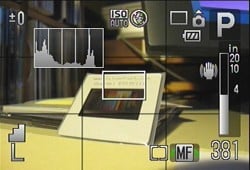
Record Display. Live histogram, indicators for the essentials, plus, in Manual Focus mode (the green arrows near the MF indicate the wheel is active), a distance scale. Note that this image, as a video capture, does not do justice to the Canon G10's high-resolution LCD.
Then we gave some attention to the sky, using the Curves command to bring out as much contrast as we could without shifting the midtones much. After we rendered the sky as menacingly as possible, we moved to the shadows and were surprised to find our silhouetted trees actually contained full color detail. We really didn't want to distract from the tiny church at the center of the image, so we merely lightened the trees from complete black to very dark detail. And we kicked the vibrance up a bit to see the yellow paint on the church without turning the pink building under it into a brothel.
We also used Lightroom 2's camera profiles feature to set Camera Landscape with no adjustments.
Image Quality. The Canon G10 sets the standard for digicam image quality. Nothing short of a digital SLR beats it.
The Still Life ISO 100 image (G10hSLI0100.HTM) never looked so good. Start with the colored yarns in the top right. Note how much detail there is even in the white yarn. There's only a very slight blurring of the red yarn (noticeable in the pink yarn as well). The proportional scale below it is as crisp as we've ever seen it. And the "Pure Brewed" type on the Samuel Smith label simply spectacular. The hatching that greys the type is rarely detectable. And, yes, you can make out the salt crystals in the shaker to the left.
In general, the Canon G10 offers excellent sharpness in the center at wide-angle, though it gets a little soft in the corners. At telephoto, the center is a little softer, as are the corners. Some of the softening is simply a result of the Canon G10's 14.7-megapixel resolution, which reveals more of the lens's flaws -- flaws that won't be noticeable at any but the largest print sizes.

High Quality Movie. A 7.7MB file lasting seven seconds. Click to view or download .MOV file.
There's good color saturation with only slight oversaturation in reds and blues throughout the shot. Canon has foregone the usual oversaturation common on consumer digicams to please its enthusiast market. Skin tones are slightly reddish, but not at all bad, and hue follows a fairly standard trend among digital cameras, pushing cyan toward blue, red toward orange, and yellow toward green. It's hardly apparent in images, however, appearing more in our very detailed testing.
Color balance is slightly warm using the Auto white balance setting, but really quite impressive. Printed images still look good at the same ISOs and sizes as those listed below, even though incandescent lighting usually presents more of a problem.
The Multi Target shot does show some chromatic aberration. While it's moderate at wide angle, it is fairly bright. It's only slightly noticeable in high-contrast prints at 8x10, but that effect increases as you print larger. At telephoto, chromatic aberration is not nearly as bright and much less noticeable.
Detail is one thing the Canon G10's large, high-resolution sensor is quite good at capturing. Looking at the resolution targets at the center of the Multi Target shot, we really can't point to a spot where it becomes all artifact. It seems to hold detail to the 2,000 line limit of the target.
There is evidence of noise suppression at ISO 80, but it's negligible, again considering the resolution. Low ISO print sizes still look good and sharp printed at 16x20 inches, and are usable at 20x30.
Though it's not surprising at 28mm, wide-angle barrel distortion seen in this test shot is a little higher than average. At 140mm telephoto, the lens has the very slightest pincushion distortion, which is hardly noticeable in this test shot.

Macro. So close.
The Canon G10 offers excellent Macro performance, focusing so close to our test target that there was very little light on the subject. There is considerable softening in the corners at this range, but this is relative to your subject; at greater distances this won't be an issue.
The gallery shots are also best of class, starting with the always difficult hydrant shot. Here you can really appreciate the detail the G10 captures, beyond the blades of grass to the pebbles in the concrete. There is some very slight blooming at the top of the hydrant but the highlights are well held in the JPEG. I shot this as a RAW+JPEG, so you can do even better with a little elbow grease.
The fire alarm shows the red oversaturation mentioned above, also shot as a RAW_JPEG. It nearly makes the fire alarm look molten itself. While the sunset shots are dramatic, they suffered from the same oversaturation of the reds, although they looked much less accurate on the LCD than they do on the monitor.

ISO 1,600. Full size captures. ISO 3,200 is just 1,600 x 1,200 pixels.
I also shot a series of handheld macro shots (not nearly at the camera's closest range) of the Rumbolino's stick shift. The ISO range goes from Auto (which was set to 277) to 800 to 1,600 and to 3,200 at 1,600 x 1,200. What's remarkable about the series is the color consistency. The lower ISO shots required some very slow shutter speeds (nearly 1/2 second) but the optical image stabilization saved the day.
Print quality is quite excellent from the Canon G10's images, with good color. Conservatively, the ISO 80 JPEG images look great at 16x20 inches, and are usable at 20x30 straight out of the camera; sharpening and processing from RAW can sharpen things up considerably at all ISO settings. ISO 400 JPEG images are soft but usable at 13x19, but stand up better at 11x14 inches. Even ISO 800 shots are usable at 11x14, with a film-like grain pattern. ISO 1,600 shots are good at 5x7, too, but ISO 3,200 shots really are too soft to be usable even at 4x6 inches; avoid this mode altogether. Overall, though, it's an amazing performance.
Appraisal. The Canon G10 is the highest resolution digicam I've ever used, delivering detail I expect from digital SLRs. It does not have the same control of noise those larger sensors have but I still liked very much the images I captured with it after the sun went down. A little grainy noise doesn't bother me. Though it's a little heavier than I'd like, the build quality of the Canon G10 is excellent. Controls feel good and work well. It is truly useful to have the EV control as a very visible dial on the top of the Canon G10, and ISO is also easier to gauge and change with a dial. Overall, I think the Canon G10 deserves high marks as a well-built camera for those who love photography.
Canon G10 Basic Features
- 14.7 megapixel 1/1.7-inch CCD
- 5.00x zoom (28-140mm 35mm equivalent) with image stabilization
- 3.0-inch fixed LCD
- ISO sensitivity from 80 to 1,600 with 3,200 available at reduced image size in a special Scene mode
- Shutter speeds from 15 seconds to 1/4,000 second
- Max Aperture of f/2.8 at wide angle and f/4.5 at telephoto
- SDHC/SD memory card support
- Custom lithium-ion battery
Canon G10 Special Features
- High resolution captures with 14.7-megapixel CCD
- High resolution display on 3.0-inch LCD with 461,000 pixels
- New DIGIC 4 image processor with improved face detection, Servo autofocus, face detection self-timer and intelligent contrast correction
- RAW + JPEG shooting mode
- Extensive collection of accessories from external strobes to converter lenses to underwater housings
- Print/Share button for one-button printing and downloading
- Neutral density filter simulation
- Canon iMage Gateway membership included for sharing online photo albums
- Extended battery life
- Canon Digital Photo Professional software for RAW conversion, plus Canon Remote Capture software
In the Box
The PowerShot G10 ships with the following items in the box:
- PowerShot G10
- Lithium Battery Pack NB-7L
- Battery Charger CB-2LZ
- Shoulder Strap NS-DC8
- Digital Camera Solution CD-ROM v38.1
- USB Interface Cable IFC-400PCU
- AV Cable AVC-DC300
- Printed User Guide (305 pages)
Recommended Accessories
- Large capacity SD/SDHC memory card. These days, 4GB is a good tradeoff between cost and capacity
- Extra battery pack for extended outings
- Small camera case for outdoor and in-bag protection like Canon's $39.99 Deluxe Soft Case PSC-5100
- Conversion Lens Adapter LA-DC58K ($39.99) with Tele Converter TC-DC58D ($149.99)
- High-Power Flash HF-DC1 ($129.99)
- Waterproof Case WP-DC28 ($240.00)
Canon G10 Conclusion
| Pro: | Con: |
|---|---|
|
|
The Canon G10 is an impressive photographic tool for the discriminating enthusiast. The switch to a wider-angle lens than the G9 makes the G10 more useful for more types of photography, yet the 140mm end still gets in reasonably close for tighter compositions.
Optical quality is quite good, especially considering the extremely high 14.7-megapixel resolution, with only moderate softening in the corners. Image quality is also impressive, with good color control and low noise at most ISO settings, exemplified by the ISO 800 shots that are usable printed at 11x14. Autofocus performance isn't on par with SLRs, but action photography isn't what the Canon G10 is about; it's about quality photography in a small package.
Its solid body, analog ISO control, optical image stabilization, and tons of features tuned for the enthusiast photographer tell of the Canon G10's purpose. A close look at the Canon G10's images makes it clear that the Canon G10 meets the enthusiast's standard. We've used no finer digicam and it easily earns a Dave's Pick.
Optics
Canon PowerShot G10 Optics
Lens
Zoom
A fairly wide, 5x optical zoom lens with good performance. Average digital zoom performance.


The Canon PowerShot G10's lens covers the equivalent of a 28-140mm zoom on a 35mm camera, which is slightly more zoom ratio than most consumer digital cameras. While the 5x zoom ratio has dropped compared to the 6x zoom on the G9, we welcome the gain at the wide-angle end, even at the cost of losing some telephoto reach in the bargain. Results are quite good at wide-angle, with minimal blurring and coma distortion., though some chromatic aberration can be seen in the corners and edges, and some minor flare is noticeable around the brighter areas of the scene. Details are a bit softer at full telephoto, but with only a small amount of chromatic aberration and flare. The camera's 4x digital zoom did a good job of maintaining fine detail despite the typical blurring and loss of resolution associated with digital zoom.
Macro
A very small macro area, with excellent detail and resolution. Flash is blocked by lens.


The Canon PowerShot G10's macro setting captured a very tiny minimum area of just 1.18 x 0.89 inches (30 x 23 millimeters). Exposure is a bit uneven, due to the very close shooting range, and the three dimensional structure of the target (the brooch and one of the coins are shading the dollar bill). Detail and resolution were both excellent, particularly in the center of the frame. There's quite a lot of softening in the corners from the lens, as well as some chromatic aberration. (Most cameras have some softening in the corners in macro mode, but this is extreme.) The G10's flash throttled down for the macro area fairly well, but the exposure was again quite uneven, as the flash is blocked by the lens when this close. Plan on using external lighting for the very closest macro shots with the G10, and even then, you may have trouble getting the light in onto your subject given how close the G10 focuses. All in all, a very good performance.
Distortion
Higher than average barrel distortion at wide angle, very low pincushion at telephoto.
| Barrel distortion at 28mm is 0.9% |
 |
| Pincushion distortion at 140mm is less than 0.1% |
 |
The Canon G10's 0.9% barrel distortion at wide angle is higher than average, but that's not surprising considering its 28mm equivalent focal length. Still, we'd like to see lower, as the distortion is quite noticeable in some of its images. At the telephoto end, the G10's less than 0.1% pincushion distortion is almost nonexistent. This is the tendency for the lens to bend straight lines outward (like a barrel -- usually at wide angle) or inward (like a pincushion -- usually at telephoto).
Chromatic aberration
Moderately bright at wide-angle, almost none at telephoto.
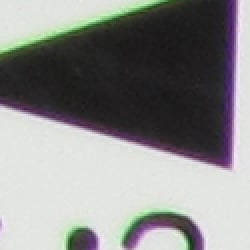

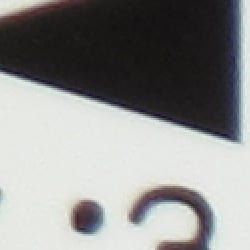

Chromatic aberration is moderate at wide angle, showing about 6-8 pixels of moderately bright coloration on either side of the target lines. At telephoto, chromatic aberration is not nearly as bright and much less noticeable. Chromatic aberration is a type of distortion visible as a slight colored fringe around the objects at the edges of the field of view on the resolution target.
Corner Sharpness
Moderate blurring in the corners of the frame at wide angle and telephoto.
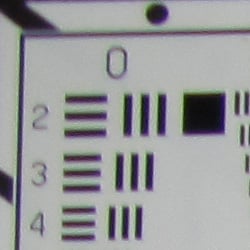
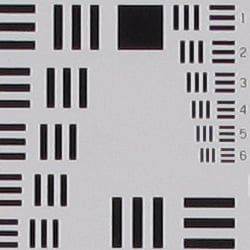
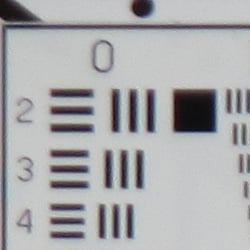
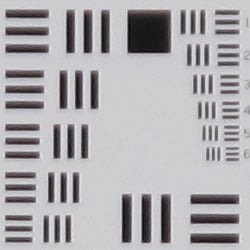
The Canon PowerShot G10's lens produced some soft corners at full wide angle and telephoto. Blurring was strongest in the upper left corner, for both wide angle and telephoto. The center was a bit soft at full telephoto as well.
Viewfinder
Coverage
An inaccurate optical viewfinder, but very good accuracy from the LCD monitor.


The Canon PowerShot G10's optical viewfinder was very tight, at around 82% coverage at wide angle, and 79% at telephoto. It's also somewhat tilted and offset with respect to the CCD. This is not unusual for this type of optical viewfinder though. The LCD monitor was much more accurate, showing about 101% coverage accuracy at wide angle, and about 100% at telephoto.
The images above were taken from our standardized test shots. For a collection of more pictorial photos, see our Canon PowerShot G10 Photo Gallery .
Exposure
Canon PowerShot G10 Exposure
Color
Saturation & Hue Accuracy
Very good overall color and hue accuracy, with minor oversaturation of some colors.
 |
| In the diagram above, the squares show the original color, and the circles show the color that the camera captured. More saturated colors are located towards the periphery of the graph. Hue changes as you travel around the center. Thus, hue-accurate, highly saturated colors appear as lines radiating from the center. |
Saturation. The Canon G10 produced very good saturation overall, with only slight oversaturation in reds and blues. Some other colors such as bright yellows and purples were actually undersaturated a small amount. The Canon G10's images appeared to have natural looking color without appearing dull or subdued. Most consumer digital cameras produce color that's more highly saturated (more intense) than found in the original subjects. This is simply because most people like their color a bit brighter than life.
Skin tones. Here, with the color balanced properly for the light source, the Canon G10's skin tones did have a slightly reddish cast, but should still be pleasing to most consumers. Where oversaturation is most problematic is on Caucasian skin tones, as it's very easy for these "memory colors" to be seen as too bright, too pink, too yellow, etc.
Hue. The Canon PowerShot G10 produced a few color shifts relative to the correct mathematical translation of colors in its subjects, most visibly pushing cyan toward blue (for better-looking skies), red toward orange, and yellow toward green. Still, overall hue accuracy was quite good. Hue is "what color" the
color is.
Saturation Adjustment
The Canon G10 lets you adjust the image Saturation, Contrast, and Sharpness (as well as Red, Green, Blue, and Skin Tone settings) in five steps each. As can be seen below, the saturation adjustment was pretty effective.
| Saturation Adjustment Examples | ||
 |
 |
 |
| -2 | 0 | +2 |
The table above shows results with the default as well as the two "extreme" saturation settings. Click on any thumbnail above, then click again to see the full-sized image.


Sensor
Exposure and White Balance
Indoors, incandescent lighting
Good color with the Auto and Manual white balance settings. About average positive exposure compensation required.
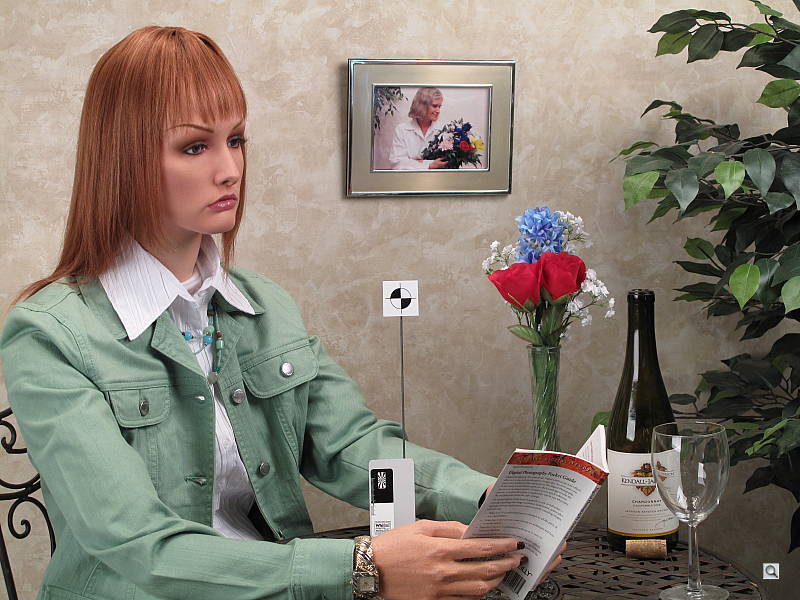
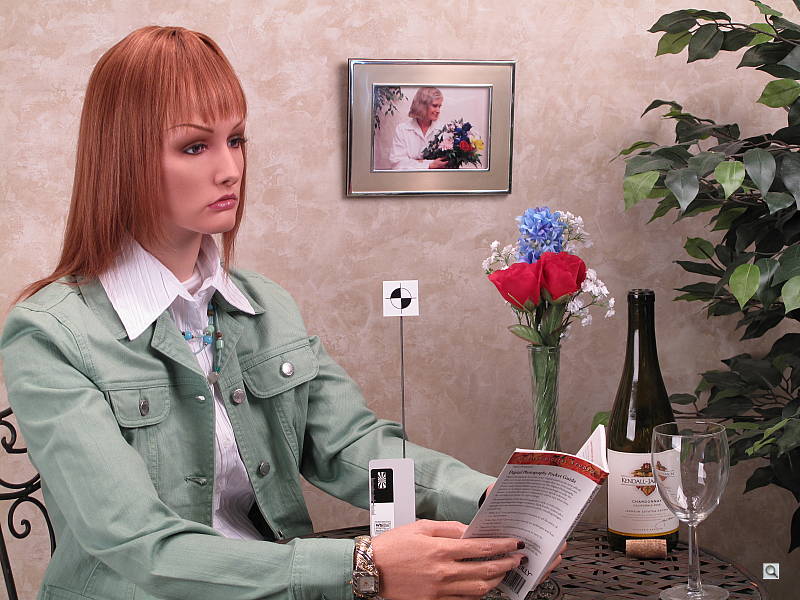
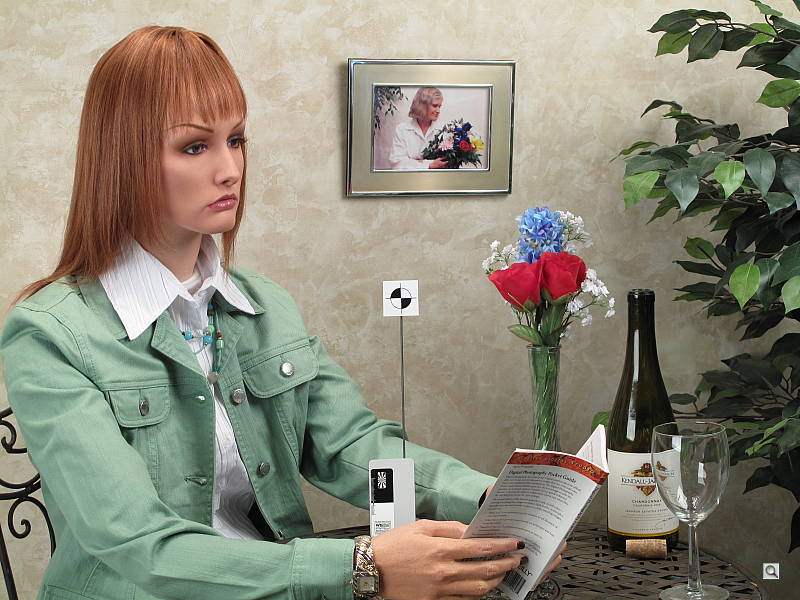
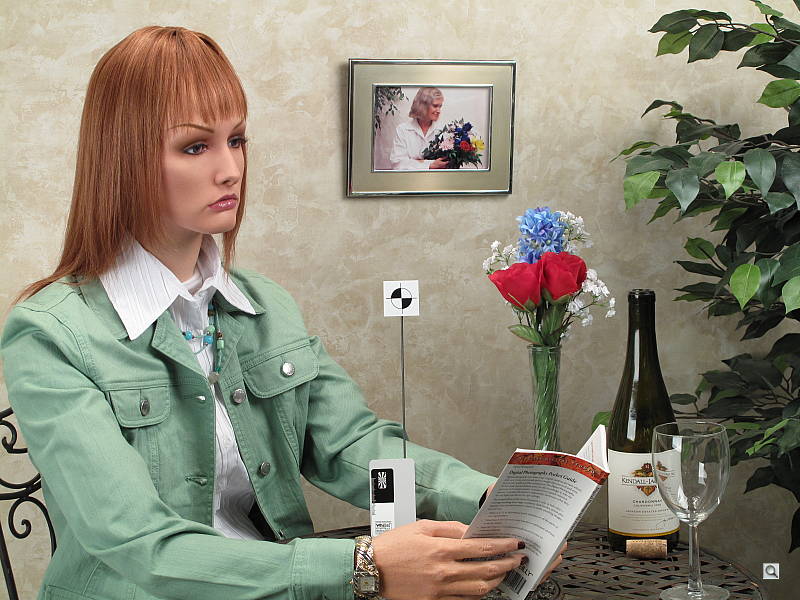
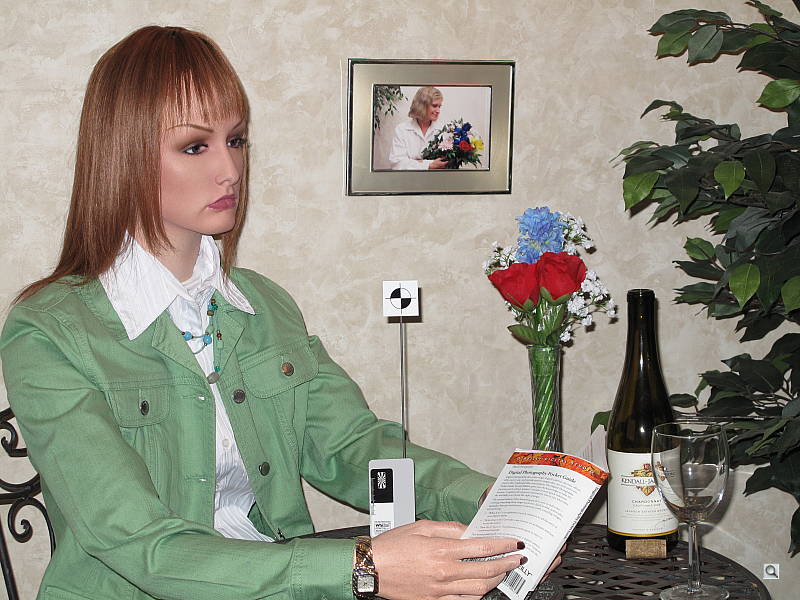
Color balance indoors under incandescent lighting was a little warm with the Auto white balance setting, but the Canon G10 did better here than most digital cameras. The Incandescent white balance option resulted in a fairly strong reddish cast, while the Manual setting produced the most accurate overall. The G10's exposure system handled this lighting well, producing good results with an average amount of exposure compensation, + 0.3 EV. Overall color looks good, though the blue flowers look a touch purplish, probably due to the G10's tendency to punch up reds a little. (Many digital cameras reproduce the blue flowers here with more of a purplish tint, so the Canon G10 actually performs a little better than average here.) Our test lighting for this shot is a mixture of 60 and 100 watt household incandescent bulbs, a pretty yellow light source, but a very common one in typical home settings here in the U.S.
Outdoors, daylight
Good overall performance outdoors, though high contrast and hot highlights. Good color as well.
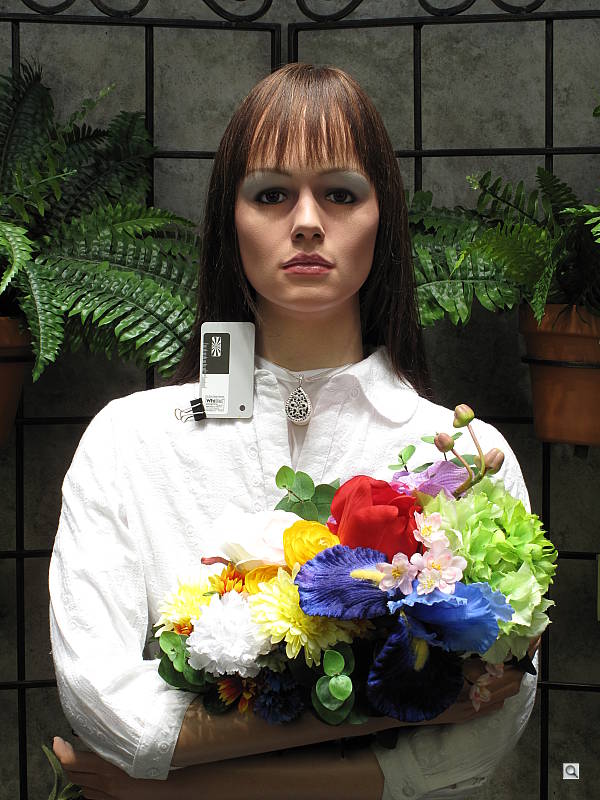
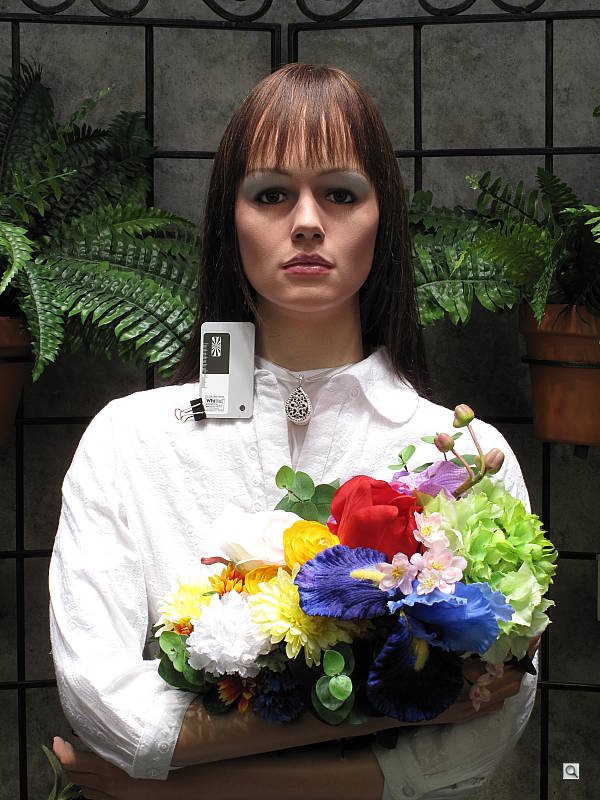
The Canon PowerShot G10 performed reasonably well under harsh outdoor lighting, though contrast was quite high. Slightly higher than average exposure compensation (+1.0 EV) was needed to keep the model's facial skin tones bright, resulting in a lot of blown highlights in her shirt and flowers. There was slight overexposure in the outdoor far-field house shot at the default exposure. Overall color is good though, if slightly reddish, with the Manual white balance setting on the portrait (the Auto and Daylight settings were just a touch too cool). Though overall contrast is high, the shadows hold onto a fair amount of detail. Fortunately, there's a contrast adjustment to help tame the highlights a bit.
See full set of test images with explanations
See thumbnails of all test and gallery images
Resolution
Very high resolution, 1,800 lines of strong detail.
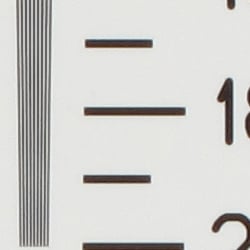
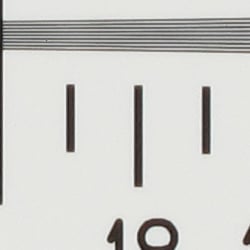
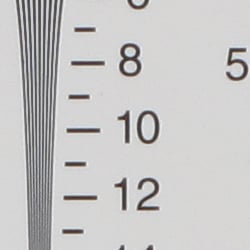
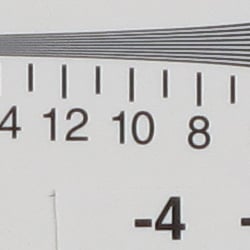
Our laboratory resolution chart revealed sharp, distinct line patterns down to about 1,800 lines per picture height in both directions. (Some would argue over 2,000 lines, but artifacts begin to appear at around 1,800 lines.) Extinction of the pattern occurred around 2,600 lines in both directions (multiple the results from the 2x chart by two). Use these numbers to compare with other cameras of similar resolution, or use them to see just what higher resolution can mean in terms of potential detail.
See full set of test images with explanations
See thumbnails of all test and gallery images
Sharpness & Detail
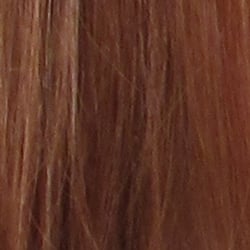
Sharp, detailed images overall, with only minor edge-enhancement on high-contrast subjects. Moderate noise suppression limits definition in the shadows, though detail is still strong here.
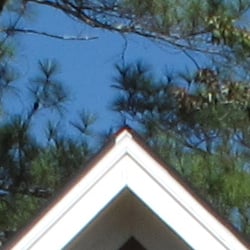
Sharpness. The Canon PowerShot G10 captures excellent detail and reasonably sharp images. Slight enhancement artifacts are visible on high-contrast subjects such as the crop above left. Edge enhancement creates the illusion of sharpness by enhancing colors and tones right at the edge of a rapid transition in color or tone.
Detail. The crop above right shows moderate noise suppression, as the darker areas of hair show less distinct detail. However, individual strands remain fairly well defined in the more moderate shadows. Noise-suppression systems in digital cameras tend to flatten-out detail in areas of subtle contrast. The effects can often be seen in shots of human hair, where the individual strands are lost and an almost "watercolor" look appears.
RAW vs In-Camera JPEGs
As noted above, the Canon G10 produces fairly sharp, detailed in-camera JPEGs. As is almost always the case, quite a bit more detail can be obtained from carefully processing RAW files than can be seen in the in-camera JPEGs. The Canon G10's JPEGs are quite good straight from the camera, but it's surprising how much more detail is visible after processing in a good RAW converter. Take a look below, to see what we mean:
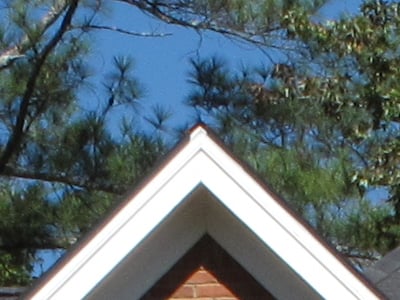
In the table above, mousing over a link at the bottom will load the corresponding crop in the area above, and clicking twice will open the full resolution image.
ISO & Noise Performance
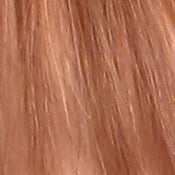
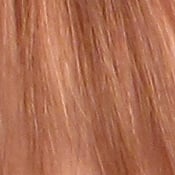
Low to moderate noise at the normal sensitivity settings, with pretty good results up to ISO 400. Strong noise and loss of detail at higher settings, however.
 |
 |
 |
| ISO 80 | ISO 100 | ISO 200 |
 |
 |
 |
ISO 400 | ISO 800 |
ISO 1,600
|
 |
ISO 3,200 (1.9 MP) |
The Canon PowerShot G10 produced low to moderate noise at the lower sensitivity settings, though the effects of noise reduction such as smudging and loss of detail can already be seen at ISO 200. At ISO 400, noise is still reasonable and fine detail fairly strong, though additional smudging is evident and chroma noise starts to appear in the shadows. Noise grain is much more apparent at ISO 800, as is an increase in detail loss and chroma noise. At ISO 1,600, a pronounced increase in noise greatly interferes with detail and color. Yellow and purple blotches start to appear in even tones and hair at ISO 800, and worsen as ISO goes up. ISO 3,200 is reasonably clean, but also devoid of fine detail due to the pixel binning or interpolation employed to produce the much lower resolution (1.9 megapixels) image. The exposure at ISO 3,200 is a bit dim as well. The Canon G10 does not have an adjustable noise reduction setting. To see how these images held up to printing at various sizes, read the Output Quality section below.
Extremes: Sunlit and low light tests
High resolution with strong detail, but high contrast. Good low-light performance, capable of getting bright images in near darkness.
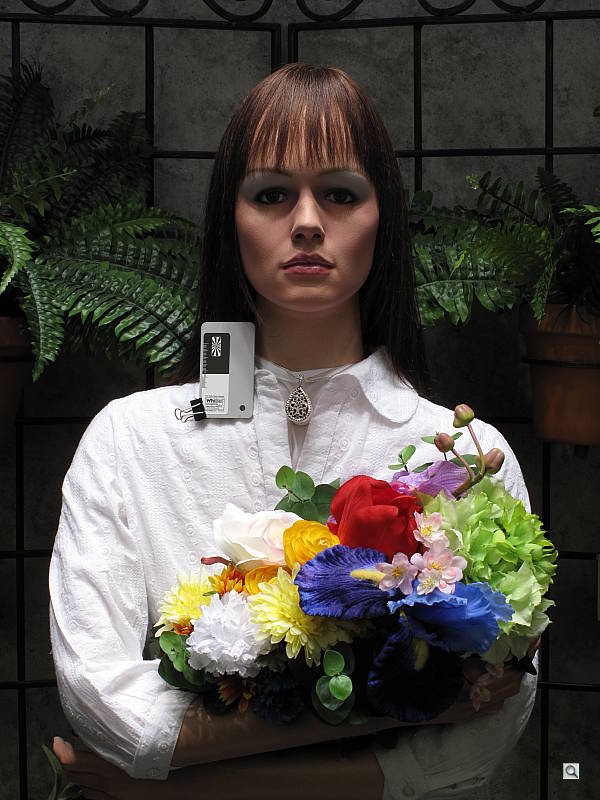
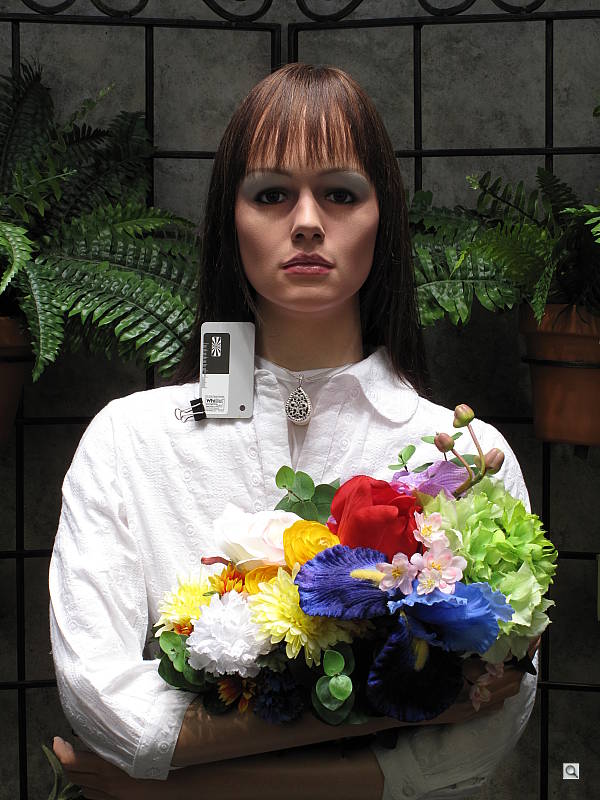
Sunlight. The Canon PowerShot G10 performed reasonably well under the deliberately harsh lighting in the test above, but with washed-out highlights and deep shadows. Despite some noise suppression in the shadow areas, detail is still good in the shadows. Highlight detail is compromised, with clipping occurring in the shirt and some flowers, but still pretty good. At +0.7 EV, the face, background and some shadow areas are just a little dark, so we preferred the +1.0 EV exposure, though it resulted in a lot of blown highlights. The G10's adjustable contrast setting did a good job of decreasing the overall contrast and bringing up the midtones, without creating any strange color gradations on the face, but some highlights were still too hot. Be sure to use fill flash in situations like the one shown above; and it's better to shoot in the shade when possible.
Contrast Adjustment
As mentioned previously, the camera's contrast adjustment helped in handling the harsh lighting.
|
Minimum Contrast
|
|
 |
 |
| Contrast set to lowest, +1.0 EV |
Contrast set to lowest, Auto Exposure |
At its lowest contrast setting, the Canon G10 did a better job of preserving highlight detail, maintaining fairly natural-looking skin tones, and holding more in the shadows, though there are still some blown highlights in both the portrait and far-field house shots.
| Contrast Adjustment Examples | ||
|
 |
 |
| -2 | 0 | +2 |
The shots above show the results of the minimum, default and maximum contrast settings. While you can see the extremes, it's pretty hard to evaluate small differences in contrast on small thumbnails like these, click on any thumbnail to go to the full-size image.
| i-Contrast Example | |
 |
 |
| Off, +1.0EV | Auto, +1.0EV |
The above images show the effect of the Canon G10's Intelligent Contrast (i-Contrast) feature. The Auto mode did brighten the model's face a bit, though there appears to be sightly more clipping of highlights in her shirt and flowers.
Because digital cameras are more like slide film than negative film (in that they tend to have a more limited tonal range), we test them in the harshest situations to see how they handle scenes with bright highlights and dark shadows, as well as what kind of sensitivity they have in low light. The shot above is designed to mimic the very harsh, contrasty effect of direct noonday sunlight, a very tough challenge for most digital cameras. (You can read details of this test here.)
| 1 fc 11 lux |
1/2 fc 5.5 lux |
1/4 fc 2.7 lux |
1/8 fc 1.3 lux |
1/16 fc 0.67 lux |
|
|---|---|---|---|---|---|
| ISO 80 |
 2 sec f3.0 |
 4 sec f3.0 |
 8 sec f2.9 |
 15 sec f2.9 |
 15 sec f2.9 |
| ISO 100 |
 1.6 sec f3.0 |
 3.2 sec f3.0 |
 6.3 sec f3.0 |
 12.6 sec f2.9 |
 15 sec f2.9 |
| ISO 200 |
 0.8 sec f3.0 |
 1.6 sec f3.0 |
 3.2 sec f3.0 |
 8 sec f3.0 |
 12.6 sec f2.9 |
| ISO 400 |
 0.4 sec f3.0 |
 0.6 sec f2.9 |
 1.6 sec f3.0 |
 4 sec f3.0 |
 6.3 sec f2.9 |
| ISO 800 |
 1/5 sec f3.0 |
 0.4 sec f3.0 |
 0.8 sec f3.0 |
 2 sec f3.0 |
 4 sec f3.0 |
| ISO 1600 |
 1/10 sec f3.0 |
 1/6 sec f2.9 |
 0.4 sec f3.0 |
 1 sec f3.0 |
 2 sec f3.0 |
| ISO 3200 |
 1/24 sec f2.9 |
 1/12 sec f2.9 |
 1/8 sec f2.9 |
 1/8 sec f2.9 |
 1/8 sec f2.9 |
Low light. The Canon PowerShot G10 performed well on the low-light test, capturing reasonably bright images at the lowest light level with almost the lowest sensitivity setting (ISO 100). At ISOs 80 and 100, the image at 1/16 foot-candle are a bit dim, due to the G10's maximum exposure time of 15 seconds. Alternatively, images captured at ISO 3,200 were only bright down to the 1/4 foot-candle light level because the camera limits its exposure times to 1/8 second at that ISO setting. Color balance was pretty good with the Auto white balance setting. Images were reasonably clean up to ISO 400 at the lowest light levels, but increase in noise as ISO increases until ISO 3,200, where the lower resolution masks much of the noise (and detail too). In addition to default noise reduction, the G10 automatically applies dark-frame subtraction for exposures 1.3 seconds or slower.
The camera's autofocus system worked well also, as it was able to focus on the subject down to just below the 1/8 foot-candle light level unassisted, and down to the darkest light level with the AF assist enabled. (A useful trick when shooting under dim lighting is to just prop the camera on a convenient surface, and use its self-timer to release the shutter. This avoids any jiggling from your finger pressing the shutter button, and can work quite well when you don't have a tripod handy. The G10 should do quite well in such situations.)
How bright is this? The one foot-candle light level that this test begins at roughly corresponds to the brightness of typical city street-lighting at night. Cameras performing well at that level should be able to snap good-looking photos of street-lit scenes.
NOTE: This low light test is conducted with a stationary subject, and the camera mounted on a sturdy tripod. Most digital cameras will fail miserably when faced with a moving subject in dim lighting. (For example, a child's ballet recital or a holiday pageant in a gymnasium.) For such applications, you may have better luck with a digital SLR camera, but even there, you'll likely need to set the focus manually. For information and reviews on digital SLRs, refer to our SLR review index page.
Flash
Coverage and Range
A powerful flash, with good coverage. About average exposure compensation required.


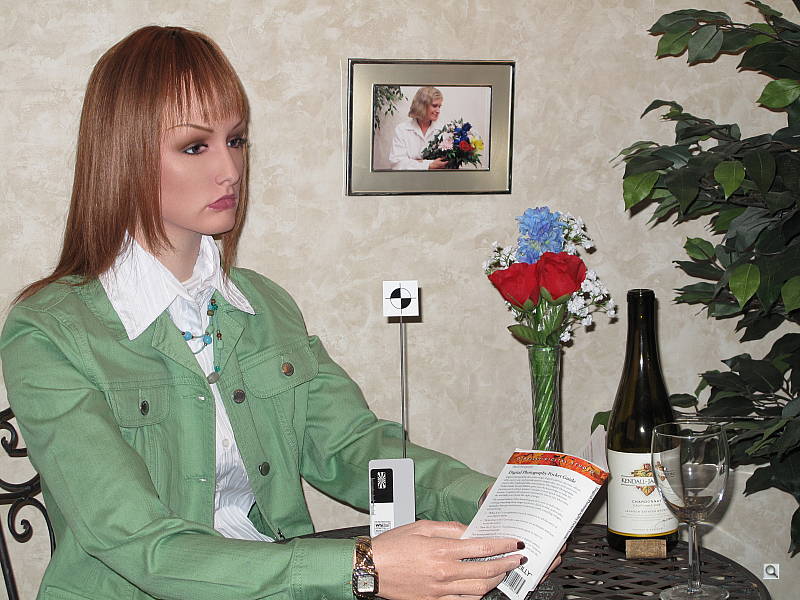
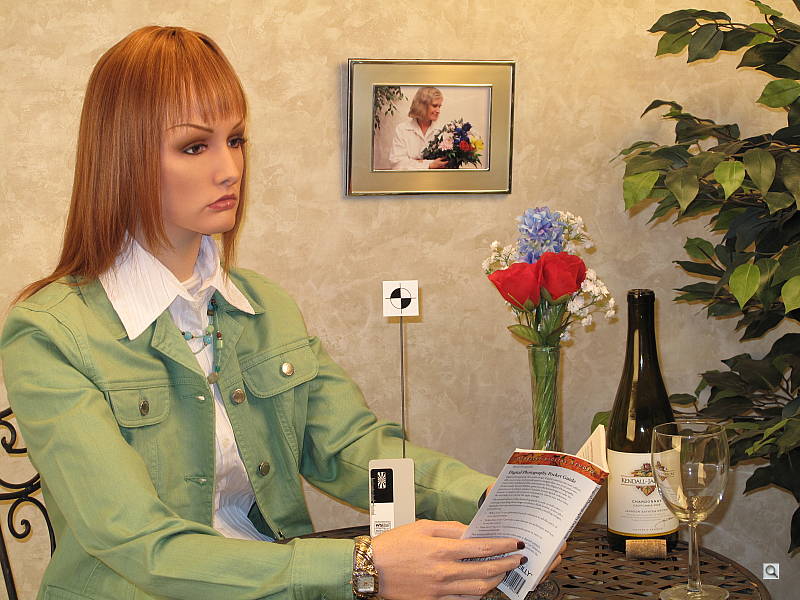
Coverage and Exposure. Flash coverage was somewhat uneven at wide angle (not surprising, given the wider-than-average 28mm equivalent focal length), with more uniform results at full telephoto. In the Indoor test, the G10's flash underexposed our subject at its default setting, requiring a boost in exposure to +0.7 EV, a typical value for this scene. The camera's Slow-Sync flash mode produced slightly brighter and more even results with no exposure compensation, though with a stronger yellow-orange cast from the room lighting.
| Flash Range: Wide Angle | |||||
|---|---|---|---|---|---|
| 6 ft | 7 ft | 8 ft | 9 ft | 10 ft | 11 ft |
 1/64 sec f2.9 ISO 100 |
 1/64 sec f2.9 ISO 100 |
 1/64 sec f2.9 ISO 100 |
 1/64 sec f2.9 ISO 100 |
 1/64 sec f2.9 ISO 100 |
 1/64 sec f2.9 ISO 100 |
| 12 ft | 13 ft | 14 ft | 15 ft | 16 ft | |
 1/64 sec f2.9 ISO 100 |
 1/64 sec f2.9 ISO 100 |
 1/64 sec f2.9 ISO 100 |
 1/64 sec f2.9 ISO 100 |
 1/64 sec f2.9 ISO 100 |
|
| Flash Range: Telephoto | |||||
|---|---|---|---|---|---|
| 6 ft | 7 ft | 8 ft | 9 ft | 10 ft | 11 ft |
 1/64 sec f4.6 ISO 100 |
 1/64 sec f4.6 ISO 100 |
 1/64 sec f4.6 ISO 100 |
 1/64 sec f4.6 ISO 100 |
 1/64 sec f4.6 ISO 100 |
 1/64 sec f4.6 ISO 100 |
| 12 ft | 13 ft | 14 ft | 15 ft | 16 ft | |
 1/64 sec f4.6 ISO 100 |
 1/64 sec f4.6 ISO 100 |
 1/64 sec f4.6 ISO 100 |
 1/64 sec f4.6 ISO 100 |
 1/64 sec f4.6 ISO 100 |
|
ISO 100 Range. At wide angle and ISO 100, flash shots were bright all the way out to 16 feet, the limit of our test. At telephoto, flash shots were bright to about 12 feet, decreasing in brightness from that point on. Excellent results here.
| Manufacturer-Specified Flash Range | |
|---|---|
| Wide Angle | Telephoto |
 15.0 feet Auto ISO 250 |
 9.2 feet Auto ISO 250 |
Manufacturer Specified Flash Test. In the shots above, the G10 seems to perform about as Canon says it will at wide angle and telephoto. It boosted ISO a little to 250, probably because the metering reacted to all the black in the target scene. Much better than average performance here. Our standard test method for flash range uses a fixed setting of ISO 100, to provide a fair basis of comparison between cameras. We've now also begun shooting two shots using the manufacturer-specified camera settings, at the range the company claims for the camera, to assess the validity of the specific claims.
Output Quality
Print Quality
Good print quality, good color, sharp 16x20-inch prints. ISO 400 images are soft but usable at 13x19, ISO 800 shots are good at 11x14.
 Print quality is quite excellent from the Canon G10's images, with good color. Conservatively, the ISO 80 JPEG images look great at 16x20 inches, and are usable at 20x30 straight out of the camera; sharpening and processing from RAW can sharpen things up considerably at all ISO settings. ISO 400 JPEG images are soft but usable at 13x19, but stand up better at 11x14 inches. Even ISO 800 shots are usable at 11x14, with a film-like grain pattern. ISO 1,600 shots are good at 5x7, too, but ISO 3,200 shots really are too soft to be usable at 4x6 inches. Overall, an amazing performance.
Testing hundreds of digital cameras, we've found that you can only tell just so much about a camera's image quality by viewing its images on-screen. Ultimately, there's no substitute for printing a lot of images and examining them closely. For this reason, we now routinely print sample images from the cameras we test on our Canon Pro9000 studio printer, and on the Canon iP5200 here in the office. (See the Canon PIXMA Pro9000 review for details on that model.)
The images above were taken from our standardized test shots. For a collection of more pictorial photos, see our Canon PowerShot G10 Photo Gallery .
Not sure which camera to buy? Let your eyes be the ultimate judge! Visit our Comparometer(tm) to compare images from the Canon PowerShot G10 with those from other cameras you may be considering. The proof is in the pictures, so let your own eyes decide which you like best!
Performance
Canon PowerShot G10 Performance
Timing and Performance
Slow to good speed for a consumer camera.
| Startup/Shutdown |
||
| Power on |
2.0 seconds | Time it takes for LCD to turn on and lens to deploy and capture a picture. |
| Shutdown |
1.2 seconds | How long it takes to retract lens. |
| Buffer clearing time |
5 seconds* (after 20 RAW + LF JPEG frames) 2 seconds* (after 20 LSF JPEGs) |
Worst case buffer clearing time. -- This is the delay after a set of shots before you can remove the card. Some cameras won't retract their lenses and shut down until the buffer is cleared. |
About average startup and shutdown times here, but pretty fast buffer clearing.
| Mode Switching | ||
|---|---|---|
| Play to Record, |
1.4 seconds | Time until first shot is captured. |
| Record to play |
1.2 seconds | Time to display a large/superfine file immediately after capture. |
| Display |
2.1 seconds | Time to display a large/superfine file already on the memory card. |
Mode switching times are about average, though displaying a previously recorded image is a bit sluggish.
| Shutter Response (Lag Time) | ||
|---|---|---|
| Full Autofocus Wide |
0.569 second | Time from fully pressing shutter button to image capture, zoom lens at wide angle position, using Flexizone (center) AF mode. |
| Full Autofocus Tele |
0.671 second | Time from fully pressing shutter button to image capture, zoom lens at telephoto position, using Flexizone (center) AF mode. |
|
Full Autofocus
Flash enabled |
0.921 second
|
Time to capture while forcing flash to fire, zoom lens at wide angle position.
|
| Prefocused |
0.068 second | Time to capture, after half-pressing and holding shutter button. |
| Continuous AF |
0.614 second |
This mode usually shows no speed increase with our static subject; we have no way to measure performance with moving subjects. |
| Manual Focus |
0.303 second |
For most cameras, shutter lag
is less in manual focus than autofocus, but usually not as fast as
when the camera is "prefocused." |
Full AF shutter response is about average at wide angle and slightly better than average at telephoto, at 0.57s and 0.67s respectively. Enabling the flash increases lag to 0.92s. "Prefocusing" the camera by half-pressing and holding down the shutter button before the final exposure results in a lag time of only 0.068 second, which while quite fast, isn't as fast as some. Times for continuous and manual focus are also about average.
| Cycle Time (shot to shot) | ||
|---|---|---|
|
Single Shot mode Large SuperFine JPEG |
2.15 seconds | Time per shot, averaged over 20 shots. |
| Single Shot mode |
2.12 seconds | Time per shot, averaged over 20 shots. |
| Single Shot mode |
2.53 seconds | Time per shot, averaged over 20 shots. |
| Single Shot mode |
2.66 seconds | Time per shot, averaged over 20 shots. |
| Early shutter |
No | Some cameras don't snap another shot if you release and press the shutter too quickly in Single Shot mode, making "No" the preferred answer. |
| Continuous mode |
0.73 second (1.37 frames per second); 20+ frames total; 2 seconds to clear* |
Time per shot, averaged over buffer length or 20 shots, whichever came first. |
| Continuous mode |
0.73 second (1.37 frames per second); 20+ frames total; 1 second to clear* |
Time per shot, averaged over buffer length or 20 shots, whichever came first. |
| Continuous mode |
1.26 second (0.80 frames per second); 20+ frames total; 3.5 seconds to clear* |
Time per shot, averaged over buffer length or 20 shots, whichever came first. |
| Continuous mode |
1.40 second (0.71 frames per second); 20+ frames total; 5 seconds to clear* |
Time per shot, averaged over buffer length or 20 shots, whichever came first. |
| Flash recycling |
10.2 seconds | Flash at maximum output. |
| *Note: Buffer clearing times measured with a SanDisk Extreme III 8GB SDHC memory card. Slower cards will produce correspondingly slower clearing times. Slow cards may also limit length of bursts in continuous mode. ISO sensitivity also affects cycle times and burst mode performance, with higher ISOs generally increasing cycle times and reducing burst performance. |
||
Shot-to-shot cycle times are a bit on the slow side, at about 2.15 seconds for large/superfine JPEGs, but the camera does capture frames continuously at this rate. (That is, given a fast enough memory card, it doesn't have to pause every few frames to wait for the card to catch up.) When shooting RAW, this slows to 2.53 seconds per frame, and RAW + large/fine JPEG is 2.66 seconds. The G10's continuous shooting modes were also on the slow side, capturing large/superfine JPEGs at about 1.37 frames per second. This rate slows to 0.80 frames per second with RAW, and 0.71 frames per second with RAW + large/fine JPEG. Buffer sizes were good though, at over 20 frames in any quality. The flash takes 10.2 seconds to recharge after a full-power shot, which is rather slow, but not surprising given how powerful it is.
| Download Speed | ||
|---|---|---|
| Windows Computer, USB 2.0 |
5,680 KBytes/sec | Typical Values: |
Connected to a computer or printer with USB 2.0, download speeds are very good.
Bottom line, the Canon G10 won't be a good choice for any fast-paced action, especially if shooting RAW, but should handle most typical shooting situations fairly well.
Battery and Storage Capacity
Battery
Excellent battery life for a lithium-ion design.
| Operating Mode | Number of Shots |
|---|---|
|
Lithium-ion Rechargeable Battery,
Optical Viewfinder (CIPA standard) |
1,000
|
|
Lithium-ion Rechargeable Battery,
LCD Monitor (CIPA standard) |
400
|
The Canon PowerShot G10 uses a custom rechargeable lithium-ion battery for power, and ships with a charger. Although battery life is excellent, especially when using the optical viewfinder instead of the LCD to frame, we recommend you pick up a spare battery and keep it freshly charged and on-hand for extended outings.
The table above shows the number of shots the camera is capable of (on a fully-charged rechargeable battery as appropriate), based on CIPA battery-life and/or manufacturer standard test conditions.
(Interested readers can find an English translation of the CIPA DC-002 standards document here. (180K PDF document))
Storage
The Canon PowerShot G10 accepts SDHC/SD/MMC memory cards, and does not include any built-in memory or a starter card.
| Image Capacity with 1GB Memory Card |
SuperFine | Fine | Normal | RAW | RAW + LF JPEG |
|
|---|---|---|---|---|---|---|
|
4,416 x 3,312 |
Images (Avg Size) |
155 6.6 MB |
261 3.9 MB |
536 1.9 MB |
47 21.4 MB |
40 25.4 MB |
|
Approx.
Comp. |
7:1 | 11:1 | 23:1 | 0.9:1 | - | |
|
3,456 x 2,592 |
Images (Avg Size) |
253 4.0 MB |
426 2.4 MB |
864 1.2 MB |
- |
- |
|
Approx.
Comp. |
7:1 | 11:1 | 23:1 | - | - | |
|
2,592 x 1,944 |
Images (Avg Size) |
389 2.6 MB |
691 1.5 MB |
1,396 734 KB |
- |
- |
|
Approx.
Comp. |
6:1 | 10:1 | 21:1 | - | - | |
|
1,600 x 1,200 |
Images (Avg Size) |
943 1.1 MB |
1,744 587 KB |
3,308 310 KB |
- |
- |
|
Approx.
Comp. |
5:1 | 10:1 | 19:1 | - | - | |
|
640 x 480 |
Images (Avg Size) |
3,696 277 KB |
5,714 179 KB |
8,980 114 KB |
- |
- |
|
Approx.
Comp. |
3:1 | 5:1 | 8:1 | - | - | |
We strongly recommend buying a large capacity SDHC or SD memory card at least a 2GB card, preferably a 4GB or 8GB one, to give yourself extra space for extended outings, RAW files or video. (Check the shopping link above, cards are really cheap these days, so no reason to skimp.)