


Overview
Fujifilm FinePix F60fd Overview
by Andrew Alexander
and Mike Tomkins
Review Date: 03/17/09
The Fujifilm FinePix F60fd is based around a seventh generation 1/1.6-inch Super CCD HR image sensor with twelve megapixel resolution coupled to a Fujinon-branded 3x optical zoom lens that offers a range from a rather tight 35mm wide angle to a 105mm telephoto. The image sensor is mounted on a movable platter, allowing for sensor-shift type image stabilization. ISO sensitivity ranges up to a maximum of ISO 1,600 equivalent at full resolution (3,200 at a reduced five megapixel resolution, or 6,400 at three megapixels or below). The Fuji FinePix F60fd's rear panel offers no optical viewfinder, instead opting solely for a large 3-inch LCD display with 230,000 dots of resolution.
Following in the footsteps of the past F50fd model, the Fujifilm F60fd features face detection as its "fd" designation might imply. The Fuji F60fd has a third-generation implementation of this feature, capable of detecting up to ten faces in a scene in just 0.036 seconds. The angle at which the camera can detect a face has been further improved, with the company stating that the F60fd can now handle faces even at a 90 degree side profile, and even when the face is turned on its side or completely upside down. The face detection system is linked to both the autofocus and autoexposure systems, and to post-exposure red-eye removal.
The Fujifilm F60fd offers a new Scene Recognition Auto mode which is capable of automatically detecting one of four different scene types, and then selecting the scene mode as appropriate: Portrait, Landscape, Macro, or Night. Focusing modes in the Fuji F60fd include both Multi or Center as well as the aforementioned Face Detection. Shutter speeds range from 8 seconds to 1/2,000 second, and apertures from f/2.8 at wide angle or a rather dim f/5.1 at telephoto to f/8.0 when stopped down.
Perhaps unusually for a compact camera these days, the Fujifilm F60fd offers a fair range of manual controls, including the ability to shoot in aperture or shutter-priority modes, as well as manual control of white balance and ISO sensitivity. Thirteen scene modes give some control over the look of images without the need to understand shutter speeds, apertures and the like, and a high-speed burst shooting mode offers five frames per second for up to twelve frames, the tradeoff being that this is achieved at a reduced three-megapixel resolution. The Fuji F60fd is also capable of recording VGA or QVGA videos with sound, using the QuickTime Motion JPEG format.
The Fujifilm FinePix F60fd stores its images on SD or SDHC cards, xD-Picture Cards, or in 25MB of built-in memory, and draws power from an NP-50 lithium-ion rechargeable battery. Available from September 2008 with pricing of about $300, the Fuji FinePix F60fd comes in silver and black body colors.
Fujifilm F60fd User Report
by Andrew Alexander
It's hard to look at the FinePix F60fd without immediately drawing comparisons with its predecessor model, the F50fd, because the cameras are more alike than they are different. I'll suggest reading our review of the F50fd (if you haven't already), and then when you're done there, we'll examine the improvements made in the F60fd.
The Differences. Looking at the specifications, you'd be hard-pressed to find any differences between the F50fd and the F60fd, leading me to believe the camera represents an exercise in fine-tuning the features the camera has already. There are only two obvious external differences between the two cameras. The first is an upgrade from a 2.7-inch LCD to a 3-inch LCD, with both screens offering 230,000 pixels. The second is a new body texture, a matte-silver or matte-black finish that gives you a bit more traction to hold on to the camera. There are a couple of differences under the hood, too. Fuji has decided to lean toward a simpler interface, removing features such as spot metering and manual focus, and adding two flash modes, which let the camera automatically use red-eye reduction if necessary. There are a few other, smaller differences: a shroud around the four-way direction pad has been removed, and there's been a slight re-shuffling of modes on the mode dial. Otherwise, the cameras are identical: 12-megapixel point-and-shoot digicams in a small deck-of-cards style package.
The Fujifilm F60fd packs in all the features you'd expect to find in a current modern digicam: a large megapixel sensor, large LCD screen, automatic scene modes, face detection, and image stabilization.
 Design. Fujifilm's F-series of cameras have a lot in common with their J-series (small and simple) and A-series (slightly larger and more feature-rich) siblings. Of the three, the F-series packs in the most advanced functionality, and seems to use the most capable versions of high-end features such as face detection. The Fujifilm F60fd is designed quite sensibly, with controls placed along the top and right-rear sides. With a little finger dexterity it's possible to use the camera one-handed, though you'll more likely find yourself steadying the F60fd with your left hand, and manipulating the controls with your right. Fuji has changed the overall texture of the camera from a slick silver to a matte-black or matte-silver, making it much easier to hold: the F50fd was a bit slicker, both in appearance and texture, making use of the camera strap mandatory.
 The Fuji F60fd's large 3-inch LCD takes up the majority of the rear panel, placing most of its controls along the rightmost portion of the back face.
The Fujifilm menu system innovated the idea of a quick-access menu known as the F-menu, allowing access to Quality, ISO, Color rendition and power management. As well there is a conventional multi-tabbed menu system. The F-menu has the benefit of overlaying its menu items over top of the scene, where the regular menu does not.

Our review of the F50fd commented that some of the options included in the F-menu were a bit confusing: quality and ISO I understand and agree with, but Power management seems like something I wouldn't change as often (in fact, during my time with the camera, I never did). What I'd really want is the ability to put a custom user-selected function into this list (such as our suggestion of White balance or metering mode). Perhaps we'll see this in the next model.
The LCD of the Fujifilm F60fd is large and bright, and when viewed indoors, images look bright and saturated. I'm not sure if it's been improved at all in terms of use in bright outdoor situations. It's protected with a coating that seems to collect fingerprints quite well, but it's still hard to see outdoors in direct sunlight without covering it with your hands. To be fair, most cameras have a hard time with this.
Lens. The Fujifilm FinePix F60fd shares the same lens as its predecessor, a 3x optical zoom lens that telescopes out when powered on, retreating back behind an automatic cover when shut down. The zoom spans a 35-105mm equivalent focal range. This range is fairly typical, but (as with the F50fd) you'll need to be in a pretty large space to squeeze ten people into a group portrait.
Zoom is controlled by a small ring around the shutter release button; pushing the ring to the left zooms out toward wide-angle, and pushing the right to the right zooms in to telephoto. It's a sensitive control that moves pretty quickly, stopping at roughly eight individual points within its focal range. The maximum aperture size is fairly wide -- f/2.8 -- but that drops to f/5.1 at full telephoto.
Autofocus. Overall, the autofocus system of the Fujifilm F60fd is about average: it's reasonably fast and accurate, capable of focusing in low-light situations without engaging its distracting focus-assist lamp. As with most digital cameras, it's faster at wide-angle (0.592 second) than at telephoto (0.745 second). In truly dark situations the lamp works well, and if you don't like it, you can disable it in the camera's menu. The Fujifilm F60fd's performance results for autofocus are actually slightly slower than the F50fd, though we're talking in the tenths-of-seconds here.
There was one focus situation that annoyed me, and in my opinion, could be easily solved. The minimum focus distance of the camera is 18 inches (45cm) in the regular, non-macro mode, and if you try to focus on something within this distance, the camera will go through one autofocus operation and give up, giving you the helpful "!AF" indicator message. For the longest time I assumed there wasn't enough light, wondering why the autofocus assist lamp wouldn't come on to help. It was only after checking through the manual that I discovered the minimum focus distance of 18 inches, and figured out the camera wouldn't focus at anything closer than this distance unless it was in macro mode. The camera has helpful messages scattered in other areas of operation, instructing users on how to use the camera more efficiently. However in this case, there's no assistance given, where a helpful messages such as "Back up" or "Use Macro mode" would have been very helpful.
The option to select manual focus has been removed from the F60fd. While manual focus control is often poorly implemented on point-and-shoot cameras, I feel it's a bit of a step backward to remove it completely, as there are times when you need to override the autofocus of the camera.
Image Stabilization. Fujifilm has used its dual-method image stabilization method for a few generations now, combining mechanical image stabilization with an automatic ISO selection to enable faster shutter speeds. The Fujifilm F60fd's 12-megapixel sensor sits on a shifting platform that moves to correct for camera shake. It can be set to work continuously or to engage only when you press the shutter release. The other component of the camera's dual image stabilization system is referred to as High sensitivity, and basically functions like many other digital image stabilization settings, boosting the ISO to use faster shutter speeds and freeze motion. The idea here is that the camera utilizes both collectively, intelligently discerning how much of each is needed for the best results given the subject and shot.

Blurry indoors: With indoor lighting, the fast f/2.8 lens and ISO 400 (selected automatically by the camera) won't produce a shooting scenario faster than 1/4 of a second; flash is required.
My experience with Fuji's image stabilization system on the F60fd is slightly different from Alex's on the similar F50fd. I agree that the mechanical image stabilization system worked very well to provide a steady platform to around 1/15 of a second, but the high-ISO functionality was a bit more elusive. The camera is conservative when it comes to setting an ISO above 400, and it wasn't until I was shooting in near-darkness that it ventured into that territory. As a result, images I shot indoors at a party were typically blurry. The shutter speed couldn't get above 1/8 of a second, and the subject would be moving. It was only by manually selecting ISO 3,200 or ISO 6,400 that I could get shutter speeds that would stop the action (1/60), but at that point you're getting reduced resolution (3-megapixel), smudgy details and extreme noise. Using the camera indoors without flash is still difficult, unless you can convince your subjects to be still for 1/8 of a second. The bottom line is that for candid low-light scenarios, unless you're comfortable with high-ISO shooting or flash photography, Fuji still has a ways to go.
Modes. Eight icons are arrayed around the Fujifilm F60fd's upright mode dial. There's been a subtle redesign from the F50fd; gone is the dual Scene Mode selection (SP1 & SP2) in favor of a single Scene selector (SP). On the F50fd the two selections choose from the same list of scene modes; the thinking was that you could leave SP1 on "Sport" mode and SP2 on "Night" mode, and be able to switch between the two at your convenience. In practice it was never clear if you were selecting from two sets of scene modes. Having just one SP mode makes a fair bit more sense, to my mind.

Lots of snow: For this outdoor scene, the Fujifilm F60fd's SP scene selector mode correctly identified the scene as a landscape.
The new mode that's been added is fairly useful: Scene Recognition, marked as "SP Auto" on the dial, which lets the camera make a judgement call about which scene mode is appropriate to the shooting situation. The camera will choose between Portrait, Landscape, Night, Macro, or Auto modes. In practice, it's fairly accurate, and you can use your imagination as to the factors which are being taken into account in deciding the mode: present the camera with a face, it will select Portrait mode and kick in face-detecting autofocus. Present it with a dark scene and it will select Night mode. Present it with a target within eighteen inches and it will select Macro mode -- which begs the question, as I indicated earlier, as to why the camera won't give me a more detailed explanation for why it couldn't autofocus? (Okay, I'll stop harping on that one.) The system isn't perfect -- it will default to Auto mode if it's not satisfied the subject scenario isn't present -- but it worked more often than it didn't in terms of selecting the appropriate scene selection.
Otherwise, the modes are all identical to what was presented on the F50fd. The camera's automatic mode is denoted by a red camera. A Manual mode is included, but it functions like a Program setting with a few overrides; users cannot manually set exposure. More control is granted in the camera's semi-automatic Aperture- and Shutter-Priority mode, but they're really to shape the visual effect of the image (depth-of-field and motion), more than to control exposure. The range of apertures to select from is fairly limited (f/2.8 to f/8 when set to wide-angle, to f/5.1 to f/8 at telephoto) and the longest shutter speed you can set in this mode is 1 second. For longer shutter speeds, you either select the Fireworks scene mode, which locks the camera at f/8 and allows you to set the shutter speed to catch the firework trails -- or the night scene mode, which will let you select a shutter speed of up to eight seconds (though you must enable this option in the setup menu).
Fujifilm instead makes an effort to create automatic modes that capture portraits and low-light shots the way an experienced photographer would. The most successful of these are the camera's Portrait Enhancer and Natural Light & with Flash modes, along with its Face Detection 3.0 system.
Fujifilm's Natural Light & with Flash mode has been around for a few generations, and is one of the most practical settings on any point-and-shoot camera. The decision whether to shoot with flash or boost the ISO is often a tough one, both for novices or experienced photographers. In this mode the camera quickly snaps two successive images, one without flash, and one with, and displays them both side-to-side, letting you evaluate them and decide which you prefer.
Face Detection 3.0. Fuji continues to innovate in the realm of face detection. Camera orientation is no longer a factor when it comes to detecting faces: version 2.0 improved upon this aspect of face detection by allowing a range of 270 degrees in camera orientation where faces could be detected, and version 3.0 now detects faces at any camera orientation. Fuji also touts improved face detection response, claiming a figure of 0.036 seconds. I couldn't say whether this is faster than the F50fd. Otherwise, FD3.0 seems to be as effective as FD2.0, detecting up to 10 faces either straight on, or well off-axis, to the camera.
Alex's examination of Face Detection 2.0 in the F50fd indicated some autofocus problems with "arms-extended self-portraits." I tried the same experiments and found face detection worked every time, suggesting that this element has been improved as well.
Playback mode also benefits from Face Detection. Pressing the face detection button once during image review brackets recognized faces; pressing the button a second time will zoom in on the primary face and allow users to inspect details or crop the image into an isolated portrait. Continuing to press the face detection button in group portraits will scroll though close ups of other detected faces in the picture. The feature can also be used in slideshow form, transiting between the various recorded faces.
Color modes. The F-menu of the Fuji F60fd gives the shooter quick access to different FinePix color modes. The F-Standard color mode produces accurate and reasonably saturated colors, pushing the reds and blues slightly. F-Chrome mode is intended for landscape and scenery, pushing the greens and blues. F-B&W is a black and white mode, producing monotone images with nice contrast. I made especially good use of this mode when shooting images with higher ISO speeds than I would have preferred, as the black and white mode transforms objectionable color noise into something similar to film grain.
 Storage and battery. The Fuji F60fd is fitted with a 3.7v lithium-ion cell that's rated to get 230 shots on a charge, according to CIPA standards. The Fujifilm F60fd's endurance pales in comparison to previous models in the line, some of which attained well over double that on a charge, but it is just under average. The new Scene Recognition (SP Auto) mode seems to be pretty taxing on the camera: you can hear the autofocus continually adjusting, suggesting to me that it might be a heavier drain on the battery than other modes. The F60fd's battery held up sufficiently in use, but it would be wise to take an extra cell on longer outings, particularly if viewing a lot of slide shows.
The Fujifilm F60fd is built with 25MB of internal memory, which holds about five 12-megapixel JPEGs (Fine). This may help you in a pinch, should the card run full and the perfect moment arises, but with a native 12-megapizel file size, a larger card is a necessity. Fortunately, the F60fd uses a memory card slot that accepts both SD and xD media.
Shooting. The Fujifilm F60fd is built like the camera you want to take everywhere: small enough to drop into a coat pocket, and handy enough to take out and snap a few pictures when the opportunity presents itself. Shooting with the Fujifilm F60fd was simple and straightforward, given its efficient layout and automatic modes. Most camera settings were easily available, though I did have to search around a bit to find some of the more advanced functions, and the instruction manual wasn't much help. In particular, while the camera's specifications state it's capable of an eight-second shutter speed, I couldn't find it anywhere. Then on the specifications table in the manual, it lists the Night mode as being the only mode capable of achieving this speed, but selecting this mode, it wasn't letting me select a shutter speed. Turns out there is a menu item in the Setup menu that you're required to set to manually override this automatic setting.
The majority of my usage of the camera was in indoor situations, with low light. My preference is to shoot without flash, but as I've previous indicated, it's particularly tricky to get a usable shutter speed without using ISO speeds that produce objectionable noise, or shutter speeds that cause the subject to blur due to their motion. The use of the flash became unavoidable, and in short-range situations, produced a nice and even exposure. Red-eye can be a problem, so don't hesitate to use the red-eye reduction mode.
Small details aside, shooting with the Fujifilm F60fd was uncomplicated. It functions like you expect it to, so budding photographers can easily take good photographs, and advanced users won't have much trouble fine-tuning their shooting experience within reason.
Appraisal. The Fujifilm F60fd isn't much changed from its previous model, with a few changes under the hood and a redesign of some of the features. Small improvements in Face Detection show Fujifilm continuing to innovate in this area, but the camera still shows significant noise as the ISO is pushed to 800 and beyond. Captured images also show evidence of noise suppression and slight edge enhancement throughout the most of the sensitivity range.
Colors rendered by the Fujifilm F60fd are fairly realistic, with slight shifts in hue and a push in saturation levels that is considered to be generally pleasing (most people like their colors a little more saturated than in real life). Images captured in Tungsten light do suffer from noise suppression in low-contrast and shaded areas.
Optically, distortion and chromatic aberration are more apparent in the wide-angle range of the lens. The camera performs best at the telephoto end of its range. Ultimately, with its incorporation of Face Detection, Portrait Enhancement, and dual image stabilization, point-and-shooters looking to snap scores of people pictures will be pleased with the results.
Fujifilm F60fd Basic Features
- 12-megapixel Super CCD HR sensor
- 3x optical zoom lens (35-105mm 35mm equivalent)
- 8.2x digital zoom
- 3.0-inch LCD with 230,000 pixels
- ISO Sensitivity from 100 to 6,400 (reduced res.)
- Shutter speeds from 8 to 1/2,000
- Max Aperture f/2.8 at wide-angle, f/5.1 at telephoto
- USB 2.0 Hi-Speed
- Powered by 3.7v lithium-ion battery
Fujifilm F60fd Special Features
- Face Detection 3.0 sets the focus, exposure, and white balance for up to 10 faces
- Accepts SDHC/SD/xD Memory cards
- Zoom Up and Crop settings allow detected faces to become portraits in playback mode
- Dual image stabilization (CCD-shift, high sensitivity)
- Face-oriented slide show (face detection system will detect and zoom in during playback)
- Micro thumbnail view displays up to 100 images at a time; thumbnail images are enlarged when scrolled over
- IrSimple
In The Box
The Fujifilm F60fd ships with the following items in the box:
- Fujifilm FinePix F60fd camera body
- Battery Charger BC-50
- Lithium-ion battery NP-50
- A/V cable
- USB cable
- F60fd user manual
- Wrist strap
- FinePix software CD-ROM
Recommended Accessories
- Large capacity SD or xD memory card, (you'll need it for the 12-megapixel files)
- Additional NP-50 lithium-ion battery
- Underwater Housing (WP-FXF60)
Fujifilm F60fd Conclusion
| Pro: | Con: |
|---|---|
|
|
Fujifilm didn't re-invent the wheel with the FinePix F60fd, choosing to make small changes that improve the overall user experience. Basic issues like the camera slipping out of your hand have been addressed by changing the textured coating of the camera; a Scene mode selection interface has been improved to be less confusing. Fujifilm may be seeing that they don't need to quickly chase after megapixels, instead refining a model that has already taken quite a leap.
The small pixels of the Fujifilm F60fd's sensor should produce large images, but at ISO settings over 400 the camera starts to sacrifice detail to suppress noise. There is a loss of detail due to noise suppression in even ISO 100 shots, and an overall softness to the left side of the frame, though most people won't notice it unless they're making prints at 11x14 or larger.
By putting a lot of technology into a small, portable package, Fujifilm made a good pocket camera that takes decent pictures. Though it doesn't quite rise to a Dave's Pick thanks to its heavy-handed noise suppression and so-so optics, it's a good camera that will serve as a decent pocket camera for those who won't enlarge beyond 8x10.
Optics
Fujifilm FinePix F60fd Optics
Lens
Zoom
A standard 3x optical zoom lens with fair performance. Digital zoom performance
is soft at full size, but results are passable for smaller print sizes.


The Fujifilm FinePix F60fd's optical zoom range covers the equivalent of a 35-105mm zoom on a 35mm camera, which is a typical range for a consumer digital camera. Results at full wide angle are fair, with moderate coma distortion and fairly strong blurring along the left side of the frame. Details are pretty well-defined throughout the center of the frame, however. At full telephoto, detail definition is a little stronger, though corner softening is again visible on the left side of the frame. There's also some noticeable chromatic aberration around high contrast areas. The camera's 8.2x digital zoom shows some losses in resolution and fine detail, though overall results are still a little better than average.
Macro
About average macro area, with slightly soft detail overall. The flash
has trouble up close, though.


The Fujifilm FinePix F60fd's macro setting captured a larger-than-average minimum area measuring 2.54 x 1.91 inches (65 x 48 millimeters). Resolution and detail are both high, though details are slightly soft throughout the frame. That said, the FinePix F60fd produced less blurring in the corners than we're accustomed to seeing here. (Most cameras have some softening in the corners in macro mode.) The Fujifilm FinePix F60fd's flash had some trouble throttling down for the macro area, and produced an uneven exposure with strong highlights and a dark shadow from the lens. Thus, you'll need to stick to external lighting for macro shots with the F60fd.
Geometric Distortion
Lower than average barrel distortion at wide angle, and only a tiny amount
at telephoto.
| Barrel distortion at 35mm is 0.6% |
 |
| Barrel distortion at 105mm is less than 0.1% |
 |
The Fujifilm FinePix F60fd's 0.6% barrel distortion at wide angle is actually lower than average compared to most consumer digital cameras, though the effect is still somewhat noticeable. At the telephoto end, the FinePix F60fd's less than 0.1% barrel distortion (actually only about one pixel) is low and barely noticeable. Distortion is the tendency for the lens to bend straight lines outward (like a barrel -- usually at wide angle) or inward (like a pincushion -- usually at telephoto).
Chromatic Aberration
Moderately high distortion at wide angle in terms of brightness and pixel count. Less distortion at telephoto.




Chromatic aberration is moderately high at wide angle, with bright pixels of coloration on both sides of the target lines. At telephoto, distortion is not as strong or bright, though the distortion on the left side of the frame is exaggerated by blurring from the lens. Chromatic aberration is a form of distortion visible as a slight colored fringe around the objects at the edges of the field of view on the resolution target.
Corner Sharpness
Fairly strong blurring in the corners of the frame at wide angle and
telephoto.
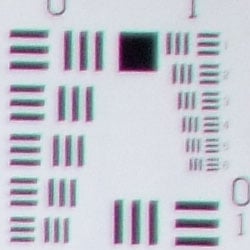
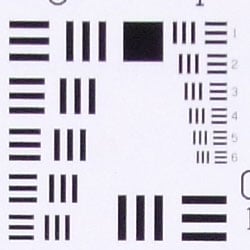
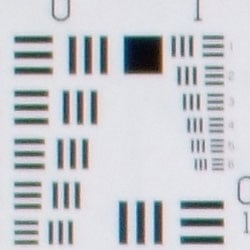
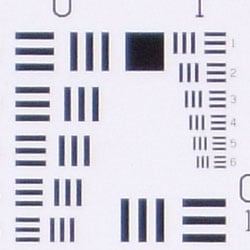
The Fujifilm FinePix F60fd produced soft corners of the frame at full wide angle and telephoto, though effects were much stronger at wide angle. In both zoom settings, the degree of blurring remained fairly consistent between the four corners, but blurring extended much further toward the center of the frame along the left sides.
Viewfinder
Coverage
Very good accuracy from the LCD monitor.


The Fujifilm FinePix F60fd's LCD monitor showed about 102% coverage accuracy at wide angle, and about 99% at telephoto. Great results!
The images above were taken from our standardized test shots. For a collection of more pictorial photos, see our Fujifilm FinePix F60fd Photo Gallery .
Exposure
Fujifilm FinePix F60fd Exposure
Color
Saturation & Hue Accuracy
Some oversaturation in strong reds and blues, with small shifts in accuracy.
 |
| In the diagram above, the squares show the original color, and the circles show the color that the camera captured. More saturated colors are located towards the periphery of the graph. Hue changes as you travel around the center. Thus, hue-accurate, highly saturated colors appear as lines radiating from the center. |
Saturation. The Fujifilm FinePix F60fd oversaturates strong reds, blues and some greens, but this is fairly common among consumer digital cameras. Yellows are actually undersaturated quite a bit. Most consumer digital cameras produce color that's more highly saturated (more intense) than found in the original subjects. This is simply because most people like their color a bit brighter than life.
Skin tones. Here, with the color balanced properly for the light source, the FinePix F60fd's Caucasian skin tones had a red cast, while darker skin tones were pushed toward orange slightly. Where oversaturation is most problematic is on Caucasian skin tones, as it's very easy for these "memory colors" to be seen as too bright, too pink, too yellow, etc.
Hue. The Fujifilm FinePix F60fd showed some small color shifts relative
to the correct mathematical translation of colors in its subjects, pushing
cyan toward blue, and yellow toward green. But overall performance here
is pretty good. Hue is "what color" the color is.

Sensor
Exposure and White Balance
Indoors, incandescent lighting
Best color with Manual white balance, though still a bit cool. Slightly
more than average positive exposure compensation required.


Color balance indoors under incandescent lighting was quite red in Auto white balance mode, while the Incandescent setting produced strong warm cast. Manual mode produced the most accurate overall color, though it was a little cool and greenish. The Fujifilm FinePix F60fd required a +0.7 EV exposure compensation boost to get a reasonably bright exposure, which is more than average, and the exposure is still slightly dim. Our test lighting for this shot is a mixture of 60 and 100 watt household incandescent bulbs, a pretty yellow light source, but a very common one in typical home settings here in the U.S.
Outdoors, daylight
Very high contrast outdoors, with slightly cool color.

Outdoors, the Fujifilm FinePix F60fd produced very high contrast under harsh lighting. In both shots above, exposures have very few midtones, and very extreme highlights and shadows. Noise and noise suppression just about obliterate detail in the shadows areas, though highlights hold onto slightly more detail. Overall color is a bit cool in both images, with a slight magenta cast in the portrait shot, and a slightly bluish tint in the house shot.
See full set of test images with explanations
See thumbnails of all test and gallery images
Resolution
Very high resolution, 2,000 lines of strong detail.
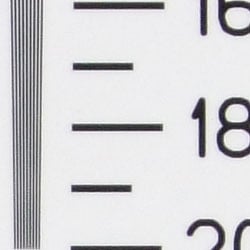
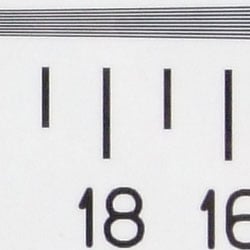
Our laboratory resolution chart revealed sharp, distinct line patterns all the way down to about 2,000 lines per picture height in both directions, without any visible extinction. Use this number to compare with other cameras of similar resolution, or use them to see just what higher resolution can mean in terms of potential detail.
See full set of test images with explanations
See thumbnails of all test and gallery images
Sharpness & Detail
Fine detail is soft from noise suppression, with practically no detail in the shadows. High contrast areas show some minor edge enhancement.
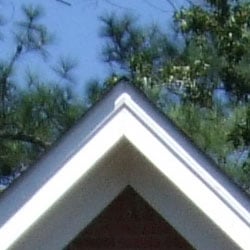

Sharpness. The Fujifilm FinePix F60fd captures a lot of fine detail, though detail definition suffers slightly from noise suppression. In high contrast areas, such as the trim lines in the crop above left, the camera produces slight enhancement artefacts. Edge enhancement creates the illusion of sharpness by enhancing colors and tones right at the edge of a rapid transition in color or tone.
Detail. The crop above right shows strong noise suppression, with the darker areas of hair showing hardly any detail. Individual strands are only hinted at even in the brighter areas. Noise-suppression systems in digital cameras tend to flatten-out detail in areas of subtle contrast. The effects can often be seen in shots of human hair, where the individual strands are lost and an almost "watercolor" look appears.
ISO & Noise Performance
Moderately high noise suppression blurs detail even at the lower ISO
settings, while strong noise and very strong noise suppression become too
strong at the higher settings.







The Fujifilm FinePix F60fd kicks in its noise suppression fairly early on, with some blurring present even at the lowest sensitivity setting. At ISO 200, detail is quite soft, and the results just get progressively worse from there. At ISOs 1,600 and above, the image is so blurry and the noise pattern so distinct that it looks like an illustration. See the Print Quality section below, to find out what the recommended maximum size print is at each ISO setting.
Extremes: Sunlit and low light tests
High resolution with a lot of detail overall, though high contrast severely
limits shadow detail. Slightly bright contrast, but still good results overall.
Slightly limited low-light capabilities.


Sunlight. The Fujifilm FinePix F60fd had some trouble with the deliberately harsh lighting in the test above, and produced very strong contrast with hot highlights and very deep shadows. Both image noise and noise suppression efforts result in big losses in shadow detail, though the highlights do manage to hold on to some. Overall color is slightly cool, with reddish skin tones. Be sure to use fill flash in situations like the one shown above; and it's better to shoot in the shade when possible.
Because digital cameras are more like slide film than negative film (in that they tend to have a more limited tonal range), we test them in the harshest situations to see how they handle scenes with bright highlights and dark shadows, as well as what kind of sensitivity they have in low light. The shot above is designed to mimic the very harsh, contrasty effect of direct noonday sunlight, a very tough challenge for most digital cameras. (You can read details of this test here.)
| 1 fc 11 lux |
1/2 fc 5.5 lux |
1/4 fc 2.7 lux |
1/8 fc 1.3 lux |
1/16 fc 0.67 lux |
|
|---|---|---|---|---|---|
| ISO 100 |
 1 sec f2.8 |
 1 sec f2.8 |
 1 sec f2.8 |
 1 sec f2.8 |
 1 sec f2.8 |
| ISO 200 |
 1 sec f2.8 |
 1 sec f2.8 |
 1 sec f2.8 |
 1 sec f2.8 |
 1 sec f2.8 |
| ISO 400 |
 1 sec f4.0 |
 1 sec f2.8 |
 1 sec f2.8 |
 1 sec f2.8 |
 1 sec f2.8 |
| ISO 800 |
 0.5 sec f4.0 |
 1 sec f4.0 |
 1 sec f2.8 |
 1 sec f2.8 |
 1 sec f2.8 |
| ISO 1600 |
 1/4 sec f4.0 |
 0.5 sec f4.0 |
 1 sec f4.0 |
 1 sec f2.8 |
 1 sec f2.8 |
| ISO 3200 |
 1/8 sec f4.0 |
 1/4 sec f4.0 |
 0.5 sec f4.0 |
 1 sec f4.0 |
 1 sec f2.8 |
| ISO 6400 |
 1/15 sec f4.0 |
 1/8 sec f4.0 |
 1/4 sec f4.0 |
 0.5 sec f4.0 |
 0.5 sec f3.2 |
| ISO 100 Night Scene |
 2.5 sec f2.8 |
 5 sec f2.8 |
 8 sec f2.8 |
 8 sec f2.8 |
 8 sec f2.8 |
Low light. The Fujifilm FinePix F60fd was limited in terms of low-light performance, as only the 3,200 and 6,400 sensitivity settings produced what I would call bright results at the lowest light level. As the sensitivity decreased, so did the performance, so that images at ISO 100 were only bright at one foot-candle. Obviously, the trade-off for the higher sensitivities is much stronger noise, though even at ISO 100, noise is a factor. The camera's night scene mode was however able to capture bright images down to 1/4 foot-candle at ISO 100, by increasing maximum exposure time from one second to eight seconds. Color balance was slightly magenta or green from the Auto white balance in many of the dimmer shots. The camera's AF system was able to focus down to just under the 1/16 foot-candle light level with and without AF assist enabled, which is more than its exposure system can really handle.
How bright is this? The one foot-candle light level that this test begins at roughly corresponds to the brightness of typical city street-lighting at night. Cameras performing well at that level should be able to snap good-looking photos of street-lit scenes.
NOTE: This low light test is conducted with a stationary subject, and the camera mounted on a sturdy tripod. Most digital cameras will fail miserably when faced with a moving subject in dim lighting. (For example, a child's ballet recital or a holiday pageant in a gymnasium.) For such applications, you may have better luck with a digital SLR camera, but even there, you'll likely need to set the focus manually. For information and reviews on digital SLRs, refer to our SLR review index page.
Flash
Coverage and Range
Modest flash power at close range, though coverage is fairly uniform.
Exposure compensation has no effect on flash exposures.


Coverage and Exposure. Flash coverage was slightly uneven at wide angle, but more uniform at telephoto. In the Indoor test, the Fujifilm FinePix F60fd's flash underexposed our subject at its default setting, but increasing the exposure compensation had no effect on overall brightness. The camera's Slow-Sync flash mode produced somewhat brighter and more even results, though with a slight warm cast from the background lighting. However, again, the exposure compensation system had no effect here.
| Flash Range: Wide Angle | |||||
|---|---|---|---|---|---|
| 6 ft | 7 ft | 8 ft | 9 ft | 10 ft | 11 ft |
 1/60 sec f2.8 ISO 100 |
 1/60 sec f2.8 ISO 100 |
 1/60 sec f2.8 ISO 100 |
 1/60 sec f2.8 ISO 100 |
 1/60 sec f2.8 ISO 100 |
 1/60 sec f2.8 ISO 100 |
| 12 ft | 13 ft | 14 ft | 15 ft | 16 ft | |
 1/60 sec f2.8 ISO 100 |
 1/60 sec f2.8 ISO 100 |
 1/60 sec f2.8 ISO 100 |
 1/60 sec f2.8 ISO 100 |
 1/60 sec f2.8 ISO 100 |
|
| Flash Range: Telephoto | |||||
|---|---|---|---|---|---|
| 6 ft | 7 ft | 8 ft | 9 ft | 10 ft | 11 ft |
 1/100 sec f5.1 ISO 100 |
 1/100 sec f5.1 ISO 100 |
 1/100 sec f5.1 ISO 100 |
 1/100 sec f5.1 ISO 100 |
 1/100 sec f5.1 ISO 100 |
 1/100 sec f5.1 ISO 100 |
| 12 ft | 13 ft | 14 ft | 15 ft | 16 ft | |
 1/100 sec f5.1 ISO 100 |
 1/100 sec f5.1 ISO 100 |
 1/100 sec f5.1 ISO 100 |
 1/100 sec f5.1 ISO 100 |
 1/100 sec f5.1 ISO 100 |
|
ISO 100 Range. At the wide angle zoom setting and ISO 100, flash intensity began to decrease from 7 feet on. At full telephoto, 6 feet was already dim.
| Manufacturer-Specified Flash Range | |
|---|---|
| Wide Angle | Telephoto |
 14.0 feet Auto ISO 800 |
 7.8 feet Auto ISO 800 |
Manufacturer Specified Flash Test. In the shots above, the FinePix F60fd performs as Fujifilm says it will, though it had to raise the sensitivity quite a bit at both wide angle and telephoto settings, to ISO 800, where image quality degrades significantly. Our standard test method for flash range uses a fixed setting of ISO 100, to provide a fair basis of comparison between cameras. We've now also begun shooting two shots using the manufacturer-specified camera settings, at the range the company claims for the camera, to assess the validity of the specific claims.
Output Quality
Print Quality
Good print quality at 11x14 inches. ISO 800 images are soft but usable at 8x10, ISO 1600 shots are usable at 5x7. Higher ISOs are not worth the effort to capture, let alone print.
 Though shots from the FinePix F60fd are usable when printed at 13x19 inches, a noticeable softness on the left side of wide-angle images makes 11x14-inch prints preferable. You can print at 11x14 inches up through ISO 400. At ISO 800, you're better off dropping to 8x10 or 5x7, the latter being noticeably better. ISO 1,600 shots are decent at 5x7 but streaky shadow noise is too pronounced to call them anything but usable, but at 4x6 it's better. ISO 3,200 and 6,400 are really too soft to bother printing.
Shots captured in Tungsten lighting, however, fare more poorly, dropping down at least one print size when enlarged, thanks to significant anti-noise processing in shadows and areas of finer detail, like hair. Such detail in ISO 100 shots is so soft we have to go from 11x14 to 8x10, when 5x7's are better. ISO 200, 400, and 800 shots are better at 5x7, and ISO 1,600 shots are only good at 4x6 inches.
Testing hundreds of digital cameras, we've found that you can only tell just so much about a camera's image quality by viewing its images on-screen. Ultimately, there's no substitute for printing a lot of images and examining them closely. For this reason, we now routinely print sample images from the cameras we test on our Canon Pro9000 studio printer, and on the Canon iP5200 here in the office. (See the Canon Pixma Pro9000 review for details on that model.)
The images above were taken from our standardized test shots. For a collection of more pictorial photos, see our Fujifilm FinePix F60fd Photo Gallery .
Not sure which camera to buy? Let your eyes be the ultimate judge! Visit our Comparometer(tm) to compare images from the Fujifilm FinePix F60fd with those from other cameras you may be considering. The proof is in the pictures, so let your own eyes decide which you like best!
Performance
Fujifilm FinePix F60fd Performance
Timing and Performance
Overall slower than average timings, though some areas stand out.
| Startup/Shutdown |
||
| Power on |
2.7 seconds | Time it takes for LCD to turn on and lens to deploy and capture a picture. |
| Shutdown |
1.6 seconds | How long it takes to retract lens. |
| Buffer clearing time |
14 seconds (after 3 L/F JPEGs in Top-3 mode) 4.5 seconds (after 20 L/F JPEGs in Continuous Long mode) |
Worst case buffer clearing time. -- This is the delay after a set of shots before you can remove the card. Some cameras won't retract their lenses and shut down until the buffer is cleared. |
About average times here, though worst case buffer clearing is markedly slow.
| Mode Switching | ||
|---|---|---|
| Play to Record, |
0.8 second | Time until first shot is captured. |
| Record to play |
0.8 second | Time to display a large/fine file immediately after capture. |
| Display |
0.5 second | Time to display a large/fine file already on the memory card. |
Mode switching times are better than average.
| Shutter Response (Lag Time) | ||
|---|---|---|
| Full Autofocus Wide |
0.592 second | Time from fully pressing shutter button to image capture, zoom lens at wide angle position. |
| Full Autofocus Tele |
0.745 second | Time from fully pressing shutter button to image capture, zoom lens at telephoto position. |
| Prefocused |
0.028 second | Time to capture, after half-pressing and holding shutter button. |
| Continuous AF |
0.580 second |
This mode usually shows no speed increase with our static subject; we have no way to measure performance with moving subjects. |
| Full Autofocus Flash |
0.716 second | Time to capture while forcing flash to fire, wide angle. |
Shutter response is good at both wide angle and telephoto, at 0.592s and 0.745s respectively, and enabling the flash only results in a lag time of 0.716s (faster than telephoto without flash). "Prefocusing" the camera by half-pressing and holding down the shutter button before the final exposure results in a lag time of 0.028 second, which is very good.
| Cycle Time (shot to shot) | ||
|---|---|---|
| Single Shot mode Large Fine JPEG |
3.17 seconds | Time per shot, averaged over 20 shots. |
| Single Shot mode |
3.32 seconds | Time per shot, averaged over 20 shots. |
| Early shutter |
YES | Some cameras don't snap another shot if you release and press the shutter too quickly in Single Shot mode, making "No" the preferred answer. |
| Continuous mode |
2.97 seconds (0.34 frames per second); >20 frames total; 4.5 seconds to clear |
Time per shot, averaged over buffer length or 20 shots, whichever came first. |
| Continuous mode |
3.10 seconds (0.32 frames per second); >20 frames total; 3.5 seconds to clear |
Time per shot, averaged over buffer length or 20 shots, whichever came first. |
| Continuous mode |
0.50 second (2.00 frames per second); 3 frames total; 14 seconds to clear |
Time per shot, averaged over buffer length or 20 shots, whichever came first. |
| Continuous mode |
0.21 second (4.85 frames per second); 12 frames total; 8 seconds to clear |
Time per shot, averaged over buffer length or 20 shots, whichever came first. |
| Flash recycling |
9.3 seconds | Flash at maximum output. |
| *Note: Buffer clearing times measured with a SanDisk Extreme III 8GB SDHC memory card. Slower cards will produce correspondingly slower clearing times. Slow cards may also limit length of bursts in continuous mode. ISO sensitivity also affects cycle times and burst mode performance, with higher ISOs generally increasing cycle times and reducing burst performance. |
||
Shot-to-shot cycle times are quite sluggish, at about 3.17 seconds for large/fine JPEGs, and even slower at the lowest resolution, at 3.32 seconds. The camera's Long Period Continuous mode is quite slow, capturing only 0.34 frames per second at the large/fine JPEG setting. The Top-3 mode captures 3 frames at 2 frames per second and the Top-12 mode captures 12 frames at an impressive 4.85 frames per second. However, Top-12 is limited to the 3MP resolution size. Flash recycling is about average, though a little slow considering its modest power.
| Download Speed | ||
|---|---|---|
| Windows Computer, USB 2.0 |
3,750 KBytes/sec | Typical Values: |
Connected to a computer or printer with USB 2.0, download speeds are very
good.
Overall, the Fujifilm FinePix F60fd is quite slow. Its cycle times alone are very slow, and its Continuous modes are much slower than average. The exceptions here are its mode-switching times, which are fairly fast, and its Top-12 Continuous mode. Shutter lag also isn't too bad. Though it should handle average shooting conditions fairly well, you may find yourself tapping your foot between exposures.
Battery and Storage Capacity
Battery
Mediocre battery life for a lithium-ion design.
| Operating Mode | Number of Shots |
|---|---|
| Lithium-ion
Rechargeable Battery, (Based on CIPA standard) |
230 |
The Fujifilm FinePix F60fd uses a custom rechargeable lithium-ion battery for power, and ships with a charger. Battery life is a bit below average, so we recommend you pick up a spare battery and keep it freshly charged and on-hand for extended outings.
The table above shows the number of shots the camera is capable of (on a fully-charged rechargeable battery), based on Fujifilm's standard test conditions.
(Interested readers can find an English translation of the CIPA DC-002 standards document here. (180K PDF document))
Storage
The Fujifilm FinePix F60fd accepts SDHC/SD or xD memory cards, and includes about 25MB of usable internal memory.
| Image Capacity with 25MB Internal Memory |
Fine | Normal | |
|---|---|---|---|
| 4,000
x 3,000 |
Images |
5 |
8 |
| File Size |
4.9 MB |
3.0 MB |
|
| 2,848
x 2,136 |
Images |
8 |
15 |
| File Size |
3.1 MB |
1.6 MB |
|
| 2,048
x 1,536 |
Images |
29 |
- |
| File Size |
855 KB |
- |
|
| 1,600
x 1,200 |
Images |
36 |
- |
| File Size |
691 KB |
- |
|
| 640
x 480 |
Images |
151 |
- |
| File Size |
164 KB |
- |
|
We strongly recommend buying a large capacity SD/SDHC memory card or xD-Picture card. (These days, 2GB is a good trade-off between cost and capacity.)