


Overview
Overview by Shawn Barnett and Mike Tomkins
Posted 09/17/2012
Field Test by Eamon Hickey
Posted 05/13/2013

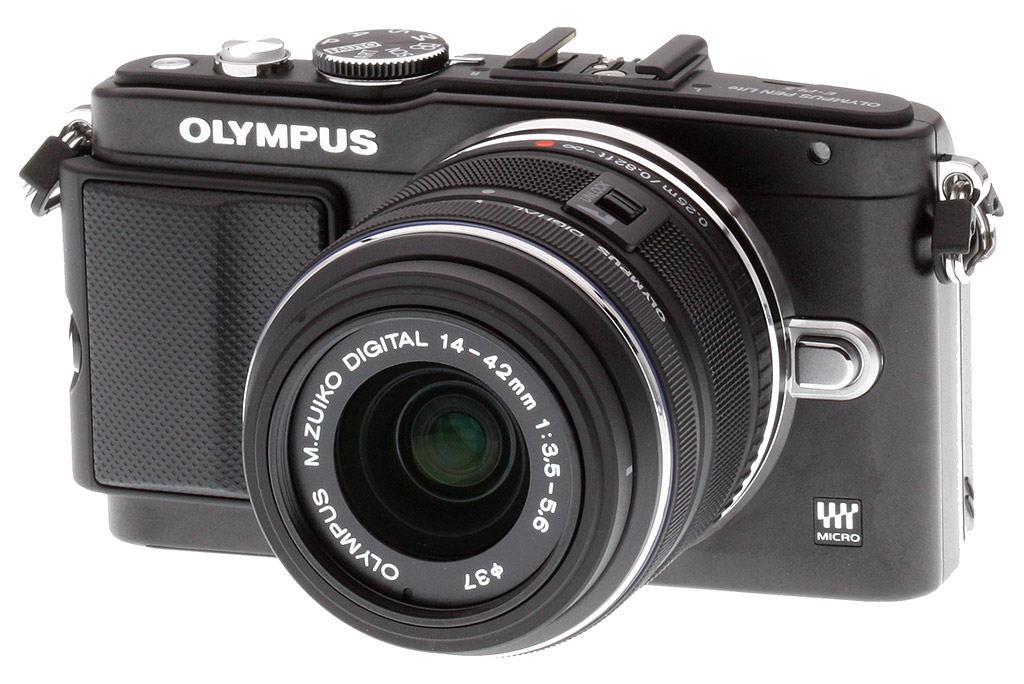
Tiny and feature-rich as they were, Olympus saw fit to revamp their two smallest PEN cameras just fifteen months after their introduction. The higher-end model, the Olympus PEN E-PL5, is still about the same size, but it gains a few features from both the E-P3 and the OM-D E-M5, both of which have some cool stuff to offer. The most obvious addition to the E-PL5 is the (included) removable grip from the E-P3. What isn't quite as obvious is the inclusion of the very fine 16-megapixel sensor handed down from the OM-D E-M5. Sitting up now? You should be, because that's a very good sensor, now available in the tiny, reasonably-priced Olympus E-PL5.

Design. I've spent a ton of time with the older cameras, and I didn't feel a great need for a grip, but don't mind that they've included one. Great that it's removable, though. More important and valuable is that 16-megapixel sensor that's impressed me so much in the E-M5. This matte black version is appealing for the street photographer, to be sure, though I'm sure the purist would prefer no chrome.

Stereo microphones flank the hot shoe, and a silver speaker grille peeks out form beneath the camera name. A simple mode dial is well positioned to avoid accidental activation. The power button is to the right of shutter button, and a small focal plane indicator is off to the right of that. It's important to note that this line of Pens still uses the D-rings, so you need to be careful when shooting video to silence this metal-to-metal connection to prevent rattle in your audio.

The Olympus E-PL5 retains the tilting 3-inch LCD screen, though the new design tilts upward 170 degrees to face forward for self-portraits. Note the deeper notch in the top of the LCD to better fit over the hot shoe. All the rest of the buttons are the same as the E-PL3, including a physical Mode dial up top, except that the Movie Record button has shifted right a bit, probably to reduce accidental activation.
One advanced feature, for those who are into it, is the addition of touchscreen capabilities to the Olympus E-PL5. That includes their touch shutter function, where touching on the screen focuses on that spot and fires. The touch shutter also works while recording HD videos, and like its predecessor, the E-PL5 can shoot movies up to Full HD (1,920 x 1,080-pixel) with stereo audio.
Fast shooter. As we say, the Olympus E-PL5 seemed very much like the E-PL3, until we first pressed the shutter button when it was in continuous drive mode, and it cranked off a few shots at a very rapid pace. This compact camera with a great sensor and in-body image stabilization can rip off up to 8 frames per second, something few larger DSLRs can do. Do note that the 8 fps only comes with focus locked -- it achieves a more pedestrian 3.5 fps while using AF tracking -- but it's still impressive.

Overall, Olympus's offerings are only getting more impressive, with the broadest range of small mirrorless lenses, very fast autofocus, small bodies, fast frame rate, innovative design and excellent image quality.
As an example of continuing Olympus innovation, the BCL-15 Body Cap Lens at left is a manual-focus design, focusing with the slider at front. It's a tiny 15mm prime lens with an f/8 aperture, though Olympus points out it has three good-quality glass elements. I found it was easy to focus by pressing the magnifying glass button on the back of the camera and sliding the focus control.
Shooting with the Olympus E-PL5
By Eamon Hickey

Ever since it was announced, the Olympus PEN E-PL5 has been tops on my wish list (a wish list that Santa callously ignored, I regret to say). My ideal camera would combine good overall performance and a reasonably advanced set of controls in the smallest possible package. The E-PL5 is aimed pretty squarely at that sweet spot, especially when you pair it with one of the many, very small Micro Four Thirds lenses available in the marketplace, so I was especially eager to get my hands on this little camera.

Size, feel and handling. I happened to be staying in the San Francisco Bay Area when testing the Olympus E-PL5, and for my first outing with the camera I decided to take it for a hike in an interesting place known as "The Dish Area" -- a kind of nature preserve owned by Stanford University, open to the public and dotted with several radio telescopes (a.k.a. dishes). I hiked the loop trail, a 3.5-mile path with a devilish array of steep 200 to 500 ft. ascents and descents. I shot about 50 pictures in a little more than two hours, and the E-PL5's weight and bulk (with the M.Zuiko 14-42mm f/3.5-5.6 II R kit lens) were simply unnoticeable. Over the course of the next week, I carried it with me for hours every day in small and large messenger bags, or hanging from my shoulder, and yet again it was too small and light to notice. I couldn't have been happier.
For the Dish hike, I had the included, detachable MCG-4 grip installed. It's plastic and fairly slim so doesn't add much bulk to the Olympus PEN E-PL5, but for me it didn't improve the grippability of the camera all that much, so I ended up banishing it to that part of my bag known as The Pocket of No Return. A nice touch that it's removable.

I love the portability of the Olympus PEN E-PL5 but physics always has the last word, and the camera's small size brings some inevitable handling compromises. Squeezing the tiltable LCD screen -- with its substantial mounting structure -- plus a reasonably serious array of external buttons and controls onto the back and top deck of this tiny camera makes for a cramped setup. I noticed it immediately on my hike as I was forced to develop new forms of finger yoga in order to simultaneously operate the buttons on the back of the camera and the shutter release (for reference, I'm 6'2" tall with the large-ish fingers that come along with that). And the right-side strap attachment was always in my way, interfering with my operation of the camera's crucial controls. If I were to buy an E-PL5, I'd definitely get one of the straps that attaches to a single point on the camera, and I'd hook it up to the left strap lug only.
Finger yoga aside, I had no trouble with the buttons and dials on the Olympus E-PL5 once I got them within reach. Yes, the controls are small, but I could quickly and precisely make exactly the setting changes I needed to. Bottom line: the E-PL5's small size causes a few minor handling drawbacks, but for me, the camera's superb portability more than makes up for it.

Menus. Unfortunately, the E-PL5 has a rather tricky -- dare we say, labyrinthine -- menu system that makes it difficult and time-consuming to sort through its considerable settings and controls.
Controls. Even before I hit the Dish trail, I spent a few hours going through the Olympus E-PL5's control setup and menu system -- and hours is what it takes. The camera is extremely customizable but the menu system is almost as extremely inscrutable at default. If you've got the patience, it's worth the time to explore all your options and set up the camera just the way you want it. Be advised, you will need the manual to figure this out.
My first step was to separate the E-PL5's autofocus activation from the shutter release and set the autofocus mode to Single AF + Manual Focus, which allows instant manual focus override. I loved the flexibility of this setup, which gave me a lot of seamless options for focusing quickly and accurately.
I then configured the Olympus PEN E-PL5's live view display to show me shadow and highlight clipping warnings and set the exposure system to give me direct control of the aperture with the rear dial and quick, one-click access to exposure compensation. With this setup I could very quickly zero in on the best exposure on several tricky late-afternoon shots on the Dish trail, -- including tree silhouettes and a pastoral image with cows grazing in a meadow lit by streaky sunlight, with a sidelit 150 ft. radio telescope in the background. It worked equally well for some flower and store window images I made in subsequent shoots in the downtown areas of two nearby towns, Menlo Park and Palo Alto.


Super Control Panel. Olympus balanced the difficult menu system with the easy and intuitive Super Control Panel. A welcome relief -- once you figure out how to activate it!
While shooting in those downtown areas, I was constantly moving in and out of shadow and sunlight, and, on one day, from twilight to night. So I was doing a lot of ISO changing from shot to shot. I tried assigning ISO to the Olympus E-PL5's function (Fn) button, but that didn't end up making me any happier than changing ISO through the camera's Super Control Panel (SCP). The SCP worked quite well once I got used to it. I also used it to quickly turn Image Stabilization on and off (I want it to be off and not mucking about with my pictures when my shutter speeds are high enough that it's not needed). The SCP also let me quickly change autofocus modes, burst shooting speeds and several other things. The SCP isn't better than dedicated buttons for those functions, but it didn't slow me down much, so I've got no complaints.
Unfortunately, Olympus did choose to bury the autoexposure bracketing function in the E-PL5's menus. I've used a lot of Olympus cameras over the past 10 years, and Olympus just doesn't seem to "get" bracketing; they apparently don't know why and how people want to use it. But I found a nice workaround. I created a custom function set (a "Myset" in Olympus lingo) with bracketing activated. And then I used a really nice feature of the E-PL5, which inadvertently saves Olympus from their own cluelessness about bracketing. You can re-assign positions on the mode dial -- iAuto or Art, for example -- to any of your four Mysets. So I re-assigned Art mode to my bracketing Myset and was able to go in and out of bracketing mode with an instant twist of the mode dial. This worked beautifully for occasions where I wanted to cover all my exposure bases, including some shots inside an iconic Menlo Park tavern called The Dutch Goose and on the nighttime streets of University Avenue in Palo Alto, which still had its Christmas lights up.


All in all, I came away satisfied with the Olympus E-PL5's controls. I was worried they'd be too rudimentary for me, but not so: the crucial basics of focus and exposure control are very well-implemented, and I could shoot happily with this camera for a long time.
Performance. It took just a few shots on the Dish Area trail to see that the Olympus E-PL5 autofocuses very fast on stationary subjects. Later, when I looked at these and the rest of my test shots closely on the computer, I found that the focus was also perfectly accurate. For static subjects, this camera's autofocus is just super reliable, and in fact, I ended up never really needing the manual focus override that I had enabled.
When my subjects started moving, things got a little rough. In downtown Menlo Park, I used the Olympus E-PL5 to make a few quick grab shots of some teenage boys bicycling on the sidewalks and the results: nearly all were out of focus. On subsequent days, taking life in hand, I stood on the side of a busy road and tried some tests on bicyclists and cars, using the camera's Continuous Autofocus mode and the Continuous Low burst mode (3 frames per second). And although I got some sharp shots (including one where a driver was staring back at me suspiciously -- sorry commuters!), my results were mixed at best. I don't think I would rely on this camera for fast-action shooting.


However, in the days that I shot with it, everything else about the Olympus E-PL5 was snappy -- just the way it should be. There's nothing good to be said about waiting for a camera to respond to control inputs, or write pictures to a memory card, or play back your images, and, happily, the PEN E-PL5 never made me wait.

LCD. I'm a big fan of tilting and articulating LCDs -- being able to compose easily with the camera held at different heights and angles is a huge benefit. So, for me, the Olympus PEN E-PL5's LCD was way ahead of the game from the start. In four different cafes and restaurants, I took pictures of the staff and customers around me, and the ability to frame my pictures accurately without raising the camera to my eye was a great boon. I liked it just as much for macro flower shots, and even just for general pictures, where I find it very natural to hold the camera below eye level. The world has no crying need for a lot of "selfies" from me, so the new feature that allows the E-PL5's LCD to tilt all the way around for self-portrait framing didn't change my life, but it works and I'm sure a lot of folks will love it.

VF-3: One of the three optional electronic viewfinders available for the E-PL5.
Don't tell anyone, but there's a lot of sunshine in California, and it was out in force on several of my shooting days. I shot a lot of backlit and sidelit scenes, especially on my Dish hike, and I found the Olympus PEN E-PL5's LCD to be mediocre for framing and viewing in bright light. Looking into the sun, I sometimes had trouble seeing what was in the frame. Although the sharpness of the PEN E-PL5's LCD isn't top tier, I had no problem with it, but then I don't try to do a lot of critical image evaluation in camera. As noted above, the screen has a 16:9 aspect ratio, while the camera's native aspect ratio is 4:3 (3:3, 16:9, 1:1 and 3:4 modes are also available), and Olympus uses the wider-than-necessary screen to display shooting information outside the image area; I wasn't bothered by this compromise.
Like its little brother, the E-PM2, the Olympus E-PL5's LCD features touchscreen controls -- which is a blessing if you like touchscreens, and rather inconsequential if you don't since the E-PL5 has a Mode dial and a more sophisticated set of physical controls. Because of my comfort level and familiarity with physical controls, I found myself rarely using the E-PL5's touchscreen (though I was forced to use it extensively on the E-PM2, and eventually I found I kind of liked it). You can use the touchscreen to focus and snap shots in both still and video modes, a feature which could come in handy when you quickly want to change a focus point and capture a fleeting moment when your eyes are trained on the LCD.


Kit lens. For the general kind of shooting I did while testing the Olympus E-PL5, the M.Zuiko 14-42mm f/3.5-5.6 II R kit lens covered a nice range of focal lengths (28-84mm in 35mm equivalent terms). It's very light and feels somewhat insubstantial, although the zoom action is smooth and the overall assembly quality is fine. When I focused it manually, which I did mainly for practice (the camera's AF is very reliable, as I said) I found the focus ring under-damped, but this is common with inexpensive AF lenses. The lens, in short, is functional and an above average performer optically, but like most kit lenses is nothing to write home about. Fortunately, Olympus is known for building lenses of exceptional quality for this mount, sold separately of course.
Image quality. Overall, I was very impressed with the quality of my images from the Olympus E-PL5. Sharpness and detail are excellent -- as good as or better than anything I've seen from other 16-megapixel cameras. (Its images even stack up nicely against the lauded Olympus OM-D E-M5, believe it or not.) I shot with the E-PL5 on several sunny days with high contrast levels, and the dynamic range of the camera was very much up to the task, capturing usable detail in a very wide tonal range.
I've always thought that Olympus has a fairly good eye for color, and the Olympus E-PL5's JPEG files live up to that tradition, with a nicely saturated but balanced color palette. Some flower pictures and sunlit landscapes, especially, showed off this quality. Finally, I thought the PEN E-PL5 did a great job at high ISO settings, retaining good detail with very low noise for a Micro Four-Thirds format camera.

Summary. Overall, I was very pleased with the Olympus E-PL5, especially the remarkable image quality and speed it delivers at such an affordable price. Considering that it performs as good as or better than many higher-end compact system cameras and DSLRs, the E-PL5 is a tremendous value and an equally worthwhile option for budding photographers stepping up to their first interchangeable lens camera as it is for experienced DSLR users looking for a smaller, more portable system.
Olympus E-PL5 Additional Shooting Modes and Options
by Dave Pardue
To illustrate more of what the Olympus E-PL5 has to offer we shot additional images using a variety of the camera's built-in modes and creative filters, as well to demonstrate how it performed with a few of Olympus' more touted lenses.
| Olympus E-PL5 gallery images shot with specialty Olympus lenses |
 |
|
The above image was shot using the Olympus 60mm f/2.8 M.Zuiko Digital ED (120mm equivalent), a specialty macro lens that tested exceptionally well in our lens testing lab at SLRgear.com (and scored a reader's overall rating of 10 / 10). Paired with the E-PL5 it makes a high quality (yet amazingly lightweight) macro solution.
|
 |
|
This image was shot using the Olympus 75-300mm f/4.8-6.7 M.Zuiko Digital ED (35mm equivalent range of 150-600mm) at 187mm, f/6.7. Both the subject sharpness and the nice bokeh are evident here, yet again showcasing the power of the E-PL5 when paired with a terrific lens.
|
| The Olympus E-PL5 ships with a good kit lens which is a steal for only ~$50 more than the body, but Olympus has released several exceptional lenses to support its Micro Four Thirds cameras that you should consider (especially after seeing what some of them can do above). For more information on E-PL5 lens options, visit our Olympus lens page at SLRgear.com. |
Olympus E-PL5 Creative Effects Modes |
|
 |
 |
Program Auto (no effect) |
Pop Color |
 |
 |
Grainy Film |
Diorama |
 |
 |
Cross Process |
Dramatic Tone |
|
The E-PL5 ships with a nice range of creative Art modes, many of which are on display above. I was pleased to see that the "Dramatic Tone" effect that I've become accustomed to on the E-P3 comes in similar fashion on the E-PL5. It is such a useful effect that I try and bracket with it whenever possible.
|
|
Movies. While the E-PL5 is designed primarily with still photography in mind, it can certainly stand in as a quick video solution when needed. It shoots in Full HD resolution (1920 x 1080 at 30p) and can be set to continuous autofocus if desired. There is a Movie mode on the Mode dial, but video can also be triggered using the dedicated Movie Record button while in any of the modes in a pinch as needed. The videos below were shot with continuous autofocus set to On.
Olympus E-PL5 Image Quality Comparison
Below are crops comparing the Olympus E-PL5 with the Olympus E-PL3, Olympus E-PM2, Olympus OM-D E-M5, Panasonic G5, and the Sony NEX-F3. We're starting with the base ISO to show the best each camera can do, then moving onto ISO 1600, 3200, and then more details with ISO 6400 below.
NOTE: These images are best quality JPEGs straight out of the camera, at default settings including noise reduction.
Olympus E-PL5 versus Olympus E-PL3 at base ISO
 |
 |
 |
 |
 |
 |
Olympus E-PL5 at ISO 200 |
Olympus E-PL3 at ISO 200 |
The E-PL5 has almost 4 more megapixels than its predecessor, the E-PL3, and the higher resolution certainly helps in the image quality department, delivering better detail. |
|
Olympus E-PL5 versus Olympus E-PM2 at base ISO
|
 |
|
 |
|
 |
Olympus E-PL5 at ISO 200 |
Olympus E-PM2 at ISO 200 |
These employ the same sensor so we would assume a similar result, as is the case. This will be welcome news to anyone choosing the lighter E-PM2 (lighter in weight and price) in knowing that they are not sacrificing much in the image quality department. |
|
Olympus E-PL5 versus Olympus E-M5 at base ISO
|
 |
|
 |
|
 |
Olympus E-PL5 at ISO 200 |
Olympus E-M5 at ISO 200 |
While the sensor sizes and resolutions are the same, the E-M5 is slightly superior in several key areas, especially the detail in the mosaic pattern and the slight increase in clarity in the red leaf swatch. But the E-PL5 is not too far behind and costs much less than its heavily touted big brother. |
|
Olympus E-PL5 versus Panasonic G5 at base ISO
|
 |
|
 |
|
 |
Olympus E-PL5 at ISO 200 |
Panasonic G5 at ISO 160 |
It's always interesting when comparing these images when one camera gets one area better, and then vice versa for the other camera. The E-PL5 has better color overall and greater clarity in the mosaic pattern, but the G5 is far superior in accurately rendering the difficult red leaf swatch. |
|
Olympus E-PL5 versus Sony NEX-F3 at base ISO
|
 |
|
 |
|
 |
Olympus E-PL5 at ISO 200 |
Sony NEX-F3 at ISO 200 |
The NEX-F3 has an APS-C sensor, and does a better job in the fabric swatches, but the E-PL5 shines in the color and detail of the mosaic. |
|
Most digital SLRs and CSCs will produce an excellent ISO 100 shot, so we like to push them and see what they can do compared to other cameras at ISO 1600, 3200, and 6400. Recent advances in sensor technology have made ISO 1600 look a lot more like ISO 100, but there are still cameras whose quality starts to fall apart at this setting. We also choose ISO 1600 because we like to be able to shoot at least at this level when indoors and at night.
Olympus E-PL5 versus Olympus E-PL3 at ISO 1600
 |
 |
 |
 |
 |
 |
Olympus E-PL5 at ISO 1600 |
Olympus E-PL3 at ISO 1600 |
Again, the higher resolution of the E-PL5 is on display above, although the E-PL3 does an admirable job on the Mas Portel (top) bottle. |
|
Olympus E-PL5 versus Olympus E-PM2 at ISO 1600
|
 |
|
 |
|
 |
Olympus E-PL5 at ISO 1600 |
Olympus E-PM2 at ISO 1600 |
As we saw at base ISO, these two are almost too close to call. Both do a reasonable job for ISO 1600, especially in the nice renditioning of colors. |
|
Olympus E-PL5 versus Olympus E-M5 at ISO 1600
|
 |
|
 |
|
 |
Olympus E-PL5 at ISO 1600 |
Olympus E-M5 at ISO 1600 |
The higher priced E-M5 does a slightly better job in most all areas than the E-PL5, especially the red leaf swatch, but the E-PL5 is clearly not far behind. |
|
Olympus E-PL5 versus Panasonic G5 at ISO 1600
|
 |
|
 |
|
 |
Olympus E-PL5 at ISO 1600 |
Panasonic G5 at ISO 1600 |
Accurate colors and fine detail are far better in the E-PL5, while the G5 starts to lose steam at this ISO, quickly degrading in both color saturation and contrast. |
|
Olympus E-PL5 versus Sony NEX-F3 at ISO 1600
|
 |
|
 |
|
 |
Olympus E-PL5 at ISO 1600 |
Sony NEX-F3 at ISO 1600 |
Other than the red leaf swatch, the E-PL5 holds its own rather well here. Also note how aggressive noise reduction and sharpening on the NEX-F3 seems to produce odd artifacts in the lower pink fabric swatch. |
|
Today's ISO 3,200 is yesterday's ISO 1,600, so below are the same crops at ISO 3,200.
Olympus E-PL5 versus Olympus E-PL3 at ISO 3200
 |
 |
 |
 |
 |
 |
Olympus E-PL5 at ISO 3200 |
Olympus E-PL3 at ISO 3200 |
Yet again the higher resolution E-PL5 is in a different league than its predecessor for high ISO image quality, doing a good job for ISO 3200. |
|
Olympus E-PL5 versus Olympus E-PM2 at ISO 3200
|
 |
|
 |
|
 |
Olympus E-PL5 at ISO 3200 |
Olympus E-PM2 at ISO 3200 |
Just as before, there's virtually no difference between these two first cousins. |
|
Olympus E-PL5 versus Olympus E-M5 at ISO 3200
|
 |
|
 |
|
 |
Olympus E-PL5 at ISO 3200 |
Olympus E-M5 at ISO 3200 |
While the E-M5 performed slightly better at the lower ISOs, the playing field seems to have leveled off here, with very little difference between the two. Anyone considering buying an E-PL5 will be glad to note this. |
|
Olympus E-PL5 versus Panasonic G5 at ISO 3200
|
 |
|
 |
|
 |
Olympus E-PL5 at ISO 3200 |
Panasonic G5 at ISO 3200 |
The E-PL5 holds itself together at ISO 3200, but the G5 starts to fall apart, with odd noise in the Mas Portel bottle and loss of most all detail in the mosaic pattern. |
|
Olympus E-PL5 versus Sony NEX-F3 at ISO 3200
|
 |
|
 |
|
 |
Olympus E-PL5 at ISO 3200 |
Sony NEX-F3 at ISO 3200 |
The NEX-F3 again wins the contest in the red leaf swatch, but otherwise the E-PL5 holds its own against the Sony and its larger sensor. |
|
Detail: Olympus E-PL5 versus Olympus E-PL3, Olympus E-PM2, Olympus E-M5, Panasonic G5, and Sony NEX-F3
 |
 |
 |
 |
 |
 |
 |
 |
 |
 |
 |
 |
 |
 |
 |
 |
 |
 |
| Olympus E-PL5 ISO 200 ISO 3200 ISO 6400 |
Olympus E-PL3 ISO 200 ISO 3200 ISO 6400 |
Olympus E-PM2 ISO 200 ISO 3200 ISO 6400 |
Olympus E-M5 |
Panasonic G5 ISO 160 ISO 3200 ISO 6400 |
Sony NEX-F3 ISO 200 ISO 3200 ISO 6400 |
| Detail comparison. When it comes to high-contrast detail, the Olympus E-PL5 does surprisingly well as ISO rises, easily besting its predecessor the E-PL3, and also looking good against its APS-C rival the NEX-F3. With the slight exception of the higher-priced E-M5, the E-PL5 is the sharpest of the bunch, especially at ISO 6400. | |||||
Olympus E-PL5 Print Quality
 Prints a nice 24 x 36 at ISO 200; ISO 1600 capable of a good 13 x 19 inch print; with a good 4 x 6 at ISO 12,800.
ISO 200 prints look very good at 24 x 36 inches, and yields a suitable wall display print up to 36 x 48.
ISO 400 prints are nice and crisp at 20 x 30, with minor softening in the red swatch of our test target (which is typical for many cameras); capable of a nice wall display print up to 30 x 40.
ISO 800 yields a good 16 x 20 inch print with the exception of a loss in contrast in our red swatch, but is otherwise sharp with vibrant colors.
ISO 1600 prints look good at 13 x 19 inches, with minor noise in the shadows and minor previously mentioned softness; suitable for less critical applications at 16 x 20 inches.
ISO 3200 yields prints that we consider good at 11 x 14, but a lot of people will find 13 x 19 perfectly acceptable.
ISO 6400 prints a nice 8 x 10 for this ISO, with only minor grain in the shadows of our target.
ISO 12,800 yields a decent 4 x 6 inch print, with nice color for such a high ISO.
ISO 25,600 prints are a bit too grainy to be called good at 4 x 6.
The Olympus E-PL5 is capable of producing nice large prints at low ISOs, outstanding for its price. It demonstrates excellent high ISO performance up to ISO 1600, and makes surprisingly nice-looking 8 x 10s at ISO 6400. Please note that we shoot these test shots with our sharp reference lenses in order to show what the camera body is capable of, and results with the kit lenses may vary somewhat.
Olympus E-PL5 Technical Info
by Mike Tomkins
 |
 |
At its heart, the Olympus E-PL5 shares much with the incredibly popular OM-D E-M5: it shares the exact same pairing of image sensor and processor, but places them in a much smaller body. (It's still all-metal, though, and comes with a removable hand grip to let you choose if you prefer less bulk or a better feel in-hand.) The Olympus PL5's image sensor is a 4:3-aspect, 16.1-megapixel Live MOS sensor supplied by Sony. It's capable of providing images at a maximum resolution of 4,608 x 3,456 pixels. Sensitivity from the chip ranges as high as ISO 25,600 equivalent. |
Output from the imager is handled by a TruePic VI image processor, a designation first seen in 2011's E-P3 mirrorless camera. Although it's the same processor used in the E-M5, the Olympus PL5's burst performance isn't quite as swift as that camera. With focus locked, the E-PL5 can deliver a full eight frames per second, swift by mirrorless standards but still one less than the E-M5 provides. Enable tracking autofocus though, and this falls to a more sedate 3.5 frames per second. That's about 0.7 fps slower than the E-M5 managed. |
 |
|
Like all PEN-series models, the Olympus E-PL5 sports a Micro Four Thirds lens mount that can accept a wide selection of over 30 dedicated lenses from Olympus, Panasonic, and Voigtländer. (Admittedly, several of these are very similar to each other in specification; there's still a little over 20 models that are reasonably distinct, however.) Courtesy of various first- and third-party adapters, the Micro Four Thirds mount can also accept a huge variety of older glass including lenses made for Olympus and Panasonic's full-sized Four Thirds cameras, albeit often with limitations regarding autofocus, exposure, etc. There were several new lenses announced alongside the Olympus PL5. These include the unusual BCL-15 Body Cap Lens (a 9mm-thick, three element f/8, manual focus pancake which sells for ~US$50), the M.ZUIKO DIGITAL ED 60mm f2.8 (US$500), and a limited-edition black version of the M.ZUIKO DIGITAL ED 12mm f2.0 (US$1,100). The latter two lenses started shipping in October 2012. The new M.ZUIKO DIGITAL 17mm f1.8 (US$500) prime also started shipping December 2012, and the revised M.ZUIKO 75-300mm f4.8-6.7 II ED (US$550) telephoto zoom started shipping March 2013. Although the Olympus PEN PL5 does include in-body image stabilization, it's not the same system used in the E-M5. Hence, it corrects only for pitch and yaw like most other stabilization systems. It lacks the E-M5's ability to correct for roll, or for up/down and left/right translational motions. Another thing that does make it across intact from the popular E-M5 is the PEN E-PL5's contrast detection autofocus system. Branded as "Frequency Acceleration Sensor Technology," or "FAST" AF for short, it's a system that's claimed to offer the world's fastest autofocusing when coupled with the M.Zuiko Digital ED 12-50mm f/3.5-6.3 EZ lens. That comes thanks to a stunning readout speed of 240 frames per second (but with reduced accuracy) for continuous autofocus, and a more typical 120 fps readout rate (with maximum accuracy) for single autofocus. Like that in the M5, the Olympus PL5's contrast detection AF system still has 35 fixed autofocus point locations, with the points arranged in a 7 x 5 array that covers most of the image frame. You can switch to a small single-point focus point that you can position where you need it simply by tapping on the camera's touchscreen, however. And to help out with focusing on nearby subjects in low light, the PL5 retains its predecessor's autofocus assist lamp. As you'd expect, Olympus' dust removal system is included in the E-PL5. This vibrates the cover glass over the sensor with a dedicated piezoelectric element to shake dust free, then captures it on an adhesive strip beneath the sensor. |
|
 |
|
There's no built-in viewfinder, but the Olympus E-PL5 retains the company's proprietary Accessory Port 2 just beneath its flash hot shoe, which allows the camera to accept a number of accessories. These include the same two electronic viewfinders used with past Olympus cameras (VF-2 and VF-3), the new VF-4 (with firmware upgrade), along with the SEMA-1 external microphone adapter, MAL-1 Macro Arm Light, and PENPAL Bluetooth Communication Unit accessories. |
|
 |
 |
The PL3's 3.0-inch, 460K-dot, 16:9 aspect LCD panel is retained in the PEN PL5, but with a couple of important changes. First, the articulation mechanism now has an expanded swivel range of approximately 170° up and about 65° down. That means you can now frame self-portraits using the LCD, so long as nothing is mounted in the hot shoe. |
Also, the panel itself now has a gapless design which places a capacitive touch sensitive layer in between the LCD itself and the protective cover glass. The removal of the air gap should translate to reduced glare and better contrast. There's also now an anti-smudge coating that should reduce the likelihood of fingerprints on the display. You can now opt for Vivid or Natural display modes, as well. |
We've mentioned the touchscreen, by the way, and it's worth noting that this is a new addition since the E-PL3. The Olympus PL5's touch screen not only allows you to set focus and make adjustments; you can even trip the shutter with a tap on the LCD panel. And since it's a capacitive design like higher-end smartphones, it should be sensitive enough to do so with very little camera shake. |
|
 |
 |
There's no built-in flash, but the Olympus PL5 does come with the same FL-LM1 accessory flash that was included with the PL3. This flash has a guide number of 10 meters at ISO 200 equivalent. The E-PL5's hot shoe can also accept a variety of other, more powerful strobes. Flash sync is possible up to 1/250 second depending on the flash, and the E-PL5 also allows Super FP flash between 1/125 and 1/4,000 second, if supported by the attached flash. The E-PL5 also supports four-channel wireless flash with the bundled strobe acting as a master, and off-camera flash strobes configured in up to 3 groups. Olympus has made a number of changes to the creative options in the PEN PL5. These include a new high dynamic range bracketing mode, and an additional six Art Filters. Unfortunately, the new HDR bracketing mode does not automatically combine multiple shots like some cameras, but is still useful for post processing an image with greater dynamic range than is possible in a single exposure. Exposure steps are larger than what's available with standard exposure bracketing. Options are: 3 or 5 frames in 2 or 3 EV steps, or 7 frames in 2 EV steps. The additional Art Filters are Pale & Light Color, Light Tone, Cross Process, Gentle Sepia, Key Line and Watercolor, which are added to the six filter types found in the PL3 (Pop Art, Soft Focus, Grainy Film, Pin Hole, Diorama, and Dramatic Tone). |
You can still record high definition (1,920 x 1,080 pixel) movies with the Olympus PL5, but there are a few changes and additions in this area, too. The E-PL3 shot Full HD (1080i) at 60i and HD (720p) at 60p while the E-PL5 shoots both at 30p. File format has also changed from MTS to more widely supported MOV (MPEG-4AVC/H.264). Both cameras also offer 720p and VGA resolutions in AVI Motion JPEG format, also at 30p. Like its predecessor, image stabilization in movie mode is electronic only. Thanks to the new touchscreen, you can now simply tap to select a new focus point during video capture, making it easy to guide your viewers' attention to a different subject. You can also now switch between different art filters during recording, something we've not seen before from any manufacturer. So that the change isn't jarring, one filter effect will fade out and the other will fade in. It's a neat idea that could be fun if you're the type who enjoys these effects. You can also now enable what Olympus calls Movie Teleconverter, which is essentially a variable focal length crop. Since there's no mechanical adjustment being made, this is silent. It also shouldn't significantly degrade image quality, since you're not using interpolation. (Beyond that inherent in all Bayer-filtered cameras, anyway.) |
 |
 |
Connectivity includes the Accessory Port 2, USB 2.0 data, Micro HDMI (Type D), and an analog audio/video output via the combined USB/AV port. The USB port also supports the RM-UC1 remote cable. The Olympus E-PL5 doesn't include built-in WiFi connectivity, but the company has built support for Toshiba's FlashAir WiFi-capable flash cards into the PL5's firmware. An Olympus application for Android and iOS operating systems allows sharing of photos from the camera via your smartphone, as well as application of filters to the photos before sharing. You can also use the existing PenPal accessory to transfer images to your phone via Bluetooth. |
There's a Secure Digital card slot, and it supports both the higher-capacity SDHC or SDXC card types, plus the higher-speed UHS-I types. Eye-Fi cards are also supported, though not Endless Memory. Secure Digital cards with a Speed Class of 6 or above are recommended for HD movie recording. Power comes courtesy of a proprietary BLS-5 lithium-ion battery pack, and a BCS-5 charger is included in the product bundle. The BLS-5 lithium-ion battery pack is CIPA-rated for 360 shots per charge, though we don't know if that includes 50% flash shots with the bundled FL-LM1 flash. Olympus does not appear to offer an AC adapter for the E-PL5. |
 |
|
Available since October 2012, the Olympus PEN E-PL5 was originally priced at about US$650 body-only. Three body colors are available: black, silver, or white. A kit bundling the M.ZUIKO DIGITAL 14-42mm f3.5-5.6 II R zoom lens listed for about US$700 at launch. Since then, Olympus has reduced MSRP of both the body and kits by about US$100. Several new accessories are offered alongside the PEN E-PL5 camera body. These include the CS-38B leather body jacket in four different colors, the MCG-3PR camera grip in three different patterns, and the CBG-8 camera bag. |
|
In the Box
The Olympus E-PL5 retail kit package (as reviewed) contains the following items:
- Olympus E-PL5 camera body (in black, silver or white)
- 14-42mm Olympus M.Zuiko Digital zoom lens
- Flash FL-LM1
- Rechargeable Li-ion battery BLS-5
- Battery charger BCS-5
- USB cable
- AV cable
- Shoulder strap
- Olympus Viewer 2 software (CD-ROM)
- Instruction manual
- Warranty card
- MCG-4 standard removable grip
Recommended Accessories
- Large capacity SDHC/SDXC memory card. 16GB Class 6 should be a minimum.
- Spare battery BLS-5 (~US$42)
- Electronic Viewfinder VF-2 (Silver) (~US$250)
- Leather Protective Body Jacket (~US$60)
- External Microphone Adapter Set (SEMA-1) (~US$90)
Olympus E-PL5 Conclusion
| Pro: | Con: |
|---|---|
|
|
We've been very pleased with the image quality and overall speedy performance of the Olympus PEN compact system camera line over the past couple of years, and the E-PL5 stands out as a significant evolution on almost every front.
First off, the Olympus E-PL5 inherits the exceptional 16-megapixel sensor from the groundbreaking OM-D E-M5, one of our all-time favorite cameras we've ever reviewed. Bolstered by this sensor and the TruePic VI image processor (also borrowed from the E-M5), the image quality we saw from the E-PL5 proved to be nothing less than stellar -- demonstrating accurate colors, an impressive dynamic range and tons of detail. When you consider the camera's price, such image quality is an outright amazing feat that rivals much higher-end CSCs and DSLRs.
The E-PL5 also improves upon the quick operation of its predecessor, the E-PL3, providing blazing speed in terms of start up, mode switching, autofocus, single-shot cycle times and more. The camera's Continuous mode averaged 8 frames per second -- not too shabby -- but falls to a more pedestrian 3.5 fps when tracking AF is enabled. Overall, we found the FAST (Frequency Acceleration Sensor Technology) AF to be responsive and accurate in most situations, though our reviewer said he wouldn't rely too heavily on it for capturing fast-motion action.
One major issue we had with the Olympus E-PL5 was its labyrinthine menu system, which most of us here at IR found we had difficulties figuring out. Our reviewer spent hours solving its riddles, but once he mastered them, he was able to activate the camera's Super Control Panel and create a bunch of presets (Olympus Mysets) that made for much easier (and outright convenient) operation. Happily, by digging through the E-PL5's maze of settings and shooting options, we fully uncovered its plethora of advanced functions and its immense customizability, and we were impressed by how sophisticated this tiny camera could be for a patient and motivated photographer.
For all these reasons and more, the Olympus E-PL5 should be seriously considered by any enthusiast looking to ditch their DSLR and move over to a more affordable, compact system (or at least as a backup camera when portability is key). It also should be a top contender for beginning photographers looking to step up from their point-and-shoots, especially considering that the Olympus E-PL5 offers tremendous image quality, speed and flexibility at such a competitive price. You bet it's a Dave's Pick.
Don't need a physical mode dial and tilting LCD? Save $100 and get the Olympus E-PM2 instead!
Follow Imaging-Resource.com on twitter!
Optics
Kit Lens Test Results
Zoom
Typical zoom range for a kit lens, with good performance.


The Olympus E-PL5 is available bundled with an Olympus M.ZUIKO 14-42mm f/3.5-5.6 II R Micro Four Thirds lens. This kit lens possesses a typical optical zoom range of about 3x, and its 35mm equivalent focal range is about 28-84mm, because of the E-PL5's 2x "crop factor." Far-field performance at 14 and 25mm is very good with strong detail and good contrast across the frame, though some chromatic aberration can be seen in the corners and edges. Results are good at the 42mm setting, with good sharpness and contrast, though some chromatic aberration is still visible, as well as some flare around very bright objects. The camera's 2x digital zoom does a good job, though with the expected loss of fine detail and more visible noise that comes with digital enlargement. Overall, though, above average performance here for an inexpensive kit lens. See below for comments on macro performance, geometric distortion, corner softness, etc.
Macro
An average sized minium area, with good detail. Flash exposure is a bit dim.


As with zoom performance, the Olympus PEN E-PL5's macro performance will depend entirely on the lens in use. With the 14-42mm II kit lens set to 42mm, the Olympus E-PL5 captured a fairly average minimum area measuring 2.75 x 2.06 inches (70 x 52 millimeters). Sharpness is quite good over most of the frame, though corners are a touch soft. (Most lenses have some softening in the corners at macro distances.) Extreme corners show a very small amount of light falloff, though that's not unusual. The bundled flash throttled down a bit too much at this close distance, resulting in a slightly underexposed image.
Geometric Distortion
Very low to moderate geometric distortion with the 14-42mm II kit lens in JPEGs. High barrel distortion at wide angle in uncorrected raw files.
| In-Camera JPEG: Barrel distortion at 14mm is 0.6 percent |
 |
| In-Camera JPEG: Pincushion distortion at 42mm is practically nonexistent |
 |
| Uncorrected RAW: Barrel distortion at 14mm is 2.4 percent |
 |
| Uncorrected RAW: Barrel distortion at 42mm is is practically nonexistent |
 |
When shooting JPEGs, the Olympus PEN E-PL5's 14-42mm kit lens produced about 0.6 percent barrel distortion at wide angle, which is slightly less than average but still noticeable in some of its images. At the telephoto end, there is almost no visible distortion, only about two pixels. This is the tendency for the lens to bend straight lines outward (like a barrel -- usually at wide-angle) or inward (like a pincushion -- usually at telephoto).
To see how much correction is taking place in the camera, we converted raw files from the above shots with dcraw, which does not correct for distortion. As you can see, at wide angle, barrel distortion is very high at about 2.4%, though pincushion distortion at telephoto is very low, almost nil. We expect to see high distortion at wide angle from smaller interchangeable lenses though, so it's nothing to be concerned about unless you are using a raw converter which does not understand the embedded "opcodes" to perform distortion corrections automatically. Most raw converters these days are capable of applying distortion correction automatically, as specified by the manufacturer. (There is however going to be some loss of resolution as a result of such correction, because pixels in the corners of the frame are being "stretched" to correct for the distortion. Obviously, a lens that doesn't require such correction, and is also sharp in the corners to begin with would be preferable, but relaxing constraints on barrel and pincushion distortion likely brings other benefits in the lens design, such as cost, size and weight.)
Chromatic Aberration and Corner Sharpness
Moderate chromatic aberration at wide angle and telephoto with the 14-42mm II kit lens. Some corner softening wide open.
Aperture: maximum |
|
 |
 |
| 14mm @ f/3.5: Lower right C.A.: Moderate Softness: Soft |
14mm @ f/3.5: Center C.A.: Very low Softness: Sharp |
 |
 |
| 42mm @ f/5.6: Upper left C.A.: Moderately low Softness: Soft |
42mm @ f/5.6: Center C.A.: Very low Softness: A hint soft |
Chromatic Aberration. Chromatic aberration in the corners with the E-PL5's 14-42mm II kit lens is moderate and noticeable at wide angle (14mm), and a little lower at telephoto (42mm) when wide open. In both cases, the color fringing gradually reduces in brightness and width as it approaches the center of the image, where it is practically nonexistent.
The Olympus E-PL5 does not appear to be suppressing lateral chromatic aberration in its JPEGs, as uncorrected raw files have similar amounts.
Corner Softness. The Olympus E-PL5's 14-42mm kit lens produced soft corners at full wide angle and telephoto when wide open. At wide angle, the bottom right corner is the softest, while at full telephoto, the upper left is the softest. The center is quite sharp at wide angle, and just a touch soft at telephoto.
Vignetting. There's some mild vignetting (corner shading) particularly at wide angle, as indicated by the darker corner crops compared to the center.
Aperture: f/8 |
|
 |
 |
| 14mm @ f/8: Lower right C.A.: Moderate Softness: Fairly sharp |
14mm @ f/8: Center C.A.: Low Softness: Sharp |
 |
 |
| 42mm @ f/8: Upper left C.A.: Moderately low Softness: Fairly sharp |
42mm @ f/8: Center C.A.: Very low Softness: Sharp |
Chromatic Aberration. With the aperture stopped down to f/8, chromatic aberration in the corners is still moderate at wide angle, and moderately low at telephoto.
Corner Softness. Corner sharpness improved at both wide angle and telephoto when stopped-down to f/8, and sharpness improved in the center at full telephoto as well.
Vignetting. Vignetting also improves to the point of being negligible at f/8.
Pretty good performance overall for an inexpensive zoom kit lens. Yes, chromatic aberration could be lower, but keep in mind that unlike Olympus PENs, most cameras suppress chromatic aberration in JPEGs these days.
Shading Compensation
The Olympus E-PL5 features optional Shading Compensation to reduce vignetting in JPEG images.
 |
||
| Shading Compensation: (14mm @ f/3.5) |
Off | On |
Mouse over the links above to compare thumbnails, and click on the links to load the full resolution images.
As you can see, the Olympus E-PL5's Shading Compensation reduces corner shading with the 14-42mm kit lens, so it's a useful feature at wide angle when shooting wide open. There's little corner shading to correct at telephoto.
Shading Compensation is off by default, not available when shooting video or when burst rate is set to SH, and is not available with all lenses. It may also produce more visible noise in the periphery at higher ISOs.
Olympus E-PL5 Viewfinder
Viewfinder Test Results
Accuracy
Excellent accuracy from the LCD monitor.

The Olympus PEN E-PL5's LCD monitor proved very accurate in record mode, showing essentially 100% coverage with our Olympus Zuiko Digital 50mm f/2.0 low distortion prime. Excellent results here.
The images above were taken from our standardized test shots. For a collection of more pictorial photos, see our Olympus PEN E-PL5 Photo Gallery .
Exposure
Color
Saturation & Hue Accuracy
Accurate saturation levels with very good hue accuracy.
 |
|||
|
ISO Sensitivity
|
|||
| 25600 | |||
| In the diagram above, the squares show the original color, and the circles show the color that the camera captured. More saturated colors are located toward the periphery of the graph. Hue changes as you travel around the center. Thus, hue-accurate, highly saturated colors appear as lines radiating from the center. Mouse over the links to compare ISOs and click for a larger version. | |||
Saturation. The Olympus E-PL5 pushes reds a fair bit, but most other colors are pretty close to bang on in terms of saturation. Default saturation at base ISO is 106.8% (6.8% oversaturated), which is lower than average; that is, it's more accurate than most. Saturation remains fairly stable across the ISO range, except at ISO 6,400 and above where it falls off, particularly in purples and dark green. You can always adjust saturation, or select a different picture mode to adjust color to your tastes. Most consumer digital cameras produce color that's more highly saturated (more intense) than what's found in the original subjects. This is simply because most people like their color a bit brighter than life.
Skin tones. Here, the Olympus E-PL5 did fairly well, producing natural-looking Caucasian skin tones, just slightly on the warm side. Where oversaturation is most problematic is on Caucasian skin tones, as it's very easy for these "memory colors" to be seen as too bright, too pink, too yellow, etc.
Hue. The Olympus PEN E-PL5 does shift cyan toward blue, light green toward yellow, oranges toward yellow, etc., but shifts are fairly minor. (The shift from cyan to blue is much less pronounced than most cameras, leaving sunny sky colors a little warmer than most.) Overall hue accuracy is quite good with a Delta-C color error after correction for saturation of 4.27 at base ISO, which is better than average. Hue is "what color" the color is.
Saturation Adjustment
The Olympus E-PL5 lets you adjust the image saturation, contrast, and sharpness in five steps each. As can be seen below, the saturation adjustment was quite effective, covers a useful range, and does a good job of not impacting contrast.
| Saturation Adjustment Examples | ||
 |
 |
 |
| -2 | 0 | +2 |
The table above shows results with the default as well as the two extreme saturation settings. Click on any thumbnail above, then click again to see the full-sized image.


Sensor
Exposure and White Balance
Indoors, incandescent lighting
Very warm cast with Auto White Balance, cool with 2,600K setting, but good color with the Incandescent and Manual settings. Average exposure compensation required.


Indoors, under normal incandescent lighting, color balance was very warm and orange using the Auto white balance setting. Results with the Incandescent setting were quite good, almost identical to the Manual setting, which was the most accurate. The 2,600 Kelvin setting was quite cool with a blue-green tint. The Olympus E-PL5 required an average amount of positive exposure compensation here, at +0.3 EV. (Our test lighting for this shot is a mixture of 60 and 100 watt household incandescent bulbs, a pretty yellow light source, but a very common one in typical home settings here in the U.S.)
Outdoors, daylight
Natural looking colors overall, with good exposure.
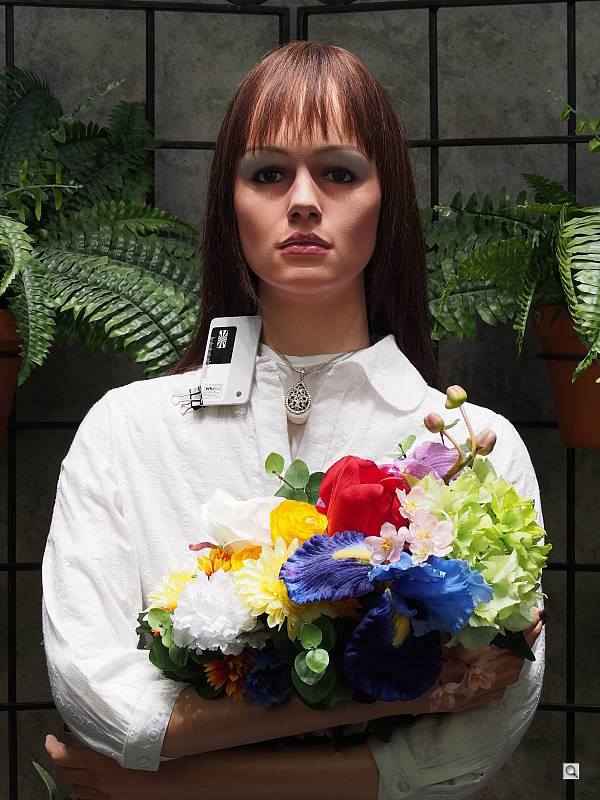
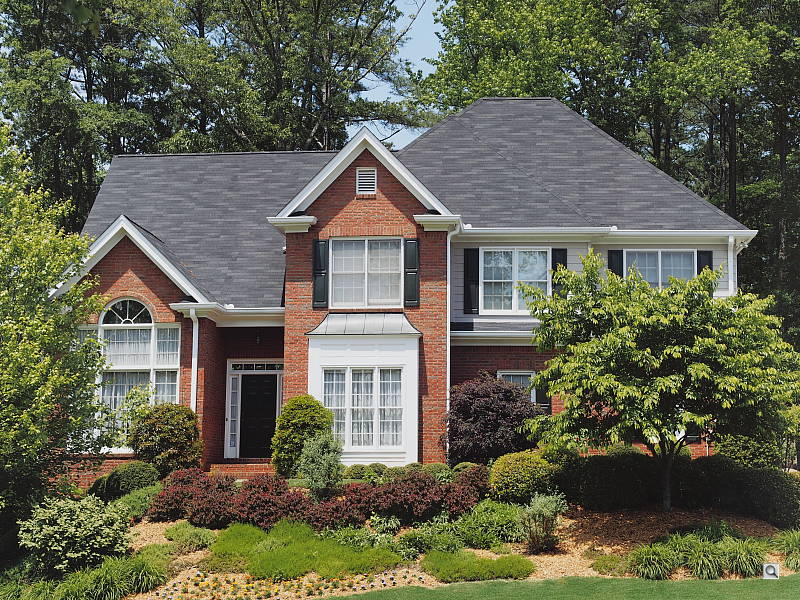
Outdoors, the Olympus E-PL5 performed well, with pleasing if slightly warm colors, and good exposure. We prefer the skintones with the Auto white balance setting in our "Sunlit" Portrait shot, though Manual white balance produced very similar results. The Olympus E-PL5 required an average amount of positive exposure compensation (+0.7 EV) to keep facial tones reasonably bright. Default contrast is a bit high, but despite the bright appearance there are very few blown highlights in the mannequin's shirt and flowers, which is much better than average. The Far-field shot is just slightly underexposed at default settings, but has almost no blown highlights, though there are some deep shadows. Noise in all but the deepest shadows is however very low for a Micro Four Thirds camera.
See full set of test images with explanations
See thumbnails of all test and gallery images
Resolution
Very high resolution, ~2,300 lines of strong detail in JPEGs, about the same from processed raw files.


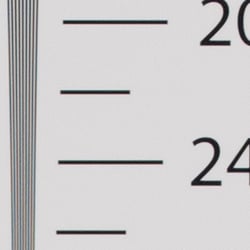

In-camera JPEGs our laboratory resolution chart reveals sharp, distinct line patterns down to about 2,300 lines per picture height in both the horizontal and vertical direction before aliasing artifacts start to interfere with the pattern. Complete extinction of the pattern doesn't occur until about 3,000 to 3,200 lines, though. Adobe Camera Raw wasn't able to extract more resolution here, though color moiré is more apparent near the limits of resolution. Use these numbers to compare with other cameras of similar resolution, or use them to see just what higher resolution can mean in terms of potential detail.
See full set of test images with explanations
See thumbnails of all test and gallery images
Sharpness & Detail
Good sharpness overall, though edge-enhancement artifacts on high-contrast subjects are visible. Mild noise suppression visible in the shadows.


Sharpness. The Olympus PEN E-PL5 captures sharp images overall, though edge enhancement artifacts are visible on high-contrast subjects such as sharpening halos around the thicker branches and pine cones in the crop above left. Still, results are pretty good as we've seen higher default sharpening from other cameras. Edge enhancement creates the illusion of sharpness by enhancing colors and tones right at the edge of a rapid transition in color or tone.
Detail. The crop above right shows some fairly mild noise suppression artifacts in the darkest areas of the model's hair, smudging individual strands together, though quite a few strands remain visible. Overall detail is very good for a 16-megapixel Micro Four Thirds model, though there are some demosaicing errors and aliasing artifacts visible in the hair, indicating that the E-PL5's low pass filter is fairly weak. Noise-suppression systems in digital cameras tend to flatten-out detail in areas of subtle contrast. The effects can often be seen in shots of human hair, where the individual strands are lost and an almost "watercolor" look appears.
Raw vs In-Camera JPEGs
As noted above, the Olympus E-PL5 produces sharp, detailed in-camera JPEGs, though with some visible sharpening artifacts at default settings. As is almost always the case, though, more detail can be obtained from carefully processing raw files than can be seen in the in-camera JPEGs. Take a look below, to see what we mean:


In the table above, mousing over a link at the bottom will load the corresponding crop in the area above, and clicking on the link will load the full resolution image. The SuperFine camera JPEG and Olympus [ib] conversion used default settings, while Adobe Camera Raw conversion was sharpened in Photoshop using unsharp mask of 300% with a radius of 0.3.
As you can see, the Olympus [ib] conversion resulted in an image very similar to the in-camera JPEG in terms of detail, color and contrast. The Adobe Camera Raw (version 7.4) conversion however contains fine detail superior to the camera's SuperFine JPEG or the Olympus software conversion at default settings, especially noticeable in the pine needles, though it does leave more noise. Nevertheless, like previous Olympus PEN cameras, the E-PL5 rewards raw shooters with even better detail when using a good quality raw converter.
ISO & Noise Performance
Very good noise versus detail up to ISO 1,600.
|
Default High ISO Noise Reduction
|
 |
 |
 |
| ISO 200 | ISO 400 | ISO 800 |
 |
 |
 |
| ISO 1,600 | ISO 3,200 | ISO 6,400 |
 |
 |
|
| ISO 12,800 | ISO 25,600 | |
The Olympus E-PL5's high ISO performance is nearly identical to the E-M5's. Images are quite clean and detailed at ISOs 200 though 800, though some minor chroma noise is visible in the shadows. At ISO 1,600, we see some minor detail loss due to stronger noise and noise reduction efforts, as well as more visible chroma noise in the shadows, but detail is still very strong. At ISO 3,200, additional blurring occurs reducing fine detail, though chroma noise is better controlled. ISO 6,400 shows a lot more luminance noise, as well as another decrease in fine detail and also a reduction in saturation. ISO 12,800 is very noisy, with strong yellow blotching in the shadows. At ISO 25,600, noise and noise reduction is very strong smudging out almost all fine detail, and a lot of blue, purple, and yellow chroma noise is present as well.
Overall, though, high ISO noise performance matches the best we've seen from a Micro Four Thirds model thus far, and competes well with most APS-C models. As always, see the Print Quality section below for maximum recommended print sizes at each ISO.
A note about focus for this shot: We shoot this image at f/4, using one of three very sharp reference lenses (70mm Sigma f/2.8 macro for most cameras, 60mm f/2.8 Nikkor macro for Nikon bodies without a drive motor, and Olympus Zuiko 50mm f/2.0 for Four Thirds and Micro Four Thirds bodies). To insure that the hair detail we use for making critical judgements about camera noise processing and detail rendering is in sharp focus at the relatively wide aperture we're shooting at, the focus target at the center of the scene is on a movable stand. This lets us compensate for front- or back-focus by different camera bodies, even those that lack micro-focus adjustments. This does mean, though, that the focus target itself may appear soft or slightly out of focus for bodies that front- or back-focused with the reference lens. If you click to view the full-size image for one of these shots and notice that the focus target is fuzzy, you don't need to email and tell us about it; we already know it. :-) The focus target position will simply have been adjusted to insure that the rest of the scene is focused properly.
Extremes: Sunlit, dynamic range and low light tests
High resolution with very good dynamic range. Good low-light performance as well.


Sunlight. The Olympus E-PL5 did very well with this difficult shot, requiring the average amount of exposure compensation (+0.7 EV) to keep the mannequin's face reasonably bright in this harsh lighting. As mentioned previously, despite the bright appearance of the mannequin's shirt, dynamic range was surprisingly good, with very few highlights blown and very good detail in the shadows as well. Performance here was well above average compared to most Micro Four Thirds models.
Because digital cameras are more like slide film than negative film (in that they tend to have a more limited tonal range), we test them in the harshest situations to see how they handle scenes with bright highlights and dark shadows, as well as what kind of sensitivity they have in low light. The shot above is designed to mimic the very harsh, contrasty effect of direct noonday sunlight, a very tough challenge for most digital cameras. (You can read details of this test here. In actual shooting conditions, be sure to use fill flash in situations like the one shown here; it's better to shoot in open shade whenever possible.)
Dynamic Range Analysis
A key parameter in a digital camera is its Dynamic Range, the range of brightness that can be faithfully recorded. At the upper end of the tonal scale, dynamic range is dictated by the point at which the RGB data "saturates" at values of 255, 255, 255. At the lower end of the tonal scale, dynamic range is determined by the point at which there ceases to be any useful difference between adjacent tonal steps. Note the use of the qualifier "useful" in there: While it's tempting to evaluate dynamic range as the maximum number of tonal steps that can be discerned at all, that measure of dynamic range has very little relevance to real-world photography. What we care about as photographers is how much detail we can pull out of the shadows before image noise becomes too objectionable. This, of course, is a very subjective matter, and will vary with the application and even the subject matter in question. (Noise will be much more visible in subjects with large areas of flat tints and subtle shading than it would in subjects with strong, highly contrasting surface texture.)
What makes most sense then, is to specify useful dynamic range in terms of the point at which image noise reaches some agreed-upon threshold. To this end, Imatest computes a number of different dynamic range measurements, based on a variety of image noise thresholds. The noise thresholds are specified in terms of f-stops of equivalent luminance variation in the final image file, and dynamic range is computed for noise thresholds of 1.0 (low image quality), 0.5 (medium image quality), 0.25 (medium-high image quality) and 0.1 (high image quality). For most photographers and most applications, the noise thresholds of 0.5 and 0.25 f-stops are probably the most relevant to the production of acceptable-quality finished images, but many noise-sensitive shooters will insist on the 0.1 f-stop limit for their most critical work.
JPEG. The graph at right (click for a larger version) was generated using Imatest's dynamic range analysis for an in-camera Olympus E-PL5 JPEG file with a nominally-exposed density step target (Stouffer 4110). At the base ISO of 200 (the optimal ISO) and with default settings, the graph shows 12.4 f-stops of total dynamic range, with 8.81 f-stops at the "High" Quality level. Roll-off at the highlight end of the curve is gradual, but for shadows it isn't quite as well-behaved, which could lead to some minor gradation in very deep shadows. Still, these are are excellent results for a Micro Four Thirds sensor, rivaling many APS-C models. Compared to the Olympus E-M5 which uses the identical sensor as far as we know, the E-PL5 scored pretty much the same at all quality levels, though total dynamic range is actually a full stop better at 12.4 vs 11.4 f-stops, likely due to tweaked processing. Note though that this measurement has a margin of error of about 1/3 f-stop, so differences of less than 0.33 can be ignored.
Raw. The graph at right is from the same Stouffer 4110 stepchart image captured as a raw (.ORF) file, processed with Adobe Camera Raw using the Auto setting, then manually tweaked from there. As can be seen, the score at the highest quality level increased from 8.81 to 9.44 f-stops, while total dynamic range increased less than 1/3 f-stop from 12.4 to 12.6. Again, these results are much better than average for a Micro Four Thirds sensor, slightly better than the E-M5, and almost as good as the best APS-C sensors. It's worth noting here is that ACR's default noise reduction settings reduced overall noise somewhat (see the plot in the lower left-hand corner) relative to the levels in the in-camera JPEG, which would tend to boost the dynamic range numbers for the higher quality thresholds.
Contrast Adjustment
The camera's contrast adjustment was some help in handling the harsh lighting in our "Sunlit" Portrait and Far-field shots.
|
Minimum Contrast
|
|
 |
 |
| Contrast set to lowest, +0.7 EV |
Contrast set to lowest, Auto Exposure |
At its lowest contrast setting, the Olympus E-PL5 did a better job of revealing shadow detail, while maintaining fairly natural-looking skin tones. There were just a few blown highlights to begin with in both these shots so the decreased contrast setting left most highlights alone, but it did bring out more shadow and darker midtone detail.
| "Sunlit" Portrait Contrast Adjustment Examples | ||
|
 |
 |
| -2 | 0 | +2 |
The shots above show the results of the minimum, default and maximum contrast settings. While you can see the extremes, it's pretty hard to evaluate small differences in contrast on small thumbnails like these, click on any thumbnail to go to the full-size image. As you can see, the E-PL5's contrast setting is effective on both highlights and shadows, and didn't impact saturation much, which is a good thing.
|
Outdoor Portrait Gradation Comparison
|
|
 |
Gradation Normal (Default) Low Key Auto High Key |
 |
|
Gradation
Similar to dynamic range optimization systems from other manufacturers, the Olympus E-PL5's Gradation setting applies local contrast adjustments in an attempt to preserve shadow detail and prevent highlight clipping with the Auto setting. Above are examples of the Normal (default), Low Key, Auto, and High Key settings applied to our "Sunlit" Portrait shot with +0.3 EV exposure compensation. Mouse over the links to load the associated thumbnail and histogram, and click on the links to visit the full resolution image.
As you can see, the Low Key setting applies Gradation for making subjects darker (in the thumbnail and histogram above, you can see that the camera shifted levels to the left, darkening the image dramatically), while the High Key setting does the opposite for brighter subjects (shifting levels to the right so that lighter tones are blown, but darker ones are opened up). The Auto setting did a good job at toning down highlights and bringing up shadows and darker midtones without making the image too flat-looking or washed-out.
| Face Detection | ||
 |
 |
 |
| Off at 0 EV Aperture priority, f/8 |
On at 0 EV Aperture priority, f/8 |
Full Auto f/2 |
Face Detection
Like most cameras these days, the Olympus E-PL5 has the ability to detect faces, and adjust exposure and focus accordingly. The E-PL5 does it automatically in iAuto mode, when a Portrait scene mode is selected, or when Face Detection AF mode is selected. As you can see from the examples above, it works well, as the image with face detection enabled is much better exposed for the face without having to use exposure compensation. The Full Auto setting worked even better by choosing a larger aperture (f/2). An excellent performance under very difficult lighting such as this.
Because digital cameras are more like slide film than negative film (in that they tend to have a more limited tonal range), we test them in the harshest situations to see how they handle scenes with bright highlights and dark shadows, as well as what kind of sensitivity they have in low light. The shot above is designed to mimic the very harsh, contrasty effect of direct noonday sunlight, a very tough challenge for most digital cameras. (You can read details of this test here.)
| 1 fc 11 lux |
1/2 fc 5.5 lux |
1/4 fc 2.7 lux |
1/8 fc 1.3 lux |
1/16 fc 0.67 lux |
1/16fc No NR |
|
|---|---|---|---|---|---|---|
| ISO 200 |
 1 s f2.8 |
 2 s f2.8 |
 4 s f2.8 |
 8 s f2.8 |
 15 s f2.8 |
 15 s f2.8 |
| ISO 400 |
 0.5 s f2.8 |
 1 s f2.8 |
 2 s f2.8 |
 4 s f2.8 |
 8 s f2.8 |
 8 s f2.8 |
| ISO 800 |
 1/4 s f2.8 |
 0.5 s f2.8 |
 1 s f2.8 |
 2 s f2.8 |
 4 s f2.8 |
 4 s f2.8 |
| ISO 1600 |
 1/8 s f2.8 |
 1/4 s f2.8 |
 0.5 s f2.8 |
 1 s f2.8 |
 2 s f2.8 |
 2 s f2.8 |
| ISO 3200 |
 1/15 s f2.8 |
 1/8 s f2.8 |
 1/4 s f2.8 |
 0.5 s f2.8 |
 1 s f2.8 |
 1 s f2.8 |
| ISO 6400 |
 1/30 s f2.8 |
 1/15 s f2.8 |
 1/8 s f2.8 |
 1/4 s f2.8 |
 0.5 s f2.8 |
 0.5 s f2.8 |
| ISO 12800 |
 1/60 s f2.8 |
 1/30 s f2.8 |
 1/15 s f2.8 |
 1/8 s f2.8 |
 1/4 s f2.8 |
 1/4 s f2.8 |
| ISO 25600 |
 1/125 s f2.8 |
 1/60 s f2.8 |
 1/30 s f2.8 |
 1/15 s f2.8 |
 1/8 s f2.8 |
 1/8 s f2.8 |
Low Light. The Olympus E-PL5 performed well in low lighting, capturing bright exposures at our lowest light level at all ISOs. Noise was well controlled up to ISO 3,200, though there's some chroma noise noticeable in darker shadows at lower light levels. There are a few bright or hot pixels visible here and there at all ISOs. (The E-PL5 does offer pixel mapping, so hot/dead pixels can be mapped out without a trip to a service center.)
White balance was fairly neutral using the Auto setting, just slightly cool at most ISOs, though blacks and dark greys took on a slightly reddish tint at lower light levels. Some very minor horizontal banding can be seen at the highest ISOs and lowest light levels, but nothing to be concerned about.
The camera's autofocus system was able to focus on our subject down to below the 1/16 foot-candle light level unassisted with an f/2.8 lens, which is excellent for a camera using contrast-detect autofocus, and in total darkness with the aid of its focus assist lamp.
How bright is this? The one foot-candle light level that this test begins at roughly corresponds to the brightness of typical city street-lighting at night. Cameras performing well at that level should be able to snap good-looking photos of street-lit scenes.
NOTE: This low light test is conducted with a stationary subject, and the camera mounted on a sturdy tripod. Most digital cameras will fail miserably when faced with a moving subject in dim lighting. (For example, a child's ballet recital or a holiday pageant in a gymnasium.) Thanks to their phase-detect AF systems, digital SLRs tend to do much better than point & shoots, but you still shouldn't expect a quick autofocus lock with moving subjects. The E-PL5 uses contrast-detect autofocus, as is found in most point & shoot cameras, so its low-light focusing ability is less than that of most SLRs with phase-detect systems. That said, though, the larger, more sensitive pixels of the E-PL5's sensor do better under dim lighting than do the tiny pixels of most point & shoots, (A useful trick is to just prop the camera on a convenient surface, and use its self-timer to release the shutter. This avoids any jiggling from your finger pressing the shutter button, and can work quite well when you don't have a tripod handy.)
Output Quality
Print Quality
Prints a nice 24 x 36 at ISO 200; ISO 1600 capable of a good 13 x 19 inch print; with a good 4 x 6 at ISO 12,800.
 ISO 200 prints look very good at 24 x 36 inches, and yields a suitable wall display print up to 36 x 48.
ISO 400 prints are nice and crisp at 20 x 30, with minor softening in the red swatch of our test target (which is typical for many cameras); capable of a nice wall display print up to 30 x 40.
ISO 800 yields a good 16 x 20 inch print with the exception of a loss in contrast in our red swatch, but is otherwise sharp with vibrant colors.
ISO 1600 prints look good at 13 x 19 inches, with minor noise in the shadows and minor previously mentioned softness; suitable for less critical applications at 16 x 20 inches.
ISO 3200 yields prints that we consider good at 11 x 14, but a lot of people will find 13 x 19 perfectly acceptable.
ISO 6400 prints a nice 8 x 10 for this ISO, with only minor grain in the shadows of our target.
ISO 12,800 yields a decent 4 x 6 inch print, with nice color for such a high ISO.
ISO 25,600 prints are a bit too grainy to be called good at 4 x 6.
The Olympus E-PL5 is capable of producing nice large prints at low ISOs, outstanding for its price. It demonstrates excellent high ISO performance up to ISO 1600, and makes surprisingly nice-looking 8 x 10s at ISO 6400. Please note that we shoot these test shots with our sharp reference lenses in order to show what the camera body is capable of, and results with the kit lenses may vary somewhat.
Testing hundreds of digital cameras, we've found that you can only tell just so much about a camera's image quality by viewing its images on-screen. Ultimately, there's no substitute for printing a lot of images and examining them closely. For this reason, we now routinely print sample images from the cameras we test on our Canon Pro9000 Mark II studio printer, and the Canon Pixma MP610 here in the office. (See the Canon Pixma Pro9000 Mark II review for details on that model.)
The images above were taken from our standardized test shots. For a collection of more pictorial photos, see our Olympus PEN E-PL5 Photo Gallery .
Not sure which camera to buy? Let your eyes be the ultimate judge! Visit our Comparometer(tm) to compare images from the Olympus PEN E-PL5 with those from other cameras you may be considering. The proof is in the pictures, so let your own eyes decide which you like best!
Performance
Timing and Performance
Very good performance overall for a compact system camera.
| Startup/Shutdown |
||
| Power on |
~0.7 second
|
Time it takes to turn on and capture a shot. |
| Shutdown |
~1.0 second
|
How long it takes camera to turn off before you can remove the memory card. |
|
Buffer clearing time
|
8 seconds after 15 large/super fine JPEGs*
|
Worst case buffer clearing time. -- This is the delay after a set of shots before you can remove the card.
|
|
9 seconds after 16 RAW files*
|
||
|
24 seconds after 14 RAW + LSF JPEG files*
|
||
|
*Note: Buffer clearing times measured with a SanDisk Extreme Pro 95MB/sec UHS-I SDHC card. Slower cards will produce correspondingly slower clearing times. Slow cards may also limit length of bursts in continuous mode. ISO sensitivity and noise reduction settings can also affect cycle times and burst mode performance.
|
||
Startup time was quite fast for a CSC, at well under a second. Buffer clearing time depends on the quality and number of shots, and on the speed of the memory card. With a fast 95MB/s UHS-I SDHC card, the E-PL5's buffer clearing times were good with JPEGs or RAW files, but slowed significantly with RAW+JPEG.
| Mode Switching | ||
|---|---|---|
| Play to Record, |
~0.6 second
|
Time until first shot is captured.
|
| Record to Play |
~1.5 seconds
|
Time to display a large/super fine JPEG file immediately after capture.
|
| Display |
~0.4 second
|
Time to display a large/superfine JPEG file already on the memory card.
|
Mode switching was quite fast, except for Record to Play which was slow.
| Shutter Response (Lag Time) | ||
|---|---|---|
|
Full Autofocus,
Single-area AF mode |
0.221 second
|
Time from fully pressing shutter button to image capture, with the lens already at the proper focal distance setting. (All AF timing performed with the new Olympus 14-42mm II R kit lens at medium focal length.)
|
|
Full Autofocus,
Multi-area AF mode |
0.255 second
|
Time from fully pressing shutter button to image capture, with the lens already at the proper focal distance setting.
|
|
Full Autofocus,
Single-area AF mode Auto Flash Enabled |
0.327 second
|
Time from fully pressing shutter button to image capture, with the lens already at the proper focal distance setting, TTL Auto flash enabled.
|
|
Continuous AF
|
0.185 second
|
This mode usually shows no speed increase with our static subject; we have no way to measure performance with moving subjects.
|
|
Manual Focus
|
0.100 second
|
For most cameras, shutter lag is less in manual focus than autofocus, but usually not as fast as when the camera is "prefocused".
|
| Prefocused |
0.064 second
|
Time to capture, after half-pressing and holding shutter button.
|
The Olympus E-PL5's full-autofocus shutter lag in single-area AF mode (center AF position) was only 0.221 second with the 14-42mm II R kit lens. That's faster than most consumer DSLRs these days. In 35-point "All Targets" AF mode, this time increased slightly to 0.255 second, which is still very fast, especially for a contrast-detection system. Full autofocus shutter lag increased to 0.327 second with the flash enabled, which includes an additional delay for the preflash metering. Continuous AF mode resulted in a shutter lag of 0.185 second. When manually focused, the E-PL5's lag time was 0.100 second, which is pretty fast. The E-PL5's prefocused lag time of 0.064 second is also quite fast, though not as fast as most point and shoots.
To minimize the effect of different lens' focusing speed, we test AF-active shutter lag with the lens already set to the correct focal distance.
| Cycle Time (shot to shot) | ||
|---|---|---|
| Single Shot mode |
0.56 second
|
Time per shot, averaged over 20 shots, 7 seconds to clear*. |
|
Single Shot mode |
0.56 second
|
Time per shot, averaged over 20 shots, 6 seconds to clear*. |
|
Single Shot mode
RAW + LSF JPEG |
0.55 second
|
Time per shot, averaged over 18 shots, 19 seconds to clear*. |
| Early shutter |
No
|
Some cameras don't snap another shot if you release and press the shutter too quickly in Single Shot mode, making "No" the preferred answer. |
|
Continuous H Mode |
0.12 second (8.05 frames per second);
15 frames total; 8 seconds to clear* |
Time per shot, averaged over 15 shots, then slows to an average of about 0.5s or 1.99 fps when buffer is full. |
| Continuous H Mode |
0.13 second (7.98 frames per second);
16 frames total; 9 seconds to clear* |
Time per shot, averaged over buffer length of 16 frames, then slows to an average of about 0.55s or 1.81 fps when buffer is full. |
|
Continuous H Mode |
0.12 second (8.02 frames per second);
14 frames total; 24 seconds to clear* |
Time per shot, averaged over buffer length of 14 frames, then slows to 1.06s or 0.95 fps when buffer is full. |
| Flash Recycling |
4.7 seconds
|
Flash at maximum output. |
|
*Note: Buffer clearing times measured with a SanDisk Extreme Pro 95MB/sec UHS-I SDHC card. Slower cards will produce correspondingly slower clearing times. Slow cards may also limit length of bursts in continuous mode. ISO sensitivity and noise reduction settings can also affect cycle times and burst mode performance.
|
||
Single-shot cycle times were quite good for a CSC, at under 0.6 seconds per shot no matter the type of file. Continuous mode was very good, at around 8 frames per second in any quality mode. This matches Olympus' spec, though we must point out that the burst speed will fall to 3.5 frames per second when tracking AF is enabled. (Not tested.) Buffer depths were good for its class, at 15 frames for large/super fine JPEGs, 16 for RAW files, and 14 frames for RAW+JPEGs. Note that our test target for this was designed to be difficult to compress, so JPEG burst lengths should be longer with typical subjects.
Flash recycle time was about average with the included external flash, at 4.7 seconds after a full power discharge.
| Download Speed | ||
|---|---|---|
| Windows Computer, USB 2.0 |
10,561 KBytes/sec
|
Typical Values: |
Download speeds were fast, quick enough that you probably won't feel the need for a separate card reader. (Note that this test was performed with a SanDisk Extreme Pro 95MB/sec UHS-I SDHC card: Slower cards would likely show slower transfer times.)
Bottom line, the Olympus E-PL5's performance is generally very good for a CSC, and improved on almost all fronts compared to the E-PL3. Our only real quibble is the slow buffer clearing for RAW+JPEGs.
Battery
Battery Life
Good battery life for a CSC.
| Operating Mode | Number of Shots |
|---|---|
|
Still Capture,
(CIPA standard) |
360
|
The Olympus E-PL5 uses a custom rechargeable lithium-ion battery pack for power, and comes with both a single battery and charger. The rated 360 shots per charge is a little better than average for a compact system camera, though still well below the capacity of most DSLRs when using the optical viewfinder. We recommend getting a second battery for your E-PL5 if you plan any extended outings.
The table above shows the number of shots the camera is capable of (on a fully-charged rechargeable battery), based on CIPA battery-life and/or manufacturer standard test conditions.
(Interested readers can find an English translation of the CIPA DC-002 standards document here. (180K PDF document))
Video
Check out the links below for more sample images, videos and image quality analysis:
- Olympus PEN E-PL5 Optics page (Crops from images shot with the camera's kit lens, if sold as a kit)
- Olympus PEN E-PL5 Sample Images page (Index to all standard test shots, with explanations)
- Olympus PEN E-PL5 Thumbnails page (Thumbnails of all shots, including RAWs, with EXIF data)
- Olympus PEN E-PL5 Gallery page (Regular photos taken with the Olympus PEN E-PL5)
Most digital cameras these days offer some form of high-definition video recording features, and as expected the Olympus PEN E-PL5 compact system camera offers just that. The E-PL5's technical specification match almost identically with its sister camera, the E-PM2, and as such the video pages for the two models will be quite similar. Unfortunately for the E-PL5 and E-PM2, video features seem a bit tacked on, with a somewhat limited feature set and only mediocre video quality.
Both cameras offer up to Full HD 1080p video recording at 29.97 frames per second (30p) with full-time autofocus. There is a choice of video file format, with only the MPEG-4 format (saved in an MOV file wrapper) going up to 1,920 x 1,080 resolution. Motion JPEG format (saved as AVI files) is limited to a maximum of 1,280 x 720. There is no choice of frame rate other than 30 fps (or 29.97 in MPEG-4). There are Program Auto, Shutter/Aperture-priority or full Manual exposure modes available for movie mode, but exposure settings cannot be changed during recording. Stereo audio is available in movie mode, with an optional wind-cut filter as well as 3-level volume adjustment. However there is no built-in microphone jack for a standard third-party mic, but Olympus does sell an optional hot-shoe adapter that allows the attachment of a mic with a 3.5mm plug.
At first glance, the E-PL5 (and E-PM2) looks to have a pretty standard fare for consumer-grade video features giving those users the ability to shoot quick HD videos with both full automatic or manual exposure settings. Where the camera falters is with image quality. Heavy compression artifacts can be seen at all video resolutions, especially in 1080p whenever there are moving subjects or the camera moves. It's not as bad in Motion JPEG format, but it's still noticeable. Moiré patterns are also prevalent.
Overall, the E-PL5 is clearly designed with still photography in mind, first and foremost. And while many users will appreciate the option of recording HD video, the video image quality out of the camera leaves a lot to be desired.
Olympus E-PL5 Basic Video Specs
- 1,920 x 1,080 (Full HD / 1080p), 1,280 x 720 (720p), and 640 x 480 (VGA) recording
- H.264 compression at Full HD and 720p resolutions, or Motion JPEG compression at 720p or below
- MOV file format for MPEG-4 AVC/H.264, AVI for Motion JPEG
- 29.97 progressive frames per second at Full HD and 720p, or 30 frames per second for Motion JPEG
- Autofocus functions during movie recording, includes tracking function, and is essentially silent with MSC-badged lenses
- Touch AF allows you tap the touchscreen to select a new focus point during video capture
- Continuous AF with Subject Tracking in video mode
- Manual focus with and without Single-Point AF
- Auto, Shutter/Aperture-priority or full Manual exposure, set before recording
- EV adjustment is available in Program, Shutter and Aperture Priority AE prior to recording, but not during
- EV adjustment is available in all auto and semi-auto recording modes
- Digital image stabilization is used for video recording; sensor-shift stabilizer mechanism is disabled for movies
- Stereo audio recording via built-in microphones or standard external mics via an optional, hot-shoe-mounted accessory connector
- "Art Filters" can be applied to video, but most adversely affect framerate, sometimes drastically
- Video recorded with Diorama filter plays back at ~15x normal speed and has audio disabled
- Digital tele-converter function adds 2x digital zoom; can be toggled during recording
- Articulating LCD makes recording video from odd angles possible
- Still + Video mode: movie recording pauses to take a still image. Movie recording restarts after the picture is taken, saving to a new file.
Olympus E-PL5 Video: Image Size, Frame Rate, and Encoding
The Olympus E-PL5 records at three different video resolutions in two compression formats, with each combination having a fixed frame rate. Both Full HD (1080p; 1,920 x 1,080) and 720p (1,280 x 720) videos are recorded at 29.97 progressive frames per second. In Motion JPEG format, which is available for 720p or VGA (640 x 480) resolution, the frame rate is fixed at 30 frames per second. In MOV format, users have a choice of two bit rates for each resolution. Regardless of the compression and frame rate, the actual data is clocked off the image sensor at 30 frames per second, and some art filters reduce the captured frame rate significantly.
Unless audio capture is disabled, all movies include Wave Format (Stereo linear PCM/16-bit) stereo audio, with a sampling frequency of 48kHz.
The table below shows the specs for various video recording options.
|
Olympus E-PL5 Video Options
|
|||
|---|---|---|---|
|
MPEG-4 Format (H.264, .MOV files)
|
|||
|
Resolution |
Aspect Ratio |
Frame Rate
|
Average Bit Rate
|
1,920 x 1,080 |
16:9 |
29.97 frames per second |
20 Mbps (Fine) |
17 Mbps (Normal) |
|||
1,280 x 720 |
16:9 |
29.97 frames per second |
13 Mbps (Fine) |
10 Mbps (Normal) |
|||
M-JPEG Format (Motion JPEG, .AVI files) |
|||
Resolution |
Aspect Ratio |
Frame Rate |
Compression Ratio |
|
1,280 x 720 |
16:9 |
30 frames per second |
1:12
|
|
640 x 480 |
4:3 |
1:8
|
|
As noted above, the Olympus E-PL5 offers two video recording formats, although if you want Full HD, the choice of format is made for you. The E-PL5's Full HD video is recorded using the MOV format, which is based upon H.264 compression. For VGA resolution and a 720p option, the E-PL5 uses the older, less efficient (but easier to decode) Motion JPEG compression type. At 720p resolution, you can choose between the two formats.
The continuous movie recording duration limit changes depending on file format and bit rate setting. For both 1080p and 720p HD video, recording is limited to approximately 29 minutes for Normal bit rate and 22 minutes for Fine bit rate. For M-JPEG format, the recording time is limited to 7 minutes for HD and 14 minutes for VGA. The maximum movie file size is 4GB for MOV format videos and 2GB for M-JPEG. Olympus recommends use of at least a Class 6 Secure Digital card to avoid issues with write speeds during video capture.
Here are some examples of video shot with our sample of the Olympus E-PL5:
| Olympus E-PL5: Video Samples
|
|---|
Olympus E-PL5 Video: Image Quality
The video image quality of the E-PL5 is highly variable depending both on how the video is shot and what file format you use. Despite the great image quality in still images, the same can't be said for video, particularly with 1080p H.264 video. In stationary shots there is an overall lack of crisp, fine details as well as visible compression artifacts over the entire frame. In fast-moving shots where the camera pans quickly to follow a subject, such as in our frisbee video, the compression artifacts increase, severely distorting the image. In the 720p H.264 video, the compression artifacts are slightly less noticeable, but they are still there to a pretty significant degree. When using the Motion JPEG format, compression artifacts are significantly reduced, but Moiré patterns are quite pronounced.
| Olympus E-PL5: Compression Artifacts
|
Frame grabs from rolling shutter sample videos
|
|---|
 |
| Notice the heavy compression artifacts on the 1080p H.264 video. Click to view the large 1,920 x 1,080 image. |
 |
| Compression artifacts are still noticeable, but less severe on the 720p H.264 video compared to 1080p. Click to view the larger 1,280 x 720 image. |
 |
| Motion JPEG video is much cleaner in terms of compression artifacts, but Moiré pattern interference is very apparent. Click to view the larger 1,280 x 720 image. |
In our night videos, noise is pretty well-controlled at high ISO levels, and the shadow areas still retain a decent amount of detail. As we saw in the daytime videos, there still seems to be a lot of compression noise/artifacts in the H.264 videos, but not in the Motion JPEG format.
Olympus E-PL5 Video: Focusing
Like many other video-capable compact system cameras, the E-PL5 provides full-time autofocus during video recording. The E-PL5 offers all the same focusing settings in video mode as in still image mode. In Single-Point AF mode, the shooter can autofocus using a half-press of the shutter button. This can be done both before and during recording. And thanks to its new touchpanel LCD, the E-PL5 also supports Touch AF, allowing you to change focus while recording just by tapping on a new focus point, though we did find that Touch AF didn't seem to work when movie effects were enabled.
In the standard S-AF mode, there is no option of manual focus, for that the user must chose a separate "S-AF+MF" setting to enable manual focusing abilities. There is also a full "MF" mode for complete manual focusing. In addition to the regular Continuous AF mode (C-AF) there is also a subject tracking continuous autofocus mode that will adjust the focus to follow the subject through the entire frame. The camera does feature face tracking as well as face and eye tracking priority settings for fine-tuning the AF tracking system. The facial tracking feature is also available in Manual Focus to identity faces, but as expected will not autofocus on them.
It's interesting to note that in manual focus mode, there is still the ability to autofocus, and autofocus continuously, by pressing the "Fn" button. Note: this only works if you have Movie Effect disabled in the Movie menu. Simply press the Fn button to autofocus similar to a half-press of the shutter button in S-AF mode.
Unlike some other cameras, there is no ability to to magnify the Live View screen to assist in manual focus when in movie mode nor are there more advanced focus features such as focus peaking.
Olympus E-PL5 Video: Exposure Control
Photographers out taking still images have the option to immediately start shooting video thanks to the dedicated record button located right near the thumb rest on the E-PL5. Recording this way, video exposure is completely automated, regardless of what still image mode the camera is in. Users looking to have full exposure control must switch over to Movie Mode, which includes its own set of Program Auto, Aperture-/Shutter-Priority and Manual exposure modes.
These modes work just like they would in still image mode in regards to setting the aperture or shutter speed, however once recording has begun exposure settings cannot be changed. In both Shutter-Priority and Manual mode, the shutter speed is limited to no slower than 1/30th of a second. The ISO level is set to Auto in all exposure modes other than Manual. Auto ISO is not available in Manual mode, and the ISO value cannot be changed during video recording, only prior.

Art Filters. A selection of various creative effects that can be applied to stills as well as video.
The E-PL5 features a plethora of Art Filters and Scene modes, such as Pin Hole, Cross Process, Watercolor and Grainy Film, that users can enable to add some creative special effects to their videos. However, we found that some of these filters severely slow down the video framerate to make movies very stuttery. Also, audio is disabled when using the "Diorama" art filter. Users also have the option of toggling a set of Movie Effects shortcuts that let you quickly bring up an Art Filters menu (which fade between scenes), an odd "persistence of vision" ghosting effect, as well as a one-time or continuous "Echo" effect that displays an after-image.
Exposure compensation is available in all exposure modes except Manual mode, and is only adjustable prior to recording. White Balance is fully adjustable in all Movie exposure modes prior to recording.
Olympus E-PL5 Video: Image Stabilization
The E-PL5 does feature a form of image stabilization for Movie Mode, but it's different than the IS mode used for still images. In still image modes, the E-PL5 uses Sensor Shift technology to physically move the sensor to compensate for minor camera movements and shakes. In movie modes or while recording any video, the camera uses a digital image stabilization technique that crops in on the image and digitally moves the "crop" around the sensor surface to counteract camera movements. There are two settings for I.S. in movie mode, "Movie I.S.," which compensates for camera movements in all directions as well as reducing shakes that occur while walking, and "Auto," which just affects directional camera movements. Furthermore, there are manual focal length settings for I.S. with non-Olympus lenses. These have a range of 8mm to 1000mm, and users simply choose the focal length that matches the lens. Users also have the option to disable IS completely.
There's a strange distortion that can occur when using Movie IS "Mode 1" (listed as M-IS 1 in the menu system). If you move or tilt the camera up and down quickly the image can become oddly distorted with wobbly, Jello-like effect. However, if you are careful and pan slowly or use side-to-side movement, this I.S. mode works great to smooth out vibrations and shakiness.
Olympus E-PL5 Video: Audio Recording
The E-PL5 offers fairly limited audio recording capabilities right out of the box. Stereo audio is recorded in Wave Format (Stereo linear PCM/16-bit) with a sampling frequency of 48kHz through separate left and right channel microphones on either side of the hot shoe. In theory, this greater separation between the left and right channels of the audio should provide a better stereo effect, although we have no way of objectively testing this.

External Mic. Sold separately, the Olympus SEMA-1 mic kit includes an external mic and accepts 3.5mm inputs.
Other audio options include a 3-level adjustments for both the wind noise filter and recording volume -- Low, Standard and High. Unfortunately, there is no option to adjust the recording volume during recording, nor is a more fine-grained control for the recording volume. Therefore users wishing to have more control over their audio should resort to using an external audio recorder and sync audio in post-production.
There is no microphone jack built-in to the camera body, but Olympus does sell an external hot-shoe adapter that adds the familiar 3.5mm mic jack. Users should be careful about any handling noises while recording video as the internal mic is very prone to picking up these sounds. Users have the option to disable sound recording altogether, which is easy to toggle with a quick press of the OK button and scrolling to the mic symbol.
Olympus E-PL5 Video: Recording / Playback User Interface
As mentioned earlier, the E-PL5 has the ability to start recording video in any still shooting mode. Simply press the red Movie Record button near the thumb rest area, and the camera will start recording video. The E-PL5 does have a dedicated Movie Mode that includes its own set of quick menu settings, as well as its own set of exposure modes that are not the same as the P, A, S, and M modes shown on the mode dial.

To access the movie mode-specific settings, rotate the mode dial to Movie Mode and the press the OK button. The Movie Mode settings will slide into view, providing quick access to most of the settings necessary in customizing your video shooting. From this menu, users can access everything from file format and resolution, ISO and Image Stabilization to Autofocus modes, AF tracking and exposure modes.
Some movie functions, such as enabling or disabling Movie Effects or adjusting the Wind Noise Reduction or Recording Volume, must be accessed in the primary camera menus, as shown at right.
The playback system on the E-PL5 is very straightforward, there's no hopping through various media folders to access stills or videos. On the E-PL5, everything is all in one place and is quickly viewed by pressing the Playback button near the top left corner. Users can scroll through all media quickly and play back videos by pressing the OK button and selecting "Movie Play."
Olympus E-PL5 Video: Rolling Shutter Artifacts ("Jello Effect")
| Olympus E-PL5: Rolling Shutter Artifacts
|
|---|
| 1,280 x 720 30fps, M-JPEG (AVI), Progressive Download Original |
Almost every video-capable digital SLR and compact system camera currently available experiences some amount of motion-related distortion called rolling shutter artifacts, also known as the "Jello Effect." This results from the way the information is read from the cameras' sensors; data from the image sensor is read in rows rather than from the entire sensor all at once. This causes the image, particularly vertical lines like edges of buildings or trees, to appear to bend left or right in a Jello-like manner if you pan or spin the camera quickly.
As you can see from the videos above, the E-PL5 does not do a very good job of handling rolling shutter artifacts. In both H.264 and Motion JPEG and at both video resolutions, the rolling shutter effect is pretty pronounced with vertical lines like the tall trees and the edges of the house becoming heavily distorted and "wobbly" -- hence the name "Jello Effect."
Typically there is not much a shooter can do about rolling shutter effects other than to be aware of them and shoot his or her videos accordingly. There are plug-ins for video editing and motion graphics software that attempt to reduce the effect on your footage, but it's not a 100% surefire solution and some plug-ins can be quite expensive.
Computer Requirements for Viewing HD Video
A typical computer these days has little trouble dealing with still images, but high-definition video can be another matter. Depending on the file format involved, it can take a pretty beefy computer to handle HD-resolution video playback without stuttering or dropping frames. The H.264 image compression used by the Olympus E-PL5 is one of the more computer-intensive formats, and its high maximum resolution of 1,920 x 1,080 pixels resolution means there's a lot of data in each frame to deal with. The net result is that you'll need a reasonably recent computer to play the E-PL5's Full HD video files smoothly, and will want a pretty powerful machine for Full HD video editing. When recording at 720p resolution or below, you can opt for Motion JPEG compression, though, which is one of the less compute-intensive formats and should prove easier to edit (albeit less efficient to store.)
You can of course view your movies on a high definition TV via the E-PL5's HDMI output, or a standard-def TV via the combined USB/AV output.
Flash
Olympus E-PL5 Flash
Bundled Flash Test Results
Coverage and Range
A weak flash despite being external, with somewhat narrow coverage.


Coverage and Exposure. Flash coverage was uneven at wide-angle (14mm), but much more uniform (albeit quite dim) at full telephoto (42mm). In our Indoor Portrait flash test, the Olympus E-PL5 underexposed our subject despite using an external flash, and a higher-than-average base ISO of 200. +1.0 EV flash compensation produced the brightest exposure, though it was still quite dim. The camera's Slow-Sync flash mode produced much better results at +1.0 EV aided by the slower 1/6 second shutter speed, though with a stronger orange cast from the ambient room lighting.
| Flash Range: Wide Angle | |||||
|---|---|---|---|---|---|
| 6 ft | 7 ft | 8 ft | 9 ft | 10 ft | 11 ft |
 1/60 sec f3.5 ISO 200 |
 1/60 sec f3.5 ISO 200 |
 1/60 sec f3.5 ISO 200 |
 1/60 sec f3.5 ISO 200 |
 1/60 sec f3.5 ISO 200 |
 1/60 sec f3.5 ISO 200 |
| 12 ft | 13 ft | 14 ft | 15 ft | 16 ft | |
 1/60 sec f3.5 ISO 200 |
 1/60 sec f3.5 ISO 200 |
 1/60 sec f3.5 ISO 200 |
 1/60 sec f3.5 ISO 200 |
 1/60 sec f3.5 ISO 200 |
|
| Flash Range: Telephoto | |||||
|---|---|---|---|---|---|
| 6 ft | 7 ft | 8 ft | 9 ft | 10 ft | 11 ft |
 1/80 sec f5.6 ISO 200 |
 1/80 sec f5.6 ISO 200 |
 1/80 sec f5.6 ISO 200 |
 1/80 sec f5.6 ISO 200 |
 1/80 sec f5.6 ISO 200 |
 1/80 sec f5.6 ISO 200 |
| 12 ft | 13 ft | 14 ft | 15 ft | 16 ft | |
 1/80 sec f5.6 ISO 200 |
 1/80 sec f5.6 ISO 200 |
 1/80 sec f5.6 ISO 200 |
 1/80 sec f5.6 ISO 200 |
 1/80 sec f5.6 ISO 200 |
|
ISO 200 Range. Flash exposure started out dim at 6 feet at wide-angle, then became dimmer as distance increased. At telephoto, flash exposures were even dimmer at 6 feet than they were at wide angle, and gradually became dimmer as distance increased. Poor results here, especially considering the bundled flash is external, though you can always mount a more powerful flash.
| Manufacturer-Specified Flash Range | |
|---|---|
| Wide Angle | Telephoto |
 9.4 feet ISO 200 |
 5.9 feet ISO 200 |
Manufacturer Specified Flash Test. The Olympus E-PL5's bundled flash has a Guide Number (GN) of 10 meters at ISO 200. That works out to about 9.4 feet at f/3.5 and 5.9 feet at f/5.6, the maximum apertures of the kit lens at both ends of the zoom range. In the shots above, the E-PL5 did not perform as Olympus says it will, producing dim exposures at the rated distances. Our standard test method for flash range uses a fixed setting of ISO 100 (when supported), to provide a fair basis of comparison between cameras. We've now also begun shooting two shots using the manufacturer-specified camera settings, at the range the company claims for the camera, to assess the validity of the specific claims.
High ISO Noise Reduction
Olympus E-PL5 High ISO Noise Reduction
The Olympus E-PL5 offers four settings for noise reduction, or "Noise Filter" as the company calls it: "Off", "Low", "Standard" and "High". The user manual doesn't state at which ISO noise reduction kicks in, so we've started with the base ISO of 200 here to find out.
See for yourself how the Olympus E-PL5's various noise reduction settings work under daylight-balanced lighting. Click on any of the crops below to see the corresponding full-sized image.
| Noise Reduction Settings Comparison Daylight-balanced illumination |
||||
|
|
Off
|
Low
|
Standard
|
High
|
|
I
S O 2 0 0 |
 |
 |
 |
 |
 |
 |
 |
 |
|
 |
 |
 |
 |
|
|
|
Off
|
Low
|
Standard
|
High
|
|
I
S O 4 0 0 |
 |
 |
 |
 |
 |
 |
 |
 |
|
 |
 |
 |
 |
|
|
|
Off
|
Low
|
Standard
|
High
|
|
I
S O 8 0 0 |
 |
 |
 |
 |
 |
 |
 |
 |
|
 |
 |
 |
 |
|
|
|
Off
|
Low
|
Standard
|
High
|
|
I
S O 1 6 0 0 |
 |
 |
 |
 |
 |
 |
 |
 |
|
 |
 |
 |
 |
|
|
|
Off
|
Low
|
Standard
|
High
|
|
I
S O 3 2 0 0 |
 |
 |
 |
 |
 |
 |
 |
 |
|
 |
 |
 |
 |
|
|
|
Off
|
Low
|
Standard
|
High
|
|
I
S O 6 4 0 0 |
 |
 |
 |
 |
 |
 |
 |
 |
|
 |
 |
 |
 |
|
|
|
Off
|
Low
|
Standard
|
High
|
|
I
S O 1 2 8 0 0 |
 |
 |
 |
 |
 |
 |
 |
 |
|
 |
 |
 |
 |
|
|
Off
|
Low
|
Standard
|
High
|
|
|
I
S O 2 5 6 0 0 |
 |
 |
 |
 |
 |
 |
 |
 |
|
 |
 |
 |
 |
|
As you can see, the Olympus E-PL5 applies noise reduction already at ISO 200, the base ISO. The E-PL5's four noise reduction settings allow you quite a bit of flexibility in choosing how you want to make the trade-off between subject detail and noise levels in your JPEGs. The "Off" setting does not eliminate noise processing altogether, but it leaves the most fine/subtle subject detail, however shooting RAW will of course give you maximum detail and control.
RAW Files
Olympus E-PL5 RAW Comparison
See crops below to compare the Olympus E-PL5's (12-bit) RAW image quality to its big brother, as well as a few recent compact system cameras.
| RAW Comparison with Olympus E-M5, Panasonic G5, and Samsung NX200 RAW files converted with ACR, no NR, no sharpening Daylight-balanced illumination |
|||
|
Olympus E-PL5
|
Olympus E-M5
|
Panasonic G5
ISO 160 |
Samsung NX200
ISO 100 |
 |
 |
||
|
N/A,
ISO 100 not supported. |
N/A,
ISO 100 not supported. |
 |
 |
 |
 |
||
|
Olympus E-PL5
ISO 200 |
Olympus E-M5
ISO 200 |
Panasonic G5
ISO 200 |
Samsung NX200
ISO 200 |
 |
 |
 |
 |
 |
 |
 |
 |
 |
 |
 |
 |
|
Olympus E-PL5
ISO 400 |
Olympus E-M5
ISO 400 |
Panasonic G5
ISO 400 |
Samsung NX200
ISO 400 |
 |
 |
 |
 |
 |
 |
 |
 |
 |
 |
 |
 |
|
Olympus E-PL5
ISO 800 |
Olympus E-M5
ISO 800 |
Panasonic G5
ISO 800 |
Samsung NX200
ISO 800 |
 |
 |
 |
 |
 |
 |
 |
 |
 |
 |
 |
 |
|
Olympus E-PL5
ISO 1,600 |
Olympus E-M5
ISO 1,600 |
Panasonic G5
ISO 1,600 |
Samsung NX200
ISO 1,600 |
 |
 |
 |
 |
 |
 |
 |
 |
 |
 |
 |
 |
|
Olympus E-PL5
ISO 3,200 |
Olympus E-M5
ISO 3,200 |
Panasonic G5
ISO 3,200 |
Samsung NX200
ISO 3,200 |
 |
 |
 |
 |
 |
 |
 |
 |
 |
 |
 |
 |
|
Olympus E-PL5
ISO 6,400 |
Olympus E-M5
ISO 6,400 |
Panasonic G5
ISO 6,400 |
Samsung NX200
ISO 6,400 |
 |
 |
 |
 |
 |
 |
 |
 |
 |
 |
 |
 |
|
Olympus E-PL5
ISO 12,800 |
Olympus E-M5
ISO 12,800 |
Panasonic G5
ISO 12,800 |
Samsung NX200
ISO 12,800 |
 |
 |
 |
 |
 |
 |
 |
 |
 |
 |
 |
 |
|
Olympus E-PL5
ISO 25,600 |
Olympus E-M5
ISO 25,600 |
Panasonic G5
|
Samsung NX200
|
 |
 |
N/A,
ISO 25,600 not supported. |
N/A,
ISO 25,600 not supported. |
 |
 |
||
 |
 |
||
As you can see, noise in E-PL5 RAW files is very similar to its big brother, the E-M5. The E-PL5 also does better than the 16-megapixel Panasonic G5 and the 20-megapixel Samsung NX200. Excellent performance, though contrast in the red leaf swatch is a little low.
Here's a comparison with some moderately priced APS-C models.
| RAW Comparison with Canon T4i, Fuji X-E1 and Nikon D7000 RAW files converted with ACR, no NR, no sharpening Daylight-balanced illumination |
|||
|
Olympus E-PL5
|
Canon T4i
ISO 100 |
Fuji X-E1
|
Nikon D7000
ISO 100 |
 |
N/A,
ISO 100 not supported. |
 |
|
|
N/A,
ISO 100 not supported. |
 |
 |
|
 |
 |
||
|
Olympus E-PL5
ISO 200 |
Canon T4i
ISO 200 |
Fuji X-E1
ISO 200 |
Nikon D7000
ISO 200 |
|
 |
 |
 |
|
 |
 |
 |
|
 |
 |
 |
|
Olympus E-PL5
ISO 400 |
Canon T4i
ISO 400 |
Fuji X-E1
ISO 400 |
Nikon D7000
ISO 400 |
|
 |
 |
 |
|
 |
 |
 |
|
 |
 |
 |
|
Olympus E-PL5
ISO 800 |
Canon T4i
ISO 800 |
Fuji X-E1
ISO 800 |
Nikon D7000
ISO 800 |
|
 |
 |
 |
|
 |
 |
 |
|
 |
 |
 |
|
Olympus E-PL5
ISO 1,600 |
Canon T4i
ISO 1,600 |
Fuji X-E1
ISO 1,600 |
Nikon D7000
ISO 1,600 |
|
 |
 |
 |
|
 |
 |
 |
|
 |
 |
 |
|
Olympus E-PL5
ISO 3,200 |
Canon T4i
ISO 3,200 |
Fuji X-E1
ISO 3,200 |
Nikon D7000
ISO 3,200 |
|
 |
 |
 |
|
 |
 |
 |
|
 |
 |
 |
|
Olympus E-PL5
ISO 6,400 |
Canon T4i
ISO 6,400 |
Fuji X-E1
ISO 6,400 |
Nikon D7000
ISO 6,400 |
|
 |
 |
 |
|
 |
 |
 |
|
 |
 |
 |
|
Olympus E-PL5
ISO 12,800 |
Canon T4i
ISO 12,800 |
Fuji X-E1
|
Nikon D7000
ISO 12,800 |
|
 |
N/A,
ISO 12,800 not supported. |
 |
|
 |
 |
|
|
 |
 |
|
|
Olympus E-PL5
ISO 25,600 |
Canon T4i
|
Fuji X-E1
|
Nikon D7000
ISO 25,600 |
|
N/A,
ISO 25,600 not supported. |
N/A,
ISO 25,600 not supported. |
 |
|
 |
||
|
 |
||
The Fuji X-E1 Adobe Camera Raw conversions are by far the cleanest here, but they look as if some filtering has been applied, spreading out chroma noise and attenuating luminance noise while reducing acuity in the process. We're not sure if this is a deliberate attempt at noise reduction (something we don't like to see in RAW files), or just a by-product of the interpolation algorithm needed to demosaic the X-E1's unique 6x6 filter array.
The Olympus E-PL5 compares favorably to the cameras using conventional sensors, producing noise levels that are pretty much on par with the 16-megapixel Nikon D7000 and slightly better than the 18-megapixel Canon T4i. That's a remarkable achievement considering the E-PL5's pixel pitch is significantly smaller than both, at about 3.7µm versus 4.7µm for the D7000 and 4.2µm for the 7D.
Pricing and availability
The Olympus E-PL5 began shipping in the U.S. market in October 2012, initially priced at US$650 body only in black, silver or white, or US$700 when kitted with an Olympus M.Zuiko 14-42mm f/3.5-5.6 zoom lens. Olympus has since dropped the body only price to US$550 and the kit to US$600.