


Overview
Click here to jump to our in-depth Panasonic S1 Overview
Panasonic S1 Review -- Overview

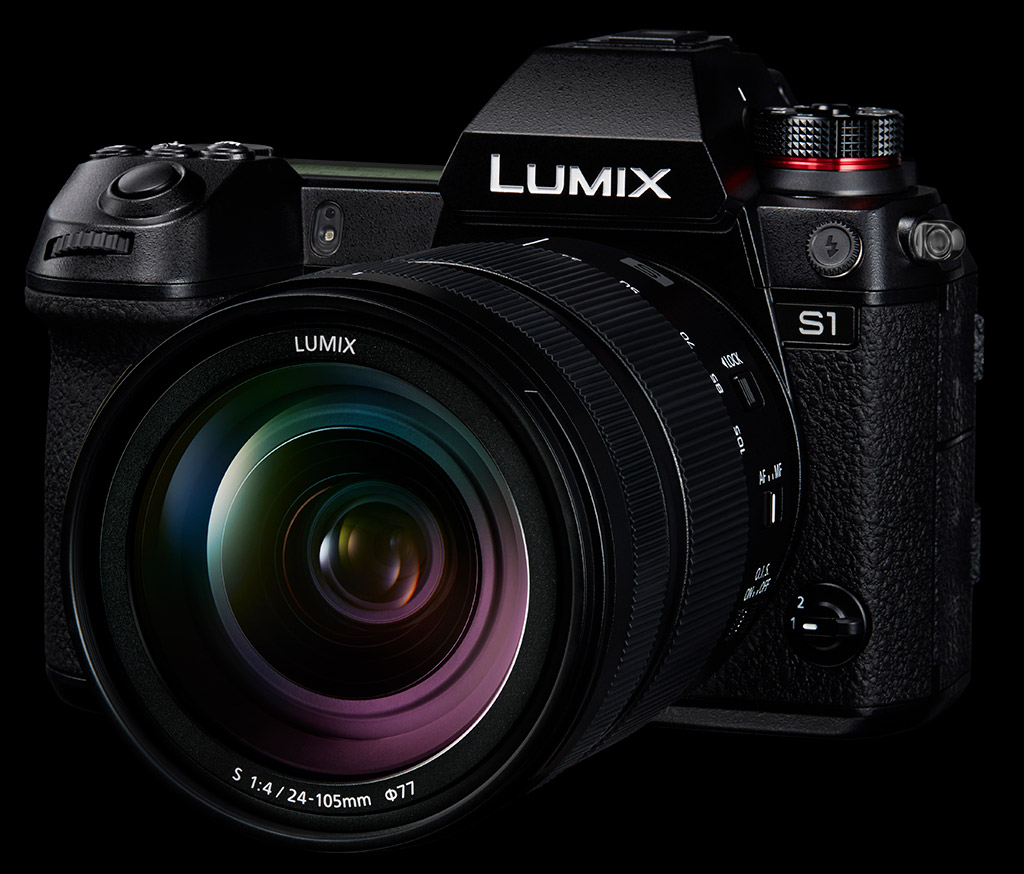
In an effort to grow their business beyond the dedicated fans of the Lumix Micro Four Thirds system, Panasonic has decided that in order to respond to the needs of customers seeking higher picture quality and creative control, they needed to create entirely new cameras. The Lumix S1 is one of two cameras built to answer the call, and is aimed at existing Lumix users as well as both professional and high-end enthusiast photographers.
Featuring a full-frame 24.2-megapixel sensor, 5-axis Dual IS 2 image stabilization with up to 6 stops of compensation, HLG shooting capabilities as well as 4K 60p/50p ultra high definition video, the S1 is a blend of photo and video capture features the likes of which Panasonic has never made and that the market has never seen. Featuring a totally new body design, autofocus powered by artificial intelligence, and a fully weather-resistant body, Panasonic's new S1 aims to be a dynamic camera capable of capturing just about anything a photographer can imagine.
Design & Ergonomics
Panasonic has expressed that the S1 uses an elegant style that is proportioned to accentuate the lens, with vectored lines that complement the dominant circle of the lens. With a natural, well-balanced feel, the S1 features a substantial, stable grip that was designed to be held and used for long periods of time.

The viewfinder is the highest resolution electronic viewfinder available on an interchangeable lens mirrorless camera, with a 5,760k-dot OLED panel. This high-speed display has a minimum lag time of 0.005 seconds and refreshes at a rate of 120 frames per second, and the EVF overall offers a 0.78x magnification and a 21mm eye point. While certainly large, the S1's 0.78x EVF isn't as large as some other modern mirrorless cameras, such as the 0.83x EVF of the Lumix G9 and Olympus E-M1X.

Similar to the rear screens of the Fuji X-T3 and GFX 50S, the rear touchscreen LCD is a "triaxial tilt" design that offers both landscape up/down tilting as well as flip-out design in portrait orientation. The S1's rear display is 3.2-inch, 2,100K-dot, RGBW touch monitor with adjustable brightness and is said to offer high visibility in bright conditions.

The top of the camera features a variety of physical buttons and controls, including white balance, ISO and EV buttons behind the shutter button. Unlike many mirrorless cameras, the S1 (and S1R) offers top-deck status LCD for confirmation of camera settings. The rear of the camera features a handy joystick control that allows for diagonal directionality. The S1 features front and rear command dials as well as a multi-directional pad on the rear that doubles a rotating dial. The rear buttons can also be illuminated, making them easier to use in the dark.

The body construction features a fully die-cast magnesium alloy frame that's extremely durable and lightweight. The body itself is dust and splash resistant and is rated to function even at -10° Celsius (14° F). Further, the S1's shutter unit is rated for 400,000 cycles.
Storage, Power & Connectivity

The S1 features two card slots, a traditional SD slot and an XQD slot (which can be updated with firmware to support CFexpress). The SD slot is UHS-II V90 compatible, and the data writing speed of XQD currently supports up to 400 MB/s read and 440 MB/s write, with CFexpress in the future offering transfer rates as high as 1400 MB/s.
In addition, the S1 implements a feature that helps prevent the loss of data due to user error. An alarm will sound when the card door or battery door is opened during camera operation, in addition to providing a card access lamp.

Power is supplied by a new 7.4V 3050mAh (23Wh) battery pack, and both USB Power Delivery (USB-PD) and in-camera charging are supported. CIPA battery life is rated at 360 shots with the EVF or 380 shots with the LCD when using an XQD card. This increases slightly to 380 and 400 shots respectively with an SD card. In Power Save LVF mode, the EVF ratings increase to a generous 1,100 or 1,150 shots with a one second sleep mode timeout. An optional DMW-BGS1 battery grip will also be available which accepts one battery in addition to the one in the body, roughly doubling battery life.
Wired connectivity includes a full-size (Type-A) HDMI port, a USB-C 3.1 Gen 1 port, a 3.5mm stereo microphone jack (MIC (Plug-in Power) / MIC / LINE selectable), a 3.5mm stereo headphone jack, a 2.5mm remote jack, a PC sync socket and a dedicated hot shoe that supports an XLR microphone accessory. Wireless connectivity is provided by built-in Wi-Fi (2.4GHz 802.11b/g/n and 5GHz 802.11ac) and Bluetooth LE (v4.2).
Sensor & Image Quality
The Panasonic S1 features a 24.2-megapixel full-frame sensor with an AR (anti-reflective) coating and no optical low-pass filter that can capture 14-bit raw photos and has the ability to output 12-bit video. The image processing system provides both high resolution and high sensitivity, with a native ISO range of 100 - 51,200 that can be extended to ISO 50 - 204,800, and Panasonic promises that the S1 can capture super high sensitivity images with low noise.
Thanks to an additional High Resolution Mode, the S1 can also produce 96-megapixel raw files by capturing eight slightly shifted frames in quick succession and optionally stitching them together in-camera, however there's no hand-held mode and a tripod is recommended.

Panasonic's new Venus Engine allows them to offer both high image quality and high performance. The new image processor allows for "Intelligent Detail Processing" to realize more natural, high-resolution expression and improve color moiré suppression. "Three-dimensional Color Control" improves color reproduction of bright and shadow areas. The camera also utilizes "Deep Learning Technology" in the form of human body and animal recognition AI, which the Venus Engine processes through a huge number of reference images programmed into the Engine itself.
Performance & Autofocus
Panasonic claims the S1 as having the fastest autofocus acquisition of any camera before it, able to do so in just 0.08 seconds with the new Depth from Defocus (DFD) autofocus system. Because of the shallower depth of field that can be created by the full-frame sensor, the autofocus system had to be overhauled to be more precise than that of Panasonic's previous Micro Four Thirds cameras. The S1 (and S1R) is quoted to achieve fast and accurate autofocus by combining the DFD AF and 480 fps control, and promises a diversity of AF modes to respond to precise focusing needs.
The new AF system is said to offer accurate focusing even in low lighting conditions down to -6EV (AF-S mode at f/1.4 and ISO 100), and even down to -3EV with 10% contrast (low contrast) subjects. Panasonic says that means it will shoot accurately even in foggy or misty scenes.

The "deep learning" that Panasonic has quoted as part of the Venus Engine processor uses human body and animal recognition (dogs, cats and birds). The AI combines three aspects of the system: DFD, Face/Eye detection, and the deep learning of human bodies and animals. By combining the focus of the lens and sensor (which calculates at 480 frames per second) and the DFD calculations, Panasonic believes the autofocus will be excellent even without the now-typical on-sensor phase detection AF technology. A scene's information is constantly retrieved while monitoring, and spacial information is continuously updating while shooting. According to Panasonic, the camera can then determine the distance to the subject at the instant the shot is taken, and based on that information can adjust for quick and accurate autofocus.
The S1's top shutter speed is 1/8,000 seconds in both mechanical shutter and electronic shutter modes for stills, and an electronic first curtain shutter (EFCS) mode is also available, but its top speed is limited to 1/2,000 seconds. Bulb mode exposures as long as 30 minutes are supported with mechanical or EFCS shutter, and up to 60 seconds with the electronic shutter. While recording movies, the electronic shutter speed range is 1/25 to 1/16,000 seconds. Interestingly, Panasonic claims the world's fastest flash sync speed of 1/320s (for a full-frame mirrorless camera), though that figure is qualified with reduced flash power (similar to what some high-end Nikon DSLRs can do). We've asked Panasonic for the maximum x-sync speed at full flash power, and will update this section once we find out.

The S1 can continuously shoot at up to 9 frames per second in AF-S mode and record with a buffer of 90 photos (or more) in RAW, and 70 photos (or more) in RAW+JPEG. In JPEG only, Panasonic rates the buffer to handle 999 photos or more. In AF-C mode, the S1's frames-per-second rate drops to 6 per second.
If you don't mind a drop in image resolution, the S1 offers both 6K PHOTO and 4K PHOTO burst shooting with at 18MP and 8MP image sizes, respectively. 6K PHOTO captures images at 30fps, while 4K PHOTO mode is offered in both 30fps and 60fps. 6K PHOTO mode can continuous capture up to 10 minutes, while 4K PHOTO mode goes up to 15 minutes.
Video
The Panasonic S1 is in many ways a more video-oriented camera than its brother, the S1R. Though the S1R can also capture full-frame 4Kp60 video just like the S1, it cannot do so in great enough bit-depth to where Panasonic was confident in giving the camera the ability to use V-Log. The Panasonic S1 will also be able to capture HDR video, which the S1R cannot. Unlike the GH5 and GH5s, the S1 and S1R come in NTSC and PAL region versions.
Without additional video upgrades, which can be purchased as an add-on, the S1 captures 4K video in MP4 in 60p/50p/30p/25p/24p in 4:2:0 8-bit. In the higher frame rates (60/50p), the S1 can record 4K video for 29 minutes and 59 seconds. In lower frame rates (30/25/24p), the recording time is unlimited.
Out of the box, the S1 will ship with Cinelike D, Cinelike V and Like709 video profiles. The S1 cannot capture 4Kp60 in full frame, instead cropping to an APS-C frame size in order to achieve it. However, at 30/25/24p frame rates, 4K video uses full-pixel readout without pixel binning.

If you opt for the additional video upgrade, the S1 becomes a much more formidable video capture device. In addition to gaining the Like2100 (Hybrid Log Gamma) and V-Log video profiles (Panasonic has stated V-Log will never be available on the S1R), the S1 will also be able to record 4:2:2 10-bit video internally without any pixel binning in 30p/25p/24p. The S1 can also capture 4K 60p/50p 4:2:2 10-bit via HDMI out. Internal 4Kp60 capture is written in 4:2:0 8-bit.
In Full HD mode, the S1 can record at up to 180 frames per second with High-speed video mode in addition to the typical range of standard video framerates, ranging from 24p up to 60p depending on the video file format. Full HD at 24p (23.98fps) is only available with AVCHD format. With the optional video upgrade, Full HD can be recorded with a bit rate up to 100 Mbps. (Without the upgrade, Full HD video at 60p/50p is recorded at 28Mbps for MP4 and 20Mbps for 30p/25p.)
Here is the full list of features available with the optional upgrade for the S1 (the price of which is TBD):
- 4:2:2 10-bit Recording
- MP4 4K 30p/25p 150Mbps (4:2:2 10-bit, Long GOP, LPCM)
- MP4 4K 24p 150Mbps (4:2:2 10-bit, Long GOP, LPCM)
- MP4 FHD 60p/50p 100Mbps (4:2:2 10-bit, Long GOP, LPCM)
- MP4 FHD 30p/25p 100Mbps (4:2:2 10-bit, Long GOP, LPCM)
- MP4 FHD 24p 100Mbps (4:2:2 10-bit, Long GOP, LPCM)
- V-Log
- 4K60p 4:2:2 10-bit HDMI Live Output

Panasonic S1 Pricing & Availability
The suggested retail price of the Panasonic Lumix S1 is US$2,499 for the body only, and US$3,399 bundled with the 24-105mm f/4 OIS lens, and shipping should begin in early April. An optional battery grip will be available for US$349, which is one of many option accessories Panasonic will offer once the camera becomes available. The pricing for the optional video upgrade has not yet been announced, however Panasonic has stated that it's set to be released some time in 2019.

New L-series Alliance with Panasonic, Leica and Sigma
One of the major stories around these new Lumix S1R and S1 camera is the lens mount; they utilize the Leica L mount -- the same mount that's on the Leica SL. Panasonic and Leica have long had a strategic partnership, not only on lens designs and manufacturing but also sharing certain camera models. They've now taken the partnership to the next level, not only incorporating Leica's L mount into their cameras and lenses, but also bringing on famed lens manufacturer Sigma to form a new L-series Alliance.
It's a pretty strategic move on Panasonic's part. In launching an all-new camera system with a "new," or rather a different lens mount than their already-existing lens products (MFT), Panasonic isn't fresh out of the gate with a new camera system with little to no lens support, both natively or from third parties. By using the L-mount, the Lumix S1R and S1 camera can already take advantage of the current selection of Leica L-Mount lenses.
As mentioned, Panasonic will also design and build their own native L-mount lenses, starting with a 50mm f/1.4 prime, a 24-105mm f/4 standard zoom, and a 70-200mm f/4 telephoto zoom. They've also announced a broad lens roadmap, expanding the native S series lenses to more than ten different models by 2020.
As for Sigma's role in this new L-mount Alliance, we don't yet have specifics, but the company plans to release their 14 E-mount lenses in L-mount, as well as develop new ones.
A versatile and impressive all-around full-frame mirrorless camera
by Jeremy Gray | Posted 03/12/2018

Introduction
While the Panasonic S1 and S1R aren't hitting store shelves until next month, we have already had two hands-on experiences with the cameras. My colleague, Jaron Schneider, went to Barcelona to try out the cameras at Panasonic's first launch event. Later, I headed to Austin, Texas to spend a day with the cameras and the three launch lenses.
During my time with the cameras, both the S1 and S1R had pre-production firmware, so I will not be able to go in-depth with my analysis of the camera's imaging or performance. However, I am able to generally discuss how I feel about the cameras and lenses. Further, raw files aren't supported in Adobe Camera Raw yet, so I cannot share processed raw files. The camera did offer in-camera raw processing, but I only had a day with the S1 and S1R, so I spent it shooting as much as possible, rather than tinkering with the menus.
With that said, my general plan is to write a detailed Hands-On Experience, much like my colleague William Brawley did with the Olympus E-M1X back in December. I will be covering some of the same ground as Jaron has previously in his hands-on experience but with my own personal spin. It'll be a "second opinion" type of situation. Further, as the S1 and S1R are identical in numerous meaningful ways, there will be considerable overlap with my written experiences for the S1 and S1R. For people interested in both cameras, I apologize for the redundancies. Without further ado, let's get into it and see what all the buzz is about with Panasonic's brand-new full-frame mirrorless camera system.

The Panasonic S1 and S1R cameras share identical camera bodies save for the model branding. Anything positive or negative I say in this section applies equally to both cameras.
When I first picked up the S1, I was immediately struck by the sheer size and weight of the camera. While other mirrorless cameras, such as the Sony A7 series, have emphasized a small, lightweight design, they've done so at the cost of usability and comfort in my opinion. Panasonic has taken a different approach with the S1R, perhaps at the cost of portability. Which direction is best is a matter of taste. In my opinion, Panasonic's approach is the better one in most cases. The camera has ample physical controls, including a lot of dedicated buttons (many of which can be reprogrammed).
The toll for these physical controls is that the camera weighs 2.25 pounds (1,021 grams), which is quite heavy. The camera is also nearly 6 inches wide, over 4 inches tall and nearly 4 inches deep at its maximum. It's a big camera and feels more like a full-frame DSLR than it does a full-frame mirrorless camera, generally speaking.
With that said, it's also remarkably comfortable in the hand. The grip is very well designed, and the shutter release is in an excellent location and even has a bit of an angle to it, allowing my index finger to rest naturally on the release. The release feels great too, which is something I really appreciate.

Other controls and buttons feel great. Near the shutter release are white balance, ISO and exposure compensation buttons, which you can either hold and cycle with either of the two command dials or press to cycle through available settings. For example, if you hold the ISO button, you can spin a dial to go through available ISO speeds, or you can tap the button to move through speeds. Tap once to go from ISO 100 to ISO 200, tap twice to get from 100 to 400, etc. Three of the most important controls are located within reach of my shooting hand, which is great.
The rear of the camera has a wide array of buttons as well, including a dedicated autofocus joystick and a directional pad surrounded by a rotating dial. The focus joystick is nice for moving the autofocus point, but I did not like the directional pad. It's mushy and unresponsive and I found myself quickly opting instead for utilizing the AF joystick or touchscreen to navigate menus.
Speaking of the touchscreen, the touch implementation is great. However, the 3.2-inch display felt a little underwhelming in general. The triaxial tilt mechanism, which is very Fuji-like in design, works well for tilting when using the camera in landscape orientation but is limited when using the camera in a portrait orientation, as it does not tilt fully in that direction. A tilt-swivel display would be much more practical.
 |
| The back of the S1 is designed well, save for the mushy directional pad. The joystick, which controls focus point location by default, is much better. The electronic viewfinder is particularly good as well due to its superb resolution and overall smoothness during shooting. |
The electronic viewfinder, on the other hand, is superb. It is a 5.76-million dot OLED LVF with 0.78x magnification. Other cameras offer similar magnification, but no other camera in its class offers this level of resolution. It is remarkably sharp. Sharpness is but one aspect of its appeal, it is also very smooth during operation, offering 120Hz refresh rate. It's a smooth and sharp EVF and frankly, probably the best I've ever used. The round eyecup is comfortable as well, which is great for extended use.
The S1 also offers a top information display, which looks good and does its job. Next to the information display is a button to illuminate not only the display, but a selection of critical buttons on the camera. Similarly useful in low light, when the camera senses dark conditions, it dims the rear display. There's also a dedicated night vision mode, which makes the display red to help preserve night vision. It may not be something many users will need, but the thoughtfulness of this feature is symbolic of the entire camera's design.
So yes, the S1 is big and heavy when compared to its full-frame mirrorless competition. But, with the heft comes not only ruggedness and weather sealing, but a bevy of physical controls and intelligent design. It's a very comfortable and enjoyable camera to use.
A Brief Word on Image Quality
At the risk of sounding like a broken record, the S1 I used in Austin was not using production firmware. While I'm not sure how much will change with respect to image quality before the camera ships, it's possible that important adjustments to the camera's imaging performance will be made ahead of firmware version 1.0. With that said, I will not be able to make any sweeping claims about the S1's quality. Further, raw image processing is not yet available for files from the S1, so I will be withholding analysis of raw files for now.
Image quality is one of the few areas of distinction between the S1 and S1R cameras. The S1 has a 24.2-megapixel MOS image sensor which delivers a native ISO range of 100 to 51,200. The ISO can be expanded further to a 50-204,800 range.

I was pleased with the detail found in the S1's JPEG files. At low ISO settings, the images are sharp and look quite nice. The dynamic range appears to be good as well. When shooting in low light, the situation remains quite good. The noise is well-controlled and tonal transitions are smooth and pleasing to the eye.
While image quality could be further adjusted before the camera releases this spring, I have no concerns with the images produced by the S1. Files are detailed, clean and have pleasing colors.
Shooting Experience: Autofocus, Continuous Shooting and More
Autofocus
Autofocus is a particularly interesting area when it comes to the S1. Unlike other mirrorless cameras on the market, Panasonic has opted for contrast-detect autofocus rather than phase-detect or hybrid autofocus. This is a fascinating decision and one the company certainly didn't take lightly. As I headed to Texas, I had some concern about how the S1's autofocus would perform not only in general, but also with respect to continuous and low-light autofocus performance.

As it turns out, not only does the S1 and its 225-area contrast-detect autofocus system work quickly and accurately, but it also performs well in subject tracking and continuous autofocus scenarios. Even in very dim light, the camera did a really nice job of acquiring focus with all three lenses I used, even the 50mm f/1.4 PRO, which was on firmware version 0.2.
The S1 offers a variety of autofocus area modes, including body/face/eye detect. The camera does a nice job locating a body in the frame and then dialing in on the face. Locking on the eye was a bit less reliable, although the camera did a good job when the face was moderately large in the frame. For example, the camera did well, even in low light, when shooting a portrait where the subject's upper half was filling the frame. However, it didn't do as well at finding the eyes when it was a full-body portrait. By tapping on different selected areas, which are highlighted with rectangles for body and face and lines for eyes, you can quickly swap between detected people in the frame.
For continuous focus, the body detect, subject tracking and single area modes I tested worked well. Body detect and subject tracking were particularly impressive. Obviously additional testing is needed, but first impressions in this area are certainly positive.

Overall, my impressions of the autofocus performance are very positive. I had no issues and was generally impressed with the camera's capabilities.
Performance
The S1 delivers strong performance thanks to its Venus Engine Image Processor. The S1 shoots at 6 frames per second with continuous autofocus and 9 fps with AF-S. These are the same speeds as the S1R, but the S1 has an advantage when it comes to buffer depths. Both cameras have an XQD card slot and a UHS-II SD card slot and writing and buffer clearing felt fast during my hands-on time with the S1. We will need to put the camera through the lab with 1.0 firmware for a full picture, but the first impressions are positive.
Panasonic promises up to 90 raw files in a burst before the buffer fills or 999 JPEG files, making the S1 a notably better option for sports photography than the S1R. When shooting continuously with the S1, I never felt slowed down or hampered by the camera. Everything about it was fluid, responsive and quick.

Menus and Usability
Not only is the S1 quick, but it's also really enjoyable to use. The menu system is well-designed and of the biggest compliments I can give to a camera is that I didn't have to think very hard about where to find certain settings. That was also the case with the S1R. Settings are where you'd expect them and the menu can be navigated quickly, even when you are not experienced with the camera. Further, touchscreen implementation works well, as does the Quick Menu.
Additionally, there are some physical aspects of the camera which are particularly impressive. For example, there are illuminated buttons, which is really nice. The electronic viewfinder, which I discussed earlier, is excellent in real-world use. It is very sharp and smooth and is poised to become the new standard-bearer in the industry. The top display is also a welcome addition.

Panasonic S1 versus S1R
Much of what I like about the S1R can be equally applied to the S1, including the excellent build quality and overall camera design, both in terms of hardware and software. The two cameras are very comfortable to use and feature many physical controls. They also utilize the same electronic viewfinder, which is one of the best I have ever used thanks to its industry-leading sharpness and fast refresh rate.
What separates the S1R and S1 perhaps the most are their respective image sensors. The S1R employs a 47.3-megapixel sensor, whereas the S1 delivers 24-megapixel images. In both cases, imaging performance is good. However, the sharpness and detail in the S1R files is notably good and while the S1 does a bit better at higher ISO speeds, I still prefer the look and overall quality of images from the S1R. It will be interesting to compare raw files later, but for now, I prefer the S1R's image quality.
Performance between the two cameras is pretty similar, although the S1 offers more buffer depth and feels a little bit faster in real-world use when shooting continuously. Both cameras offer really good autofocus performance as well.
Video is yet another one of the handful of differentiators between the S1 and S1R. Unlike he S1, the S1R does not have HLG Video recording. Further, the S1R doesn't record 4:2:2 video. Both cameras record 4K/60p video and can shoot Full HD video at up to 180 fps, but the S1 is definitely better-suited for video-intensive work.
When it comes to pricing, the S1 is, unsurprisingly, the more affordable option. However, it is still quite expensive, arriving in April with a price of $2,500. The S1R will cost $3,700, making it more expensive than both Sony and Nikon's high-resolution mirrorless cameras.
Panasonic S1 Hands-on Experience (Austin, Texas) Summary
Versatile and well-rounded full-frame mirrorless camera
What I liked:
- Excellent camera design and build quality
- Fantastic electronic viewfinder
- Impressive image quality
- Great low-light performance
- Good all-around performance
- A wider array of video features than the S1R
What I didn't like:
- Tilting touchscreen doesn't tilt a lot
- Mushy directional pad/buttons
- Quite large and heavy
The Panasonic S1 is a well-rounded and versatile camera. It is very well-designed and ruggedly built, proving to be a very comfortable and enjoyable camera to use. While photographers looking for the ultimate in image quality may find more to like with the S1R, those wanting the best S series video features and performance will look toward the S1. Neither camera is like the hybrid beast that is the GH5(S), but the S1 is definitely packed with a bit more video punch.

Whether you are shooting stills or video, the autofocus and overall performance of the S1 is impressive. And while 24 megapixels is not as impressive as 47, the S1 offers sharp image files and very good low-light performance. There is a lot to like with the Panasonic S1 and I am excited to see how it performs in our lab.
Performance
Timing and Performance
Very good overall performance with deep buffers, though buffer clearing can be sluggish.
| Startup/Play to Record | ||
|---|---|---|
| Power on |
~1.5 seconds
|
Time it takes to turn on and capture a shot. |
|
Play to Record, |
~0.6 second
|
Time until first shot is captured. |
Powering on and taking a shot was reasonably fast for a mirrorless camera, at about 1.5 seconds. Switching from Play to Record mode and taking a shot was quite a bit faster, at about 0.6 second. Good performance here for a mirrorless camera, though most DSLRs are faster at startup.
| Shutter Response (Lag Time) Mechanical / Electronic First Curtain / Electronic Shutter |
||
|---|---|---|
|
Full Autofocus, |
0.154/0.142/0.187
second |
Time from fully pressing shutter button to image capture, with the lens already at the proper focal distance setting. |
| Manual Focus |
0.067/0.067/0.121
second |
For most cameras, shutter lag is less in manual focus than autofocus, but usually not as fast as when the camera is "prefocused". |
|
Prefocused |
0.060/0.058/0.108
second |
Time to capture, after half-pressing and holding shutter button. |
|
Note: All timing performed with a Panasonic Lumix S Pro 50mm f/1.4 L-mount lens. Performance may vary with other lenses.
|
||
The Panasonic S1's autofocus speeds were quite good in our tests, especially for a camera that uses contrast-detect AF. In the lab, the S1 produced a full-autofocus shutter lag (with the subject at a fixed distance) of 0.154 second using 1-area (center) AFS mode with the Panasonic Lumix S Pro 50mm f/1.4 lens using default mechanical shutter mode. That's competitive with a lot of pro DSLRs.
Shutter lag in manual focus mode was very low at only 0.067 second, and prefocused shutter lag was lower at 0.060 second. Good performance here.
Using the Electronic Front Curtain Shutter (EFCS) mode produced slightly faster results, while the fully electronic shutter option increased shutter lag slightly. Note that the S1 offers an Auto shutter mode which switches the shutter type to suit the recording conditions and shutter speed, but it defaults to mechanical shutter.
To minimize the effect of different lens' focusing speed, we test AF-active shutter lag with the lens already set to the correct focal distance.
| Cycle Time (shot to shot) | ||
|---|---|---|
|
Single Shot mode |
0.33 second
|
Time per shot, averaged over 10 frames (we no longer test for buffer depth in single-shot mode). |
|
Single Shot mode |
0.34 second
|
Time per shot, averaged over 10 frames (we no longer test for buffer depth in single-shot mode). |
|
Early shutter |
No
|
Some cameras don't snap another shot if you release and press the shutter too quickly in Single Shot mode, making "No" the preferred answer. |
|
Continuous H mode Large/Fine JPEG |
0.11 second
(8.9 fps); Unlimited (?) 0.8 second to clear* |
Average time per shot over 40 frames, with no apparent limit other than card capacity. |
|
Continuous H mode RAW |
0.11 second
(9.0 fps); 124 frames total; 12.3 seconds to clear* |
Average time per shot. Slows to an average of 0.22s or 4.6 fps when buffer is full with a lot of variation. |
|
Continuous H mode RAW + L/F JPEG |
0.11 second
(9.0 fps); 74 frames total; 18.1 seconds to clear* |
Average time per shot. Slows to an average of 0.39s or 2.6 fps when buffer is full with a lot of variation. |
|
Continuous H mode 6K JPEG |
0.03 second
(30.0 fps); Unlimited (?) 1.1 seconds to clear* |
Average time per shot over 40 frames, with no apparent limit other than card capacity. |
| Flash Recycling |
N/A
|
Flash at maximum output. |
|
*Note: Buffer clearing times measured with a Lexar Pro 2933x XQD 2.0 400MB/s flash card. Slower cards can produce correspondingly slower clearing times and may also limit length of bursts in continuous mode. ISO sensitivity and noise reduction settings can also affect cycle times and burst mode performance.
|
||
Single-shot cycle times were quite fast at less than 0.4 second for best quality JPEGs or RAW+JPEG files. (Note that we no longer test single-shot mode with just RAW files, as the results are usually somewhere in between.)
In Continuous H mode, the fastest full-res burst mode, the S1 captured best quality JPEG images at about 8.9 frames-per-second and RAW or RAW+JPEG files at 9 fps, almost dead-on Panasonic's spec. Note that autofocus is locked at the first frame of a burst in this mode (AFS). Panasonic claims the S1 can manage up to 6 fps with AF updated between frames (AFC) when using the mechanical shutter or EFCS, and 5 fps using electronic shutter, however we did not test those modes in the lab. In addition, the S1 offers medium (M) and low (L) speed continuous modes, rated at 5 and 2 fps respectively.
The S1 also allows you to capture 6K (18 megapixel) JPEGs at 30 fps or 4K (8 megapixel) JPEGs at 60 fps with no limit other than card space, using the electronic shutter.
Buffer depth was outstanding when shooting best quality JPEGs in Continuous H mode, with no apparent limit using our Lexar Pro 2933x XQD 2.0 card. Buffer depths fell to 124 RAW frames and 74 RAW+JPEG files, though that's excellent and exceeds Panasonic's spec of 90 and 70 frames respectively.
The S1 also has 6K and 4K Photo burst modes, which capture 18-megapixel JPEGs at 30 fps and 8-megapixel JPEGs at 60 or 30 fps respectively with no apparent buffer limit (other than card space or elapsed time).
Full resolution buffer clearing times were on the slow side for XQD when shooting RAW or RAW+JPEG files, though, taking 12.3 seconds after 124 RAW frames and about 18.1 seconds after 74 RAW+JPEG files in Continuous Hi mode. However, clearing after a long burst of best quality JPEGs was quick at just under a second, and the camera lets you make setting changes, review just-shot images and continue shooting while the buffer is clearing.
To see how a fast SD card compared, we re-tested Continuous Hi mode with our Lexar 2000x UHS-II SDXC card, and here are the results:
| With Lexar Professional 64GB 2000x UHS-II SDXC | ||
|---|---|---|
|
Continuous H mode Large/Fine JPEG |
0.11 second
(9.1 fps); Unlimited (?) 1.3 seconds to clear* |
Average time per shot over 40 frames, with no apparent limit other than card capacity. |
|
Continuous H mode RAW |
0.11 second
(9.0 fps); 97 frames total 19.9 seconds to clear* |
Average time per shot. Slows to an average of 0.31s or 3.2 fps when buffer is full with a lot of variation. |
|
Continuous H mode RAW + L/F JPEG |
0.11 second
(9.0 fps); 78 frames total 28.2 seconds to clear* |
Average time per shot. Slows to an average of 0.43s or 2.3 fps when buffer is full with a lot of variation. |
|
Continuous H mode 6K JPEG |
0.03 second
(30.0 fps); Unlimited (?) 1.2 seconds to clear* |
Average time per shot over 40 frames, with no apparent limit other than card capacity. |
|
*Note: Buffer clearing times measured with a 64GB Lexar Pro 2000x UHS-II SDXC card. Slower cards can produce correspondingly slower clearing times and may also limit length of bursts in continuous mode. ISO sensitivity and noise reduction settings can also affect cycle times and burst mode performance.
|
||
Interestingly, switching to a fast UHS-II SD card did not impact buffer depths by as much as we had expected. Buffer depth with best quality JPEGs was still unlimited, RAW buffer depth dropped from 124 to 97 and RAW+JPEG buffer actually went up a bit from 74 to 78 frames. Clearing times were longer, though, ranging from 1.3 seconds to 28.2 seconds for full-res images depending on the file type, versus 0.8 to 18.1 seconds.
Bottom line, the Panasonic S1's performance was quite good overall in the lab, with reasonably fast startup, quick autofocus, low shutter lag, fast cycle times, very good burst performance and generous buffer depths. Buffer clearing can be sluggish, though, even with a fast XQD 2.0 card.
Battery
Battery Life
Good battery life for its class, with flexible power options.
| Operating Mode | Battery Life |
|---|---|
|
Still Capture, CIPA standard
EVF with S-R24105 lens and XQD card |
360 shots
|
|
Still Capture, CIPA standard
LCD Monitor with S-R24105 lens and XQD card |
380 shots
|
The Panasonic S1 uses a custom DMW-BLJ31 rechargeable lithium-ion battery pack for power, and comes with a single battery and a dedicated battery charger. In-camera battery charging and power supply via USB are both supported. Battery life is CIPA-rated for between 360 and 380 shots per charge depending on which display is active. That's slightly above average for a mirrorless camera but not nearly as good as most DSLRs when using their optical viewfinders. However the S1 has a Power Save LVF mode which when enabled, increases battery life to an excellent 1,100 shots per charge according to Panasonic. And the optional DMW-BGS1 power grip can double battery life with a second battery.
The table above shows the number of shots the camera is capable of (on a fully-charged rechargeable battery), based on CIPA battery-life and/or manufacturer standard test conditions.
(Interested readers can find an English translation of the CIPA DC-002 standards document here. (180K PDF document))
Technical Info
Hands-on with the Panasonic S1
by Jaron Schneider
Posted: 02/01/2019
I don't think it would be unfair to say that the S1 and S1R are two of Panasonic's most anticipated cameras ever. Though the world has only had a few short months to get hyped and excited about them as Panasonic did a very good job keeping their development under wraps until now, expectations are high for this newcomer to the full frame mirrorless game. But with that excitement comes expectation, so how well do Panasonic's cameras hold up to the hype?

As a note before you continue, the S1 and the S1R are nearly the same camera in just about every regard, from body design to autofocus functionality. With the samples we were able to spend a short time with, even the video features were largely the same (the more advanced video functionality of the S1 will require a paid firmware update after launch, and those functions were not available to test during our short hands-on session). As such, much of the following previews for each camera will be the same, with side notes in select sections branching off to discuss major differences.
Also, the cameras we were given to test for a very short time were pre-production builds, and as a result we won't be diving too deep or offering detailed opinions on image quality and other features. Raw files will also not be made available at this time.
Writer's note: Panasonic had very limited numbers of cameras and lenses. Cameras specifically were distributed to each region, and USA only had one S1R among all present journalists. Same for the lenses, which we only had one of each available lens. It was therefore challenging to not only share one of each lens we had, but also find a way to move that single S1R around among us while also not squandering the very limited three hours total we had to shoot. I received an S1 and 50mm f/1.4 initially, hence why most of the images I captured during the shoot time were done with that combination of equipment. See our beta S1 Gallery page.
Body Design and Build Quality
I think the first thing most will notice about the S1 is the size of the camera; it's pretty large. Though the body is thinner than a DSLR thanks to not needing a mirror, most of the rest of the camera is pretty similar in size to a Canon 5D Mark IV or even a Nikon D750. It has significant heft, though it is lighter than the D850. Differentiating itself from, say, a Sony Alpha full frame mirrorless, the grip is noticeably deeper and more robust, and the height of the camera allows for your full hand to grip the body without your pinkie finger having to drag underneath the battery compartment. Some may feel that the while the grip is indeed much larger than on a Sony camera, it still may not be deep enough for every hand grip position or for those with larger hands, as it is very easy to get your palm into such a position and jam the tips of your fingers into the base of the grip.
Nevertheless, it is very comfortable to hold, and it is likely that more will praise Panasonic for their design choices here than those who will be outspokenly disappointed.

Panasonic decided to break away from their vari-angle LCD that is popular with video shooters and instead used a multi-axis tilt screen that is surprisingly robust. It allows you to tilt the rear monitor up and down at a few different angles, and then also can be flipped to the side slightly by pulling on a small trigger on the left side of the monitor. It allows you as a shooter to get pretty much any angle on the screen as long as you are behind the camera. The S1 is more a stills shooting camera than a video camera, but because it can be outfitted with a good number of high-end video features, some videographers might not be happy with the limited viewing angles available to video shooters. The monitor can not be articulated to face fully forwards or left, for example, which can result in some challenging angles depending on the shoot. But since it does feature a full-sized HDMI port, using a monitor with the S1 feels like a fair compromise in exchange for the full frame video.
Also, given that Panasonic went pretty far out of their way to build a camera that was robust and tough, the design of this monitor fits that bill very well. You can hold the camera by the monitor at any of its possible angles without fear of it snapping on you. It's a very tough design.
If you have used a Panasonic camera before, the position of many buttons will be similar, though there are some changes to the placement of items compared to the GH5, for instance. Firstly, the command dial that is located behind the shutter button on the GH5 is in front of it on the S1. The mode dial is moved from the right side of the body to the left to make room for a top-facing LCD, and the burst rate and self timer buttons were placed underneath that dial, instead of existing as their own dedicated dial on the GH5.

The video record button was moved from its place on the top of the body on the GH5 to be snugly, almost hidden, to the lower right of the eye cup on the S1. If you aren't looking for it, you may miss it.
Many other buttons have seen slight shifts in location from their mainstays on the GH5 body, but none of them feel out of place or in odd locations, except for perhaps the power switch. Instead of keeping it wrapped around either the shutter button (like on Sony cameras) or the mode dial (like on the GH5), the power switch stands alone on the top of the body, taking up a large portion of the real estate next to the top-facing LCD.
Speaking of that top-facing LCD... there is one! It's not particularly striking in any other way other than it does exist, and there is a backlight button that can be toggled to the right of the LCD for use in the dark.
The one small complaint I have regarding one of the button/dials is the button/dial that surrounds the menu button on the back of the camera. This dial turns just fine, but it is also a directional pad that can be used to navigate menus. As a directional pad, the "pressability" of it felt odd. It's a bit hard to explain, but while you can press the dial in a number of directions, it feels like you have to extend a bit more effort into the press than you would think. It doesn't have a satisfying click and feels shallow, despite the fact that this button/dial protrudes from the body of the camera more than any other button on the body. That's the best I can do to describe it, so hopefully that paints a decent picture! It's by no means a deal breaker, but the same button/dial on the GH5 feels remarkably more "complete" than it does on the S1.
Many of you will rejoice to hear that the S1 has two memory card slots: a UHS-II SD card port and an XQD port that will eventually support CFexpress.

Finally, I want to touch on the quality of the electronic viewfinder: it's stunning. My friend Jordan Drake from DP Review put it perfectly when he said, "I never realized how bad my GH5 viewfinder was until I looked through the S1's."
The GH5 viewfinder is not bad, but the S1's viewfinder is just immaculate. For video shooters, this is a wonderful thing. Every detail is visible, the refresh rate and the 120 frames per second makes everything just look so smooth when shooting. For stills shooters, these higher and higher resolution EVFs are less important, but I don't want to de-emphasize how much you will appreciate the quality of this EVF. It's very, very good. I'm confident saying it's either the best or close to the best one I've personally ever used.
Menu System
I want to spend a short moment here to congratulate Panasonic on their menu design: it's very good. Though some will probably find that it's still clinging to the old hierarchical, page-based design that digital cameras have used since pretty much their inception, but it's smart in its layout of all the features. Rather than feel like just one giant list of options randomly assembled together, which is a problem on several other cameras by other manufacturers, Panasonic nicely organized all similar features together. It uses easily recognizable icons next to menu items so you know what section you are presently working through.
Like with all cameras, I spent the first few minutes setting up the S1with my own personal preferences, and I recall it taking significantly less time than with other cameras, and I did not have to ask for help from any engineers to do it. I also did not have to grab the instruction manual and thumb through that while searching for any feature at any time. That's a testament to the strength of their menu design.
I used to personally think Canon did the best job of making their menus not confusing to navigate, but the S1 takes it one step further. Though both companies do a good job, Panasonic is presently my personal favorite thanks to a mix of excellent overall organization and their use of easily-recognizable icons.
Autofocus
This is perhaps the most important section for many, as autofocus has been the center of speculation and debate due mainly to Panasonic's public distaste for phase-detection pixels on sensors. The S1R is indeed devoid of them, instead relying on a mixture of DFD-powered contrast detection and what Panasonic calls "deep learning" object detection and recognition. The result is somewhat mixed, but let me preface this by saying that at no point did I consider the autofocus "bad." It is in fact quite impressive in many regards. However, it's slightly inconsistent in some areas leaving me feeling like I need more time to fully evaluate it.

The below insights are based on using both the S1 and S1R, as we had very limited time with both cameras. Some shooting situations the S1R was not available to use, and vice versa. That said, the autofocus system felt identical on both cameras.
Let me share the shooting environments we experienced, and my thoughts on the autofocus performance in each of those environments.
The three or so hours we had with the cameras took place in three indoor locations broken up by nice, late afternoon light on the streets. While walking from our bus to the first indoor shooting location, I spent some time getting images of buildings, people and street objects. In this regard, I found the camera to be extremely snappy and accurate to focus. That is to say, I could get lost and fully immersed in the shooting experience and at no point felt myself directly thinking about the camera.
Grade: A
The first indoor location was a cramped, dimly-lit bar where we had a few moments to photograph two bartenders, their drinks, and the ambiance. Because the camera uses a database to determine shapes and lock focus and also combines this technology with eye-AF, photographing people is pretty natural. I used the human detection autofocus setting, and I have to say I was pretty impressed with how good the camera was at quickly seeking and locking on to the face and eyes of the bartenders. The camera also did a decent job of selecting focus of non-human elements like the drinks they were making, though this was a bit more hands-on than anything else I had shot thus far. Because I was also shooting at a very wide open f/1.4, I had to often recompose or ask the camera to try again when aiming at the drinks. I don't know if this is because of the shallow depth of field or because the deep learning algorithms don't include obscure bar top objects. I say this knowing full well that phase detection probably wouldn't have helped. In retrospect, single point AF would likely have been a better choice.
While tracking faces in the dark environment, some images in a burst sequence would dip in and out of focus as the camera attempted to keep track of what I wanted it to capture. So while I did not have a shortage of good finished images, it was mostly because I took so many. The cameras were good at capturing a crisp image when they recognized a subject properly, but this did not always happen.
Because the environment was so dim and I still got quite a few excellent images, I am overall very pleased with the results in this setting.
Grade: A-
On the way to the next location was more street shooting, so the " Grade A" stated before continues to stand in this regard.
The next location was a museum of sorts that featured high ceilings with glass roofing and plenty of light. It was a rather cavernous, open space with not a lot to photograph other than a few select architecture images. The lighting situation inside the building was pretty much identical to the lighting outside, so the few images I did capture in this space were just as good as my experience outdoors.
Grade: A
The final shooting location was an indoor studio with four or five different sets, a few featuring still-life arrangements like fruit or drinks on a table, and a couple featuring models and strobe lights. For the still life images, there were large kino-flo style panels with plenty of light, and in the case of the models the rooms weren't dim, but they weren't well-lit either.

In the well-lit still life sets, the cameras performed very well. Focus was swift and accurate. In video mode, I tested tapping on different areas of the frame with very shallow depth of field (using the new 50mm f/1.4 which is, by the way, a stunning lens) to see how the camera was able to judge changes in distance and depth. Moving from a background subject to a foreground subject, focus was absolutely superb. I cannot imagine it working better. Not only did it smoothly move from the background element to perfectly focus on the foreground, it did so in a very "human-like" slow and smooth rack focus. I made a note on that set that it would be hard for me to manually make a rack focus that was as smooth and perfect as what the camera did automatically.
Moving from a foreground element to a background one, however, was less good. For some reason, consistently, foreground to background required the camera to stutter a bit to determine a contrast point. Imagine how all old digital cameras used to focus: rack out and back in to determine contrast point distances, and then it locks onto an area based on that data. That is what the cameras did here consistently, but only from foreground to background. From background to foreground, the cameras never did this.
When shooting the models, I relied heavily on the facial recognition and eye-AF. I only shot one model with the S1, and about half of my images I was happy with the level of sharpness. Through the viewfinder, the S1 told me that it was tracking an eye, but the captured end result sometimes resulted in an overall soft image. I am not sure if this is due to the autofocus or the model moving too much for the shutter speed we were working with, but I am happy that I had some results at all from this set (it was rushed, cramped and challenging to work in). I wasn't able to baby the camera and get everything perfect, but the camera still produced results I was happy with. I think there is something to be said about that.
Grade: B+
Overall, I have to say the hardest part about shooting with the Panasonic S1 is the visual feedback you receive when using autofocus. As is common with other cameras from Panasonic, like the G9, the S1 is constantly wavering its focus as it continually calculates with contrast detection and Depth From Defocus. The deep learning helps the camera recognize important subjects to track on, but at this time I'm not sure if it actually contributes to the forming of sharp images. I get the feeling it's relying on the combination of DFD and contrast detect for that, which has its limits. The closer you are to a subject, the stronger the visual effect is. Imagine a scene slightly pulsating as you look at it, or the out of focus bokeh areas slightly growing and shrinking at a rapid pace in the background. This is a result of the autofocus system Panasonic chooses to use, and is not just limited to the S1R or the S1. For those who are not used to this kind of visual feedback, it can feel unsettling. Sometimes you will feel like the photo you took missed focus, but when you check the image on the back of the camera, more often than not it's perfect.
And that's a camera-to-user interaction that is kind of a let down with the S1. I think that if this weird effect did not happen in the viewfinder, I probably would be less critical overall of the autofocus capability. It definitely will take some getting used to.
What is very important to note here though is that Panasonic has made a camera in 2019 that is capable of acquiring, locking and tracking with autofocus extremely reliably in a variety of lighting conditions without the use of phase detection. Their desire to go a different route with autofocus technology and rely on machine learning is a bold one (the camera isn't learning and adding to its database while you shoot, so it's not true machine learning, but the idea is there), and they are really the only ones doing it this way. In this first iteration, I would go so far as to say their experiment here was a success. It's worth noting that Panasonic can continually update this software to become more intelligent and they have proven this to be the case with their cameras in the past that only used Depth from Defocus, and adding the deep learning to their focus algorithm has only made it better and will continue to do so.

Brief Notes on Video and Image Quality
I don't want to go too far into this section because the camera was pre production, and we aren't permitted to discuss too much of a deep dive on image quality at this time, but I do want to say that the overall "look" of images and video gets a big thumbs up from me.
Though I wish there were more opportunities to photograph people in natural light, the images that I was able to capture showed me that there is a lot to like about the S1's ability to render color. Now, granted, for stills shooting much of this is editable in post and it really only matters when you look at JPEGs or the straight video files, but it's still important to feel good about the images you capture when you see them on the back of the camera.
In that sense, I was very happy with how good the camera rendered shadows and highlights as well as blues and midtone reds. I will have to do more research at a later date regarding how it deals with greens, but what I saw in my short time with the S1 leads me to believe it's not quite as good as what you see out of a Nikon, which is my personal standard for bright and stunning greens (D750 for example is one of my favorite sensors for this).
Judging the S1 on video at this time isn't particularly fair. As I mention in my hands-on with the S1R, both it and the S1 share the same 4:2:0 8-bit limitation at this point, with the additional higher-end video features coming to the S1 after launch at a time to be determined, for a price that hasn't been stated yet. So with both cameras shooting at the same 4K in 4:2:0 8-bit, the video feed from both cameras looks pretty much identical. I say "pretty much" because I'm sure someone with better eyes than me could spot the difference, but I honestly think they look exactly the same. I think that is more praise on the S1R than the S1, since that camera is working with a great deal more pixels to render the same frame of view and final video size.
I think that the video on both cameras looks very good for standard profile, 4:2:0 8-bit straight out of camera. Anyone who regularly shoots in a camera's standard profile and does minimal to no grading in post is going to find a lot to love about either of these cameras. Right now, I'm confident saying that at least in standard, since Log was unavailable to test, the Panasonic S1 is easily my favorite out of any other competitor camera that shoots full frame video.
The S1 has a limitation that the S1R does not, and that is its ability to capture 4Kp60. The S1R will capture 4Kp60 in full frame, something the S1 cannot do (this is because Panasonic wanted to assure a certain quality for the S1 once 4:2:2 10-bit became available on it, and offering the full width of the sensor in 60 frames per second would not hold up to that standard. Since the S1R won't ever be getting V-log or 4:2:2, they did not have to be so strict on what they allowed the camera to do). Comparing the 60p video to the 24p feed out of the S1 is only noticeable in that the 60p footage has a significant crop. The actual look and quality of the footage appears the same to me, as was the case with the S1R video as well. The crop is rather extreme though, but at least 4Kp60 capture is enabled at all. Once the S1 gets the video package upgrade, being able to capture 4Kp60 in APS-C size at 4:2:2 10-bit is going to leave me very little to complain about. Do I wish it was the full width? Of course. Is it holding me back from loving this camera? Absolutely not.

Final Notes
The Panasonic S1 appears to be a very solid competitor in the full frame mirrorless space. The body design, viewfinder, menu system and image quality all look to stand up to the best of what is out there, and in many cases exceed those competitors.
When the shutter clicks down and you feel the camera capture an image, it feels good. The S1 is a satisfying camera to use in just about every regard.
The main sticking point for many will be the autofocus, and not really even how good it is but rather the experience of using it. In many ways it feels like older cameras, at least in its visual feedback to you as the shooter. You have to be willing to ignore a lot about the what it's doing in order to feel comfortable, and I'm still personally not sure how that makes me feel. I think there is great promise in what Panasonic is doing with their deep learning technology, and for a beta release of the camera it felt surprisingly polished. The S1 will not let you down in most cases, but I am hesitant to say that Panasonic's choice for autofocus puts it even near the top of what is available. Is it good? Yes. Is it great? Jury is still out.
At this point, if you forced me to pick between the two, I would probably go with the S1. Not only is the price point easier to swallow, the 24 megapixels are much more forgiving than the 47 on the S1R, and the coming video features to the S1 makes it more of a camera for me specifically. In an ideal world, I would have both the S1 and S1R in my bag with my GH5 and GH5S. All these cameras together create a complete photo, time-lapse and video solution that only Panasonic presently offers in these form factors and price points. They really do have something special with what they are building here, and they've made a believer out of me. It makes me want to give their autofocus more chances, because the rest of the system they are building is so intriguing and compelling.