



Overview

For the third straight generation, Pentax Ricoh Imaging has retained almost exactly the same body for its new Pentax K-5 II digital SLR. That's not surprising: we weren't alone in heaping praise on the ergonomics it shares with the earlier K-7 and K-5 models. What is rather surprising, though, is just how much else the K-5 II shares with its immediate predecessor. The two cameras are as near-indistinguishable under the skin as they are on the outside, with only a couple of key differences.
What's new? One of these changes aims to answer a common criticism of the company's recent SLRs. In the process, it vaults the company to the top of the tables in terms of low-light autofocusing capabilities -- on paper at least. Along with the refreshed autofocus system, Pentax has also gifted the K-5 II with an updated LCD display whose tougher surface better-matches the rest of the K-5's rugged, weather-sealed body. Better still, the new display provides a clearer image when shooting outdoors, with glare presenting less of an issue.
The Pentax K-5 II also bests its predecessor by a significant margin in terms of launch pricing, although it still a few hundred dollars above current street pricing for that camera. And it retains everything else that made its predecessor so popular, albeit accompanied by a few things we find ourselves wishing the company had changed.
...and what's not? Back in late 2010, the Pentax K-5's image quality was unrivaled among APS-C SLRs, thanks in no small part to the Sony image sensor at the heart of the design. That same sensor now appears in several competitors, but the K-5 is still right around the top of the pack in terms of dynamic range and sensitivity / noise performance. With the sensor and processor unchanged, the K-5 II provides that same great image quality and wide sensitivity range as its predecessor. It also retain the same swift seven frames-per-second burst shooting, and useful features such as in-body stabilization with the rare ability to correct for rotation. Unfortunately, it also retains a movie mode that rather lags the field, with inefficient Motion JPEG storage, no full-time autofocus, and no control over shutter speed.
Good things come in pairs. Unusually, there's also a second version of the camera, sold as the Pentax K-5 IIs. This differs in precisely one way: it lacks the anti-aliasing filter found over the image sensor in the K-5 II. That change allows slightly higher per-pixel resolution, but the extra sharpness comes at the expense of increased moiré in subjects with repeating patterns at the correct frequency. (Think things like hair, feathers, fabric, fences, grilles, brick walls, and so on.) Since it's technically a different camera, we've reviewed the Pentax K-5 IIs separately, but essentially everything in this review is applicable to that camera too, with the exception of sharpness and the likelihood of moiré / aliasing. In other words, if you're interested in that camera, you'll want to first read this review, and then head on over to our Pentax K-5 IIs review for the rest of the story.

Walkaround. Cover the logo with a fingertip, and from the front there's simply no way to tell the Pentax K-5 II apart from its predecessor. That's no bad thing: the K-5 had great ergonomics, and was absolutely packed with external controls that mean less time hunting for options in the menu system. A small red window in the base of the comfortably-profiled handgrip marks the location of the front infrared remote receiver, with a second placed on the rear of the body. As you'd expect from a camera aimed at enthusiasts, the K-5 II also has a twin-dial layout. Just to the right of the front dial and shutter button is a small green AF assist lamp. Also worth noting from this view are the flash release button, PC sync terminal, Raw / Fx button, and focus mode lever that cascade down the left side of the body behind the lens mount.

There's no change on the top of the K-5 II either. All the controls are positioned as they were, including the locking Mode dial with its central release button, sitting above the lever used to select the camera's metering mode. The large, backlit top-deck LCD info panel makes it easy to confirm settings without wasting power--or ruining your night vision--by running the main LCD panel.

The only real difference from the K-5's body is found on the rear panel, and even here you'll need to be paying attention to spot it. Give up? The main LCD panel is now recessed just slightly, where that on the K-5 was flush-mounted. (The Pentax logo has to move onto the body itself to accommodate this change.) The polycarbonate cover over the LCD panel from the standard version of the K-5 has been replaced with tempered glass for the K-5 II, which make it more resistant to scratches. Pentax has also switched to a new LCD panel that has the same size and resolution as in the earlier camera, but now has no air gap between the panel and the cover glass. That translates to better visibility under strong ambient light, with less glare and better contrast. It's also richer and more saturated than that in the K-5.
The other main difference between the Pentax K-5 II and its predecessor is found beneath the surface: there's a brand-new SAFOX X phase-detection autofocus sensor assembly, replacing the SAFOX IX+ sensor from the K-5. It's still fairly closely-related to the earlier design, as the number and type of focus points is unchanged: there are still eleven points, of which nine are cross-types sensitive to both horizontal and vertical detail.

So how does SAFOX X best the earlier SAFOX IX+? Pentax tells us that as of launch, the new sensor assembly provides best-in-class low-light sensitivity, with a working range of -3 to +18 EV at ISO 100. By way of comparison, the earlier K-5 offered a working range of -1 to +18 EV. In use, we found the K-5 II's autofocus system exceptionally sensitive, able to focus without the assist lamp in near-darkness. (Essentially, if we could see the subject through the viewfinder, we could most likely focus on it.) Of course, low-light focusing performance is only one metric, and even with its new sensor, the Pentax K-5 still lags some competitors. The Nikon D7000, for example, offers a much more generous 39 autofocus points, versus Pentax's 11--although admittedly, none of the extra points are cross types.
All things considered, the Pentax K-5 II is a relatively modest update, but it's easy to argue that's no bad thing. Even with a much higher launch price, the Pentax K-5 seems to have been something of a hit for the company, and the Pentax K-5 II retains everything that made its predecessor popular at a significantly lower list price, while including a couple of worthwhile tweaks. But how much difference have those tweaks made in the real world? Read on...
Pentax K-5 II Field Test
by Mike Tomkins

Faced with a choice between the Pentax K-5 II and K-5 IIs to take on a family vacation to Hong Kong, I reached for the K-5 II so as not to have to worry about moiré. You can read my K-5 IIs verdict in a separate review.
On taking the Pentax K-5 II out of its box, I was greeted by a familiar friend. For the third generation, Pentax retained the same physical design, and that was great news for me -- I own both the earlier Pentax K-7 and K-5, and so I was right at home with the K-5 II.
Everything was as I expected it, and even the menu system was near-identical to that in my K-5. If you're considering upgrading from the K-7, you'll find a few more changes as described in our K-5 review -- a slightly taller mode dial, an easier-to flick focus mode selector dial, a better-organized menu system, and a few subtle tweaks to operation here and there, but you'll get used to them quickly, and all are positive improvements.
Compared to its immediate predecessor, the changes were much more slight, but the new autofocus system in particular was certainly noticeable. It was definitely better in low light -- remarkably so. I could accurately lock focus without using the assist lamp beyond the point where I could even see my subject in the viewfinder, and I've got pretty good night vision. Pentax says that the K-5 II can autofocus under moonlight, and they're not exaggerating in the least.
In fact, shooting in Hong Kong -- the neon city -- it was difficult to find anywhere dark enough to even challenge the K-5 II. It was when shooting back home in rural East Tennessee that the amazing low-light AF really became apparent, and proving the point, I shut myself in a room that was completely dark, save for the light coming through a quarter-inch gap in the slightly-cracked door from an adjacent room that itself wasn't terribly brightly lit. With the AF assist lamp disabled the K-5 II still had absolutely no problems focusing on picture frames on the wall.
 |
Hong Kong is sometimes called the City of Lights, and it was hard to find anywhere dark enough to give the K-5 II's improved autofocus a workout. I did put its high ISO chops to the test, though, and just like my closely-related Pentax K-5 body, it performed admirably. The ISO 12,800 shot here is a bit noisy, but the raw file cleans up nicely in Lightroom. |
Realistically, low-light autofocus on the K-5 II has reached the point where it is no longer an issue -- if you can't autofocus on your subject, you're almost certainly going to need to be in live view mode just to see what you're trying to frame, and with the camera on a tripod to get a usable shot.

The Pentax K-5 II, like its predecessor, tends towards rather more vivid JPEGs than is typical of an enthusiast-grade camera. Fear not, though, plenty of customization is available -- or you can just shoot raw.
The K-5 II has also been gifted with an expanded area AF function, one of only two changes I could find in the entire menu system. I saw the same feature previously on the Pentax K-30, and I'm thrilled that they included it on the K-5 II. (But I really wish Pentax would give this option to K-5 owners as well -- the camera's hardware is clearly capable of supporting the function, and it would be a nice way of saying thanks for their loyalty -- it's very unlikely most K-5 owners will be upgrading to the K-5 II anyway.)
Expanded area AF is available only in continuous AF.C servo mode, and when enabled, looks at the autofocus distance data of AF points surrounding the one you've manually selected. If the distance for an adjacent point is similar to that of your manually-selected point, the K-5 II will let the focus point briefly roam to the adjacent point, on the assumption that it's likely part of the same subject.
It's usually a valid assumption to make -- most of the time you've simply slipped your selected point off the subject momentarily -- and so the function makes a noticeable improvement to autofocus.
Although the K-5 II's autofocus system now has a diffraction lens like that in the K-30, used to reduce chromatic aberration and thereby improve focus accuracy, I can't say I noticed any difference in that respect compared to my K-5. I already found that camera to be pretty accurate in my day-to-day usage, once adjusted for my lenses.
 |
The K-5 IIs might've been sharper, but there's still plenty of detail in shots from the Pentax K-5 II with a good lens. Here, I used my 21mm f/3.2 AL Limited, and just a little unsharp mask is all that's needed for the fine detail in the lobster's shell to really pop -- even when viewed at 1:1. |
Really my main complaint is simply that I'd like to see more focus points and better continuous autofocus tracking -- Pentax trails its rivals in these area. Our lab tests did suggest that the K-5 II's autofocus performance is a little lower than that of our review K-5, but I didn't notice any difference in the real world. (It's possible that the K-5 itself has gotten slower with the firmware updates that have been released since our review, and I'm simply used to that.) Overall, though, I'm already quite happy with autofocus on my K-5, and the K-5 II is a noticeable improvement in low light.

The K-5 II's auto white balance mode handled even tricky lighting like this shot of the Hong Kong Space Museum with aplomb. The result here came out just as it looked in person.
The K-5 II's new display is also a handy improvement. I must admit that I wasn't expecting a huge difference from the gapless design beyond reduced glare, but the panel is also significantly brighter, a little more color-neutral (the K-5's looks slightly warm, by comparison, although that's at default settings -- you can adjust it), and colors seemed richer and more saturated. The gapless design does definitely cut down on glare, which is good news -- and it also makes the remaining reflections a bit less obtrusive since you only get one image, not the double-image reflection you get with a gapped design. There's also a new contrast setting for the LCD, which could be handy if you find the default contrast doesn't reflect your final images. (Personally, I just left this at the default.)
Pentax says the new cover glass over the panel is more scratch-resistant, and while I certainly didn't attempt to scratch it, it didn't show even the lightest buff mark after a significant time with the camera. My K-5's polycarbonate cover, by contrast, does show some very, very fine microscratches -- and that's despite my treating it very carefully. (When not in use, it's stored in a water-tight, padded hard-case. Growing up in a very humid environment taught me to treat my cameras with respect, even if they are weather sealed.) I do typically use the shoulder strap around my neck, though, so the LCD likely got those light marks from bumping against buttons and zippers as I walk. I can't say it with certainty, but it seems likely there would be fewer -- if any -- scratches on the K-5 II's display.
 |
A less obvious difference between the Pentax K-5 II and its predecessor can be found in their choice of kit lenses. As well as the existing 18-55mm weather-resistant kit lens, you can now opt for an 18-135mm WR optic used to take this image and the one following below. More examples are in the gallery. |
There's another difference between the Pentax K-5 II and the earlier K-5 that's easy to overlook, but could be of quite some importance if you're new to the system, and plan to build up your stock of K-mount glass only gradually. (Not all of us can afford to shell out for a new camera body and a bunch of new lenses, all in one go.)
The K-5 was available body-only, or with a weather-resistant smc Pentax-DA 18-55mm F3.5-5.6 AL WR lens. An 18-55mm optic is pretty much the standard kit lens for a consumer-oriented SLR, although the inclusion of weather sealing is a nice touch. For more reach, though, Pentax now also offers a travel zoom kit, bundling the smc Pentax-DA 18-135mm F3.5-5.6 ED AL [IF] DC WR. (You can see our review of the travel zoom on our sister site, SLRgear, if you click the link. We haven't reviewed 18-55mm WR lens, but we understand that it's optically identical to the non-weather sealed 18-55mm AL II lens, which we have reviewed.)

The 18-135mm WR kit lens turns in a reasonable performance for the price, but can get rather soft in the corners, and shows fairly strong chromatic aberration well into the image when zoomed in.
Although I happen to own both WR kit lenses myself, I only took the 18-135mm to Hong Kong, along with two primes -- the smc PENTAX-DA 21mm F3.2 AL Limited and smc PENTAX-DA 40mm F2.8 Limited. I left the 18-55mm lens behind simply because it duplicates the coverage of the 18-135mm lens, I was running out of room in my carry-on bags, and I don't check camera gear in the hold for obvious reasons.
With that said, even though I brought the 18-135mm lens along for the trip, on most days I left it at home, taking only a couple of primes with me. That's not my typical behavior -- I'm usually more of a zoom shooter than a prime shooter, but I was doing a lot of walking, and the primes made for a much more portable package. (Plus spending most of my time on Hong Kong streets, I was usually pretty close to my subjects anyway, and wide-angle was the order of the day.)
The other reason I mostly shot the primes, though, is that they simply offer better image quality. That's not to say the kit lenses are bad. At the time of our review four years ago, we felt the non-WR variant of the 18-55mm lens turned in a better performance than you'd expect for the price, and while the standard of kit zooms has improved in the last few years, it's still a reasonably good consumer optic. The newer 18-135mm WR can get pretty soft in the corners and has high chromatic aberration, but given its reach and affordable price tag, it's not too hard to forgive those flaws. (It also helps that it has very quiet autofocus, thanks to its DC motor.)
Neither is in the class of the primes, though, and if you want to make the most of the Pentax K-5 II's image quality, I recommend going for some higher-quality glass. If you prefer zooms and don't mind some added heft, look to the DA *-series optics. You'll need two lenses to cover the reach of the 18-135mm, and both are notably larger and heavier than that lens alone, but not unduly so. Thankfully, you can buy the K-5 II body by itself, if you want to take this route. If you're not making large prints, though, and you're looking to the K-5 II more for features like its weather sealing and solid construction than resolution,the 18-55mm or 18-135mm could be worth picking up in a kit.

Dynamic range in raw files is a strength of the K-5 II. Getting a shot of this knife-sharpener at work was tough -- the sight is rare these days, and drew quite a crowd. I blew the highlights in the JPEG and couldn't get close for another attempt, but plenty of detail remains in the raw file.
One other near-insignificant difference I noticed as I updated both cameras to their most recent firmware side by side: updating on the K-5 II was significantly faster. (It was also a three-step process, rather than a two-step one.)
Those differences might very well be specific to the firmware updates, though, and not to the camera. In fact that seems likely, given that the processor is the same. And other than those differences, I didn't really notice much to tell the K-5 II apart from my K-5.
But honestly, I'm glad not to have seen too much difference to the physical design, and in terms of the underlying electronics I think it's not a bad call either. My K-5 fits me like a glove, and two years on I'm still very happy with it. It has excellent ergonomics, it's compact, it has pretty good performance for its cost, and more importantly it's fast enough to handle shooting my hyperactive four year old.
And even better, it's extremely customizable. Little features of the K-5 that would have annoyed me -- like the arrow keys defaulting to their alternate options instead of focus point adjustment -- can easily be changed to suit my preference, not that of the manufacturer.
Given how closely they're related, those sentiments apply to the K-5 II in equal measure. Are there things I'd like to have seen Pentax change for its new APS-C flagship? Sure: key among them for me being tethered shooting, and a more robust movie feature set. In that area, in particular, the K-5 II is now looking decidedly long-in-the-tooth. With that said, there's nothing significant enough to sway me towards buying another model, though.
 |
Again, raw saves the day. Here, I didn't want to disturb these gentlemen's game of Chinese Chess with flash, but their shady nook was far-removed from the harsh sunlight beyond. A few seconds in Photoshop gave a more balanced -- yet still fairly natural look, restoring much of the detail in the iconic Star Ferry behind. (Hover to see the out-of-camera image.) |
Pentax's weather sealing is a great feature whose importance really cannot be overestimated. Although I was extremely fortunate on my Hong Kong trip to find only one rainy afternoon -- a feat I'm still not quite sure how I managed -- I've found myself taking advantage of the K-7 and K-5's weather sealing far more than I thought I would when I bought them. (As my son gets older and starts wanting to participate in team sports, I'd imagine I'll do so even more frequently.)
 |
I was very happy with the image quality of the Pentax K-5 II, and that's not surprising. It's basically the same camera as my much-loved Pentax K-5, but with better low-light autofocus, an updated LCD panel, and two minor firmware tweaks. Less change is more, in this case. Very zen. |
And best of all, the K-5 II -- just like my K-5 -- produces really great images. (Well, OK: technically great. This photographer is not ashamed to admit there's still plenty he can learn to improve his works.) When shooting in JPEG mode in particular, the K-5 II provides lots of control over the look of images, and the tradeoff between noise and detail.

My HK trip had to end, and so does my time with the Pentax K-5 II. Unlike its predecessors, I won't be buying it. That's no knock on the camera, though: it deserved to be on your shortlist.
Personally, I tend to use JPEG only for throwaway shots anyway, but it's nice to know I can get the look I'm after on those occasions where I run out of card space and have to forgo raw shooting for a while. And I love the User modes, which let me save settings I know I'll want to recall later. I've got a preset for JPEG shooting which I call Ebay mode, and another called Geoffrey mode for shooting my son, who's invariably blurred with the default program line, requiring me to shoot with Sports line. Jumping to those modes when I need them is a snap.
When I'm shooting in raw, I love the ability to output DNG files that save me converting everything I shoot -- I'm not a big fan of proprietary formats. My images come straight out of camera and into Lightroom, and most of the time they need very little adjustment. (I typically spend more time in the digital darkroom fine-tuning my own framing with the crop tool than I spend doing anything else to each image.)
The K-5 II was so like my K-5 in terms of image quality that shooting the same scenes with both cameras side by side, I honestly couldn't tell difference between the two. Its handling too is identical, and in terms of operation it's nearly indistinguishable, simply having improved in low-light AF and been gifted with a more pleasant LCD that makes me want to shoot in live view mode a little more frequently. I came back from my Hong Kong trip with lots of shots I was thrilled with, and some real keepers. That, at the end of the day, is the mark of a good camera, for me.
 |
Keeper photos are the mark of a good camera. This shot's a keeper even without any editing. A few little tweaks, and I'll be putting it on my wall. If you're ready to upgrade to a new enthusiast SLR, the Pentax K-5 II is equally well worth putting in your camera bag. |
Pentax K-5 II Technical Info
by Mike Tomkins

Sensor. For the second straight generation and the fourth camera model in a row, Pentax has based its K-5 II digital SLR around the same 16.28 effective megapixel, APS-C sized (23.7 x 15.7mm), RGB CMOS image sensor, with a total resolution of 16.93 megapixels. That's no surprise -- the chip's been widely acknowledged as a great performer, with reasonably high resolution, and great dynamic range / noise characteristics.
The Pentax K-5 II offers a maximum image resolution of 4,928 x 3,264 pixels. Three lower-resolution options are also available: 3,936 x 2,624, 3,072 x 2,048, and 1,728 x 1,152 pixels.

Processor. Output from the Pentax K-5 II's image sensor is processed by the same PRIME II (PENTAX Real Image Engine II) imaging engine that's been at the heart of every Pentax DSLR except the K-30, going all the way back to 2009's Pentax K-7. The design is a little long-in-the-tooth now, but it still does a respectable job, and sticking with it for another generation rather than switching to the newer PRIME M processor from the K-30 and K-01 has helped Pentax to keep the cost down.

Sensitivity. The Pentax K-5 II provides a pretty generous standard sensitivity range of ISO 100 to 12,800 equivalents, adjustable in 1/3, 1/2 or 1 EV steps. Its expanded range goes even further, covering everything from an ISO 80-equivalent minimum to a maximum of ISO 51,200 equivalent. If you're shooting in Bulb mode, though, the maximum sensitivity cap is just ISO 1,600 equivalent.
An interesting feature held over from the earlier Pentax K-5 is that noise reduction settings can be specified on a per-ISO basis for full-stop ISO sensitivities. (The intermediate 1/2 stop or 1/3 stop sensitivities, if enabled, share a setting with the full-stop sensitivity immediately below them.) This level of user control over the tradeoff between noise levels and subject detail across the sensitivity range is rare indeed, and a powerful tool for JPEG shooters.

Burst speed. In the lab, we found the K-5 II's capture rate had climbed from 6.5 to 6.7 frames per second, edging closer to the advertised 7 frames per second rate. At the same time, though, we found the burst depth had slipped slightly to 28 large/premium JPEGs, or 22 raw / raw+JPEG frames. Both figures are close to -- but not quite as high as -- those achieved by the K-5. (Note that all of our lab figures are set with a difficult-to-compress target image, and so in the real world, burst depths will likely be somewhat higher.)
It seems likely that the subtle increase in speed may well have brought with it the equally-subtle decrease in burst depth. Note that given the hardware is basically identical to that of the K-5, we'd expect that camera to turn in similar figures, if we had the time to retest it. It's quite likely that in the firmware revisions since we tested the earlier camera, Pentax has made optimizations that have increased the camera's burst rate.
For subjects where a little less speed is required, the K-5 II's Continuous Lo mode captures Best-quality JPEG images at a rather sedate 1.6 frames per second for as long as there's available card space. We'd still like to see Pentax offer the ability to select from additional burst shooting rates between these two extremes -- there's simply too much of a gap between the Continuous Hi and Continuous Lo speeds, and as a result, we found we frequently tended to leave the camera set to Continuous Hi mode all the time during burst shooting.

Shake Reduction. Pentax has retained the same in-body, sensor-shift stabilization system that debuted in 2009's K-7 for the new K-5 II. The system, which Pentax brands Shake Reduction, is compatible with all Pentax interchangeable lenses produced to date, and it can correct not only for horizontal and vertical motion, but also for rotation around the axis of the lens barrel. (That capability is no longer unique, however -- Olympus now offers a similar feature in some of its mirrorless cameras.) Two degrees of rotational correction on either side of the central position is possible, and Pentax claims 2.5 to 4 stops of correction is possible.
The drawback to Pentax's Shake Reduction technology is that you can't see its effects as you look through the optical viewfinder, as you can with lens-based stabilization systems. If you want to preview the effect on the LCD, you'll need to shoot in Live View mode.

Dust removal. The Pentax K-5 II also retains Pentax's DR II dust removal system, another feature that debuted on the K-7. The system includes a piezo-ceramic element to vibrate the low-pass filter, and subjectively we've found similar systems to work noticeably better than those that rely on simply shaking the sensor with the stabilization system. A dust alert system can check for the presence of dust on the low-pass filter, at the user's prompting.

Lens mount. On its front panel, the Pentax K-5 II features a KAF2 Lens mount, which is also compatible with KAF3, KAF, and KA mount lenses. Both in-body and in-lens AF mechanisms are supported, as is power zoom with compatible lenses. Pentax K mount lenses can also be attached, as can 35mm screwmount and 645/67 medium format lenses using optional adapters, although there may be restrictions depending on the lens type used.
Lens distortion correction. The Pentax K-5 II can correct for lens distortion and lateral chromatic aberration in-camera when using DA and DFA lenses, as well as with several of the company's FA Limited lenses. When enabled, these corrections do have a significant negative impact on burst shooting speed, but if you shoot in Raw mode you can choose to apply the correction after the fact, and so needn't worry about enabling the corrections pre-capture.

Autofocus. Pentax has also upgraded the K-5 II's autofocus system, which is now branded as SAFOX X. Compared to the previous-generation SAFOX IX+ system used in the K-5, SAFOX X has the same point count and arrangement -- eleven points, of which nine are cross-types sensitive to both horizontal and vertical detail -- but there are two important differences.
Firstly, the SAFOX X sensor incorporates a diffractive lens element that corrects for chromatic aberration, just as seen previously in the Pentax K-30's SAFOX IXi+ module. There's also a brand-new feature, though -- a newly developed sensor chip that is more sensitive than that used previously. This allows focusing in lower-light conditions, and Pentax rates the new SAFOX X sensor module as good for a working range of -3 to +18 EV at ISO 100. By way of comparison, the earlier K-5 offered a working range of -1 to +18 EV.
There's one other change to autofocus, and again it hails from the K-30. Called Expanded Area AF, this option functions only in continuous AF.C servo mode. When enabled, this considers the autofocus distance data of AF points surrounding the manually-selected point, and will let the active focus point roam to any point that has similar distance data to your manually selected point. The assumption is that these points are likely seeing the same subject, and you've simply slipped your selected point off the subject momentarily. It's a good assumption, and one that makes a noticeable improvement to continuous autofocus.

Metering. Automatic exposure is achieved courtesy of the same 77-segment metering sensor that debuted in the K-7. The K-5 II's metering options include Matrix, Center-weighted, and Spot modes, selectable via the switch beneath the Mode dial. A full 5.0EV of exposure compensation is available in either 1/3 or 1/2 EV steps.

Exposure Modes. Exposure modes in the Pentax K-5 II include Green (fully automatic), Manual, Bulb, Shutter- and Aperture-priority, and a Hyper Program mode which allows shutter or aperture to be instantly adjusted around a predetermined Program exposure. There's also Sensitivity Priority, plus Shutter-and-Aperture Priority. In the latter, the user defines both shutter speed and aperture, and the camera selects an appropriate sensitivity. Finally, a User mode allows five different settings groups to be saved for later reuse, and each can be given a unique name as a memory aid.
The K-5 II also allows you to alter the program line the camera uses when determining exposure variables. In a nutshell, this can tell the camera to prioritize for higher shutter speeds, shallow or deep depth-of-field, MTF (best aperture setting for image quality with the currently-attached lens), or to use the default, normal program line.
Drive Modes. In addition to its ~seven frames-per-second Continuous Hi and 1.6 fps Continuous Lo modes, the Pentax K-5 II offers the ability to bracket two, three, or five-frames with anywhere up to 2.0 EV between each exposure, set in 1/3 or 1/2 EV steps. (For two-frame exposures, you can choose whether the extra frame should be over- or underexposed, with respect to the metered exposure). There's also a mirror lockup function, and a two or 12-second self-timer, with self-timer indicator LEDs provided on both the front and back of the camera.
A variety of remote control modes work with the optional cabled or infrared remote units, and these include standard remote shooting, remote with a three-second delay, and continuous burst remote capture. Additionally, you can set bracketed or mirror lockup exposures to be initiated with the remote control.
Two infrared remote control units are compatible with the K-5 II: the tiny Remote Control F, and the larger, waterproof Remote Control WP. The former has only one button, which trips the shutter (and can optionally perform an AF operation first). The Remote Control WP has an added advantage beyond its waterproofing -- its Zoom button serves as an autofocus button on the K-5 II, effectively decoupling AF and shutter operation. This lets you prep focus when you choose ahead of tripping the shutter release, so you can be confident you've left enough time to complete focusing before you want to trip the shutter.

Shutter. Like that in its predecessors, the Pentax K-5 II's shutter unit is capable of a maximum 1/8,000 second shutter speed, and has a rated lifetime of 100,000 cycles. Minimum shutter speed is 30 seconds, and a Bulb position is also available. Note, though, that Bulb exposures are limited to ISO 1,600 max.
White balance. As well as Automatic and Manual modes, the Pentax K-5 II provides ten white balance presets (Daylight, Shade, Cloudy, Daylight Color Fluorescent, Daylight White Fluorescent, Cool White Fluorescent, Warm White Fluorescent, Tungsten, Flash, and Color Temperature Enhancement). This last option is used to retain and enhance the lighting tone - for example, to enhance a sunset.
White balance can also be measured from a neutral target, or a specific color temperature can be dialed in manually, using either Kelvin or Mired values. Six custom white balance values can be stored in-camera.

Flash. As well as a hot shoe and PC socket for external flash and studio lighting connection, the Pentax K-5 II includes a built-in popup flash. Rated at 13 meters / ISO 100, the onboard flash is unchanged from that introduced with the K-7, and offers 28mm coverage plus red-eye removal capability.
The K-5 II still has X-sync at 1/180 second, offers -2 to +1EV of flash exposure compensation, and can use either first- or second-curtain flash.
In Wireless mode, the built-in flash can control multiple wireless slave flashes, and can be set either to contribute to the exposure, or to act only as a controller. The Pentax wireless flash system offers four control channels, so up to four camera/flash setups can be used in the same area without interfering with each other.

Viewfinder. Pentax has retained the same glass prism-type TTL optical viewfinder seen previously in the K-7, K-5, and K-30 for the new Pentax K-5 II. The finder offers a ~100% field of view and 0.92x magnification, and four interchangeable focusing screens are available, with the default being a Natural-Bright-Matte III screen. The K-5 II's viewfinder offers -2.5 to +1.5 diopter adjustment to cater for eyeglass wearers, and has an eyepoint of 21.7mm from the eyepiece frame, or 24.5mm from the exit pupil.

LCD. Another rare difference between the K-5 II and its immediate predecessor can be found in its 3.0-inch LCD display, which still offers about 921,000 dots of resolution (or roughly 640 x 480 pixels, with each pixel comprised of separate red, green, and blue dots).
The LCD panel is now recessed just slightly, where that on the K-5 was flush-mounted, and its polycarbonate cover has been replaced with more scratch-resistant tempered glass. Pentax has also switched to a new LCD panel that no longer has an air gap between the panel surface and cover glass. The change brings better visibility under strong ambient light, with less glare and better contrast. Comparing both cameras side by side, the K-5 II's display is also richer and more saturated than that in the K-5.

Movie mode. The Pentax K-5 II's Movie mode, more than any other feature of the camera, is now looking decidedly dated -- disappointing, for the company that first introduced aperture-control in a movie-capable camera. (Most likely, the processor in the K-5 II, which is held over from all the way back in the K-7, simply can't provide a more modern feature-set, as we've seen better from more affordable Pentax cameras with newer processors.)
Although you can shoot at resolutions up to 1,920 x 1,080 pixels, the capture rate at this maximum resolution is limited to just 25 frames-per-second. You're also stuck with Motion JPEG compression in an AVI container, which while offering good quality, produces absolutely mammoth file sizes. Although there's a maximum clip length of 25 minutes or 4GB, whichever limit is reached first, there's realistically little chance of reaching the time limit without exceeding a 4GB file size even in 720p mode, let alone at 1080p.
Worse still for consumers and even some enthusiasts who prefer not to pull focus manually, the K-5 II's movie mode still doesn't offer autofocus during movie recording. It also lacks manual control of movie exposure, offering only a choice of Program or Aperture-priority exposure modes for movie shooting. Nor can the lens aperture be changed during recording in Aperture-priority mode, although this usually causes a significant change in brightness on cameras that do allow a change during capture.
Movie audio is recorded either from an internal monaural microphone, or from an external mic via a 3.5mm stereo jack, and the Pentax K-5 II still offers no manual control over audio levels during recording. Audio capture can be disabled altogether, though.
We'll be adding our detailed Pentax K-5 II video analysis page soon, with insight on how the
camera handles a variety of recording situations, ranging from night-time shooting to
rolling shutter tests. Stay tuned!

Dual-axis level gauge. The Pentax K-5 II sports a dual-axis (side-to-side roll and front-to-back pitch) level sensor, and can display the roll level on both the viewfinder and top panel status displays, as well as the rear LCD panel. The pitch level, however, can only be displayed on the rear panel. Unlike some competing cameras, you can't calibrate the tilt sensors manually.
Composition correction. Perhaps the most unique feature of recent Pentax flagships is retained for the Pentax K-5 II. When shooting on a tripod, it is possible to fine-tune your framing by manually controlling the position and rotation of the image sensor. With Shake Reduction enabled, a total of two degrees rotation and three millimeters of horizontal or vertical adjustment (one degree and 1.5mm on either side of the centered position) are available. If the sensor is tilted, the available horizontal / vertical adjustment range may be reduced by as much as 1mm on either side of the centered position, potentially restricting the adjustment range to 2mm total on either axis. It's a very handy tool if you shoot on a tripod much, making light work of precision framing.
Self-leveling function. Also thanks to the sensor-shift mechanism and internal roll sensor, the K-5 II offers an electronic level function that actually rotates the sensor to a level position when enabled. The system can correct for errors of one degree in either direction if Shake Reduction is enabled, and if you disable Shake Reduction, you double the level of correction possible to two degrees in either direction.

Connectivity. Interface options in the Pentax K-5 II are unchanged: high definition mini-HDMI (Type C) video output, standard definition NTSC / PAL switchable composite video output, and USB 2.0 high speed data connectivity. There's also an 8.3 volt DC input, a terminal for the wired CS-205 cable release, a PC sync terminal for external flash strobes, a 3.5mm stereo microphone jack for recording movie audio from an external microphone, and a proprietary contact on the camera's base for an optional battery / portrait grip, which accepts the same D-BG4 model that was used with the earlier Pentax K-7 and K-5.
The Pentax K-5 II also includes two infrared remote receivers -- one each on the front and rear of the camera body, allowing for the shutter to be released wirelessly from most angles, using the optional Remote Control F, or the waterproof Remote Control WP (aka O-RC1) remote. The latter allows not only shutter operation, but also provides for autofocus operation via a separate button when used with the K-5.
Unfortunately, the Pentax K-5 II still lacks any official, Pentax-authorized tethered shooting capability, but a third party solution does exist, although it doesn't provide a remote live view feed.

Power. The Pentax K-5 II accepts the exact same D-LI90 lithium ion battery pack as its predecessors. The D-LI90 is a 7.2V pack rated at 1,860 mAh / 14Wh. Battery life is rated at 980 shots without flash usage, 740 shots with 50% flash usage, or 440 minutes of playback on a charge -- unchanged from figures for the K-5 despite the new autofocus sensor and LCD panel. For studio shooting, or while offloading data via USB, the K-5 II can also draw power from Pentax's K-AC50 AC adapter.
Battery grip. The D-BG4 battery grip for the Pentax K-5 II is the same model compatible with the K-5 and K-7, and comes with two trays -- one for six AA batteries, and one for a single D-LI90 battery. The K5's battery grip transfers power through a dedicated, proprietary connection, so you can leave a battery in the camera to double the battery life, and needn't fiddle to remove the battery door, as in some competing designs that use a dummy battery. While this design is nice because you don't have to worry about the cumbersome tower that goes up into the battery compartments of other camera designs, you will have to remove the entire grip to change the K7's internal battery. (Of course, you can leave the internal battery compartment empty, and simply place your battery pack in the portrait grip, so this is of little import in real-world use unless you intend to use both battery bays simultaneously.)

The D-BG4 is weather sealed like the camera body, and duplicates several controls from the camera's main interface, including the shutter release, front and rear e-dials, the AE-Lock, and the AF button. While the duped control size and layout isn't identical to those on the camera body, it's similar enough to retain familiarity. There's also an On/Off switch, which controls not the camera body, but rather the portrait grip's controls. The D-BG4 also includes an insert in which to store the protective caps from the body and grip terminals when in use, and the lithium ion battery tray further includes space to store a spare SD card inside the grip.

Storage. The Pentax K-5 II's single memory card slot supports Secure Digital cards, including the higher-capacity SDHC and SDXC types, but doesn't gain any benefit from high speed UHS I-type cards. Use of Class 6 or higher-speed cards is recommended for video capture, or when shooting high-speed still image bursts. Eye-Fi's Wi-Fi capable Secure Digital cards can also be used, but the K-5 II isn't an Eye-Fi Connected device, and so doesn't provide the ability to adjust card settings, etc. in-camera. Instead, setup must be done first on your computer.
As in its predecessor, the Pentax K-5 II supplements its compressed JPEG file format with 14-bit raw files complying with either the Adobe DNG or Pentax PEF raw formats.
Pentax K-5 II Image Quality Comparisons
Below are crops comparing the Pentax K-5 II, Pentax K-5, Canon 60D, Nikon D7100, Olympus E-M5, and Sony NEX-7.
NOTE: These images are best quality JPEGs straight out of the camera, at default settings including noise reduction. All cameras in this comparison were shot with our very sharp reference lenses.
Pentax K-5 II versus Pentax K-5 at ISO 100
 |
 |
 |
 |
 |
 |
|
Pentax K-5 II at ISO 100
|
Pentax K-5 at ISO 100
|
|
Both cameras here do a similar and admirable job. On the fabric swatch, the K-5 seems to have a bit more contrast in the red fabric swatch but seems to oversaturate the pink fabric just a bit more than the K-5 II. |
|
Pentax K-5 II versus Canon 60D at ISO 100
|
 |
|
 |
|
 |
|
Pentax K-5 II at ISO 100
|
Canon 60D at ISO 100
|
|
The K-5 II is the winner in the fabric swatch comparison with more fine details in the red area. Again in the black tiled area of the mosaic crop the K-5 II produces better details. In the bottle crop, the 60D looks cleaner and sharper, but the Canon is smoothing out some of the background texture and is also oversharpening. |
|
Pentax K-5 II versus Nikon D7100 at ISO 100
|
 |
|
 |
|
 |
|
Pentax K-5 II at ISO 100
|
Nikon D7100 at ISO 100
|
|
The D7100 is an APS-C camera just like the K-5 II, but it sports a higher resolution 24-megapixel sensor and doesn't have an optical low-pass filter, and as such the Nikon should produce more fine details. The D7100 seems to do just that in the fabric swatch, particularly in the pink area. Also notice how the Nikon produces a more accurate, less saturated pink color. Overall, the D7100 pulls out ahead here.
|
|
Pentax K-5 II versus Olympus E-M5 at base ISO
|
 |
|
 |
|
 |
|
Pentax K-5 II at ISO 100
|
Olympus E-M5 at ISO 200
|
|
There's no clear winner in this comparison. Whereas the E-M5 pulls ahead in the bottle, mosaic images and pink fabric area, the K-5 II clearly does better in the red leaf fabric swatch. |
|
Pentax K-5 II versus Sony NEX-7 at ISO 100
|
 |
|
 |
|
 |
|
Pentax K-5 II at ISO 100
|
Sony NEX-7 at ISO 100
|
|
The K-5 II and NEX-7 are pretty close overall. The bottle crop and mosaic images look fairly similar, although the NEX-7 does a bit better in the beige tile area of the mosaic crop. On the fabric swatch however, the K-5 II does better in the red area, while the NEX-7 produces better detail and color in the pink area. |
|
Most digital SLRs and CSCs will produce an excellent ISO 100 shot, so we like to push them and see what they can do compared to other cameras at ISO 1,600, 3,200, and 6,400. Recent advances in sensor technology have made ISO 1,600 look a lot more like ISO 100, but there are still cameras whose quality starts to fall apart at this setting. We also choose 1,600 because we like to be able to shoot at least at this level when indoors and at night.
Pentax K-5 II versus Pentax K-5 at ISO 1,600
 |
 |
 |
 |
 |
 |
|
Pentax K-5 II at ISO 1,600
|
Pentax K-5 at ISO 1,600
|
|
At ISO 1,600, the Pentax K-5 II and the K-5 appear similar, although the older K-5 seems to do just slightly better at producing fine detail in the dark area of the mosaic image. The K-5 also seems to do better in the red fabric swatch, producing a more noticeable leaf pattern, though both are fairly devoid of any fine details. |
|
Pentax K-5 II versus Canon 60D at ISO 1,600
|
 |
|
 |
|
 |
|
Pentax K-5 II at ISO 1,600
|
Canon 60D at ISO 1,600
|
|
At ISO 1,600, the Pentax K-5 II and the 60D are similar in the first pair of images. The K-5 II does better with the mosaic image, while the Canon does better with the fabric swatch in both detail and color accuracy. |
|
Pentax K-5 II versus Nikon D7100 at ISO 1,600
|
 |
|
 |
|
 |
|
Pentax K-5 II at ISO 1,600
|
Nikon D7100 at ISO 1,600
|
|
As expected, noise is lower from the Pentax at ISO 1,600, but the Nikon wins in terms of detail, especially in the red leaf fabric swatch. |
|
Pentax K-5 II versus Olympus E-M5 at ISO 1,600
|
 |
|
 |
|
 |
|
Pentax K-5 II at ISO 1,600
|
Olympus E-M5 at ISO 1,600
|
|
The E-M5 does better in all three images compared to the K-5 II. Even though there appears to be heavier noise reduction in the shadow areas of the bottle crop image from the Olympus, the details on the bottle look a bit better. In the fabric swatch, there's almost no detail in the red area from the Pentax image. |
|
Pentax K-5 II versus Sony NEX-7 at ISO 1,600
|
 |
|
 |
|
 |
|
Pentax K-5 II at ISO 1,600
|
Sony NEX-7 at ISO 1,600
|
|
The NEX-7 does better in the fabric swatch compared to the K-5 II, although fine details start to get lost due to noise reduction, and the same goes for the bottle image. The K-5 II still maintains detail in the mosaic crop, though. |
|
Today's ISO 3,200 is yesterday's ISO 1,600 (well, almost), so below are the same crops at ISO 3,200.
Pentax K-5 II versus Pentax K-5 at ISO 3,200
 |
 |
 |
 |
 |
 |
|
Pentax K-5 II at ISO 3,200
|
Pentax K-5 at ISO 3,200
|
|
At ISO 1600, both Pentax cameras look almost identical, particularly in the fabric swatches. Both cameras have difficulty producing any fine detail in the fabric, although there is just a minute bit of leaf pattern in the K-5's image. |
|
Pentax K-5 II versus Canon 60D at ISO 3,200
|
 |
|
 |
|
 |
|
Pentax K-5 II at ISO 3,200
|
Canon 60D at ISO 3,200
|
|
At ISO 3200, it's a mixed bag here. The Pentax does better in the mosaic image, but the Canon does produce some semblance of a pattern in the fabric swatches. |
|
Pentax K-5 II versus Nikon D7100 at ISO 3,200
|
 |
|
 |
|
 |
|
Pentax K-5 II at ISO 3,200
|
Nikon D7100 at ISO 3,200
|
|
There's a bit more color noise and grain in the bottle image of the D7100, but the cameras are surprisingly close when it comes to fine detail at this sensitivity. While the K-5 II produces better detail in the mosaic image, the Nikon is the clear winner in the fabric swatch. |
|
Pentax K-5 II versus Olympus E-M5 at ISO 3,200
|
 |
|
 |
|
 |
|
Pentax K-5 II at ISO 3,200
|
Olympus E-M5 at ISO 3,200
|
|
The Pentax wins in the mosaic comparison, but the Olympus wins in both the bottle and fabric crops with finer detail overall. |
|
Pentax K-5 II versus Sony NEX-7 at ISO 3,200
|
 |
|
 |
|
 |
|
Pentax K-5 II at ISO 3,200
|
Sony NEX-7 at ISO 3,200
|
|
The Sony here has better noise control in the bottle image and produces much better detail in the fabric swatch, but the Pentax does a better job with details in the mosaic image. |
|
Detail: Pentax K-5 II versus Pentax K-5 , Canon 60D, Nikon D7100, Olympus E-M5, and Sony NEX-7
 |
 |
 |
 |
 |
 |
 |
 |
 |
 |
 |
 |
 |
 |
 |
 |
 |
 |
| Pentax K-5 II ISO 100 ISO 3,200 ISO 6,400 |
Pentax K-5 ISO 100 ISO 3,200 ISO 6,400 |
Canon 60D ISO 100 ISO 3,200 ISO 6,400 |
Nikon D7100 ISO 100 ISO 3,200 ISO 6,400 |
Olympus E-M5 ISO 200 ISO 3,200 ISO 6,400 |
Sony NEX-7 ISO 100 ISO 3,200 ISO 6,400 |
| Detail comparison. High-contrast details are often sharper as ISO rises, so they're worth a look as well. Overall, the Olympus OM-D E-M5 appears to be the winner at all ISO levels. Particularly at ISO 6400, the E-M5 handily bests the K-5 II. Compared to its predecessor, the K-5 II appears a bit worse. The K-5's blacks are more accurate and the crops have more contrast compared to the K-5 II. | |||||
Compared to Pentax K-5 IIs
Pentax K-5 II versus Pentax K-5 IIs at ISO 100
|
 |
|
 |
|
 |
 |
 |
Pentax K-5 II at ISO 100 |
Pentax K-5 IIs at ISO 100 |
|
Removing the optical low pass filter on the K5IIs certainly has obvious advantages. The Mas Portel bottle is clearer, while the mosaic pattern and red leaf swatch sharper. There is a downside, though, in the form of increased susceptibility to aliasing artifacts such as the stronger moiré patterns and jaggies you can see in the last crop above.
|
|
Pentax K-5 II versus Pentax K-5 IIs at ISO 1,600
|
 |
|
 |
|
 |
 |
 |
Pentax K-5 II at ISO 1,600 |
Pentax K-5 IIs at ISO 1,600 |
|
Again the K-5 IIs yields sharper images than the K-5 II. The differences aren't quite as noticeable at ISO 1600, but the advantages are most evident in the mosaic image. Moiré is still much more visible from the IIs at this ISO, but becomes less of an issue at higher ISOs where higher noise and noise reduction suppress it.
|
|
| High Contrast Detail | |
 |
 |
Pentax K-5 II at ISO 100 |
Pentax K-5 IIs at ISO 100 |
 |
 |
| Pentax K-5 II at ISO 1,600 | Pentax K-5 IIs at ISO 1,600 |
The K-5 IIs yields nice detail in the Pure lettering, and deeper blacks. Also note the writing below the name being crisper overall, as well as the leaf. |
|
Pentax K-5 II Print Quality
Excellent print quality up to 24 x 36 inches at ISO 80/100/200; ISO 1600 capable of a good 11 x 14 inch print; ISO 12,800 still able to deliver a good 4 x 6. (Note: the K-5 II creates noticeable oversaturation in some colors of our test images.)
 ISO 80/100/200 produces excellent prints at 24 x 36 inches, and is capable of wall display images up to 30 x 40 inches. As noted above, the magenta fabric swatch is noticeably oversaturated.
ISO 400 prints lose only a minor amount of detail in a few areas like the mosaic tiles, but are quite sharp at 20 x 30 inches.
ISO 800 images still look decent at 20 x 30, but show marginal loss in contrast in our difficult target red leaf swatch and some apparent noise in the shadowy areas of our target. To be safe we'll call 16 x 20 good at this ISO.
ISO 1,600 prints at 11 x 14 lose all contrast detail in our target red swatch, but are otherwise quite good.
ISO 3,200 makes a nice 8 x 10 inch print, again losing all detail in our red swatch but good in all other areas.
ISO 6,400 prints a nice 5 x 7, with only minor grain in the shadows.
ISO 12,800 prints a nice 4 x 6, which still is a good size for this ISO.
ISO 25,600/51,200 prints are not usable at any size and are best avoided.
The Pentax K-5 II with its 16.3-megapixel APS-C CMOS sensor yields a nice range of printed images across most of the ISO spectrum, producing comparable print sizes to most of its competitors in this sensor size and price range. Note however that at all sizes and ISO ranges our target magenta fabric swatch has a noticeable boost in saturation, and is tinted slightly more towards purple than the actual swatch color. Other colors are oversaturated as well.
Testing hundreds of digital cameras, we've found that you can only tell just so much about a camera's image quality by viewing its images on-screen. Ultimately, there's no substitute for printing a lot of images and examining them closely. For this reason, we now routinely print sample images from the cameras we test on our Canon Pro9000 Mark II studio printer, and on the Pixma MP610 here in the office. (See the Canon Pixma Pro9000 Mark II review for details on that model.)
In the Box
- Pentax K-5 II digital camera
- SMC Pentax DA 18-55mm F3.5-5.6 AL WR or SMC Pentax-DA 18-135mm F3.5-5.6 ED AL [IF] DC WR lens (if bought as a kit)
- Lithium-ion rechargeable battery pack D-LI90
- Battery charger kit K-BC90
- Body cap
- Front and rear lens caps (for kits)
- Lens hood (for kits)
- Eyecup FR
- Finder cap for ME
- PC socket cap
- Hotshoe cover FK
- Focusing screen MF-60 Frame Matte (aka Natural-Bright-Matte III)
- USB data cable I-USB7
- Audio/video cable I-AVC7
- Shoulder strap O-ST132
- Software CD-ROM S-SW132
- One-year limited warranty
Recommended Accessories
- Protective case
- Extra battery pack for extended outings
- Large capacity, high-speed SDHC/SDXC memory card. 8-16GB or larger makes sense if you plan on shooting lots of HD video. Look for a speed grade of at least Class 6 for video capture.
- Additional lenses
- External flash
- Additional focusing screens
Pentax K-5 II Conclusion
| Pro: | Con: |
|---|---|
|
|
For the last couple of generations of Pentax's K-series flagships, as soon as I've returned the review camera, I've gone out and bought one for myself. For a change, I won't be doing that with the K-5 II -- the changes Pentax has made since the K-5 just aren't significant enough to justify an immediate upgrade for the typical K-5 owner. (If low-light shooting is your bread and butter, though, the K-5 II might be worth your consideration.)
The fact that I'm not upgrading is no knock on the Pentax K-5 II, though. The fact is that after two years, I'm still very satisfied with my K-5. Its successor takes basically everything I still love about that camera, and implements a couple of key changes that make it noticeably better in specific areas. The autofocus system's ability to focus in very low ambient light feels near-magical -- if I could see a subject through the viewfinder, I was almost certainly able to focus on it -- and the new LCD monitor is also a little easier on the eye.
If you own the K-7 or an earlier flagship, the K-5 II represents a very worthwhile upgrade, and it's really a no-brainer purchase unless you can find a K-5 body for significantly less. For those currently shooting with an entry-level or mid-range Pentax DSLR, or perhaps even a compact camera, the Pentax K-5 II may prove intimidating at first, but it will offer you much more room to grow. And if you're considering jumping ship from another system, the K-5 II offers a lot of bang for the buck, so long as maximum resolution, AF sophistication, tethered shooting, and advanced movie capabilities aren't your primary goals. (And admittedly, third-party accessories are also a little less common for Pentax than for some of its more popular rivals.)
If you're considering picking up the K-5, you're faced with a decision -- but it's one that may resolve itself very easily. For the first time in a Pentax camera, you can opt to buy the Pentax K-5 II without an anti-aliasing filter, essentially trading off the risk of moiré for increased resolution. In other respects, the Pentax K-5 IIs is identical to the K-5 II, but given the important differences in image quality brought on by the removal of the AA filter, we've reviewed it separately. If you understand the tradeoff and it still has appeal for you, click here and find out if it's the camera for you.
For the typical advanced amateur or enthusiast who's happier to live with an antialiasing filter so they don't need to worry about moiré, the Pentax K-5 II presents a very attractive option, even if in many respects its design is now a couple of years old. If you're looking for an enthusiast-grade DSLR, the K-5 II definitely merits a place both on your short list, and on our Dave's Pick list.
Follow Imaging-Resource.com on twitter!
Optics
The Pentax K-5 II is available body-only, or bundled with either the DA 18-55mm f/3.5-5.6 AL kit lens, or the DA 18-135mm f/3.5-5.6 ED AL DC WR lens. Below are the results of our optical tests on the Pentax K-5 II with the 18-135mm lens. Studio test shots on other pages of this review (apart from the flash range shots) use a very sharp, reference prime lens (Sigma 70mm f/2.8 EX DG Macro).
Kit Lens
Zoom
A longer than average kit lens, with below average performance.


With a generous optical zoom ratio of 7.5x, the Pentax 18-135mm lens offers greater telephoto reach than typical 3x zoom kit lenses. Sharpness and contrast were very good in the center of the frame at wide angle, though corners were soft, even stopped down to f/8. Chromatic aberration was quite high, though the K-5 II can suppress it in JPEGs (see below). Performance at 31mm and f/8 was actually pretty good, with very good sharpness over much of the frame and just a touch of softness in extreme corners. Chromatic aberration was lower but still visible in corners and along edges. Results at full telephoto were good near the center of the frame at f/8, but corners were quite soft extending deep into the frame. Chromatic aberration was very high and quite noticeable at full telephoto.
Macro
A larger than average macro area with somewhat soft detail. Flash overexposed at closest range.


Like zoom range, macro performance will depend entirely on the lens being used. With the Pentax 18-135mm lens, the K-5 II captured a larger than average minimum macro area (for an SLR kit lens), measuring 3.50 x 2.32 inches (89 x 59 millimeters). Details were a bit soft in center of the frame and corners were softer, and there's also some noticeable shading ("vignetting") in the extreme corners. (Most lenses have some softening and shading in the corners at macro distances.) The Pentax K-5 II's built-in flash was tall enough so that the lens didn't cast a shadow, but it didn't throttle down well for our standard macro shot, producing an overexposed image.
Geometric Distortion
Higher than average distortion at wide angle and telephoto with the 18-135mm lens.
| Barrel distortion at 18mm is 0.9 percent |
 |
| Pincushion distortion at 135mm is 0.5 percent |
 |
The Pentax 18-135mm lens produced about 0.9 percent barrel distortion at wide angle, which is well above average and noticeable in its images. At the telephoto end, there was about 0.5% pincushion distortion, also higher than average and noticeable in some shots. Geometric Distortion is the tendency for the lens to bend straight lines outward (like a barrel -- usually at wide-angle) or inward (like a pincushion -- usually at telephoto).
Distortion Correction
The Pentax K-5 II offers optional Distortion Correction when using DA, DA L, and DFA lenses, as well as several of the company's FA Limited lenses.
| Distortion Correction On: Pincushion Distortion at 18mm is 0.2 percent |
 |
Distortion Correction On: Barrel distortion at 135mm is 0.2 percent |
 |
The Pentax K-5 II does not apply any geometric distortion correction to JPEGs by default. There is however a menu option to turn Distortion Correction on. RAW files are not corrected, but are tagged to have the same correction applied when using a RAW converter that supports the embedded parameters.
The crops above show JPEGs taken with the kit lens at wide angle and telephoto with Distortion Correction enabled. As you can see, the 0.9% barrel distortion in the uncorrected file has been slightly overcorrected to about 0.2% complex (slightly moustache-shaped) distortion. At the telephoto end, the 0.5% pincushion distortion in the uncorrected image was overcorrected to about 0.2% barrel distortion. Also notice some of the image has been cropped away in the process especially at wide angle, so keep that in mind.
Chromatic Aberration and Corner Sharpness
High to very high levels of chromatic aberration from the 18-135mm lens in JPEGs. Very soft corners at both wide angle and telephoto.
| Aperture: Maximum | |
 |
 |
| 18mm@f/3.5: Lower right C.A.: High Softness: Very soft |
18mm@f/3.5: Center C.A.: Very low Softness: Sharp |
 |
 |
| 135mm@f/5.6: Upper left C.A.: Very high Softness: Very soft |
135mm@f/5.6: Center C.A.: Very low Softness: Slightly soft |
Chromatic Aberration. Chromatic aberration was high and fairly bright in the corners at the full wide angle setting of the Pentax 18-135mm lens. At full telephoto, chromatic aberration was even higher and brighter, and quite noticeable. (This distortion is visible as a slight colored fringe around the objects at the edges of the field of view on the resolution target.) The Pentax K-5 II has the capability to suppress chromatic aberration in JPEGs (see below), however this is disabled by default.
Corner Sharpness. The Pentax 18-135mm lens produced soft corners at full wide angle and full telephoto when shot wide-open at maximum aperture. All four corners were soft at wide angle, with the lower right slightly softer than others. The blurring extends a small to moderate distance into the frame depending on the corner, but the center was reasonably sharp. At full telephoto, corners were also quite soft, with upper corners softer than the lower ones. Softness extended quite far into the frame, and the center was also a bit soft.
Corner Shading. Moderate amounts of corner shading ("vignetting") can also be seen from the darker corner crops, particularly at wide angle.
| Aperture: f/8 | |
 |
 |
| 18mm@f/8: Lower right C.A.: High Softness: Soft |
18mm@f/8: Center C.A.: Very low Softness: Sharp |
 |
 |
| 135mm@f/8: Upper left C.A.: Very high Softness: Very soft |
135mm@f/8: Center C.A.: Very low Softness: Fairly sharp |
Stopped-down to f/8. Corner sharpness improved when stopped-down to f/8, but they were still soft, particularly at telephoto. Chromatic aberration remained about the same, perhaps slightly lower and not quite as exacerbated by the blurring in the corners. Corner shading improved quite a bit, though.
Chromatic Aberration Reduction
The Pentax K-5 II offers lateral chromatic aberration reduction for the same lenses that are supported for distortion correction.
| Camera JPEGs, Lateral Chromatic Aberration Reduction | |
 |
 |
| 18mm@f/8: Disabled (default) | 18mm@f/8: Enabled |
 |
 |
| 135mm@f/8: Disabled (default) | 135mm@f/8: Enabled |
As illustrated in the crops above, the 18-135mm exhibits some very high lateral chromatic aberration in the corners when uncorrected (left) at the telephoto end, exacerbated by corner softness. At wide angle, C.A. wasn't quite as bad, but still much more than in corrected images. Pentax K-5 II's processor is reasonably effective at removing much of color fringing with Lateral Chromatic Aberration Correction enabled, though it still leaves some visible chromatic aberration behind in the form of magenta and blue fringes.
Overall, below average performance, though the 18-135mm does offer much more reach than most kit lenses.
Pentax K-5 II Viewfinder
Viewfinder Test Results
Coverage
Good accuracy from both the optical viewfinder and LCD.


The Pentax K-5 II's optical viewfinder showed just over 99% coverage vertically, and just under 99% coverage horizontally with our Sigma 70mm f/2.8 prime lens. That's a little short of Pentax's 100% coverage specification, and there was also a slight tilt relative to the sensor. In Live View mode, the LCD showed just under 99% coverage vertically, and closer to 98% horizontally. Good performance here.
The images above were taken from our standardized test shots. For a collection of more pictorial photos, see our Pentax K-5 II Photo Gallery .
Exposure
Color
Saturation & Hue Accuracy
Very high mean saturation, with slightly below average hue accuracy.
 |
||||
|
ISO Sensitivity
|
||||
| 1600 | ||||
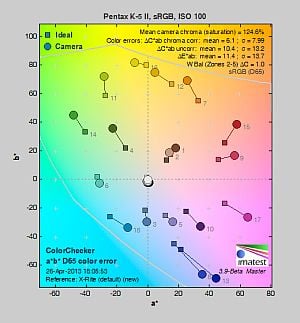
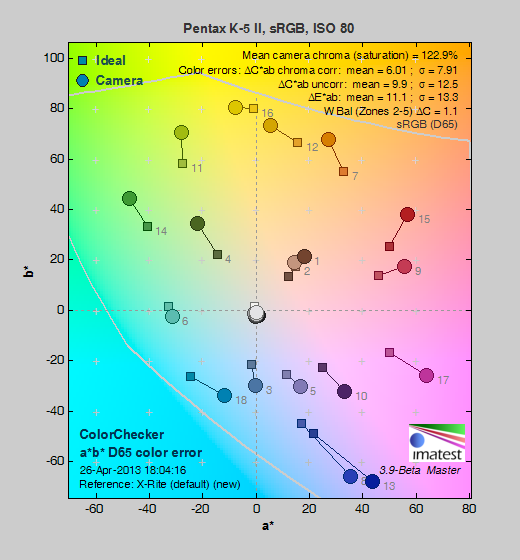
| In the diagram above, the squares show the original color, and the circles show the color that the camera captured. More saturated colors are located toward the periphery of the graph. Hue changes as you travel around the center. Thus, hue-accurate, highly saturated colors appear as lines radiating from the center. Mouse over the links to compare ISOs and click for larger versions. | ||||
Saturation. The Pentax K-5 II's default image tone setting of "Bright" pushes most colors by quite a bit at base ISO, especially blues, greens, and reds. Mean saturation at ISO 100 was 124.6% or 24.6% oversaturated. That's about 15% higher than most other brands. Overall, colors are very bright and punchy, a trait we've come to expect from Pentax, and mean saturation remains higher than average throughout the ISO range. You can of course always select a different image tone preset and/or turn down settings such as saturation and contrast to suit your own tastes. Most consumer digital cameras produce color that's more highly saturated (more intense) than found in the original subjects. This is simply because most people like their color a bit brighter than life.
Skin tones. Caucasian skin tones from the Pentax K-5 II were a touch yellow using auto white balance in our test shots, while manual white balance produced a more pinkish, "healthier" appearance. Because of the push in reds, though, skintones were a little too ruddy. Where oversaturation is most problematic is on Caucasian skin tones, as it's very easy for these "memory colors" to be seen as too bright, too pink, too yellow, etc.
Hue. The Pentax K-5 II's mean "delta-C" color error of 6.1 after correction for saturation at ISO 100 is a little below average for a DSLR these days. Most noticeable were moderate shifts in orange toward yellow and cyan toward blue, with minor shifts and some reds, yellows, and greens. (The cyan to blue shift is very common among the digital cameras we test; we think it's a deliberate choice by camera engineers to produce better-looking sky colors.) Hue is "what color" the color is.
Saturation Adjustment
The Pentax K-5 II lets you adjust the image Saturation and Contrast in nine steps each (Hue, High/Low Key and Sharpness are also adjustable in nine steps.) As can be seen below, the saturation adjustment worked well, providing a reasonably fine-grained adjustment over a useful range of control. The saturation adjustment also had almost no impact on contrast. That's how a saturation control should work, but we've often found interactions between saturation and contrast adjustments on cameras we've tested.
| Saturation Adjustment Examples | ||||
 |
 |
 |
 |
 |
| -4 | -2 | Default | +2 | +4 |
The series of shots above shows results with several different saturation adjustment settings including both extremes. See the Thumbnails index page for more (look for the files named K52OUTBSATx.JPG). Click on any thumbnail above to see the full-sized image.


Sensor
Exposure and White Balance
Indoors, incandescent lighting
Very warm results with default Auto and 2,600 Kelvin white balance settings, too cool with Incandescent, but good color with Manual white balance setting. Slightly higher than average exposure compensation required.


The Pentax K-5 II's Auto White Balance had a difficult time with the very warm color of the household incandescent bulbs used in this shot, producing a very warm image with a strong orange tint. Increasing the color correction in AWB mode to "Strong" (default is "Subtle Correction") improved results, but color balance was still a bit warm and reddish. Results with the Incandescent setting on the other hand were too cool with a blue bias. The Manual setting produced the most accurate color balance, though a touch cool. Unusually, the 2,600 Kelvin setting which matches the temperature of our lights produced a strong yellow/green cast. Note that a Color Temperature Enhancement (CTE) white balance option is also available (not shown), which exaggerates the temperature of the ambient light. The Pentax K-5 II required a slightly higher than average amount of exposure compensation of +0.7 EV for this shot. (The average for this scene is +0.3 EV for the cameras we've tested.) Our test lighting for this shot is a mixture of 60 and 100 watt household incandescent bulbs, a pretty yellow light source, but a very common one in typical home settings here in the U.S.
Outdoors, daylight
Bright, slightly cool colors with about average exposure accuracy.
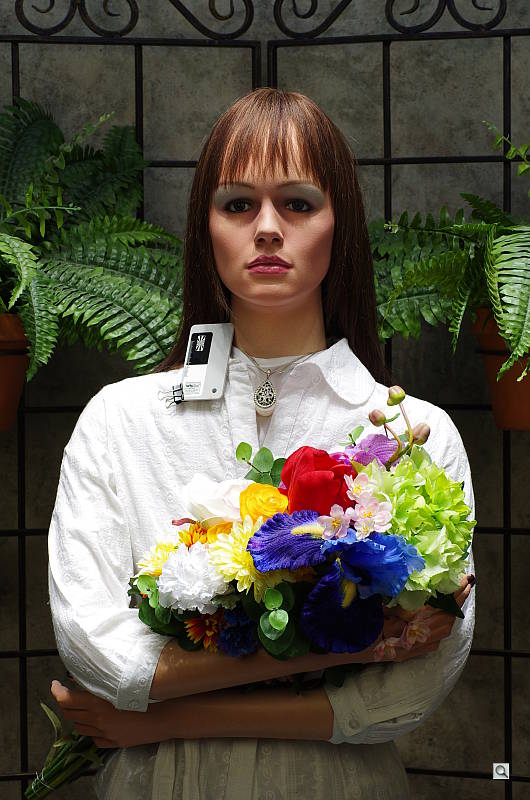
The Pentax K-5 II handled tough outdoor lighting under harsh sunlight fairly well, producing bright though slightly cool colors. Default contrast is on the high side (as most users prefer), resulting in some clipped highlights in the mannequins's shirt and some of the flowers, as well as some lost shadows in the flowers and the background, though all but the deepest shadows were quite clean. +0.7 EV exposure compensation was required to keep the model's face reasonably bright, which is about average for this scene. Skintones were just a touch yellow using auto white balance, so we preferred manual white balance for our "Sunlit" Portrait shot here, though skintones were a bit ruddy. Our Far-field shot was slightly underexposed at 0 EV, but again with punchy, slightly cool color. Almost no highlights were clipped and very few shadows were lost, with very good detail in the shadows as well. Good results overall here.
See full set of test images with explanations
See thumbnails of all test and gallery images
Resolution
Very high resolution, ~2,100 to 2,200 lines of strong detail from JPEGs, a little higher from converted RAW files.


Our laboratory resolution chart revealed sharp, distinct line patterns down to about 2,200 lines per picture height in the horizontal direction, and about 2,100 in the vertical direction in best quality JPEGs. Complete extinction didn't occur until about 2,700 lines in both directions. We were able to resolve a little more with an Adobe Camera Raw conversion, about 2,300 lines in the horizontal direction and about 2,200 in the vertical, and complete extinction of the pattern was extended to about 3,000 lines. The ACR processed RAW images did show more color moire, as they often do. Use these numbers to compare with other cameras of similar resolution, or use them to see just what higher resolution can mean in terms of potential detail.
See full set of test images with explanations
See thumbnails of all test and gallery images
Sharpness & Detail
Very sharp, detailed images overall, though with moderate edge-enhancement on high-contrast subjects. Minor noise suppression visible at base ISO.


Sharpness. The Pentax K-5 II produced very sharp images with very good detail at default settings. Images were slightly oversharpened as edge enhancement artifacts are visible on high-contrast subjects such as the sharpening halos around thicker branches and the pine codes in the crop above left, but overall results were still quite good (albeit with a bit too much contrast and saturation for our tastes). Edge enhancement creates the illusion of sharpness by enhancing color and tonal differences right at the edge of a rapid transition in color or tone.
Detail. The crop above right shows only minor detail loss due to noise suppression. Individual strands are still distinguishable even in the lighter shadows, though they begin to merge as shadows deepen, and in places where the tone and color of adjacent strands is very close. Still, very good performance here. Noise-suppression systems in digital cameras tend to flatten-out detail in areas of subtle contrast. The effects can often be seen in shots of human hair, where the individual strands are lost and an almost "watercolor" look appears.
Raw vs In-Camera JPEGs
As noted above, the Pentax K-5 II does a pretty good job at capturing lots of detail, but more detail can often be obtained from carefully processing RAW files, while at the same time reducing sharpening artifacts. Take a look below, to see what we mean:



In the table above, mousing over a link at the bottom will load the corresponding crop in the area above, and clicking the link will load the full resolution image. Examples are shot at ISO 100, and consist of an in-camera Best quality JPEG (left link) and the matching RAW file processed through Adobe Camera Raw (ACR) version 7.4, then sharpened in Photoshop. For the Pentax K-5 II's RAW files, we found good results with strong but tight 300% unsharp masking with a 0.3 pixel radius.
As is frequently the case, the demosaicing and sharpening from Adobe Camera Raw and Photoshop deliver finer detail than the camera's processing. Looking very closely at the images, ACR extracted a bit more fine detail that wasn't present in the JPEGs, but results also look more natural with reduced saturation and contrast. There's also a touch more noise visible from the converted RAW file (though noise levels are still very low). You can always adjust noise reduction to your liking, though, which is one of the advantages of shooting RAW and processing the images yourself.
ISO & Noise Performance
Excellent high ISO performance, with very good handling of noise versus detail to ISO 3,200.
| Noise Reduction = Auto (Default) | ||
 |
 |
 |
| ISO 80 | ISO 100 | ISO 200 |
 |
 |
 |
| ISO 400 | ISO 800 | ISO 1,600 |
 |
 |
 |
| ISO 3,200 | ISO 6,400 | ISO 12,800 |
 |
 |
|
| ISO 25,600 | ISO 51,200 | |
The Pentax K-5 II's images are very clean and detailed from ISO 80 through 800, which just a touch of luminance noise becoming more visible in the shadows and darker midtones as ISO increases. Detail is still very good at ISO 1,600, with a tight film-like noise "grain" and very little fine detail lost to noise reduction. At ISO 3,200, there's increased blurring and more visible noise "grain" particularly in the shadows, but fine detail is still quite good, though subtle detail in reds take a larger hit. ISO 6,400 shows stronger luminance and chrominance noise as well as increased blurring, though there's still a fair amount usable detail left. Images quality at ISO 12,800 and above falls off quickly, with much stronger luminance noise and much less detail than those at lower sensitivity levels. Chroma noise in the form of yellow and purple blotches becomes a noticeable issue at ISOs 25,600 and 51,200, and overall color balance shifts toward green.
Overall, though, high ISO noise performance is excellent for a 16-megapixel APS-C camera and at least as good as the K-5's, if not slightly better. Note that these images were shot using the Pentax K-5 II "Auto" noise reduction setting. The Pentax K-5 II offers an unusually flexible amount of control over noise reduction applied to its JPEGs. In addition to "Auto", you can adjust how much NR is applied ("Off", "Low", "Medium" or "High") at all ISOs, or you can select "Custom" which allows you to choose from the same four options at each ISO sensitivity setting (in whole EV increments). Of course, the impact of noise and detail loss are highly dependent on the size the photos are printed at, and pixel-peeping on-screen has surprisingly little relationship to how the images look when printed: See the Print Quality section below for recommended maximum print sizes at each ISO.
A note about focus for this shot: We shoot this image at f/4, using one of three very sharp reference lenses (70mm Sigma f/2.8 macro for most cameras, 60mm f/2.8 Nikkor macro for Nikon bodies without a drive motor, and Olympus Zuiko 50mm f/2.0 for Four Thirds and Micro Four Thirds bodies). To insure that the hair detail we use for making critical judgements about camera noise processing and detail rendering is in sharp focus at the relatively wide aperture we're shooting at, the focus target at the center of the scene is on a movable stand. This lets us compensate for front- or back-focus by different camera bodies, even those that lack micro-focus adjustments. This does mean, though, that the focus target itself may appear soft or slightly out of focus for bodies that front- or back-focused with the reference lens. If you click to view the full-size image for one of these shots and notice that the focus target is fuzzy, you don't need to email and tell us about it; we already know it. :-) The focus target position will simply have been adjusted to insure that the rest of the scene is focused properly.
Extremes: Sunlit, dynamic range, and low light tests
Very high resolution with good highlight and excellent shadow detail. Very good low-light performance, capable of capturing bright images in near darkness.


Sunlight:
The Pentax K-5 II handled the deliberately harsh lighting well in the above test. Though default contrast is quite high, highlight and especially shadow detail are very good. (The K-5 II's contrast adjustment also did a good job of decreasing overall contrast though it did impact saturation; see the section below.) The +0.7 EV exposure did the best job here, as we thought +0.3 and 0 EV were too dim in the face. Some highlights were blown in the model's shirt and bright flowers at +0.7 EV, though, while very good detail was preserved in the shadows with low levels of noise. Note that these shots were captured with the Pentax K-5 II's D-Range control set to "Off."
Because digital cameras are more like slide film than negative film (in that they tend to have a more limited tonal range), we test them in the harshest situations to see how they handle scenes with bright highlights and dark shadows, as well as what kind of sensitivity they have in low light. The shot above is designed to mimic the very harsh, contrasty effect of direct noonday sunlight, a very tough challenge for most digital cameras. (You can read details of this test here. In actual shooting conditions, be sure to use fill flash in situations like the one shown here; it's better to shoot in open shade whenever possible.)
Dynamic Range Analysis
A key parameter in a digital camera is its Dynamic Range, the range of brightness that can be faithfully recorded. At the upper end of the tonal scale, dynamic range is dictated by the point at which the RGB data "saturates" at values of 255, 255, 255. At the lower end of the tonal scale, dynamic range is determined by the point at which there ceases to be any useful difference between adjacent tonal steps. Note the use of the qualifier "useful" in there: While it's tempting to evaluate dynamic range as the maximum number of tonal steps that can be discerned at all, that measure of dynamic range has very little relevance to real-world photography. What we care about as photographers is how much detail we can pull out of the shadows before image noise becomes too objectionable. This, of course, is a very subjective matter, and will vary with the application and even the subject matter in question. (Noise will be much more visible in subjects with large areas of flat tints and subtle shading than it would in subjects with strong, highly contrasting surface texture.)
What makes most sense then, is to specify useful dynamic range in terms of the point at which image noise reaches some agreed-upon threshold. To this end, Imatest computes a number of different dynamic range measurements, based on a variety of image noise thresholds. The noise thresholds are specified in terms of f-stops of equivalent luminance variation in the final image file, and dynamic range is computed for noise thresholds of 1.0 (low image quality), 0.5 (medium image quality), 0.25 (medium-high image quality) and 0.1 (high image quality). For most photographers and most applications, the noise thresholds of 0.5 and 0.25 f-stops are probably the most relevant to the production of acceptable-quality finished images, but many noise-sensitive shooters will insist on the 0.1 f-stop limit for their most critical work.
JPEG. The graph at right (click for a larger version) was generated using Imatest's dynamic range analysis for an in-camera Pentax K-5 II JPEG file with a nominally-exposed density step target (Stouffer 4110). At the base ISO of 100 (the optimal ISO for dynamic range), with D-Range Expansion set to Off and default Contrast, the graph shows 11.5 f-stops of total dynamic range, and 7.43 f-stops at the "High" Quality level. These are are good results for an APS-C model. Compared to the Pentax K-5, the K-5 II scored almost identically at the highest quality level with its JPEG producing 7.43 versus 7.22 f-stops. The K-5 II scored better in total dynamic range with 11.5 vs 10.5 f-stops, so it seems that Pentax has made some improvements to its JPEG engine since the K-5. Note though that this measurement has a margin of error of about 1/3 f-stop, so differences of less than 0.33 can be ignored.
Raw. The graph at right is from the same Stouffer 4110 stepchart image captured as a RAW (.DNG) file, processed with Adobe Camera Raw using the Auto setting and tweaked from there. As can be seen, the score at the highest quality level increased over two f-stops from 7.43 to 10.4 f-stops, while total dynamic range increased just over two f-stops from 11.5 to 13.1. These results are excellent, essentially matching the K-5's 10.2 score at the highest quality level, and exceeding it in total dynamic range. Results at the highest quality level were also significantly better than the K-30's, which scored 9.86 f-stops in our tests. It's worth noting here is that ACR's default noise reduction settings reduced overall noise somewhat (see the plot in the lower left-hand corner) relative to the levels in the in-camera JPEG, which would tend to boost the dynamic range numbers for the higher quality thresholds.
Contrast Adjustment
Just as with its saturation adjustment, the Pentax K-5 II's contrast adjustment offers a fairly wide range of settings (-4 to +4), and the contrast steps are actually a little finer than those for saturation, which is even more to our liking.
| Minimum Contrast | |
 |
 |
| Contrast set to lowest, +0.3 EV |
Contrast set to lowest, 0 EV |
At its lowest contrast setting, the K-5 II did a really excellent job of bringing nice detail out of the shadows as well as preserving more highlight detail in the mannequin's shirt and flowers, but skin tones in the "Sunlit" Portrait were a bit too flat for our tastes, and colors in general in the Far-field shot were less saturated.
| Contrast Adjustment Examples | ||||
|
 |
 |
 |
 |
| -4 | -2 | Default | +2 | +4 |
The series of shots above shows results with several different contrast adjustment settings, showing a range between both extremes including the default. The camera's contrast adjustment had quite an effect on color saturation, reducing and increasing it along with contrast. Contrast and saturation are actually fairly closely coupled, so this is unfortunately not that unusual. Click on any thumbnail to go to the full-size image.
D-Range Settings
The Pentax K-5 II offers three Shadow Correction levels (Low, Medium and High, plus Off) as well as one Highlight Correction level (On/Off). Unlike the K-30, there are no Auto settings. As the name implies, Shadow Correction works to raise shadow levels while attempting to keep highlights and midtones as they are, and inversely, Highlight Correction attempts to reduce highlights without darkening shadows and midtones. Both can be used simultaneously. See the images below to see their effect on our high-contrast "Sunlit" Portrait test shot.
|
Outdoor Portrait D-Range Examples
|
|||
 |
D-Range Off |
||
| Shadow Low |
|||
| Shadow Medium |
|||
| Shadow High |
|||
 |
Highlight On |
||
Mouse over the links to see how the various settings for D-Range affects our "Sunlit" Portrait shot. Click on a link to get to the full-res image. (The effect can be a little subtle in shots like those above, so we decided to use a mouse-over to better show how each setting compares to Off.)
Shadow Correction. Above, we see a gradual lightening of shadows and midtones as the Shadow Correction setting is increased, though highlights are also affected to some degree. If you look closely at the shadow detail, you will notice an increase in noise as the setting is turned higher, but that's to be expected and noise levels are still pretty low. The camera reports an ISO of 100 for all three settings of Shadow Correction.
Highlight Correction. Highlight Correction set to On did reduce the number of bright highlights, but also boosted shadows a bit. It also raised ISO to 160.
|
Far-field D-Range Examples
|
|||
 |
|||
|
|
|
||
Here are the results with our Far-field shot. Again, we see a lightening of shadows as the Shadow Correction setting is increased. Highlight Correction worked as expected though again there weren't many highlights clipped in the first place, and it also boosted shadows somewhat.
HDR Capture
The Pentax K-5 II has a High Dynamic Range (HDR) capture mode where the camera takes three images (underexposed, normal, and overexposed) in quick succession and combines them in-camera into one image. If performed properly, this method should result in much higher dynamic range, without the additional noise penalty that comes with boosting sensitivity or lightening shadows. (In fact, it can reduce shadow noise by combining shadows from the overexposed shot.) There are five HDR settings available: Auto, Standard, and HDR 1/2/3 providing +/-1 EV, +/-2 EV and +/-3 EV exposure ranges respectively.
|
Far-field HDR Examples
|
||
|
|
||
| HDR 1 | ||
The Auto and Standard HDR settings worked reasonably well on our Far-field test shot, reducing highlights and bringing out shadow detail. HDR 1 produced a relatively realistic image, but higher settings were too much for this scene, resulting in very flat and unnatural looking images with strong halos. As with most HDR systems, watch out for ghosting that can occur when subjects move between exposures. The K-5 II also has an Auto Align function which should let you shot HDR images without the use of a tripod, but we didn't test that feature in the lab. As you'd expect, HDR mode is not supported when shooting RAW or RAW+JPEG files.
| 1 fc 11 lux |
1/2 fc 5.5 lux |
1/4 fc 2.7 lux |
1/8 fc 1.3 lux |
1/16 fc 0.67 lux |
1/16fc No NR |
|
|---|---|---|---|---|---|---|
| ISO 80 |
 2.5 s f2.8 |
 5 s f2.8 |
 10 s f2.8 |
 20 s f2.8 |
 30 s f2.8 |
 30 s f2.8 |
| ISO 100 |
 2 s f2.8 |
 4 s f2.8 |
 8 s f2.8 |
 15 s f2.8 |
 30 s f2.8 |
 30 s f2.8 |
| ISO 200 |
 1 s f2.8 |
 2 s f2.8 |
 4 s f2.8 |
 8 s f2.8 |
 15 s f2.8 |
 15 s f2.8 |
| ISO 400 |
 0.5 s f2.8 |
 1 s f2.8 |
 2 s f2.8 |
 4 s f2.8 |
 8 s f2.8 |
 8 s f2.8 |
| ISO 800 |
 1/4 s f2.8 |
 0.5 s f2.8 |
 1 s f2.8 |
 2 s f2.8 |
 4 s f2.8 |
 4 s f2.8 |
| ISO 1600 |
 1/8 s f2.8 |
 1/4 s f2.8 |
 0.5 s f2.8 |
 1 s f2.8 |
 2 s f2.8 |
 2 s f2.8 |
| ISO 3200 |
 1/15 s f2.8 |
 1/8 s f2.8 |
 1/4 s f2.8 |
 0.5 s f2.8 |
 1 s f2.8 |
 1 s f2.8 |
| ISO 6400 |
 1/30 s f2.8 |
 1/15 s f2.8 |
 1/8 s f2.8 |
 1/4 s f2.8 |
 0.5 s f2.8 |
 0.5 s f2.8 |
| ISO 12800 |
 1/60 s f2.8 |
 1/30 s f2.8 |
 1/15 s f2.8 |
 1/8 s f2.8 |
 1/4 s f2.8 |
 1/4 s f2.8 |
| ISO 25600 |
 1/125 s f2.8 |
 1/60 s f2.8 |
 1/30 s f2.8 |
 1/15 s f2.8 |
 1/8 s f2.8 |
 1/8 s f2.8 |
| ISO 51200 |
 1/250 s f2.8 |
 1/125 s f2.8 |
 1/60 s f2.8 |
 1/30 s f2.8 |
 1/15 s f2.8 |
 1/15 s f2.8 |
Low Light. The Pentax K-5 II performed very well here, able to capture usable images down to the 1/16 foot-candle light level (about 1/16 as bright as average city street lighting at night), at all ISO settings. Noise was quite low up to ISO 1,600, and even a higher ISOs there's still a lot of detail to work with especially when high ISO NR is set to "Off." As mentioned previously, the Pentax K-5 II gives you four options for high ISO noise reduction: Auto, Off, Low, Normal, and High, and you can choose the level of noise reduction for each ISO, so you have a lot of flexibility in deciding how much noise to trade for detail. Except for the "No NR" shots in the table above, these were all shot using the default Auto NR settings.
Color balance with Auto white balance was pretty good which isn't always the case, with just a slightly cool bias that became cooler as light levels dropped. At very high ISOs, chroma noise shifted overall color balance, sometimes towards magenta or green, but that's not unusual.
We did not detect any significant issues with hot pixels, banding, or heat blooming.
The Pentax K-5 II's phase-detection autofocus system was able to focus on the subject down to below the 1/16 foot-candle light level using an f/2.8 lens with its AF assist light turned off, and in total darkness with the focus assist lamp enabled. In Live View mode, the K-5 II's contrast-detect autofocus was also able to focus down to below the 1/16 foot-candle level, which is excellent.
(Keep in mind that the longer shutter speeds here demand the use of a tripod to prevent any blurring from camera movement. A useful trick is to just prop the camera on a convenient surface, and use its self-timer to release the shutter. This avoids any jiggling from your finger pressing the shutter button, and can work quite well when you don't have a tripod handy.)
How bright is this? The one foot-candle light level that this test begins at roughly corresponds to the brightness of typical city street-lighting at night. Cameras performing well at that level should be able to snap good-looking photos of street-lit scenes.
NOTE: This low light test is conducted with a stationary subject, and the camera mounted on a sturdy tripod. Most digital cameras will fail miserably when faced with a moving subject in dim lighting. (For example, a child's ballet recital or a holiday pageant in a gymnasium.) Digital SLRs like the Pentax K-5 II do much better than point & shoots, but you still shouldn't expect a quick autofocus lock with moving subjects..)
Output Quality
Print Quality
Excellent print quality up to 24 x 36 inches at ISO 80/100/200; ISO 1600 capable of a good 11 x 14 inch print; ISO 12,800 still able to deliver a good 4 x 6. (Note: the K-5 II creates noticeable oversaturation in some colors of our test images.)
 ISO 80/100/200 produces excellent prints at 24 x 36 inches, and is capable of wall display images up to 30 x 40 inches. As noted above, the magenta fabric swatch is noticeably oversaturated.
ISO 400 prints lose only a minor amount of detail in a few areas like the mosaic tiles, but are quite sharp at 20 x 30 inches.
ISO 800 images still look decent at 20 x 30, but show marginal loss in contrast in our difficult target red leaf swatch and some apparent noise in the shadowy areas of our target. To be safe we'll call 16 x 20 good at this ISO.
ISO 1,600 prints at 11 x 14 lose all contrast detail in our target red swatch, but are otherwise quite good.
ISO 3,200 makes a nice 8 x 10 inch print, again losing all detail in our red swatch but good in all other areas.
ISO 6,400 prints a nice 5 x 7, with only minor grain in the shadows.
ISO 12,800 prints a nice 4 x 6, which still is a good size for this ISO.
ISO 25,600/51,200 prints are not usable at any size and are best avoided.
The Pentax K-5 II with its 16.3-megapixel APS-C CMOS sensor yields a nice range of printed images across most of the ISO spectrum, producing comparable print sizes to most of its competitors in this sensor size and price range. Note however that at all sizes and ISO ranges our target magenta fabric swatch has a noticeable boost in saturation, and is tinted slightly more towards purple than the actual swatch color. Other colors are oversaturated as well.
Testing hundreds of digital cameras, we've found that you can only tell just so much about a camera's image quality by viewing its images on-screen. Ultimately, there's no substitute for printing a lot of images and examining them closely. For this reason, we now routinely print sample images from the cameras we test on our Canon Pro9000 Mark II studio printer, and on the Pixma MP610 here in the office. (See the Canon Pixma Pro9000 Mark II review for details on that model.)
The images above were taken from our standardized test shots. For a collection of more pictorial photos, see our Pentax K-5 II Photo Gallery .
Not sure which camera to buy? Let your eyes be the ultimate judge! Visit our Comparometer(tm) to compare images from the Pentax K-5 II with those from other cameras you may be considering. The proof is in the pictures, so let your own eyes decide which you like best!
Performance
Timing and Performance
Generally good performance for a prosumer DSLR, though buffer clearing is sluggish and AF speed is slower than the K-5's.
| Startup/Shutdown |
||
| Power on |
~0.6 second
|
Time it takes for camera to turn on and take a shot. |
| Shutdown |
~0.5 second
|
How long it takes to turn off. |
| Buffer clearing time |
18 seconds*
after 28 L/P JPEGs |
Worst case buffer clearing time. -- This is the delay after a set of shots before you can remove the card. Some cameras won't shut down until the buffer is cleared. See Cycle-Time table below for more buffer clearing times. |
|
31 seconds*
after 22 RAW frames |
||
|
41 seconds*
after 22 RAW + L/P JPEGs |
||
| * Note: Buffer clearing times measured with a SanDisk Extreme Pro 95MB/s UHS-I SDHC card. Slower cards will produce correspondingly slower clearing times. Slow cards may also limit length of bursts in continuous mode. ISO sensitivity and noise reduction settings can also affect cycle times and burst mode performance. |
||
Startup and shutdown times were about average for a prosumer DSLR. Buffer clearing times were a little slow for the class of camera, though buffer depths were good. (Unfortunately, the Pentax K-5 II doesn't take advantage of increased performance offered by the newer higher-speed UHS-I compliant card we tested with.)
| Mode Switching | ||
|---|---|---|
|
Play to Record, |
~0.3 second
|
Time until first shot is captured. |
|
Record to Play |
~1.6 seconds
|
Time to display a large/premium JPEG file immediately after capture. |
|
Display |
~0.3 second
|
Time to display a large/premium JPEG file already on the memory card. |
Play to Record was very fast as was displaying a recorded image, but switching from Record to Play was a touch sluggish.
| Shutter Response (Lag Time) | |||
|---|---|---|---|
|
Full Autofocus |
0.225 second
|
Time from fully pressing shutter button to image capture. (All AF timing measurements taken with Sigma 70mm f/2.8 prime.) |
|
|
Full Autofocus |
0.245 second
|
Time from fully pressing shutter button to image capture. Auto Flash enabled. |
|
|
Full Autofocus |
0.242 second
|
Time from fully pressing shutter button to image capture. |
|
|
Continuous AF
|
0.225 second
|
This mode is release priority so subject may be out of focus; we have no way to measure performance with moving subjects.
|
|
|
Manual focus
|
0.204 second
|
For most cameras, shutter lag is less in manual focus than autofocus, but usually not as fast as when the camera is "pre-focused."
|
|
|
Pre-focused |
0.091 second
|
Time to capture, after half-pressing and holding shutter button. |
|
|
Live View
|
|||
|
Full Autofocus
(Phase-Detect AF) Live View mode |
1.27 seconds
|
Time from fully pressing shutter button to image capture. |
|
|
Full Autofocus
(Contrast-Detect AF) Live View mode |
1.25 seconds
|
Time from fully pressing shutter button to image capture. |
|
|
Pre-focused |
0.403 second
|
Time to capture, after half-pressing and holding shutter button. |
|
The shutter lag numbers above measure time from shutter button press to image capture, with the lens already set to the correct focal distance. This largely removes the issue of differences in lens focusing speed, and measures how fast the camera can measure and act on focus information. In this metric, the Pentax K-5 II was a touch slower than average for a prosumer DSLR, and noticeably slower than the K-5 which was about twice as fast in our tests. The K-5 II required 0.225 second for full AF when using Single-point (center) AF mode (our default full AF lag test). Enabling the flash in this AF mode increased lag to 0.245 second, which isn't much of a speed penalty. Full AF shutter lag in Auto area AF mode was a bit slower than single area at 0.242 second. Continuous and Manual focus lag times were 0.225 and 0.204 second respectively, which are also slower than average. When prefocused, shutter lag was 0.091 second which while fast, isn't as fast as some competing models.
As expected, the Pentax K-5 II's Live View mode was much slower to focus. Full autofocus shutter lag was approximately 1.27 seconds using phase-detect AF mode. This decreased slightly to approximately 1.25 seconds using contrast-detect AF mode. Prefocused shutter lag was good for Live View mode, at 0.403 second.
To minimize the effect of different lens' focusing speed, we test AF-active shutter lag with the lens already set to the correct focal distance. We also use the same Sigma 70mm f/2.8 macro with every camera (on all platforms except Four Thirds/Micro Four Thirds and Nikon consumer models lacking an in-body focus motor), to further reduce variation, and because our tests showed that focus-determination time with this lens was close to the fastest, across multiple camera bodies from different manufacturers. Being an older design with a non-ultrasonic motor, it wouldn't be the fastest at slewing from one focus setting to another, but that's exactly the reason we measure focus determination speed, which is primarily a function of the camera body, vs focus adjustment speed, which is primarily a function of the lens.
| Cycle Time (shot-to-shot) | ||
|---|---|---|
|
Single Shot mode
Large/Premium JPEG |
0.38 second
7 seconds to clear |
Time per shot, averaged over 20 shots, with no signs of slowing down. |
|
Single Shot mode |
0.39 second
22 seconds to clear |
Time per shot, averaged over 20 shots, with no signs of slowing down. |
|
Single Shot mode
RAW + L/P JPEG |
0.39 second
35 seconds to clear |
Time per shot, averaged over 20 shots, with no signs of slowing down.
|
|
Early shutter |
No
|
Some cameras refuse to snap another shot if you release and press the shutter too quickly in Single Shot mode, making "No" the preferred answer. |
|
Continuous mode Large/Premium JPEG |
0.15 second
(6.65 fps); 28 frames total; 18 seconds to clear* |
Time per shot, averaged over the buffer length of 28 shots, then slows to an average of 0.36 second (2.76 fps) for subsequent shots, with about 21% variation in cycle times when buffer is full.
|
|
Continuous mode |
0.15 second
(6.69 fps); 22 frames total; 31 seconds to clear* |
Time per shot, averaged over the buffer length of 22 frames, then slows to an average of 0.9 seconds (1.11 fps) for subsequent shots, with about 24% variation in cycle times when buffer is full. |
|
Continuous mode |
0.15 second
(6.69 fps); 22 frames total; 41 seconds to clear* |
Time per shot, averaged over the buffer length of 22 frames, then slows to an average of 1.9 seconds (0.53 fps) for subsequent shots, with about 45% variation in cycle times when buffer is full. |
| Flash recycling |
2.1 seconds
|
Flash at maximum output. |
| * Note: Buffer clearing times measured with a SanDisk Extreme Pro 95MB/s UHS-I SDHC card. Slower cards will produce correspondingly slower clearing times. Slow cards may also limit length of bursts in continuous mode. ISO sensitivity and noise reduction settings can also affect cycle times and burst mode performance. |
||
Shot-to-shot cycle times were good, at 0.38 second for Large/Premium JPEG and 0.39 seconds for DNG or DNG + L/P JPEG files.
Continuous mode was very good for a prosumer DSLR, at about 6.7 frames per second regardless of file type. That's a little faster than the ~6.5 fps we got for the K-5, however a bit slower than Pentax's rating of 7 frames per second.
The Pentax K-5 II's buffer depths were also quite good for a prosumer DSLR, considering the burst rates. The K-5 II managed 28 L/P JPEGs, 22 DNGs and 22 DNG + L/P JPEG frames before slowing down. (You'll likely do better, as the target image we use for our tests is designed to be difficult to compress.)
The Pentax K-5 II's flash took 2.1 seconds to recharge after a full-power shot, which is quite fast.
| Download speed | ||
|---|---|---|
|
Windows Computer, USB 2.0 |
11,984 KBytes/sec
|
Typical Values: |
Connected to a computer or printer with USB 2.0, downloads were very fast.
Bottom line, the Pentax K-5 II's performance was generally good, however autofocus speed was a touch slower than average for its class and noticeably slower than its predecessor. Burst speeds were quite good, but buffer clearing times were a bit of a disappointment as the camera does not appear to be UHS-I compliant. Still, buffer depths were pretty good, so you likely won't lose too many shots unless you need to take long bursts back-to-back.
Battery
Battery Life
Average battery life for a semi-professional model SLR.
| Operating Mode | Number of Shots |
|---|---|
|
Optical Viewfinder,
(CIPA standard) |
740
|
|
Live View LCD,
(CIPA standard) |
Unknown
|
The Pentax K-5 II uses a custom rechargeable lithium-ion battery for power, and ships with a charger. Battery life is about average for a semi-pro model (better than average compared to most consumer models), but if you plan to use Live View or shoot movies much, you'll definitely want to have a spare battery to bring along.
The table above shows the number of shots the camera is capable of (on either a fresh set of disposable batteries or a fully-charged rechargeable battery as appropriate), based on CIPA battery-life and/or manufacturer standard test conditions.
(Interested readers can find an English translation of the CIPA DC-002 standards document here. (180K PDF document))
Video
Check out the links below for more sample images, videos and image quality analysis:
- Pentax K-5 II Optics page (Crops from images shot with the camera's kit lens, if sold as a kit)
- Pentax K-5 II Sample Images page (Index to all standard test shots, with explanations)
- Pentax K-5 II Thumbnails page (Thumbnails of all shots, including RAWs, with EXIF data)
- Pentax K-5 II Gallery page (Regular photos taken with the Pentax K-5 II)
Like most DSLRs nowadays, the Pentax K-5 II offers at least some HD video recording capability. Pentax hasn't been a big player in the HD-DSLR arena, and unfortunately, the updated K-5 II and K-5 IIs don't make much of an entrance. The K-5 II models do finally add full 1,920 x 1,080 HD resolution video (up from the 720p video of the K-5), however they only shoot 1080p video at 25 frames per second, which is a bit strange, particularly for the US and other NTSC markets where frame rates like 24p and 30p are more common and compatible. They also shoot at 720p resolution at 25 and 30 frames per second, but there are no faster frame rates like 60p or 50p. There's also a standard definition video resolution of 640 x 480 at both 25 and 30 frames per second. Each video resolution has three image quality (compression) levels.
Other features for video recording are rather slim, with only one recording format, a built-in monaural microphone (although there is an external mic jack) and a 25 minute limit to video recording. There are various special effects filters and scene modes that can be applied to videos as well.

One quite interesting and unique feature is the K-5 II's body-based Shake Reduction technology, so rather than lens-based image stabilization, the camera itself handles the I.S., providing a stabilized image with any lens. The cool thing about this is that it works for video recording, too. We've seen other manufacturers with sensor-shift image stabilization, but it's often disabled for video recording. This is quite versatile and convenient.
Although the Pentax K-5 II packs an array of powerful and unique features for still images in a camera at this price point, the video side of things doesn't seem to be this camera's strong suit. Using this camera for video feels like stepping into a time machine back to the burgeoning days of DSLR video recording -- minimal features, sightly clunky operation and technical limitations. Here's the full rundown of the K-5 II's video capabilities, along with our usual selection of sample videos.
NOTE: The Pentax K-5 IIs features identical specifications regarding video recording, so the video pages for these two cameras will be very similar.
Pentax K-5 II Basic Video Specs
- Full HD 1,920 x 1,080 video at 25 frames per second
- 1,280 x 720 HD video at 30 fps & 25 fps
- VGA 640 x 480 video at 30 fps & 25 fps
- Three video quality levels: Best, Better and Good
- Video recording started and stopped with shutter button
- Does not have full-time autofocus
- Live View AF options (using half-press of shutter button prior to recording):
- Face Detection AF - autofocus priority to faces; contrast detection AF
- Contrast AF
- Phase Difference AF (screen will shut off to use use phase detection autofocus, then the screen will turn back on once focus is determined.)
- Manual focus also available
- Cannot change ISO sensitivity in Movie Mode; Auto ISO only
- Spot, Center-Weighted and Multi-Segmented Metering available
- Shake Reduction available during video mode
- Shake Reduction is body/sensor-based -- can use any lens and still have image stabilization
- Live histogram display available before and during recording
- Shutter speed is not adjustable in Movie Mode; automatically adjusted (not shown to user)
- Vertical and horizontal level can be displayed during recording
- Built-in mono microphone with 3.5mm external stereo microphone input jack
- Recording time limited to 25 minutes or 4GB
- Video recording also stops if camera overheats
- Can use optional remote control to start and stop recording
- Nine custom image style presets; Five digital effects filters; Cross processing filters
- Pentax warns that Digital Filter may caused dropped frames in recorded video
Pentax K-5 II Video: Image Size, Frame Rate, and Encoding
The Pentax K-5 II is fairly limited in terms of recording file format, resolution and frame rates.
|
Pentax K-5 II Video Options
|
||
|---|---|---|
|
M-JPEG Format (Motion JPEG, .AVI files)
|
||
|
Resolution |
Aspect Ratio |
Frame Rate
|
1,920 x 1,080 |
16:9 |
25 frames per second |
1,280 x 720 |
16:9 |
30 frames per second |
|
25 frames per second |
||
|
640 x 480 |
4:3 |
30 frames per second |
25 frames per second |
||
The Pentax K-5 II offers a very simple menu when it comes to video resolution, frame rates and file formats. It features a single file format, Motion JPEG in an AVI container, in three resolutions, 1,920 x 1,080, 1,280 x 720, and 640 x 480. At 1080p resolution, the only option for frame rates is 25 fps, which, as mentioned above, is quite odd given that this camera is also sold in non-PAL countries where 25p is not a standard frame rate. Users are also given the choice of 720p HD video in 30p and 25p frame rates as well as VGA resolution video 30p and 25p.
There are three levels of image quality for each resolution video: Best, Better and Good. Pentax do not indicate specific bitrates for each quality level, however, but they do indicate that approximate recording time limits for a standard 4GB memory card:
| Pentax K-5 II Video Recording Times & Estimated Bit Rates
|
|||
|---|---|---|---|
Resolution |
Quality Level |
Time |
Est. Bit Rate
|
1080p, 25p |
Best |
5 min, 17 sec |
101 Mbps |
Better |
6 min, 57 sec |
77 Mbps |
|
Good |
9 min, 43 sec |
55 Mbps |
|
720p, 30p |
Best |
8 min, 31 sec |
63 Mbps |
Better |
13 min, 03 sec |
41 Mbps |
|
Good |
18 min, 07 sec |
29 Mbps |
|
720p, 25p |
Best |
10 min, 12 sec |
52 Mbps |
Better |
15 min, 35 sec |
34 Mbps |
|
Good |
21 min, 37 sec |
25 Mbps |
|
VGA, 30p |
Best |
25 min, 08 sec |
21 Mbps |
Better |
37 min, 57 sec |
14 Mbps |
|
Good |
51 min, 34 sec |
10 Mbps |
|
VGA, 25p |
Best |
30 min, 01 sec |
18 Mbps |
Better |
44 min, 41 sec |
12 Mbps |
|
Good |
1 hr, 0 min, 57 sec |
9 Mbps |
|
The downside to using a video format like Motion JPEG, which is quite simple to decode, is that it's not as efficient in its compression scheme as more advanced codecs, like H.264/MPEG-4 AVC encoding (as is used in the Panasonic GH3, for example). As such, video files from the Pentax K-5 II can grow to massive sizes. Pentax puts a limit of 25 minutes of continuous recording or a 4GB file, whichever comes first. Given the M-JPEG inefficiency with compression, it's not surprising that you can record 1080p Best quality video for only about 5 min, 17 sec.
Pentax K-5 II Video: Image Quality
The K-5 II produces nice image quality overall at both 1080p and 720p resolutions with a decent level of detail and good colors, if a bit saturated at the default "Bright" picture settings. However, videos aren't as crisp and finely detailed as other video-capable still cameras like the GH3.
The camera also struggled in our standard night videos, particularly with shadow details. The Pentax K-5 II does not allow users to set the ISO in video mode, contributing to the low-light videos looking underexposed. There was also a lot of high-ISO noise throughout the frame, despite the ISO apparently not being high enough for a good exposure.
Moiré and aliasing artifacts were also quite severe, not only on the K-5 IIs, but also with the K-5 II, which has an optical low-pass filter. We saw moiré artifacts on many objects in the frame, such as roofing shingles, window screens and blinds, and even the small leaves and fronds of the sweet grass bushes. (Check out the beginning of our rolling shutter videos to really see examples of moiré.)
Many people wouldn't expect to find moiré artifacts in video from the version of the camera that has a low-pass filter, but optical low-pass filters (LPFs) are designed to operate at the individual pixel level, at still-image resolutions. Because video resolution is so much lower, the optical LPF has no effect on aliasing. Aliasing and moiré are a significant problem in DSLR video, because most cameras don't have (remotely) enough processing horsepower to do anti-aliasing processing in firmware.
Take a look at our standard set of sample videos below:
| Pentax K-5 II: Video Samples
|
|---|
Pentax K-5 II Video: Focusing
The Pentax K-5 II (and IIs) is one of the rare video-capable DSLRs released recently that doesn't feature some form of continuous autofocus. And the K-5 II doesn't offer many of the bells and whistles for video focusing that we've seen in other recent cameras, such as focus peaking.
- No full-time autofocus ; manual focus only
- If AF is enabled, the camera will autofocus with a half-press of the shutter button prior to recording (shutter button is used to start/stop video recording) -- can override AF attempt with a quick full-press of shutter button.
- Magnify View with press of "Info" button (2x, 4x, 6x) to check critical focus (before recording only).
- Can move AF point around almost entire frame (except for right and left edges).
- Continuous Tracking focus works while half-pressing shutter button; doesn't track focus during recording.
- Can be used as another way to focus and recompose prior to recording.
Pentax K-5 II Video: Exposure Control

As with focusing, the Pentax K-5 II is pretty sparse when it comes to features for exposure settings, with most most of the video exposure controls automatically chosen for you. The only exposure options the user is given are aperture and exposure compensation, while other settings like shutter speed and, surprisingly, ISO sensitivity are automatically adjusted.
- Option to have aperture manually adjustable or automatic
- for manual aperture control, set "Movie Aperture Control" to "Fixed" in Movie menu.
- ISO is set to Auto ISO. Cannot be changed in Movie Mode.
- Shutter speed automatically selected based on video frame rate and light level (not shown to user, however).
- Exposure compensation is available before and during recording
- Spot, Center-Weighted and Multi-Segmented Metering available
- White balance available in movie mode (before recording)
- Tonal adjustments: 9 preset values, plus full customization of tonal settings (saturation, hue, high & low key adjustments, contrast, and sharpness) are available in movie mode.
- Cross Processing and Digital Filters special effects presets are available.
There is, however, an unofficial "hack" to have full manual exposure in video mode on the Pentax K-5 II (IIs):
- Rotate mode dial to "User"
- In the menu, select exposure mode "Av" for Aperture Priority
- Choose aperture value that you want
- Choose the ISO value that you want
- Enable Live View
- Point camera to meter on a subject in such a way that the shutter speed adjusts to your desired level (i.e. 1/25 for 25p, 1/30 for 30p, etc.)
- Press AE-L button (auto-exposure lock) to set exposure settings
- Rotate Mode Dial to Movie Move
- Notice the AE-L asterisk icon is still on the screen. Your exposure should be locked to the ISO, shutter speed and aperture that you set previously.
- Note that entering menus or turning of the camera will reset the Auto-Exposure Lock (like it will with still images).
Pentax K-5 II Video: Audio Recording

The Pentax K-5 II provides only the most basic of audio recording features for Movie Mode: mono audio with the built-in mic and no adjustable recording level, but with the ability to attach an external stereo mic.
- Monaural audio with built-in microphone
- 3.5mm microphone input jack ("stereo mini plug")
- Audio level is not adjustable; choice is on or off
- Pentax suggestions for external microphones
- Stereo electret condenser mics
- Plug-in Power Method (with operating voltage of 2.0V or lower)
- Impedance: 2.2 kΩ
- Pentax warns not to disconnect the external mic during recording, as the camera will not switch automatically back to internal mic and sound will not be recorded.
- Although no specifications are given regarding audio format, video players report it as 16-bit PCM audio with a sample rate of 32 kHz.
Pentax K-5 II Video: Rolling Shutter Artifacts ("Jello Effect")
Almost every video-capable still camera on the market distorts rapidly moving objects, or the entire scene, if the camera is panned quickly. The technical term for this is "rolling shutter artifacts," but many users simply call it the "Jello effect," because the image can jiggle and sway like Jello as the camera is moved. This occurs because the image is captured and read out line by line, so the bottom of an object may no longer be underneath the top of it by the time the camera gets around to capturing that part of the frame.
The Pentax K-5 II sadly displays pretty severe rolling shutter artifacts. On both 1080/25p and 720/30p, with and without Shake Reduction enabled, rolling shutter was pretty noticeable. (Note: Shake Reduction was disabled for the two sample videos below.) On a couple subsequent tests, even when panning slowly, rolling shutter artifacts were produced easily.
| Pentax K-5 II: Rolling Shutter Artifacts
|
|---|
There are plug-ins out there to fix rolling shutter when editing your footage on the computer, but software correction is not a surefire solution. It's simply something that you must keep in mind when moving the camera while recording video. If you just pan slowly while filming, you're not likely to notice them much at all.
Flash
Pentax K-5 II Flash
Pop-up Flash Test Results
Coverage and Range
A moderately powerful built-in flash, with narrow coverage. About average exposure compensation required.


Coverage and Exposure. Flash coverage was rather narrow at wide angle (18mm) with the 18-135mm kit lens. Coverage was more uniform at telephoto (135mm), but corners were still a little dim, though some of fall-off is due to the lens itself. In our Indoor test, the Pentax K-5 II's flash required +0.7 EV flash exposure compensation to get bright results, which is about average for this scene. Auto white balance was however quite cool. The camera's Slow-Sync flash mode produced bright results with +0.3 EV exposure compensation, though with a strong yellow-orange cast from the room lighting.
| Flash Range: Wide Angle | |||||
|---|---|---|---|---|---|
| 6 ft | 7 ft | 8 ft | 9 ft | 10 ft | 11 ft |
 1/50 sec f3.5 ISO 100 |
 1/50 sec f3.5 ISO 100 |
 1/50 sec f3.5 ISO 100 |
 1/50 sec f3.5 ISO 100 |
 1/50 sec f3.5 ISO 100 |
 1/50 sec f3.5 ISO 100 |
| 12 ft | 13 ft | 14 ft | 15 ft | 16 ft | |
 1/50 sec f3.5 ISO 100 |
 1/50 sec f3.5 ISO 100 |
 1/50 sec f3.5 ISO 100 |
 1/50 sec f3.5 ISO 100 |
 1/50 sec f3.5 ISO 100 |
|
| Flash Range: Telephoto | |||||
|---|---|---|---|---|---|
| 6 ft | 7 ft | 8 ft | 9 ft | 10 ft | 11 ft |
 1/180 sec f5.6 ISO 100 |
 1/180 sec f5.6 ISO 100 |
 1/180 sec f5.6 ISO 100 |
 1/180 sec f5.6 ISO 100 |
 1/180 sec f5.6 ISO 100 |
 1/180 sec f5.6 ISO 100 |
| 12 ft | 13 ft | 14 ft | 15 ft | 16 ft | |
 1/180 sec f5.6 ISO 100 |
 1/180 sec f5.6 ISO 100 |
 1/180 sec f5.6 ISO 100 |
 1/180 sec f5.6 ISO 100 |
 1/180 sec f5.6 ISO 100 |
|
ISO 200 Range. At 18mm, f/3.5 and ISO 200, our flash target remained bright out to 12 feet, though images were still usable out to about 14 feet. At 135mm and f/5.6, flash exposure started out slightly dim at 6 feet, but brightness fell rapidly from 9 feet on.
| Manufacturer-Specified Flash Range | |
|---|---|
| Wide Angle | Telephoto |
 12.2 feet ISO 100 |
 7.6 feet ISO 100 |
Manufacturer Specified Flash Test. The Pentax K-5 II's flash is rated with a GN of 13 meters at ISO 100. That translates to about 12.2 feet at f/3.5 and about 7.6 feet at f/5.6, the maximum aperture of the 18-135mm kit lens at wide angle and telephoto respectively. In the shots above, the K-5 II's flash performed to specification at wide angle, but our flash target was underexposed by about 1/3 EV at full telephoto. Our standard test method for flash range uses a fixed setting of ISO 200, to provide a fair basis of comparison between cameras. We've also begun shooting two shots using the manufacturer-specified camera settings, at the range the company claims for the camera, to assess the validity of the specific claims.
High ISO Noise Reduction
Pentax K-5 II High ISO Noise Reduction
Like other Pentax models, the K-5 II offers an unusually flexible amount of control over noise reduction applied to its JPEGs. In addition to "Auto", you can adjust how much NR is applied ("Off", "Low", "Medium" or "High") at all ISOs, or you can select "Custom" which allows you to choose from the same four options at each ISO sensitivity setting in whole EV increments. That is, if you enable 1/3 EV ISO steps, you get one NR setting for ISO 100, 125, and 160, another for ISO 200, 250, and 320, etc. The same applies for 1/2 EV ISO steps, but with only two sensitivities sharing each setting (ie. ISO 100 and 140 share a setting, ISO 200 and 280 share one, etc.). Kudos to Pentax for providing such excellent control over noise reduction for JPEGs.
See for yourself how the Pentax K-5 II's "Medium", "Low" and "Off" High ISO NR settings compare to RAW without noise reduction under daylight-balanced lighting. (Note that these RAW images have no sharpening applied, so they look softer than camera JPEGs at low ISOs.) Click on any of the crops below to see the corresponding full-sized image.
| High ISO Noise Reduction Comparison Daylight-balanced illumination |
||||
|
"Medium"
|
"Low"
|
"Off"
|
RAW (no NR)
|
|
|
I
S O 8 0 |
 |
 |
 |
 |
 |
 |
 |
 |
|
 |
 |
 |
 |
|
|
"Medium"
|
"Low"
|
"Off"
|
RAW (no NR)
|
|
|
I
S O 1 0 0 |
 |
 |
 |
 |
 |
 |
 |
 |
|
 |
 |
 |
 |
|
|
"Medium"
|
"Low"
|
"Off"
|
RAW (no NR)
|
|
|
I
S O 2 0 0 |
 |
 |
 |
 |
 |
 |
 |
 |
|
 |
 |
 |
 |
|
|
"Medium"
|
"Low"
|
"Off"
|
RAW (no NR)
|
|
|
I
S O 4 0 0 |
 |
 |
 |
 |
 |
 |
 |
 |
|
 |
 |
 |
 |
|
|
"Medium"
|
"Low"
|
"Off"
|
RAW (no NR)
|
|
|
I
S O 8 0 0 |
 |
 |
 |
 |
 |
 |
 |
 |
|
 |
 |
 |
 |
|
|
"Medium"
|
"Low"
|
"Off"
|
RAW (no NR)
|
|
|
I
S O 1 6 0 0 |
 |
 |
 |
 |
 |
 |
 |
 |
|
 |
 |
 |
 |
|
|
"Medium"
|
"Low"
|
"Off"
|
RAW (no NR)
|
|
|
I
S O 3 2 0 0 |
 |
 |
 |
 |
 |
 |
 |
 |
|
 |
 |
 |
 |
|
|
"Medium"
|
"Low"
|
"Off"
|
RAW (no NR)
|
|
|
I
S O 6 4 0 0 |
 |
 |
 |
 |
 |
 |
 |
 |
|
 |
 |
 |
 |
|
|
"Medium"
|
"Low"
|
"Off"
|
RAW (no NR)
|
|
|
I
S O 1 2 8 0 0 |
 |
 |
 |
 |
 |
 |
 |
 |
|
 |
 |
 |
 |
|
|
"Medium"
|
"Low"
|
"Off"
|
RAW (no NR)
|
|
|
I
S O 2 5 6 0 0 |
 |
 |
 |
 |
 |
 |
 |
 |
|
 |
 |
 |
 |
|
|
"Medium"
|
"Low"
|
"Off"
|
RAW (no NR)
|
|
|
I
S O 5 1 2 0 0 |
 |
 |
 |
 |
 |
 |
 |
 |
|
 |
 |
 |
 |
|
As you can see, the Pentax K-5 II applies high ISO noise reduction already at its lowest sensitivity of ISO 80. Also notice the "Off" setting clearly does not eliminate noise processing altogether (especially chroma noise suppression above ISO 1600), but it does leave the most fine/subtle subject detail in JPEGs. We can also see by the blotchy appearance of chroma noise that some subtle noise suppression is likely being applied to RAW files above ISO 1600. Unfortunately noise reduction in the K-5 II's RAW files at high ISOs can't be disabled, as we've seen in previous Pentax DSLRs. Still, shooting in RAW mode will give you maximum detail and control despite the K-5 II's very flexible noise reduction settings.
Pricing and availability
Available since October 2012, the Pentax K-5 II currently carries list pricing of around US$1,100 body-only, a full US$500 less than the price at which its predecessor originally launched, and US$100 below its own launch price. As it did with the earlier camera, Pentax also offers two kit versions bundling weather-sealed lenses. The 18-55mm kit now lists at around US$1,250, while the 18-135mm kit lists for US$1,450. In all cases, street pricing is even more affordable. As of this writing, you can pick up the K-5 II body-only for under US$1,000, and the 18-55mm kit for about US$1,150. The 18-135mm kit, meanwhile, can be had for US$1,350.