


Overview
Sony W170 Overview
by Mike Pasini
Review Date: 04/17/08
The Sony Cyber-shot DSC-W170 couples a 10.1-megapixel sensor to a Zeiss-branded 5x optical zoom and a generous 2.7" LCD display. The Sony W170 also has an optical viewfinder, an increasingly rare feature that's useful when the LCD is difficult to see, or when trying to conserve power.
The DSC-W170's 28 to 140mm equivalent lens is wider than most and incorporates Sony's Super SteadyShot optical image stabilization to minimize blur caused by camera shake at slow shutter speeds. Other Sony W170 features include ISO sensitivity to a maximum of ISO 3,200, a Memory Stick Duo/PRO Duo card slot, plus 15MB of built in memory. The Sony W170 derives its power from a proprietary Lithium-ion rechargeable battery, which is CIPA rated for about 370 shots on a charge. The Sony W170 also offers high definition component video output, via an optional proprietary cable or cradle.
The Cyber-shot W170 includes Sony's latest face detection technology, which can now distinguish between the faces of children and adults. "Child priority" or "Adult priority" modes are available and the camera will detect up to eight faces in a frame and optimize focus, exposure, white balance and flash.
The Cyber-shot W170 also features Sony's new intelligent scene recognition (iSCN) technology, which allows the camera to automatically select what it "thinks" is the optimal scene mode for a variety of shooting situations. In advanced iSCN mode, the camera will not only take a photo based on the user's settings, but will automatically take a second photo if it determines that another setting would yield better results. The user then has two images to choose from.
The Sony W170 offers a number of additional features, including: Sony's D-Range Optimizer to retrieve picture detail in photos with harsh highlights or dark shadows; semi-manual focus that allows you to select the focusing distance based on your subject's location; and in-camera editing functions such as "unsharp mask" to sharpen images.
The Sony Cybershot W170 is priced at US$300 and is available from April 2008. The W-series lineup features a wider range of color choices than previous models, including pink, blue, champagne gold, and red.
Sony W170 User Report
by Mike Pasini
Intro. Sony's W-series packs some of the company's most exciting technology into an affordable, compact package. While not as slim as the T series, the Sony W170 is still an attractive digicam. It's what's inside that you'll love.
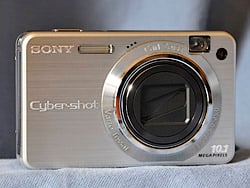
Front View. Compact, attractive, and even available in colors.
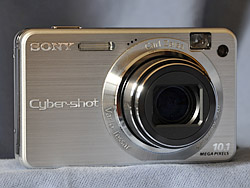
Open. Takes a heartbeat, but that big glass pops out with serious attitude.
The 10-megapixel sensor, Carl Zeiss 5x zoom, and 2.7-inch high resolution LCD are the most obvious attributes. You might not immediately appreciate that the lens starts at a real wide-angle 28mm equivalent rather than the more typical 35mm. And it has Super SteadyShot optical image stabilization, too. Not to mention automatic Macro mode, so you don't have to shift into Macro when you get close.
Face Detection may be last year's news, even coupling it beyond just focus to flash, exposure and white balance. But the Sony W170 adds a wrinkle this year with the ability to tell the difference between adults and children.
Adult/Child priority shows up in Smile Shutter mode, too, which may replace your typical use of Self-Timer mode. In Smile Shutter mode, you press the Sony W170's Shutter button but nothing happens until someone smiles. You can even change how big a smile it takes to trip the shutter. Sony describes the levels as laughs, smiles, or grins.
Scene shooting has gotten a bit more intelligent, if not quite as smart as Kodak's latest digicams. It's nice to see a little competition in this arena. Cameras could be smarter, and they should be. In this case, the Sony W170 can tell the difference between Backlight, Backlight Portrait, Twilight, Twilight Portrait, and Twilight using a Tripod. That's not a bad start.
There's still a Bionz image processor in the W-series, but it now lets you choose the degree of dynamic range optimization you want. There's a tradeoff in Continuous Shutter mode speed for choosing more processing, but it's worth it most of the time.
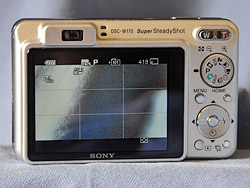
Back. Showing 16:9 shooting mode here with the grid enabled. Note the optical viewfinder.
There's also still ISO 3,200 but it doesn't deliver the same image quality as the lower ISO settings. And that quality was once again a pleasure to view on the screen and even in large prints.
Look and Feel. I do like the look of the W-series, which has changed just a little from last year. There's no grip to speak of, but plenty of room on the right side front for your fingers. With your index finger perched on the Shutter button and your thumb on the Zoom lever, it's easy to operate the Sony W170 with one hand. But do attach the wrist strap and use it.
The Sony W170 ranks only average in weight for a camera in its class, but it's still easy to slip into your shirt pocket and won't make you look like you're carrying your inheritance there. It's a bit bulkier than the slimmest of the slim, but that glass has got to hide somewhere.
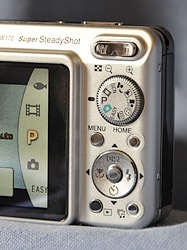
Controls. They aren't just small buttons, they're petite.
The Cyber-shot W170's buttons and dials are petite (and we don't use the word lightly), but elegant and nicely laid out. There's a lot on the Mode dial, which is smaller than any coin and the four-way navigator isn't one of those cheap button arrangements, but a real disk. All the small round buttons, including the OK button are the same size, too. And the Zoom lever really is a toggle switch, not two buttons.
I did have a little trouble finding the Shutter button by touch, but it's large enough and slightly raised so no one would blame you if you just thought I'm insensitive. The small Power button didn't bother me at all because I don't mind looking for it, and it has a nice, bright green LED light circling it. But when I'm composing a picture, I really don't want to have to look for the Shutter button.
The Sony W170's Clear Photo LCD is a very pleasant 2.7 inches with 230,000 pixels. The glossy coating was pretty fingerprint resistant and it was visible (but barely) in direct sun.
The Cyber-shot W170 does, however, include an optical viewfinder; although it isn't very accurate. While the LCD shows 102 percent of the captured image at wide angle and 98 at telephoto, the optical viewfinder manages just 73 percent at wide angle and 80 at telephoto. LEDs by the viewfinder indicate the status of the flash and focus.
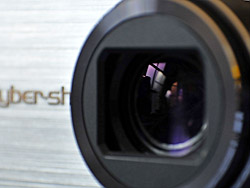
Lens. Larger than the average pocket camera.
The lens is some serious glass, not the compact lens you see on most compact digicams. It's large, for one thing, with an aperture range from f/3.3 to f/8.0. The 5x optical zoom ranges from 5 to 25mm (a wide 28 to 140mm equivalent on a 35mmm camera).
Minimum focus distance is just a bit less than four inches at wide angle and just under 20 inches at telephoto. But the nice thing about the Sony W170 is that it automatically shifts into Macro mode in standard autofocus. You can speed up focus if you manually switch to Macro mode using the navigator. Minimum macro area, however, is a rather large 3.92 x 2.94 inches.
Image stabilization is provided by Sony's admirable Super SteadyShot, which compensates for camera shake, minimizing blur with a built-in gyro sensor that detects movement and sends correcting signals to a stabilization lens. It's complemented by a shutter speed range of 1/4 to 1/1,600 second in Auto mode, and up to a minute in Program Auto.

Home. The Home Shooting menu.

Settings. The Home Settings menu. You have to scroll all the way across, no wrap around.
Interface. The menu system is unnecessarily complicated. You have both a Menu button and a Home button. One option on the Menu button takes you to the Setup options. The Home button is all Setup options, but you'll go nuts trying to find the one you want. Canon and Nikon both do this a lot better.
I don't understand why the horizontal menus don't wrap, but they don't. If you're on the first item, you can't press the Left arrow to get to the last item. You have to press the Right arrow, going through the whole list of items until you get to the last item.
And what happens when you get there? The camera beeps like you ran into a brick wall. Ridiculous.
Something about the chimes and beeps on Sony digicams reminds me of tin cans tied to a bumper. It isn't a pleasant sound. Fortunately you can turn off the noise. I usually enjoy hearing the audio feedback on a camera, but I really dislike the Sony tunes.
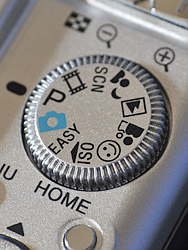
Mode Dial. No Gaps.
One thing I do like about the Sony W170's interface is that you can just press the Playback mode button to turn the camera on and the lens will not protrude. Even better, you can then press the Power button to shut it down, avoiding Record mode all together. On some cameras that just isn't possible.
Modes. There's no Manual control on the Sony W170, but there are three automatic modes: Easy, Auto, and Program Auto.
Easy mode is a simplified camera environment designed for beginners, or anyone who wants to keep things simple. It provides easy-to-read on-screen instructions and limits the number of camera settings so you can't get into too much trouble. Image Size (just Large and Small) and Flash (Auto or Off) are the only two Menu options. The screen shows how many shots can be fit on the card in very large type.
Auto provides Image Size (which includes a 16:9 aspect ratio), Face Detection, Rec Mode (single or continuous shutter), Scene Recognition options, EV, Red-Eye Reduction, and Setup options.
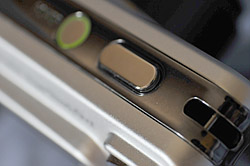
Shutter Button. Note the green ring around the Power button and the eyelet for the wrist strap.
Program Auto adds ISO, White Balance, Flash Level (but only plus or minus), DRO options (Dynamic Range Optimization of plus, standard or off), Color mode, and SteadyShot.
With its Intelligent Scene Recognition mode, the Sony W170 can recognize five scenes: Backlight, Backlight Portrait, Twilight, Twilight Portrait, and Twilight using a Tripod. There are two additional modes in Intelligent Scene mode: Advanced, which takes two shots of the scene, and Auto, which takes one.

Easy Mode. Not many options, but large type.
Standard Scene modes include Beach, High Sensitivity, Landscape, Snow, Soft Snap, Twilight, Twilight Portrait, Fireworks, Smile Shutter, and Underwater. The Sony W170 Menu system gives you access to Twilight, Beach, Snow, Fireworks, and Underwater. The others are on the Mode dial.

Face Detection. It can now tell the men from the boys -- with a handy little balloon help, too.
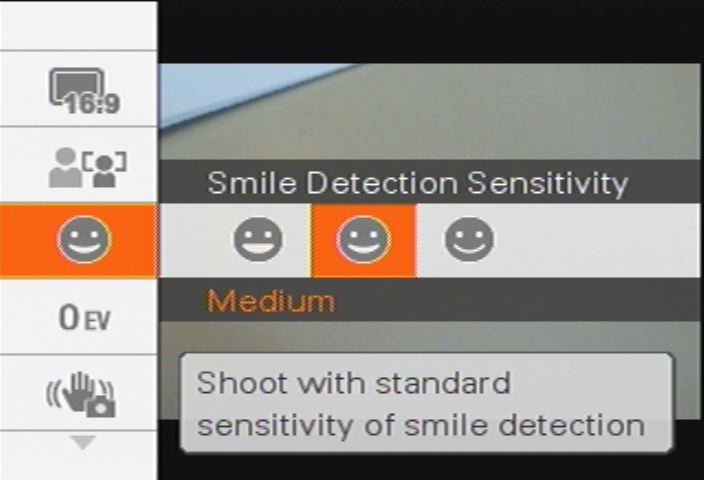
Smile Sensitivity. One case where higher sensitivity does not equal more noise.
Most of those modes are familiar, but this year Sony's portrait modes have evolved to distinguish between adults and children. Hit the Sony W170's Menu button and find the Face Detection option for your four choices: Off, Auto, Child Priority, or Adult Priority.
Face Detection has grown up a bit itself, now adjusting not just focus but exposure, white balance, and flash, so skin tones appear more natural and red-eye is reduced.
If you think that's funny, wait until you try Smile Shutter, a special Scene mode that won't actually trip the shutter until someone smiles. We can't get anyone around here to smile, so we couldn't test this in normal circumstances. But that didn't stop us. We slipped into Smile Shutter mode, pressed the Shutter button and walked around the house until we found a picture of someone smiling. That did it. The shutter flipped and the flash fired. It really works. If you don't have a beard, anyway.
High Sensitivity mode kicks ISO up to 3,200. See the Shirley Temple doll shot for what that accomplishes. Sony claims its Clear Raw Noise Reduction system suppresses color noise, but there's enough luminance noise to be disturbing. Detail is sacrificed for color.
All of this is "illuminated" by a Function Guide mode (which you can turn off) that explains functions and settings by displaying a helpful note in a balloon on the LCD.

High Quality Movie. A 8.2MB file lasting 6.6 seconds. Zoom was unavailable. (Click to download MPEG file.)
Movie mode was big disappointment. Broadcast quality isn't news these days, having become a standard feature. LP versions that use less frames per second are a nice touch (you don't need broadcast quality for a quick clip) and small email formats are worth having, too, for bloggers especially.
But shouldn't an HD camera have 16:9 movies in 720 resolution? For some reason, Sony continues to avoid this feature. In fact, Sony doesn't even supply a cable with the W170 to connect it to your HD television. Which is too bad because its 1080i output for stills is worth watching on HDTV.


Zoom Range. 28 to 140mm to 10x total with 2x digital zoom.
Even worse than standard TV resolution, though, is that you can't zoom in Movie mode. Not with the 5x optical zoom and not even with the 2x digital zoom. Most digicams these days let you use the digital zoom -- and 10x total zoom with Super SteadyShot would be fun on this camera. Bummer.
In-camera editing options include Trimming, Red Eye Correction, Soft Focus, Partial Color, Fisheye Lens, Cross Filter, Retro, Radial Blur, Unsharp Masking, and Happy Face.
And when it comes time to print, you'll be happy to know the W170 is PictBridge-compatible. Hook it up to a PictBridge printer and use it as a printing kiosk.
Storage and Battery. This is a Memory Stick Duo camera. You'll need an adapter (which is not included) to plug it into most devices (like printers, card readers, PCMCIA cards). I really missed all my neat SD cards (the one that folds into a USB plug, the Wi-Fi one) on this camera. To transfer images, I had to use the awkward octopus cable and free a USB port.
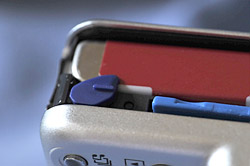
Battery/Card Compartment. The blue latch holds the battery in.
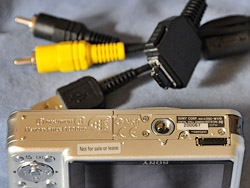
Bottom. The octopus cable plugs in underneath.
There's also built-in storage, but it's pretty meager considering this is a 10.1 megapixel camera. The 15MB memory can store about three full-resolution images.
I like the battery charger because it's compact and it has folding plugs. Why everybody doesn't do it this way, I have no idea, but it's a real blessing when you have to pack your bag for a trip.
The proprietary Stamina lithium-ion battery lasted longer than a shoot, so no complaints here. Sony says it will last "a long weekend or a whole vacation." It's a 3.6-volt, 960 mAh power pack that sells for $50.
Performance. Startup and shutdown times for the Sony W170 were both average for its class. I found it a little sluggish compared to its competitors, but you can blame that big glass for the delay. Still, it wasn't too bad. I had no trouble turning the camera off after a shot and waiting for the lens to protrude when I wanted to start shooting again.
Autofocus lag was above average (significantly) as was prefocus lag (where you half-press the Shutter button). Cycle time was above average, too, but we have to note that a lot depends on your DRO setting, which requires extra processing time, and can slow cycle time down accordingly.

DRO. Three options.
Autofocus was generally quick and reliable with the nine-point autofocus system but both Dave and I experienced situations where the camera just couldn't focus. In Dave's case, it was the indoor Marti shots. The camera couldn't detect focus looking at her hair and forehead. In my case, it was a similar skin-colored composition of low contrast. That can be pretty maddening. There is a semi-manual focus option, which lets you set focus to half a meter, a meter, three meters, seven meters, or infinity.
USB download speed was very speedy, although flash cycle time was well below average. That usually indicates a powerful flash, but not in this case, where the flash range was achieved only by kicking up the ISO significantly and capturing a good deal of noise.
If you study our flash range table, you'll wonder what Sony was thinking. Our table is shot at ISO 100 and every image is too dark to be taken seriously. They don't even look as good as the High-ISO shooting mode.
But Sony is playing the flash game a little differently, relying on an ISO boost to make the weak flash more effective. Unfortunately, it's quite an ISO boost, shooting at ISO 800 for wide angle to reach out 13.8 feet, and at ISO 500 for telephoto to manage 8.9 feet. There's some real noise in the shadows at ISO 800. And worse yet, flash recycle time is 11.6 seconds, well below average.
Makes you kind of want to switch to High ISO and forget the flash all together. But the W170 suffers from noise beyond ISO 400.

Pontiac. Close examination is a bit misleading.
Image Quality. My first impression from looking at thumbnails of the 10-megapixel images was not a good one. But it was only the thumbnails that were disappointing. The actual images were really quite strong. To prove it, I printed them full bleed on letter-sized photo paper and was impressed at the sharpness and color.
In our Still Life shot at ISO 80 there are a few challenges that the Sony W170 easily met. Note the excellent detail in the Hellas wine vinegar label. A lot of cameras can't capture the dark tile background behind the figure, but the Cyber-shot W170 has no such problem. While you're there, note that the Samuel Smith label does not bloom out into the dark glass of the bottle, another common issue. Slide over to the coffee cup and note the shadow of the handle in the shadows while the highlight detail in the cloth beneath it is still clear. That's remarkable.
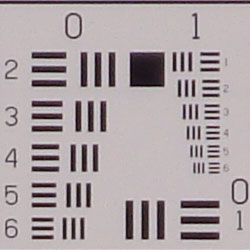
In our Multi Target shot, visit the corners. While they're softer than the center of the image, there's no strong colored pixels indicating chromatic aberration. Then examine the center of the image where you'll see the horizontal and vertical resolution scales delivering nearly 1,700 lines of resolution before the target breaks up.

Hydrant. Bionz handled it better than most.
Our ISO shots reveal the only real problem with the W170: As early as ISO 200, the image starts to break up, losing resolution and mottling the color. Sony fans don't seem to mind the company's preference for color over detail, but if you're new to the brand, it's something to study.
How does that work in the real world? Switch to our Gallery shots. Most were taken in Program Auto so we could fiddle with more options. We also enabled DRO for them (although there's no EXIF field to prove it) and Super SteadyShot (Anti-Blur in the EXIF Makernotes).

White Balance. Deceived in this modern living room.
Our usual hydrant shot is a good test of DRO in action. We often see the white highlights of the hydrant bleed into the dark green background. There is a little of that around the top, but it's pretty well contained. Texture (well, the cracked paint) is pretty well held throughout, as is the darker detail of the green hedge. I don't usually see this scene so well rendered.
My first print, which really impressed me with both its color and detail, was the Pontiac badge. This is an old car and you can see the rust on the chrome and the dust on the primer. When you look at the full resolution version, you can see a number of problems with the primer, but you may be looking too close. Make a print and you'll see what I really liked about it: it all comes together.

Shirley. Not much detail, even for Denny.
One shot that didn't render naturally is the tree detail (YDSC00573.JPG). I took the shot because, in the shade, I was hoping to capture some saturated color. Instead, the image looks overexposed, the ISO pushed to 200.
Another issue you can't miss is the Ligurian lemon cake the incredibly gifted Rachel whipped up for us one evening on spring break (flattery, I hope, will get a replay). That's white frosting not orange. The modern kitchen lighting fooled the Sony W170's auto white balance rather easily.
Our High ISO shot at 3,200 is Shirley Temple (well, the doll). It was taken in near darkness, so the color is almost fictional, but appreciated. Close inspection shows the detail is pretty impressionistic. But there are times you'll settle for that. No flash, too dark, switch to High ISO and go home with the capture.
Print quality is pretty good. The Sony W170's ISO 80 shots make a decent 13x19, if you can ignore the slight softening and chromatic aberration in the corners. ISO 400 shots are better at 8x10, and ISO 1,600 shots take you into 4x6 territory. ISO 3,200 shots are a bit soft, even for 4x6. Most notable is that the low contrast areas lose all detail, while high contrast items stay sharp, creating a surreal appearance. That happens with other cameras, but not to this extent. Sony's really turned up the anti-noise machine, perhaps a bit too much. Still, a camera that makes a decent 4x6 at ISO 1,600 will serve most people's needs just fine.
Appraisal. The Sony W170 maintains the W-series tradition of wrapping hot technology in a compact bargain. With its Bionz processor contributing sophisticated dynamic range optimization options and its clever Smile Shutter mode, it makes shooting easier than it has been. But it still includes Super SteadyShot, High ISO, in-camera editing and an HD output signal. You won't get tired of the Sony W170 very quickly.
Sony W170 Basic Features
- 10.1-megapixel sensor
- 5x optical zoom (28-140mm equivalent) with 2x digital zoom
- Optical and LCD viewfinders
- 2.7-inch LCD with 230K pixels
- ISO sensitivity from 80 to 3,200
- Shutter speeds from two to 1/1,600 second
- Max Aperture: f/3.3
- MS Duo/MS PRO Duo memory cards
- 15MB internal memory
- Custom lithium-ion battery
- PictBridge compatible
Sony W170 Special Features
- Automatic Macro shooting
- Smile Shutter technology
- Child/Adult face recognition
- Nine point autofocus
- Intelligent Scene recognition
- Super SteadyShot image stabilization
- Bionz image processor
- High ISO sensitivity (to ISO 3,200) with Sony Clear RAW Noise Reduction
- D-Range Optimization
- HD slide show with music
In the Box
The Sony W170 ships with the following items in the box:
- NP-BG1 rechargeable battery
- BC-CSG battery charger
- A/V and USB multi-connector cables
- Wrist strap
- Software CD-ROM
Note: No Memory Stick DUO media or adaptors are included.
Recommended Accessories
- Large capacity Memory Stick PRO Duo. MemoryStick PRO versions can handle high-res movie data and give faster download times. They should be used for all current Sony cameras. These days, 2-4GB is about what you need for a decent number of photos and videos.
- Small camera case for outdoor and in-bag protection like the $39.99 Soft Leather Carrying Case LCS-TWB/P
Sony W170 Conclusion
| Pro: | Con: |
|---|---|
|
|
The Sony W170 is a compact bargain, including the hottest technology Sony has introduced in its 2008 lineup. It has a Bionz processor, face detection technology that can tell a child from an adult (and even hold the shutter until they're smiling), High ISO, Super SteadyShot, in-camera editing and an HD output signal.
Like other Sony digicams, it does give away detail to hold onto color at higher ISO settings, but most users won't mind that tradeoff, particularly if 4x6 prints are the game you want to play.
HD output -- particularly when played as a slide show with the built-in special effects and music -- was stunning. But only for stills. This isn't an HD movie camera and to see any HD output from this camera, you'll have to buy an accessory cable, dock, or dock/printer.
But outright, prolonged, standing applause for the big Carl Zeiss lens that starts at a nice 28mm and cranks out to 140mm, more than usual on a digicam zoom. And stay standing for the automatic Macro detection, which means no more switching to Macro mode when you get close.
Despite all the fancy features and the attractive body, what makes the W170 a Dave's Pick is its image quality. Don't take a loupe to these 10.1-megapixel images, but print them and you'll see what we mean. Good color and detail at large print sizes. And that, after all, is what you buy a camera for.
Optics
Sony W170 Optics
Lens
Zoom
Fairly good performance with the Sony W170's 5x optical zoom lens. Digital zoom performs well.


The Sony W170's 5x optical zoom lens covers a range equivalent to a 28-140mm zoom on a 35mm camera, which makes it wider as well as longer than most for this compact class of camera. Details are soft at full wide angle near the center, and some minor chromatic aberration is evident, and there is moderate blurring in the corners of the frame, especially the top right. Results at full telephoto are better, but with some minor chromatic aberration still visible. The camera's 2x digital zoom performed well, and though resolution and detail are compromised with the digital enlargement, there's still a lot of fine detail visible.
Macro
Soft details up close, with larger-than-average size macro area. Flash exposure was uneven.


The Sony W170's macro setting performed poorly, capturing a larger-than-average sized minimum area measuring 3.92 x 2.94 inches (100 x 75 millimeters). Resolution is good, but detail somewhat soft across the frame, and there's a significant amount of additional softening in the corners from the lens. (Most cameras have some softening in the corners in macro mode.) The flash coverage is uneven and it has a bit of trouble throttling down, so plan on using external lighting for the best results with the DSC-W170's macro settings.
Distortion
Moderate barrel distortion at wide angle, higher-than-average pincushion at telephoto.
| Wide-angle Barrel distortion at 28mm is 0.8% |
 |
| Telephoto Pincushion distortion at 140mm is 0.6% |
 |
The Sony W170's 0.8% barrel distortion at wide angle is about average, and quite noticeable. Still, a pretty good performance considering the fairly wide 28mm equivalent focal length. At the telephoto end, the W170's 0.6% pincushion distortion is much higher than average, and is also quite noticeable. Distortion is the tendency for the lens to bend straight lines outward (like a barrel -- usually at wide angle) or inward (like a pincushion -- usually at telephoto).
Chromatic aberration
Moderate at wide angle, exacerbated by softening in the corners; less noticeable at telephoto.

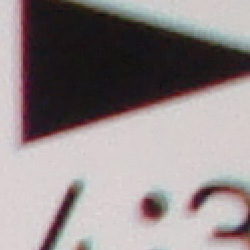
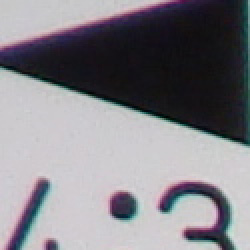
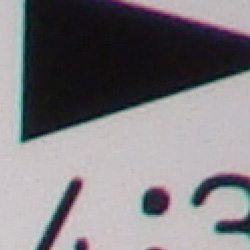
Chromatic aberration is moderate at wide angle, showing about 6-8 pixels of distinct, if not bright, coloration on either side of the target lines, which is exacerbated by corner softness. C.A. also extends fairly deep into the frame, but is not as evident there. Corners are sharper at telephoto, so C.A. is less noticeable at full telephoto focal length. (This distortion is visible as a slight colored fringe around the objects at the edges of the field of view on the resolution target.)
Corner Sharpness
Moderate blurring in the top corners of the frame at wide angle, very good corner sharpness at telephoto.
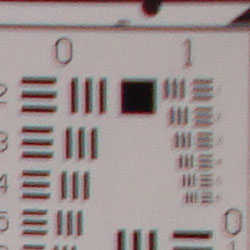
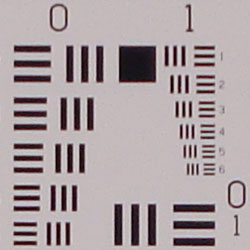
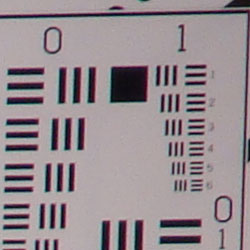
The Sony W170 produced soft corners at the top of the frame at full wide angle, compared to sharp results in the center. The bottom corners were much sharper than the top. At full telephoto, only very minor blurring was noticeable in all four corners of the frame compared to the center.
Viewfinder
Coverage
A very tight and inaccurate optical viewfinder (typical), though good accuracy from the W170's LCD monitor.


The Sony W170's optical viewfinder was quite tight and inaccurate (shifted), with only about 74% coverage at wide angle, and 80% coverage at full telephoto. This is, however, quite typical for a compact digicam's optical viewfinder. The LCD monitor was much more accurate, showing about 102% frame accuracy at wide angle and 98% at telephoto. LCD coverage is probably very close to 100%, but the lens's geometric distortion makes it difficult to frame and measure accurately.
The images above were taken from our standardized test shots. For a collection of more pictorial photos, see our Sony Cyber-shot DSC-W170 Photo Gallery .
Exposure
Sony W170 Exposure
Color
Saturation & Hue Accuracy
Vibrant colors with slight oversaturation in red and blue tones.
 |
| In the diagram above, the squares show the original color, and the circles show the color that the camera captured. More saturated colors are located towards the periphery of the graph. Hue changes as you travel around the center. Thus, hue-accurate, highly saturated colors appear as lines radiating from the center. |
Saturation. The Sony W170 oversaturates bright red and blue tones somewhat, but undersaturates some yellow and green tones just a bit. Most consumer digital cameras produce color that's more highly saturated (more intense) than found in the original subjects. This is simply because most people like their color a bit brighter than life.
Skin tones. The W170 produced slightly pinkish skin tones, but overall results were still fairly natural. Where oversaturation is most problematic is on Caucasian skin tones, as it's very easy for these "memory colors" to be seen as too bright, too pink, too yellow, etc.
Hue. The Sony W170 showed fairly small color shifts relative to the correct mathematical translation of colors in its subjects, pushing cyan toward blue, red toward orange and some oranges toward yellow. Overall color accuracy was quite good though. Hue is "what color" the color is.


Sensor
Exposure and White Balance
Indoors, incandescent lighting
Warm casts with both Auto and Incandescent white balance settings. Slightly less than average positive exposure compensation required.


Color balance indoors under incandescent lighting was quite warm and a bit reddish in Auto white balance mode, while the Incandescent setting resulted in a more yellow color balance that we judged as the more pleasing of the two. (But still more highly colored than we'd prefer.) Unfortunately, like most Sony compacts of late, the W170 does not have a custom or manual white balance mode, which would result in a more neutral color balance indoors. The W170 required a +0.7 EV exposure compensation boost to get a good exposure, a little less than average for this shot. Overall color is a bit dark and yellow here, making the blue flowers very dark, and a bit purplish. Our test lighting for this shot is a mixture of 60 and 100 watt household incandescent bulbs, a pretty yellow light source, but a very common one in typical home settings here in the U.S.
Outdoors, daylight
High contrast, but still very good overall exposure under bright conditions. Good color as well.
Outdoors, the Sony W170 performed fairly well, despite slightly high contrast. The camera holds onto a fair amount of detail in the bright highlights, though shadow detail falls apart a little due to high noise, as well as some blurring from noise suppression. Exposure was very good, as no exposure compensation was required for either shot. Though color is slightly warm, results are quite good here, even with the higher contrast.
See full set of test images with explanations
See thumbnails of all test and gallery images
Resolution
Very high resolution, 1,600 ~ 1,700 lines of strong detail.
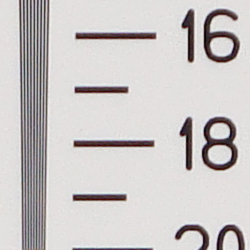
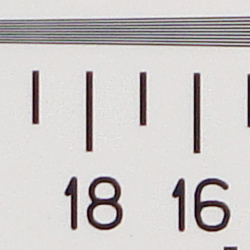
Our laboratory resolution chart revealed sharp, distinct line patterns down to about 1,700 lines per picture height in the horizontal direction, and about 1,600 lines in the vertical direction. Extinction of the pattern didn't occur below 2,000 lines, the limit of this chart. Use these numbers to compare with other cameras of similar resolution, or use them to see just what higher resolution can mean in terms of potential detail.
See full set of test images with explanations
See thumbnails of all test and gallery images
Sharpness & Detail
Slightly soft images overall, with some visible edge-enhancement on high-contrast subjects. Noise suppression limits fine detail.


Sharpness. The Sony Cyber-shot DSC-W170 captures reasonably sharp images, though with slightly mottled detail. Some edge enhancement artifacts are visible on high-contrast subjects such as the crop above left, but it's minimal and not uncommon. Edge enhancement creates the illusion of sharpness by enhancing colors and tones right at the edge of a rapid transition in color or tone.
Detail. The crop above right shows significant softening due to noise suppression, as the darker areas of Marti's hair show limited detail. Bright individual strands are evident, but definition is fuzzy. Noise-suppression systems in digital cameras tend to flatten-out detail in areas of subtle contrast. The effects can often be seen in shots of human hair, where the individual strands are lost and an almost "watercolor" look appears.
ISO & Noise Performance
Moderate noise at the normal sensitivity settings; stronger noise and blurring at higher ISO settings.
 |
 |
 |
| ISO 80 | ISO 100 | ISO 200 |
 |
 |
 |
ISO 400 | ISO 800 | ISO 1,600 |
 |
ISO 3,200 |
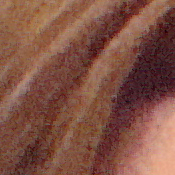
The Sony W170 produced moderately low noise at its 80 and 100 ISO settings, though some noise reduction artifacts are already visible at these low sensitivity levels. There's a noticeable jump in noise at ISO 200, where individual hairs are smudged together by aggressive noise reduction that's stomping out most of the fine detail. ISO 400 continues this trend, with even less fine detail and more visible NR artifacts, as well as visible chroma noise. At ISO 800, results are quite mottled, giving the image a stippled effect. Overall color balance starts to shift with purple and yellow color blotches as well. At ISOs 1,600 and especially 3,200, heavy noise reduction obliterates all fine detail, resulting in images that look more like watercolor paintings than photographs. As always, see the Output Quality section below to see how these results translate to prints.
Extremes: Sunlit and low light tests
High resolution with strong detail, but slightly high contrast and limited shadow detail. Limited low-light performance at the normal sensitivity settings, capable of capturing bright but noisy images in near darkness at the highest ISO settings.


Sunlight. The Sony W170 produced fairly high contrast under the deliberately harsh lighting in the test above, with deep shadows and bright highlights. Still, overall exposure is pretty good, with reasonable midtone detail. Shadow detail is limited, both from noise suppression efforts and noise pixels. Though there is more highlight detail preserved at -0.3 EV, Marti's face was a bit too dim to our liking, so we preferred the default exposure even though some of the highlights in the shirt and flowers were clipped. In real life, be sure to use fill flash in situations like the one shown above; it's better to shoot in the shade when possible.


Sony's Dynamic Range Optimization (DRO)
The W170 doesn't have contrast adjustment, but it does offer two settings for Sony's Dynamic Range Optimization. See the images above (all at default auto exposure) to see how it reduces lost highlights and shadows in high contrast situations. DRO Standard adjusts the curve to preserve shadow and highlight detail, and DRO plus further analyzes the image to apply more processing where it's needed.
Because digital cameras are more like slide film than negative film (in that they tend to have a more limited tonal range), we test them in the harshest situations to see how they handle scenes with bright highlights and dark shadows, as well as what kind of sensitivity they have in low light. The shot above is designed to mimic the very harsh, contrasty effect of direct noonday sunlight, a very tough challenge for most digital cameras. (You can read details of this test here.)
| 1 fc 11 lux |
1/2 fc 5.5 lux |
1/4 fc 2.7 lux |
1/8 fc 1.3 lux |
1/16 fc 0.67 lux |
|
|---|---|---|---|---|---|
| ISO 80 |
 1 sec f3.3 |
 1 sec f3.3 |
 1 sec f3.3 |
 1 sec f3.3 |
 1 sec f3.3 |
| ISO 100 |
 1 sec f3.3 |
 1 sec f3.3 |
 1 sec f3.3 |
 1 sec f3.3 |
 1 sec f3.3 |
| ISO 200 |
 0.8 sec f3.3 |
 1 sec f3.3 |
 1 sec f3.3 |
 1 sec f3.3 |
 1 sec f3.3 |
| ISO 400 |
 0.4 sec f3.3 |
 0.8 sec f3.3 |
 1 sec f3.3 |
 1 sec f3.3 |
 1 sec f3.3 |
| ISO 800 |
 1/5 sec f3.3 |
 0.4 sec f3.3 |
 1 sec f3.3 |
 1 sec f3.3 |
 1 sec f3.3 |
| ISO 1600 |
 1/8 sec f3.3 |
 1/5 sec f3.3 |
 0.5 sec f3.3 |
 1 sec f3.3 |
 1 sec f3.3 |
| ISO 3200 |
 1/15 sec f3.3 |
 1/10 sec f3.3 |
 1/4 sec f3.3 |
 0.5 sec f3.3 |
 1 sec f3.3 |
| ISO 100 Night Scene |
 2 sec f3.3 |
 2 sec f3.3 |
 2 sec f3.3 |
 2 sec f3.3 |
 2 sec f3.3 |
Low light. The Sony W170 struggled with our low light test, limited by the 1 second maximum exposure duration (2 seconds in Night Scene mode). It was only able to capture bright images at the lowest light level when using its maximum ISO of 3,200, where noise levels are unacceptable. At the normal sensitivity settings, images were just a little dim even at the one foot-candle light level, which is equivalent to average city street-lighting at night. Color balance was pretty good with the Auto white balance setting at brighter levels, but images acquired a green cast as ISO increased and light levels dropped. The camera's autofocus system was able to focus on the subject down to the 1/4 foot-candle light level unassisted, and down to the darkest light level with the AF assist enabled. (A useful trick under these conditions is to just prop the camera on a convenient surface, and use its self-timer to release the shutter. This avoids any jiggling from your finger pressing the shutter button, and can work quite well when you don't have a tripod handy.)
How bright is this? The one foot-candle light level that this test begins at roughly corresponds to the brightness of typical city street-lighting at night. Cameras performing well at that level should be able to snap good-looking photos of street-lit scenes.
NOTE: This low light test is conducted with a stationary subject, and the camera mounted on a sturdy tripod. Most digital cameras will fail miserably when faced with a moving subject in dim lighting. (For example, a child's ballet recital or a holiday pageant in a gymnasium.) For such applications, you may have better luck with a digital SLR camera, but even there, you'll likely need to set the focus manually. For information and reviews on digital SLRs, refer to our SLR review index page.
Flash
Coverage and Range
Uneven coverage at wide angle. Poor flash range at normal ISO settings.


Coverage. Flash coverage was uneven at wide angle (no surprise though, given the 28mm wide-angle lens). Coverage was more even at telephoto, but too dark. Indoors, under incandescent background lighting, the Sony DSC-W170's flash underexposed our subject at its default setting. Using the flash's High Intensity setting helped, but results were still a bit dim. The camera's Slow-Sync flash mode fared a bit better, though with a more yellow cast.
| Flash Range: Wide Angle | |||||
|---|---|---|---|---|---|
| 6 ft | 7 ft | 8 ft | 9 ft | 10 ft | 11 ft |
 1/30 sec f3.3 ISO 100 |
 1/30 sec f3.3 ISO 100 |
 1/30 sec f3.3 ISO 100 |
 1/30 sec f3.3 ISO 100 |
 1/30 sec f3.3 ISO 100 |
 1/30 sec f3.3 ISO 100 |
| 12 ft | 13 ft | 14 ft | 15 ft | 16 ft | |
 1/30 sec f3.3 ISO 100 |
 1/30 sec f3.3 ISO 100 |
 1/30 sec f3.3 ISO 100 |
 1/30 sec f3.3 ISO 100 |
 1/30 sec f3.3 ISO 100 |
|
| Flash Range: Telephoto | |||||
|---|---|---|---|---|---|
| 6 ft | 7 ft | 8 ft | 9 ft | 10 ft | 11 ft |
 1/50 sec f5.2 ISO 100 |
 1/50 sec f5.2 ISO 100 |
 1/50 sec f5.2 ISO 100 |
 1/50 sec f5.2 ISO 100 |
 1/50 sec f5.2 ISO 100 |
 1/50 sec f5.2 ISO 100 |
| 12 ft | 13 ft | 14 ft | 15 ft | 16 ft | |
 1/50 sec f5.2 ISO 100 |
 1/50 sec f5.2 ISO 100 |
 1/50 sec f5.2 ISO 100 |
 1/50 sec f5.2 ISO 100 |
 1/50 sec f5.2 ISO 100 |
|
ISO 100 Range. At wide angle, flash shots at ISO 100 remained fairly bright out to a distance of about 8 feet, decreasing in brightness from that point on. At full telephoto and ISO 100, the target at 6 feet was quite dim, getting darker from there.
| Manufacturer-Specified Flash Range | |
|---|---|
| Wide Angle | Telephoto |
 13.8 feet Auto ISO 800 |
 8.9 feet Auto ISO 500 |
Manufacturer Specified Flash Test. In the shots above, the W170 performs about as Sony says it will, producing good exposures at the rated distances with its ISO set to Auto. Unfortunately, the camera had to raise ISO sensitivity by quite a bit to achieve the bright images, resulting in excessive noise. Our standard test method for flash range uses a fixed setting of ISO 100, to provide a fair basis of comparison between cameras. We've now also begun shooting two shots using the manufacturer-specified camera settings, at the range the company claims for the camera, to assess the validity of the specific claims.
Output Quality
Print Quality
Good print quality, good color, sharp 13x19-inch prints at ISO 80 and 100. ISO 400 images are soft but usable at 11x14, ISO 800 shots are better at 5x7.
 The Sony W170 had enough resolution to make good 13x19-inch prints at ISO 80, though with chroma noise in the shadows. 11x14-inch prints were a little better. Detail in colors starts to soften at ISO 200 when printed at 11x14, thanks to noise suppression. High contrast areas remain sharp, but not areas of subtle change, which is the theme throughout the rest of the ISO settings. There are too many color blotches at ISO 400 for 11x14 to stand, but 8x10 is better. ISO 800 shots look good at 8x10, with some minor noise that mimics film rather well; it looks better at 5x7. ISO 1,600 at 5x7 looks good in high contrast areas, but low contrast areas are just big empty fields of color. You notice this a little less at 4x6, but the lack of detail in colors is disappointing. ISO 3,200 is usable at 4x6, but I can't say that most people will like it. It's usable, but soft.
Testing hundreds of digital cameras, we've found that you can only tell just so much about a camera's image quality by viewing its images on-screen. Ultimately, there's no substitute for printing a lot of images and examining them closely. For this reason, we now routinely print sample images from the cameras we test on our Canon i9900 studio printer, and on the Canon iP5200 here in the office. (See the Canon i9900 review for details on that model.)
The images above were taken from our standardized test shots. For a collection of more pictorial photos, see our Sony Cyber-shot DSC-W170 Photo Gallery .
Not sure which camera to buy? Let your eyes be the ultimate judge! Visit our Comparometer(tm) to compare images from the Sony Cyber-shot DSC-W170 with those from other cameras you may be considering. The proof is in the pictures, so let your own eyes decide which you like best!
Performance
Sony W170 Performance
Timing and Performance
Average to above average speed for a consumer camera.
| Startup/Shutdown |
||
|
Power on |
2.8 seconds
|
Time it takes for LCD to turn on, lens to deploy, and take a shot. |
|
Shutdown |
2.2 seconds
|
How long it takes to retract lens. |
|
Buffer clearing time |
2.0 seconds
(after 20 large JPEGs) |
Worst case buffer clearing time. -- This is the delay after a set of shots before you can remove the card. Some cameras won't retract their lenses and shut down until the buffer is cleared. |
Startup and shutdown times are on the slow side of average.
| Mode switching | ||
|---|---|---|
|
Play to Record, |
1.3 seconds
|
Time until first shot is captured. |
|
Record to Play |
1.3 seconds
|
Time to display a large file immediately after capture. |
|
Display |
1.9 seconds
|
Time to display a large file already on the memory card. |
Mode switching times are about average for this class.
| Shutter response (Lag Time) | ||
|---|---|---|
|
Full Autofocus Wide |
0.36 second
|
Time from fully pressing shutter button to image capture, zoom lens at wide angle position. |
|
Full Autofocus Tele |
0.40 second
|
Time from fully pressing shutter button to image capture, zoom lens at telephoto position. |
|
Full Autofocus with flash enabled |
0.62 second
|
Time from fully pressing shutter button to image capture, with flash enabled. |
|
Prefocused |
0.008 second
|
Time to capture, after half-pressing and holding shutter button. |
|
Continuous AF
|
0.36 second
|
This mode usually shows no speed increase with our static subject; we have no way to reliably measure performance with moving subjects.
|
|
Manual focus
|
0.38 second
|
For most cameras, shutter lag is less in manual focus than autofocus, but usually not as fast as when the camera is "prefocused".
|
Shutter response is very good at both wide angle and telephoto, at 0.36s and 0.40s respectively. "Prefocusing" the camera by half-pressing and holding down the shutter button before the final exposure results in an impressive lag time of only 0.008 second (among the fastest on the market).
| Cycle time (shot to shot) | ||
|---|---|---|
|
Single Shot mode
Large JPEG |
1.64 seconds
|
Time per shot, averaged over 20 shots. |
|
Single Shot mode |
1.92 seconds
|
Time per shot, averaged over 20 shots. |
|
Early shutter |
No
|
Some cameras don't snap another shot if you release and press the shutter too quickly in Single Shot mode, making "No" the preferred answer. |
|
Continuous mode |
0.62 second (1.62 frames per second);
20+ frames total; 2 seconds to clear |
Time per shot, averaged over buffer length or 20 shots, whichever came first. |
|
Continuous mode |
0.61 second (1.63 frames per second);
20+ frames total; 1.5 seconds to clear |
Time per shot, averaged over buffer length or 20 shots, whichever came first. |
|
Flash recycling |
11.62 seconds
|
Flash at maximum output. |
| *Note: Buffer clearing times measured with a SanDisk Extreme III PRO Duo memory card. Slower cards will produce correspondingly slower clearing times. Slow cards may also limit length of bursts in continuous mode. ISO sensitivity also affects cycle times and burst mode performance, with higher ISOs generally increasing cycle times and reducing burst performance. |
||
Shot-to-shot cycle times are about average, at about 1.64 seconds for large JPEGs, and the camera appears to capture shots continuously in single-shot mode without having to slow down to clear the buffer. Oddly, when capturing low resolution JPEGs, the cycle time slows to 1.92 seconds, unusual for this test. Continuous mode performance is about average (perhaps slightly above for a 10-megapixel model), at 1.62 frames-per-second, and the camera was able to maintain that pace for over 20 large frames. The flash takes 11.62 seconds to recharge after a full-power shot, which is very slow indeed, especially considering the flash is not very powerful and the battery is a lithium-ion type.
| Download speed | ||
|---|---|---|
| Windows Computer, USB 2.0 |
8,170 KBytes/sec
|
Typical Values: |
Connected to a computer or printer with USB 2.0, download speeds are much faster than most digital cameras on the market today.
Overall, the Sony W170 is above average in terms of speed; fast enough for most family and travel photo opportunities, but flash recycling is markedly slow.
Battery and Storage Capacity
Battery
Above average battery life for a lithium-ion design.
| Operating Mode | Number of Shots |
|---|---|
|
Lithium-ion Rechargeable Battery,
LCD On |
370
|
|
Lithium-ion Rechargeable Battery,
LCD Off |
450
|
The Sony W170 uses a custom rechargeable lithium-ion battery for power, and ships with a charger. Though battery life is pretty good, we still recommend picking up a separate battery and keeping it freshly charged and on-hand for extended outings.
The table above shows the number of shots the camera is capable of (on either a fresh set of disposable batteries or a fully-charged rechargeable battery as appropriate), based on CIPA battery-life and/or manufacturer standard test conditions.
(Interested readers can find an English translation of the CIPA DC-002 standards document here. (180K PDF document))
Storage
The Sony W170 accepts Memory Stick Duo or Duo Pro memory cards. Though no card is included, the camera has about 15MB of internal memory usable for storage. The table below shows the approximate capacity of the internal memory at each resolution setting. (The Sony W170 does not have a compression level option.)
| Image Capacity with 15MB Internal Memory |
JPEG | |
|---|---|---|
|
3,648 x 2,736 |
Images |
3 |
| File Size |
4.0 MB |
|
| 2,592
x 1,944 |
Images |
5 |
| File Size |
2.5 MB |
|
| 2,048
x 1,536 |
Images |
9 |
| File Size |
1.6 MB |
|
| 640
x 480 |
Images |
88 |
| File Size |
169 KB |
|
We strongly recommend buying a large capacity Memory Stick Pro Duo card at least a 1GB card, preferably a 2 or 4GB one, to give yourself extra space for extended outings and video. (Check the shopping link above, cards are really cheap these days, so no reason to skimp.)