



Overview
Sony Cyber-shot W300 Overview
by Mike Pasini
Review Date: 08/15/08
The Sony Cyber-shot DSC-W300 features a 13.6-megapixel 1/1.7-inch CCD image sensor which is coupled to a Carl Zeiss Vario-Tessar-branded 3x optical zoom and a 2.7-inch LCD display.
The Sony W300's 35 to 105mm equivalent lens incorporates Sony's Super Steady Shot optical image stabilization to minimize blur caused by camera shake at slow shutter speeds. Other W300 features include ISO sensitivity to a maximum of ISO 3,200, a Memory Stick Duo/PRO Duo card slot plus a not-so-generous 15MB of built in memory, and power from a proprietary lithium-ion rechargeable battery. The Sony W300 also offers high-definition component video output, via an optional proprietary cable or cradle.
The Cyber-shot W300 includes Sony's face detection technology, not only capable of detecting up to eight faces simultaneously, but of differentiating between adults and children, and of automatically triggering the shutter when your subject smiles. Sony's system is linked not only to the Cyber-shot W300's autoexposure and autofocus systems as in most similar systems, but also to white balance and flash metering as well, allowing the camera to ensure proper flash exposure and pleasing flesh tones.
Sony Cyber-shot W300 Pricing and Availability
The Sony Cyber-shot DSC-W300 ships from May 2008 priced at US$350. Be sure to check the links at right for a better price.
Sony W300
User Report
by Mike Pasini
Intro. It's been quite a year for the Sony W-Series. The $179 W110 and $199 W120 were launched in Spring after the $229 W130. They were followed by the $249 W150 and $299 W170. Every one of them featured Sony's Bionz image processor. And each model introduced another feature, starting with child/adult face recognition, smile shutter, double anti-blur, intelligent scene recognition, dynamic range optimization, date view, face search, and in-camera retouching (including unsharp masking and smile).
And now Sony has capped the W-Series with a new flagship: the Sony W300. At $349, the W300 is Sony's top W-Series digicam, bringing a 13.6 megapixel sensor, high speed burst mode, and real color mode, in addition to the other innovations introduced to the W-Series this year.

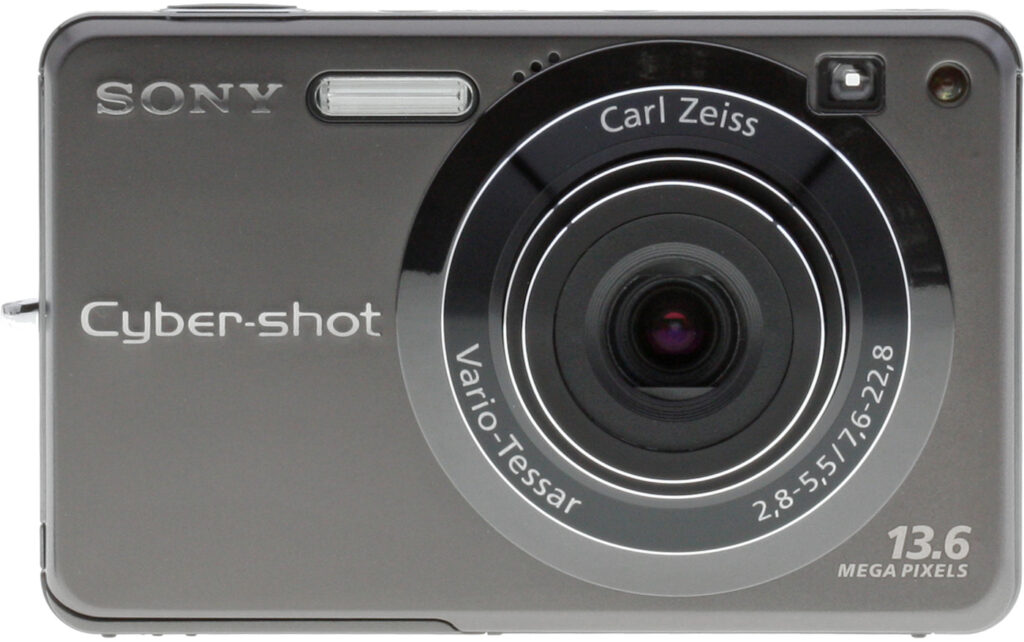
Front. Sony's top-of-the-line W-Series digicam.

Open. Fully extended and ready for action.
The Sony W300 adds a few other special tweaks, including a titanium shell that resists scratching, and an ISO sensitivity that extends to 6,400. But it only has a 3x optical zoom (compared to the W170's 5x zoom) and, like its stablemates, cannot zoom in Movie mode.
I'm fond of the W-Series for its powerful collection of technologies wrapped up in an attractive shell, at an even more attractive price. Those technologies, however, aren't just for geeks. They automate geeky functions so anybody can just point and shoot to enjoy them. The Sony W300 figures out how to apply them, not the person behind the lens. Which is just the way it should work in a digital camera.
So another W just about makes my day. Let's see how the Sony W300 fared in my camera bag.
Look and Feel. It's hard to resist comparing the stylish T-Series digicams to the W-Series models. I've always found the W models handsome in their own right, even though the T models get all the paparazzi. One thing I do miss on the W models, though, is the T's sliding lens cover. It's the simplest way to turn a camera on or off. You could do it blindfolded.

Back. Large LCD, small buttons.
Powering on the Sony W300 can be done in either of two ways. You can press the tiny Power button, which sits slightly below the level of the top deck, to get into Record mode. Or you can press the tiny Playback button on the back panel to get into Playback mode without extending the lens. The Power button, ringed in plastic that lights up green when the camera is on, is the only way to turn it off. That all makes perfect sense to me.
While it's a bit thick among ultracompacts, the Sony W300's design minimizes the appearance so it seems svelt. It isn't heavy, but it isn't light either, happily traveling in a pocket without causing curvature of your spine, but hefty enough to provide some resistance when you press the Shutter button. The Sony W300 is well balanced, in short.

Top. Top panel with inset speaker at top, Power button with ring LED indicator, and the slightly raised Shutter button. Note the Zoom lever at the top of the back panel.
The Sony W300's buttons are quite small. I was tempted to fingernail them rather than push them with the pad of my fingertips, but there's enough room to touch-type. I had some trouble with the Mode dial; otherwise no complaints. Sony didn't try to shave a few bucks off the cost of the Cyber-shot W300 by using cheap buttons.
The Mode dial was a bit too loose for my taste, often switching positions when I pulled it out of a camera bag or just held it with my thumb on the dial.

Controls. I had trouble with the Mode dial, which also serves as a thumb rest, but the small buttons were actually easy to use.
Oddly enough, it was plenty stiff when I tried to move it from the edge of the dial. The problem was only evident when I put thumb pressure on the middle of the dial, typically the shooting position. Then any movement of my thumb twisted the dial. I found myself moving from Program to Manual mode often. A stiffer dial would be better.
The 2.7-inch Clear Photo LCD with 230,000 pixels is big enough with great resolution. But the glossy coating, which is barely usable in direct sun, picked up my fingerprints very easily. I was surprised to see my fingerprints actually reflect the light, obscuring the image. It was a charming, lace-like pattern, but it really wasn't helpful.

Optical Viewfinder. Not accurate but a godsend.
Fortunately the Sony W300 includes an optical viewfinder, among the few compact digicams that do. No, it isn't very accurate, showing 86 percent of the captured image at wide angle and just 81 percent at telephoto. But you'll be glad you have it, I promise.
The lens itself is a Carl Zeiss Vario-Tessar optic with an aperture range of f/2.8 to f/5.5 and a 3x optical zoom range the equivalent of a 35 to 105mm 35mm lens. As nice a lens as it is, it's the one issue I had with the Sony W300. Compare its range of 3x optical with 2x digital for 6x total to the W170's 5x optical and 2x digital for 10x total and tell me again which model is the flagship.

Lens. A real piece of glass with Super SteadyShot image stabilization, but it's just 3x optical zoom and only 2x digital zoom.
The W300 does employ Sony's Super SteadyShot optical image stabilization, however, which makes low-light shooting feasible at slow shutter speeds (and lower ISOs) than would otherwise be the case.
The Sony W300 can also detect a moving subject and adjust ISO upward to use a faster shutter speed and thus avoid subject blur, too. That's what's behind the Double Anti-Blur technology: Super SteadyShot and high ISO, coupled with motion detection.

Bottom. The tripod socket looks like an afterthought. Note the proprietary port connection that mates with Sony's octopus AV/USB cable.
Interface. The menu system is the same as the W170: unnecessarily complicated. You have both a Menu button and a Home button. One option on the Menu button takes you to the Setup options. The Home button is all Setup options, but you'll go nuts trying to find the one you want (try to find digital zoom). Canon and Nikon both do this much better.
I don't understand why the horizontal menus don't wrap, but they don't. If you're on the first item, you can't press the Left arrow to get to the last item. You have to press the Right arrow, going through the whole list of items until you get to the last item.

Digital Zoom Setting. It's on the Home menu under the Setup menu on the Shooting Settings first page, not the Home Menu's Shooting option, though. Got that? And, no, don't look for it from the Menu button in Record mode, either.
And what happens when you get there? The camera beeps like you ran into a brick wall. Ouch.
Something about the chimes and beeps on Sony digicams reminds me of tin cans tied to a bumper. It isn't a pleasant sound. Fortunately you can turn off the noise. I usually enjoy hearing the audio feedback on a camera, but I really dislike the Sony tones.
One thing I do like about the interface is that you can just press the Playback mode button to turn the camera on and the lens will not protrude. Even better, you can then press the Power button to shut it down, avoiding Record mode all together. On some cameras that just isn't possible.
Modes. In addition to a fully Manual exposure mode, the Sony W300 has three automatic modes: Easy, Auto, and Program Auto.

Scene Recognition. But only in Auto mode.

ISO 3,200. From the Record menu you can get to ISO 3,200. To get to ISO 6,400, you have to use the Model dial's ISO+ setting.
Easy mode is a simplified camera environment designed for beginners, or anyone who wants to keep things simple. It provides easy-to-read on-screen instructions and limits the number of camera settings so you can't get into too much trouble. Image Size (just Large and Small) and Flash (Auto or Off) are the only two Menu options. The screen shows how many shots can be fit on the card in very large type.
Auto provides Image Size (which includes a 16:9 aspect ratio), Face Detection, Rec Mode (single or continuous shutter), Scene Recognition options, EV, Red-Eye Reduction, and Setup options.

Noise Reduction. Now available in three settings.

Real Color Mode. For those of us who prefer natural color to the oversaturated digicam standard.
Program Auto adds ISO, White Balance, Flash Level (but only plus or minus), DRO options (Dynamic Range Optimization of plus, standard or off), Color mode, and SteadyShot.
With its Intelligent Scene Recognition mode, the Sony W300 can recognize five scenes: Backlight, Backlight Portrait, Twilight, Twilight Portrait, and Twilight using a Tripod. There are two additional modes in Intelligent Scene mode: Advanced, which takes two shots of the scene, and Auto, which takes one.
Standard Scene modes include Beach, Extra High-speed Burst, Extra High Sensitivity, Fireworks, Landscape, Snow, Soft Snap, Twilight, Twilight Portrait, High Sensitivity, Smile Shutter, and Underwater. The Sony W300 Menu system gives you access to Twilight, Beach, Snow, Fireworks, and Underwater. The others are on the Mode dial.

Calendar View. Playback option displays your images by date.

Slide Show. You can even filter the images by faces now.
Most of those modes are familiar, but this year Sony's portrait modes have evolved to distinguish between adults and children. Hit the Sony W300's Menu button and find the Face Detection option for your four choices: Off, Auto, Child Priority, or Adult Priority.
Face Detection has grown up a bit itself, now adjusting not just focus but exposure, white balance, and flash, so skin tones appear more natural and red-eye is reduced.
If you think that's funny, wait until you try Smile Shutter, a special Scene mode that won't actually trip the shutter until someone smiles. We can't get anyone around here to smile, so we couldn't test this in normal circumstances. But that didn't stop us. We slipped into Smile Shutter mode, pressed the Shutter button and walked around the house until we found a picture of someone smiling. That did it. The shutter flipped and the flash fired. It really works. If you don't have a beard, anyway.
High Sensitivity mode kicks ISO up to 6,400. See the Shirley Temple doll shot for what that accomplishes. Sony claims its Clear Raw Noise Reduction system suppresses color noise, but there's enough luminance noise to be disturbing. Detail is sacrificed for color.
All of this is "illuminated" by a Function Guide mode (which you can turn off) that explains functions and settings by displaying a helpful note in a balloon on the LCD.
Movie mode was big disappointment (although I suppose I should be getting used to it). Broadcast quality isn't news these days, having become a standard feature. LP versions that use less frames per second are a nice touch (you don't need broadcast quality for a quick clip) and small email formats are worth having, too, for bloggers especially.

Broadcast Quality Movie. A 6MB file lasting 5 seconds. No zoom at all, though. (Click to download.)
But shouldn't an HD camera have 16:9 movies in 720 resolution? For some reason, Sony continues to avoid this feature, even with its flagship W300. In fact, Sony doesn't even supply a cable with the Cyber-shot W300 to connect it to your HD television. That's too bad because its 1080i output for stills is worth watching on HDTV.
Even worse than standard TV resolution, though, is that you can't zoom in Movie mode. Not with the 3x optical zoom and not even with the 2x digital zoom. Most digicams these days let you at least use the digital zoom. An inexplicable bummer.
In-camera editing options include Trimming, Red Eye Correction, Soft Focus, Partial Color, Fisheye Lens, Cross Filter, Retro, Radial Blur, Unsharp Masking, and Happy Face. Happy Face can turn the corners of a pout into an erie smile but you won't fool anyone.
And when it comes time to print, you'll be happy to know the W300 is PictBridge-compatible. Hook it up to a PictBridge printer and use it as a printing kiosk.
Special Features. What the W300 brings to the W-Series party is that titanium shell, a 13.6-megapixel sensor, high speed burst mode, ISO 6,400, and real color mode.
Sony claims the titanium coating on the body is about five times harder than anodized aluminium-treated camera bodies. There wasn't a scratch on it when we got it, and despite some rough treatment in our camera bag, it still looked brand new when we returned it.


Zoom Range. 35mm to 105mm to 2x digital zoom.
There's another reason this might matter to you. Sony puts its data port on the bottom of the camera and the LCD is, of course, on the back. That arrangement means that when you plug your Sony W300 into a TV for playback or to your computer to transfer images, you'll have to lie it face down. That actually rests it on the outer chrome ring around the lens, but it's nice to know the shell can take a few knocks without getting scratched when you have to lie it face down.
The 13.6-megapixel sensor breaks the 12-megapixel barrier in a small CCD format. That translates into more resolution at the risk of more noise at higher ISOs. Undaunted by the risk, the Sony W300 kicks ISO up to 6,400. Sony has always been brash about ISO sensitivity, offering some of the first digicams to go as far as ISO 1,000. But it has done so at the risk of detail, favoring its spectacular color capture to carry the day.
Our Programmed Auto shooting capped ISO at 400. A typical shot is our stack of books shot in dim light at 1/25 second (thanks to Super SteadyShot) and f/2.8. Whatever noise reduction the Sony W300 applied to the image, detail was not sacrificed. You can easily see the type on the book covers -- and that wasn't always the case with Sony. At the same time, noise is quite suppressed. There is a spackling of it in the blue book on top (which has a linen cover) but little in the dark shadows. And that's examining the image at 100 percent enlargement, rather than the 50 percent more realistic view of a high resolution image. A quantum leap forward, really.

ISO 3,200. Detail! And accurate color, too.
At ISO 3,200 color starts to fade, but detail remains remarkably sharp, as our doll in dim light shows. You can make out the cracks in her face, the eyebrows and the eyelashes very clearly. This is really sometime new for Sony, surpassing even the W170's image quality, and we applaud it.
The user-selectable noise reduction option may have something to do with that improvement. The W300 offers high, low and standard settings now so you can control the tradeoff between detail and noise.
High speed burst mode is another intelligent application of the high resolution sensor, providing nearly five three-megapixel frames a second. A three-megapixel image used to be the standard for high resolution in a digicam only a few years ago, providing sharp prints as large as 13x19 (a few of which are framed here at the bunker to this day). So that isn't quite the drop off in quality you might imagine.

ISO 6,400. Color but no detail.
Real color mode is new with the W300, as well, joining the previously available Standard or Normal, Vivid, Black & White, and Sepia. It's no secret that digicams tend to oversaturate color to delight the amateur eye. Enthusiasts and pros work very hard to get natural color, however, and Sony has given them the nod with a new Real color mode that tries to capture the actual color in a scene without enhancement.
Real color is going to look rather flat, however, and there are few examples in the gallery.
Storage and Battery. This is a Memory Stick Duo camera. You'll need an adapter (which is not included) to plug it into most devices (like printers, card readers, PCMCIA cards). I really missed all my neat SD cards (the one that folds into a USB plug, the Wi-Fi one) on this camera. To transfer images, I had to use the awkward octopus cable and free a USB port.

Unreal Color. Not set to Real Color mode, but about as vibrant as it really was.
There's also built-in storage, but it's pretty meager considering this is a 13.6-megapixel camera. The 15MB memory can store two or three full-resolution images.
I like the battery charger because it's compact and has folding plugs. It's a real blessing when you have to pack your bag for a trip.
The proprietary Stamina lithium-ion battery lasted longer than a shoot, so no complaints here. Sony says it will last "a long weekend or a whole vacation." It's a 3.6-volt, 960 mAh power pack that sells for $50.
Performance. The Sony W300 racked up mostly average rankings in our performance tests -- except where it really mattered in shutter lag timing.
At 2.9 seconds, startup time was just average, as was the 1.7 second shutdown time. Even at that, I never felt it was onerous. I powered the Sony W300 up and down at will, never worrying about having to wait too long for startup that I'd miss a shot.
The above average shutter lag rankings confirm Rob Murray's lab experience of the Sony W300 as one of the more responsive digicam's he's used. It's combined wide-angle and telephoto shutter lag of 0.48 second is almost at dSLR levels, easily exceeding the average compact digicam's score of 0.8 second. Since the camera only has a 3x zoom lens, there isn't a great disparity between focusing at either end of the focal range, either.
Prefocus lag, where you've eliminated autofocus as a factor by half pressing the Shutter button, is a very spry 0.008 seconds, which is needless to say extremely fast.
Continuous mode cycle time, too, was above average for a 13.6-megapixel digicam, at 0.52s (1.92 frames-per-second) for a large fine images. USB transfers were also above average at 9,619 Kb/s. That's important for a high-resolution digital camera that you'll probably connect by cable. The USB 2.0 Hi-Speed connection (at both ends, remember) made quick work of the file transfers for me.
Flash cycling time was below average at nine seconds, but that was the Sony W300's lowest ranking, and often indicates a powerful flash.
In LCD size, optical zoom and weight, the W300 scored average rankings. The 2.7-inch LCD really didn't make us miss a 3.0-inch LCD. But we did miss a 5x zoom. And the weight is a non-issue, providing a bit of resistance when pressing the Shutter button without rearranging our collar when we dropped it into a shirt pocket.
Shooting. Is there a happier phrase than Automatic Macro in any digicam review? It's right up there with Face Detection in my book. Two useful things a digicam can do for you.
I love taking macro shots, even if I have to reel the lens all the way back in to wide angle, as some cameras require. But I hate switching in and out of Macro mode (or worse yet Macro mode and Super Macro mode). After I've taken a macro shot, I do switch out of it so I don't have to remember what focus mode the camera is in. But that means switching back in whenever I take a macro shot. Quite a pain when you think the camera could check focus distance, realize it needs to be in Macro mode and switch itself to that mode automatically, freeing me to study my composition.
There is still an advantage in selecting Macro mode, however. The Macro options tell the camera to look for the subject up close first and then further away. Typical autofocus starts at infinity and moves toward macro.

Auto Macro. A little slower to find focus than manually changing to Macro, but a relief all the same.
I let the Sony W300 do the macro setting for my favorite macro shot in the gallery.
Auto scene recognition is another W-Series plus. The Exif tag is SceneCaptureType and generally was recorded as Standard in our gallery shots because we rarely used Auto mode, the only mode in which it is active.
But switch to Auto and Sony's new intelligent scene recognition (iSCN) technology becomes an option in the LCD menu system. It allows the camera to automatically select what it "thinks" is the optimal scene mode for a variety of shooting situations, particularly twilight or backlit scenes. In iSCN+ mode, the camera will not only take a photo based on the user's settings, but will automatically take a second photo if it determines that another setting would yield better results. The user then has two images to choose from.
Dynamic range optimization, which Sony calls DRO, is only available in Programmed Auto and Manual mode. It too has two options, a standard setting which makes global brightness and contrast adjustments, and a plus setting that evaluates the image area-by-area. ISO is restricted to 400 and below, only DRO standard is available in burst mode or exposure bracketing mode, and processing time slows down the cycle time between shots.

DRO. The daisy hangs onto its highlights in full sun.
Perhaps the best example of it in our gallery shots is the portrait of a daisy. I'd have expected the white petals of the daisy to lack any detail with most digicams. To minimize the problem of burned out highlights, I cropped the flower closely, filling the frame with it. But the subject was still bright enough in full sunlight that I doubted I get much detail in the petals. With DRO on, however, there's almost too much detail as the bright white tone dropped down significantly, perhaps even a tad too much, although you have to look at the full resolution image to make that call.

DRO. Shadows developed with highlights held pretty well.
For an example in which the shadows are held as well, see the turtle. It looked pretty blown out in the LCD but when I got a look at it on the computer, I was impressed.
With only a 3x optical zoom lens, digital zoom becomes an important issue. The Sony W300 does well when set to Precision digital zoom (2x). As our zoom range shots on Twin Peaks show, that still doesn't get you very close to faraway objects, but the dropoff in quality isn't as bad as many other digicams.
Sony's alternate Smart zoom can't be used at the highest image sizes because it merely crops to the smaller image size and therefore limits zoom depending on the image size you've chosen. At very low resolution (VGA), therefore, you can achieve the highest magnification (19x). And at the highest resolution at which it's available (8 megapixels), you get the lowest magnification (3.9x). But you get nothing at higher resolution image sizes.
So I left the image size at the highest resolution and set digital zoom to Precision.
While the Sony W300 can crank ISO sensitivity up to 6,400, the option isn't easy to find. The ISO setting is typically limited to 3,200, although Extra High-Speed Burst mode brings it down to 800 and Burst of Exposure Bracketing down to 400. Only Extra High Sensitivity Scene mode provides ISO 6,400.
Image Quality. Our lab tests are designed to reveal the image quality of a digicam and the new 13.6-megapixel sensor of the Sony W300 gave them a run for the money.
The Still Life at ISO 100 showed very good detail in the yarns and proportional scale with some evidence of chromatic aberration where the white cloth below the dark coffee cup bleeds into the dark cloth below it.
The more central Hellas label's dark mosaic pattern held up well while the white Samuel Smith label next to it did not bloom into the dark glass behind it. Colors are rendered naturally as well.
The Multi Target test does show moderate chromatic aberration in the corners, but with just a 3x optical range, much less than more ambitious lenses exhibit. As you might expect of this high-resolution sensor, resolution approaches about 2,000 lines both horizontally and vertically, among the best results we've seen in a compact digicam.

Balanced White Balance. Daylight streams in from the window but the dome is lit with a warmer source and the lamp, too.
Our gallery shots with the Sony W300 confirmed the lab results.
Color was naturally rendered for the most part, even without resorting to Real Color mode. Auto white balance did well in mixed lighting, as our shots of City Hall revealed, showing both the cooler sunlight and warm interior lighting equally well.
Dynamic range was helped by the Bionz processor's DRO feature, holding highlights and developing the detail in the shadows, as discussed above.
And the Sony W300's Super SteadyShot image stabilization let us capture slow shutter shots at reasonable ISO settings.
In general, the results surpassed those of the W170 we liked so much, particularly in the high ISO shots, which held onto detail and color much better than the W170.
Appraisal. The W300 is Sony's best W-Series digicam, bringing a titanium shell, a 13.6-megapixel sensor, ISO 6,400, high speed burst mode, and real color mode in addition to the other innovations introduced to the W-Series this year. But it only has a 3x optical zoom (compared to the W170's 5x zoom), and like its stablemates, cannot zoom in Movie mode. Its image quality sets a new standard for the W-Series, though, and that's what counts.
Sony W300 Basic Features
- 13.6-megapixel sensor
- 3x optical zoom lens (35-105mm eq.)
- 2x digital zoom
- 2.7-inch LCD
- ISO sensitivity from 80 to 3,200
- Shutter speeds from 30 to 1/2,000 second
- Max Aperture f/2.8
- MS Duo/MS PRO Duo card support
- Custom lithium-ion battery
Sony W300 Special Features
- Bionz image processor
- Anti-scratch titanium body
- Face Detection technology (up to 8 faces)
- Smile Shutter technology
- Dynamic Range Optimizer
- Happy Face in-camera editing
- Super SteadyShot optical image stabilization
- Intelligent scene recognition mode
- Variable noise reduction
- Automatic macro shooting
- 15MB internal memory
- Function guide
In the Box
The W300 ships with the following items in the box:
- The W300 digicam
- NP-BG1 rechargeable battery
- BC-CSG battery charger
- A/V and USB multi-connector cable
- Wrist strap
- Software CD-ROM
Recommended Accessories
- Large capacity Memory Stick PRO Duo. Memory Stick PRO versions can handle high-res movie data and give faster download times. They should be used for all current Sony cameras. These days, 2 GB is a good tradeoff between cost and capacity, but if you plan to capture many movie clips, 4 MB should be a minimum.
- Small camera case for outdoor and in-bag protection like Sony's $19.99 LCS-CSD soft Cyber-shot carrying case
Sony W300 Conclusion
| Pro: | Con: |
|---|---|
|
|
Sony's W-Series digicams have all been compact bargains, packaging the company's hottest technology into attractive cameras that automatically use their innovations so you don't have to remember every trick they can perform.
The Cyber-shot W300 adds a titanium shell, a 13.6 megapixel sensor, ISO 6,400, high speed burst mode and real color mode in addition to the other innovations introduced to the W-Series this year.
But it also improves image quality significantly. Sony has long been noted for giving away detail at high ISO settings to maintain color. But the W300 hangs onto the detail and shows very little noise at ISO 400. It does remarkably well at ISO 3,200 as well, though.
There are really only two significant shortcomings. The first is the 3x optical zoom lens, far shorter than the 5x zoom on the W170. The second is the inexplicable failure of the W-Series in general to provide any kind of zoom in Movie mode.
But if you can live with those limitations, you'll find the Sony Cyber-shot W300 one of the worthier W-Series cameras to earn a Dave's Pick.
Optics
Sony Cyber-shot DSC-W300 Optics
Lens
Zoom
Good performance from the DSC-W300's 3x optical zoom lens, though some
noticeable blurring in the corners at wide angle. Sony's Precision Digital
Zoom performs much better than average digital enlargement.


The Sony Cyber-shot DSC-W300's 3x optical lens covers a fairly standard 35mm-equivalent range of 35-105mm. Results at full wide angle are pretty good for the most part, though there's a significant amount of blurring all of the corners of the frame except the lower right. Some coma distortion is also noticeable. At full telephoto, results are also very good, with less pronounced blurring in the corners. The camera's 2x Precision Digital Zoom did an excellent job of holding onto fine detail, despite slight losses in resolution. Great job overall.
Macro
An average size macro area, though very strong blurring from the lens.
Closest focusing distance is too close for the flash.


The Sony Cyber-shot DSC-W300's macro setting captured a minimum area of 2.06 x 1.54 inches (52 x 39 millimeters), which is about average. Detail and resolution were both good at the very center of the frame, but strong blurring from the corners extended far into the image area. (Most cameras have some softening in the corners in macro mode, but the DSC-W300's lens produced more than average.) The DSC-W300's flash had trouble throttling down for the macro area, however, and produced a very uneven exposure. Plan on using external lighting for any macro shots with the Cyber-shot DSC-W300.
Distortion
High barrel distortion, and higher than average pincushion.
| Barrel distortion at 35mm is 0.8% |
 |
| Pincushion at 105mm is 0.3% |
 |
The Sony Cyber-shot DSC-W300's 0.8% barrel distortion at wide angle is higher than what we typically see, and is noticeable in many of its full wide angle images. At the telephoto end, the DSC-W300's 0.3% pincushion distortion is also a little higher than average. This is the tendency for the lens to bend straight lines outward (like a barrel -- usually at wide angle) or inward (like a pincushion -- usually at telephoto).
Chromatic aberration
Moderate to moderately high levels at wide angle and telephoto, with
some exaggeration from strong blurring in the corners. Bright pixels at
wide angle.


Chromatic aberration is moderately high at wide angle and telephoto. At both zoom settings, the distortion appears to be increased by some strong blurring in the corners of the frame. (This distortion is visible as a slight colored fringe around the objects at the edges of the field of view on the resolution target.)
Corner Sharpness
Fairly strong blurring in the corners of the frame at wide-angle, not as bad at telephoto, when compared to the center of the frame.


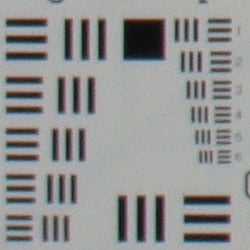

The Sony Cyber-shot DSC-W300 produced soft corners at full wide angle and telephoto zoom settings. At full wide angle, blurring was strongest in the upper right corner, with the lower right corner showing the least blurring. The degree of softness in the corners also varied at telephoto, with the lower left corner showing the strongest amount.
Viewfinder
Coverage
A tight optical viewfinder, but good results with the LCD monitor.


The Sony Cyber-shot DSC-W300's optical viewfinder showed about 86% frame accuracy at wide angle, and about 81% at telephoto, which is a bit tight. Alternatively, the LCD monitor showed about 104% coverage accuracy at wide angle, and about 100% at telephoto, actually a little loose on the wide angle end.
The images above were taken from our standardized test shots. For a collection of more pictorial photos, see our Sony Cyber-shot DSC-W300 Photo Gallery .
Exposure
Sony Cyber-shot DSC-W300 Exposure
Color
Saturation & Hue Accuracy
Generally good color and hue accuracy, though strong reds and blues are oversaturated a fair amount.
 |
| In the diagram above, the squares show the original color, and the circles show the color that the camera captured. More saturated colors are located towards the periphery of the graph. Hue changes as you travel around the center. Thus, hue-accurate, highly saturated colors appear as lines radiating from the center. |
Saturation. The Sony Cyber-shot DSC-W300 produced generally good saturation, though strong reds and blues were definitely oversaturated. (In some images, the bright reds practically jump off of the screen.) Yellows, greens, and purples were just about exact though. Most consumer digital cameras produce color that's more highly saturated (more intense) than found in the original subjects. This is simply because most people like their color a bit brighter than life.
Skin tones. The DSC-W300's skin tones were a little on the pink side, with slightly added warmth as well. However, most consumers should find the W300's performance here pleasing. Where oversaturation is most problematic is on Caucasian skin tones, as it's very easy for these "memory colors" to be seen as too bright, too pink, too yellow, etc.
Hue. In terms of hue accuracy, the Cyber-shot DSC-W300 showed a
few small color shifts relative to the correct mathematical translation
of colors in its subjects. Most notably, cyan was pushed strongly toward
blue, presumably for better skies, and orange shifted toward yellow. Still,
overall hue accuracy was about average. Hue is "what color"
the color is.


Sensor
Exposure and White Balance
Indoors, incandescent lighting
Most accurate color with the Manual white balance, though a hint
cool. More than average positive exposure compensation required.


Color balance indoors under incandescent lighting was quite warm in both Auto and Incandescent white balance modes, though the Manual mode produced more accurate results. Color looks pretty good with the Manual white balance, if a hint cool overall, though the slightly cool cast is preferable to the very strong warm casts in Auto and Incandescent white balance modes. The Cyber-shot DSC-W300 required a +0.7 EV exposure compensation boost to get a good exposure, which is actually a little higher than average for this shot. Our test lighting for this shot is a mixture of 60 and 100 watt household incandescent bulbs, a pretty yellow light source, but a very common one in typical home settings here in the U.S.
Outdoors, daylight
Good overall exposure and color, though strongly-saturated reds.
Under the harsh lighting of the outdoor conditions above, the Sony Cyber-shot DSC-W300 handled exposure pretty well. Contrast is a little high, but given the bright circumstances, not too bad. Shadow detail is quite good, with only moderate interference from noise and noise suppression. In the portrait above, midtones look pretty good on the face, with a lot of fine detail. Color is vibrant and bright, and you could argue that reds are a little too bright, though overall color is still quite pleasing.
See full set of test images with explanations
See thumbnails of all test and gallery images
Resolution
Very high resolution, 1,800 ~ 2,000 lines of strong detail.


Our laboratory resolution chart revealed sharp, distinct line patterns down to about 2,000 lines per picture height horizontally, and to about 1,800 lines vertically. You could argue for 2,000 lines vertically, but the delineation isn't as clear in this direction. Extinction didn't occur. Use these numbers to compare with other cameras of similar resolution, or use them to see just what higher resolution can mean in terms of potential detail.
See full set of test images with explanations
See thumbnails of all test and gallery images
Sharpness & Detail
Sharp images overall, though with some edge-enhancement on high-contrast
subjects. Shadow detail is good, with only moderate noise suppression blurring
fine detail.


Sharpness. The Sony Cyber-shot DSC-W300 captures sharp images with good definition in areas of fine detail. High-contrast subjects such as the crop above left do show edge enhancement artifacts, though the effect isn't very strong. Edge enhancement creates the illusion of sharpness by enhancing colors and tones right at the edge of a rapid transition in color or tone.
Detail. The crop above right shows moderate noise suppression, with strand detail in the darker areas of hair merging together, with some chroma noise in the mix. That said, the DSC-W300 does pick up a lot of strand detail in the moderate shadows. Impressive results, especially for a pocket point-and-shoot. Noise-suppression systems in digital cameras tend to flatten-out detail in areas of subtle contrast. The effects can often be seen in shots of human hair, where the individual strands are lost and an almost "watercolor" look appears.
ISO & Noise Performance
Low noise at the normal sensitivity settings, with only moderately high
noise at ISO 400, though some blurring from noise suppression efforts. Stronger
noise and noise suppression at the higher settings, with losses in detail
and color balance.
 |
 |
 |
| ISO 80 | ISO 100 | ISO 200 |
 |
 |
 |
ISO 400 | ISO 800 | ISO 1,600 |
 |
 |
 |
ISO 3,200 |
ISO 3,200 |
ISO 3,200 High Noise Reduction |
The Sony Cyber-shot DSC-W300 produced low to moderate noise all the way to ISO 200. At ISO 400, noise is higher and the camera's efforts at noise suppression blur fine details. At ISOs 800 and up, noise becomes stronger and more dominating, altering color balance and blurring fine detail. The DSC-W300 has an adjustable noise reduction setting. The last crops above are only part of a series of High and Low settings, and show really minimal impact on the noise at ISO 3,200. The Low setting does attempt to preserve detail, but the pixels of noise also interfere with definition. At the other extreme, higher noise suppression results in a very blurry image. (See full set of test images with explanations for the full series of noise reduction settings.)
Extremes: Sunlit and low light tests
Very high resolution with strong detail, even in the shadows, but slightly
high contrast. Very good low-light capabilities, captures bright images
in near darkness.


Sunlight. The Sony Cyber-shot DSC-W300 produced slightly high contrast under the deliberately harsh lighting in the test above, though both shadow and highlight detail remain strong. Noise suppression attempts do hurt detail slightly in the shadows, but results are still good. The default exposure actually looks pretty good, though midtones are a hint dark; but even a small +0.3 EV exposure adjustment makes the highlights on the shirt too bright. The DSC-W300 does have an adjustable contrast setting, which had a small effect on the overall exposure. Regardless, be sure to use fill flash in situations like the one shown above; and it's better to shoot in the shade when possible.
Because digital cameras are more like slide film than negative film (in that they tend to have a more limited tonal range), we test them in the harshest situations to see how they handle scenes with bright highlights and dark shadows, as well as what kind of sensitivity they have in low light. The shot above is designed to mimic the very harsh, contrasty effect of direct noonday sunlight, a very tough challenge for most digital cameras. (You can read details of this test here.)
| 1 fc 11 lux |
1/2 fc 5.5 lux |
1/4 fc 2.7 lux |
1/8 fc 1.3 lux |
1/16 fc 0.67 lux |
1/16 fc 0.67 lux NR=Low |
|
|---|---|---|---|---|---|---|
| ISO 80 |
 3 sec f2.8 |
 7 sec f2.8 |
 15 sec f2.8 |
 30 sec f2.8 |
 30 sec f2.8 |
 30 sec f2.8 |
| ISO 100 |
 2.5 sec f2.8 |
 5 sec f2.8 |
 13 sec f2.8 |
 25 sec f2.8 |
 30 sec f2.8 |
 30 sec f2.8 |
| ISO 200 |
 1.3 sec f2.8 |
 2.5 sec f2.8 |
 7 sec f2.8 |
 13 sec f2.8 |
 30 sec f2.8 |
 25 sec f2.8 |
| ISO 400 |
 0.6 sec f2.8 |
 1.3 sec f2.8 |
 3 sec f2.8 |
 7 sec f2.8 |
 15 sec f2.8 |
 13 sec f2.8 |
| ISO 800 |
 0.3 sec f2.8 |
 0.6 sec f2.8 |
 1.6 sec f2.8 |
 3 sec f2.8 |
 8 sec f2.8 |
 7 sec f2.8 |
| ISO 1600 |
 1/6 sec f2.8 |
 0.4 sec f2.8 |
 0.8 sec f2.8 |
 1.6 sec f2.8 |
 4 sec f2.8 |
 3 sec f2.8 |
| ISO 3200 |
 1/10 sec f2.8 |
 1/5 sec f2.8 |
 0.4 sec f2.8 |
 0.8 sec f2.8 |
 2 sec f2.8 |
 1.6 sec f2.8 |
Low light. The Sony Cyber-shot DSC-W300 handled low lighting quite well, capturing bright images at the darkest light level at the lowest sensitivity setting (ISO 80). Color balance looks good with the Auto white balance. Image noise becomes higher at the higher sensitivity settings, and the camera's efforts at noise suppression aren't too pronounced, but results are still good considering how dark the subject is. The camera's AF system was able to focus unassisted down to just below the 1/8 foot-candle light level, and to total darkness with the AF assist enabled.
How bright is this? The one foot-candle light level that this test begins at roughly corresponds to the brightness of typical city street-lighting at night. Cameras performing well at that level should be able to snap good-looking photos of street-lit scenes.
NOTE: This low light test is conducted with a stationary subject, and the camera mounted on a sturdy tripod. Most digital cameras will fail miserably when faced with a moving subject in dim lighting. (For example, a child's ballet recital or a holiday pageant in a gymnasium.) For such applications, you may have better luck with a digital SLR camera, but even there, you'll likely need to set the focus manually. For information and reviews on digital SLRs, refer to our SLR review index page.
Flash
Coverage and Range
A modest flash at close range, with slightly uneven coverage and limited
range. Exposure compensation had little effect on the normal flash mode, though better results in Slow-Sync mode.


Coverage and Exposure. Flash coverage was uneven at full wide angle, and still a bit uneven (and quite dim) at full telephoto. In the Indoor test, the Cyber-shot DSC-W300's flash underexposed our subject quite a bit at its default setting, though boosting the exposure compensation had only a small effect on the exposure. The image is brighter at +0.3 EV than the default exposure, but increasing the exposure compensation did not brighten the image past +0.3 EV setting. The camera's Slow-Sync flash mode produced much brighter and more even results, though with a stronger pinkish-orange cast from the room lighting. The best results here were at +0.7 EV.
| Flash Range: Wide Angle | |||||
|---|---|---|---|---|---|
| 6 ft | 7 ft | 8 ft | 9 ft | 10 ft | 11 ft |
 1/40 sec f2.8 ISO 100 |
 1/40 sec f2.8 ISO 100 |
 1/40 sec f2.8 ISO 100 |
 1/40 sec f2.8 ISO 100 |
 1/40 sec f2.8 ISO 100 |
 1/40 sec f2.8 ISO 100 |
| 12 ft | 13 ft | 14 ft | 15 ft | 16 ft | |
 1/40 sec f2.8 ISO 100 |
 1/40 sec f2.8 ISO 100 |
 1/40 sec f2.8 ISO 100 |
 1/40 sec f2.8 ISO 100 |
 1/40 sec f2.8 ISO 100 |
|
| Flash Range: Telephoto | |||||
|---|---|---|---|---|---|
| 6 ft | 7 ft | 8 ft | 9 ft | 10 ft | 11 ft |
 1/50 sec f5.5 ISO 100 |
 1/50 sec f5.5 ISO 100 |
 1/50 sec f5.5 ISO 100 |
 1/50 sec f5.5 ISO 100 |
 1/50 sec f5.5 ISO 100 |
 1/50 sec f5.5 ISO 100 |
| 12 ft | 13 ft | 14 ft | 15 ft | 16 ft | |
 1/50 sec f5.5 ISO 100 |
 1/50 sec f5.5 ISO 100 |
 1/50 sec f5.5 ISO 100 |
 1/50 sec f5.5 ISO 100 |
 1/50 sec f5.5 ISO 100 |
|
ISO 100 Range. At wide angle and ISO 100, flash shots were brightest at 6 feet and decreased in intensity with each foot of distance. At full telephoto and ISO 100, shots were already dim at 6 feet, and decreased in brightness from there.
| Manufacturer-Specified Flash Range | |
|---|---|
| Wide Angle | Telephoto |
 18.0 feet Auto ISO 800 |
 9.2 feet Auto ISO 640 |
Manufacturer Specified Flash Test. In the shots above, the Cyber-shot DSC-W300 performs almost as Sony says it will, though it boosts the ISO to get these results. At wide angle, the camera boosted ISO to 800 and at telephoto, to 640; way too much in our opinion. Our standard test method for flash range uses a fixed setting of ISO 100, to provide a fair basis of comparison between cameras. We've now also begun shooting two shots using the manufacturer-specified camera settings, at the range the company claims for the camera, to assess the validity of the specific claims.
Output Quality
Print Quality
Good print quality, good color, sharp 13x19-inch prints. ISO 400 images are soft but usable at 11x14, ISO 800 shots are still good at 8x10.
 The Sony W300 had enough resolution to make good looking 13x19-inch prints. 16x20-inch prints were reasonable, but chroma noise shows up in some places. ISO 400 shots are better than expected at 11x14, with good color and detail. ISO 800 shots are soft at 11x14, but pretty good at 8x10, surprisingly. ISO 1,600 shots aren't bad at 8x10 either, unless you look closely. They're quite a bit better at 5x7. ISO 3,200 shots are a little rough at 5x7, but quite decent at 4x6, though with soft detail in low-contrast areas. Overall it's a better performance than most 12-megapixel digital cameras. Sony has used the higher resolution to good advantage to allow larger print sizes. Though we recommend sticking to ISO 800 and below for enlargements, ISO 1,600 is quite usable for snapshots.
Testing hundreds of digital cameras, we've found that you can only tell just so much about a camera's image quality by viewing its images on-screen. Ultimately, there's no substitute for printing a lot of images and examining them closely. For this reason, we now routinely print sample images from the cameras we test on our Canon Pro9000 studio printer, and on the Canon iP5200 here in the office. (See the Canon PIXMA Pro9000 review for details on that model.)
The images above were taken from our standardized test shots. For a collection of more pictorial photos, see our Sony Cyber-shot DSC-W300 Photo Gallery .
Not sure which camera to buy? Let your eyes be the ultimate judge! Visit our Comparometer(tm) to compare images from the Sony Cyber-shot DSC-W300 with those from other cameras you may be considering. The proof is in the pictures, so let your own eyes decide which you like best!
Performance
Sony Cyber-shot DSC-W300 Performance
Timing and Performance
Blazing fast to sluggish timings, depending on the action.
| Startup/Shutdown |
||
| Power on |
2.9 seconds | Time it takes for LCD to turn on and lens to deploy and capture a picture. |
| Shutdown |
1.7 seconds | How long it takes to retract lens. |
| Buffer clearing time |
2 seconds (2 seconds buffer clearing in LF JPEG) |
Worst case buffer clearing time. -- This is the delay after a set of shots before you can remove the card. Some cameras won't retract their lenses and shut down until the buffer is cleared. |
Slightly sluggish times here, particularly start-up.
| Mode Switching | ||
|---|---|---|
| Play to Record, |
1.5 seconds | Time until first shot is captured. |
| Record to play |
1.8 seconds | Time to display a large/fine file immediately after capture. |
| Display |
1.8 seconds | Time to display a large/fine file already on the memory card. |
Mode switching times are also slower than average.
| Shutter Response (Lag Time) | ||
|---|---|---|
| Full Autofocus Wide |
0.42 second | Time from fully pressing shutter button to image capture, zoom lens at wide angle position. |
| Full Autofocus Tele |
0.54 second | Time from fully pressing shutter button to image capture, zoom lens at telephoto position. |
|
Full Autofocus |
0.77 second |
Time from fully pressing shutter button to image capture, zoom lens at wide angle position, flash enabled. |
| Prefocused |
0.008 second | Time to capture, after half-pressing and holding shutter button. |
| Continuous AF |
0.36 second |
This mode usually shows no speed increase with our static subject; we have no way to measure performance with moving subjects. |
| Manual Focus |
0.38 second |
For most cameras,
shutter lag is less in manual focus than autofocus, but usually not
as fast as when the camera is "prefocused" |
Shutter response is better than average at both wide angle, at 0.42-second, and also pretty good at telephoto, at 0.54-second. "Prefocusing" the camera by half-pressing and holding down the shutter button before the final exposure results in a lag time of only 0.008 second, which is excellent. Good results here.
| Cycle Time (shot to shot) | ||
|---|---|---|
| Single Shot mode Large Fine JPEG |
1.77 seconds | Time per shot, averaged over 20 shots. |
| Single Shot mode |
2.01 seconds | Time per shot, averaged over 20 shots. |
| Early shutter |
No | Some cameras don't snap another shot if you release and press the shutter too quickly in Single Shot mode, making "No" the preferred answer. |
| Continuous mode |
0.52 second (1.92 frames per second); >20 frames total; 2 seconds to clear |
Time per shot, averaged over buffer length or 20 shots, whichever came first. |
| Continuous mode |
0.20 second (4.96 frames per second); >20 frames total; 1 second to clear |
Time per shot, averaged over buffer length or 20 shots, whichever came first. |
| Continuous mode |
0.63 second (1.59 frames per second); >20 frames total; 1.5 seconds to clear |
Time per shot, averaged over buffer length or 20 shots, whichever came first. |
| Flash recycling |
9 seconds | Flash at maximum output. |
| *Note: Buffer clearing times measured with a SanDisk Pro Duo Extreme III memory card. Slower cards will produce correspondingly slower clearing times. Slow cards may also limit length of bursts in continuous mode. ISO sensitivity also affects cycle times and burst mode performance, with higher ISOs generally increasing cycle times and reducing burst performance. |
||
Shot-to-shot cycle times are on the slower side, at about 1.77 seconds for large/fine JPEGs, though the camera does capture frames continuously at this rate. (That is, given a fast enough memory card, it doesn't have to pause every few frames to wait for the card to catch up.) Surprisingly, the lower resolution, 640x480-JPEG setting results in an even slower 2.01-second cycle time. Continuous mode is pretty good, at 1.92 frames per second for large/fine JPEGs, and the camera captures more than 20 frames this fast. The High Speed mode is blazing fast for a consumer digital camera, capturing 4.96 frames per second for more than 20 frames, though it is limited to the 3-megapixel resolution. The flash takes 9 seconds to recharge after a full-power shot, which is on the slower side.
| Download Speed | ||
|---|---|---|
| Windows Computer, USB 2.0 |
9,619 KBytes/sec | Typical Values: |
Connected to a computer or printer with USB 2.0, download speeds are excellent.
Overall, the Cyber-shot DSC-W300 is a bit of a mixed bag, timing-wise. Its startup and mode-switching times are a little slow, and shot-to-shot cycle times are also on the slow side. However, shutter lag is pretty good, and the High Speed continuous mode is blazing fast, as are download times. Thus, the DSC-W300 should handle most shooting situations well. And though the High Speed Continuous setting is limited to the 3-megapixel resolution, we think it's an excellent option for capturing fast-paced action.
Battery and Storage Capacity
Battery
Average battery life for a lithium-ion design.
| Operating Mode | Number of Shots |
|---|---|
| Lithium-ion Rechargeable
Battery, LCD On (CIPA standard) |
300 |
| Lithium-ion
Rechargeable Battery, LCD Off (CIPA standard) |
340 |
The Sony Cyber-shot DSC-W300 uses a custom rechargeable lithium-ion battery for power, and ships with a charger. Battery life is about average, so we definitely recommend you pick up a spare battery and keep it freshly charged and on-hand for extended outings.
The table above shows the number of shots the camera is capable of (on a fully-charged rechargeable battery), based on CIPA battery-life and/or manufacturer standard test conditions.
(Interested readers can find an English translation of the CIPA DC-002 standards document here. (180K PDF document))
Storage
The Sony Cyber-shot DSC-W300 accepts Sony Memory Stick PRO Duo memory cards, and includes about 15MB of internal memory.
| Image Capacity with 15MB Internal Memory |
Fine | |
|---|---|---|
| 4,224
x 3,168 |
Images |
2 |
| File Size |
5.3 MB |
|
| 3,264
x 2,448 |
Images |
4 |
| File Size |
3.2 MB |
|
| 2,592
x 1,944 |
Images |
6 |
| File Size |
2.5 MB |
|
| 2,048
x 1,536 |
Images |
10 |
| File Size |
1.6 MB |
|
| 640
x 480 |
Images |
169 |
| File Size |
257 KB |
|
We strongly recommend buying a large capacity Memory Stick PRO Duo at least a 1GB card, preferably a 4GB one, to give yourself extra space for extended outings and video. (Check the shopping link above, cards are really cheap these days, so no reason to skimp.)