
Adobe Adds Major Editing and Catalog Management Features to Lightroom Classic


Imaging Resource is reader-supported. When you buy through links on our site, we may earn an affiliate commission. How this works.
On this page
Table of Contents
 New Catalog Management and Color Tools
Adobe has quietly released Lightroom Classic 16.0, introducing several new features that were not highlighted during Adobe MAX 2026. While Adobe previously announced the arrival of Glow and Blemish Removal, the latest update brings additional tools for photo culling, catalog management, masking, and color grading.
One of the biggest additions is the ability to filter photos before importing them. Lightroom Classic can now recognize in-camera star ratings, color labels, protected status, and file types, allowing photographers to select the images they want to bring into their catalogs more efficiently.
These filters also carry over to the Assisted Culling workflow, potentially speeding up the selection process and helping photographers avoid unnecessarily bloated catalogs.
New Catalog Management and Color Tools
Lightroom Classic 16 also introduces a way to clean up photo editing history while preserving the final appearance of an image. Users can remove history states from individual photos, multiple images, folders, or entire collections to reduce catalog file sizes.
The cleanup process can also be scheduled to run automatically, helping photographers keep their catalogs manageable without deleting their edited images.
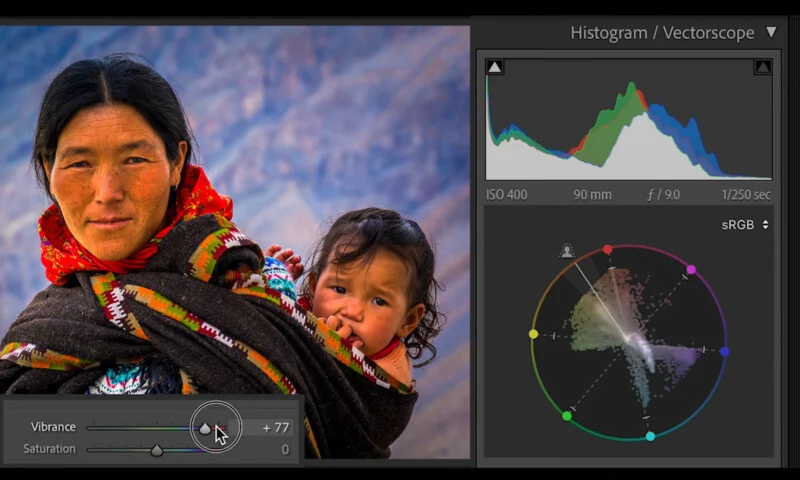
For color work, Adobe has added a Vectorscope, giving photographers another way to analyze color distribution and skin tones. The tool can help users make more informed color-grading decisions.
The update also expands the existing Color Grading tools by allowing users to apply color tints specifically to masked areas. Photographers can independently adjust shadows, midtones, and highlights within a selected mask without affecting the rest of the image.
Improved Masking and Depth Selection
Adobe has added more customization options to Lightroom Classic’s Masking panel. Users can rearrange controls and move frequently used sliders into a Favorites section for quicker access.
Another major addition is an AI-powered depth masking tool. Lightroom Classic can recognize depth information in supported image files and use it to create masks for the foreground, middle ground, and background. Users can then refine the resulting masks manually to fine-tune their adjustments.
The Transform panel also gains a Projection slider. This control is designed to help correct distortions affecting faces and objects near the edges of an image.
Expanded Camera and Lens Support
As with other Lightroom updates, version 16.0 adds support for new cameras and lenses. The update includes support for the Apple iPhone Duo’s wide and ultrawide cameras, alongside additional lenses from manufacturers including Laowa, Sigma, Sony, and Tamron.
Notable additions include Sony’s FE 8-14mm F3.5 Fisheye G, FE 400mm F4.5 GM, and FE 600mm F6.3 GM lenses. Sigma’s 50-120mm F2.8 DC OS and Tamron’s 17-70mm F2.8 RF are also included.
Pricing and Availability
Lightroom Classic 16.0 is available now to all subscribers. Users can install the update through the Lightroom Classic application or the Adobe Creative Cloud desktop app.
More in News
 NewsArtizlab Recreates a Leica Classic 50mm Lens for Just $39910 Nov 2026
 NewsMitakon Speedmaster 45mm F1.4 Launches for Fujifilm GFX and Hasselblad XCD9 Nov 2026
 NewsPanasonic Registers New Camera in China, Sparking Lumix Announcement Rumors9 Nov 2026
 NewsSirui Expands Aurora Series With Two New Wide-Angle Prime Lenses9 Nov 2026
 NewsNikon May Have Accidentally Leaked the Upcoming Z706 Nov 2026
 NewsHOA A1 Is a Screen-Free Camera Designed to Prove Photos Are Authentic6 Nov 2026