Nikon D2Xs Viewfinder
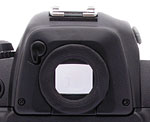 The Nikon D2Xs is equipped with an optical viewfinder that works through the lens (the LCD monitor is for image playback and accessing the menu system only, and as with other digital SLRs cannot be used for image preview / framing). The optical viewfinder eyepiece features a diopter adjustment knob on the side of the prism housing, and a sliding protective shutter than can be moved in and out of place manually via a small lever. The internal metal shutter helps avoid exposure errors due to light entering the rear element of the viewfinder during long exposures on a tripod. Nikon states that the optical viewfinder provides about 100 percent frame coverage, which agrees quite well with my own measurements. (I measured viewfinder coverage at almost exactly 100 percent.) The D2Xs's illuminated display inside the viewfinder provides a bit more information than the previous D1X, with a center-weighted metering circle, 11 sets of focus brackets, focus indicator, metering, bracketing indication, battery level, FV lock, sync indicator, AE lock, B&W mode, shutter speed, shutter speed lock, aperture, aperture lock, aperture stop indicator, exposure mode and compensation, frame counter, flash-ready indicator, electronic analog exposure display, voice memo status, white balance mode and bracketing, image size and quality, and ISO sensitivity.
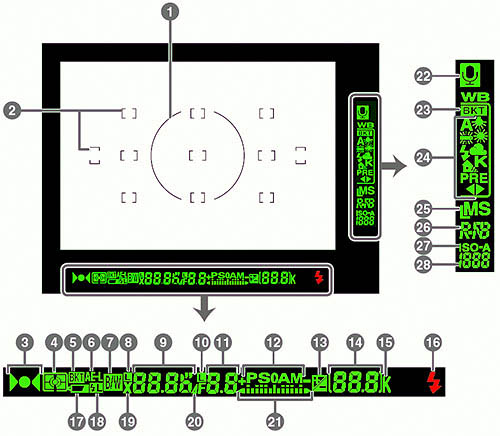
1 |
8-mm (0.31") reference circle for center-weighted metering |
15 |
"K" (appears when memory remains for over 1000 exposures) |
2 |
Focus brackets (focus areas) |
16 |
Flash-ready indicator |
| Spot metering targets |
17 |
Battery indicator | |
3 |
Focus indicator |
18 |
FV lock indicator |
4 |
Metering |
19 |
Sync indicator |
5 |
Bracketing indicator |
20 |
Aperture stop indicator |
6 |
Autoexposure (AE) lock |
21 |
Electronic analog exposure display |
7 |
Black and White indicator |
22 |
Voice memo status indicator |
8 |
Shutter-speed lock icon |
23 |
White-balance bracketing indicator |
9 |
Shutter speed |
24 |
White-balance mode |
10 |
Aperture lock icon |
25 |
Image size |
11 |
Aperture (f/-number) |
26 |
Image quality |
| Aperture (number of stops) |
27 |
Sensitivity (ISO) indicator | |
|
12
|
Exposure mode | Auto ISO sensitivity indicator | |
13 |
Exposure compensation indicator |
28 |
Sensitivity (ISO equivalency) |
14 |
Frame count | ||
| Number of exposures remaining | |||
| Number of shots remaining before memory buffer fills | |||
| Exposure compensation value | |||
| PC mode indicator |
 The D2Xs has improved the way that High-Speed Crop mode mask is shown. Instead of the corner brackets used by the D2X to indicate the cropping boundary, the D2Xs viewfinder dims the cropped portion, making it easier to see what the final image will look like, while still being able to track subjects entering or leaving the capture zone.
Viewfinder
Coverage
Excellent accuracy with the optical viewfinder.
 |
| Optical Viewfinder |
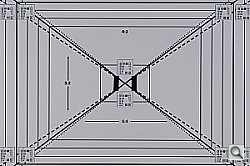
The Nikon D2Xs' optical viewfinder proved very accurate, showing about 98% of the frame in the final image, essentially a "100%" viewfinder. Excellent performance here, we frankly don't understand why only the most expensive "pro" DSLRs have 100% viewfinders, they're a great help to accurate framing.
Nikon D2Xs Main LCD Display

While the 2.5-inch LCD panel on the Nikon D2Xs isn't usable as a viewfinder, it does provide a great deal of information about your pictures after you've shot them. A variety of playback options are available, ranging from a 9-image thumbnail display, through several full-sized image modes, to a zoomed playback option with variable magnification. The screen shot at right shows several of the information displays that are available.
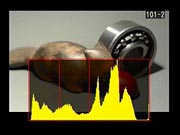 Of the various screens, one of the more interesting options on the Nikon D2Xs is the histogram screen, shown at right. Histogram displays are common on professional digicams, regarded as almost mandatory by many pros for evaluating exposure levels. A histogram is simply a graph of how many pixels there are in the image at each brightness level. The brightness is the horizontal axis, running from black at the left to white at the right. The height of the graph shows the relative number of pixels having each brightness level. This sort of display is very handy for determining under- or overexposure. Ideally, the histogram would stretch across the entire width of the display, using the full range of brightness values available. An underexposed image will have a histogram with all the data lumped on the left-hand side, with nothing reaching all the way to the right. Likewise, an overexposed image will have all the data lumped on the right hand side.
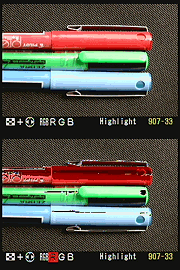
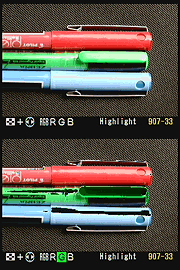
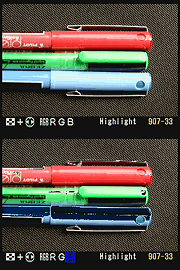
 New to the D2Xs is an RGB histogram mode, which shows four separate, smaller histograms, with separate plots for the Red, Green, and Blue color channels, as well as overall luminance, shown in yellow. When in this mode, the thumbnail image will blink wherever highlights are blown out, and you can select the color channel that the blink warning is associated with by holding down the Index button and pressing the left or right arrows on the multi-controller.
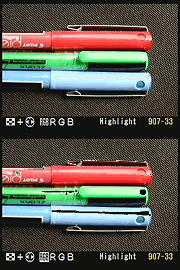
A histogram display is very helpful in telling whether you've got the exposure right, but to my mind isn't adequate by itself. With digital cameras, it's very important not to blow-out the highlights in a picture (they're similar to slide film in that respect), since once you hit the maximum brightness, the image just saturates, and any highlight detail will be lost. A histogram display does a pretty good job of telling you how the image as a whole is doing, but what if there are just a few critical areas that you're worried about for the highlights? If only a small percentage of the total frame is involved, it won't account for many pixels. That means any peak at the "white" end of the histogram graph would be pretty small, and easy to miss (or just plain invisible). What to do? The folks at Nikon recognized this problem, and provided another special display mode on the D2Xs that they simply call "highlights," accessible via the Playback settings menu, under "Display Mode." This mode blinks any highlights that are saturated in any of the color channels. It does this by taking the nearly-white areas on the LCD and toggling them between white and black.
| Luminance | Red |
 |
 |
 |
 |
| Green | Blue |
Nikon took the blinking highlights display one big step further in the D2Xs though, by letting you examine the state of highlights in the individual Red, Green, and Blue color channels independently. Along the bottom of the Highlights display on the D2Xs are four indicators labeled RGB, R, G, and B. You can select between them with the left/right arrows on the Multi Controller, while holding down the Index button on the left side of the LCD display. When RGB is selected, the blinking highlights correspond to areas of the image that are approaching saturation in two or more color channels at once. When either R, G, or B is selected though, the highlights only blink where the corresponding color channel is blown out. This is an important addition, because highly saturated colors can often blow out a single color channel without triggering a conventional luminance-only highlight warning display. Saturating a single color channel results in loss of shape and detail in brightly colored objects, so it's important to know when it might be happening. (I've often seen this happen on brightly colored fabrics, where the texture of the fabric can be lost in brightly lit areas.) The group of screen shots above shows the behavior of the separate color channels on an overexposed shot of three colored pens. Pretty slick!
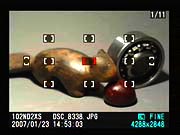 In addition to the histogram, highlights, and information screens, the D2Xs also features a focus information screen, which highlights in red the AF area used for the shot. This can be helpful for checking to see that the camera's AF system locked onto the portion of the subject you were most interested in.
 Like the D2H and D2X before it, the D2Xs offers a good playback zoom feature. Pressing the Enter button while an image is displayed enters Playback Zoom mode. To control zoom, you then hold down the Index button while turning the Command dial. As you do this, a red rectangle with blue corners appears on the screen to mark the area of the subject to be viewed. You can move this box around the screen with the Multi Controller's arrows. When you release the Index button, the selected portion of the image appears full-screen. The ability to magnify an image lets you see critical details that are indiscernible in the basic LCD image. Also in Playback mode, the D2Xs's LCD monitor can display as many as four or nine thumbnail-sized images at once, when the Index button is held down while rotating the Sub-Command dial.
 Fujifilm GFX 50S Review
 Fujifilm X-T3 Review
 Olympus E-M5 III Review


Follow Imaging Resource