Nikon D90 Modes and Menus
Nikon D90 Exposure Modes
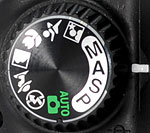 The mode dial on the right side of the D90's top panel provides access to its various exposure modes, the same arrangement of Auto, three semi-auto, and one Manual as found on all Nikon DSLRs, but with a total of six Scene modes (which Nikon calls "Vari-Programs"). Note that the D80's Night Landscape Scene mode has been replaced by the D90's more useful Flash Off mode. Here's a list of what's available:
 Auto: The camera sets everything. Used for snapshots or users who just don't want to be bothered with the details. The AF-assist light will come on if needed, and the camera selects the AF point covering the closest subject.
 Program: Puts the camera in charge of aperture and shutter speed, though all remaining camera settings are available. You can vary the combination of aperture and shutter speed the camera has selected by rotating the Command Dial.
 Shutter Priority: The user controls shutter speed, from 1/4,000 to 30 seconds, while the camera sets the aperture value.
 Aperture Priority: The opposite of Shutter Priority mode, this mode lets the user control the aperture, while the camera sets the shutter speed.
 Manual: Gives the user complete control over the exposure (both shutter and aperture settings), and provides access to the camera's Bulb shutter setting for exposures longer than 30 seconds.
 Night Portrait: Uses slow shutter speed with flash, balancing the two so that night portraits look natural even with flash. Closest-subject AF is used. Use a tripod to avoid blurring.
 Sports: Uses higher shutter speeds, camera switches to continuous focus while the shutter button is held down halfway, tracking the subject in the center focus area. If the subject leaves the central AF area, the camera will follow it and judge focus from the other focus areas. The beginning AF area can be chosen with the Multi-selector. Both flash and AF illuminator are turned off and will not fire.
 Close up: Reds and greens are pumped up, camera selects center focus point, but other points can be chosen with the Multi-Selector. The built-in flash will pop up and fire if the lighting is too dim, use of a tripod is recommended.
 Landscape: Boosts color saturation, contrast, and sharpening for city and forest landscape shots. Closest-focus AF is used, and the flash and AF-assist light are turned off in this mode.
 Portrait: Adjusts the lens aperture to soften background details to help the main subject stand out more clearly. Sharpness and color saturation are moderated somewhat, to give softer, more natural-looking skin tones. The built-in flash will pop up and fire if the lighting is too dim.
 Flash Off (Auto): In this mode, the flash is disabled, and the camera will vary the ISO up to a maximum of 3,200, to capture images using available light. The AF-assist light will come on if needed, and the camera selects the AF point with the closest subject. This mode is great for museums and other places where flash isn't permitted, more natural-looking indoor shots, etc. (Do note though, that you may need to use a tripod, as the shutter speeds are likely to be on the slow side, even at ISO 3,200.)
Nikon D90 Menus
The menu system on the D90 follows that of recent Nikons SLRs like the D60 and D300. Pressing the Menu button provides access to the camera's full menu system.
In the section below, rather than list and verbally describe each option, we'll present the top-level menu screens in the main text without comment, and provide links to pages showing most of D90 menu structure, page by page.
Nikon D90 Playback Menu
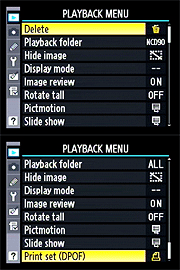
Nikon D90 full Playback menu layout
(note, large download for dialup users)
Nikon D90 Shooting Menu
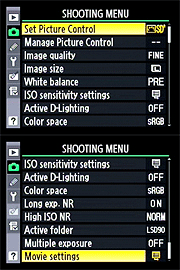
Nikon D90 full Shooting menu layout
(note, large download for dialup users)
Nikon D90 Custom Settings Menu
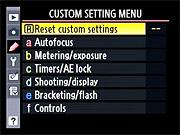
Nikon D90 full Custom Settings menu layout
(note, large download for dialup users)
Nikon D90 Setup Menu
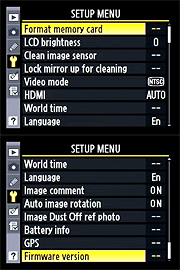
Nikon D90 full Setup menu layout
(note, large download for dialup users)
Nikon D90 "Retouch" Menu
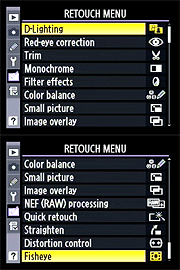
Nikon D90 full "Retouch" menu layout
(note, large download for dialup users)
Nikon D90 "My Menu" Menu
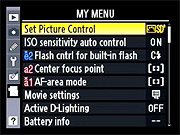
Nikon D90 "My Menu" menu layout
 Fujifilm GFX 50S Review
 Fujifilm X-T3 Review
 Olympus E-M5 III Review


Follow Imaging Resource