Canon SD600 Exposure and Imaging
Color
Saturation & Hue Accuracy
Very good color, with good accuracy and overall saturation.
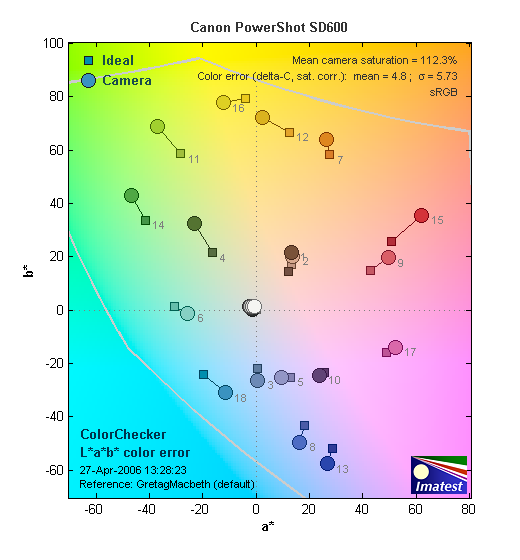 |
| In the diagram above, the squares show the original color, and the circles show the color that the camera captured. More saturated colors are located towards the periphery of the graph. Hue changes as you travel around the center. Thus, hue-accurate, highly saturated colors appear as lines radiating from the center. |
The other important part of color rendition is hue accuracy. Hue is "what color" the color is. Again, the SD600 performed quite well. Like most digital cameras, it shifts cyan colors toward blue, to produce better-looking sky colors, but the rest of the hues were quite accurate.
 |
 |
 |
Sensor
Exposure and White Balance
Indoors, incandescent lighting
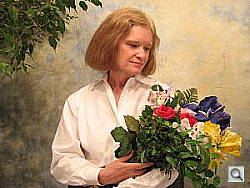
Auto was very warm, but good color with the Manual white balance. Average exposure compensation required, though bright highlights.
 |
 |
| Auto White Balance +1.0 EV | Incandescent WB +1.0 EV |
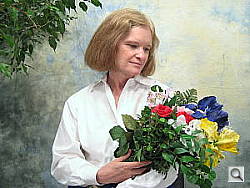 |
|
| Manual White Balance +1.0 EV |
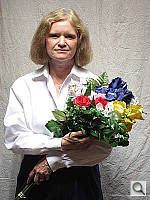
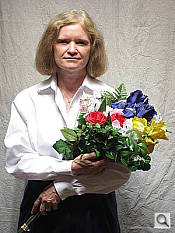
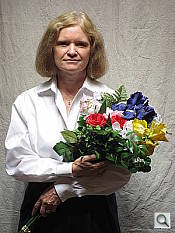
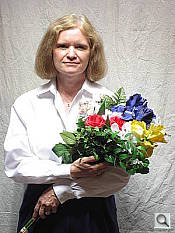
The Canon SD600's Manual white balance setting produced the best results here, despite slightly yellow overall color. The Auto setting resulted in a strong warm cast, and the Incandescent option produced reddish results. I found the best exposure with a +1.0 EV exposure compensation adjustment, though the highlights on Marti's shirt are really quite hot. Still, the image at +0.7 EV was just too dim overall. Color looks pretty good here, though the blue flowers are a bit dark. (A very common outcome for this shot.) Our test lighting for this shot is a mixture of 60 and 100 watt household incandescent bulb, a pretty yellow light source, but a very common one in typical home settings here in the US.
Outdoors, daylight
Slightly warm color balance, though very bright colors. About average exposure accuracy.
 |
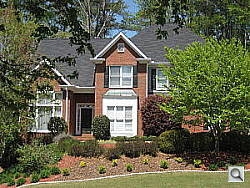 |
| Auto White Balance, +0.1 EV | Auto White Balance, Auto Exposure |
Outdoor shots generally showed nearly accurate exposure, though with blown out highlights and somewhat high contrast. Detail was pretty good in the shadows, though slightly limited. Overall color tended toward a slightly warm cast outdoors, though overall color was bright and very pleasing.
See full set of test images with explanations
See thumbnails of all test and gallery images
Resolution
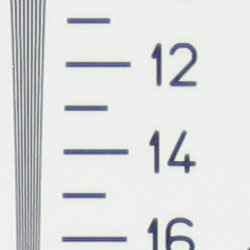
High resolution, 1,300 lines of strong detail.
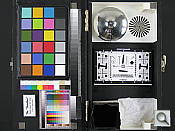
Our laboratory resolution chart revealed sharp, distinct line patterns down to about 1,300 lines per picture height, with extinction at around 1,800. (The camera did produce very slight color artifacts at lower line frequencies though, visible in the full-sized res target shots.) Use these numbers to compare with other cameras of similar resolution, or use them to see just what higher resolution can mean in terms of potential detail. Beware that while you might be able to make out what looks like distinct lines at numbers higher than those we've mentioned here, the camera is just doing its best to continue interpreting the lines.
 |
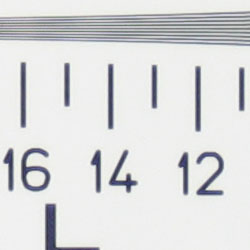 |
| Strong detail to 1,300 lines horizontal | Strong detail to 1,300 lines vertical |
See full set of test images with explanations
See thumbnails of all test and gallery images
Sharpness & Detail
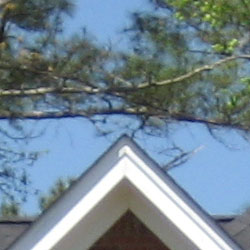
Slightly soft images overall, though still good definition. Some noise suppression in the shadows, but still good detail here as well.
 |
 |
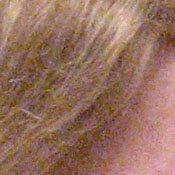
| Soft details, with only adequate definition of high-contrast elements. Far less detail than we're used to seeing from similar Canon cameras, especially in the background trees. | Subtle detail: Hair Noise suppression tends to blur detail in areas of subtle contrast, as in the darker parts of Marti's hair here. |
The Canon SD600's images are a little soft overall, and detail definition is acceptable, if a little mushy. There's really no strong over-sharpening or edge enhancement on the camera's part, but there is either more significant noise suppression, or loss of quality due to the smaller sensor and different optics in the SD600.
Noise-suppression systems in digital cameras tend to flatten-out detail in areas of subtle contrast. The effects can often be seen in shots of human hair, where the individual strands are lost and an almost "watercolor" look appears. The crop at far right shows this slightly, with darker areas of Marti's hair showing limited detail. However, results are actually pretty good here.
ISO & Noise Performance
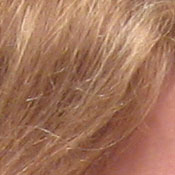
Low to moderate noise at the normal sensitivity settings, very high noise that diminishes detail at the higher settings.
 |
 |
 |
| ISO 80 (soft due to slight motion blur) |
ISO 100 | ISO 200 |
 |
 |
 |
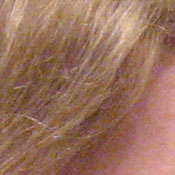
| ISO 400 | ISO 800 | High Auto |
Noise levels remained fairly low at the Canon SD600's lower ISO settings, though some detail was lost as low as ISO 200. At ISOs 400 and 800, noise becomes much higher, with an obtrusive grain pattern that really blurs detail at ISO 800.
Extremes: Sunlit and low light tests
High resolution with good overall detail, though high contrast and slightly limited shadow detail. Good low-light performance, capable of capturing bright images under average city street lighting and much darker conditions.
 |
|
 |
| 0.7 EV | +1.0 EV | +1.3 EV |
Sunlight:
Because digital cameras are more like slide film than negative film (in that they tend to have a more limited tonal range), we test them in the harshest situations to see how they handle scenes with bright highlights and dark shadows, as well as what kind of sensitivity they have in low light. The shot above is designed to mimic the very harsh, contrasty effect of direct noonday sunlight, a very tough challenge for most digital cameras. (You can read details of this test here.)
The Canon SD600 produced high contrast in response to the deliberately harsh lighting in the test above, though results are still pretty good. Despite some slight noise suppression, the deep shadows hold onto a fair amount of detail. Highlights are a bit bright at +1.0 EV, but the exposure at +0.7 EV appeared just a hair too dim overall to my eye. (In "real life" though, be sure to use fill flash in situations like the one shown above; it's better to shoot in the shade when possible.)
| 1 fc 11 lux |
1/2 fc 5.5 lux |
1/4 fc 2.7 lux |
1/8 fc 1.3 lux |
1/16 fc 0.67 lux |
|
| ISO 80 |
 2.5 sec f2.8 |
 5 sec f2.8 |
 10 sec f2.8 |
 15 sec f2.8 |
 15 sec f2.8 |
| ISO 100 |
 2 sec f2.8 |
 4 sec f2.8 |
 8 sec f2.8 |
 15 sec f2.8 |
 15 sec f2.8 |
| ISO 200 |
 1 sec f2.8 |
 2 sec f2.8 |
 4 sec f2.8 |
 8 sec f2.8 |
 15 sec f2.8 |
| ISO 400 |
 1/2 sec f2.8 |
 1 sec f2.8 |
 2 sec f2.8 |
 4 sec f2.8 |
 8 sec f2.8 |
| ISO 800 |
 1/4 sec f2.8 |
 1/2 sec f2.8 |
 1 sec f2.8 |
 2 sec f2.8 |
 4 sec f2.8 |
Low light:
The Canon SD600's exposure system handled low lighting pretty well, capturing bright, usable images down to the darkest light levels we test at, at ISO 200 and up. At the lower ISO settings (80 and 100), images were usable down to about 1/8 foot-candle, which is about 1/8 as bright as average city street lighting at night. Color looked good with the Auto white balance setting. The camera's autofocus system worked well down to about 1/4 foot-candle, which is a small limitation considering the SD600's exposure capabilities. Do keep in mind though, that the very long shutter times available absolutely demand the use of a tripod or other camera support to get sharp photos. (A useful trick is to just prop the camera on a convenient surface, and use its self-timer to release the shutter. This avoids any jiggling from your finger pressing the shutter button, and can work quite well when you don't have a tripod handy.)
Flash
Coverage and Range
A slightly limited flash range. Our standard shots required about average positive exposure compensation.
 |
 |
| 35mm equivalent | 105mm equivalent |
 |
 |
| Normal Flash +1.0 EV | Slow-Sync Flash +1.3 EV |
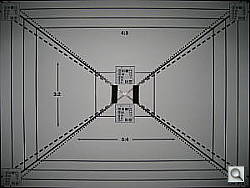
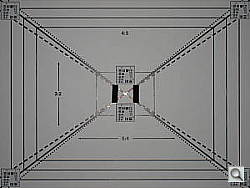
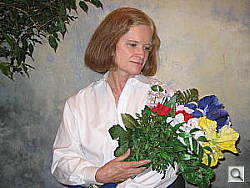
Flash coverage was uneven at wide angle, with strong falloff in the corners, but much more uniform at telephoto. In the Indoor test, the SD600's flash underexposed our subject at its default setting, requiring a +1.0 EV exposure compensation adjustment for bright results. (Even though the overall exposure is still slightly dim here.) The camera's Slow-Sync flash mode produced more even coverage, though with a stronger orange cast from the room lighting. It also required an EV boost, at +1.3 EV.
| 8 ft | 9 ft | 10 ft | 11 ft | 12 ft | 13 ft | 14 ft |
 1/60 sec f4.9 |
 1/60 sec f4.9 |
 1/60 sec f4.9 |
 1/60 sec f4.9 |
 1/60 sec f4.9 |
 1/60 sec f4.9 |
 1/60 sec f4.9 |
The Canon SD600's flash was brightest at eight feet from the test target, and only decreased in intensity from there. Results at 14 feet are quite dim indeed.
Output Quality
Print Quality
Good print quality, great color, very usable 11x14 inch prints. ISO 400 images are very soft at 8x10, acceptable at 5x7, great at 4x6.
Testing hundreds of digital cameras, we've found that you can only tell just so much about a camera's image quality by viewing its images on-screen. Ultimately, there's no substitute for printing a lot of images and examining them closely. For this reason, we now routinely print sample images from the cameras we test on our Canon i9900 studio printer, and on the Canon iP5200 here in the office. (See the Canon i9900 review for details on that model.)
With the Canon SD600, we found that it had enough resolution to make very crisp 8x10 inch prints. At 11x14, its prints were a bit softer, but more than adequate for wall or table display. At very high ISO, image noise levels are decent, but color is subdued. ISO 400 images are still usable at 11x14, but don't get excellent until 8x10. ISO 800 are marginal even at 5x7 inches, but look pretty good at 4x6, which is what most folks print anyway. Color-wise, the SD600's images looked great when printed on the iP5200, with good color. The exception is skin tones, which looked ruddy. Other colors made it through impressively well.
The images above were taken from our standardized test shots. For a collection of more pictorial photos, see our Canon PowerShot SD600 Photo Gallery .
Not sure which camera to buy? Let your eyes be the ultimate judge! Visit our Comparometer(tm) to compare images from the Canon PowerShot SD600 with those from other cameras you may be considering. The proof is in the pictures, so let your own eyes decide which you like best!
 Fujifilm GFX 50S Review
 Fujifilm X-T3 Review
 Olympus E-M5 III Review


Follow Imaging Resource