




Overview
Reviewed by Shawn Barnett and Dave Etchells
Hands-on Preview: 07/01/08
Review Posted: 08/13/08
Keeping stride after last year's stunning announcements of the D300 and full-frame D3 digital SLRs, Nikon now has a full-frame digital SLR for pros, semi-pros, and well-heeled enthusiasts: the Nikon D700.
The Nikon D700 is mostly an amalgam of the D300 and D3, actually borrowing more features from the D3 than the D300; but the overall look and feel is more D300 than D3. That the controls match the D300 more makes perfect sense, because the D700 is a logical upgrade path for serious photographers already invested in a D200 or D300.
The 12.1-megapixel, FX (full-frame) sensor is taken directly from the Nikon D3 digital SLR camera, with the same 8.45-micron pixel pitch and 12-channel data readout. As a result, the D700 has the D3's renowned image quality at high ISO, but in a smaller, more affordable form factor. Like the D3, ISO ranges from 200 to 6,400, with Lo 1 (100), Hi 1 (12,800), and Hi 2 (25,600). We've noted a few differences in overall performance from the D3's images, however, with a little better control over red saturation, and detail in the JPEGs that resembles what you get from well-processed NEF files from the D3.
Other major features include the Virtual Horizon Indicator from the D3 (which is now active in Live View mode as well), the 51-point AF system with 3D tracking, and the two Live View modes (Handheld and Tripod). The 3-inch LCD has 920,000 pixels, for the same excellent photo preview and detailed Live View as the D3 and D300.
The D300's Integrated Dust Reduction made it into the full-frame D700 as well. Nikon said that the technology missed the D3 because it just wasn't ready before production began.
Though it's a full-frame camera, the Nikon D700's shutter mechanism can deliver up to five frames per second, and adding the MB-D10 battery grip that was originally made for the D300 will also raise the frame rate to eight frames per second (see the action sequence on the Gallery tab). The shutter mechanism of the D300 is rated at 150,000 cycles.
The Nikon D700's Expeed processor is also the same as the Nikon D3, if not a newer version, so there are no frame-rate bottlenecks when it comes to 12-bit vs 14-bit A/D (Analog to digital) conversion, as there is on the Nikon D300.
 The Nikon D700's magnesium alloy body is sealed and feels like a rock, just like its predecessors; and a new accessory attaches to seal the connection between the camera and the new SB-900 flash. A new information display on the rear LCD augments the monochrome LCD status display on the top deck. The new display includes onscreen hot buttons similar to the Nikon D80, which allow quick access to commonly changed functions without having to find a button or delve into the menu; helpful when the camera is mounted high on a tripod.
Combining the best of the D300 with the excellence of the D3 is a masterstroke that's sure to attract a lot of sales. Coming in at $2,999.99, $300 less than the Canon 5D's initial retail price, the Nikon D700 is sure to sell well. The D700 is also available bundled with the Nikkor 24-120mm VR lens, for about $3,599.
Nikon D700 User Report
by Shawn Barnett
As if having two of the hottest and best performing digital SLRs weren't enough, Nikon is shipping a camera that combines the best of both cameras into one: the Nikon D700. Though I called the Nikon D300 the "build-it-yourself D3," the Nikon D700 brings you a lot closer to that goal, with the ability to add not only the D3's faster frame rate to your camera, but you start out with the D3's exact 12.1, full-frame, high-sensitivity CMOS sensor. According to Nikon, that includes the 12-channel readout for faster image acquisition.
The bulk of the story is that the D700 is a lot like a D300 with a full-frame sensor, and that's pretty much how it shot in the field. The only major difference I experienced when shooting the D700 was that the lens's 24mm setting produced an image that looked like it was shot at 24mm: more like the one I used to get back in the days of 35mm film SLRs. That's a welcome change.
I also appreciate the Nikon D700's viewfinder blackout speed, which seems quite a bit faster than the Canon 5D's rather sluggish performance. The duration of shutter sound is also a lot shorter on the D700, attracting less attention than the 5D's long, slow mirror slap and winding sound.
Nikon D700 Look and Feel
Though the Nikon D700 feels and shoots almost identically to the D300, one major feature stands out as different: the pentaprism housing. It's a lot taller to allow for the larger pentaprism inside. The bulging shape looks strange at first, but now that I've used the D700 for a bit, the D300's pentaprism housing looks small relative to the wide, tall body. Pros considering the D700 will be pleased that the camera has a built-in flash that can control two flash groups, just like the other semi-pro cameras in the line; it's a pity, though, that they didn't include that third group for full versatility. The grip on the Nikon D700 is a little bigger front-to-back than the D300's, perhaps a little wider, and the indent for the fingers is more concave than the D300 as well.
Weight is about 2.4 pounds (1,095g) with the battery and card, and dimensions are 5.8 x 4.8 x 3 inches (147 x 123 x 77mm).

The other two minor differences on the Nikon D700's front is another redesign of the Flash Sync and Remote Terminal covers (top right), and the addition of the gold FX badge from the Nikon D3.
The soft corner taper just below the FX logo is retained from the D300, making a softer point for the palm as your fingers reach for the lens controls. This is also required to maintain compatibility with the battery grip. I also appreciate the slight finger-grip upper left of the FX logo; it's not new, but is helpful when looking at the rear LCD.

Here on the back of the Nikon D700, the differences become more obvious, as does the merger of the D3 and D300. Starting from the top, the optical viewfinder is a lot larger, looking more like the viewfinder on the D3, complete with a large internal shutter to close the viewfinder opening when using Live View mode or when metering on a tripod. The diopter wheel, though smaller than the D3's, is still mounted perpendicular to the back, rather than parallel on the D300. The larger viewfinder has also pushed the AE-L/AF-L button and the AF-ON buttons over a tad, and the graphics for the metering mode switch are now above this button/switch, instead of on the left as on the D300. The aggressive thumbgrip ridge on the other two SLRs has been reduced a bit (a welcome change for me, because the other grips tended to put a strain on my thumb after a day of shooting).
The Nikon D700 also inherits the rear multi-controller from the D3. Though I've always found the D300's multi-controller a pleasure to use for navigation, properly centering it to press down to confirm selections requires too much attention; the D700's center button makes it harder to press the entire controller in the wrong direction when you're really trying to press it down.
 Nikon omitted the memory card door release lever to make room for the dedicated Info button. The Nikon D700's new rear status display, similar to the display on the Nikon D40, required its own button, so it was moved from its former position, which it shared with the Protect button just beneath the Menu button (marked with a key symbol). The memory card read/write lamp is now located just to the right of the Info button. Naturally, with the CF door lever gone, the D700 had to borrow the door design from the Nikon D80. A quick pull to the rear releases the door to spring open toward the camera's front. Though existing D200, D300, and D3 owners might object to the lack of a lever or other mechanism, D80, D40, D60, and Canon digital SLR owners will feel right at home with the design (might that, too, be by design?).
A plastic screen cover is still included with the Nikon D700, but is not shown here. The LCD itself is reinforced with tempered glass, as was the case with the D300 and D3.

The top deck is mostly unchanged, except that the Status display is taller and narrower than other recent Nikon digital SLRs, and it shows less information overall, dropping the AF Area, Flash value lock, and Comment indicators, as well as the Shooting and Custom Menu bank indicators.

The Nikon D700's bottom shows the battery door, the tripod socket, and the battery pack contacts, covered by a removable rubber door (this door nestles in a socket on the MB-D10 battery pack for safe keeping).
Nikon D700 Build

The D700 has a strong magnesium alloy body for a rock-solid feel and rugged protection for the internal components. It is sealed to keep dust and moisture out, and the optional battery grip is built of the same material.
Though the body is fully sealed against moisture, once you pop up the built-in flash you've broken the seal and opened the casing to moisture, according to Nikon. If your shooting will include outdoor flash work in any weather, Nikon advises you use the new SB-900 external flash and the optional Water Guards to seal the connection between flash and body to avoid shorts there as well.
The Nikon D700 is a bit bigger than its predecessor, but not bad for those used to a semi-pro digital SLR camera. The D700's more abrupt angles, while still round and comfortable, lend to the overall feel of a metal machine, compared to Canon's decidedly contoured, organic look.

Rear Status display. The new rear display shows a lot more information at a glance, and is called up by the new Info button. Most of the elements missing from the top Status LCD reappear here.

Info button. Press the Info button a second time to bring up the onscreen menu for commonly accessed items. Pressing the navigator's central button takes you straight to the menu for each item. (For more screenshots, see the Modes & Menus subtab)
Controls. They've changed a little, but the controls on the Nikon D700 are excellent, with plenty of buttons dedicated to oft-used functions. I like the changes, which include a better multi-controller arrangement from the D3, and the addition of the Info button, which brings up a new rear status display. The Quality, White Balance, and ISO buttons are where they should be on the top deck, where you can press them and make the setting on the top Status LCD by turning the Main command dial. The Mode and EV-compensation buttons are also on top, behind the shutter release. Having the power switch around the shutter button has always appealed to me, because if you've turned the camera off (which I do by habit), you can just flip it on without taking your eye from the viewfinder or your hand off the grip.
Viewfinder. The Nikon D700's viewfinder looks a lot like the D3's, with the same internal shutter to block stray light, but it has the rounded AF points of the D300 (the D3's are square), and it lacks the D3's manual metering scale on the right side of the viewfinder. Though it is big and bright, the D700's viewfinder shows only 95% of the frame area, and is limited to 0.72x magnification.
The big, round viewfinder opening makes it easy to get your eye in close so you can see the entire frame, and though I had to touch my glasses to the rubber guard, it was pretty comfortable. The diopter adjustment wheel allows settings from -3 to +1.
LCD. The Nikon D700 has the same high-resolution LCD as its counterparts. Those 920,000 pixels give you a very sharp view of what you've captured, and make checking focus that much more accurate. There's nothing new about the Nikon D700's LCD display, but it sure is nice to use.
The LCD has a 170 degree viewing angle, and offers a 100% view, whether you're looking at captured images or framing in Live View mode. The Nikon D700 includes a protective screen cover, but its main glass is said to be quite scratch-resistant.

Leveling. Keeping your horizon straight is made easier with the Virtual Horizon Indicator in Live View mode.
Virtual Horizon Indicator. One of the few features that is truly new on the Nikon D700 is its Virtual Horizon Indicator (VHI) in Live View mode. (The Nikon D3 didn't have the VHI feature in Live View originally; you could only see the indicator on the rear LCD when using the optical viewfinder. The feature was added just days after the Nikon D700 was announced.) Set the D700 to Live View and scroll through the display options with the up and down arrows. Once you've reached the right screen, the camera presents you with a virtual display that's similar to the horizon indicators on airplanes. When you get the horizon just right, the horizontal line lights up green. It works pretty well, and can help straighten out a common photographic problem.
Though this is better than just having the VHI on the rear LCD, it should be superimposed in the optical viewfinder for those of us less prone to use Live View for important shots; a tall order, to be sure, but it would be valuable. Regardless, it's useful as a tripod leveling tool, where you can use the LCD to lock it in and shoot however you like.
Nikon D700 Autofocus
The Nikon D700 also has the new MultiCam 3500FX autofocus module introduced on the D300, a 51-point sensor array that includes 15 cross-type points, sensitive to both horizontal and vertical lines, and 35 horizontal AF points. The Multi-CAM system can be set to five modes on the Nikon D700, including 9-area, 21-area, 51-area, and 51-area with 3D tracking.
The Scene Recognition System enhances subject tracking by merging data from the AF sensor and the 1,005-area Color Matrix Metering II sensor. With this extra information, the AF system can better select and track a subject, even when it leaves the AF area. A red car moving toward the camera could conceivably be tracked from one side of the frame to the other, tracked more accurately through the AF zone.
Though I thought the pre-release Nikon D700 I shot with seemed faster than a D300 when in Auto-area AF, the shipping version does not seem faster at all. That's a shame, because that particular aspect of the D300 needed improving. It's not really as important to me, however, because I prefer to use a single AF point most of the time, and that is plenty fast on both cameras.
AF Fine-tuning. Like its predecessors, the Nikon D700 has the new AF Fine-tune capability, which allows the camera to store adjustments for up to 12 lenses. Precise as they are, many lenses have a tendency to focus in front of or behind a subject, and the Fine-tuning feature allows you to compensate for this tendency. Though you can indicate a serial number with the fine-tune setting, the camera will only recognize one lens for each lens type, so owners of two of the same type will need to match the serial number to the camera body to make sure that the AF Fine-tune setting is right for the attached lens.
Auto Active D-Lighting. D-Lighting is a popular post-processing feature in Nikon cameras. It's a quick software process that attempts to overcome underexposed images, and bring detail out of shadows. It's seen as a solution to a number of common problems, including backlit images where fill lighting could have been applied, but wasn't. It works well enough that many of us have been persuaded to leave it on most of the time, and the Nikon D700 makes taking that tactic a little more reassuring with Auto Active D-Lighting. Set this mode, and the camera will look at each image and make an intelligent decision based on the dynamic range of the image which of the three Active D-Lighting levels to use, or whether to use it at all.
Vignette Control. Another interesting feature on the Nikon D700 is Vignette Control, a new algorithm with three levels that attempts to reduce the effects of corner shading with certain lenses. Designed for G and D Nikkor lenses, not DX or PC lenses, users can choose from High, Normal, Low, and Off for this setting. You can't see the results in Live View, nor can the Vignette Control be applied to multiple exposures. If you know your lens tends to vignette, you might want to turn on this feature.
Nikon D700 Sensor
 The Nikon D700's 12.1 megapixel full-frame, 35mm-sized CMOS image sensor. Measuring 36 x 23.9mm, the sensor size is not the exact dimension of a 35mm frame, which measures 36x24mm; but I'm sure most people won't worry about a tenth of a millimeter. The size of the largest image is 4,256 x 2,832, and the pixel size is 8.45 microns. This is very near the pixel size of the 12.8-megapixel Canon EOS 5D, which is 8.2 microns.
The sensor has a 12-channel readout, which allows it to move data off the sensor at a blistering pace of eight frames per second, nearly equal to that of the Nikon D3's nine frames per second. The Nikon D700 lacks the 5:4 crop mode found on the D3, however, which is handy for times when you know you're going to be outputting 8x10-inch prints.
Nikon D700 Live View
The Live View modes on the Nikon D700 come in essentially unchanged, save for the already mentioned Virtual Horizon Indicator. There are two modes, Hand-held and Tripod mode. Hand-held mode uses the traditional method of dropping the mirror to focus with the camera's phase-detect autofocus array. Tripod mode employs a contrast-detect algorithm on the data being clocked off the sensor, working more like a regular digicam. Unfortunately, the Nikon D700 is very slow at this job, so that's why it's called Tripod mode: the camera needs a very stable image to perform its calculations accurately. Be warned that though Live View is a handy feature for off-angle and tripod shooting, it is too slow to be used as your main mode of focusing and shooting with the Nikon D700, regardless of the mode chosen.
You can control the Nikon D700 from a computer remotely with the optional Camera Control Pro software, receiving a Live View image from the camera. You can focus, adjust settings, and fire, all from the computer, via cable or WiFi connection, with the optional WiFi adapter.
Battery boost: When using most AA batteries or the big (expensive) battery from the D3, the Nikon D700 gets quite a speed boost, up to eight frames per second.
Shutter. The Nikon D700 is capable of five frames-per-second (fps), and up to eight fps when used with the MB-D10 Multi-Power battery pack. Nikon says the shutter lag is 40 milliseconds, and expected shutter life is 150,000 cycles.
The Nikon D700 can capture over 100 JPEG images, about 23 lossless NEF 12-bit images, and about 20 14-bit lossless NEF images without pausing to clear the buffer. Switching between these modes does not slow the capture rate, as it does on the Nikon D300.
Quiet and well-behaved shutters are the Nikon standard, and the D700 follows suit. It does seem like it takes a little longer to move that bigger mirror, but viewfinder blackout time didn't seem to be too long, something I lament when shooting with the full-frame Canon 5D.
Processor. The Nikon D700 uses the same Expeed processor as the Nikon D3, if not an upgraded one, we're told, which should give the D700 greater speed than the D300. It also enables such impressive features as the Scene Recognition System, in-camera Lateral Chromatic Aberration Correction, and Active D-Lighting.
Scene Recognition System. Nikon's Scene Recognition System in the D700 is identical to the one introduced last year. SRS does a more complete analysis of the image area than the old Matrix metering did, improving white balance, focus tracking, and exposure. One of its chief benefits is highlight analysis, which is designed to prevent blown highlights in common situations by adjusting the tone curve to compensate.
Lateral Chromatic Aberration Correction. The Nikon D700 has the power, thanks to the EXPEED processing system, to analyze each image after capture and fix the chromatic aberration before saving the JPEG file. Results that we've seen from the D3 are quite impressive, and the D700 seems to work just as well. See the Optics tab for more on this subject.
Picture Control. Nikon has standardized their Picture Control system so that camera settings for tone, saturation, brightness, and sharpening can be set and ported to other Nikon digital SLRs, currently limited to the D700, D300, and D3.
 Battery. The Nikon D700 uses an EN-EL3e battery, which will drive it through 1,000 shots on a single charge. That's enough that I seldom had to think about recharging the Nikon D700's battery. If I noticed the battery levels were down a few bars, I had plenty of time to wait until the end of the day to recharge the battery.
The optional MB-D10 Multi-Power Battery Pack adds three frames per second (with the higher-capacity EN-EL4a lithium-ion battery or AA cells installed), taking the D700 to 8 frames per second, probably its most enticing feature. But it also allows a battery to be kept in the camera body to take over when the battery grip's supply is depleted. Other designs use a tower that goes up into the battery compartment, which prevents you from leaving in a backup battery, and introduces a few problems, including packing an L-shaped grip in a camera bag when it's not in use. The MB-D10 is easier to use, and packs well.
WiFi. The WT-4A wireless transmitter announced last year is compatible with the D700, D300, and D3, providing support for wired LAN (10BASE-T and 100BASE-TX), and 802.11a/b/g. A Live View image can be transmitted to a computer via wire or wireless using the optional Camera Control Pro 2 software.

Dust cleaning. The D700 has a dust cleaning system that the D3 does not have; it's the same dust reduction system found on the D300, though it's larger to cover the full-frame sensor. They're careful to call it a "reduction" system, which is admirable, because we haven't seen a single system that actually keeps all dust off the sensor. "Four different resonance frequencies vibrate the optical low pass filter," according to Nikon. Even if it works only a little, it's a good feature to have, especially on a full-frame camera, whose larger surface area can collect more dust.
Size comparisons: Nikon D700 vs Canon EOS 5D


Tall vs Stout: The Nikon D700's not quite as wide as the Canon EOS 5D, but it certainly is taller. Both full-frame designs are more than a handful. That's great for stability, but not for casual vacation shooting.
Size comparisons: Nikon D700 vs Nikon D300


Stretch: Not just the pentaprism is higher on the Nikon D700, the lens mount is a little higher too. Height of the D700 is 4.8 inches (123mm) and weight is 2.4 pounds (1,095g), while the D300 is 4.5 inches (114mm) high and weighs 2.06 pounds (936g), both with card and battery.
Size comparisons: Nikon D700 vs Nikon D3


Tall and slim: Compared to the Nikon D3, the Nikon D700 is taller than the D3 with the MB-D10 battery grip, but slimmer overall. With eight AA Energizer Lithiums loaded, the combo is 3.29 pounds (1,494.2g) and with eight AA Sanyo Eneloop batteries loaded it's 3.49 pounds (1,585.5g). The combo is also about 6.57 inches (167mm) tall. The Nikon D3 with its standard lithium-ion battery weighs 3.09 pounds (1,405g), and measures 6.18 inches (157mm) high. So there are some height and weight savings to be gained with that extra $2,000.
Nikon D700 Image Quality
You'll find our extensive analysis of the Nikon D700's image performance on the Optics and Exposure tabs above, but I can summarize it here. Overall, the Nikon D700 performs as well as the Nikon D3, with a few tweaks that make the camera more favorable for enthusiast users at the default settings.
Color saturation at the default setting is pretty close to accurate, pumping only the blues and reds a little; quite a bit less than the Nikon D3 did, surprisingly. Auto white balance left the incandescent scene a little yellow, though that's pretty standard for nearly all digital SLR cameras we've tested.
Resolution was quite high from the Nikon D700, but just a little soft at 100% onscreen. Most camera companies set the defaults a little on the soft side so enthusiasts and pros are left with something to tweak on the computer later, where sharpening algorithms are a little better than the in-camera sharpening. Here's another area where the D700 actually surpassed the D3 in its handling of fine detail. See our JPEG vs RAW Comparison to see how much more detail you can get when shooting RAW. File sizes between the two formats, by the way, average from 4.5 to 6.5MB for JPEGs and 14 to 25MB for RAW files. (Stock up on those big Gig cards and hard drives, folks.)
The full range of ISO performance is stunning. You generally get better sharpness at ISO 200 than at ISO 100, which is one reason it's not an official ISO setting (it's called L1.0). Images look nearly the same for most subjects from ISO 100 to ISO 3,200, and they only get what we'd normally call "bad" at ISO 25,600 (H2.0). Just awesome.
Incidentally, you can choose to set the ISO range to full stops, 1/3 stops, and 1/2 stops for greater exposure control.
Low ISO comparisons: Nikon D700 vs Canon EOS 5D


ISO 200: The top image is a 100 percent crop from the Canon 5D at ISO 200, to match the Nikon D700's ISO 200 shot (the 5D is actually capable of a "real" ISO 100). Here you can see that the Nikon D700 image is a little softer than the Canon image; unfortunately, I think this 5D test shot had the sharpening set a little high, so this comparison is of limited value. Suffice it to say that both cameras are very smooth at ISO 200, and produce excellent detail. (Remember, too, that these are crops from camera JPEG files; both cameras are capable of more than you see here.)
High ISO comparisons: Nikon D700 vs Canon EOS 5D


ISO 3,200: The top image is the Canon 5D's ISO 3,200 performance, which is quite good in its own right. Below that is the Nikon D700's ISO 3,200 performance. The Nikon image is smoother, and though some of the detail in the bright areas is softer, it's important to note that the D700 image is nearly free of chroma noise. Normally we point out that you trade chroma noise for anti-noise softening in the Canon vs Nikon comparison, but the Nikon image is remarkably smooth, and sharpens very well with Photoshop's Unsharp Mask tool At this point, the Nikon hasn't tapped out its high-ISO capabilities, with three more stops above ISO 3,200 to explore.
Nikon D700 Field Test


Active D-Lighting. It's subtle, but you can see more inside the windows of this restaurant with Active D-Lighting on (the bottom image); though some of the tonal detail is lost, especially in the signs on the wall inside.
Shooting with the Nikon D700 was natural and easy. I've been shooting a lot with the D300 since my review, so I'm familiar with the interface. I should be careful to point out that the Nikon D700 is not a camera for amateurs, with a complex and detailed menu system, and a thick, 444-page manual. The Nikon D700 is also heavy, weighing 2.2 pounds without a lens, and 4.6 pounds (2,092g) with the 24-70mm f/2.8 lens I've used for most of these shots. Most casual photographers would be happier with a lighter digital SLR design.
Functionally, the Nikon D700 is very much like the Nikon D300, with most of the controls in the same places. The exceptions I've already mentioned, but include the addition of the Info button, the new OK button in the center of the Multi-selector, and the lack of a CF card door release. The control layout and overall design is nearly perfect, with all the most-used controls readily available. The new Info button and Status screen really did help changing some other items I wanted to explore, especially the new Auto Active D-Lighting.
I tried all four of the Active D-Lighting settings in bright daylight, and definitely found differences in how Auto handled the scene, depending on the subject. The high-resolution screen showed the differences quite clearly, even in the bright light, as did the histogram. One shot of a storefront with a darkened interior showed more apparent detail inside; tweaking levels after capture revealed less detail, of course, because Active D-Lighting had already processed the shadows to show better detail at the captured exposure. That's the risk you take using this kind of processing on your JPEG images; but it serves as a good tool if you're already shooting RAW for insurance.

Mantle shots. Covering the range from ISO 200 to 26,500, these shots illustrate how slowly resolution falls off as you increase ISO. It's pretty impressive. See the Gallery section for more.
Wandering into a very old War Memorial building, I tested the ISO range on the fireplace, whose mantle had a listing of men who had died in the war. Portions of a bookshelf were just adjacent on the left, with dark leather covers embossed with metallic letters, which I also included in the shot. The series is remarkable. At ISO 200, the small, affordable, full-frame 24-120mm VR lens performed admirably handheld, maintaining sharpness at 42mm and 1/10 second. ISO 400 looks identical to 200. Here I should mention that on the leather books the only words I can read from the given distance are "Long Island" in probably 18 point type, and "1959" and "1960," in maybe 30 point type. The numbers on the small mantle clock are clearly visible, and all the names on the plaque are quite legible.
To put it simply, the big letters on the plaque are quite smooth from ISO 200 to 3,200. They start to get a little fuzzy first at 6,400, but even that's not bad. ISO 8,000 gains in grain a bit, as does 12,800, but it's still better than most digital SLRs at ISO 3,200. ISO 12,600 starts to gain random chroma noise and softness, but it handles printing up to 8x10. Pretty incredible.
The numbers on the clock are quite sharp up to ISO 3,200, and only a little bit soft at 8,000.
The numbers and letters on the books, which are dark and in shadow, are clear up to ISO 1,600. They get soft, but are still legible at ISO 3,200, and the Long Island title is illegible at 6,400. The numbers are too soft to read reliably at 12,600.
These are very small elements in these images, as the image itself covers floor to ceiling of this eight or nine-foot-high wall. As I said, remarkable.

TV light. Shooting in the light of the television yields an almost over-exposed shot at ISO 25,600. 1/13 second, f/2.8, 24-70mm f/2.8 lens. (And yes, those are two broken arms.)
As I did with the Nikon D300, I shot a few frames of one of my kids in light from the television at ISO 25,600. I could barely confirm focus visually in this light, and the AF-assist lamp on the D700 only just made it around the 24-70mm f/2.8G lens with the hood in place (something I only noticed after taking the shots), but the shots are astounding. The Nikon D700 reached into near darkness and pulled this shot right out as if it were daylight. There are red spots in the shadows, and fine hair is a blur, but you can also count the eyelashes and see the texture of the red cast. The Nikon D700, like the D3, opens up opportunities you don't normally have. This shot was handheld, by the way.
Before my son had his accident, I asked him to help me demonstrate how the Nikon MB-D10 battery grip improves the D700's frame rate. I loaded it with six AA Energizer Lithium batteries to get the extra voltage necessary and caught him jumping into the pool several times. It's not the most exciting sequence, but it does illustrate just how many frames you catch at eight frames per second. It takes less than two seconds to jump into a pool. You won't get nearly this many images from a three or five-frame-per-second camera. (No arms were broken in the making of this sequence.)


The Nikon D700's full autofocus shutter lag is quite fast in single point AF mode, taking only 0.197 second with our test lens. Naturally, this time will vary depending on the lens and aperture setting, but that's a very fast time.
Functionally, the Nikon D700 performs very much like a Nikon D300, so there's not much more to say. It's excellent, smartly designed, and built well.
 Analysis. I think any photographer with experience would fall in love with the Nikon D700. There's something to be said for having a 24mm lens work like a 24mm lens again, and the extremely high ISO setting available on this fine digital SLR make once-unthinkable images as easy as a press of the ISO button and a twist of the Main command dial. If you've ever laboriously push-processed film to ISO 3,200 and marveled that you got anything at all (usually a grainy mush), you'll understand the pleasure of getting such high quality in near darkness from the Nikon D700.
If I had to describe the ideal digital SLR to turn my head and meet the needs of most photographers, I would describe the Nikon D700. I enjoyed my time with the Nikon D700 enough that I want one. I use a lot of cameras every year, and there are just a few I would like to own, with the more affordable Nikon D300 near the top of that list. But what I really want is a Nikon D700.
Nikon D700 Basic Features
- Full-frame, 12.1-megapixel, 36 x 23.9mm, CMOS sensor with output pixel dimensions of 4,256 x 2,832
- Nikon F-mount
- Large optical viewfinder
- 3.0-inch LCD with 920,000 pixels, 170 degree viewing angle
- ISO range of 100 to 25,600
- Shutter speed range of 30 seconds to 1/8,000 second
- Compact Flash Type I, UDMA compatible
- Lithium-ion battery EN-EL3e
- Dimensions: 5.8 x 4.8 x 3 inches (147 x 123 x 77mm)
- Weight: 35.1 ounces (995g)
- Price: $3,000
Nikon D700 Special Features
- Live View mode with two AF modes: Hand-held and Tripod
- Virtual horizon indicator helps level the camera
- Integrated dust reduction
- 51-point AF system with 3-D tracking
- Built-in pop-up flash with 24mm FX and 16mm DX coverage, serves as commander of two flash groups
- 150,000 cycle shutter mechanism
- GPS support
- Type C Mini HDMI connector
- Shutter closes viewfinder to avoid light leaks
- Active D-Lighting, now includes an Automatic mode
- AF Fine-tune capability
- Frame rate increases with MB-D10 battery grip and right combination of batteries
- Magnesium alloy body
- Weather sealing
- Rear panel LCD status display with onscreen menu
- Scene Recognition system improves AF tracking and White Balance control
- Lateral chromatic aberration correction
- Picture Control System
- Optional WiFi transmitter
In the Box
Included in the box with the D700 are the following items:
- Nikon D700 body with body cap, eyepiece cap, eyecup, hot shoe, and LCD monitor covers
- EN-EL3e lithium-ion battery
- MH-18a quick charger
- Neck strap
- UC-E4 USB cable
- EG-D100 video cable
- Nikon Software Suite CD-ROM
- User's Manual and Quick Guide
- Registration kit
Recommended Accessories
- Lens (none is included with the Nikon D700)
- Large capacity CF memory cards
- Camera case for protection
- Accessory lenses
- Accessory flash: SB-600, SB-800, SB-900
- Extra battery
Nikon D700 Conclusion
| Pro: | Con: |
|---|---|
|
|
Nikon has done it again, producing a market-leading digital SLR that sets a new standard for image quality and ISO performance. Stacked up against its nearest competitor, the three-year-old Canon 5D, the Nikon D700 wins in high ISO performance and overall camera features. The 12.8-megapixel 5D, for its part, may hold a slight lead in overall image tonal quality, but that kind of quality is indeed found only in the eye of the beholder, and the Nikon D700 can be tweaked to reproduce much of that performance.
The Nikon D700's list of pluses is overwhelming. Easily the greatest advantage offered by this $3,000 digital SLR is the ability to shoot usable photos in ridiculously low light. Press photographers are the obvious beneficiaries, where newsprint reproduction won't even reveal noise artifacts from shots at 12,800; and we as image consumers will start seeing more available light photography everywhere. Though the initial price is still high, the Nikon D700 produces images of the same quality, if not better, than the Nikon D3. Even looking closely at images produced in low light, ISO 3,200 images are not far removed from ISO 200 images.
Investing in a full-frame camera that offers such high image quality is smart if you have the available funds, and buying a camera whose frame rate you can upgrade from five to eight with a $239 battery grip purchase is just gravy. Add that Nikon is producing some of the finest full-frame glass that the market's ever seen, with the 14-24mm f/2.8G and 24-70mm f/2.8G as examples, and the Nikon D700 becomes a camera with some obsolescence-resistance built in. Higher resolutions will come, but the D700's 12.1-megapixel sensor delivers category-leading performance that is unsurpassed by anything on the market.
The Nikon D700 is well-built, with such superb features and a nimble, smart interface. It is adaptable to most any kind of photography, and thanks to its full-frame sensor, works with lenses in a way that photographers familiar with 35mm film will find comfortable and familiar. Nikon D200 and D300 users will likewise feel right at home, and users of competing designs will quickly adapt to the D700's interface. The Nikon D700 earns a five-star Dave's Pick, as one of the finest digital SLR cameras ever produced.
Note: Be sure to see the Modes & Menus section for just about every screen available on the D700, and see the Optics, Exposure, and Performance tabs for more thorough analysis of the Nikon D700.
Design
Nikon D700 Design
Roll-over the various controls and features with your mouse for a brief description.

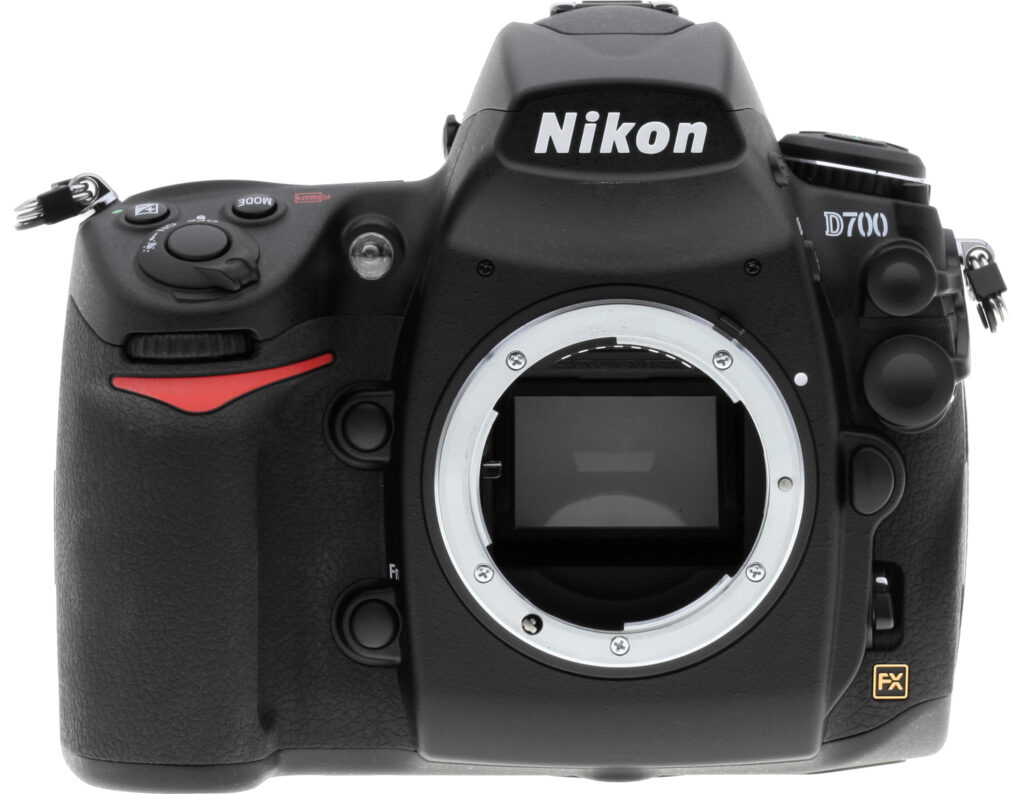
Front View. Compared to the D300, the Nikon D700 is taller (123mm vs 114mm) to allow for the larger pentaprism and mirrorbox inside. The control locations are nearly identical to the D300. The grip on the Nikon D700 is a little bigger front-to-back than the D300's, perhaps a little wider, and the indent for the fingers is more concave than the D300 as well. The other two minor differences on the Nikon D700's front is another redesign of the Flash Sync and Remote Terminal covers (top right), and the addition of the gold FX badge from the Nikon D3.

Left View. The D700's left side view is nearly identical to the D300's. The D700 is about 3mm deeper overall, and the flash hot-shoe has been moved back a bit, to make room for the larger viewfinder.

Right View. The only change here is the diopter adjustment knob has been moved from the back to the side of the pentaprism housing.

Top View. The layout of the top of the D700 is almost identical to the D300 as well, however the top-panel LCD isn't quite as wide or as informative as the D300's, to maintain the same overall width of the camera (147mm).

Back View. The D700's viewfinder is the main difference on the back. It has a round eye-cup, with a built-in shutter mechanism. Nikon omitted the memory card door release lever to make room for the new Info button, and the card access lamp has moved down in position. The D700 uses the same, gorgeous 3-inch 922K-pixel LCD as the D300 (shown here with clip-on protector).

Bottom View. The bottom looks very similar to the D300 as well. Note that this D700 was made in Japan, while our D300 was made in Thailand.
Operation
Nikon D700 Operation
(We'll be adding this section if/when we do the full review, but wanted to activate this tab now, so we could post the menu screen-shots we took during our brief time with the prerelease version of the Nikon D700, under the Modes & Menus subtab.)
Optics
Nikon D700 Optics
Lens
Because the D700 accepts a range of Nikkor lenses, performance in the Zoom, Macro, Distortion, Chromatic aberration and Corner sharpness categories will vary with the lens in use.
Though we don't normally post lens results unless a digital SLR includes a kit lens, there is one aspect of optical performance that's very much a function of the D700 body: Like its predecessor the D3, the Nikon D700 can compensate for lateral chromatic aberration in lenses attached to it. This ability isn't limited to Nikon-brand lenses, it will produce at least some improvement in most any lens you choose to use with it.


The anti-CA system in the D700 works identically to that in the D3, so the crops above are taken from our review of the D3. These are taken from the corners of a JPEG + RAW pair shot with the D3 and the Nikkor 14-24mm f/2.8 lens, shooting at 24mm. It's an excellent lens, but there's still some CA in the corners on a full-frame camera like the D3, as can be seen clearly here. The image on the left is from a RAW file, converted through Adobe Camera Raw, with no lens correction applied, and just enough sharpening to approximate the look of the D3's JPEGs, shot with the default sharpness setting.
The image on the right is from the same area of an in-camera JPEG image. (The images were captured as a JPEG+RAW pair, so the pixel alignment between the two is exact.) You can still see just a smidgen of coloration along the vertical edges of the bold black bar, but that's really splitting hairs: For all intents and purposes, the chromatic aberration is gone. (Note that the anti-CA processing is only applied to the in-camera JPEGs; the camera very rightly leaves the RAW files untouched.)
It's important to note that this CA correction isn't dependent on your using a Nikon lens: The camera figures out how much CA there is in each area of the image, and shifts the planes of red and blue pixel data to compensate for it. Note, though, that this only works for lateral CA. Longitudinal chromatic aberration isn't corrected out. (Happily, though, with most good quality lenses, lateral CA is much more common than longitudinal.)
Is that great, or what? - A camera that makes your lenses look better than they are! (Now, if they could just make a camera that'd make me look like a better photographer than I am, they'd really have something! ;-) -Dave
The images above were taken from our standardized test shots. For a collection of more pictorial photos, see our Nikon D700 Photo Gallery .
Exposure
Nikon D700 Exposure
Color
Saturation & Hue Accuracy
Slight oversaturation of strong red and blue tones, but better than average accuracy and pleasing color overall.
 |
| In the diagram above, the squares show the original color, and the circles show the color that the camera captured. More saturated colors are located towards the periphery of the graph. Hue changes as you travel around the center. Thus, hue-accurate, highly saturated colors appear as lines radiating from the center. Click for a larger image. |
Saturation. As you might expect (they use the same sensor chip), the Nikon D700's color handling is very similar to that of its big brother, the D3. It oversaturates some blues and reds a bit, but holds dark greens and rich oranges in check more than the D3 does, dropping its average saturation level to 109 percent vs 113.8 percent for the D3. Other than reds and blues then, the Nikon D700's color saturation levels are almost dead neutral across much of the spectrum. The net effect is pleasing and accurate color, actually somewhat more in keeping with the demands of professional users than that of the D3. If you'd like a bit brighter-looking color, it's easy enough to dial in a bit more saturation in the D700's Picture Styles menu; the steps there are a bit bigger than we'd optimally like to see, but the +1 saturation setting should please most people looking for slightly brighter color, without going too far. Most consumer digital cameras produce color that's more highly saturated (more intense) than found in the original subjects. This is simply because most people like their color a bit brighter than life. Professional models tend to be more restrained in their color rendering.
Skin tones. Again in keeping with what we saw on the D3, the Nikon D700 rendered skin tones just slightly warm/pink. Still, the results looked natural, well within what we'd consider an acceptable range. (Here, too, the D700's saturation adjustment may come into play for some users, letting them knock down the color on skin tones a little, if they find the default rendering a bit too saturated for their personal tastes.) Where oversaturation is most problematic is on Caucasian skin tones, as it's very easy for these "memory colors" to be seen as too bright, too pink, too yellow, etc.
Hue. With an average hue error after correction for saturation variation of only 5.19 delta-E units, the D700's hue accuracy is almost identical to that of the D3, and thus likewise closer to technically accurate than many DSLRs on the market. All in all, accurate and pleasing color in a compact pro body. Hue is "what color" the color is.


Sensor
Exposure and White Balance
Indoors, incandescent lighting
Good color with the 2,600K and Manual white balances. Less than average
positive exposure compensation required as well.


Once again mirroring the behavior of the D3, the Nikon D700's auto white balance had a hard time with the very warm color balance of the household incandescent bulbs used in this shot, and its incandescent white balance setting is obviously tuned for the cooler 3,200K color of professional studio lighting. The Nikon D700 isn't quite as expensive as the D3, but we still expect better performance from the auto white balance setting in a camera of its caliber. The 2,600K and Manual settings produced much more accurate results. Skin tones and white values looked best with the 2,600K setting, as the Manual option was just a hint cool (though still nearly accurate). The Nikon D700 actually required a -0.3 EV decrease in exposure to get best results, as even the default exposure was just a bit too bright. Most cameras expose this scene best with no exposure compensation, so the Nikon D700's performance amounted to a slight overexposure relative to the rest of the field. Our test lighting for this shot is a mixture of 60 and 100 watt household incandescent bulbs, a pretty yellow light source, but a very common one in typical home settings here in the U.S.
Outdoors, daylight
Good exposure and color outdoors, though slightly high contrast at the default setting. Excellent highlight/shadow detail preservation, though, and options like D-Lighting, Contrast, and Saturation are a help when faced with tough conditions like these.
The Nikon D700 handled tough outdoor lighting under harsh sunlight pretty well, and produced good overall color and exposure. The default contrast setting was a bit on the high side, but shadow and highlight detail was excellent, and the D700's adjustable contrast does a good job in situations like this. The camera's D-Lighting option also proved useful under very harsh lighting. (See the full range of contrast, saturation and D-Lighting options on the links below.) Color looks good outdoors, though strong reds are a bit oversaturated. Here again, the D700's adjustable saturation setting is a useful tool. Overall though, the D700 performed well.
See full set of test images with explanations
See thumbnails of all test and gallery images
Resolution
Very high resolution, 1,700 lines of strong detail.


Our laboratory resolution chart revealed sharp, distinct line patterns all the way down to about 1,700 lines per picture height in both directions, which is excellent. (Some would doubtless argue for an even higher lines/picture height rating, but we judge the aliasing that appears shortly after 1,700 lines as an indication that 1,700 is about the limit of the camera's true resolution.) Use these numbers to compare with other cameras of similar resolution, or to see just what higher resolution can mean in terms of potential detail.
(Note that we were able to shoot with our standard Sigma 70mm f/2.8 Macro lens, something that wasn't possible on the Nikon D3. For some reason, the D3 mis-exposed badly when shooting through this lens. So there's a nice point in the Nikon D700's favor.)
See full set of test images with explanations
See thumbnails of all test and gallery images
Sharpness & Detail
Sharp images with good detail definition. Minor edge-enhancement on high-contrast
subjects and minimal noise suppression.


Sharpness. The Nikon D700 captures a lot of fine detail, with excellent definition. Some slight enhancement artifacts are visible on high-contrast subjects such as the crop above left, but they're really pretty minimal. Again mimicking the D3, the D700's in-camera sharpening is very restrained at its default setting. This leaves its JPEGs looking just slightly soft overall, but they take sharpening in Photoshop and other software pretty well. There's still some minor sharpening artifacts present. You'll do somewhat better if you process the Nikon D700's images straight from the NEF RAW files. Overall though, detail is excellent.
We're a bit surprised to see some of the subtle differences between the D3 and D700's images; we expected the results to be essentially identical. There are a number of subtle differences, though, and the Nikon D700's handling of fine detail appears to be one of them. The differences are subtle indeed, but we think the D700's rendering produces slightly more delicate-looking fine detail in its images.
Detail & Noise Suppression. The crop above right shows only minimal noise suppression in the shadows at ISO 200, as individual strands of hair can be seen even in the darker areas. Noise-suppression
systems in digital cameras tend to flatten-out detail in areas of subtle
contrast. The effects can often be seen in shots of human hair, where the
individual strands are lost and an almost "watercolor" look appears.
JPEG vs RAW
JPEG vs RAW Comparison |
|||
Mouse over the links in the box above to compare the difference in sharpness and detail from camera JPEG versus a 14-bit RAW file processed with Nikon's View NX version 1.1.0, Capture NX2 version 2.0.0 and Adobe Camera Raw 4.5. Camera settings for the JPEG settings were the defaults.
We've found that there is indeed a good reason to shoot RAW, because RAW files have more detail than makes it out in the camera-produced JPEGs. This is also to be the case for the Nikon D700. Its in-camera JPEG processing is actually pretty good, but you can nonetheless produce a sharper, more finely-rendered image by manipulating the RAW files in a good third-party RAW converter.
The camera's own JPEG processing and that of Nikon's View NX and Capture NX2 software produce very similar-looking images (no surprise there), although Capture NX2 gives you more control over image-sharpening parameters. The size of the sharpening operator in Capture NX2 seems to be somewhat constrained, though, preventing you from using as tight an operator as you might like. As a result, finer detail can be revealed by processing in Photoshop, importing via Camera Raw with its sharpening turned off and then applying ~200% unsharp masking with a radius of 0.3 pixels once the image has been imported. (We've generally found that careful unsharp masking delivers better results than we can achieve using the sharpening built into Camera Raw.)
ISO & Noise Performance
Very good noise performance, with low noise levels and good detail even
at very high sensitivity settings.
 |
 |
 |
| ISO 100 | ISO 200 | ISO 400 |
 |
 |
 |
ISO 800 | ISO 1,600 |
ISO 3,200
|
 |
 |
 |
ISO 6,400 | ISO 12,800 |
ISO 25,600
|
| These crops taken from shots with High ISO NR set to "Normal", the default. |
||
Noise levels are remarkably low at the Nikon D700's lower sensitivity settings, with very smooth images up to ISO 800, where there is only the slightest hint of "grain" visible in darker shadows. At ISO 1,600, noise is still very low with excellent preservation of fine/subtle detail. We start to see some minor loss of detail at ISO 3,200 where high ISO noise reduction scrubs away a little fine detail along with the image noise. Noise and the effects of noise reduction becomes obvious at 6,400, with stronger blurring, and increased grain, but chroma noise is kept in check and overall results are still excellent for a 12-megapixel sensor at such a high sensitivity setting. (As with the D3, the D700's big pixels really help with light sensitivity and low noise, and Nikon's sensor technology and noise reduction appear to be top-notch as well.) ISOs 12,800 and especially 25,600 are quite noisy and soft looking, with blotches of chroma noise and little fine detail remaining after default high ISO noise reduction is applied. That said though, even ISO 12,800 images look surprisingly usable when printed as large as 8x10 inches, and ISO 25,600 ones seemed usable at 5x7.
Bottom line, the Nikon D700 matches the D3, with the best high-ISO noise performance of any DSLR we've tested to date. Very impressive!
See the Nikon D3 review for more details on high ISO performance here and here.
Extremes: Sunlit and low light tests
Excellent detail in both highlights and shadows, high resolution and good overall exposure.
Excellent low-light capabilities: This camera sees better in the dark than you do!


Sunlight. The Nikon D700 did very well under the deliberately harsh lighting in the test above. The best exposure is probably that at -0.3 EV: The mannequin's skin tones are at a good level, and only the very brightest parts of her shirt (on the right shoulder) are blown out. The image looks a little contrasty, but that's just representative of the lighting itself. The key is that highlight and shadow detail are both very well preserved, with good-looking midtones as well. (The very brightest highlights are lost, the very darkest shadows are a bit plugged, but you have to go really far in both directions before you'll find any problems. Noise and noise suppression are quite low in the shadows, and fine detail in these areas looks very good. Still, the camera's adjustable contrast, saturation and D-Lighting adjustments do help fine tune the exposure in conditions like this. (As always though, we remind readers to be sure to use fill flash in situations like the one shown above; and it's better to shoot in the shade when possible.)
Because digital cameras are more like slide film than negative film (in that they tend to have a more limited tonal range), we test them in the harshest situations to see how they handle scenes with bright highlights and dark shadows, as well as what kind of sensitivity they have in low light. The shot above is designed to mimic the very harsh, contrasty effect of direct noonday sunlight, a very tough challenge for most digital cameras. (You can read details of this test here.)
| 1 fc 11 lux |
1/2 fc 5.5 lux |
1/4 fc 2.7 lux |
1/8 fc 1.3 lux |
1/16 fc 0.67 lux |
1/16fc No NR |
|
|---|---|---|---|---|---|---|
| ISO 100 |
 0.8 sec f2.8 |
 1.6 sec f2.8 |
 4 sec f2.8 |
 8 sec f2.8 |
 15 sec f2.8 |
 15 sec f2.8 |
| ISO 200 |
 0.4 sec f2.8 |
 1 sec f2.8 |
 2.5 sec f2.8 |
 3 sec f2.8 |
 10 sec f2.8 |
 8 sec f2.8 |
| ISO 400 |
 1/5 sec f2.8 |
 0.5 sec f2.8 |
 1.3 sec f2.8 |
 2.5 sec f2.8 |
 5 sec f2.8 |
 5 sec f2.8 |
| ISO 800 |
 1/10 sec f2.8 |
 1/5 sec f2.8 |
 0.6 sec f2.8 |
 1.3 sec f2.8 |
 2.5 sec f2.8 |
 2 sec f2.8 |
| ISO 1600 |
 1/20 sec f2.8 |
 1/8 sec f2.8 |
 0.3 sec f2.8 |
 0.5 sec f2.8 |
 0.6 sec f2.8 |
 1.3 sec f2.8 |
| ISO 3200 |
 1/30 sec f2.8 |
 1/20 sec f2.8 |
 1/6 sec f2.8 |
 0.3 sec f2.8 |
 0.3 sec f2.8 |
 0.6 sec f2.8 |
| ISO 6400 |
 1/80 sec f2.8 |
 1/30 sec f2.8 |
 1/15 sec f2.8 |
 1/6 sec f2.8 |
 0.3 sec f2.8 |
 0.3 sec f2.8 |
| ISO 12800 |
 1/160 sec f2.8 |
 1/60 sec f2.8 |
 1/25 sec f2.8 |
 1/15 sec f2.8 |
 1/8 sec f2.8 |
 1/8 sec f2.8 |
| ISO 25600 |
 1/320 sec f2.8 |
 1/125 sec f2.8 |
 1/60 sec f2.8 |
 1/25 sec f2.8 |
 1/13 sec f2.8 |
 1/15 sec f2.8 |
Low light:
The Nikon D700 turned in a great performance here, capturing bright images at the lowest light level even at the lowest sensitivity setting (and at an amazing 1/15 second exposure time at its highest ISO). Color balance is a bit cool from the Auto white balance setting, especially at the darkest light levels. The camera's handling of noise was again very good, with minimal interference even at very high sensitivities. The AF system was able to focus unassisted down to just below the 1/16 foot-candle light level, and to total darkness with the AF assist enabled.
For all intents and purposes, noise is negligible up to ISO 800, and remains very low at ISO 1,600 and 3,200. Noise levels are moderate at ISO 6,400, but there's still loads of detail to work with, especially when high ISO NR is set to "Off" (which still applies some minimal filtering to JPEGs at ISOs over 2,000 -- RAW files are always left untouched, as they should be). As you would expect, noise is much higher at ISOs 12,800 and 25,600. (Probably no surprise, noise levels at the highest ISOs are noticeably higher under these very low light conditions than they are in our more brightly-lit test shots.)
The D700 gives you 4 options for high ISO noise reduction: Off, Low, Normal and High, so you have some flexibility in deciding how much noise to trade for detail. Except for the "No NR" shots in the table above, all were shot using the Normal NR setting, and Long Exposure NR was enabled, so was applied to exposures longer than one second. Interestingly, we saw somewhat fewer hot pixels (with NR both on and off) at ISOs 12,800 and 25,600 than we did with our D3 test body, making the D700's highest-ISO shots at the lowest light levels somewhat cleaner overall. As with the D3, the D700's Long Exposure NR did not come into play at its highest ISOs, because the shutter speed was still relatively high. (Only 1/8-1/15 second at the lowest light level we test at!) With these ultra-high ISOs, Nikon should perhaps consider offering a way to adjust the Long Exposure NR shutter speed threshold in a future firmware revision.
The D700's autofocus also did very well in low-light, easily able to focus at the lowest light level we test at (1/16 foot-candle) even with its AF-assist light disabled. - And in total darkness when the AF-assist was operating.
At the end of the day, the D700 more than matches the D3's low-light capability; together they're by far the best cameras for low-light shooting that we've tested to date.
How bright is this? The one foot-candle light level that this test begins at roughly corresponds to the brightness of typical city street-lighting at night. Cameras performing well at that level should be able to snap good-looking photos of street-lit scenes.
NOTE: This low light test is conducted with a stationary subject, and the camera mounted on a sturdy tripod. Most digital cameras will fail miserably when faced with a moving subject in dim lighting. (For example, a child's ballet recital or a holiday pageant in a gymnasium.) Digital SLRs like the Nikon D700 do much better than point & shoots, but you still shouldn't expect a quick autofocus lock with moving subjects.
Output Quality
Print Quality
Excellent print quality, great color, good 20x30 inch prints, excellent 13x19 inch ones. ISO 6,400 images are surprisingly good at 8x10, even better at 5x7.
 Output from the Nikon D700 was good enough to produce good-looking 20x30 inch prints, and sharp 13x19 inch prints. At 20x30, its images were slightly soft looking, but would be more than OK when seen at the viewing distances typical for such large prints. As we noted earlier, the D700 rewards RAW shooters with really excellent detail when its NEF files are processed through a good RAW converter. The difference between camera JPEGs and those from RAW isn't as dramatic as with some cameras we've tested lately, but the results are nonetheless well worth the effort if you care about extracting every last bit of information from your images.
High ISO images were really extraordinary: Together with the D3, the Nikon D700 clearly leads the field in high-ISO performance, thanks to its large pixels, CMOS sensor technology, and Nikon's excellent noise-reduction processing. D700 images shot under incandescent lighting (always the tougher test) looked great when printed at 8x10 inches, all the way up to ISO 6400. At ISO 6400 and at that size, there was a little noise present, but we had to look close to see it (closer than you'd normally view a print of that size), and it was very fine-grained. - There's also almost no chroma component to the D700's noise at ISO 6400, making it even less apparent than noise patterns from many other cameras with similar "grain" size. Shot under daylight-balanced lighting and printed at 13x19 inches, the D3's ISO 6,400 shots were softer and somewhat noisier than those at lower ISOs, but the results were still pretty amazing.
As with the D3, the Nikon D700's noise processing at high ISOs varies quite a bit, depending on the setting you're using. (The following is a direct copy/paste from our D3 test analysis - Examining a number of images shot with the two cameras convinced us that their high-ISO noise processing is essentially identical.) At the low setting (our personal preference), a little fine-grained noise creeps in at ISO 3,200, but it's pretty minimal, and fine subject detail is preserved very well. The Normal noise reduction setting almost entirely eliminates the noise (even at ISO 3,200), but loses a little fine detail in the process. The High setting leaves images very clean, but also very soft, with much more detail lost. That said though, the underlying images are so clean to begin with that the amount of detail loss from any given level of noise reduction is much less than we're accustomed to seeing. (In practice, for print sizes 8x10 or smaller, leaving high-ISO NR turned entirely off produces prints with excellent detail and surprisingly little noise up to ISO 6,400.) As noted, the Low setting was our favorite, it produced surprisingly clean images that still contained loads of fine detail.
The Nikon D700 also did very well when it came to color. As noted earlier in this review, its handling of bright reds and blues seems to be just slightly more subdued than that of the D3, so images containing those colors are a little closer to technically accurate. The difference is relatively slight though, and we found the D700's overall color handling to be very pleasant (meaning, I suppose, that it matched our personal preferences quite well.) A very good performance overall, slightly better than the D3's in this area.
Testing hundreds of digital cameras, we've found that you can only tell just so much about a camera's image quality by viewing its images on-screen. Ultimately, there's no substitute for printing a lot of images and examining them closely. For this reason, we now routinely print sample images from the cameras we test on our Canon Pro9000 studio printer, and on the Canon iP5200 here in the office. (See the Canon Pro9000 review for details on that model.)
The images above were taken from our standardized test shots. For a collection of more pictorial photos, see our Nikon D700 Photo Gallery .
Not sure which camera to buy? Let your eyes be the ultimate judge! Visit our Comparometer(tm) to compare images from the Nikon D700 with those from other cameras you may be considering. The proof is in the pictures, so let your own eyes decide which you like best!
Performance
Nikon D700 Performance
Timing and Performance
Excellent speeds for a semi-pro digital SLR.
| Startup/Shutdown | ||
|---|---|---|
| Power on |
0.4 second
|
Time it takes to turn on and capture a picture. (Short enough that it's hard to measure, but it did appear to be slightly slower than the D3.) |
| Shutdown |
Not measurable
|
How long it takes camera to turn off before you can remove the memory card. (Oddly, faster than the D3 for some reason.) |
| Buffer clearing time |
27 seconds after 15
14-bit RAW + L/F JPEGs (11 seconds after 20 large/fine JPEGs) |
Worst case buffer clearing time. -- This is the delay after a set of shots before you can remove the card. |
|
*Note: Buffer clearing times measured with a SanDisk Extreme III 1GB CompactFlash card. Slower cards will produce correspondingly slower clearing times. Slow cards may also limit length of bursts in continuous mode. ISO sensitivity and noise reduction settings can also affect cycle times and burst mode performance.
|
||
Slower startup than the D3, but faster shutdown. Buffer clearing times are about the same, suggesting it's card write speeds that limit the process, rather than the camera's CPU capability. (The D3 has two EXPEED processors, the D700 has one, but both clear the buffer about as fast.)
| Mode Switching | ||
|---|---|---|
| Play to Record, |
0.4 second
|
Time until first shot is captured. |
| Record to play |
0.5 second
|
Time to display a large/superfine file immediately after capture. |
| Display |
0.3 second
|
Time to display a large/superfine file already on the memory card. |
Mode switching times are very good: Interestingly, play to record and time to display large/fine images are somewhat faster than equivalent times on the D3.
| Shutter Response (Lag Time) | ||
|---|---|---|
|
Full Autofocus |
0.197 second
|
Time from fully pressing shutter button to image capture. Sigma 70mm f/2.8 macro lens. |
|
Prefocused |
0.045 second
|
Time to capture, after half-pressing and holding shutter button. |
| Continuous AF |
0.048 second
|
This mode usually shows no speed increase with our static subject; we have no way to measure performance with moving subjects |
| Manual Focus |
0.045 second
|
For most cameras, shutter lag is less in manual focus than autofocus, but usually not as fast as when the camera is "prefocused". |
|
Full Autofocus |
0.573 second
|
Time from fully pressing shutter button to image capture, using Live View "Hand-Held" (phase-detect) mode. |
|
Prefocused |
0.043 second
|
Time to capture, after half-pressing and holding shutter button, using Live View Hand-Held (phase-detect) mode. |
|
Focusing Time, |
~1.1 seconds
|
Tripod Live View mode, Nikkor 24-70mm f/2.8 lens (a lens with a fast focus motor). Lens begins already at proper focus setting from previous shot. (This is basically the time it takes in contrast-detect AF mode for no or small differences in focus setting with a fast lens.) Note that this is an approximate time for the AF cycle to complete, after being triggered by pressing the AF-ON button on the camera's back panel. Pressing the shutter button doesn't trigger AF operation in Tripod Mode. |
|
Focusing Time, |
~3.5 seconds
|
Same as above, but lens defocused substantially (set to infinity) before focus is triggered. |
|
Prefocused |
0.524 second
|
Time from fully pressing shutter button to image capture, using Live View "Tripod" (contrast-detect) mode. Autofocus is performed using the AF-On button, and is not included in this number. |
| Full Autofocus |
0.211 second
|
Time to capture while forcing flash to fire. (Metering pulses from flash sometimes slow shutter response.) |
Shutter response is good at 0.20 second, albeit not quite as blazing as the D3's (to be expected, given the difference in price and general camera design). "Prefocusing" the camera by half-pressing and holding down the shutter button before the final exposure results in a lag time of only 0.045 second, very close to the D3's figure. Lag times in Live View mode are a bit slower than those for the D3, but generally fairly decent. NOTE though, that the figure shown for Live View "Tripod Mode" (contrast-detect autofocus) doesn't include the time spent focusing, which can be quite long in that mode. Focusing in Tripod mode is triggered by pressing the AF-On button, rather than by pressing the shutter button, so measuring the time required is a little tricky, and the results will be less precise than using our normal method. Even a casual observation shows why Nikon chose to call the D700's contrast-detect AF "Tripod" mode: Even with a lens having a fast focus motor, AF times can be quite long. Using the Nikon 24-70mm f/2.8 lens as an exemplary fast lens, the D700 required a bit over a second to come to focus when the lens started out already being focused on the subject. (The contrast-detect AF needs to adjust the lens slightly out of focus first, then back in again, to be able to tell that it's achieved proper focus.) When the lens started out set to infinity, it took roughly 3.5 seconds for the camera to rack down to the ~10 foot setting required for our test target.
| Cycle Time (shot to shot) | ||
|---|---|---|
| Single Shot mode |
0.36 second
|
Time per shot, averaged over 17 shots. (More variation in shot to shot times than we're accustomed to seeing. Times ranged from 0.25 to 0.59 second, standard deviation was 24.5%) |
|
Single Shot mode |
0.31 second
|
Time per shot, averaged over 20 shots. More consistent, ~10% variation between shots. |
|
Single Shot mode |
0.38 second
|
Time per shot, averaged over 20 shots. About 7% variation between shots. |
|
Single Shot mode |
0.31 second
|
Time per shot, averaged over 20 shots. |
|
Early shutter |
No
|
Some cameras don't snap another shot if you release and press the shutter too quickly in Single Shot mode, making "No" the preferred answer. |
|
Continuous mode |
0.20 second (5.09 frames per second);
15 frames total; 27 seconds to clear |
Time per shot, averaged over buffer length or 20 shots, whichever came first. |
|
Continuous mode |
0.20 second (5.08 frames per second);
17 frames total; 25 seconds to clear |
Time per shot, averaged over buffer length or 20 shots, whichever came first. |
|
Continuous mode |
0.20 second (5.08 frames per second);
18 frames total; 16 seconds to clear |
Time per shot, averaged over buffer length or 20 shots, whichever came first. |
|
Continuous mode |
0.20 second (5.09 frames per second);
>20 frames total; 11 seconds to clear |
Time per shot, averaged over buffer length or 20 shots, whichever came first. |
|
Continuous mode |
0.20 second (5.05 frames per second);
>20 frames total; 0.5 seconds to clear |
Time per shot, averaged over buffer length or 20 shots, whichever came first. |
|
Flash recycling |
2.6 seconds
|
Flash at maximum output. |
|
*Note: Buffer clearing times measured with a SanDisk Extreme III 1GB CompactFlash card. Slower cards will produce correspondingly slower clearing times. Slow cards may also limit length of bursts in continuous mode. ISO sensitivity and noise reduction settings can also affect cycle times and burst mode performance.
|
||
Shot-to-shot cycle times in single-shot mode were quite fast, at only 0.36 second for RAW + large/fine JPEGs, which is very impressive. Large/fine JPEGs by themselves averaged out to 0.38 second per shot, while 14-bit RAW-only shots could be fired off at intervals of about 0.31 second. We questioned the slight differences between modes, as we'd normally expect RAW+JPEG to take longer than JPEG alone, but for whatever reason, there was a lot of variation in the cycle times for the RAW+JPEG case, giving a standard deviation of +/- 0.09 second, or 24.5%. We also hit some significant slowdowns after 17 shots of our very hard-to-compress noise target, indicating a worst-case buffer capacity of 17 shots for RAW+JPEG mode. In JPEG-only and RAW-only modes, the camera captured a full run of 20 shots without having to slow for buffer clearing.
Continuous speeds are also very good, our measured speeds coming in just over the camera's rated 5 frames/second. (The D700 actually managed just shy of 5.1 frames/second in most modes.) Measured buffer depths were 15 frames for 14-bit RAW+JPEG mode, 17 frames for 14-bit RAW-only, 18 frames for 12-bit RAW-only, and more than 20 frames for large/fine JPEGs. (Note that in our cycle time testing we shoot a target consisting of a fine-grained digital noise pattern, designed to be very hard to compress. This gives us worst-case buffer capacity numbers: You're likely to see greater buffer capacity when shooting more normal subjects.)
The flash took under 3 seconds to recharge after a full-power pulse, also quite fast. Excellent performance here.
| Download speed | ||
|---|---|---|
| Windows Computer, USB 2.0 |
4,130 KBytes/sec
|
Typical Values: |
Connected to a computer or printer with USB 2.0, download speeds are very fast.
Bottom line, while not (nearly) rising to the heights of its predecessor the D3, the Nikon D700 is pretty fast in just about every aspect of its operation. Continuous modes are fast enough for most moving subjects, and shutter lag and cycle times are pretty fast as well. The camera does run into trouble when its AF system operates in conjunction with a forced flash firing, which may result in some missed opportunities, but overall excellent performance.
Battery and Storage Capacity
Battery
Excellent battery life for a lithium-ion design.
| Operating Mode | Number of Shots |
|---|---|
|
Lithium-ion Rechargeable Battery,
(CIPA standard) |
1,000
|
The Nikon D700 uses a custom rechargeable lithium-ion battery for power, and ships with a charger. Although battery life is quite good, we recommend you pick up a spare battery and keep it freshly charged and on-hand for extended outings.
The table above shows the number of shots the camera is capable of (on a fully-charged rechargeable battery), based on CIPA battery-life and/or manufacturer standard test conditions.
(Interested readers can find an English translation of the CIPA DC-002 standards document here. (180K PDF document))
Storage
The Nikon D700 accepts CompactFlash memory cards, and does not ship with a card.
| Image Capacity with 1GB Memory Card |
Fine | Normal | Basic | TIFF | RAW | RAW + JPEG |
|
|---|---|---|---|---|---|---|---|
| 4,256
x 2,832 |
Images (Avg size) |
139 7.4 MB |
274 3.7 MB |
500 2.0 MB |
105 9.7 MB |
38 26.6 MB |
35 29.3 MB |
|
Approx.
Comp. |
5:1
|
10:1
|
18:1
|
4:1
|
0.8:1
|
- | |
| 3,184
x 2,120 |
Images (Avg size) |
247 4.1 MB |
488 2.1 MB |
900 1.1 MB |
- |
- |
- |
|
Approx. Comp. |
5:1
|
10:1
|
18:1
|
- |
- |
- |
|
| 2,128
x 1,416 |
Images (Avg size) |
500 2.0 MB |
1000 1.0 MB |
1950 525 KB |
- |
- |
- |
|
Approx. Comp. |
4:1
|
9:1
|
17:1
|
- |
- |
- |
|
The chart above shows how many FX format images can be stored on a 1GB card at various size/quality settings, as well as the approximate compression ratio. (RAW was 14-bit uncompressed and JPEGs used the "Size Priority" setting.) We strongly recommend buying a large capacity CompactFlash memory card at least a 1GB card, preferably a 4GB one, to give yourself extra space for extended outings, especially if you plan on doing a lot of RAW shooting. (Check the shopping link above, cards are really cheap these days, so no reason to skimp.)
Viewfinder
Nikon D700 Viewfinder
 The D700's optical viewfinder is big and bright, though not quite as big as the D3's 100% finder. The pentaprism design features 95% frame coverage, 0.72x magnification at 50mm and -1 diopter, an 18 mm eyepoint, and diopter adjustment range of -3 to +1. If you just look at the specs, you might think that the D700's optical VF is a step backward from that of the D300's. After all, the D700's viewfinder is rated at only 0.72x magnification factor, vs. the 0.94x of the D300. However, you need and take into account the fact that that's 0.72x relative to a full-frame sensor, not an APS-C sized DX sensor like the D300 has.
A built-in eye-piece shutter is provided for self-timer or live view mode. The Nikon D700 comes with a Type B BriteView Clear Matte VI focusing screen and unlike the D3, there is provision for grid lines to be projected onto the viewfinder screen, as with some earlier Nikon SLRs. The number of AF points remains the same as the D300's (51), but because the D700 is full-frame, the area covered by the focus points is smaller than that of the D300.
The viewfinder display is very similar to the D300, but the D700 has added a 12-mm center-weighted metering reference circle on the screen, moved the battery status to the information display below, and has added focusing arrows, shutter lock and aperture lock indicators to the info display. The electronic analog exposure display can also double as a tilt indicator.
The graphic and table below shows what information is displayed in D700's viewfinder.

1 |
On-demand framing grid
|
15
|
ISO sensitivity
|
2 |
AF area brackets
|
16 |
Number of exposures remaining
|
3 |
12-mm reference circle for center-weighted metering
|
Number of shots remaining before memory buffer fills
|
|
4 |
Focus points
|
White balance recording indicator
|
|
5 |
Focus indicator
|
Exposure compensation value
|
|
6 |
Metering mode
|
Flash compensation value
|
|
7 |
Autoexposure (AE) lock
|
17
|
Flash-ready indicator
|
8 |
Shutter speed lock
|
18
|
FV lock indicator
|
9 |
Shutter speed
|
19
|
Flash sync
|
10 |
Aperture lock
|
20
|
Aperture stop
|
11 |
Aperture value / f-stops
|
21
|
Electronic analog exposure display / Tilt indicator
|
12 |
Exposure mode
|
22
|
Battery status
|
| 13 | Flash compensation indicator |
23
|
Auto ISO indicator
|
| 14 | Exposure compensation indicator |
24 | "K" (appears when memory remains for over 1000 frames) |
Viewfinder Test Results
Coverage
A slightly tight optical viewfinder, but nearly dead-on accuracy with
the LCD monitor.


The Nikon D700's optical viewfinder showed about 96% frame accuracy, while the LCD monitor in Live View mode showed about 99%. Good results, though the optical viewfinder is a bit tight. (The non-100% viewfinder is one key difference between the Nikon D700 and its big brother, the D3.)
Flash
Nikon D700 Flash
Flash Test Results
Coverage and Range
A powerful flash, with fairly even coverage. Our
standard shots required about average positive exposure compensation.


Coverage. Oddly, Nikon doesn't rate the D700's flash for angular coverage. To get a sense for what its coverage looked like, we attached a Nikkor 14-24mm f/2.8 lens to the camera and shot a series of exposures at different focal length settings. This not only showed that the flash has about enough coverage to handle a 24mm lens, but also showed very clearly one limitation of on-camera flashes in general: They're prone to being shadowed by large lenses. The 14-24mm lens casts a rather large shadow, even at 24mm. (We thought about extending our coverage testing to longer focal lengths, but the 24-70mm f/2.8 lens stuck out even further than the 14-24mm one, so we didn't think the results would be worthwhile.)
Exposure. In the Indoor test, the Nikon D700's flash underexposed our subject just a little at its default setting, requiring a +0.3 EV exposure compensation adjustment. Though results were still slightly dim there, the image at +0.7 EV appeared too unnaturally bright. The camera's Slow-Sync flash mode produced brighter and more even results, though with a stronger pinkish-orange cast from the room lighting, as is appropriate for a pro-level camera: A pro would gel the strobe to match the color temperature of the room lighting. Making the auto white balance hew closer to the flash white balance on flash shots makes sense.
| Manufacturer-Specified Flash Range |
|---|
| 105mm, f/2.8 |
 20 feet ISO 200 |
Manufacturer Specified Flash Range Test. In the shot above, the D700 performs about as Nikon says it will, producing a good exposure at a distance of 20 feet with an f/2.8 lens and shooting at its ISO 200 base ISO setting. Our standard test method for flash range uses a fixed setting of ISO 100, to provide a fair basis of comparison between cameras. We've now also begun shooting two shots using the manufacturer-specified camera settings, at the range the company claims for the camera, to assess the validity of the specific claims.
Imatest Results
Nikon D700 Imatest Results
We routinely use Norman Koren's excellent "Imatest" analysis program for quantitative, thoroughly objective analysis of digicam test images. I highly recommend it to our technically-oriented readers, as it's far and away the best, most comprehensive analysis program I've found to date.
My comments below are just brief observations of what we see in the Imatest results. A full discussion of all the data Imatest produces is really beyond the scope of this review: Visit the Imatest web site for a full discussion of what the program measures, how it performs its computations, and how to interpret its output.
Here's some of the results produced by Imatest for the Nikon D700:
| sRGB Accuracy Comparison |
|||
The Nikon D700 showed good color accuracy, though like the D3, it had saturation levels slightly higher than we're accustomed to finding in professional SLRs, although most of the saturation boost was in blues, purples and reds. Other parts of the spectrum had essentially neutral saturation. Hue accuracy was quite good, with most of the hue shift occurring in the cyans and sky blues, with a little in the reds and oranges. Average saturation was 109% (oversaturated by 9%, as just mentioned, mostly in the blues, reds and a bit in the greens). Average "delta-C" color error was only 5.19 after correction for saturation, which is quite low, albeit very slightly higher than most of the competition. All in all, a very good color response for an SLR. Mouse over the links below the illustration above to compare results with competing models.
Adobe RGB Accuracy Comparison |
|||
Using the Adobe RGB color space (which provides a much wider gamut, or range of colors that can be expressed), the Nikon D700 delivers more highly saturated color, with an average saturation of 114.5% and average saturation-corrected hue error of 5.34 "delta-C" units, which in this case is a smidgen more accurate than most of the competition. Again, mouse over the links below the illustration above to compare results with competing models.
Color Analysis

This image shows how the Nikon D700 actually rendered the colors of the MacBeth chart, compared to a numerically ideal treatment. In each color swatch, the outer perimeter shows the color as actually captured by the camera, the inner square shows the numerically ideal color, after correcting for the luminance of the photographed chart (as determined by a second-order curve fit to the values of the gray swatches), and the small rectangle inside the inner square shows the numerically ideal color, without any luminance correction. This image shows the D700's excellent hue accuracy, as well as a gamma curve that results in an overexposure of some colors, notably blues, reds, and some greens. (We've seen this in most cameras, increasing the "punch" of images by lightening bright colors a little, while actually keeping both the hue and saturation level very close to technically accurate values.)
Noise Analysis

There's a lot in this particular graph, a lot more than we have room to go into here. (This set of plots has also changed a little in the more recent versions of Imatest. Some of the plots that were shown here previously are now shown in other Imatest output. Since we largely focus on the Noise Spectrum plot, we'll only show the graphic above, which includes that plot.)
In comparing these graphs with those from competing cameras, I've found that the Noise Spectrum graph at lower right is the most important. Cameras that manage to shift their noise spectrum to higher frequencies have much finer-grained noise structures, making their noise less visually objectionable. In the graph above, this would show up as a noise spectrum curve that remained higher on the right side, representing higher noise frequencies. The champion at this was (and still is) the Canon EOS-1Ds Mark II, which produced remarkably fine-grained image noise, even at very high ISOs.
Here, we can see why ISO 100 is treated as a "LO" extension of the normal ISO range for the D700, as noise is a bit higher than at ISO 200, particularly in the blue channel. Below is the plot for ISO 200, the D700's normal base sensitivity.

The D700's noise performance at ISO 200 doesn't quite rise to the level of the 1Ds Mark II, but it nonetheless does a good job of keeping plenty of the noise energy at high frequencies, at least in the blue channel and in the luminance values. The green and especially red channel oddly show a lot of low-frequency energy, which would translate into blotchiness in the final images. The good news though, is that overall noise levels at ISO 200 are quite low, so the blotchiness isn't visible without considerable tone-curve tweaking. Bottom line, the Nikon D700 noise levels are low at low ISO, with a frequency spectrum for the luminance and blue channels that has more energy on the higher frequency (right-hand) side of the curve than do most cameras in the blue and luminance signals, but less so in green, and particularly in red.

Here's the same set of noise data at ISO 3,200. Here, the Noise Spectrum graph is shifted a bit more toward the left-hand, lower-frequency side than it was at ISO 200, coarsening the "grain" of the image noise patterns somewhat, but the spike in the color channels has been reduced somewhat. (And it's now the blue and red channels that are blotchy, with green behaving itself better. Odd/interesting...) Also, while there's less energy at the highest spatial frequencies (far right hand side of the plot), the mid-frequency range (middle of the plot) is quite a bit higher than we're accustomed to seeing at very high ISOs. This is reflected in the D700's grain structure at ISO 3,200, which isn't as fine as some, but which also lacks the very prominent, large blotches that are common in some SLRs. Once again, very good performance.

Here's the same set of noise data at ISO 6,400. A surprisingly flat curve, indicating noise is well controlled and fine grained even at this high ISO, but again with more low-frequency energy present in the red and blue channels.

Here's the same set of noise data at ISO 12,800. It a little hard to tell because of the change in scale, but there is a significant shift towards the left, lower-frequency region.
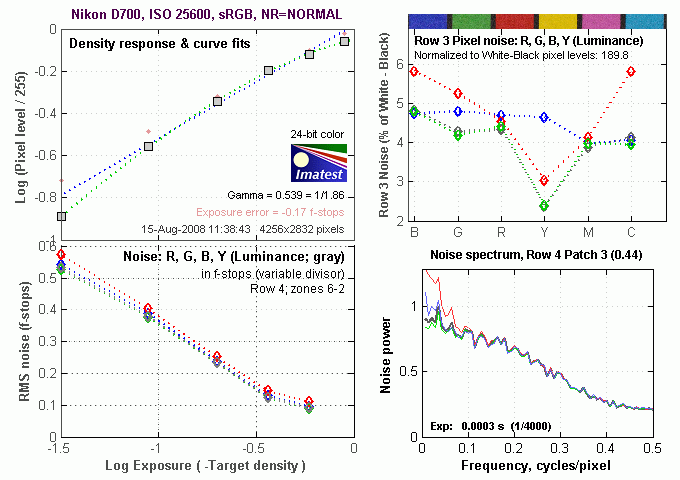
The trend of increasing the coarsening the "grain" of the image noise patterns continues at ISO 25,600, once again with a big spike in the red channel at the lowest frequencies.

This chart compares the Nikon D700's noise performance over a range of ISOs against that of other full frame cameras, using default settings. While we continue to show noise plots of this sort because readers ask for them, we each time point out that the noise magnitude is only a small part of the story, the grain pattern being much more important. In the case of the Nikon D700, which follows the D3 very closely, the magnitude of the image noise starts out slightly below most of the competition at ISO 100, and remains lower for all ISOs in common. A really excellent performance, and a major benefit of Nikon not succumbing to the temptation of cramming more pixels into the full-frame sensor of the D700. Keep in mind these are at default settings, so the shape and positions of the curves will be influenced the settings you choose to use.

Here's a plot comparing results using the D700's four High ISO noise reduction settings. Note that Hi ISO NR does not apply under ISO 2,000, so the graph starts at ISO 1,600, where the results of the different settings are the same. Also note that above ISO 6400, the "Off" setting still applies "minimal" noise reduction, explaining why the "Off" and "Low" curves are so close to each other at the highest ISOs.
Nikon D700 Dynamic Range Analysis
A key parameter in a digital camera is its Dynamic Range, the range of brightness that can be faithfully recorded. At the upper end of the tonal scale, dynamic range is dictated by the point at which the RGB data "saturates" at values of 255, 255, 255. At the lower end of the tonal scale, dynamic range is determined by the point at which there ceases to be any useful difference between adjacent tonal steps. Note the use of the qualifier "useful" in there: While it's tempting to evaluate dynamic range as the maximum number of tonal steps that can be discerned at all, that measure of dynamic range has very little relevance to real-world photography. What we care about as photographers is how much detail we can pull out of the shadows before image noise becomes too objectionable. This, of course, is a very subjective matter, and will vary with the application and even the subject matter in question. (Noise will be much more visible in subjects with large areas of flat tints and subtle shading than it would in subjects with strong, highly contrasting surface texture.)
What makes most sense then, is to specify useful dynamic range in terms of the point at which image noise reaches some agreed-upon threshold. To this end, Imatest computes a number of different dynamic range measurements, based on a variety of image noise thresholds. The noise thresholds are specified in terms of f-stops of equivalent luminance variation in the final image file, and dynamic range is computed for noise thresholds of 1.0 (low image quality), 0.5 (medium image quality), 0.25 (medium-high image quality) and 0.1 (high image quality). For most photographers and most applications, the noise thresholds of 0.5 and 0.25 f-stops are probably the most relevant to the production of acceptable-quality finished images, but many noise-sensitive shooters will insist on the 0.1 f-stop limit for their most critical work.
The image below shows the test results from Imatest for an in-camera JPEG file from the Nikon D700 with a nominally-exposed density step target (Stouffer 4110), and the D700's Active D-Lighting and contrast settings at their default positions.

These are excellent results for in-camera JPEGs, near the top of the SLRs we've tested. The tone curve shows excellent gradation in highlights, but the shadow end trails off more abruptly. A sharp tail-off at the shadow end usually signals plugged shadows and lost detail in images, but the D700 really didn't seem to show this. There's clearly more gradation at the highlight end of the tonal scale, but examining deep shadows on the D700's test images showed excellent detail, in all but the very darkest shadows. - In the darkest shadows though, there was indeed some plugging, rather than a smooth trailing-off. (We're not sure why Imatest sometimes doesn't report DR for the lower quality thresholds like this. We've called it to the attention of the program's author; will try to come back and re-do these graphs if/when he develops a fix.)

Processing the D700's RAW (NEF) files through Adobe Camera Raw (ACR) version 4.5 improved dynamic range by over 1-3/4 stops at the best quality level, and by more than 3 stops total. ACR's automatic settings were used. Tweaking the sliders manually may result in slightly better results. Worth noting here is that ACR's default noise reduction settings reduced the pixel noise quite a bit overall, but had more trouble with the red channel. ACR also shifted slightly more of the noise energy into higher spatial frequencies.
Active D-Lighting. The charts below show the effect of the Nikon D700's three Active D-Lighting settings: Low, Normal and High.


These plots show that most of the D700's Active D-Lighting impact occurs at the highlight end of the tone curve, at least when confronted with an artificial image like the greyscale step-wedge used for our dynamic range measurements. What's a little hard to see with the plots arranged vertically like this though, is that the shadow end of the curve is lifted somewhat as well: Imatest adjusts the vertical axis to show the most detail in the curves overall, but the result is that the vertical scale can change somewhat between plots. Looking closely, you'll see that the bottom end of the Density Response curve is a fair bit higher on the "High" plot than on the "Low" one. The major impact though, is the way Active D-Lighting flattens-off the very top of the tone curve. This translates into excellent preservation of detail in strong highlights, something the D700 does a better job of than most cameras we've tested.
One thing you soon learn when playing with tone curves though: There's no free lunch. Ultimately, there's only so much dynamic range to work with, you just get to choose whether you "spend" it on the highlights or shadows. Because Active D-Lighting (with the step-chart image, at least) is choosing to pay a lot of attention to the highlights, it should come as no surprise that the deepest shadows suffer as a result. In fact, because the camera is compressing the tone curve the way it is, the noise levels in the shadows limit the calculated dynamic range a fair bit, relative to the camera's performance using its default settings. Still, for images with very strong highlight detail, Dynamic D-Lighting really works very well. Equally important, the resulting images look very natural, not appearing as though they'd had their tone curves massaged to any great extent.
Dynamic Range, the bottom line:
The net result was that the D700 JPEGs came in ahead most other DSLR models we've tested, but slightly below the D3. When it comes to images processed from RAW files, it was at the top of the list.
To get some perspective, here's a summary of the Nikon D700's dynamic range performance, and how it compares to other digital SLRs that we also have Imatest dynamic range data for. (Results are arranged in order of decreasing dynamic range at the "High" quality level.):
| Dynamic Range (in f-stops) vs Image Quality (At camera's base ISO) |
||||
| Model | 1.0 (Low) |
0.5 (Medium) |
0.25 (Med-High) |
0.1 (High) |
| Nikon D700 (Adobe Camera Raw 4.5) |
12.1 | 11.6 | 10.6 | 9.51 |
| Fujifilm S3 Pro (Adobe Camera Raw 2) |
12.1 | 11.7 | 10.7 | 9.0 |
| Nikon D40x (Adobe Camera Raw 4.1) |
12.0 | 10.9 | 10.3 | 8.9 |
| Canon EOS-1Ds Mark III (Adobe Camera Raw 4.5) |
11.5 | 10.7 | 9.96 | 8.84 |
| Nikon D3 (Adobe Camera Raw 4.5) |
11.7 | 11.0 | 10.0 | 8.75 |
| Canon EOS-1D Mark III (Adobe Camera Raw 4.5) |
11.7 | 10.7 | 9.99 | 8.73 |
| Nikon D300 (Adobe Camera Raw 4.3.1) |
11.4 | 10.9 | 9.87 | 8.45 |
| Sony A200 (Adobe Camera Raw 4.3.1) |
11.6 | 10.4 | 9.82 | 8.43 |
| Nikon D60 (Adobe Camera Raw 4.4.1) |
11.6 | 10.5 | 9.74 | 8.31 |
| Nikon D40 (Adobe Camera Raw 4.1) |
11.9 | 10.9 | 9.89 | 8.3 |
| Canon EOS-1Ds Mark III (Camera JPEG) |
10.9 | 10.2 | 9.71 | 8.23 |
| Pentax K100D (Adobe Camera Raw 3.6) |
11.3 | 10.3 | 9.51 | 8.23 |
| Pentax K200D (Adobe Camera Raw 4.4.1) |
-- | 10.5 | 9.54 | 8.19 |
| Pentax K10D (Adobe Camera Raw 3.7) |
10.6 | 10.0 | 9.29 | 8.19 |
| Sony A100 (Adobe Camera Raw 3.4) |
11.3 | 10.5 | 9.69 | 8.16 |
| Canon EOS-1Ds Mark II (Adobe Camera Raw 3) |
11.2 | 10.3 | 9.4 | 8.14 |
| Nikon D40x (Camera JPEG) |
10.8 | 10.0 | 9.42 | 8.04 |
| Canon Rebel XSi (Camera JPEG) (ALO on by default) |
11.3 | 10.1 | 9.34 | 8.01 |
| Fujifilm S3 Pro (Camera JPEG) |
-- | 9.9 | 9.4 | 7.94 |
| Sony A350 (Adobe Camera Raw 4.4) |
11.6 | 10.5 | 9.61 | 7.89 |
| Canon EOS-1D Mark III (Camera JPEG) |
-- | 10.2 | 9.7 | 7.88 |
| Nikon D3 (Camera JPEG) |
-- | -- | -- | 7.87 |
| Canon Digital Rebel XTi (Adobe Camera Raw 3.6) |
10.8 | 9.88 | 9.18 | 7.84 |
| Canon EOS-5D (Adobe Camera Raw 3) |
11.0 | 10.4 | 9.21 | 7.83 |
| Canon EOS-40D (Adobe Camera Raw 4.2) |
11.2 | 10.1 | 9.26 | 7.72 |
| Canon Rebel XSi (Adobe Camera Raw 4.4.1) |
10.6 | 9.95 | 9.1 | 7.68 |
| Nikon D700 (Camera JPEG) |
-- | -- | 9.05 | 7.67 |
| Canon EOS-5D (Camera JPEG) |
10.2 | 9.68 | 8.82 | 7.65 |
| Olympus E-3 (Adobe Camera Raw 4.3) |
10.3 | 10.1 | 9.29 | 7.64 |
| Nikon D60 (Camera JPEG) |
10.5 | 9.62 | 8.89 | 7.62 |
| Nikon D200 (Adobe Camera Raw 3) |
10.6 | 9.65 | 8.96 | 7.61 |
| Nikon D80 (Adobe Camera Raw 3.6) |
11.1 | 10.4 | 9.42 | 7.51 |
| Olympus E-500 (Adobe Camera Raw 3) |
10.7 | 9.97 | 8.90 | 7.46 |
| Olympus E-510 (Adobe Camera Raw 4.1) |
10.0 | 9.43 | 8.64 | 7.46 |
| Pentax K10D (Camera JPEG) |
-- | 9.49 | 8.88 | 7.44 |
| Nikon D300 (Camera JPEG) |
-- | -- | 8.70 | 7.44 |
| Nikon D2Xs (Adobe Camera Raw 3.6) |
10.6 | 9.9 | 8.93 | 7.42 |
| Canon EOS-40D (Camera JPEG) |
10.6 | 9.52 | 8.78 | 7.42 |
| Nikon D50 (Camera JPEG) |
10.7 | 9.93 | 8.70 | 7.36 |
| Sony A200 (Camera JPEG) (DRO on by default) |
10.4 | 9.43 | 8.91 | 7.29 |
| Canon EOS 20D (Camera JPEG) |
10.3 | 9.66 | 8.85 | 7.29 |
| Canon EOS 30D (Camera JPEG) |
10.3 | 9.5 | 8.57 | 7.29 |
| Nikon D40 (Camera JPEG) |
10.4 | 9.8 | 8.89 | 7.28 |
| Sony A350 (Camera JPEG) (DRO on by default) |
10.3 | 9.55 | 8.85 | 7.19 |
| Nikon D80 (Camera JPEG) |
10.1 | 9.43 | 8.48 | 7.12 |
| Canon Digital Rebel XT (Camera JPEG) |
10.3 | 9.51 | 8.61 | 7.11 |
| Nikon D200 (Camera JPEG) |
-- | 9.07 | 8.36 | 7.11 |
| Olympus E-300 (Camera JPEG) |
10.8 | 9.26 | 8.48 | 7.07 |
| Olympus E-410 (Adobe Camera Raw 4.1) |
10.2 | 9.4 | 8.24 | 7.05 |
| Olympus E-500 (Camera JPEG) |
10 | 9.14 | 8.16 | 7.05 |
| Canon Digital Rebel XTi (Camera JPEG) |
9.83 | 9.10 | 8.27 | 7.04 |
| Canon EOS-1Ds Mark II (Camera JPEG) |
10.3 | 9.38 | 8.6 | 7.04 |
| Pentax K200D (Camera JPEG) |
-- | 9.5 | 8.3 | 7.01 |
| Canon Digital Rebel (Camera JPEG) |
10.1 | 9.11 | 8.47 | 6.97 |
| Nikon D2Xs (Camera JPEG) |
9.82 | 8.98 | 8.23 | 6.97 |
| Panasonic DMC-L10 (Adobe Camera Raw 4.2) |
10.4 | 9.34 | 8.48 | 6.91 |
| Sigma DP1 (Camera JPEG) |
-- | 8.95 | 8.13 | 6.91 |
| Pentax *istDs (Camera JPEG) |
10.2 | 10 | 8.87 | 6.9 |
| Sony A100 (Camera JPEG) |
10.2 | 9.24 | 8.39 | 6.89 |
| Pentax K100D (Camera JPEG) |
10.3 | 9.3 | 8.39 | 6.73 |
| Nikon D2x (Camera JPEG) |
-- | 8.93 | 7.75 | 6.43 |
| Olympus E-3 (Camera JPEG) |
9.32 | 9.06 | 8.5 | 6.42 |
| Panasonic DMC-L10 (Camera JPEG) |
-- | 8.94 | 8.00 | 6.38 |
| Olympus E-420 (Camera JPEG) |
9.18 | 8.82 | 7.93 | 6.37 |
| Olympus E-410 (Camera JPEG) |
-- | -- | 7.60 | 5.99 |
| Nikon D70s (Camera JPEG) |
9.84 | 8.69 | 7.46 | 5.85 |
| Nikon D70 (Camera JPEG) |
9.81 | 8.76 | 7.58 | 5.84 |
| Olympus E-510 (Camera JPEG) |
7.70 | 7.16 | 5.87 | 3.55 |
The results shown in the table are interesting. One of the first things that struck me when I initially looked at test data for a wide range of d-SLRs, was that here again, purely analytical measurements don't necessarily correlate all that well with actual photographic experience. There's no question that the Fuji S3 Pro deserves its place atop the list, as its unique "SR" technology does indeed deliver a very obvious improvement in tonal range in the highlight portion of the tonal scale. I was surprised to see the analytical results place the Olympus E-300 as highly as they did, given that our sense of that camera's images was that they were in fact noisier than those of many other d-SLRs that we looked at. In the other direction, I was quite surprised to see the Nikon D2x place as low on the listings as it did, given that we found that camera's shadow detail to be little short of amazing.
One thing that's going on here though, is that we tested each camera at its lowest (base) ISO setting, which should produce best-case noise levels. This is in fact what many photographers will be most interested in, but it does perhaps place some of the Nikons (like the D40) at a disadvantage, as their lowest ISO setting is 200, as compared to the ISO 100 settings available on most other models.
Nikon D700 Resolution Chart Test Results

The chart above shows consolidated results from spatial frequency response measurements in both the horizontal and vertical axes. The "MTF 50" numbers tend to correlate best with visual perceptions of sharpness, so those are what I focus on here. The uncorrected resolution figures are 1,637 line widths per picture height in the horizontal direction (corresponding to the vertically-oriented edge), and 1,696 lines along the vertical axis (corresponding to the horizontally-oriented edge), for a combined average of 1,666 LW/PH. Correcting to a "standardized" sharpening with a one-pixel radius increased both vertical and horizontal resolution rather significantly, resulting in an average of 2,420 LW/PH, almost identical to the D3's corrected results.
(Note: We shot these with a Sigma 70mm f/2.8 macro lenses, one of the sharpest lenses we've tested to date over on SLRgear.com. With the D3 though, the Sigma 70mm produced significant exposure errors, so we reverted to the Nikon 105mm f/2.8 macro (the original, not the newer VR model, which is softer), also an exceptionally sharp lens.) This may explain the better uncorrected results with the D700, though Nikon may have tweaked the D700's default sharpening as well. Stopped down to f/8, though, there should be very little difference in the sharpness of the tow lenses in question.)
To see what's going on, refer to the plots below, which show the actual edge profiles for both horizontal and vertical edges, in both their original and corrected forms. Here, you can see that there is very conservative in-camera sharpening applied (no noticeable bump at the top and bottom ends of the black edge profile curves). Imatest reports that the horizontal direction (vertical edge) is "undersharpened" by 22.1% while the vertical direction (horizontal edge) is undersharpened by 18.5%. Professionals and serious amateurs much prefer this to oversharpening, and the D700's images respond very well to the use of strong/tight sharpening post-exposure in Photoshop or some other image editor. (That said, you can still extract more fine detail if you begin with a RAW file, rather than a JPEG.)
.

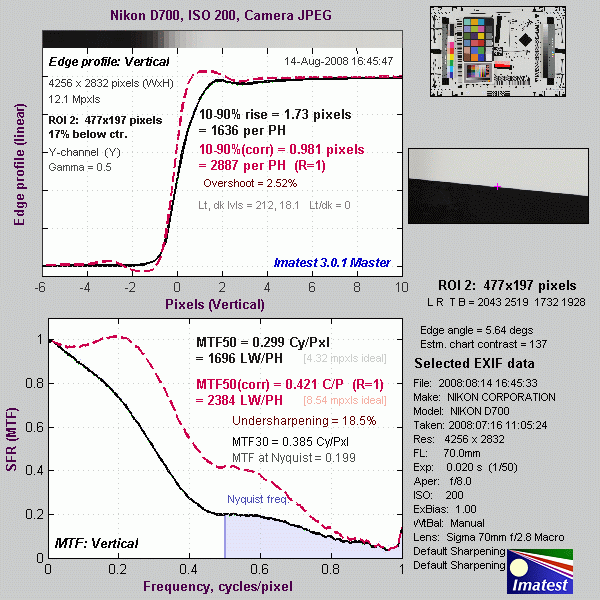
Menus
Nikon D700 Modes and Menus
Nikon D700 Exposure Modes
 Like the D300 and D200 before it, the Nikon D700 doesn't have a mode dial, but instead has a mode button. The current exposure mode is displayed on the LCD and viewfinder and can be changed by pressing this button and rotating the main (rear) command dial. Available exposure modes are: P (Programmed Auto), S (Shutter Priority), A (Aperture Priority) or M (Manual). Like all pro and semi-pro Nikons, the D700 doesn't offer any scene modes.
Programmed Auto: Lets the camera control the shutter speed and aperture settings, although you can vary its choices by turning the Command dial (that is, you can increase or decrease the aperture the camera has chosen, and the camera will vary the shutter speed to maintain the same overall exposure value. Once you've chosen an offset in the aperture/shutter combination, the camera will continue to control the exposure automatically, while maintaining the aperture/shutter bias you've selected.) This ability to select a persistent bias for the exposure system is very useful, in many cases more so than conventional Aperture or Shutter Priority metering (see below). This is because the "tweaked" Program AE will track even radical changes in subject lighting, not being constrained to a single aperture or shutter speed.
Aperture Priority: Allows you to set the aperture value while the camera automatically selects the appropriate shutter speed. Available apertures will vary with the lens in use.
Shutter Speed Priority: Allows you to set the shutter speed value while the camera automatically selects the appropriate aperture. Shutter speeds range from 1/8,000 to 30 seconds in this mode.
Manual: Lets you select both the aperture value and shutter speed, and increases the shutter speed range to include a Bulb setting for exposures longer than 30 seconds.
Nikon D700 Menus
The menu system on the Nikon D700 follows that of the D300. Pressing the Menu button provides access to the camera's full menu system.
In the section below, rather than list and verbally describe each option, we'll present the top-level menu screens in the main text without comment, and provide links to pages showing most of D700 menu structure, page by page.
Nikon D700 Playback Menu

Nikon D700 full Playback menu layout
(note, large download for dialup users)
Nikon D700 Shooting Menu

Nikon D700 full Shooting menu layout
(note, large download for dialup users)
Nikon D700 Custom Settings Menu

Nikon D700 full Custom Settings menu layout
(note, large download for dialup users)
Nikon D700 Setup Menu

Nikon D700 full Setup menu layout
(note, large download for dialup users)
Nikon D700 "Retouch" Menu

Nikon D700 full "Retouch" menu layout
(note, large download for dialup users)
Nikon D700 "My Menu" Menu

Comparison
Nikon D700 Feature Comparison
The following table compares major features of the Nikon D700 to the D300 and D3. What we've done below is to present something of a hybrid comparison between these three models. A red cell means that a given camera performs below the other two, a green cell means that it performs better than the other two, and a yellow cell means it falls between the other two. In cases where two cameras share a superior capability, both their cells will be colored green. Sharp-eyed readers may find some areas where we haven't chosen to highlight a particular difference. Those cases are simply ones that we don't feel are significant in typical use of the camera.
| Nikon High-end SLR Comparison | ||||
|
Manufacturer
|
Nikon
|
Nikon | Nikon | |
|
Model
|
D300
|
D700 | D3 | |
| Imaging System |
Sensor Manufacturer
|
Sony | Sony(?) | Sony(?) |
|
Sensor Type
|
CMOS | CMOS | CMOS | |
|
Color Filter Array
|
RGB | RGB | RGB | |
|
Total Megapixels
|
13.1
|
12.87 | 12.87 | |
|
Effective Megapixels
|
12.3 | 12.1 | 12.1 | |
|
Effective Sensor Size (mm)
|
23.6 x 15.8
|
36.0 x 23.9 | 36.0 x 23.9 | |
|
Focal Length Multiplier (approx.)
|
1.5x
(Nikon DX) |
1.0x (Nikon FX) |
1.0x (Nikon FX) |
|
|
Image Processor
|
EXPEED
|
EXPEED | EXPEED | |
| Viewfinder |
Type
|
Eye-level
pentaprism
|
Eye-level pentaprism | Eye-level pentaprism |
|
Coverage
|
~100%
|
~95% | ~100% | |
|
Magnification (-1 diopter with 50mm lens at infinity)
|
0.94x
|
0.72x (but full-frame) |
0.70x (but full-frame) |
|
|
Eyepoint (mm)
|
19.5
|
18 | 18 | |
|
Dioptric Adjustment Range (diopters)
|
-2.0 to +1.0
|
-3.0 to +1.0 | -3.0 to +1.0 | |
|
Focusing Screen
|
Fixed Type-B BriteView clear matte screen Mark II, with on-demand grid lines
|
Fixed Type B BriteView Clear Matte VI, with on-demand grid lines | Interchangeable Type B BriteView Clear Matte VI | |
|
Depth of Field Preview
|
Enabled
with depth-of-field preview button
|
Enabled with depth-of-field preview button | Enabled with depth-of-field preview button | |
|
Live View
(on LCD) |
Yes (2 Modes: Hand-held mode uses conventional AF sensor; Tripod mode uses contrast detect AF from image sensor) |
Yes (2 Modes: Hand-held mode uses conventional AF sensor; Tripod mode uses contrast detect AF from image sensor) Virtual Horizon indicator available |
Yes (2 Modes: Hand-held mode uses conventional AF sensor; Tripod mode uses contrast detect AF from image sensor) Virtual Horizon indicator available with firmware 2.00 |
|
| Recording System |
Recording Media / Quantity / Slot Type
|
Type
I or II CF card / Microdrive
UDMA supported |
Type I CF card UDMA supported |
Dual Type I or II CF card / Microdrive slots UDMA supported |
|
Compatible File System
|
FAT
16 / FAT 32
|
FAT 16 / FAT 32 |
FAT 16 / FAT 32
|
|
|
Recording Formats
|
RAW 12-bit or 14-bit (uncompressed, lossless compressed or compressed NEF), TIFF (32-bit), JPEG
|
RAW 12-bit or 14-bit (uncompressed, lossless compressed or compressed NEF), TIFF (32-bit), JPEG | RAW 12-bit or 14-bit (uncompressed, lossless compressed or compressed NEF), TIFF (32-bit), JPEG | |
|
Maximum Resolution
|
4288 x 2848
|
FX format (36 x 24): DX format (24 x 16): |
FX format (36 x 24): 4256 x 2832 5:4 format (30 x 24): DX format (24 x 16): |
|
|
Reduced Resolutions
|
3,216 x 2,136;
2,144 x 1,424 |
FX format (36 x 24): DX format (24 x 16): |
FX format (36 x 24): 3184 x 2120; 2128 x 1416 5:4 format (30 x 24): DX format (24 x 16): |
|
|
RAW + JPEG Recording
|
Yes, Selectable JPEG resolution / compression
|
Yes, Selectable JPEG resolution / compression | Yes, Selectable JPEG resolution / compression | |
|
A/D Conversion
|
12- or 14-bit | 12- or 14-bit | 12- or 14-bit | |
|
Auto crop when DX lens mounted
|
n/a | Yes | Yes | |
| Color Space, Image Parameters & White Balance |
User-Selectable Color Space
|
Yes
sRGB + Adobe RGB |
Yes sRGB + Adobe RGB |
Yes sRGB + Adobe RGB |
|
Processing Parameters
(Contrast, Sharpness, Saturation, Hue) / # of Increments |
10 options for sharpening, 7 options for contrast, 3 options for brightness, 7 options for saturation, 7-step hue adjustment.
|
10 options for sharpening, 7 options for contrast, 3 options for brightness, 7 options for saturation, 7-step hue adjustment. | 10 options for sharpening, 7 options for contrast, 3 options for brightness, 7 options for saturation, 7-step hue adjustment. | |
|
Picture Control System
|
Yes | Yes | Yes | |
|
Active
D-Lighting |
Yes, Low, Normal, High |
Yes Low, Normal, High,Auto |
Yes Low, Normal, High |
|
|
WB settings
|
Auto, 7 manual modes with fine tuning, color temperature
|
Auto, 7 manual modes with fine tuning, color temperature | Auto, 7 manual modes with fine tuning, color temperature | |
|
Manual Color Temperature Setting Range
|
2,500 ~ 10,000K in increments of roughly 10
mired
|
2,500 ~ 10,000K in increments of roughly 10 mired | 2,500 ~ 10,000K in increments of roughly 10 mired | |
|
WB Adjustment Range
|
±6 steps in 1-step increments
5 mireds per step |
±6 steps in 1-step increments
5 mireds per step |
6 steps in 1-step increments
5 mireds per step |
|
| Autofocus System |
Type
|
TTL phase detection by Nikon Multi-CAM3500DX autofocus module
|
TTL phase detection by Nikon Multi-CAM3500FX autofocus module | TTL phase detection by Nikon Multi-CAM3500FX autofocus module |
|
# of Focusing Points (Focusing Point Type)
|
51 points (15 cross-type, 36 line type)
|
51 points (15 cross-type, 36 line type) | 51 points (15 cross-type, 36 line type) | |
|
Superimposed Focus Point
Display
|
Yes | Yes | Yes | |
|
AF Working Range (ISO 100 at 20C/68F)
|
-1 to +19 EV
|
-1 to +19 EV | -1 to +19 EV | |
|
AF Servo Modes
|
AF-S (single one-shot),
AF-C (continuous tracking) |
AF-S (single one-shot),
AF-C (continuous tracking) |
AF-S (single one-shot), AF-C (continuous tracking) |
|
|
AF Area Modes
|
1) Single-point AF,
2) Dynamic-area AF [number of AF areas: 9, 21, 51, 51 (3D-tracking)], 3) Automatic-area AF |
1) Single-point AF,
2) Dynamic-area AF [number of AF areas: 9, 21, 51, 51 (3D-tracking)], 3) Automatic-area AF |
1) Single-point AF, 2) Dynamic-area AF [number of AF areas: 9, 21, 51, 51 (3D-tracking)], 3) Automatic-area AF |
|
|
AF-assist Beam
|
Yes
Bright incandescent lamp |
Yes Bright incandescent lamp |
Emitted by an optional dedicated Speedlight | |
|
Fine-tune front/back focus adjustment
|
Yes (settings for up to 12 lenses) | Yes (settings for up to 12 lenses) | Yes (settings for up to 20 lenses) | |
| Exposure Control |
Shooting Modes
|
4 - Program, shutter-priority AE,
aperture-priority AE, manual mode.
|
4 - Program, shutter-priority AE, aperture-priority AE, manual mode. | 4 - Program, shutter-priority AE, aperture-priority AE, manual mode. |
|
Metering Zones
|
1,005
|
1,005 | 1,005 | |
|
Metering Modes
|
1) 3D Color Matrix Metering II (type G and D
lenses); Color Matrix Metering II (other CPU lenses); color matrix
metering available with non-CPU lenses if user provides lens data;
metering performed by 1,005-segment RGB sensor.
2) Center-weighted: Weight of 75% given to 6, 8, 10, or 13mm dia. circle in center of frame. 3) Spot: Meters 3mm dia. circle (about 2.0% of frame) centered on active focus area (on center focus area when non-CPU lens is used). |
1) 3D Color Matrix Metering
II (type G and D lenses); color matrix metering II (other CPU lenses); color
matrix metering available with non-CPU lenses if user provides lens data;
metering performed by 1,005-segment RGB sensor 2) Center-weighted: Weight of 75% given to 8, 12, 15, or 20mm dia. circle in center of frame 3) Spot: Meters 3mm dia. circle (about 1.5% of frame) centered on active focus area (on center focus area when non-CPU lens is used) |
1) 3D Color Matrix Metering
II (type G and D lenses); color matrix metering II (other CPU lenses); color
matrix metering available with non-CPU lenses if user provides lens data;
metering performed by 1,005-segment RGB sensor 2) Center-weighted: Weight of 75% given to 8, 12, 15, or 20mm dia. circle in center of frame 3) Spot: Meters 3mm dia. circle (about 1.5% of frame) centered on active focus area (on center focus area when non-CPU lens is used) |
|
|
Metering System Working Range
(ISO 100, f/1.4 lens, 20C/68F) |
1) EV 0 ~ 20 (Matrix or Center-weighted metering)
2) EV 2 ~ 20 (Spot metering) |
1) EV 0 ~ 20 (Matrix or Center-weighted metering) 2) EV 2 ~ 20 (Spot metering) |
1) EV 0 ~ 20 (Matrix or Center-weighted metering) 2) EV 2 ~ 20 (Spot metering) |
|
|
Nikon Scene Recognition System
|
Yes | Yes | Yes | |
|
ISO Range / Extended
|
100 / 200 ~ 3200 / 6400
|
200 ~ 6,400 / down to 100 in Lo-1 mode; up to 25,600 in Hi -2 mode | 200 ~ 6,400 / down to 100 in Lo-1 mode; up to 25,600 in Hi -2 mode | |
|
Exposure Compensation
|
+/-
5EV in 1/2 or 1/3EV increments
|
+/- 5EV in 1, 1/2 or 1/3EV increments | +/- 5EV in 1, 1/2 or 1/3EV increments | |
|
Automatic Exposure Bracketing
|
2 to 9 exposures in increments of 1/3, 1/2,
2/3 or 1EV
|
2 to 9 exposures in increments of 1/3, 1/2, 2/3 or 1EV | 2 to 9 exposures in increments of 1/3, 1/2, 2/3 or 1EV | |
| Shutter Speeds, Frame Rate, Shutter Lag |
Shutter Type
|
Electronically controlled vertical-travel focal-plane shutter
|
Electronically controlled vertical-travel focal-plane shutter
|
Electronically controlled vertical-travel focal-plane shutter |
|
Shutter Durability
|
~150K cycles
|
~150K cycles | ~300K cycles | |
|
Shutter Speed Range
|
1/8000 ~ 30 sec. in steps of 1/3, 1/2 or 1 EV, bulb
|
1/8000 ~ 30 sec. in steps of 1/3, 1/2 or 1 EV, bulb | 1/8000 ~ 30 sec. in steps of 1/3, 1/2 or 1 EV, bulb | |
|
Maximum Frames Per Second / Buffer depth
|
6.1 fps / 37 large/fine JPEG or 17 (12-bit) RAW fames,
slows to 2.66 fps in 14-bit RAW (measured); up to 8 fps with optional MB-D10 battery pack |
5 fps / 100 JPEG or 23 12-bit RAW or 20 14-bit RAW frames, no slow-down for 14-bit; |
9 fps / 30 large/fine JPEG or 17 12-bit RAW or 16 14-bit RAW frames, no slow-down for 14-bit (measured); up to 11 fps in 5.1MP DX Cropped mode |
|
|
Full AF shutter lag (seconds)
|
0.23 (measured) |
0.20 (measured) |
0.085 (measured) |
|
|
Prefocused shutter lag (seconds)
|
0.057 (measured) |
0.045 (measured) |
0.043 (measured) |
|
| Flash |
i-TTL / Advanced Wireless Lighting
|
Yes / Yes
(built-in flash can act as Wireless Commander) |
Yes / Yes (built-in flash can act as Wireless Commander) |
Yes / Yes (with SB-800 Flash or SU-800 Wireless Commander) |
|
Built-in Flash / Guide Number at ISO 100.
|
Yes
(12) |
Yes (12) |
No | |
|
Max flash x-sync speed. (sec.)
|
1/250
|
1/250
|
1/250
|
|
|
Flash Exposure Compensation
|
-3 to +1 EV, 1/3 or 1/2 EV steps
|
-3 to +1 EV, 1/3 or 1/2 EV steps | n/a | |
|
Slow-sync flash
|
1st or 2nd curtain
|
1st or 2nd curtain | n/a | |
|
PC Sync Terminal
|
Yes
|
Yes | Yes | |
| Playback System |
LCD Size / Pixel Count
|
3.0 in LCD / 920,000 pixels
|
3.0 in LCD / 920,000 pixels | 3.0 in LCD / 920,000 pixels |
|
Enlarged Playback / Scroll
|
1.1 - 27x for large images, 20x for medium images, or 13x for small ones / Yes
|
1.1 - 27x for large images, 20x for medium images, or 13x for small ones / Yes
|
1.1 - 27x for large images, 20x for medium images, or 13x for small ones / Yes
|
|
|
LCD Monitor Brightness Adjustment Range
|
7 steps
|
7 steps
|
7 steps
|
|
|
Automatic Rotation for Vertical Shots
|
Yes
|
Yes | Yes | |
|
Video Out
|
Analog NTSC/PAL, HDMI | Analog NTSC/PAL, HDMI | Analog NTSC/PAL, HDMI | |
| Other Features |
Computer Connection
|
Yes, USB 2.0 High -Speed, PTP-compliant
|
Yes, USB 2.0 High -Speed, PTP-compliant | Yes, USB 2.0 High -Speed, PTP-compliant |
|
Direct Printing (PictBridge-compliant printers)
|
Yes
|
Yes | Yes | |
|
Menu Languages
|
15 (Japanese, German, English, Spanish, Finnish,
French, Italian, Dutch, Polish, Portuguese, Russian, Swedish,
Traditional Chinese, Simplified Chinese, Korean)
|
15 (Chinese [Simplified and Traditional], Dutch, English, Finnish, French, German, Italian, Japanese, Korean, Polish, Portuguese, Russian, Spanish, Swedish)
|
15 (Chinese [Simplified and Traditional], Dutch, English, Finnish, French, German, Italian, Japanese, Korean, Polish, Portuguese, Russian, Spanish, Swedish)
|
|
|
Camera Default Reset
|
Yes
|
Yes | Yes | |
|
Custom Functions (Quantity)
|
Yes (48)
|
Yes (50) | Yes (44) | |
|
Remote Control
|
Yes, 10-pin terminal
|
Yes, 10-pin terminal | Yes, 10-pin terminal | |
|
Info LCD Panel / Illumination
|
Yes / Yes
(power switch) |
Yes / Yes (power switch) |
Yes (large top panel, smaller rear panel) / Yes (both panels)
|
|
|
Ultrasonic dust-removal
|
Yes
|
Yes | No | |
|
Virtual Horizon digital level sensor
|
No | Yes | Yes | |
|
In-camera Lateral C.A. Correction
|
Yes
|
Yes
|
Yes | |
|
Vignette Control
|
No | Yes | Yes (with firmware 2.00) |
|
|
Self Diagnostic Shutter Monitor
|
No
|
Yes
|
Yes | |
|
Voice Memo
|
No
|
No
|
Yes | |
| Body Structure |
Body Cover / Chassis
|
Magnesium Alloy, environmental seals
|
Magnesium Alloy, environmental seals | Magnesium Alloy, environmental seals |
| Power System |
Battery
|
EN-EL3e,
optional MB-D10 battery pack |
EN-EL3e, optional MB-D10 battery pack |
EN-EL4a |
|
Rated Shooting Capacity at 20C/68F (shots)
|
CIPA: 1000
(50% flash) |
CIPA: 1000 (50% flash) |
CIPA: 4300 (no flash though) |
|
| Dimensions & Weight |
Dimensions (WxHxD, mm)
|
147 x 114 x 74
|
147 x 123 x 77 | 160 x 157 x 88 |
|
Weight (body only)
|
825 g
|
995 g | 1240 g | |
| Operational Environment |
Operating Temperature Range
|
0 ~ 40°C
|
0 ~ 40°C | 0 ~ 40°C |
|
Operating Humidity Range
|
85% max.
|
85% max. | 85% max. | |
| Lens Compatibility |
Lens Mount / Compatibility
|
1) Type G or D AF Nikkor: All functions supported 2) DX AF Nikkor: All functions supported 3) AF Nikkor other than type G or D (excluding lenses for F3AF): All functions supported except 3D Color Matrix Metering II 4) AI-P Nikkor: All functions supported except autofocus and 3D Color Matrix Metering II 5) Non-CPU AI Nikkor: Can be used in exposure modes A and M; electronic rangefinder can be used if maximum aperture is f/5.6 or faster; Color Matrix Metering and aperture value display supported if user provides lens data. Up to 9 non-CPU lenses can be registered. |
1) Type G or D AF Nikkor: All functions supported 2) DX AF Nikkor: All functions supported except FX-format (36x24) image size 3) AF Nikkor other than type G or D (excluding lenses for F3AF): All functions supported except 3D Color Matrix Metering II 4) AI-P Nikkor: All functions supported except autofocus and 3D Color Matrix Metering II 5) Non-CPU AI Nikkor: Can be used in exposure modes A and M; electronic rangefinder can be used if maximum aperture is f/5.6 or faster; Color Matrix Metering and aperture value display supported if user provides lens data. Up to 9 non-CPU lenses can be registered. |
1) Type G or D AF Nikkor: All functions supported 2) DX AF Nikkor: All functions supported except FX-format (36x24)/5:4 (30x24) image size 3) AF Nikkor other than type G or D (excluding lenses for F3AF): All functions supported except 3D Color Matrix Metering II 4) AI-P Nikkor: All functions supported except autofocus and 3D Color Matrix Metering II 5) Non-CPU AI Nikkor: Can be used in exposure modes A and M; electronic rangefinder can be used if maximum aperture is f/5.6 or faster; Color Matrix Metering and aperture value display supported if user provides lens data. Up to 9 non-CPU lenses can be registered. |
|
Auto switch to DX-format crop when DX lens mounted
|
n/a | Yes | Yes | |
Press Release
INSPIRED BY THE NIKON D3 IN A SMALLER, LIGHTER DESIGN
Nikon's Second FX-Format Camera Delivers Peak Pro Performance in a Versatile Form-Factor
MELVILLE, N.Y. (July 1, 2008) -- Nikon, Inc. today introduced the new D700 digital SLR camera featuring a 12.1-effective megapixel Nikon FX-format sensor that measures 23.9 x 36mm, which is nearly identical to the size of 35mm film. Benefiting from Nikon's legacy of imaging technology innovation, the D700 offers both advanced and professional photographers stunning image quality, accurate color reproduction and revolutionary low light performance.
Building on the immense success of the Nikon D3 professional D-SLR camera, the D700 offers pro-level performance and an extensive array of features and innovations in a comfortably nimble platform. In addition to the Nikon-original FX-format CMOS sensor, the D700 incorporates Nikon's EXPEED Image Processing System, Nikon's renowned 51-point auto focus system with 3D Focus Tracking and two Live View shooting modes that allow photographers to frame a shot using the camera's three-inch high-resolution LCD monitor. The D700 also features Nikon's sophisticated Scene Recognition System and a new active dust reduction system.
Nikon's flagship FX and DX-format cameras, the D3 and D300 respectively, established new benchmarks for digital image quality, speed, and unmatched ISO performance. The D700 maintains this new measure with exceptional overall image quality, broad tonal range and depth, and extremely low-noise throughout its native ISO range of 200 to 6400.
"Nikon FX-format cameras have teamed with our strong lineup of DX-format models to offer photographers unprecedented advancements in performance and versatility along with the freedom to choose the format that best serves their needs. Today's introduction of the D700 offers an important new option to photographers who need the overall performance and imaging perspective Nikon FX-format cameras offer," said Edward Fasano, general manager for marketing, SLR System Products at Nikon, Inc. "Nikon has developed a host of innovative technologies such as the Scene Recognition System and Picture Control, incorporating them into both FX and DX-format digital SLRs to ensure that photographers can leverage the advantages of both formats seamlessly, and achieve the end-results that best fulfill their photographic vision."
The legendary Nikon FX-Format CMOS sensor
The D700's 12.1-megapixel FX-format CMOS image sensor provides exceptional image quality throughout its remarkable ISO sensitivity range. A large pixel size of 8.45 µm allows for an extremely low signal-to-noise ratio and a wide dynamic range. The 12-channel readout enables accelerated information transfer, allowing the D700 to shoot at speeds of up to eight frames per second at full resolution (using the optional MB-D10 Multi Power Battery Pack) and quickly write image data onto the CompactFlash™ card.
The D700 offers a versatile base ISO range from 200-6400 but can be expanded to range from ISO 100 (Lo-1) to 25,600 (Hi-2) affording photographers the new-found confidence to shoot in the widest variety of lighting conditions from the brightest midday sun to dim interiors. Images previously thought to be impossible to create without complex lighting set-ups or lengthy post-processing are now captured easily and faithfully with the D700, unleashing new and diverse shooting possibilities.
Also new to the D700 is Nikon's first self-cleaning system designed for the FX-format sensor. Utilizing four distinct vibration frequencies, the D700 frees image degrading dust particles from the sensor's optical low-pass filter at start-up, shut-down or on demand. As an added benefit, the mirror box and entire shutter mechanism are constructed of materials that resist creating debris that can affect image purity.
Fastest speed and autofocus in its class
The D700 starts up in a mere 0.12 seconds and has a nearly imperceptible shutter-lag response time of 0.40 milliseconds, making this an extraordinarily responsive tool for the demanding photographer. The D700 can record full-resolution JPEG images at an astounding five frames per second (fps), or eight fps with the optional MB-D10 battery pack for up to 100 images, or up to 17 lossless 14-bit Nikon NEF (RAW) files. To write images efficiently, the Nikon D700 is also compliant with the next-generation of high-speed UDMA CompactFlash™ cards that will enable recording speeds up to 35 megabytes/second.
The D700 offers one of the fastest and most accurate advanced AF systems on the market today. Nikon's Multi-CAM 3500FX autofocus sensor module features 51 AF points and the ability to use 3D tracking to focus and lock-on a moving subject. The 15 cross-type sensors and 36 horizontal sensors can be used individually or in groups, with the option for Single Area AF mode and Dynamic AF modes using groups of either 9, 21 or all 51 focus points. The system also features 3D Focus Tracking with automatic focus point switching that takes advantage of all 51 AF points as it uses scene color content and light information to accurately track the subject.
Intelligent features for sophisticated performance
The D700 relies on a wealth of innovative Nikon technologies to help photographers create superb images. Nikon's Scene Recognition System analyzes information from the 1,005-pixel RGB light sensor for use in auto exposure, auto white balance and autofocus calculations. The Scene Recognition System also assists autofocus by tracking subject position and automatically shifts the AF points used to match the subject's movement within the frame. This system also contributes to higher accuracy of auto exposure and auto white balance detection, resulting in sharp landscapes, flattering portraits and engaging action shots.
Photographers also have the option to enhance their pictures during or after capture with the Picture Control System and Active D-Lighting. Nikon's Picture Control System enables users to adjust their images to pre-set parameters such as Standard, Neutral, Vivid and Monochrome that apply tweaks to image sharpening, tone compensation, brightness, overall tone and saturation. D-Lighting uses localized tone control technology to further optimize highlight and shadow detail while also maintaining natural contrast, giving photographers the ability to capture more perfectly exposed images, even in unusual lighting conditions. Active D-Lighting lets photographers choose from various intensities during capture, while a new Automatic mode also applies varying levels of D-Lighting as, and when needed, to enhance photos while shooting.
Enhanced Live View modes and viewfinder
Ideal for studio, remote applications and more, Nikon's Live View allows the photographer to compose the subject on the bright three-inch, TFT LCD monitor. In Handheld mode, the user is able to recompose the frame prior to actual shooting; familiar TTL phase-detection AF is activated, using all 51 AF points. Tripod mode is designed for precise focus accuracy with still subjects and tripod stabilization. It enables focal-plane contrast-detect AF on a desired point within a specific area. Remote view, focusing and shooting can also be controlled from a PC (via connection or wireless) using the optional Nikon Camera Control Pro 2 software. Additionally, the Virtual horizon feature on the D700 can now be superimposed over the Live View monitor image to aid composition.
While using Live View to compose or review images and settings, users will appreciate the ultra-high resolution 920,000-dot VGA, three-inch TFT LCD monitor with tempered glass that provides a wide 170-degree viewing angle. The large monitor is remarkably effective when confirming the focus with enlarged playback images. The camera also outputs a video signal to an HD television using the new smaller HDMI-C standard, which is an excellent solution for workshop demonstrations or shooting tethered for clients.
Photographers will also be able to compose images easily using the wide and bright viewfinder that features an eye-level pentaprism with high refraction index and provides a 95 percent frame coverage with 0.72x magnification. Each of the 51-AF points, as well as a framing grid can also be superimposed on the finder screen to suit the photographer's personal preferences.
Rugged construction and durability
High-strength magnesium alloy is used for the construction of the camera body, rear body and mirror box to create a precision platform, reduce weight and provide rugged durability. The camera is tested to stand up to the rigors of the globetrotting photographer and is weather sealed using precision O-rings where connections are made to effectively combat dust and moisture.
The shutter unit employs an assembly made of a new composite carbon fiber and Kevlar hybrid material. Tested on fully assembled cameras, the D700's shutter unit has been proven through 150,000 cycles under demanding conditions. The self-diagnostic shutter constantly monitors and maintains shutter precision to ensure peak performance.
Price and availability
The new FX-format Nikon D700 D-SLR camera will be available late July 2008, and will have an estimated selling price of $2,999.95* (body only).
About Nikon
Nikon, At the Heart of the Image™. Nikon Inc. is the world leader in digital imaging, precision optics and photo imaging technology and is globally recognized for setting new standards in product design and performance for its award-winning consumer and professional photographic equipment. Nikon Inc. distributes consumer and professional digital SLR cameras, NIKKOR optics, Speedlights and system accessories; Nikon COOLPIX® compact digital cameras; COOLSCAN® digital film scanners; 35mm film SLR cameras; Nikon software products and Nikon sports and recreational optics. Nikon D Series digital SLR cameras are recognized as "Highest in Customer Satisfaction with digital SLR cameras," according to the latest J.D. Power and Associates 2007 digital Camera Satisfaction Study. Nikon Corporation, the parent company of Nikon Inc., recently celebrated its 90th anniversary and announced the production of over 40 million NIKKOR SLR interchangeable lenses. For more information, dial (800) NIKON-UX or visit http://www.nikonusa.com, which links all levels of photographers to the Web's most comprehensive photo learning and sharing communities.
# # #
For J.D. Power and Associates award information go to jdpower.com
* Estimated selling price listed is only an estimate. Actual prices are set by dealers and are subject to change at any time.