




Overview
Panasonic FX35
Overview
by Mike Pasini
Review Date: 06/13/08
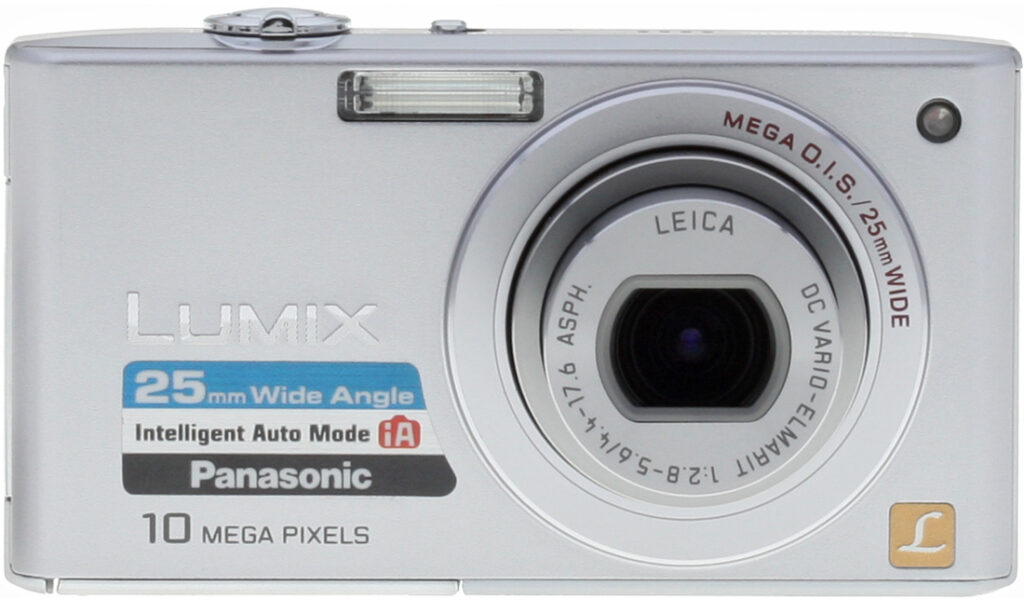
The super-slim Panasonic FX35 features an ultra-wide 25-100mm zoom lens, a 10.1-megapixel CCD sensor, and Panasonic's Intelligent Auto mode.
The Panasonic FX35's lens is the big story, as it's a very wide-angle Leica DC Vario-Elmarit-branded f/2.8 to f/5.6, 4x optical zoom lens. Images are framed and reviewed on a 2.5-inch LCD display with 230,000 pixel resolution, and stored on SD/SDHC/MMC cards or the camera's own 50MB built-in memory. Power comes from a proprietary Lithium-ion battery pack, rated for some 290 shots on a charge (CIPA standard testing with 50 percent flash usage at room temperature).
Panasonic's Advanced Intelligent Auto mode actually guesses what kind of scene you're looking at and selects the appropriate exposure mode to match. The Panasonic FX35 features the Venus Engine IV, designed to deliver higher-quality digital photos than its predecessor, with an advanced signal processing system that produces a quick response time.
A slide show feature on the Panasonic FX35 includes a selection of music, from mellow to more "urban" sounds. The Panasonic FX35's intelligent LCD can detect the lighting condition and raise or lower the brightness level in 11 steps. The FX35's High Angle mode brightens the screen to help when composing images with the camera held high to shoot over crowds.
The Panasonic FX35 can shoot 720p High Definition movies and 1,920 x 1,080 pixel High Definition-ready photos that perfectly fit a wide-screen (16:9) HDTV.
The Panasonic Lumix FX35 is available in silver, black and blue variants, with an MSRP of $350, though you'll find it a lot cheaper if you check the shopping links above right or below.
Panasonic FX35
User Report
by Mike Pasini
Whenever I get my hands on a Panasonic digital camera I tell myself, "This is as close as you'll ever get to a Leica." Not only do Panasonic digital cameras bear a striking and not coincidental resemblance to Leica digicams, but Panasonic uses Leica glass.

Closed. Compact and smooth enough to slip into any pocket.

Open. Fully extended and ready for action.
There's something else Leica-like about the Panasonic cameras. Build quality. The minute you get one in your hands, you realize this isn't a cheap plastic camera you're going to ruin before the week is out.
So right from the start, the Panasonic FX35 broadcasts two distinguishing traits. But there's a lot more to it.
That zoom lens, for example, doesn't start out at a measly 35mm. No, the Panasonic FX35 starts you out at 25mm, a true wide-angle. And with its 4x optical zoom, you get to 100mm without bothering to slip into digital zoom.
Then there are those Scene modes to contend with. On most digital cameras you have to memorize them or scroll through them, perhaps never finding the one you want. On the Panasonic FX35, Scene modes can be automatic. The camera can figure it out for you.

Back. Relatively few buttons to remember.
There are several other features Panasonic calls intelligent on the FX35. Let's take a look at all of them, as there are big pluses, and a few significant negatives to explore. It's the smart thing to do.
Look and Feel. Substantial, let's call it. You lift the Panasonic FX35 from the table and you know immediately it is well built. There are no cheap compartment doors on the Panasonic FX35, no rubber flaps that never get out of the way, no plastic where metal is required.
Like the tripod socket, which is metal, the door to the connectors on the Panasonic FX35 is also metal -- with three hinges. And the metal door is stamped with labels for each connector. When it's open, it stays open. When it snaps shut, it stays shut. Nothing to click, no fingernail to split.

Top. Power switch left of the large Shutter button with Zoom ring. Note the Mode dial window and Record/Playback switch below.
The Panasonic FX35's Power switch is another example of this intelligent design motif. I prefer the lens cover slides of ultracompacts because you don't have to look for the Power button, no question. I very much dislike Power buttons that have to be pressed in to cycle the power. They are usually too small and very hard to activate, or tell when they have been activated. And you have to look for them.
But the Panasonic FX35 has a switch just short of the middle of the top panel. The button that protrudes is easily felt with your shooting finger, so you really don't have to look for it. And all you do is move it right to turn the camera on or left to turn it off. No mystery.

Ports. The well-built port cover (note the hinges) covers three ports and identifies each.
There's another switch on the side of the Panasonic FX35's back panel of camera to select between Shooting and Playback modes. Up is for recording, down is for viewing. And that matters on the Panasonic FX35, because the lens extrudes. If you want to keep the lens protected when viewing images, slip this switch down before powering the camera on. It's very easy to figure out, hardly any effort to learn, and works every time.
Another bright design choice is the Zoom lever, which is a ring around the large Shutter button. I prefer the ring to the toggle switch used for zooming on many cameras. Your finger is right there on the Shutter button to begin with, so moving the toggle left for wide angle and right for telephoto is intuitive.
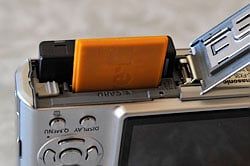
Battery/Card Compartment. An orange Eye-Fi SD card (not included) in front of the lithium-ion battery .
The Panasonic FX35's Mode dial is different, too. You can't see the whole dial. A small window cut out of the top panel shows you at most three settings. A white dot reinforces the obvious setting. It's surprising how many cameras make this confusing with some piece of trim conflicting with some raised indicator. The Panasonic FX35 is simple. And the dial only spins to real settings.
There aren't many other buttons on the Panasonic FX35. The navigator is a set of five discreet buttons, not my favorite arrangement, but certainly functional. The usual functions populate the arrow keys: EV, Flash, Macro, and Self-Timer, with the middle Menu/Set button to confirm choices. There's also Display and Quick Menu buttons below the navigator. Simple.
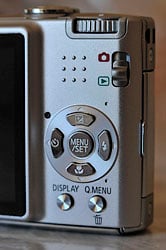
Controls. Just the basics.
The rounded edges of the Panasonic FX35's body seem like PBS's resident carpenter Norm Abrams took a router to them. Closed up, it's smooth enough to slip into any pocket and go anywhere with you.
The Panasonic FX35's LCD is a 2.5-inch polycrystalline TFT display with a generous 230K pixels (that's high resolution) that displays 101 percent at wide angle and 100 percent at telephoto of the captured scene. That's called accurate, in plain English. The shiny surface is easy to clean (just a rub against your cotton T-shirt gets rid of fingerprints) and, amazingly, you can see it in direct sunlight.

Leica Lens. A very wide angle with a 4x optical zoom.
The Panasonic FX35's 4x optical Leica zoom lens has four aspherical lenses and six aspherical surfaces including an Extra High refractive index aspherical lens. The DC Vario-Elmarit lens starts at 25mm and cranks out to 100mm. And, yes, that 25mm matters, even when compared to a 28mm, but especially compared to the more common 35mm+. You can get the whole room from the corner with the Panasonic FX35.
The FX-35 enjoys Panasonic's optical stabilization system to reduce the effects of camera shake in low light situations. A built-in gyrosensor detects when the camera is moving and instantly calculates the compensation needed to stabilize the lens. A linear motor shifts the lens just that much, all in tenths of a second.
You can set optical stabilization in either of two modes. Mode 1 sets stabilization on continuously, which is helpful in composing shots where the subject is hard to track. Mode 2 activates stabilization when you press the Shutter button, which can be slightly more effective.
Interface. While the Panasonic FX35's LCD menu itself was serviceable, it was still a disappointment. The graphic design elements are amateurish. Menu items are displayed in uppercase, for example (no doubt to crowd one more line of them on the screen) with grammar-school level icons on both sides (to indicate function on the left and the selected setting on the right).

Menus. All uppercase with too many icons and too many screens (five on this Setup menu).
Using the Panasonic FX35's menu system is funky, too. I was constantly pressing the Menu/Set button to explore an item rather than the Right arrow.
Submenus slide in from the right side of the screen so you never lose your bearings, a point in the system's favor.
But even the organization of items struck me as peculiar. Why is the Clock setting in the Shooting menu when it is also in of the Setup menu? How often do you fiddle with that? And why could I never get to the Format option efficiently, even after I knew (approximately) where it was?

Scene Modes. Restrooms on page two.
While the same graphics are at work on the Quick Menu system, it does give you one-button access to a set of options tailored to the shooting mode you're in. Movie mode, for example, offers image stabilization, autofocus mode, white balance settings, picture mode, and LCD mode (with a helpful High Angle option that really cranks up the brightness of the LCD so you can see it when you hold the camera overhead). Intelligent Auto offers stabilizer, burst shooting, picture size, and LCD mode. Normal Auto offers stabilizer, burst shooting, white balance, ISO, intelligent exposure, picture size, and LCD mode.
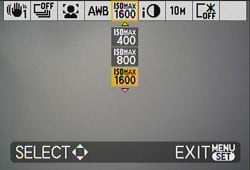
Quick Menu. Nice idea but hard to read.
The options are arrayed along the top of the screen and expand downward as you scroll across them.
That, at least, is a good idea in an otherwise poor menu system.
Modes. Modes on the all-automatic Panasonic FX35 are a bit different than they are on other cameras. There is no Manual mode, where you can set aperture and shutter speed independently. But there are two Auto modes: Normal and Intelligent.
In Lake Wobegon, of course, everyone uses Intelligent Auto (iA on your Mode dial). But Normal Auto lets you customize more settings yourself. It's as close as you're going to get to a Manual mode. As noted above, the Quick Menu provides access to settings for the stabilizer, burst shooting, white balance, ISO, intelligent exposure, picture size, and LCD mode. Color mode and audio recording are also available from the regular LCD menu system.
That is the mode I use when I test a camera because I can push it around to see what it can do. Panasonic calls it "taking pictures with your favorite settings" but they aren't etched-in-stone favorites. Instead, they're flexible, changing from situation to situation and moment to moment.
But Intelligent Auto is an intriguing feature worth more study, so I took a peek.


What's so intelligent about it?
Well, it's really a bundle of five technologies, all active at once (so you don't have to be). Those five are:
- Intelligent Exposure. According to Panasonic, this feature compensates for backlit subjects or very dark ones. Backlight compensation, however, can force the flash to fire, too.
- Intelligent Scene Selector. The camera will try to determine whether it is looking at a portrait, scenery, macro, night portrait, or night scenery. A blue icon is supposed to indicate the decision, displaying for a couple of seconds before it turns red (but I never saw the blue icon myself). If the Panasonic FX35 can't figure it out, it reverts to standard settings.
- Optical Image Stabilization. The gyrosensor-based lens-shift image stabilization is activated so if you move the camera during exposure, the lens tries to compensate.
- Intelligent ISO Control measures subject movement in the scene and sets ISO accordingly to prevent subject blur. Normally, you want to shoot with the lowest ISO possible to achieve the highest quality image. But if the subject is moving (like Junior jumping on his bed), grain is the least of your problems. To eliminate blur, the camera sets ISO higher to be able to use a faster shutter speed.
- Face Detection. Both focus and exposure are set to capture any of up to 15 faces in the scene.
The intelligent thing about this is that on most digicams, you have to enable all these things. On the Panasonic FX35, you turn them all on by selecting iA.
Still, it isn't foolproof photography. It's more assisted living. But when you need help, there's nothing quite like it.
There is a healthy set of Scene modes, too. You can't really expect a camera to know if you're shooting from a helicopter, or if the subject is a party and not fireworks. That takes some actual human intelligence.
Scene modes include Portrait, Soft Skin, Scenery, Sports, Night Portrait, Night Scenery, Self-Portrait, Food, Party, Candle Light, Fireworks, Starry Sky, Beach, Aerial Photo, Snow, High Sensitivity, Baby 1&2, Underwater, Sunset, Pet, and Hi-Speed Burst.
There's yet another still recording mode that Panasonic calls Clipboard mode. When you're in Clipboard mode, the camera takes either two megapixel or one megapixel images, storing them to its built-in memory. You can get about 94 two-megapixel images and 140 one megapixel images total in the approximately 50MB available. You can also record up to five seconds of audio to go with the shots. To see them, just switch to Playback mode with the Mode dial set to Clipboard.
Panasonic suggests using Clipboard mode for taking visual notes, shots of train schedules, maps, etc. that you might otherwise be writing down in a notebook.

High Definition Movie. A 20.9MB file lasting 7 seconds. Zoom not supported, not even digital. (Click to download MOV file.)
And then there's Movie mode. To its credit, Panasonic gives you an HD option for movies. After all, they sell HDTVs, too (some of them with SD card readers). You won't get 1080 resolution, but you do get 720 and that's really plenty good enough; at least it's the right shape.
But our first attempt to shoot HD movies with the Panasonic FX35 resulted in an error message. The movie was canceled due to the speed of the card, the camera told me.
That made sense, though. I had an Eye-Fi card in the Panasonic FX35 (a special WiFi-enabled SD card), which is admittedly too slow for video capture, at least HD capture (it worked with 640 x 480 captures). A faster card did the trick for HD.
Set the Panasonic FX35 to 16:9 (which is also available in still modes) to take HD movies. That fills the screen nicely. There are two resolutions available: 848 x 480 (indicated by L in the Quick Menu) and 1280 x 720 (indicated by H). You want H, which will give you 720 vertical pixels. If you select a 4:3 aspect ratio, you can record at 640 x 480 or 320 x 240 (not too shabby for Web display).
You can record at 30 frames per second or 15 fps (perfect for those Best Man toasts) at 720 HD, too (Low res HD gets you 30 or 10 fps). You can also record at either 30 or 10 fps in 4:3 mode.
You do get sound (and can't avoid getting it either). But you don't get zoom. And that's a killer. Much as I like having 720 resolution, I need zoom. I even had zoom on my Super8 Bolex, for crying out loud.
Playback. Speaking of playback, the Panasonic FX35 has some tricks up its sleeve for stills.


Calendar View. Month view (top) and Day view.
In addition to a Calendar display mode, which shows a monthly calendar populated with images taken on that date, you can display images in a slide show with music.
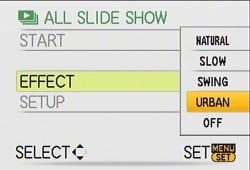
Submenus. A fly-out submenu.
Slide Show offers five effects with music to match: Natural, Slow, Swing, Urban and Off. Off just cycles through the images automatically (which the Normal slide show option doesn't bother to do, forcing you to manually go through them). Natural plays some piano and pans (the music sequence is very short, though, and noticeably repeats). Slow has some hammering industrial music (perfect for the workplace) and more pans and some fancy transitions. Swing brings in the woodwinds and some zoomed images as well as pans and fancy transitions. Urban is as noisy as any city and just as discombobulated.
On the whole, the effect to spice up the old slide show was a disaster. None of these modes is particularly well done. Sony does this much better, and any camera with muvee built in (the Nikons, for example) does better still. If building slideshows on your camera is your cup of Red Bull.


Optical Zoom Range. 25mm to 100mm.
Image Quality. But my cup is image quality. So how did the Panasonic FX35 do on our image quality tests in the lab?
In some respects, the Panasonic FX35 did very well.
The Leica lens, for example, delivered very low distortion at both wide angle and telephoto focal lengths. That's particularly impressive at wide angle because the Panasonic FX35 has a wider angle than most digicam zooms.
Chromatic aberration was also low at both wide angle and telephoto focal lengths. We almost never see that either. And detail was strong to around 1,500-1,600 lines of resolution. Very impressive, especially when you consider that extinction of detail didn't occur until about 2,000 lines.
On the other hand, the Panasonic FX35 disappointed in a number of tests.
The Panasonic FX35 showed strong blurring in the corners of the image at both wide angle and telephoto focal lengths. And "strong blurring" is putting it kindly. You can see this in the images, which is generally not the case.
While color was good overall, the Panasonic FX35 is one of those digicams that likes to oversaturate slightly, pumping up the red and blue tones, while undersaturating bright yellows. Skin tones were a little pink, particularly with Caucasian skin tones.

Still Life. Among the better examples.
But most disappointing was the sensor noise, which seemed to be evident even at ISO 100. It's rare to see a camera that exhibits noise at ISO 200, but the Panasonic FX35 is one of them. Usually when you see so much grain at lower ISOs you can expect to see good color capture at higher ISOs, but not with the FX35. Color starts to fall apart at ISO 800.
Flash and low-light performance were two more disappointments. Even at ISO 400, the flash failed to adequately illuminate the test target at 9.8-feet and at full telephoto focal length -- and that's the manufacturer's specification. We needed a +1.3 EV correction to get enough light on our subject. And in low light even our brightest scene was a dim capture at ISO 100.
Our still life test shot seemed among the better examples I've examined. The WhiBal at the top center is fairly sharp, as is the white proportional scale. That may be because the highlights really did not bloom on the FX35, obscuring that detail. You can see them under control in the Samuel Smith label and the white napkin under the brown coffee cup.
But you can see that noise in the shadows even in this ISO 100 shot.
Performance. If image quality was somewhat disappointing, performance was not.
Startup time with the extruding lens was not brisk but average at 2.9 seconds. Shutdown at 1.3 seconds was, however, above average.
While combined autofocus lag was a bit below average (and pretty much the same for both wide angle and telephoto focusing), prefocus lag was exceptional at 0.008 second. Cycle time was quicker than average, too.
Flash cycle time was about average at just six seconds for a full charge, but a full charge wasn't quite enough to light up any scene. This is the one test that is most misleading. High power flashes take longer to recycle but weak ones recycle quickly.

Orchids. 1/40 sec. at f/2.8.
Download speed was briskly above average so connecting the Panasonic FX35 by cable won't be an issue, although we prefer to simply load the card into a PCMCIA adapter or use the Eye-Fi card to wirelessly transmit the images to our box.
LCD size was average (but its resolution was above average) and optical zoom, while unusual for a compact digicam, was not impressive enough to escape the average category. You can get a similarly sized camera with as much as 10x zoom.
Despite its solid feel, the Panasonic FX35 scored among the lighter compact digicams we've tested. Which is good news because a little heft goes a long way in keeping a small camera stable.
Shooting. I was disappointed at how dark some of our images were at EV 0.0. Look at those roses, shot in the shade (see the Gallery tab for these images). Every one of them is much too dark, especially the white JFK rose. On the one hand, this prevents blowing out highlights, but on the other, it prevents highlights altogether.

iA Scene Recognition. Automatically switched to Macro.
For anyone curious about iA mode's effectiveness, our NuLOOQ closeup was shot in iA mode which did register it as a Macro shot. And the landscape I shot just after it did register as "Scenery," so iA is no dummy.
While there's almost no color in the Shirley Temple doll shot, it pretty accurately represents the actual conditions. There is a bit more color in realty, no question, but it's close. Unfortunately, a close examination shows how much noise there is at ISO 1,600, something the thumbnail obscures.
Even my ISO 800 doll fares poorly, showing little detail and lots of noise in better light.

25mm. A wide angle that gets more of what you see.
One thing I did like, however, was the wide angle lens, particularly coupled with the 16:9 aspect ratio. My shots of the road on Twin Peaks at both 4:3 and 16:9 demonstrate the dramatic difference that wide angle makes with the right aspect ratio.
And the logs laid out as a barrier along one crest are another illustration of the drama that the Panasonic FX35's lens can deliver.
Appraisal. What at first glance seemed like a very nicely designed compact digicam turned out to be a disappointment. Not only were the Panasonic FX35's menus unsightly and awkward to use (with as many as five screens to page through) but functions were hard to find and some simply didn't operate as expected (like digital zoom). The higher-end features sound impressive, but if you can't get the basic functions right, you don't make friends. Weak image quality made the above disappointments difficult to ignore, as well. So while I had a good time with the Panasonic FX35, I think there are better choices on the market.
Panasonic FX35 Basic Features
- 10.10 megapixel sensor
- 4x zoom with 25-100mm 35mm equivalent
- 2.5-inch LCD
- ISO sensitivity from 100 to 6,400
- Shutter: 60-1/2,000 sec.
- Max Aperture: f/2.8
- SDHC/SD memory card support
- Custom lithium-ion battery
- 50MB built-in memory
Panasonic FX35 Special Features
- Intelligent Exposure to compensate for backlighting and other tricky situations
- Optical image stabilization using gyrosensor
- Intelligent ISO that increases ISO for moving subjects to avoid blur
- Intelligent Scene Selector to set the camera for Scenery, Portrait, Macro, Night Portrait or Night Scenery mode
- Face Detection focus and exposure for up to 15 faces
- Quick AF
- HD video capture
- Slide show with music
In the Box
The Panasonic FX35 ships with the following items in the box:
- Battery Charger
- Battery Pack
- Battery Carrying Case
- AV cable
- USB Cable
- Strap
- CD-ROM with PhotofunStudio viewer, ArcSoft MediaImpression, ArcSoft Panorama Maker, QuickTime, Adobe Reader, USB Driver
Recommended Accessories
- Large capacity SD/MMC memory card. These days, 2-4GB is a good tradeoff between cost and capacity.
- Small camera case for outdoor and in-bag protection
Panasonic FX35 Conclusion
| Pro: | Con: |
|---|---|
|
|
The Panasonic FX35 is a well-built digicam with an impressive piece of glass, the Leica DC-Vario Elmarit that starts at a very wide 25mm equivalent and extends 4x to 100mm. Unfortunately that was where the fun stopped. The Panasonic FX35's menu system is painful to use, and basic functions like digital zoom are awkward or simply not functional. The Panasonic FX35 packs some smart photo technology inside, and if that was all anyone ever needed, it might make the grade. But that's not all anyone needs, really. iA mode is a better Auto for many situations, but none in which you want to control the camera. Ultimately, it comes down to image quality, and the Panasonic FX35 compromises just a little too much, with soft corners in images, and odd demosaicing that produces a grainy appearance across the image. Printed results aren't bad, though, so long as you keep them under 11x14 inches. So while it's not a bad little camera by any means, the Panasonic FX35 just doesn't rise to the level of a Dave's Pick.
Optics
Panasonic FX35 Optics
Lens
Zoom
The Panasonic FX35's 4x zoom lens is exceptionally wide, with pretty good performance. Digital zoom performance is about average these days.


The Panasonic Lumix FX35 features an optical zoom range equivalent to 25-100mm, which is exceptional in the world of consumer digital cameras. Details are a little soft at full wide angle, with low levels of coma distortion and some blurring in the corners of the frame (and along the right side of the frame as well). Details are better at full telephoto, but the corners are very soft; this is also true at the middle focal lengths, quite a disappointment. The camera's 4x digital zoom performs about average, with pretty good detail but a lot of artifacts.
Macro
An average-sized macro area with good detail and high resolution. Closest focusing distance is too close for the flash.


The Panasonic FX35's macro setting performed about average, capturing a minimum area of 2.45 x 1.84 inches (62 x 47 millimeters). Detail and resolution were both good, though there's some moderate softening in the corners from the lens. (Most cameras have some softening in the corners in macro mode.) The Panasonic FX35's flash had trouble throttling down for the macro area, and was also partially blocked by the lens, resulting in a very uneven exposure. Plan on using external lighting for any macro shots with the Panasonic FX35.
Distortion
Low barrel distortion and pincushion.
| Barrel distortion at 25mm is 0.4% |
 |
| Pincushion at 100mm is 0.1% |
 |
This is the tendency for the lens to bend straight lines outward (like a barrel -- usually at wide angle) or inward (like a pincushion -- usually at telephoto). The Panasonic Lumix DMC-FX35's 0.4% barrel distortion at wide angle is much lower than average, and actually surprisingly low considering the 25mm equivalent rating. At the telephoto end, the DMC-FX35's 0.1% pincushion distortion is also low.
Chromatic aberration
Low at wide angle and telephoto. Only a small amount in the top left
corner at full wide angle.


Chromatic aberration is low at wide angle, showing only about 8-10 pixels of very faint coloration on either side of the target lines, and really only in the upper left corner. At telephoto, there is no visible chromatic aberration. (This distortion is visible as a slight colored fringe around the objects at the edges of the field of view on the resolution target.)
Corner Sharpness
Strong blurring in the corners of the frame at wide angle and telephoto
settings, strongest in the lower corners.

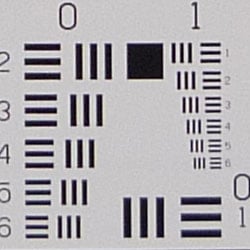


The Panasonic Lumix DMC-FX35 produced very soft corners of the frame at full wide angle and telephoto, with the strongest blurring in the lower corners. Blurring is noticeable in some of the DMC-FX35's images.
Viewfinder
Coverage
Very good accuracy from the DMC-FX35's LCD monitor.


The Panasonic Lumix DMC-FX35's LCD monitor showed about 101% coverage accuracy at wide angle, and about 100% at telephoto. Excellent results!
The images above were taken from our standardized test shots. For a collection of more pictorial photos, see our Panasonic Lumix DMC-FX35 Photo Gallery .
Exposure
Panasonic FX35 Exposure
Color
Saturation & Hue Accuracy
Generally good overall color and hue accuracy, with minor oversaturation
of some colors.
 |
| In the diagram above, the squares show the original color, and the circles show the color that the camera captured. More saturated colors are located towards the periphery of the graph. Hue changes as you travel around the center. Thus, hue-accurate, highly saturated colors appear as lines radiating from the center. |
Saturation. The Panasonic Lumix DMC-FX35 oversaturates red and blue tones slightly, but undersaturates bright yellows. This is typical of many consumer models, but we found its colors pleasing on a wide range of subjects. Most consumer digital cameras produce color that's more highly saturated (more intense) than found in the original subjects. This is simply because most people like their color a bit brighter than life.
Skin tones. Here, with the color balanced properly for the light source, the DMC-FX35's skin tones looked pretty good, though just a little pinkish. Where oversaturation is most problematic is on Caucasian skin tones, as it's very easy for these "memory colors" to be seen as too bright, too pink, too yellow, etc.
Hue. The DMC-FX35 showed a few small color shifts relative to the
correct mathematical translation of colors in its subjects, pushing cyan
toward blue, yellow toward green, and orange toward yellow. Still, overall
color looked pretty good across our range of subjects. Hue is "what
color" the color is.

Sensor
Exposure and White Balance
Indoors, incandescent lighting
Nearly accurate color with the Manual white balance setting,
but color casts with the Auto and Incandescent options. Less than average
positive exposure compensation required.


Color balance indoors under incandescent lighting was slightly pinkish in Auto white balance mode, while the Incandescent setting had a very warm cast. Manual mode was the most accurate overall, though it too had hints of magenta. The Panasonic FX35 required a +0.7 EV exposure compensation boost to get a good exposure, which is actually a little less than average for this shot. Overall color with the Manual white balance setting is good, though the blue flowers are dark and purplish. (Many digital cameras reproduce these flowers with a dark, purplish tint, so the DMC-FX35 struggled a bit here.) Our test lighting for this shot is a mixture of 60 and 100 watt household incandescent bulbs, a pretty yellow light source, but a very common one in typical home settings here in the U.S.
Outdoors, daylight
Good overall color and exposure, though high contrast limits shadow
and highlight detail.

Outdoors, the Panasonic Lumix FX35 performed fairly well, with good overall exposure, though contrast is high. Highlights are a bit hot, with lost detail, and the shadows also hold onto only the strongest detail. Some losses in shadow detail are also due to a small some noise artifacts as well as some noise suppression. The Panasonic FX35 also has an Intelligent Exposure mode, but we didn't see a strong difference in exposure here.
See full set of test images with explanations
See thumbnails of all test and gallery images
Resolution
High resolution, 1,500 ~ 1,600 lines of strong detail.


Our laboratory resolution chart revealed sharp, distinct line patterns down to about 1,600 lines per picture height horizontally, and to about 1,500 lines vertically. Extinction didn't really occur, though lines began to merge around 2,000 lines. Use these numbers to compare with other cameras of similar resolution, or use them to see just what higher resolution can mean in terms of potential detail.
See full set of test images with explanations
See thumbnails of all test and gallery images
Sharpness & Detail
Fairly sharp images overall, with only minor edge-enhancement on high-contrast subjects. Noise suppression limits detail in the shadows.


Sharpness. The Panasonic Lumix DMC-FX35's detail would probably be better were it not for the significant amount noise and noise suppression, even the lowest ISO setting. Slight enhancement artifacts are visible on high-contrast subjects such as the crop above left. Edge enhancement creates the illusion of sharpness by enhancing colors and tones right at the edge of a rapid transition in color or tone.
Detail. The crop above right shows fairly high noise and noise suppression, with darker areas of Marti's hair showing limited detail. Individual strands merge together in the medium shadows. Noise-suppression systems in digital cameras tend to flatten-out detail in areas of subtle contrast. The effects can often be seen in shots of human hair, where the individual strands are lost and an almost "watercolor" look appears.
ISO & Noise Performance
Moderate to moderately high noise at the normal sensitivity settings,
with very high noise and blurry details at the highest settings.
 |
 |
 |
| ISO 100 | ISO 200 | ISO 400 |
 |
 |
ISO 800 | ISO 1,600 |
Noise levels and efforts to suppress noise are quite evident at the Panasonic FX35's lower sensitivity settings, with much higher noise at ISO 400 and up. Even at ISO 200, we can see some fairly obvious noise reduction artifacts, such as blurred detail. At ISO 400, a strong grain pattern appears, and it only gets worse from there. At ISOs 800 and 1,600, the grain pattern becomes progressively stronger, with a shift in overall color as well. Because ISO 3,200 and 6,400 are reduced resolution modes, we did not test them, but judging by the ISO 1,600's printed performance, the results are unlikely to produce a better 4x6-inch print.
Extremes: Sunlit and low light tests
High resolution with strong overall detail, but high contrast and limited shadow detail. Not very good low-light performance, only capable of capturing bright images under average city street lighting at the higher ISOs, though special scene modes do allow for longer exposures.


Sunlight. The Panasonic Lumix FX35 had some difficulty dealing with the deliberately harsh lighting in the test above, producing high contrast with washed-out highlights and deep shadows. Shadow detail is limited, with the smudged detail from noise suppression. The camera required about average compensation to get proper exposure of skin tones, at +0.3 EV, but unfortunately blows the detail in the shirt. The camera's Intelligent Exposure mode made some effort to even out the exposure, but contrast remained high. Be sure to use fill flash in situations like the one shown above; it's better to shoot in the shade when possible.
Because digital cameras are more like slide film than negative film (in that they tend to have a more limited tonal range), we test them in the harshest situations to see how they handle scenes with bright highlights and dark shadows, as well as what kind of sensitivity they have in low light. The shot above is designed to mimic the very harsh, contrasty effect of direct noonday sunlight, a very tough challenge for most digital cameras. (You can read details of this test here.)
| 1 fc 11 lux |
1/2 fc 5.5 lux |
1/4 fc 2.7 lux |
1/8 fc 1.3 lux |
1/16 fc 0.67 lux |
|
|---|---|---|---|---|---|
| ISO 100 |
 1 sec f2.8 |
 1 sec f2.8 |
 1 sec f2.8 |
 1 sec f2.8 |
 1 sec f2.8 |
| ISO 200 |
 0.8 sec f2.8 |
 1 sec f2.8 |
 1 sec f2.8 |
 1 sec f2.8 |
 1 sec f2.8 |
| ISO 400 |
 0.4 sec f2.8 |
 0.8 sec f2.8 |
 1 sec f2.8 |
 1 sec f2.8 |
 1 sec f2.8 |
| ISO 800 |
 1/5 sec f2.8 |
 0.4 sec f2.8 |
 0.6 sec f2.8 |
 1 sec f2.8 |
 1 sec f2.8 |
| ISO 1600 |
 1/10 sec f2.8 |
 1/5 sec f2.8 |
 0.3 sec f2.8 |
 1 sec f2.8 |
 1 sec f2.8 |
Low light. The Panasonic Lumix DMC-FX35 had some trouble in low lighting, as the camera captured a dim exposure even at the brightest light level we test at ISO 100. Increasing sensitivity provides brighter exposures, but noise levels rise as well. There are some scene modes such as "Starry Sky" that allow exposures up to 60 seconds at low ISO, but we didn't test those. Color balance is a little cool and magenta with the Auto white balance setting. The camera's autofocus system worked well however, as it was able to focus on the subject almost down to the 1/16 foot-candle light level unassisted, and down to the darkest light level with the AF assist enabled. (A useful trick is to just prop the camera on a convenient surface, and use its self-timer to release the shutter. This avoids any jiggling from your finger pressing the shutter button, and can work quite well when you don't have a tripod handy.)
How bright is this? The one foot-candle light level that this test begins at roughly corresponds to the brightness of typical city street-lighting at night. Cameras performing well at that level should be able to snap good-looking photos of street-lit scenes.
NOTE: This low light test is conducted with a stationary subject, and the camera mounted on a sturdy tripod. Most digital cameras will fail miserably when faced with a moving subject in dim lighting. (For example, a child's ballet recital or a holiday pageant in a gymnasium.) For such applications, you may have better luck with a digital SLR camera, but even there, you'll likely need to set the focus manually. For information and reviews on digital SLRs, refer to our SLR review index page.
Flash
Coverage and Range
A dim flash at close range, and not much of a match for the camera's 4x optical zoom. Our standard shots required higher-than-average exposure compensation.


Coverage. Flash coverage was very uneven at wide angle, with dark falloff in the corners and at the edges of the frame. At full telephoto, coverage was again uneven and dim. In the Indoor test, the DMC-FX35's flash underexposed our subject quite a bit at its default setting, requiring a +1.3 EV exposure compensation adjustment to get reasonably bright results. The camera's Slow-Sync flash mode produced slightly brighter results, though with a very strong orange cast from the room lighting.
| Flash Range: Wide Angle | |||||
|---|---|---|---|---|---|
| 6 ft | 7 ft | 8 ft | 9 ft | 10 ft | 11 ft |
 1/30 sec f2.8 ISO 100 |
 1/30 sec f2.8 ISO 100 |
 1/30 sec f2.8 ISO 100 |
 1/30 sec f2.8 ISO 100 |
 1/30 sec f2.8 ISO 100 |
 1/30 sec f2.8 ISO 100 |
| 12 ft | 13 ft | 14 ft | 15 ft | 16 ft | |
 1/30 sec f2.8 ISO 100 |
 1/30 sec f2.8 ISO 100 |
 1/30 sec f2.8 ISO 100 |
 1/30 sec f2.8 ISO 100 |
 1/30 sec f2.8 ISO 100 |
|
| Flash Range: Telephoto | |||||
|---|---|---|---|---|---|
| 6 ft | 7 ft | 8 ft | 9 ft | 10 ft | 11 ft |
 1/60 sec f5.6 ISO 100 |
 1/60 sec f5.6 ISO 100 |
 1/60 sec f5.6 ISO 100 |
 1/60 sec f5.6 ISO 100 |
 1/60 sec f5.6 ISO 100 |
 1/60 sec f5.6 ISO 100 |
| 12 ft | 13 ft | 14 ft | 15 ft | 16 ft | |
 1/60 sec f5.6 ISO 100 |
 1/60 sec f5.6 ISO 100 |
 1/60 sec f5.6 ISO 100 |
 1/60 sec f5.6 ISO 100 |
 1/60 sec f5.6 ISO 100 |
|
ISO 100 Range. At wide angle, flash shots at ISO 100 began decreasing in brightness at 7 feet. At full telephoto and ISO 100, the target at 6 feet was already dim, and brightness decreased from there.
| Manufacturer-Specified Flash Range | |
|---|---|
| Wide Angle | Telephoto |
 19.7 feet Auto ISO 200 |
 9.8 feet Auto ISO 400 |
Manufacturer Specified Flash Test. In the shots above, the DMC-FX35's flash falls just slightly short of Panasonic's expectations, producing slightly dim exposures at the rated distance with its ISO set to Auto (which selected ISO 200 and 400). Our standard test method for flash range uses a fixed setting of ISO 100, to provide a fair basis of comparison between cameras. We've now also begun shooting two shots using the manufacturer-specified camera settings, at the range the company claims for the camera, to assess the validity of the specific claims.
Output Quality
Print Quality
Good print quality, good color, sharp 11x14 inch prints. ISO 400 images are soft but usable at 8x10, ISO 800 shots are still good at 8x10.
 The Panasonic Lumix DMC-FX35 had enough resolution to make good looking 11x14-inch prints, though with soft corners at all zoom ranges. 13x19-inch prints were reasonable, but appeared soft and stippled. ISO 200 shots at 11x14 were softer, but still usable; naturally they were better at 8x10. ISO 400 shots are good at 8x10, with only slight luminance noise in the shadows. ISO 800 shots are too soft at 8x10, but mostly usable at 5x7. Subtle detail is lost even at this size, thanks to noise suppression. ISO 1,600 shots are pretty muddled at 5x7, and don't improve much at 4x6; still, printed results at this setting will probably be acceptable to most users.
Overall printed performance is average, but not quite up to the standard of other pocket 10-megapixel digital cameras.
Testing hundreds of digital cameras, we've found that you can only tell just so much about a camera's image quality by viewing its images on-screen. Ultimately, there's no substitute for printing a lot of images and examining them closely. For this reason, we now routinely print sample images from the cameras we test on our Canon i9900 studio printer, and on the Canon iP5200 here in the office. (See the Canon i9900 review for details on that model.)
The images above were taken from our standardized test shots. For a collection of more pictorial photos, see our Panasonic Lumix DMC-FX35 Photo Gallery .
Not sure which camera to buy? Let your eyes be the ultimate judge! Visit our Comparometer(tm) to compare images from the Panasonic Lumix DMC-FX35 with those from other cameras you may be considering. The proof is in the pictures, so let your own eyes decide which you like best!