


Overview
Canon PowerShot SX110 IS Overview
by Mike Pasini and
Stephanie Boozer
Review Date: 02/18/09
Packing a 10x zoom lens into a surprisingly compact body, the Canon SX100IS was a very popular model in last year's long-zoom sweepstakes. This year, Canon has updated the design with a 9 megapixel sensor (up from 8 megapixels) and larger 3 inch LCD (up from 2.5 inches). The result is the new Canon SX110IS, selling for the same MSRP of $299, despite the upgrades. Read on below for more details about the Canon SX110IS.
As was the case with its predecessor, with dimensions of 4.4 x 2.8 x 1.8 inches (111 x 71 x 45mm) and weighing in at 10.7 ounces (302g) the Canon SX110IS won't fit in your pocket, but if you can live with a camera you have to carry in a pants pocket or purse rather than a shirt pocket, the SX110IS gives you a load of features and capability in a surprisingly compact package.
In an age when camera makers are chasing ever-higher megapixel counts, we applaud Canon's restraint with the SX110IS, in going to "only" 9 megapixels on its 1/2.3-inch sensor. This is more than enough resolution for 99% of consumers, and should produce less noise than would a higher-resolution sensor of similar size. Combining its 9-megapixel sensor with a 10x optical zoom lens, the Canon SX110 IS gives you the power to reach out and turn distant subjects into frame-filling images. Long zoom lenses mean it's all the harder to hold the camera steady enough to capture sharp images though. Fortunately, the "IS" in the SX110's name means it incorporates Canon's excellent Image Stabilization technology, letting you snap sharp photos at shutter speeds two to four times slower than you'd be able to hand-hold otherwise.
As digital cameras have become less expensive and more mass-market, there's been an unfortunate dumbing down of camera controls. As one result, it's becoming increasingly difficult to find compact (non-SLR) cameras that give you options for shutter-priority, aperture-priority and full manual exposure control. The Canon SX110IS offers all that and more, yet remains entirely accessible for novice users with its full auto and multiple scene modes. In fact, a new "Easy Mode" makes the camera even simpler to use: Literally a "you push the button, the camera does the rest" experience suited for complete beginners. An enhanced iSAPS (intelligent Scene Analysis based on Photographic Space) exposure system compares scenes the camera sees through its lens with an enormous database of reference scenes stored in its memory, to determine the best exposure for a wide range of conditions.
The Canon PowerShot SX110 IS stores images on Secure Digital or MultiMediaCard media, including the newer (and higher capacity) SDHC types. Images are framed and reviewed on a 3-inch color LCD display with 230,000 pixels.
The Canon SX110IS's 10x optical zoom lens covers a broad range equivalent to 36-360mm on a 35mm camera -- a moderate wide angle to a pretty substantial telephoto. The lens is also faster than many, with a maximum aperture ranging from f/2.8 at the wide angle end to f/4.3 at the telephoto end of its range.
 With a lens offering this kind of telephoto power, camera shake can become a real problem, so Canon added a true optical image stabilizer, which works to correct camera shake by moving lens elements to counteract the motion. Three modes are available: one that operates continually while framing images, another that saves a little battery by only operating during exposure, and a final mode that optimizes the anti-shake algorithms to cope with stabilizing panning shots. Canon claims up to three stops of stabilization, meaning that you can shoot at shutter speeds 8 times slower than what you would otherwise be able to hand-hold, and still get sharp results.
Canon's implementation of face detection is included, and capable of detecting up to nine faces in a scene. The camera can automatically prioritize which face to focus on, and the face detection functionality is also linked to the ambient exposure, flash exposure and white balance systems to ensure correct metering of portraits as well; if you prefer, face detection can be turned off altogether and center AF used instead. When focusing in dim light, a very bright orange LED provides for AF-assist. For the more experienced photographer, there's a wide range of adjustments and customizations on hand, including a range of ISO sensitivities (from 80 to 1,600 equivalent), metering modes, autoexposure and flash exposure locks, flash output control, white balance options, and adjustable image sharpness, contrast, and color options.
The Canon SX110IS offers eleven preset shooting modes, of which five have their own positions on the Mode dial, while the remainder are accessed through a special Scene position. These scene modes make it easier for beginners to tailor the camera's settings to their intent without really needing to understand them, and the modes on offer include Portrait, Landscape, Night Snapshot, Kids&Pets, Night Scene, Indoor, Foliage, Snow, Beach, Fireworks, and Aquarium.
Like its predecessor the SX100, the Canon SX110IS runs on a pair of AA batteries, either alkaline, lithium, or NiMH rechargeables. Depending on your perspective, this could be considered either a plus or a minus. On the one hand, you won't get the kind of battery life you could from a custom lithium-ion battery pack, but on the other hand, you're much less likely to run out of juice in some remote location: AA batteries can be found most anywhere, and the Energizer Lithium AA cells can be tucked in your camera back as an insurance policy, because they have almost zero self-discharge and so will remain fresh for years. And for low battery cost, nothing compares to a couple of sets of high-capacity NiMH rechargeable batteries and a good-quality charter.
Retail list pricing for the Canon PowerShot SX110 IS was set at US$299, but as of November, 2008, reputable retailers were offering it at prices as low as $205. One testimony to the popularity of this camera line is that the previous SX100IS was almost entirely sold out from the marketplace by the time the SX110IS was announced: So, if you're interested in buying a Canon SX110IS, you'd better not wait, this looks like another big winner for Canon.
Canon SX110 IS User Report
by Mike Pasini
Intro. The X in SX must stand for Exceptional. The first exceptional thing about the SX110 IS is its price. At about $240, you expect to give up a few things, but I can't find any. The SX110 IS gives you full manual control plus Scene modes for its 10x optical zoom with optical image stabilization and a 9.0 megapixel CCD. The flash even pops up to reduce red-eye.
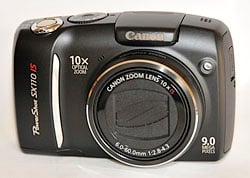
Front. An asymmetrical design.
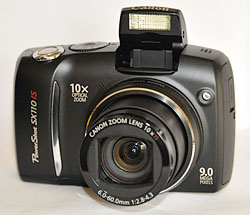
Open. Long zoom and popup flash.
I usually feel very uncomfortable when I write about inexpensive digicams because often the price is the only standout feature. If only, I try to whisper, you can save up another fifty or a hundred dollars, you won't have to live with this or that limitation.
I'm not uncomfortable writing about the SX110 IS. It's a model for others to emulate. You get the goods without giving up the farm.
Design. The prior model wasn't a lot different from the SX110 IS, but the SX100 IS was symmetrical with a nice bump on top following the lines of the large lens. The SX110 IS is not symmetrical. The bump rises slowly from the right side and drops off abruptly on the left.
You won't be bothered by that much, though, because the gorgeous 3.0 inch LCD will capture your attention. You thought a camera this inexpensive would come with just a 2.5 inch LCD, probably, or just 110K pixels. But Canon delivers a big LCD with high resolution.
That contributes to the one thing about the Canon SX110 that may give you pause. It's not a small camera. Canon has a long standing habit of building small cameras a little large. The flagship G10 is a good example, as was the G9 before it. And the SX110, like the SX100 before it, shows no effort to miniaturize. If you want small, buy an ELPH. But you'll give up a lot of things with an ELPH when compared to the Canon SX110.
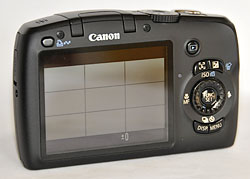
Back. Very nicely sculpted around the big LCD.
This is a plastic body with smooth surfaces. Some people may consequently find the grip a little slippery. There's a nicely sculpted thumb grip on the back and a good chrome-accented ledge on the front for your other fingers. It never slipped from my hands.
It does have a healthy heft, but I wouldn't describe it as heavy. The featherweights often shake when you press the Shutter but that's not a problem on the Canon SX110.
One peculiar aspect of the body design is the location of the CR1220 battery that keeps the clock ticking when you pop out the main battery. It's on the left side of the camera in a little drawer that's hard to pull out evenly. And when you do, you lose the time. This drawer is usually hidden in the battery compartment and not quite so tempting.
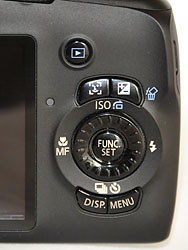
Controls. The dial spins.
The control layout is pretty standard, abandoning the row of buttons below the LCD on the SX100 (there isn't room any more) for positions around the navigator. The Mode dial is large and easily thumbed from the back. The Shutter button ringed with the Zoom control is also quite large and easy to find. Only the Power button, a small rectangular inset behind the Shutter button could use further thought.
The LCD is your viewfinder and even holds up pretty well in sunlight. It does show fingermarks (blame the antiglare surface) but they're easy to wipe away.
The lens remains the big draw on the Canon SX110. Once you've used a camera with a 10x optical range, you'll feel hemmed in by cameras with 5x and 3x zooms. It's just astonishing you get 10x on a camera at this price. And when you think Canon has included its optical image stabilization, too, you just have to shake your head.
Interface. Moving the buttons from under the LCD to around the navigator turn the SX110 into a one-handed camera, although you'll use two for stability. But, as with any digicam, the interface on the SX110 is half buttons and half menus.
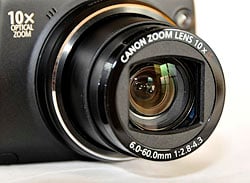
Lens. 10x zoom with optical image stabilization.
As far as the buttons go, their use should be fairly familiar to any Canon owner. Canon always has to change the function of at least one button on every model, but the usual hierarchy is intact. The Menu button brings up the major settings in tabs (Playback mode, for example, has a tab for its settings, another for Print function and the Setup tab). The Function/Set button brings up more frequently used options for the mode you're in (in Record mode, for example, that's where you set the image size and quality, white balance and more). And finally the buttons themselves handle the most used functions (EV, for example, is on one of them).
This works well, although I continually shake my head at the shell game Canon plays moving functions from the menu system to the buttons. But once you get the idea and learn where you're favorites are, you don't forget.
Buttons are the most direct way to do anything, and the Canon SX110 makes good use of them.
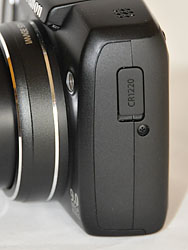
Left Side. The clock battery drawer is temptingly available. Resist.
Around the Function/Set button is the Control dial. You can press the top, bottom, left, and right sides of the navigator to move upward, downward, left, and right where necessary. But Up also sets ISO in Record mode and rotates the image in Playback. Down cycles through the shutter release modes. Left cycles through the focusing modes and Right through the Flash modes.
But the Control dial also spins, speeding navigation. It's most useful when the Mode dial is set to Scene. Then any spin of the Control dial displays the available Scene modes.
Above the Control dial are two buttons, one to toggle Face Detection on and off and the other to set EV. Below the Control dial are two more buttons. One cycles through the Display modes and the other is the Menu button.
That's the basic control configuration, but there are two other buttons on the back panel worth pointing out. Just above the controls is the rather lonely Playback button. It's located pretty close to your thumb, though, making it easy to get into Playback mode to review your shots. Pressing the Playback button again or the Shutter button takes you back to Record.
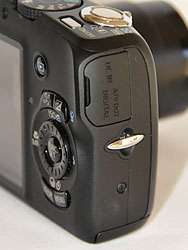
Right Side. Strap tether and auxiliary ports.
The other button of note is the Print/Share button. You can scroll through your images selecting a few to add to the print list or to download when using the camera's Direct Transfer option. In Record mode, you can assign one of six functions to it: White Balance, Custom White Balance, Red-Eye Correction, Teleconverter, Display Overlay (grid), Display Off, or unassigned.
Modes. One of the best things about the Canon SX110 is its inclusion of manual shooting modes, which are often neglected on Canon digicams.
Tv for setting the shutter speed manually, Av for setting the aperture manually, and Manual for setting both shutter speed and aperture manually greatly enhance the camera's value to both beginners and those who know how to get what they want.
The automatic modes include Program AE, Auto, and Easy Shooting. It takes a bit of doing, but in Program AE, if you half-press the Shutter button then press the EV button, you can use the Control dial to change aperture and shutter speed combinations without changing the exposure. That's how Program AE is supposed to work, but Canon rarely lets you tinker with the suggested exposure.
Auto restricts the Function menu to image size and quality options.
Easy Shooting pretty much locks up the camera, great for handing it off to a child. You can zoom and use the flash (if you raise it) but otherwise, no options.
The Mode dial includes a few Scene modes you might use frequently. Those include Portrait, Landscape, Night Snapshot, Kids&Pets, and Indoor.
Under the Scene menu, which Canon calls Special Scene, are a few additional Scene modes: Foliage, Snow, Beach, Sunset, Fireworks, Aquarium, Night Scene, and ISO 3,200.
Finally, the SX110 offers a Movie mode that can capture 640 x 480 frames at 30 fps, an LP version of that which can capture movies twice as long, and 320 x 240 at 30 fps.
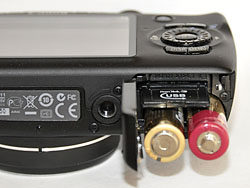
Bottom. SD card and two AA batteries right next to the tripod mount. Note the sculpted thumb grip above the Control dial.
Storage and Battery. The largest image size from the 9-Mp sensor is 3,456 x 2,592 pixels. You can fit about seven of those using superfine compression and 13 using fine compression on the included 32-MB SD card.
That same card will hold only 15 seconds of the highest movie quality. But a 2GB card will hold 16 min. 47 sec.
Because the Canon SX110 is powered by AA batteries, you have a choice of technologies. Single use lithiums provide the most power but are not rechargeable. Still they make a good choice if you shoot mainly on holidays and rarely any other time. The alkalines included with the camera are the least powerful option, rating just 140 shots using CIPA test methods (which take quite a few flash shots). Between those extremes, but closer to the lithiums, are rechargeable Ni-MH batteries. Those rated 400 shots using CIPA test methods.
Performance. The Canon SX110 straddles two classes of digicams. With its 10x zoom, it's a long zoom. But with its user-friendly features and price, it's also an entry-level camera.
Among long zooms, its performance is about average on our most important categories. While startup was average at 2.8 seconds as the long lens extrudes, shutdown was better average at 1.7 second. If you're scoring this as an entry-level camera, make those both average.


Combined autofocus lag (both at wide angle and telephoto) was about average at 0.595 second in either class. Prefocus lag (with the Shutter button pressed halfway down before taking the picture) was average at 0.075 second for a long zoom but above average for an entry-level camera. That's rather quick, however you look at it.
Continuous mode cycle time for large/superfine images was below average 0.89 second, or 1.12 frames-per-second.
Flash cycling was below average in both classes at 10.8 seconds. That usually indicates a powerful flash. That, in fact, is the case with the Canon SX110. Our ISO 100 flash tests were well illuminated to about 9 or 10 feet. That's unusual for an entry-level camera.
Download speed was 4,004 Kbytes/s, very fast indeed at USB 2.0 Hi-Speed rates. That's about average among long zooms but above average on entry level digicams.
In either class, the 3.0-inch LCD ranks above average.
Optical zoom at 10x is only average for a long zoom, if above average on an entry-level camera.
And, on the other side of the coin, the Canon SX110's weight is a bit heavy for an entry-level digicam while very light for a long zoom.


Zoom Range. 36mm to 360mm to 4x digital zoom.
Image Quality. Informally looking at our first shots with the Canon SX110, I liked the image quality. Of course, I've yet to see a flawless lens, so I was curious what our lab tests revealed.
A peek at the Still Life ISO 100 image confirmed our initial impressions. The hanging yarns look pretty good, with even a little detail in the white yarn on the right. The proportional scale below them is pretty sharp, too, without any of the artifacts I usually see.
The dark coffee mug and the white napkin under it keep to themselves, although you can see a hint of chromatic aberration on the edge of the coffee cup as it bleeds into the wall and the edge of the dark napkin along the table.
The Hellas label looks very good, as does the white Samuel Smith label, which doesn't bloom into the dark glass of the bottle.
The crayons look natural and I can even see some salt crystals in the white salt mill.
The Multi Target test shot clearly shows several bright pixels of chromatic aberration in the corners and they extend into the image more than usual. But this is a 10x zoom, after all.
The horizontal and vertical resolution targets at the center of the image look very good to at least 1,500 lines.
The Gallery shots were taken under a variety of conditions. Indoors with natural light (even the very dim light of dusk) and outdoors in both sunlight and overcast skies.
The first observation we'll make is that the Canon SX110 delivered the detail. You can see this on the outdoor white hydrangea as well as the dried one indoors. But you can also see it on the two lemons, whose skin is just luscious. Those images ranged in ISO from 75 to 400.
While the indoor hydrangea at ISO 400 clearly shows color noise, it still retains the detail of the veined petals. A little post-processing with Noiseware and I was easily able to clear this up.

Sunset. Somewhat oversaturated in Scene mode.
The worst example of the noise issue, however, is easily the orchid taken at dusk. You can see the sunset pictures taken at the same time. That was the available light. I shot the image at ISO 1,600 and it's so grainy that you might be forgiven for thinking it's a Seurat pointillist painting.
Still, it's a remarkable shot. There was almost no light, although you can see the strong shadows the petals cast on each other. And it was taken in Macro mode. I did rely on Manual mode to open the lens up to f/2.8 and fix the Shutter speed at 1/15 second, which I thought I could hand hold with image stabilization. That's not possible with an automatic entry-level digicam.

Hydrant. A little blooming but highlights are preserved.
The sunset shots, however, are. They were all taken in Scene mode using the Sunset option. Viewing the images in real time on the LCD they all seemed a bit too intense to us. But that's forgivable with sunsets. Looking at them later on the monitor, I didn't feel they were quite so exaggerated. The early blues and later purples are nicely rendered as well as the glowing oranges.
That slight exaggeration of the reds I noticed in the sunset images is clear on the shot of the fire alarm. We've seen it much worse than this, though.

Broadcast Quality Movie. A 20MB file lasting 11 seconds. Digital zoom. (Click to view/download AVI file.)
And the fire hydrant again demonstrates the issue with chromatic aberration. This is really as bad as it gets along the top edges of the hydrant. What's notable about the image to us is how well contained the highlight detail is. I didn't see blown highlights with the SX110 -- and that's unusual.
Digital zoom performed well, too. That cranks the range out to 40x, but usually images start to fall apart, surviving only when resized. But the Canon SX110 did well even at 4x as our zoom range shots show.
But at just 10x it did remarkably well, too. The shot down Market St. is notable for the clear display of the time on the Ferry Building. You don't get that kind of detail from ultracompact digicams.
Appraisal. Usually when I say a camera is a bargain, I am highlighting the only good thing about it. Bargains usually represent technical trade-offs. But not in this case. The SX110 is a bargain by any standard. Yet it delivers above average performance whether you measure it against other long zooms or other entry-level cameras. I was happy with the image quality, too, taking successful shots under a variety of conditions, relying on both the full manual control as well as the Scene modes to do it.
Canon SX110 IS Basic Features
- 9.0 megapixel, 1/2.3-inch CCD sensor
- 10x optical zoom (36-360mm 35mm equivalent) with 4x digital zoom
- 3.0 inch LCD with 230,000 pixels
- ISO sensitivity from 80 to 3,200
- Shutter Speeds from 15 to 1/2,500 second
- Maximum aperture of f/2.8 at wide angle and f/4.3 at telephoto
- Support for SDHC/SD/MMC/MMC+/HC MMC+ memory cards
- Powered by two AA batteries
Canon SX110 IS Special Features
- Optical image stabilization
- DIGIC III image processor with Canon face detection technology
- Full manual shooting options plus a wide range of Scene modes
- My Colors photo effects
- Available in silver or black
In the Box
The Canon SX110 IS ships with the following items in the box:
- PowerShot SX110 IS body
- Two AA-size alkaline batteries
- SD memory card SDC-32MB
- Wrist strap WS-DC5
- Digital Camera Solution CD-ROM
- USB cable IFC-400PCU
- AV cable AVC-DC400
Recommended Accessories
- Extra NiMH batteries. (Be sure to read our NiMH battery shootout page to see which batteries currently on the market are the best, Dave's review of the Maha C-204W NiMH battery charger, our current favorite, and Mike's look at the latest AA rechargeable technology.)
- Large capacity SD/SDHC memory card
- Small camera case for outdoor and in-bag protection
Canon SX110 IS Conclusion
| Pro: | Con: |
|---|---|
|
|
The Canon SX110 IS manages to pack an optically stabilized 10x zoom lens into a relatively compact body, but its image quality still competes very well with that of full-sized long-zoom cameras. In high ISO shooting, it gives up a little ground to Canon's own SX10 IS, which uses a more powerful version of Canon's DIGIC processor, but the Canon SX110 IS's more compact body is much easier to pack along on outings and trips. Its 9-megapixel sensor may sound modest at a time when some consumer models are sporting 14- and 15-megapixel chips, but trust us: The Canon SX110 IS captures more than enough detail for any size print you're likely to want to make. Auto white balance is excellent, making this a good camera for indoor shooting, as it's able to handle difficult household incandescent lighting. Highly versatile; offering anything from fully automatic to fully manual exposure, the Canon SX110IS would make a great family camera, as it can easily accommodate the interests of everyone from first-time beginners to experienced enthusiasts. A great, all-around digicam. The Canon SX110IS was an easy Dave's Pick.
Optics
Canon PowerShot SX110 IS Optics
Lens
Zoom
A very generous 10x optical zoom lens with good performance. Digital
zoom performance is better than average.


The Canon PowerShot SX110 IS' optical zoom range covers the equivalent of a 36-360mm zoom on a 35mm camera, a much larger range than most consumer digital cameras offer. Performance at full wide angle is good, hardly noticeable blurring in the corners of the frame and a low level of coma distortion. Details are fairly sharp, with good definition in the foliage. At full telephoto, fine detail is better defined. Some chromatic aberration is visible on the high contrast areas of the house trim, and a small amount of softening in the corners is noticeable in the brick pattern. The camera's 4x digital zoom performs well also, preserving a lot of fine detail in the foliage and window trim despite losses in resolution. Overall, good results.
Macro
A slightly smaller than average macro area, with good detail. The close
shooting range cuts down the flash power, but results are still usable.


The Canon PowerShot SX110 IS' macro setting captured a small minimum area measuring 1.09 x 0.82 inches (28 x 21 millimeters). Detail and resolution are very good in the printed details of the dollar bill, though the coin and brooch are too close for proper focusing. The uneven exposure that results from the very close shooting range creates a strong hot spot along the left side of the frame, making it difficult to tell if any softening is occurring. (Most cameras have some softening in the corners in macro mode.) The PowerShot SX110 IS' flash actually performed fairly well considering the extremely close shooting range. Though the overall image is dim and uneven, the image doesn't have strong hot spots.
Geometric Distortion
Higher than average barrel distortion at wide angle, though fairly low
pincushion at telephoto.
| Barrel distortion at 36mm eq. is 0.9% |
 |
| Pincushion at 360mm eq. is less than 0.1% |
 |
The Canon PowerShot SX110 IS' 0.9% barrel distortion at wide angle is a little higher than average compared to the most consumer digital cameras, and noticeable in its full wide angle images. At the telephoto end, the PowerShot SX110 IS' 0.1% pincushion distortion is fairly low. Distortion is the tendency for the lens to bend straight lines outward (like a barrel -- usually at wide angle) or inward (like a pincushion -- usually at telephoto).
Chromatic Aberration
Moderately high distortion at wide angle and telephoto, with bright pixels.
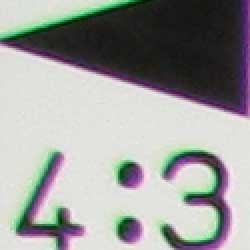
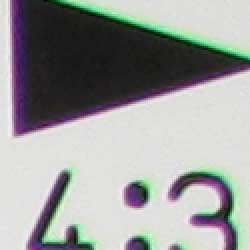
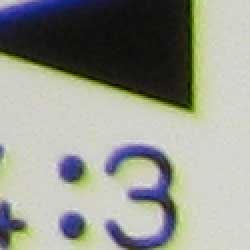
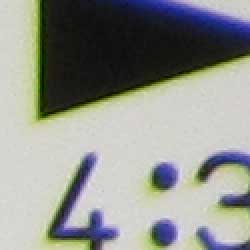
Chromatic aberration is fairly high at both wide angle and telephoto lens settings, with bright pixels of coloration on both sides of the target lines. At wide angle, pixels are brighter in terms of stronger pink and green tones, while the effect at telephoto shows stronger yellow and blue pixels. This effect is noticeable in several of the Canon PowerShot SX110 IS' high contrast images. Chromatic aberration is a form of distortion visible as a slight colored fringe around the objects at the edges of the field of view on the resolution target.
Corner Sharpness
A small amount of blurring in the corners of the frame at wide angle
and telephoto, though the effect doesn't extend very far from the corners.
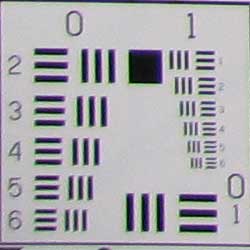
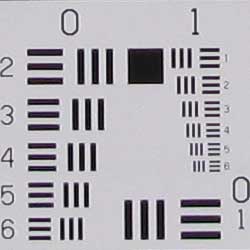
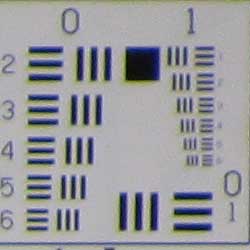
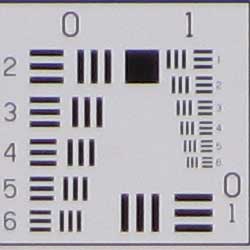
The Canon PowerShot SX110 IS produced slightly soft corners of the frame at full wide angle, though results are actually a little better than average. At full telephoto, softening in the corners was slightly stronger, but still not too bad.
Viewfinder
Coverage
Very good accuracy from the LCD monitor.


The Canon PowerShot SX110 IS' LCD monitor showed about 102% coverage accuracy at wide angle, and about 100% at telephoto. Great results!
The images above were taken from our standardized test shots. For a collection of more pictorial photos, see our Canon PowerShot SX110 IS Photo Gallery .
Exposure
Canon PowerShot SX110 IS Exposure
Color
Saturation & Hue Accuracy
Some oversaturation in the reds, but overall good saturation and hue
accuracy.
 |
| In the diagram above, the squares show the original color, and the circles show the color that the camera captured. More saturated colors are located towards the periphery of the graph. Hue changes as you travel around the center. Thus, hue-accurate, highly saturated colors appear as lines radiating from the center. |
Saturation. The Canon PowerShot SX110 IS oversaturates strong reds more than anything else, which is fairly common among consumer digital cameras. Yellows and greens are actually just about right, and blues are fairly close as well. Most consumer digital cameras produce color that's more highly saturated (more intense) than found in the original subjects. This is simply because most people like their color a bit brighter than life.
Skin tones. Here, with the color balanced properly for the light source, the PowerShot SX110 IS' Caucasian skin tones had a slight pink cast, while darker skin tones were pushed toward yellow. However, performance here is still pleasing. Where oversaturation is most problematic is on Caucasian skin tones, as it's very easy for these "memory colors" to be seen as too bright, too pink, too yellow, etc.
Hue. The Canon PowerShot SX110 IS showed a few small color shifts
relative to the correct mathematical translation of colors in its subjects,
most notably pushing cyan toward blue. The camera pushed some orange tones
toward yellow, and some yellows toward green, but overall hue accuracy was
quite good. Hue is "what color" the color is.


Sensor
Exposure and White Balance
Indoors, incandescent lighting
Best color with Manual white balance, slightly more than average
positive exposure compensation required.


Color balance indoors under incandescent lighting was a hint red in Auto white balance mode, while the Incandescent setting produced a very strong pink cast. Manual mode produced the most accurate overall color. The Canon PowerShot SX110 IS required a +0.7 EV exposure compensation boost to get a bright exposure, which is higher than average. Our test lighting for this shot is a mixture of 60 and 100 watt household incandescent bulbs, a pretty yellow light source, but a very common one in typical home settings here in the U.S.
Outdoors, daylight
Generally good color and exposure outdoors.

Outdoors, the Canon PowerShot SX110 IS handled harsh lighting pretty well, though contrast is pretty high. Shadow detail is limited, showing the effects of noise grain and noise suppression. Highlights are also pretty hot. Overall color looks good, however, though the strong reds in the portrait shot are quite bright. The PowerShot SX110 IS does have an adjustable contrast setting, which helps tone down high contrast images like these without too heavy a hand.
See full set of test images with explanations
See thumbnails of all test and gallery images
Resolution
High resolution, 1,500 - 1,600 lines of strong detail.

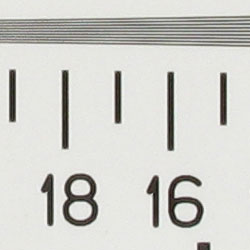
Our laboratory resolution chart revealed sharp, distinct line patterns down to about 1,500-1,600 lines per picture height in both directions. While lines are distinguishable here, they aren't overly clear. Extinction began just a hair before 2,000 lines. Use these numbers to compare with other cameras of similar resolution, or use them to see just what higher resolution can mean in terms of potential detail.
See full set of test images with explanations
See thumbnails of all test and gallery images
Sharpness & Detail
Good definition in higher-contrast areas of fine detail, though softer
areas show less distinct definition. Noise suppression is evident in the
shadows.
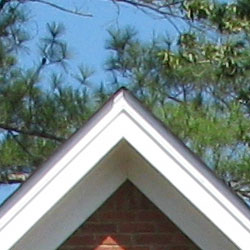

Sharpness. The Canon PowerShot SX110 IS captures a lot of fine detail, with pretty good definition in the more contrasty areas of fine foliage, though the softer foliage (pine needles) is less distinct. In high contrast areas, the camera produces slight enhancement artifacts, such as along the trim in the crop above left. Edge enhancement creates the illusion of sharpness by enhancing colors and tones right at the edge of a rapid transition in color or tone.
Detail. The crop above right shows moderately high noise suppression, with the darker areas of hair showing limited detail. Individual strands become lost as the shadow deepens. Noise-suppression systems in digital cameras tend to flatten-out detail in areas of subtle contrast. The effects can often be seen in shots of human hair, where the individual strands are lost and an almost "watercolor" look appears.
ISO & Noise Performance
Good noise handling at the lower sensitivity settings, though even at
the moderate settings, noise suppression becomes noticeable.






The Canon PowerShot SX110 IS produced little noise at the lower ISO settings, though starting at ISO 200, noise suppression efforts become visible. At ISO 400, noise grain is moderately high, but the camera's attempts to suppress it result in smudged detail. The effect only gets worse at ISO 800, and by 1,600, the image is much too blurry.
Extremes: Sunlit and low light tests
High resolution with strong overall detail, though limited shadow detail
and high contrast. Good low-light performance.


Sunlight. The Canon PowerShot SX110 IS responded to the deliberately harsh lighting in the test above with high contrast. Shadows are quite dark, with limited detail blurred by noise and noise suppression. At +0.7 EV, the highlights on the white shirt are a tad hot, but any lower exposure resulted in too dark of an image overall. As it is, the exposure on the face is still a hint too dim. The Canon PowerShot SX110 IS features an adjustable contrast setting, which makes small adjustments to overall contrast. Though the effect doesn't solve the problem here completely, it does help tone things down. Be sure to use fill flash in situations like the one shown above; and it's better to shoot in the shade when possible.
Because digital cameras are more like slide film than negative film (in that they tend to have a more limited tonal range), we test them in the harshest situations to see how they handle scenes with bright highlights and dark shadows, as well as what kind of sensitivity they have in low light. The shot above is designed to mimic the very harsh, contrasty effect of direct noonday sunlight, a very tough challenge for most digital cameras. (You can read details of this test here.)
| 1 fc 11 lux |
1/2 fc 5.5 lux |
1/4 fc 2.7 lux |
1/8 fc 1.3 lux |
1/16 fc 0.67 lux |
|
|---|---|---|---|---|---|
| ISO 80 |
 2 sec f3.0 |
 4 sec f3.0 |
 8 sec f3.0 |
 16 sec f3.0 |
 16 sec f2.9 |
| ISO 100 |
 1.6 sec f3.0 |
 2.5 sec f2.9 |
 6.3 sec f3.0 |
 12.6 sec f3.0 |
 16 sec f2.9 |
| ISO 200 |
 0.6 sec f2.9 |
 1.2 sec f2.9 |
 3.2 sec f3.0 |
 6.3 sec f3.0 |
 12.6 sec f3.0 |
| ISO 400 |
 0.4 sec f3.0 |
 0.6 sec f2.9 |
 1.6 sec f3.0 |
 3.2 sec f3.0 |
 6.3 sec f3.0 |
| ISO 800 |
 1/6 sec f2.9 |
 0.3 sec f2.9 |
 0.8 sec f3.0 |
 1.6 sec f3.0 |
 3.2 sec f3.0 |
| ISO 1600 |
 1/16 sec f2.9 |
 1/8 sec f2.9 |
 1/4 sec f2.9 |
 0.5 sec f2.9 |
 1 sec f2.9 |
Low light. The Canon PowerShot SX110 IS handled low lighting well, thanks in part to its maximum 16-second exposure time. Images were bright at the lowest light level as low as ISO 200, though you could arguably use the images at ISOs 80 and 100 (the test target is a hair dim, but quite visible). Color balance was cool from the Auto white balance in many shots, mainly those with darker exposures. The camera's AF system was able to focus down to just above the 1/8 foot-candle light level without AF assist enabled, and to total darkness with the AF assist beam.
How bright is this? The one foot-candle light level that this test begins at roughly corresponds to the brightness of typical city street-lighting at night. Cameras performing well at that level should be able to snap good-looking photos of street-lit scenes.
NOTE: This low light test is conducted with a stationary subject, and the camera mounted on a sturdy tripod. Most digital cameras will fail miserably when faced with a moving subject in dim lighting. (For example, a child's ballet recital or a holiday pageant in a gymnasium.) For such applications, you may have better luck with a digital SLR camera, but even there, you'll likely need to set the focus manually. For information and reviews on digital SLRs, refer to our SLR review index page.
Flash
Coverage and Range
Fairly strong flash power at close range, though coverage is slightly
uneven. About average positive exposure compensation required.


Coverage and Exposure. Flash coverage was uneven at wide angle, with dark falloff in the corners of the frame. At full telephoto, the flash was no match for the 10x optical zoom. In the Indoor test, the PowerShot SX110 IS' flash underexposed our subject at its default setting, requiring a boost of +0.3 EV for brighter results. The image is still slightly dim here, but boosting the exposure compensation any higher did not have a strong effect on brightness. The camera's Slow-Sync flash mode produced much brighter and more even results, though with a warm cast from the background lighting. Though results are a bit warm, the Slow-Sync image seems more natural because of the ambient lighting.
| Flash Range: Wide Angle | |||||
|---|---|---|---|---|---|
| 6 ft | 7 ft | 8 ft | 9 ft | 10 ft | 11 ft |
 1/64 sec f2.9 ISO 100 |
 1/64 sec f2.9 ISO 100 |
 1/64 sec f2.9 ISO 100 |
 1/64 sec f2.9 ISO 100 |
 1/64 sec f2.9 ISO 100 |
 1/64 sec f2.9 ISO 100 |
| 12 ft | 13 ft | 14 ft | 15 ft | 16 ft | |
 1/64 sec f2.9 ISO 100 |
 1/64 sec f2.9 ISO 100 |
 1/64 sec f2.9 ISO 100 |
 1/64 sec f2.9 ISO 100 |
 1/64 sec f2.9 ISO 100 |
|
| Flash Range: Telephoto | |||||
|---|---|---|---|---|---|
| 6 ft | 7 ft | 8 ft | 9 ft | 10 ft | 11 ft |
 1/64 sec f4.4 ISO 100 |
 1/64 sec f4.4 ISO 100 |
 1/64 sec f4.4 ISO 100 |
 1/64 sec f4.4 ISO 100 |
 1/64 sec f4.4 ISO 100 |
 1/64 sec f4.4 ISO 100 |
| 12 ft | 13 ft | 14 ft | 15 ft | 16 ft | |
 1/64 sec f4.4 ISO 100 |
 1/64 sec f4.4 ISO 100 |
 1/64 sec f4.4 ISO 100 |
 1/64 sec f4.4 ISO 100 |
 1/64 sec f4.4 ISO 100 |
|
ISO 100 Range. At wide angle and ISO 100, flash intensity began to decrease slightly from about 9 feet on. At telephoto, flash power maintained the same intensity to about 7 feet, decreasing in brightness at 8 feet and beyond.
| Manufacturer-Specified Flash Range | |
|---|---|
| Wide Angle | Telephoto |
 9.8 feet Auto ISO 200 |
 6.6 feet Auto ISO 200 |
Manufacturer Specified Flash Test. In the shots above, the PowerShot SX110 IS performs close to Canon's assertions, though it had to raise the sensitivity slightly at both wide angle and telephoto settings. Our standard test method for flash range uses a fixed setting of ISO 100, to provide a fair basis of comparison between cameras. We've now also begun shooting two shots using the manufacturer-specified camera settings, at the range the company claims for the camera, to assess the validity of the specific claims.
Output Quality
Print Quality
Very good print quality at 16x20 inches. ISO 400 images are soft but usable at 8x10, ISO 800 shots are better at 5x7.
 With loads of detail, ISO 100 and 200 shots from the Canon PowerShot SX110 make nice-looking 16x20 inch prints, suitable for wall or table display. At 11x14-inch sizes, they'll stand up to close inspection very well. The limitations are felt more at higher ISO settings: ISO 400 is about the limit for good-looking 8x10-inch prints, ISO 800 for 5x7-inch prints. ISO 1,600 shots are grainy but usable at 4x6 inches.
Overall, a pretty good performance from the Canon SX110 IS.
Testing hundreds of digital cameras, we've found that you can only tell just so much about a camera's image quality by viewing its images on-screen. Ultimately, there's no substitute for printing a lot of images and examining them closely. For this reason, we now routinely print sample images from the cameras we test on our Canon Pro9000 studio printer, and on the Canon iP5200 here in the office. (See the Canon Pixma Pro9000 review for details on that model.)
The images above were taken from our standardized test shots. For a collection of more pictorial photos, see our Canon PowerShot SX110 IS Photo Gallery .
Not sure which camera to buy? Let your eyes be the ultimate judge! Visit our Comparometer(tm) to compare images from the Canon PowerShot SX110 IS with those from other cameras you may be considering. The proof is in the pictures, so let your own eyes decide which you like best!
Performance
Canon PowerShot SX110 IS Performance
Timing and Performance
Average to slower than average timing.
| Startup/Shutdown |
||
| Power on |
2.8 seconds | Time it takes for LCD to turn on and lens to deploy and capture a picture. |
| Shutdown |
1.7 seconds | How long it takes to retract lens. |
| Buffer clearing time |
2 seconds (2 seconds buffer clearing after LSF JPEG) |
Worst case buffer clearing time. -- This is the delay after a set of shots before you can remove the card. Some cameras won't retract their lenses and shut down until the buffer is cleared. |
Slightly slow startup time, but shutdown is about average. Buffer clearing is average.
| Mode Switching | ||
|---|---|---|
| Play to Record, |
2.6 seconds | Time until first shot is captured. |
| Record to play |
1.2 seconds | Time to display a large/superfine file immediately after capture. |
| Display |
1.0 seconds | Time to display a large/fine file already on the memory card. |
Mode switching times are about average overall, though switching from play to record is a little sluggish.
| Shutter Response (Lag Time) | ||
|---|---|---|
| Full Autofocus Wide |
0.63 second | Time from fully pressing shutter button to image capture, zoom lens at wide angle position. |
| Full Autofocus Tele |
0.56 second | Time from fully pressing shutter button to image capture, zoom lens at telephoto position. |
| Prefocused |
0.075 second | Time to capture, after half-pressing and holding shutter button. |
| Continuous AF |
0.63 second | This mode usually shows no speed increase with our static subject; we have no way to measure performance with moving subjects. |
| Manual Focus |
0.29 second | For most cameras, shutter lag is less in manual focus than autofocus, but usually not as fast as when the camera is "prefocused." |
| Full Autofocus |
0.88 second |
Time to capture while forcing flash to fire. |
Shutter response is about average for a long zoom at both wide angle and telephoto, at 0.63s and 0.56s respectively. Enabling the flash increases shutter lag to 0.88s. "Prefocusing" the camera by half-pressing and holding down the shutter button before the final exposure results in a lag time of 0.075 second, which is pretty fast.
| Cycle Time (shot to shot) | ||
|---|---|---|
| Single Shot mode Large SuperFine JPEG |
2.09 seconds | Time per shot, averaged over 20 shots. |
| Single Shot mode |
2.05 seconds | Time per shot, averaged over 20 shots. |
| Early shutter |
No | Some cameras don't snap another shot if you release and press the shutter too quickly in Single Shot mode, making "No" the preferred answer. |
| Continuous mode |
0.89 second (1.12 frames per second); >20 frames total; 2 seconds to clear |
Time per shot, averaged over buffer length or 20 shots, whichever came first. |
| Continuous mode |
0.75 second (1.33 frames per second); >20 frames total; 0.5 second to clear |
Time per shot, averaged over buffer length or 20 shots, whichever came first. |
| Flash recycling |
10.8 seconds | Flash at maximum output. |
| *Note: Buffer clearing times measured with a SanDisk Extreme III SD memory card. Slower cards will produce correspondingly slower clearing times. Slow cards may also limit length of bursts in continuous mode. ISO sensitivity also affects cycle times and burst mode performance, with higher ISOs generally increasing cycle times and reducing burst performance. |
||
Shot-to-shot cycle times are on the slower side of average, at about 2.09 seconds for large/superfine JPEGs, though the camera does capture frames continuously at this rate. (That is, given a fast enough memory card, it doesn't have to pause every few frames to wait for the card to catch up.) Continuous mode speeds are also a little slower than average at about 1.12 frames per second for large/superfine JPEGs, though the camera can capture more than 20 frames at this rate. Flash recycling time is also on the slower side of average.
| Download Speed | ||
|---|---|---|
| Windows Computer, USB 2.0 |
4,004 KBytes/sec | Typical Values: |
Connected to a computer or printer with USB 2.0, download speeds are very good.
Overall, the Canon PowerShot SX110 IS is on the slower side of average, particularly in areas where it counts, such as shutter lag and cycle time. Continuous mode speeds are fast enough for slower-paced action shots, or for chasing around children, however. Download speeds are good, and some lag times are fair, but overall timing is just a little slow.
Battery and Storage Capacity
Battery
Low battery life for AA cells, but improved performance with NiMH rechargeables.
| Operating Mode | Number of Shots |
|---|---|
| AA alkaline batteries, LCD on |
140 |
| AA NiMH rechargeable
batteries, LCD on |
400 |
The Canon PowerShot SX110 IS uses two AA-type batteries for power, and ships with a set of ordinary alkalines. Because alkaline battery life is short-lived, we strongly recommend you pick up a couple of sets of good-quality NiMH rechargeable batteries and a good-quality charger, as they'll save you many times their cost over the life of the camera.
The table above shows the number of shots the camera is capable of (on a fresh set of disposable batteries), based on Canon's standard test conditions.
(Interested readers can find an English translation of the CIPA DC-002 standards document here. (180K PDF document))
Storage
The Canon PowerShot SX110 IS accepts SDHC/SD/MMC memory cards, and comes with a 32MB starter card.
| Image Capacity with 32 MB SD Card |
Super Fine | Fine | Normal | |
|---|---|---|---|---|
| 3,456
x 2,736 |
Images |
7 |
13 |
27 |
| File Size |
4.0 MB |
2.4 MB |
1.2 MB |
|
| 2,816
x 2,112 |
Images |
11 |
18 |
37 |
| File Size |
2.8 MB |
1.7 MB |
855 KB |
|
| 2,272
x 1,704 |
Images |
15 |
27 |
54 |
|
File Size |
2.1 MB |
1.2 MB |
591 KB |
|
| 1,600
x 1,200 |
Images |
29 |
54 |
102 |
| File Size |
1.1 MB |
591 KB |
312 KB |
|
| 640
x 480 |
Images |
114 |
177 |
278 |
| File Size |
279 KB |
181 KB |
115 KB |
|
We strongly recommend buying a large capacity SDHC/SD memory card. (These days, 4GB is a good trade-off between cost and capacity.)