



Overview

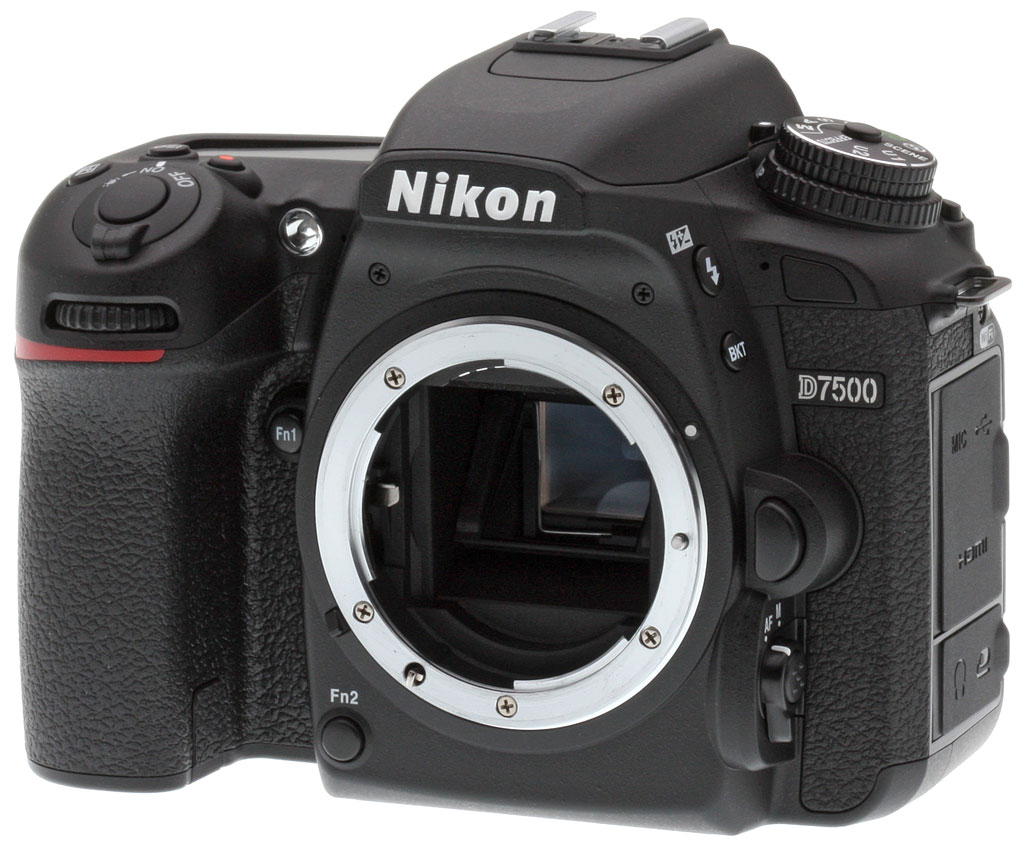
Nikon makes exceptional speed, low-light performance and video features accessible to many more photographers with the D7500. The D7500 borrows numerous features from the D500, including its 20.9-megapixel sensor, EXPEED 5 image processor, metering system and 4K UHD video recording capabilities, all while cutting down on size.
Key Features
- Redesigned monocoque body with improved weather-sealing
- 20.9-megapixel DX CMOS image sensor
- Native ISO range of 100-51,200, expandable to 50-1,640,000
- EXPEED 5 processor
- Continuous shooting up to 8.2 frames per second
- Auto Picture Control
- In-camera batch raw processing
- 4K UHD video recording up to 30p
- Built-in Wi-Fi and Bluetooth
- SnapBridge functionality
- US$1,250 body-only price, just $50 more than the D7200 at launch
Camera body: Smaller & lighter than the D7200 but with new features
The Nikon D7500 has a redesigned body compared to its predecessor's. Gone are the D7200's magnesium-alloy top and rear panels. The D7500's new monocoque carbon fiber composite body has a deeper grip and includes "comprehensive" weather sealing. As a result, the camera is 5% lighter than the D7200 and is also slimmer and a bit shorter. Its dimensions are 5.3 x 4.1 x 2.9 inches (135.5 x 104 x 72.5 millimeters), and it weighs 22.6 ounces (640 grams) body-only. The D7200's dimensions are 5.3 x 4.2 x 3.0 inches (135.5 x 106.5 x 76mm) with a body-only weight of 23.8 oz or 676g.
Looking at the top of the camera, there is a mode dial to the left of the built-in flash and hot shoe. The drive mode dial is underneath the locking mode dial. Speaking of the built-in flash, the flash has a guide number of 39 feet (12 meters) at ISO 100. The camera's max flash sync is 1/250s (up to 1/320s at reduced range) and flash compensation is available for -3 to +1 EV in 1/3 and 1/2 EV increments. Auto FP High-Speed Sync up to 1/8000s is supported with compatible external flash units.

Moving to the right of the built-in flash and viewfinder pentaprism, the D7500 has a slightly rearranged button layout. Like the D500, the D7500 includes all exposure controls within the reach of your right index finger, including dedicated ISO and exposure compensation buttons. There is also a dedicated movie record button on the top of the camera. Adjacent to the buttons is a status display that can be illuminated.
The rear of the D7500 is dominated by its 3.2-inch tilting touchscreen display with about 922,000 dots of resolution. Using the touch capabilities, you can control menus, setup, playback with swiping through images, as well as being able to tap-to-focus in Live View mode. Both its touch and tilt functionality are new additions when compared to its predecessor. To the left of the display are a wide array of buttons, which are very similar to those found on the D7200. The right side of the back of the camera is similar as well, with a lockable directional pad, AE-L/AF-L button and rear command dial above a Live View button and switch. The D7500 swaps the Info button for the 'i' button, which are now on the left and right side of the display respectively.

Like its predecessor, the D7500 includes a pentaprism optical viewfinder with approximately 100% coverage. The viewfinder has 0.94x magnification, which is a 35mm equivalent of 0.63x magnification. Eye relief is 18.5mm and there is a -2.0 to +1.0m-1 diopter adjustment.
Overall, the D7500 body has a refined design that is very similar to the D7200, but its new tilting touchscreen display and relocated ISO button are improvements to overall usability. The D7500 continues to be aimed at enthusiast photographers and appears to be rugged enough for many users.

Shooting Features
As hinted at by its name, the D7500 comes equipped with the same image sensor as last year's flagship DX camera, the Nikon D500. The sensor at the heart of the D7500 is a 20.9-megapixel APS-C CMOS sensor with a focal length multiplier (or "crop factor") of about 1.5x, like other Nikon DX cameras. Distinctly, the 20.9 megapixel count is less than 24.2-megapixel sensor found in its predecessor, the D7200. This marks the first time Nikon has dipped below 24 megapixels in the D7000-series since the original 16-megapixel D7000. So why decrease megapixels? In order to improve high ISO image quality as well as burst performance.

The D7500 offers a native ISO range of 100 to 51,200, which is wider than the D7200 ISO range of 100-25,600. When you extend the ISO, the D7500 widens its lead over its predecessor. The D7500 can extend down to ISO 50 and up to a whopping ISO 1,640,000 equivalent. In contrast, the D7200 offered an extended ISO up to 51,200 and 102,400, but only in black and white modes.
Additional image sensor features include built-in sensor cleaning as well as the lack of an optical low-pass filter, which results in sharp, although more moiré-prone, images (the D7200 also lacked an anti-aliasing filter). There is one difference between the D500 and D7500 in the imaging department: the D500 offers 14-bit or 12-bit uncompressed, lossless compressed and compressed raw shooting in three image sizes: large, medium and small (medium and small always use 12-bit lossless compression) whereas the D7500 only offers large raw files and doesn't include an uncompressed option.

Although the image sensor is new compared to the D7200's, the autofocus system in the D7500 is not. The new DSLR utilizes the same 51-point Advanced Multi-CAM 3500 II DX system as its predecessor. The autofocus system includes 15 cross-type sensors, of which the centermost point is f/8 compatible -- ideal for working with long lenses and teleconverters. The low-light working range of the autofocus system is rated for -3 EV, which is impressive but is 1 EV higher than the D500's autofocus system.
Autofocus modes include dynamic area autofocus (9, 21 or 51 points), single-point AF, 3D-tracking and group-area autofocus. The group area autofocus is a relatively new advancement for Nikon cameras and is found in their pro-oriented models. The mode uses 5 autofocus points for tracking a subject through the frame.

Introduced in the Nikon D5 and D500 last year, Automatic AF Fine Tune comes to the D7500 as well. This feature allows the user to automatically calibrate autofocus for their lenses to help ensure that autofocus performance is accurate. Some lenses require AF micro adjustments, which has traditionally required the user to manually calibrate their lenses, but Auto AF Fine Tune is a much faster process.
Live View autofocus continues to rely on contrast-detect autofocus. The D7500 does allow the user to touch the rear display to move the autofocus point around the entire frame. Live View-exclusive autofocus modes include wide-area AF, normal-area AF, subject-tracking AF and Face-Priority AF in addition to an AF-A mode, which is a full-time servo autofocus drive mode.

Metering is another area where the D7500 borrows from the D500. The D7500 uses the same 180k-pixel RGB metering sensor found in the D500 and D5 DSLRs, whereas the D7200 utilized a 2,016-pixel RGB sensor. The more sophisticated metering sensor in the D7500 helps with subject recognition and AF tracking.
Metering modes include matrix (3D color matrix metering III), center-weighted (75% weight to an 8mm central circle, the size can be changed by the user), spot (centered on the selected focus point when using a CPU lens, center point otherwise) and highlight-weighted metering. The D7500 also offers +/-5 EV exposure compensation and exposure bracketing up to nine frames in 1/3 or 1/2 steps.
Note that the D7500 dropped the D7200's mechanical AI coupling lever, which means metering and aperture-priority are no longer supported with older non-CPU AI Nikkors, though you can still use manual exposure mode without metering. We doubt most D7500 users will care, but it is something to keep in mind if you plan to use old AI lenses.
The shutter speed range is the same in the D7500 as the D7200: 30s to 1/8000s, plus bulb and time modes. The fastest shutter speed of 1/8000s is good for shooting action or using fast lenses in bright light. A faster all-electronic shutter mode is not offered, however an electronic front-curtain shutter is now available for reduced vibrations, but only in mirror-up release mode. The shutter unit is rated for 150,000 actuations, the same as the D7200, but now includes a shutter monitor, which automatically corrects shutter speeds for improved accuracy.

Performance is an area of focus for Nikon and their new D7500 enthusiast DSLR. Paired with the new sensor is the EXPEED 5 image processor found in the D5 and D500 DSLRs. This sensor claims 30% faster performance than the D7200.
Taking a look at Nikon's specs for its new camera, the D7500 is said to offer up to 8 frames per second with full AE and AF functionality. This claim was confirmed by our Performance lab tests, with the D7500 even managing a slightly higher frame rate of 8.2fps. This is over 3fps faster than the D7200 with raw capture and over 2fps faster when shooting JPEGs. Shooting faster is great, but buffer depth is very important for sports and wildlife shooters and the D7500 aims to impress there as well. The D7500 managed a 47 frame buffer depth when shooting lossless 14-bit raw files, and 100 best quality JPEG frames. Compared to its predecessor's lab results, this is 29 additional raw files and 44 more JPEG shots.
Clearly, continuous shooting performance is an area Nikon where wanted to step up their game for their D7000-series. The inclusion of the EXPEED 5 processor in the D7500 and its resulting performance gains over the D7200 will surely excite sports and wildlife photographers in particular.

In addition to the standard suite of exposure modes -- such as aperture and shutter priority, manual and programmed auto -- the D7500 also includes scene modes and special effects modes. There is also a multiple exposure mode, which lets you capture up to 10 images and create a composite. The D7500 lets you lighten and darken each individual frame, too, as well as save the individual frames as standalone images.
An exciting new feature for the D7500, and one which Nikon told us we should expect to see in future Nikon cameras, is Automatic Picture Control. This mode leverages the new metering sensor with its advanced scene recognition capabilities to deliver Picture Control functionality which changes on the fly depending on what you are shooting. The camera recognizes your subject and adjusts the tone curve accordingly. If you would like to use a traditional Picture Control, you can select from Standard, Landscape, Monochrome, Neutral, Portrait and Vivid.
Active D-Lighting returns in the D7500, offering Auto, Extra High, Normal and Low modes in addition to Active D-lighting bracketing. You can process images with Active D-Lighting after capture as well. Additional in-camera processing includes a new raw batch processing feature.

Continuing Nikon's connectivity trends, the D7500 comes with built-in Bluetooth (4.1) in addition to Wi-Fi for full Nikon SnapBridge compatibility, but it loses NFC. Nikon SnapBridge allows users to connect their D7500 to a compatible smart device and have their images automatically downloaded to their device as they shoot, even when the camera is powered off. Nikon SnapBridge also offers remote shooting capabilities.
Video Features: D7500 is their most affordable 4K camera yet
If you thought the D7500 introduced plenty of new still image capture features, you should also be impressed with its video capabilities. Whereas the D7200 topped out at Full HD video, the D7500 can now capture 4K UHD video (3,840 x 2,160) at up to 30p. However, just like the D500, the D7500's 4K video has a 1.5x crop factor (on top of the camera's 1.5x APS-C crop).
Beyond sheer capture capabilities, the D7500 includes an array of exciting features for videographers. The camera can simultaneously record 4K UHD video to an external recorder and the internal memory card. In this usage case, the camera sends an uncompressed 4K UHD signal out to the external device via HDMI -- which has been optimized for 4K UHD video -- and a compressed video is recorded to the memory card. Further, the camera includes microphone and headphone jacks, which are critical for serious video shooters looking for the best audio recording and monitoring capabilities. The D7500 also includes zebra stripes in Live View, support for power aperture for smoother aperture changes during recording and Auto ISO functionality. For time lapse fans, the D7500 can create 4K UHD time lapse movies right in the camera.

The D7500 includes exciting features for Full HD video recording as well. Unlike its predecessor, the D7500 can record up to 1080/60p video across the full image sensor (the D7200 was limited to 1.3x crop for 1080/60p video). Additional Full HD video features include a new 3-axis electronic VR image stabilization system and Active D-Lighting video.
Video files are recorded in MOV or MP4 file format, and the maximum movie recording time is 29 minutes, 59 seconds. Each movie is recorded in up to eight individual files, each up to 4GB in total size. Video compression comes in the form of H.264-MPEG-4 advanced video coding. If you aren't using an external mic, the D7500 records stereo audio using built-in mics.
The D7500 records to SD/SDHC/SDXC cards, but unlike the D500 and D7200, the D7500 offers only a single card slot. Like the D7200, this camera supports UHS-I cards but does not include UHS-II support like the D500 does.

The D7500 includes an Accessory Terminal, a Type-C Mini HDMI port, a Hi-Speed USB 2.0 Micro-B port, a 3.5mm stereo mic jack and a 3.5mm stereo headphone jack.
The camera is compatible with Nikon's GP-1/GP-1A GPS unit and WR-1 and WR-R10 wireless remote controllers, meaning that the camera is also fully compatible with Nikon's radio-equipped SB-5000 flash unit in addition to being able to control Nikon speedlights via line of sight with the built-in flash.
The D7500 also supports Nikon's MC-DC2 remote cord and ML-L3 infrared remote, though it only has a front IR receiver (the D7200 had front and back receivers).

Regarding power, the D7500 relies on an EN-EL15a lithium-ion battery, which is the same size, has the same 7.0V 1900mAh rating, and is backwards compatible with the EN-EL15 used in the D7200. The D7500's battery life is CIPA-rated at up to 950 shots per charge when using the optical viewfinder which while excellent, is less than the 1,110 shots the D7200 is rated at.
A dedicated MH-25a battery charger is included but in-camera charging via USB is not supported. An optional EH-5c AC Adapter is available and requires an EP-5b Power Connector. Sadly, the D7500 is not compatible with the D7200's MB-D15 battery grip and doesn't have the necessary connections and support for a proper battery grip.

Similarities with the Nikon D500
The D7500 shares many features with the D500, hence its model name of D7500 instead of D7300. The similarities between the D7500 and D500 (and in some cases even the flagship full-frame D5) include:
- 20.9-megapixel APS-C CMOS image sensor
- EXPEED 5 image processor
- Electronic front-curtain shutter (in mirror-up mode)
- 180k-pixel RGB metering sensor
- Tilting touchscreen display
- 4K UHD video recording at up to 30p
- Nikon SnapBridge
Compared to the Nikon D7200
Despite the interesting naming convention, the D7500 is the successor to the D7200. Nikon's newest DX DSLR includes a wide array of differences compared to its predecessor, including:
- Camera body: The D7500 body is smaller and lighter than the D7200 despite a deeper grip and comprehensive weather-sealing. Further, the D7500 includes a tilting touchscreen display whereas the D7200 had a fixed non-touchscreen display.
- Different image sensor: The D7200 relied on a 24-megapixel DX sensor, whereas the D7500 employs the same 20.9-megapixel sensor as the flagship D500 DSLR. This may be a decrease in megapixel count, but the sensor in the D7500 offers a wider ISO range than the one found in the D7200.
- New processor: The D7500 pairs its sensor with an EXPEED 5 image processor, which offers much improved continuous shooting performance compared to the D7200 (the slightly lower megapixel count also helps).
- Autofocus: While the same 51-point Advanced Multi-CAM 3500 II DX module is used, group-area autofocus mode has been added, the new exposure metering sensor and faster processor should improve AF tracking, and Auto AF Fine Tune is now supported.
- Shooting features: With in-camera batch raw processing and the new Auto Picture Control capabilities, the D7500 offers more shooting modes than its predecessor. There's also an electronic front-curtain shutter option and a new shutter monitor.
- Video features: Whereas the D7200's video recording was capped at Full HD resolutions, the D7500 can record 4K UHD video at up to 30p. Further, the D7500 has advanced videography features such as simultaneous 4K recording to an external device and the internal memory card.
- Connectivity: Like other recent Nikon cameras, the D7500 adds Bluetooth to its Wi-Fi capability to offer full Nikon SnapBridge functionality. NFC has been dropped, as well as the rear IR remote receiver.
- Storage: The D7500 only gets a single SD card slot, while the D7200 had dual slots. Both cameras support UHS-I but not UHS-II types.
- Power: Despite a new battery, CIPA battery life has dropped slightly from 1,110 to 950 shots. Unlike the D7200, a Nikon battery grip for the D7500 is not available.

In the Box
The Nikon D7500 bundle (as tested) contains the following items:
- D7500 camera
- Nikon AF-S DX Nikkor 16-80mm f/2.8-4E ED VR lens (kit)
- HB-75 lens hood
- Front and rear lens caps (kit version only)
- EN-EL15a lithium-ion battery (7.0V, 1,900mAh)
- Battery terminal cover
- MH-25a Battery charger
- AC wall adapter or power cable (varies by region)
- DK-28 rubber eyecup
- DK-5 eyepiece cap
- BF-1B body cap
- AN-DC3 neck strap
- Warranty cards
Recommended Accessories
- Large capacity SDHC/SDXC memory card. Faster UHS-I types are recommended.
- Additional lenses
- Extra EN-EL15a battery pack
- Speedlite external flash strobe such as the SB-700 or SB-910
- Camera bag
Optics
The Nikon D7500 is available kitted with the Nikkor AF-S DX 16-80mm f/2.8-4E ED VR lens. Since we haven't tested this lens before, below are some basic test results. (Stay tuned for a full test.)
Kit Lens Test Results
Zoom
A wide-angle 5x zoom, with decent performance.


The Nikon D7500 is available bundled with the relatively new Nikkor AF-S DX 16-80mm f/2.8-4E ED VR lens. This 5x zoom lens has a 35mm equivalent focal length of about 24-120mm thanks to the D7500's 1.5x "crop factor", offering both a wider and longer reach than typical DSLR kit lenses.
Sharpness and contrast are pretty good across most of the frame at full wide angle and f/8. There's some minor softening in the corners and some flare is noticeable in brighter areas of the building, but chromatic aberration isn't an issue because it is suppressed by the D7500's image processor (see below). Performance at a medium focal length of 35mm (52mm eq.) is excellent, with excellent sharpness and contrast across the frame. Results at full telephoto are quite good at f/8, with very good performance across most of the frame.
Macro
A slightly larger-than-average macro area with the kit lens, with good detail overall. Flash throttles down well.


The Nikon D7500 captured a slightly larger-than-average macro area with the 16-80mm lens at 80mm (at its maximum reproduction ratio), measuring 3.51 x 2.34 inches (89 x 59 millimeters). Detail is quite good across most of the frame, with only moderate softening in the corners. (Most lenses have some softening in the corners at macro distances.) The Nikon D7500's flash throttled down well at minimum distance resulting in a well exposed image, however the lens cast a shadow at the bottom of the frame.
Geometric Distortion
Higher-than-average distortion from the 16-80mm lens.
| Barrel distortion is ~1.1% at 16mm |
 |
| Pincushion distortion is ~0.6% at 80mm |
 |
The Nikon 16-80mm lens produced about 1.1 percent barrel distortion at wide angle, which is higher-than-average and quite noticeable in its images. At the telephoto end pincushion distortion is lower at about 0.6 percent, but still noticeable. This is the tendency for the lens to bend straight lines outward (like a barrel -- usually at wide-angle) or inward (like a pincushion -- usually at telephoto).
Chromatic Aberration and Corner Sharpness
Low to very low C.A. in JPEGs, much higher in uncorrected RAW files at wide angle. Corners are quite soft at wide-angle when wide open, but improve stopped down.
| Maximum Aperture | |
 |
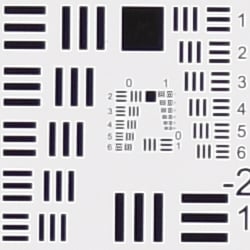 |
| Wide, f/3.5: Upper left C.A.: Low Softness: Quite soft |
Wide, f/3.5: Center C.A.: Very low Softness: Very sharp |
 |
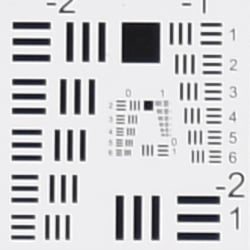 |
| Tele, f/5.6: Upper left C.A.: Very low Softness: Soft |
Tele, f/5.6: Center C.A.: Very low Softness: Slightly soft |
Chromatic Aberration. Chromatic aberration is low at the full wide-angle setting of the 16-80mm lens, suppressed by the D7500's image processor. (See below for crops from uncorrected RAW files.) At full telephoto, chromatic aberration is even lower and hardly detectable. (This distortion is visible as a slight colored fringe around the objects at the edges of the field of view on the resolution target.)
Corner Sharpness. The 16-80mm lens produced soft corners at full wide angle when wide-open at maximum aperture. The left corners are a little softer than the right even showing some image doubling, indicating the lens is slightly decentered. Softness didn't extend very deep into the frame from the right, though it extended moderately deep from the left. The center was however quite sharp. At full telephoto wide open, corners were much sharper than at wide angle, but the lens isn't quite as sharp across the frame as at wide angle.
Vignetting. There's some fairly mile vignetting (corner shading) visible at both wide angle and telephoto when wide open, even with default vignetting control enable as indicated by the darker corner crops.
| f/8 Aperture | |
 |
 |
| Wide, f/8: Upper left C.A.: Moderately low Softness: Soft |
Wide, f/8: Center C.A.: Very low Softness: Very sharp |
 |
 |
| Tele, f/8: Upper left C.A.: Low Softness: Slightly soft |
Tele, f/8: Center C.A.: Very low Softness: Fairly sharp |
F8. Stopped-down to an aperture of f/8, corner performance improved dramatically at wide angle, though corners were still a bit soft compared to the center. At full telephoto, sharpness also improved across the frame, though the lens is still not tack sharp. Vignetting was negligible.
Overall, decent results for a wide-angle 5x zoom lens when stopped down.
Lens Corrections
The Nikon D7500 offers distortion correction, chromatic aberration suppression and vignetting (corner shading) correction for most modern Nikkor lenses.
Auto Distortion Control
Low geometric distortion when Auto Distortion Control is enabled.
| Pincushion distortion at 16mm is < -0.05% |
 |
| Pincushion distortion at 80mm is < -0.05% |
 |
The Nikon D7500 offers an Auto Distortion Control feature to reduce geometric distortion automatically with most modern Nikkor lenses. As you can see it worked quite well with the 16-80mm lens, overcorrecting barrel distortion a bit at wide angle to under -0.05% pincushion, and reducing pincushion at telephoto to about -0.05%. Note that some of the image is cropped away in the process, especially at wide angle. We also noticed sharpness drops because of the interpolation, and at wide angle, there were some noticeable interpolation artifacts as well, so it's likely better to address distortion during post processing.. Since this option is database driven, it's only available for Nikkor D, E and G-type lenses with certain optics such as Fisheye and Perspective Control lenses excepted. Auto Distortion Control is Off by default.
You can also apply Auto or Manual Distortion Control to JPEGs after the fact, in the Retouch menu. Manual mode works with images from any lens.
Chromatic Aberration Correction
Like all modern Nikon DSLRs, the D7500 automatically suppresses lateral chromatic aberration in JPEGs.
|
In-Camera JPEG
|
Uncorrected RAW |
 |
 |
| Wide, f/8: Upper left C.A.: Low |
Wide, f/8: Upper left C.A.: High |
 |
 |
| Tele, f/8: Upper left C.A.: Very low |
Tele, f/8: Upper left C.A.: High |
As you can see, the Nikon D7500's chromatic aberration suppression was very effective at removing almost all the lateral chromatic aberration in the 16-80mm lens test shots above, leaving very small amounts of purple fringing at wide angle, and almost no fringing at telephoto. There is no option to disable it, so above we're comparing in-camera JPEGs to uncorrected RAW files on the right.
Vignette Control
The Nikon D7500 also offers Vignette Control to reduce vignetting or lens shading with Nikkor lenses. Available settings are Low, Normal, High and Off. See below for how Normal compares with Off at maximum aperture.
 |
 |
||
| 16mm @f/2.8 | 80mm @f/4 | ||
| Vignette Control | Normal (default) | Off | |
Mouse over the Normal and Off links above to see the effect on the 16-80mm lens at wide angle and telephoto at the worst-case maximum apertures. As you can see, the default Normal setting compensates for much of the corner shading, but not all. We didn't try the High and Low settings.
Viewfinder Test Results
Coverage
Somewhat disappointing coverage accuracy from the optical viewfinder. Excellent accuracy from the LCD in Live View mode.


The Nikon D7500's optical viewfinder tested at just under 99 percent coverage with our Nikkor 60mm f/2.8 macro lens. This is a bit short of Nikon's 100% coverage claim, and there is also a slight vertical offset and tilt compared to the image sensor. In Live View mode, the Nikon D7500's LCD produced 100% coverage, which is excellent.
The images above were taken from our standardized test shots. For a collection of more pictorial photos, see our Nikon D7500 Photo Gallery .
Exposure
Color
Saturation & Hue Accuracy
Vibrant colors with average hue accuracy.
 |
|||
|
ISO Sensitivity
|
|||
| In the diagram above, the squares show the original color, and the circles show the color that the camera captured. More saturated colors are located toward the periphery of the graph. Hue changes as you travel around the center. Thus, hue-accurate, highly saturated colors appear as lines radiating from the center. Mouse over the links above to compare ISOs, and click to load a larger version. | |||


Saturation. The Nikon D7500 pumps dark blues a lot, dark green, dark orange, and reds moderately, and most other colors slightly, though yellow and aqua are slightly undersaturated. Overall, mean saturation levels are a little higher than average at 13.9% oversaturated at ISO 100 versus a more typical 10%, however colors are quite pleasing and vibrant in real-world images as a result. The D7500's default mean saturation is fairly consistent at low to moderately high ISOs, but starts to fall off at ISO 51,200, to a minimum of 89% at ISO 819,200. Camera JPEGs are quite discolored at extended ISOs above 204,800, though, with a red or magenta tint, so take those numbers with a grain of salt. Most consumer digital cameras produce color that's more highly saturated (more intense) than found in the original subjects. This is simply because most people like their color a bit brighter than life.
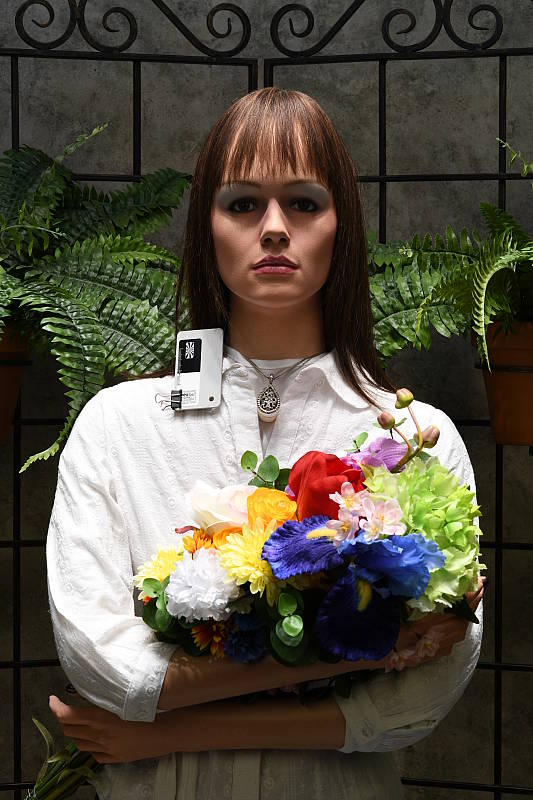
Skin tones. The Nikon D7500 did fairly well with Caucasian skin tones, rendering them with a bit of a pink tint with both Manual and Auto white balance in our "Sunlit" outdoor lighting, but they were a bit on the warm side. However when using Daylight white balance, they were definitely too yellow, so we preferred Auto or Manual white balance. Where oversaturation is most problematic is on Caucasian skin tones, as it's very easy for these "memory colors" to be seen as too bright, too pink, too yellow, etc.
Hue. The Nikon D7500 produces a few color shifts relative to ideal colors, as do most cameras. Reds are shifted slightly toward orange, and cyan toward blue, but there are only slight shifts in yellow, orange, green and purple. (The cyan to blue shift is very common among the digital cameras we test; we think it's a deliberate choice by camera engineers to produce better-looking sky colors.) Mean "delta-C" color error at base ISO was 5.26 after correction for saturation, which is about average, and remains about average up to ISO 204,800, increasing rapidly from there due to the aforementioned tint at very high extended ISOs. Hue is "what color" the color is.


Sensor
Exposure and White Balance
Indoors, incandescent lighting
Warm results with Auto and Incandescent white balance, though excellent color balance with Manual. Average exposure accuracy.


Indoors, in common incandescent lighting, color balance is a little too warm and reddish with the default "Normal" Auto white balance setting,. Unlike the D500, the D7500 does not offer the "Keep white" option, with just "Normal" and "Keep warm lighting colors" options. The Incandescent setting is very warm with a strong yellow tint. (Some users may prefer this look, though, as being more representative of the original lighting.) The Manual white balance setting produced accurate results, though perhaps just a touch cool. The Nikon D7500 required +0.3 EV exposure compensation, which is about average among cameras we've tested for this scene. Our test lighting for this shot is a mixture of 60 and 100 watt household incandescent bulbs, a pretty yellow light source, but a very common one in typical home settings here in the U.S.
Outdoors, daylight
Vibrant color and very good exposure outdoors, but somewhat high default contrast.
We found skin tones fairly realistic with both Auto and Manual white balance in our "Sunlit" Portrait shot. Default contrast is on the high side, so a few highlights were clipped in the mannequin's shirt, pendant and some of the flowers while darker shadows are quite deep, though noise in all but the deepest shadows is quite low. Exposure accuracy was about average for this shot, requiring +0.7 EV exposure compensation to keep the face bright. The Far-field image on the right is very well exposed, with very few clipped highlights. Again, detail in the shadows is quite good, and deep shadow noise is low for an APS-C sensor. Color here with Auto white balance is very pleasing, though perhaps a bit cool.
See full set of test images with explanations
See thumbnails of all test and gallery images
Resolution
~2,550 lines of strong detail from JPEGs, about the same from converted RAW files.


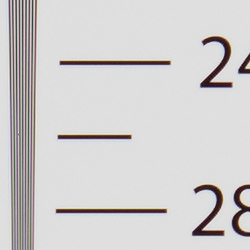

Our laboratory resolution chart revealed sharp, distinct line patterns up to about 2,550 lines per picture height in the horizontal direction, and to about 2,550 lines per picture height in the vertical direction in JPEGs. (Some might argue for higher, but lines begin to merge at those resolutions.) Complete extinction of the pattern didn't occur until around 3,300 - 3,400 lines. We weren't able to extract any more resolution with RAW files processed through Adobe Camera Raw. Moiré patterns and false colors could be seen from both images at higher frequencies, though interestingly, the ACR conversion contain color moiré with different colors than the in-camera JPEG image. Use these numbers to compare with other cameras of similar resolution, or use them to see just what higher resolution can mean in terms of potential detail.
See full set of test images with explanations
See thumbnails of all test and gallery images
Sharpness & Detail
Very crisp images, though default sharpening is a bit high and generates noticeable sharpening halos. Minor noise suppression artifacts at base ISO.


Sharpness. The Nikon D7500 produced very sharp, detailed images for a 21-megapixel sensor at default settings, though edge enhancement artifacts are somewhat conspicuous around high-contrast edges, such as the sharpening halos around the lines and lettering in the crop above left. Default sharpening is probably optimized for crisp-looking prints which can look overdone on screen at 100%, and you can always turn it down if you prefer. Edge enhancement creates the illusion of sharpness by enhancing color and tonal differences right at the edge of a rapid transition in color or tone.
Detail. The crop above right shows some minor detail loss and smudging due to noise suppression, as the darker areas of the mannequin's hair show a lot of detail. Individual strands are still distinguishable even in the lighter shadows, though some begin to merge as shadows deepen, and in places where the tone and color of adjacent strands is very close. The hair is also virtually free from chroma noise, which is often not the case. An excellent performance here for an APS-C camera. Noise-suppression systems in digital cameras tend to flatten-out detail in areas of subtle contrast. The effects can often be seen in shots of human hair, where the individual strands are lost and an almost "watercolor" look appears.
RAW vs In-Camera JPEGs
As noted above, the Nikon D7500 does a great job at capturing lots of fine, crisp detail in its JPEGs for its resolution, but more detail can often be obtained from carefully processing RAW files, while at the same time reducing sharpening artifacts. Let's have a look at base ISO:
| Base ISO (100) | |
 |
 |
 |
 |
 |
 |
|
Camera JPEG, defaults
|
RAW via Adobe Camera Raw
|
In the table above, we compare an in-camera JPEG taken at base ISO using default noise reduction and sharpening (on the left) to the matching RAW file converted with Adobe Camera Raw 9.1 via DNG Converter 9.6 using default noise reduction with some strong but tight unsharp mask sharpening applied in Photoshop (300%, radius of 0.3 pixels, and a threshold of 0).
As is frequently the case, the demosaicing in Adobe Camera Raw and sharpening in Photoshop deliver finer detail than the camera, with fewer sharpening artifacts. Looking very closely at the images, it's clear that ACR extracts a bit more detail that isn't present in the JPEGs from the camera itself, even in the red-leaf swatch Nikons traditionally do very well with. The ACR conversion manages to resolve more of the thread patterns in the fabrics while the camera treats them as noise and blurs them away. While it doesn't look quite as finely detailed, Nikon's rendering is smoother-looking with higher contrast and more vibrant colors, and noise is less visible in the shadows and flatter areas. Still, we'd personally go the Adobe (or other high-quality third-party RAW converter) route here if we were concerned about making the best images possible from the D7500's sensor. That said, the D7500's in-camera JPEGs are excellent at low ISOs, and you can always try adjusting image processing settings to your tastes.
ISO & Noise Performance
Excellent high ISO performance for an APS-C sensor.
| Noise Reduction = Default | ||
 |
 |
 |
| ISO 50 | ISO 100 | ISO 200 |
 |
 |
 |
| ISO 400 | ISO 800 | ISO 1600 |
 |
 |
 |
| ISO 3200 | ISO 6400 | ISO 12,800 |
 |
 |
 |
| ISO 25,600 | ISO 51,200 | ISO 102,400 |
 |
 |
 |
| ISO 204,800 | ISO 409,600 | ISO 819,200 |
 |
||
| ISO 1,638,400 | ||
Nikon D7500 images are clean and very detailed up to ISO 800, with just a touch of luminance noise becoming more visible in the shadows as ISO increases, as well as a very slight drop in fine detail due to noise reduction processing. ISO 1600 shows more noticeable luminance noise, but fine detail is still quite good, and chroma noise is very low. ISO 3200 still contains very good detail and relatively low noise. ISO 6400 exhibits a larger drop in image quality, but fine detail is still fair. Image quality drops off more rapidly at ISO 12,800 and above, with increasing noise "grain", blurring from noise reduction and chroma blotches, and ISOs above 51,200 are so noisy and discolored we question why Nikon included them other than for pure specmanship.
All in all, though, excellent high ISO performance for an APS-C camera.
Of course, the impact of noise and detail loss are highly dependent on the size the photos are printed at, and pixel-peeping on-screen has surprisingly little relationship to how the images look when printed: See the Print Quality section below for recommended maximum print sizes at each ISO.
A note about focus for this shot: We used to shoot this image at f/4, however depth of field became so shallow with larger, high-resolution sensors that it was difficult to keep important areas of this shot in focus, so we have since started shooting at f/8, the best compromise between depth of field and sharpness.
Extremes: Sunlit, dynamic range and low light tests
Excellent dynamic range despite the high default contrast. Very good low-light performance, capable of capturing bright images in near darkness.


Sunlight:
The Nikon D7500 performed well in the deliberately harsh lighting in the above test, despite its high default contrast. We felt +0.7 EV exposure compensation was required to keep the mannequin's face bright, but that led to relatively few highlights blown in her shirt and flowers, and shadows contained good detail with low noise for an APS-C camera. Note that these shots were captured with the Nikon D7500's Active D-Lighting control set to its default of "Off." See below for how Active D-Lighting and contrast settings help with hot highlights and deep shadows.
Because digital cameras are more like slide film than negative film (in that they tend to have a more limited tonal range), we test them in the harshest situations to see how they handle scenes with bright highlights and dark shadows, as well as what kind of sensitivity they have in low light. The shot above is designed to mimic the very harsh, contrasty effect of direct noonday sunlight, a very tough challenge for most digital cameras. (You can read details of this test here. In actual shooting conditions, be sure to use fill flash in situations like the one shown here; it's better to shoot in open shade whenever possible.)
Face Detection
Recent higher-end Nikon DSLRs like the D5, D500 and now the D7500 use a 180K-pixel metering sensor that has sufficient resolution that it can detect faces when using the optical viewfinder when using matrix metering. This is something most DSLRs can't do, instead relying on Live View mode to able to detect faces.
|
Face Detection
|
|
 |
OVF: Face Detect On Face Detect Off Live View: Face Priority AF Full Auto |
Mouse over the links to compare default exposures using the optical viewfinder (OVF) with the feature enabled and disabled, as well as in Live View mode with Face Priority AF enabled and in Full Auto. As you can see, face detection made a dramatic improvement to exposure when using the optical viewfinder at f/8. Face Priority AF in Live View also provides an improvement, and doesn't have the AF point location restrictions that the optical viewfinder has so it can improve focus as well. Full Auto in Live View mode also improved the exposure as it too detected a face, and it selected a larger aperture (f/4), a higher ISO (400) and enabled Active D-Lighting for a better balanced exposure.
Active D-Lighting
Active D-Lighting attempts to preserve detail in both highlights and shadows in high-contrast situations, while maintaining moderate levels of contrast. The series of shots below show the effect of the various Active D-Lighting settings (Off (default), Low, Normal, High, Extra High and Auto) available on the Nikon D7500 on our high-contrast "Sunlit" Portrait scene.
Note that Active D-Lighting is different from the Retouch menu's D-Lighting, as it is performed during image capture instead of after. (It does affect only JPEG images, though, Nikon very properly doesn't apply tonal adjustments like this to RAW file data. NEF files are however tagged so that Nikon software can automatically apply the effect when converted.)
|
"Sunlit" Portrait Active D-Lighting
|
|
 |
ADL Settings: Off (Default) Auto Low Normal High Extra High |
 |
|
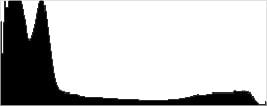
Mouse over the links to see how the various levels of Active D-Lighting affects our "Sunlit" Portrait shot at default exposure, and click on any link to get to the full-res image. (Active D-Lighting's effect can be a little subtle in shots like those above, so we use a mouse-over with matching histograms to better show how each setting compares.)
As you can see from the thumbnail images and histograms above, the default exposure was somewhat dim so almost no highlights were blown to begin with, but we can see that enabling Active D-Lighting boosted shadows and lower midtones for a better overall exposure (still too dim, though), while at the same time preserving highlights even when cranking up the level. Normally, there is a noise penalty to be paid for boosting shadows, but noise levels in the shadows are quite low with this camera, so increased shadow noise is not really a concern here at base ISO. It's also interesting to note that the default ADL setting for the D7500 is Off, while in more consumer-oriented models, the default is Auto.
| Far-field Active D-Lighting (0 EV) | |||
 |
|||
Here are the results with our Far-field shot. As you can see, Active D-Lighting brought up shadow detail while holding on to highlights. The Auto setting did a pretty good job here.
HDR Mode
Like other recent Nikon DSLRs, the D7500 offers an in-camera high-dynamic-range imaging function. When enabled, the D7500 captures two images with one push of the shutter button -- one underexposed and one overexposed -- and combines them in-camera to produce a high-dynamic-range JPEG. (RAW format is not supported.) There are three exposure differentials available: 1, 2 and 3 EV, as well as an Auto option, and there are three Smoothing options: Low, Normal and High. You can also elect to do a series of HDR shots without having to re-enable the mode each time, or select a Single Photo option.
| Far-field HDR mode | ||||
 |
||||
Mouse over the links to see how the Auto, 1 EV, 2 EV and 3 EV levels of HDR with default Smoothing affects our Far-field shot at default exposure. Click on a link to get to the full-res image.
Overall, we think Nikon D7500's in-camera HDR is one of the better implementations we've seen, though it would be nice if more than two images were captured. Obviously moving subjects should be avoided, as you can see from the ghosting around the leaves in some of HDR shots above.
Dynamic Range Analysis (RAW mode)
While we once performed our own dynamic range measurements based on in-camera JPEGs as well as converted RAW images (when the camera was supported by Adobe Camera Raw), we've switched to using DxO Labs' results from their DxOMark website. As technology advanced, the dynamic range of modern high-end cameras in some cases exceeded the range of the Stouffer T4110 density scale that we used for our own measurements. DxO's approach based on RAW data before demosaicing is also more revealing, because it measures the fundamental dynamic range of the sensor, irrespective of whatever processing is applied to JPEGs, or to RAW data by off-the-shelf conversion software.
In the following, we use DxO's "Print" dynamic range results, which are scaled based on camera resolution. As the name suggests, this scaling corresponds to the situation in which you print at a given size, regardless of how many megapixels the camera might have. (In other words, if you've decided to make a 13x19 inch print, that's the size you're printing, whether the camera's resolution is 16 or 300 megapixels.) For the technically-minded, you can find a discussion of the reasoning behind this here on the DxOMark website. Also note that DxO Labs uses a signal-to-noise (SNR) threshold of 1 when defining the lower boundary of acceptable luminance noise in their dynamic range measurements, which corresponds to the "Low Quality" threshold of the Imatest software we used to use for this measurement.

Here, we compare the Nikon D7500's dynamic range (in orange) to that of its predecessor, the D7200 (yellow), and also to a leading mirrorless APS-C camera, the Sony A6500 (red). Note that the D7500's dynamic range results are essentially identical to its bigger brother's, the D500.
As you can see from the above graph (click for a larger image), the D7500's dynamic range is almost 2/3 EV lower than its predecessor at base ISO (14.0 vs 14.6 EV), thanks in part to the D7200's higher resolution. However the D7500 catches up to the D7200 at ISO 400, and dynamic range is a bit higher or similar up to ISO 12,800. At the highest common ISO setting of 25,600, the D7500 bests the D7200 by over a stop (7.6 vs 6.5 EV).
The Nikon D7500's dynamic range is slightly higher than the Sony A6500's at lower ISOs, though you'd probably be hard-pressed to see a difference in real-world shots. And dynamic range performance is very similar above ISO 1600.
Overall, excellent dynamic range from the Nikon D7500. Click here to visit the DxOMark page for the Nikon D7500 for more of their test results and additional comparisons.
| 1 fc 11 lux |
1/16 fc 0.67 lux |
1/16 fc No NR |
|
|---|---|---|---|
| ISO 100 |
 2 s f2.8 |
 30 s f2.8 |
 30 s f2.8 |
| ISO 3200 |
 1/15 s f2.8 |
 1 s f2.8 |
 1 s f2.8 |
| ISO 51200 |
 1/250 s f2.8 |
 1/15 s f2.8 |
 1/15 s f2.8 |
Low Light. The Nikon D7500 performed well here, able to capture usable images down to the 1/16 foot-candle light level (about 1/16 as bright as average city street lighting at night) even at base ISO. Noise is of course very low at ISO 100, and still quite low at ISO 3200, but as expected, noise is a little high at maximum native ISO of 51,200, but still usable in a pinch.
Color balance with Auto white balance is pretty neutral here at one foot-candle, just a touch cool, and at 1/16 foot-candle it didn't exhibit much of a shift to cyan or magenta as we've seen from some prior Nikon models. Very good results here.
We didn't notice any significant issues with hot or overly bright pixels, banding (fixed pattern noise), or heat blooming during our low-light tests.
LL AF: The D7500's phase-detection autofocus system was able to focus on our low-contrast AF target down -2.9 EV unassisted with an f/2.8 lens, which is quite good. (Our low-contrast AF target is more difficult to focus on than how manufacturers rate their cameras; when using our high-contrast AF target, the D7500 was able to focus down to -3.9 EV, significantly better than its -3 EV rating.)
The Nikon D7500 has a built-in AF illuminator, and with it active it can autofocus in complete darkness as long as the subject is in range.
In Live View mode, the D7500's contrast-detect autofocus was able to focus on our low-contrast AF target down to -2.3 EV, and down to -3.9 EV again with our high-contrast target.
How bright is this? The one foot-candle light level that this test begins at roughly corresponds to the brightness of typical city street-lighting at night. Cameras performing well at that level should be able to snap good-looking photos of street-lit scenes.
NOTE: This low light test is conducted with a stationary subject, and the camera mounted on a sturdy tripod. Most digital cameras will fail miserably when faced with a moving subject in dim lighting. (For example, a child's ballet recital or a holiday pageant in a gymnasium.) Digital SLRs like the Nikon D7500 do much better than point & shoots, but you still shouldn't expect a quick autofocus lock with moving subjects.
Output Quality
Print Quality
Excellent 30 x 40 inch prints at ISO 50-400; a nice 16 x 20 at ISO 1600; and a good 5 x 7 at ISO 12,800
 ISOs 50, 100 and 200 deliver superb prints at 30 x 40 inches, with rich, vibrant colors and crisp fine detail throughout. Larger prints are certainly fine as well for wall display purposes until resolution becomes an issue at your intended viewing distance.
ISO 400 also yields a nice 30 x 40 inch print. There is perhaps the slightest drop in overall crispness as compared to the lower ISOs, but not enough to keep this print size from an overall good rating.
ISO 800 prints are very nice at a robust 24 x 36 inches, which is a terrific output for this ISO from the APS-C world. As with virtually all cameras of APS-C or smaller sensors, there is now a slight softening in the red channel, most noticeable as less contrast detail in our tricky red-leaf swatch, and mild noise is apparent in a few flatter areas of our test target as well. But otherwise a nice overall print.
ISO 1600 produces images that are quite good at 16 x 20 inches. The 20 x 30 inch prints here can also be used for wall display purposes or less critical applications, but there is perhaps a trace too much noise in some areas to pass our good seal for prints.
ISO 3200 delivers a 13 x 19 inch print that is quite nice, with full color reproduction still on display and little in the way of obvious noise or noise reduction artifacts. There is very good fine detail remaining as well. Overall, this is quite a large print for ISO 3200 in the APS-C world.
ISO 6400 shots are good at 11 x 14 inches, although this ISO is where the D7500 begins to show slight signs of ISO strain. As with most cameras in this class, there is now some noticeable softening in the red channel, and mild noise in a few flatter areas of our target, but not enough to keep this print from attaining the good grade. For your most critical printing purposes a reduction to 8 x 10 is certainly wise here.
ISO 12,800 yields a 5 x 7 inch print that is quite good for this ISO and sensor size. Full color is still represented, and it’s sharp enough to make out a decent amount of fine detail for this size.
ISO 25,600 prints are quite good at 4 x 6 inches. That’s not a large size, but this is a lofty ISO, and at least you know there is something worthwhile for printing purposes.
ISO 51,200 does not deliver good prints and is best avoided, although for less critical applications the 4 x 6 inch prints here are not too bad.
Extended high ISOs are too noisy and discolored, and we question why Nikon continues to include such high ISO settings in an APS-C camera.
The Nikon D7500 delivers prints that rival the best of the best from the APS-C world. You can expect large print sizes up to ISO 1600, and yet can still achieve a good 11 x 14 inch print at ISO 6400. For the price this is very much a camera to be reckoned with for sheer image quality as ISO rises, and it delivers terrific value for the money in that regard. Once again, and as with so many of their offerings we have seen and tested over the past few years, a terrific job to Nikon in the print quality department.
The images above were taken from our standardized test shots. For a collection of more pictorial photos, see our Nikon D7500 Photo Gallery .
Not sure which camera to buy? Let your eyes be the ultimate judge! Visit our Comparometer(tm) to compare images from the Nikon D7500 with those from other cameras you may be considering. The proof is in the pictures, so let your own eyes decide which you like best!
Performance
Timing and Performance
Very good to excellent performance for a prosumer DSLR.
| Startup/Play to Record | ||
|---|---|---|
| Power on |
~0.2 second
|
Time it takes for camera to turn on and take a shot. |
|
Play to Record, |
~0.2 second
|
Time until first shot is captured. |
The Nikon D7500's startup time was very fast and switching from Play to Record and taking a shot was also very fast.
| Shutter Response (Lag Time), Optical Viewfinder |
||
|---|---|---|
|
Full Autofocus |
0.075 second
|
Time from fully pressing shutter button to image capture. (All AF timing measured with Nikkor AF-S 60mm f/2.8 Macro lens.) |
|
Full Autofocus |
0.106 second
|
Time from fully pressing shutter button to image capture, Auto Flash enabled. |
|
Manual focus |
0.052 second
|
For most cameras, shutter lag is less in manual focus than autofocus, but usually not as fast as when the camera is "pre-focused." |
|
Pre-focused |
0.050 second
|
Time to capture, after half-pressing and holding shutter button. |
| Live View | ||
|
Pre-focused |
0.119 second
|
Time to capture, after half-pressing and holding shutter button. |
The Nikon D7500's full autofocus shutter lag when shooting the same target multiple times was quite fast for a prosumer DSLR. The D7500 required 0.075 second for full AF using the center focus point. Enabling the flash raised shutter lag only slightly to 0.106 second, reflecting the added delay caused by the metering preflash. Manual focus shutter lag was very fast at 0.052 second. When prefocused, shutter lag was 0.050 second which is also quite fast for a DSLR.
When prefocused in Live View mode shutter lag was 0.119 second, more than twice as long as when using the optical viewfinder, but still quite fast for a DSLR in Live View mode. We no longer test autofocus speeds during Live View mode for DSLRs, since it's very lens dependent.
To minimize the effect of different lens' focusing speed, we test AF-active shutter lag with the lens already set to the correct focal distance.
| Cycle Time (shot-to-shot) | ||
|---|---|---|
|
Single Shot mode |
< 0.3 second
|
Time per shot, averaged over a few frames (we no longer test for buffer depths in single-shot mode). |
|
Single Shot mode |
< 0.3 second
|
Time per shot, averaged over a few frames (we no longer test for buffer depths in single-shot mode). |
|
Early shutter |
No
|
Some cameras refuse to snap another shot if you release and press the shutter too quickly in Single Shot mode, making "No" the preferred answer. |
| Continuous H mode |
0.12 second
(8.20 fps); 100 frames total; 10 seconds to clear* |
Time per shot, averaged over capped 100 frame buffer. |
|
Continuous H mode |
0.12 second
(8.20 fps); 47 frames total; 11 seconds to clear* |
Time per shot, averaged over 47 frame buffer. Then slows to an average of 0.35 second or 2.86 fps when buffer is full, with a lot of variation. |
|
Continuous H mode |
0.12 second
(8.20 fps); 31 frames total; 15 seconds to clear* |
Time per shot, averaged over 31 frame buffer. Then slows to an average of 0.54 second or 1.84 fps when buffer is full, with a lot of variation. |
| Flash recycling |
2.5 seconds
|
Flash at maximum output. |
| *Note: Buffer clearing times measured with a SanDisk Extreme Pro 95MB/s UHS-I SDHC memory card. Slower cards will produce correspondingly slower clearing times. Slow cards may also limit length of bursts in continuous mode. ISO sensitivity and other settings such as Advanced D-Lighting or NR can also affect cycle times and burst mode performance. |
||
Single-shot cycle times were so fast that they were difficult to accurately measure as they depend on the tester's dexterity and ability to maintain an optimum rhythm, so your results may vary. (Note that we no longer test single-shot mode with just RAW files, as the results are usually somewhere in between JPEG and RAW+JPEG.)
Continuous H mode burst speed was very good, at 8.2 frames per second no matter the file type, slightly faster than Nikon 8 fps spec. This is a significant improvement over the D7200 which topped out at 5.8 fps for JPEGs, and only 4.9 fps with 14-bit RAW files. There is also a Continuous L mode with a programmable rate between 1 and 7 fps.
Buffer depth in continuous mode was excellent when shooting Optimal Quality JPEGs, artificially capped at 100 L/F JPEG frames (the limit is programmable from 1 to 100). When shooting 14-bit lossless compressed RAW files, the buffer depth was still very good at 47 frames, which is quite an improvement over the D7200's 18 frames despite the faster frame rate. Buffer depth when shooting 14-bit lossless compressed RAW+JPEG files was 31 frames which is still very good for its class, and again much better than the D7200's 11 frame limit. According to Nikon, shooting 12-bit RAW files increases buffer depth by about 50% and selecting lossy compression yields about a 45% improvement in buffer depth, but we did not verify those claims. The D7500's 1.3x crop mode is also said to increase buffer depth, to up to 100 frames for all file types.
Buffer clearing was pretty fast with our 95MB/s UHS-I SDHC card, ranging from 10 seconds after 100 Optimal Quality JPEGs to 15 seconds after a max-length burst of 14-bit lossless RAW + JPEG files.
The D7500's built-in flash took an average of 2.5 seconds to recharge after full-power shots, which is good.
Bottom line, the Nikon D7500's performance is very good to excellent for its class, with fast startup, fast autofocus, low shutter lag, and a quick burst mode with deep buffers and reasonably fast buffer clearing. A significant upgrade over the D7200 in terms of performance.
Battery
Battery Life
Very good battery life with the optical viewfinder.
| Operating Mode | Number of Shots |
|---|---|
|
Optical Viewfinder,
(CIPA standard) |
950
|
|
Live View LCD,
(CIPA standard) |
Unknown
|
The Nikon D7500 uses a custom rechargeable EN-EL15a lithium-ion battery for power, and ships with a dedicated battery charger (in-camera charging via USB is not supported). Battery life when using the optical viewfinder is very good though a bit lower than the D7200's 1,100 shots. Nikon does not specify number of shots on a charge in Live View mode, which will certainly be a lot lower. We recommend you pick up a spare battery and keep it freshly charged and on-hand for extended outings, especially when using Live View a lot.
The table above shows the number of shots the camera is capable of (on either a fresh set of disposable batteries or a fully-charged rechargeable battery as appropriate), based on CIPA battery-life and/or manufacturer standard test conditions.
(Interested readers can find an English translation of the CIPA DC-002 standards document here. (180K PDF document))
Image Quality
Below are crops from our laboratory Still Life target comparing the Nikon D7500's image quality to its predecessor's, the D7200, as well as to its big brother's, the D500. We've also included a few recent competitors in this comparison: the Canon 80D, Pentax KP and the Sony A6500.
NOTE: These images are from best quality JPEGs straight out of the camera, at default settings including noise reduction and using the camera's actual base ISO (not extended ISO settings). All cameras in this comparison were shot with our very sharp reference lenses. Clicking any crop will take you to a carrier page where you can click once again to access the full resolution image as delivered straight from the camera. For those interested in working with the RAW files involved, click these links to visit each camera's respective sample image thumbnail page: Nikon D7500, Nikon D7200, Nikon D500, Canon 80D, and Sony A6500 -- links to the RAW files appear beneath those for the JPEG images, wherever we have them. And remember, you can always go to our world-renowned Comparometer to compare the Nikon D7500 to any camera we've ever tested!
Nikon D7500 vs Nikon D7200 at Base ISO
 |  |
 |  |
 |  |
Nikon D7500 at ISO 100 | Nikon D7200 at ISO 100 |
Here we compare the D7500 to its predecessor, the D7200. As you can see, image quality and processing are quite similar here at base ISO, though the 24-megapixel D7200 does resolve a touch more detail than the 21-megapixel D7500, as expected. Colors are a little more pleasing and accurate from the D7500, though. | |
Nikon D7500 vs Nikon D500 at Base ISO
|  |
|  |
|  |
Nikon D7500 at ISO 100 | Nikon D500 at ISO 100 |
Compared to its much more expensive big brother, the Nikon D500, image quality is virtually identical. This is no surprise, though, since the two siblings share the same sensor and processor with just minor tweaks to default processing. | |
Nikon D7500 vs Canon 80D at Base ISO
|  |
|  |
|  |
Nikon D7500 at ISO 100 | Canon 80D at ISO 100 |
Here, we compare the 21-megapixel D7500 its closest competitor from Canon, the 24-megapixel Canon 80D. Resolution is a bit higher from the Canon, but thanks to the lack of an optical low-pass filter, the Nikon nearly resolves as much detail. Both show noticeable sharpening halos along high-contrast edges, but the Nikon's image is much crisper and contrastier. The Canon's image is a little smoother with slightly lower visible noise, but that's mostly due to differences in processing as well. | |
Nikon D7500 vs Pentax KP at Base ISO
|  |
|  |
|  |
Nikon D7500 at ISO 100 | Pentax KP at ISO 100 |
The 24-megapixel Pentax KP resolves more detail than the D7500 here at base ISO. Both cameras produce a sharp, crisp image though contrast is higher from the Nikon, giving the D7500 image more "pop". Colors are more pleasing and accurate from the Nikon, particularly noticeable in the pink fabric which is too magenta from the Pentax. Aliasing artifacts are a little more evident from the Pentax, but keep in mind it has an on-demand AA filter simulator (turned off for these shots), which the Nikon does not. | |
Nikon D7500 vs Sony A6500 at Base ISO
|  |
|  |
|  |
Nikon D7500 at ISO 100 | Sony A6500 at ISO 100 |
At base ISO, the 24-megapixel Sony A6500 resolves noticeably more detail than the 21-megapixel D500, thanks to its higher resolution, very weak (or absent) optical low-pass filter, and more advanced processing. The Nikon image is a touch more vibrant with better color, but sharpening halos are quite evident while they are practically nonexistent from the Sony. The Sony shows more obvious moiré patterns in the red-leaf fabric here, but again keep in mind the OLPF-less D7500 could easily show more with different subject matter or the same subject at a different distance. | |
Nikon D7500 vs Nikon D7200 at ISO 1600
 |  |
 |  |
 |  |
Nikon D7500 at ISO 1600 | Nikon D7200 at ISO 1600 |
The older D7200 continues to capture more detail than the D7500 in most subject matter, but noise is a little higher from the D7200, allowing the D7500 to produce slightly cleaner results while doing noticeably better with our difficult red-leaf swatch. Colors are a little warmer and more pleasing from the D7500 as well. | |
Nikon D7500 vs Nikon D500 at ISO 1600
|  |
|  |
|  |
Nikon D7500 at ISO 1600 | Nikon D500 at ISO 1600 |
Here at ISO 1600, the two siblings continue to produce very similar results, though the D500 appears to retain slightly better detail. | |
Nikon D7500 vs Canon 80D at ISO 1600
|  |
|  |
|  |
Nikon D7500 at ISO 1600 | Canon 80D at ISO 1600 |
The 24-megapixel Canon 80D manages to resolve a bit more detail than the D7500 in most areas here at ISO 1600, but noise is slightly higher and less fine-grained from the Canon, and noise reduction artifact are more visible. The D7500 continues to produce a sharper, crisper image with slightly warmer colors. | |
Nikon D7500 vs Pentax KP at ISO 1600
|  |
|  |
|  |
Nikon D7500 at ISO 1600 | Pentax KP at ISO 1600 |
The Pentax KP continues to resolve more detail than the D7500 with less obvious sharpening halos, but luminance noise "grain" is higher and coarser from the Pentax, and contrast remains higher from the Nikon. Almost all detail has been blurred away by the Pentax in our troublesome red-leaf swatch, and the Nikon continues to produce more pleasing and accurate color. | |
Nikon D7500 vs Sony A6500 at ISO 1600
|  |
|  |
|  |
Nikon D7500 at ISO 1600 | Sony A6500 at ISO 1600 |
The Sony A6500 still manages to render more detail than the Nikon D7500 with better sharpness yet fewer sharpening halos, though noise levels are a little higher. Contrast is higher from the Sony in the red-leaf swatch, however moiré patterns continue to interfere with detail here. Colors are not as pleasant from the Sony, and noise "grain" does not appear quite as consistent as the D7500's in flatter areas. | |
Nikon D7500 vs Nikon D7200 at ISO 3200
 |  |
 |  |
 |  |
Nikon D7500 at ISO 3200 | Nikon D7200 at ISO 3200 |
The Nikon D7200 still manages to retain a bit more detail than the D7500 at ISO 3200, but the D7500's image shows noticeably lower noise levels and manages to render our red-leaf swatch a little better than the D7200, though both smudge much of the fine detail away. | |
Nikon D7500 vs Nikon D500 at ISO 3200
|  |
|  |
|  |
Nikon D7500 at ISO 3200 | Nikon D500 at ISO 3200 |
Once again, very similar images from the D7500 and D500 here at ISO 3200, though again the D500 retains a bit more detail. | |
Nikon D7500 vs Canon 80D at ISO 3200
|  |
|  |
|  |
Nikon D7500 at ISO 3200 | Canon 80D at ISO 3200 |
The Nikon D7500 easily bests the Canon 80D here at ISO 3200, with better detail, much better clarity, lower noise, and fewer noise reduction artifacts. | |
Nikon D7500 vs Pentax KP at ISO 3200
|  |
|  |
|  |
Nikon D7500 at ISO 3200 | Pentax KP at ISO 3200 |
Similar to what we saw at ISO 1600, the Pentax KP retains considerably more detail in high contrast areas, but luminance noise is higher, and our tricky red-leaf swatch is now so heavily blurred by its anti-noise processing, that it appears as almost a flat, solid red. | |
Nikon D7500 vs Sony A6500 at ISO 3200
|  |
|  |
|  |
Nikon D7500 at ISO 3200 | Sony A6500 at ISO 3200 |
The Sony A6500 still manages to produce a sharper, more detailed image overall than the Nikon D7500 at ISO 3200, but noise and noise reduction artifacts are more noticeable, and the Nikon continues to produce better color. Much of the apparent detail in the Sony's rendering of the red-leaf pattern appears distorted instead of just being blurred. | |
Nikon D7500 vs. Nikon D7200, Nikon D500, Canon 80D, Pentax KP, Sony A6500
 |  |  |  |  |  |
 |  |  |  |  |  |
 |  |  |  |  |  |
| Nikon D7500 ISO 100 ISO 3200 ISO 6400 | Nikon D7200 ISO 100 ISO 3200 ISO 6400 | Nikon D500 ISO 100 ISO 3200 ISO 6400 | Canon 80D ISO 100 ISO 3200 ISO 6400 | Pentax KP ISO 100 ISO 3200 ISO 6400 | Sony A6500 ISO 100 ISO 3200 ISO 6400 |
| Detail comparison. High-contrast detail is also important, pushing the camera in different ways, so we like to look at it, too. As can be seen above, the D7500 does a little better than its predecessor as ISO rises, with less image degradation at higher ISOs. Performance here again is quite similar to the D500. While resolution is a bit higher from the Canon 80D and Pentax KP, both degrade more rapidly than the D7500 as sensitivity is increased. The Sony A6500 is the overall winner here, though, with excellent detail and contrast, and the least amount of degradation at higher ISOs. | |||||
Excellent 30 x 40 inch prints at ISO 50-400; a nice 16 x 20 at ISO 1600; and a good 5 x 7 at ISO 12,800
ISOs 50, 100 and 200 deliver superb prints at 30 x 40 inches, with rich, vibrant colors and crisp fine detail throughout. Larger prints are certainly fine as well for wall display purposes until resolution becomes an issue at your intended viewing distance.
ISO 400 also yields a nice 30 x 40 inch print. There is perhaps the slightest drop in overall crispness as compared to the lower ISOs, but not enough to keep this print size from an overall good rating.
ISO 800 prints are very nice at a robust 24 x 36 inches, which is a terrific output for this ISO from the APS-C world. As with virtually all cameras of APS-C or smaller sensors, there is now a slight softening in the red channel, most noticeable as less contrast detail in our tricky red-leaf swatch, and mild noise is apparent in a few flatter areas of our test target as well. But otherwise a nice overall print.
ISO 1600 produces images that are quite good at 16 x 20 inches. The 20 x 30 inch prints here can also be used for wall display purposes or less critical applications, but there is perhaps a trace too much noise in some areas to pass our good seal for prints.
ISO 3200 delivers a 13 x 19 inch print that is quite nice, with full color reproduction still on display and little in the way of obvious noise or noise reduction artifacts. There is very good fine detail remaining as well. Overall, this is quite a large print for ISO 3200 in the APS-C world.
ISO 6400 shots are good at 11 x 14 inches, although this ISO is where the D7500 begins to show slight signs of ISO strain. As with most cameras in this class, there is now some noticeable softening in the red channel, and mild noise in a few flatter areas of our target, but not enough to keep this print from attaining the good grade. For your most critical printing purposes a reduction to 8 x 10 is certainly wise here.
ISO 12,800 yields a 5 x 7 inch print that is quite good for this ISO and sensor size. Full color is still represented, and it’s sharp enough to make out a decent amount of fine detail for this size.
ISO 25,600 prints are quite good at 4 x 6 inches. That’s not a large size, but this is a lofty ISO, and at least you know there is something worthwhile for printing purposes.
ISO 51,200 does not deliver good prints and is best avoided, although for less critical applications the 4 x 6 inch prints here are not too bad.
Extended high ISOs are too noisy and discolored, and we question why Nikon continues to include such high ISO settings in an APS-C camera.
The Nikon D7500 delivers prints that rival the best of the best from the APS-C world. You can expect large print sizes up to ISO 1600, and yet can still achieve a good 11 x 14 inch print at ISO 6400. For the price this is very much a camera to be reckoned with for sheer image quality as ISO rises, and it delivers terrific value for the money in that regard. Once again, and as with so many of their offerings we have seen and tested over the past few years, a terrific job to Nikon in the print quality department.
Field Test Part I
Field Test Part II
Above ground and below, the D7200 successor performs well in its first real-world test
By Mike Tomkins | Posted: 06/21/2017
 40mm-equivalent, 1/40 sec. @ f/3.0, ISO 25,600
Some seven years ago, Nikon plugged the gap between its professional DSLR lineup and its more consumer-friendly offerings with the launch of a brand-new, mid-range DSLR camera series. The Nikon D7000 was the first product in that line, and it was aimed with laser-like precision at enthusiast photographers.
With no replacement as of then having been offered up for the earlier D300 and D300S, and full-frame as yet still only available in pro-grade bodies, the D7000 became the company's de-facto flagship enthusiast DSLR from late 2010. And the same was true of its DX-format successors, the D7100 and D7200, which launched in early 2013 and 2015 respectively to bear the APS-C flagship crown themselves.
But we're in 2017 now, and things have changed significantly -- both in the marketplace, and for the D7000 specifically. The Nikon D500 finally made its arrival on the scene last year, taking over the D7200's throne as the preeminent Nikon DX-format DSLR. That has necessitated a shift in positioning for the subsequent Nikon D7500, and has thus brought a few feature changes which have raised hackles among Nikonian enthusiasts who cut their teeth on the earlier cameras.
Given that they're something of an elephant in the room, I think it's good that we get the discussion out of the way right upfront relative to these few shortcomings, because they distract from what's otherwise still a very powerful and capable camera -- just one which doesn't now share quite the same enthusiast camera cachet as its siblings. So what's missing?

Well, perhaps the most significant omission for my money is the lack of any provision for a portrait / battery grip accessory. Sure, a third-party grip could potentially be made which would mount using the D7500's tripod socket, but since there's no electronic connectivity with which to interface with the camera (nor even a removable battery door to allow piggybacking off the existing battery compartment), it's very unlikely that a third-party grip could allow for greater battery life or dedicated portrait-orientation controls.
At this level, the omission of such a significant feature surprises me, and with my larger-than-average hands and love for portrait grips, it would probably be enough to make me personally consider buying the D500 instead, despite the D7200's much cheaper pricetag. Whether or not it should do the same for you will depend on how much you shoot in portrait orientation, whether you want to avoid changing batteries too often (although as a DSLR, this isn't such a big concern as it would be for an EVF-based camera), and whether you tend to prefer a portrait grip for ergonomic reasons.

And there are two other similarly significant omissions which may persuade you to look higher up Nikon's line to a more expensive model, as the company doubtless intends. For one thing, there's only a single SD card slot. That means you can't keep a backup in case of card failure, and nor can you segregate your data by file type as it is captured, should you prefer to do so.
Of course, the extra slot can only protect against failure caused by an individual flash card, and it's possible that you could find both cards corrupted simultaneously for other reasons, but that added layer of belt-and-suspenders safety is nevertheless worth having. And I doubt the extra slot added terribly much to the weight, size or cost of the D7500.
 24mm-equivalent, 1/25 sec. @ f/2.8, ISO 11,400
Finally, the Nikon D7500 also lacks an Ai indexing tab on its lens mount. This is an issue which will only be of concern if you want to use older lenses, but also want the camera to be able to meter for you. Where earlier D7000-series cameras could use center-weighted or spot metering with many older lenses, and could even offer Color Matrix metering with AI-type lenses, all of the above will be usable only in fully manual mode on the D7500. Unlike its predecessors, this camera can only meter with CPU lenses. (But if you're only shooting modern glass, this won't be an issue for you.)
Do I wish that Nikon had kept all three features in the D7500? Undoubtedly, but I can also understand that the decision not to include them was likely made because the company was concerned about cannibalizing D500 sales. And this is a significantly more affordable camera than that one. Still, the D7500 is if anything just fractionally more expensive than was the D7200 before it, and that camera was nevertheless able to offer all three features. It's definitely a shame that they're not included in the D7500.
But enough of that -- there's a lot more to the Nikon D7500 than those few features it now lacks. And this is a form factor which really appeals to me, I have to say. Although I probably spend more time shooting with mirrorless cameras these days because that's what's been on hand for review, I'm still a DSLR guy at heart, and my own daily shooter is currently the Pentax K-3, a direct rival with similar capabilities to the D7000-series cameras.

I love that attachment which only an optical viewfinder has yet given me to my subjects. Even if electronic viewfinders do continue to get ever closer to matching their optical viewfinder brethren, I still don't think they're quite there yet.
The Nikon D7500 is impressively light for a fully-featured, enthusiast DSLR
So I was keen to try out the Nikon D7500, and got my hands on our sample just as soon as the lab was done with its first round of testing. On taking it out of the box, I was immediately impressed by how relatively light is the D7500, for a DSLR camera. The earlier D7200 was already a noticeably 40g lighter than my aforementioned Pentax K-3. And now, thanks to its new carbon fiber composite body, the Nikon D7500 is another 35 grams lighter than its predecessor, and a whopping 75 grams lighter than the K-3.

To put that difference in context, consider that the battery packs used in the D7500 and K-3 (the Nikon EN-EL15 and Pentax D-LI90 respectively) each tip the scales at around 78 grams. That means Nikon has managed to remove almost half the battery's weight from its new model, and that a ready-to-shoot Nikon D7500 without its lens weighs almost exactly as much as the Pentax K-3 with neither lens nor battery included. It's significant, and enough to notice immediately when you pick up the camera.
Yet despite its lighter weight, it still feels very solid indeed. I couldn't detect a hint of panel flex or creak anywhere on the Nikon D7500's body. Really, the only way I could tell that I wasn't handling a mag-alloy bodied camera is that the D7500's body panels don't feel cold to the touch when first you pick it up, as a metal-bodied camera would do.
 120mm-equivalent, 1/125 sec. @ f/4.0, ISO 1250
The control layout is typical Nikon, and for the most part pretty intuitive. It always takes me a little while to readjust to the fact that the lens unscrews from the mount in the opposite direction to my Pentax bodies, and to the fact that by default, shutter and aperture controls are assigned to the opposite dials, but that's an adjustment I've made many times before, and you won't have to jump back and forth between brands as I do, so it won't affect you unless you're about to switch brands.
All of the main controls are where I want them to be, though, and the buttons have good feel, while the dials have a satisfying click detent and locks to prevent accidental turns. I do prefer Pentax's on-demand mode dial lock when I'm having to make frequent mode adjustments - there's no getting around the fact that at least two fingers are required to spin the D7500's exposure and drive mode dials -- but I'd rather a locking dial than one which cannot be locked at all.
And Nikon's smart button placement, with video capture, ISO sensitivity and exposure compensation easily within reach behind the shutter button, while the AE/AF-lock button falls directly under my thumb, really couldn't be much better.
Really, my only control complaints with the D7500 are that I find it quicker and more intuitive to control playback zoom from dials rather than buttons, as Nikon does, and that the placement of the user-configurable function 1 / 2 buttons makes them rather too easy to forget. They're tucked inside the handgrip, with the function 1 button falling under my middle fingertip, and function 2 just within reach of my little fingertip.

I have pretty big hands, though, as I'm 6'1" tall. That meant I tended to press the Fn1 button accidentally more often than I remembered to do so intentionally -- thankfully it just defaults to enabling and disabling the artificial horizon -- but also means that while I can reach Fn2 with my little finger, you may need to adjust your grip a little to do so. (It defaults to changing the image sensor crop, another function which you likely won't use too regularly.)
But those slight niggles aside, I really do like the Nikon D7500's control layout, and I found it very comfortable in-hand, even when shooting for hours at a time without a chance to set the camera down.

Some great glass for my Nikon D7500 review
Of course, your choice of lens is important here too. When it first arrived, my Nikon D7500 sample came complete with the AF-S DX NIKKOR 16-80mm f/2.8-4E ED VR and AF-S NIKKOR 70-200mm f/2.8G ED VR II lenses, and I've just received a copy of the AF-S DX NIKKOR 18-140mm f/3.5-5.6G ED VR lens which I'll be using in my second field test as well.
Both the 16-80mm and 18-140mm lenses are pretty lightweight, and pair beautifully with this body. The 70-200mm is rather heavier, as suggested by its included, detachable tripod foot. It focuses and zooms internally, and although a two-handed grip is basically a given when shooting with this lens, even it could feasibly be shot one-handed in a pinch, especially towards the wider end of its range.
 217mm-equivalent, 1/250 sec. @ f/2.8, ISO 400
As it happened, just shortly after my review sample arrived, I had a quick overnight trip already arranged to visit Mammoth Cave, Kentucky, and so that became my first shooting experience with the Nikon D7500 as well. I really couldn't have chosen a much more challenging subject. Not only are ambient light levels very low once you get down into the incredibly sprawling, 405-mile connected network of caves, but the National Park Service also doesn't allow flash photography, tripods or monopods. So for the duration of my 2.5-hour cave tour, I'd be shooting entirely handheld.
Unfortunately, while attempting to corral an overactive eight-year old I made a couple of slips in getting my gear set up, as you'll see from my shots in the gallery. Firstly, I somehow missed enabling raw capture, although I could have sworn I did so. I also missed enabling VR on the lens, although the Nikon D7500's epic sensitivity range saved the day here, roaming as high as the native maximum of ISO 51,200-equivalent to get the shot. (And yielding reasonably usable results despite needing such a high sensitivity.)
But lesson definitely learned on my part: Wrangling kids at the same time as configuring a new and unfamiliar camera body is a bad idea. Mea culpa! (And fear not, I'll have plenty of raws in my second round of gallery shots, coming soon. Watch this space!)

One feature I did thankfully remember was the Quiet shutter-release mode, which is set using the lower of the two dials which sit, stacked wedding-cake style one above the other, on the Nikon D7500's left shoulder. With the cave being such a peaceful environment, I really didn't want my liberal use of the shutter button disturbing anyone else's experience.
The function works by disabling camera sounds, and by delaying the reflex mirror's return motion until you release the shutter button, as well as by allowing a little more time to prepare the mirror and shutter mechanisms for the next shot. By spreading everything out over a longer period, the effect is that the camera is significantly quieter at any given moment. And despite that, it's available for continuous photography too, albeit at a sedate three frames per second. (But for street shooting, that's likely plenty.)

But if you're not shooting sports or other similarly active subjects, three fps is likely plenty. For example, when shooting a wedding you're unlikely to want the full burst performance of the D7500, and you'll by happy to trade off that speed so as not to draw too much attention to yourself. It occurred to me as I was using Quiet shutter-release mode in the caves that it could also be handy for street photography, where you don't typically want your subjects to notice and react to the camera's presence.
Another thing I quickly realized while shooting in the cave was that it was going to prove an even more difficult subject than I'd realized. With the exception of the people, most everything down there was much the same color, and unless near to a light, there was pretty little contrast as well.
 300mm-equivalent, 1/1,000 sec. @ f/3.2, ISO 100
The D7500 could still manage to autofocus some of the time, if I could find at least a somewhat-contrasty subject at the right distance, but with the best will in the world no camera was going to to a great job focusing down there. And nor could I manage to focus accurately enough through the viewfinder, either, in such dim light.
Sadly, there's still no focus peaking in the Nikon D7500
What I ended up doing was to shoot in live view mode instead, having first turned the display brightness down to its minimum so as not to blind myself of course. I could grab a quick shot or two, then switch live view back off until I was ready for some more shooting, thereby keeping my light pollution to a minimum.
But even once having enabled autofocus assist to zoom the live view image, focusing manually with such low-contrast subjects was tricky. I could really have made good use of focus peaking here, as it can outline higher-contrast edges to make it more obvious where the point of focus lies. Sadly, the enthusiast-oriented Nikon D7500 still lacks this feature, which seems absurd given that these days the function can be found even in sub-$500 pocket-friendly cameras like the Sony RX100.
While my Mammoth Cave tour shoot was a lot of fun -- and a great opportunity for some father-son bonding -- it was perhaps not the best representation of real-world use, though. There's just not that much opportunity to get interesting shots when you're constantly having to keep moving, and you have to shoot entirely handheld with available light.

A more realistic real-world subject was called for, and so I headed out to downtown Knoxville, Tennessee at the first chance I got on my return. (And sadly, not yet having had the opportunity to offload my photos and realize I'd missed enabled raw mode. D'oh!)
As I wandered around downtown looking for new angles on familiar subjects, I was welcomed by an absolutely gorgeous day that gave me a chance to see how the Nikon D7500 handled some real memory colors. Rich, blue skies dotted with fluffy white clouds, lush green foliage thanks to plenty of recent rain, and plenty of warmth between the late afternoon sun and the many brick buildings really let me appreciate the D7500's low-sensitivity image quality, and I loved what I saw from it.

And as it happened, I stumbled upon a peaceful demonstration in favor of LGBT rights, complete with TV news crews and a representative from the mayor's office with a prepared speech, a subject which made for some cool shots too. Feeling rather inspired by the lovely day and with my creativity fully unleashed thanks to the new tilting, touch-screen display, I found more than a few angles from which I'd never tried a shot before, and I think that comes across nicely in my gallery.
No question about it: The Nikon D7500 is a really fun camera to shoot with. It's responsive, comfortable in-hand and yields great results -- in the daytime, at least. My brief dalliance with high-sensitivity shooting in the cave aside, I've yet to really stretch the D7500's high ISO capabilities, in this first field test.

If you want to see how the D7500 performs in really low-light conditions, you'll want to move on to my second field test. (And I've also filled in for the missing raw files in this first field test as promised.)
And if you want to see how the D7500 handles some more active subjects, you'll want to read my third and final field test, where I also take a look at this capable DSLR's video chops.

Field Test Part III
Once more unto the breach: Nikon's enthusiast DSLR heads back out for more day and night shooting!
By Mike Tomkins | Posted: 07/02/2017
 99mm-equivalent, 1/100 sec. @ f/4.0, ISO 180
A week or so back, I posted my first Field Test for the Nikon D7500, an enthusiast-oriented followup to the extremely popular D7200. (Not already had a chance to read that first report? If so, you'll want to start here and then return to this page when you're done.)
At the time, I noted that an unfortunate mistake on my part meant that I'd missed capturing any raw files for my first batch of shots, instead recording only compressed JPEGs. Hence, I wanted to return as quickly as I could with a second field test rectifying this.
With an overnight road trip to Cincinnati, Ohio planned anyway to take my son to see a show by his favorite YouTube celebrity, I took the D7500 along for the journey and shot a bunch of daylight photos. (After very, very carefully double-checking to be sure I enabled raw capture this time.)
And then on returning home to Knoxville, TN, I shot a bunch more images, starting from the golden hour and staying out and about until it was completely dark, so I could also add a new batch of low light photos to my gallery spanning most of the Nikon D7500's exceptionally broad sensitivity range. (I must admit that I struggled to find any subjects which were actually dark enough to make the most of the D7500's extreme high ISO capabilities when ISO expansion is enabled, though.)

The Nikon D7500's lack of dual card slots caught me out
Between shoots, I had to change cards because I'd already rattled off a full card's worth of shots just wandering around downtown Cincinnati. With the earlier D7200, I could have had two cards in the camera body and kept on shooting seamlessly after the first card filled, leaving it in the camera for safekeeping.
 36mm-equivalent, 1/40 sec. @ f/3.0, ISO 640
In the rush to get myself and my son out the door, I switched cards and left the already-filled one at home, reasoning that it would be less likely to get lost. On my return, though, I couldn't find hide or hair of it, which is why my gallery update (published a few days ago) lacks any shots from Cincinnati.
Eventually I found the card a couple of days later. It had slipped down between my inbox and the edge of the writing pad on my desk, where I missed it on my first few exploratory passes around the house and car. I could have used a much larger card when shooting in the first place of course, as the one from the first shoot was only a 16GB card. Based on bitter experience, though, I typically prefer to avoid the highest-capacity cards, sticking with 16GB or 32GB cards and reasoning that if they fail, I'll lose a lot fewer images per card. Having dual slots in the D7200 gave me the opportunity to do that; to get the same storage space out of the D7500 without switching cards, I'd have to use cards with double the capacity.
With the gallery already getting pretty large, I'm now hesitant to upload any of my shots from Cincinnati, as they're predominantly low ISO images similar to those I've already uploaded. Suffice it to say that I got quite a few keepers which I'm really happy with from the shoot. (Who knows, though, I may still upload a few of my faves alongside my final field test, which will be coming shortly.)

While I was out shooting in full sunlight with the Nikon D7500 once more, I remembered another thing I had intended to call attention to in my first field test. I was quite impressed with its outdoor LCD visibility, which even at default settings was reasonably visible even in direct sunlight.
 93mm-equivalent, 1/100 sec. @ f/4.0, ISO 3200
It's probably not visible enough to accurately focus manually if sunlight is striking the screen directly, but it's certainly enough to frame accurately in live view mode, along as you're not shooting with the screen at an angle where you're getting glare from the sky. (But the tilting monitor helps with that for landscape-orientation shots.)
I should also mention the viewfinder a little more, something I meant to bring up in the first test. By APS-C DSLR standards it's a pleasure to use. It's roomy, bright and crisp, and quiet easy to focus through manually so long as light levels are reasonable. I also really like Nikon's on-demand overlays and status indications, which are very clear. They appear black when active, but are completely transparent when disabled, and when the shutter button is half-pressed they're briefly illuminated in red, ensuring visibility even against dark backgrounds.
I found one on-screen indication in particular grabbed my attention. The "Flicker" warning at the bottom right of the screen surprised me with its frequency, not only popping up when shooting scenes primarily lit by flickering light sources, but even when shooting outdoor scenes under somewhat bright skies which had flashing street signage in them. I'm quite impressed that flicker can be detected and accounted for even if the scene is predominantly illuminated by natural light.

The Nikon D7500 offers great image quality at night, too
And finally for my second field test, let's come back to that night shoot. I shot handheld all evening, predominantly using autofocus, and only focusing manually when shooting with extremely low-contrast or deeply shaded scenes. I think the D7500's autofocus system acquitted itself very well during the shoot, and so too did the exposure metering system, only slipping a little once I used the very highest expanded ISO sensitivities.
 45mm-equivalent, 1/50 sec. @ f/3.2, ISO 10,000
We've yet to assemble our formal image quality comparison for the Nikon D7500, but from my own real-world shooting, I'm happy to report that I found high ISO image quality to be very good for an APS-C camera, with the D7500 showing a noticeable step forward from the D7200 in this area.
I found noise and detail levels to be good right the way up to ISO 12,800-equivalent, and although beyond this point noise (and the artifacts of noise reduction) did start to intrude, I found even ISO 25,600 and 51,200-equivalents capable of yielding quite usable shots out-of-camera, too. Once the noise does appear, though, it's not the most film-like I've seen when viewed 1:1 on-screen.
As for its expanded high ISO capabilities, I must admit my personal suggestion would be to avoid them if at all possible. I felt the Hi-1 setting or thereabouts to be usable in a pinch, alhough it was prone to muted color, color casts and quite strong noise when viewed 1:1 on-screen. In the real world, I didn't really find the even-higher expanded sensitivities to be worth the tradeoff in terms of image quality. Nor could I easily find subjects which even needed such high sensitivities, honestly. Even when seeking out the lowest-light subjects I could find and shooting handheld, I still had to force the Auto ISO function to go higher up the range by stopping down the lens a bit.
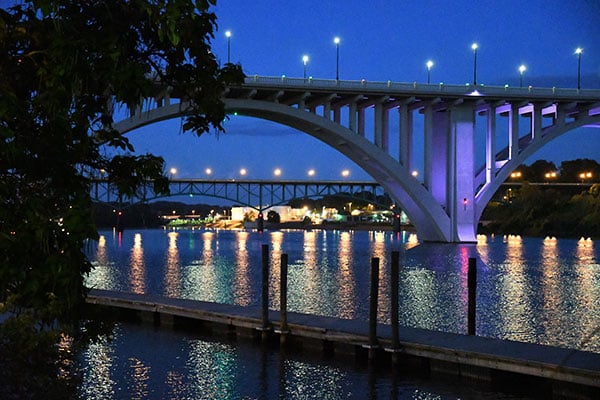
But it's pretty normal for expanded sensitivities to come along with compromises like this, which is precisely why they're not available by default in the first place. Essentially, Nikon is saying "We don't think image quality is up to our standards beyond this point, but if you feel the need to do so, far be it from us to stop you." I like that approach, as it lets me factor my own personal tastes into the equation.
And that's it for this field test. If you've not already read my first field test, you'll want to hop back there for a look at daytime shooting. And in my third and final field test, you'll find discussion of how the D7500 handles some more active subjects, as well as of daylight and nighttime video capture, and face detection functionality, the latter being a reader request.
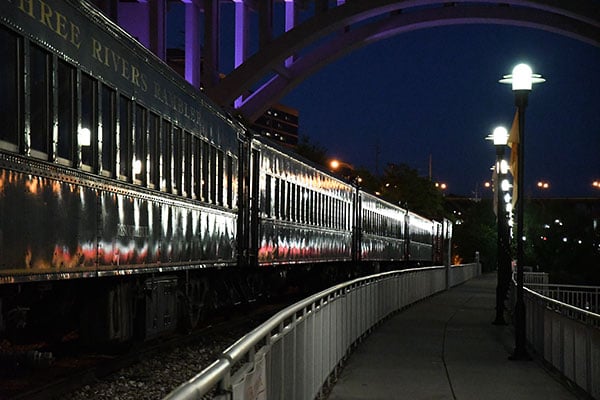
And don't forget to check out my gallery page for many, many more images shot with the Nikon D7500 in the real world, most of them including a raw version of the same scene as well. While you're at it, be sure to check out the results of our in-depth performance testing in the lab!

Field Test Part IV
Sports shooting, videos and reader questions: My final field test has them all!
By Mike Tomkins | Posted: 07/18/2017
 40mm-equivalent, 1/160 sec. @ f/6.3, ISO 100
Over the last few weeks, I've posted two field tests looking at how the Nikon D7500 performs in the real world. In my first field test, I took Nikon's enthusiast DSLR on the road to Mammoth Cave, Kentucky, then followed up with a daytime shoot back home in Knoxville, Tennessee. In the second field test, I continued with a sunset and evening shoot, rounding things out nicely with a raft of gallery shots across the sensitivity range.
If you've not already read those two field tests, I recommend you start there to get the full benefit of my real-world shooting experiences. Click here to read the first field test, or click here for the second one.
For the third test, I want to move the focus away from still image quality for a bit, and take a look at sports shooting performance and movie capture, as well as answering a few reader questions that cropped up since my previous reports.
The Nikon D7500 focuses quickly and confidently; shoots swiftly too
To get a feel for the Nikon D7500's performance, my son and I headed to the nearby tourist town of Pigeon Forge, Tennessee to the Xtreme Racing Center, a go kart track which has previously featured in some of my other DSLR reviews, as it makes for a good test of autofocus capabilities. A couple of reasonably long straights are coupled with the fastest karts I've found in the area, and there's easy access near the end of the straights without crossing any barriers.

After making some measurements off the map in comparison to my own photos and their EXIF timestamps, I've previously estimated them to have a top speed of somewhere around 25mph, a little shy of the claimed 40mph, but still somewhere in the ballpark. A few years after the track first opened, the karts themselves might be starting to look decidedly scruffy and second-hand now, but they still give me a reasonably predictable subject which is fast-moving and can come very close to the camera. And at other points around the circuit I can shoot the karts from oblique angles for an even tougher challenge.
Unfortunately, the weather hasn't been terribly cooperative lately, with a lot of rain and thunderstorms -- invariably right when I was available to go shooting. And as luck would have it, it had apparently rained fairly heavily not long before our arrival, as the karts were all parked and switched off.

A little patience paid off, though, as within an hour or so, the track had dried back up and the tourists were back out turning laps once more. And in the meantime, I was able to while away the time testing out the D7500's face detection capability when shooting through the viewfinder, answering a reader request in the process. (We'll come back to that in just a moment.)
So what did I think of the Nikon D7500 after shooting the karts for an hour or two, predominantly using the AF-S NIKKOR 70-200mm f/2.8G ED VR II lens? I have to say, I came away very impressed indeed. For a DSLR at this pricepoint, continuous autofocus was very swift and confident, and most of the time very accurate as well.

And when other, closer karts passed between me and my subject, the D7500 wasn't too quick to shift focus to the closer subject, meaning that most of the time I didn't lose more than the frame where my view of the kart I was focusing on was partially obscured. And on those occasions where, say, a couple of karts in quick succession meant that focus did leap to the new foreground subjects, it never took more than a frame or two to reacquire a focus lock on the correct subject once they'd passed.
And it wasn't just the autofocus performance that was swift, either. The Nikon D7500's burst capture speed also satisfied, and its buffer was generous enough that even shooting in raw+JPEG mode at the maximum JPEG quality, I could still rattle off a burst of shots following my subject almost all the way from one end of the straight to the other.

And I was seriously impressed with just how well the Nikon D7500 handled subjects very close to the camera. The last camera I shot with at the same track, Ricoh's Pentax K-3 II, definitely wasn't able to keep up as well in this respect. Thanks to its ability to keep up to fast-moving subjects so relatively close to the camera, the D7500 actually scored me some shots where the single kart I was shooting extended well beyond the image frame on both sides.
I have to say that in terms of autofocus and burst capture performance, shooting with the Nikon D7500 is a very satisfying experience indeed!

With sports shooting out of the way, let's talk about video capture for a moment. The great news here is that the Nikon D7500 is capable of recording ultra high-definition 4K video in-camera, and it does so with great quality.
I watched a generous selection of day and night 4K videos on my 55-inch Sony 4K TV, and came away very impressed with the D7500's ability to hold onto fine details in daylight, as well as its reasonably fine-grained noise in night shooting. I did notice some rolling shutter effect in panning shots, with skewed verticals noticeable when panning fairly swiftly across a scene, but I don't think it's enough to be too objectionable.
Daytime video, 3,840 x 2,160 pixels @ 30 frames per second
|
Daytime video, 1,920 x 1,080 pixels @ 60 frames per second
|
So what's the bad news? For 4K shooters, one potential concern is that the Nikon D7500 applies a 1.5x focal length crop, presumably as it cannot clock sufficient data off the full sensor width quickly enough to shoot without a crop. (You can see this in my sample videos, which were shot from the same locations and at the same focal lengths for both Full HD and 4K clips.)
What this means is that shooting wide-angle 4K video on the Nikon D7500 will prove challenging, as you will face an additional 1.5x crop on top of the 1.5x crop caused by the use of a DX-format image sensor instead of a full-frame one. And even for non-4K movies,you can also find yourself facing an additional crop, depending upon your camera setup. That's because the D7500 pairs any lens-based image stabilization with an electronic stabilization system, and this too will cause a crop, although the function (and the crop which it causes) can be disabled through the menu system.
Night video, 3,840 x 2,160 pixels @ 30 frames per second
|
Night video, 1,920 x 1,080 pixels @ 60 frames per second
|
The crop when using electronic stabilization is absolutely necessary, though, as it's what provides the leeway for the camera to move the active area around the sensor and thereby counter motion. But if you want the widest possible field of view, you'll want to disable this.
And the presence of electronic stabilization is also worth noting for tripod shooting, where I was initially a little perplexed as to why the D7500's Full HD videos showed a little choppiness when panning -- until I realized that although I'd disabled mechanical stabilization on the lens, electronic stabilization was still active. Once disabled, panned videos were as smooth as I expected them to be.
Night video, 3,840 x 2,160 pixels @ 30 frames per second
|
Time-lapse video, 3,840 x 2,160 pixels @ 30 frames per second
|
Also, autofocus during movie capture is a weak spot on the Nikon D7500, as it relies solely on contrast-detection, and isn't the fastest contrast-based system we've seen either. Of course, AF performance is going to vary from lens to lens, but unless you're happy with very obvious focus adjustments and hunting -- probably accompanied by some noise from the lens, as well -- then you're not going to want to rely on autofocus during video capture. You can pull focus manually, of course, but unfortunately just as for still imaging, there's no focus peaking in live view mode, so manually focusing accurately during capture isn't the easiest task, either.
 84mm-equivalent, 1/800 sec. @ f/7.1, ISO 100
And that brings me to the end of things I'd planned to investigate myself, but I did get a few reader questions which I wanted to quickly answer, too. The first such question related to face detection, and specifically to the Nikon D7500's ability to locate and focus on faces when shooting through the viewfinder, not using its live view mode.
This functionality is active by default, although there's no indication of this other than the fact that focus points over the detected face will show a lock as you trigger an autofocus cycle. However, that's different from the typical behavior of focusing on the closest object, which would be the case were face detection disabled. (And you can choose to do that, if you want.)
As I mentioned earlier, I tested this out while waiting for the go kart track to dry out and racing to recommence. My son gamely assisted with the test, standing at various distances as I shot photos of him with a couple of different lenses, having him stand near to or behind other objects, turn his face at an angle, etc.
So long as his face was mostly or entirely covered by the AF area and both eyes were visible, the system seemed to detect his location pretty robustly. You don't get to choose *where* on the face the D7500 will focus, but it did reliably put the point of focus on his face somewhere, and at least with the lenses I had on offer, that was always close enough that his eye was reasonably sharp. (You do need to bear in mind that it's possible neither eye will be beneath a physical focus point, though, so if you're using a really bright lens wide-open, you may want to rely on manually placing a focus point over the eye instead, if possible.)

Given that there are already a couple of shots of my son in the already-extensive gallery which were shot at default settings -- and hence with the feature already enabled -- I've not added any more in my final round of gallery photos.
One final request I received was for feedback on Nikon's Active D-Lighting and Picture Controls functions. These features have been included on Nikon's DSLRs for very close to a decade now, since they were first introduced with the Nikon D3 and D300 back in August 2007.
I must admit, with so much to discuss in reviewing Nikon's DSLRs, these very useful tools tend not to get so much coverage these days. For those of you who want to see what they can achieve, though, I've shot three full picture series showing all of the different default Picture Control settings, plus two series showing the effects of Active D-Lighting.




Let's look at the Picture Controls first, where the effect of the function is quite obvious. There are a total of eight picture controls to choose from: Auto, Standard, Neutral, Vivid, Monochrome, Portrait, Landscape and Flat.
Each applies different levels of brightness, contrast, clarity, hue, saturation and sharpening, much as you could do in Photoshop on your computer, and each preset allows you to adjust the look to your own tastes as well. (For monochrome images, you can also simulate the effects of different color filters on the lens, and add a tint to the final monochromatic image.)


IR reader and new D7500 owner Bruce Fenster reported in our comments that he finds the Auto and Standard settings to be a bit much for his tastes, compared to his earlier Nikon D7100. Unfortunately, I don't have access to a D7100 body myself to confirm that, but even though these effects are intended to provide commonality across Nikon's DSLRs, I wouldn't be too surprised if there are some minor variations from model to model, especially in the ~4.5 years since the D7100 arrived on the scene.
In my own shooting -- and I captured a couple of dozen Picture Control series, not just those which appear in the gallery -- I found that the Auto and Standard controls were near-indistinguishable from each other, suggesting that the Nikon D7500 strongly favors the Standard picture control when set to Auto.





For my own personal tastes, I felt the saturation of the Standard control was a bit on the high side, a look consumer photographers tend to favor, but that the contrast was a little lower than ideal. I personally prefer the Neutral profile, which yield most realistic, less punchy color, but this setting has a little lower contrast than I'd like, by default.
The solution, for both Bruce and myself, is to remember that we can tweak these presets, which really just offer a starting point from which to work. To do so, highlight the Picture Control which is closest to your desired look in the menu system, then hit the right arrow and tweak the various options for that preset.




User-modified presets are indicated in the Picture Control menu with an asterisk, and you can easily return to the defaults by repeating the same procedure to access the options, then hitting the Delete button to return them all to their original setup.
Active D-Lighting, meanwhile, is rather more subtle, at least unless you opt for the strongest effect levels, so it's harder to see what's happening at first glance. What it does, though, is to identify areas of clipped highlights and blocked shadows, and then pull the highlights back and open up the shadows a little, restoring more detail in both areas.


If the Active D-Lighting strength is too high, though, this can have the unwanted side effect of introducing color gradients where they shouldn't be, something which can be especially noticeable in buildings. (The walls appear to get gradually darker towards the top of the building, which can look rather unnatural.)
Again, I shot a good couple of dozen different series using all of the Active D-Lighting settings, then compared them back in the office. Personally, I felt the Auto setting tended to offer a nice balance between restoring highlight and shadow detail, and yet still yielding a pretty natural-looking image. I did find the effect much more noticeable in highlights than shadows, though, perhaps because Nikon is trying to avoid introducing objectionable noise by lifting the shadows too much.

And with that, we come to the end of my third and final field test. To make a long story short, I've greatly enjoyed shooting with the Nikon D7500, even if it lacks a few features like portrait grip support, dual flash card slots and support for metering with Nikon's older lenses.
It's a really good sports shooter, offers great image quality, and can also yield very good videos if you don't mind the sensor crop associated with 4K footage, and don't need unobtrusive full-time autofocus. If you can't justify the additional cost of the DX-format flagship Nikon D500, which lists for close to twice as much, I think you'll be very pleased indeed to own the Nikon D7500!

Flash
Nikon D7500 Flash

Built-in Flash Test Results
Coverage, Exposure and Range
A fairly powerful pop-up flash with narrow coverage. Average exposure compensation required.
| Coverage |
|---|
 |
| 16mm @ f/2.8 |
Coverage. Flash coverage was very narrow at wide angle (16mm or 24mm eq.), with dark corners and edges, although some of the light fall-off in the corners is from the lens itself. The 16-80mm f/2.8-4E can also cast a shadow depending on the distance and focal length, as you can see. We no longer test coverage at telephoto, as it's invariably much better.

Exposure. When it came to exposure, the D7500's built-in flash underexposed our Indoor Portrait subject slightly at its default setting, requiring +0.7 EV flash exposure compensation which is about the average required for this shot.
| Manufacturer-Specified Flash Range |
|---|
 14 feet f/4, ISO 200 |
Manufacturer Specified Flash Range. The Nikon D7500's flash is rated with a Guide Number of 12/39 (m/ft) at ISO 100 in both Auto TTL mode and in Manual flash mode. That works out to about 14 feet at f/4 and ISO 200. In Auto TTL mode, the flash produced a dim exposure, but in manual mode at full power as shown above, the Nikon D7500 produced a very bright flash exposure (almost a full stop overexposed), indicating the flash output rating is conservative.
Note: Here we shoot with manufacturer-specified camera settings, at the range the company claims for the camera, to assess the validity of the specific claims. The specified range has been calculated for the sensitivity, lens and aperture used in the test shot above.
Conclusion
by Mike Tomkins | Posted: 09/27/2017
When Nikon launched its D7000 DSLR back in late 2011, you could say that it created something of an instant classic. The D7000 perfectly hit the sweet spot for enthusiasts and even as a second or third body for many pros. It was affordable and yet comprehensively feature-rich, giving its owners plenty of room to grow in whatever direction their photographic needs took them. The D7100 and D7200 followed in much the same vein, but the D7500 arrives in an altogether-different market.
The Nikon D500 now rules the roost as the company's flagship sub-frame (or DX-format, in Nikon parlance) DSLR, and the D7500 is positioned directly beneath it in the line, offering many of its features at a significantly more affordable pricetag. Perhaps understandably, though, the D7500 lacks a few of the features found in its predecessors, as Nikon has reserved these for the flagship model instead.
But while we can understand why Nikon felt the need to take away these features -- we'll get to the specifics in just a moment, for those of you who've not already read the rest of our review -- it's a bit of a shame that the company wasn't able to reduce the pricetag of its D7500 at the same time. In fact, body-only the D7500 is a scant $50 more expensive than was the D7200 at launch, listing for a still-affordable US$1,250 without a lens.
But while it does lack a few features of earlier models, such as a second flash card slot, a secondary infrared receiver, an NFC radio, support for a portrait grip, or a mechanical AI coupling lever, the D7500 does best its predecessor in many other ways, perhaps justifying that slight bump in price. (Especially when one bears in mind the effects of a couple of years inflation. It inherits much the same excellent imaging pipeline as the D500, for example, and thus offers a nice step forwards in both performance and sensitivity range. And it also sports a much finer-grained metering sensor that it shares not just with the D500, but also with its professional flagship, the D5.
The D7500's newly-designed body is a joy to shoot with
All of this sits inside a newly-designed carbon fiber monocoque body which is truly a pleasure to shoot with. It's comfortable in the hand, and is adorned with an abundance of external controls that, for the most part, are well-positioned and easy to use without accidental operation.
It's a little easy to forget its two front function buttons, tucked inside the hand grip as they are, and if you have large hands you may find yourself occasionally bumping the upper of the two as we did, but at its default setting doing so won't adversely affect your images. And the remainder of the controls are very easy to reach, have good feel, and quickly become second nature. And we're definitely fans of the new ISO button location!
And the body itself, for such a fully-featured DSLR, is nevertheless surprisingly trim and light, something achieved thanks to that carbon fiber monocoque design. And really, it feels just as sturdy and solid as the magnesium alloy panels it replaced. Truth be told, the only way we really noticed the difference in materials is that carbon fiber isn't cold to the touch, as the mag alloy panels are. (And it's worth remembering that the D7200 only had mag alloy on its top and front surfaces anyway, with the remainder being polycarbonate.)
The D7500 is relatively unusual among DSLRs -- heck, in the camera market in general -- for the fact that it actually has a little lower resolution than did its immediate predecessors, the D7100 and D7200. But in our book, that's absolutely no bad thing. Frankly, the difference between a 20.9-megapixel camera and a 24.2-megapixel one is modest, at best.
We're talking about the subtraction of only 432 columns and 288 rows of pixels to make an image from the D7500 that's still 5,568 pixels wide and 3,712 pixels tall, after all. A little back-of-the-envelope math tells you that the D7500 has somewhere in the region of 7% less linear resolution than the D7200, hardly an earth-shattering reduction. And yet by sacrificing almost 14% of the total pixel count, the D7500 can offer larger, more light-hungry pixels and will fill its buffers noticeably less quickly.
And that's borne out by what we've seen both in the lab and in the real world. Yes, the D7200 will give you just slightly higher resolution, a difference that's noticeable even after you ramp up the sensitivity a little. But it will do so at the expense of noise levels and dynamic range once the sensitivity ramps up a little. The D7500, by contrast, will give you better results once you move away from base sensitivity, with cleaner images and as much as a stop more dynamic range than its predecessor by the time you reach ISO 25,600-equivalent.
And even at base sensitivity, the D7500's 20.9-megapixel resolution is sufficient for super 30 x 40-inch prints, or perhaps even larger for display on your walls at typical viewing distances. Combine that with vibrant, pleasing colors, good exposure accuracy and accurate white balance under most conditions except tungsten lighting, and you have the recipe for great photos. And once you raise the sensitivity levels, the D7500 will prove even more satisfying!
The D7500 performs admirably with slightly fewer pixels to handle, too
We alluded to the potential performance advantage of a reduction in pixel count a moment ago, and that's paired with a new EXPEED 5 image processor which Nikon tells us offers 30% greater performance. The result is that the D7500 handily outperforms its predecessor and even best its own manufacturer rating, managing a solid 8.2 frames per second in our lab testing.
For JPEG compressed images, that's a worthwhile 2.4 extra frames every second, and for raw shooters there's an even more significant 3.3 frames more every second than the D7200 could manage. And yet buffer depths in the D7500 are double those of the D7200 for JPEGs, and they've even more than doubled for raws.
And performance in other respects, including autofocus, shutter lag and single-shot cycle times are all great too. Plus there's a swift 1,8,000-second maximum shutter speed, just as in the D7200, and greater shutter-speed accuracy in general, according to Nikon. Battery life has decreased by around 14% since that camera, admittedly, but even here the D7500 turns in a very good performance for its class, so long as you're shooting through the optical viewfinder.
The D7500 isn't just a still shooter, of course. It's a capable video camera too, in many respects, although there are a couple of catches to be aware of which may sway you in favor of another camera, if video capture is a primary goal for you. Its 4K videos are packed with loads of detail. And it's nice to know that if you want to avoid compression artifacts, you can also simultaneously record uncompressed video via HDMI to an external recorder.
But 4K footage comes with a significant 1.5x focal length crop (and that's on top of the 1.5x crop you already experience since you're using a DX-format image sensor), so it's effectively a 2.25x crop overall. Even if you opt for the widest of the three kit lenses, for example, being the AF-S 16-80mm f/2.8-4E ED VR zoom, you'll find that for 4K video usage it's effectively a 36-180mm zoom instead. That could be a great thing if you're wanting to shoot distant subjects and bring them up close, but if wide-angle video possibilities are what you're after, then it's going to prove seriously limiting.
On the plus side, if you're only looking for Full HD video capture, then the D7500 bests in predecessor in this regard. Where the D7200 had a focal length crop if shooting 1080p footage at 60 frames per second, the D7500 can accomplish this feat with no crop at all, so long as you disable its optional electronic vibration reduction function and rely on lens-based stabilization or shoot unstabilized footage instead.
The only other significant fly in the ointment for video capture comes in the focusing department. The D7500 lacks any on-chip phase detection autofocus pixels, and that means while many mirrorless rivals and even some competing DSLRs now offer hybrid autofocus for video capture, the D7500 must still rely on contrast-detection autofocus, which is much more prone to hunting around the point of focus. And while you can, if you like, pull focus manually, the D7500 still lacks focus peaking functionality, an omission which we find a little bit incredible when the feature can now be found even on sub-$500 point-and-shoot cameras from some rivals.
But if you can live with those few shortcomings in the video department, there's no question that the D7500 is a very capable camera indeed. Admittedly, in some respects it doesn't quite match up to its own predecessor in order to create a greater differentiation from the more expensive, DX-format flagship, the Nikon D500. But if you need those features, Nikon would really rather you pay the extra for that camera, and you'll get an even more serious photographic tool that justifies the added cost in other respects, too. And it certainly bests its predecessor in important ways that will arguably have a greater impact on your photography, too.
If you want superb image quality and plenty of features at a much more affordable pricetag, the D7500 is a great camera. A clear choice for a place on our Dave's Pick list, the D7500 comes highly recommended for enthusiast shooters (and amateurs looking to step up their game), but who can't justify stretching to the purchase of its significantly pricier flagship sibling. All in all, in the D7500, Nikon has achieved a near-perfect balance of image quality, features, ease of use and price.
Pros
- Essentially the same excellent image quality and dynamic range as the D500
- Even broader base ISO range than its predecessor (51,200 vs 25,600)
- Quick 8.2 fps burst mode, significantly faster than its predecessor
- Generous buffer depths have doubled for JPEG, more than doubled for raw despite faster bursts
- Very fast and accurate autofocus
- Low shutter lag
- Fast single-shot cycle times
- Top 1/8,000 sec mechanical shutter, and shutter timing now said to be more accurate
- Ultra high-def 4K video capture at 30 frames per second
- No additional crop for 1080p60 video, unlike D7200
- New three-axis electronic VR for 1080 video (but with additional crop, obviously)
- Can record compressed 4K internally and uncompressed to external recorder simultaneously
- External mic and headphone jacks
- Power aperture control, zebra striping, and even 4K time-lapse movies
- Lighter, smaller carbon fiber monocoque body with deeper grip, better weather-sealing, better ISO button location feels just as solid as mag-alloy
- Boatloads of well-designed, mostly well-positioned dedicated controls
- Generously-sized, tilting touch-screen display
- Electronic front-curtain shutter option reduces vibrations (but only in mirror-up mode)
- Quiet shutter release mode really lives up to its name, great for shooting unobtrusively (and at up to 3fps, too)
- Very good battery life (but down 14% from D7200)
- Face detection supported even with optical viewfinder
- Automatic AF Fine-Tune function gives good results easily
- Built-in Wi-Fi and Bluetooth wireless communication
- In-camera batch raw processing
- All three kit lens options are decent (but can be soft in corners wide-open at some focal lengths, and show significant distortion / chromatic aberration when uncorrected)
- Viewfinder is bright, crisp, roomy and has great on-demand indications
- Built-in flash with good performance
- X-sync at 1/320 possible with reduced range
Cons
- Slightly lower sensor res than D7200 (but faster burst and much broader ISO range)
- Ridiculously high extended ISOs aren't very useful in the real world
- Auto and Incandescent white balance too warm under tungsten lighting
- Heavy 1.5x crop in 4K video recording
- No hybrid AF for live view/movies; shows noticeable hunting and AF adjustments
- Rolling shutter can be noticeable in 4K videos, especially when panning
- Combination of mechanical and electronic VR for videos (and the fact they're quite separate in the UI) can cause confusion
- Function 1/2 buttons can be too easy to forget, being hidden just inside the handgrip (and Fn1 is easy to bump accidentally if you have large hands)
- *Still* no focus peaking
- Only a single card slot, and it lacks UHS-II support
- No support for accessory portrait / battery grip
- NFC and rear IR remote receiver dropped
- Metering and Aperture-priority are no longer supported with older non-CPU AI lenses due to lack of mechanical AI coupling lever
- Optical viewfinder has less than 100% coverage, and is slightly tilted/offset
- Built-in flash has narrow coverage