
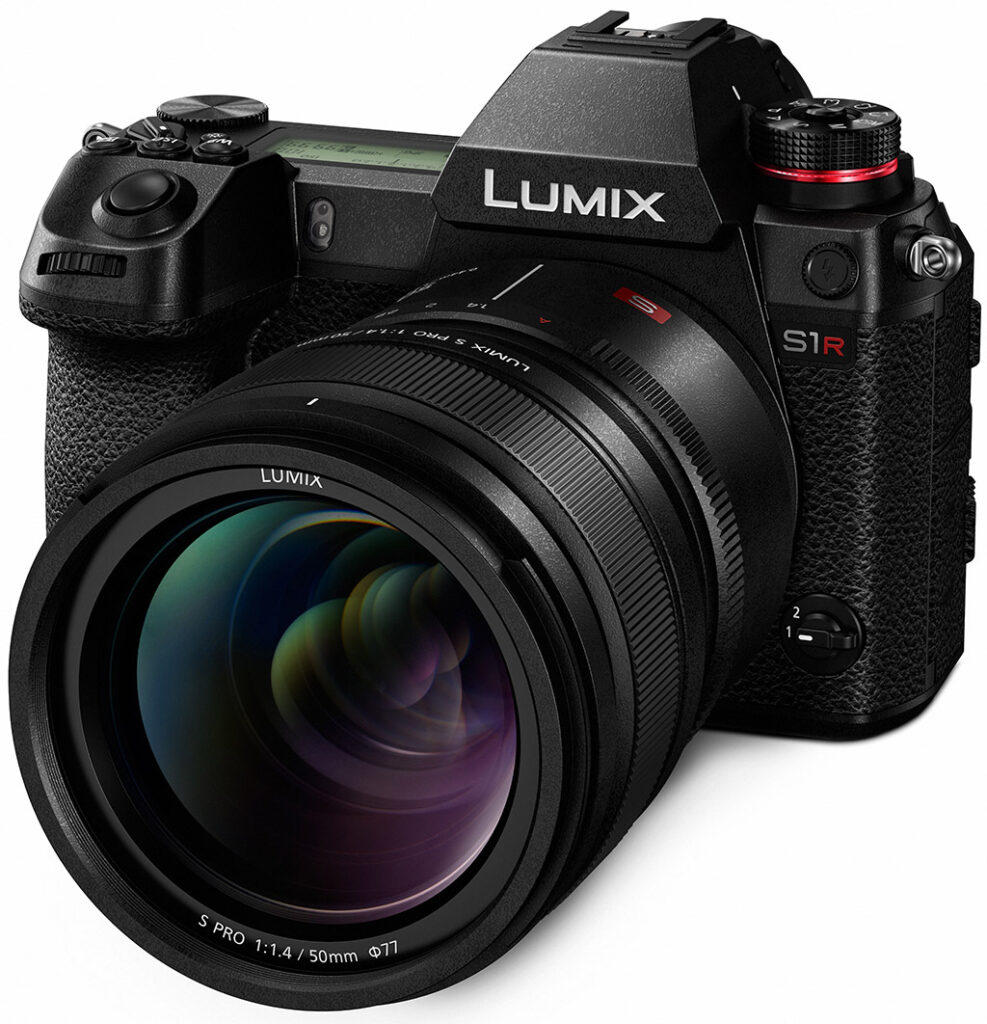


Overview
by William Brawley
Originally published: 9/25/2018
Revised: 02/01/2019

Well, well, well, look what we have here. Another fighter enters the fray of full-frame mirrorless cameras!
As one of the co-creators of the Micro Four Thirds mirrorless standard, Panasonic has been a leader in developing a compact ILC system centered around this fairly small sensor size. Back in 2008, Panasonic unveiled the world's first digital single-lens mirrorless camera, the Lumix G1, and now over ten years on, they are starting a new chapter -- with a new sensor size. Among pros, Panasonic's GH-series MFT cameras have been extremely successful, especially for videographers; the latest GH5 and GH5S cameras, in particular, offer a slew of professional-level video features, and the image quality and performance to match. With the new full-frame Lumix S series, Panasonic is aiming to take the photo and video expertise of their Micro Four Thirds system to the next level, offering an even higher-end, truly professionally-focused camera system.
In the run-up to Photokina 2018, Micro Four Thirds powerhouse Panasonic announced the development of not one but two professional-level full-frame mirrorless cameras, the Lumix S1R and Lumix S1. And in February 2019, Panasonic finally took the wraps off their first pair of full-frame mirrorless cameras. Although there were a few specs and features mentioned back at the initial development annouced, we now know in-depth details about what the high-res Panasonic S1R (and its 24MP sibling, the S1) is all about.
Image Quality
Following a similar pairing strategy to Sony's A7R and A7 models, the Panasonic S series so far comes in two different flavors: one high-resolution body that's designed more squarely for still photographers, and one with more modest resolving power but that's aimed at being more of a photo/video-hybrid camera.
With both models powered by an all-new Venus Engine image processor (more on that in a bit), the Panasonic S1R sports a 47-megapixel full-frame CMOS sensor, while the Panasonic S1 comes with a more manageable 24-megapixel sensor. However, Panasonic did clarify that despite the Lumix S1 being the more photo/video-hybrid model of the two S series cameras, it is still more photo-centric than the GH5/GH5S cameras. The S1 offers more video features than the S1R (although the latter is no slouch itself for video), so head over to our Panasonic S1 preview for info on that model.
As for the imaging pipeline of the S1R on its own, as mentioned, the camera is powered by all-new, Panasonic-designed 47.3-megapixel CMOS sensor that offers a native ISO range of 100-25,600 (expanded ISO range of 50-51,200) and is capable of capturing 14-bit raw files (and 12-bit video output). The new sensor sports an anti-reflective coating and lacks an optical low-pass filter for maximum image resolving power.

Despite the high-resolution sensor, Panasonic claims the S1R's sensor features an excellent signal-to-noise ratio, allowing the camera to produce impressive high ISO image quality performance. The microlens array utilized on top of the sensor are aspherical lenses and are designed for more efficient peripheral light collection. Other technical advances for increasing light-gathering efficiency include optimizing how light travels to each of the sensors' photosites as well as having a deep photodiode structure for improved light capture of longer wavelengths of light, such as reds. All this is combined with fast parallel A/D (analog to digital) conversion results in fast sensor readout.
Paired with the new sensor is also a new Venus Engine processor, providing both advanced image processing as well as agile performance. On the image processing side, the focus of the Lumix S1R is all about accurate, natural-looking fine detail and colors across the camera's ISO range. The new Venus Engine's Intelligent Detail Processing creates images with natural-looking fine detail as well as improved suppression of color moiré artifacts. Additionally, there are enhancements to color rendering, with a focus on accurate color reproduction for both bright and shadow areas.
In addition to regular 47.5-megapixel still images, the Panasonic S1R also features a multi-shot High-Resolution Mode. Like some other recent cameras with body-based image stabilization systems, the Panasonic S1R features a high-resolution shooting mode that quickly captures multiple (8) frames, with the sensor repositioned ever-so-slightly between frames, and stitches them together automatically for a final image with some truly impressive resolution. With a high-res 47MP sensor, the Panasonic S1R takes High-Res Mode shooting to the next level, creating an incredibly high-detail image with 187 megapixels. Yes, 187MP. Better start stocking up on high-capacity memory cards and hard drives now!

Like most High-Res multi-shot shooting modes, the S1R's version requires a tripod and is designed mainly for static subjects, such as architectural, landscape and product photography. For landscapes, in particular scenes with trees and other foliage, it's difficult or nearly impossible to have everything in your scene remain perfectly still during the High-Res capture period. Luckily, the Panasonic S1R has a setting for this which helps combat and reduce the motion blur seen when capturing High Res images of subtly-moving objects like foliage. High-Res images are captured in RAW mode, but can be converted to high-res JPEGs in-camera.
The Panasonic S1R has yet another interesting image capture mode, called HLG Photo Mode. In a sense, it's similar to an HDR-type capture mode, but the camera instead records an 8K image with a compressed brightness and in a unique HDR filetype (.HSP - "HDR Still Photo" filetype). Then, when you plug the S1R (or its SD card) into HLG-compliant 4K TV television, the resulting image is displayed back with an expanded dynamic range appearance.
Other new image capture modes include a new "Flat" Photo Style with reduced contrast and saturation; new aspect ratio options of 65:24 and 2:1; a new Highlight-weighted Metering Mode that helps prevent blown highlights; and an additional Auto White Balance mode, dubbed AWBw, that skews on the warm side in order to preserve warmer, redder tints such as in skin tones even under fluorescent lighting.

Autofocus & Performance
Much like Panasonic's Micro Four Thirds cameras, the Panasonic S1R uses a contrast-detect autofocusing system with DFD technology; the S series cameras do not have on-sensor phase-detect pixels like most other full-frame mirrorless cameras. Nevertheless, Panasonic claims some pretty spectacular AF performance for the S1R, with a 0.08s AF acquisition speed and excellent low-light and low-contrast focusing capabilities. In terms of speed, the camera body and lens work together, with the lens' focusing element(s) and the image sensor communicating at 480fps, while the Venus Engine processor analyses image data and performs the necessary DFD calculations, all in order to achieve focus quietly and accurately in only 0.08s. The camera is also able to autofocus in conditions as dim as -6EV (AF-S mode at f/1.4 and ISO 100), and on dark, low-contrast scenes down to -3EV.
When it comes to subject tracking performance, the Panasonic S1R has some interesting tricks up its sleeve. The camera incorporates an artificial intelligence-based subject and scene recognition system that uses not only DFD information and Facial/Eye Detection but also a new Deep Learning system that lets the camera recognize both human bodies as well as animals (cats, birds, dogs, etc). To develop this human/animal recognition system, Panasonic trained a deep learning system with a huge dataset of images.
Much like its "smaller" Lumix G9 sibling, the Panasonic S1R offers a similar array of 225 selectable AF areas, with various AF point grouping options to choose from. The new A.I.-based subject recognition system can be enabled or disabled manually depending on your shooting style. Enabled, the subject tracking system will continuously track the subject across the frame, thus letting you put more focus into your composition rather than trying to keep your AF point(s) over the subject.

When it comes to still photo performance features, the S1R offers some impressive continuous burst shooting specs, despite its high resolution. It's not the fastest full-frame camera on the market, but the S1R isn't intended to be a sports- and wildlife-centric camera. With single-shot AF, the S1R shoots at up to 9fps at full resolution, but if you flip into continuous focus, the burst rate drops to 6fps. Given the resolution, the burst speeds themselves are respectable for this class of camera.
Buffer depth is quite good even with its high-resolution sensor, though the lower-res S1, understandably, offers much, much deeper buffer depths. Panasonic states the S1R can capture up to 40 full-resolution raw files, 50 JPEG images, or 35 RAW+JPEG pairs -- regardless of AF shooting mode/burst rate. If you don't mind a drop in resolution, the S1R offers both 6K PHOTO and 4K PHOTO burst shooting with at 18MP and 8MP image sizes, respectively. 6K PHOTO captures images at 30fps, while 4K PHOTO mode is offered in both 30fps and 60fps. 6K PHOTO mode can continuously capture up to 10 minutes, while 4K PHOTO mode goes up to 15 minutes.
The camera's highly durable shutter mechanism offers up to 1/8,000s shutter speed, is rated for 400,000 actuations and offers the world's fastest flash sync speed of 1/320s (for a full-frame mirrorless camera), though that's at reduced flash power (similar to what some high-end Nikon DSLRs can do). In electronic shutter mode, the top shutter speed increases to 1/16,000s, but electronic first curtain shutter (EFCS) mode top out at 1/2,000s. Bulb mode exposures as long as 30 minutes are possible with mechanical or EFCS shutter, and up to 60 seconds with the electronic shutter. While recording movies, the electronic shutter speed range is 1/25s to 1/16,000s.

Image Stabilization
A long-time maker of optically-stabilized lenses, Panasonic debuted in-body image stabilization with the GX8, creating Dual I.S. in which lens stabilization worked in combination with sensor-shift stabilization. Since then, Dual I.S. and Dual I.S. 2 have made their way into the most of Panasonic's Micro Four Thirds cameras. With the S1R and S1 cameras, Panasonic brought their Dual I.S. technology to full frame.
Now, according to Panasonic, the inclusion of Dual I.S. is a "world's first" for a full-frame digital interchangeable lens camera. But, it should be noted that Sony's had their 5-axis SteadyShot sensor-shift technology for some time now, starting with the A7 II, which can work in conjunction with optically stabilized E-mount lenses. But, when it comes to full-frame cameras with Panasonic's "Dual I.S." brand of image stabilization technology, then yes, the S1R and S1 cameras are a first.
In terms of capabilities, the new Panasonic S1R is pretty impressive when it comes to image stabilization. Panasonic designed a stabilization algorithm based not only on info from a gyro sensor but also data from both the image sensor and an accelerometer. The 5-axis IS system in camera body itself offers up to 5.5 stops (6 stops now with recent firmware updates). The in-body IS mechanism is about 2x heavier than that of Lumix Micro Four Thirds cameras, housing four larger voice coil motors for increase speed and precision. When using an optical stabilized lenses, the two stabilization system work together for even better stabilization correction; this Dual I.S. 2 system can produce up to 6 stops of correction (6.5 stops with new firmware), and it works for both stills and video (including 4K).
Video
As mentioned, the S1R is more of a still photographer's camera than it is a video shooter, but the camera nevertheless offers some healthy video chops. For starters, much like the S1, the S1R, too, offers 4K UHD video up to 60 frames per second, making them the world's first full-frame DSLM cameras with 4Kp60 video. Panasonic was the first to introduce 4K video to a DSLM (in the GH4), and then the first DSLM with 4Kp60 (in the GH5). Panasonic made a huge splash with their GH-series for videographers, so it's exciting to see them push the envelope here with their full-frame mirrorless cameras.
In addition to 4Kp60, UHD video can also be recorded in 30p and 24p (as well as 50p and 25p for PAL regions), and at a high 150Mbps bit rate and in 4:2:0 8-bit. Despite the large sensor and high native resolution, the S1R produces a small crop for 4K recording, at 1.09x, and uses pixel binning. The S1, however, does not crop for 4K video (in 30p, 25p, 24p; it does in 60p). Further, the S1R only records 4K video in MP4 format and has a fairly limited continuous recording time at just 15 minutes for 4K (all frame rates) and 10 minutes for high-speed (slow-mo) 4K, whereas the S1 offers unlimited 4K recording in sub-60p frame rates (4Kp60 is limited to 29:59 and high-speed can be shot for a little longer at 15 minutes).

Full HD video is also offered, in a similar array of frame rates, as well as high-speed recording option at up to 180fps. The bitrate for Full HD video in the S1R is capped at 28Mbps, whereas the optional paid upgrade for the S1 bumps this up to 100Mbps in that camera. Recording time for the Full HD is unlimited, in both MP4 and AVCHD formats, however, High-Speed mode is again limited to just 10 minutes of continuous recording.
Like many of the Lumix Micro Four Thirds models before it, the S1R offers a number of cinema-focused video features, including Cinelike D, Cinelike V and Like709 Photo Styles, adjustable Luminance levels, Zebra overlays, focus peaking, clean HDMI output (only 4:2:0 8-bit, whereas the S1 with the optional upgrade can gain 4:2:2 10-bit). There's also a Type-A HDMI port, a 3.5mm mic jack, a headphone jack and support for an optional XLR microphone accessory.
Design & Ergonomics
Despite the differences in image resolution for these two models, the S1R and S1 cameras are identical in shape, styling and ergonomics. The Panasonic S1R (and S1) looks and feels like a larger brother to the Lumix G9. The camera offers a deep, comfortable handgrip, ample room for numerous physical controls and dials, as well as a large top-deck info display. The rear LCD design is new, however, compared to the G9, offering a handy three-way tilting design much like that of the Fuji X-T3, for example, allowing for easy viewing in both portrait and landscape orientations.

The 3.2-inch, 2,100K-dot LCD screen itself offers touchscreen functionality like most modern mirrorless cameras, features adjustable brightness levels, and uses an RGBW LCD panel for high brightness and improved visibility in sunlight.
The LCD is certainly nice, but EVF is the big talking point when it comes to looking through the camera. Not only is the EVF itself physically large with a deep eyecup, up to a 0.78x magnification ratio (adjustable with three magnification levels) and a 21mm eyepoint, but the EVF display is extremely high-res. The OLED EVF is the world's highest resolution viewfinder screen in a mirrorless camera to date, at 5,760K-dots of resolution. According to Panasonic, the EVF in the S1R offers an image resolution that's very close what's seen with the naked eye, and when you factor in the 0.005s lag and the 60/120Hz refresh rate, the S1R offers an EVF experience that's extremely close to what DSLR users are accustomed to with an OVF.
Much like large DSLR cameras, the Panasonic S1R includes a top-deck info display screen, which offers a quick glance at critical shooting settings as well as battery life and card(s) capacity. What's more, even if you power off the camera, you can still see the battery life indicator and the number of shots remaining. Handy!

Both S series models are fully weather-sealed, as we'd expect given their professional, flagship nature. Panasonic claims both cameras are "100% sealed," though we certainly don't wouldn't consider them "waterproof," but they should safely withstand a healthy dose of dust, moisture and freezing temperatures (down to -10 degrees C/14 degrees F). According to Panasonic, the S series cameras are weather-sealed to the same degree as the Lumix G9 and similar in ruggedness as the Canon 1D-series or as Nikon's flagship D-series DSLRs.

One physical design feature that's sure to please professionals, advanced users, and many other serious photographers and videographers is the inclusion of dual memory card slots -- one UHS-II SD and one XQD (and the option to accept physically similar CFexpress card with a future firmware update). Both Canon and Nikon's current full-frame mirrorless models offer just a single card slot, SD for Canon, XQD/CFexpress for Nikon. Not only do dual card slots provide the ability to expand your storage capacity and save media to the spare card once the primary one is filled, but they can also be configured to offer on-the-fly backup (recording media to both cards simultaneously), saving you from potential disaster should one card fail and become corrupted. Many professional flagship cameras, such as the Canon 1D X Mark II, Nikon D5, the Sony A9 as well as Panasonic's own GH5 and G9 cameras, offer dual card slots. Seeing as the Lumix S1R and S1 cameras are designed with the professional photographer and videographer in mind, it makes sense to see dual card slot support offered in these cameras.
Further usability features include numerous physical controls and dials, as one would expect on a professional-level camera. There are front and rear controls dials, a rear-facing 4-way directional control with an additional scrolling dial functionality and a joystick control for fast AF point adjustments. Furthermore, there are dedicated white balance, ISO and exposure compensation buttons along the top deck of the camera. As expected, the controls are all highly customizable, and there's even a lock lever on the back that lets you disable a number of buttons and dials to prevent accidental operation. The rear buttons on the camera are also illuminated to improve usability in dark conditions. If you happen to own or move between multiple S1R or S1 camera bodies, you can even save all your camera settings and customizations to the memory card and load up your personalized settings onto a different S1/R body.
Panasonic has not only refreshed their menu system UI for improved usability but the Quick Menu GUI gets an update, too, offering customization and easier access to frequently used settings. The primary menu system isn't entirely overhauled, so those familiar with Lumix MFT cameras won't be totally thrown for a loop, but the menu navigation is revamped, which Panasonic claims is more systematic and makes it easier to access frequent settings.

Lastly, the battery life. Mirrorless cameras have notoriously struggled to keep pace against DSLRs when it comes to sheer battery life -- powering shooting functions in addition to an EVF and/or the rear screen takes its toll. However, recent advancements in batteries have started to shift that balance, and larger camera bodies, too, often mean larger battery backs and longer battery life. The Panasonic S1R uses an all-new lithium-ion battery pack compared to the previous Lumix MFT cameras, such as the GH5 or G9. The larger battery gives the S1R a CIPA-rated battery life of 360 images/charge (LCD) or 340 (EVF) when using the XQD card. Battery life is slightly longer with the SD card, at 380 (LCD) and 360 (EVF). Overall, that's not fantastic battery life compared to professional DSLRs, however if you use the Power Save LVF (EVF) Shooting mode, which puts the camera to sleep automatically if you take your eye down from the viewfinder, you can seriously extend the shooting capacity out to over 1,000 images per charge -- 1,150 for the SD, 1,100 for the XQD. Plus, you can an add a second battery with the battery grip accessory, thus doubling your battery life. Furthermore, the S1R features a USB 3.1 Type-C port which supports USB Power Delivery, letting you charge your camera on the go, with your laptop, iPad, external battery pack, etc., without needing the dedicated battery charger. And you can even operate the camera while it's recharging. Very handy!

Wired & Wireless Connectivity
As is typical with most modern cameras, the Panasonic S1R offers the standard array of wireless communication features, including Wi-Fi and Bluetooth. Wi-Fi supports both 2.4GHz and 5GHz frequencies (802.11ac for 5GHz, 802.11b/g/n for 2.4GHz), making image transfers quite fast. You can even wirelessly transfer camera setting between multiple S1/R bodies. Bluetooth supports the v4.2 Low Energy standard, which enables constant, low-power connections to paired smartphones or tablets. For studio shooters or other photographers requiring wired connections, the S1R supports tethered shooting via USB, including image transfer and camera control.
As mentioned earlier, the camera features Type-A HDMI and USB Type-C ports as well as microphone and headphone jacks. It also provides a 2.5mm remote jack.
Panasonic S1R Pricing & Availability
The Panasonic S1R will be sold both body-only and as a kit with a 24-105mm f/4 OIS lens. The Panasonic S1R is both body-only and as a kit with a 24-105mm f/4 OIS ens. The S1R went on sale in February with a suggested retail price of US$3,699 (body-only) or US$4,599 (kit). The DMW-BGGS1 (Battery Grip) is compatible with both S1R and S1 bodies will sell for US$349. Availability is estimated for early April.

New L-series Alliance with Panasonic, Leica and Sigma
One of the major stories around these new Lumix S1R and S1 camera is the lens mount; they utilize the Leica L mount -- the same mount that's on the Leica SL. Panasonic and Leica have long had a strategic partnership, not only on lens designs and manufacturing but also sharing certain camera models. They've now taken the partnership to the next level, not only incorporating Leica's L mount into their cameras and lenses, but also bringing on famed lens manufacturer Sigma to form a new L-series Alliance.
It's a pretty strategic move on Panasonic's part. In launching an all-new camera system with a "new," or rather a different lens mount than their already-existing lens products (MFT), Panasonic isn't fresh out of the gate with a new camera system with little to no lens support, both natively or from third parties. By using the L-mount, the Lumix S1R and S1 camera can already take advantage of the current selection of Leica L-Mount lenses.
As mentioned, Panasonic will also design and build their own native L-mount lenses, starting with a 50mm f/1.4 prime, a 24-105mm f/4 standard zoom, and a 70-200mm f/4 telephoto zoom. They've also announced a broad lens roadmap, expanding the native S series lenses to more than ten different models by 2020.
As for Sigma's role in this new L-mount Alliance, we don't yet have specifics, but the company plan to release their 14 E-mount lenses in L-mount, as well as develop new ones.
In The Box
The Panasonic S1R retail box with Lumix S 24-105mm f/4 Macro O.I.S. kit (as reviewed) includes the following items:
- Panasonic Lumix DC-S1R Mirrorless Digital Camera
- Panasonic Lumix S 24-105mm f/4 Macro O.I.S. Lens
- Panasonic DMW-BLJ31 Rechargeable Lithium-Ion Battery (7.2V, 3100mAh)
- Panasonic DMW-BTC14 Battery Charger
- AC Adapter and AC Mains Lead
- USB Type-C to USB Type-C Cable
- USB Type-C to USB Type-A Cable
- Body Cap
- Shoulder Strap
- Eyecup
- Hot Shoe Cover
- Flash Sync Socket Cap
- Battery Grip Connector Cover
- Cable Holder
- Limited 1-Year Warranty
Performance
Timing and Performance
Very good overall performance, though buffer clearing can be sluggish.
| Startup/Play to Record | ||
|---|---|---|
| Power on |
~1.5 seconds
|
Time it takes to turn on and capture a shot. |
|
Play to Record, |
~0.6 second
|
Time until first shot is captured. |
Powering on and taking a shot was reasonably fast for a mirrorless camera, at about 1.5 seconds. Switching from Play to Record mode and taking a shot was quite a bit faster, at about 0.6 second. Good performance here for a mirrorless camera, though most DSLRs are faster at startup.
| Shutter Response (Lag Time) Mechanical / Electronic Front Curtain / Electronic Shutter |
||
|---|---|---|
|
Full Autofocus, |
0.153/0.148/0.173
second |
Time from fully pressing shutter button to image capture, with the lens already at the proper focal distance setting. |
| Manual Focus |
0.063/0.068/0.110
second |
For most cameras, shutter lag is less in manual focus than autofocus, but usually not as fast as when the camera is "prefocused". |
|
Prefocused |
0.056/0.057/0.094
second |
Time to capture, after half-pressing and holding shutter button. |
|
Note: All timing performed with a Panasonic Lumix S Pro 50mm f/1.4 L-mount lens. Performance may vary with other lenses.
|
||
The Panasonic S1R's autofocus speed was quite good in our tests, especially for a camera that uses contrast-detect AF. In the lab, the S1R produced a full-autofocus shutter lag (with the subject at a fixed distance) of 0.153 second in 1-area (center) AFS mode with the Lumix S Pro 50mm f/1.4 lens using default mechanical shutter mode. That's competitive with a lot of pro DSLRs.
Shutter lag in manual focus mode was very low at only 0.063 second, and prefocused shutter lag was even lower at 0.056 second. Good performance here.
Using the Electronic Front Curtain Shutter (EFCS) mode produced slightly faster full AF lag but slightly slower manual focus and prefocused lag, while the fully electronic shutter option increased shutter lag in all three cases though results were still pretty quick. Note that the S1R offers an Auto shutter mode which switches the shutter type to suit the recording conditions and shutter speed, but it defaults to mechanical shutter.
To minimize the effect of different lens' focusing speed, we test AF-active shutter lag with the lens already set to the correct focal distance.
| Cycle Time (shot to shot) | ||
|---|---|---|
|
Single Shot mode |
0.28 second
|
Time per shot, averaged over 10 frames (we no longer test for buffer depth in single-shot mode). |
|
Single Shot mode |
0.31 second
|
Time per shot, averaged over 10 frames (we no longer test for buffer depth in single-shot mode). |
|
Early shutter |
No
|
Some cameras don't snap another shot if you release and press the shutter too quickly in Single Shot mode, making "No" the preferred answer. |
|
Continuous H mode Large/Fine JPEG |
0.10 second
(9.6 fps); 62 frames total 17.3 seconds to clear* |
Average time per shot before buffer fills. Slows to an average of 0.41s or 2.5 fps when buffer is full with a lot of variation. |
|
Continuous H mode RAW |
0.10 second
(9.6 fps); 39 frames total 12.3 seconds to clear* |
Average time per shot before buffer fills. Slows to an average of 0.50s or 2.0 fps when buffer is full with a lot of variation. |
|
Continuous H mode RAW + L/F JPEG |
0.10 second
(9.6 fps); 33 frames total 18.1 seconds to clear* |
Average time per shot before buffer fills. Slows to an average of 0.64s or 1.6 fps when buffer is full with a lot of variation. |
|
Continuous H mode 6K JPEG |
0.03 second
(30.0 fps); Unlimited (?) 2.4 seconds to clear* |
Average time per shot over 100 frames, with no apparent limit other than card capacity. |
| Flash Recycling |
N/A
|
Flash at maximum output. |
|
*Note: Buffer clearing times measured with a Lexar Pro 2933x XQD 2.0 400MB/s flash card. Slower cards can produce correspondingly slower clearing times and may also limit length of bursts in continuous mode. ISO sensitivity and noise reduction settings can also affect cycle times and burst mode performance.
|
||
Single-shot cycle times were very fast at about 0.3 second for best quality JPEGs or RAW+JPEG files. (Note that we no longer test single-shot mode with just RAW files, as the results are usually somewhere in between.)
In Continuous H mode (the fastest full-res burst mode), the S1R captured images at about 9.6 frames-per-second no matter the file type, surpassing Panasonic's 9 fps spec. Note that autofocus is locked at the first frame of a burst in this mode (AFS). Panasonic claims the S1R can manage up to 6 fps with AF updated between frames (AFC) when using the mechanical shutter or EFCS, and 5 fps using electronic shutter, however we did not test those modes in the lab. In addition, the S1R offers medium (M) and low (L) speed continuous modes, rated at 5 and 2 fps respectively.
The S1R also has 6K and 4K Photo burst modes, which capture 18-megapixel JPEGs at 30 fps and 8-megapixel JPEGs at 60 or 30 fps respectively with no apparent buffer limit (other than card space or elapsed time).
Buffer depth was very good when shooting best quality JPEGs in Continuous H mode, at 62 frames using our Lexar Pro 2933x XQD 2.0 card, exceeding Panasonic's 50 frame spec. Buffer depth fell to 39 RAW frames and 33 RAW+JPEG frames, though that's still pretty good considering the file sizes, and pretty close to Panasonic's spec of 40 and 35 frames respectively.
Full resolution buffer clearing times were on the slow side for XQD, though, taking 17.3 seconds after a burst of 62 JPEGs, 12.3 seconds after 39 RAW frames, and about 18.1 seconds after 33 RAW+JPEG files in Continuous Hi mode. The camera does however let you make setting changes, review just-shot images and continue shooting while the buffer is clearing.
To see how a fast SD card compared, we re-tested Continuous Hi mode with our Lexar 2000x UHS-II SDXC card, and here are the results:
| With Lexar Professional 64GB 2000x UHS-II SDXC | ||
|---|---|---|
|
Continuous H mode Large/Fine JPEG |
0.11 second
(9.2 fps); 56 frames total 17.4 seconds to clear* |
Average time per shot before buffer fills. Slows to an average of 0.42s or 2.4 fps when buffer is full with a lot of variation. |
|
Continuous H mode RAW |
0.11 second
(9.2 fps); 38 frames total 18.3 seconds to clear* |
Average time per shot before buffer fills. Slows to an average of 0.50s or 2.0 fps when buffer is full with a lot of variation. |
|
Continuous H mode RAW + L/F JPEG |
0.11 second
(9.2 fps); 33 frames total 19.8 seconds to clear* |
Average time per shot before buffer fills. Slows to an average of 0.56s or 1.8 fps when buffer is full with a lot of variation. |
|
Continuous H mode 6K JPEG |
0.03 second
(30.0 fps); Unlimited (?) 2.5 seconds to clear* |
Average time per shot over 100 frames, with no apparent limit other than card capacity. |
| Flash Recycling |
N/A
|
Flash at maximum output. |
|
*Note: Buffer clearing times measured with a 64GB Lexar Pro 2000x UHS-II SDXC card. Slower cards can produce correspondingly slower clearing times and may also limit length of bursts in continuous mode. ISO sensitivity and noise reduction settings can also affect cycle times and burst mode performance.
|
||
Interestingly, switching to a fast UHS-II SD card reduced the average burst rate slightly to 9.2 frames per second, but it did not impact buffer depths or clearing times by much. Buffer depth with best quality JPEGs only fell from 62 to 56 frames, RAW from 39 to 38 and RAW+JPEG was unchanged at 33 frames. Clearing times weren't much longer either, with the exception of RAW files, which increased from 12.3 to 18.3 seconds.
Bottom line, the Panasonic S1R's performance was quite good overall in the lab, with reasonably quick startup, fast autofocus, low shutter lag, very fast cycle times, very good burst performance and decent buffer depths. Buffer clearing was sluggish, though, even with a fast XQD 2.0 card.
Battery
Battery Life
Decent battery life for its class, with flexible power options.
| Operating Mode | Battery Life |
|---|---|
|
Still Capture, CIPA standard
EVF with S-R24105 lens and XQD card |
340 shots
|
|
Still Capture, CIPA standard
LCD Monitor with S-R24105 lens and XQD card |
360 shots
|
The Panasonic S1R uses a custom DMW-BLJ31 rechargeable lithium-ion battery pack for power, and comes with a single battery and a dedicated battery charger. In-camera battery charging and power supply via USB are both supported. Battery life is CIPA-rated for between 340 and 360 shots per charge depending on which display is active. That's about average for a mirrorless camera but not nearly as good as most DSLRs when using their optical viewfinders. However the S1R has a Power Save LVF mode which when enabled, increases battery life to an excellent 1,100 shots per charge according to Panasonic. And the optional DMW-BGS1R power grip can double battery life with a second battery.
The table above shows the number of shots the camera is capable of (on a fully-charged rechargeable battery), based on CIPA battery-life and/or manufacturer standard test conditions.
(Interested readers can find an English translation of the CIPA DC-002 standards document here. (180K PDF document))
Image Quality
Editor's Note: Fear not! Our S1R print quality analysis is coming. Due to the current pandemic situation, we've had to limit our time at IR's Galagtic HQ. Rest assured that once we are able to return to HQ, we'll fire up the printer once more.
Below are crops from our laboratory Still Life target comparing the Panasonic S1R's JPEG image quality to a series of competing cameras with similar high-resolution sensors. Unlike most Image Quality Comparisons, there is no predecessor to the all-new S1R. For this comparison set, we're showing the S1R up against the 50MP Canon 5DS R, the 50MP (medium-format) Fujifilm GFX 50S, the 45MP Nikon Z7 as well as the earlier 42MP Sony A7R III and current 61MP Sony A7R IV.
NOTE: These images are from best quality JPEGs straight out of the camera, at default settings including noise reduction and using the camera's actual base ISO (not extended ISO settings). All cameras in this comparison were shot with our very sharp reference lenses. Clicking any crop will take you to a carrier page where you can click once again to access the full resolution image as delivered straight from the camera.
Panasonic S1R vs Canon 5DS R at Base ISO


Panasonic S1R vs Fujifilm GFX 50S at Base ISO


Panasonic S1R vs Nikon Z7 at Base ISO


Panasonic S1R vs Sony A7R III at Base ISO


Panasonic S1R vs Sony A7R IV at Base ISO


Panasonic S1R vs Canon 5DS R at ISO 1600


Panasonic S1R vs Fujifilm GFX 50S at ISO 1600


Panasonic S1R vs Nikon Z7 at ISO 1600


Panasonic S1R vs Sony A7R III at ISO 1600


Panasonic S1R vs Sony A7R IV at ISO 1600


Panasonic S1R vs Canon 5DS R at ISO 3200


Panasonic S1R vs Fujifilm GFX 50S at ISO 3200


Panasonic S1R vs Nikon Z7 at ISO 3200


Panasonic S1R vs Sony A7R III at ISO 3200


Panasonic S1R vs Sony A7R IV at ISO 3200


Panasonic S1R vs. Canon 5DS R, Fujifilm GFX 50S, Nikon Z7, Sony A7R III, Sony A7R IV


Field Test
The Panasonic S1R expertly blends classic feel and functionality with modern performance

The Lumix S1R is Panasonic's first high-resolution full-frame mirrorless camera. Compared to the company's long tradition of Micro Four Thirds cameras, the new full-frame Lumix S system is a big jump up in terms of sensor size.
A large aspect of any camera system is its lens selection, which is particularly challenging when launching a brand-new camera system, especially one which must use a different lens mount. Fortunately, Panasonic has long had a productive relationship with Leica, who has their own full-frame lens mount, the L mount. While Panasonic is making their own lenses (the S1R and S1 launched alongside three Panasonic S lenses), users can also attach existing L mount lenses from Leica. Further, Sigma has joined the newly-formed L Mount Alliance, promising to release native versions of their Sigma Art lenses in addition to offering mount and conversion options to existing Sigma owners.
When considering the intelligent design of the S1R, Panasonic's imaging expertise, and the new L-Mount Alliance, Panasonic has done a really good job of positioning themselves during the critical launch period of their new full-frame mirrorless cameras. They've jumped in with both feet and it shows when using the Panasonic S1R. Let's take a close look at how the camera performs in the field, including a look at image quality, autofocus performance, video features and more.

Key Features and Specs
- Full-frame mirrorless camera
- L lens mount (developed by Leica)
- Part of the new L Mount Alliance with Leica and Sigma
- 47.3-megapixel MOS full-frame image sensor
- Native ISO range of 100-25,600, expandable to ISO 50-51,200
- Weather-sealed body
- High-resolution electronic viewfinder
- Triaxial tilting touchscreen
- Dual card slots (UHS-II SD and XQD)
- Up to 9 frames per second continuous shooting with AF-S, 6 fps with AF-C
- 4K/60p video
- Sensor-shift image stabilization
- High Resolution shooting mode
- $3,700 USD for the body

Camera Body & Handling: A large, but very well-designed camera
If you buy into the conventional wisdom that mirrorless cameras are always small and lightweight, the S1R will quickly make you realize that is not the case. The camera weighs 2.26 pounds (1,021 grams), which is quite a bit more than the Nikon Z7, Canon EOS R and Sony A7R Mark IV full-frame mirrorless cameras, for example. Further, the S1R is large. It is 5.9 inches (148.9 millimeters) wide, 4.3 in. (110mm) tall and 3.8 in. (96.7mm) deep, which is between half an inch and an inch larger than the Sony A7 IV in each dimension.

However, this bulk comes with excellent build quality and an intelligent control layout. The S1R feels very good in the hands. Its buttons and dials are plentiful and easy to operate, and the front grip is deep and comfortable to hold. If you have gone hands-on with different mirrorless cameras and found any of them a bit too cramped, the S1R will likely be a breath of fresh air.
Another excellent aspect of the camera is its electronic viewfinder. The OLED EVF has 5.76 million dots and a 0.78x magnification. The display is sharp and works great. It is not just high resolution, but it's also smooth thanks to its 120Hz refresh rate. Further, the circular eyecup around the EVF is comfortable, which may not sound like an important consideration, but it is when you are shooting for an extended period of time. The rear touchscreen is nice too, although it's not a tilt/swivel display but rather a triaxial display. This means that it tilts up and down and about 45 degrees to the side. The 3.2-inch screen looks good, but I do miss the fully articulating display design of Panasonic's higher-end Micro Four Thirds cameras.
 |
| On the back of the S1R, there is ample space for physical controls and buttons. The dedicated autofocus joystick is a particular highlight, as is the excellent OLED electronic viewfinder. While the rear display is large and looks nice, I do wish it was a tilt/swivel display rather than a triaxial display. |
The camera also has a third display, a useful, easy-to-read top-deck information display. The backlit, monochrome screen shows settings such as shutter speed, aperture, exposure compensation, ISO, battery life, image quality, white balance and remaining shots. Further, by double tapping the illumination button on the top deck of the camera, some of the S1R's buttons also light up. The buttons which light up are the playback, Q, back, DISP., and delete buttons.
In terms of button placement, I don't have much to complain about. Most controls are within reach of your shooting hand except for the playback button, which is to the left of the viewfinder and requires your left hand to press -- a mild annoyance. My favorite aspect of the design are the white balance, ISO and exposure compensation buttons located near the shutter release. They're all the same size, but to make them easier to differentiate while looking through the viewfinder, the white balance button sits higher, the ISO button in the middle has two bumps, and the exposure compensation button sits the lowest. You can easily feel the difference between the three. Another great aspect of the S1R's design is its dedicated autofocus joystick; super convenient and easy to use.
|
| The top of the S1R has a dedicated mode dial to the left of the viewfinder. To the right, there are three exposure control buttons near the shutter release. Further, the camera has a useful top display, a feature missing from some mirrorless cameras. |
While I like the size of the camera and the overall design, I found that the directional pad on the back doesn't feel good at all. It's mushy and I found it difficult to use for menu navigation, opting instead to use the joystick. This is a small nitpick in the grand scheme of things, especially since it's by no means a required method of input when using the S1R.
Image Quality: The 47.3MP full-frame sensor delivers great images
The Panasonic S1R features a 47.3-megapixel full-frame image sensor. At the time of its original announcement and release, it was the highest-megapixel full-frame mirrorless camera. Since then, Sony has announced the 61-megapixel A7R IV, but that nevertheless leaves the S1R as still a very high-resolution option in the ever-more-crowded full-frame mirrorless market.

Sharpness and colors
Considering the 47.3-megapixel full-frame image sensor, I expected the S1R to capture highly-detailed images, particularly when considering raw files. Fortunately, the S1R has certainly met my expectations, with the camera producing very detailed images, particularly at low ISO settings.
 |
| Panasonic Lumix S 70-200mm f/4 lens with 2x teleconverter at 281mm, f/8, 1/2000s, ISO 2000. This image has been converted and processed to taste in Adobe Camera Raw, including default sharpening and noise reduction settings. Click for the full-size image. Click here for the RAW file. |
 |
| Panasonic Lumix S 70-200mm f/4 lens with 2x teleconverter at 281mm, f/8, 1/2000s, ISO 2000. 100 percent crop from the above image. This image has been converted and processed to taste in Adobe Camera Raw, including default sharpening and noise reduction settings. Click for the full-size image. Click here for the RAW file. |
The above crops are from a raw file, which I processed in Adobe Camera Raw. If you are looking for the ultimate in detail from the S1R, you will certainly want to process raw files. With that said, the camera does well with its JPEG processing as well. In the crop below, we see a good amount of detail with the S1R applying moderate in-camera sharpening. I like this approach because while it doesn't produce quite as much detail as a processed raw file, it also doesn't introduce any unsightly artifacts. For comparison's sake, I have also included the same image processed to taste as a raw file, which has sharpening slightly stronger than the Adobe Camera Raw default value.


When considering how the S1R handles colors, let's consider a few examples below. The first shows how the S1R handles pink, magenta, orange and green. The first two colors are particularly challenging for many cameras, but I think that the S1R does a nice job of capturing the natural vibrance without overdoing it or producing ugly color blocking.

In this second image, we see a different shade of green, along with nicely-rendered bright yellow sunflowers. They are saturated without appearing unnatural.

In this third image, I want to bring attention to the reds in the scene. The S1R reproduces the reds well here, too, without overdoing it.

High ISO
The S1R has a native ISO range of 100-25,600 and can be extended down to ISO 50 and up to ISO 51,200. Of course, a full-frame 47-megapixel image sensor is being pushed pretty hard at ISO 25,600. With the image below, which was shot at ISO 6400, I am quite impressed by how the camera performed. Considering first the JPEG image, the camera does a decent job of retaining quite a bit of fine detail while also suppressing noise. There is still a bit of detail in the fur, although obviously some very fine details get blurred. Look in particular at the whiskers, which get blurred quite heavily. In the repeating patterns of the fur, detail is preserved pretty well. Looking at the 100-percent crop from the bottom left corner of the image, the camera does a pretty nice job of handling noise in smoother areas of the image.


When looking at the raw file, I am even more impressed. After editing the file and performing some manual noise reduction within Adobe Camera Raw, I was able to preserve detail better than the camera did with the JPEG while also maintaining better color and contrast. There is slightly more noise, but I prefer a fine-grained noisy image to a smoother, somewhat blotchy, image. I could have done additional noise reduction to really smooth the image out, but it would come at the cost of detail. For the S1R to be able to produce such nice fine detail at ISO 6400, even after making adjustments to the raw file and performing noise reduction, is impressive.

 |
| Panasonic Lumix S 70-200mm f/4 lens with 2x teleconverter at 389mm, f/8, 1/640s, ISO 6400. 100 percent crop of the above processed raw image. This image has been converted and processed to taste in Adobe Camera Raw. Click for the full-size image. Click here for the RAW file. |
 |
| Panasonic Lumix S 70-200mm f/4 lens with 2x teleconverter at 389mm, f/8, 1/640s, ISO 6400. 100 percent crop of the above processed raw image. This image has been converted and processed to taste in Adobe Camera Raw. Click for the full-size image. Click here for the RAW file. |
In another example, we can more easily see the effect of in-camera noise reduction when shooting at high ISOs. In the JPEG image, seen first, there's some blurring of fine feather details. In the raw file, which does not have additional noise reduction applied, you can see more detail in the feathers.


 |
| Panasonic Lumix S 70-200mm f/4 lens with 2x teleconverter at 287mm, f/8, 1/1250s, ISO 6400. 100 percent crop from a processed raw image. This image has been converted and processed to taste in Adobe Camera Raw. Click for the full-size image. Click here for the RAW file. |
Raw file flexibility
When considering the flexibility of the S1R's raw files, you can make considerable adjustments to exposure, shadows and highlights while retaining a natural appearance to the image file. Consider the image below, which is shown first in its original JPEG form and then shown with raw processing adjustments. In the original image, the camera does a pretty nice job of capturing some shadow detail in the foreground while not blowing out the sky and building in the back. When processing the raw file, I was able to pull out a lot more detail from the dark foreground and also bring back some finer details from the sky by reducing highlights.


 |
| Panasonic Lumix S 24-105mm f/4 lens at 63mm, f/8, 1/80s, ISO 100. 100 percent crop from the above processed raw image. This image has been converted and processed to taste in Adobe Camera Raw. Click for the full-size image. Click here for the RAW file. |
 |
| Panasonic Lumix S 24-105mm f/4 lens at 63mm, f/8, 1/80s, ISO 100. 100 percent crop from the above processed raw image. This image has been converted and processed to taste in Adobe Camera Raw. Click for the full-size image. Click here for the RAW file. |
This example also brings to light the dynamic range of the S1R. While I did choose to make adjustments to the raw file, it is worth considering that the S1R did a nice job with this challenging scene. If we look at data from Photons to Photos, we see that the S1R performs quite nicely, maxing out at about 12 EVs of dynamic range at its minimum ISO of 50. At its base native ISO of 100, the situation remains very good, with the S1R producing 11.4 EVs of dynamic range. These results are comparable to those the Sony A7R III and Nikon Z7.
High Resolution Shooting Mode
The Panasonic S1R includes a High Resolution Shooting mode, which can create a 187-megapixel raw image. This mode has some restrictions worth considering. For one thing, you really need to use a tripod in order to minimize camera shake and capture the best quality image possible. The camera can also take a while to create such a high-resolution image, so it's certainly a slower shooting process. Also, the ISO's top limit is capped at 3200. With all that said, being able to produce a 187-megapixel raw file, which can then be easily opened in editing software such as Adobe Lightroom and Camera Raw, is really cool.
To enable High Resolution Mode, you simply go into the camera's menu, head to the Image Quality 1 menu, which is the very first page in the menus, and head down to High Resolution Mode. From here, you can start the mode and adjust settings, including simultaneous recording of regular shots, setting a shutter delay and selecting your motion blur processing mode. There are two motion blur processing modes to choose from. The first (default) setting gives priority to resolution, which just keeps subject blur in the shot. The second mode reduces afterimage from subject blur by deferring those sections of the image to regular shooting resolutions. The camera analyzes the frame for blur and leaves areas which are sharp in the composite image while replacing blurry areas with data from a single image capture.
As you can see in the comparison images below, High Resolution Mode produces an image size of 16736 x 11168 pixels. In contrast, the 47.3-megapixel sensor in its normal shooting mode captures an image size of 8368 x 5584 pixels.

 |
| Panasonic Lumix S 70-200mm f/4 lens at 146mm, f/8, 1/100s, ISO 100. 100 percent crop from above processed raw image. Full High-Res Mode image processed with Adobe Camera Raw default settings. Click for the full-size image. Click here for the RAW file. |

 |
| Panasonic Lumix S 70-200mm f/4 lens at 146mm, f/8, 1/100s, ISO 100. 100 percent crop from processed raw image not shot in High Resolution mode. This image have been converted and processed with Adobe Camera Raw default settings. Click here for the RAW file. |
 |
| Panasonic Lumix S 70-200mm f/4 lens at 146mm, f/8, 1/100s, ISO 100. 100 percent crop from processed raw image not shot in High Resolution mode. This image have been converted and processed with Adobe Camera Raw default settings. Click here for the RAW file. |
When the situation is well-suited to the mode, such as when photographing a stationary (or primarily stationary, at least) subject and when you can use a tripod, the High Resolution shooting mode produces good results. If there was more movement from objects in the frame (i.e. leaves or trees, etc.) and I was using Mode 2 to remove afterimage artifacts, I found the compositing process would take longer. The S1R's High Res Mode is somewhat limited, but overall, it works well within its limitations. The S1R does a great job of producing sharp 47-megapixel raw files in its normal shooting modes, of course, but who doesn't want more megapixels on occasion?
Overall
Overall, I am very impressed with the Panasonic S1R's image quality. The sensor produces highly detailed images with pleasing colors and smooth tonal transitions. The S1R also performs well in low light. Further, the camera has impressive dynamic range and produces very flexible raw files. The High Resolution shooting mode is a neat feature, too, and works well in certain situations.

Shooting Experience: Impressive usability highlighted by strong performance
The S1R delivers a very positive overall shooting experience. The camera is easy to use thanks to its straightforward design, array of shooting modes, and its built-in sensor-shift image stabilization. The 5-axis IS system works well and is rated for up to 5.5 stops of image stabilization. It can also work with Panasonic's Dual I.S. 2 technology when using compatible O.I.S. lenses, such as the 70-200mm f/4 S lens, combining optical lens stabilization with sensor-shift IS.

When considering shooting modes, like Panasonic's Micro Four Thirds cameras, the S1R offers 4K Photo modes. This allows you to capture 8-megapixel still images at 30 or 60 frames per second and comes with a few different burst modes. The S1R also offers 6K Photo, which can capture 18-megapixel still images at 30 fps.
For photographers who want to tweak the appearance of JPEG images with the S1R, this is easily achieved. For starters, the camera has a variety of Photo Style modes, which can be tweaked. These include: Standard, Vivid, Natural, Flat, Landscape, Portrait, Monochrome, L. Monochrome, L. Monochrome D, Cinelike D, Cinelike V, HLG and more. Personally, I like Natural and Landscape styles. Additionally, you can record in different aspect ratios: 3:2, 4:3, 1:1, 16:9, 65:24 and 2:1, with the lattermost two being panorama image formats.

Autofocus: Depth from Defocus system works well in most situations
A large aspect of the S1R's positive overall shooting experience comes down to its autofocus system. The S1R relies upon Panasonic's tried-and-true Depth from Defocus (DFD) autofocus system, which utilizes contrast-detect autofocus rather than phase-detect. In many situations, I found that the DFD system worked very well, delivering quick and accurate autofocus performance, even when shooting in low light. In fact, the camera is rated to focus down to -6 EV when using Low Light AF.

An area of some weakness with the S1R is with respect to continuous autofocus performance. Like many contrast-detect autofocus systems, the S1R produces some wobble. This means that the camera is hunting to lock on and can focus too far or too close, making regular minor adjustments. This is a bit distracting when shooting and does result in some missed focus when shooting a moving subject using burst shooting modes.

Back to the positives, the S1R offers numerous interesting autofocus modes and features. It has body and eye-detect autofocus, for example, and allows you to switch between faces if multiple are detected in a scene. Like other Panasonic cameras, the S1R also allows you to create your own autofocus point pattern from its 225 autofocus points. If you prefer traditional autofocus area options, the camera has a full multi-area mode, vertical and horizontal zones, square and oval zones and single-point area modes. There is also a pinpoint autofocus mode, which allows you to focus on very small objects in the frame.

While autofocus is important, how a camera handles manual focus matters, too. The S1R performs nicely here as well, offering features such as adjustable focus peaking as well as 3x and 10x zooming options. Further, you can also change how the electronically-controlled focus ring behaves on compatible lenses. The default option is "non-linear," which means that the change in focus speed corresponds to the speed with which you rotate the focus ring. However, there's also a linear option, which changes focus based upon the rotational angle of the focus ring, which makes it behave more like traditional, mechanically-focused lenses, rather than modern focus-by-wire mirrorless lenses. I prefer the linear option. Further, the camera's focus peaking works well, as it is not overly sensitive.
Overall, the S1R delivers good autofocus performance in many situations, although it is not particularly well-suited to photographing fast-moving subjects. It can certainly succeed in that type of shooting scenario, just not quite as well as some other mirrorless cameras I have recently used.

Performance: The S1R mostly stays out of your way, but is not an action camera
The S1R is equipped with Panasonic's latest Venus Engine Image Processor, resulting in very good overall performance. For starters, the camera is quick to power on, and it's fast when switching between shooting and playback modes. Further, the camera delivers fast continuous shooting in AF-S mode (9 frames per second). Burst shooting with continuous autofocus is a bit slower, however, at 6 fps, and there are some buffer clearing issues. In our lab, and in my own experience in the field, the S1R took nearly 20 seconds to clear a full buffer when shooting raw + JPEG (my preferred setup when doing Field Tests), with both a fast SD card and with XQD. This is a bit sluggish when you are in an action-shooting situation, but you need to keep in mind that the camera is capturing 47MP images!

When considering battery life, the situation is fine although not particularly impressive. The S1R is rated for 340 shots when using the EVF and 360 shots when using the LCD. With that said, the S1R has a Power Save mode that automatically puts the camera to sleep when you haven't used it for a set period of time. With this mode enabled, the camera is rated for over 1,000 shots. When in the field, battery life seemed a bit better than the CIPA rating, but that's pretty typical for me.
Overall, the S1R delivers strong overall performance. The camera feels quick in every way, save for perhaps the buffer clearing times. When considering continuous autofocus performance and the buffer clearing times, however, it becomes evident that the S1R is not the perfect action camera. Being able to shoot between 30 and 40 raw/JPEG frames and needing to wait nearly 20 seconds or the buffer to clear could be limiting for some photographic applications.
Overall
The Panasonic S1R delivers a very good overall shooting experience. The camera's menus are easy to navigate, the controls are designed well, autofocus is generally fast and precise, and the camera's performance is very good overall. It may not deliver the ideal shooting experience in every situation, particularly if fast action is your specialty, but for most types of photography, the S1R excels.

Video: 4K/60p capable, but video is not the focus of the S1R
Alongside the Panasonic S1R, Panasonic also has the 24MP Lumix S1. The S1 is the more video-centric of the two cameras, although they are both more geared toward still photography than many of Panasonic's Micro Four Thirds cameras. Nonetheless, the S1R includes a lot of impressive video features and offers strong 4K video performance.
Panasonic S1R 4K Video #1 3840 x 2160 video at 29.97 frames per second. 70-200mm f/4 lens, f/7.1, 1/60s, ISO 800. Download Original (183.7 MB .MP4 File) |
The S1R can shoot 4K video at up to 60 frames per second (as well as 24p and 30p, of course) and can record Full HD video at up to 180 frames per second, which results in up to 6x slow motion. With that said, the S1R does lack HLG video recording, doesn't do 10-bit video and its full-frame 4K video performance is only okay. When considering frame area, the full-frame 4K has a slight 1.09x crop, and there are also APS-C and pixel-for-pixel 4K area options, which crop in further. Further, the S1R only records 4K video in MP4 format and has limited continuous 4K recording time of just 15 minutes.
Panasonic S1R 4K Video #2 3840 x 2160 video at 29.97 frames per second. 70-200mm f/4 lens, f/16, 1/60s, ISO 100. Download Original (268.5 MB .MP4 File) |
When considering autofocus performance while recording video, I found the S1R to do pretty well. In the example video below, I rotated focus between the three sunflowers in the frame by using the touchscreen. Focus was not super quick, but it was pretty smooth and was able to lock onto the selected subject without any hunting.
Panasonic S1R 4K Autofocus Test Video 3840 x 2160 video at 29.97 frames per second. 70-200mm f/4 lens, f/4, 1/400s, ISO 100. Download Original (303.3 MB .MP4 File) |
At lower ISOs, the 4K quality is impressive. As you increase the ISO, performance remains fairly good. The ISO range during video recording is 100-25,600, and the S1R offers auto ISO which has user-selectable minimum and maximum settings. The video below was captured at ISO 6400, and while there is certainly visible noise, performance overall is alright and there's still good detail.
Panasonic S1R 4K High ISO Video 3840 x 2160 video at 29.97 frames per second. 70-200mm f/4 lens, f/16, 1/60s, ISO 6400. Download Original (497.5 MB .MP4 File) |
As mentioned earlier, the S1R can also record Full HD video at up to 180 frames per second, which is then played back at 30p, resulting in a 6x slow-motion video. This mode is restricted to manual focus and automatic exposure, however, but overall, it's a neat feature.
Panasonic S1R High-Speed Test Video 1920 x 1080 video recorded at 180 frames per second and output at 29.97 fps. 70-200mm f/4 lens, f/4, 1/200s, ISO 1000. Download Original (337.5 MB .MP4 File) |
When considering usability and other video features, there's quite a bit to like about the S1R. When in the dedicated movie mode, you can start and stop recordings using the shutter release, which is nice. Otherwise you must use the dedicated movie record button on the back of the camera. Another nice feature is that the S1R has a full-size HDMI port (Type A), which you can use to record externally. The camera also includes 3.5mm microphone and headphone jacks.
Panasonic S1R 4K Video #3 3840 x 2160 video at 59.94 frames per second. 70-200mm f/4 lens, f/8, 1/200s, ISO 160. Download Original (126.3 MB .MP4 File) |
Overall, the S1R is a solid video camera. Its 4K quality is pretty good, autofocus works well in many situations and the camera offers quite a few nice usability features. The lack of more advanced features such as unlimited 4K recording time, full-width (and non-lineskipped) 4K, 10-bit video and HLG could be a concern for some users, and particularly video-oriented photographers may want to look closer at the Panasonic S1 or even the Panasonic S1H, as that is the S-series camera more targeted at video.
In the Field
Landscape photography with the Panasonic S1R
Landscape photography is my favorite genre, so I regularly evaluate cameras from that perspective. This means that there are aspects of performance or features I consider differently than someone who is primarily a portrait photographer, for example. I also think about the design of the camera somewhat differently. A camera being large is not necessarily a major drawback for me, meanwhile it being rugged and weather-sealed is critically important. The S1R does well here. The large camera feels very solid in the hands and appears built to last. Further, its tilting display works well for shooting on a tripod.

Image quality matters a lot to me, and the S1R fares well here, too. Its 47-megapixel raw files look good, offer nice resolution and handle a variety of colors well. The S1R also offers its 187MP High Resolution shooting mode, which is good for some types of landscape photography. Further, raw files have pretty good dynamic range and are malleable during processing.

Photographing wildlife with the S1R
While landscape photography is often done slowly and with stationary subjects, wildlife photography can be much more chaotic. The S1R still does well here but is hindered somewhat by autofocus performance. The contrast-detect DFD AF system works well in many situations but can struggle to keep up with erratic subjects. Further, the camera is limited to 6 fps shooting with AF-C and its buffer can take a while to clear, meaning it's not a great choice for repeated burst shooting.

With that said, the high ISO performance of the S1R is pretty good, as is its low-light autofocus. Even when using the 2x teleconverter on the Panasonic 70-200mm f/4 OIS lens, which produces an effective aperture of f/8, the S1R was able to focus pretty quickly, which is impressive.
Overall, it is not the best action camera, which means it's not the best wildlife camera either, but the S1R is no slouch for the most part.

The state of the Panasonic S-series system and my overall thoughts on the Panasonic S1R
There have been numerous new camera systems in the last few years, including new full-frame mirrorless camera systems from Canon, Nikon and now Panasonic in the last year or so. The market is seemingly flooded with great options, especially when you also consider the mirrorless stalwart, Sony, which has the most robust mirrorless full-frame camera and lens lineup in the industry. Where does this leave Panasonic, who are the most recent competitor to enter the fray?
For some photographers, Panasonic will likely become one of the better options, despite being the newest player. The S1R is a really good camera, with great image quality, solid features and impressive overall performance. As part of the new L-Mount Alliance, it will also quickly deliver a lot of great lens options, including an array of Sigma Art lenses.

However, the S1R has some weaknesses. For starters, the barrier to entry is quite high with this camera body priced at $3,700 USD by itself. That's quite a lot, and then you need to consider lenses. Currently, there are only three Panasonic lenses available for the S1R right now, the 24-105mm f/4, 70-200mm f/4 and 50mm f/1.4. Per Panasonic's roadmap, users can expect 24-70mm f/2.8, 70-200mm f/2.8 and 16-35mm f/4 lenses to arrive this year with additional lenses, including super telephoto, prime and macro lenses to arrive in 2020. Of course, this lack of lenses is not as big of an issue when you consider that Sigma is releasing L-mount versions of its Art lenses this year. And there's Leica's existing lineup of L-mount lenses -- although beware the high price tags!
There are so many excellent cameras out there and if you are looking to buy into a full-frame mirrorless camera system for the first time, you won't be going wrong with the Panasonic S1R. If you are after a small, lightweight camera, then the S1R is not for you. However, some photographers prefer a large, solid-feeling camera, and some mirrorless cameras can feel too small and cramped in real-world use. This is an area of particular strength for the S1R, as its robust body feels great in real-world use.

Another strong suit is the S1R's image quality. The 47.3-megapixel sensor is very good, and the camera produces really nice images, both in terms of straight-from-the-camera JPEG files and with respect to flexible, versatile raw files.
Simply put, I really enjoy using the Panasonic S1R. I liked it a lot when I went hands-on back in February and I like it just as well now. The camera feels modern in terms of performance and features but feels sort of classic in terms of build quality and the controls.

Panasonic S1R Field Test Summary
A great way to kick off Panasonic's new mirrorless camera system
What I liked:
- Very good build quality
- Excellent electronic viewfinder
- Impressive image quality
- Reliable autofocus in most situations
- Good overall performance
What I didn't like:
- Camera will be too large and heavy for some
- Struggles a bit with some action photography situations
- Quite expensive
The Panasonic S1R is a really good full-frame mirrorless camera. The image stabilization and reliable autofocus help make capturing high-quality images with the S1R very easy. The electronic viewfinder is excellent as well, helping to make shooting with the S1R an enjoyable experience. Further, image quality is impressive across the board. It's not the best choice for every photographer, but for those who emphasize a well-built, rugged camera body and high-end image quality, the S1R should absolutely be considered.
Technical Info
Hands-on with the Panasonic S1R
by Jaron Schneider
Posted: 02/01/2019
I don't think it would be unfair to say that the S1 and S1R are two of Panasonic's most anticipated cameras ever. Though the world has had only a few short months to get hyped and excited about them as Panasonic did a very good job keeping their development under wraps until they were ready to share with the world, expectations are high for this newcomer to the full frame mirrorless game. But with that excitement comes expectation, so how well do Panasonic's cameras hold up to the hype?

As a note before you continue, the S1 and the S1R are nearly the same camera in just about every regard, from body design to autofocus functionality. With the samples we were able to spend a short time with, even the video features were largely the same (the more advanced video functionality of the S1 will require a paid firmware update after launch, and those functions were not available to test during our short hands-on session). As such, my hands-on for each camera will be the same, with side notes in select sections branching off to discuss major differences.
Also, the cameras we were given to test for a very short time were pre-production builds, and as a result we won't be diving too deep or offering detailed opinions on image quality and other features. Raw files will also not be made available at this time. Click here to see our beta S1R gallery images and stay tuned for more!
Writer's note: Panasonic had very limited numbers of cameras and lenses. Cameras specifically were distributed to each region, and USA only had one S1R among all present journalists. Same for the lenses, which we only had one of each available lens. It was therefore challenging to not only share one of each lens we had, but also find a way to move that single S1R around among us while also not squandering the very limited three hours total we had to shoot. I received an S1 and 50mm f/1.4 initially, hence why most of the images I captured during the shoot time were done with that combination of equipment. See our beta S1 Gallery page.
Body Design and Build Quality
I think the first thing most will notice about the S1R is the size of the camera; it's pretty large. Though the body is thinner than a DSLR thanks to not needing a mirror, most of the rest of the camera is pretty similar in size to a Canon 5D Mark IV or even a Nikon D750. It has significant heft, though it is lighter than the D850. Differentiating itself from, say, a Sony Alpha full frame mirrorless, the grip is noticeably deeper and more robust, and the height of the camera allows for your full hand to grip the body without your pinkie finger having to drag underneath the battery compartment. Some may feel that though the grip is indeed much larger than on a Sony camera, it still may not be deep enough for all hand grip positions or for those with larger hands, as it is very easy to get your palm into such a position as to jam the tips of your fingers into the base of the grip.
It is very comfortable to hold, however, and it is likely that more will praise Panasonic for their design choices here than those who will be outspokenly disappointed.
Panasonic decided to break away from their vari-angle LCD that is popular with video shooters and instead used a multi-axis tilt screen that is surprisingly robust. It allows you to tilt the rear monitor up and down at a few different angles, and then also can be flipped to the side slightly by pulling on a small trigger on the left side of the monitor. It allows you as a shooter to get pretty much any angle on the screen as long as you are behind the camera. Since the S1R isn't really a video-centric camera, this feels like a pretty good choice for stills shooters. Also, given that Panasonic went pretty far out of their way to build a camera that was robust and tough, the design of this monitor fits that bill very well. You can hold the camera by the monitor at any of its possible angles without fear of it snapping on you. It's a very tough design.

If you have used a Panasonic camera before, the position of many buttons will be similar, though there are some departures from the placement of items on the GH5. Firstly, the command crown that is located behind the shutter button on the GH5 is in front of it on the S1R. The mode dial is moved from the right side of the body to the left to make room for a top-facing LCD, and the burst rate and self timer buttons were placed underneath that dial, instead of existing as their own command dial on the GH5.
The video record button was moved from its place on the top of the body on the GH5 to be snugly, almost hidden, to the lower right of the eye cup on the S1R. If you aren't looking for it, you may miss it.
Many other buttons have seen slight shifts in locations from their mainstays on the GH5 body, but none of them feel out of place or in odd locations, except for perhaps the power switch. Instead of keeping it wrapped around either the shutter button (like on Sony cameras) or the mode dial (like on the GH5), the power switch stands alone on the top of the body, taking up a large portion of the real estate next to the top-facing LCD.
Speaking of that top-facing LCD... there is one! It's not particularly striking in any other way other than that it does exist, and there is a backlight button that can be toggled to the right of the LCD for use in the dark.
The one small complaint I have regarding one of the button/dials is the button/dial that surrounds the menu button on the back of the camera. This dial turns just fine, but it is also a directional pad that can be used to navigate menus. As a directional pad, the "pressability" of it felt odd. It's a bit hard to explain, but though you can press the dial in a number of directions, it feels like you have to extend a bit more effort into the press than you would think. It doesn't have a satisfying click, and perhaps it is because the nature of this button in particular feels shallow, despite the fact that this button/dial protrudes from the body of the camera more than any other button on the body. That's the best I can do to describe it, so hopefully that paints a decent picture! It's by no means a deal breaker, but the same button/dial on the GH5 feels remarkably more "complete" than it does on the S1R.

Many of you will rejoice to hear that the S1R has two memory card slots: a UHS-II SD card port and an XQD port that will eventually support CFexpress.
Finally, I want to touch on the quality of the electronic viewfinder: it's stunning. My friend Jordan Drake from DP Review put it perfectly when he said, "I never realized how bad my GH5 viewfinder was until I looked through the S1R's."
The GH5 viewfinder is not bad, the S1R's viewfinder is just immaculate. For video shooters, this is a wonderful thing. Every detail is visible, the refresh rate and the 120 frames per second makes everything just look so smooth when shooting. For stills shooters, these higher and higher resolution EVFs are less important, but I don't want to de-emphasize how much you will appreciate the quality of this EVF. It's very, very good. I'm confident saying it's either the best or close to the best one I've personally ever used.
Menu System
I want to spend a short moment here to congratulate Panasonic on their menu design: it's very good. Though some will probably find that it's still clinging to the old hierarchical, page-based design that digital cameras have used since pretty much their inception, it's smart in its layout of all the features. Rather than feel like just one giant list of options randomly assembled together, which is a problem on several other cameras by other manufacturers, Panasonic very well organized all similar features together and uses easily recognizable icons next to menu items so you know what section you are presently working through.
Like with all cameras, I spent the first few minutes setting up the S1R with my own personal preferences, and I recall it taking significantly less time than with other cameras, and I did not have to ask for help from any engineers to do it. I also did not have to grab the instruction manual and thumb through that while searching for any feature at any time. That's a testament to the design strength of their menu.
I used to personally think Canon did the best job of making their menus not confusing to navigate, but the S1R takes it one step further. Though both companies do a good job, Panasonic is presently my personal favorite thanks to a mix of excellent overall organization and their use of easily-recognizable icons.

Autofocus
This is perhaps the most important section for many, as autofocus has been the center of speculation and debate due mainly to Panasonic's public distaste for phase-detection pixels on sensors. The S1R is indeed devoid of them, instead relying on a mixture of contrast detection and what Panasonic calls "deep learning" object detection and recognition. The result is somewhat mixed, but let me preface this by saying that at no point did I consider the autofocus "bad." It is in fact quite impressive in many regards. However, it's slightly inconsistent in some areas leaving me feeling like I need more time to fully evaluate it.
The below insights are based on using both the S1 and S1R, as we had very limited time with both cameras. Some shooting situations the S1R was not available to use, and vice versa. That said, the autofocus system felt identical on both cameras.
Let me share the shooting environments we experienced, and my thoughts on the autofocus performance in each of those environments.
The three or so hours we had with the cameras took place in three indoor locations broken up by nice, late afternoon light on the streets. While walking from our bus to the first indoor shooting location, I spent some time getting images of buildings, people and street objects. In this regard, I found the camera to be extremely snappy and accurate to focus. That is to say, I could get lost and fully immersed in the shooting experience and at no point felt myself directly thinking about the camera.
Grade: A
The first indoor location was a cramped, dimly-lit bar where we had a few moments to photograph two bartenders, their drinks, and the ambiance. Because the camera uses a database to determine shapes and lock focus and also combines this technology with eye-AF, photographing people is pretty natural. I used the human detection autofocus and have to say I was pretty impressed with how good the camera was at quickly seeking and locking on to the face and eyes of the bartenders. The camera also did a decent job of selecting focus of non-human elements like the drinks they were making, though this was a bit more hands-on than anything else I had shot thus far. Because I was also shooting at a very wide open f/1.4, I had to often recompose or ask the camera to try again when aiming at the drinks. I don't know if this is because of the shallow depth of field or because the deep learning algorithms don't include obscure bar top objects. I say this knowing full well that phase detection probably wouldn't have helped. In retrospect, single point AF would likely have been a better choice.

While tracking faces in the dark environment, some images in a burst sequence would dip in and out of focus as the camera attempted to keep track of what I wanted it to capture. So while I did not have a shortage of good finished images, it was mostly because I took so many. The cameras were good at capturing a crisp image when they recognized a subject properly, but this did not always happen.
Because the environment was so dim and I still got quite a few excellent images, I am overall very pleased with the results in this setting.
Grade: A-
On the way to the next location was more street shooting, so the "A" stated before continues to stand in this regard.
The next location was a museum of sorts that featured high ceilings with glass roofing and plenty of light. It was a rather cavernous, open space with not a lot to photograph other than a few select architecture images. The lighting situation inside the building was pretty much identical to the lighting outside, so the few images I did capture in this space were just as good as my experience outdoors.
Grade: A
The final shooting location was an indoor studio with four or five different sets, a few featuring still-life arrangements like fruit or drinks on a table, and a couple featuring models and strobe lights. For the still life images, there were large kino-flo style panels with plenty of light, and in the case of the models the rooms weren't dim, but they weren't well-lit either.
In the well-lit still life sets, the cameras performed very well. Focus was swift and accurate. In video mode, I tested tapping on different areas of the frame with very shallow depth of field (using the new 50mm f/1.4 which is, by the way, a stunning lens) to see how the camera was able to judge changes in distance and depth. Moving from a background subject to a foreground subject, focus was absolutely superb. I cannot imagine it working better. Not only did it smoothly move from the background element to perfect focus on the foreground, it did so in a very "human-like" slow and smooth rack focus. I made a note on that set that it would be hard for me to manually make a rack focus that was as smooth and perfect as what the camera did automatically.
Moving from a foreground element to a background one, however, was less good. For some reason, consistently, foreground to background required the camera to stutter a bit to determine a contrast point. Imagine how all old digital cameras used to focus: rack out and back in to determine contrast point distances, and then it locks onto an area based on that data. That is what the cameras did here consistently, but only from foreground to background. From background to foreground, the cameras never did this.

When shooting the models, I relied heavily on the facial recognition and eye-AF. Though through the viewfinder it appeared to be following and locking on to the models perfectly, only a few of the S1R images were perfectly tack sharp. In speaking with a few colleagues regarding the S1R, none of us were certain if it was this specific camera or the high megapixels that was causing hand held images to be kind of a gamble. Outside of very fast shutter speeds, it is often the case on high megapixel cameras to be slightly soft. You have to consider it's just a lot of resolution you're dealing with, and anything less than perfect is much more noticeable on close to 50 megapixels than it is on 24 megapixels.
So in this regard, the S1R did a good job tracking faces and eyes but the jury is still out for me on its consistency in actually capturing the images flawlessly... at least hand-held.
Grade: B
Overall, I have to say the hardest part about shooting with the Panasonic S1R is the visual feedback you receive when using autofocus. As is common with other cameras from Panasonic, like the G9, the S1R is constantly wavering focus as it continually calculates with contrast detection and Depth from Defocus. The deep learning helps the camera recognize important subjects to track on, but at this time I'm not sure if it actually contributes to the forming of sharp images. I get the feeling it's relying on the combination of DFD and contrast detect for that, which has its limits. The closer you are to a subject, the stronger the visual effect is. Imagine a scene slightly pulsating as you look at it, or the out of focus bokeh areas slightly growing and shrinking at a rapid pace in the background. This is a result of the autofocus system Panasonic chooses to use, and is not just limited to the S1R or the S1. For those who are not used to this kind of visual feedback, it can feel unsettling. Sometimes you will feel like the photo you took missed focus, but when you check the image on the back of the camera, more often than not it's perfect.
And that's a camera-to-user interaction that is kind of a let down with the S1R. I think that if this weird effect did not happen in the viewfinder, I probably would be less critical overall of the autofocus capability. It definitely will take some getting used to.
What is very important to note here though is that Panasonic has made a camera in 2019 that is capable of acquiring, locking and tracking with autofocus extremely reliably in a variety of lighting conditions without the use of phase detection. Their desire to go a different route with autofocus technology and rely on machine learning is a bold one (the camera isn't learning and adding to its database while you shoot, so it's not true machine learning, but the idea is there), and they are really the only ones doing it this way. In this first iteration, I would go so far as to say their experiment here was a success. It's worth noting that Panasonic can continually update this software to become more intelligent and they have proven this to be the case with their cameras in the past that only used Depth from Defocus, and adding the deep learning to their focus algorithm has only made it better and will continue to do so.

Brief Notes on Video and Image Quality
I don't want to go too far into this section because the camera was pre-production, and we aren't permitted to discuss too much of a deep dive on image quality at this time, but I do want to say that the overall "look" of images and video gets a big thumbs up from me.
Though I wish there were more opportunities to photograph people in natural light, the few images that I was able to capture showed me that there is a lot to like about the S1R's ability to render color. Now, granted, for stills shooting much of this is editable in post and it really only matters when you look at JPEGs or the straight video files, but it's still important to feel good about the images you capture when you see them on the back of the camera.
In that sense, I was very happy with how good the camera rendered shadows and highlights as well as blues and midtone reds. I will have to do more research at a later date regarding how it deals with greens, but what I saw in my short time with the S1R leads me to believe it's not quite as good as what you see out of a Nikon, which is my personal standard for bright and stunning greens (the D750 for example is one of my favorite systems for this).
I think that the video heritage Panasonic is working with does great things on full frame, and what I saw on the S1R was very nice. For those who shoot video in standard profile and do not plan to edit or grade video in post, I think the S1R does a great job. Though its video prowess is significantly less than what the S1 will be able to do, comparing its 4:2:0 8-bit to the same 4:2:0 8-bit on the S1 felt like pretty much straight-up identical. I don't expect much to be revealed about video dynamic range when you're comparing 4:2:0 8-bit, so straight out of camera the S1R absolutely stands up next to the S1 in terms of quality.
Additionally, the S1R will capture 4Kp60 in full frame, something the S1 cannot do (this is because Panasonic wanted to assure a certain quality for the S1 once 4:2:2 10-bit became available on it, and offering the full width of the sensor in 60 frames per second would not hold up to that standard. Since the S1R won't ever be getting V-log or 4:2:2, they did not have to be so strict on what they allowed the camera to do). Comparing the 60p side by side to the 24p, I don't see a visual difference, and that's a good thing. Video just looks... well, great on the S1R.

Summary
The Panasonic S1R appears to be a very solid competitor in the full frame mirrorless space. The body design, viewfinder, menu system and image quality all look to stand up to the best of what is out there, and in many cases exceed those competitors.
When the shutter clicks down and you feel the camera capture an image, it feels good. The S1R is a satisfying camera to use in just about every regard.
The main sticking point for many will be the autofocus, and not really even how good it is but rather the experience of using it. In many ways it feels like older cameras, at least in its visual feedback to you as the shooter. You have to be willing to ignore a lot about the what it's doing in order to feel comfortable, and I'm still personally not sure how that makes me feel. I think there is great promise in what Panasonic is doing with their deep learning technology, and for a beta release of the camera it felt surprisingly polished. The S1R will not let you down in most cases, but I am hesitant to say that Panasonic's choice for autofocus puts it even near the top of what is available. Is it good? Yes. Is it great? The jury is still out, so stay tuned for much more to come from us.
Tech2
The high-res S Series camera has great usability and performance

Introduction
The Panasonic S1 and S1R cameras share identical camera bodies save for the model branding. Anything positive or negative I say in this section applies equally to both cameras.
While the Panasonic S1 and S1R aren't hitting store shelves until next month, we have already had two hands-on experiences with the cameras. My colleague, Jaron Schneider, went to Barcelona to try out the cameras at Panasonic's first launch event. Later, I headed to Austin, Texas to spend a day with the cameras and Panasonic's first three native lenses.
During my time with the cameras, both the S1 and S1R had pre-production firmware, so I will not be able to go in-depth with my analysis of the camera's imaging or performance. However, I am able to generally discuss how I feel about the cameras and lenses. Further, raw files aren't supported in Adobe Camera Raw yet, so I cannot share processed raw files. The camera did offer in-camera raw processing, but I only had a day with the S1 and S1R, so I spent it shooting as much as possible, rather than tinkering with the menus.
With that said, my general plan is to write a detailed Hands-On Experience, much like my colleague William Brawley did with the Olympus E-M1X back in December. I will be covering some of the same ground as Jaron has previously in his hands-on experience but with my own personal spin. It'll be a "second opinion" type of situation. Further, as the S1 and S1R are identical in numerous meaningful ways, there will be considerable overlap with my written experiences for the S1 and S1R. For people interested in both cameras, I apologize for the redundancies. Without further ado, let's get into it and see what all the buzz is about with Panasonic's brand-new full-frame mirrorless camera system.

When I first picked up the S1R, I was immediately struck by the sheer size and weight of the camera. While other mirrorless cameras, such as the Sony A7 series, have emphasized a small, lightweight design, they've done so at the cost of usability and comfort in my opinion. Panasonic has taken a different approach with the S1R, perhaps at the cost of portability. Which direction is best is a matter of taste. In my opinion, Panasonic's approach is the better one in most cases. The camera has ample physical controls, including a lot of dedicated buttons (many of which can be reprogrammed).
The toll for these physical controls is that the camera weighs 2.25 pounds (1,021 grams), which is quite heavy. The camera is also nearly 6 inches wide, over 4 inches tall and nearly 4 inches deep at its maximum. It's a big camera and feels more like a full-frame DSLR than it does a full-frame mirrorless camera, generally speaking.
With that said, it's also remarkably comfortable in the hand. The grip is very well designed, and the shutter release is in an excellent location and even has a bit of an angle to it, allowing my index finger to rest naturally on the button. The shutter release feels great too, which is something I really appreciate.

Other controls and buttons feel great. Near the shutter release are white balance, ISO and exposure compensation buttons, which you can either hold and cycle with either of the two command dials or press to cycle through available settings. For example, if you hold the ISO button, you can spin a dial to go through available ISO speeds, or you can tap the button to move through speeds. Tap once to go from ISO 100 to ISO 200, tap twice to get from 100 to 400, etc. Three of the most important controls are located within reach of my shooting hand, which is great design.
The rear of the camera has a wide array of buttons as well, including a dedicated autofocus joystick and a directional pad surrounded by a rotating dial. The focus joystick is nice for moving the autofocus point, but I did not like the directional pad. It's mushy and unresponsive, and I found myself quickly opting instead for utilizing the AF joystick or touchscreen to navigate menus.
Speaking of the touchscreen, the touch implementation is great. However, the 3.2-inch display felt a little underwhelming in general. The triaxial tilt mechanism, which is very Fuji-like in design, works well for tilting when using the camera in landscape orientation but is limited when using the camera in a portrait orientation, as it does not tilt fully in that direction. A tilt-swivel display would be much more practical.
 |
| The back of the S1R is designed well, save for the mushy directional pad. The joystick, which controls focus point location by default, is much better. The electronic viewfinder is particularly good as well due to its superb resolution and overall smoothness during shooting. |
The electronic viewfinder, on the other hand, is superb. It is a 5.76-million dot OLED LVF with 0.78x magnification. Other cameras offer similar magnification, but no other camera in its class offers this level of resolution. It is remarkably sharp. Sharpness is but one aspect of its appeal, it is also very smooth during operation, offering 120Hz refresh rate. It's a smooth and sharp EVF and frankly, probably the best I've ever used. The round eyecup is comfortable as well, which is great for extended use.
The S1R also offers a top information display, which looks good and does its job. Next to the information display is a button to illuminate not only the display, but a selection of critical buttons on the camera. Similarly useful in low light, when the camera senses dark conditions, it dims the rear display. There's also a dedicated night vision mode, which makes the display red to help preserve night vision. It may not be something many users will need, but the thoughtfulness of this feature is symbolic of the entire camera's design.
So yes, the S1R is big and heavy when compared to its full-frame mirrorless competition. But, with the heft comes not only ruggedness and weather sealing, but a bevy of physical controls and intelligent design features. It's a very comfortable and enjoyable camera to use.
A Brief Word on Image Quality
At the risk of sounding like a broken record, the S1R I used in Austin was not equipped with production firmware. While I'm not sure how much will change with respect to image quality before the camera ships, it's possible that important adjustments to the camera's imaging performance will be made ahead of firmware version 1.0. With that said, I will not be able to make any sweeping claims about the S1R's quality. Further, raw image processing is not yet available for files from the S1R, so I will be withholding analysis of raw files for now.
The Panasonic S1R uses a brand-new 47.3-megapixel MOS full-frame image sensor, which is the highest megapixel full-frame sensor in a mirrorless camera to date. Unlike the image sensors in competing mirrorless cameras, the one found in the S1R doesn't include phase-detect pixels. The sensor's native ISO range is 100 to 25,600 and with expanded settings, the camera's ISO can go down to 50 and increase to 51,200.

While evaluating image quality using JPEG images can be a little tricky, and I can't speculate with regard to how image processing of JPEG files might change in firmware 1.0, what I can say is that the S1R captures really nice images across a variety of ISO settings. At or near base ISO, images are very sharp and detailed, and I am pleased with the colors and tones from the S1R.
In low light and with the ISO increased, image quality remains impressive. While there's certainly some noise and various noise reduction algorithms being applied, the images maintain a good amount of detail and don't take on an ugly, digital appearance. The noise reduction seems intelligently applied to areas of the image with rich detail. Tonal transitions are smooth, and the grain is fine and somewhat film-like in appearance. The quality of noise is perhaps more important than the amount of noise. I don't mind grain if it is uniform and doesn't distract the viewer, and in the case of the S1R, the grain isn't distracting.

Again, image quality might change in the final release of the camera, but what I can say for now is that barring something unexpected or odd, the S1R will deliver very good image quality. It will be interesting to see how it compares to the Sony A7R III and the Nikon Z7 in our lab tests, but I expect that the S1R will perform well in our battery of tests.
Shooting Experience: Autofocus, Continuous Shooting and More
Autofocus
Autofocus is a particularly interesting area when it comes to the S1R. Unlike other mirrorless cameras on the market, Panasonic has opted for contrast-detect autofocus rather than phase-detect or hybrid autofocus. This is a fascinating decision and one the company certainly didn't take lightly. As I headed to Texas, I had some concern about how the S1R's autofocus would perform not only in general, but also with respect to continuous and low-light autofocus performance.

As it turns out, not only does the S1R and its 225-area contrast-detect autofocus system work quickly and accurately, but it also performs well in subject tracking and continuous autofocus scenarios. Even in very dim light, the camera did a really nice job of acquiring focus with all three lenses I used, even the 50mm f/1.4 PRO, which was on firmware version 0.2.
The S1R offers a variety of autofocus area modes, including body/face/eye detect. The camera does a nice job locating a body in the frame and then dialing in on the face. Locking on the eye was a bit less reliable, although the camera did a good job when the face was moderately large in the frame. For example, the camera did well, even in low light, when shooting a portrait where the subject's upper half was filling the frame. However, it didn't do as well at finding the eyes when it was a full-body portrait. By tapping on different selected areas, which are highlighted with rectangles for body and face and lines for eyes, you can quickly swap between detected people in the frame.

For continuous focus, the body detect, subject tracking and single area modes I tested worked well. Body detect and subject tracking were particularly impressive. Obviously additional testing is needed, but first impressions in this area are certainly positive.
Overall, my impressions of the autofocus performance are very positive. I had no issues and was generally impressed with the camera's capabilities.
Performance
With a 47.3-megapixel sensor, you might not expect much in terms of speedy performance. However, powered by Panasonic's Venus Engine Image Processor, the S1R delivers solid all-around performance. With single-shot autofocus, the camera can shoot at up to 9 frames per second. With continuous autofocus, the speed drops to 6 fps, which is still pretty snappy.

Buffer depths are good, although not quite as good as they are on the S1. The S1R can record up to 40 raw files or 50 JPEGs files in a single burst, according to Panasonic's specs. Importantly, thanks to not only its processing power but also the implementation of an XQD card slot and a UHS-II SD card slot, the S1R works quickly through its buffer. When I was shooting, I never felt slowed down by the camera. Obviously, specs and features are important, but what I care about most is that the camera stays out of my way for what I want to shoot and for me, that's what the S1R did. Sports shooters who need a significant buffer depth may be better served by the S1, but the S1R is no slouch.
Menus and Usability
Not only is the S1R quick, but it's also really enjoyable to use. The menu system is well-designed and of the biggest compliments I can give to a camera is that I didn't have to think very hard about where to find certain settings. Settings are where you'd expect them, and the menu can be navigated quickly, even when you are not experienced with the camera. Further, touchscreen implementation works well, as does the Quick Menu.
Additionally, there are some physical aspects of the camera which are particularly impressive. For example, there are illuminated buttons, which is really nice. The electronic viewfinder, which I discussed earlier, is excellent in real-world use. It is very sharp and smooth and is poised to become the new standard-bearer in the industry. The top display is also a welcome addition.
Panasonic S1 versus S1R
Much of what I like about the S1R can be equally applied to the S1, including the excellent build quality and overall camera design, both in terms of hardware and software. The two cameras are very comfortable to use and feature many physical controls. They also utilize the same electronic viewfinder, which is one of the best I have ever used thanks to its industry-leading sharpness and fast refresh rate.
What separates the S1R and S1 perhaps the most are their respective image sensors. The S1R employs a 47.3-megapixel sensor, whereas the S1 delivers 24-megapixel images. In both cases, imaging performance is good. However, the sharpness and detail in the S1R files is notably good and while the S1 does a bit better at higher ISO speeds, I still prefer the look and overall quality of images from the S1R. It will be interesting to compare raw files later, but for now, I prefer the S1R's image quality.
Performance between the two cameras is pretty similar, although the S1 offers more buffer depth and feels a little bit faster in real-world use when shooting continuously. Both cameras offer really good autofocus performance as well.
Video is yet another one of the handful of differentiators between the S1 and S1R. Unlike the S1, the S1R does not have HLG Video recording. Further, the S1R doesn't record 4:2:2 video. Both cameras record 4K/60p video and can shoot Full HD video at up to 180 fps, but the S1 is definitely better-suited for video-intensive work.
When it comes to pricing, the S1 is, unsurprisingly, the more affordable option. However, it is still quite expensive, arriving in April with a price of $2,500. The S1R will cost $3,700, making it more expensive than both Sony and Nikon's high-resolution mirrorless cameras.
Panasonic S1R Hands-on Experience (Austin, Texas) Summary
A very positive first impression for a new chapter in Panasonic's storied history
What I liked:
- Excellent camera design and build quality
- Fantastic electronic viewfinder
- Impressive image quality
- Good all-around performance
What I didn't like:
- Tilting touchscreen doesn't tilt a lot
- Mushy directional pad/buttons
- Quite large and heavy
- Not as many video features as the S1
While I have been unable to use the a production-ready S1R camera, based on the time I have had with the camera (and lenses), I think that there is a lot to be excited about as we approach the launch of Panasonic's new full-frame mirrorless camera system.
The usability of the S1R is excellent. It may be large and heavy, especially compared to other full-frame mirrorless cameras, but is remarkably well-designed. The build quality is very good, and the electronic viewfinder is one of the best on the market.

Not only is the camera comfortable and easy to use, it also performs well. Image quality, at least so far based on JPEG files, is really good, and I'm hopeful that raw image quality will follow suit. Autofocus and continuous shooting performance are impressive as well.
First impressions are important and the Panasonic S1R has delivered positive impressions in spades. I'm excited to see how the S1R performs in our lab and more broadly, how Panasonic continues to develop their new system.
Conclusion
As one of the two most prominent manufacturers of Micro Four Thirds cameras, it was quite surprising to find Panasonic announcing at Photokina 2018 that they were developing an all-new camera system based around a full-frame sensor. However, with the growing popularity of full-frame mirrorless cameras in the market, it was, on the other hand, certainly an understandable development and a new path for the Lumix brand.
The all-new full-frame Panasonic Lumix S series debuted with two flavors: a 24-megapixel Lumix S1 model with a greater balance of features for both photo and video creators, a higher ISO spec and a lower price; and then this, the Lumix S1R, with a new higher-res 47.3-megapixel sensor and a higher price tag. At the time of its announcement, the S1R was the highest-resolution full-frame mirrorless camera on the market, overtaking the 42MP Sony A7R III. (Sony subsequently reclaimed this crown with the 61MP A7R IV.)
Sporting practically identical camera bodies, both the S1 and S1R look and feel the same. Feature-wise, the two cameras share a lot of similarities, too, including in-body image stabilization, 4K 60p video, weather-sealed construction, and the same L-mount lens standard from Leica. As such, our S1 and S1R reviews will share a lot of similarities in many ways.
However, here we'll focus on the Lumix S1R. The big boy, the high-res beast of Panasonic's new full-frame camera series. For landscape photographers, editorial photographers, wildlife photographers and others, having a lot of image resolution to play with can be critical. When it comes to high-resolution cameras, it's a crowded market. Both Canon and Nikon offer a variety of options with lots of megapixels, both in DSLRs and mirrorless forms. There's Sony, too, with its A7R-series, and notably, the aforementioned 61MP A7R IV. Fujifilm is worth mentioning here as well, as the GFX medium format system brings the price point way down for a medium format camera and could very well be a compelling option for those considering a camera with a high-resolution sensor.
So how did Panasonic fair with its first full-frame mirrorless camera? Let's jump in to see how the camera performed in our lab and real-world testing...
Design & Ergonomics
Usually, when you think of comparing the physical design of DSLRs versus mirrorless cameras, it boils down to DSLR = big, and mirrorless = small. Over the years, for the most part, this has been true, but the Panasonic S1R changes that. The S1R looks and feels more like a full-frame DSLR, and that could be a good or bad thing depending on your preferences and priorities. If you're used to and prefer a large DSLR-style camera with a big handgrip and lots of physical controls, buttons and dials, then you'll likely greatly appreciate the design of the S1R. Conversely, if you're looking for something compact and lightweight, this isn't it. If that's your style and you want a full-frame camera, then something like a Sony Alpha or Nikon Z camera might be more up your alley. However, in our experience, a camera like the Sony A7R IV, for example, is indeed smaller and lighter -- which is great for portability -- but the camera can feel cramped for those with larger hands and more un-balanced when using with longer, heavier lenses. (To be fair to the A7R IV, though, Sony has improved the grip and ergonomics, so this is less of an issue now compared to earlier models -- still, it's a smaller camera body than the S1R.)
On its own, the Panasonic S1R is a pleasure to use. The large size of the camera offers ample room to hold the camera and operate its many buttons and controls. In many ways, the camera looks like a larger G9, one of Panasonic's flagship Micro Four Thirds cameras, and a camera we have loved here at IR. The S1R features a large top-deck info display, which is still an uncommon feature on most mirrorless cameras. There's also a large 3-way tilt/swivel rear touchscreen display, rather than the more common articulating display. This feature certainly gives the S1R a slant more towards still photography applications rather than video shooting, which often benefits from articulating screens.
And we certainly can't forget to mention the EVF. One of the biggest hesitations among DSLR shooters in switching to mirrorless has been the EVF. The clarity, precision and lag-free experience of a good optical viewfinder is hard to beat. But the electronic viewfinder in the S1R is incredible. With a 5.76-million dot OLED panel, a 0.78x magnification ratio and a refresh rate up to 120Hz, the EVF in the S1R is very large, bright and extremely crisp. The fast refresh rate makes for a very smooth and practically lag-free viewing experience.
Image Quality
While the lower-res Lumix S1 uses a more common 24MP full-frame sensor -- similar to what we see inside the Sony A7 III, for example -- the high-res S1R uses an all-new, Panasonic-designed 47.3-megapixel full-frame sensor, which offers a native ISO range of 100-25,600 (expandable to 50 and up to 51,200) and 14-bit raw capture. Further, the sensor lacks an optical low-pass filter just like many cameras these days, which of course means greater fine detail resolution, yet a higher risk of moiré and aliasing artifacts.
The result is excellent image quality, tons of resolution and terrific dynamic range. The camera really shines at lower ISOs, and yet its high ISO performance is nothing to scoff at either. Compared to the S1, the S1R doesn't have as wide an ISO range (the S1 can climb all the way up to ISO 204,800), but it still performs very well at higher ISO levels for a high-res camera, particularly up to ISO 6400. In-camera noise reduction does a decent job of balancing noise removal and retaining fine detail, though you can get better results by processing raw files on your own. Image quality is great straight-out-of-camera, but raw files with careful processing really bring out the best of the S1R's image quality performance. Raw files are nice and flexible when it comes to dynamic range and tonal adjustments. You can pull more detail with your own raw processing, as well as have better control over reducing noise and balancing fine detail compared to the in-camera image processing and noise reduction.
Going further, the S1R, like many modern cameras featuring in-body image stabilization, offers a multi-frame High-Resolution Shooting mode, which lets you create massive 187-megapixel raw files. As is often the case, the S1R's high-res mode has some limitations. It requires a tripod, and the multi-frame compositing process is a bit sluggish. For the most part, you also need to limit any sort of subject movement in your scene. However, unlike most other high-res shot modes, the S1R has an option to try to remove any after-image blurring from objects that might have moved during capture. There's also a mode that prioritizes sheer resolution and will leave any blur artifacts in the final shot. Despite limitations, the results can be impressive, and it's a handy feature to have if you really need tons of image resolution.
Autofocus & Performance
Like Panasonic's Micro Four Thirds cameras, the new S1R's autofocus is based around a contrast-detection AF system combined with their Depth From Defocus technology. The S1R does not have on-sensor phase-detect like many of its competitors. The DFD technology really speeds up the AF performance compared to traditional contest-detect AF systems, which is typically significantly slower than phase-detect AF. With standard single-shot AF, the S1R's autofocus proved to be fast and accurate, with speeds rivaling pro-level DSLRs. Autofocus also performed well in a variety of lighting conditions, including really low-light situations.
However, when it comes to continuous autofocus, this is, unfortunately, and area of weakness for the S1R compared to cameras with hybrid and phase-detect AF systems. As the camera continues to track a moving subject, there is still a characteristic CDAF wobbling effect seen as the lens constantly shifts the focusing element(s) back and forth in an attempt to determine and maintain focus. It can be visually distracting, and we didn't see the best keeper rate when shooting fast-moving subjects with the S1R. It's by no means terrible at C-AF, but it is at a disadvantage for these types of subjects compared to a lot of competing cameras.
In terms of performance, the Panasonic S1R is a surprisingly responsive and nimble camera on most counts, despite its high-resolution sensor. Single-shot times are very fast, and continuous shooting -- though not class-leading -- performs surprisingly well. Burst shooting with single-shot AF tested slightly faster than Panasonic's 9fps spec, even with raw enabled. Buffer depths are also generous. Shooting highest-quality JPEGs at the quickest burst rate also exceeded Panasonic's specs in our testing with a fast Lexar Pro XQD card. Shooting with RAW or RAW+JPEG will fill up the buffer more quickly, but it still has a healthy buffer depth considering the 47MP files. While 9fps is likely fast enough for many situations, for those who need speedier burst performance -- and still don't mind the lack of C-AF -- the S1R includes Panasonic's array of 4K PHOTO and 6K PHOTO shooting modes. If you're okay with capturing just JPEGs and lower resolutions, you can shoot 18MP (6K) images at 30fps or 8MP (4K) at up to 60fps.
Where the S1R comes up a little short, however, is related to continuous autofocus. With C-AF, the maximum burst rate drops to just 6fps. This is decent for a lot of subjects, but combined with the less-than-stellar continuous AF performance overall, it's clear the S1R is not the best choice if you shoot lots of sports, action or really fast-moving subjects. Furthermore, the buffer clearing times are pretty sluggish. Shooting RAW+JPEG, we found buffer clearing could take close to twenty seconds, which can be frustrating out in the field. However, the camera doesn't lock you out of menus, changing settings or reviewing images while the buffer is clearing, which is good.
As mentioned earlier, the S1R features in-body image stabilization that's also Dual IS-compatible with optically-stabilization Panasonic L-mount lenses (of which, there are currently only three: a 105mm macro and two 70-200mm zooms). The IBIS system is rated at up to 5.5 stops or 6 stops with Dual IS. (Note: Firmware update v1.2 increased IBIS to 6 stops in-camera and 6.5 stops with Dual IS.) In practice, the IS system works well. Shooting a high-res camera handheld can be very tricky, as the increased resolution can make handheld vibrations all the more noticeable, but thankfully the S1R's excellent IBIS system smooths things out and makes handheld shooting easier.
Video
True to form for Panasonic, the Lumix S1R -- despite its focus as a photo-centric, high-res camera first and foremost -- packs in a surprisingly healthy dose of advanced video features. The Lumix S1 and the S1H models, meanwhile, offer even more high-end video amenities, so if you do shoot more video, these other versions might be more appropriate options. However, if you mainly shoot stills and want a high-res camera that also doesn't skimp much on video, the S1R is indeed a promising option.
Offering 4K video up to 60fps, the S1R is one of only a few full-frame mirrorless cameras to offer 4Kp60 video -- the other options being, well, the other Panasonic S cameras: the S1 and S1H. Smaller-sensor cameras, like the GH5 and Fuji X-T3 offer 4Kp60 too, but if you want this with a full-frame mirrorless camera, you'll want to look at Panasonic. Quality-wise, the S1R's 4K video looks beautiful, especially at lower ISOs. The camera also offers a range of Full HD recording options, including high-speed frame rates up to 180fps, which can create really nice in-camera slow-motion footage.
As mentioned, the S1 and S1H are the better choices for more serious video shooters, especially since these offer unlimited continuous 4K recording, while the S1R is limited to a mere 15 minutes of sustained 4K recording. Additional limitations include a single video format option (MP4), and the video image is cropped. Standard 4K has about a 1.09x crop factor, but there are also APS-C and pixel-for-pixel 4K settings that crop-in even further.
Summary
Overall, the new Panasonic S1R is a very impressive camera, not only in and of itself in terms of design, image quality and general performance, but also as the first release of a camera in an entirely new system. Of course, Panasonic isn't starting completely from scratch, as they are building upon their years of experience and excellence with Micro Four Thirds cameras. As a "bigger brother" to the Lumix G9, in a sense, the Panasonic S1R proves to be an excellent professional-level camera for landscape, architectural, portrait and (in some cases) wildlife photographers who need and want high-quality, high-resolution image-making performance. The new 47MP sensor inside the S1R captures fantastic images, with excellent detail, terrific dynamic range and really good high ISO performance; it's a very versatile, well-built camera all around.
Of course, it's not without its downsides. Based around a contrast-detection AF system, even with fast DFD technology, the continuous AF performance struggles a bit with fast-moving subjects. And, while it's perhaps understandable given its resolution, the S1R's slower burst speed with C-AF as well as its sluggish buffer clearing times also make it less ideal for fast-paced action shooting. Also, it's price point of $3,700 body-only is relatively expensive, and you have to factor-in lenses, too. It's definitely a camera designed for the pro or serious enthusiast photographer. However, the price isn't out of line compared to similar high-res full-frame cameras from other manufacturers, and so you get what you pay for.
In terms of lens selection, Panasonic S lenses are somewhat limited, but it's continuing to expand. Launching an entirely new camera system is a daunting task, but Panasonic was smart to help create the L-mount alliance and build upon the existing L-mount format. It takes time to build up your system of lenses. Having this jumping-off point with existing lenses (albeit expensive ones from Leica) as well as having Sigma bring a whole slew of their lenses to the playing field, gives the Panasonic S series a really healthy start. Right now, native L-mount lenses from Panasonic themselves are fairly limited, but their roadmap is ever-increasing with more offerings. At this point in time, there aren't major omissions either, as the Lumix S series lenses cover a lot of ground already, with wide-angle, standard, and short to medium telephoto lenses -- both as zooms and primes -- already on the market or soon-to-be available. The basic set of lenses for the majority of shooters are here, and Panasonic's done a lot correctly in a short amount of time.
All in all, the S1R is a super solid, high-quality, robust, professional-class full-frame mirrorless camera. An easy addition to our Dave's Pick list.
Pros
- Impressive image quality with excellent resolving power
- Very good dynamic range
- Very good high ISO performance considering the resolution
- In-body image stabilization
- High-Resolution mode creates 187MP raw files
- Good overall performance
- Fast startup times
- Low shutter lag
- Good buffer depths considering image resolution
- Very fast single-shot AF performance
- Good low-light AF
- 9fps continuous shoot (S-AF)
- 4K UHD video up to 60fps
- Full HD video up to 60p
- High-speed Full HD video up to 180fps (in-camera slow-motion)
- Slow-mo video also in 4K at up to 60p
- Unlimited Full HD video recording time
- Uses L-mount lenses
- Rugged, weather-sealed construction
- Illuminated rear buttons
- Large size with deep handgrip & lots of physical controls
- Tilting rear display
- Large, sharp OLED EVF is fantastic
- Dual card slots
- Firmware updates improved IBIS, added CFexpress support
- Decent battery life; Power Save options help extend shooting time significantly
Cons
- Sluggish buffer clearing, even with fast XQD card
- C-AF can struggle with fast-moving subjects
- Contrast-detect AF system not as fast as phase-detect for moving subjects
- Continous shooting with C-AF is only 6fps
- 4K video recording limited to 15 minutes
- 4K has small (1.09x) crop, uses pixel-binning
- High-speed Full HD video limited to 10 minutes
- Big and heavy compared to typical full-frame mirrorless cameras
- Expensive
- Fairly limited lens selection so far from Panasonic, but increasing & L-mount Alliance provides options