


Overview
by Shawn Barnett, Mike Tomkins and Zig Weidelich
Hands-on Preview: May 21, 2012
Full Review: October 30, 2012

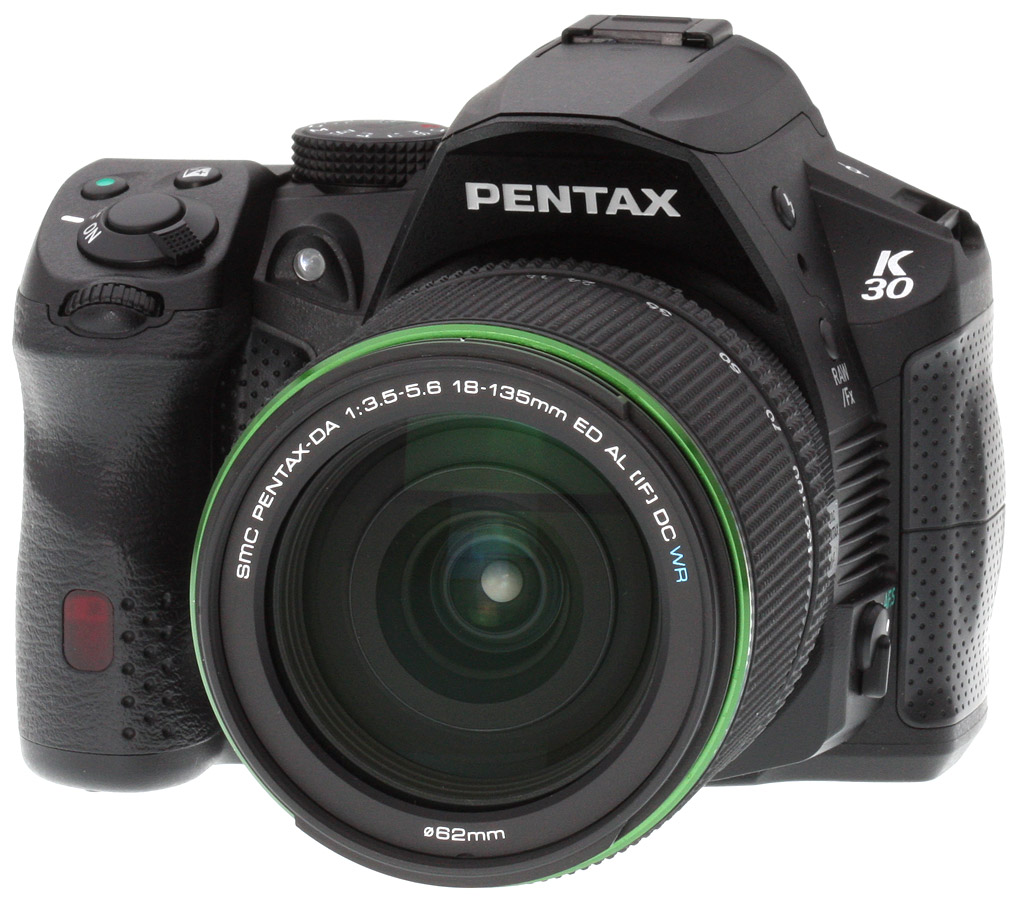
Two factors stand out to make the Pentax K-30 worth a closer look: One: it's weather resistant so you can take the K-30 out on your next adventure without concern for water, dust, or cold damage. Two: you won't have to guess how much extra image area you're going to capture, because Pentax says the pentaprism optical viewfinder is close to 100% accurate. You won't find either on the competition for US$849 body-only. Granted, to make it fully water-resistant, you have to buy one of Pentax's WR lenses, like the US$530 waterproof lens shown at right if you don't already have one, and that raises the price a bit. (Although you can get that lens in a kit with the K-30 body for only $350; an 18-55mm WR sells separately for around US$200.)
And yes, I did say the Pentax K-30 has a pentaprism viewfinder, not merely a pentamirror. So not only is the view nearly 100%--it's also bright and clear.
Before I started looking at pictures of the Pentax K30, I didn't notice its more aggressive graphical treatment, particularly in the front. I only noticed its good, rubbery front grip, its nicely ramped thumbgrip, and its resemblance to the K5 in terms of feel and operation. The K-5, of course, is metal, and the Pentax K30 is polycarbonate. Controls are also fewer on the K30, and there's no Status LCD on the top, so by design its major competition is the Canon Rebel and Nikon D3200.
Dimensions are only slightly smaller than the K5, measuring 5.1 x 3.8 x 2.8 inches, but it's a fair bit lighter. With battery, the K-30 body weighs 23 ounces (1.44 pounds; 652g). With the 18-135mm lens (shown above) attached, the Pentax K-30 is still well-balanced, but a good bit heavier, weighing 38.4 ounces (2.4 pounds; 1088g). Overall feel is substantial, if not as rock-solid as the K5 or K7.

Pentax is also offering a white model, pictured above with the 18-55mm kit lens (although a water-resistant version is available, Pentax has chosen to bundle a non-WR version), as well as a Crystal blue model, for those into a different look. The unique styling stands out more in these latter two colors, but is hardly noticeable in the black version. The black grip area is soft to the touch, and the inner grip and left side grip are softer, slicker rubber.
Unlike the K5, the Pentax K-30 has only the one infrared port embedded into the grip; a red lamp also flashes from the top of this window while the self-timer ticks down. Just beneath the shutter button is the front command dial, but surprisingly it's not the only command dial on this consumer-oriented digital SLR camera--there's another on the rear panel. Under the arch between the grip and pentaprism housing lies a green lamp that shines when needed for AF assist.

Shown here in Crystal blue, again with the 18-55mm kit lens, the left side of the Pentax K30 shows the mechanical flash pop-up button, RAW/Function button, and the AF mode switch. Between the latter two is a unique grip area; I joked with Pentax that this and the one on the other side were the ram-jet air intakes, being the smart-aleck that I am, but we agreed that they could serve as a finger grip while changing lenses in certain circumstances.
The main reason I included this shot, though, was to bring up the unusual overhang, covering the Pentax logo. I've heard that it's designed to serve as a grip of sorts. I have found myself grabbing SLRs by the pentaprism housing for some reason, and while I haven't found the overhang more useful for this purpose than many others, it does provide more to grip than does the company's flagship K-5. Sadly, it doesn't raise the Pentax K-30's flash higher, as that doesn't start until about 5/8-inch down from the top of the flash where there's more room for the width of the strobe.

Getting back to basic black, also with the 18-135mm lens, the Pentax K-30's top-deck features are few. I love their choice of wide strap lugs for a cloth-to-metal interface, preferred over the noisy metal D-rings for video. Two holes atop the pentaprism mark the position of the monaural mic, and though it's difficult to see, a cluster of seven holes on the right of the pentaprism housing mark the location of the speaker. A burly Mode dial offers a good amount of stiffness to resist accidental changes, and the Shutter button is ringed by the Power switch. Again we see the front command dial, and the Exposure compensation and Green "re-center" button, great for bringing EV and other exposure adjustments back to what the camera would choose.

The Live View button on the top left shoulder is positioned oddly--it's more typical to find them on the right side of the camera--but it works just fine. What the K30 has that most cameras at this price point don't is an additional control dial, allowing users to make adjustments to both aperture (front dial) and shutter speed (rear dial) when in Manual mode. Even in Program mode, the camera will adjust these two parameters, highlighting each as you turn either dial. Controls are about the same as on the K-r, though they've moved around a bit, and the navigation cluster is a little larger than on the K-r, thankfully.
To the right you can see the SD card door, quite obviously sealed against water (see photo below), and below that is a rubber door, also well-sealed, for the remote control unit. Overall, the Pentax K-30 looks like the K-r all grown up.
Pentax K-30 Technical Info
 |
 |
The Pentax K-30 is based around much the same APS-C CMOS image sensor seen in the K-01 compact system camera, itself a development of that in the flagship K-5 DSLR. Resolution is 16 megapixels, and ISO sensitivity ranges from 100 to 12,800 equivalents, expandable to ISO 25,600. |
The K-30 uses the same Pentax PRIME M image processor as the K-01. Compared to the PRIME II chip in the K-5, PRIME M allows a faster live view refresh rate of 60 fps, and H.264 compression instead of Motion JPEG for high-def video. Burst shooting is slightly slower than the K-5, at six frames per second for 8 raw or 30 JPEG frames. |
As you'd expect, the K-30 retains Pentax's KAF2 bayonet lens mount, and is compatible with a vast selection of KA, KAF, and KAF3 lenses. While SDM autofocus is supported, power zoom--a feature of a few older Pentax lenses--is not. Of course, you can also use third-party K-mount lenses and various mount adapters for an even wider range of lens options. |
The K-30 also includes a sensor shift-type Shake Reduction system with rotational compensation capability. Where recent Pentax SLRs were rated for a four-stop correction, the K-30 is said to be good for three stops. The SR system is also used for dust reduction, instead of a dedicated piezoelectric element. In concert with the K-30's dual-axis level, it can also automatically correct tilted horizons at capture time. |
A new iteration of Pentax's SAFOX autofocus module debuts in the K-30, now called SAFOX IXi+. Compared to the SAFOX IX+ chip in the K-5, this is said to offer better accuracy and efficiency, thanks to new algorithms and a diffraction lens that better corrects for chromatic aberration. Working range is EV -1 to 18 at ISO 100. |
A dedicated LED lamp nestled next to the lens mount provides for autofocus assist, when trying to focus on nearby subjects in low-light conditions. In still-image Live View, the K-30 now offers a focus peaking function, for more accurate manual focusing. |
One of the most impressive points in the K-30's design is its viewfinder. Pretty-much all cameras in this class use pentamirror viewfinders. For the K-30, Pentax has chosen a brighter, more accurate pentaprism design. With 0.92x magnification, ~100% coverage, and an interchangeable Natural-Bright-Matte III focusing screen, it's basically the same as that in the K-5. |
Nestled beneath the viewfinder is an LCD panel, which is similar to that in the K-5, but brighter and less warm. The wide-angle display has a 4:3 aspect ratio, a diagonal of 3.0 inches, and an anti-reflective coating. Total resolution is approximately 921,000 dots, which roughly equates to a VGA array with each pixel comprised of separate red, green, and blue dots. |
As you'd expect, the K-30 includes a built-in popup flash strobe with 28mm coverage. The guide number of 12 meters at ISO 100 is just slightly lower than that of the K-5. X-sync is still at 1/180 second. |
For external flash strobes, there's both a P-TTL compatible hot shoe, and support for wireless off-camera flash. Unlike the K-5, the K-30 doesn't include a PC socket for studio strobes, however. |


The K-30 offers a rich selection of exposure modes, typical of a Pentax digital SLR. These go beyond the ubiquitous PASM modes to include more unusual options such as sensitivity priority, shutter and aperture priority (which lets you set both variables and have the camera set the exposure with the sensitivity), and Hyper Program / Hyper Manual. There's also a Scene mode, and two user modes.
Exposures are metered with a 77-segment metering system as in the K-5, with a working range of EV0 to 22 (ISO 100, 50mm, f/1.4). Metering modes include 77-segment multiple, center-weighted, and spot, and a healthy +- 5.0 EV of exposure compensation is available, in 1/3 or 12 EV steps.
Shutter speeds range from 1/6,000 to 30 seconds, plus bulb. White balance options include Auto, Daylight, Shade, Cloudy, Fluorescent (D, N, W, L), Tungsten, Flash, Color Temperature Enhancement, plus 3 Kelvin and 3 Manual positions. A 15 step amber/blue and green/magenta adjustment is available.
Creative options include in-camera HDR imaging with microalignment, three-frame bracketing, interval, and multi-exposure, as well as a healthy selection of Custom Image settings and digital filter effects.
One of the main areas where the Pentax K-30 offers a significant advantage over the company's flagship model is in its video capture capabilities. The wide selection of frame rates contrasts with the K-5, which had a fixed rate of 25 fps for Full HD, and a choice of 25 or 30 fps at lower resolutions. The K-30 provides a selection of 24, 25, or 30 fps at Full HD and VGA resolutions, and adds 50 or 60 fps modes for 720p from matching sensor data rates. Movies are also recorded in .MOV containers using H.264 / MPEG-4 AVC compression, rather than the inefficient (but high-quality) Motion JPEG of the K-5. There's also an audio gain control. All that's really missing versus the flagship camera is an external microphone jack.
 |
 |
The other main selling point of the Pentax K-30 compared to cameras in its price bracket is its extensive weather sealing. 81 seals throughout plus a coldproof design allow use in damp, dusty, or sub-freezing conditions. |
In this shot of the K-30's flash card compartment door--it accepts SD, SDHC, and SDXC cards--you can see the large rubber seal on the door itself, designed to prevent ingress of dust and water. |
 |
 |
The Pentax K-30 includes a USB 2.0 High Speed data port, standard definition composite NTSC / PAL video output, and a connector for a wired remote release. (There's also an infrared wireless remote receiver in the hand grip.) Unlike the K-5, there's no high-def video output or external microphone jack. |
Power comes courtesy of a bundled D-LI109 lithium ion rechargeable battery, or the same D-BH109 battery holder used by the Pentax K-r. This continues the company's lengthy run as the only manufacturer still providing for standard AA batteries in the camera body itself, rather than in a separate battery grip. |
The Pentax K-30 went on sale in the US market from July 2012. Pricing is set at around US$850 body-only, or US$900 with a DA L 18-55mm kit zoom lens. (That puts the latter at a premium of only $50, impressive even given that it's a DA L lens with plastic mount.) Kits with the DA 18-135mm ED AL (IF) DC WR lens retail for about US$1,200.
Three body colors are available: the typical black version akin to most any SLR, as well as eye-catching Crystal Blue and Crystal White versions. The latter options ship with a standard black lens in their kit forms.
Pentax K-30 Field Test
by Mike Tomkins

The Pentax K-30's images generally have pleasing color and good exposure. I did have to dial in a little negative exposure compensation for this particular shot to match my memory, but that's to be expected given the shady subject.
Ever since it was announced last May, I've been excited to get my hands on the brand-new Pentax K-30. The company's entry-level models may occasionally have stumbled, but Pentax has consistently turned out some really great mid-range and enthusiast cameras over the last several years. Although the K-30 is currently Pentax's most affordable SLR, its pricing places it in the mid-range market, competing with cameras like the Canon T4i, Nikon D5100, and Sony A65. (Body-only, the Canon sells for the exact same price, while the Nikon is about $50 cheaper, and the Sony some $50 more expensive.)
On paper at least, the Pentax K-30 shows great promise, with a weather-sealed body, a pentaprism viewfinder with ~100% coverage, and twin control dials. These are all features that Pentax's rivals reserve for their more expensive cameras. To get a similar feature set, you have to step up to a Canon 60D, Nikon D7000, or Sony A77, cameras which sell for about US$250-550 more than Pentax's model. That makes the K-30 rather a bargain, and I was keen to see if it lived up to the promise.
I was also curious to see how it compared to Pentax's existing enthusiast camera, the K-5, which has just recently been replaced by the closely-related K-5 II. (It helps that I own the K-5 myself, as well as a copy of the same 18-135mm WR lens provided with our K-30 review sample.) We've also heard from readers trying to decide between the K-5 and K-30, with their decision complicated by the fact that street pricing for the two cameras is currently pretty similar. So you'll excuse me if I return to comparisons against my K-5 quite a bit throughout my shooter's report: it's for good reason.

Handling. In-hand, while it's clear from the polycarbonate build and lesser number of external controls that this isn't a flagship model, the K-30 certainly feels a step above more affordable cameras. It's pretty comfortable in-hand, and quite well balanced with the lithium ion rechargeable battery. (I didn't have one of the clever D-BH109 AA battery holders with my review sample, so couldn't try out AA shooting, but I'm pleased that Pentax continues to cater to fans of both battery types in-body, something no other company does any more.)
I was happy shooting the K-30 single-handed with everything from my tiny 40mm F2.8 Limited pancake up to my old full-frame FA 100mm F2.8 Macro, which at around 21 ounces (600 g) is the heaviest lens I own. I did find myself wishing that the handgrip was a little thicker though. Compared to the thicker grip on my K-5, the K-30's slimmer grip puts more strain on my fingers with heavier lenses, although that's easily resolved by taking up the weight with my left hand.
I did find myself missing the K-5's profusion of external controls, but then I'm not really the target customer for the K-30. Things like the K-5's physical Metering mode and focus point selection levers, and its locking Mode dial, are all great for experienced shooters who've become one with their camera body, but they're an invitation to confusion for a mid-range model. And as I've said, it does at least have dual control dials, something its nearest competitors lack. Perhaps more of a shame is the lack of a top-deck LCD status panel. Of course, none of the K-30's competitors have one either, but I find myself using this all the time on the K-5, and it consumes far less power than the rear panel display would, so that certainly saves me some battery life.
Display. The K-30's main LCD is pretty nice, incidentally, even if most assumed it was the same display used in the earlier flagship camera. Compared side by side, it offers a definite step forward over the display in my K-5, with a much brighter backlight, higher saturation, and a more neutral color temperature. I've asked Pentax about this, and they tell me it doesn't have a gapless design that features in the newer K-5 II and K-5 IIs. Presumably it's just from a different panel supplier, or a slightly improved model, but either way it's a welcome change.

I've heard the calls from Pentaxians for an articulated main LCD, and while I do agree it would add to the K-30's versatility, I'd only want one were it not to reduce the reliability of the camera's weather sealing. The fully-sealed system available in both of Pentax's current SLRs--well, with the exception of a sealed flash strobe, anyway--is a big selling point of the system for me.
I'm a belt-and-suspenders kind of person, and bought into the Pentax line several years ago expecting to seldom if ever actually take advantage of the weather sealing. It turns out, the opposite is true: I've used it in rain more than a few times, and while once or twice I've gotten completely drenched myself, the camera still got me the shots without issue. The K-30 has a similar level of sealing to my K-5, and although there wasn't much rain in my time with the K-30, that knowledge inspires confidence in me. While other photographers leave their camera at home or have to fiddle with clumsy covers, you'll have no such worries with the Pentax K-30.
Ergonomics. Two design choices did bother me a little, though. The positions of the Playback and Live View buttons are transposed, as compared not only to other recent Pentax cameras, but also to just about every other camera I've used lately. Also, the Green button sits on the top deck, where the dedicated ISO sensitivity button is on the K-5; the back seems a more natural position to me. Neither would likely be an issue once you'd spent some time with the Pentax K-30, so long as it was your only DSLR. If you're considering picking up a K-30 as a second body, though, you'll want to be aware of it because you'll need to consciously pay attention so as to prevent yourself starting live view every time you want to play back an image, and vice versa. (I'm more sensitive to this than most would be, just because I handle so many cameras in the process of reviewing them.)
User interface. In other areas, though, the Pentax K-30 has some nice benefits over my K-5. I've mentioned the improved LCD panel, and it's accompanied by some nice tweaks to the graphical user interface over recent Pentax DSLRs. Among other changes, menus have a subtle halftoned background, while the status screen has more colorful graduated backgrounds and squared-off corners on some elements, where the K-5 and K-r had flatter backgrounds and rounded corners. The difference isn't huge, but the net result is an interface that feels a bit less dated. Still not as modern as on some rivals, sure, but it's mostly an improvement.
Pentax K-30 menus |
Pentax K-r menus |
 |
|
 |
 |
 |
 |
 |
 |

More importantly, menu options have been significantly reorganized in a much more sensible manner, making it easier to find the items you're looking for. Perhaps the key change here is a new Movie menu tab, where previously movie options were unintuitively clustered in a sub-menu off the still image menu. Options related to image capture, autofocus, connectivity, and LCD display are also grouped in their own pages. Add in some better English translations--for example Disable / Enable instead of Prohibited / Permitted--and the menu system is a noticeably more pleasant affair without having required a huge investment in programming. I'd love to see some of these changes ported back to the K-5 firmware, as well!

I found myself using live view more often with the K-30 than with my K-5, thanks largely to the snappier autofocus. For this shot, it was a must: there was a wall right behind me, and I didn't have a wider lens handy, so there was no room to fit myself behind the camera to frame!
Live view. Pentax has put quite a lot of work into its live view mode in the K-30, and it shows. (The improvement is also in part thanks to the new PRIME M image processor, which doubles the refresh rate for live view.) To be quite honest, I've seldom used live view with my K-5, other than with static scenes such as shooting tabletop studio shots.
While I still mostly preferred to use the viewfinder on the Pentax K-30, I did find myself using live view quite a bit more often too. That's largely due to the improvement in autofocus speed. Our lab testing found contrast detection autofocus in live view to be about a third faster, and there was a similar margin for prefocused live view shooting. My experience in the field bore this out, and so did an informal comparison of my K-5 and the K-30 review sample side by side, with the same lens and subject. The K-30 had often finished focusing in live view mode when the K-5 had barely started to do so, and it failed to lock focus less often as well.
You can no longer opt for phase-detect AF in live view mode, but contrast-detect was fast enough that I really didn't mind. Also, the K-30 now lets you disable the AF autozoom function, which I'd found helpful and frustrating in about equal measures with the K-5, depending on whether the subject was moving or not.

You have to pay attention to shutter speeds for moving subjects. Even in bright sunlight, the K-30's Program autoexposure often doesn't freeze the action. Out of seven bracketed shots of my hyperactive three year old with this flower sculpture, only one was fairly sharp.
Another very worthwhile addition to live view mode was the focus peaking function, even if I'm not a fan of Pentax's implementation. What focus peaking does is indicate the areas of highest microcontrast on the LCD display. These are typically the areas that are closest to being in focus, and so the function makes it easy to see where the point of focus is as you manually rack through the focus range. Where Pentax's implementation stumbles is that the indication isn't in color. Instead, high contrast edges are given a white glow. That's great on dark subjects, but white is a fairly common color in real-world subjects, so it means that for bright, light subjects, the peaking overlay can be hard to see--particularly when shooting outdoors where you have to deal with reflections and glare on the LCD panel. I'd like to see either an optional user selection of the peaking color, or at least to see Pentax use a color that doesn't appear in real-world subjects so often--a vivid pink, yellow, or something of the sort.
Viewfinder. I'm a bit old-school though, and I do still prefer a TTL optical viewfinder. I feel closer to my subject with the camera to my eye, and I think it helps my shooting. I was thrilled, then, to learn that the K-30 shared the same viewfinder with my K-5. Or at least, largely so--I did notice the K-30's autofocus point indications weren't as good as those on the K-5. They were more like those of my K-7, a little unevenly lit and dimmer. It could be that this is simply down to a poorly-adjusted component, though, as the basic style of the point indications is the same on all three cameras.

Noise levels are similar to my K-5. At ISO 1,600, grain is fine and quite film-like...
Focusing. Autofocus is said to be improved for regular, non-live view shooting too, but I must admit I didn't notice the difference here as much as for contrast-detect AF. The SAFOX IXi+ phase detection autofocus module has since been bested by the SAFOX X module in the K-5 II and IIs, but compared to the K-5's SAFOX IX+ was said to have better accuracy and efficiency. Subjectively I felt it hunted slightly less, and refused to focus less often, but didn't seem to focus in lower light conditions than did my K-5. Our lab testing suggested it was also a little less responsive than the PDAF in the K-5, so perhaps the improvements came at the expense of a little speed.
One improvement I really did like, though: the new Expanded Area AF option, available in continuous AF.C or automatic AF.A servo modes. When enabled, this considers the autofocus distance data of AF points surrounding that you've manually selected, and will let the focus point roam to any point that has similar distance data to your manually selected point. The assumption is that these point are likely seeing the same subject, and you've simply slipped your selected point off the subject momentarily. It's a good assumption, and one that makes a noticeable improvement to autofocus. I'd really like to see this ported back to the K-5 firmware too, although it's a bigger change than those made to the user interface, and so quite likely not possible. Speaking of the AF.A mode, by the way, this is a nice addition for the advanced amateurs who might be stepping up to the K-30 from a compact or older Pentax SLR. This simply selects between continuous and single autofocus modes automatically, as the camera deems necessary.

...but by ISO 3,200 it does begin to get a little splotchy, especially in areas of otherwise-smooth bokeh. Still plenty of fine detail in the instrument panel cluster, though--this is a very usable ISO 3,200.
Movies. Another area in which the Pentax K-30 has really been improved quite a bit is in its video capture capabilities. For the full story, you'll want to look at our video page, but let's briefly hit the high and low points. Perhaps most importantly, video is now stored with modern H.264 compression, rather than Motion JPEG. That means much more sensible file sizes for any given video clip, but it also means quite a bit higher processing requirements for editing. You can also now record movies with manual exposure, not just aperture-priority--but shutter priority and control over ISO sensitivity are still sadly unavailable. You can, however, record interval movies as you could in the Pentax Q and K-01 mirrorless cameras, something the K-5 couldn't do. There are more frame rate options (although the 50/60p modes significantly reduce image quality), and there's also a coarse-grained audio levels control, but the built-in speaker is decidedly weak and there's no longer an external microphone jack.

Even ISO 6,400 has a fair bit of detail -- the tartan in the sign, for example -- although the color starts to get a little muted, and there's quite a bit of noise if you pixel peep. It cleans up in post processing pretty well. This was as far as I was generally willing to go, though. You can see an ISO 12,800 shot in the gallery, but a lot of detail is lost to noise.
K-30 versus the flagships. Were there some things I really missed from my K-5 in shooting with the K-30, though? For sure. I've already mentioned the lesser selection of external controls, and the status LCD panel. While the K-30 feels fairly comfortable and solid, the K-5's mag-alloy body definitely feels even more so. There are several other things that would sway me towards the K-5, though. The K-5 also has piezoelectric dust reduction, rather than the sensor-shift type of the K-30. Subjectively we've found piezo systems to perform better than ones which rely on shaking the sensor, and that's backed up by the fact that in 18 months of owning my K-5 I've never yet needed to manually clean the sensor. (Although that's also in part because I'm very careful about avoiding dust when I change lenses.)
The K-5 also has an exceptionally quiet shutter release by DSLR standards. The K-30's shutter release sound is quite a bit louder, and harsher-sounding as well. While it doesn't sound as refined as that in Pentax's enthusiast flagship cameras, that's not to say it's uncommonly loud for a DSLR. It's certainly more likely to startle nearby, skittish animal subjects than that in the K-5 though.
With the K-30, you lack a PC flash sync socket and an HDMI output. You also get a little less performance for burst shooting (5.5 vs. 6.5 fps in our lab testing), and for the fastest shutter speed (1/6,000 vs. 1/8,000). There's also a greater level of control available over the Pentax K-5: functions such as the program line, the ramp-up speed for Auto ISO sensitivity, and extended bracketing aren't available in the K-30. Basically all of these would also apply to the newer K-5 II, and that camera is also said to have better low-light AF, although we've not yet had a chance to test that in our lab.

Auto white balance also sometimes struggled in low light. This available light shot (1/50th sec., ISO 3,200) has a bit of a color cast, but it's easily fixed in post.
Power. Battery life is also quite significantly lower. Where the K-5 was much better than average when compared to consumer cameras, the K-30 is decidedly below average even when shooting with the optical viewfinder, managing barely over half as many shots as its older sibling. That's largely because it uses a much smaller battery pack, and it should be noted that we're solely discussing battery life with the bundled, proprietary battery here. Battery life with AA batteries will depend entirely on the battery type you choose, and will likely vary quite radically between brands and formulations. If you shoot with the bundled battery though, you will definitely want a second one, especially if you shoot video or in live view mode very much.
And there are quite a few other differences, but by and large they won't matter to many--perhaps most--of the K-30's target customers. As I said at the start of my shooter's report, I wanted to answer the question of which camera was the better buy: the K-5, or the K-30. (And then Pentax threw the new K-5 II and IIs into the mix.) The answer, not surprisingly, is that each will meet different needs. The good news is that image quality is fairly similar between the K-5 and K-30, which is not surprising given that they share nearly the same image sensor, and are only separated by one generation in their image processors.
Image quality comparison. Below, you can find a number of samples shot side by side at the same time with manual ISO sensitivity, using the same lens model, similar focal length, and with the cameras' largely at their default settings. The lens model used was a DA 18-135mm ED AL (IF) DC WR, the only weather-sealed kit lens option offered with the K-30. (And coincidentally, the only lens I had access to two copies of, saving me switching back and forth between bodies all afternoon! The lens used on the K-5, like the body itself, was my own.) I'd intended to shoot with the same aperture on both bodies, but unfortunately in trying to replicate the same framing, I wasn't paying enough attention to maintaining precisely the same apertures. (Sorry!) Still, to my eye the two cameras provided very similar image quality, although the K-30 looks to use higher default sharpening and noise reduction than does the K-5, if only slightly so.
Pentax K-30
|
Pentax K-5 |
Cameras used
default settings, except Raw+JPEG and bracketed exposure. Each camera used a separate DA 18-135mm ED AL (IF) DC WR lens. |
|
 |
 |
ISO 100 |
|
 |
 |
ISO 400 |
|
 |
 |
ISO 400 |
|
 |
 |
ISO 400 |
|
 |
 |
ISO 400 |
|
 |
 |
ISO 800 |
|
 |
 |
ISO 1,600 |
|
 |
 |
ISO 3,200 |
|
|
 |
ISO 6,400 |
|
 |
 |
ISO 12,800 |
|
Overall. All of which is to say that both cameras are pretty darned close in terms of basic image quality, and so you can let the feature set of each camera tell you which belongs on your shopping list. If you need the K-5 or K-5 II, you probably already know why. For the rest of you, the K-30 offers a heck of a camera for the money, with some worthwhile improvements even when compared to Pentax's enthusiast flagship cameras. For my money, I'd probably buy the K-5, and I'd expect most experienced shooters will do the same. Enthusiastic amateurs will find a more approachable package in the K-30. It's a shame that it isn't quite as small as the earlier Pentax K-r, but it manages to pack in a surprising amount of the K-5's DNA into a friendly design that provides loads of room to learn, and a lot of fun in a day's shooting.
Pentax K-30 Image Quality
Below are crops comparing the Pentax K-30 with the Pentax K-5, Canon 60D, Nikon D7000, Olympus E-M5, and the Sony A65. We're starting with the base ISO to show the best each camera can do, then moving onto ISO 1600, 3200, and then more details with ISO 6400 below.
NOTE: These images are best quality JPEGs straight out of the camera, at default settings including noise reduction. All cameras in this comparison were shot with our very sharp reference lenses.
Pentax K-30 versus Pentax K-5 at ISO 100
 |
 |
 |
 |
 |
 |
|
Pentax K-30 at ISO 100
|
Pentax K-5 at ISO 100
|
|
The differences we see between the K-30 and K-5 may come down to point of focus or else noise processing and sharpening. The K-30's images seem a tad sharper, but they also have more noticeable halos around dark subjects, something we'd expect to see from a more consumer-focused SLR. Note that the Pink swatch below the red leaf swatch is more magenta than pink. And the red leaf swatch itself has less detail than the K5, which suggests more aggressive noise processing is at work in the K-30. |
|
Pentax K-30 versus Canon 60D at ISO 100
|
 |
|
 |
|
 |
|
Pentax K-30 at ISO 100
|
Canon 60D at ISO 100
|
|
Despite its lower, 16-megapixel resolution, the Pentax K-30 does pretty well against the Canon 60D's 18 megapixels. The 60D captures a little more detail in the mosaic image, but doesn't do as well with the red leaf swatch in terms of detail. The pink is closer to pink, though. |
|
Pentax K-30 versus Nikon D7000 at ISO 100
|
 |
|
 |
|
 |
|
Pentax K-30 at ISO 100
|
Nikon D7000 at ISO 100
|
|
More aggressive sharpening really makes the Pentax K-30's image look crisper than the Nikon D7000. Both offer good detail, but the D7000's version of pink is truer. |
|
Pentax K-30 versus Olympus E-M5 at base ISO
|
 |
|
 |
|
 |
|
Pentax K-30 at ISO 100
|
Olympus E-M5 at ISO 200
|
|
The Olympus E-M5 takes a similar approach to image processing, resulting in a little more detail in key areas, like the mosaic swatch and the pink fabric, where you can see threads. The red leaf swatch is a little sharper from the K30, however. |
|
Pentax K-30 versus Sony A65 at ISO 100
|
 |
|
 |
|
 |
|
Pentax K-30 at ISO 100
|
Sony A65 at ISO 100
|
|
The 24-megapixel Sony A65 puts a whole lot more pixels on the area, showing noticeably more detail, but that detail is a little soft in its final rendering. A simple sharpening operation would fix it, of course. Note the pink swatch with hints of a thread pattern. |
|
Most digital SLRs and CSCs will produce an excellent ISO 100 shot, so we like to push them and see what they can do compared to other cameras at ISO 1,600, 3,200, and 6,400. Recent advances in sensor technology have made ISO 1,600 look a lot more like ISO 100, but there are still cameras whose quality starts to fall apart at this setting. We also choose 1,600 because we like to be able to shoot at least at this level when indoors and at night.
Pentax K-30 versus Pentax K-5 at ISO 1,600
 |
 |
 |
 |
 |
 |
|
Pentax K-30 at ISO 1,600
|
Pentax K-5 at ISO 1,600
|
|
The Pentax K-30's stronger noise suppression shows in the shadows and red leaf swatch, obliterating detail in dramatic fashion at ISO 1,600. Sharpening is likewise aggressive in high-contrast areas, while the Pentax K-5 took a more balanced approach. |
|
Pentax K-30 versus Canon 60D at ISO 1,600
|
 |
|
 |
|
 |
|
Pentax K-30 at ISO 1,600
|
Canon 60D at ISO 1,600
|
|
Although both cameras ramp up their noise suppression, the Canon 60D takes a more even approach, leaving a little more noise, but also more detail. It retains at least some of the flavor of the red leaf swatch. |
|
Pentax K-30 versus Nikon D7000 at ISO 1,600
|
 |
|
 |
|
 |
|
Pentax K-30 at ISO 1,600
|
Nikon D7000 at ISO 1,600
|
|
The Nikon D7000's approach is even more even-handed. Though its image doesn't pop in high-contrast areas, it looks more photographic, and offers more to work with in post. |
|
Pentax K-30 versus Olympus E-M5 at ISO 1,600
|
 |
|
 |
|
 |
|
Pentax K-30 at ISO 1,600
|
Olympus E-M5 at ISO 1,600
|
|
The Olympus E-M5 retains more detail as well at ISO 1,600, so less noise suppression is necessary. |
|
Pentax K-30 versus Sony A65 at ISO 1,600
|
 |
|
 |
|
 |
|
Pentax K-30 at ISO 1,600
|
Sony A65 at ISO 1,600
|
|
Detail in the Sony A65's images starts to suffer at ISO 1,600, noticeably enough in the mosaic swatch that the K-30's image looks a little better. However, the Sony's rendition of the red leaf swatch still looks better. |
|
Today's ISO 3,200 is yesterday's ISO 1,600 (well, almost), so below are the same crops at ISO 3,200.
Pentax K-30 versus Pentax K-5 at ISO 3,200
 |
 |
 |
 |
 |
 |
|
Pentax K-30 at ISO 3,200
|
Pentax K-5 at ISO 3,200
|
|
Again, the K-5's noise suppression is less aggressive than the K-30, leaving behind more detail. |
|
Pentax K-30 versus Canon 60D at ISO 3,200
|
 |
|
 |
|
 |
|
Pentax K-30 at ISO 3,200
|
Canon 60D at ISO 3,200
|
|
The Pentax K-30 does better than the 60D with the mosaic image and the Mas Portel label, but not with the red leaf swatch. |
|
Pentax K-30 versus Nikon D7000 at ISO 3,200
|
 |
|
 |
|
 |
|
Pentax K-30 at ISO 3,200
|
Nikon D7000 at ISO 3,200
|
|
Here's where Nikon's more even approach begins to bear fruit. Yes, the Nikon has more chroma noise in the shadows, but the payoff in overall image evenness results in a more believable print. The K-30's method leaves the image looking confused with different elements looking either in or out of focus. |
|
Pentax K-30 versus Olympus E-M5 at ISO 3,200
|
 |
|
 |
|
 |
|
Pentax K-30 at ISO 3,200
|
Olympus E-M5 at ISO 3,200
|
|
The K30 and E-M5 are about evenly matched at ISO 3,200, with perhaps a little better color on the K30, while the E-M5 has boosted its contrast somewhat. |
|
Pentax K-30 versus Sony A65 at ISO 3,200
|
 |
|
 |
|
 |
|
Pentax K-30 at ISO 3,200
|
Sony A65 at ISO 3,200
|
|
Sony's smaller pixels suffer a bit, offering less color and very mushy detail overall. |
|
Detail: Pentax K-30 versus Pentax K-5, Canon 60D, Nikon D7000, Olympus E-M5, and Sony A65
 |
 |
 |
 |
 |
 |
 |
 |
 |
 |
 |
 |
 |
 |
 |
 |
 |
 |
| Pentax K-30 ISO 100 ISO 3,200 ISO 6,400 |
Pentax K-5 ISO 100 ISO 3,200 ISO 6,400 |
Canon 60D ISO 100 ISO 3,200 ISO 6,400 |
Nikon D7000 ISO 100 ISO 3,200 ISO 6,400 |
Olympus E-M5 ISO 160 ISO 3,200 ISO 6,400 |
Sony A65 ISO 100 ISO 3,200 ISO 6,400 |
| Detail comparison. The Pentax K-30 does very well in the high-contrast detail comparison, exceeded mainly by the Olympus OM-D E-M5. The latter's different aspect ratio makes the elements appear larger when viewed pixel-for-pixel, which helps a bit. After that it's the Canon 60D that is the K30's clearest competition. Note how the 60D and D7000 maintain a better red color as ISO rises, however, while the K-30's reds darken noticeably. Overall, a pretty good performance from the K-30 against some very good cameras. | |||||
Pentax K-30 Print Quality
 Impressive 24 x 36 inch prints at ISO 100/200; good 8 x 10s at ISO 3,200; ISO 12,800 makes a good 4 x 6.
ISO 100/200 shots look quite good printed at 24 x 36 inches. Prints look better than the Canon T4i, despite its higher resolution, mostly because the K-30 by default is using less noise suppression at low ISOs.
ISO 400 shots look better at 20 x 30 inches, as the softening is a little too much at 24 x 36.
ISO 800 shots are usable at 20 x 30, but luminance noise shows up in the shadows, and detail in reds is a bit smudgy. As a result, we prefer the 16 x 20 inch prints.
ISO 1,600 images have sufficient detail for 11 x 14 inch prints, all except for our red swatch (a common outcome).
ISO 3,200 images are decent at 11 x 14, but noise is a little strong, so we preferred the 8 x 10 inch prints.
ISO 6,400 shots are good at 5 x 7, with only minor grain apparent in shadowy areas.
ISO 12,800 shots look good at 4 x 6, slightly noisy, but not bad.
ISO 25,600 prints are not usable.
Overall, the Pentax K-30 does a lot with its 16-megapixel sensor. It produces great 8 x 10 inch images at ISO 3,200 and even 12,800 is good for a 4 x 6.
In the Box
The Pentax K-30 ships with the following items in the box:
- Pentax K-30 body
- 18-55mm non-sealed or 18-135mm weather-sealed lens (if purchased as a kit)
- Body cap
- Lithium-ion battery D-LI109
- Battery charger kit K-BC109 with AC cable
- Rubber eyecup
- Eyepiece cap
- Focusing screen MF-60 Frame Matte
- Hot Shoe cover
- Lens caps (if lens included)
- Shoulder strap
- USB cable UC-E6
- Silkypix Developer Studio 3.0 for Pentax CD-ROM
- Quick Guide
- Operating manual
- Warranty card
Recommended Accessories
- Extra battery pack for extended outings
- Large capacity SDHC/SDXC memory card. These days, 8GB is a good tradeoff between cost and capacity, but if you plan to capture HD movie clips, look for larger cards with Class 6 or faster ratings.
- Eye-Fi card if you want wireless transfer
- AF540FGZ, AF360FGZ, or AF200FG flash strobe, AF160FC macro ring flash
- Remote Control WP if you prefer a weather-sealed remote, or Remote Control F if you want the smallest one
- K-AC128 AC Adapter Kit if do much studio shooting
- GPS unit O-GPS1 for geotagging
- Camera case
Pentax K-30 Conclusion
| Pro: | Con: |
|---|---|
|
|
With the K-30 digital SLR, Pentax has done something pretty impressive. The company has managed to take several very worthwhile features that its rivals reserve for their enthusiast and pro-oriented cameras, and place them in a mid-range camera. If you don't already have an investment in glass for a competing mount--or if your investment isn't great enough to prevent you jumping ship--then Pentax has given you several very good reasons to consider choosing the K-mount instead of a rival. Perhaps the most significant of these for an SLR user will be the K-30's bright, accurate pentaprism optical viewfinder. It's where you'll be doing most of your image framing, after all, and it's a much more pleasant experience to shoot with than the pentamirror finders of other mid-range SLRs.
The twin-dial control layout is also a great bonus. Adjusting shutter speed and aperture with twin dials quickly becomes second-nature, with single-dial setups feeling positively cumbersome by comparison. And even if shooting in a downpour isn't your thing, the weather-sealed body of the Pentax K-30 provides a very reassuring feeling. It's easy to tell yourself that you won't ever take advantage of weather sealing, but once you're confident in your camera's ability to handle dust and moisture, you quickly find yourself noticing new shooting opportunities. (Shooting only in perfect weather can get boring, after a while!)
We do have to question Pentax's decision to include a non-weather sealed lens in the more affordable of the K-30's two kit bundles, however. It's a bit like selling a sports car, and then bolting on a set of steel rims with basic tires, instead of alloys and some rubber that's up to the occasional day at the track. We have to think that more than a few K-30 buyers aren't going to realize that their 18-55mm lenses aren't sealed, leading to problems down the line. Of course, you can always opt for the 18-135mm WR kit, whose lens is sealed to the same standard as the camera body, but that's rather larger and more expensive than the 18-55mm WR would've been. (And that 18-135mm lens, honestly, isn't able to deliver the same level of image quality that the K-30 body is capable of capturing.)
And then there's the K-30's video feature set. In some respects, it's better than that of the K-5 and K-5 II, with fully manual exposure control, and more space-efficient H.264 compression. In other areas it lags the competition, though. The lack of external microphone connectivity is a shame, and consumer-friendly features such as full-time autofocus and a dedicated video button are also absent. The highest frame rates for 720p video have issues with color moire that rather preclude their use. These issues combine to make the Pentax K-30 less than ideal as a video camera, whether you're a consumer, enthusiast, or pro. Don't get us wrong--you can still manage great videos with the K-30, if you know how to extract the most from it. It's just that Pentax's video feature set is starting to look rather dated compared to the competition.
We're quibbling, though. If your focus is on still shooting, considering its pricetag, the Pentax K-30 is a superb camera. It offers a well thought-out design that in some respects actually betters the enthusiast-grade K-5 and K-5 II, and does so at a noticeably lower list price. (And if the pentaprism viewfinder, dual dials and sealing are on your must-have list, there's simply nothing available from the competition without spending hundreds of dollars more.) Certainly, there are features worth having on enthusiast cameras--including the K-5 II--that aren't available here, too. There's no top-deck info LCD, for example, and the lack of piezoelectric dust reduction and PC sync connectivity is a shame. For many photographers, though, these features would simply be overkill. Shaving them off has doubtless helped Pentax hit its consumer-friendly pricetag, not to mention removing some weight from the camera body. (And Pentax remains the only show in town, if you want to be able to use standard AA batteries in the camera body, something some consumers still desire.)
Unless your focus is on video, or you need an enthusiast-level body, we have absolutely no reservations in recommending the Pentax K-30. It's a clear Dave's Pick, and a camera that really provides a lot of bang for the buck!
Optics
Pentax K-30 Optical Test Results
The Pentax K-30 is available body-only, or bundled with either the DA 18-55mm f/3.5-5.6 AL kit lens, or the DA 18-135mm f/3.5-5.6 ED AL DC WR lens. Below are the results of our optical tests on the Pentax K-30 with the 18-135mm lens. Studio test shots on other pages of this review (apart from the flash range shots) use a very sharp, reference prime lens (Sigma 70mm f/2.8 EX DG Macro).
Lens
Zoom
A longer than average kit lens, with below average performance.


With a generous optical zoom ratio of 7.5x, the Pentax 18-135mm lens offers greater telephoto reach than typical 3x kit lenses. Sharpness and contrast is very good in the center of the frame at wide-angle, though corners are soft, even stopped down to f/8. Chromatic aberration isn't an issue, as the K-30 suppresses it in JPEGs. Results at full telephoto are also quite good near the center of the frame, but again corners are soft. Chromatic aberration is more noticeable at full telephoto, despite the camera's efforts to suppress it.
Macro
A larger than average macro area with the 18-135mm lens, with good detail. Flash throttled down well.


Like zoom range, macro performance will depend entirely on the lens being used. With the Pentax 18-135mm lens, the K-30 captured a larger than average minimum macro area (for an SLR kit lens), measuring 3.40 x 2.25 inches (86 x 57 millimeters). Detail is pretty good in the center of the frame, though corners are soft, and there's also some noticeable shading ("vignetting") in the extreme corners. (Most lenses have some softening and shading in the corners at macro distances.) The Pentax K-30's built-in flash was tall enough so that the lens didn't cast a shadow, and it throttled down well for our standard macro shot, producing a good if slightly dim exposure.
Geometric Distortion
Higher than average distortion at wide-angle and telephoto with the 18-135mm lens.
| Barrel distortion at 18mm is 1.1 percent |
 |
| Pincushion distortion at 135mm is 0.5 percent |
 |
The Pentax 18-135mm lens produced about 1.1 percent barrel distortion at wide-angle, which is well above average and noticeable in its images. At the telephoto end, there was about 0.5% pincushion distortion, also higher than average and noticeable in some shots. Geometric Distortion is the tendency for the lens to bend straight lines outward (like a barrel -- usually at wide-angle) or inward (like a pincushion -- usually at telephoto).
Distortion Correction
The Pentax K-30 offers optional Distortion Correction when using DA, DA L, and DFA lenses, as well as several of the company's FA Limited lenses.
| Distortion Correction On: Distortion at 18mm is almost nil | |
 |
Distortion Correction On: Barrel distortion at 135mm is 0.3 percent |
 |
|
The Pentax K-30 does not apply any geometric distortion correction to JPEGs by default. There is however a menu option to turn Distortion Correction on. Raw files are not corrected, but are tagged to have the same correction applied when using a Raw converter that supports the embedded parameters.
The crops above show JPEGs taken with the kit lens at wide-angle and telephoto with Distortion Correction enabled. As you can see, the 1.1% barrel distortion in the uncorrected file has been practically eliminated, with less than 0.1% complex (slightly moustache-shaped) distortion remaining. At the telephoto end, the 0.5% pincushion distortion in the uncorrected image was overcorrected to about 0.3% barrel distortion. You can also notice some of the image has cropped away in the process, especially at wide-angle, so keep that in mind.
Chromatic Aberration and Corner Sharpness
Low to moderate levels of chromatic aberration from the 18-135mm lens in JPEGs. Very soft corners at both wide-angle and telephoto.
| Aperture: Maximum | |
 |
 |
| 18mm@f/3.5: Lower left C.A.: Low Softness: Very soft |
18mm@f/3.5: Center C.A.: Very low Softness: Sharp |
 |
 |
| 135mm@f/5.6: Upper right C.A.: Moderate Softness: Very soft |
135mm@f/5.6: Center C.A.: Very low Softness: Sharp |
Chromatic Aberration. Chromatic aberration is fairly low at the full wide-angle setting of the Pentax 18-135mm lens, being suppressed by the K-30's JPEG processing. At full telephoto, chromatic aberration is more noticeable. (This distortion is visible as a slight colored fringe around the objects at the edges of the field of view on the resolution target.) The Pentax K-30 suppresses chromatic aberration in JPEGs by default, as uncorrected images from this lens have much higher amounts (see below).
Corner Sharpness. The Pentax 18-135mm lens produced soft corners at full wide-angle and full telephoto when shot wide-open at maximum aperture. All four corners were soft at wide-angle, with the lower left being slightly softer that others. The blurring extended a small to moderate amount into the frame depending on the corner, but the center was quite sharp. At full telephoto, corners were also quite soft, this time the upper right was a little softer than the others. Again, softness extended a moderate amount into the frame, but the center was quite sharp. Some corner shading ("vignetting") can also be seen from the darker corner crops.
| Aperture: f/8 | |
 |
 |
| 18mm@f/8: Lower left C.A.: Low Softness: Very soft |
18mm@f/8: Center C.A.: Very low Softness: Sharp |
 |
 |
| 135mm@f/8: Upper right C.A.: Moderate Softness: Soft |
135mm@f/8: Center C.A.: Very low Softness: Sharp |
Corner sharpness improved only slightly when stopped-down to f/8, but they were still soft, particularly at telephoto. Chromatic aberration remained about the same, perhaps slightly lower and not quite as exacerbated by the blurring in the corners. Corner shading improved quite a bit, though.
Chromatic Aberration Reduction
The Pentax K-30 offers lateral chromatic aberration reduction for the same lenses that are supported for distortion correction.
| Camera JPEGs, Lateral Chromatic Aberration Reduction | |
 |
 |
| 18mm@f/5.6: Enabled (default) | 18mm@f/5.6: Disabled |
 |
 |
| 135mm@f/5.6: Enabled (default) | 135mm@f/5.6: Disabled |
As illustrated in the crops above, the 18-135mm exhibits some very high lateral chromatic aberration in the corners when uncorrected (right) at the telephoto end, exacerbated by corner softness. At wide-angle, C.A. wasn't as bad, but still much more than in corrected images. Pentax K-30's processor was effective at removing much of color fringing with Lateral Chromatic Aberration Correction enabled (default), though it still leaves some visible chromatic aberration behind in the form of purple and blue fringes.
Overall, below average performance, though the 18-135mm does offer much more reach than most kit lenses. This lens is sharp in the center, but corners are soft even stopped-down to f/8. Macro performance isn't great, geometric distortion is high at both wide-angle and telephoto, and chromatic aberration is high to very high, though the K-30 can reduce lens aberrations.
Pentax K-30 Viewfinder
Viewfinder Test Results
Coverage
Good accuracy from both the optical viewfinder and LCD.


The Pentax K-30's optical viewfinder showed just under 99% coverage vertically, and about 98% coverage horizontally with our Sigma 70mm f/2.8 prime lens. That's a little short of Pentax's 100% coverage specification, and there was also a slight horizontal shift relative to the sensor. In Live View mode, the LCD showed about 101% coverage vertically, and closer to 100% horizontally. Good performance here.
The images above were taken from our standardized test shots. For a collection of more pictorial photos, see our Pentax K-30 Photo Gallery .
Exposure
Color
Saturation & Hue Accuracy
Very high mean saturation, with slightly below average hue accuracy.
 |
||||
|
ISO Sensitivity
|
||||
| In the diagram above, the squares show the original color, and the circles show the color that the camera captured. More saturated colors are located toward the periphery of the graph. Hue changes as you travel around the center. Thus, hue-accurate, highly saturated colors appear as lines radiating from the center. Mouse over the links to compare ISOs and click for larger versions. | ||||
Saturation. The Pentax K-30's default image tone setting of "Bright" pushes most colors by quite a bit at base ISO, especially blues, greens, and reds. Overall, colors are very bright and punchy, a trait we've come to expect from Pentax, and mean saturation remains higher than average throughout the ISO range. You can of course always select a different image tone preset and/or turn down settings such as saturation and contrast to suit your own tastes. Most consumer digital cameras produce color that's more highly saturated (more intense) than found in the original subjects. This is simply because most people like their color a bit brighter than life.
Skin tones. Caucasian skin tones from the Pentax K-30 were a touch yellow using auto white balance in our test shots, while manual white balance produced a more pinkish, "healthier" appearance. Where oversaturation is most problematic is on Caucasian skin tones, as it's very easy for these "memory colors" to be seen as too bright, too pink, too yellow, etc.
Hue. The Pentax K-30's mean "delta-C" color error of 7.81 after correction for saturation is a little below average for an SLR these days. Most noticeable were moderate shifts in orange toward yellow and cyan toward blue, with minor shifts and some reds, yellows, and greens. (The cyan to blue shift is very common among the digital cameras we test; we think it's a deliberate choice by camera engineers to produce better-looking sky colors.) Hue is "what color" the color is.
Saturation Adjustment
The Pentax K-30 lets you adjust the image Saturation and Contrast in nine steps each (Hue, High/Low Key and Sharpness are also adjustable in nine steps.) As can be seen below, the saturation adjustment worked well, providing a reasonably fine-grained adjustment over a useful range of control. The saturation adjustment also has almost no impact on contrast. That's how a saturation control should work, but we've often found interactions between saturation adjustments and image contrast (and vice versa) on the cameras we test.
| Saturation Adjustment Examples | ||||
 |
 |
 |
 |
 |
| -4 | -2 | Default | +2 | +4 |
The series of shots above shows results with several different saturation adjustment settings including both extremes. See the Thumbnails index page for more (look for the files named K30OUTBSATx.JPG). Click on any thumbnail above to see the full-sized image.


Sensor
Exposure and White Balance
Indoors, incandescent lighting
Very warm results with default Auto and 2,600 Kelvin white balance settings, too cool with Incandescent, but good color with Manual white balance setting. Slightly higher than average exposure compensation required.


The Pentax K-30's Auto White Balance had a difficult time with the very warm color balance of the household incandescent bulbs used in this shot, producing a very warm image with a strong orange tint. Increasing the color correction in AWB mode to "Strong" (default is "Subtle Correction") improved results, but color balance was still a bit warm and reddish. Results with the Incandescent setting on the other hand were too cool with a blue bias. The Manual setting produced the most accurate color balance, though a touch cool. Unusually, the 2,600 Kelvin setting which matches the temperature of our lights produced a strong yellow/green cast. Note that a Color Temperature Enhancement (CTE) white balance option is also available (not shown), which exaggerates the temperature of the ambient light. The Pentax K-30 required a slightly higher than average amount of exposure compensation of +0.7 EV for this shot. (The average for this scene is +0.3 EV for the cameras we've tested.) Our test lighting for this shot is a mixture of 60 and 100 watt household incandescent bulbs, a pretty yellow light source, but a very common one in typical home settings here in the U.S.
Outdoors, daylight
Bright colors with very good exposure and good highlight/shadow detail preservation.
The Pentax K-30 handled tough outdoor lighting under harsh sunlight fairly well, producing bright colors with good exposure. Default contrast was on the high side (as most users prefer), resulting in some clipped highlights in the model's shirt and some of the flowers, as well as some lost shadows in the flowers and the background, though remaining shadow detail is generally pretty clean. +0.3 EV exposure compensation was required to keep the model's face reasonably bright, which is better than the average of +0.7 EV usually required for this scene. Skin tones were just a touch yellow using auto white balance, so we preferred manual white balance for our "Outdoor" Portrait shot here. Our Far-field shot was slightly underexposed at 0 EV, but again with bright, punchy color. Very few highlights were clipped, but there were some very deep shadows, though shadow detail was quite good. Good results overall here.
See full set of test images with explanations
See thumbnails of all test and gallery images
Resolution
Very high resolution, ~2,100 lines of strong detail from JPEGs, a little higher from converted raw files.


Our laboratory resolution chart revealed sharp, distinct line patterns down to about 2,100 lines per picture height in both the horizontal and vertical direction in JPEGs. Complete extinction didn't occur until around 2,600 lines in both directions. We were able to resolve a little more with an Adobe Camera Raw conversion, about 2,250 lines of resolution in the horizontal direction and about 2,200 in the vertical, and complete extinction of the pattern was extended beyond 3,600 lines. The ACR processed raw images did show more color moire, as they often do. Use these numbers to compare with other cameras of similar resolution, or use them to see just what higher resolution can mean in terms of potential detail.
See full set of test images with explanations
See thumbnails of all test and gallery images
Sharpness & Detail
Sharp images overall, though moderate edge-enhancement on high-contrast subjects. Minor noise suppression visible at base ISO.


Sharpness. The Pentax K-30 produced sharp images with very good detail at default settings. Some edge enhancement artifacts are visible on high-contrast subjects such as the sharpening halos around thicker branches and the pine codes in the crop above left, but overall results are still quite good (albeit with a bit too much contrast and saturation for our tastes). Edge enhancement creates the illusion of sharpness by enhancing color and tonal differences right at the edge of a rapid transition in color or tone.
Detail. The crop above right shows minor detail loss due to noise suppression. Individual strands are still distinguishable even in the lighter shadows, though they begin to merge as shadows deepen, and in places where the tone and color of adjacent strands is very close. Good performance here, but we'd prefer default noise reduction to be a little less aggressive. Noise-suppression systems in digital cameras tend to flatten-out detail in areas of subtle contrast. The effects can often be seen in shots of human hair, where the individual strands are lost and an almost "watercolor" look appears.
Raw vs In-Camera JPEGs
As noted above, the Pentax K-30 does a pretty good job at capturing lots of detail, but more detail can be obtained from carefully processing raw files, while at the same time reducing sharpening artifacts. Take a look below, to see what we mean:


In the table above, mousing over a link at the bottom will load the corresponding crop in the area above, and clicking the link will load the full resolution image. Examples are shot at ISO 100, and consist of an in-camera Best quality JPEG (left link) and the matching raw file processed through Adobe Camera Raw (ACR) version 6.7, then sharpened in Photoshop. For the Pentax K-30's raw files, we found good results with strong but tight 400% unsharp masking with a 0.3 pixel radius.
As is frequently the case, the demosaicing and sharpening from Adobe Camera Raw and Photoshop deliver finer detail than the camera's processing. Looking very closely at the images, ACR extracts quite a bit more fine detail that wasn't present in the JPEGs, but there's also a touch more noise visible (though noise levels are still very low). You can always adjust noise reduction to your liking, though, which is one of the advantages of shooting raw and processing the images yourself.
ISO & Noise Performance
Very good handling of noise versus detail to ISO 1,600.
| Noise Reduction = Auto (Default) | ||
 |
 |
 |
| ISO 100 | ISO 200 | ISO 400 |
 |
 |
 |
| ISO 800 | ISO 1,600 | ISO 3,200 |
 |
 |
 |
| ISO 6,400 | ISO 12,800 | ISO 25,600 |
The Pentax K-30's images are very clean at ISO 100 through 800, which just a touch of luminance noise becoming more visible in the shadows and darker midtones as ISO increases. Detail is still very good at ISO 1,600, with a tight film-like noise "grain" and very little fine detail lost to noise reduction. At ISO 3,200, there's increased blurring and more visible noise "grain", but fine detail is still generally quite good, though subtle detail in reds take a larger hit. ISO 6,400 shows stronger luminance and chrominance noise as well as increased blurring, though there's still a fair amount usable detail left. As expected, images at ISOs 12,800 and 25,600 have much stronger luminance noise and much less detail than those at lower sensitivity levels, while chroma noise in the form of purple and yellow blotching is more obvious, especially at ISO 25,600.
Default noise reduction seems stronger than the K-5's, but otherwise image quality appears to be similar which is to say very good. Note that these images were shot using the Pentax K-30 "Auto" noise reduction setting. The Pentax K-30 offers an unusually flexible amount of control over noise reduction applied to its JPEGs. In addition to "Auto", you can adjust how much NR is applied ("Off", "Low", "Medium" or "High") at all ISOs, or you can select "Custom" which allows you to choose from the same four options at each ISO sensitivity setting (in whole EV increments). Of course, the impact of noise and detail loss are highly dependent on the size the photos are printed at, and pixel-peeping on-screen has surprisingly little relationship to how the images look when printed: See the Print Quality section below for recommended maximum print sizes at each ISO.
A note about focus for this shot: We shoot this image at f/4, using one of three very sharp reference lenses (70mm Sigma f/2.8 macro for most cameras, 60mm f/2.8 Nikkor macro for Nikon bodies without a drive motor, and Olympus Zuiko 50mm f/2.0 for Four Thirds and Micro Four Thirds bodies). To insure that the hair detail we use for making critical judgements about camera noise processing and detail rendering is in sharp focus at the relatively wide aperture we're shooting at, the focus target at the center of the scene is on a movable stand. This lets us compensate for front- or back-focus by different camera bodies, even those that lack micro-focus adjustments. This does mean, though, that the focus target itself may appear soft or slightly out of focus for bodies that front- or back-focused with the reference lens. If you click to view the full-size image for one of these shots and notice that the focus target is fuzzy, you don't need to email and tell us about it; we already know it. :-) The focus target position will simply have been adjusted to insure that the rest of the scene is focused properly.
Extremes: Sunlit, dynamic range, and low light tests
Very high resolution with good highlight and shadow detail. Very good low-light performance, capable of capturing bright images in near darkness.


Sunlight:
The Pentax K-30 handled the deliberately harsh lighting well in the above test. Though default contrast is quite high, highlight and especially shadow detail are very good. (The K-30's contrast adjustment also did a good job of decreasing overall contrast though it did impact saturation; see the section below.) The +0.3 EV exposure did the best job here, as we thought that too many highlights were lost at +0.7 and 0 EV was too dim in the face. Some highlights were blown in the model's shirt and bright flowers at +0.3 EV, though, while very good detail was preserved in the shadows with low levels of noise. Very deep shadows have some abrupt tonal transitions which can lead to posterization if trying to boost shadows too much, though nothing really to be concerned with unless you are doing trying to recover the deepest shadows in post processing (better to shoot in raw mode then). Note that these shots were captured with the Pentax K-30's D-Range control set to "Off."
Because digital cameras are more like slide film than negative film (in that they tend to have a more limited tonal range), we test them in the harshest situations to see how they handle scenes with bright highlights and dark shadows, as well as what kind of sensitivity they have in low light. The shot above is designed to mimic the very harsh, contrasty effect of direct noonday sunlight, a very tough challenge for most digital cameras. (You can read details of this test here. In actual shooting conditions, be sure to use fill flash in situations like the one shown here; it's better to shoot in open shade whenever possible.)
Dynamic Range Analysis
A key parameter in a digital camera is its Dynamic Range, the range of brightness that can be faithfully recorded. At the upper end of the tonal scale, dynamic range is dictated by the point at which the RGB data "saturates" at values of 255, 255, 255. At the lower end of the tonal scale, dynamic range is determined by the point at which there ceases to be any useful difference between adjacent tonal steps. Note the use of the qualifier "useful" in there: While it's tempting to evaluate dynamic range as the maximum number of tonal steps that can be discerned at all, that measure of dynamic range has very little relevance to real-world photography. What we care about as photographers is how much detail we can pull out of the shadows before image noise becomes too objectionable. This, of course, is a very subjective matter, and will vary with the application and even the subject matter in question. (Noise will be much more visible in subjects with large areas of flat tints and subtle shading than it would in subjects with strong, highly contrasting surface texture.)
What makes most sense then, is to specify useful dynamic range in terms of the point at which image noise reaches some agreed-upon threshold. To this end, Imatest computes a number of different dynamic range measurements, based on a variety of image noise thresholds. The noise thresholds are specified in terms of f-stops of equivalent luminance variation in the final image file, and dynamic range is computed for noise thresholds of 1.0 (low image quality), 0.5 (medium image quality), 0.25 (medium-high image quality) and 0.1 (high image quality). For most photographers and most applications, the noise thresholds of 0.5 and 0.25 f-stops are probably the most relevant to the production of acceptable-quality finished images, but many noise-sensitive shooters will insist on the 0.1 f-stop limit for their most critical work.
JPEG. The graph at right (click for a larger version) was generated using Imatest's dynamic range analysis for an in-camera Pentax K-30 JPEG file with a nominally-exposed density step target (Stouffer 4110). At the base ISO of 100 (the optimal ISO for dynamic range), with D-Range Expansion set to Off and default Contrast, the graph shows 10.4 f-stops of total dynamic range (albeit with some widely spaced steps in the shadows as previously mentioned), and 7.71 f-stops at the "High" Quality level. These are are good results for an APS-C model. Compared to the Pentax K-5, the K-30 actually scored a bit better with its JPEG producing 7.71 versus 7.22 f-stops at the highest quality level, and almost identically at 10.4 vs 10.5 f-stops total dynamic, though some of that improvement in the high quality number is due to slightly stronger default noise reduction. Note though that this measurement has a margin of error of about 1/3 f-stop, so differences of less than 0.33 can be ignored.
Raw. The graph at right is from the same Stouffer 4110 stepchart image captured as a raw (.DNG) file, processed with Adobe Camera Raw using the Auto setting. As can be seen, the score at the highest quality level increased over two f-stops from 7.71 to 9.86 f-stops, while total dynamic range increased just over two f-stops from 10.4 to 12.5. These results are good, though not as good as the K-5 which managed 10.2 f-stops at the highest quality level. (And keep in mind the K-5 offers slightly lower minimum ISO of 80, which produces a bit less noise.) It's also worth noting here is that ACR's default noise reduction settings reduced overall noise somewhat (see the plot in the lower left-hand corner) relative to the levels in the in-camera JPEG, which would tend to boost the dynamic range numbers for the higher quality thresholds.
Contrast Adjustment
Just as with its saturation adjustment, the Pentax K-30's contrast adjustment offers a fairly wide range of settings (-4 to +4), and the contrast steps are actually a little finer than those for saturation, which is even more to our liking.
| Minimum Contrast | |
 |
 |
| Contrast set to lowest, 0 EV |
Contrast set to lowest, 0 EV |
At its lowest contrast setting, the K-30 did a really excellent job of bringing nice detail out of the shadows as well as preserving more highlight detail in the model's shirt and flowers, but skin tones in the "Outdoor" Portrait were a bit too flat for our tastes, and colors in general in the Far-field shot were noticeably less saturated.
| Contrast Adjustment Examples | ||||
|
 |
 |
 |
 |
| -4 | -2 | Default | +2 | +4 |
The series of shots above shows results with several different contrast adjustment settings, showing the minimum step size around the default, as well as both extremes. The camera's contrast adjustment had quite an effect on color saturation, reducing it along with contrast. Contrast and saturation are actually fairly closely coupled, so this is unfortunately not unusual. While you can see the extremes, it's hard to really evaluate contrast on small thumbnails like these, click on any thumbnail to go to the full-size image.
D-Range Settings
The Pentax K-30 offers three Shadow Correction levels (Low, Medium, and High, plus Off and Auto) as well as one Highlight Correction level (Auto/On/Off). Auto is the default setting for both. As the name implies, Shadow Correction works to raise shadow levels while attempting to keep highlights and midtones as they are, and likewise, Highlight Correction attempts to reduce highlights without darkening shadows and midtones. Both can be used simultaneously. See the images below to see their effect on our high contrast "Sunlit" Portrait test shot.
|
Outdoor Portrait D-Range Examples (+0.3 EV)
|
|||
|
|
D-Range Off |
||
| Shadow Low |
|||
| Shadow Medium |
|||
| Shadow High |
|||
| Shadow Auto |
|||
 |
Highlight On |
||
| Highlight Auto |
|||
Mouse over the links to see how the various settings for D-Range affects our "Outdoor" Portrait shot. Click on a link to get to the full-res image. (The effect can be a little subtle in shots like those above, so we decided to use a mouse-over to better show how each setting compares to Off.)
Shadow Correction. Above, we see a gradual lightening of shadows as the Shadow Correction setting is increased, but there is little change with the Auto setting. If you look closely at the shadow detail, you will notice an increase in noise as the setting is turned higher, but that's to be expected and noise levels are still pretty low. The camera reports an ISO of 100 for all three settings of Shadow Correction.
Highlight Correction. Highlight Correction set to On did reduce the number of bright highlights, but it raised ISO to 200. Auto decided no highlight correction was necessary, producing results practically identical to Off.
|
Far-field D-Range Examples
|
|||
|
|
|||
Here are the results with our Far-field shot. Again, we see a lightening of shadows as the Shadow Correction setting is increased. Highlight Correction worked as expected though there weren't many highlights clipped in the first place, so again, the Auto setting had little effect.
HDR Capture
The Pentax K-30 has a High Dynamic Range (HDR) capture mode where the camera takes three images (underexposed, normal, and overexposed) in quick succession and combines them in-camera into one image. If performed properly, this method should result in much higher dynamic range, without the additional noise penalty that comes with boosting sensitivity. (In fact, it can reduce shadow noise by combining shadows from the overexposed shot.) There are four HDR settings available: Off (default), Auto, and HDR 1/2/3 providing +/-1 EV, +/-2 EV and +/-3 EV exposure ranges respectively.
|
Far-field HDR Examples
|
||
|
|
||
|
|
||
The Auto HDR setting worked reasonably well on our Far-field test shot, reducing highlights and bringing out shadow detail. HDR 1 produced a relatively realistic image, but higher settings were too much for this scene, resulting in very flat and unnatural looking images with strong halos. As with most HDR systems, watch out for the ghosting that occur when subjects are moving between exposures, such as the flag and leaves in the shots above. The K-30 also has an Auto Align function which should let you shot HDR images without the use of a tripod, but we didn't test that feature in the lab.
| 1 fc 11 lux |
1/2 fc 5.5 lux |
1/4 fc 2.7 lux |
1/8 fc 1.3 lux |
1/16 fc 0.67 lux |
1/16fc No NR |
|
|---|---|---|---|---|---|---|
| ISO 100 |
 2 s f2.8 |
 4 s f2.8 |
 8 s f2.8 |
 15 s f2.8 |
 30 s f2.8 |
 30 s f2.8 |
| ISO 200 |
 1 s f2.8 |
 2 s f2.8 |
 4 s f2.8 |
 8 s f2.8 |
 15 s f2.8 |
 15 s f2.8 |
| ISO 400 |
 0.5 s f2.8 |
 1 s f2.8 |
 2 s f2.8 |
 4 s f2.8 |
 8 s f2.8 |
 8 s f2.8 |
| ISO 800 |
 1/4 s f2.8 |
 0.5 s f2.8 |
 1 s f2.8 |
 2 s f2.8 |
 4 s f2.8 |
 4 s f2.8 |
| ISO 1600 |
 1/8 s f2.8 |
 1/4 s f2.8 |
 0.5 s f2.8 |
 1 s f2.8 |
 2 s f2.8 |
 2 s f2.8 |
| ISO 3200 |
 1/15 s f2.8 |
 1/8 s f2.8 |
 1/4 s f2.8 |
 0.5 s f2.8 |
 1 s f2.8 |
 1 s f2.8 |
| ISO 6400 |
 1/30 s f2.8 |
 1/15 s f2.8 |
 1/8 s f2.8 |
 1/4 s f2.8 |
 0.5 s f2.8 |
 0.5 s f2.8 |
| ISO 12800 |
 1/60 s f2.8 |
 1/30 s f2.8 |
 1/15 s f2.8 |
 1/8 s f2.8 |
 1/4 s f2.8 |
 1/4 s f2.8 |
| ISO 25600 |
 1/125 s f2.8 |
 1/60 s f2.8 |
 1/30 s f2.8 |
 1/15 s f2.8 |
 1/8 s f2.8 |
 1/8 s f2.8 |
Low Light. The Pentax K-30 performed well here, able to capture usable images down to the 1/16 foot-candle light level (about 1/16 as bright as average city street lighting at night), at all ISO settings. Noise was quite low up to ISO 1,600, and even a higher ISOs there's still a lot of detail to work with especially when high ISO NR is set to "Off." As mentioned previously, the Pentax K-30 gives you four options for high ISO noise reduction: Auto, Off, Low, Normal, and High, and you can choose the level of noise reduction for each ISO, so you have a lot of flexibility in deciding how much noise to trade for detail. Except for the "No NR" shots in the table above, these were all shot using the default Auto NR settings.
Color balance with Auto white balance was pretty good which isn't always the case, with just a slightly cool bias that became a touch cooler as light levels dropped. At very high ISOs, chroma noise shifted overall color balance, sometimes towards magenta or green, but that's not unusual.
We did not detect any significant issues with hot pixels or banding, and only a hint of heat blooming can be seen in the bottom right at the highest ISO when NR turned "Off."
The Pentax K-30's phase-detection autofocus system was able to focus on the subject down to the 1/8 foot-candle light level using an f/2.8 lens with its AF assist light turned off, and in total darkness with the focus assist lamp enabled. In Live View mode, the K-30's contrast-detect autofocus was able to focus down to just above the 1/4 foot-candle level.
(Keep in mind that the longer shutter speeds here demand the use of a tripod to prevent any blurring from camera movement. A useful trick is to just prop the camera on a convenient surface, and use its self-timer to release the shutter. This avoids any jiggling from your finger pressing the shutter button, and can work quite well when you don't have a tripod handy.)
How bright is this? The one foot-candle light level that this test begins at roughly corresponds to the brightness of typical city street-lighting at night. Cameras performing well at that level should be able to snap good-looking photos of street-lit scenes.
NOTE: This low light test is conducted with a stationary subject, and the camera mounted on a sturdy tripod. Most digital cameras will fail miserably when faced with a moving subject in dim lighting. (For example, a child's ballet recital or a holiday pageant in a gymnasium.) Thanks to their larger sensors, compact system cameras like the Pentax K-30 tend to do better than point & shoots, but you still shouldn't expect a quick autofocus lock with moving subjects. (A useful trick is to just prop the camera on a convenient surface, and use its self-timer to release the shutter. This avoids any jiggling from your finger pressing the shutter button, and can work quite well when you don't have a tripod handy.)
Output Quality
Print Quality
Impressive 24 x 36 inch prints at ISO 100/200; good 8 x 10s at ISO 3,200; ISO 12,800 makes a good 4 x 6.
 ISO 100/200 shots look quite good printed at 24 x 36 inches. Prints look better than the Canon T4i, despite its higher resolution, mostly because the K-30 by default is using less noise suppression at low ISOs.
ISO 400 shots look better at 20 x 30 inches, as the softening is a little too much at 24 x 36.
ISO 800 shots are usable at 20 x 30, but luminance noise shows up in the shadows, and detail in reds is a bit smudgy. As a result, we prefer the 16 x 20 inch prints.
ISO 1,600 images have sufficient detail for 11 x 14 inch prints, all except for our red swatch (a common outcome).
ISO 3,200 images are decent at 11 x 14, but noise is a little strong, so we preferred the 8 x 10 inch prints.
ISO 6,400 shots are good at 5 x 7, with only minor grain apparent in shadowy areas.
ISO 12,800 shots look good at 4 x 6, slightly noisy, but not bad.
ISO 25,600 prints are not usable.
Overall, the Pentax K-30 does a lot with its 16-megapixel sensor. It produces great 8 x 10 inch images at ISO 3,200 and even 12,800 is good for a 4 x 6.
Testing hundreds of digital cameras, we've found that you can only tell just so much about a camera's image quality by viewing its images on-screen. Ultimately, there's no substitute for printing a lot of images and examining them closely. For this reason, we now routinely print sample images from the cameras we test on our Canon Pro9000 Mark II studio printer, and on the Pixma MP610 here in the office. (See the Canon Pixma Pro9000 Mark II review for details on that model.)
The images above were taken from our standardized test shots. For a collection of more pictorial photos, see our Pentax K-30 Photo Gallery .
Not sure which camera to buy? Let your eyes be the ultimate judge! Visit our Comparometer(tm) to compare images from the Pentax K-30 with those from other cameras you may be considering. The proof is in the pictures, so let your own eyes decide which you like best!
Performance
Timing and Performance
Generally good performance for a consumer SLR, though sluggish startup.
| Startup/Shutdown |
||
| Power on |
~1.1 seconds
|
Time it takes for camera to turn on and take a shot. |
| Shutdown |
~0.7 second
|
How long it takes to turn off. |
| Buffer clearing time |
3 seconds*
after 20 Large/Best JPEGs |
Worst case buffer clearing time. -- This is the delay after a set of shots before you can remove the card. Some cameras won't shut down until the buffer is cleared. See Cycle-Time table below for more buffer clearing times. |
|
5 seconds*
after 8 RAW frames |
||
|
8 seconds*
after 7 RAW + L/B JPEGs |
||
| * Note: Buffer clearing times measured with a SanDisk Extreme Pro 95MB/s UHS-I SDHC card. Slower cards will produce correspondingly slower clearing times. Slow cards may also limit length of bursts in continuous mode. ISO sensitivity and noise reduction settings can also affect cycle times and burst mode performance. |
||
Startup was sluggish for an SLR at just over one second, but buffer clearing times were good with a fast card.
| Mode Switching | ||
|---|---|---|
|
Play to Record, |
0.24 second
|
Time until first shot is captured. |
|
Record to Play |
~1.1 seconds
|
Time to display a large/best JPEG file immediately after capture. |
|
Display |
~0.2 second
|
Time to display a large/best JPEG file already on the memory card. |
Play to Record was very fast as was displaying a recorded image, but switching from Record to Play was somewhat sluggish.
| Shutter Response (Lag Time) | |||
|---|---|---|---|
|
Full Autofocus |
0.162 second
|
Time from fully pressing shutter button to image capture. (All AF timing measurements taken with Sigma 70mm f/2.8 prime lens.) |
|
|
Full Autofocus |
0.177 second
|
Time from fully pressing shutter button to image capture. |
|
|
Full Autofocus |
0.540 second
|
Time from fully pressing shutter button to image capture. Auto Flash enabled. |
|
|
Continuous AF
|
0.099 second
|
This mode is release priority so subject may be out of focus; we have no way to measure performance with moving subjects.
|
|
|
Manual focus
|
0.098 second
|
For most cameras, shutter lag is less in manual focus than autofocus, but usually not as fast as when the camera is "pre-focused."
|
|
|
Pre-focused |
0.098 second
|
Time to capture, after half-pressing and holding shutter button. |
|
|
Live View
|
|||
|
Full Autofocus
Live View mode |
0.871 second
|
Time from fully pressing shutter button to image capture. |
|
|
Pre-focused |
0.253 second
|
Time to capture, after half-pressing and holding shutter button. |
|
The shutter lag numbers above measure time from shutter button press to image capture, with the lens already set to the correct focal distance. This largely removes the issue of differences in lens focusing speed, and measures how fast the camera can measure and act on focus information. In this metric, the Pentax K-30 was faster than average for a consumer SLR. The Pentax K-30 required 0.162 second for full AF when using Single-point (center) AF mode (our default full AF lag test). This increased only slightly to 0.177 second in Auto area AF mode, which is still quite fast. Continuous and Manual focus lag times were 0.099 and 0.098 second respectively. When prefocused, shutter lag was 0.098 second which while fast, isn't quite as fast as some competing models.
As expected, the Pentax K-30's Live View mode was much slower to focus using contrast detection, though performance here was pretty good compared to most other SLRs. Full autofocus shutter lag was 0.871 seconds, which, while quite a bit slower than when using the optical viewfinder, is pretty good. Prefocused shutter lag was also good for Live View mode, at 0.253 second.
To minimize the effect of different lens' focusing speed, we test AF-active shutter lag with the lens already set to the correct focal distance. We also use the same Sigma 70mm f/2.8 macro with every camera (on all platforms except Four Thirds/Micro Four Thirds and Nikon consumer models lacking an in-body focus motor), to further reduce variation, and because our tests showed that focus-determination time with this lens was close to the fastest, across multiple camera bodies from different manufacturers. Being an older design with a non-ultrasonic motor, it wouldn't be the fastest at slewing from one focus setting to another, but that's exactly the reason we measure focus determination speed, which is primarily a function of the camera body, vs focus adjustment speed, which is primarily a function of the lens.
| Cycle Time (shot-to-shot) | ||
|---|---|---|
|
Single Shot mode
Large/Best JPEG |
0.41 second
1 second to clear |
Time per shot, averaged over 20 shots, with no signs of slowing down. |
|
Single Shot mode |
0.43 second
5 seconds to clear |
Time per shot, averaged over 20 shots, with no signs of slowing down. |
|
Single Shot mode
RAW + L/B JPEG |
0.41 second
7 seconds to clear |
Time per shot, averaged over 11 shots (buffer depth).
|
|
Early shutter |
YES
|
Some cameras refuse to snap another shot if you release and press the shutter too quickly in Single Shot mode, making "No" the preferred answer. |
|
Continuous Hi mode Large/Best JPEG |
0.18 second
(5.52 fps); 45 frames total; 3 seconds to clear* |
Time per shot, averaged over the buffer length of 45 shots.
|
|
Continuous Hi mode |
0.18 second
(5.65 fps); 8 frames total; 5 seconds to clear* |
Time per shot, averaged over the buffer length of 8 frames, then slows to an average of 0.53 second (1.87 fps) for subsequent shots. |
|
Continuous Hi mode |
0.18 second
(5.66 fps); 7 frames total; 8 seconds to clear* |
Time per shot, averaged over the buffer length of 7 frames, then slows to an average of 0.74 second (1.35 fps) for subsequent shots. |
| Flash recycling |
2.6 seconds
|
Flash at maximum output. |
| * Note: Buffer clearing times measured with a SanDisk Extreme Pro 95MB/s UHS-I card. Slower cards will produce correspondingly slower clearing times. Slow cards may also limit length of bursts in continuous mode. ISO sensitivity and noise reduction settings can also affect cycle times and burst mode performance. |
||
Shot-to-shot cycle times were pretty good at just over 0.4 second no matter the file type in Single Shot mode.
Continuous Hi mode was good for a consumer SLR, at about 5.5 frames per second for Large/Best JPEGs, and oddly slightly faster when DNG files were captured, at about 5.7 frames per second. These results are a little short of Pentax's 6 fps specification, though. There is also a Continuous Lo mode available, rated at 3 fps.
The Pentax K-30's buffer depths were quite good for best quality JPEGs. We captured 45 frames before the camera slowed down. (You'll likely do even better, as the target image we use for our tests is designed to be difficult to compress.) Buffer depth with RAW files is a bit shallow, though, at only 8 frames for RAW, and 7 for RAW+JPEG. Buffer clearing was quite quick with a fast card.
The Pentax K-30's flash took 2.6 seconds to recharge after a full-power shot, which is pretty fast.
| Download speed | ||
|---|---|---|
|
Windows Computer, USB 2.0 |
5,932 KBytes/sec
|
Typical Values: |
Connected to a computer or printer with USB 2.0, downloads speeds are good, though we've seen much faster.
Bottom line, the Pentax K-30's performance is generally pretty good. Startup is a bit sluggish and so is switching from Record to Play, but autofocus is swift, burst speed good, and buffer clearing fast. Buffer depths with RAW files are however on the shallow side.
Battery
Battery Life
Below average battery life for an SLR using a rechargeable lithium-ion battery.
| Operating Mode | Number of Shots |
|---|---|
|
Optical Viewfinder,
(CIPA standard) |
410
|
|
Live View LCD,
(CIPA standard) |
Unknown
|
The Pentax K-30 uses a custom rechargeable lithium-ion battery for power, and ships with a charger. The camera can also use four AA batteries with the optional D-BH109 battery holder.
Battery life with the included lithium-ion battery is well below average for an SLR using an optical viewfinder, and if you plan to use Live View or shoot movies much, you'll definitely want to have a spare battery or two to bring along. Battery life with disposable lithium AAs is quite good though, at a CIPA-rated 1,000 shots.
The table above shows the number of shots the camera is capable of (on either a fresh set of disposable batteries or a fully-charged rechargeable battery as appropriate), based on CIPA battery-life and/or manufacturer standard test conditions.
(Interested readers can find an English translation of the CIPA DC-002 standards document here. (180K PDF document))
Video
Check out the links below for more sample images, videos and image quality analysis:
- Pentax K-30 Optics page (Crops from images shot with the camera's kit lens, if sold as a kit)
- Pentax K-30 Sample Images page (Index to all standard test shots, with explanations)
- Pentax K-30 Thumbnails page (Thumbnails of all shots, including RAWs, with EXIF data)
- Pentax K-30 Gallery page (Regular photos taken with the Pentax K-30)
High-definition video capture is now ubiquitous in current single-lens reflex cameras: all of the major manufacturers now provide some form of video capture. The Pentax K-30 offers a reasonably rich feature set, although it does lack a couple of consumer-friendly features found on some models. Videos can be recorded at up to Full HD resolution using H.264 compression, but there's no support for full-time autofocusing during movie capture, nor does the K-30 have a wind cut function, both options that consumer videographers might typically expect to see. Pros, meanwhile, will find offputting the absence of external microphone connectivity. The K-30 does however support manual exposure control, manual audio levels control, and adjustable frame rates, all functions that professional use typically demands. For those who like to cater to their creative side, the K-30 does offer a generous selection of pre-capture video filters.
Overall, we found the Pentax K-30's video feature set to be a worthwhile step forward from past Pentax SLRs, although the lack of a dedicated Video button is a shame, as is the choice of a monaural mic. Consumers may mourn the lack of full-time autofocus, but given its relatively slow and hesitant operation, it probably wouldn't have been terribly useful regardless. If you're willing to live without it and either focus manually or plan your shots around your depth of field, you should be able to achieve good results with the K-30. Overall, we felt the K-30 provided very decent video, with good color and exposure.
Pentax K-30 Basic Video Specs
- 1,920 x 1,080 (Full HD / 1080p), 1,280 x 720 (720p), and 640 x 480 (VGA) recording
- MPEG-4 AVC / H.264 compression at all resolutions; MOV file format; three quality levels
- A choice of 29.97, 25, or 23.976 frames per second at all resolutions; for 720p mode only there's also a choice of 59.940 or 50 fps
- Automatic or manual focus possible before or during movie capture, but only single AF operations are available while recording, not full-time AF
- Manual focus peaking before capture starts, but not during capture
- Optional infrared remote controls can start or stop recording; one model can also trigger AF operations remotely
- Auto, aperture-priority, or full manual exposure, but no shutter-priority
- Automatic or manual ISO sensitivity control in manual mode
- Exposure compensation adjustment is available
- Available exposure variables can be adjusted both before and during movie capture
- Digital image stabilization supported during video recording
- Monaural audio recording via built-in microphone on top deck
- Five-step control over microphone levels; audio capture can also be disabled
- Custom Image / Digital Filter functions are available in movie mode
- Interval movie function can record timelapse movies at anywhere from one frame every three seconds to one frame per hour
- Playback functions include the ability to split videos at up to four different points, and extract still frames
Pentax K-30 Video: Image Size, Frame Rate, and Encoding

Full HD video. The Pentax K-30 offers three resolution levels for video recording, topping out at a maximum resolution of 1,920 x 1,080 pixels (commonly known as 1080p or Full HD).
The Pentax K-30's CMOS image sensor records high definition video at a maximum resolution of 1,920 x 1,080 pixels--otherwise known as Full HD or 1080p--with a 16:9 aspect ratio. In addition, there are two lower resolution options. The 720p mode is likewise 16:9 aspect, and captures high-def video at 1,280 x 720 pixels. A standard definition mode further downsamples the video stream to produce 640 x 480 (VGA or 480p) movies with a 4:3 aspect ratio. All resolutions offer an adjustable recording rate of 29.97, 25, or 23.976 frames per second. Additionally, in the 720p mode, you can opt for rates of 59.940 or 50 fps. All resolutions and frame rates provide a choice of three quality levels, ranging from one to three stars.
Unfortunately, the Pentax K-30's 60p / 50p frame rates for 720p video seem to come at the (significant) expense of video quality. As you'll see in our samples below, videos shot at this rate look much softer than other 720p videos, even though they're shot with identical settings. They're also much more prone to moire, often producing shimmering rainbow artifacts where fine detail should be. Combined, these video quality defects were enough to persuade us to avoid using the higher frame rates, even though they do yield significantly smoother video.
Unless audio capture is disabled, all movies include PCM monaural audio. No spec is provided for the audio sampling rate, though video players report 16-bit audio at a 32 kHz sample rate, with a bit rate of 512 Kbps.
Like the K-01 compact system camera, the Pentax K-30 ditches the inefficient Motion JPEG video compression used by the earlier K-5 and K-7 SLRs in favor of MPEG-4 AVC / H.264 compression. This yields significantly smaller file sizes than in the older Pentax cameras, but also requires much greater processing power to play back or edit. The more sophisticated encoding used in the H.264 standard requires quite a bit of processor power to pull it apart and put it back together again, so frame-accurate editing of H.264 requires a fast processor and capable editing program.
The table below shows the specs for various video recording options.
|
Pentax K-30 Video Options
|
||
|---|---|---|
|
MPEG-4 H.264/AVC Format (.MOV files)
|
||
|
Resolution |
Aspect Ratio |
Frame Rate (fps)
|
1,920 x 1,080 |
16:9 |
29.97 |
25 |
||
23.976 |
||
1,280 x 720 |
59.940 |
|
50 |
||
29.97 |
||
25 |
||
23.976 |
||
640 x 480 |
4:3 |
29.97 |
25 |
||
23.976 |
||
Continuous movie recording is limited to approximately 25 minutes regardless of the capture settings, and maximum movie file size is 4GB. Pentax doesn't provide a recommended Secure Digital card speed rating to avoid issues with write speeds during video capture, but other manufacturers typically specify at least a Class 6 card, and the same is likely true with the K-30.
Here are some examples of video from the Pentax K-30, showing typical results under daylight and night conditions.
|
Pentax K-30: Video Samples
|
|---|
Pentax K-30 Video-Mode Focusing
For a consumer audience used to camcorders that can automatically focus during video capture (and who don't necessarily have the time and patience to learn to pull focus manually), autofocus is typically considered to be a pretty critical feature. The Pentax K-30 offers the ability to autofocus during capture, but only provides for single autofocus operations. You can trigger the autofocus system to operate before recording with either a half-press of the shutter button, or by pressing the AF button. Once recording starts, only the latter operates.
When focusing during video capture, depending on the lens in use, the audio levels, and the degree of focus adjustment required, AF noise is likely to be picked up on the audio track. With the 18-135mm DC kit lens and the K-30's internal microphone, AF noise is picked up a very faint buzz. Although we didn't have access to one during testing, SDM lenses will likely also be relatively quiet. Screw drive lenses are much louder, and their drive noise will appear in your audio very clearly as a strong buzzing/whining.
You can also manually focus the lens during a recording, and the true manual operation of AF on Pentax's K-mount lenses means you can do this more or less silently, simply by being careful about turning the focus ring. (Some interchangeable-lens cameras we've tested use "fly by wire" focusing, whereby the focus ring only instructs the camera to move the lens elements rather than moving them directly via a mechanical coupling, which can mean that small clicks can be heard on the audio track every time the focus setting is changed, regardless of how slowly you turn the focus ring. With true manual operation of its lenses, the Pentax K-30 doesn't have this problem, although it's possible that a third-party or older Pentax lenses might produce audible noise while their focus was adjusted.)
As we've noted in other SLR reviews, the good news with focusing for video is that you can get surprisingly good depth of field in video mode if the lens is stopped down, thanks to the relatively low resolution of the video image. With a pixel resolution of only 2.1 megapixels even in the Pentax K-30's 1080p Full HD video mode, images that would be unacceptably blurred as 16 megapixel still shots look perfectly fine as video frames. This not only provides greater depth of field at any given aperture, but is also more forgiving of diffraction limiting at very small lens apertures. Diffraction at small apertures means you'd usually want to avoid f/16 or f/22 for still images, but again, the results generally look perfectly fine at video resolutions. Given that you can manually specify the aperture, you may be surprised by how little focus adjustment is required when using a higher ISO sensitivity and slower shutter speed.
Pentax K-30 Video Exposure Control
|
Pentax K-30: Aperture Control
|
|---|
The Pentax K-30, like the K-01 before it, offers fully manual exposure control during shooting, as well as the Aperture-priority mode that's been found in past Pentax cameras. Unlike some competitors, there's still no Shutter-priority mode. There is, however, an optional auto / manual ISO sensitivity control in the Manual mode, effectively giving you something akin to the Shutter and Aperture Priority (TAv) mode found on Pentax's SLRs. This is great, because it lets you set both exposure variables as you choose, and the camera can adjust the sensitivity automatically to attain the metered exposure.
While the absence of shutter priority is a bit of a shame, this is still a big step forward from the video feature set of earlier K-mount DSLRs, which offered only Program or Aperture-priority modes. (The K-30 does, of course, allow Program autoexposure as well.) Interestingly, it's possible to adjust shutter speed, aperture, and ISO sensitivity during video capture, although handling noise from the controls means you can't really accomplish much with this feature unless using a separate audio capture device.
Surprisingly, the K-30's upper sensitivity limit is ISO 3,200 equivalent for video capture. We say that's surprising because the tiny Pentax Q, which has a much smaller sensor--albeit backside-illuminated--will roam as high as ISO 6,400 equivalent. (The K-01, which shares much the same sensor as the K-30, also had the same ISO 3,200 upper limit.) In Program and Aperture-priority modes, +/-2.0EV of exposure compensation is available in 0.3 EV steps, and white balance settings also carry over to video mode. (Exposure compensation is also available in Manual mode, but doesn't do anything except change the indication as to how far you are from the metered exposure, unless using Auto ISO.)
|
Pentax K-30: Aperture in Program Auto
|
|---|
1,920 x 1,080 MPEG-4 H.264/AVC, 30 frames per second, Program Auto showing diffraction limiting Download Original |
When using automatic exposure control, the Pentax K-30 will vary exposure to account for changes in ambient lighting as capture continues, although it does so fairly slowly. Still, it's better than most cameras we test in this regard. Note that it does, much like Canon's SLRs and some mirrorless cameras, tend to use very small apertures in bright daylight. That results in detail lost due to diffraction limiting, but the alternative would be to increase the shutter speed, which brings its own problems. (A faster shutter speed reduces motion blurring between frames, resulting in choppy-looking video.) And of course, with manual exposure control available, you can always choose to override the camera's chosen exposure variables if you disagree.
We did experience one quirk with exposure control in shooting video with the Pentax K-30. Shooting in Manual exposure mode with Auto ISO could result in a brief period of significant overexposure at the start of video capture, although the exposure level was correct before the shutter button was pressed. This varied anywhere from a dozen frames or so, to as much as several seconds of video.
Pentax K-30 In-Camera Image Adjustment for Movies
Catering to those who really want to express their creative side without relying on computers and complicated post-processing, the Pentax K-30 also includes some pre-capture functions that change the look of videos, in some cases quite radically.
The Custom Image effects are the more subtle, changing saturation, toning / hue, high / low-key adjustment, contrast, and sharpness, as well as filter effect for monochrome videos, to yield eleven different user-adjustable presets. These include Bright, Natural, Portrait, Landscape, Vibrant, Radiant, Muted, Bleach Bypass, Reversal Film, Monochrome, and Cross Processing.
The Digital Filter functions bring a more radical difference to the look of videos. For example, you can capture a video that's completely desaturated other than one chosen color, with the look of a film negative, or even with a quasi-fisheye effect added in software. In full, the list of Digital Filter effects in the K-30 includes Extract Color, Toy Camera, Retro, High Contrast, Invert Color, and Color. The Shading filter that's available for still images is not available in video mode. Note that Pentax states movies recorded with digital filters active may have dropped frames, likely due to the processing power required for the effects.
In addition to the filter functions, the Pentax K-30 has an unusual interval movie mode, which captures images for a preset length of time, at a preset interval. It's similar to that in the K-01, although the lowest capture rate has been changed. You can opt for an interval of 3, 5, 10, or 30 seconds, or of 1, 5, 10, or 30 minutes, and the maximum interval period of one hour. (The K-01 had a one-second rate, instead of three seconds.) The recording time can run anywhere from twelve seconds to 99 hours, although the upper limit varies with the selected interval, and so it's not possible to configure an interval movie of more than a couple of thousand frames. Interval movies play back at an accelerated rate, and don't include sound. The video can be set to start immediately that the shutter button is pressed, or at a predetermined start time. For longer clips, you'll want to use the optional K-AC128 AC adapter kit.
Pentax K-30 Video: Image Stabilization
|
Pentax K-30: Image Stabilization
|
|---|
Although the Pentax K-30's incorporates a sensor shift-type image stabilization system, this is disabled during video recording, in favor of what Pentax calls 'Movie SR'; in essence, digital image stabilization. Unlike a mechanical system, this allows completely silent operation, but there's no such thing as a free lunch. The system works by creating the video feed from a 'window' of pixels in one particular location on the sensor, with the location of the window moved around the sensor as needed to correct for motion. For this system to function, you need to leave a band of "spare" pixels around the periphery of the sensor, and in the process, the K-30 effectively increases the effective focal length crop significantly. While for telephoto videos this may in fact be desirable, it means that if you want the widest possible field of view, you'll want to disable image stabilization.
Likely due to the manner in which it operates, the K-30's Movie SR sometimes induced a slight "wobbling" in captured videos, visible as a slight squashing / stretching along the vertical axis. This is distinct from the "jello" effect caused by rolling shutter, although the two effects can be present in a single clip, making the distortion even more pronounced. We also noted that as you reach the limits of the corrective area available by panning the sensor window, the K-30 shows "hiccups" in video playback where your subject moves significantly further than it should in a single frame. On the plus side, the system is very stable, able to correct reasonably well even for motion from walking.
Note that even if you disable Movie SR, you don't recoup the wide-angle capabilities. The crop is increased at all times when in movie mode.
Pentax K-30 Video: Audio recording
Audio recording in movies is optional with the Pentax K-30, and can be turned on or off using the Recording Sound Level function located in the Movie menu. Audio is recorded as 16-bit, 32 kHz stereo PCM, with a bit rate of 1,024 Kbps, captured via a single microphones on the top panel, directly behind the popup flash. Unlike the K-01, there's no external microphone connectivity.
Audio recorded with the K-30 sounded clear, but we do no tests to measure frequency response or sensitivity, so can't comment quantitatively. The level of hiss recorded on audio tracks in relatively quiet environments was somewhat more noticeable than we're accustomed to on competing models, however.
Unlike some of its competitors, the Pentax K-30 provides a five-step manual audio level control. Unfortunately, there's no audio level display, nor any way to monitor audio from the camera body, and so you have no way to know whether you're in the ballpark or not without playing back a recorded video. (And even then, you're going to want to listen on an external device, as the camera's internal speaker is quite weak.) Nor is there a wind cut function, something which may be slightly more of an issue for the K-30's primary target buyers; we noticed a fairly significant amount of wind noise picked up in our own clips, shot in a light breeze.
Audio capture is automatically disabled for interval movies.
Pentax K-30 Movie Recording User Interface
The Pentax K-30's movie mode can be accessed via a separate position on the camera's mode dial. Like past Pentax DSLRs, there's no dedicated Video button, so video capture is impossible unless you're in Movie mode. Instead, you start or stop capture with the regular Shutter button. The lack of a movie button is something of a shame, as this was present in the earlier K-01 compact system camera. The clear delineation between still and video capture lessens the ability to quickly grab spontaneous, unanticipated video clips, as you have to pay attention to changing the camera's operating mode before you can switch from still to video capture, or vice versa.
A few movie-specific setting adjustments are made in a dedicated Movie Menu, which has relatively few options. Other settings applicable to both still and video shooting are made in the still image menus. Options on the Movie Menu for video recording are:

| Pentax K-30 Record Mode Menu Movie Options | ||
|
Top-Level
Selection |
Second-Level
|
Notes
|
Exposure Setting |
- Program (P) - Aperture-priority (Av) - Manual (M) |
Manual mode allows Auto or manual ISO; other modes use Auto ISO. |
Movie Capture Settings |
- Recorded pixels - Framerate - Quality level |
|
Recording Sound Level |
- Five steps or off |
|
Movie SR |
- On - Off |
|
Interval Movie |
- Interval - Recording time - Start interval - Start time |
|
Rolling Shutter Artifacts
|
Pentax K-30: Rolling Shutter Artifacts
|
|---|
Essentially every video capable digital SLR/CSC currently on the market exhibits some level of motion-related distortion called rolling shutter artifacts. These are caused because the image data is captured and then read off the chip sequentially by rows, rather than each frame's data being captured all at once. In the case of the Pentax K-30, this means that image data for the last row of a given frame is captured and read out as much as 1/24th second after the data for the top row was captured. The effect on moving objects is like that of a focal plane shutter in an SLR, but more pronounced, because the video frame is read out much more slowly than the slit of a focal plane shutter moves across the sensor.
For a camera that scans video frames vertically (as all do that we're aware of), rolling shutter artifacts will be most noticeable for subjects that are moving rapidly side to side, or when the camera itself is being panned horizontally. Verticals in the scene will appear tilted to the right or left, depending on the direction of camera motion. As an example, consider the case of a camera being panned from left to right, with a flagpole or other vertical object in the middle of the scene when recording for a particular frame begins: If the top of the object was centered horizontally when the first line of the video frame is acquired, by the time the last line of the frame has been captured, the bottom of the object will have shifted to somewhere left of center: As a result, the vertical object would appear to be leaning to the right.
Compared to other recent SLRs, rolling shutter artifacts from the K-30 were relatively minimal.
Computer Requirements for Viewing HD Video
A typical computer these days has little trouble dealing with still images, but high-definition video can be another matter. Depending on the file format involved, it can take a pretty beefy computer to handle HD-resolution video playback without stuttering or dropping frames. The MPEG-4 H.264/AVC image compression used by the Pentax K-30 is a fairly compute-intensive format, and its high maximum resolution of 1,920 x 1,080 pixels resolution means there's a lot of data in each frame to deal with. The net result is that you'll need a reasonably recent computer to play the K-30's Full HD video files smoothly, and will want a pretty powerful machine for Full HD video editing.
You can view your movies on a TV via the combined USB / AV output, but there's no high-definition video output. Note that an AV cable is not included in the product bundle.
Flash
Pentax K-30 Flash

The Pentax K-30 features a built-in, pop-up flash, which operates in either Auto, Flash On (forced flash), Auto + Red-eye reduction, Flash On + Red-eye reduction, or Wireless mode. First and Second Curtain sync modes are available, as well as Slow-sync. The flash modes available depends on the current exposure mode. The flash is not auto pop-up. To release the flash from its compartment, press the Flash button on pentaprism housing. Close it again by pushing the flash head back down. The flash tube extends quite high when deployed, and even the longer-than-average 18-135mm kit lens didn't cast a shadow during our flash testing.
 The Pentax K-30's built-in flash has a guide number rating of 12 meters (39.4 feet) at ISO 100, translating to a range of about 14 feet at ISO 100 with an f/2.8 lens. Flash coverage is rated by Pentax at 28mm equivalent. A Flash Exposure Compensation feature controls the flash exposure -2.0 to +1.0 stops in 1/2 or 1/3-stop increments. Maximum sync speed is 1/180 second, though if an external flash that supports high-speed sync is used, such as the Pentax AF540FGZ or AF360FGZ, maximum shutter speed with flash is 1/6,000 second.
In Wireless mode, the built-in flash can be used as a controller to multiple wireless slave flashes (including the Pentax AF540FGZ and/or AF360FGZ flash units). The built-in flash can be set to contribute to the exposure, or to act only as a controller. The Pentax wireless flash system offers four control channels, so up to four camera/flash setups can be used in the same area without interfering with each other. The K-30 can connect on any of the four control channels: You program it by setting a flash unit to the desired channel, attaching that flash to the camera and then half-pressing the shutter button. This sets the camera to the channel the flash was set up for. After this, the flash may be removed and used as a remote unit, controlled by the camera.
Normally, all flashes used (whether on-camera or remote) contribute equally to the exposure, however each external flash can be set to one of the following ratios: 1/1, 2/3, 1/2 or 1/3. Additionally, each flash can be adjusted to under- or overexpose in 0.5 stop increments from -3.0 stops to +1.0 stop. All of this is relative to the overall flash exposure that can be adjusted on the camera by from -2.0 stops to +1.0 stop. Alternately, the Pentax flash units offer a Contrast-Control-Sync mode (CCS for short), which drops a flash's power. Units set to CCS mode can thus be used to provide "fill" illumination. When used with the K-30, and when the K-30's internal flash is also contributing to the exposure, the external flash in CCS mode will cut its output to two-thirds, while the K-30's built-in flash will cut its exposure contribution to one-third.
The Pentax K-30 also has a top-mounted hot shoe for attaching an external flash unit. Unlike the K-5, though, a dedicated PC-sync terminal not provided.
Flash Test Results
Coverage and Range
A somewhat weak, inconsistent flash, with very uneven coverage at wide-angle. About average exposure compensation required.


Coverage and Exposure. Flash coverage was rather uneven at wide-angle (18mm) with the 18-135mm kit lens, though coverage was more uniform at telephoto (135mm). In our Indoor test, the Pentax K-30's flash required +0.7 EV flash exposure compensation to get bright results, which is about average for this scene. The camera's Slow-Sync flash mode produced brighter and more even results with no exposure compensation, though with a yellow-orange cast from the room lighting.
| Flash Range: Wide Angle | |||||
|---|---|---|---|---|---|
| 6 ft | 7 ft | 8 ft | 9 ft | 10 ft | 11 ft |
 1/15 sec f3.5 ISO 200 |
 1/15 sec f3.5 ISO 200 |
 1/15 sec f3.5 ISO 200 |
 1/15 sec f3.5 ISO 200 |
 1/15 sec f3.5 ISO 200 |
 1/15 sec f3.5 ISO 200 |
| 12 ft | 13 ft | 14 ft | 15 ft | 16 ft | |
 1/15 sec f3.5 ISO 200 |
 1/15 sec f3.5 ISO 200 |
 1/15 sec f3.5 ISO 200 |
 1/15 sec f3.5 ISO 200 |
 1/15 sec f3.5 ISO 200 |
|
| Flash Range: Telephoto | |||||
|---|---|---|---|---|---|
| 6 ft | 7 ft | 8 ft | 9 ft | 10 ft | 11 ft |
 1/80 sec f5.6 ISO 200 |
 1/80 sec f5.6 ISO 200 |
 1/80 sec f5.6 ISO 200 |
 1/80 sec f5.6 ISO 200 |
 1/80 sec f5.6 ISO 200 |
 1/80 sec f5.6 ISO 200 |
| 12 ft | 13 ft | 14 ft | 15 ft | 16 ft | |
 1/80 sec f5.6 ISO 200 |
 1/80 sec f5.6 ISO 200 |
 1/80 sec f5.6 ISO 200 |
 1/80 sec f5.6 ISO 200 |
 1/80 sec f5.6 ISO 200 |
|
ISO 200 Range. At 18mm, f/3.5 and ISO 200, flash shots started out a little dim at 6 feet, peaked in brightness at about 8 feet, and remained reasonably bright out to about 11 feet, though brightness sometimes fluctuated unexpectedly (for example, the target at 15 feet was brighter than 14 feet). At 135mm and f/5.6, flash exposure started out slightly dim at 6 feet and also fluctuated with distance, but fell off consistently from 11 feet on.
| Manufacturer-Specified Flash Range | |
|---|---|
| Wide Angle | Telephoto |
 15.9 feet ISO 200 |
 10.0 feet ISO 200 |
Manufacturer Specified Flash Test. The Pentax K-30's flash is rated with a GN of 12 meters at ISO 100. At ISO 200, that translates to 15.9 feet at f/3.5 and about 10 feet at f/5.6, the maximum aperture of the 18-135mm kit lens at wide-angle and telephoto respectively. In the shots above, the K-30's flash under-performed compared to Pentax's specifications, producing somewhat dim exposures at the rated distances despite using spot metering at wide-angle. In the above test shots, the flash target is almost one f-stop underexposed at wide-angle, and about 2/3 f-stop underexposed at telephoto. Our standard test method for flash range uses a fixed setting of ISO 200, to provide a fair basis of comparison between cameras. We've also begun shooting two shots using the manufacturer-specified camera settings, at the range the company claims for the camera, to assess the validity of the specific claims.
High ISO Noise Reduction
Pentax K-30 High ISO Noise Reduction
Like other Pentax models, the K-30 offers an unusually flexible amount of control over noise reduction applied to its JPEGs. In addition to "Auto", you can adjust how much NR is applied ("Off", "Low", "Medium" or "High") at all ISOs, or you can select "Custom" which allows you to choose from the same four options at each ISO sensitivity setting in whole EV increments. That is, if you enable 1/3 EV ISO steps, you get one NR setting for ISO 100, 125, and 160, another for ISO 200, 250, and 320, etc. The same applies for 1/2 EV ISO steps, but with only two sensitivities sharing each setting (ie. ISO 100 and 140 share a setting, ISO 200 and 280 share one, etc.). Kudos to Pentax to providing such excellent control over noise reduction for JPEGs, though as you can see from the crops below, the "Off" setting does not disable noise reduction as the name would imply.
See for yourself how the Pentax K-30's four noise reduction levels work under daylight-balanced lighting. Click on any of the crops below to see the corresponding full-sized image.
| Noise Reduction Settings Comparison Daylight-balanced illumination |
||||
|
|
Off
|
Low
|
Medium
|
High
|
|
I
S O 1 0 0 |
 |
 |
 |
 |
 |
 |
 |
 |
|
 |
 |
 |
 |
|
|
|
Off
|
Low
|
Medium
|
High
|
|
I
S O 2 0 0 |
 |
 |
 |
 |
 |
 |
 |
 |
|
 |
 |
 |
 |
|
|
|
Off
|
Low
|
Medium
|
High
|
|
I
S O 4 0 0 |
 |
 |
 |
 |
 |
 |
 |
 |
|
 |
 |
 |
 |
|
|
|
Off
|
Low
|
Medium
|
High
|
|
I
S O 8 0 0 |
 |
 |
 |
 |
 |
 |
 |
 |
|
 |
 |
 |
 |
|
|
|
Off
|
Low
|
Medium
|
High
|
|
I
S O 1 6 0 0 |
 |
 |
 |
 |
 |
 |
 |
 |
|
 |
 |
 |
 |
|
|
|
Off
|
Low
|
Medium
|
High
|
|
I
S O 3 2 0 0 |
 |
 |
 |
 |
 |
 |
 |
 |
|
 |
 |
 |
 |
|
|
|
Off
|
Low
|
Medium
|
High
|
|
I
S O 6 4 0 0 |
 |
 |
 |
 |
 |
 |
 |
 |
|
 |
 |
 |
 |
|
|
|
Off
|
Low
|
Medium
|
High
|
|
I
S O 1 2 8 0 0 |
 |
 |
 |
 |
 |
 |
 |
 |
|
 |
 |
 |
 |
|
|
Off
|
Low
|
Medium
|
High
|
|
|
I
S O 2 5 6 0 0 |
 |
 |
 |
 |
 |
 |
 |
 |
|
 |
 |
 |
 |
|
As you can see, the Pentax K-30 applies high ISO noise reduction already at ISO 100, and all settings are fairly aggressive in the red channel. Also notice the "Off" setting clearly does not eliminate noise processing altogether, especially in the red channel, but it does leave the most fine/subtle subject detail. Shooting raw however will of course give you maximum detail and control.
RAW Files
Pentax K-30 Raw Comparison
We used to convert raw files used for comparison crops with dcraw (an excellent freeware raw converter), as we could count on dcraw not to apply any noise reduction, sharpening or other corrections. Unfortunately, dcraw's author has not been providing timely updates lately, so we have switched to using Adobe Camera Raw with its noise reduction and sharpening options set to zero. We've found conversions made with recent versions of ACR to be almost identical to dcraw when dcraw's demosaicing option is set to match ACR's method, so we're pretty sure ACR isn't applying any noise reduction "under the hood" like it used to.
See crops below to compare the Pentax K-30 raw image quality to its big brother the K-5, as well as a few recent enthusiast models.
| Pentax K-30 Raw Comparison with Pentax K-5, Canon T4i, Nikon D7000 and Olympus E-M5 Raw files converted with ACR, no NR, no sharpening Daylight-balanced illumination |
||||
|
Pentax K-30
ISO 100 |
Pentax K-5
ISO 100 |
Canon T4i
ISO 100 |
Nikon D7000
ISO 100 |
Olympus E-M5
|
 |
 |
 |
 |
|
 |
 |
 |
 |
N/A,
ISO 100 not supported. |
 |
 |
 |
 |
|
|
Pentax K-30
ISO 200 |
Pentax K-5
ISO 200 |
Canon T4i
ISO 200 |
Nikon D7000
ISO 200 |
Olympus E-M5
ISO 200 |
 |
 |
 |
 |
 |
 |
 |
 |
 |
 |
 |
 |
 |
 |
 |
|
Pentax K-30
ISO 400 |
Pentax K-5
ISO 400 |
Canon T4i
ISO 400 |
Nikon D7000
ISO 400 |
Olympus E-M5
ISO 400 |
 |
 |
 |
 |
 |
 |
 |
 |
 |
 |
 |
 |
 |
 |
 |
|
Pentax K-30
ISO 800 |
Pentax K-5
ISO 800 |
Canon T4i
ISO 800 |
Nikon D7000
ISO 800 |
Olympus E-M5
ISO 800 |
 |
 |
 |
 |
 |
 |
 |
 |
 |
 |
 |
 |
 |
 |
 |
|
Pentax K-30
ISO 1,600 |
Pentax K-5
ISO 1,600 |
Canon T4i
ISO 1,600 |
Nikon D7000
ISO 1,600 |
Olympus E-M5
ISO 1,600 |
 |
 |
 |
 |
 |
 |
 |
 |
 |
 |
 |
 |
 |
 |
 |
|
Pentax K-30
ISO 3,200 |
Pentax K-5
ISO 3,200 |
Canon T4i
ISO 3,200 |
Nikon D7000
ISO 3,200 |
Olympus E-M5
ISO 3,200 |
 |
 |
 |
 |
 |
 |
 |
 |
 |
 |
 |
 |
 |
 |
 |
|
Pentax K-30
ISO 6,400 |
Pentax K-5
ISO 6,400 |
Canon T4i
ISO 6,400 |
Nikon D7000
ISO 6,400 |
Olympus E-M5
ISO 6,400 |
 |
 |
 |
 |
 |
 |
 |
 |
 |
 |
 |
 |
 |
 |
 |
|
Pentax K-30
ISO 12,800 |
Pentax K-5
ISO 12,800 |
Canon T4i
ISO 12,800 |
Nikon D7000
ISO 12,800 |
Olympus E-M5
ISO 12,800 |
 |
 |
 |
 |
 |
 |
 |
 |
 |
 |
 |
 |
 |
 |
 |
|
Pentax K-30
ISO 25,600 |
Pentax K-5
ISO 25,600 |
Canon T4i
ISO 25,600 |
Nikon D7000
ISO 25,600 |
Olympus E-M5
ISO 25,600 |
 |
 |
 |
 |
 |
 |
 |
 |
 |
 |
 |
 |
 |
 |
 |
As you can see from these unsharpened raw crops, the Pentax K-30 performs very well in terms of noise compared to this group, about as well as the K-5, and better than the remaining three, especially at higher ISOs. You can however see it's applying noise reduction at ISOs above 1,600, as does the K-5, which is something we'd rather not see in raw files. Even at lower ISOs, though, the Pentax K-30 produces files that are cleaner looking than the Canon, Nikon and Olympus. Note that the Pentax K-5 offers ISOs down to 80, and up to 51,200.
Pricing and availability
The Pentax K-30 started shipping from July 2012. It's available either body-only for US$850, or in two kits. One kit includes the DA L 18-55mm f/3.5-5.6 AL for US$900, and the other kit bundles the DA 18-135mm ED AL (IF) DC WR for US$1,200.