


Overview

"Boy, would you look at that Samsung NX1? Check out those specs -- high-resolution sensor, on-chip phase-detect AF, and 4K video recording -- but the camera itself sure seems big!"
Perhaps these have been your thoughts when contemplating the Samsung NX1. If you've been admiring the specs, features and performance of Samsung's latest flagship mirrorless camera, but don't want or need a beefy, weather-sealed, DSLR-like camera body, Samsung now has the solution to your conundrum.
With the new Samsung NX500 -- the successor to both the NX300M and NX300 from a couple years ago -- the Korean electronics giant manages to squeeze almost all the guts of their high performance NX1 camera into a much more compact, lightweight -- and less expensive -- body. Indeed, the new NX500 sports the same 28.2-megapixel APS-C backside illuminated CMOS sensor and similar DRIMe Vs (note the "s" designation here compared to the NX1's standard DRIMe V engine) image processor as its bigger brother, providing high-quality, high-resolution images with the same ISO sensitivity range of 100-25,600 (up to ISO 51,200 expanded).
Autofocus performance on the NX500 is similar to the NX1 as well, as it shares the same NX AF System III, which uses a combination of 205 on-sensor phase detect pixels (153 of which are cross-type sensors) covering about 90% of the imaging sensor, as well as 209 contrast-detect AF areas. This is a noticeable upgrade over the NX300's hybrid AF system, which featured a comparatively paltry 105 PDAF sensors (though the number of CDAF areas were a bit higher at 247). Unfortunately, the NX1's patterned AF illuminator didn't make it over, with the NX500 using the same conventional AF-assist lamp as the NX300.

In addition to sharing the NX1's AF system, the NX500 also includes the special Samsung Auto Shot capture mode. With SAS, the camera will continuously monitor the scene and then automatically detect and track a fast-moving subject -- like a moving baseball or a runner on a track -- and snap a photo right at the precise moment -- when the ball strikes the bat or the runner crosses the finish line.
For video enthusiasts, the NX500 also shares similar video recording capabilities as the NX1, including ultra-high-res 4K video, in both Ultra HD 3840 x 2160 and Cinema 4K 4096 x 2160 resolutions. Ultra HD video is recorded at 30fps, while Cinema 4K video -- not surprisingly given the 'cinema' name -- is pegged at 24fps. The NX500 also offers Full HD at 60p, 30p and 24p and 720p video at 60p and 30p (as well as 50p and 25p in PAL mode). Like the NX1, video is recorded using the new, space-saving H.265 HEVC video codec, which takes up about half the amount of memory card space as the oft-used H.264 codec.
Of course, given the size constraints as well as the target price point, the NX500 is not exactly like the NX1, as there are a few notable changes compared to the flagship model, including some video capabilities. While the NX500 and NX1 can both record 4K video internally to the SD card, the NX500 is limited to only 1080p resolution output via the HDMI port -- whereas the NX1 can go up to 4K. (The NX1 was also limited to 1080p HDMI output when recording 4K to the SD card, but it could stream clean, uncompressed 4K via HDMI when not recording internally.)

Like the NX300, the NX500 also omits the NX1's external microphone and headphone jacks, and its data port is High-Speed USB 2.0, not the SuperSpeed USB 3.0 port on the NX1.
Burst shooting performance is also not as souped-up as the the NX1 due to using the same shutter mechanism as the earlier NX300. The NX500 offers the same ~9fps maximum burst capabilities as the NX300 -- a solid spec in and of itself -- while the brawnier NX1 can hit up to a whopping 15fps. And like the NX300, the the NX500's top shutter speed is 1/6,000th of a second, not 1/8,000s as on the NX1. Flash x-sync speed isn't quite as fast as the NX1's either, at 1/200 second versus 1/250, though it's improved over the NX300's 1/180 second.
And of course, there are more obvious differences such as lack of the NX1's electronic viewfinder, additional physical controls and built-in flash (a small external flash is still bundled as it was with the NX300).
The NX500 does feature most of the nifty and convenient wireless connectivity amenities from the NX1, such as always-on Bluetooth, Wi-Fi (IEEE 802.11b/g/n) and NFC, however there's no support for the 802.11ac standard, which means wireless streaming of 4K video is not possible.
For a more in-depth look at some of the technology packed inside the new NX500 from the NX1, check out our tour of the NX1's technical features.
We've talked about all the under-the-hood improvements to the NX500, so now let's get acquainted with the updated exterior design and physical controls...
Samsung NX500 Walkaround

Not surprisingly, the NX500 shares a lot of design aesthetics and ergonomics with its predecessor -- as Samsung described, it's basically an NX300 with the guts of the NX1. The NX500 maintains a similar sleek, slim, two-toned body design with protruding, curved handgrip as with the NX300. The biggest design change is the improved grip ergonomics. The top edge of the handgrip has been sloped downwards slightly to provide a more comfortable placement for your index finger over the shutter release button.
From the front, it's clear the styling of the NX500 is nearly identical to the NX300. The top plate remains a sleek, brushed silver metal, with the rest of the front face covered in a black, faux-leather, textured grip material for comfort and a secure hold. The black finish now extends down fully to the base of the camera rather than having a slim silver-finished bottom panel as on the NX300. The brand and model name logo remain in the same place, as does the AF assist lamp. The lens mount release button has been moved slightly from the 3-o'clock position to close to a 4-o'clock position in the lower left corner, however.

Moving up to the top plate, again the NX500 is familiar territory for those accustomed with the NX300 control scheme and design, with the controls clustered around the handgrip area for easy access. Samsung has added an Auto-Exposure Lock (AEL) button now to the right side of the shutter release button that was not present on the NX300. Behind the shutter release is the same vertical command dial, and in the lower-right corner of the top plate is the large, knurled mode dial.

The mode dial itself has changed slightly. In addition to the standard PASM options, Samsung has done away with the dedicated "Wi-Fi" and "i" modes, in favor of the new SAS (Samsung Auto Shot) mode and also a "C" mode for a user-customizable preset shooting mode.
The remaining top plate features include a Mobile activation button, providing one-press access to the camera's wireless connectivity options, and a standard-size hotshoe. Like the previous model, there are two small microphone ports on either side of the hotshoe for stereo audio recording, though they are placed closer together as well as closer to the front of the camera. And the speaker port is now also on the top plate, moved from the left side of the NX300.

Moving to the rear of the camera, things are largely unchanged in terms of button placement. Users are presented with the same set of four, cardinal direction buttons centered around a central "OK/AF point" button. Surrounding these 4-way buttons are the Menu, Function, Playback and Delete buttons. There is also the exposure compensation button placed above the Menu button.
Unlike the NX300, however, Samsung has thoughtfully added back a second command dial near the thumb grip for quick and easy adjustments to settings on the fly. When the NX300 was introduced, it did away with the NX200's rotating dial around its 4-way directional button cluster, and left out any sort of rear dial control altogether. For fans of manual, physical controls, it's nice to have this feature included again on the NX500. Samsung has also subsequently tweaked the contour of the thumb grip shape to make room for this rear dial. As with the previous model, the slightly recessed movie-recording button is conveniently placed near the apex of the thumb grip protrusion.
Users will also notice that the faux-leather textured grip material now wraps around the entire back panel and between the buttons -- and along the full right side as well -- instead of transitioning to a smooth plastic finish.

The rear screen tilt range is the same as the later-released NX300M variant providing full 180-degree upward tilt capabilities for easy self-portraits. And as with both the NX300 and NX300M, the NX500's screen tilts downward about 45 degrees, as well. The Samsung NX500 uses the same panel as the NX1, however, which is a 3-inch, 1,036K-dot Super AMOLED display rather than the 3.31-inch, 768K-dot AMOLED display used on the NX300/M.

On the left side, we have a strap lug as well as small door covering the USB 2.0 and Type-D Micro HDMI ports. As mentioned previously, the NX500 does not provide external mic or headphone jacks, nor the USB 3.0 port found on the NX1. The right side of the NX500 is rather unremarkable containing no ports, buttons or switches, with only a lone strap lug.

Along the bottom, we see a standard tripod socket and the door covering the battery and SD card slot location. The battery -- the same BP1130 lithium ion rechargeable battery pack as in the NX300 -- is rated for 1,130mAh. If you're upgrading from the NX200 and NX210, which used BP1030 packs with a 1,030 mAh rating, you can still use these packs as well. We don't yet have an official battery life rating for the NX500, but the same BP1130 in the NX300 was CIPA-rated at 320 shots per charge, and Samsung's preliminary testing suggests that it could be close to 400 shots for the NX500.

The NX500 uses Secure Digital cards, including the latest SDHC and SDXC types, as well as the higher-speed UHS-I cards for file storage. (Note that unlike the NX1, the NX500 does not include UHS-II support.) Images can be stored in either RAW or JPEG compressed formats, and movies are saved in a .MP4 container using HEVC / H.265 compression, and include AAC audio.
One final change from the NX300 is the now unfortunately absent bundled Adobe Lightroom software. Some earlier higher-end Samsung NX cameras including the NX1 and NX300 included a standalone version of Adobe's popular cataloging and photo editing software. However, Samsung says Lightroom will not be included with the NX500 this time around. The NX500's software bundle consists of Samsung Raw Converter (based on SILKYPIX), i-Launcher (web version), Power Media Player, Samsung Movie Converter, and Samsung DNG Converter.

The Samsung NX500 went on sale in March 2015 for the rather affordable price of US$799.99 with the 16-50mm f/3.5-5.6 OIS Power Zoom lens. The camera body is available in brown, black and white colors.. This price point puts the NX500 as the world's first 4K-capable interchangeable lens camera under US$1,500.
In the Box
The Samsung NX500 retail kit w/16-50mm package (as reviewed) contains the following items:
- Samsung NX500 Camera Body
- 16-50mm f/3.5-5.6 Power Zoom ED OIS Lens (Black)
- ED-BP1130 Rechargeable Lithium-Ion Battery Pack (7.6VDC, 1130mAh)
- ED-SEF8A Flash
- USB Wall Charger
- Micro-USB Cable
- Body Cap
- Lens Caps
- Strap
Recommended Accessories
- Large capacity SDHC/SDXC memory card. 16GB Class 10 should be a minimum.
- Extra Samsung ED-BP1130 Lithium-Ion Battery Pack (~US$24)
- Small-sized camera bag
Optics
Here in the US, the Samsung NX500 is sold bundled with the compact 16-50mm f/3.5-5.6 Power Zoom ED OIS NX lens. Visit our Samsung NX3000 Optics page for details on how this kit lens performs, and stay tuned for our full review of this lens on SLRgear.com.
See below for our Samsung NX500 viewfinder coverage test results.
Viewfinder Test Results
Accuracy
Very good accuracy from the monitor.

The Samsung NX500's Super AMOLED monitor tested at just under 101% coverage in record mode. Very good results here, though we expect high accuracy from a preview image derived from the imaging sensor.
The images above were taken from our standardized test shots. For a collection of more pictorial photos, see our Samsung NX500 Photo Gallery .
Exposure
Forbidden
You don't have permission to access /_fragment on this server.
The images above were taken from our standardized test shots. For a collection of more pictorial photos, see our Samsung NX500 Photo Gallery .
Not sure which camera to buy? Let your eyes be the ultimate judge! Visit our Comparometer(tm) to compare images from the Samsung NX500 with those from other cameras you may be considering. The proof is in the pictures, so let your own eyes decide which you like best!
Performance
Timing and Performance
Very good overall performance.
| Startup/Play to Record | ||
|---|---|---|
| Power on |
~1.5 seconds
|
Time it takes to turn on and capture a shot. |
|
Play to Record, |
~0.8 second
|
Time until first shot is captured. |
Powering on and taking the first shot was about average for a mirrorless, but required two shutter presses to take a shot. Switching from Play to Record mode and taking a shot took about half the time.
| Shutter Response (Lag Time) | ||
|---|---|---|
|
Full Autofocus, |
0.202 second |
Time from fully pressing shutter button to image capture, with the lens already at the proper focal distance setting. (All timing performed with the Samsung 16-50mm f/3.5-5.6 Power Zoom kit lens at medium focal length.) |
|
Full Autofocus, |
0.360 second
|
Time from fully pressing shutter button to image capture, with the lens already at the proper focal distance setting. Bundled flash enabled. |
|
Manual Focus |
0.097 second |
For most cameras, shutter lag is less in manual focus than autofocus, but usually not as fast as when the camera is "prefocused". |
|
Prefocused |
0.076 second
|
Time to capture, after half-pressing and holding shutter button. |
The Samsung NX500 produced a full-autofocus shutter lag (with the subject at a fixed distance) of 0.202 second using the center AF point, which is faster than most mirrorless cameras these days. (The NX3000 for instance measured 0.298 second with the same lens.) Mounting and enabling the bundled flash increased full AF shutter lag to 0.36 second to account for the preflash metering, also faster than average.
When manually focused, the Samsung NX500's shutter lag time dropped to 0.097 second, which is quite good. The NX500's prefocused shutter lag time was 0.076 second, which is about average.
To minimize the effect of different lens' focusing speed, we test AF-active shutter lag with the lens already set to the correct focal distance.
| Cycle Times, Burst Mode and Flash Recycling | ||
|---|---|---|
|
Single Shot mode |
0.83 second
|
Average time per shot. |
|
Single Shot mode |
0.81 second
|
Average time per shot. |
|
Early shutter |
No
|
Some cameras don't snap another shot if you release and press the shutter too quickly in Single Shot mode, making "No" the preferred answer. |
| Continuous Hi Mode |
0.11 second (8.77 fps); ~38 frames total; 1 seconds to clear* |
Time per shot, averaged over buffer length of about 38 shots, then slows to an average of 0.51s or 1.98 fps when buffer is full. |
| Continuous Hi Mode |
0.12 second (8.47 fps); 6 frames total; 3 seconds to clear* |
Time per shot, averaged over buffer length of 6 frames, then slows to an average of 1.01s or 0.99 fps when buffer is full. |
| Continuous Hi Mode |
0.12 second (8.62 fps); 6 frames total; 4 seconds to clear* |
Time per shot, averaged over buffer length of 6 frames, then slows to an average of 1.16s or 0.87 fps when buffer is full. |
|
Burst Mode |
0.04 second
(27.4 fps); 30 frames total; 3 seconds to clear* |
Time per shot, averaged over fixed buffer length of 30 frames. |
|
Flash Recycling |
3.1 seconds
|
Flash at maximum output. |
|
*Note: Buffer clearing times measured with a SanDisk Extreme Pro 95MB/s UHS-I SDHC card. Slower cards will produce correspondingly slower clearing times. Slow cards may also limit length of bursts in continuous mode. ISO sensitivity and noise reduction settings can also affect cycle times and burst mode performance. |
||
Single-shot cycle times were about average for a mirrorless, at about 0.8 second for best quality JPEGs or RAW+ LSF JPEG files. (Note that we no longer test single-shot RAW mode only, as cycle time is usually somewhere between JPEG and RAW+JPEG cycle times.)
Continuous Hi mode was fast at about 8.8 frames-per-second for Large Superfine JPEGs. The rate decreased just slightly to 8.5 fps for RAW and 8.6 seconds for RAW+LSF JPEGs. That's just short of Samsung's 9 fps spec but still very good. (We test cycle times and burst mode at ISO 200 for all cameras, which may explain why our results are slightly slower than Samsung's claim.) Note that the NX500 offers two compression types for RAW: Lossless and Normal, the latter being lossy. We used lossless compression (the default ) for our testing. Also be aware the NX500 drops the bit-depth of RAW files from 14 to 12 bits when shooting in continuous mode, just like the NX1.
Buffer depths were very good when shooting Large Superfine JPEGs in Continuous Hi mode, at about 38 frames before the camera slowed down. However when shooting RAW or RAW+JPEG files, the buffer depth was rather shallow at 6 frames. Note that our target for this test is designed to be difficult to compress, so continuous mode buffer depths may be slightly larger with typical subjects. The NX500 also offers a Continuous Normal speed rated at 4 fps, however we did not test that mode.
The NX500's low-resolution 30 fps "Burst" mode captured 7-megapixel JPEGs at 27.4 fps in our tests. Buffer length is fixed at 30 frames and you can instead opt to capture at 15 fps for 2 seconds or 10 fps for 3 seconds. RAW files are not supported in this mode.
Buffer clearing times were fast with a fast UHS-I card, ranging from 1 second after a max-length burst of best quality JPEGs to 4 seconds after a burst of 6 RAW+JPEG files.
Flash recycle time was fair, taking an average of 3.1 seconds after a full power discharge.
Bottom line, the Samsung NX500's performance varies from typical to excellent for an enthusiast mirrorless, ranging from average startup and single-shot cycle times to swift autofocus, fast continuous mode and quick buffer clearing. Buffer depth when shooting JPEGs is good, however the buffer is shallow when shooting RAW files. Overall, though, very good performance.
Battery
Battery Life
Decent battery life for a mirrorless camera.
| Operating Mode | Battery Life |
|---|---|
| Still
Capture, (CIPA standard) |
370 shots |
The Samsung NX500 uses a custom rechargeable lithium-ion battery pack for power, and comes with a single battery and an AC adapter for in-camera charging via USB.
Samsung rates the NX500's battery life at 370 shots per charge using CIPA standards. While that's slightly above average for a mirrorless camera, it's much lower than most DSLRs when using their optical viewfinders. As is usually the case, we recommend getting a second battery for your NX500 if you plan any extended outings.
The table above shows the number of shots the camera is capable of (on a fully-charged rechargeable battery), based on CIPA battery-life and/or manufacturer standard test conditions.
(Interested readers can find an English translation of the CIPA DC-002 standards document here. (180K PDF document))
Image Quality
Below are crops comparing the Samsung NX500 with the Samsung NX300, Canon T6i, Nikon D5500, Olympus E-PL7 and Sony A6000. All of these models sit at relatively similar price points and/or categories in their respective product lineups as compact, travel-friendly, consumer-class cameras.
NOTE: These images are best quality JPEGs straight out of the camera, at default settings including noise reduction and using the camera's actual base ISO (not extended ISO settings). All cameras in this comparison were shot with our very sharp reference lenses. Clicking any crop will take you to a carrier page where you can click once again to access the full resolution image as delivered straight from the camera. For those interested in working with the RAW files involved, click these links to visit each camera's respective sample image thumbnail page: Samsung NX500, Samsung NX300, Canon T6i, Nikon D5500, Olympus E-PL7 and Sony A6000 -- links to the RAW files appear beneath those for the JPEG images, wherever we have them. And remember, you can always go to our world-renowned Comparometer to compare the Samsung NX500 to any camera we've ever tested.
Samsung NX500 vs Samsung NX300 at Base ISO
 |  |
 |  |
 |  |
Samsung NX500 at ISO 100 | Samsung NX300 at ISO 100 |
The 28MP sensor in the NX500 clearly gives this new model a boost in resolution compared to the 20MP NX300, however here at base ISO, both cameras do very well with fine detail in their own regard. The NX500 does show a noticeable improvement in the fabric swatches, though, especially the pink fabric. | |
Samsung NX500 vs Canon T6i at Base ISO
|  |
|  |
|  |
Samsung NX500 at ISO 100 | Canon T6i at ISO 100 |
Despite the relatively minor resolution difference here (28 vs 24MP), the NX500 has the edge over the T6i with crisper fine detail in all three crops, especially in the mosaic and fabric crops. | |
Samsung NX500 vs Nikon D5500 at Base ISO
|  |
|  |
|  |
Samsung NX500 at ISO 100 | Nikon D5500 at ISO 100 |
Here's another 28 vs 24 megapixel comparison, however the D5500 puts up a fight against the NX500. Both cameras lack an OLPF which really helps with fine detail, but the NX500 still has the edge, particularly in the fabric and mosaic crops. It does however show more moiré patterns than the Nikon in the red leaf fabric. | |
Samsung NX500 vs Olympus E-PL7 at Base ISO
|  |
|  |
|  |
Samsung NX500 at ISO 100 | Olympus E-PL7 at ISO 200 |
Comparing a 28MP APS-C sensor and a 16MP Four Thirds sensor is quite difficult given the large difference in image resolution, but both cameras here at base ISO display a lot of fine detail. | |
Samsung NX500 vs Sony A6000 at Base ISO
|  |
|  |
|  |
Samsung NX500 at ISO 100 | Sony A6000 at ISO 100 |
While both cameras display a lot of fine detail here at base ISO, the NX500 again comes out ahead with sharper, crisper fine detail. The red leaf pattern in the fabric is a little more defined from the A6000, though. | |
Samsung NX500 vs Samsung NX300 at ISO 1600
 |  |
 |  |
 |  |
Samsung NX500 at ISO 1600 | Samsung NX300 at ISO 1600 |
Here at ISO 1600, noise and noise reduction characteristics are noticeably different between the predecessor and the new model. In the shadow areas, the NX500's NR processing doesn't appear quite as heavy-handed as it is on the older model. However, you can see how the NX500's NR smoothes out low contrast detail in areas such as the red fabric, though it handles the pink fabric much better that its predecessor. | |
Samsung NX500 vs Canon T6i at ISO 1600
|  |
|  |
|  |
Samsung NX500 at ISO 1600 | Canon T6i at ISO 1600 |
At ISO 1600, both cameras show some minor image degradation due to noise and noise reduction processing compared to base ISOs. The T6i shows a bit more luminance noise in the shadows compared to the NX500, and fine detail in the mosaic crop is a bit sharper from the NX500. The Canon does better with the red leaf fabric, though, while the Samsung wins with the pink fabric. | |
Samsung NX500 vs Nikon D5500 at ISO 1600
|  |
|  |
|  |
Samsung NX500 at ISO 1600 | Nikon D5500 at ISO 1600 |
Luminance noise is quite low for both cameras; the D5500 displays a bit more, but it's very finely-grained and images still have lots of detail. Both cameras, in fact, do well with fine detail in this comparison. Both struggle with the fabric swatches, notably the red, though. | |
Samsung NX500 vs Olympus E-PL7 at ISO 1600
|  |
|  |
|  |
Samsung NX500 at ISO 1600 | Olympus E-PL7 at ISO 1600 |
The E-PL7 holds its own here against the larger-sensored, higher-res NX500. Both cameras display low noise and a good amount of fine detail, though the NX500's resolution advantage is still quite apparent in the mosaic crop. The E-PL7 tries to resolve the leaf pattern in the red fabric a bit better than the NX500, while the NX500 handles the pink swatch better. | |
Samsung NX500 vs Sony A6000 at ISO 1600
|  |
|  |
|  |
Samsung NX500 at ISO 1600 | Sony A6000 at ISO 1600 |
As with other comparisons at ISO 1600, both cameras here display minimal noise. Fine detail is good from both cameras, but the NX500 has the edge here, particularly in the mosaic crop. The A6000, however, does better with the red fabric, with a somewhat more discernible leaf pattern. | |
Samsung NX500 vs Samsung NX300 at ISO 3200
 |  |
 |  |
 |  |
Samsung NX500 at ISO 3200 | Samsung NX300 at ISO 3200 |
In a closer look, you can see how the NR processing has improved in the NX500 compared to its predecessor, which heavily smoothed out detail and left behind visible artifacts. The NX500 does show a bit more luminance noise, however detail in both the bottle and mosaic crops is impressive. Both cameras struggle with the red fabric but the NX500 does do a bit better, and it displays more detail in the pink. | |
Samsung NX500 vs Canon T6i at ISO 3200
|  |
|  |
|  |
Samsung NX500 at ISO 3200 | Canon T6i at ISO 3200 |
The T6i displays more luminance noise, particularly in the shadowy bottle crop compared to the NX500. Fine detail in the mosaic crop is slightly crisper from the NX500, as well, however detail is very minimal from both cameras in the fabric swatches. | |
Samsung NX500 vs Nikon D5500 at ISO 3200
|  |
|  |
|  |
Samsung NX500 at ISO 3200 | Nikon D5500 at ISO 3200 |
Noise at ISO 3200 is very well-controlled from both cameras. The Nikon shows more of that finely-grained luminance noise, but it doesn't overly degrade detail. Both cameras show lots of detail in the mosaic crop, but the edge goes to the Samsung. As with other comparisons, both cameras struggle with the fabric swatches, particularly the red fabric. | |
Samsung NX500 vs Olympus E-PL7 at ISO 3200
|  |
|  |
|  |
Samsung NX500 at ISO 3200 | Olympus E-PL7 at ISO 3200 |
Again, the E-PL7 does a great job at controlling noise, and both cameras perform well even at this higher ISO. As before, the large resolution difference makes this comparison difficult, but the detail in the mosaic crop from the NX500 looks very good, while the E-PL7's NR processing reduces the fine detail in this crop. The fabric swatches prove equally challenging for both cameras, however. | |
Samsung NX500 vs Sony A6000 at ISO 3200
|  |
|  |
|  |
Samsung NX500 at ISO 3200 | Sony A6000 at ISO 3200 |
We have another close comparison with both cameras displaying relatively low amounts of noise, even at ISO 3200. The A6000, upon close inspection, displays ever-so-slightly more visible NR processing artifacts. The NX500 displays more fine detail in the mosaic crop. However, there is ever-so-slightly more definition of the leaf pattern in the red fabric from the A6000 (but both cameras really struggle to resolve this recognizable pattern). | |
Samsung NX500 vs. Samsung NX300, Canon T6i, Nikon D5500, Olympus E-PL7, Sony A6000
 |  |  |  |  |  |
 |  |  |  |  |  |
 |  |  |  |  |  |
| Samsung NX500 ISO 100 ISO 3200 ISO 6400 | Samsung NX300 ISO 100 ISO 3200 ISO 6400 | Canon T6i ISO 100 ISO 3200 ISO 6400 | Nikon D5500 ISO 100 ISO 3200 ISO 6400 | Olympus E-PL7 ISO 200 ISO 3200 ISO 6400 | Sony A6000 ISO 100 ISO 3200 ISO 6400 |
| Detail comparison. High-contrast detail is also important, pushing the camera in different ways, so we like to look at it too. Across the board, all cameras here display crisp, sharp, fine detail at base ISOs, but as the ISO rises, differences become more apparent. Particularly, the biggest improvement is between the NX500 over its predecessor, with the newer model displaying much better performance with high-contrast detail at higher ISOs. The new Canon T6i doesn't fare as well in comparison to the NX500 or other competitors at ISO 3200 and 6400, with softer fine detail and less contrast. | |||||
Fantastic prints up to 30 x 40 inches at base ISO through ISO 400; Very good 20 x 30 inch prints at ISO 1600; and acceptable 5 x 7 inches prints are possible all the way up to ISO 25,600.
 ISO 100 through 400 images all display outstanding clean, crisp fine detail and great colors, which can be used for prints all the way up to 30 x 40 inches and larger; you're really only limited by the resolution of the sensor. At 30 x 40 inches, even at very close inspection, pixelation is practically nonexistent, but at normal viewing distances for these very large prints, details are nice and sharp.
ISO 800 prints are impressive up to 24 x 36 inches. Images are very clean with hardly any visible luminance noise thanks to the noise reduction processing. This clean-up does soften very fine detail somewhat compared to lower ISOs, however a 30 x 40 inch print would be suitable for wall display.
ISO 1600 images look similar to ISO 800, however the NR softens up fine detail just a little bit more, and so we're calling it at 20 x 30 inches here. Overall, the detail is still very good, and the colors are pleasing.
ISO 3200 prints drop down a size to 16 x 20 inches as shadow noise becomes slightly more apparent and softens up fine detail in those areas along with NR processing. We'd be okay with 20 x 30 inch prints for less critical applications, though.
ISO 6400 images look good at 13 x 19 inches, as the noise/NR processing effects further reduce fine detail resolution.
ISO 12,800 prints top out at 8 x 10 inches, as noise as well as noise reduction processing effects are becoming more and more visible and taking their toll on fine detail. Colors, as well, begin to appear a little on the drab side.
ISO 25,600 images reach the limit of what we can consider an acceptable print for this camera, with 5 x 7 inches. Detail loss due to noise and less pleasing colors really limit printing at larger sizes.
ISO 51,200 prints are all too noisy with lots of detail loss as well as drab colors to be considered acceptable, however a 4 x 6 may be okay for less critical applications, though we'd recommend avoiding this ISO level for prints.
The compact, travel-friendly Samsung NX500 really packs a punch in the print department alongside its larger sibling, the NX1. With a very high-resolution 28MP APS-C image sensor, this camera's files can create some really large prints. At base ISO until ISO 400, prints look excellent all the way up to 30 x 40 inches and larger. You're only limited really on how much you're willing to push the boundaries of the 28MP sensor's resolution. Fine detail is fantastic and colors are accurate at these lower ISO prints. At the middle ISO level, the NX500 still manages to produce some excellent and quite large prints. At ISO 1600, the NX500 yields a nice 20 x 30 inch print, while IS0 3200 manages a good 16 x 20. At the extremely high ISOs, the NX500 can still make acceptable prints, with ISO 25,600 being the top limit at 5 x 7 inches. However, colors become less pleasing at these really high ISOs. The NX500 can hit ISO 51,200, but this ISO is best avoided for prints.
Field Test
The traveler's NX1: A high-res, 4K-shooting, compact ILC

Introduction
Samsung made a big splash with their NX1 high-performance, prosumer, DSLR-like mirrorless camera. The camera is packed to the brim with some very impressive technology and has a lot of horsepower under the hood, promising top-notch image quality, autofocus and burst performance, plus most of the bells, whistles and dials that enthusiast or professional DSLR users have come to expect.
For me, a long-time DSLR user, the Samsung NX1 looked like an undoubtedly impressive piece of kit, however, after reviewing and using a number ever-smaller mirrorless cameras, I was starting to get swayed by the appeal of a lighter, more compact camera. The NX1 is quite a bit larger and bulkier than many of its mirrorless contemporaries, and it was a little concerning to me -- and, I'm sure, to many others out there.
Well, it wasn't soon after that Samsung came along with a solution: the Samsung NX500. Taking the more svelte, rangefinder-esque body design of the NX300 and cramming in the guts of the NX1, Samsung created a camera that aims to basically be an NX1 in a compact shell.

To get some serious hands-on time with the new NX500, Samsung invited a group of press out for a once in a lifetime shooting event on the Big Island of Hawaii. Not only did I have an opportunity to shoot a wide variety of subjects in various lighting conditions, I also had a chance to shoot with a full array of Samsung lenses to fully get a sense of the performance and image quality chops. I brought along an NX300 and had access to an NX1 on the trip so that I could compare design improvements as well as see how this new compact mirrorless camera holds up to its bigger brother.
In this in-depth NX500 Field Test I'll cover my impressions with the camera's ergonomics, design and build quality, having never shot with an NX-series camera aside from the NX1. I will also give my take on its image quality and performance as well as handling with larger lenses and its wireless connectivity features. Samsung let us hang onto our NX500 review camera, and I have brought the camera back to the mainland with me so it can undergo our full IR lab testing.
To get things started, let's explore how the new NX500 looks and feels in the hand...

Design and Ergonomics
The new Samsung NX500 mirrors the design of the earlier NX300 quite closely, with a slim, compact body and a curved, protruding handgrip that houses the battery and provides a nice amount of real estate to grip the camera. The exterior styling is also similar with a two-toned, two-textured design. The top plate is a smooth brushed aluminum while the remaining body is a covered in a colored, rubber-like textured material. Unlike the NX300, the NX500's rubbery texture extends all the way to the bottom of the camera, whereas the NX300 had a second exposed silver bottom plate.
The earlier NX300 had a boxier design with a completely flat top plate with stark, sharp edges, yet the ergonomics were not bad or awkward though -- the curved shape of the handgrip and small thumb rest protrusion is comfortable and secure. Nevertheless, with the updated NX500, Samsung has found room for improvement by angling down and slightly contouring the top of the handgrip. This minor design tweak makes the NX500 even more comfortable with a more natural forefinger placement over the shutter release button (and newly-added AEL button).

Like the NX1, the NX500 also features dual control dials (one on the top plate behind the shutter button, as well as a new one on the back conveniently placed near the thumb rest), which is a nice improvement over the NX300 that only had one top-facing control dial. For fans of more manual controls, this minor addition is a big deal and makes exposure adjustments quick and easy. For even further customizability, the new AEL button on the top plate, the exposure compensation and custom buttons, as well as the rotation and function of the top and rear command dials can all be programmed and personalized to fit your shooting style.

On the earlier NX300, Samsung covered the majority of the camera body in a textured coating. While it mimicked a leather-like, rubberized coating used on many DSLRs and other larger cameras, the NX300's coating felt more like textured plastic. It provided some amount of grip, but it was still rather smooth and doesn't feel as secure in my hands as do cameras with rubberized coatings. With the NX500, however, the front surface of the handgrip has a little more friction and grip feel to it -- a nice improvement. The texture extends onto the rear of the camera, but this back portion remains a simple textured plastic, even in the thumb-rest area.
As with the earlier NX300 and other compact NX-series mirrorless cameras, the NX500 lacks a built-in EVF, opting instead for a more compact design. Samsung did make an add-on EVF (appropriately named EVF10) for their NX100 mirrorless camera, however it was not compatible with the later NX200, and now two model revisions later, a compatible, official EVF accessory for the NX500 is sadly still absent. Considering the more consumer-oriented target market for a camera like the NX500, the lack of an EVF is not all that surprising, as it's aimed at step-up users coming from compact digicams and smartphones, who've all learned to compose and shoot photos via a rear screen.
Being a DSLR guy myself, I'm a big fan of a viewfinder, especially a big, bright optical one if I had to choose. I enjoy the more stable holding position (especially with larger lenses) that a viewfinder offers as well as the ability to block out glare from the sun when shooting on bright days. Electronic viewfinders are nice as well, if they are large and bright, such as the one on the Olympus E-M1 or the Samsung NX1, for instance. An EVF lets you see even more shooting information, such as a histogram, horizon level or focus peaking, as you're composing your shots, and if the refresh rate is quick enough, the shooting experience is very similar to that of an optical viewfinder.

I do hope Samsung will offer an accessory EVF for the NX500 in the future, though the outlook, I'd venture, does not look promising. The tilting rear screen on the NX500, however, is big and bright, and the ability to adjust the angle of the screen makes it great for most shooting situations, and yes, even selfies, with the completely 180-degree rotation. However, just as I experienced with the Panasonic GM1 that I reviewed a while back, the lack of a viewfinder makes shooting with larger, heavier lenses a bit awkward and more unbalanced since you're forced to hold the camera out in front of you instead of up against your body. This also puts handheld low-light shooting at a bit of a disadvantage as you're now more susceptible to inducing camera shake, particularly with slower shutter speeds.
As it stands now, shooting with the NX500 is all about the rear screen. The Super AMOLED touchscreen display on the NX500 is very similar to the one on the NX1 -- big, bright, and with accurate and responsive touch functionality. It's a big jump in resolution to the NX300's AMOLED screen, too. One of the big disadvantages to cameras that rely solely on exposed screens for composition is the risk of glare, reflections or an otherwise poor viewing experience when shooting in bright, sunny conditions. Shooting often in bright mid-day Hawaiian sun, I found the NX500's AMOLED display to perform rather well -- it was bright, colors looked great, text was sharp and glare was rarely a problem. The screen is not completely resistant to glare at certain angles, of course, but I quickly got used to this and could "look past it" or I could easily tilt the screen angle slightly to avoid reflections.
One new feature of the NX500 over the older, original NX300 is the addition of a selfie mode. Making use of the new 180-degree rotating display, the NX500 will automatically enable a handful of selfie-specific shooting modes when you flip the screen up. By default, the camera's "Auto Self Shot" mode is enabled, and when flipping up the screen, the camera automatically enables a two-second self-timer as well as face detection, and "beauty face" functions. The sloped handgrip makes it quite comfortable and easy to activate the shutter release with your thumb while still having a good hold on the camera.


For even simpler operation, you can enable smile detection or wink detection options to automatically fire a shot when the camera's face detection system identifies a smile or wink. These two features worked surprisingly well, with the camera quickly able to recognize a smile and fire off a quick shot. Wink-detection also worked well, though an inadvertent blink while you're positioning your selfie shot can trigger the camera prematurely. These smile shot and wink shot subsets of the face detection options are also available in normal "forward-facing" shooting modes. You can, of course, turn all these automatic shooting modes and self-timers off for quick-fire selfie shots using the shutter button.
Image Quality
Design and styling aside, the real question is how do the images look? Overall, the Samsung NX500 produces very good, high quality, high-resolution images. With the camera being so new, Adobe has yet to update Camera Raw to read the NX500's SRW files, so most of my assessment of image quality is based on in-camera JPEGs, though I have converted some RAW files into DNGs using the included Samsung DNG Converter software.

The NX500's 28.2-megapixel APS-C sensor and fast DRIMe Vs image processor manages to produce very good photos. At low ISOs, the fine detail is very impressive and colors are vibrant and pleasing to the eye at default picture style settings (i.e. Picture Wizard set to "off"). After having the opportunity to shoot a number of evening and sunset images, I was particularly pleased with the camera's ability to capture pleasant and smooth color tone gradients in the skies, with little to no banding or posterization. I was also impressed with the dynamic range, especially when shooting in higher contrast lighting, though I haven't been able to edit or examine a full SRW RAW file yet in Lightroom/Photoshop.
 |
 |
16-50mm Kit Lens: 16mm, f/3.5, 1/800s, ISO 100 |
I found the NX500 displays good dynamic range, as shown here in this high-contrast sunset scene. The top image is a straight-from-the-camera JPEG, and the bottom is a DNG conversion from the .SRW file with heavy Adobe Lightroom adjusts to demonstrate the amount of detail that can be pulled out of the shadows. |
The NX500 is also able to handle higher ISOs quite well, too. Nowadays, ISO sensitivities like 800 and 1600 aren't really that extreme anymore, as processors and sensors get better and better. Shooting the Samsung NX500 in a variety of lighting conditions, I captured a number of images at various higher ISOs ranging from 800 all the way up to ISO 4000. The high ISO performance of the NX500 is impressive, especially when looking at RAW files. The in-camera JPEGs -- which I shot with default noise reduction processing applied -- look very good, however upon close inspection, NR processing artifacts are visible, especially on very high ISO shots. If you're not a pixel-peeper, then high-ISO JPEGs are very much acceptable.

For example, looking at this ISO 4000 shot below, at full view, the image is quite clean with low noise and lots of detail. However, if you look closely, you can see the artifacts from the NR processing. The converted DNG (which to my knowledge has no NR processing applied during the SRW to DNG conversion process), is quite a bit noisier without any noise reduction applied, though fine detail is quite good, edges are crisper, noise is rather finely grained. The DNG file was imported into Adobe Lightroom 5 and both luminance and color noise reduction sliders were set to zero. You can see both luminance and chroma noise is visible, but by default LR5 applies some color noise reduction, which I found easily eliminated the visible color noise.


Autofocus and Performance
The Samsung NX500 shares a similar autofocus system to the larger NX1 -- the NX AF System III -- which is a combination of 205 on-sensor phase detect pixels (153 of which are cross-type sensors) that cover about 90% of the imaging sensor, as well as 209 contrast-detect AF areas.
Unlike early mirrorless cameras with only contrast-detect AF, the NX500 autofocuses extremely quickly. In decent to good lighting, the NX500 autofocuses nearly instantaneously upon a half-press of the shutter button. Even in dim, indoor lighting, the camera is quick to focus, though it can struggle on lower-contrast and very small subjects. The NX500 differs from the NX1 in that it doesn't use the patterned AF illuminator and instead uses a standard AF-assist lamp. In poor lighting, with the shockingly-bright-green AF assist lamp disabled, AF performance is noticeably slower, unless there's good contrast in your subject, in which case it's still quite fast.
Of course, AF performance can vary depending on which lens you're using. The included 16-50mm Power Zoom kit lens is very fast to focus, but, for example, using the Samsung 85mm f/1.4 at night without the AF assist beam can be a bit frustrating with sluggish autofocus. I was able to test out a variety of different lenses with the NX500, and I'll dive into that in the next section, but first, let's move on to general shooting performance and speed.

In addition to snappy AF performance, the NX500 is a quick and nimble camera. Our review unit is now undergoing in-depth performance testing in the lab, but from my personal experience, the camera felt very nice and fast to use, with quick shot-to-shot speed. Especially if you disable Quick Review, the camera can snap a shot and be ready for another right away.
Being a smaller, more compact camera, it's no wonder that some compromises had to be made compared to the brawny NX1, and burst rate is one of those areas. The continuous burst rate of NX500 tops out at 9fps, which, in and of itself, is a pretty respectable speed. Using a fast 50MB/s Samsung SDXC PRO 64GB memory card, I varied between shooting just Super Fine JPEGs and RAW+JPEG pairs. When shooting only JPEGs, the camera was quick and speedy with no slow-down due to buffer filling or writing files to the memory card, for what felt like an indefinite number of frames. (I came across no shooting scenarios where I needed an extraordinary continuous number of frames, though.) However, when shooting in RAW+JPEG (or just RAW-only), with Continuous High burst mode, the camera pretty much grinds to a halt after about five or so frames as the camera's buffer fills and it starts to write images to the memory card. After a brief pause, you can fire off about three more frames while it's still writing to the card, but it will soon pause again. This behavior is also similar in Continuous Low burst mode, but the pausing or slow-down once the buffer fills is not so jarring as the burst rate is slower. So, if you want to minimize waiting and potentially missing a shot, be sure to either shoot with JPEG only and/or use the absolute fastest SD card you can find (the NX500 is UHS-1 compliant).
 |
It was difficult to shoot wildlife with longer lenses, especially on lower-contrast targets such as humpback whales just breaching the ocean's surface. Plus, with a limited buffer capacity with RAW files, capturing good handful of shots as the whales briefly splashed and jumped was a challenge. 55-200mm f/4-5.6 III: 200mm, f/5.6, 1/2000s, ISO 1250 |
Shooting with Various Lenses
As I mentioned, I had a chance to test the NX500 with a variety of Samsung glass beyond the standard kit lens. For general purpose shooting, the 16-50mm f/3.5-5.6 Power Zoom OIS lens was solid performer, though. The telescoping design automatically retracts when the camera is powered off, making this combo very small and compact -- great for traveling. Even with general shooting, I found that 50mm was still a bit too short for some good, close-in telephoto shots, though, but it does have a decent close-focusing distance at full telephoto (just shy of one foot). I understand the desire to keep this kit as small and compact as possible, though, so a 50mm max tele focal length is a decent compromise.
One aspect of the kit lens that I'm not too wild about is the power zoom mechanism. The zooming function is completely electronic with no mechanical connection between the zoom ring and lens elements. While the zooming is quiet (great for video), I found the zooming speed a little slow for my liking, even if I really cranked the zoom ring quickly -- the lens would zoom only so quickly. The three-speed adjustable side zoom buttons are a great feature for video recording, however, as they help maintain a steady hold on the camera while recording and provide a smooth zoom.

Other lenses I used were the Samsung 10mm f/3.5 Fisheye, 60mm f/2.8 Macro, 16-50mm f/2-2.8 S, 85mm f/1.4, 50-200mm f/4-5.6 and a prototype of the new 300mm f/2.8 S. The fisheye lens was very fun to use, and size-wise, was very similar to the 16-50mm kit lens. The other lenses I used were much larger and, in the case of the 16-50mm f/2-2.8 S and 300mm f/2.8 S, much heavier.

Using longer and heavier lenses with the NX500 can be cumbersome and awkward at times, due mainly to the lack of an EVF. Despite the heavier weight, I found the 16-50mm f/2-2.8 S to be comfortable and manageable to use on this small camera. However, the longer telephoto lenses posed a bit of a challenge. I had the opportunity to photograph whales on a boat tour, and trying to frame and focus on far-off subjects with telephoto lenses while holding the camera out in front of me, instead of up to my eye as with the NX1 or a DSLR, was difficult at times. The 50-200mm is actually a rather lightweight lens, so comfort-wise it wasn't all that bad, though to keep things steady at 200mm on a moving boat without a viewfinder was tough.

The heavy 300mm f/2.8 lens, on the other hand, was another beast altogether. The compressed perspective and shallow depth of field made it difficult to acquire focus on small subjects like the tips of whale fins, and being low-contrast objects, the camera also struggled to maintain focus when using Continuous AF and the lens would often hunt widely. It's certainly not a lens designed for use with the NX500. It's big and heavy and very unbalanced when using handheld, which, to be honest, isn't all that unexpected with such a lens is mounted to a small camera like the NX500.

Like the 16-50mm f/2-2.8, the 85mm f/1.4 is another heavier lens, but one that I found to be rather comfortable with the NX500. Once you get used to balancing the majority of the camera and lens' weight with your left hand, the pairing nice. As I mentioned earlier, the NX500's AF assist beam is very bright, and rather disrupting, I find, for low-light candid photography. Using this lens during a luau, I made sure to disable this to avoid distracting people. When disabled, I noticed this combo could be very tricky to focus, and it would sometimes take multiple tries on the same subject for the camera to eventually snap into focus. However, the resulting images at f/1.4 were stunning.
Video
UPDATE 03/22/15:
Video section updated with improved 4K sample movie and additional notes on video shooting
Like the Samsung NX1, the new NX500 offers both 4K ultra HD and Cinema 4K video resolutions using the space-saving H.265 HEVC video codec. Unlike the NX1, though, 4K video capture is capped at 15 minutes in length rather than the more standard 29min, 59sec, and 4K capture is only done via the internal SD card (HDMI output is limited to 1080p on the NX500). You are also limited to just Normal and HQ image quality, while the NX1 offers a higher "Pro" option.
As a consumer-oriented camera, in casual everyday scenarios, the 15-minute time limit on 4K video is not all that problematic because for small clips here and there, that's plenty of time, and a majority of users probably aren't going to record a solid 15 minute video -- at least not very often. However for more professional or enthusiast users, filming documentary scenes, interviews or recording events, for example, you could run into issues with this time limitation. If you do record for a straight 15 minutes, the camera will automatically stop recording, and you'll have to manually re-start the recording process -- in other words, it will not automatically start recording a new 15-minute clip. For 1080p video, however, the time limit is extended to a more comfortable 29:59 limit.
In addition to the rather short 4K time limit, there's another, perhaps more serious "quirk" regarding 4K video capture. The Samsung NX500 doesn't use the full size of the sensor for 4K. Instead, the camera has a 1:1 center crop to get the 4K resolution from the sensor's full 6480 x 4320 resolution, and in doing so introduces a noticeably narrower field of view when shooting 4K video -- about a 1.6-1.7x crop, with Ultra HD (3840x2160) looking slightly more cropped in than Cinema 4K (4096x2160). There's no cropping for 1080p and 720p video resolutions, though.
Thus, the nice wide-angle view you might have with photos, for instance, is now a much tighter shot when you record video. If you're serious about video with the NX500, you'll want to take this into account when framing your shots and what focal lengths to use if you plan on shooting in 4K. Thankfully, you're not completely in the dark as to how this video-centric crop looks before you hit "record." Pressing the "Custom" button (aka the Trash button), in shooting mode -- not playback mode -- will toggle you into a "Movie Standby" mode that will show the difference in framing, as well as display other video-related information like stereo audio levels.
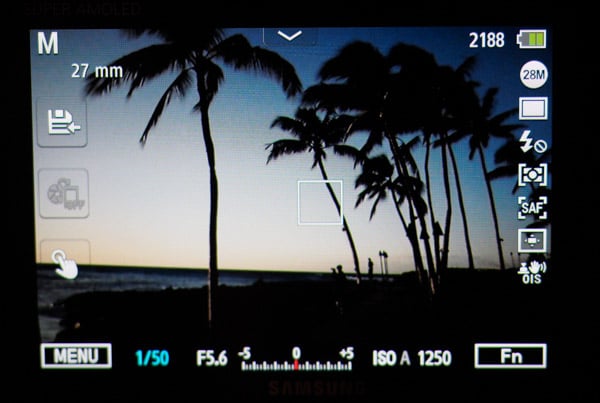
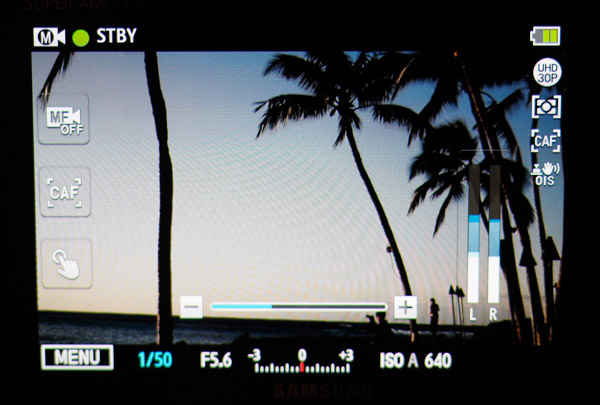
Another small annoyance is the lack of a dedicated Movie Mode. Video is, instead, simply triggered by pressing the record button near the thumb-rest, and video can be captured regardless of what stills shooting mode you're in. This is really handy for quick, off-the-cuff video clips, but after you finish recording a video clip, the NX500 automatically backs out of Movie Standby mode and returns you to the stills shooting view, complete with its wider angle of view. If you're shooting a bunch of videos back to back, you'll need to remember to re-enter Movie Standby mode every time after recording each clip if you want to check your composition and framing.

As for video image quality, as we experienced with the NX1, we ran into some playback issues right off the bat with Samsung's new H.265 video codec. The video compression is very complex and results in very small, space-saving files, however it takes a lot of computational horsepower for many media players to smoothly play these files at this time, and some media players on the computer will simply not play the normal NX500 H.265 videos files. (I'm looking at you Apple QuickTime.)
Thankfully, Samsung has included a movie converter app as part of the camera's bundled i-Launcher software. The converter application transcodes the H.265 files into more compatible, but less-compressed H.264 videos. To get a sense of the compression, a small 13-second 4K (3840 x 2160) video I shot was 64.7MB as an H.265 file, but a whopping 350MB in H.264! The Samsung Movie Converter apps works well and is simple to use, but as the screenshot above indicates, it can be quite taxing on your computer's resources to convert these H.265 videos -- so, the beefier the computer the better!
Viewing the transcoded H.264 versions, I found the video quality at 4K from the NX500 to be excellent, with crisp detail, great colors and nice dynamic range. Check out a sample video below, including download links for the both the H.264 version and the original H.265 one (again, note the difference in file sizes).
NEW (03/22/15) : Samsung NX500 4K Sample Video 3840 x 2160, H.264 Converted, Progressive, 30 fps, Pro Quality transcode Download: Original H.265 (143.1MB MOV) or Converted H.264 File (693MB MP4) |
In the above video, I also experimented with the tap-to-focus feature, which altogether works very well. It makes adjusting focus quick and easy without inducing too much (if any) camera vibrations. I inadvertently had the AF Shift Speed set to the quickest setting, however, so the focus transitions are very fast. For a more cinematic feel to focus transitions during video recording, the NX500 does offer some adjustment for AF Shift Speed: Slow, Normal or Fast. The NX500 also lets you fine-tune AF Responsiveness (+2 to -2), which tweaks how quickly the camera's autofocus adjusts to a new subject during recording.
Another indication that the NX500 is more consumer-oriented, at least when it comes to video, is the lack of both a microphone input and a headphone jack. Like the add-on EVF of yesteryear's NX100 I mentioned earlier, Samsung also used to make a hot-shoe-mounted mini-shotgun mic with a headphone jack (called the ED-EM10), that worked on earlier NX cameras, including the relatively-recent NX300, but it appears to no longer available based on a brief search around the web. If you can get your hands on one, I've been told there's no technical reason it wouldn't work on the NX500, but alas, an updated, official external mic for the NX500 doesn't appear available at this time either.
Wireless Connectivity

Lastly, let's talk about the wireless connectivity on the NX500. Like the NX1, it features many of the same amenities in this area, including always-on Bluetooth (though this can be turned off in the menus, if you want), Wi-Fi (IEEE 802.11b/g/n) and Near Field Communication. As an iPhone user, I can't take part in the nifty touch-to-pair syncing that NFC offers, but I can still use the standard Wi-Fi connection. (Note: "Quick Transfer" is available for Android devices only.)

After pressing the "Mobile" button on the top of the camera, the set-up process is fairly simple, though Samsung begins the pairing procedure as if you're an Android OS user (simply tap through a couple beginning screens and select "Wi-Fi Manual Connection (iOS)" for iPhone and iPad devices). Be sure to install the Samsung Camera Manager app first, and then after pressing the Mobile button, connect your iOS device to the camera's own Wi-Fi network, and then switch over to open the Samsung app, and you're done.
You can either browser through and transfer photos, or opt for the remote viewfinder and have complete wireless control of the camera. You can adjust nearly every basic shooting option and exposure setting as well as tap-to-focus and, if you have a Power Zoom lens like the included kit lens, you can even zoom the lens using your smart device.
It all works rather well, though I did find the app to be a bit sluggish. It can take a while for the image thumbnails to appear in the app as does toggling between remote viewfinder and MobileLink mode to transfer images. Also, the pairing and connection process is a multi-step one for us iOS users, but once it's up and running, the process itself is fairly straightforward, though not the snappiest, however images do transfer quickly to your smart device, I found.

Field Test Conclusion
All in all, the Samsung NX500 is an impressive little camera. The image quality is very good, at both low and higher ISOs, with files that are packed with fine detail and bright colors, as well as well-controlled noise at those higher sensitivities. The build quality is equally impressive. It's a solid-feeling camera, and not a cheap, plasticky toy camera. I took the camera ziplining with me and had it strapped to my harness. I was concerned about it banging and scraping against metal latches and carabiners, and while it did get jostled around, it survived with hardly a scratch, and the big Super AMOLED screen is still flawless!
The performance is also very good for the most part. It's certainly not as robust and beefy as the bigger NX1, with a rather small buffer when shooting RAW files, but for most uses, the NX500 is peppy and quick with great shot-to-shot performance. AF speed is super quick in most situations, though it can vary depending on the lens and light condition, as do most cameras, especially hybrid AF-capable mirrorless ones.
Ergonomically, the camera is very nice, but I think I'm in the minority for Samsung's target user for this camera: I'd like an EVF, especially since I love longer lenses, which obviously end up being much heavier! Using smaller lenses, such as the 16-50mm kit lens or small primes, the NX500 is light, compact, easy to hold and a breeze to carry with you all day during your travels, but as I've experienced with other small mirrorless cameras, adding larger, heavier lenses on the NX500 can get a little unwieldy. Nevertheless, the curved handgrip and improved exterior texture make for a secure hold.
If you're making the jump up from a smartphone or a compact camera to an ILC, or looking for a smaller camera to compliment your existing kit (and aren't tied down to a particular brand's lens system), the Samsung NX500 is a very attractive camera at a very reasonable price. The camera takes fantastic, high-resolution stills and great video all the way up to 4K, and it's all in a package that easily slips into your carry-on bag. While the NX500 might not fit the bill for the dedicated wildlife or sports shooter, for everyone else, the NX500 might just hit that sweet spot.

Up Next
The Samsung NX500 is currently undergoing our in-house testing here at Imaging Resource, so stay tuned for our extensive performance test results and additional lab test images, as well as our print and image quality analysis, and of course, our final IR conclusion. If you have any questions or comments for things you like us here at IR to examine while we still have the camera in-hand, be sure leave a comment below!
High ISO Noise Reduction
Samsung NX500 High ISO Noise Reduction
The Samsung NX500's four noise-reduction settings ("High, "Normal", "Low" and "Off") imply good flexibility in choosing how you want to make the trade-off between subject detail and noise levels. The Samsung NX500 user manual doesn't state at which sensitivities high ISO noise reduction is applied, so we've included crops all the way from the base ISO on up.
See for yourself how the Samsung NX500's "Normal"and "Off" High ISO NR settings compare to RAW without noise reduction under daylight-balanced lighting. (Note that these RAW images also have no sharpening applied, so they're a little softer than camera JPEGs at low ISOs.) Click on any of the crops below to see the corresponding full-sized image.
| High ISO Noise Reduction Comparison Daylight-balanced illumination |
|||
|
"Normal"
|
"Off"
|
RAW (no NR)
|
|
|
I
S O 1 0 0 |
 |
 |
 |
 |
 |
 |
|
 |
 |
 |
|
|
"Normal"
|
"Off"
|
RAW (no NR)
|
|
|
I
S O 2 0 0 |
 |
 |
 |
 |
 |
 |
|
 |
 |
 |
|
|
"Normal"
|
"Off"
|
RAW (no NR)
|
|
|
I
S O 4 0 0 |
 |
 |
 |
 |
 |
 |
|
 |
 |
 |
|
|
"Normal"
|
"Off"
|
RAW (no NR)
|
|
|
I
S O 8 0 0 |
 |
 |
 |
 |
 |
 |
|
 |
 |
 |
|
|
"Normal"
|
"Off"
|
RAW (no NR)
|
|
|
I
S O 1 6 0 0 |
 |
 |
 |
 |
 |
 |
|
 |
 |
 |
|
|
"Normal"
|
"Off"
|
RAW (no NR)
|
|
|
I
S O 3 2 0 0 |
 |
 |
 |
 |
 |
 |
|
 |
 |
 |
|
|
"Normal"
|
"Off"
|
RAW (no NR)
|
|
|
I
S O 6 4 0 0 |
 |
 |
 |
 |
 |
 |
|
 |
 |
 |
|
|
"Normal"
|
"Off"
|
RAW (no NR)
|
|
|
I
S O 1 2 8 0 0 |
 |
 |
 |
 |
 |
 |
|
 |
 |
 |
|
|
"Normal"
|
"Off"
|
RAW (no NR)
|
|
|
I
S O 2 5 6 0 0 |
 |
 |
 |
 |
 |
 |
|
 |
 |
 |
|
|
"Normal"
|
"Off"
|
RAW (no NR)
|
|
|
I
S O 5 1 2 0 0 |
 |
 |
 |
 |
 |
 |
|
 |
 |
 |
|
As you can see, both the default "Normal" and "Off" high ISO noise reduction settings apply noise suppression at all ISOs, so the "Off" setting isn't truly off (which is the case for most cameras). Also note that there's practically no difference between "Normal" and "Off" settings until sensitivity is increased past ISO 3200, and even then the "Off "setting remains too aggressive. The "Off" setting does apply lower amounts of luminance noise suppression at high ISOs, but it still works fairly hard to suppress much of the chrominance noise, though it doesn't desaturate images as much as the "Normal" setting at the highest ISOs. Also notice how the noise grain changes dramatically between the two settings at the highest ISO, an indication vastly different noise reduction schemes are being used.
We'd personally like to see more of a difference between the settings, with lower amounts of noise reduction applied ,especially with the "Off" setting. For those shooting high ISOs, RAW is definitely the way to go with the Samsung NX500.
Conclusion
| Pro: | Cons: |
|---|---|
|
|
The Samsung NX500 packs a lot of punch for a lightweight, travel-friendly mirrorless camera. Coming as an update to the earlier NX300, the NX500 is more of a complete overhaul rather than merely an incremental update to their mid-level compact system camera. In fact, under the hood, the NX500 includes many of the same hardware and software features as the beefy, flagship NX1.
Indeed, the NX500 shares the same backside-illuminated 28.2-megapixel APS-C sensor as the NX1 as well as a similar DRIMe Vs image processor, which together give the NX500 some impressive specs, including very crisp, high-resolution images, a very high 51,200 maximum ISO sensitivity and 4K video recording.
In both our real-world shooting experience and lab testing, the NX500's image quality is very good, especially with low to medium ISOs. Details are crisp and sharp, colors are pleasing and the dynamic range is very good. High ISO performance is generally good as well, particularly up to around ISO 1600, with a good balance of detail and noise reduction with in-camera, default NR processing for JPEGs. At around ISO 6400 and higher, though, detail loss is quite noticeable with a lot of blotchiness and smearing from the NR processing. The NX500 does shoot RAW, which, of course, gives you much more control over how much sharpening or noise reduction you can choose to apply in post-processing.
On the speed and performance front, the NX500 is a good performer. Autofocus speeds are nice and quick thanks to the hybrid AF system with on-sensor phase detect pixels. By the numbers, the NX500 tested faster than average for a mirrorless camera, and as for out in the real world, the camera was quick and snappy to acquire focus. And while shot-to-shot time tested about average, it's pleasing and not at all frustrating or sluggish to use.
Seeing as it has a lot of the horsepower of the NX1 under the hood, it's no surprise that the continuous burst shooting on the NX500 was also pretty good. Samsung claims a 9fps rate, and we tested it at about 8.8fps for Large Superfine JPEGs (LSF), and 8.6fps for RAW+JPEGs, which is not far off. Buffer performance was also very good for LSF JPEGs in Continuous Hi mode, with about 38 frames until the buffer filled. However, it chokes up with just 6 frames in RAW or RAW+JPEG, so if you're into capturing fast action scenes with the NX500, turning off RAW is probably a good idea.
Like the NX1, the NX500 shoots very nice, highly detailed 4K video, at both Cinema 4K (4096x2160) and Ultra HD (3840x2160) resolutions, at 24p and 30p framerates, respectively. The video quality at 4K from the NX500 is very good, with crisp detail, great colors and nice dynamic range. It also uses the new H.265 video codec, which is not the most compatible format right now, though it saves a lot of space on the memory card. Unlike the NX1, however, the NX500 records 4K only to a maximum of 15 minutes in one go and, more importantly perhaps, doesn't use the full size of the sensor and instead crops in. This 4K crop is quite noticeable -- about a 1.6-1.7x crop with Ultra HD -- which really narrows the field of view, and particularly makes wide-angle lenses much less "wide."
The build quality of the little Samsung NX500 is quite nice with a very solid feel, nice brushed aluminum top plate and nicely-textured leather-like grip surrounding the majority of the camera body. The handgrip has a slightly more contoured top surface, which improved the comfort and finger placement over the shutter release button. The rest of the buttons and controls are easy to use, and the re-introduction of dual control dials on the top and rear is a very nice improvement over the previous model iteration.
The new 180-degree tilting screen is nice for shooting at variable high and low angles, and yes, for capturing "selfies." The NX500 can be set to automatically enter into "selfie-mode" when you flip the screen fully vertical, which includes automatic shutter release modes like smile detection and wink detection options. These modes worked surprisingly well, though we can't help but think they're a little on the gimmicky side.
The camera features a hot shoe, and without a built-in flash, Samsung has thoughtfully included a small hot-shoe-mounted flash in the bundle. The flash tested on the weak side with narrow coverage, but it's better than nothing, that's for sure. One glaring omission in our view when it comes to the hot shoe is the option for an electronic viewfinder. Back with the original NX100, Samsung produced an add-on EVF, but subsequent models sadly did away with this little accessory. From a consumer standpoint, many of which are used to smartphones and other small point-and-shoot cameras, a viewfinder is likely not a critical or much-used feature. However, for the enthusiast crowd, it would be a nice addition to the camera, especially when using longer and often heavier lenses.
And speaking of lenses, the included 16-50mm f/3.5-5.6 Power Zoom ED OIS lens is, on one hand, a small, compact and lightweight piece of kit with pretty nice optical performance if, on the other hand, you get a good copy. In our NX3000 review, we also received this lens as part of the kit, and it tested quite well for a kit lens with good sharpness, low distortion and only moderate CA. However, the 16-50mm PZ lens that came with our NX500 seemed to perform less well.
The Power Zoom feature of the lens is nice for video recording and features built-in zoom buttons on the side of the lens, which provide a controlled, smooth zooming action. Given the electronic nature of the zooming function, the manual zoom ring is electronically controlled as well. The feel of the zoom ring can be a little imprecise with the force of rotation not directly translating to the speed of zooming as you might expect from a typical zoom lens.
All in all, though, the Samsung NX500 is a fun, great little camera. The image quality and video quality are both very good, and the compact size and solid build quality make it an excellent travel companion. Speed and performance are also quite good, with snappy AF in all but dim lighting and good continuous burst rates and a deep buffer with JPEGs. The Samsung NX500 overall shapes up to be not only a great mid-level camera for those stepping beyond the smartphone, but also a great camera for enthusiasts, including those looking for a lightweight companion to their NX1 or other larger system camera.
Overall, the Samsung NX500's impressive feature set, improved stylish design, high image and video quality, and solid performance make it an easy Dave's Pick.
Follow Imaging-Resource.com on Twitter!
Pros
- Very good image quality with high-resolution files
- Excellent high ISO performance with RAW files
- Very good dynamic range
- Fast AF performance
- Compact design with good build quality
- Better ergonomics than predecessor
- 4K video recording.
Cons
- High ISO noise reduction too strong
- AF struggles in low-light
- Buffer depth is shallow with RAW files
- No option for EVF
- No built-in flash (external one included)
- 4K Video is cropped with narrower FOV.