
Overview
- - -
Review Update:
Named as the Best Camera of 2015 in our Camera of the Year awards, the A7R II is an excellent high-resolution yet compact mirrorless camera. For those wanting DSLR-style handling and performance, Sony's recently introduced the A99 Mark II, which pairs their SLT camera technology with the same 42MP full-frame sensor and 399-point on-sensor phase-detect AF system as in the A7R II.
- - -

You knew it was coming. The higher-resolution "companion" to the Sony A7 II and much-anticipated update to the Sony A7R has arrived. The aptly-named A7R II shares the much-improved ergonomic redesign introduced by its A7 II sibling, as well as presenting a whole host of new features and technology aimed at providing the utmost in image and video quality as well as performance.
At the heart of the matter is a new 42.4-megapixel back-illuminated Exmor R full-frame CMOS sensor. This brand new sensor makes it possible to have a camera that not only provides very high-resolution stills and video, but also provides a high performance and speedy experience that's typically seen with lower-resolution cameras. As Sony puts it, you no longer have to pick a high-res camera or a high-performance one.
With its new sensor, the A7R II not only gains a notable boost in resolution from 36MP to 42MP (while continuing to do away with the optical low-pass filter), but it also provides a noticeable boost in high ISO sensitivity -- up to an expanded ISO 102,400 -- thanks to the back-side illuminated design and powerful BIONZ X image processor. The new sensor's structure and copper wiring also allow for improved data throughput off the chip at up to 3.5x faster than the predecessor, which means having the camera ready to shoot shot after shot as it reads off the sensor data much more quickly.

And now, for the first time in the "R" version of the A7-lineup, the A7R II features on-sensor phase-detect AF, which Sony claims provides up to 40 percent faster AF performance compared to the original. The A7R II's focusing system offers the world's widest coverage area of phase-detect sensor at 45-percent of the frame thanks to the whopping 399 phase-detect AF points (which is huge bump up from the 117 PDAF points of the A7 II).
With the original A7R, burst shooting performance was not one of the camera's strong suits, with a rather paltry 4fps burst rate without continuous AF and a measly 1.7fps with C-AF. Now, with the A7R II, the higher-powered autofocus system allows the camera to shoot at 5fps with continuous AF. It's still not the speediest camera out there in terms of burst rate, but considering the resolution of this full-frame sensor, it's still quite the feat.

In addition, the Alpha A7R II features a new shutter mechanism that Sony claims produces 50% less vibration compared to its predecessor to help combat shutter-induced blur which is particularly important at these resolutions, and it's also highly durable with a cycle rating of approximately 500K actuations. The A7R II can also be set to Silent Shooting mode which employs an all-electronic shutter in order to shoot silently, without any sensor vibration.
This new "R" model also gains Sony's impressive 5-axis sensor-shift image stabilization that was introduced with the A7 II. This 5-axis system, working in concert with Sony's OSS-capable lenses, helps correct for pitch and yaw movements, shifts along the X and Y axis as well as rotational movements, and all up to an impressive 4.5-stops of correction.

For the A7R II, it's not only still images that gain a noticeable increase in resolution and quality, but videos as well. Like the A7S before it, the A7R II is able to capture ultra-high-resolution 4K video (3840 x 2160), however, unlike the "S" model, it can record 4K video internally to the memory card (or stream an uncompressed 4:2:2 8-bit signal via HDMI, or do both simultaneously).
But there's a bigger story surrounding 4K video with the A7R II, and that is it's the world's first to offer in-camera full-frame 4K recording. Indeed, the A7R II captures 4K video using the full width of its full-frame sensor. Initially, this is way more pixels than is needed for 4K resolution video, and so the A7R II condenses the pixel-by-pixel information into a highly-detailed, crisp 4K video resolution. The camera also offers a cropped Super 35mm mode, while still capturing a higher-resolution 5168 x 2912 (5K) frame and condensing it into the 8MP-equivalent 4K video size.


Furthermore, the A7R II makes use of Sony's higher bitrate XAVC S file format, which supports 4K bitrates up to 100Mbps. Full HD and 720p video recording is also offered in XAVC S format at 50Mbps (AVCHD and MP4 formats are also available for these resolutions). And like the A7S, the A7R II includes advanced video features including Picture Profile support with S-Log2 gamma for increased dynamic range control, REC control and timecode support.
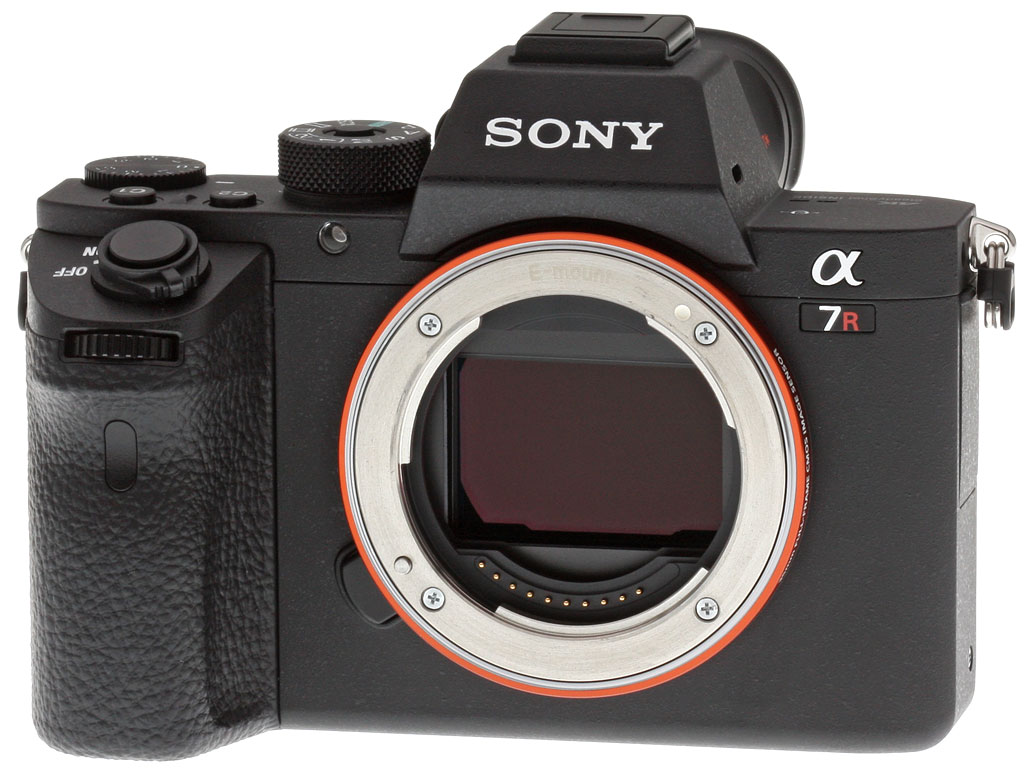
The exterior design of the A7R II borrows heavily from the much-improved, redesigned A7 II in terms its shape and contoured grip and control layout. In fact, aside from the different model badge and 4K logo, the camera is practically identical. As we mentioned with the A7 II, this redesign is a much-welcomed improvement. The camera is much more comfortable to hold and the button placement and other controls are in more natural locations; overall, the camera feels great in the hand. The one primary, if not only, exterior change compared to the A7 II is the locking mode dial, which we think is a very nice little touch.

If you've picked up the A7 II, then the handling characteristics of the A7R II will be strikingly familiar, though it does feel just a hair heavier than the A7 II. Looking at the Sony-provided weight specs, at 625g (with battery and memory card), the A7R II is noticeably heavier and beefier-feeling than the original A7 (approx. 465g with battery and card) and tips the scale a bit compared to the A7 II as well (approx. 599g with battery and card).
Like other Sony A7-series cameras, especially the more recent A7 II, the build quality of the A7R II feels excellent and super-solid. According to the press materials provided and from speaking with Sony representatives, the A7R II's full magnesium alloy body construction features some environmental sealing, though a rubberized gasket around the lens mount is, sadly, still absent. The buttons and dials do feature sealing, and the body construction components themselves, we're told, are built with such tight tolerances that the camera is considered dust and moisture resistant. However, Sony does point out that the camera is not waterproof, nor is it splashproof.
In other design improvements, the electronic viewfinder gets some love as well, and now features the world's highest viewfinder magnification at 0.78x for a full-frame camera (up from 0.71x in the A7R and A7 II). Indeed, the new 2,359K-dot XGA OLED Tru-Finder feels much larger thanks to the improved approximately 38.5-degree field of view. Technologically, the EVF has been completely redesigned with a new four-lens construction, including double-sided aspherical elements and Zeiss T* coating to insure crisp image resolution and minimal surface reflection, respectively.

The A7R Mark II's LCD monitor size remains the same at 3 inches, but it's a 1,228,800 dot RGBW panel versus the 921,600 dot RGB display initially used for the A7R (Sony may have made a running change to A7R's panel since we reviewed it, though, as some sources indicate a 1.23M-dot RGBW panel for the A7R as well). While still not a fully articulating tilt/swivel design, the range of the tilting mechanism has been improved to match the A7 II's, allowing the panel to tilt upwards to about 107 degrees, up from 84 degrees on the A7R, though downward tilt is slightly more limited to about 41 degrees, versus 45 on the predecessor.
Like the previous A7-series cameras, the A7R II features both built-in Wi-Fi and NFC connectivity and utilizes Sony's PlayMemories suite of on-camera add-on applications and mobile apps. One particularly interesting new addition to the PlayMemories line of add-on functionality is the Angle Shift feature. In conjunction with the already-existing Time Lapse add-on, the new Angle Shift feature uses the sensor's massive resolution to crop in and add panning, tilting and zooming "effects" for even more dynamic, motion-control-style videos, all without the need for heavy, expensive or complicated time-lapse equipment, motorized sliders and various other accessories.

A wide variety of wired connectivity options are offered, including a 3.5mm stereo microphone jack with plug-in power, a 3.5mm stereo headphone jack, the previously mentioned HDMI port (Micro Type D), and a combined USB 2.0 data / wired remote / charging port, which Sony calls the Multi-Terminal Interface.
As well as the ability to control it remotely via Wi-Fi or wired remote, the A7R II lets you trip the shutter release from an infrared remote, using a receiver in the handgrip.
The camera also comes with the same cable lock protector that ships with the A7S II, to help prevent the HDMI cable from coming loose.

Like other A7 models, the A7R II does not include a built-in flash. That limits users to external strobes only, and they're attached via the top-deck Multi Interface Shoe mount. This has proprietary intelligent contacts, and can also be used to mount various non-flash accessories. The A7R II also accepts Minolta / Sony iISO strobes using an optionally-available adaptor.
The A7R II stores images on Secure Digital cards, including the higher-capacity SDHC / SDXC types, and the higher-speed UHS-I types. Note that an SDXC card with a U3 speed rating is required for 100Mbps 4K or Full HD XAVC S video recording. The A7R II's single flash card slot can also accept Sony's proprietary Memory Stick PRO Duo cards, if you prefer, though they don't support XAVC S video capture.

The A7R II uses the same NP-FW50 lithium-ion battery pack as its predecessor. Battery life remains the same when using the LCD monitor at 340 shots per charge, but has improved slightly when using the EVF at 290 shots versus 270 for the A7R.
Sony decided to include a second battery in the A7R II bundle, as well as an AC adapter for in-camera charging via USB and a dedicated battery charger (BC-QM1). Nice! And of course the A7R II is compatible with Sony's optional VGC2EM vertical battery grip which doubles battery life with two batteries installed.
In the Box
The Sony A7R II body-only retail box (as reviewed) contains the following items:
- Sony ILCE-7RM2 Camera Body
- 2 x NP-FW50 Lithium-Ion Rechargeable Battery (1020mAh)
- BC-VW1 Battery Charger
- AC-UD10 AC Adapter
- Power Cord
- Shoulder Strap
- Body Cap
- Multi-Interface Shoe Cover
- Eyepiece Cup
- Cable Protector
- Micro-USB Cable
Recommended Accessories
- Large capacity SDHC/SDXC memory card. (SDXC U3 memory card required for 100Mbps XAVC S video format.)
- High Quality Lenses
- Sony VGC2EM Vertical Battery Grip (~US$350)
- Sony HVL-F20M External Flash (~US$150)
- Small/Medium Carrying Bag
Optics
The Sony A7R II is usually sold body-only, so we have no "kit" lens optical test results to share here. Below are our A7R II viewfinder accuracy test results.
Viewfinder Test Results
Coverage
Very good accuracy from the EVF and LCD monitor.


The Sony A7R II's OLED electronic viewfinder and LCD monitor both show just over 99% coverage with our FE 55mm f/1.8 prime lens. Very good performance.
The images above were taken from our standardized test shots. For a collection of more pictorial photos, see our Sony Alpha ILCE-A7R II Photo Gallery .
Exposure
Color
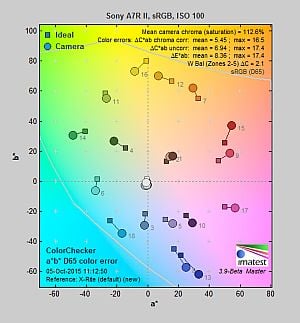
Saturation & Hue Accuracy
Fairly typical saturation levels and hue accuracy.
 |
|||
|
ISO Sensitivity
|
|||
| 12800 | 25600 | 51200 | 102400 |
| In the diagram above, the squares show the original color, and the circles show the color that the camera captured. More saturated colors are located toward the periphery of the graph. Hue changes as you travel around the center. Thus, hue-accurate, highly saturated colors appear as lines radiating from the center. Mouse over the links to compare ISOs and click on a link for a larger version. | |||
Saturation. The Sony A7R II's mean default color saturation is 112.6% at base ISO or in other words, oversaturated by 12.6%. That's just a touch higher than average these days. Mean saturation remains very stable across up to ISO 1600, after which is begins to gradually drop as sensitivity rises to a minimum of 103.5% at maximum ISO. Reds, dark blues and dark green are boosted the most, but not as much as we often see. Most other colors are pushed just a bit, though light orange and light green are slightly undersaturated, and yellow is moderately undersaturated. Overall, saturation levels are quite pleasing to our eyes, and you can of course tweak saturation to your liking. Most consumer digital cameras produce color that's more highly saturated (more intense) than found in the original subjects. This is simply because most people like their color a bit brighter than life.
Skin tones. The Sony A7R II does fairly well with Caucasian skin tones. Brighter flesh tones have a healthy-looking pinkish tint, though darker areas are nudged slightly toward orange. Still, pretty realistic results here. Where oversaturation is most problematic is on Caucasian skin tones, as it's very easy for these "memory colors" to be seen as too bright, too pink, too yellow, etc.
Hue. Like many cameras, the Sony A7R II shifts cyan toward blue, red toward orange, orange toward yellow and yellow toward green, but shifts are relatively minor. (The cyan to blue shift is actually fairly minor and very common among the digital cameras we test; we think it's a deliberate choice by camera engineers to produce better-looking sky colors. The yellow to green shift combined with its desaturation is however unfortunate, as it can produce somewhat dingy-looking yellows.) With an average "delta-C" color error of 5.45 after correction for saturation at base ISO, overall hue accuracy is about average, with accuracy only varying slightly at higher ISOs. Hue is "what color" the color is.


Sensor
Exposure and White Balance
Indoors, incandescent lighting
Warm cast with Auto white balance; Incandescent is pretty good, and Manual is very good. Less than average exposure compensation required.


Indoors, under normal incandescent lighting, color balance is too warm and orange with the Auto white balance setting, though results here are slightly better than average. Results with the Incandescent setting are quite good and only slightly warm. Results with the Manual setting are the most accurate, though just slightly cool. The Sony A7R II required no exposure compensation here, while +0.3 EV is about average for this shot. (Our test lighting for this shot is a mixture of 60 and 100 watt household incandescent bulbs, a pretty yellow light source, but a very common one in typical home settings here in the U.S.)
Outdoors, daylight
Excellent results under harsh lighting, with very good handling of contrast, color, and exposure.
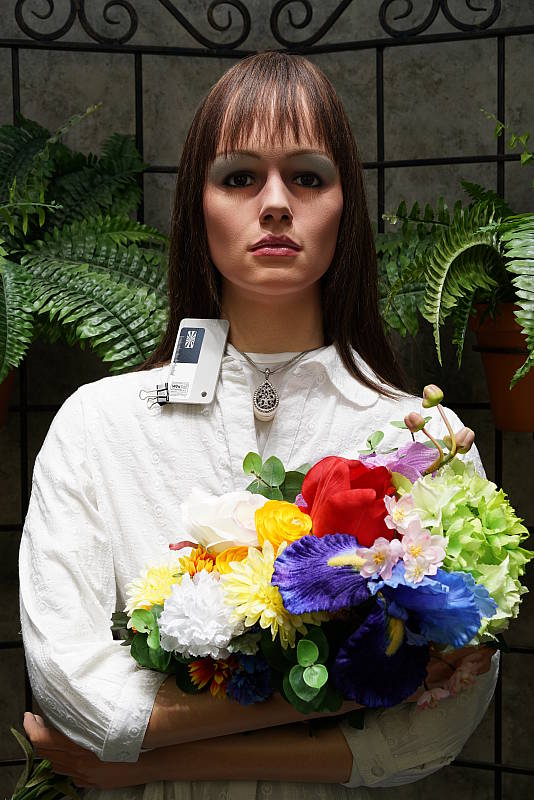
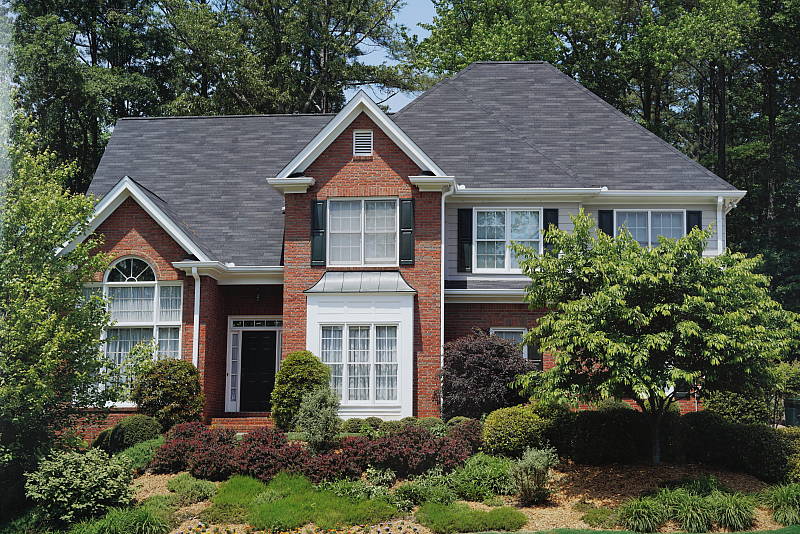
Outdoors, the Sony A7R II performed extremely well. Only +0.3 EV exposure compensation was required to keep the mannequin's face bright in our "Sunlit" Portrait shot, which is less than the +0.7 EV average among the cameras we've tested. Contrast is a little high as you might expect under such harsh lighting, but despite the bright appearance, the camera does a great job of holding onto detail in both the shadows and bright highlights, even without the help of DRO. We preferred Manual color balance for our "Portrait" shot, though Auto white balance produced very similar results. Default exposure is excellent in our Far-field shot with almost no highlights blown however there are some dark shadows that can be a little noisy and discolored at the lowest levels. The Far-field shot with Auto white balance has very good color, just a touch cool. Overall, great performance in harsh lighting, especially considering DRO was off for these shots.
See full set of test images with explanations
See thumbnails of all test and gallery images
Resolution
~3,700 lines of strong detail from JPEGs, about the same from RAW files.


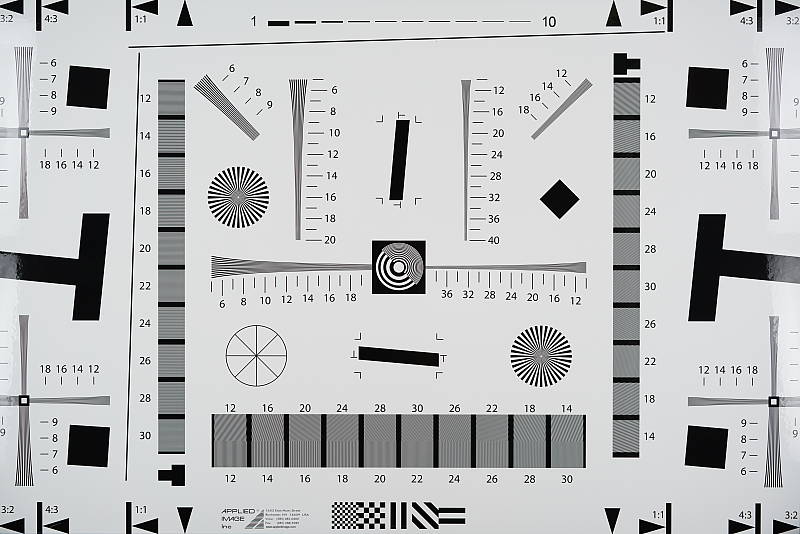
An in-camera JPEG of our laboratory resolution chart reveal sharp, distinct line patterns down to about 3,700 lines per picture height in the horizontal direction and to about 3,700 lines per picture height in the vertical direction, though some minor aliasing can be seen starting as low as 3,100 lines. Complete extinction of the pattern didn't occur before the 4,000 line limit of our chart in both directions. Adobe Camera Raw wasn't really able to extract more resolution here from matching RAW files, but it produced more color moiré and false colors as it often does at and above the limits of resolution. Use these numbers to compare with other cameras of similar resolution, or use them to see just what higher resolution can mean in terms of potential detail.
See full set of test images with explanations
See thumbnails of all test and gallery images
Sharpness & Detail
Remarkable detail and sharpness, with very few sharpening artifacts. Mild noise suppression visible in the shadows and areas of low contrast.


Sharpness. The Sony A7R II captures incredibly sharp, crisp and detailed images overall, and it doesn't leave behind heavy sharpening halos around edges with high contrast that we often see around the lines and letters of our bottle label crop (above left). The A7R II's RAW images don't need a lot of sharpening because of the lack of an optical low pass filter, but Sony really has done an excellent job with the A7R II's low-ISO JPEG processing. Edge enhancement creates the illusion of sharpness by enhancing colors and tones right at the edge of a rapid transition in color or tone.
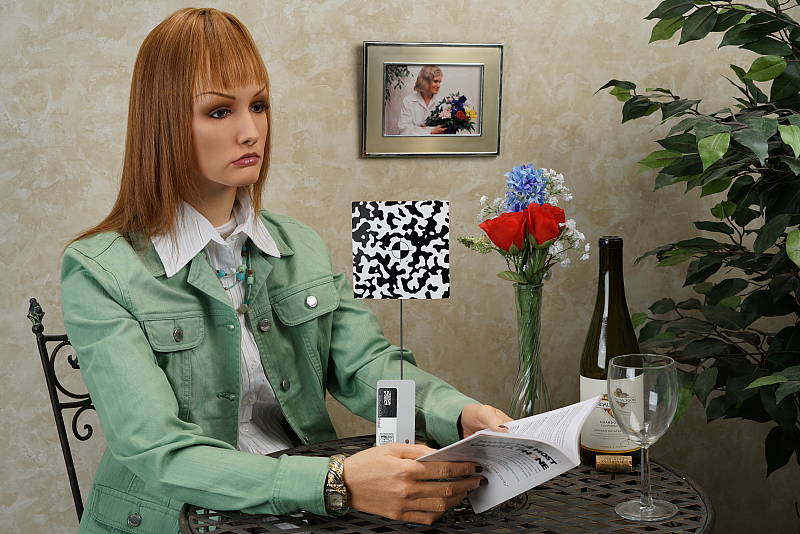
Detail. The crop above right shows fairly mild noise suppression in the darker areas of the mannequin's hair. A number of low-contrast strands are smudged together, though higher contrast strands are distinct, though as you can see some suffer from the "jaggies" and other aliasing artifacts (see below). Still, outstanding results here considering the resolution. Noise-suppression systems in digital cameras tend to flatten-out detail in areas of subtle contrast. The effects can often be seen in shots of human hair, where the individual strands are lost and an almost "watercolor" look appears.


Aliasing Artifacts. As mentioned previously the Sony A7R II captures incredibly sharp, detailed images thanks to its very high resolution and lack of an optical low pass filter, but that means it's also susceptible to moiré and other aliasing artifacts when used with a sharp lens. As you can see in our Still Life shots, moiré patterns can for instance be seen in the red-leaf fabric as well as in the Samuel Smith bottle label as shown in the crops above.
With the increasing trend of using either a very weak or no optical low pass filter, quite a few cameras produce similar artifacts these days, and the A7R II's JPEG processing engine actually does a good job at suppressing aliasing-related false colors in our Resolution target. But it's not fool proof as we've shown, and luminance moiré is much more difficult to deal with. That's something to be aware of especially if you shoot a lot of man-made subjects with repeating patterns, such as buildings, fabrics, etc. Techniques than can be used to reduce aliasing include shooting at a smaller aperture so that lens diffraction acts as an anti-alias filter, defocusing slightly, shooting at higher ISOs, as well as trying different RAW converters and processing tools.
RAW vs In-Camera JPEGs
As noted above, the Sony A7R II produces in-camera JPEGs with incredible amounts of crisp detail. Additional detail can often be obtained from carefully processing RAW files with a good converter, so let's have a look at base ISO:
| Base ISO (100) | |
 |
 |
 |
 |
 |
 |
|
Camera JPEG, defaults
|
RAW via Adobe Camera Raw
|
In the table above, we compare an in-camera JPEG taken at base ISO using default noise reduction and sharpening (on the left) to the matching RAW file converted with Adobe Camera Raw 9.1 using default noise reduction with some moderate but tight unsharp masking applied in Photoshop (200%, radius of 0.3 pixels, and a threshold of 0).
As you can see, the Adobe Camera Raw conversion renders a touch more detail than the camera, while higher contrast and saturation makes the in-camera image pop a bit more, but the ACR conversion also reveals a bit more luminance noise in flat areas. You can always turn up the luminance noise reduction (default of zero was used here), though noise levels are already quite low. Also note the moiré pattern in the red-leaf pattern in both images.
Bottom line: Although Adobe Camera Raw is able to extract a little more detail and produce perhaps a slightly more natural-looking image, there's really very little to complain about the Sony A7R II's JPEG engine at low ISOs. It provides a great balance of fine, crisp detail, low noise, and low sharpening artifacts straight out of the camera.
ISO & Noise Performance
Surprisingly good high ISO performance.
|
Default High ISO Noise Reduction
|
 |
 |
 |
| ISO 50 | ISO 100 | ISO 200 |  |
 |
 |
| ISO 400 | ISO 800 | ISO 1600 |
 |
 |
 |
| ISO 3200 | ISO 6400 | ISO 12,800 |
 |
 |
 |
| ISO 25,600 | ISO 51,200 | ISO 102,400 |
The Sony A7R II's JPEG images are quite clean and extremely detailed at ISOs 50 though 400, with very little image degradation, and image quality drops in a nice, very gradual manner up to ISO 1600. ISO 3200 produces a more noticeable drop in image quality with higher noise and some noise reduction artifacts, however fine detail is still quite good, and chroma noise is very low. ISO 6400 shows more noise and artifacts from noise reduction, but fine detail is still pretty good, and the often more objectional chroma noise remains low. ISO 12,800 is significantly noisier and sharpening combined with strong noise reduction give the image a somewhat hammered look in darker areas and shadows, though hard edges aren't as rough and haloed as we saw with earlier A7 models, and chroma noise is still well-controlled. Image quality drops rapidly from ISO 25,600 on, though, with images that look almost like paintings with a stippled effect and strong chroma blotching becomes an issue at ISO 51,200 and 102,400 as well.
Overall, the A7R II offers surprisingly good high ISO performance especially considering its resolution and pixel size. As always, see the Print Quality section below for maximum recommended print sizes at each ISO.
A note about focus for this shot: We used to shoot this image at f/4, however depth of field became so shallow with larger, high-resolution sensors that it was difficult to keep important areas of this shot in focus, so we have since started shooting at f/8, the best compromise between depth of field and sharpness.
Extremes: Sunlit, dynamic range and low light tests
Excellent highlight and shadow detail. Excellent low-light performance, capable of capturing bright images in near darkness.


Sunlight. The Sony A7R II handled the deliberately harsh lighting in the test above brilliantly. We preferred the +0.3 EV exposure here, as the default 0 EV exposure is a touch dim in the face while the +0.7 EV exposure is a bit too bright. Contrast is a little high, but shadow and highlight detail are both very good. Despite the bright appearance, few highlights are blown in the model's shirt and face at +0.3 EV, though the red channel is clipped in some of the flowers as is often the case, and in specular highlights where you'd expect clipping. There are some dark shadows however they're quite clean with lots of detail, though very deep shadows are posterized and discolored as expected. Overall, excellent performance here.
For best results, be sure to use fill flash in situations like the one shown above; it's better to shoot in the shade when possible. See below for results with Dynamic Range Optimization and High Dynamic Range features enabled.
Because digital cameras are more like slide film than negative film (in that they tend to have a more limited tonal range), we test them in the harshest situations to see how they handle scenes with bright highlights and dark shadows, as well as what kind of sensitivity they have in low light. The shot above is designed to mimic the very harsh, contrasty effect of direct noonday sunlight, a very tough challenge for most digital cameras. (You can read details of this test here. In actual shooting conditions, be sure to use fill flash in situations like the one shown here; it's better to shoot in open shade whenever possible.)
| Face Detection | ||
 |
 |
 |
| Aperture Priority, 0 EV Face Detection Off |
Aperture Priority, 0 EV Face Detection On |
Auto Mode, 0 EV |
Face Detection. Like most cameras these days, the Sony A7R II has the ability to detect faces (up to 8 in a scene), and adjust exposure and focus accordingly. As you can see from the examples above, face detection worked as expected in Aperture Priority at f/8, producing a brighter image than without it by reducing the shutter speed from 1/40 to 1/25s (that's a bit slow for handheld and the type of subject, but it had little other choice since the aperture and ISO was manually selected). Full Auto mode also did better than Aperture Priority without face detection. It selected a larger aperture of f/4 while maintaining a relatively fast shutter speed of 1/160s, and automatically applied DRO (see below) to reduce overall contrast.


Dynamic Range Optimization is Sony's name for their dynamic range enhancement technology. DRO divides the image into small areas, analyzes the range of brightness of each area, and adjusts the camera's image processing parameters accordingly to make the best use of the available dynamic range. Auto DRO is enabled by default on the Sony A7R II. You can also set the level manually, from 1 ("weak") to 5 ("strong"), or turn it off. As one would expect, DRO is only available for JPEG files.
The above thumbnails and histograms show the effects of the various levels of DRO on our "Sunlit" Portrait shot with no exposure compensation. Mouse over the links on the right to load the associated thumbnail and histogram, and click on the link to visit the full resolution image. As you can see from the thumbnails and associated histograms, increasing DRO progressively boosts shadows and midtones while leaving highlights essentially intact, though boosting shadows does make noise slightly more visible. The Auto setting did a pretty good job overall, and the five manual levels give quite a bit of control over the effect.

Above, you can see the effect of DRO settings on our Far-field shot. The default Auto setting produced a nicely balanced exposure, despite the harsh lighting. A useful feature that works well.


High Dynamic Range. The Sony A7R II's HDR mode takes three images in rapid succession, one nominally exposed , one underexposed, and one overexposed, then combines them into one high dynamic range JPEG automatically. Lighter areas from the underexposed image are combined in-camera with darker areas from the overexposed image to produce an image with compressed tonal range. The camera then saves a single composite image, as well as the nominally exposed image. The overlaid images are micro-aligned by the camera, but it can only correct for so much movement. If it can't micro-align successfully, an icon indicating HDR capture failed will appear. For best results, the subject should not move or even blink, so it's not really intended for portraits. There is also a manual mode where you can select 1 EV ("weak") to 6 EV ("strong") difference in exposures.
Mouse over the links to load the associated thumbnail and histogram, and click on the link to visit the full resolution image. As you can see, the Auto setting did a decent job, similar to the 3 EV manual setting. The higher the manual setting, the more highlights were toned-down and shadows opened up, but as you can see higher settings can produce flat and unnatural results with this subject.
Above, you can see the effect of HDR settings on our Far-field shot. Watch out for ghost images from subject movement during the capture sequence, though, as can be seen in some of the shots above. It appears that the A7R II attempts to eliminate them during the merging process, but isn't always 100% successful.
Dynamic Range Analysis (RAW mode). While we once performed our own dynamic range measurements based on in-camera JPEGs as well as converted RAW images (when the camera was supported by Adobe Camera Raw), we've switched to using DxO Labs' results from their DxOMark website. As technology advanced, the dynamic range of modern high-end cameras in some cases exceeded the range of the Stouffer T4110 density scale that we used for our own measurements. DxO's approach based on RAW data before demosaicing is also more revealing, because it measures the fundamental dynamic range of the sensor, irrespective of whatever processing is applied to JPEGs, or to RAW data by off-the-shelf conversion software.
In the following, we use DxO's "Print" dynamic range results, which are scaled based on camera resolution. As the name suggests, this scaling corresponds to the situation in which you print at a given size, regardless of how many megapixels the camera might have. (In other words, if you've decided to make a 13x19 inch print, that's the size you're printing, whether the camera's resolution is 16 or 300 megapixels.) For the technically-minded, you can find a discussion of the reasoning behind this here on the DxOMark website. Also note that DxO Labs uses a signal-to-noise (SNR) threshold of 1 when defining the lower boundary of acceptable luminance noise in their dynamic range measurements, which corresponds to the "Low Quality" threshold of the Imatest software we used to use for this measurement.

Here, we compare the Sony A7R II's dynamic range to two rival full-frame cameras, the 50.6-megapixel Canon 5DS R and the 36.3 megapixel Nikon D810.
As you can see from the above graph (click for a larger image), the A7R II's dynamic range (orange) isn't as high as the Nikon D810's at the lowest ISOs. The A7R II's dynamic range at its ISO 100 setting is 13.9 EV, while the Nikon D810 managed almost 14.9 EV at its lower base ISO of 64, and even at ISO 100, the Nikon bests the A7R II at about 14.4 EV. But look what happens above ISO 200 -- The A7R overtakes the D810, and offers about an EV advantage at most ISOs above 800. Amazing!
Perhaps unsurprisingly, the Sony A7R II's dynamic range is dramatically better than the Canon 5DS R's across the ISO range, offering about a 1.5 stop advantage at base ISO (13.9 vs 12.4 EV), and the Sony continues to do better across remaining ISOs, offering a 0.8 to 1.1 EV advantage.
Bottom line: Really excellent dynamic range results from the Sony A7R II, with exceptional results at higher ISOs. Click here to visit the DxOMark page for the Sony A7R II for more of their test results and additional comparisons.
| 1 fc 11 lux |
1/16 fc 0.67 lux |
1/16fc No NR |
|
|---|---|---|---|
| ISO 100 |
 2s, f2.8 |
 30s, f2.8 |
 30s, f2.8 |
| ISO 3200 |
 1/15s, f2.8 |
 1s, f2.8 |
 1s, f2.8 |
| ISO 102400 |
 1/500s, f2.8 |
 1/30s, f2.8 |
 1/30s, f2.8 |
Low Light. The Sony A7R II performed very well in our low light tests, producing usable exposures with very low noise down to the lowest light level we test at (1/16 fc) at base ISO of 100. Noise is very low at base ISO and still fairly low at ISO 3200, though as expected, at the highest ISO of 102,400 luminance noise is very high and blotchy chroma noise can be seen in darker areas. With noise reduction minimized (right-most column), noise "grain" is quite fine and tight and not too objectionable except at the highest ISOs.
We found a few hot or bright pixels at base ISO, particularly when long exposure noise reduction is turned off (where you'd expect to find them), but nothing out of the usual. Banding in deep shadows (fixed pattern noise) is almost nonexistent and we didn't detect any issues with heat blooming.
Auto white balance did a very good job here, producing a fairly neutral, just slightly cool color balance.
The Sony A7R II's autofocus system was able to focus on our test target down to below the 1/16 foot-candle light level unassisted with an f/2.8 lens, which is excellent. However with the AF illuminator enabled, the camera actually failed to focus, as the bright AF assist lamp overwhelmed the AF system. This of course will vary with subject type, distance, etc.
How bright is this? The one foot-candle light level that this test begins at roughly corresponds to the brightness of typical city street-lighting at night. Cameras performing well at that level should be able to snap good-looking photos of street-lit scenes. (A useful trick is to just prop the camera on a convenient surface, and use its self-timer to release the shutter. This avoids any jiggling from your finger pressing the shutter button, and can work quite well when you don't have a tripod handy.)
NOTE: This low light test is conducted with a stationary subject, and the camera mounted on a sturdy tripod. Most digital cameras will fail miserably when faced with a moving subject in dim lighting. (For example, a child's ballet recital or a holiday pageant in a gymnasium.) Thanks to its larger sensor and Hybrid AF, compact system cameras like the Sony A7R II tend to do better than point & shoots, but you still shouldn't expect a quick autofocus lock with moving subjects.
Output Quality
Print Quality
Excellent 30 x 40 inch prints at ISO 50/100/200; a nice 16 x 20 at ISO 3200; a good 5 x 7 at ISO 25,600.
 ISOs 50 through 200 produce stunningly sharp prints at 30 x 40 inches and higher. And with 42MP resolution to play with you won't likely run out of resolution until the prints are substantially larger. Everything about prints at these lowest ISOs is simply amazing.
ISO 400 is also able to deliver an excellent 30 x 40 inch print with no noticeable noise present anywhere. This is one of the best looking prints we've seen at this sensitivity from any camera.
ISO 800 yields very good 24 x 36 inch prints, with virtually no noise in the flatter areas of our test target, and no noticeable softening in our target red-leaf swatch. 30 x 40 inch prints are still usable at this ISO sensitivity for wall-display purposes as well; definitely a strong showing here for printing purposes.
ISO 1600 prints are quite good at 20 x 30 inches with terrific color reproduction and sharp, fine detail. 24 x 36 inch prints here aren't bad either, but minor noise in a few of the flatter areas prevents our good rating on those.
ISO 3200 images look quite good and crisp at 16 x 20 inches. Looking closely reveals just a trace of minor noise in some areas of our target, but there's still an amazing amount of fine detail and vibrancy present at this print size.
ISO 6400 delivers a solid 11 x 14 inch print with fairly good colors and fine detail. There is a definite hint of noise present in some areas of our test target, and a noticeable reduction in overall vibrancy, but still not a bad print for this ISO sensitivity.
ISO 12,800 yields an 8 x 10 inch print that just passes our "good" rating. Contrast detail is beginning to suffer in our tricky red-leaf swatch, which is typical for most cameras at this lofty sensitivity.
ISO 25,600 is almost able to deliver a good 8 x 10 inch print, but there's just a bit too much noise to warrant our good seal. 5 x 7's are quite good considering just how high this ISO is!
ISOs 51,200 and 102,400 aren't able to produce usable prints at any size and are best avoided.
It's very comforting to know that you can dial your ISO sensitivity up to 12,800 and still expect a solid 8 x 10 inch print, and the Sony A7R II can do just that. With a higher resolution sensor than the original A7R from 2013 we were eager to see if there would be any noticeable improvement in high ISO capabilities to accompany the resolution increase, but our take is that they're virtually identical regarding print quality and sizes as ISO sensitivity rises. The A7R II sports two higher ISO settings, but we found them to be unusable for printing purposes at any size. Still, the Sony A7R II retains all the terrific ISO performance up to ISO 25,600 as we saw with the A7R, and that's certainly a good thing.
The images above were taken from our standardized test shots. For a collection of more pictorial photos, see our Sony Alpha ILCE-A7R II Photo Gallery .
Not sure which camera to buy? Let your eyes be the ultimate judge! Visit our Comparometer(tm) to compare images from the Sony Alpha ILCE-A7R II with those from other cameras you may be considering. The proof is in the pictures, so let your own eyes decide which you like best!
Performance
Timing and Performance
Generally faster than the A7R, but startup and buffer clearing are still slow.
| Startup/Play to Record | ||
|---|---|---|
|
Power on |
~1.5 seconds
|
Time it takes to turn on and capture a shot. |
|
Play to Record, |
~0.9 second
|
Time until first shot is captured. |
Powerup to first shot was still sluggish compared to DSLRs, but improved over the ~2.0 seconds we measured for the A7R. Switching from Play to Record mode and taking a shot was identical to the A7R.
| Shutter Response (Lag Time) | ||
|---|---|---|
|
Full Autofocus, |
0.212 second
|
Time from fully pressing shutter button to image capture, with the lens already at the proper focal distance setting. (AF timing performed with the Sony FE 35mm f/2.8 lens.) |
|
Manual Focus |
0.107 second
|
For most cameras, shutter lag is less in manual focus than autofocus, but usually not as fast as when the camera is "prefocused". |
|
Prefocused |
0.020 second
|
Time to capture, after half-pressing and holding shutter button. |
Looking at the Sony A7R II's ability to determine that it's properly focused when shooting the same, static target multiple times without defocusing between shots (our standard test), its autofocus speeds were good for a mirrorless ILC, and competitive with many DSLRs. The Sony A7R II's full-autofocus shutter lag (with the subject at a fixed distance) was 0.212 second in Single-area (center) AF mode. This is a noticeable improvement over the 0.359 second result we measured for the A7R.
When manually focused, the Sony A7R II's lag time dropped to 0.107 second, which is good, and again noticeably better than the 0.261 second we measured for the A7R.
The Sony A7R II's prefocused shutter lag was only 0.020 second which is excellent, much better than the A7R's 0.163 second. We can thank the A7R II's electronic first-curtain shutter which is enabled by default for the much lower shutter lag (the A7R did not have an electronic first-curtain shutter option).
To minimize the effect of different lens' focusing speed, we test AF-active shutter lag with the lens already set to the correct focal distance.
| Cycle Time (shot to shot) | ||
|---|---|---|
|
Single Shot mode |
1.02 second
|
Time per shot, averaged over a few frames (we no longer test for buffer depths in single-shot mode). |
|
Single Shot mode |
0.99 second
|
Time per shot, averaged over a few frames (we no longer test for buffer depths in single-shot mode). |
|
Early shutter |
No
|
Some cameras refuse to snap another shot if you release and press the shutter too quickly in Single Shot mode, making "No" the preferred answer. |
|
Continuous Hi mode |
0.20 second
(5.01 fps); 23 frames total; 27 seconds to clear* |
Time per shot, averaged over buffer length of 23 frames, then slows to an average of 1.29s or 0.77fps when buffer is full. |
|
Continuous Hi mode |
0.20 second
(4.99 fps); 23 frames total; 24 seconds to clear* |
Time per shot, averaged over buffer length of 23 frames, then slows to an average of 1.18s or 0.85fps when buffer is full. |
|
Continuous Hi mode |
0.20 second
(5.00 fps); 22 frames total; 32 seconds to clear* |
Time per shot, averaged over buffer length of 22 frames, then slows to an average of 1.58s or 0.63fps when buffer is full. |
|
*Note: Buffer clearing times measured with a SanDisk Extreme Pro 95MB/sec UHS-I SDHC card. Slower cards will produce correspondingly slower clearing times. Slow cards may also limit length of bursts in continuous mode. ISO sensitivity and noise reduction settings can also affect cycle times and burst mode performance.
|
||
Single-shot cycle time was about one second when shooting Large/Extra Fine JPEGs or RAW+ Large/Fine JPEG files. This is sluggish compared to most DSLRs and a bit slower than the ~0.8 second we got from the A7R, but keep in mind the larger 42-megapixel files.
The Sony A7R II's Continuous Hi burst mode is rated at 5 fps, and our lab results agree. Note that continuous AF is supported in burst mode, and Sony no longer calls it Speed Priority Continuous mode so there shouldn't be any aperture limitations. While not quite as fast as most full-frame DSLRs this is pretty good considering the 42-megapixel resolution, and an improvement over the A7R's 4 fps top rate. There's also a Continuous Lo mode rated at 2.5 fps, but we didn't test that mode.
Buffer depths were good in Continuous Hi mode, at 23 frames for Large/Extra Fine JPEGs, 23 for RAW and 22 for RAW+Large/Fine JPEGs (like many Sonys, the A7R Mark II does not support RAW + Extra Fine JPEGs), and improved over the A7R's 14-15 frame buffer. In Continuous Lo mode, buffer depths are likely even better. Note that our target for this test was designed to be difficult to compress, so maximum JPEG burst lengths should be even longer with typical subjects. Also be aware that the test results above were performed with firmware v1.0, so RAW files were compressed. See below for some uncompressed RAW results after upgrading to v2.0 firmware.
Buffer clearing times were slow even with our fast UHS-I card, but perhaps not unreasonable given the fairly deep buffers and file sizes, ranging from 24 seconds after 23 RAW files to 32 seconds after 22 RAW+ Large/Fine JPEG files.
To see how much of a penalty shooting with the new uncompressed RAW option added to firmware v2.0 is in terms of buffer size and clearing time, we retested RAW mode after upgrading the firmware and here are our results side-by-side:
| Compressed vs Uncompressed RAW | ||
|---|---|---|
|
Firmware v2.0 |
Compressed RAW
|
Uncompressed RAW
|
|
Continuous Hi mode |
0.20 second
(4.99 fps); 23 frames; 24 seconds to clear |
0.20 second
(5.00 fps); 9 frames; 22 seconds to clear |
As you can see in the table above, switching from compressed to uncompressed RAW files in Continuous Hi mode had no significant effect on frame rate, however it drastically decreased buffer depth from 23 frames to only 9 frames, and it also reduced clearing time slightly from 24 to 22 seconds due to the shallower buffer.
Bottom line, the Sony A7R II's overall performance is good and generally improved over the A7R with faster AF, lower shutter lag, faster burst speed and deeper buffers, however while startup time is better than its predecessor it's still a bit slow, as is buffer clearing.
Battery Life
Fair battery life for a mirrorless camera.
| Operating Mode | Battery Life |
|---|---|
|
Still Capture,
(CIPA standard, LCD Monitor) |
340 shots
|
|
Still Capture,
(CIPA standard, EVF) |
290 shots
|
The Sony A7R II uses a custom NP-FW50 rechargeable lithium-ion battery pack for power, and normally comes with two batteries, an AC adapter for in-camera charging via USB, and a dedicated charger. The battery is rated for 340 shots per charge when using the LCD monitor and 290 shots when using the electronic viewfinder, tested according to the CIPA standard. Battery life is fair compared to mirrorless cameras but poor compared to most DSLRs. We definitely recommend getting a second battery for your A7R II if you plan any extended outings or shoot a lot of video. An optional VG-C2EM vertical grip is available which doubles battery life with two batteries.
The table above shows the number of shots the camera is capable of (on a fully-charged rechargeable battery), based on CIPA battery-life and/or manufacturer standard test conditions.
(Interested readers can find an English translation of the CIPA DC-002 standards document here. (180K PDF document))
Image Quality
Below are crops from our laboratory Still Life target comparing the Sony A7R II's image quality to its predecessor, the A7R, as well as its more affordable sibling, the A7 II. Since resolution is the name of the game here, we've also compared it against the highest-resolution DSLRs from rivals Canon and Nikon, namely the Canon 5DS R and Nikon D810. And for good measure, we've also included Ricoh's superb Pentax 645Z DSLR, giving a comparison with a current-generation medium-format camera.
NOTE: These images are from best quality JPEGs straight out of the camera, at default settings including noise reduction and using the camera's actual base ISO (not extended ISO settings). All cameras in this comparison were shot with our very sharp reference lenses. Clicking any crop will take you to a carrier page where you can click once again to access the full resolution image as delivered straight from the camera. For those interested in working with the RAW files involved: click these links to visit each camera's respective sample image thumbnail page: Sony A7R II, Sony A7R, Sony A7 II, Canon 5DS R, Nikon D810 and Pentax 645Z -- links to the RAW files appear beneath those for the JPEG images, wherever we have them. And remember, you can always go to our world-renowned Comparometer to compare the Sony A7R II to any camera we've ever tested!
Sony A7R II vs Sony A7R at Base ISO
 |  |
 |  |
 |  |
Sony A7R II at ISO 100 | Sony A7R at ISO 100 |
At base sensitivity, it's pretty obvious that the Sony A7R II's 42-megapixel sensor is gathering more detail than the 36-megapixel chip in its predecessor, the Sony A7R. Both cameras yield a clean, crisp image as you'd expect, and given there's nothing other than the resolution difference to choose between the pair, we'd call this one for the A7R II. | |
Sony A7R II vs Sony A7 II at Base ISO
|  |
|  |
|  |
Sony A7R II at ISO 100 | Sony A7 II at ISO 100 |
The resolution difference is even greater when compared to the A7R's most affordable current-gen sibling, the 24-megapixel A7 II. Here, the higher-res camera has a clear edge -- as you'd expect, given the price difference -- especially in the red fabric swatch and mosaic label. | |
Sony A7R II vs Canon 5DS R at Base ISO
|  |
|  |
|  |
Sony A7R II at ISO 100 | Canon 5DS R at ISO 100 |
With a resolution of 50 megapixels, the Canon 5DS R is the only full-frame camera in this comparison to best the Sony A7R II in terms of sensor resolution. And as you'd expect, at base sensitivity the Canon DSLR does indeed resolve a bit more detail than its mirrorless Sony rival. In other respects, the pair show only relatively minor differences. Canon has slightly more accurate color though, which coupled with its higher resolution gives it the edge at base sensitivity. | |
Sony A7R II vs Nikon D810 at Base ISO
|  |
|  |
|  |
Sony A7R II at ISO 100 | Nikon D810 at ISO 64 |
Placed head to head against the 36-megapixel Nikon D810, the Sony A7R II once again has a noticeable resolution advantage. It also handles the difficult red fabric swatch much better than does the D810, which shows significant moiré patterns. (That's the wavy red bands in the swatch.) | |
Sony A7R II vs Pentax 645Z at Base ISO
|  |
|  |
|  |
Sony A7R II at ISO 100 | Pentax 645Z at ISO 100 |
The Sony A7R II comes surprisingly close to the Pentax 645Z at base sensitivity, given that its full-frame image sensor is much smaller than the medium-format chip in Ricoh's camera. The 645Z is clearly resolving quite a bit more resolution than does the A7R II, something which is particularly apparent in the red fabric swatch. Sony's color rendition is more convincing, though, especially in the pink swatch. | |
Sony A7R II vs Sony A7R at ISO 1600
 |  |
 |  |
 |  |
Sony A7R II at ISO 1600 | Sony A7R at ISO 1600 |
Stepping up to ISO 1600-equivalent, things get a bit more interesting. The Sony A7R II still yields a bit more resolution than did its predecessor, but that comes at the expense of a bit more noise in the bottle crop. But if we look at the mosaic label and fabric swatches, the A7R II's noise reduction algorithms have done a better job, with less of the smudginess apparent in the earlier camera's images. | |
Sony A7R II vs Sony A7 II at ISO 1600
|  |
|  |
|  |
Sony A7R II at ISO 1600 | Sony A7 II at ISO 1600 |
As you'd expect thanks to its much larger pixels, the Sony A7 II turns in a cleaner-looking result than its much higher-res sibling at ISO 1600-equivalent. However, the A7R II extracts a good bit more detail than the A7 II is able to, and we'd have to give it the edge here overall. | |
Sony A7R II vs Canon 5DS R at ISO 1600
|  |
|  |
|  |
Sony A7R II at ISO 1600 | Canon 5DS R at ISO 1600 |
At ISO 1600-equivalent, the Canon 5DS R still has a slight resolution edge over the Sony A7R II. Its less-aggressive noise reduction doubtless helps out here, but the other side of the coin is that the Canon's image looks a bit noisier. Which approach is better likely depends on your personal tastes and workflow needs; we're going to call this a tie. | |
Sony A7R II vs Nikon D810 at ISO 1600
|  |
|  |
|  |
Sony A7R II at ISO 1600 | Nikon D810 at ISO 1600 |
Moving on to the Nikon, the D810 shows similar noise levels to its higher-res rival, but it's clearly trailing in other respects. There's much more detail in the Sony A7R II's crops, and it also better holds onto contrast in the difficult red swatch. | |
Sony A7R II vs Pentax 645Z at ISO 1600
|  |
|  |
|  |
Sony A7R II at ISO 1600 | Pentax 645Z at ISO 1600 |
The Sony A7R II's color rendition is still more pleasing at ISO 1600, and noise is slightly better controlled too. When it comes to detail, though, the larger medium-format sensor of the Pentax 645Z pays dividends. There's little if any sign of the fine thread pattern of the red swatch in the Sony's crop, for example, while the Pentax still shows it fairly clearly. | |
Sony A7R II vs Sony A7R at ISO 3200
 |  |
 |  |
 |  |
Sony A7R II at ISO 3200 | Sony A7R at ISO 3200 |
Moving up to ISO 3200-equivalent, the Sony A7R II yields a noisier bottle crop than that from the original A7R. That seems in part to be down to less aggressive noise reduction, though, with the A7R II holding onto more detail which its predecessor loses to noise reduction smudging. | |
Sony A7R II vs Sony A7 II at ISO 3200
|  |
|  |
|  |
Sony A7R II at ISO 3200 | Sony A7 II at ISO 3200 |
It's a similar situation against the A7 II, as well. Again, the Sony A7R II's bottle crop is noisier, but more detail remains in its mosaic label and fabric swatches. | |
Sony A7R II vs Canon 5DS R at ISO 3200
|  |
|  |
|  |
Sony A7R II at ISO 3200 | Canon 5DS R at ISO 3200 |
The higher-res Canon 5DS R turns in a rather noisier bottle crop than that of the Sony A7R II, but that noise has a more film-like grain that's rather easier on the eye. However, the A7R II has a pretty clear advantage in terms of detail, and it also better holds onto contrast than does its Canon rival. | |
Sony A7R II vs Nikon D810 at ISO 3200
|  |
|  |
|  |
Sony A7R II at ISO 3200 | Nikon D810 at ISO 3200 |
At ISO 3200-equivalent, the Nikon D810 better tamps down noise in the bottle crop, but the Sony A7R II's mosaic and fabric swatch crops have more detail, better contrast, and aren't as muted as those from the Nikon. | |
Sony A7R II vs Pentax 645Z at ISO 3200
|  |
|  |
|  |
Sony A7R II at ISO 3200 | Pentax 645Z at ISO 3200 |
Once again, the huge sensor of the Pentax 645Z yields a better result at ISO 3200. Where the Sony A7R II has lost most of the thread pattern in the fabric swatches, its medium-format competitor still retains quite a bit of that detail. The same is also noticeable in the mosaic label, although not to the same degree. (That's in part due to the different scale of the two images making that from the Pentax appear softer, but it seems the Sony camera is also using a bit stronger sharpening.) | |
Sony A7R II vs. Sony A7R, Sony A7 II, Canon 5DS R, Nikon D810, Pentax 645Z
 |  |  |  |  |  |
 |  |  |  |  |  |
 |  |  |  |  |  |
| Sony A7R II ISO 100 ISO 3200 ISO 6400 | Sony A7R ISO 100 ISO 3200 ISO 6400 | Sony A7 II ISO 100 ISO 3200 ISO 6400 | Canon 5DS R ISO 100 ISO 3200 ISO 6400 | Nikon D810 ISO 64 ISO 3200 ISO 6400 | Pentax 645Z ISO 100 ISO 3200 ISO 6400 |
Detail comparison. When it comes to high-contrast detail, the Sony A7R II turns in a very good performance. Contrast falls a little as sensitivity rises, but the ISO 6400 crop is surprisingly close to that at base sensitivity. And while some sharpening haloes are visible, they're not as pronounced as those from the A7 II, D810 or 645Z. The Canon 5DS R noticeably trails its rivals in terms of contrast. | |||||
Excellent 30 x 40 inch prints at ISO 50/100/200; a nice 16 x 20 at ISO 3200; a good 5 x 7 at ISO 25,600.
ISOs 50 through 200 produce stunningly sharp prints at 30 x 40 inches and higher. And with 42MP resolution to play with you won't likely run out of resolution until the prints are substantially larger. Everything about prints at these lowest ISOs is simply amazing.
ISO 400 is also able to deliver an excellent 30 x 40 inch print with no noticeable noise present anywhere. This is one of the best looking prints we've seen at this sensitivity from any camera.
ISO 800 yields very good 24 x 36 inch prints, with virtually no noise in the flatter areas of our test target, and no noticeable softening in our target red-leaf swatch. 30 x 40 inch prints are still usable at this ISO sensitivity for wall-display purposes as well; definitely a strong showing here for printing purposes.
ISO 1600 prints are quite good at 20 x 30 inches with terrific color reproduction and sharp, fine detail. 24 x 36 inch prints here aren't bad either, but minor noise in a few of the flatter areas prevents our good rating on those.
ISO 3200 images look quite good and crisp at 16 x 20 inches. Looking closely reveals just a trace of minor noise in some areas of our target, but there's still an amazing amount of fine detail and vibrancy present at this print size.
ISO 6400 delivers a solid 11 x 14 inch print with fairly good colors and fine detail. There is a definite hint of noise present in some areas of our test target, and a noticeable reduction in overall vibrancy, but still not a bad print for this ISO sensitivity.
ISO 12,800 yields an 8 x 10 inch print that just passes our "good" rating. Contrast detail is beginning to suffer in our tricky red-leaf swatch, which is typical for most cameras at this lofty sensitivity.
ISO 25,600 is almost able to deliver a good 8 x 10 inch print, but there's just a bit too much noise to warrant our good seal. 5 x 7's are quite good considering just how high this ISO is!
ISOs 51,200 and 102,400 aren't able to produce usable prints at any size and are best avoided.
It's very comforting to know that you can dial your sensitivity up to ISO 12,800-equivalent and still expect a solid 8 x 10 inch print, and the Sony A7R II can do just that. With a higher resolution sensor than the original A7R from 2013 we were eager to see if there would be any noticeable improvement in high ISO capabilities to accompany the resolution increase, but our take is that they're virtually identical regarding print quality and sizes as ISO sensitivity rises. The A7R II sports two higher ISO settings, but we found them to be unusable for printing purposes at any size. Still, the Sony A7R II retains all the terrific ISO performance up to ISO 25,600 as we saw with the A7R, and that's certainly a good thing.
Field Test Part I
Field Test Part II
Object of desire: Sony's flagship full-frame shooter is even better than ever!
By Mike Tomkins | Posted: 09/23/2015
 24mm, 1/250 sec. @ f/8, ISO 100
Way back in late 2013, Sony's Alpha A7-series was a pretty revolutionary concept, offering fully-featured mirrorless interchangeable-lens cameras with roomy, light-loving full-frame image sensors. My first introduction to those first A7-series cameras -- the Sony A7 and Sony A7R -- came on a press trip right down the road in Nashville, Tennessee.
I found a whole lot to like in both cameras on that trip, and my colleagues here at Imaging Resource agreed. Both cameras were no-brainer choices for our Dave's Picks list, and also placed well in our 2013 Camera of the Year awards. (The A7 earned itself a Camera of Distinction award overall, while the A7R took top prize as our Camera of the Year.)
Since then, the A7-series has grown to six models. Alongside the original two cameras, the followup Sony A7S traded resolution for sensitivity, and also emphasized video thanks to 4K capture capability, although an external recorder was needed. And this year, all three models have been replaced with ever more impressive successor cameras: the A7 II, A7R II and A7S II.
It's the Sony A7R II that I'll be looking at in this field test, and of the three cameras it offers far and away the highest resolution. That means if maximizing print sizes or gathering the maximum detail for landscapes, fine art and more is your primary goal, the A7R II will be the camera you'll gravitate towards. And once again, my first introduction to the A7R II came on a press event -- this time, in the picturesque city of Portland, Oregon.

When the original A7 cameras launched back in 2013, their native Sony FE full-frame lens selection was rather limited, with just five models available initially. That's no longer the case, though. There are now no less than 11 Sony FE lenses available, plus six wide and fisheye converters and two mount adaptors. Whether you prefer primes or zooms, there are now plenty of lenses to choose from, and I was able to select four of these for my camera bag on the Portland trip. At the time, I didn't yet have my itinerary, so I aimed for versatility in my selection.
 89mm, 1/160 sec. @ f/5, ISO 100
The FE 90mm F2.8 Macro G OSS ensured I'd have a really sharp prime lens on hand, and covered my bases on macro capability as well. This was coupled with the Vario-Tessar T* FE 16-35mm F4 ZA OSS, Vario-Tessar T* FE 24-70mm F4 ZA OSS and FE 70-200mm F4 G OSS zoom lenses for coverage across the board from a very generous wide angle to a reasonable telephoto.
(For my upcoming second Field Test, I've opted for the FE 24-240mm F3.5-6.3 OSS zoom, Distagon T* FE 35mm F1.4 ZA prime and Sonnar T* FE 55mm F1.8 ZA prime, so if you favor shooting with fixed focal-length optics, fear not -- I'll have more to your tastes coming soon!)
A brand-new body with much better ergonomics
I didn't first get my hands on the Sony A7R II until a little later than expected, but that wasn't Sony's fault in the last. My first flight of the day had gotten cancelled on short notice, and that threw out my connections, putting me into Portland late in the evening when I'd originally been expecting to get in some time around lunch.
I might've lost an afternoon's shooting, but the lengthy wait had merely helped my anticipation grow. I was really looking forward to getting hands-on with this camera because, while I really liked its predecessor for the imagery it could create from such a compact body, its ergonomics were in some respects rather flawed. The shutter button, in particular, was a bit uncomfortable: Too far back on the body and had a vertical motion that felt somewhat unnatural.

The Sony A7R II fixes that, inheriting a body very similar to that of the A7 II. It's not quite identical, though: There are some subtle differences like a taller mode dial and a small secondary name plate near the top left corner of the rear deck. The important thing is that the shutter button now sits where it belongs, at the top of the handgrip and angled forwards slightly, making it much easier to reach and more comfortable to press.
The hand grip itself is much deeper and more generous, and that really helps give it a secure feel in hand. I'd personally like it to be a little wider, though, as my fingers feel a bit cramped, and my fingertips press into the camera body. That's not quite as comfortable as it could be with a heavier lens mounted, but it's certainly a lot better than it was in the original A7R.

The updated front and rear control dials have a very nice feel to them. Both roll smoothly and with just enough resistance, are textured for about the perfect amount of grip, and they're very easy to locate by touch. And thanks to the relocation of the shutter button and power switch, there's now room for one extra customizable button on the top deck.
I'm still not a fan of the movie button's location, though
There's only one control I still strongly dislike, but it's more frustrating on this camera than in the past simply because related functionality has improved, which led me to want to use it more. The video button sits pretty much where it did in the original A7R, on the outside of the thumb grip on the top right of the camera's rear. It's a pretty uncomfortable location to reach with anything other than your thumb, and to free up that particular digit, you'll need a two-handed hold to reduce strain from holding the entire weight of the camera by the grip.

You might think that would be a good thing in terms of stability, but it's not really. The reason for that is that when you press on the button wit your thumb to start or stop video capture, the location on the side of the body tends to cause a sideways rotation of the camera, pivoting around your fingers on the grip.
 174mm, 1/200 sec. @ f/4, ISO 1600
I would far prefer one of the more common locations for this button -- either on the rear of (or just left of) the thumb grip, or adjacent to the shutter button on the top deck -- reducing this unwanted motion when the button was pressed.
Customization is a big strength: You can really make this camera your own
Thankfully, you can at least assign movie capture to one of the custom buttons, but that means you lose that control for other functionality, because your choice applies not just in movie mode, but in still image shooting as well. (And you can't reassign another function to that awkwardly-placed movie button.)
In other respects, though, customization is really a strength of this camera. Although you can't customize the default movie button, you can change the function no less than a dozen different buttons, swap the functions of the front and rear dials, and even choose which options you want in the function menu, which itself is a very quick way to access the most important features of the camera.
 158mm, 1/160 sec. @ f/4, ISO 1250
Preparing for an early-morning shoot
Having arrived in Portland so far behind schedule -- and with an early start on the cards for the next day anyway -- I decided my best approach was to spend a little while familiarizing myself with the camera, then get some much-needed rest and an early start the following day. Like any camera aimed at enthusiasts and pros, there's a lot to take in here, and a rather steep learning curve initially.
If you've shot with a Sony camera recently, you'll have a pretty good idea what to expect. The menu system is straightforward in its basic design, gives you a lot of control over the camera's operation, and tries to place more frequently-used options at the top of each menu. However, despite this it can sometimes seem a bit disorganized or even confusing.
A blessing and a curse: This menu system is really packed with options
For example, you might expect focus settings to be grouped together, and for the most part they are on pages three and four of the record menu, but pages six and seven have one focus-related item apiece (focus magnifier and center lock-on AF, respectively), and there are a fair few more focus-related options sprinkled across seven pages of the eight-page custom menu.

And there's no question the menu system is quite involved, with six tabs (Record, Custom, Wireless, PlayMemories Camera Apps, Playback and Setup), beneath which sit a whopping 28 pages of options, each with up to six items per page. And that's without even counting the fact that some items like Bracket Settings or SteadyShot Settings can open up their own separate menus, and that PlayMemories Camera Apps have their own completely separate menu systems, one per app.
PlayMemories Camera Apps have their own siloed menu systems
As I mentioned in my recent Sony RX10 II review, these apps' menus are a particular source of confusion and befuddlement, because they often duplicate options in the main menu system -- and yet must be configured separately. (For example, although the camera itself may be set to record raw+JPEG images, switching to the Smart Remote app will return you to the default of large/fine JPEGs. Change that to capture small JPEGs and then exit the app, and suddenly you're back to shooting raw+JPEG again.

All of which is even more confusing when you consider that you're using an app for remote control -- and yet most menu settings can't be viewed or changed remotely, requiring you to switch back to the camera body to complete basic setup. (You can, of course, change exposure variables and so forth remotely, but how many users will never realize that when Smart Remote is active, the camera's menu system can still be accessed? I'd wager more than a few.)
Up early for my first exploration of downtown Portland
Having come to terms with its complexity and configured everything how I wanted it, I prepped flash cards and batteries for the following day's shooting, and set an early wake-up call. At least I had the time shift from Eastern to Pacific time working in my favor for a start at the crack of dawn!

Shortly after sunrise, I was out on the streets for my first shoot with the Sony A7R II. I wasn't familiar with Portland, as I've mentioned, and so came up with a plan on the fly. Given that it was so early, I figured that heading towards the center of downtown wasn't a great idea, reasoning that most stores would probably still be closed and that there wouldn't be much happening in the business district.
 133mm, 1/160 sec. @ f/4, ISO 100
So instead, I walked away from downtown towards Old Town Chinatown, although with only an hour or so before I needed to be back at the hotel to offload my photos and head out for the day, I didn't get quite that far. But I quickly realized that it wasn't going to be a problem finding subjects for my lens anyway -- Portland's really attractive mixture of old and new architecture -- with a generous helping of quirkiness -- ensured there were plenty of interesting subjects.
Starting off with the zooms
I should note at this point that I wasn't just shooting the A7R II. This was also my first chance to get hands-on with its fixed-lens, 1"-sensored sibling, the RX10 II, and so I was juggling both cameras. With a fair bit to handle, I decided to leave my primes in the hotel room and start off with the two zoom lenses -- the Vario-Tessar T* FE 24-70mm F4 ZA OSS and FE 70-200mm F4 G OSS -- instead.
Together, they provided plenty of coverage for anything I might encounter. And that 70-200mm lens in particular is just a lovely piece of glass: As you'll see in our review over at sister site SLRgear.com, it has great optical performance, and it also has a really solid, quality feel. The 24-70 isn't quite in the same league -- it's a bit soft in the corners, and suffers from some vignetting and distortion -- but nonetheless it gave me the wide-angle coverage I needed.
 24mm, 1/250 sec. @ f/8, ISO 100
Write speeds could be better
And for the most part, the Sony A7R II performed admirably as I walked around town getting an initial gallery under my belt. While I thought its card writing speeds could have been a bit swifter for my liking, I was shooting raw+JPEG as I always do, and bracketed to boot, so at its high 42.4-megapixel resolution I was really capturing a lot of data.
That's probably not a typical real-world scenario, though. Chances are you'll either shoot JPEG and bracket more frequently, or you'll shoot raw and only bracket the shots you're really concerned about. I'm a bit of an edge case, in that I need well-exposed JPEGs for the gallery, and they need to come accompanied by matching raw files so that you can make a valid comparison of how the out-of-camera JPEGs match up to what can be extracted from a raw file.
Autofocus is impressively fast and accurate
But while I was kept waiting for the camera to come back to life after a burst of raw+JPEG frames, once that was done the A7R II was very responsive indeed. Its new phase-detection autofocus system really impressed me with its speed and accuracy. (And the latter is really important: With such high resolution and the narrow depth of field possible with full frame, focusing errors can be really noticeable.)
This was a night and day difference from the original A7R, where autofocus felt merely "fast enough" most of the time, bearing in mind that it wasn't a camera you'd use for sports. Not that I'd likely choose the A7R II were I interested primarily in sports photography, but it's certainly capable of shooting fairly active subjects as the need arises.

Excellent image quality at base sensitivity
And while on this first shoot I didn't use anything much above base sensitivity, image quality from the Sony A7R II was great. In fact, good enough that it tended to emphasize the issues in the corners with the 24-70mm lens, at least if I allowed myself to pixel-peep. Of course, pixel-peeping a camera with this kind of resolution is... well, crazy.
Viewing at 1:1 resolution even on my laptop's 15-inch display is like viewing a 54 x 36-inch print from a distance of just a couple of feet; on my desktop monitor it would be akin to pixel-peeping an 86 x 58-inch print. And reminding myself of that, those lens-induced flaws seem rather easier to accept. Still, if you want to crop a lot or print at huge sizes -- or you just can't help but pixel-peep -- then you're clearly going to want some very, very good lenses for the Sony A7R II!

Accurate exposure and color
The great news is that exposure is quite accurate, with very few of my photos needing exposure compensation -- and those few which did being scenes that were predominantly quite light or dark, which would fool most cameras' metering systems. And color was very pleasing as well, offering a nice balance between realism and punchiness.
Of course, all of this was at or near base ISO. My next shoot, though, was indoors with available light, and it gave me a chance to take a look at something a little further up the sensitivity range. Although with its extraordinarily wide range of ISO 50 to 102,400 equivalents, moving up to around ISO 6400 would hardly have had the Sony A7R II breaking a sweat.

Ramping up the sensitivity a little
For this second shoot, Sony had laid on a professional food stylist who gave us an introduction to some of the ways in wich she works with photographers and clients to create appealing imagery. And after that introduction, it was our chance to shoot her arrangements, tweaking them ourselves if we liked.
 133mm, 1/160 sec. @ f/4, ISO 100
With most of my shots now at ISO 3200 to 6400 equivalents, noise was starting to become noticeable when viewed 1:1, but when looking at my shots at more realistic sizes it wasn't even slightly problematic. Even in finely-textured fabrics and the like, the Sony A7R II was still giving me really great results. For some of these shots, I switched to the 90mm macro lens to help me get closer. Depth of field was absolutely razor-thin wide open and shooting from up close, which was rather fun to play with.
Our next stop was a nearby brewery and taproom. Here, I mostly focused on shooting the Sony RX10 II instead, but I did reach for the A7R II when it came time to go behind-the-scenes for a look at the beermaking process. Full of immaculately-clean silver tanks and equipment, I was honestly surprised by how bright and airy the room was.
The fisheye conversion lens is lots of fun
I borrowed the FE 28mm F2 lens complete with 16mm fisheye conversion lens from a colleague, and did my best to capture that feeling in one extremely wide shot. I don't shoot a lot of fisheyes, but I really should do more often: It was a pretty fun combination to play with. (And while the people in my shot look a bit distorted and unnatural towards the edges of the picture, it really does give a sense of the room that the lenses I'd selected for my own camera bag just couldn't rival.)
 40mm, 1/60 sec. @ f/4, ISO 4000
My final shoot with the Sony A7R II on this rather whirlwind trip came on the last night, and ended up being much more abbreviated than expected. (We'd been planning to shoot around downtown, but our schedule having gotten us back so late, we ended up gathering for drinks in a typically Portland-quirky downtown bar.
More to come on high ISO shooting
That didn't stop me from getting the A7R II out for some more handheld shots -- and at very high ISO as well (in fact, predominantly at the maximum sensitivity) -- but the white balance understandably struggled to neutralize the difficult mixture of lighting in the bar, leaving the shot with a very warm cast. And given how dimly lit the bar was, I didn't have a chance for anything much in between maximum ISO and my lower-sensitivity shots from the food styling shot.
No matter, though, because I'll be coming back for more high ISO shooting in my second Field Test, not to mention some long exposures. (I was out shooting these a couple of nights ago at the Tennessee Valley Fair, but I still have more shooting to do.)
The autofocus is great even in really low light, too
With that said, as I played with it in the bar the Sony A7R II really continued to impress me with its autofocus and low-light capabilities. One particular image I shot was of an empty table, tucked away in a corner beneath a staircase and even more dimly-lit than the rest of the joint. Not only did the A7R II focus on it without problem -- and I'd disabled the AF assist lamp so as not to disturb anybody else while I was playing -- but it actually had a surprise for me when I looked at the image on the camera's display.

Yes, it was pretty noisy, but that's to be expected at ISO 102,400-equivalent. On the table was a small tent card, and looking at it with my eyes, there was not a chance of reading the text on the card. (In fact, other than the largest typeface on the card, I couldn't even make out that there was any text on it.)
 70mm, 1/60 sec. @ f/4, ISO 102,400
A handheld shooter that can (almost) see in the dark
Looking at the picture I'd just shot handheld from the same position, however, I could read it quite clearly, and not just that largest font, either. "Edgefield Cider", read the top of the tent card on the A7R II's LCD. And looking at the raw file on my computer, while there's one word I can't quite make out, the text that was completely invisible to my unassisted eye reads in part "Seasonal / Black Cherry."
And sure enough, looking at the website of Edgefield Winery they do indeed have a seasonal black cherry cider. (It wouldn't have been on tap any more, but only by a few days. Apparently I was the only way paying attention to this forgotten corner nook! Hopefully someone has replaced that tent card by now!)
This is just downright impressive to me: The Sony A7R II can just about see in the dark, picking up details handheld that I could never have noticed in a million years by myself! And its autofocus system was no less impressive, managing to lock focus on even more dimly-lit subjects than that.
Battery life is rather abbreviated
If there was one fly in the ointment, honestly it was probably the A7R II's battery life. Luckily, I had a couple of battery packs on hand, and at every opportunity I got, I recharged them. Hence I never actually ran out of power. If you're planning on much shooting, I would definitely recommend at least a couple of spare battery packs though, because even without much video shooting I found it very easy to drain the A7R II's battery in just an afternoon.

But they're pretty small battery packs and you'll easily fit a few in a pocket until you need them, so I don't see that as a big concern, honestly. It's just something to be aware of.
Watch for my second Field Test soon!
And that brings me to the end of my first Field Test for the Sony A7R II. My second and final field test will be coming soon, and as well as the aforementioned high ISO and long-exposure shooting, I have several other things queued for a test.

I want to look at both wireless communications and movie capture, and also at a feature which I've found to be rather useful (if a bit frustratingly well-hidden): The Eye AF function, which is now available with continuous autofocus.
Got any features you want to see tested? Sound off in the comments below, and let me know!

Field Test Part III
A tale of two nights: From the county fair to glittering New York
By Mike Tomkins | Posted: 11/11/2015
 48mm, 1/60 sec. @ f/4.5, ISO 51,200
Recently, I shot with the just-launched Sony A7R II on a press trip in Portland, Oregon. (Not seen it? You'll want to start with my first field test, and then come back to this one afterwards.)
Nutshell view: A quick recap of my earlier experiences
After that first experience with the new model, a followup to the earlier Sony A7R, I found much to love on the new Mark II model. In particular, I really appreciated its brand-new body, inherited with some subtle tweaks from its current-generation sibling the A7 II.
The ergonomics are noticeably better, with the shutter button in particular being much more comfortable to reach and press with your index finger. No question: The Sony A7R II is a much better camera than was its predecessor in this respect.
I also loved its very compact size by full-frame camera standards, something it inherits from the earlier model. Even with a few lenses, you can get away with a very small camera bag indeed when shooting with the A7R II. Compared to a full-frame DSLR kit, the difference is frankly night and day.
That compact size I found particularly impressive given that this is a camera with a fairly generous selection of external controls. There's no way around the fact that the A7R II is a very feature-rich and thus rather complex camera, though, and it can present a bit of a learning curve to get the most from, although the main functions and controls pretty soon become second nature.
I was also thrilled by the Sony A7R II's much-improved autofocus, and found its image quality in good lighting conditions to be absolutely superb, especially when paired with a high-quality lens. The new, higher-resolution image sensor absolutely adores detail, and you can get some very generous print sizes indeed from this camera.
 80mm, 1/80 sec. @ f/5.6, ISO 8000
I did, however, also find a few concerns in that first outing with the A7R II. The menu system, for example, does a fairly good job of putting the most commonly-used options where they can be accessed quickly, but more obscure options can be tricky to find, with the menu layout feeling somewhat disorganized.
Some functions are also modal: That is to say that they're grayed out and inaccessible unless you can figure out the corresponding option which must be changed to access them. And the PlayMemories Camera Apps in particular are confusing, siloed off from the main menu system as they are, even though many of their options are duplicated in (and yet completely separate from) those in other menus.
More significant, though, were the somewhat abbreviated battery life of the A7R II, as well as a rather sedate write speed that left me waiting too long after shooting bursts of images.
(That's something I'm particularly sensitive, though, as I tend to shoot not only raw+JPEG but also with three-shot bracketing for reviews, to be sure I get all the imagery I need.)
On balance, though, I found far more to recommend the Sony A7R II than not in that first shooting experience. Now it was time to conclude my field testing with a more in-depth look at low-light performance, as well as other features such as video capture and wireless connectivity.

Off to New York, but first a trip to the fair
I had a really great shooting opportunity lined up for the bulk of this second field test, but before then I spotted another chance to get some interesting photos that would let me see how the A7R II handled long-exposure photography. The Tennessee Valley Fair was under way, and it struck me as a nice chance to try shooting some long exposures of the fairground rides, something I've also tried recently at a different fair in our review of the Pentax K-S2 DSLR.
As it happened, the long exposures I shot with the A7R II weren't as interesting as those from the other fair, but that was in no way the Sony camera's fault. The rides were just more spread out at the Tennessee Valley Fair, and I couldn't get the angles that I wanted because there were so many more people around. But I still turned out to be very glad that I went, because another opportunity presented itself instead: A really colorful display of Lego models created by local students.

Great results handheld in dim indoor lighting
You'll see some of my images of both the fairground rides and Lego exhibition throughout this field test, and there are more in my Sony A7R II gallery. And since the lighting in the exhibition hall was quite dim, it turned out that while I'd gone to the fair mostly for the long-exposure opportunities -- and for some family fun, of course -- I got my first chance to stretch the A7R II's legs on higher-sensitivity shots instead.
And I have to say, I was very pleased with the results. Although its high resolution is a great boon in daylight, allowing really large print sizes or lots of cropping post-capture, I'd been concerned that image quality might suffer as the sensitivity ramped upwards, but while noise levels certainly increased the results were still very usable indeed, shooting handheld in low light.

Off to New York to shoot side-by-side with the A7S II
Heading to New York with that knowledge in mind, I knew I'd get some great results in this incredibly interesting and vibrant city, and the A7R II didn't disappoint in the least. As it happened, I was in town for a Sony press trip, shooting the A7R II's low-light loving new sibling, the A7S II, which trades off a lot of resolution for much larger and more light-sensitive photodiodes. There's no question that the A7S II was even better than the A7R II in low light, but the higher-res flagship model nevertheless acquitted itself very well as I roamed New York on foot, seeking interesting subjects.
 89mm, 1/100 sec. @ f/5.6, ISO 40,000
I should take a pause at this moment to thank a couple of friends, because this was actually only my second trip to New York, and I'd never have gotten half the photo opportunities I did without their help. One of the nice things with press trips like these is that they let folks like myself in the photo press meet face to face, compare our thoughts on various cameras, and create bonds that help us share our love of photography with our friendly rivals. And for this trip, I spent a good while shooting with two photographers who are much more familiar with NYC than I.
A quick word of thanks to my colleagues at other publications
Chris Gampat, better known to the public as founder and editor-in-chief of The Phoblographer, lives in the New York area and after the press event wrapped up -- I was there for an extra day -- spent quite some time pounding the pavement with me looking for great photos. And so too did Gordon Laing, the man behind the UK-based Camera Labs website. Although he doesn't live there, Gordon has obviously spent quite a bit of time in New York, and clearly has a love for the city which I found rather contagious. I'm sure I'd still have found plenty to photograph without both gentlemen's help, but as a New York newbie, it was a whole lot easier and more fun with their assistance. Thanks, guys!
Note to self: Choose gear that matches the Sony A7R II's strengths
Once I got down to the fun of roaming New York on foot, I quickly realized I'd erred in my choice of camera bag. Coming from Hong Kong originally --a city with a truly superb and very easy-to-understand public transport system -- I personally find New York's subway system a bit of a challenge, and so I ended up walking almost everywhere. When I chose my bags for the trip, I opted for a bag large enough to take the camera, lenses, my rather chunky desktop-replacement laptop, tablet and all the other electronic gadgetry that I figured I might need on the trip, in the hopes of it not all having to go in the hold where it's not treated with the same care I'd lavish on it.

That hope turned out to be in vain, because the bag didn't actually fit in the overheads or under the seat on my flights, and once I was out and about shooting, it was just far bigger than I needed for the A7R II, even with a healthy selection of glass. I would've done better to just opt for a smaller bag -- perhaps a messenger bag -- and then a separate laptop bag. In other words, something that plays to one of the Sony A7R II's key strengths: It's compact nature. Lesson learned!
A whole lot of fun to shoot with, day or night
But while the bag I'd chosen wasn't a great choice, there's no question that the A7R II was. Shooting with it was just as fun as in the daytime on the Portland trip, and since I'd had the camera in-hand for a while, I was pretty familiar with it and getting great results. I had brought a tripod along with me just in case -- yet another thing which had been packed in that carry-on bag for protection -- but never once felt the need to actually use it. In spite of its very high resolution, the full-frame A7R II was still more than capable of shooting handheld in relatively low ambient light.

Great low-light autofocus more often than not
And as I reported in my earlier field test, the Sony's autofocus system also handled low light admirably. Only a relatively few times did I hit a scene where it had to rack focus or failed to lock focus properly on the first try or two, and in every one it was a circumstance in which I'd expect most cameras to struggle. Autofocus is definitely a strength of this camera versus its predecessor.
 108mm, 1/100 sec. @ f/6.3, ISO 102,400
Impressive white balance, too
For the most part, white balance in low light was also very good. I did hit a few scenes in difficult lighting that tended a bit on the warm side, especially indoors. Most of the time, though, the A7R II handled even fairly complex lighting well, giving me images that were attractive and which matched my own memory of the scene.
Very good sensitivity / noise levels for handheld low-light shots, despite the high resolution
And the high ISO performance struck me as pretty great -- which is saying something, considering that I was shooting this camera alongside the A7S II, which has truly epic high ISO performance. (Good enough that it prompted our publisher and founder, Dave Etchells, to pen a blog post for our Caffeine Priority series entitled "When ISO 25,600 is just what you do", describing his epiphany at just how far we've come since the film days.)
Sure, you're not going to get the same high ISO performance out of a camera with so much higher resolution than has the A7S II, but the Sony A7R II really acquits itself well in this area nevertheless. I found myself happy to shoot at up to ISO 12,800-equivalent routinely, and pushed as far as ISO 51,200-equivalent or even a little beyond as the shots demanded it.

It wasn't really until I got quite close to the upper limit of ISO 102,400-equivalent that colors started to get too muted, and detail too muddy thanks to noise reduction under realistic viewing conditions. Sure, viewed 1:1 onscreen, noise was quite noticeable well before that point, and not the most film-like I've seen -- Sony's JPEG noise reduction seems to have a tendency to introduce a somewhat blotchy look when viewed from way up close -- but for a camera with 42+-megapixel resolution, I was seriously impressed.
Continuous Eye AF is a great (if well-hidden) feature
 90mm, 1/100 sec. @ f/5.6, ISO 16,000
But enough of low-light image quality; we have other important things to discuss. I'll start with one which is interesting in that it's a very useful feature, and yet Sony seems almost to have gone to pains to hide it, which I find rather a shame. I might have missed it myself, tucked away as it is deep in the Sony A7R II's menu system under the custom control configurations, had author and pro photographer Gary Fong not called attention to it on the Portland trip.
In fact, rather than go into an in-depth explanation of the feature, I'd suggest watching a video Gary shared at the time on YouTube, showing off just how it works with the help of a rather photogenic model. In a nutshell, though, it allows you to pair continuous autofocus with not just face detection, but instead by detecting and focusing specifically on the subject's eyeball.
It can lag behind or fail to locate the eyes if your subject is moving a lot, so you won't want to use it for sports, but then this isn't really a camera aimed at sports shooters. But for its intended use -- portrait / wedding photography or candid family photos -- it works just great. There are likely some samples shot using it in the gallery, but unfortunately I didn't think to note which photos I was using it for, so I'm not entirely sure if any made the cut from the many, many hundreds of great shots I had to cull down to a reasonable number for sharing on the site.
Really, the only downside to the function is that it's so well hidden. If you buy an A7R II -- and based on my experiences, I'd recommend doing so if you're not completely tied to another mount, and don't want to deal with adapting lenses -- I'd suggest configuring Eye AF on one of the customizable controls as one of the first things you should do with your camera, so you too can get sharp autofocus on your subjects' eyes, rather than the tip of their noses.

Excellent image quality in 4K, and very good in Full HD too
In my previous field test, I promised to discuss video capture on the Sony A7R II, and true to my word it's time for that discussion. If you're an avid reader of our news page, you'll quite possibly have already seen my sample videos, as I shared them shortly after they were shot in Portland. (I just felt that the earlier field test was already getting rather on the long side, so saved them for this one instead.)
4K XAVC S video shot at 30 frames per second. Click to download the original file |
To try and keep a long story short, video image quality is very impressive indeed. Shooting in 4K and recording in-camera on such a compact full-frame camera is quite the experience. My workflow isn't yet 4K-ready, as I had only just updated my computers and TV shortly before it became the "next big thing", but I can definitely see an argument for shooting in 4K even if you're in the same boat as me.
4K XAVC S video shot at 30 frames per second. Click to download the original file |
The reasons for that are twofold. Partly, it's because even if you shoot 4K and then downsample to Full HD resolution, you'll get noticeably better image quality than if you'd just shot at Full HD in the first place. (At least, assuming your video editor is up to the task, of course.)
Full HD XAVC S video shot at 60 frames per second. Click to download the original file |
The second reason strikes me as even more important, though: If you're planning on Full HD output, shooting at 4K resolution allows you to crop or stabilize in post-production without throwing away image quality unnecessarily.
Full HD AVCHD video shot at 60 frames per second. Click to download the original file |
Of course, you can shoot at lower resolution if you want to, and here too I felt the image quality to be very good, although noticeably less detailed than 4K capture as you'd expect. But on the plus side, 60 frames-per-second capture becomes available at Full HD resolution if you want to emphasize smoother motion or provide a slow-motion effect, rather than maximizing resolution.
Full HD MP4 video shot at 60 frames per second. Click to download the original file |
A robust Wi-Fi feature set with super-simple one-tap sharing
And finally, we come to Wi-Fi capture. Here, you'll know what to expect if you've shot with any of Sony's other recent cameras, as the feature is very similar across the line. I found the remote live view feed to have good range and be quite stable with my Android smartphone -- also a Sony product as it happens, imported from Europe since I couldn't buy the model I wanted here in the US market at the time.
 96mm, 1/100 sec. @ f/5.6, ISO 25,600
And I really enjoyed the remote control capabilities as well. My favorite feature, though, is a no-brainer: The unbelievably simple NFC tap-to-transfer function. You'll need a phone with an accessible NFC radio -- and that sadly rules out Apple, who lock this function down, limiting the hardware only to work with Apple Pay at the expense of all else -- but if you are on Android you likely have one already. And if you do, it's really one of the best Wi-Fi transfer implementations I've seen.
Simply bump your phone to the camera (roughly aligning the antennas on both), and a few seconds later you'll have a copy of the image on your phone, ready for sharing. It really doesn't get any simpler than that, and it's perfect for the way I tend to use social networking. I seldom want to share whole rafts of photos at once, although that's still possible if you want to do it. Most of the time, there are just one or two photos I want to share, and the Sony A7R II accomplishes it with aplomb.
Wrapping up...
And with that, we've reached the end of my second and final field test. If you've not already done so, do go back and have a look at my previous field test for info on ergonomics, daylight shooting and plenty more besides. And don't forget to look at my gallery, as well as our performance results and lab samples. We will, of course, have the conclusion of the review and more, coming soon, but in the meantime I don't think it's too much of a spoiler to say that I like this camera a lot.

In fact, were I not already fairly deeply invested in a competing DSLR system, having spent more than I care to remember on lenses and other gear over the last half-decade, the Sony A7R II would be right at the top of my list. And that, really, should tell you everything you need to know!

High ISO Noise Reduction
Sony A7R II High ISO Noise Reduction
The Sony A7R II offers only three High ISO Noise Reduction settings: "Off", "Low" and "Normal" (default). The user manual doesn't say at what sensitivity High ISO Noise Reduction begins to be applied, so we've included crops from ISO 50 on up to find out.
See for yourself how the the default and lowest noise reduction settings compare to RAW files with no noise reduction or sharpening applied. Click on any of the crops below to see the corresponding full-sized image.
| High ISO Noise Reduction Comparison In-Camera JPEGs vs RAW Simulated Daylight |
|||
|
Normal
|
Off
|
RAW (No NR)
|
|
| I S O 5 0 |
 |
 |
 |
 |
 |
 |
|
 |
 |
 |
|
|
Normal
|
Off
|
RAW (No NR)
|
|
| I S O 1 0 0 |
 |
 |
 |
 |
 |
 |
|
 |
 |
 |
|
|
Normal
|
Off
|
RAW (No NR)
|
|
| I S O 2 0 0 |
 |
 |
 |
 |
 |
 |
|
 |
 |
 |
|
|
Normal
|
Off
|
RAW (No NR)
|
|
| I S O 4 0 0 |
 |
 |
 |
 |
 |
 |
|
 |
 |
 |
|
|
Normal
|
Off
|
RAW (No NR)
|
|
| I S O 8 0 0 |
 |
 |
 |
 |
 |
 |
|
 |
 |
 |
|
|
Normal
|
Off
|
RAW (No NR)
|
|
| I S O 1 6 0 0 |
 |
 |
 |
 |
 |
 |
|
 |
 |
 |
|
|
Normal
|
Off
|
RAW (No NR)
|
|
| I S O 3 2 0 0 |
 |
 |
 |
 |
 |
 |
|
 |
 |
 |
|
|
Normal
|
Off
|
RAW (No NR)
|
|
| I S O 6 4 0 0 |
 |
 |
 |
 |
 |
 |
|
 |
 |
 |
|
|
Normal
|
Off
|
RAW (No NR)
|
|
| I S O 1 2 8 0 0 |
 |
 |
 |
 |
 |
 |
|
 |
 |
 |
|
|
Normal
|
Off
|
RAW (No NR)
|
|
| I S O 2 5 6 0 0 |
 |
 |
 |
 |
 |
 |
|
 |
 |
 |
|
|
Normal
|
Off
|
RAW (No NR)
|
|
| I S O 5 1 2 0 0 |
 |
 |
 |
 |
 |
 |
|
 |
 |
 |
|
|
Normal
|
Off
|
RAW (No NR)
|
|
| I S O 1 0 2 4 0 0 |
 |
 |
 |
 |
 |
 |
|
 |
 |
 |
|
As you can see, the Sony A7R II's default High ISO Noise Reduction is applied at all ISO sensitivities, and the "Off" setting really isn't off (which is almost always the case), as the A7R II still applies fairly strong noise reduction with that setting at high ISOs. The Normal setting does a very good job at removing almost all chroma noise, but it does start to impact fine detail in our difficult red-lead swatch already at low ISOs. The "Off" setting on the other hand preserves more detail but leaves a lot of chroma noise behind, and it also produces more objectionable luma noise in flatter areas with a peppered effect at moderate to high ISOs. Unlike the A7R, though, the Sony A7R II's high ISO noise reduction does not suffer from the issue of blurring our red-leaf fabric more with the "Off" setting than the Normal setting at moderate to moderately high ISOs.
Conclusion
by Mike Tomkins
Over the last couple of years, I've gotten to shoot with some really cool cameras, but the original Sony A7R holds a special place in my heart. I first shot with that camera on a press trip in Nashville, Tennessee, and while it had some rough edges here and there -- I wasn't thrilled with the shutter button placement, for example -- I found a whole lot of potential in a camera so compact, yet housing a full-frame image sensor.
A couple of years down the road, the Sony A7R II follows on from that camera, and that gives it some mighty big shoes to fill. The great news is that it's more than up to the challenge, with significant upgrades throughout. Where its predecessor was a magnificent portent of things to come, the A7R II feels much more polished and complete.
More refined ergonomics
From the moment I laid hands on it, I loved the updated ergonomics of the Sony A7R II. Compared to the original A7R, it's a much more comfortable camera to shoot with thanks to a better-positioned shutter button, among other tweaks. In fact, I was happy with all but one control: I'm still not too keen on the movie button, whose position makes it challenging to start or stop handheld video capture without moving the camera. Otherwise, though, the A7R II's plethora of buttons and dials are well-positioned and comfortable.
The A7R II's menu system, like that of its predecessor, keeps the most frequently-used items near the start of each menu section. This is a bit of a double-edged sword, though. While it generally saves you time accessing those key functions, it can be a bit of a chore to find more obscure options. (Especially the oh-so-handy Eye Autofocus function, which is buried under control config and easy to miss altogether.)
But much as I'd like to see Sony improve the menu organization, doing so would likely mean a few more clicks to access some more common functions. And truth be told, A7R II owners will, after a little while, learn the ins and outs of the menus like the back of their hands. I'm a bit more sensitive to menu layout than most because I'm continuously jumping back and forth between cameras (and brands) as they land on my desk for review.
So while I'd like to see the menus improve, I'm not going to hold them against the A7R II. Overall, the ergonomics and UI combine to provide a noticeably better experience than in the original A7R, and that's great news.
Truly outstanding image quality
Image quality has also taken a sizeable step forwards in the Sony A7R II. In terms of resolution when shooting with a quality lens, its detail-gathering is simply spectacular. In fact, it comes surprisingly close to what medium-format cameras are capable of in a far, far more compact body. (And as I've pointed out over the years, a more compact camera is one you're more likely to have with you, ensuring you get the shot.)
Despite its high resolution, noise is surprisingly well controlled, as well. If you're predominantly an available-light shooter and you don't need this much resolution, you'll want to consider the A7 II or perhaps even the light-loving A7S II instead, but even if resolution is your primary goal, the Sony A7R II should net you some great handheld images under city streetlighting or in other dimly-lit locales. Especially if you're not aiming for too large a print size: We found the A7R II capable of good 5x7-inch prints (and perhaps even the occasional 8x10-inch print) at all the way up to ISO 25,600-equivalent.
Good performance and much-improved autofocus
Performance has also taken a good step forwards, especially in the autofocus department. No, the Sony A7R II isn't quite as swift in burst mode as would be a DSLR at this price point, but considering the amount of data it has to deal with after each shot, its burst rate of five frames per second seems eminently reasonable.
And thanks to the newly-added, on-chip phase detection autofocus, focusing is swift and confident, even in surprisingly low light. Buffer depths are also good -- at least so long as you don't opt to shoot uncompressed raw files -- and if you like to focus manually or prefocus, the A7R II's electronic first curtain shutter means you'll not be troubled by shutter lag in the least.
Really, the only fly in the ointment for performance is buffer clearing, which is a bit on the slow side. But then that, again, is relatively easy to forgive when considering the extremely high sensor resolution. (And honestly, buffer depths and clearing are something I'm more attuned to than the average shooter simply because I shoot bracketed raw+JPEG for everything when reviewing cameras.)
In-camera 4K in a really compact form-factor
There have also been some great upgrades in the video department, making the Sony A7R II a very impressive dual-purpose still / video camera. Finally, in-camera recording of 4K content is possible, and that's not from a tiny cropped window, but instead using the full frame-width of the image sensor. (Well, unless you intentionally opt for the Super 35mm crop mode.) That capability, in a camera so compact, is a seriously impressive feat which must have required a lot of thought from Sony's engineers as to how to get heat out of the camera body.
While I found myself wanting to shoot 4K more often than not -- even if the rest of my workflow hasn't yet been upgraded for ultra high-def support -- Full HD videos also offer good quality, and with the added bonus of being able to increase the frame-rate for smoother motion (or perhaps a modicum of slow-motion playback). And if you prefer to record externally for the maximum possible control, you'll be pleased to note that the Sony A7R II can record internally and provide an uncompressed video feed via HDMI for recording on an external device. Add in a high-quality XAVC S codec, external microphone connectivity and more, and the Sony A7R II makes for a very compelling video capture device, not just a stills camera!
A Dave's Pick for one highly-recommended full-frame shooter!
All things considered, I've really enjoyed shooting with the Sony A7R II. And not just because there's an astounding amount of technology jammed into its very compact, comfortable body. Most important of all, it's a fun and satisfying camera to shoot with, and can give really great results in a wide range of shooting situations.
If you're in the market for a really high-res camera and don't want to be weighed down with a heavy, bulky DSLR and lenses, I'd highly recommend putting the A7R II near the top of your shortlist. The Sony A7R II is a clear Dave's Pick, and quite possibly the most impressive Alpha-series mirrorless camera to date!
Pros
- Superb image quality at low ISOs straight out of the camera
- Surprisingly good high ISO performance
- Very high resolution
- Excellent dynamic range; best in class at higher ISOs
- Fast autofocus with 399 points and very good coverage
- Incredibly fast prefocused shutter lag
- Able to autofocus in very low light
- Eye Autofocus, while deeply hidden in the menu, makes it simple and quick to place focus on your subject's eye
- Decent burst speed considering the resolution and sensor size
- Good buffer depths (when shooting JPEGs or compressed RAW files)
- 4K (UHD) video recording in-camera with no external recorder needed
- High bitrate XAVC S compression available
- Excellent image quality at 4K resolution, and very good at Full HD as well
- Can still record 4:2:2 8-bit video to an external recorder via HDMI, even when recording internally at the same time
- Optional Super 35mm crop can get you some more tele reach
- External mics can be connected via standard 3.5mm jack or proprietary Multi Interface Shoe
- Much-improved ergonomics make it far more comfortable to shoot with
- Extremely customizable controls
- Dust and moisture resistant (but no lens gasket, sadly)
- Huge, bright and clear electronic viewfinder with very good accuracy
- Tilting LCD helps get the shot at awkward angles
- Five-axis in-body image stabilization
- Low-vibration mechanical shutter rated for 500,000 actuations, which bodes well for reliability
- Electronic first curtain shutter (all electronic option as well)
- Uncompressed RAW capture option added in firmware version 2.0
- PlayMemories Camera Apps can extend the functionality of your camera post-purchase (sometimes for an additional cost)
- Good support for third-party optics via a broad selection of adapters, some including autofocus support
- Multi Interface Shoe allows for various smart accessories and adapters
Cons
- Susceptible to aliasing artifacts
- Sluggish startup compared to a DSLR, but a good bit faster than A7R was
- Burst speed trails what's possible from similarly-priced DSLRs
- Slow buffer clearing
- Somewhat shallow buffer with uncompressed RAW files in Continuous Hi mode, and there's no losslessly compressed RAW option
- Movie button is awkwardly-positioned and hard to press without shaking the camera
- Tilt-only LCD isn't as versatile as a tilt/swivel type
- No touch control
- Movie button is still awkwardly positioned, making it hard to start or stop recording without moving the camera
- Menu system can feel somewhat disorganized, especially for PlayMemories Camera Apps
- Fair battery life for a mirrorless camera, but poor compared to DSLRs
- Single card slot where some rivals have twin slots
- Limited native lens selection (but growing)
- No built-in flash