



Overview
Last year, Sony announced the Alpha NEX-F3, a mirrorless camera revisiting its earlier NEX-C3 design. The NEX-F3 was gifted with both a built-in flash and a self-portrait friendly tilting LCD. Unfortunately for fans of really small cameras, both changes added significantly to the NEX-F3's weight and size. This year's Sony Alpha NEX-3N is a direct follow-up to the NEX-F3, but in some ways it's also a return to the ethos of the NEX-C3. Compactness is key, and the Sony NEX-3N's newly-designed body is almost exactly the same size as that of the C3. In an impressive feature of miniaturization, though, both of the key features added in the NEX-F3 -- its built-in flash and forward-tilting LCD -- are retained in its smaller, lighter replacement. And in a first for an Alpha-series camera, the NEX-3N also includes a zoom lever on the camera body, easing the transition from a compact camera for consumers.

Unfortunately, some compromises have had to be made to achieve the NEX-3N's pairing of features and size. Key among these is the removal of Sony's proprietary accessory port, which significantly reduces the options for Sony 3N owners looking to build a system around their camera body. To hit the NEX-3N's goals for size and price point, Sony also had to dial back the LCD resolution, flash output and burst-shooting performance.
For more experienced photographers wanting the smallest and lightest possible NEX-series body, those sacrifices -- and especially the sedate burst-shooting performance -- may be a step too far. While the Sony 3N is the smallest NEX-series camera you can buy right now, the NEX-5T comes a close second, and although it lacks a built-in flash, its feature set is otherwise a healthy step above that of the entry-level model. The Sony Alpha NEX-3N, then, is a camera aimed first and foremost at the consumer photographer. For that market, size and price are key, and the NEX-3N bests its siblings on both fronts.
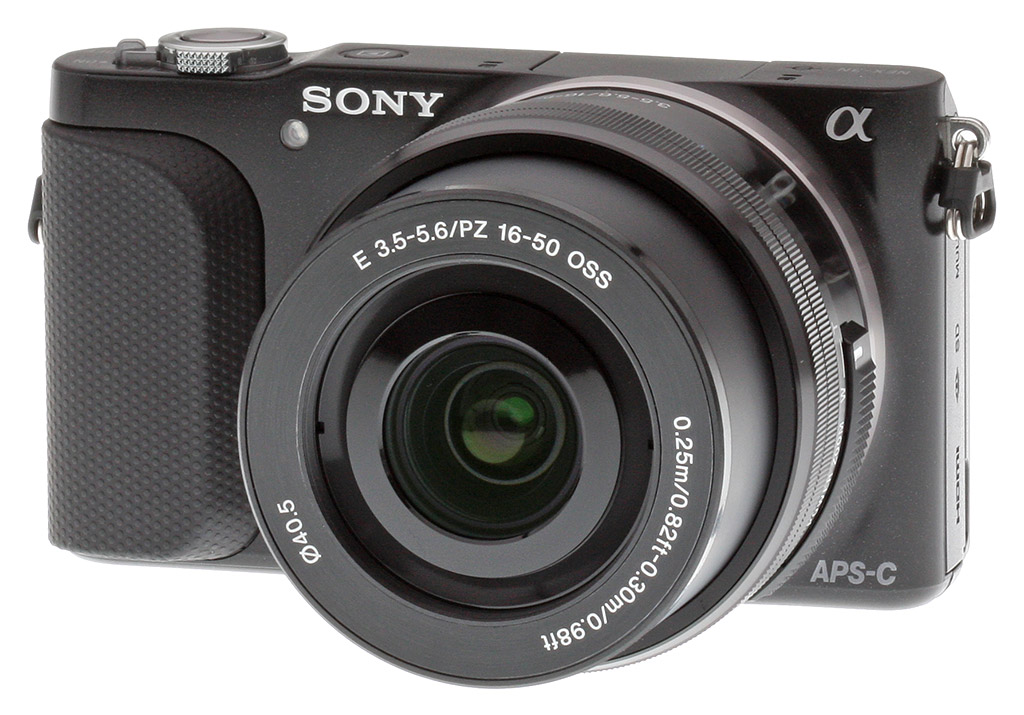
The Sony NEX-3N comes kitted with the E-mount PZ 16-50mm f/3.5-5.6 OSS lens. The lens is a nice pairing for two reasons. Not only is it a power zoom, compatible with the NEX-3N's on-camera zoom lever, but also it's significantly more compact than the 18-55mm kit lens bundled with most of the NEX-3N's siblings.
Walkaround. With dimensions of 4.3 x 2.4 x 1.4 inches (110 x 62 x 35mm), the Sony NEX-3N is significantly smaller than 2012's NEX-F3 (4.6 x 2.6 x 1.6 inches; 117 x 67 x 41mm). The nearest model in Sony's current NEX-series line in terms of size is the NEX-5T (4.4 x 2.3 x 1.5 inches; 111 x 59 x 39mm). At a ready-to-shoot weight of 9.5 ounces (269g) without lens, the NEX-3N is also lighter than both cameras, although the NEX-5R (9.7 ounces; 276g) comes very close. The NEX-F3 trails by quite some distance, with a weight of 11.1 ounces (314g) ready to go, before the lens is attached.

Seen from the front, the Sony NEX-3N is about as clean and simple as interchangeable-lens cameras get. Beyond the branding, a small hand grip, and a metal lens mount with release button in the usual place, the front of the NEX-3N is almost devoid of features. The only other detail is a small but extremely bright orange autofocus assist lamp, tucked beneath and slightly to one side of the Sony logo. This sits a little further away from the handgrip than it did in the NEX-F3, making it rather less likely to be accidentally covered with a fingertip.
The handgrip itself is much smaller than that of the NEX-F3, and is no longer topped by a plateau for the shutter button. It's made of hard plastic, and stippled with tiny, textured dots that give your finger purchase. (And I do mean just one finger -- with my large hands, fitting even two fingers on the grip was too uncomfortable. For me, the easiest and least tiring way to hold the camera was with my index finger curled over the shutter button, and my second finger lining the edge of the grip, its tip just wrapping around the bottom of the camera. A two-fingered grip won't be feasible unless you have small hands and relatively slim fingers.)

When we reviewed the NEX-F3, we commented on the inconsistency of the top-deck control layouts in recent NEX-series cameras, and the NEX-3N brings yet another option to the table. Sony's designers have reverted to a side-facing lever around the shutter button for power control as seen previously in the NEX-C3, rather than the separate controls of the NEX-F3, the front-facing lever of the NEX-5R and NEX-7, or the angled-inwards lever of the NEX-6.
Where the NEX-C3 placed only one ring around the shutter button, however, the NEX-3N now sports a second. In a nod to the familiarity of consumer photographers with the on-body zoom controls typical of compact cameras, the Sony 3N's shutter button is also encircled by a zoom lever. If a power zoom lens is mounted, this will offer an alternative to the on-lens power zoom controls. If you're using a manual zoom lens, this new zoom rocker will have no effect in Record mode, but it will serve as a playback zoom control in Playback mode.
The F3's two-port stereo microphone is retained in the Sony NEX-3N, and moves to the top deck, where the separate ports span either side of the pop-up flash strobe. There's still a bevel between the back and top decks of the camera, and the button to raise the flash now sits at the very leftmost end of this beveled area. It's a stiffly spring-loaded mechanical release with a relatively short throw, and if you press off-center on the small button nothing happens, so it sometimes take a couple of tries to raise the strobe. (On the plus side, since it's a mechanical release, the camera doesn't startle you by randomly raising the flash whenever it feels the need!)
The Sony NEX-3N's dedicated Movie button sits in much the same place it did on the NEX-F3, at the very rightmost end of the bevel. It's not a great location for spontaneous shooting, as it's not within easy reach of either thumb or forefinger. Instead, you have to change your grip to reach back for it. A two-handed grip works best for videos, which has the advantage of promoting a steadier hold as well.
Finally, the Play button has been moved off the beveled area, and now sits to the left of the shutter button. One remaining item is notable by its absence: the Sony NEX-3N no longer offers an accessory port, and so can't accept external accessories such as strobes, microphones or viewfinders.

Moving to the rear panel, the familiar soft button and dial layout common to all Sony's NEX-series cameras is retained for another generation. It's sparse, but it's also fairly straightforward and approachable. Labels on-screen next to the controls state their current function, which differ depending on the camera's operating mode. There are a couple of differences compared to previous NEX models, but they're relatively minor. Since there's now a dedicated zoom control on the top deck, the dial encircling the center soft button is no longer labeled for playback zoom, although it can still be used to zoom in and out of captured images if you've become accustomed to this from another NEX camera and prefer it to the zoom rocker. In Record mode, the right side of the dial -- which also acts as a four-way button control -- now serves to provide quick access to ISO sensitivity control. If you prefer, you can instead use it to call up a configurable function menu, for quick recall of up to six different options, from a fairly extensive list. Or you can disable it altogether by setting all six options to "Not set".
Alongside these controls is the LCD monitor, which along with its articulation mechanism dominates the remainder of the NEX-3N's rear panel. Like that in the NEX-F3, it can be tilted upwards by 180 degrees, allowing it to be seen from in front of the camera. Since there's no longer an accessory port, the only thing that might block its visibility when raised is the flash strobe. That's not really of concern, given that on-camera flash would give an unnatural look for arm's length self-portraits anyway. For tripod-mounted self-portraits, you can simply confirm your framing first with the flash lowered, and then raise it before taking the final shot.
More of a concern is that the LCD no longer tilts downwards at all. On the NEX-C3, you could tilt the monitor downwards by around 45 degrees, and even on the NEX-F3 there was a rather less generous 13-degree downwards tilt. For the Sony NEX-3N, the articulation is a simple hinge at the top of the LCD panel. It's probably more reliable, smaller and lighter this way than with the articulation mechanism of the earlier cameras, but it makes the Sony Alpha 3N much less conducive to arm's length shots over a crowd than were its predecessors. There is a workaround, but it's a clumsy one: you can tilt the LCD upwards, hold the camera upside down so that the LCD now faces downwards, and trigger the shutter with your thumb instead of your forefinger. On the plus side, the camera's orientation sensor recognizes what you're trying to do, and tags the images appropriately. You may need to rotate the images on your computer if your chosen software can't understand the orientation tags, though.

Finally, we come to the sides and bottom of the Sony NEX-3N. The right-hand (grip) side of the camera is essentially featureless, with the exception of a lug for the shoulder strap. Unfortunately, this attaches to the camera via a small, metal D-ring with plastic cover. As we've noted in many reviews over the years, these D-rings are prone to metal-on-metal noise with the slightest touch of the shoulder strap, which is easily picked up by the on-board microphone when shooting video. If you plan on shooting a lot of video, you'll want to remove the D-rings and go strapless.

The left-hand side of the NEX-3N is consumed by a large, hinged plastic door that covers both a Secure Digital / Memory Stick Duo card slot, and the camera's only two connector ports. At the top, above the card slot, is a USB data terminal that is also used to charge the camera. Sony describes it as a multi-terminal, and it accepts a new RM-VPR1 wired remote control that provides a remote shutter button with lock, a zoom control, and a video button. Beneath the card slot is a Micro HDMI high-def video terminal, which is now a smaller Type-D terminal, rather than the Type-C of the NEX-F3.

With the card slot relocated to the left side of the camera body, the base of the Sony NEX-3N is cleaner than it was in the NEX-F3. There's still a metal tripod socket, neatly located on the central axis of the lens for easier tripod-mounted panorama shooting. At the left-hand end is a small three-hole port for the speaker, which is unfortunately not a very good location -- you're almost guaranteed to cover it with your fingertip when holding the camera two-handed. At the right-hand (grip) end is the battery compartment door, which is spring-loaded with a small locking switch like that on the NEX-F3. The door still includes a small rubber plug sealing a cutout that allows egress for the optional AC adapter's dummy battery.

Connectivity. The Sony NEX-3N provides only the basics when it comes to connected to other devices or services. As mentioned earlier, the camera lacks a hot shoe for attaching an accessory flash, and it also lacks Sony's proprietary accessory port -- meaning the NEX-3N is made to stand on its own resources (beyond various lenses, that is). The camera also doesn't support Wi-Fi, so there's no simply way to offload a quick snapshot to a phone or tablet for sharing. On the plus side, it supports Sony's BRAVIA sync function -- another name for Consumer Electronics Control -- so you can control the camera from an attached TV's remote when using HDMI. The NEX-3N has a Type C mini-HDMI output jack, as well as a USB 2.0 port (mini USB).

Battery and storage. Like most digital cameras these days, the NEX-3N is powered by a rechargeable Lithium-ion battery -- specifically, a 1020mAh battery that is CIPA-rated for 480 shots before it runs out of juice. The battery is recharged in camera using a Micro USB cable and the included AC adapter. The camera uses SD/SDHC/SDXC memory cards as well as Sony's Memory Stick PRO Duo/Pro-HG Duo/PRO-HG HX Duo media. Higher-speed UHS-I cards aren't supported, and so will fall back to standard speeds in the NEX-3N.
Pricing and availability. The NEX-3N became available in April 2013 with an MSRP of US$500, but we've since seen its street price dip below US$450. It's sold in a kit with Sony's E-mount 16-50mm F3.5-5.6 power zoom lens, and comes in either black or white.
Shooting with the Sony NEX-3N
by David Schloss

After 20 years of writing camera reviews and teaching classes in photography, the single most frequent question I get from friends and relative strangers is "what camera should I buy?" The question is always worded like that, without a price point or a specific purpose, but after a few minutes of questioning it almost always turns out that the price point is between $300 and $500 and the camera will be used for "general photography."
Usually my answer to these questions is "whichever camera is available at Best Buy in your price range", since just about every camera in the $300 to $500 range is decent these days for "general photography". But after working with the Sony NEX-3N, I might have a new answer.
The latest compact system camera body in the Sony NEX line offers an array of features that are perfectly suited to the general purpose photographer looking to get superior quality images without much fuss. The sub-$500 NEX 3N and kit lens bring an SLR-sized sensor to a compact and affordable package. While the bare-bones NEX-3N won't replace a serious photographer's DSLR, it's one of the few nearly-perfect grab-and-go compact cameras on the market. Thanks largely to its 16.1-megapixel, APS-C-sized sensor, the camera enables you to capture sharper, more detailed pictures -- especially in low light -- than many of its entry-level mirrorless competitors.

Design. The Sony NEX-3N's body is minimalist in design, with just a few buttons on the back. Without a lens attached, the body could easily slip into a shirt pocket. The camera is 4.3 inches wide x 2.4 inches tall x 1.4 inches deep, and the body weighs just 7.4 ounces (with the battery and kit lens, 13.7 ounces). Though it's small, the body and kit lens both feel sturdy and solid in the hands, providing a firm and steady purchase from which to photograph.

A tilting 3-inch LCD screen with 461,000 pixels -- not the highest resolution in the class -- dominates the back of the camera. It's bright enough and clear enough for most purposes, but since the LCD screen is the only focusing and review tool, it would have been great to have more pixels available. In some shooting situations images looked in-focus on playback, but in reality were slightly soft -- something a higher-resolution screen would have made more visible.
Higher up on Sony's NEX line, the LCD monitors are dual-purpose, also functioning as touch screen. That, too, would have been nice to have on the NEX-3N. The camera has limited physical controls -- including no Mode dial -- and often requires a series of button presses to change a function such as focus points. A touch screen would no doubt have made the process faster. The usefulness of the tilting screen is questionable, but I'll come back to that in a bit.
The camera's SD card slot isn't housed in the battery compartment, as is the case with most camera bodies. Instead, it's in a side compartment, along with a Micro HDMI jack and a Micro USB jack. The USB jack is the camera's charging system. There isn't a battery-docking charger; instead the camera uses a USB wall adapter. As a result, I was able to charge the NEX-3N with my MacBook Air while traveling, saving a bit of space in my computer bag.
My one gripe with the Micro USB port is that I don't own any Micro USB cables, aside from the one that came with the camera, while more standard mini USB cables cover my desk like snow. I understand the Micro USB standard is more popular in Europe, and that the smaller profile theoretically allows for smaller electronics, but there seems to be plenty of space in the camera's side panel for the larger cable. (It has been mentioned to me that the Micro USB cable is slightly more durable, so that might be the real reason for its use.)

On top of the camera is an ingenious articulating pop-up flash that puts the strobe a bit farther above the camera than most built-in flashes, dead center over the lens. However, it occupies the space where a dedicated flash or accessory could have been mounted to a hot shoe -- or rather, Sony's proprietary accessory port, something that's found on other NEX cameras.
This is something of a shame because the camera could really benefit from the use of Sony or third-party strobes in low-light situations. The lack of an accessory port also means there's no electronic viewfinder option, and no place to add an accessory microphone for video recording. (Speaking of which, the camera's built-in stereo microphones for video recording are mounted on top of the body, placing them in a less-than-ideal location for the task.)
Sony obviously got rid of the hot shoe and accessory port for the sake of keeping the camera's size and cost down. And the company apparently thought that consumers would prefer to have a built-in flash rather than have to obtain -- and carry -- add-on accessories, no matter how much more flexible it would have made the camera. And to be honest, they're probably right. The NEX-3N isn't intended for experienced shooters -- at least not as their main camera, so the lack of the hot shoe/accessory port shouldn't be a deal breaker for most users.
There are only three controls on the back of the camera, four on the top and just the lens-release button on the front. (The count for the back panel could be higher, if you consider that one of the controls is a four-way controller with rotating dial.) Looking at the back of the camera, it doesn't seem like there are enough controls, especially compared with competing systems that are chock-full of buttons and dials, but at least the ones on the NEX-3N are innovative enough to reduce the need for dedicated "OK" or "back" buttons, with many buttons doing double duty.
 |
The Sony NEX-3N's 16-50mm kit lens proved to be decently sharp, though not "prime sharp," while the f/3.5-5.6 maximum aperture across the zoom wasn't the fastest. However, the Optical SteadyShot feature was handy, making low-light shooting both easier and more effective. |
Lens system. One of the hallmarks of the Sony NEX series is the company's versatile array of E-mount lenses. There are more than a dozen Sony-designed lenses for the E-Mount, including numerous high-end primes. The 16-50mm f/3.5-5.6 kit lens was the only one I used in this test, although if I owned the camera I'd have been much more likely to pick up the pancake 16mm f/2.8 or 24mm f/1.8 to gain a few stops and a sharper image. I also found the kit lens to be quite soft, especially in the corners.
As far as kit lenses go, the 16-50mm is small and provides a nice array of shooting options, though it doesn't provide a shallow enough depth-of-field to create much background blur. On the side of the kit lens is a rocker switch that allows control of the zoom without needing to use the shutter-release mounted switch -- something that's especially handy for video shooting. The kit lens includes Optical SteadyShot stabilization, meaning the average photographer can shoot at a stop or two lower than a non-stabilized lens and still get sharp images.

Shooting with the NEX-3N. The one thing that I immediately noticed about the Sony NEX-3N is that it's a smartly designed camera which inherits a lot from the company's previous NEX cameras.

The user interface is, purely from a visual standpoint, beautiful. A crisp, white background with nicely designed graphics make it look more like a phone running an app than a camera -- and I say that as a good thing, as camera user interfaces are almost always ugly. The camera menu is broken down into modes: Shot Mode, Camera, Image Size, Brightness/Color, Playback and Setup. Sony's smart button remapping allows the camera to do a lot with just a few buttons. The top rear button becomes a "back" button that doubles as the menu activation button and "back" while in a menu, for example, and while in the iAuto mode (where the camera selects the best shooting style and settings), the button usually assigned to Exposure Compensation becomes the button to bring up picture styles.
In another nice example, placing the camera in the Flexible Spot focus gives the photographer precise control over the focus point. Once the point is selected, the lower button on the rear control panel switches to become the toggle for the focal point -- push the button and then use the four-way control to change the point.

Menus. The menu system is fine for quick changes, though many standard camera settings require several steps to change something, and the Menu button always brings the user to the top level of the menus. So in a typical example where you'd like to quickly change to the spot focus and then later switch back, you have to dig down like this: Press the menu button, move to Camera, press the center button on the four-way controller, select Autofocus Area, press the center button again, move the controller up or down to select a focus method, then finally press the center button or the shutter release.
To switch back to the Multi-focus mode, the above process has to be repeated. This is one of the instances where touchscreen would be helpful. It would also be great to be able to have a dedicated button that's user-programmable. The Movie button, for instance, can be selected to be active or inactive, but I'd love if it could be programmed to, say, jump to the focus mode screen. (The same is true of operations such as switching from AF-C to AF-S.) Once you have the hang of the camera though, it's easy to move around the menus and get great images, and that's partially because of the intelligence and power of Sony's autofocus system.

Oddly, Sony has elected to put the camera's Metering Mode, ISO and Flash Compensation controls under a menu option titled Brightness/Color. While technically the metering affects the brightness of an image, this seems to be the wrong place for these controls and it took me quite some time to find them.
Multi-focus AF. The NEX-3N includes a Multi-focus mode that is so powerful I rarely turned it off. As I tested the camera largely taking photos of my family, I turned on Face Detection and let the camera pick out subjects in the photos. Lacking a human face the camera does a preternaturally good job of picking the intended focal point. The camera can also be set to "register" faces, but unlike many systems that allow you to pick a photo from those on the memory card, with the NEX-3N you must frame a subject and take a photo to represent them.
As a result -- and since it often picked out the face I wanted anyhow because I was framing my intended subject in the foreground -- I rarely used this, but I found it comical that using the kit lens, it was impossible to register my own face. In order to register a face the whole face has to be framed in a box displayed on the LCD screen, and even at the widest zoom I was unable to get the camera far enough away to fit myself in the box. Perhaps I need to get longer arms.
Advanced controls and capabilities. Though there's no physical Mode dial on the NEX-3N, the camera still provides full Program, Aperture-priority, Shutter-priority, and Manual controls in the Shoot Mode menu. This gives photographers the choice of whether they want to operate in point-and-shoot mode via Superior or Intelligent Auto, or tak some control via Aperture or Shutter Priority modes, or even complete Manual exposure. Speaking of manual, the camera of course allows for fullly-manual focusing. It also features focus peaking, something that's often included only on higher-end models.
Perhaps equally important as having full exposure controls, the Sony NEX-3N captures files in raw and raw+JPEG formats, giving serious shooters high-resolution images they can process to their heart's content.
Lost in translation. Another quirk of the Sony NEX-3N was the sometimes comically-worded instructions, doubtless resulting from poor translation. Trying to align my face in the box, the camera prompted me to "Shoot with fitting into the face frame." When setting the camera to "Superior Auto," the displayed text told me that in this mode "the device beautifully shoots automatically while reducing blurring and noise." I'm glad to see the camera feels that it's doing a beautiful job, I guess.

There's also a context-sensitive help system that's activated with the "?" button, and it provides rather lengthy (for the back of a camera) instructions on how to photograph in different situations. It's possibly too little information for the photographer looking to really get into more serious shooting, but enough that it would provide some good tips for the beginner.
Tilt-a-whirl. One of the most notable features of the Sony NEX-3N is the tilting LCD screen, though this is one of the few places where I feel the camera falls short. The display rotates on one pivot on the top of the camera, and while it does allow for low-angle photography and "selfies," the top of the camera blocks the lower edge of the screen when in self-portrait mode, making it impossible to see any of the settings displayed on the bottom of the screen.
Much more useful are pivoting displays that allow for overhead "Hail Mary" shooting in addition to the low-level photography supported by this design. Also, with the display flipped up into self-shooting position it becomes clear how helpful a touchscreen would have been. In order to make any changes to the settings, it's necessary to turn the camera around or grope at the controls.

Operation and image quality. In use I found the NEX-3N to be fast and extremely capable. During a week-long family trip that included two museums and an aquarium (often difficult to capture low-light environments with much movement) the camera produced shot after shot that was in focus and accurately rendered. Even at relatively high ISO, I thought the camera produced great looking images. At no point in the week-long trip did I wish I had brought another camera with me, although I'd have loved to have been able to switch to a f/1.8 lens at several points.
The burst mode wasn't the fastest I've used, but it was fair. Under default settings it locks focus on the first shot and keeps it throughout the burst. You can select continuous AF, but it slows down the burst speed quite a bit. On the plus side, I didn't seem to fill the buffer up too quickly, nabbing about 10 fine JPEGs before it started to slow down on me -- and that was while using a completely non-remarkable SD card. One caveat: Before switching to video the camera clears out the whole buffer. If you press the dedicated Movie button before this is complete, the camera will warn you that the operation can't be completed.
The NEX-3N seemed more than fast enough to capture your average little league game or soccer match. Though enthusiasts might want speedier performance, the average entry-level photographer should be pleased.

Good features. The Sony NEX-3N's Superior Auto does a fantastic job at switching modes for the user, even changing to Macro when shooting close objects. (And since it was easier to activate Superior Auto than to dig around for the Macro setting, I often switched to Superior Auto just to photograph a close up image.)
The camera's Twilight and Anti Motion Blur settings use multiple frames in order to create usable images. While gimmicky, and better to use a tripod, this does extend the usefulness of the camera for beginners. There's also a wide variety of creative effects and filters called Picture Effects, ranging from Toy Camera to Sweep Panorama. These make it easy for photographers to add drama or fun to their images, right in the camera.
The pop-up flash has a "fill flash" mode, specifically designed to balance the light in a scene without having to overwhelm it. In many systems I've used, the only way to get fill flash from the built-in strobe is to dig through the menus and dial back the power output. Providing a dedicated fill flash setting takes the guess work out of flash exposure compensation settings. And for those with a desire to creatively control lighting, there is also a flash compensation control in the menus.

Not-so-good features. Auto Object Framing is designed to automatically crop an image to provide the best composition, but it does this in the same way that Photoshop's crop tool does -- by throwing away parts of the photo. I feel that the same people who might benefit from having the camera decide which part of the image is best composed are also likely those would would care least about composition. There are also a half-dozen camera modes in which Auto Object Framing doesn't function.
The camera also insists on making a ridiculously fake shutter release noise that actually sounds more like the Aflac duck than a camera. As of this writing, there is no way to control that sound in the menu, though we hope this will be addressed in firmware.
| Sony NEX-3N gallery video shot with the Sony 16-50mm f/3.5-5.6 OSS kit lens |
Sample Video #1 1,920 x 1,080, AVCHD, Progressive, 24 fps Download original (93.9MB) or the interlaced 60i version (82.3MB) |
Video. The Sony NEX-3N can record Full HD (1920 x 1080 pixel) video. While its quality wasn't the best we've seen, it was reasonable considering the entry-level price. I did spot a couple of issues, as you'll see in the clips below, however.
In one test inside a well-lit section of a museum with the camera using a high-capacity, high-speed SD card, the recorded video appeared to stutter during filming, as if it were missing frames. At first I chalked this up to an LCD issue: Surely the camera wouldn't actually create stuttering video.
But during playback, it became apparent that the NEX-3N had indeed recorded at far below its actual frame rate, presumably due to a low shutter speed. (Stepping through the video in Premiere Pro, only one in every three frames changes. The other two are duplicates.)
In another test, the camera's contrast-detection autofocus system was slightly -- but perceptibly -- hunting around the point of focus during the clip, and a tiled roof exhibited noticeable moiré patterns.
| Sony NEX-3N gallery videos shot with the Sony 16-50mm f/3.5-5.6 OSS kit lens | |
Conclusions. The Sony NEX-3N is a versatile, capable and powerful little camera. When the price is considered -- under $500 for lens and body together -- it jumps out as a particularly strong contender for an entry-level user, or even as a compact backup for a seasoned enthusiast. The camera lacks (or in some cases obscures) some of the high-end controls that savvy shooters would want, but the large APS-C sensor delivers excellent images, and the fast and accurate focusing and metering are so powerful that the lack of more sophisticated and granular controls shouldn't be an issue for its intended users.
All in all, my main criticisms of the camera -- the lack of a hot shoe / accessory port, and the so-so tilting LCD screen -- are mainly a function of keeping the price down. While the NEX-3N can't be said to be a true upgrade over the earlier NEX-F3 in all key areas, it's definitely a fantastic value, and one I'd highly recommend to someone who asked me "what camera should I buy?"
Shooting with the Sony NEX-3N -- A Second Take
by Mike Tomkins

Earlier this year, I reviewed Sony's Alpha NEX-F3, the camera Sony has replaced with the NEX-3N. I've also spent some time with the previous NEX-C3 that precedes both cameras. When our review sample of the Sony 3N arrived in our lab, then, it was perhaps a given that I'd take it out for a spin. I was keen to see how it compared, and whether my concerns with its predecessor had been addressed.
On taking the Sony NEX-3N out of the box, I was immediately conflicted. On the one hand, I mourned for Sony's Smart Accessory Terminal, the proprietary port that lets you connect external accessories to the NEX-series cameras. It's been removed from the NEX-3N design, doubtless in the interests of reducing the body size, but it also reduces the camera's versatility somewhat. There's no longer any way to use an external viewfinder with the NEX-3N, and perhaps more importantly, you can't attach an external strobe. (This also means that bounce flash is no longer possible; even if you craft your own bounce card, the internal flash is simply not powerful enough for bouncing.) And nor can you add an accessory microphone, so if you want to avoid issues with handling noise being recorded along with your high-def videos, you no longer have any option except an off-camera recorder. That's even more of a concern thanks to the use of noisy metal-on-metal D-rings for the shoulder strap.

On the positive side, though, the Sony NEX-3N is handily smaller than its predecessor, and that's definitely good news. In my book, the more portable a camera is, the more likely you'll have it with you when you most need it -- for the shot you weren't expecting. And the inclusion of Sony's 16-50mm power zoom lens in the kit bundle is a sensible choice, as it improves both the overall bulk, and the wide-angle shooting possibilities. Pick up a second lens for telephoto work, and you're set! And although I didn't find the NEX-3N's tiny hand grip terribly comfortable, I found this flaw relatively easy to overlook, given the NEX-3N's lighter weight. Even without a strap on the camera, I didn't find my hands tiring after an afternoon's shooting in downtown Knoxville, Tennessee.
Perhaps more disappointing to me was Sony's decision to reduce the NEX-3N's specification in several areas, which I can only presume was done in the interests of reducing the cost of the camera. The LCD monitor has a lower resolution than that of the NEX-F3, making it harder to determine whether your focus is accurate when focusing manually, or when reviewing images in playback mode. (Although thankfully, Sony's handy focus peaking function is included, so it's not quite as hard to focus manually as it can be on some cameras.) The flash strobe is also rather less powerful -- and that's harder to defend, given that it's now your only option for flash.

My main concern, though, was for the camera's burst shooting performance. Consumer photographers might not give this a second thought, presuming burst shooting to be something needed only for sports. A good burst mode can make it much easier to get photos of other less predictable subjects, such as kids and pets, though.
The Sony NEX-F3's burst mode was already limited in terms of depth, especially for RAW shooters. The NEX-3N is even more so, with fine-quality JPEG burst depths in particular slashed in half, compared to the earlier camera. That's also accompanied by a reduction in burst rate from 5.5 to 4 frames per second even with exposure and focus locked from the first frame, and a sedate 2.5 frames per second with each frame being individually focused and metered. With that said, if your reflexes are up to the task, or you don't shoot a lot of moving subjects, the burst performance concerns are worth overlooking.
Admittedly I only had a short time shooting the camera, but I thought the NEX-3N's image quality, like that of its predecessor, was pretty pleasing. Autofocus and exposure were generally accurate, and although I'm still not a fan of Sony's menu system and playback-mode interface, overall the NEX-3N is a fairly approachable camera with a generous array of shooting aids to help consumers get the shot they're after.

And while the grip isn't the most comfortable, I did appreciate some of the other physical changes to the Sony NEX-3N's design. Even for somebody like me who largely shoots with DSLRs, the new on-camera zoom rocker is a nice addition. I'm not a huge fan of fly-by-wire lens rings in the first place, and zooming with the rocker just felt more natural for an electronic zoom, letting me focus on the framing and my subject instead. Of course, not everybody will agree with me, but if you don't, you can still use the controls on the lens, as well. And I do mean controls, plural. The lens itself bears both a fly-by-wire zoom ring, and also a slider on the lower-left quadrant of the lens barrel.
Zoom control, incidentally, is perhaps a little bewildering. You're provided with no less than three ways to control the zoom, none of which can be disabled, and none of whose function can be changed. That's something I'd like to see Sony address in a firmware update; the lens ring could be better used, in my opinion, for controlling variables such as focus, shutter speed or aperture. I actually disliked it as a zoom control, because there's no feedback "feel" in the fly-by-wire system (although the lens does vibrate as the zoom motor drives it to its new focal length), and it has a very short throw indeed. More often than not I found myself bumping one of the duplicate controls, and wishing it wasn't there -- but at least one of them has to be there for the lens to support other NEX-series cameras, which lack an on-camera zoom control. (As of now, that includes all of them other than the NEX-3N.)
But as I said, I did like the new control on the camera body, and it's perhaps not fair to ding the camera for the lens' design, even if it is part of the kit bundle. I also appreciated the new shutter button position, and the return to a power control integrated into the shutter button cluster.

Among the NEX-3N's new features, perhaps the most interesting is the updated Auto Framing function, which has been seen on several of Sony's recent interchangeable-lens cameras. It's a feature clearly aimed at consumers, who may well not be acquainted with -- or fully understand -- some of the basic compositional rules that are second nature to more experienced photographers. The function's underlying algorithm examines pictures as they're captured, then decides if the composition could be improved. If the algorithm believes this to be the case, it will crop the image so as to best match its internal composition rules, then use a pattern-matching digital zoom function to enlarge the image back to full resolution. The end result, suggests Sony, is an image that's more pleasing, yet not of obviously lower image quality to the photographer. More experienced photographers will doubtless disable the function, but consumers may well find appeal -- and perhaps learn how to improve their photos from seeing the camera's choices.
In previous cameras, Auto Framing worked only for portraits, keying off the camera's face detection functionality. (Indeed, it has until now actually been called Auto Portrait Framing.) In the NEX-3N, it also works for non-portrait photos, and even for portraits has been tweaked. According to Sony, it will now recognize the subject in macro and action photos, and crop to improve composition with these subjects as well. I was able to confirm this when shooting macro photos, as the camera would occasionally crop my image for me. With my example macro shot, where I intentionally placed the subject dead-center in the frame, the camera's composition is undeniably more pleasing. It also recognizes portraits with two faces, but to my eye, the crop here places the faces too close to the top of the image, giving it an unbalanced feel. (You can see the pre- and post-crop shots for both images in the gallery.)

Unfortunately, I wasn't able to get a photo of a moving subject to trigger the function, despite trying a variety of scenes and shooting styles, either panning with the subject or keeping the camera still, and with my own framing ranging from relatively pleasing to intentionally bad. If it's triggered, though, it will apparently recognize the direction of subject motion, and take account of this in determining how best to crop the image.
And so, I return to my initial question: Does the NEX-3N better its predecessor? My answer is a definite "it depends." There are more than a few changes I like, but there are features that I miss -- and I suspect other experienced shooters will, too. For me and my ilk, we could likely only consider the NEX-3N as a convenient, compact backup to our main camera system.
However, given its excellent image quality, simple consumer-friendly controls and extremely affordable price, the NEX-3N appears to be an excellent option for entry-level photographers -- especially those stepping up from point-and-shoots.
Sony NEX-3N Image Quality Comparison
Below are crops comparing the Sony NEX-3 with the Sony NEX-F3, Canon EOS M, Olympus E-PL5, Panasonic G6 and Samsung NX2000.
NOTE: These images are best quality JPEGs straight out of the camera, at default settings including noise reduction. All cameras in this comparison were shot with our very sharp reference lenses.
Sony NEX-3N versus Sony NEX-F3 at base ISO
 |
 |
 |
 |
 |
 |
Sony NEX-3N at ISO 200 |
Sony NEX-F3 at ISO 200 |
Compared to its predecessor, the NEX-3N looks very similar here at the base sensitivity of ISO 200. The fabric crops looks slightly different, but fine detail is there in both, and it looks like a subtle difference in contrast, rather than one image looking better than the other. |
|
Sony NEX-3N versus Canon EOS M at base ISO
|
 |
|
 |
|
 |
Sony NEX-3N at ISO 200 |
Canon EOS M at ISO 100 |
The bottle crops between the Sony and Canon here look nearly identical, but on the mosaic and fabric crops, the Sony pulls ahead with more fine detail (although both do great with the pink fabric). |
|
Sony NEX-3N versus Olympus E-PL5 at base ISO
|
 |
|
 |
|
 |
Sony NEX-3N at ISO 200 |
Olympus E-PL5 at ISO 200 |
The Sony does great here against the Olympus E-PL5 at base ISO. The default noise reduction is visible from the E-PL5 on the bottle crop. On the mosaic, the edge goes to the Olympus, but both do well on the fabric swatches -- although the NEX-3N does better with the red fabric, while the E-PL5 does better with the pink. |
|
Sony NEX-3N versus Panasonic G6 at base ISO
|
 |
|
 |
|
 |
Sony NEX-3N at ISO 200 |
Panasonic G6 at ISO 160 |
Like we've seen in previous comparisons, the Sony is matching its competitors very closely. The G6 edges out the NEX-3N here, but just barely. The bottle crop and fabric from the G6 look just a bit sharper with finer details, and the fabric swatch is also more detailed. Both cameras do great with the mosaic. |
|
Sony NEX-3N versus Samsung NX2000 at base ISO
|
 |
|
 |
|
 |
Sony NEX-3N at ISO 200 |
Samsung NX2000 at ISO 100 |
Samsung pulls out all the stops here and produces much more fine detail than the Sony. The mosaic crop is the most telling, as well as the pink fabric area. The NEX-3N does a little better with the red fabric, however, and the noise reduction is a little less heavy-handed in the shadow areas of the bottle crop. |
|
Most digital SLRs and CSCs will produce an excellent ISO 100 shot, so we like to push them and see what they can do compared to other cameras at ISO 1600, 3200 and 6400. Recent advances in sensor technology have made ISO 1600 look a lot more like ISO 100, but there are still cameras whose quality starts to fall apart at this setting. We also choose 1600 because we like to be able to shoot at least at this level when indoors and at night.
Sony NEX-3N versus Sony NEX-F3 at ISO 1600
 |
 |
 |
 |
 |
 |
Sony NEX-3N at ISO 1600 |
Sony NEX-F3 at ISO 1600 |
The NEX-3N does a little better here compared to the NEX-F3 with a smoother, more even noise pattern, as seen in the bottle crop. The fine details in the mosaic crop from the F3 have a bit more pop to them compared to those from the 3N, though. The red fabric areas look similar in terms of detail level, but the F3 has more trouble with the pink fabric, producing a blotchier appearance. |
|
Sony NEX-3N versus Canon EOS M at ISO 1600
|
 |
|
 |
|
 |
Sony NEX-3N at ISO 1600 |
Canon EOS M at ISO 1600 |
The Sony easily wins in terms of fine detail and cleaner noise versus the Canon at ISO 1600. There's less noise in the bottle crop shadows, and the mosaic looks more detailed from the Sony. The EOS M has difficulty with the red fabric here, producing a mushy, smeared effect on the red leaf pattern. |
|
Sony NEX-3N versus Olympus E-PL5 at ISO 1600
|
 |
|
 |
|
 |
Sony NEX-3N at ISO 1600 |
Olympus E-PL5 at ISO 1600 |
We'd have to say the winner here is the Sony, with cleaner high ISO noise and better fine detail rendition. It's most noticeable in the mosaic crop, with the E-PL5's noise reduction producing a more distorted fine detail pattern. The NEX-3N also does better in producing a more discernible red leaf pattern. |
|
Sony NEX-3N versus Panasonic G6 at ISO 1600
|
 |
|
 |
|
 |
Sony NEX-3N at ISO 1600 |
Panasonic G6 at ISO 1600 |
The Sony NEX-3N is the winner of this comparison in all three crops. It produces a cleaner, less grainy image at ISO 1600, and more fine detail, as well as doing better with the red fabric. The Panasonic G6 does show more fine detail in the pink fabric, though. |
|
Sony NEX-3N versus Samsung NX2000 at ISO 1600
|
 |
|
 |
|
 |
Sony NEX-3N at ISO 1600 |
Samsung NX2000 at ISO 1600 |
|
At ISO 1600, the NX2000 does some heavy noise reduction, particularly on the shadows and bottle surface in the first comparison crop. Both cameras do well on the mosaic, but the Sony edges out the Samsung on the red fabric (although the NX2000 does better with the pink fabric).
|
|
These days, ISO 3200 is a very viable shooting option for most good cameras, so let's take a look at some comparisons there.
Sony NEX-3N versus Sony NEX-F3 at ISO 3200
 |
 |
 |
 |
 |
 |
Sony NEX-3N at ISO 3200 |
Sony NEX-F3 at ISO 3200 |
Similar to the ISO 1600 comparison, the NEX-F3's images appear more blotchy or heavy on artifacts at ISO 3200. The NEX-3N does a nicer job overall, although high ISO noise is apparent. |
|
Sony NEX-3N versus Canon EOS M at ISO 3200
|
 |
|
 |
|
 |
Sony NEX-3N at ISO 3200 |
Canon EOS M at ISO 3200 |
Shadow noise looks very similar between these two cameras in the bottle crop, but the Sony produces sharper details in all three comparison crops. The Canon struggles with the red fabric, more so than the Sony. |
|
Sony NEX-3N versus Olympus E-PL5 at ISO 3200
|
 |
|
 |
|
 |
Sony NEX-3N at ISO 3200 |
Olympus E-PL5 at ISO 3200 |
The Olympus does a nice job of handling high ISO noise and grain, while still maintaining fine detail. The NEX-3N still does a great job, particularly in the fabric, and manages to produce a more pleasing mosaic pattern. |
|
Sony NEX-3N versus Panasonic G6 at ISO 3200
|
 |
|
 |
|
 |
Sony NEX-3N at ISO 3200 |
Panasonic G6 at ISO 3200 |
The Sony takes the prize in this comparison with much better noise handling, and overall a better reproduction of fine details. The G6 struggles with high ISO, notably in the mosaic. Both cameras looks similar in the red fabric crop however. |
|
Sony NEX-3N versus Samsung NX2000 at ISO 3200
|
 |
|
 |
|
 |
Sony NEX-3N at ISO 3200 |
Samsung NX2000 at ISO 3200 |
By default, the Samsung does some heavy noise reduction at ISO 3200, and as a result, loses some fine detail. Both cameras do nicely in the mosaic crop comparison, but the Sony has an edge with the fabric swatch. The Samsung still does great with the pink fabric, though. |
|
Detail: Sony NEX-3N versus Sony NEX-F3, Canon EOS M, Olympus E-PL5, Panasonic G6 and Samsung NX2000.
 |
 |
 |
 |
 |
 |
 |
 |
 |
 |
 |
 |
 |
 |
 |
 |
 |
 |
| Sony NEX-3N ISO 200 ISO 3200 ISO 6400 |
Sony NEX-F3 ISO 200 ISO 3200 ISO 6400 |
Canon EOS M ISO 100 ISO 3200 ISO 6400 |
Olympus E-PL5 ISO 200 ISO 3200 ISO 6400 |
Panasonic |
Samsung NX2000 ISO 100 ISO 3200 ISO 6400 |
| Detail comparison. At base ISO, the Samsung NX2000 and Olympus E-PL5 are the clear pack-leaders with super-sharp fine details. Compared to its predecessor, the NEX-3N looks very similar to the NEX-F3 at ISO 200. As the ISO rises, bigger differences between the cameras become apparent. The Panasonic, Canon and older Sony NEX-F3 struggle with fine details at higher ISOs. The Sony NEX-3N has improved greatly in this area. The NX2000 has a little less contrast at 6400, but is still overall not bad here. The E-PL5 however does fantastically with fine details, even at ISO 6400. | |||||
Sony NEX-3N Print Quality Analysis
 Good 24 x 36 inch prints at ISO 200; makes a good 16 x 20 inch print at ISO 800 and a usable 4 x 6 at ISO 12,800.
ISO 200 produces great 24 x 36 prints viewing from a normal distance, while a 20 x 30 inch print looks wonderful. At 30 x 40 inches, prints start to show some pixelation, but the viewer would have to be extremely close to notice, thus this size would be fine for wall display.
ISO 400 allows for great prints up to 20 x 30 inches, while 24 x 36 inch prints are suitable for wall display. ISO 400 prints look very similar to ISO 200, but are just slightly less detailed.
ISO 800 images look good at 16 x 20 inches with great colors and fine detail. Noise is practically non-existent. At 20 x 30 inches, prints would be suitable for wall display.
ISO 1600 makes a good 13 x 19 inch print with a nice level of fine detail and very low noise. Colors also looked pleasing and accurate. At 11 x 14, prints look even better! Noise starts to appear in the shadows if you look closely, but noise in the highlights and midrange areas are very low.
ISO 3200 prints start to show some noise in the shadows, but it's very minimal. You can still produce a nice 8 x 10 inch print, and 5 x 7 inch prints look even better. Despite the shadow noise mixed with noise reduction, the prints looks great and fine details are still noticeable.
ISO 6400 makes a decent 5 x 7, with nice detail and colors. High ISO noise is starting to make an appearance, particularly in the shadow areas.
ISO 12,800 images are fairly heavy on noise reduction and lack fine detail at larger sizes, but still produce a decent 4 x 6 inch print. Colors still look okay. The camera has a tough time producing details in the red fabric area, though.
ISO 16,000 images were too mushy on fine detail and high ISO noise reduction was very apparent, and therefore we would recommend avoiding this sensitivity level for use in prints. The noise reduction looks pretty heavy, creating a mottled sort of look in the shadow areas and around the edges of the bottles in our test shot.
The Sony NEX-3N produces excellent results for large prints at low sensitivity levels, all the way up to wall-mountable 30 x 40 inch prints at ISO 200. Additionally, this camera did surprisingly well controlling noise at higher ISO levels for the most part, thanks to its sophisticated noise reduction system. It wasn't until we got to ISO 6400 and looked very closely at the shadow areas that we began to see noise, as well as noticeable degradation in fine detail. At extreme sensitivity levels, such as ISO 12,800, colors looked decent, but fine detail took a big hit. Nonetheless, the camera still managed to produce an acceptable 4 x 6 at ISO 12,800. Overall, this consumer-geared mirrorless camera does very nicely with printed images. The low-ISO photos match pretty closely with its higher-tiered sibling, the NEX-6, however, the higher-ISO prints from the NEX-3N appear to have heavier noise reduction applied (at least by default). Overall, the NEX-3N is a solid performer, especially at its entry-level price.
In the Box
The Sony Alpha NEX-3N retail kit package (as reviewed) contains the following items:
- Sony Alpha NEX-3N camera body
- SELP-1650 E-mount 16-50mm Power Zoom Lens
- AC-UB10 USB AC adapter
- NP-FW50 Lithium-ion rechargeable battery
- Micro USB cable
- Lens cap
- Body cap
- Shoulder strap
Recommended Accessories
- Large capacity SDHC/SDXC memory card. 16GB Class 6 strikes a good balance between size and cost.
- Extra NP-FW50 rechargeable battery
- BC-VW1 standalone battery charger (if you want to charge one battery while shooting with another)
- AC-PW20 AC adapter kit (for studio shooting)
- LA-EA1 or LA-EA2 A-mount adapter (EA1 is contrast-detect only; EA2 allows phase-detect, but at the expense of some light loss)
- RM-VPR1 wired remote control
- CLMV55 5-inch portable external monitor
- Medium-size camera bag
- NEX-3N body case
- Wrist strap
Sony NEX-3N Conclusion
| Pro: | Con: |
|---|---|
|
|
In developing a replacement for last year's successful NEX-F3, Sony aimed to deliver nothing less than the world's smallest and lightest interchangeable-lens system that featured an APS-C-sized sensor. Mission accomplished with the entry-level NEX-3N, which pares down both the size and price from its predecessor -- albeit with a few sacrifices along the way. The end result is a camera that may present the most seamless step up from a point-and-shoot experience that we've ever seen.
And it's not just the compact form and value of the camera. The Sony NEX-3N's user interface is simple and straightforward, foregoing physical controls -- such as a Mode dial -- for a menu-based system that digicam users will be comfortable with. There's even a zoom lever control on the camera itself, much like you'd find on a typical pocket model. Photographers can leave the NEX-3N in full auto mode, or dive into the menus to learn more about advanced modes and settings.
Among the sacrifices the NEX-3N endures is the removal of the hot shoe, or more accurately, Sony's proprietary accessory terminal. For many enthusiast shooters this is a no-go since the camera can't be paired with an external flash. The Sony NEX-3N does feature a built-in, pop-up flash, but it's a rather weak one (though it does telescope up above the camera to help minimize red-eye) and it's your only flash option. The lack of the accessory port also means you can't add an external microphone for better sound with your videos, and nor can you add an electronic viewfinder. The lack of the latter forces you to rely on the 3-inch tilting LCD monitor with 420K-dots of resolution, which provides average framing, viewing and playback at best.
The Sony NEX-3N also suffers from reduced burst / continuous shooting performance, along with sluggish startup times and mode switching. Overall, however, the camera is pretty peppy and fun to shoot with, featuring quick and accurate autofocusing, even in low light. What's perhaps most important is that thanks to its relatively large sensor, the NEX-3N produces great photos for its class, rivaling those from more higher-end mirrorless models and DSLRs.
The NEX-3N may not be an enthusiast's dream, but it still offers Program, Priority, and Manual modes for controlling exposure, as well as RAW image file capture and manual focusing (including focus peaking!), in addition to other advanced capabilities. Entry-level shooters will quickly adapt to the camera, and still have plenty of room to grow as photographers. Add in the appealing price, and we think the Sony NEX-3N should be on the short list of options for beginners looking beyond their point-and-shoots, as well as for experienced shooters wanting a compact backup to their bigger, more full-featured cameras. After shooting with the Sony NEX-3N, we finally have a firm answer to give our friends when they ask "What camera should I buy under $500?" The NEX-3N is an easy answer. For all these reasons, the Sony NEX-3N gets our hearty recommendation and a Dave's Pick.
Follow Imaging-Resource.com on Twitter!
Optics
Below are optical test results with the bundled Sony E 16-50mm f/3.5-5.6 OSS kit lens. Test images shown on most other pages of this review were taken with very sharp references lenses, so we use this page to explore kit lens quality.
Kit Lens Test Results
Zoom
Wider than most zoom kit lenses, with decent far-field performance.


The Sony NEX-3N is available bundled with a 16-50mm f/3.5-5.6 OSS "kit" lens. This optically stabilized lens possesses a fairly typical optical zoom ratio of about 3.1x with a 35mm equivalent focal range of about 24-75mm. That's significantly wider than most kit lenses without losing much reach at the telephoto end. (A more common focal length for an APS-C camera kit zoom lens is 18-55mm.)
Sharpness and contrast at full wide angle (16mm) are decent at f/8 over most of the frame, and chromatic aberration isn't an issue since the camera suppresses it (see below), however some flare is visible around the building's white surfaces. It's difficult to judge corner performance here because of the depth in this scene, so we'll do that below. At full telephoto (50mm), the lens performs fairly well with decent sharpness across the frame, which is better than many kit lenses we've seen.
Overall, a very useful focal length range with decent far-field optical performance at f/8 for a kit lens, and the built-in optical image stabilization will come in handy for low light and tele shots. See sections below for comments on macro performance, geometric distortion, corner softness, performance wide open, chromatic aberration, etc.
Digital Zoom
The NEX-3N offers three types of digital zoom. Sony's new "Clear Image" digital zoom is available at 2x magnification, standard digital zoom up to 4x, and Smart Zoom is available where the camera crops away the unused portion of the image when a lower resolution is selected. You can combine the various digital zooms as well, but maximum total digital zoom is 4x at full resolution, increasing to 8x at the small image size (~4 megapixels).
Clear Image Zoom does a decent job at 2x magnification, though there's still a noticeable loss of fine detail and some visible aliasing artifacts, despite Sony's claim of being "nearly equivalent" to optical zoom. Standard 4x digital zoom has the typical loss of detail that amount of enlargement produces. It's difficult to tell given the lack of fine detail in this scene at these zoom levels, but it's probably best to avoid using digital zoom altogether and instead crop, upsize and sharpen as required during post processing.
Macro
Slightly larger than average minimum coverage area, with good detail. Flash throttled down well.


As with zoom performance, the Sony NEX-3N's macro performance will depend entirely on the lens mounted. However with the E-mount 16-50mm kit lens set to 50mm, the NEX-3N captures a minimum area measuring 3.67 x 2.44 inches (93 x 62 millimeters), which is slightly larger than average for a kit lens. Detail is good in the center at f/8, just a touch soft, though corners and edges of the frame are softer. (Most lenses have some softening in the corners at macro distances.) Some corner shading is also noticeable. The flash did a very good job throttling down at minimum distance, resulting in a good exposure. The flash also had no trouble clearing the lens as there is no detectable shadow.
Geometric Distortion
Lower than average geometric distortion at wide angle and telephoto, but the NEX-3N always applies distortion correction to JPEGs when the 16-50mm kit lens is mounted.
| Distortion at 16mm is ~0.1 percent |
 |
| Distortion at 50mm is negligible |
 |
With the 16-50mm kit lens, the NEX-3N produces JPEGs with about 0.1 percent complex (wavy) pincushion distortion at wide angle, which is quite low and hardly noticeable. At the telephoto end, there's even less wavy pincushion distortion. This is the tendency for the lens to bend straight lines outward (like a barrel -- usually at wide-angle) or inward (like a pincushion -- usually at telephoto).
See below for uncorrected distortion from this lens.
Chromatic Aberration, Corner Sharpness & Vignetting
Low levels of C.A. (the camera suppresses it). The lens produces some pretty soft corners.
| Aperture: maximum | |
 |
 |
| 16mm@f/3.5: Lower right C.A.: Low Softness: Moderately strong blurring |
16mm@f/3.5: Center C.A.: Very low Softness: Sharp |
 |
 |
| 50mm@f/5.6: Upper left C.A.: Low Softness: Somewhat soft |
50mm@f/5.6: Center C.A.: Low Softness: Fairly sharp, but lower contrast |
Chromatic Aberration. Chromatic aberration in the corners with the NEX-3N's 16-50mm kit lens at wide angle (16mm) is low with just minor magenta fringing, and the center of the image shows very little C.A. The camera does a pretty good job at suppressing much of the lateral C.A. produced by the lens (see below). At full telephoto (50mm), C.A. is also low with blue fringing that's quite muted.
Corner Softness. Wide open at full wide angle, the 16-50mm lens that came with our NEX-3N is soft in all four corners, with corners on the right side softer than the left Softness extends pretty far into the frame as well, though the center has good sharpness and contrast. At full telephoto corner sharpness is better but still somewhat soft, though the center isn't quite as sharp as wide angle, with lower contrast.
Vignetting. Moderate vignetting (corner shading) is noticeable at full wide angle, as indicated by the darker corner crops, even with automatic vignetting correction enabled (see below). Vignetting is milder at full telephoto, but still noticeable.
| Aperture: f/8 | |
 |
 |
| 16mm@f/8: Lower right C.A.: Low Softness: Strong blurring |
16mm@f/8: Center C.A.: Very low Softness: Sharp |
 |
|
| 50mm@f/8: Upper left C.A.: Low Softness: Slightly soft |
50mm@f/8: Center C.A.: Very low Softness: Sharp |
"Stopped-down" to f/8, corner sharpness at wide angle didn't actually improve much compared to wide open at f/3.5. We saw a similar result in our NEX-6 review. At full telephoto, corner sharpness did improve at f/8 versus wide open at f/5.6, and performance in the center is also improved. Although improved compared to wide open, vignetting is still visible at f/8, particularly at wide angle.
Lens Corrections
When shooting in JPEG mode, the Sony NEX-3N includes the ability to automatically correct for geometric distortion, chromatic aberration, and lens shading (vignetting), as images are captured. Only E-mount lenses are supported, and RAW files are not corrected.
Geometric Distortion
| Barrel distortion at 16mm is ~3.0 percent |
 |
| Pincushion distortion at 50mm is ~0.3 percent |
 |
Above, you can see the uncorrected geometric distortion from the 16-50mm kit lens is very high at wide angle, with about 3% barrel distortion. Very high barrel distortion at wide angle is common for Micro Four Thirds lenses, but this is the first E-mount lens we've seen with it this high, and the amount of correction required explains some of the corner softness we see at wide angle. At the telephoto end, pincushion is fairly low at 0.3%, but still higher than the corrected JPEG image.
The default Distortion Correction setting is normally Off for the NEX-3N, but is forced to Auto when the 16-50mm lens is mounted, so we used dcraw to convert the RAW file without corrections applied. Thus, like most Micro Four Thirds lenses, it appears that Sony designed this lens with higher geometric distortion at wide angle to make it more compact, and is correcting it in firmware.
Chromatic Aberration
| CA Correction Auto | CA Correction Off |
 |
 |
| 16mm@f/8: Upper left C.A.: Low |
16mm@f/8: Upper left C.A.: Moderate |
 |
 |
| 50mm@f/8: Upper left C.A.: Very low |
50mm@f/8: Upper left C.A.: Moderately low |
Above, you can see significantly higher lateral Chromatic Aberration at wide angle with Chromatic Aberration Correction disabled, though the difference at telephoto is minimal because C.A. is low at telephoto to begin with. The default for this setting is Auto.
Lens Shading
 |
|
| 16mm @ f3.5 | |
| Auto | Off |
Mouse-over the links above to see the difference Lens Shading correction makes at wide angle when wide open at f/3.5 (the worst-case scenario for most lenses). As you can see, corners are brightened without affecting brightness at the center, though some fall-off is still left behind in the corrected image. The default setting is also Auto.
Sony NEX-3N Viewfinder Accuracy
Viewfinder Test Results
Coverage
Excellent accuracy from the LCD monitor.

The Sony NEX-3N's LCD monitor showed essentially 100% coverage with our Sigma 70mm f/2.8 prime lens. This is excellent performance, though not a surprise given its image is derived from the main imaging sensor.
The images above were taken from our standardized test shots. For a collection of more pictorial photos, see our Sony Alpha NEX-3N Photo Gallery .
Exposure
Color
Saturation & Hue Accuracy
Good overall color accuracy and saturation, with mostly minor shifts in hue and intensity.
 |
|||
|
ISO Sensitivity
|
|||
| In the diagram above, the squares show the original color, and the circles show the color that the camera captured. More saturated colors are located toward the periphery of the graph. Hue changes as you travel around the center. Thus, hue-accurate, highly saturated colors appear as lines radiating from the center. Mouse over the links to compare ISOs and click for larger versions. | |||
Saturation. Like many cameras, the Sony NEX-3N pushes some colors like strong reds, dark blues, dark greens, purples and browns a small to moderate amount, but actually undersaturates light green, yellow and cyan tones slightly. The NEX-3N's overall default color saturation is oversaturated by 10.1% at base ISO, which is about average these days, and saturation remains fairly consistent across the ISO range. You can of course tweak saturation to your liking, or choose a different color mode. Most consumer digital cameras produce color that's more highly saturated (more intense) than found in the original subjects. This is simply because most people like their color a bit brighter than life.
Skin tones. Here, the Sony NEX-3N does fairly well, producing reasonably natural-looking Caucasian skin tones, just slightly on the warm side with darker areas nudged toward pink and orange. Where oversaturation is most problematic is on Caucasian skin tones, as it's very easy for these "memory colors" to be seen as too bright, too pink, too yellow, etc.
Hue. The Sony NEX-3N shifts cyan toward blue, red toward orange, orange toward yellow and yellow toward green, but shifts are relatively minor. (The cyan to blue shift is very common among the digital cameras we test; we think it's a deliberate choice by camera engineers to produce better-looking sky colors.) With an average "delta-C" color error of 5.03 after correction for saturation at base ISO, overall hue accuracy is about average (which is good) and remains average across most ISOs, though at ISO 1600 and 3200, there is a bias towards cooler colors. Hue is "what color" the color is.
Saturation Adjustment
The Sony NEX-3N has a total of seven saturation settings available, three above and three below the default saturation. This covers a pretty wide range of saturation levels. Saturation also had little effect on contrast, which is how it should work.
| Saturation Adjustment Examples | ||||
 |
 |
 |
 |
 |
| -3 | -1 | 0 | +1 | +3 |
The table above shows results with five of the seven saturation settings, including the default and the two extremes. Click on any thumbnail above, then click again to see the full-sized image.


Sensor
Exposure and White Balance
Indoors, incandescent lighting
Very warm cast with Auto, warm with Incandescent, good with Manual, and a touch cool with Kelvin white balance settings. Average exposure compensation required.


Indoors, under normal incandescent lighting, color balance is too warm and orange with the Auto white balance setting. Results with the Incandescent setting are better but still somewhat warm and orange/yellow. The Manual setting was fairly accurate, with just a slightly green bias. The 2,600 Kelvin setting which matches the color temperature of our lights resulted in a slightly cool, bluish image. The Sony NEX-3N required +0.3 EV positive exposure compensation here, which is about average for this shot. (Our test lighting for this shot is a mixture of 60 and 100 watt household incandescent bulbs, a pretty yellow light source, but a very common one in typical home settings here in the U.S.)
Outdoors, daylight
Very good results under harsh lighting, with good handling of contrast, color, and exposure.
Outdoors, the Sony NEX-3N performed very well. Only +0.3 EV exposure compensation was required to keep the model's face bright in our "Sunlit" Portrait shot. The average among the cameras we've tested is +0.7 EV, so the NEX-3N performed better than average here. (Actually, with Dynamic Range Optimization enabled which is the default setting, default exposure is bright so we can't really fault the camera here.) Contrast is a little high, as you might expect under such harsh lighting, but the camera does a pretty good job of holding onto detail in both the shadows and bright highlights, even without the help of DRO. Skin color is good with Auto white balance, perhaps just a hint warm, and switching to Manual white balance did not make much difference. Default exposure is quite good for our Far-field shot, with very few highlights blown, again with DRO disabled. Some very dark shadows in the leaves were lost, but the camera kept the main subject well exposed. The Far-field shot using Auto white balance has very good color, just a touch cool. Overall, a very good performance in harsh lighting, especially considering DRO was off for these shots.
See full set of test images with explanations
See thumbnails of all test and gallery images
Resolution
High resolution, ~ 2,200 lines of strong detail from JPEGs, up to 2,300 lines from RAW files.


In-camera JPEGs of our laboratory resolution chart reveal sharp, distinct line patterns down to about 2,200 lines per picture height in both the horizontal and vertical directions. Some may argue for higher numbers, but aliasing artifacts start to interfere at this resolution. Complete extinction of the pattern doesn't occur until about 2,800 to 3,000 lines. Adobe Camera Raw was able to extract perhaps 50 to 100 lines more of resolution here from matching RAW files, but the Sony NEX-3N does a good job holding on to high contrast detail at base ISO in its JPEGs. Use these numbers to compare with other cameras of similar resolution, or use them to see just what higher resolution can mean in terms of potential detail.
See full set of test images with explanations
See thumbnails of all test and gallery images
Sharpness & Detail
Good sharpness, though fine detail is a little soft, with some minor edge-enhancement on high-contrast subjects. Mild to moderate noise suppression visible in the shadows and areas of low contrast.


Sharpness. The Sony NEX-3N captures detailed images overall, though results are a touch soft at default settings, despite using the very sharp Carl Zeiss 24-70mm F/2.8 SSM lens at f/8 for the shot above left. There are some minor edge enhancement artifacts on high-contrast subjects such as the larger tree branches in the image, but they're not excessive and quite normal. Fine detail such as the smaller branches and pine needles show very little edge enhancement, but appear a touch mushy due to slightly over-zealous default noise reduction. Edge enhancement creates the illusion of sharpness by enhancing colors and tones right at the edge of a rapid transition in color or tone.
Detail. The crop above right shows fairly mild to moderate noise suppression in the darker areas of the model's hair. A number of low-contrast strands are smudged together, though higher contrast strands are still distinct. We saw similar results with fine detail in the pine needles being smudged. Still, pretty good results here considering the base ISO for this 16-megapixel APS-C sensor is 200 versus 100 for most others. Noise-suppression systems in digital cameras tend to flatten-out detail in areas of subtle contrast. The effects can often be seen in shots of human hair, where the individual strands are lost and an almost "watercolor" look appears.
Raw vs In-Camera JPEGs
As noted above, the Sony NEX-3N produces in-camera JPEGs with good detail, though fine, low-contrast detail is a touch soft. Quite a bit more detail can often be obtained from carefully processing raw files with a good converter, as can be seen below.

In the table above, mousing over a link at the bottom will load the corresponding crop in the area above, and clicking on the link will load the full resolution image. Examples include (from left to right): an in-camera Fine JPEG, a RAW file processed through Sony's Image Data Converter 4 software at default settings, and finally the same RAW file converted with Adobe Camera Raw 8.1, then sharpened in Photoshop using unsharp mask at 250% with radius 0.3.
As you can see, the Sony IDC version at default settings produced similar detail when compared with the in-camera JPEG. (Color and contrast are however quite different, with the camera producing much cooler colors and higher contrast.) We tried reducing noise reduction to a minimum and then sharpening in IDC, but found that generated too many alias artifacts. The Adobe Camera Raw 8.1 conversion has better detail and more natural color, but also reveals a bit more noise. Bottom line: as is usually the case, the Sony NEX-3N rewards RAW shooters with better detail than JPEGs when used with a good RAW converter, though its base ISO of 200 puts it at a slight disadvantage in terms of noise compared to models offering lower base ISO.
ISO & Noise Performance
Very good noise versus detail performance up to ISO 1,600.
|
Default High ISO Noise Reduction
|
 |
 |
 |
| ISO 200 | ISO 400 | ISO 800 |
 |
 |
 |
| ISO 1,600 | ISO 3,200 | ISO 6,400 |
 |
 |
|
| ISO 12,800 | ISO 16,000 | |
The Sony NEX-3N's JPEG images are quite clean at ISO 200, though as mentioned previously some very fine, mostly low-contrast detail is lost to noise reduction already at base ISO. There's also some chroma noise visible in darker areas, as well as demosaicing errors in the hair above the mannequin's forehead, though that's pretty common these days and not really something to be concerned with. ISO 400 is similar, with just a slight increase in smudging. ISO 800 is slightly softer with less chroma noise, though detail is still very good. ISO 1,600 appears progressively noisier as well as a bit softer, as you'd expect, but there's still lots of fine detail left. ISO 3,200 shows a larger step in noise and noise reduction effort, though fine detail is still not too bad. There's still a fair amount of detail left at ISO 6,400, but higher ISOs are quite smudged with not much fine detail intact. Overall though, these are very good results for its, especially considering the price. As always, see the Print Quality section below for maximum recommended print sizes at each ISO.
A note about focus for this shot: We shoot this image at f/4, usually using one of three very sharp reference lenses (70mm Sigma f/2.8 macro for most cameras, 60mm f/2.8 Nikkor macro for Nikon bodies without a drive motor, and Olympus Zuiko 50mm f/2.0 for Four Thirds and Micro Four Thirds bodies). To insure that the hair detail we use for making critical judgements about camera noise processing and detail rendering is in sharp focus at the relatively wide aperture we're shooting at, the focus target at the center of the scene is on a movable stand. This lets us compensate for front- or back-focus by different camera bodies, even those that lack micro-focus adjustments. This does mean, though, that the focus target itself may appear soft or slightly out of focus for bodies that front- or back-focused with the reference lens. We know this; if you click to view the full-size image for one of these shots and notice that the focus target is fuzzy, you don't need to email and tell us. :-) The focus target position will have been adjusted to insure that the rest of the scene is focused properly.
Extremes: Sunlit, dynamic range and low light tests
High resolution with excellent highlight and shadow detail. Very good low-light performance, capable of capturing bright images in near darkness.


Sunlight. The Sony NEX-3N handled the deliberately harsh lighting in the test above very well. We preferred the +0.3 EV exposure here, as the default exposure is a touch dim in the face while the +0.7 EV exposure blew a few too many highlights. Contrast is a little high, but shadow and highlight detail are both very good. Despite the bright appearance, relatively few highlights were blown in the model's shirt and face at +0.3 EV, though the red channel is clipped in some of the flowers as is often the case, and in specular highlights where you'd expect clipping. Even fewer highlights were clipped with DRO enabled (see below). There are some dark shadows and very deep shadows are posterized and a bit noisy, however that's not really an issue except perhaps for those trying to recover a severely underexposed image.
For best results, be sure to use fill flash in situations like the one shown above; it's better to shoot in the shade when possible. See below for results with Dynamic Range Optimization and High Dynamic Range features enabled.
Because digital cameras are more like slide film than negative film (in that they tend to have a more limited tonal range), we test them in the harshest situations to see how they handle scenes with bright highlights and dark shadows, as well as what kind of sensitivity they have in low light. The shot above is designed to mimic the very harsh, contrasty effect of direct noonday sunlight, a very tough challenge for most digital cameras. (You can read details of this test here. In actual shooting conditions, be sure to use fill flash in situations like the one shown here; it's better to shoot in open shade whenever possible.)
Dynamic Range Analysis
A key parameter in a digital camera is its Dynamic Range, the range of brightness that can be faithfully recorded. At the upper end of the tonal scale, dynamic range is dictated by the point at which the RGB data "saturates" at values of 255, 255, 255. At the lower end of the tonal scale, dynamic range is determined by the point at which there ceases to be any useful difference between adjacent tonal steps. Note the use of the qualifier "useful" in there: While it's tempting to evaluate dynamic range as the maximum number of tonal steps that can be discerned at all, that measure of dynamic range has very little relevance to real-world photography. What we care about as photographers is how much detail we can pull out of the shadows before image noise becomes too objectionable. This, of course, is a very subjective matter, and will vary with the application and even the subject matter in question. (Noise will be much more visible in subjects with large areas of flat tints and subtle shading than it would in subjects with strong, highly contrasting surface texture.)
What makes most sense then, is to specify useful dynamic range in terms of the point at which image noise reaches some agreed-upon threshold. To this end, Imatest computes a number of different dynamic range measurements, based on a variety of image noise thresholds. The noise thresholds are specified in terms of f-stops of equivalent luminance variation in the final image file, and dynamic range is computed for noise thresholds of 1.0 (low image quality), 0.5 (medium image quality), 0.25 (medium-high image quality) and 0.1 (high image quality). For most photographers and most applications, the noise thresholds of 0.5 and 0.25 f-stops are probably the most relevant to the production of acceptable-quality finished images, but many noise-sensitive shooters will insist on the 0.1 f-stop limit for their most critical work.
JPEG. The graph at right (click for a larger version) was generated using Imatest's dynamic range analysis for an in-camera Sony NEX-3N JPEG file with a nominally-exposed density step target (Stouffer 4110). At the base ISO of 200 (the optimal ISO) with DRO and HDR settings turned off, the graph shows 11.6 f-stops of total dynamic range, with 8.0 f-stops at the "High" Quality level. Roll-off at the highlight end of the curve was gradual, and at the low end extends fairly nicely, however some steps are spread out, indicative of a tendency of the deepest shadows to break up into discrete levels (posterization) if you try to brighten them too much. Overall, these are are very good results, in the same ballpark as the best APS-C performers to date. Compared to its more expensive sibling, the NEX-6, the NEX-3N scored just slightly higher at the High Quality level (8 vs 7.83), but noticeably better in total dynamic range (11.5 vs 10.5 f-stops), but that's probably just due to slight differences in processing. Note though that this measurement has a margin of error of about 1/3 f-stop, so differences of less than 0.33 can be ignored.
RAW. The graph at right is from the same Stouffer 4110 stepchart image captured as a raw (.ARW) file, processed with Adobe Camera Raw using the Auto setting, then manually tweaking) As can be seen, the score at the highest quality increased significantly from 8 to 9.33 f-stops compared to the JPEG, while total dynamic range increased almost a full stop from 11.6 to 12.5 f-stops. Again, these results are very good, though not quite as good as the best APS-C models. The Sony NEX-6 for example managed 9.92 f-stops at the highest quality level, with 12.7 f-stops total dynamic range. It's worth noting here is that ACR's default noise reduction settings reduced overall noise somewhat (see the plot in the lower left-hand corner) relative to the levels in the in-camera JPEG, which would tend to boost the dynamic range numbers for the High Quality threshold. Also, the extreme highlight recovery being performed by ACR here would likely produce color errors in strong highlights of natural subjects.
Contrast Adjustment
We really like it when a camera gives us the ability to adjust contrast and saturation to our liking. It's even better when those adjustments cover a useful range, in steps small enough to allow for precise tweaks. Just as with its saturation adjustment, the Sony NEX-3N's contrast setting meets both challenges.
|
Minimum Contrast
|
|
 |
 |
| Contrast set to lowest, 0 EV |
Contrast set to lowest, 0 EV |
At its lowest contrast setting, the NEX-3N did a really excellent job of preserving highlight detail, maintaining natural-looking skin tones, and holding nice detail in the shadows. Overall, very good results here.
| Contrast Adjustment Examples | ||||
|
 |
 |
 |
 |
| -3 | -1 | 0 | +1 | +3 |
The table above shows five of the seven contrast setting, including the default and two extremes. It's pretty hard to evaluate small differences in contrast on small thumbnails like these, so click on any thumbnail to go to the full-size image.
One very nice feature of Sony's contrast adjustment is that it has very little effect on color saturation. Contrast and saturation are actually fairly closely coupled, it's a good trick to be able to vary one with out the other changing as well. Sony did a good job here.

Dynamic Range Optimization is Sony's name for their dynamic range enhancement technology. DRO divides the image into small areas, analyzes the range of brightness of each area, and adjusts the camera's image processing parameters accordingly to make the best use of the available dynamic range. Auto DRO is enabled by default on the Sony NEX-3N. You can also set the level manually, from 1 ("weak") to 5 ("strong"), or turn it off. As one would expect, DRO is only available for JPEG files.
The above thumbnails and histograms show the effects of the various levels of DRO on our "Sunlit" Portrait shot with no exposure compensation. Mouse over the links to load the associated thumbnail and histogram, and click on the links to visit the full resolution image. As you can see from the thumbnails and associated histograms, the Auto DRO setting did a good job boosting shadows and mid-tones without blowing many additional highlights, and the five manual levels give you a good bit of control over the effect.


Above, you can see the effect of DRO settings on our Far-field shot. The default Auto setting produced a good exposure overall, despite the harsh lighting. Nice.
High Dynamic Range. The Sony NEX-3N's HDR mode takes three images in rapid succession, one nominally exposed , one underexposed, and one overexposed, then combines them into one high dynamic range JPEG automatically. Lighter areas from the underexposed image are combined in-camera with darker areas from the overexposed image to produce an image with increased dynamic range. The camera then saves a single composite image, as well as the nominally exposed image. The overlaid images are micro-aligned by the camera, but it can only correct for so much movement. If it can't micro-align successfully, an icon indicating HDR capture failed will appear. For best results, the subject should not move or blink, so it's not really intended for portraits. There is also a manual mode where you can select 1 EV ("weak") to 6 EV ("strong") difference in exposures.
Mouse over the links to load the associated thumbnail and histogram, and click on the links to visit the full resolution image. As you can see, the Auto setting did a pretty good job, very similar to the 4 EV manual setting. The higher the manual setting, the more highlights were toned-down and shadows opened up, but higher settings can produce flat and unnatural results with this scene.
Above, you can see the effect of HDR settings on our Far-field shot. Watch out for ghost images from subject movement during the capture sequence, though, as can be seen in some of the shots above.
| 1 fc 11 lux |
1/2 fc 5.5 lux |
1/4 fc 2.7 lux |
1/8 fc 1.3 lux |
1/16 fc 0.67 lux |
1/16fc No NR |
|
|---|---|---|---|---|---|---|
| ISO 200 |
 0.8 s f2.8 |
 1.6 s f2.8 |
 3.2 s f2.8 |
 6 s f2.8 |
 13 s f2.8 |
 13 s f2.8 |
| ISO 400 |
 0.4 s f2.8 |
 0.8 s f2.8 |
 1.6 s f2.8 |
 3.2 s f2.8 |
 6 s f2.8 |
 6 s f2.8 |
| ISO 800 |
 1/5 s f2.8 |
 0.4 s f2.8 |
 0.8 s f2.8 |
 1.6 s f2.8 |
 3.2 s f2.8 |
 3.2 s f2.8 |
| ISO 1600 |
 1/10 s f2.8 |
 1/5 s f2.8 |
 0.4 s f2.8 |
 0.8 s f2.8 |
 1.6 s f2.8 |
 1.6 s f2.8 |
| ISO 3200 |
 1/20 s f2.8 |
 1/10 s f2.8 |
 1/5 s f2.8 |
 0.4 s f2.8 |
 0.8 s f2.8 |
 0.8 s f2.8 |
| ISO 6400 |
 1/40 s f2.8 |
 1/20 s f2.8 |
 1/10 s f2.8 |
 1/5 s f2.8 |
 0.4 s f2.8 |
 0.4 s f2.8 |
| ISO 12800 |
 1/80 s f2.8 |
 1/40 s f2.8 |
 1/20 s f2.8 |
 1/10 s f2.8 |
 1/5 s f2.8 |
 1/5 s f2.8 |
| ISO 16000 |
 1/100 s f2.8 |
 1/50 s f2.8 |
 1/25 s f2.8 |
 1/13 s f2.8 |
 1/6 s f2.8 |
 1/6 s f2.8 |
Low Light. The Sony NEX-3N performed well in our low light test, producing bright images down to the lowest light level we test at (1/16 fc) at all ISO settings. Noise is very well controlled up to ISO 1,600, though as expected, at higher ISOs there are moderate to high amounts of fine luminance noise, though chroma noise is kept in check. Some hot pixels can be seen especially with long exposure noise reduction turned off (the right-most column) at moderately high ISOs, but nothing out of the ordinary. We didn't detect any significant banding or heat bloom issues even at the highest ISOs.
Auto white balance produced a somewhat cool color balance at most ISOs and light levels but still performed reasonably well, though there's sometimes a shift towards red at high ISOs and low light levels.
The camera's autofocus system was able to focus on the subject down to below the 1/16 foot-candle light level unassisted with an f/2.8 lens, and the NEX-3N was able to focus in complete darkness with its built-in focus assist lamp enabled. Excellent performance here.
How bright is this? The one foot-candle light level that this test begins at roughly corresponds to the brightness of typical city street-lighting at night. Cameras performing well at that level should be able to snap good-looking photos of street-lit scenes.
NOTE: This low light test is conducted with a stationary subject, and the camera mounted on a sturdy tripod. Most digital cameras will fail miserably when faced with a moving subject in dim lighting. (For example, a child's ballet recital or a holiday pageant in a gymnasium.) Thanks to their larger sensors, compact system cameras like the Sony NEX-3N tend to do better than point & shoots, but you still shouldn't expect a quick autofocus lock with moving subjects. (A useful trick is to just prop the camera on a convenient surface, and use its self-timer to release the shutter. This avoids any jiggling from your finger pressing the shutter button, and can work quite well when you don't have a tripod handy.)
Output Quality
Print Quality
Good 24 x 36 inch prints at ISO 200; makes a good 16 x 20 inch print at ISO 800 and a usable 4 x 6 at ISO 12,800.
 ISO 200 produces great 24 x 36 prints viewing from a normal distance, while a 20 x 30 inch print looks wonderful. At 30 x 40 inches, prints start to show some pixilation, but the viewer would have to be extremely close, thus this size would be fine for wall display.
ISO 400 allows for great prints up to 20 x 30 inches, while 24 x 36 inch prints are suitable for wall display. ISO 400 prints look very similar to ISO 200, but are just slightly less detailed.
ISO 800 images look good at 16 x 20 inches with great colors and fine detail. Noise is practically non-existent. At 20 x 30 inches, prints would be suitable for wall display.
ISO 1600 makes a good 13 x 19 inch print with a nice level of fine detail and very low noise. Colors also looked pleasing and accurate. At 11 x 14, prints look even better! Noise starts to appear in the shadows if you look closely, but noise in the highlights and midrange areas are very low.
ISO 3200 prints start to show some noise in the shadows, but it's very minimal and can produce a nice 8 x 10 inch print (5 x 7 inch prints look even better). Despite the shadow noise mixed with noise reduction, the prints looks great and fine details are still noticeable.
ISO 6400 makes a decent 5 x 7, with nice detail and colors. High ISO noise is starting to make an appearance, particularly in the shadow areas.
ISO 12,800 images are fairly heavy on noise reduction and lack fine detail at larger sizes, but still produces a decent 4 x 6 inch print. Colors still look okay. The images have a tough time producing details in the red fabric area.
ISO 16,000 images were too mushy on fine detail and high ISO noise reduction was very apparent, and therefore we would recommend avoiding this ISO level for use in prints. The noise reduction looks pretty heavy and creating a mottled sort of look in the shadow areas and around the edges of the bottles in our test shot.
The Sony NEX-3N produces excellent results for large prints at the low ISO levels, all the way up to wall-mountable 30 x 40 inch prints at ISO 200. Additionally, this camera did surprisingly well at controlling noise at higher ISO levels for the most part with a sophisticated noise reduction system. It wasn't until you got to ISO 6400 and looked very closely at the shadow areas that you began to see noise as well as noticeable degradation in fine detail. At the extreme ISO levels like 12,800 and 16,000, colors look decent, but fine details take a big hit. Nonetheless, the camera still managed to produce an acceptable 4 x 6 at ISO 12,800. Overall, this consumer-level mirrorless camera does very nicely with printed images. The low ISO photos match pretty closely with its higher-tiered sibling, the NEX-6, however the higher ISO prints from the NEX-3N appear to have heavier noise reduction applied (at least by default). Overall, the NEX-3N is a solid performer, producing great low-ISO prints at large sizes, while still doing a nice job with prints at high ISO levels.
Testing hundreds of digital cameras, we've found that you can only tell just so much about a camera's image quality by viewing its images on-screen. Ultimately, there's no substitute for printing a lot of images and examining them closely. For this reason, we now routinely print sample images from the cameras we test on our Canon Pro9000 Mark II studio printer, and the Canon Pixma MP610 here in the office. (See the Canon Pixma Pro9000 Mark II review for details on that model.)
The images above were taken from our standardized test shots. For a collection of more pictorial photos, see our Sony Alpha NEX-3N Photo Gallery .
Not sure which camera to buy? Let your eyes be the ultimate judge! Visit our Comparometer(tm) to compare images from the Sony Alpha NEX-3N with those from other cameras you may be considering. The proof is in the pictures, so let your own eyes decide which you like best!
Performance
Timing and Performance
The Sony NEX-3N's performance ranges from very fast to sluggish.
| Startup/Shutdown |
||
| Power on |
~2.2 seconds
|
Time it takes to turn on and capture a shot. |
| Shutdown |
~1.3 seconds
|
How long it takes camera to turn off before you can remove the memory card. |
|
Buffer clearing time
|
5 seconds after 14 large/fine JPEGs*
|
Worst case buffer clearing time. -- This is the delay after a set of shots before you can remove the card.
|
|
5 seconds after 6 RAW files*
|
||
|
5 seconds after 4 RAW+ L/F JPEG files*
|
||
|
*Note: Buffer clearing times measured with a SanDisk Extreme Pro 95MB/sec UHS-1 SDHC card. Slower cards will produce correspondingly slower clearing times. Slow cards may also limit length of bursts in continuous mode. ISO sensitivity and noise reduction settings can also affect cycle times and burst mode performance.
|
||
Startup time was much slower than most DSLRs, and slower than most CSCs as well these days. Buffer clearing times were pretty good (and consistent) with a fast card, though.
| Mode Switching | ||
|---|---|---|
| Play to Record, |
~1.0 second
|
Time until first shot is captured. |
| Record to Play |
~2.1 seconds
|
Time to display a large/fine JPEG file immediately after capture. |
| Display |
~0.7 second
|
Time to display a large/fine JPEG file already on the memory card. |
Play to Record delay was okay for a CSC, but Record to Play was quite slow.
| Shutter Response (Lag Time) | ||
|---|---|---|
|
Full Autofocus,
Single-area AF mode |
0.272 second
|
Time from fully pressing shutter button to image capture, with the lens already at the proper focal distance setting. (All AF timing performed with Sony E 16-50mm kit lens.)
|
|
Full Autofocus,
Multi-area AF mode |
0.270 second
|
Time from fully pressing shutter button to image capture, with the lens already at the proper focal distance setting.
|
|
Full Autofocus,
Single-area AF mode Auto Flash Enabled |
0.389 second
|
Time from fully pressing shutter button to image capture, with the lens already at the proper focal distance setting, TTL Auto flash enabled. |
|
Continuous AF |
0.316 second
|
This mode usually shows no speed increase with our static subject; we have no way to measure performance with moving subjects. |
|
Manual Focus |
0.108 second
|
For most cameras, shutter lag is less in manual focus than autofocus, but usually not as fast as when the camera is "prefocused". |
|
Prefocused |
0.022 second
|
Time to capture, after half-pressing and holding shutter button. There was about 7% variation between iterations on this particular measurement. |
The Sony NEX-3N's full-autofocus shutter lag (with the subject at a fixed distance) was about 0.27 second in both Single-area (center) and Multi-area AF modes with the 16-50mm kit lens. That's faster than average for a CSC these days, but a bit slower than the typical consumer DSLR. With the flash enabled, the NEX-3N's full AF shutter lag increased to 0.39s, to account for the preflash metering. Shutter lag was 0.316 second in continuous mode AF. When manually focused, the Sony NEX-3N's shutter lag dropped to 0.108 second, which is good. The NEX-3N's prefocused shutter lag was only 0.022 second, much faster than most CSCs -- we likely have the 3N's electronic front curtain shutter to thank for that.
To minimize the effect of different lens' focusing speed, we test AF-active shutter lag with the lens already set to the correct focal distance.
| Cycle Time (shot to shot) | ||
|---|---|---|
| Single Shot mode |
0.79 second
|
Time per shot, averaged over 20 shots with no signs of slowing. |
|
Single Shot mode |
0.90 second
|
Time per shot, averaged over 20 shots with no signs of slowing. |
|
Single Shot mode
RAW + LF JPEG |
1.42 second
|
Time per shot, averaged over 20 shots with no signs of slowing. |
| Early shutter |
No
|
Some cameras don't snap another shot if you release and press the shutter too quickly in Single Shot mode, making "No" the preferred answer. |
|
Speed Priority Continuous Mode |
0.25 second (4.00 frames per second);
12 frames total; 5 seconds to clear* |
Time per shot, averaged over 12 shots, then slows to an average of about 0.43s or 2.35 fps when buffer is full. |
|
Continuous Mode |
0.40 second (2.50 frames per second);
14 frames total; 5 seconds to clear* |
Time per shot, averaged over buffer length of 14 frames, then slows to an average of about 0.55s or 1.81 fps when buffer is full. |
| Continuous Mode |
0.40 second (2.50 frames per second);
6 frames total; 5 seconds to clear* |
Time per shot, averaged over buffer length of 6 frames, then slows to an average of about 0.89s or 1.12 fps when buffer is full. |
|
Continuous Mode |
0.40 second (2.50 frames per second);
4 frames total; 5 seconds to clear* |
Time per shot, averaged over buffer length of 4 frames, then slows to an average of about 1.28s or 0.78 fps when buffer is full. |
| Flash Recycling |
1.8 seconds
|
Flash at maximum output. |
|
*Note: Buffer clearing times measured with a SanDisk Extreme Pro 95 MB/sec UHS-1 SDHC card. Slower cards will produce correspondingly slower clearing times. Slow cards may also limit length of bursts in continuous mode. ISO sensitivity and noise reduction settings can also affect cycle times and burst mode performance.
|
||
Single-shot cycle times were about average for a CSC when shooting just JPEGs, but slowed down with RAW or RAW+JPEG files, increasing from 0.79 second for large/fine JPEGs to 0.90 second for RAW and 1.42 seconds for RAW+ large/fine JPEG files.
Speed Priority Continuous mode performance was fair for an entry-level model, matching Sony's specification at about 4 frames per second for Large/Fine JPEGs, however focus is locked at the first frame of a burst in this mode. Standard continuous mode (where Continuous AF is available) was rather pedestrian at 2.5 frames per second no matter the file type, also matching Sony's spec.
Buffer depth for large/fine JPEGs was decent, at 14 frames in standard continuous mode and 12 frames in Speed Priority. Note, though, that our test target for this was designed to be difficult to compress, so JPEG burst lengths should be longer with typical subjects. When shooting with RAW files, buffer depth dropped to only 6 frames in standard continuous mode, and 4 frames with RAW+JPEG. This is typical for an entry-level model, though.
The flash was able to recycle from a full discharge in 1.8 seconds, which is very fast.
| Download Speed | ||
|---|---|---|
| Windows Computer, USB 2.0 |
11,456 KBytes/sec
|
Typical Values: |
Download speeds were fast, quick enough that you likely won't feel the need for a separate card reader, even with large memory cards. (Note that this test was performed with a SanDisk Pro 95MB/sec UHS-1 card: Slower cards would likely show slower transfer times.)
Bottom line, the Sony NEX-3N's performance is a mixed bagged. Startup and single-shot cycle times with RAW files are slow, but full autofocus is faster than average for a CSC, and prefocused shutter lag is very fast. Continuous modes speeds aren't impressive and buffers are shallow with RAW files, but that's no surprise for an entry-level model.
Battery
Battery Life
Excellent battery life for a Compact System Camera.
| Operating Mode | Battery Life |
|---|---|
|
Still Capture,
(CIPA standard) |
480 shots
|
The Sony NEX-3N uses a custom rechargeable lithium-ion battery pack for power, and comes with both a single battery and a USB charger (for in-camera charging). The battery is rated for 480 shots per charge using the CIPA standard, which includes 50% flash shots with the built-in flash. Battery life is well above average for a CSC, but as always, we recommend getting a second battery for your NEX-3N if you plan any extended outings.
The table above shows the number of shots the camera is capable of (on a fully-charged rechargeable battery), based on CIPA battery-life and/or manufacturer standard test conditions.
(Interested readers can find an English translation of the CIPA DC-002 standards document here. (180K PDF document))
Flash
Sony NEX-3N Flash
Flash Test Results
Coverage and Range
A weak flash with narrow, uneven coverage at wide angle. Our standard indoor portrait shot was dim.


Coverage. Flash coverage was quite narrow and uneven at wide-angle (16mm), but keep in mind 16mm is wider than most kit lenses. Narrow coverage at wide-angle isn't unusual, though, as manufacturers look to increase range by concentrating the light. Coverage was much more uniform at telephoto (50mm).
Exposure. Our Indoor Portrait test scene was dim even with +1.0 EV flash exposure compensation, and didn't increase in brightness at higher settings. The average amount of flash exposure compensation required for this scene is +0.7 EV, so the NEX-3N performs below average here. The camera's Slow-Sync flash mode however produced very bright results with no flash exposure compensation, though with a stronger orange cast from the room lighting.
| Flash Range: Wide Angle | |||||
|---|---|---|---|---|---|
| 6 ft | 7 ft | 8 ft | 9 ft | 10 ft | 11 ft |
 1/60 sec f3.5 ISO 200 |
 1/60 sec f3.5 ISO 200 |
 1/60 sec f3.5 ISO 200 |
 1/60 sec f3.5 ISO 200 |
 1/60 sec f3.5 ISO 200 |
 1/60 sec f3.5 ISO 200 |
| 12 ft | 13 ft | 14 ft | 15 ft | 16 ft | |
 1/60 sec f3.5 ISO 200 |
 1/60 sec f3.5 ISO 200 |
 1/60 sec f3.5 ISO 200 |
 1/60 sec f3.5 ISO 200 |
 1/60 sec f3.5 ISO 200 |
|
| Flash Range: Telephoto | |||||
|---|---|---|---|---|---|
| 6 ft | 7 ft | 8 ft | 9 ft | 10 ft | 11 ft |
 1/60 sec f5.6 ISO 200 |
 1/60 sec f5.6 ISO 200 |
 1/60 sec f5.6 ISO 200 |
 1/60 sec f5.6 ISO 200 |
 1/60 sec f5.6 ISO 200 |
 1/60 sec f5.6 ISO 200 |
| 12 ft | 13 ft | 14 ft | 15 ft | 16 ft | |
 1/60 sec f5.6 ISO 200 |
 1/60 sec f5.6 ISO 200 |
 1/60 sec f5.6 ISO 200 |
 1/60 sec f5.6 ISO 200 |
 1/60 sec f5.6 ISO 200 |
|
ISO 200 Range. With the 16-50mm kit lens, flash exposures started out bright at 6 feet at wide-angle but brightness fell off from there. At full telephoto, flash exposures started out dim at 6 feet and decreased in brightness from then on.
| Manufacturer-Specified Flash Range | |
|---|---|
| Wide Angle | Telephoto |
 5.6 feet ISO 200 |
 3.5 feet ISO 200 |
Manufacturer Specified Flash Test. The Sony NEX-3N's built-in flash unit is rated with a Guide Number of 6 meters / 19.6 feet at ISO 200 or 4 m / 13.1 ft. at ISO 100. That works out to about 5.6 feet at f/3.5 and 3.5 feet at f/5.6 and ISO 200, the maximum apertures of the kit zoom lens. In the test shots above, the NEX-3N performs as Sony says it will, producing bright flash exposures at the rated distances with ISO set to 200.
Our standard test method for flash range uses a fixed setting of ISO 200, to provide a fair basis of comparison between cameras. We've now also begun shooting two shots using the manufacturer-specified camera settings, at the range the company claims for the camera, to assess the validity of the specific claims.
Pricing and availability
The Sony NEX-3N started shipping in the U.S. in April 2013 at a retail price of US$500, kitted with Sony's E-mount 16-50mm F3.5-5.6 power zoom lens. We've seen its street price dip below US$450 in recent weeks, making it even more of a bargain. The NEX-3N is available in two colors: black or white.