
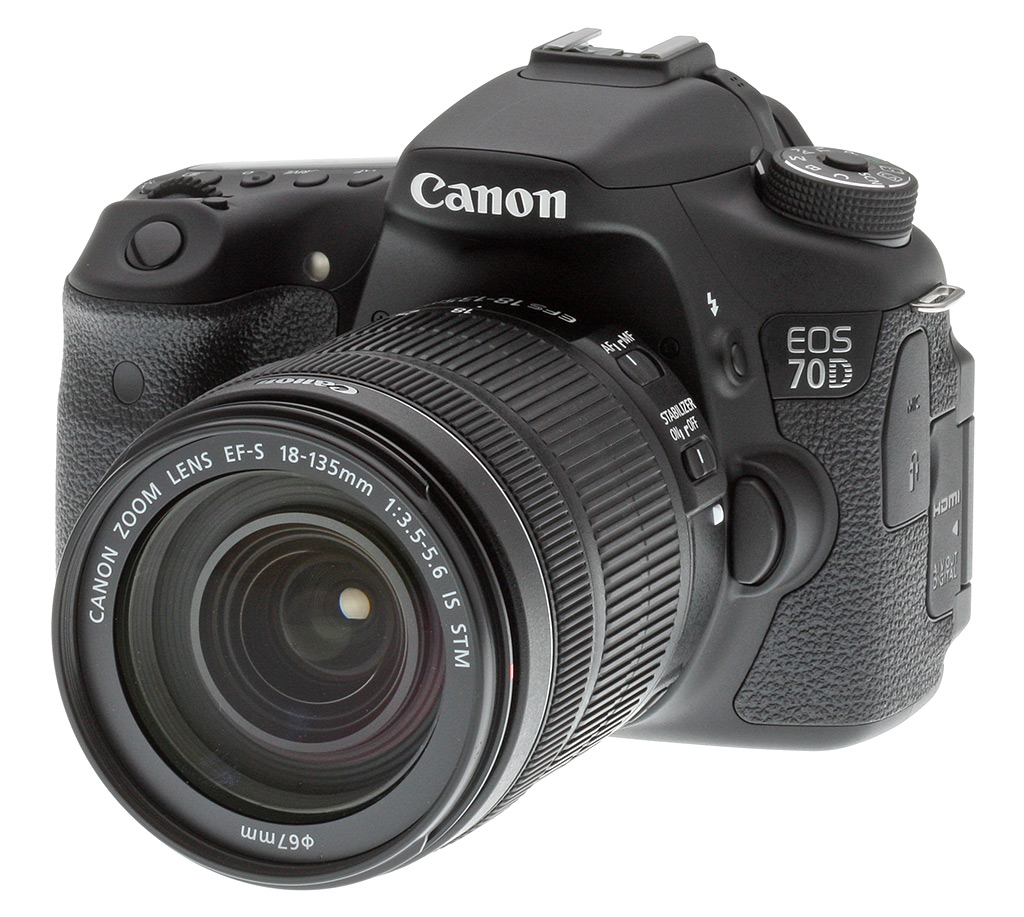



Overview
Last edited: 12/22/2016
---
UPDATE: 12/22/2016:
The Canon 70D has been replaced by the Canon 80D, which earned our top pick for Best Intermediate DSLR in our 2016 Camera of the Year awards. The Canon 80D sports a higher-resolution 24MP sensor, a faster processor and a beefed-up 45-point AF system, as well as brings over the excellent Dual Pixel CMOS AF technology from the 70D. For all the details, read our Canon 80D review, or to see how the original 70D stacks up against the new Canon 80D, check out our side-by-side comparison here: Canon 70D vs. Canon 80D.
---

The Canon 70D (70D bundles and savings) may very well have started a revolution with an innovative autofocus system that's new not only for Canon DSLRs, but also for the camera industry as a whole. Thanks to its Dual Pixel CMOS AF system, the Canon 70D -- a replacement for the three-year-old 60D -- could change the way you shoot both video and still images.
At the heart of this innovation is the Canon 70D's image sensor, a 20.2-megapixel APS-C-type CMOS chip that's been designed to accommodate on-chip phase detection -- but with one huge difference. To date, on-chip phase detect systems have provided but a handful of focus points scattered across the sensor's surface. With the Canon 70D, almost two-thirds of its surface area at the center of the frame can provide phase-detect AF, and not just at a handful of locations -- we're talking phase detect at every single pixel.
And unlike typical hybrid systems which use phase detect simply for a ballpark distance and direction to focus, then fine-tune with contrast-detect AF, the Canon 70D's on-chip phase detect is accurate enough that tuning with contrast detection isn't necessary. That is huge news for video capture, because it means no more hunting around the point of focus. With the AF bobble gone, full-time video becomes a much more exciting proposition, letting you quickly and smoothly guide your viewers' attention between subjects without distraction.
The new image sensor doesn't just drive the completely new autofocus system; in addition, its resolution has been increased slightly over the Canon 60D's. Sensor size is unchanged, but Canon has increased the active imaging area of the sensor slightly, from 22.3 x 14.9mm to 22.5 x 15.0mm. This means that, although pixel pitch has been reduced, the difference isn't as great as you might otherwise expect. A simultaneous switch to Canon's new DIGIC 5+ image processor further aims to tame image noise.

The net result is that, according to Canon, the 70D will produce noise levels that are roughly on par with the lower-res 60D for raw shooting. Meanwhile, the company says that JPEG shooters will see a "huge improvement" in image quality. To back up that claim, the ISO sensitivity range has been expanded to encompass everything from ISO 100 to 12,800 equivalents, with the ability to expand sensitivity as high as ISO 25,600 equivalent. Further in our review we'll see if the camera live up to these promises.
The new image processor also yields a significant increase in burst shooting performance, which is now rated by Canon at a full seven frames per second.
Canon has gifted the EOS 70D with a new body that's just slightly smaller, while retaining the same side-swiveling LCD monitor, and packing in several new features. These include a touch-panel overlay on the LCD monitor, built-in Wi-Fi wireless networking connectivity, a stereo microphone, and the same Live View control seen on other recent Canon SLRs. And supplementing the new on-chip phase detection system, there's also a new dedicated autofocus sensor, identical to that used in the EOS 7D.
[Note that in some markets, a variant of the Canon EOS 70D is offered without the aforementioned Wi-Fi wireless networking connectivity. Technically, the Wi-Fi enabled variant is known as the EOS 70D (W), and the variant without Wi-Fi as the EOS 70D (N).]

As well as all of the hardware changes, Canon has made numerous tweaks to firmware as well. These include the ability to preview creative filter effects before shooting, a new 3x to 10x variable video zoom function, the same video snapshot feature seen in recent Rebel-series cameras, and a choice of both ALL-I and IPB compression schemes for video, along with optional time code.
Walkaround. Although the Canon 70D looks a lot like its predecessor, it does feature a brand-new body design. Let's take a look at what's stayed the same, and what's been changed.

Seen from the front, the Canon 70D is a little less wide than is predecessor. Otherwise, though, the basic dimensions are pretty close to those of the 60D. The arrangement of controls and features on the front of the camera is near-identical. The most significant difference is the absence of the small four-hole microphone port that, on the 60D, sat directly above the model number badge.

Seen from above, the Canon 70D likewise retains an arrangement very much like that of the 60D. As well as the two four-hole ports for the relocated microphone -- now stereo, and straddling the rear of the hot shoe -- there's a new button between the Shutter button and front dial. This new control is used to select between autofocus area modes. The number of positions on the Mode dial has also been slashed by a third, to just 10.

It's when you come to the rear of the camera that the changes are more significant. In fact, something of a game of musical chairs has taken place. The Menu and Info buttons have jumped from the top right corner of the LCD monitor, and now sit above its top left corner, instead. With its chair taken, the Delete button has grabbed a spot at the bottom right corner of the display.
That move left the Playback button homeless, and so it has jumped up to take the spot previously occupied by the Info button. The Quick Menu button now sits above it, with its old spot now button-free. The Unlock / Print button of the 60D is replaced by a Lock switch, and the Live View button is substituted for a more modern Live View switch with central Start / Stop button.
The LCD monitor looks identical, but now features a touch-screen overlay. In other respects, the layout is much as it was.

The left-hand side of the EOS 70D (as seen from the rear) also shows a few changes. The connectivity available on this side is as it was, but the original single flap covering all of the ports has been split in two, with one half moved slightly behind the other. Microphone / wired remote terminals sit in front of and above the HDMI and combined AV Out / Digital (USB) ports. Above these, the speaker grille is now a nine-hole instead of seven-hole arrangement.

On the right-hand side, the changes are solely cosmetic, with no features added or removed.
Place your order with Imaging Resource affiliate Adorama now:
- Canon 70D body-only (US$1199)
- Canon 70D 18-55mm STM kit (US$1349)
- Canon 70D 18-135mm STM kit (US$1549)
Or with B&H Photo Video:
- Canon 70D body-only (US$1199)
- Canon 70D 18-55mm STM kit (US$1349)
- Canon 70D 18-135mm STM kit (US$1549)
In the Box
The Canon 70D retail box ships with the following items:
- Canon EOS 70D DSLR body (some markets have 'W' version with Wi-Fi, 'N' version without.)
- 18-55mm IS STM or 18-135mm IS STM lens (in the US market, depending on kit; other markets may vary)
- Front and rear lens caps
- Eyecup Eb
- LP-E6 Battery pack
- LC-E6 Battery charger
- IFC-130U USB interface cable
- EW-EOS 70D Wide shoulder strap
- EOS Digital Solution Disk CD-ROM
- Software Instruction Manual CD-ROM
- Camera Instruction Manual booklet
Recommended Accessories
- Large capacity SDHC/SDXC memory card. These days, 16GB is a good tradeoff between cost and capacity for a consumer DSLR, but if you plan to capture HD movie clips or shoot in RAW format, look for larger cards with Class 6 or faster ratings.
- Additional lenses
- Extra LP-E6 battery pack for extended outings
- BG-E14 battery grip (and optionally, six long-life AA lithium disposable batteries if you want a backup when you're away from your charger, although it will also accept a second LP-E6 battery pack)
- CBC-E6 car battery charger
- ACK-E6 AC adapter kit or DR-E6 DC coupler if you already have a suitable AC adapter (for studio shooting)
- External Speedlite flash, or other shoe-mount accessory flash
- Angle Finder C
- Dioptric lenses for viewfinder (if built-in diopter adjustment is insufficient for your prescription)
- EP-EX15 II eyepiece extender (if you want to shoot while wearing your glasses)
- External monaural or stereo microphone
- HTC-100 or other Mini-HDMI cable
- Medium size camera bag
Ready to purchase?
Below are the manufacturer's standard bundles, but for the latest bundles and deals, check out our constantly-updated 70D deals page!
Optics
The Canon 70D is available body-only, or bundled with either the Canon EF-S 18-55mm f/3.5-5.6 IS STM lens or the Canon EF-S 18-135mm f/3.5-5.6 IS STM lens. Below are the results of our optical tests with the 18-135mm STM lens. The test images shown on most other pages of these test results were taken with very sharp references lenses, so we use this page to explore kit lens performance.
Kit Lens Test Results
Zoom
The Canon EF-S 18-135mm IS STM lens offers more zoom ratio than the typical kit lens, with good performance for its class.


This lens has a generous and versatile optical zoom ratio of 7.5x with a 35mm equivalent range of about 29-216mm, thanks to the 70D's ~1.6x crop factor. And it's optimized for quieter, smoother focusing during live view and movies with a new stepper motor ("STM") design.
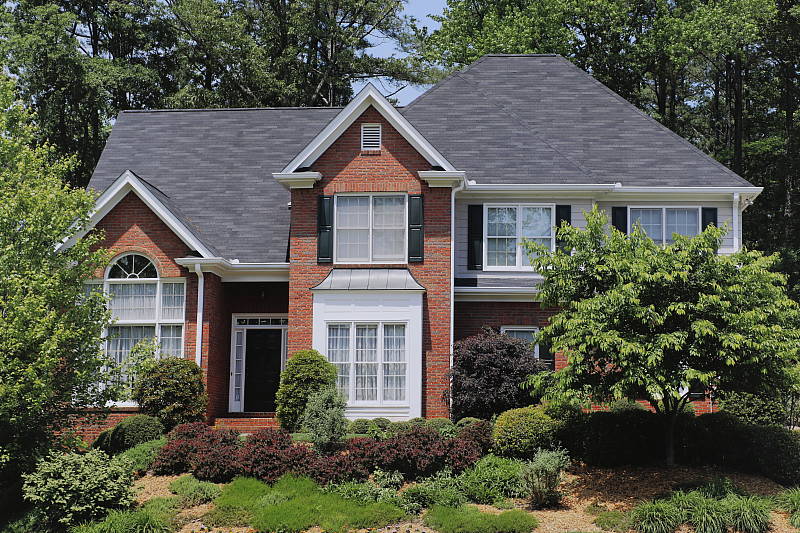
Sharpness and contrast are pretty good across most of the frame at 18mm and f/8, though there's some mild blurring in the corners. Chromatic aberration is well-corrected by the 70D's processing, so it's not a factor here. (See below for more on C.A.) At 35mm and f/8, sharpness across the frame is also good, but some softness is still visible in extreme corners. Sharpness at 135mm and f/8 is better than average, though softness in the corners appears to be a little higher. (It's difficult to determine corner performance as well as sharpness at full telephoto in these shots as they are meant primarily to demonstrate zoom capability; see below for lab test results and also read our review of another sample of this lens on SLRgear.com.)
Macro
A larger-than-average macro area with good detail. Flash throttled down well.


The Canon EOS 70D's macro performance will of course depend entirely on the lens in use. With the 18-135mm STM lens set to 135mm, the Canon 70D captured a somewhat larger-than-average minimum area measuring 3.01 x 2.00 inches (76 x 51 millimeters). Details are good but a touch soft in the center of the frame at f/8, and only a little softer in the corners. (Most lenses have some softening in the corners at macro distances, however the 18-135mm STM performed better here than most.) Some minor vignetting can also be seen in the extreme corners. The Canon 70D's flash throttled down well producing a good exposure, while coverage was even with no detectable shadow from the lens barrel.
Geometric Distortion
Higher than average barrel distortion at wide angle and moderate pincushion distortion at telephoto with the 18-135mm STM kit lens.
| Barrel distortion at 18mm is 1.0 percent |
 |
| Pincushion distortion at 135mm is 0.5 percent |
 |
The Canon EF-S 18-135mm STM lens produced images with about 1.0 percent barrel distortion at wide angle, which is higher than average and noticeable in some shots. At the telephoto end, there was about 0.5% pincushion distortion, which is also higher than average though not quite as noticeable. The Canon 70D does not correct for geometric distortion in its JPEGs, as uncorrected RAW files have identical amounts. Geometric Distortion is the tendency for the lens to bend straight lines outward (like a barrel -- usually at wide-angle) or inward (like a pincushion -- usually at telephoto).
Chromatic Aberration and Corner Sharpness
Low chromatic aberration in JPEGs with the 18-135mm STM lens because the 70D suppresses it by default. Some mild to moderate softening in the corners.
|
Aperture: Maximum
|
|
 |
 |
| Wide, f/3.5: Lower right C.A.: Low Softness: Slightly soft |
Wide, f/3.5: Center C.A.: Very little Softness: Fairly sharp |
 |
 |
| Tele, f/5.6: Upper right C.A.: Low Softness: Soft |
Tele, f/5.6: Center C.A.: Very low Softness: Fairly sharp |
Chromatic Aberration. Chromatic aberration in the corners with the Canon 18-135mm STM lens is low to very low at both wide angle and telephoto, because the 70D now suppresses lateral chromatic aberration by default. See below for examples with chromatic aberration correction disabled.
Corner Softness. The 18-135mm STM lens produced some slightly soft corners when wide-open at maximum aperture. At full wide angle, corners on the bottom of our test target are slightly softer than the top, and blurring extends pretty far into the frame. The center of the image has decent sharpness, just a touch soft. At full telephoto, the top right corner is the softest, and slightly softer than wide angle, but blurring doesn't extend as far into the frame. The lens is fairly sharp in the center, though not tack sharp.
Vignetting. Vignetting or corner shading is not an issue in the above crops, but that's because the Canon 70D's Peripheral Illumination Correction is enabled by default. See below for comparisons with it off.
|
Aperture: f/8
|
|
 |
 |
| Wide, f/8: Lower right C.A.: Low Softness: Fairly sharp |
Wide, f/8: Center C.A.: Very little Softness: Sharp |
 |
 |
| Tele, f/8: Upper right C.A.: Very low Softness: Fairly sharp |
Tele, f/8: Center C.A.: Very low Softness: Sharp |
Performance at f/8: Chromatic aberration in the corners is still low to very low due to processing, as expected. Sharpness in the corners improved when stopped down to f/8, though not dramatically so (and at f/8, diffraction limiting has probably already started to set in.) As you can see, the Canon 70D's Peripheral Illumination Correction slightly over-compensated at wide angle, producing a somewhat brighter corner crop than the center.
Overall, optical performance is good for a 7.5x consumer lens priced under $500, and the default C.A. suppression the 70D applies is a welcome change.
Chromatic Aberration Correction
The 70D features Chromatic Aberration Correction to reduce lateral C.A. with Canon lenses.
|
C.A. Correction On (Default)
|
C.A. Correction Off |
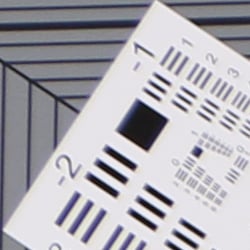 |
 |
| Wide, f/3.5: Upper left C.A.: Low |
Wide, f/3.5: Upper left C.A.: High |
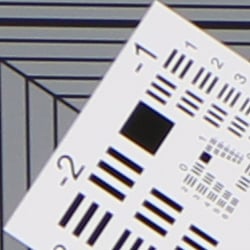 |
 |
| Tele, f/5.6: Upper left C.A.: Very low |
Tele, f/5.6: Upper left C.A.: Moderately high |
As you can see, the Canon 70D's Chromatic Aberration Correction feature was very effective at removing almost all the lateral chromatic aberration in our 18-135mm STM lens test shots above, leaving very small amounts of blue and red fringing. Unlike prior Canon EOS models with this feature, Chromatic Aberration Correction is now enabled by default for supported lenses.
Peripheral Illumination Correction
Like most other Canon DSLRs, the 70D features Peripheral Illumination Correction to reduce vignetting or lens shading with Canon lenses.
 |
 |
||
| 18mm @f/3.5 | 135mm @f/5.6 | ||
| Peripheral Illumination Correction: | On (default) | Off | |
The Canon 70D provides what the company calls "Lens Peripheral Illumination Correction," which corrects for lens shading (commonly called "vignetting"), attempting to produce a more uniform exposure across the frame by compensating for the light fall-off seen with some lenses in the corners of the frame. Mouse over the Off and On links above to see the effect on the 18-135mm kit lens at wide angle and telephoto at maximum aperture. PIC is enabled by default.
Peripheral Illumination Correction (and Chromatic Aberration Correction) are supported for many Canon lens models, in both RAW and JPEG workflows. For JPEG shooting, the correction is made at capture time, while RAW shooters can access the function in Canon's Digital Photo Professional software. From the factory, the 70D body ships with correction data for about 25 lens models. Canon's EOS Utility software allows correction data for lenses (including models as-yet unreleased) to be uploaded to the Canon 70D. When using third-party lenses, Canon recommends disabling lens corrections.
Canon 70D Viewfinder Accuracy
Viewfinder Test Results
Accuracy
Fair accuracy from the optical viewfinder, though very good accuracy from the LCD in Live View mode.


We measured the Canon 70D's optical viewfinder's coverage at just over 97%. This is a little short of Canon's 98% coverage specification, but within the tolerance of our test. The resulting image was however slightly offset with respect to the sensor, which is unfortunately quite common with optical SLR viewfinders. Live View mode using the LCD in record mode was more accurate, resulting in close to 99% coverage, and of course the image isn't tilted or offset.
The images above were taken from our standardized test shots. For a collection of more pictorial photos, see our Canon EOS 70D Photo Gallery .
Exposure
Color
Saturation & Hue Accuracy
Typical saturation levels with excellent hue accuracy.
 |
||
|
ISO Sensitivity
|
||
| In the diagram above, the squares show the original color, and the circles show the color that the camera captured. More saturated colors are located toward the periphery of the graph. Hue changes as you travel around the center. Thus, hue-accurate, highly saturated colors appear as lines radiating from the center. Mouse over the links above to compare ISOs, and click to load a larger version. | ||


Saturation. The Canon 70D produces images with fairly accurate saturation levels. Strong reds, oranges, dark greens and dark blues are pushed a little, while yellow and cyan are slightly muted. The mean saturation of 110.2% (10.2% oversaturated) at base ISO is typical, and saturation remains fairly consistent over the ISO range except at the highest ISOs where it increases, peaking at 113% at ISO 12,800. Most consumer digital cameras produce color that's more highly saturated (more intense) than found in the original subjects. This is simply because most people like their color a bit brighter than life.
Skin tones. The Canon 70D produced pleasing, natural-looking Caucasian skin tones in our tests when using manual white balance. Darker skin tones show a small nudge toward orange, but lighter tones are more pink. Very good results overall. Where oversaturation is most problematic is on Caucasian skin tones, as it's very easy for these "memory colors" to be seen as too bright, too pink, too yellow, etc.
Hue. As we've come to expect from Canon, the 70D's hue accuracy is excellent when manual white balance is used (as it is for these results), much better than average. There are the usual shifts in cyan toward blue (actually quite small), red toward orange, and orange toward yellow, but all are fairly minor. (The cyan to blue shift is very common among the digital cameras we test; we think it's a deliberate choice by camera engineers to produce better-looking sky colors.) Average "delta-C" color error at base ISO is only 3.63, which is first-rate, one of the best scores we've recorded to date. Delta-C color error increases with ISO, but remains better than average even at the highest ISOs. Hue is "what color" the
color is.
Saturation Adjustment
The Canon 70D offers a total of nine saturation settings, four above and four below the default saturation. This covers a very wide range of saturation levels, and as it should, the Canon 70D's saturation adjustment affects only saturation, leaving the contrast of images unaltered. (In some cameras, saturation tends to affect contrast, and vice versa.) The fine steps between settings mean you can program the camera to just the level of saturation you prefer. As usual for Canon, well done.
| Saturation Adjustment Examples | ||||
 |
 |
 |
 |
 |
| -4 | -2 | 0 | +2 | +4 |
The table above shows alternate settings including the default as well as the two extreme saturation settings. Click on any thumbnail above, then click again to see the full-sized image.


Sensor
Exposure and White Balance
Indoors, incandescent lighting
Auto and Incandescent settings both struggled with household incandescent lighting, though Manual and Kelvin temperature white balance worked well. Slightly higher than average exposure compensation required.


Indoors, under incandescent lighting, the Canon 70D's Auto and Incandescent white balance settings struggled, both producing very warm red/orange color casts. Unfortunately, this is common among cameras we've tested, but disappointing nonetheless for a prosumer model. The Manual setting produced the most accurate results, though just slightly cool with a nudge towards green. The Kelvin temperature setting also performed well, with just a slightly cool bias towards blue. The Canon 70D required +0.7 EV exposure compensation for this shot, which is slightly higher than the +0.3 EV average among the cameras we've tested. (Our test lighting for this shot is a mixture of 60 and 100 watt household incandescent bulbs, a pretty yellow light source, but a very common one in typical home settings here in the U.S.)
Outdoors, daylight
Good color, though a tendency towards slightly cool color balance with somewhat high contrast under harsh lighting. Slightly below average exposure accuracy.
Outdoors, the Canon 70D tended toward a slightly cool color balance with Auto WB, though overall color is generally very good. The Canon 70D required +1.0 EV exposure compensation to keep the mannequin's face bright, a little more than the typical +0.7 EV we're accustomed to using for our "Sunlit" portrait shot. The Canon 70D's default contrast is a little high, producing some washed-out highlights and dark shadows under the deliberately harsh lighting of the shot above left, though the camera's contrast, Auto Lighting Optimizer and Highlight Tone Priority settings do help with high contrast scenes like these. See below for examples of this. The Far-field shot (above right) is also a bit cool, and exposure just a touch dim, though the camera did a very good job of avoiding blown highlights at default exposure. There are some deep shadows, however, which are somewhat noisy and posterized, though that shouldn't be an issue in properly exposed shots.
See full set of test images with explanations
See thumbnails of all test and gallery images
Resolution
Very high resolution, ~ 2,400 to 2,500 lines of strong detail from JPEGs, about 2,500 to 2,600 from RAW.


Our laboratory resolution chart showed the Canon 70D's images with sharp, distinct line patterns down to about 2,500 lines per picture height horizontally and to about 2,400 lines vertically. Some may argue for higher numbers, but aliasing and sharpening artifacts start to interfere at this resolution. Extinction of the pattern occurred between 3,000 and 3,200 lines. An Adobe Camera Raw converted .CR2 file shows higher resolution than the in-camera JPEG, perhaps another 100 lines, though complete extinction of the pattern was extended to about 3,500 lines. While ACR was able to extract more detail, it also produced more moiré and false colors. Use these numbers to compare with other cameras of similar resolution, or use them to see just what higher resolution can mean in terms of potential detail.
See full set of test images with explanations
See thumbnails of all test and gallery images
Sharpness & Detail
Very good sharpness and excellent detail with a sharp lens. Minor to moderate detail loss due to noise reduction processing even at low ISOs.
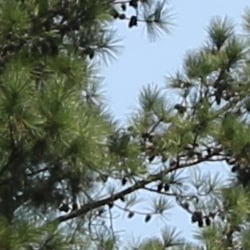

Sharpness. The Canon 70D's 20-megapixel sensor captures excellent image detail when coupled with a good lens, though as is usually the case, the 70D's default sharpening setting generates visible edge-enhancement artifacts in the form of sharpening halos around high-contrast edges, as shown in the crop above left. (The above left crop shot was taken with Canon's very sharp 16-35mm f/2.8L II USM lens at f/8.) While JPEG images may look a bit oversharpened on screen at 100% (as do most in-camera JPEGs), they result in crisp prints. Edge enhancement creates the illusion of sharpness by enhancing colors and tones right at the edge of a rapid transition in color or tone.
Detail. The crop above right shows some detail loss due to noise suppression in darker areas and in areas with low contrast, perhaps just a little more than we're accustomed to seeing from a digital SLR. Still, good performance for a 20-megapixel APS-C model. (The image above right of the hair was taken with our very sharp Sigma 70mm f/2.8 reference lens.) Noise-suppression systems in digital cameras tend to flatten-out detail in areas of subtle contrast. The effects can often be seen in shots of human hair, where the individual strands are lost and an almost "watercolor" look appears.
Raw vs In-Camera JPEGs
As mentioned above, the Canon 70D does an excellent job of capturing sharp, detailed JPEGs when coupled with a sharp lens, but as is usually the case, additional detail can be extracted by carefully processing its RAW files.
 |
||
In the table above, mousing over a link at the bottom will load the corresponding crop in the area above, and clicking on the link will load the full resolution file. Examples include in-camera Fine JPEG, the matching RAW file processed through Canon's Digital Photo Professional (DPP 3.13.20) software using default settings, and finally, the same RAW file processed through Adobe Camera Raw (ACR 8.1), then sharpened in Photoshop using 250% unsharp masking with an 0.5 pixel radius.
Canon's DPP software produced an image very similar to in-camera JPEG, perhaps with just slightly better detail and local contrast. The image processed through ACR show an improvement in fine detail compared to the DPP conversion (as well as less obvious sharpening halos, lower contrast and more neutral color), but also shows a bit more noise at default settings, which is not unusual. You may want to experiment with ACR's noise reduction settings to find the detail versus noise trade-off you're looking for. Regardless, the Canon 70D is clearly a camera that offers tons of detail in its RAW files.
ISO & Noise Performance
Very good high ISO performance, very similar to the 60D's despite slightly smaller photosites.
|
Default High ISO Noise Reduction
|
||
 |
 |
 |
| ISO 100 | ISO 200 | ISO 400 |
 |
 |
 |
ISO 800 | ISO 1,600 | ISO 3,200 |
 |
 |
 |
ISO 6,400 | ISO 12,800 | ISO 25,600 |
The Canon 70D's high ISO performance is pretty good and very similar to the Canon 60D's at the pixel level, though the 70D's increased resolution should help with prints. Images are quite clean at ISOs 100 through 400, with just a tiny amount of luminance noise seen in the shadows, as well as what looks to be chroma noise in the darker strands of hair. Some blurring of fine low-contrast detail is already visible at base ISO, though, as mentioned previously. Noise "grain" is slightly more evident at ISO 800, but detail remains very strong despite some minor blurring due to noise reduction. ISO 1,600 is of course noisier, but fine detail is still very good. At ISO 3,200 noise grain becomes coarser, blurring stronger and chroma noise more apparent, resulting in a more noticeable drop in detail. ISO 6,400 is quite grainy with obvious chroma noise, but there is still some fine detail left. Noise and the effects of noise reduction working hard to keep it under control really become apparent at ISO 12,800 and especially 25,600, with strong blurring and obvious chroma blotching, though we didn't see the same drop in saturation at high ISOs that we saw with the 60D.
See the Print Quality section below for our evaluation of maximum print sizes at each ISO setting.
A note about focus for this shot: We shoot this image at f/4, using one of three very sharp reference lenses (70mm Sigma f/2.8 macro for most cameras, 60mm f/2.8 Nikkor macro for Nikon bodies without a drive motor, and Olympus Zuiko 50mm f/2.0 for Four Thirds and Micro Four Thirds bodies). To insure that the hair detail we use for making critical judgements about camera noise processing and detail rendering is in sharp focus at the relatively wide aperture we're shooting at, the focus target at the center of the scene is on a movable stand. This lets us compensate for front- or back-focus by different camera bodies, even those that lack micro-focus adjustments. This does mean, though, that the focus target itself may appear soft or slightly out of focus for bodies that front- or back-focused with the reference lens. If you click to view the full-size image for one of these shots and notice that the focus target is fuzzy, you don't need to email and tell us about it; we already know it. :-) The focus target position will simply have been adjusted to insure that the rest of the scene is focused properly.
Extremes: Sunlit, dynamic range and low light tests
Very high resolution with strong overall detail, but somewhat high default contrast and unremarkable dynamic range. HTP, ALO and contrast adjustment options do a great job of dealing with tough lighting. Very good low-light performance.


The Canon 70D produced moderately high contrast with some washed-out highlights and deep shadows under the deliberately harsh lighting of the test above. The mannequin's face was too dim at the +0.3 EV and +0.7 EV settings, so we preferred the image with +1.0 EV exposure compensation. This resulted in more clipped highlights in the shirt and flowers than we're used to seeing from an APS-C sensor lately, indicating mediocre dynamic range compared to the best of recent competitors. Shadow detail was however pretty good, though very deep shadows are noisy and posterized. Bottom line: while dynamic range isn't bad, the Canon 70D didn't do as well with this difficult shot compared to some recent state-of-the-art peers.
Because digital cameras are more like slide film than negative film (in that they tend to have a more limited tonal range), we test them in the harshest situations to see how they handle scenes with bright highlights and dark shadows, as well as what kind of sensitivity they have in low light. The shot above is designed to mimic the very harsh, contrasty effect of direct noonday sunlight, a very tough challenge for most digital cameras. (You can read details of this test here. In actual shooting conditions, be sure to use fill flash in situations like the one shown here; it's better to shoot in open shade whenever possible.)
Contrast Adjustment
We really like it when a camera gives us the ability to adjust contrast and saturation to our liking. It's even better when those adjustments cover a useful range, in steps small enough to allow for precise tweaks. As was the case with its saturation adjustment, the Canon 70D's contrast setting meets both challenges very well.
|
Minimum Contrast
|
|
 |
 |
| Contrast set to lowest, +0.7 EV |
Contrast set to lowest, 0 EV |
At its lowest contrast setting, the Canon 70D did a good job of preserving highlight detail, maintaining fairly natural-looking skin tones, and holding nice detail in the shadows. Overall, very good results here when the contrast setting is adjusted.
| Contrast Adjustment Examples | ||||
|
 |
 |
 |
 |
| -4 | -2 | 0 | +2 | +4 |
The Canon 70D's contrast-adjustment control offers a very broad range of control in usefully fine gradations, and does a good job of adjusting contrast without affecting color saturation in the process. (As noted earlier regarding saturation adjustment, something that not all cameras manage to do.)
Highlight Tone Priority
The Canon 70D's Highlight Tone Priority (HTP) option did an excellent job of preserving highlight detail, though shadows were also affected, as shown below. (Mouse over the Off and On links to load the corresponding thumbnail, histogram and crops.)
|
Highlight Tone Priority (+0.7EV)
|
|
|
|
|
| Highlights |  |
| Shadows (Levels boosted to reveal noise.) |
 |
| Histogram |  |
Both shots above were captured at the same exposure, the only difference being that HTP was enabled for the second shot which necessarily increases the ISO to 200; part of how HTP works. The result is evident in the histograms and thumbnails above, clearly showing the superior highlight preservation when HTP is enabled, though shadow brightness is also reduced somewhat. If you look closely at shadows (the levels in shadow crops above are heavily boosted to reveal noise that would be difficult to see otherwise), you'll notice an increase in noise is the price you pay when ISO is boosted from 100 to 200. Except in the very deepest shadows, though, overall noise is low enough at ISO 200 that this is really a negligible trade-off for all but the most critical applications.
Automatic Lighting Optimization
Like previous EOS models, the Canon 70D offers three selectable levels of Automatic Lighting Optimization (ALO), plus Off. In fully automatic and Creative Auto exposure modes, ALO is automatically enabled. Mouse over the links below to load the associated thumbnail and histogram, and click on the links to load full resolution images.
|
Automatic Lighting Optimization (+0.7 EV)
|
|
 |
|
 |
|
As you can see above, ALO has the effect of shifting shadows and mid-tones in the histograms to the right, brightening shadows and indeed most of the image without clipping too many additional highlights. ISO is not boosted for ALO so increased noise is not an issue, though it may be slightly more visible in shadows that have been boosted significantly.
Face Detection
Just like most point & shoot cameras these days, the Canon 70D has the ability to detect faces in Live View mode, and adjust exposure and focus accordingly.
| Face Detection | ||
 |
 |
 |
| Aperture Priority Face Detect: Off 0 EV |
Aperture Priority Face Detect: On 0 EV |
Auto Mode 0 EV |
As you can see from the examples above, it works well, as the center image with face detection enabled is much better exposed for the face than the left image where face detection was not employed. Full Auto mode (right) was a slight improvement over Aperture Priority without face detection, selecting a larger aperture than we normally use for this shot (f/4 vs f/8), though the mannequin's face is still quite dim.
High Dynamic Range
The Canon 70D's HDR feature takes three continuous shots at different exposures and merges them together to create an image with wider tonal range than would be possible with a single exposure. There are three strength settings available (+/-1EV, +/-2EV,+/-3EV), plus Auto. The source images captured are not saved, and RAW mode is not supported. (Mouse over the links below to load the corresponding thumbnail.)
As you can see, the HDR shots have improved dynamic range with preserved highlights and shadows that have been opened up with lower noise. Do however note that a significant part of the image has been cropped away in the alignment process, and that the resulting images aren't quite as detailed overall, because the cropped image is resampled to full resolution. Also be aware that ghosting can occur when elements of the scene move during the sequence capture, as can be seen with the moving flag and person in some of these shots.
Dynamic Range
A key parameter in a digital camera is its Dynamic Range, the range of brightness that can be faithfully recorded. At the upper end of the tonal scale, dynamic range is dictated by the point at which the RGB data "saturates" at values of 255, 255, 255. At the lower end of the tonal scale, dynamic range is determined by the point at which there ceases to be any useful difference between adjacent tonal steps. Note the use of the qualifier "useful" in there: While it's tempting to evaluate dynamic range as the maximum number of tonal steps that can be discerned at all, that measure of dynamic range has very little relevance to real-world photography. What we care about as photographers is how much detail we can pull out of the shadows before image noise becomes too objectionable. This, of course, is a very subjective matter, and will vary with the application and even the subject matter in question. (Noise will be much more visible in subjects with large areas of flat tints and subtle shading than it would in subjects with strong, highly contrasting surface texture.)
What makes most sense then, is to specify useful dynamic range in terms of the point at which image noise reaches some agreed-upon threshold. To this end, Imatest computes a number of different dynamic range measurements, based on a variety of image noise thresholds. The noise thresholds are specified in terms of f-stops of equivalent luminance variation in the final image file, and dynamic range is computed for noise thresholds of 1.0 (low image quality), 0.5 (medium image quality), 0.25 (medium-high image quality) and 0.1 (high image quality). For most photographers and most applications, the noise thresholds of 0.5 and 0.25 f-stops are probably the most relevant to the production of acceptable-quality finished images, but many noise-sensitive shooters will insist on the 0.1 f-stop limit for their most critical work.
JPEG. The graph at right (click for a larger version) was generated using Imatest's dynamic range analysis for an in-camera Canon 70D JPEG file with a nominally-exposed density step target (Stouffer 4110). At default camera settings and base ISO, the graph shows 11.9 f-stops of total dynamic range, with 7.61 f-stops at the "High" Quality level. These are decent numbers for a JPEG, though somewhat lower than some recent competitors. Compared to the Canon 60D, the 70D scored essentially the same at the High Quality level (7.61 vs 7.46 f-stops), but significantly higher in total dynamic range (11.9 vs 10.5 f-stops), likely due to improved JPEG processing, though as mentioned above, the total dynamic range number is not terribly useful. Note though that this measurement has a margin of error of about 1/3 f-stop, so differences of less than 0.33 can be ignored.
 RAW. The graph at right is from the same Stouffer 4110 stepchart image captured as a RAW (.CR2) file, processed with Adobe Camera Raw using the Auto setting, then manually tweaked from there. The Canon 70D's RAW file scored 1.1 f-stops more in total dynamic range (13 vs 11.9 f-stops) but the score at the highest quality level increased only 0.7 f-stops from 7.61 to 8.31, which isn't much of an improvement over the JPEG and below average these days. Like all recent Canon SLRs, the higher quality scores are somewhat below average for a modern sensor. For example, the Nikon D7100 managed 10.1 f-stops at the highest quality level, almost 2 stops better. As always, it's worth noting here is that ACR's default noise reduction settings reduced overall noise somewhat (see the plot in the lower left-hand corner) relative to the levels in the in-camera JPEG, which would tend to boost the dynamic range numbers for the High Quality threshold, but notice that pixel noise in darker midtones and shadows is actually higher than the JPEG. Also, the extreme highlight recovery being performed by ACR here would likely produce color errors in strong highlights of natural subjects.
| 1 fc 11 lux |
1/2 fc 5.5 lux |
1/4 fc 2.7 lux |
1/8 fc 1.3 lux |
1/16 fc 0.67 lux |
1/16fc No NR |
|
|---|---|---|---|---|---|---|
| ISO 100 |
 2 s f2.8 |
 4 s f2.8 |
 8 s f2.8 |
 16 s f2.8 |
 32 s f2.8 |
 32 s f2.8 |
| ISO 200 |
 1 s f2.8 |
 2 s f2.8 |
 4 s f2.8 |
 8 s f2.8 |
 16 s f2.8 |
 16 s f2.8 |
| ISO 400 |
 0.5 s f2.8 |
 1 s f2.8 |
 2 s f2.8 |
 4 s f2.8 |
 8 s f2.8 |
 8 s f2.8 |
| ISO 800 |
 1/4 s f2.8 |
 0.5 s f2.8 |
 1 s f2.8 |
 2 s f2.8 |
 4 s f2.8 |
 4 s f2.8 |
| ISO 1600 |
 1/8 s f2.8 |
 1/4 s f2.8 |
 0.5 s f2.8 |
 1 s f2.8 |
 2 s f2.8 |
 2 s f2.8 |
| ISO 3200 |
 1/16 s f2.8 |
 1/8 s f2.8 |
 1/4 s f2.8 |
 0.5 s f2.8 |
 1 s f2.8 |
 1 s f2.8 |
| ISO 6400 |
 1/32 s f2.8 |
 1/16 s f2.8 |
 1/8 s f2.8 |
 1/4 s f2.8 |
 0.5 s f2.8 |
 0.5 s f2.8 |
| ISO 12800 |
 1/64 s f2.8 |
 1/32 s f2.8 |
 1/16 s f2.8 |
 1/8 s f2.8 |
 1/4 s f2.8 |
 1/4 s f2.8 |
| ISO 25600 |
 1/128 s f2.8 |
 1/64 s f2.8 |
 1/32 s f2.8 |
 1/16 s f2.8 |
 1/8 s f2.8 |
 1/8 s f2.8 |
Low Light. The Canon 70D performed well in our low-light tests, capturing bright images at the lowest light level (1/16 foot-candle), even with the lowest sensitivity setting (ISO 100). As expected, noise increases as ISO goes up and light levels go down, but luminance noise remains fairly low up to ISO 1,600, and image quality is still quite good up to ISO 6,400. Some chroma noise in the form of subtle color blotching in the shadows and dark areas is visible at low to moderate ISOs at lower light levels, though it's effectively suppressed by default noise reduction at higher ISOs. Noise is quite high at the extreme ISOs of 12,800 and 25,600, particularly when noise reduction is minimized (extreme right column in the table above), though that's to be expected.
We noticed a few hot pixels here and there particularly when long exposure noise reduction was turned off (where they can be expected), but that's not unusual. And we didn't see any significant banding (pattern noise) or heat bloom issues.
Color balance was pretty neutral with Canon 70D's Auto white balance setting (just a touch cool), even at high ISOs, though white balance took on a warm, slightly red or magenta tint at lower light levels.
When using the optical viewfinder and dedicated phase-detect AF, the Canon 70D's autofocus system was able to focus on the subject down to just below the 1/8 foot-candle light level unassisted with our Sigma f/2.8 lens. That's good, though not great for a prosumer model, but the camera was able to focus in complete darkness with AF assist enabled. In Live View mode using Hybrid AF, the Canon 70D was able to focus down to just below the 1/4 foot-candle light level, which is fair for a DSLR in Live View mode with an f/2.8 lens.
As always, keep in mind that the longer shutter speeds here demand the use of a tripod to prevent any blurring from camera movement. (A useful trick is to just prop the camera on a convenient surface, and use its self-timer to release the shutter. This avoids any jiggling from your finger pressing the shutter button, and can work quite well when you don't have a tripod handy.)
How bright is this? The one foot-candle light level that this test begins at roughly corresponds to the brightness of typical city street-lighting at night. Cameras performing well at that level should be able to snap good-looking photos of street-lit scenes.
NOTE: This low light test is conducted with a stationary subject, and the camera mounted on a sturdy tripod. Most digital cameras will fail miserably when faced with a moving subject in dim lighting. (For example, a child's ballet recital or a holiday pageant in a gymnasium.) Digital SLRs like the Canon 70D do much better than point & shoots, but you still shouldn't expect a quick autofocus lock with moving subjects.
Output Quality
Print Quality
Very nice 30 x 40 inch prints at ISO 100; a good 11 x 14 at ISO 3200; and even prints a reasonable 4 x 6 at its highest ISO of 25,600.
 ISO 100 makes a great 30 x 40 inch print, very crisp with good detail and color. Wall display prints are also quite good even at 36 x 48.
ISO 200 prints are excellent at 24 x 36 inches, with sharp detail, and again are suitable for wall display purposes up to 36 x 48 inches.
ISO 400 also looks nice at 24 x 36 inches, with only mild softening in areas of fine detail. Prints here are super-crisp at 20 x 30 inches.
ISO 800 yields a nice 20 x 30 inch print. There is a hint of noise in some shadowy areas of our test target, imparting a subtle "film grain" look, but still a very nice print. The noise is mostly non-apparent at 16 x 20 inches.
ISO 1,600 produces a very good 13 x 19, which is quite a respectable print size for this ISO, retaining nice, accurate colors throughout.
ISO 3,200 holds up well at 11 x 14 inches, which is yet again a nice size for so far up the ISO scale.
ISO 6,400 prints still pop nicely at 8 x 10 inches, with accurate color renditioning and only minor noise apparent in some areas.
ISO 12,800 prints a good 5 x 7 for this ISO, and colors still come through quite well.
ISO 25,600 prints at 4 x 6 just pass our standard for "good", which is no small feat considering that not many APS-C sensor cameras can make that claim.
The Canon 70D more than holds its own in the print quality department, delivering sharp, worthwhile images at sizes comparable to its competition all the way up the ISO scale. It is worth noting here that one of its primary competitors, the Nikon D7100, does print one size larger at base ISO due in large part to higher resolution and the lack of a low pass filter, but the 70D stays in step for most of the remaining ISOs, and even bests the D7100 at ISO 25,600. The D7100 does better at resolving detail in our difficult red fabric swatch, while the 70D does a better job controlling noise in shadowy areas as ISO rises, so a definite trade-off one direction or another. But for the most part these two challengers deliver comparable image quality other than the difference we mentioned at base ISO.
The images above were taken from our standardized test shots. For a collection of more pictorial photos, see our Canon EOS 70D Photo Gallery .
Not sure which camera to buy? Let your eyes be the ultimate judge! Visit our Comparometer(tm) to compare images from the Canon EOS 70D with those from other cameras you may be considering. The proof is in the pictures, so let your own eyes decide which you like best!
Performance
Timing and Performance
Very good to excellent performance for an enthusiast DSLR.
| Startup/Shutdown | ||
|---|---|---|
|
Power on |
~0.7 second
|
Time it takes to turn on and capture a shot. |
|
Shutdown |
~0.4 second
|
How long it takes camera to turn off. |
|
Buffer clearing time |
6 seconds
after 20 large/fine JPEGs* |
Worst case buffer clearing time. -- This is the delay after a set of shots before you can remove the card. |
|
10 seconds
after 14 RAW files* |
||
|
9 seconds
after 7 RAW+L/F JPEG files* |
||
|
*Note: Buffer clearing times measured with a SanDisk Extreme Pro 95MB/s UHS-I SDHC card. Slower cards will produce correspondingly slower clearing times. Slow cards may also limit length of bursts in continuous mode. ISO sensitivity and noise reduction settings can also affect cycle times and burst mode performance.
|
||
The Canon 70D turned in a fairly fast startup time of well under a second, however we noticed that if you press the shutter button too soon after powering up, the 70D will take a photo without focusing. (We needed to wait about half a second before pressing the shutter button for the camera to focus before taking a shot, which is included in the above number.) Shutdown is fast, too, when auto sensor cleaning is disabled. The Canon 70D's buffer clearing times were quick with a fast UHS-I card.
| Mode Switching | ||
|---|---|---|
| Play to Record, |
~0.1 second
|
Time until first shot is captured. |
| Record to Play |
~0.7 second
|
Time to display a large/fine file immediately after capture. |
| Display |
~0.3 second
|
Time to display a large/fine file already on the memory card. |
The Canon 70D's mode switching times were quite fast; no complaints here.
| Shutter Response (Lag Time), Optical Viewfinder, 18-135mm IS STM | ||
|---|---|---|
|
Full Autofocus |
0.075 second
|
Time from fully pressing shutter button to image capture. |
|
Full Autofocus |
0.093 second
|
Time from fully pressing shutter button to image capture. |
|
Full Autofocus |
0.158 second
|
Time to capture while forcing flash to fire. Metering pulses from flash often slow shutter response. |
|
Continuous AF |
0.121 second
|
This mode usually shows no speed increase with our static subject; we have no way to measure performance with moving subjects. |
|
Manual Focus |
0.075 second
|
For most cameras, shutter lag is less in manual focus than autofocus, but usually not as fast as when the camera is "prefocused". |
|
Prefocused |
0.059 second
|
Time to capture, after half-pressing and holding shutter button. |
| Shutter Response (Lag Time), Live View, 18-135mm IS STM | ||
|
Full Autofocus |
0.506 second
|
Time from fully pressing shutter button to image capture. This is phase-detect autofocus, the camera drops the mirror to focus, then raises it to grab the shot. |
|
Full Autofocus |
0.652 second
|
Time from fully pressing shutter button to image capture. This is using the new Dual Pixel CMOS AF system. |
|
Prefocused |
0.059 second
|
Time to capture, after half-pressing and holding shutter button. |
In terms of the Canon 70D's ability to determine that it's properly focused when shooting the same target multiple times using the optical viewfinder, its full autofocus shutter response was very fast. In our standard single-point AF test, shutter lag was only 0.075 second, which is pro DSLR performance! (We thought perhaps something was amiss, so we also tested this with the same Sigma 70mm f/2.8 lens we tested the 60D with, and measured the 70D's full AF shutter lag to be 0.094s versus 0.253s for its predecessor, so the bulk of the improvement is not due to the newer lens. Do keep in mind that we don't defocus between trials in this test, though, so these are really best-case autofocus shutter lag numbers.) Switching to Auto Selection AF and allowing the camera to choose the focus point increased shutter lag to 0.093 second, but that's still very fast. Enabling the built-in flash resulted in full AF lag of 0.158 second, which is still quite fast. In Continuous AF mode, shutter lag was a quick 0.121 second, though your subject may be out of focus in this mode. Shutter lag with Manual focus was very good, at 0.075 second. "Prefocusing" the camera by half-pressing and holding down the shutter button before the final exposure resulted in a lag time of only 0.059 second, which is very good for a DSLR.
The Canon 70D's AF lag time in Live View mode was quite a bit longer than when using the optical viewfinder, and slower than most mirrorless cameras, however it was faster than average for Live View on a DSLR. We measured 0.506 seconds using "Quick Mode" (dedicated phase-detect AF). The 70D's new FlexiZone AF mode was a bit slower than "Quick Mode" at 0.652 second, but that's still pretty good. Prefocused shutter lag in Live View mode was surprisingly fast at only 0.059 second, the same short delay we got when using the optical viewfinder.
To minimize the effect of different lens' focusing speed, we test AF-active shutter lag with the lens already set to the correct focal distance.
| Cycle Time (shot to shot) | ||
|---|---|---|
|
Single Shot mode |
0.28 second
|
Time per shot, averaged over 20 shots, 2 seconds to clear. |
|
Single Shot mode |
0.33 second
|
Time per shot, averaged over 20 shots, 10 seconds to clear. |
|
Single Shot mode |
0.32 second
|
Time per shot, averaged over 9 shots, 9 seconds to clear. |
|
Early shutter |
No
|
Some cameras don't snap another shot if you release and press the shutter too quickly in Single Shot mode, making "No" the preferred answer. |
|
Continuous mode |
0.15 second (6.73 frames per second);
20+ frames total; 6 seconds to clear* |
Time per shot, averaged over 20 shots with no signs of slowing. |
|
Continuous mode |
0.15 second (6.74 frames per second);
14 frames total; 10 seconds to clear* |
Time per shot, averaged over 14 shot buffer capacity, then slowed to an average of 0.79 seconds or 1.27 frames per second when buffer was full. |
|
Continuous mode |
0.15 second (6.74 frames per second);
7 frames total; 9 seconds to clear* |
Time per shot, averaged over 7 shot buffer capacity, then slowed to an average of 1.15 seconds or 0.87 frames per second when buffer was full. |
|
Flash recycling |
1.2 seconds
|
Flash at maximum output. |
|
*Note: Buffer clearing times measured with a SanDisk Extreme Pro 95MB/s UHS-I SDHC card. Slower cards will produce correspondingly slower clearing times. Slow cards may also limit length of bursts in continuous mode. ISO sensitivity and noise reduction settings can also affect cycle times and burst mode performance.
|
||
Shot-to-shot cycle times in the Canon 70D's single-shot mode were quite good for a prosumer DSLR, at 0.28 second for large/fine JPEGs, 0.33 second for RAW mode and 0.32 second for RAW + large/fine JPEGs.
Full-resolution continuous mode speeds were very good, at about 6.7 frames-per-second, no matter the file type.
Measured buffer depths in continuous mode were good. We captured 20 large/fine JPEGs frames in a burst with no signs of slowing, 14 RAW frames or 7 RAW + large/fine JPEGs. (Note that in our cycle time testing we shoot a target consisting of a fine-grained digital noise pattern, designed to be very hard to compress. This gives us worst-case buffer capacity numbers for compressed files: You're likely to see greater buffer capacity when shooting more normal subjects.) Buffer clearing was also quite fast with a fast UHS-I card, ranging from 6 seconds for a max-length burst of JPEGs to 10 seconds after a burst of RAW frames.
The Canon 70D's flash took an average of only 1.2 seconds to recharge after a full-power discharge, which is very fast.
| Download Speed | ||
|---|---|---|
| Windows Computer, USB 2.0 |
10,274 KBytes/sec*
|
Typical Values: |
Connected to a computer or printer with USB 2.0, the Canon 70D's download speeds were pretty fast.
Bottom line, the Canon 70D offers very good to excellent performance for a prosumer model, with fast power-up, mode switching, autofocus, shutter lag, cycle times and burst speeds. While the new Dual Pixel CMOS AF system in Live View mode isn't as fast as most mirrorless models, it's faster than most DSLRs, and really shines when it comes to smooth operation and focus tracking with an STM lens.
Battery
Battery Life
Very good battery life for a lithium-ion DSLR.
| Operating Mode | Number of Shots |
|---|---|
|
Lithium-ion Rechargeable Battery,
(CIPA standard, Optical Viewfinder) |
920
|
|
Lithium-ion Rechargeable Battery,
(CIPA standard, Live View LCD) |
210
|
The Canon 70D uses a custom rechargeable lithium-ion battery for power, and ships with a charger. Battery life is very good when using the optical viewfinder, but of course Live View mode draws more power reducing battery life considerably. We recommend you pick up a spare battery and keep it freshly charged and on-hand for extended outings or when using Live View mode a lot.
The table above shows the number of shots the Canon 70D is capable of (on a fully-charged rechargeable battery), based on CIPA battery-life and/or manufacturer standard test conditions.
(Interested readers can find an English translation of the CIPA DC-002 standards document here. (180K PDF document))
Image Quality
Below are crops comparing the Canon 70D with the Canon 60D, Canon 7D, Olympus OM-D E-M5, Pentax K-5 II and Nikon D7100.
NOTE: These images are best quality JPEGs straight out of the camera, at default settings including noise reduction. All cameras in this comparison were shot with our very sharp reference lenses.
Canon 70D versus Canon 60D at base ISO
 |
 |
 |
 |
 |
 |
Canon 70D at ISO 100 |
Canon 60D at ISO 100 |
Other than the additional 2.2 megapixels of resolution on the 70D, there is not much difference here in image quality at base sensitivity between current model and predecessor. |
|
Canon 70D versus Canon 7D at base ISO
|
 |
|
 |
|
 |
|
Canon 70D at ISO 100
|
Canon 7D at ISO 100 |
As with the 60D, there is not much difference between these two at ISO 100 for overall image quality, other than a bit more fine detail in a few areas like the pink fabric swatch for the 70D. The difference in the noticeable reflection on the mosaic tile crop is due to a subtle difference in lighting positions and isn't related to image quality. |
|
Canon 70D versus Olympus OM-D EM-5 at base ISO
|
 |
|
 |
|
 |
|
Canon 70D at ISO 100
|
Olympus OM-D E-M5 at ISO 200 |
Other than in the difficult red fabric swatch, the E-M5 tends to be stunning in comparison at base ISO to many other cameras in this general price range, especially apparent in the fine detail of the mosaic tiles and pink fabric swatch. Stay tuned to see if the results vary later in these comparisons as ISO rises and sharpening artifacts become more noticeable. |
|
Canon 70D versus Pentax K-5 II at base ISO
|
 |
|
 |
|
 |
|
Canon 70D at ISO 100
|
Pentax K-5 II at ISO 100 |
The K-5 II renders the red fabric swatch quite well, which is tough for most cameras to do. It also renders fine detail in the mosaic tiles quite well. But as we've said with many comparisons this year, Pentax cameras tend to artificially pump certain colors and render others in odd ways. Above, the yellows of the mosaic tile border are over-saturated, and the pink fabric swatch has been rendered an untrue magenta. |
|
Canon 70D versus Nikon D7100 at base ISO
|
 |
|
 |
|
 |
|
Canon 70D at ISO 100
|
Nikon D7100 at ISO 100 |
At 24.1 megapixels, the D7100 is the resolution king of this bunch, and it certainly shows in fine detail. The red fabric swatch is gorgeous, and while the 70D does a good job here, it is no match for the D7100 in overall image quality and fine detail. |
|
Most digital SLRs and CSCs will produce an excellent ISO 100 shot, so we like to push them and see what they can do compared to other cameras at ISO 1600, 3200, and 6400. Recent advances in sensor technology have made ISO 1600 look a lot more like ISO 100, but there are still cameras whose quality starts to fall apart at this setting. We also choose 1600 because we like to be able to shoot at least at this level when indoors and at night.
Canon 70D versus Canon 60D at ISO 1600
 |
 |
 |
 |
 |
 |
Canon 70D at ISO 1600 |
Canon 60D at ISO 1600 |
We had hoped for a bigger difference in image quality between these two cameras, but here at ISO 1600 we're still left hoping, because there just isn't much. |
|
Canon 70D versus Canon 7D at ISO 1600
|
 |
|
 |
|
 |
|
Canon 70D at ISO 1600
|
Canon 7D at ISO 1600 |
The 70D handles noise here at default JPEG settings a bit better than the 7D, but the results are certainly not as profound as we expected. |
|
Canon 70D versus Olympus OM-D E-M5 at ISO 1600
|
 |
|
 |
|
 |
|
Canon 70D at ISO 1600
|
Olympus OM-D E-M5 at ISO 1600 |
Sharpening halos start to present themselves here with the E-M5 around the bottle in the first crop, but the images are generally still better overall than the 70D. This is where processing from RAW would become even more interesting in comparison. |
|
Canon 70D versus Pentax K-5 II at ISO 1600
|
 |
|
 |
|
 |
|
Canon 70D at ISO 1600
|
Pentax K-5 II at ISO 1600 |
The K-5 II again pumps certain color saturations to an artificial level, and loses all contrast in the red swatch. It does however slightly outperform the 70D in the fine detail of the mosaic tiles. |
|
Canon 70D versus Nikon D7100 at ISO 1600
|
 |
|
 |
|
 |
|
Canon 70D at ISO 1600
|
Nikon D7100 at ISO 1600 |
The 70D handles noise in the shadow behind the bottle crop a bit better than the D7100, but loses ground in the red fabric swatch. We make mention of this in our print quality analysis below, as we noticed the same phenomena in prints as well. |
|
These days, ISO 3200 is a very viable shooting option for most good cameras, so let's take a look at some comparisons there.
Canon 70D versus Canon 60D at ISO 3200
 |
 |
 |
 |
 |
 |
Canon 70D at ISO 3200 |
Canon 60D at ISO 3200 |
Once again, the 70D turns in a slightly better overall performance than its predecessor, especially in the red fabric swatch, but the basic differences are not overly dramatic. |
|
Canon 70D versus Canon 7D at ISO 3200
|
 |
|
 |
|
 |
|
Canon 70D at ISO 3200
|
Canon 7D at ISO 3200 |
The 7D starts to fade more in color saturation here, and loses most all contrast in the red swatch in comparison, leaving the 70D quality preferable in all three above crops. |
|
Canon 70D versus Olympus OM-D E-M5 at ISO 3200
|
 |
|
 |
|
 |
|
Canon 70D at ISO 3200
|
Olympus OM-D E-M5 at ISO 3200 |
This is where results at default sharpening become interesting. The E-M5's images appear crisper at first glance, but sharpening effects are much more pronounced, as well as losing all contrast detail in the red fabric. The 70D's approach here at default is less aggressive and more consistent. |
|
Canon 70D versus Pentax K-5 II at ISO 3200
|
 |
|
 |
|
 |
|
Canon 70D at ISO 3200
|
Pentax K-5 II at ISO 3200 |
As we've now said a few times, the K-5 II shows artificially pumped yellows in the mosaic and magentas in the pink fabric swatch. It does deliver more fine detail in the mosaic crop, and yet loses all contrast in the red fabric swatch. As mentioned above, the 70D is simply more consistent in its overall approach. |
|
Canon 70D versus Nikon D7100 at ISO 3200
|
 |
|
 |
|
 |
|
Canon 70D at ISO 3200
|
Nikon D7100 at ISO 3200 |
Once again we see more apparent noise in the D7100 for the first crop, but better detail in the mosaic tiles and the red fabric swatch. The differences between the two cameras is not nearly as pronounced as it was at base ISO. |
|
Detail: Canon 70D versus Canon 60D, Canon 7D, Olympus OM-D E-M5, Pentax K-5 II and Nikon D7100.
 |
 |
 |
 |
 |
 |
 |
 |
 |
 |
 |
 |
 |
 |
 |
 |
 |
 |
| Canon 70D ISO 100 ISO 3200 ISO 6400 |
Canon 60D ISO 100 ISO 3200 ISO 6400 |
Canon 7D ISO 100 ISO 3200 ISO 6400 |
Olympus E-M5 ISO 200 ISO 3200 ISO 6400 |
Pentax K-5 II ISO 100 ISO 3200 ISO 6400 |
Nikon D7100 ISO 100 ISO 3200 ISO 6400 |
| Detail comparison. As is often the case, the E-M5 stands strong in the fine detail tables, looking sharp all the way to ISO 6400 and without the sharpening artifacts apparent that plagued it in other areas of the target. The D7100 is next at being able to resolve fine detail as ISO rises, with the 70D coming in solidly in third place. The lines in the lettering are not quite there for the other three as they reach ISO 6400. | |||||
Canon 70D Print Quality Analysis
Very nice 30 x 40 inch prints at ISO 100; a good 11 x 14 at ISO 3200; and even prints a reasonable 4 x 6 at its highest sensitivity of ISO 25,600.
ISO 100 makes a great 30 x 40 inch print, very crisp with good detail and color. Wall display prints are also quite good even at 36 x 48.
ISO 200 prints are excellent at 24 x 36 inches, with sharp detail, and again are suitable for wall display purposes up to 36 x 48 inches.
ISO 400 also looks nice at 24 x 36 inches, with only mild softening in areas of fine detail. Prints here are super-crisp at 20 x 30 inches.
ISO 800 yields a nice 20 x 30 inch print. There is a hint of noise in some shadowy areas of our test target, imparting a subtle "film grain" look, but still a very nice print. The noise is mostly non-apparent at 16 x 20 inches.
ISO 1,600 produces a very good 13 x 19, which is quite a respectable print size for this ISO, retaining nice, accurate colors throughout.
ISO 3,200 holds up well at 11 x 14 inches, which is yet again a nice size for so far up the ISO scale.
ISO 6,400 prints still pop nicely at 8 x 10 inches, with accurate color renditioning and only minor noise apparent in some areas.
ISO 12,800 prints a good 5 x 7 for this ISO, and colors still come through quite well.
ISO 25,600 prints at 4 x 6 just pass our standard for "good," which is no small feat considering that not many APS-C sensor cameras can make that claim.
The Canon 70D more than holds its own in the print quality department, delivering sharp, worthwhile images at sizes comparable to its competition all the way up the sensitivity scale. It is worth noting here that one of its primary competitors, the Nikon D7100, does print one size larger at base ISO due in large part to higher resolution and the lack of a low pass filter, but the 70D stays in step for most of the remaining ISOs, and even bests the D7100 at ISO 25,600. The D7100 does better at resolving detail in our difficult red fabric swatch, while the 70D does a better job controlling noise in shadowy areas as ISO rises, so there's a definite trade-off one direction or another. But for the most part these two challengers deliver comparable image quality other than the difference we mentioned at base ISO.
Field Test
by William Brawley | Posted: 09/16/2013

When Canon announced the 5D Mark II five years ago, it took the video production world by storm. It was the first full-frame DSLR with high-definition video recording capabilities, and was offered at an extremely affordable price compared to other large-sensor video cameras at the time. It wasn't a slim margin, either: The Canon 5D II was tens of thousands of dollars more affordable, and yet still had a larger sensor than its rivals! However, for the average video shooter or casual consumer, the 5D Mark II and other subsequent HD-DSLRs all lacked a critical feature: full-time continuous autofocus for video.

Now, the Canon 70D isn't the first Canon DSLR with video autofocus by any means, as most of the brand's newer models have some form of continuous Live View AF. However, the Canon 70D feels like the first DSLR that does continuous Live View AF properly. Canon's new Dual Pixel CMOS AF is pretty amazing -- and not just for video. It works great for still photography, too, as I found out during my time putting it through its paces.
I've been a Canon user for a few years now and shoot both still photography and video. I started with a 7D, and a while later added a 5D Mark II to the mix. In terms of still photography, I love my 5D Mark II for landscapes and occasional events or portraits, but my 7D has been my go-to still camera for capturing anything fast and tough to shoot, such as sports and wildlife, thanks to its more advanced autofocus and higher speed continuous shooting.
When I first learned about the 70D's new AF system, it was immediately clear the camera would be huge for the video crowd, but I wondered how it would handle still photography. My personal preference when shooting stills with a DSLR is to use the viewfinder nearly 100% of the time, unless I'm on a tripod shooting landscapes or using manual focus. The 70D does have a dedicated phase-detect AF sensor for viewfinder shooting, just like any other DSLR. However, I started thinking creatively about what kinds of subjects I could shoot -- or shoot more easily -- in Live View mode, thanks to its Dual Pixel CMOS AF technology. Did it work? Oh yes! But I won't spoil the surprise just yet. Let's take a closer look at the camera, first.

Design and feel. The Canon 70D takes its design cues from the 7D and morphs them with the 60D. I like the result. Having used a 7D extensively, the 70D feels very similar in-hand with a comfortable, contoured, heavily rubberized grip and subtle indentations for your fingers. The 70D is a bit smaller than the 7D -- and the 60D too, but only by a hair -- yet still has a nice heft to it, and my hand fits nicely around it.
The 60D's body was comprised of an aluminum chassis with an exterior of polycarbonate resin and fiberglass, and it appears that the 70D has retained that design and construction choice. The 70D is heavier than the 60D by nearly 3 ounces (80g), but since I'm used to carrying heavier cameras, I found the 70D was still comfortable to hold. It didn't weigh me down at all when I carried it around in my bag.

The 70D maintains the characteristic articulating LCD screen design of the 60D. In the past, I've normally dismissed this type of screen as somewhat gimmicky, and something that either adds bulk or is more fragile and easily broken. However, after using the 70D, I have to say, I think I'm a convert. For certain scenarios, I discovered that I love the 3-inch tilt-screen, such as when I needed to shoot at awkward angles on a tripod. The LCD folds out from the body and can swivel 270 degrees. It can also be stored with the screen against the camera, meaning it's protected from scratches and bumps when I'm carrying it around, or when it's stashed away.
Coupled with fantastic capacitive touch capabilities, the articulating monitor proved to be a very versatile feature -- made even more important since Live View shooting has been improved by the 70D's Dual Pixel CMOS AF system. The touchscreen on the 70D is excellent, and feels very similar to that of a high-end smartphone. It doesn't appear to add any bulk compared to my 7D, and seems relatively robust and rugged. Quick, light touches are enough to navigate through menus or tap on icons, even on the "Standard" sensitivity setting. It's great for shooting video with the tap-to-focus feature, as I can minimize the risk of jostling the camera when tapping or pressing on the screen. In bright sunlight, the LCD is still very readable. There's some glare if the angle is just right, but thanks to the articulated hinge of the LCD, I could easily tilt it to eliminate glare.
Controls. Moving on to the buttons and control layout, the 70D looks unsurprisingly similar to the 60D for the most part. There are a few minor changes that, in my opinion, make it a little easier to use and more familiar to users of other Canon DSLRs. The first thing I noticed was the addition of the 7D's fantastic Live View toggle switch. Unlike the 60D, you don't have to rotate the Mode dial to Movie Mode, then tap the Live View button to start and stop video recording. Users of the 7D or 5D Mark III will be at home with the 70D in this regard.

The 70D (left) features a similar convenient AF mode button near the shutter release. It's a design cue taken from the 7D's (right) Multi-Function Button, no doubt.
One of my favorite controls on my 7D is the Multi-Function button, a small programmable button near the top scroll wheel behind the shutter release button. Canon has added a similar -- albeit single-function -- variant of this button to the 70D, and I love it. By default, the 7D set this button to toggle through the various AF point modes, and the 70D's button does the same. When doing traditional viewfinder shooting, pressing this button lets you quickly change AF modes (single-point AF, zone AF and 19-point automatic selection AF), and displays your options in the viewfinder.
The third change to the layout is that the Menu button is now in the upper left-hand corner, as it is on most of Canon's current DSLRs. This is great for those of us with a deeply ingrained motor memory of button layouts. Canon has also moved the Playback button right above the rear scroll wheel, making it much closer to the delete button. Users of the 60D should be happy that these two buttons are no longer in diagonally opposite corners of the camera. My brother owns a 60D, and he and I would both fumble with its button layout, which just didn't seem to make sense.
Lastly, the 70D maintains Canon's locking Mode dial that's become a mainstay in its other recent DSLRs, and which I've quickly grown to appreciate -- no more erroneous mode changes! The 70D also does away with cramming in a little icon for each Scene mode on this dial, as it did with the 60D. Now, there's simply a single "SCN" mode option on the Mode dial, and you can access and navigate through the various scenes on the touchscreen LCD.

There are a couple of qualms I have with the controls on the 70D, albeit minor ones. The rear control dial on the 70D (and 60D) surrounds a multi-directional tilt-button unlike Canon's higher-end DSLRs which have a separate multi-directional joystick-like button placed above the rear wheel. I find that the larger-sized rear control dial of cameras like the 7D and 5D Mark II are easier to rotate without looking, and there's less risk of an accidental button-press on the multi-directional button.
I also miss a dedicated white balance button in the row of control buttons along the top LCD screen. The 70D actually has a set of five buttons, whereas the 7D, for example, has only four. Each button on the 7D has a dual function, one being adjusted by the top scroll dial and the other by the rear dial. The buttons on the 70D are all single function, however, and are adjusted by either control dial. With less room for options on the single-purpose buttons, Canon removed the quick white balance adjustment, which I found quite handy.

Shooting with the 70D. If you've ever shot with any other prosumer-level Canon DSLR then you'll feel right at home operating the 70D. Control conventions and the menu system are standard Canon fare, but even users switching over from other brands should find this camera equally easy to use. Suffice to say, for me, switching over from my 7D and 5D Mark III to the Canon 70D was comfortable, familiar and easy.
My plan of attack for shooting with the 70D was to use Live View for the majority of my testing since it's this camera's claim to fame. However, traditional viewfinder shooting shouldn't be forgotten -- it's been substantially upgraded from the 60D as well. The 70D borrows the excellent 19-point all-cross-type AF system from the 7D. Shooters of fast action and wildlife will rejoice in this fact.
When shooting with the viewfinder, the phase-detect AF felt just as snappy as my 7D, or my 5D Mark II with the center AF point. Nothing stood out to me to indicate any lag or AF performance issues with phase-detect AF. Obviously, lens choice can affect the performance of autofocus, but when using a Canon USM or STM lens, the 70D focused very quickly. Our lab results found pro-grade AF shutter lag, and in real-world shooting, the 70D was certainly no slouch. Given that the 70D features the same 19-point all cross-type AF system from the 7D, it's not surprising that I found the 70D to be a excellent performer at AF speed and accuracy.
It's also worth noting that the 70D can shoot up to 6.7 frames per second in burst mode according to our lab testing, whereas the 7D goes up to 8fps. The 70D is not as fast, nor does it quite reach Canon's performance claim, but it's not too shabby either. It's much improved over the 5.3 frames per second speed we saw from the 60D.
Remember when I mentioned that the new Dual Pixel CMOS AF is great for still photography, and not just an advantage for video? As long as you're using a compatible lens, the Live View focusing actually feels almost as fast as traditional phase-detect autofocus through the viewfinder. I took the 70D out for a hiking trip with the new EF-S 18-135mm f/3.5-5.6 IS STM kit lens, and in bright sunlight, Live View AF blazed new trails for me photographically. When I first enabled Live View, I was pretty astonished with what happened when I gave the shutter button a half-press. I got tell-tale AF confirmation beeps almost instantaneously, which is pretty amazing compared to how other DSLRs perform in Live View. I'm used to resigning myself to expect slower AF results every time I enter Live View using my Canon DSLRs and EOS M, which all feature slower contrast-detect AF systems. Not so with the speedy 70D.
That said, where I feel the 70D really shines is not in normal, everyday still photography, where most users (including me) would simply use the viewfinder, but rather for certain shooting scenarios and tricky shots. After all, the 70D has a trifecta of features -- Dual Pixel CMOS AF, the articulating screen and Wi-Fi -- that make Live View shooting particularly awesome and present unique opportunities which other cameras just can't take advantage of.
 |
This was one of the worst-case-scenarios for the Dual Pixel CMOS AF in Live View mode. On subjects that are very tiny, like this little spider, the camera had a very difficult time focusing. The 70D immediately focused "through" the spiderweb. But most DSLRs would have this problem, too. |
Dual Pixel CMOS Live View AF + Wi-Fi + articulating LCD = fun. One of my favorite things to photograph is birds, and hummingbirds in particular. Hummingbirds are a tricky subject to shoot, since they are not only very tiny and extremely fast-moving, but they are also quite skittish around people -- or at least the ones I've encountered are. I've attempted to photograph them with a long telephoto lens, and many times even the slightest movement to raise my camera scares them away. Wouldn't it be nice to remotely set up a camera, yet still have the ability to see through the lens and have powerful subject-tracking autofocus? Enter the 70D.
 |
The Dual Pixel CMOS AF with AF Tracking did a great job locking on to fast moving subjects like this hummingbird. (Shot with a beta sample of the 70D AND a 400mm lens; Photo has been converted from raw and edited with Adobe Lightroom 5 & Photoshop CC.) |
I spent my first weekend with our earlier pre-production version of the 70D taking photos of hummingbirds with my 400mm f/5.6 L lens. Thanks to the 70D, I was able to get more shots of these little guys than I would have with my regular Canon cameras, trying to stand as still as possible. First, I placed the camera on a sturdy tripod, and due to the abysmal minimum focusing distance of the 400mm lens (~12 feet without using extension tubes), I had to position the camera practically up against the back of my house to get the framing I wanted. However, thanks to the articulating touchscreen, I could stand to the side of the camera and frame shots and configure settings in the menu with ease.

Next, I set up the Wi-Fi feature in the 70D. You are given the option of either connecting your smartphone or tablet to the camera via an existing Wi-Fi network, or turning the camera into a wireless access point and connecting your smart device directly to the camera. This is excellent if you're out in the field somewhere without any network connection.
I went with the direct-connect method and quickly connected my iPhone to the camera's network. Then I used Canon's EOS Remote app (available for Android and iOS), chose the remote shooting option, and after a few seconds, the Live View screen of the 70D appeared on my phone. Now I was ready to shoot.
On a side note, this was my first time using a Canon Wi-Fi-enabled camera with their EOS Remote app, and I have to say that I am thoroughly impressed. Not only can you simply trigger the shutter button and see the Live View screen, you can also fully adjust exposure settings like shutter speed, ISO and aperture all without touching the camera.
 |
An example of what I saw using the Canon EOS Remote app on my iPhone 4s. The app -- which is also available for Android phones -- gives you not only remote shutter release, but also Live View, exposure control and image playback. |
Now, in terms of shooting and focusing, of course I could have simply pre-focused the lens and fired away when I saw hummingbirds fly in to view. However, I wanted to see how well the 70D's new focusing system performed, particularly with subject tracking. I set the 70D to Live View and to Face + Subject tracking AF mode, and framed the scene in a way that the bird would generally be in the focusing zone, which covers 64% of the sensor area.
This was my first time shooting a setup like this, and it was quite a humorous experience. In a way, I felt almost like I was cheating. Instead of standing out in the hot sun and humid air, I set up the camera, high-tailed it inside and captured some great wildlife shots all from the air-conditioned comfort of my living room.
 |
When the hummingbirds slowed down just a bit, the 70D's Dual Pixel AF tracking was able to find the subject and lock on very quickly. This screenshot comes from Canon's Digital Photo Professional software, which has the ability to display the AF point(s) used by the camera. |
The results? I was very impressed that the 70D did everything I wanted it to. The AF tracking did a good job of recognizing the hummingbird as it flew into the frame, and although there was a very slight delay until it appeared on the Live View display inside the smartphone app, I was able to trigger the shutter in high-speed continuous mode and snap some photos. More often than I expected, the AF tracking locked on to the hummingbird as it flew into the frame.
 |
Of course, shooting like this, the Dual Pixel AF wasn't always perfect. According to the EXIF on this photo, it was taken just 5 seconds earlier than the shot shown above. The bird zoomed into the frame quickly, and for the first sequence of shots, the AF was just slightly off, but the 70D quickly adjusted, as shown in the previous screenshot. |
Now, no autofocus system is perfect and of course it missed the mark several times, either by remaining locked onto the bird feeder or sometimes just deciding to focus on something else in the frame for whatever reason. Sometimes, it would catch the bird just a fraction too late. This is to be expected whenever you're relying on the camera to calculate and select its own AF point. Also, I was most likely pushing the Dual Pixel CMOS AF system to the extreme, as Canon specifically told us that for small objects in the frame like birds in flight, that traditional phase-detect autofocus is much more reliable and recommended. However, the fact that I can get nearly as fast AF speed in Live View as I can with regular phase-detect AF was very impressive.
The 70D's Dual Pixel CMOS AF system also did a great job in low-light situations and at night. For the most part the 70D had few problems focusing in dark areas; it was only when trying to focus on low-contrast or very dark objects that the Dual Pixel system had issues locking-on.

The kit lens (well, one of them). When I took the 70D out for a hike and some nature shooting, I took along with me one of the two kit lenses that Canon offers with the 70D -- the EF-S 18-135mm f/3.5-5.6 IS STM. This pairing was quite light and easy to carry around in my hand or backpack. The lens itself is fairly lightweight, yet there's still a little heft to it that adds a feel of quality and durability. It's quite unlike the more plasticky feel of the EF-S 18-55mm f/3.5-5.6 IS STM lens, which is the other kit lens option with the 70D. The 18-135mm lens also features a metal lens mount as opposed to the 18-55mm's plastic one. (Though the 18-55mm's build isn't quite as nice, it's still better-than-average for a kit lens and a good value.)
The key features of the 18-135mm lens are its versatility, long zoom range and image stabilization. I really enjoyed having the reach of 135mm; I hadn't used a lens like this one in a long time. (I owned the Nikon 18-135mm lens with my D80 many years ago.) At 18mm, the lens provides a decently-wide angle of view, if not as wide as I would have liked. (I'm a fan of ultra-wide angle lenses.) I ended up using the longer end of the lens more, though. The 18-135mm has a decent minimum focusing distance of 1.3 feet, but I found myself wanting to get just a little bit closer when shooting small subjects.
Overall, this is a nice lens that produces sharp images, with great image stabilization and nearly silent focusing thanks to the STM motor.

Image quality. The 70D's brand new APS-C sensor features 20.2 megapixels of resolution. It's Canon's first APS-C camera since 2010 not to feature an 18-megapixel APS-C sensor. I was very intrigued -- and somewhat concerned -- by this, as I've heard complaints from fellow 7D shooters about noisy images due to the extremely tiny pixels Canon used to get 18 megapixels on an APS-C sensor. The perceived downside of smaller pixels is that these little photosites have a harder time collecting photons than do those of image sensors with larger pixels (and a resulting lower megapixel count). For example, in the 7D, you have 18 megapixels crammed onto an APS-C sensor, whereas the 1D Mark IV has a larger sensor area (APS-H) yet only 16 megapixels. Therefore in low-light scenarios, the 7D, for instance, should struggle with high-noise problems at higher ISO levels. I've typically paid little mind to this issue when shooting with my 7D. As long as I expose properly (and don't pixel-peep!), I don't usually see noise problems. I'm also not afraid to post-process my raw images and fiddle with noise reduction adjustments.

So, when I was out shooting with the 70D, I wanted to get a feel for it how it handled higher ISOs given that its pixel size was even smaller. In my hummingbird shooting bonanza, I was typically shooting at ISO 1250 or 1600, and the resulting photos were pretty good. Was there noise? Sure. However, it wasn't unexpected, nor was it something a little Adobe Lightroom noise reduction or other noise removal plugins couldn't handle. I did most -- if not all -- of my test shots in raw+JPEG with default JPEG noise reduction enabled for higher ISO values, and the 70D's processing did a decent job with noise reduction on the JPEG images, while still leaving a good amount of detail.
As far as the other facets of image quality go, I found the 70D to be a solid performer. Colors looked great and the dynamic range was pleasing. With both the 18-135mm kit lens and my 400mm lens, I found my images to be sharp, showing off a lot of fine details.
Did the 70D's images blow me away? Not really. They're very good, but look pretty similar to what I've seen from my 7D. However, the other features of the 70D definitely make up for this by letting me capture some unique shots that my other Canons can't, straight out of the box.


Video. Now, still photography is only half the story with the 70D. Where the new Dual Pixel CMOS AF technology really shines is with video. Canon appears to be taking aim at the other big shots in the HD video-capable stills camera market, like the Panasonic GH3, for example.
As I said before, Canon was one of the first players to the DSLR video market with the 5D Mark II, but it lacked one crucial feature that average consumers -- accustomed to years of camcorders -- expected from video recording devices: full-time continuous autofocus. Since then, Canon has included full-time autofocus in a number of their DSLRs, but the 70D is the first one that I've seen that really brings "camcorder-like" video autofocusing to the playing field.
I loved shooting video with the 70D, and this comes from a videographer who's stuck by his 5D Mark II and 7D that only have manual focus. Video autofocusing feels smooth and accurate on the 70D. It's not too fast, nor does it hunt back and forth when acquiring focus like you see with contrast-detect AF systems.
The 70D also did an excellent job with video subject tracking. It quickly locked onto most targets and tracked them as they moved, keeping them in sharp focus almost all the time. I especially enjoyed the LCD monitor's touch-to-focus feature for quick-and-easy rack focusing between near and far subjects. Overall, the camera operated very smoothly and didn't quickly jump to refocus like some other cameras do. Again, the 70D's video AF performs very much like that of a camcorder -- and that's saying a ton.
Canon 70D Video AF Comparison: 70D versus Panasonic GH3 and Canon SL1 1,920 x 1,080, MOV, Progressive - Download Original (209 MB MOV) |
One very cool feature that I realized while shooting video with the 70D is that I no longer need to worry myself much when using lenses that are not parfocal -- lenses that stay in focus when zooming. The vast majority of DSLR lenses are not parfocal, including my go-to choice when shooting DSLR video: the Canon 24-105mm f/4 L IS lens. I would constantly have to readjust the focus ring when I zoomed in or out. The smooth continuous focus of the 70D eliminates that worry, as the camera constantly adjusts focus while you zoom in and out. I experimented with this using both the 18-135mm kit lens and 24-105mm lens, and both worked great and stayed in focus while I racked near and far.
The 70D also beefs up its video recording formats to match Canon's more high-end DSLRs like the 5D Mark III. It features the same 1080/30p/24p and 720/60p resolutions and frame rates as the 60D, but includes ALL-I and IPB compression schemes like the higher-end models. This easily makes the 70D a contender for video enthusiasts and independent filmmakers looking for higher image quality at a reasonably affordable price.
Canon 70D Sample Video 1,920 x 1,080, H.264, Progressive, 30 fps, ALL-I Download Original (387 MB MOV) |
There's a big caveat I need to mention regarding video on the 70D. Despite a stellar experience with Wi-Fi control with still photography, I thought I could do the same with video. Sadly, that's out of the question. In fact, you can't even record video while the Wi-Fi radio is enabled; it doesn't even matter if you don't plan on using the EOS Remote App. If you just leave Wi-Fi enabled -- by accident, for instance -- the camera won't let you record video. A big warning will be displayed on the screen telling you to turn off Wi-Fi.
This is not a deal breaker for me personally, but it's kind of a bummer that remote video recording is out of the question. I later found out that a similar limitation exists with the Canon 6D. I can perhaps see there being technical issues with transmitting the data necessary to stream a Live View picture from the camera to your smart device while simultaneously recording video, but why does simply having Wi-Fi enabled completely disable video recording? If there's not some technical hardware limitation at the root of this, perhaps a future firmware update can offer a remedy.

Summary. So, did Canon create a winner with the 70D? I sure think so. It doesn't blow the competition or its predecessor out of the water in terms of still image quality -- it's only a marginal improvement compared to the 60D, primarily at higher ISOs. However, just as Canon claims, the 70D is a powerhouse in the video department, as well as with Live View focusing and shooting. The new Dual Pixel CMOS AF system is equally awesome at both. In most lighting situations (full sunlight to darkish interiors), Live View focusing felt nearly as fast as regular phase-detect autofocus. It was only in very dark scenes with low-contrast subjects where the Dual Pixel CMOS AF system struggled to acquire focus.

A wide-angle hummingbird photo taken using the 70D (again, beta version) with the Tokina 11-16mm lens. Without the Wi-Fi remote shutter release, I couldn't get a shot like this with the cameras that I own without resorting to buying additional accessories. (This photo was processed from RAW in Lightroom and Photoshop).
It's the trifecta of features that really attracts me to this camera: Dual Pixel CMOS AF, articulated LCD touchscreen and Wi-Fi connectivity. With ergonomics and image quality on par with my 7D for the most part, the 70D feels just that much better thanks to these welcome features. They give me the ability to shoot photos that I couldn't previously make with other cameras.
Could I shoot something similar after buying extra accessories like radio remote triggers or a camouflage blind to hide from the hummingbirds? Sure, but with the 70D, I can do something similar straight out of the box -- remotely setup the camera and then hide out of the way.
And for video recording, the 70D is a no-brainer. If you're a Canon shooter who records a lot of video, then the 70D should be high on your list for your next camera, as the autofocusing is spectacular, and the addition of ALL-I and IPB compression really makes the 70D a pro-level video tool. Note, though, that the 70D tends to exhibit some moiré and anti-aliasing at levels that are similar to what the 5D Mark II and 6D produce, so the 5D Mark III is still a superior camera in that regard. I've always found the 5D Mark II video quality more than acceptable for the type of videos I shoot and produce, so I'm not turned off by this, and I don't think the typical user should be either, especially given the 70D's much more affordable price.
Overall, the Canon 70D is a fantastic camera that's fun and easy to use, and features the excellent build quality I've come to expect from the company. The DSLR is packed with outstanding prosumer features for a camera in its class -- some not found on many other models. If you are already a Canon 60D or even a 7D shooter, it's not really a radical upgrade, if all you care about is pure still image quality. However, if the extremely useful and fun Wi-Fi features, an excellent articulated touchscreen and its game-changing Dual Pixel CMOS autofocusing for video and Live View shooting are intriguing to you, I think you should strongly consider moving up (or over) to the Canon 70D.
Canon 70D Additional Shooting Modes and Options
To illustrate more of what the Canon 70D has to offer, we shot additional images using a variety of the camera's special built-in modes and image processing effects. The 70D doesn't include as extensive a feature set of creative filters and effects as some entry-level cameras tend to.
Canon 70D HDR Shooting Modes |
|
 |
|
HDR off (no effect) |
|
 |
 |
HDR Auto |
HDR ±1EV |
 |
 |
HDR ±2EV |
HDR ±3EV |
The 70D features a built-in multi-exposure HDR shooting mode, which will shoot three separate photos (one underexposed, one overexposed and one standard exposure) and blend them together into a single image in-camera. You are give four options for determining the "strength" of the HDR effect: Auto and then ±1 to ±3EV. Note: HDR Mode only works for JPEG images. HDR mode can't be used if raw or raw+JPEG is set. |
|
Auto Lighting Optimizer |
|
 |
 |
ALO off (no effect) |
ALO standard |
 |
 |
ALO low |
ALO high |
Highlight Tone Priority |
|
 |
 |
HTP off (no effect) |
HTP on |
 |
 |
HTP off (no effect) |
HTP on |
Multi-Shot Noise Reduction |
|
 |
 |
Multi-Shot NR off (no effect) - ISO 6400 |
Multi-Shot NR on - ISO 6400 |
|
The Multi-Shot Noise Reduction takes four separate exposures in a continuous burst, and merges them together in-camera to create a single image. The result -- for a relatively static subject, anyway -- is lower noise levels and higher image quality than a standard single-exposure image using the "High" NR option.
|
|
Ready to purchase?
Check out our new Canon 70D Deal page for the best Canon 70D prices.
Video
Check out the links below for more sample images, videos and image quality analysis:
- Canon EOS 70D Optics page (Crops from images shot with the camera's kit lens, if sold as a kit)
- Canon EOS 70D Sample Images page (Index to all standard test shots, with explanations)
- Canon EOS 70D Thumbnails page (Thumbnails of all shots, including RAWs, with EXIF data)
- Canon EOS 70D Gallery page (Regular photos taken with the Canon EOS 70D)

The EOS 70D is Canon's latest entry in the HD-DSLR market, and the company is aiming to make a big splash with it, thanks to its brand new Dual Pixel CMOS AF focusing system. When Canon introduced the 5D Mark II, it stunned crowds with its video quality and price, but it lacked a big mass-market feature: autofocus during video recording. Several more recent Canon DSLRs such as the T4i, T5i and SL1 feature full-time continuous AF for video recording, but they still rely heavily on slower and sometimes-jerky contrast-detect autofocus to fine-tune focus. With the 70D, Canon has introduced its all-new Dual Pixel CMOS AF, replacing the Hybrid AF systems found in the aforementioned models with one that splits each individual pixel on the imager into its own phase-detect AF sensor, with no need to fine-tune via contrast detection. Phase-detect AF, the same AF technology DSLRs use for shooting with the optical viewfinder, provides much faster and smoother autofocus for DSLR video shooting.
Canon is putting interchangeable lens video/still cameras like the Panasonic GH3 squarely in its sights. The GH2 and GH3 made big leaps in the HD-DSLR/MILC video space with lots of video-centric features like higher bitrates, an articulated LCD screen, as well as full-time AF for video. With the 70D, Canon is blending features of their higher-end DSLRs, such as offering both ALL-I and IPB formats and time code (though not SMTPE) from the 6D and 5D Mark III, with the articulated LCD of the 60D (adding a capacitive touchscreen in the process), all at a very reasonable price point. And this whole package is built upon a game-changing AF system that will not only provide major competition to other MILCs and HD-DSLRs, but some segments of the camcorder market as well.
Other video specs of the 70D are fairly standard fare for Canon DSLRs. Like the 60D, there's Full HD 1,920 x 1,080 resolution video at 30p and 24p (for NTSC, 25p in PAL mode), plus 720p HD video at 60p (50p PAL). There's also a 3.5mm microphone jack for external mics, as well as manual audio level adjustments with a wind filter and attenuator.
Of course there are always trade-offs, and there are few small details that might deter some users from the 70D. For one, there's no headphone jack for monitoring audio, which many professionals and video enthusiasts need. Also, video image quality appears more like the 5D Mark II and 6D in terms of moiré and aliasing. Canon users who demand the highest quality might opt for the 5D Mark III if this is a deal breaker for them, though they will have to forgo full-time autofocus.
All in all, though, the Canon 70D is a powerhouse for video recording, and not only will high-end users be attracted to the vastly improved autofocus, beginners and average consumers will as well. Here's the full rundown of the 70D's video capabilities, along with our usual selection of sample videos.
Canon 70D Video: Focusing
The clear stand-out feature of the 70D is the new Dual Pixel CMOS AF system. Canon's previous full-time continuous video autofocus systems, called Hybrid CMOS AF (T5i, T4i, EOS-M) and Hybrid CMOS AF II (SL1), used both phase-detect and contrast-detect AF. The way this system worked was that phase-detect would get the ball rolling for focusing, then contrast-detect would take over for fine-tuning to achieve crisp focus. The downside is that this process is typically slower, plus the lens still has to hunt back and forth a bit to determine the point of best focus. This can have undesirable effects for video recording, as focus can jump back a forth if the subject moves at all in the frame during recording, and if the subject moves quickly, the camera may struggle to refocus.
Canon 70D Video AF Comparison: 70D versus Panasonic GH3 and Canon SL1 1,920 x 1,080, MOV, Progressive - Download Original (209MB MOV) |
With the new Dual Pixel system in the 70D, Canon has designed an autofocus system that uses phase-detect AF all the time, both before and during video recording. What this means is that there's no more hunting when focusing, and AF is quite fast to acquire focus. Furthermore, Canon has designed the AF system for video to be very smooth and more "cinematic," shifting focus smoothly from one subject to the next. The autofocus on the 70D looks very much like a professional camcorder in terms of smoothness and performance.
As with the Canon SL1's Hybrid CMOS AF II system, the new Dual Pixel CMOS AF in the 70D system utilizes an extremely large area of the sensor for autofocusing, as shown in the illustration below. In fact, 64% of the total area of the sensor (80% of the frame, vertically and horizontally) can be used for phase-detect AF.

On the outside, the 70D functions similar to other Canon DSLRs with Movie Servo AF. Users are given three different focus options:
- Flexi-Zone - Single: Users are given a small, moveable AF area.
- Flexi-Zone - Multi: A larger AF zone, covering the full 64% sensor area, and the camera will automatically select and lock on to the subject closest to the camera.
- Face+Subject Tracking: The camera will find and lock on to faces automatically within the 64% boundary. Users can also manually select the subject for tracking by using the touch screen to tap on the subject they wish to track or by using the Set button and the directional keys.
The Canon 70D features a large, 3-inch capacitive touch screen which, when coupled with the Dual Pixel CMOS AF, allows for very fast and easy control of autofocusing in video. When using Movie Servo AF and the touchscreen and focusing modes like Flexi-Zone Single, shooters can make easy and professional-looking focus changes simply by tapping on the screen to indicate the subject they want in focus. The Touch AF system makes it easy to rack focus from near and far subjects quickly, accurately and smoothly, without any hunting.
Of course, manual focusing is also available on the 70D, as is disabling the continuous Movie Servo AF feature and using a single-shot autofocus prior to recording video to set focus. The 70D does provide the option of magnifying the Live View display by factors of 5x or 10x to get a precise look at manual focusing prior to the start of recording. In common with all other HD-DSLRs we've seen to date, though, the magnified focus-assist view is only available when not actively recording.
- Single autofocus operations can be triggered before or during movie recording by half-pressing the shutter button or pressing the AF-ON button.
- Depending on the lens in use, on-camera audio will likely pick up significant autofocus drive noise. This can be minimized by using an external microphone, however. Canon's new STM lenses are nearly silent, though, so an external mic would only be needed in very quiet surroundings with them.
- Face detection autofocus is available prior to recording, and continues to track face locations during capture.
- AF point can be positioned with the multi-directional button, or the touchscreen before or during recording, but cannot be placed at the extreme edges of the frame.
- Manual focus is also available during movie recording.
Competitive AF tracking test
We had a fair range of AF tracking examples from outdoor shooting, but wanted to try some more controlled indoor tests. We'd seen an example posted by someone on the Internet (sorry, can't recall who, to give them fair attribution), of a little stuffed animal swinging as a pendulum, showing how well the Canon 70D did, particularly with an STM lens. We decided to repeat that test, and use it to compare between three different cameras.
In the videos below, the subject was a small, stuffed dog toy, hanging from a length of monofilament fishing line about 3 feet long. It was positioned about 8 feet from the camera and about 30 inches in front of the background poster. The arc it traveled had a maximum extent of +/- 10 inches relative to the camera position. In all cases, the focal length was roughly equivalent to a 140mm lens on a 35mm full-frame camera. The amount of focus actuation required by the combination of focal length, distance, and subject movement is probably at the edge of what you'd encounter filming a real-world subject: The little swinging toy was moving quite a bit & fairly rapidly, relative to the long focal length and relatively close shooting distance.
The results were interesting. The 70D with the 18-135mm STM kit lens did indeed do pretty well, although we found that it tended to lag slightly, particularly as the subject changed directions. Importantly though, the operation of the focus-actuation motor was virtually inaudible. Trying the same test with a lens having a conventional focus motor (the Canon 24-105mm f/4L), we found that the AF didn't track quite as closely, and the focus motor's noise was very evident on the audio track.
In our outdoor AF tests with the Canon SL1 and its Hybrid-II AF system, the SL1 did quite well tracking larger moving objects, in many cases performing nearly as well as the 70D. It didn't do nearly as well in this lab test, though, as it rarely seemed to adjust focus at all, in response to the varying distance of the subject. It performed by far the poorest of the three cameras in this little comparison test. We used the 18-135mm STM lens for this test.
The third camera we tested with this setup was the Panasonic GH3, and we were rather surprised by how well it did, using Panasonic's 14-140mm f/3.5-5.6 lens. It didn't track perfectly, but then none of the cameras did with this setup, and the GH3 seemed to perform at least as well, if not slightly better than, the 70D. We were surprised, as the GH3 uses strictly contrast-detect AF, so the camera has no absolute distance information to work with. Nonetheless, perhaps thanks to its very fast 240 Hz AF cycle and intelligent tracking algorithms, it managed to track the rapidly moving subject surprisingly well.
| Canon 70D: AF Tracking Comparison Tests
|
|---|
Canon 70D + EF-S 18-135mm f/3.5-5.6 IS STM 1,920 x 1,080, MOV, Progressive, 30 frames per second Download Original |
Canon 70D + EF 24-105mm f/4L IS USM 1,920 x 1,080, MOV, Progressive, 30 frames per second Download Original |
Canon SL1 + EF-S 18-135mm f/3.5-5.6 IS STM 1,920 x 1,080, MOV, Progressive, 30 frames per second Download Original |
|
|
| Panasonic GH3 + Panasonic 14-140mm f/3.5-5.6 ASPH 1,920 x 1,080, MOV, Progressive, 30 frames per second Download Original |
Canon 70D Basic Video Specs
- 1,920 x 1,080 (Full HD / 1080p); 1,280 x 720 (720p); or 640 x 480 (VGA) recording
- MOV file format, with variable bitrate MPEG-4 AVC/H.264 encoding
- Choice of two compression types; ALL-I (intraframe) or IPB (interframe)
- Manual exposure mode possible in M mode; all other modes (P, A, S, B all revert to Program Exposure)
- Manual mode allows automatic or manual ISO control; sensitivity is controlled automatically in all other modes
- Exposure compensation and exposure lock are available
- Shutter speeds range from 1/4,000 down to 1/30 seconds (for 720p60/50, 1/60 sec. is slowest shutter speed)
- Sensitivity ranges from ISO 100 to ISO 12,800
- Features like color space, white balance, picture style, auto lighting optimizer, peripheral illumination correction, chromatic aberration correction, and highlight tone priority are all available for video
- If an external flash unit has an LED light, the 70D can automatically enable it in low-light shooting. When shooting with external flash in modes other than M, the LED will turn on automatically under low-light conditions.
- TTL (through the lens) evaluative or center-weighted average metering using the main image sensor
- Single autofocus with face detection and adjustable AF point, available before or during movie recording
- Continuous autofocus fully supported, with Face+Subject Tracking
- Manual focus is also available
- Dedicated live view toggle switch
- Video recording can be started and stopped with dedicated movie button or optional RC-6 remote control
- Seven-step LCD brightness adjustment available
- LCD brightness must be adjusted before capture starts
- If lens supports optical image stabilization, this operates at all times before and during capture unless switched off on the lens
- Optional 16-bit, 48KHz, 1,536 Kbps Linear PCM audio from internal stereo microphone or external 3.5mm stereo jack
- Automatic or 64-step manual audio level control
- VU (audio level) meter display before and during recording when manual control is enabled
- Pre-recording VU readout calibrated in standard dB units
- Optional wind cut filter function reduces levels for low-frequency audio
- Records time code, and can be set to continue to increment code regardless of capture status, or only while movie capture is underway
- Time code is recorded in hours, minutes, seconds, and frames, and can be reset, set to camera time, or set freely (Note: Not SMPTE format)
- Time code can be displayed on-screen during capture and playback
- Drop frame function will correct time code slip at 29.97 or 59.94 fps, but not at 23.967 fps or PAL frame rates of 25p/50p
- Cannot output uncompressed live feed via HDMI
- Movies can be "trimmed" in-camera, selecting just the portion you want and optionally saving it as a new file
- Video duration limited to 29 minutes, 59 seconds
- File size restricted to 4 GB maximum; new file is automatically created when the 4GB limit is reached and recording is not interrupted (but the resulting files won't automatically play sequentially; you'll need to manually play the second when the first is done)
- If sensor temperature threshold is exceeded, shooting may stop before either limit is reached; camera warns before threshold is reached
- Single SD memory card slot. Uses SD, SDHC, SDXC cards.
- Still images can be captured during video recording, but will interrupt the video feed for approximately one second and won't fire an external flash. When shooting in HD video resolutions, still images will be in 16:9 aspect ratio; 4:3 ratio when using SD resolution video.
- Continuous bursts of stills can also be shot, but they won't be reviewed on the monitor, and the video (obviously) pauses longer. An artificial "shutter sound" is recorded on the audio track to mark the point at which the still shots were taken.
- Histogram is available in manual mode, but only before capture starts
- Single-axis virtual horizon level is available in all exposure modes, but only before capture starts, and not if using face-detection autofocus or HDMI output
- Three grid displays (3x3, 6x4, and 3x3 plus diagonals) are available, but only before capture starts
- "Video snapshot" function, automatically strings together collections of 2, 4, or 8-second video clips to create a "highlights reel" with optional background music
Canon 70D Video: Image Size, Frame Rate, and Encoding
The Canon EOS 70D offers three different video resolutions and five frame rates, although only two or three rates are available at any given resolution.
|
Canon 70D Video Options
|
|||
|---|---|---|---|
|
MPEG-4 AVC Format (H.264, .MOV files)
|
|||
|
Resolution |
Aspect Ratio |
Frame Rate
|
File Size
|
1,920 x 1,080 |
16:9 |
30p (29.97 fps) |
ALL-I: 685 MB/min IPB: 235 MB/min |
25p (PAL) |
|||
24p (23.976 fps) |
|||
1,280 x 720 |
16:9 |
60p (59.94 fps) |
ALL-I: 610 MB/min IPB: 205 MB/min |
50p (PAL) |
|||
640 x 480 |
4:3 |
30p (29.97 fps) |
IPB:
78 MB/min |
25p (PAL) |
|||
The Canon 70D, like all of Canon's video-capable DSLRs, only shoot in progressive scan formats. Although television broadcast video works well with interlaced formats, progressive video is more suited for computer playback and avoids deinterlacing issues.

Canon's DIGIC 5+ image processor gives the 70D capability for both 1080p and 720p video recording. The 70D, along with all Canon video-capable DSLRs (with the exception of the $12,000 EOS 1D-C cinema DSLR and its siblings) still do not provide the option of full 1080p video at 60 frames per second, which could be a drawback for more professional shooters who need that combination.
The 70D limits the minimum shutter speed depending on the frame rate. For 30p/25p/24p, users are limited to 1/30th of a second. For 60p and 50p video, you are limited to 1/60th of a second.
The inclusion of 720p HD video at 50/60 frames per second is a great feature, as it allows users to more easily film fast action scenes. The faster frame rate also helps should you want to produce some slow-motion video in post-production. It might not be the best format to use in low-light scenarios, however, due to the slowest allowable shutter speed being 1/60th of a second at those frame rates.
The Canon 70D records all video using MPEG-4 AVC/H.264 encoding, at variable bit rates in the .MOV format. Like the 6D, the 70D gives features two compression schemes in the HD resolutions, ALL-I or IPB. The difference lies in how each frame of the video is compressed. Not surprisingly, there is no uncompressed "RAW" video capability in the 70D. ALL-I format, nevertheless, yields a higher image quality by compressing each frame individually, at the expense of file size, whereas IPB is an "interframe" scheme and compresses multiple frames at a time. This results in a slightly lower quality picture, but the files produced are roughly a third the size of those for ALL-I.
Most computers and editing programs made within the last few years should be able to play 70D files with little problem, but high-def files may strain older systems, especially during editing of IPB video. For users shooting video destined for video editing software, ALL-I format video is the format to pick if your memory card can handle the space and increased bit rate. File sizes for the 70D's ALL-I clips can be massive, as you can see in the MB/minute rates listed in the table above. If you can handle the storage requirements and require higher image quality, choose ALL-I. Canon recommends using at least 20MB/second or faster Secure Digital memory cards for ALL-I, and 6MB/second or faster for IPB. Even faster cards will be needed if you plan on shooting stills during video capture, which will cause a brief interruption to the video feed. If your card is not fast enough, a five-step buffer fill warning will appear on the LCD screen.
Canon 70D Video: Image Quality
The 70D produces very high image quality in video, with great, crisp detail and accurate color rendition. Scenes shot in bright daylight look a bit too contrasty to our eyes, though, with shadow areas being pretty dark with the Standard Picture Profile. Users looking to get the most dynamic range out of their clips should use a custom picture style with decreased contrast. In low-light scenes, the 70D did a great job, with nice detail overall and decent shadow detail. While there was visible high ISO noise in our nighttime test videos, it wasn't severe enough to significantly degrade the image quality.
Although we saw much-improved handling of moiré and aliasing effects in the 5D Mark III compared to its predecessor, that doesn't seem to be the case with the 70D. In our test videos, a fair number of moiré pattern artifacts could be seen in the standard problem areas like window screens, roof shingles, and fine patterned fabrics. Moiré and aliasing are even more pronounced in 720p video, which has been the case with other Canon DSLRs we've seen in the past. Overall, moiré artifacts look very similar to those seen on the 6D and 5D Mark II. This isn't a deal breaker by any means, and while it could be a deciding factor for professionals or high-end video shooters, most users should just be careful where they shoot and be on the lookout for problems with the patterns in people's clothing, etc.
Below you can see our standard array of sample videos for the 70D:
| Canon 70D: Video Samples
|
|---|
Canon 70D Video: Exposure Control

Like most previous Canon DSLRs with video recording, the 70D allows for full manual exposure settings and adjustments including full control of shutter speed, aperture and ISO before and during recording. In all modes, except for M, the 70D switches to automatic exposure adjustments while in live view movie mode. As such, the 70D is very user friendly for both kinds of shooters: those that want a simpler video shooting experience and more advanced users who want more control over how their videos look. (It still would be nice, though, to have options like aperture priority available.)
- Defaults to fully automatic Program exposure in all modes except for Manual mode
- Aperture and shutter priority modes revert to auto-exposure when recording video. ISO, Shutter Speed and Aperture are set automatically.
- Manual mode gives access to both shutter speed and aperture, and allows automatic or manual ISO control
- Exposure compensation adjustment is available with a +/-3EV range in 1/3 EV steps in Program or priority modes, but not in A+ mode
- Exposure can be locked with the * button and canceled with the AF point button, except in A+ mode. This also applies in Manual mode if shooting with Auto ISO sensitivity.
- Adjustments to all exposure variables can be made either before or during recording, but they are applied immediately, so the effect is not subtle. Aperture mechanism noise will vary depending on the attached lens.
- Available shutter speeds range from 1/4,000s down to 1/60s for 60p or 50p, and 1/30s for 30p, 25p or 24p
- Apertures depend upon the lens in use
- Sensitivity varies from ISO 100 to ISO 12,800
- Highlight Tone Priority is available, but disables the ISO 100 setting; defaults to ISO 200. Highlight Tone Priority also limits maximum ISO to 6,400.
- Color space, white balance, and Picture Style settings apply to movie recording. Picture Style types are Auto, Standard, Portrait, Landscape, Neutral, Faithful, Monochrome, and User Def 1-3, and each can be adjusted for sharpness and contrast, plus saturation and color tone for color styles, and filter / toning effects for monochrome.
- Picture Style, white balance, exposure, auto lighting optimizer, peripheral illumination and chromatic aberration correction, and highlight tone priority effects are all previewed on LCD monitor
- If an attached Canon flash unit has an LED light, the 70D can automatically enable it in low-light shooting in all except Manual mode
Canon 70D Video: Audio Recording

The Canon 70D has similar audio recording features to the 5D Mark III. Like many previous Canon video DSLRs, the 70D gives users the choice of recording audio with an internal stereo microphone or a third-party external stereo microphone via a 3.5mm mic jack. Audio levels are fully adjustable, with wind-cut filter and attenuator options.
The big downside to the 70D's audio capabilities is that, unlike the 5D Mark III, the 70D does not feature a headphone jack for monitoring audio. This was a much-lauded feature when it was finally introduced into the Canon DSLR lineup with the 5D Mark III. Many advanced video shooters will surely be a little disappointed to find this feature missing.
- Audio is recorded as 16-bit, 48KHz, 1,536 Kbps Linear PCM
- Internal stereo microphone
- Defaults to automatic level control (aka Automatic Gain Control)
- Manual level control available via Shooting Menu item, with 64 levels available. Left/right balance is not adjustable
- VU (audio level) meter display is displayed on the same menu screen, and includes peak hold indication
- Pre-recording VU readout is calibrated in standard dB units
- VU meter display is also available as an overlay during recording by pressing the Info button
- VU meter only available if using manual audio levels
- External 3.5mm stereo mic input. Use external mics for better sound quality, control over stereo effect / directionality, and to eliminate camera / lens noise.
- Audio can be turned off entirely
- Optional wind cut filter function reduces levels for low-frequency audio
- In A+ shooting mode, audio levels are controlled automatically, and the wind cut filter is always active
Canon 70D Video: Rolling Shutter Artifacts ("Jello effect")
Like all video-capable DSLRs and interchangeable lens cameras on the market today, the Canon 70D has to contend with rolling shutter artifacts. These image distortions are caused by the way the image is read from the camera's sensor. Data is read line-by-line, rather than the entire frame at once, so the top of the image is recorded at a slightly different time than the bottom. Therefore, when panning or moving the camera side-to-side quickly, vertical lines in the image can appear to bend and slant back and forth in a "Jello-like" effect.
The 70D did pretty well controlling the amount of rolling shutter distortion. At the 1080p resolution, rolling shutter distortion was noticeable but minimal, and even less so at 720p. Overall, the 70D places well within the upper range of DSLRs when it comes to rolling shutter. As long as you are mindful of this effect, and avoid quick pans or back-and-forth motions, particularly around objects with vertical lines like trees and buildings, you probably won't notice the rolling shutter distortion.
|
Canon 70D: Rolling Shutter Artifacts
|
|---|
|
|
|
|
| 1,280 x 720 MOV, Progressive, 60 frames per second, IPB mode Download Original |
Flash
Canon 70D Flash
Built-in Flash Test Results
Coverage and Range
Good flash range, though with somewhat narrow and uneven coverage. Average positive exposure compensation required.


Coverage. Canon rates the EOS 70D's internal flash coverage at approximately 17mm, though as you can see in the top left shot taken at 18mm, we've found manufacturers' coverage ratings are usually quite optimistic. Peripheral Illumination Correction was on (by default) for these shots, so the fall-off seen here in the corners and vertical edges is mostly from the flash. Coverage is also uneven vertically, with a dimmer horizontal band just above center. We doubt you'd notice this in most read-world flash shots, though. Coverage is more even at full telephoto, as expected.
Exposure. Indoors, under incandescent background lighting, the Canon 70D's flash performed well, requiring an average amount of positive exposure compensation of +0.7 EV for a bright image in our test scene with a shutter speed of 1/60s. The camera's slow-sync flash mode only required +0.3 EV exposure compensation for bright results, though the longer exposure (1/20s) resulted in a warmer orange/yellow cast from the ambient background lighting.
| Flash Range: Wide Angle | |||||
|---|---|---|---|---|---|
| 6 ft | 7 ft | 8 ft | 9 ft | 10 ft | 11 ft |
 1/64 sec f3.5 ISO 200 |
 1/64 sec f3.5 ISO 200 |
 1/64 sec f3.5 ISO 200 |
 1/64 sec f3.5 ISO 200 |
 1/64 sec f3.5 ISO 200 |
 1/64 sec f3.5 ISO 200 |
| 12 ft | 13 ft | 14 ft | 15 ft | 16 ft | |
 1/64 sec f3.5 ISO 200 |
 1/64 sec f3.5 ISO 200 |
 1/64 sec f3.5 ISO 200 |
 1/64 sec f3.5 ISO 200 |
 1/64 sec f3.5 ISO 200 |
|
| Flash Range: Telephoto | |||||
|---|---|---|---|---|---|
| 6 ft | 7 ft | 8 ft | 9 ft | 10 ft | 11 ft |
 1/64 sec f5.6 ISO 200 |
 1/64 sec f5.6 ISO 200 |
 1/64 sec f5.6 ISO 200 |
 1/64 sec f5.6 ISO 200 |
 1/64 sec f5.6 ISO 200 |
 1/64 sec f5.6 ISO 200 |
| 12 ft | 13 ft | 14 ft | 15 ft | 16 ft | |
 1/64 sec f5.6 ISO 200 |
 1/64 sec f5.6 ISO 200 |
 1/64 sec f5.6 ISO 200 |
 1/64 sec f5.6 ISO 200 |
 1/64 sec f5.6 ISO 200 |
|
ISO 200 Range. At the kit lens' maximum wide-angle setting and aperture (18mm and f/3.5), our flash range test shots at ISO 200 started out a little dim at 6 feet, then got a bit dimmer before getting brighter, showing usable exposures out to about 12 feet. That's a little odd, because at the smaller aperture of f/5.6 at full telephoto, flash range was better with good exposures out to about 14 feet, though flash output again fluctuated somewhat with distance. It's possible that the multi-segment metering used may have been influenced by our white ceilings and doors at wide angle.
| Manufacturer-Specified Flash Range | |
|---|---|
| Wide Angle | Telephoto |
 11.2 feet ISO 100 |
 7.0 feet ISO 100 |
Manufacturer Specified Flash Test. The Canon 70D's built in flash has a rated Guide Number of 12 meters or 39.4 feet at ISO 100. That works out to about 11.2 feet at f/3.5 and 7.0 feet at f/5.6, the maximum apertures of the 18-135mm lens at full wide angle and telephoto respectively. In the shots above, we can see that the Canon 70D's flash did not quite perform to specification, producing slightly dim targets at the rated distances. It's not too far off the mark, though. At wide angle, exposure is about 1/4 EV underexposed, and at telephoto it's about 1/3 EV underexposed.
Note: Our standard test method for flash range uses a fixed setting of ISO 200, to provide a fair basis of comparison between cameras. We've now also begun shooting two shots using the manufacturer-specified camera settings, at the range the company claims for the camera, to assess the validity of the specific claims.
High ISO Noise Reduction
Canon 70D High ISO Noise Reduction
The Canon 70D's four noise-reduction settings ("High, "Standard", "Low" and "Off") provide good flexibility in choosing how you want to make the trade-off between subject detail and noise levels. Since the Canon 70D user manual states noise reduction is applied at all ISOs, we've included crops from the base ISO below.
See for yourself how the Canon 70D's "Standard", "Low" and "Off" High ISO NR settings compare to RAW without noise reduction under daylight-balanced lighting. (Note that these RAW images also have no sharpening applied, so they're a little softer than camera JPEGs at low ISOs.) Click on any of the crops below to see the corresponding full-sized image.
| High ISO Noise Reduction Comparison Daylight-balanced illumination |
||||
|
"Standard"
|
"Low"
|
"Off"
|
RAW (no NR)
|
|
|
I
S O 1 0 0 |
 |
 |
 |
 |
 |
 |
 |
 |
|
 |
 |
 |
 |
|
|
"Standard"
|
"Low"
|
"Off"
|
RAW (no NR)
|
|
|
I
S O 2 0 0 |
 |
 |
 |
 |
 |
 |
 |
 |
|
 |
 |
 |
 |
|
|
"Standard"
|
"Low"
|
"Off"
|
RAW (no NR)
|
|
|
I
S O 4 0 0 |
 |
 |
 |
 |
 |
 |
 |
 |
|
 |
 |
 |
 |
|
|
"Standard"
|
"Low"
|
"Off"
|
RAW (no NR)
|
|
|
I
S O 8 0 0 |
 |
 |
 |
 |
 |
 |
 |
 |
|
 |
 |
 |
 |
|
|
"Standard"
|
"Low"
|
"Off"
|
RAW (no NR)
|
|
|
I
S O 1 6 0 0 |
 |
 |
 |
 |
 |
 |
 |
 |
|
 |
 |
 |
 |
|
|
"Standard"
|
"Low"
|
"Off"
|
RAW (no NR)
|
|
|
I
S O 3 2 0 0 |
 |
 |
 |
 |
 |
 |
 |
 |
|
 |
 |
 |
 |
|
|
"Standard"
|
"Low"
|
"Off"
|
RAW (no NR)
|
|
|
I
S O 6 4 0 0 |
 |
 |
 |
 |
 |
 |
 |
 |
|
 |
 |
 |
 |
|
|
"Standard"
|
"Low"
|
"Off"
|
RAW (no NR)
|
|
|
I
S O 1 2 8 0 0 |
 |
 |
 |
 |
 |
 |
 |
 |
|
 |
 |
 |
 |
|
|
"Standard"
|
"Low"
|
"Off"
|
RAW (no NR)
|
|
|
I
S O 2 5 6 0 0 |
 |
 |
 |
 |
 |
 |
 |
 |
|
 |
 |
 |
 |
|
The Canon 70D's default "Standard" High ISO NR setting provides a good tradeoff between noise and detail at low to moderate ISOs, but it struggles to maintain the contrast detail at higher ISOs, especially in our red-leaf fabric (as many cameras do). We'd probably shoot with lower settings at higher ISOs and reduce noise ourselves with post-processing (or just shoot RAW). Note how the "Off" setting doesn't disable noise reduction entirely even at low ISOs, and that the "Low" setting does a pretty good job suppressing chrominance noise while leaving more luminance noise (and more detail) than the default "Standard" setting.
Also note there is a "High" setting (not shown), as well as a Multi Shot Noise Reduction mode that captures, aligns and averages four images for even lower noise with better detail, however we did not test that mode in the lab.
Technical Info
Canon 70D Technical Info
by Mike Tomkins
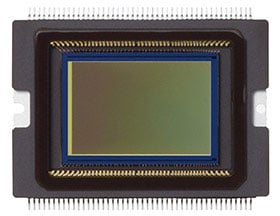
Sensor. The story of the Canon EOS 70D begins and ends with its 20.2 megapixel, APS-C CMOS image sensor. It's absolutely unique, with two photodiodes sitting under a single shared microlens at each pixel location. This, as we've described in much more detail further up the page, allows Canon to provide for on-chip phase detection at every pixel location over almost two-thirds of the sensor's surface area.
The new sensor is also slightly higher-res than the 18.0 megapixel chip of the EOS 60D, although the difference is modest and accompanied by a reduction in pixel pitch from 4.3 to 4.1µm. Simultaneously, the sensor's active area has increased slightly to 22.5 x 15.0mm, bringing a minute reduction in the focal length crop from 1.61 to 1.6x.

Processor. The Canon 70D replaces its predecessor's DIGIC 4 image processor with a newer DIGIC 5+ variant, first seen in the EOS-1D X professional digital SLR. The new processor allows improvements both in performance, and in image quality.
Performance. In terms of performance, the Canon EOS 70D brings a 26% increase in our lab-measured burst-shooting speed, from the 5.3 frames per second of the 60D to a swift 6.7fps in the newer camera.
The performance (and increase in performance) don't quite match those claimed by Canon, but they're in the ballpark, and you'll certainly notice the extra speed.
Sensitivity. Equally important is the Canon 70D's noise performance. Here, the extra horsepower of DIGIC 5+ allows more sophisticated noise reduction algorithms, while the newer sensor design is said to mitigate effects of the reduced pixel pitch. Canon claims raw performance to be on par with the EOS 60D at like sensitivities, despite the slightly higher resolution, and our testing backed that up -- at the pixel level, both cameras turn in a very similar performance.
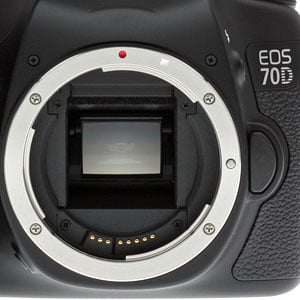
Thanks to these improvements, the Canon 70D sports an expanded default ISO sensitivity range of 100 to 12,800 equivalents, with the ability to push to ISO 25,600 if needed. By contrast, the 60D topped out at ISO 6,400 ordinarily, with an expansion to ISO 12,800 available. The difference is, it has to be said, much as you'd expect given the three additional years of development possible since the 60D's release.
Lens mount. As you'd expect in an enthusiast EOS-series camera, there's a Canon EF lens mount that's also compatible with EF-S lenses.
35mm lenses have a 1.6x focal length crop when mounted on the EOS 70D. Two kit lens choices are available; either the 18-55mm STM lens, or the 18-135mm STM lens. Alternatively, you can buy the body alone, and supply your own lenses.

Autofocus. This, more than anything else, was obviously a key target for improvement in the Canon 70D. We've already detailed the new on-chip autofocus system, dubbed Dual Pixel CMOS AF, so if you've skipped ahead, scroll up to our "Close Look at the Canon 70D's Dual Pixel CMOS AF" for in-depth info.
Briefly, though, Canon's new system allows it to provide for phase detection at every pixel location across 80% of the frame height, and 79.56% of its width, both for still image shooting in Live View mode, and more importantly, during video capture. The system is accurate enough that there is no need for a fine-tune with contrast detection autofocus after phase detection has completed. Since it covers so much of the frame, it also allows phase detection autofocusing at apertures where dedicated sensors no longer work. Its main drawback, other than the fact you can't use the optical viewfinder, is that it operates only on one axis, and so isn't sensitive to vertical detail.
You're only going to derive the benefit of that system for movies and Live View, however. In regular still-image shooting through the viewfinder, the Canon 70D reverts to a dedicated phase detection sensor. It's not a new chip, but it's new to this class, and borrowed from the Canon EOS 7D. It provides 19 autofocus points, each of them a cross-type, optimized to detect both horizontal and vertical features. In the center of the screen is an X-type sensor, designed to detect diagonal lines as well. It also requires lenses of f/2.8 or better, while the other points will work up to f/5.6.
The dedicated AF sensor has a working range of -0.5 to 18 EV (at 23°C/73°F, ISO 100).

Viewfinder. The Canon 70D features an eye-level pentaprism viewfinder with just over 97% coverage according to our lab testing, slightly improved from the 60D, which had a little over 96%. (The 50D had 95% coverage, so the figure is gradually creeping closer to the ideal, although Canon still lags some more affordable competitors in this area.)
The viewfinder magnification is unchanged from the 60D, at 0.95x (-1m-1 diopters with 50mm lens at infinity). Also unchanged is the eyepoint: 22mm from the center of the eyepiece lens.

Just like the 60D, the Canon EOS 70D provides a diopter adjustment range of -3.0 to +1.0m-1 diopters. However, it now lacks its predecessor's ability to exchange focusing screens, and instead features a fixed transmissive LCD screen.
Display. Just like its predecessor -- which introduced the feature to the EOS line -- the Canon 70D includes a tilt / swivel LCD display (or Vari-Angle, in Canon parlance). The tilt mechanism allows the LCD to be folded out 90 degrees to the left of the 70D's body, while the 270-degree swivel mechanism allows the screen to be turned 180 degrees to face upward or forward, or 90 degrees in the opposite direction to face directly downward. This also allows the LCD to be stowed facing inward, offering a modicum of protection against light bumps, scratches, and fingerprints.
The Canon 70D's screen comprises a three-inch, gapless Clear View II TFT LCD panel, in place of its predecessor's Clear View type. The change should translate to reduced glare and better contrast under strong ambient light. Dot count is still 1,040,000 dots, which roughly equates to a 720 x 480 pixel array. The Canon 70D's panel has 100% coverage and 170-degree viewing angles. Display brightness is adjustable in seven steps.

Touchscreen. Unlike the 60D, the Canon EOS 70D's display is overlaid with a touch-sensitive panel, allowing it to serve as a user interface element.
It's a capacitive panel like those found on most smartphones these days, and is particularly useful for touch autofocus during video capture, letting you seamlessly guide your viewers' attention from one subject to another with subtle focus changes.

Exposure. The Canon 70D offers a third fewer exposure modes on its Mode dial than did the 60D, a change that makes it rather simpler and more approachable. Modes that have been retained include the obvious Program, Aperture-priority, Shutter-priority, and Manual, plus Camera User, Creative Auto, and Flash Off. The Full Auto mode has been replaced by an Auto+ (aka Scene Intelligent Auto) mode, the Movie mode dropped altogether, and the five Scene modes that previously merited their own Mode dial positions have been combined into a single Scene position.
Metering. Like the 60D before it, the Canon EOS 70D includes a 63-zone iFCL metering sensor, which has a dual-layer design. Each layer is sensitive to different wavelengths of light, allowing subject color to be taken into account when determining exposure. Information on focusing points is also considered in metering calculations.

The Canon 70D's exposure metering options include 63-zone Evaluative, Center-weighted Average, Partial (7.7% of image frame at center), and Spot (3.0% of image frame at center). Metering sensitivity range is specified at 1 to 20 EV (at 23°C/73°F, with 50mm f/1.4 lens, ISO 100).
Shutter. Available shutter speeds from the electronically-controlled focal plane shutter in the Canon 70D range from 30 to 1/8,000 second in 1/2 or 1/3 EV increments. There's also a bulb mode of unstated maximum duration. Shutter life is rated by Canon at 100,000 cycles, unchanged from the EOS 60D.

Internal flash. Befitting its status as a non-pro camera, the Canon EOS 70D includes a built-in flash, something that consumers appreciate, and enthusiasts may find benefit from occasionally, as well. (It's nice not to have to carry an external strobe on every trip, just in case.)
The 70D's built-in, popup flash strobe has a guide number of 12 meters (~39.4 feet) at ISO 100. Coverage is approximately 27mm (35mm-equivalent), and X-sync is at 1/250 second.
External flash. As well as the built-in flash, there's an intelligent hot shoe compatible with EX-series Speedlites and Canon's E-TTL II metering system. Both Canon's IR and radio-controlled wireless flash systems are supported, with the appropriate hardware.
Level gauge. Canon has included a single-axis electronic level function in the EOS 70D, capable of indicating side-to-side roll. Unlike some competing cameras, there's no front-to-back pitch indication, however. That means you should be able to ensure level horizons, but you won't get any help with preventing converging verticals.

Sealing. Just like its predecessor, the Canon EOS 70D includes weather sealing. Canon describes the camera as dust and moisture resistant, and says that it is sealed to the same degree as was the EOS 60D.
Creative. As well as the various exposure modes mentioned previously, the Canon 70D includes quite a few multi-shot and effects shooting modes.
The HDR mode shoots three images with a range of +/- 3 stops, and then merges the trio in-camera to create a single image with greater dynamic range. Images can be microaligned for you before merging, if you're shooting handheld.
HDR Backlight control is similar, except that you cannot disable image microalignment, and that the algorithms are optimized to draw out shadow detail while retaining highlight detail.
Multiple Exposure mode overlays anywhere from 2 to 9 sequential images -- or you can use a raw file as a starting point -- to create a single cumulative image. Two methods of merging are possible. Additive mode is similar to what you'd get when exposing a frame of film twice. In Average mode, every pixel's value is simply the average of that pixel location in all of the source images.
In Handheld Night Scene mode, the 70D will capture four sequential exposures, raising sensitivity enough to attain a hand-holdable shutter speed. It will then merge all four in-camera, averaging out some of the noise across exposures. The result: a handheld picture with less noise than you might expect, so long as your subject is reasonably static.
Finally, there is a choice of seven different Creative Filter effects in the 70D. These include Grainy Black and White, Soft Focus, Fisheye Effect, Toy Camera Effect, Miniature Effect, Art Bold Effect and Water Painting Effect. Each offers three different effect strengths, and can be previewed before shooting your final image.
Video. The 70D doesn't just provide for still imaging. Video can be captured, too, at up to Full HD (1920 x 1080 pixel) resolution. When shooting at this maximum resolution, you have a choice of 30, 25, or 24 frames per second. At 720p HD (1280 x 720 pixels), your choices are 60 or 50 frames per second. Finally, there's a VGA (640 x 480 pixel) mode, recorded at 30 or 25 fps.
Full-time phase detection movie autofocus is possible, although you can opt for single AF or manual focusing, should you prefer.
You can choose to control exposure either fully automatically, or fully manually. If set to a Priority or Bulb mode, the EOS 70D will use Program autoexposure. It's also possible to use Auto+ exposure, which will be set whenever any Basic Zone mode is dialed in.
Exposure lock is available in Creative Zone modes, and you can also apply exposure compensation. ISO sensitivity ranges from 100 to 6400 equivalents in Basic Zone modes, and can be raised as high as 12,800 equivalent in Creative Zone modes.
All movies use H.264 / MPEG-4 AVC compression, but you have a choice of ALL-I or IPB compression with high-def movies. VGA movies always use IPB.
By default, audio is captured with a built-in stereo microphone. Both an external mic jack and manual audio levels control capability are also provided. There's also a wind filter function.

Connectivity. The Canon 70D features similar connectivity to the full-frame Canon 6D, including built-in Wi-Fi for remote shooting, sharing and transferring of photos with Canon's EOS Remote App. Note, though, that the Wi-Fi connectivity is not available in all markets. For some markets, a variant called the Canon EOS 70D (N) will be sold, and this will not include Wi-Fi.
this currently available only for iOS and Android devices. If you're using a smart device running BlackBerry's eponymously-named operating system, Nokia's now-largely-retired Symbian OS, or Microsoft's Windows Phone, Windows RT, or Windows 8 operating systems, you're out of luck.
There's also one important difference from the Canon 6D in the connectivity department. Unlike that camera, there is no GPS in the Canon 70D. Other connectivity features are standard fare, including both a USB 2.0 port and HDMI output (mini-HDMI, type C). There is also a 3.5mm microphone jack for attaching an external mic.
Storage. The 70D accommodates SD/SDHC/SDXC cards for storage, just like the 60D and 6D, and similarly features only a single card slot.

Power. The 70D employs a Canon LP-E6 rechargeable lithium ion battery for power. The battery is CIPA-rated for 920 shots on a single charge.
Accessories. A range of accessories are available for the Canon EOS 70D. If you shoot with the 60D, you'll be pleased to hear that quite a few -- including the LP-E6 battery packs, LC-E6 battery charger, ACK-E6 AC adapter kit, and CBC-E6 car battery charger kit -- can be used with your 70D. You can also keep your Angle Finder C, dioptric adjustment lenses, viewfinder eyepiece frames, remote switches, and cables.
There is one accessory you'll need to buy anew, though, and sadly it's one of the most expensive. The Canon EOS 70D uses a new portrait / battery grip, the BG-E14, priced at around US$270. The BG-E9 grip used with the 60D will not work with the newer camera.
Dual Pixel Af
A Close Look at the Canon 70D's Dual Pixel CMOS AF
As the years go by, we see camera technology advance by fits and starts. Some developments are a bigger deal than others, but it's rare that anything really amounts to a true technological breakthrough. However, the Canon 70D's Dual Pixel CMOS AF system qualifies.
This new AF system is as revolutionary a development as any we can remember seeing since the dawn of the DSLR era itself. By integrating accurate, fully-capable phase-detect autofocus over a majority of the image sensor's surface, Canon is fundamentally rewriting the book on autofocus.
The Canon 70D delivers phase-detect autofocus across an area that's fully 80% of the height and width of the sensor, that allows any area within that region to become a focus point, that can remain operational during video recording, and that will operate at any aperture. It's a whole new AF ballgame, and one that's going to shake the DSLR video business to its roots.
So what's all this Phase-Detect stuff about, anyway? Let's start by understanding how camera autofocus systems work. There are two main types of autofocus, namely contrast-detect and phase-detect. Consumer digicams invariably use the former, while SLRs use the latter. Each has its advantages, but phase-detect systems are generally faster, and they have other benefits as well.
So-called contrast-detect AF works by analyzing the image to see how sharp details are, and then trying to adjust the focus to increase sharpness. The reason it's called contrast-detect is because the sharpness measurement consists of calculating the contrast or brightness difference between adjacent pixels across the AF frame. As the image becomes more sharply focused, this contrast increases, so focusing is just a matter of maximizing the overall contrast of the subject.

Phase detection:
In each figure (not to scale), the purple circle represents the object to be focused on, the red and green lines represent light rays passing through apertures at the opposite sides of the lens, the yellow rectangle represents sensor arrays (one for each aperture), and the graph represents the intensity profile as seen by each sensor array.
Figures 1 to 4 represent conditions where the lens is focused (1) too near, (2) correctly, (3) too far and (4) much too far. The phase difference between the two profiles can be used to determine which direction and how much to move the lens to achieve optimal focus.
The thing is, the only way to tell whether the subject is in focus -- determining that the contrast is at a maximum -- is to nudge the lens one way or the other, and see if the contrast increases or decreases. This takes time, and if you're recording video, you'll see the image shift in and out of focus as the camera "hunts" for the best setting.
By contrast (sorry, bad pun), phase-detect AF works by actually measuring how much out of focus the subject is, and in which direction, then moving the lens exactly the amount needed. This is much faster, and there's no hunting involved.
The trick, of course, is measuring the out-of-focus amount; how does the camera do that? If you're old enough to remember split-image viewfinders on film SLRs, that's exactly how phase-detect autofocus works, only electronically. The key is looking at light rays coming through opposite sides of the lens, and seeing whether they line up or not. If you think about it, for an object to be in focus, the light rays from both sides of the lens have to meet at the same place. If the subject is out of focus in one direction, the light rays will run into the sensor before they have the chance to converge. If it's out of focus the other way, the light rays will pass each other before hitting the sensor. The illustration at right (courtesy of Wikipedia) illustrates this.
In SLRs, the phase-detection measurements are made via a separate AF sensor, usually located in the bottom of the mirror box. A portion of the mirror is partially-silvered, letting light pass through, bounce off a secondary mirror, and then down onto the AF sensor itself. This brings with it some limitations.
For one, the AF sensor needs to be precisely positioned, so light rays will travel exactly the same distance to reach it as they will to reach the image sensor. If the AF sensor is just a little out of alignment one way or the other, the camera will back-focus or front-focus (that is, focus behind or in front of the subject). These days, many cameras let you make micro-focus adjustments electronically, but you often need different adjustments for different lenses, or even different focal lengths of the same zoom lens.
For video shooting, the huge disadvantage is that the phase-detect AF system can only operate when the mirror is down. Raise it and the light goes to the image sensor, so it's an either-or proposition. A few years ago, Sony developed a unique translucent-mirror technology used in their SLT cameras, which lets phase-detect AF operate all the time. This was quite a breakthrough, as it's not only better at tracking moving subjects (since it's "looking" at them all the time), but it can also remain active during video recording.
This leads us to another major limitation, though: Because it needs light rays approaching the sensor from different angles, phase-detect AF typically can only operate at fairly wide apertures, usually f/5.6 or larger. This isn't a too much of a problem for still photographers, as the lens can be kept wide open for focusing, then stopped down to take the actual picture. Shooters with long lenses and teleconverters can have a hard time, though, because that combo often results in maximum apertures that are too small. The aperture limitation also rears its head with Sony's SLT system: While the AF can remain active during video recording, you can't stop down the lens and also keep your AF going as well. If you want to shoot video with the lens stopped down, you'll be back to manual focusing again.
On-chip Phase-Detect AF. Recently, technology has been developed that places phase-detect elements directly on the image sensor itself. Pioneered by Fujifilm, but now available from a wide range of camera makers, this technology has to date been only a partial success, as many such systems have proven to be rather slow, and haven't entirely eliminated focus hunting. (The exception being the Nikon 1 series, which manage to focus quite quickly indeed.)
On-chip PD systems work by "shading" some of the pixels on the array, so they'll only see light arriving from one side of the lens or the other. With CMOS sensors, pixels can be read out individually, so the camera can use these special, shaded pixels as if they were part of a separate phase-detect sensor, to compute subject distances.
Most systems using on-chip PD technology are labeled "hybrid AF," because it turns out the phase-detect system can't get the entire job done on its own. Instead, what happens in most cameras is that the on-chip PD elements are used to get the lens close to correct focus, then contrast-detect is used to fine-tune it the rest of the way. This can cut some time relative to a purely contrast-detect focusing system, but it's not as fast as full phase-detect focusing, and there's still some hunting involved to achieve and maintain focus.
Another issue with on-chip PD as it's been practiced thus far, is that the pixels used as PD elements are shaded, meaning there isn't as much light hitting them as their neighbors, so the camera's image processor has extra work to do to compensate for this. It may not be a lot of extra work, but there's clearly at least some hit on the processor to cope with it.
Perhaps because of this processing overhead (or perhaps for other technical reasons as well), on-chip PD systems to date have involved only a relatively limited number of PD pixels, behaving more or less like the AF points on a conventional SLR's AF sensor: Frame coverage has been limited and discontinuous.

The breakthrough: Canon Dual Pixel CMOS AF. With the sensor used in the EOS 70D, Canon broke the mold, asking why it shouldn't be possible to equip every sensor pixel with phase-detect capability. Of course, in doing so, they couldn't arbitrarily throw away half of the light falling on the chip, by shading the pixels the way conventional on-chip phase-detect systems do. That would cost them a full stop of ISO sensitivity, and who knows what odd optical artifacts might result as well.
The solution was to split each sensor pixel into two sub-pixels, each receiving light from the half of the lens' light cone that it normally would in a sensor with conventional microlenses. I'm not enough of an optical scientist to be able to describe in detail how light travels through microlenses, but it seems reasonable that light rays striking a microlens from one side of the frame end up hitting the same side of the underlying photodiode. It's not clear at this point whether Canon figured out a way to insert a light barrier vertically into the microlens structure to improve the separation between light rays arriving from opposite directions, if they somehow altered the microlens structure to achieve the same end, or whether conventional microlens structures inherently create enough separation on their own. Whatever they did, it apparently does give them enough separation between light arriving from different directions that they can perform effective phase detection.
However they're manipulating the incoming light, they've split the photodiode for each pixel into two halves, so they can read out image data corresponding to top-arriving and bottom-arriving light rays separately. Based on what Canon has told us, they can also read out both sides simultaneously, for normal imaging. In fact, it appears that they can read out data from the two pixel halves separately and together at the same time, when they're recording video. That sounds a little tricky to do on a pixel-by-pixel basis, but perhaps they're taking advantage of the much lower resolution of video to do the two different types of readout on alternating rows of pixels.

We believe that the split pixels are still managing to collect the same amount of light overall as a conventional, un-split structure, based on a study of the Canon 70D's low light/high-ISO performance. Were they only collecting only a portion of the incoming light, we'd have expected that to show up as significantly decreased sensitivity/higher noise, and we didn't see any such increase. It's possible, though, that sensitivity / noise improvements in other areas of the sensor and imaging pipeline are sufficient to mask any deficit caused by the split-pixel design. Only Canon knows for sure if there's a drawback at the sensor level, but the important thing to note is that overall we saw slightly better high ISO performance from the 70D than its predecessor, while at the same time it offers the uniquebenefits of Dual Pixel CMOS AF.
The Canon 70D's Dual Pixel AF operation varies slightly, depending on whether it's in still shooting or video modes: When running in still capture mode, the camera determines the degree of focus adjustment needed before commanding the lens to move, while in video capture mode, focus determination and lens movement occur continuously and simultaneously.
40.3 megapixels of AF: Primer for the Canon 70D's radical Dual Pixel AF system, offering PDAF at every pixel across most of the sensor surface. |
Canon 70D Dual Pixel Autofocus Options
When it comes time to actually use the Canon 70D's Dual Pixel AF system, you have four options. They are:
- Flexi-zone with a small, movable box: This mode gives you a smallish box that you can move anywhere in the frame you want, at least within the 80% vertical and horizontal boundaries mentioned above.
- Flexi-zone with entire AF area: This mode displays large brackets on the LCD, delineating the 80% area coverage of the AF system. Anywhere within that area, the AF system will select and lock onto the subject that's closest to the camera.
- Face Detect mode: Nikon has for some time now taken advantage of its relatively high-resolution RGB exposure sensor to provide face detection, in conjunction with the camera's specific phase-detect AF points. The idea there is that the exposure sensor-based face detection selects the conventional AF point overlaying the detected face to set focus with. This was a very welcome feature, and Nikon deserves high praise for bringing it to market, but it of course was limited by the fixed locations of the AF points.
With the Canon 70D, though, face detection has no limitation other than the inherent 80% area mentioned above. The system can precisely locate a face anywhere within that area, and place an AF box exactly around it. It's not a matter of picking the closest fixed point overlying the detected face, but rather constructing a custom "AF point" that exactly matches the face. This is huge, as you don't have to give a thought to whether your subject is near an AF point or not: You can create a custom AF point anywhere within the available area, and that AF point can move to follow the face. Very cool! - Touch Select AF: This is especially nice for videographers. We applauded a similar feature on some of Panasonic's Micro Four Thirds cameras in recent history, that let you set focus points during live video recording simply by touching the appropriate point on the LCD screen. The touch-select AF feature on the Canon 70D works similarly, but with phase-detect rather than contrast-detect AF, so there's no hunting (although cameras like the Panasonic GH3 do remarkably little "hunting", given that they're using contrast-detect AF).
Canon shared with us a movie called "Handmade" (below), which shows just how useful this feature is in video production: Also check out the "Making of Handmade" video (further below) for examples of just how well and smoothly this feature works. There's unfortunately no control over how quickly or slowly the focus racks between positions, but the rate Canon chose seems like a good compromise for most situations.
When used with one of Canon's new stepper-motor-equipped (STM) lenses, the resulting autofocus operation is not only quick and smooth, but supremely quiet. Even in a room with relatively little ambient noise, we've been hard-pressed to hear any focus-motor noise on the audio track.
Handmade: A short film showcasing the Canon 70D's new Dual Pixel AF system. Click to download 105MB MOV file. |
Why is the Canon 70D's Dual Pixel Autofocus so cool?
As I mentioned above, we see the new Dual Pixel CMOS AF technology in the Canon 70D as a genuine game-changer for DSLR video. Why? Here are a few reasons:
- Fast, and no hunting. First and foremost, this new AF system is not only fast and accurate, but there's none of the "hunting" that's an unfortunately necessary side-effect of contrast-detect systems. The camera always knows exactly how much the lens is in or out of focus, so it doesn't have to rack focus back and forth to figure it out. Seeing the 70D's AF system working next to a conventional contrast-detect one makes us realize just how much we've been putting up with, just to be able to autofocus during live video recording. There's simply no comparison.
- No possibility of front- or back-focusing. As we discussed above, conventional phase-detect AF systems can misfocus if the AF sensor is slightly out of position, or even due to differences between lenses' internal calibration settings. This has always been the strong point for contrast-detect AF, namely that the main image sensor is being used to determine focus accuracy. When something's in focus with a contrast-detection based system, it's by-golly in focus.
With the advent of full-sensor phase-detect AF in the Canon 70D, the same is now true for it as well: When the system says things are in focus, there's no question of whether a separate AF sensor is lined up properly with the image sensor; they're one and the same. (Of course, this is only true for Live View mode. In standard shooting, the 70D still uses a separate phase-detect sensor that's subject to the same tolerances as any other DSLR. And even with the on-chip phase-detect, there are always possibilities for error with any system. In our testing, we found the 70D's focusing to be very accurate.)
- Superb focus tracking of moving subjects during video recording. As you can see in our focus test published last August, focus tracking on the Canon 70D is superb. Bottom line, the camera behaves exactly as any consumer (or pro, for that matter) would expect it to: It held focus on the subject, without wavering.
- Extremely accurate. In any phase-detect AF system, focus accuracy is a strong function of the "baseline" of the AF sensor. The greater the angle of the incoming light rays and the longer the distance between AF sensor elements, the more precise the focus will be. This is why many higher-end cameras have special "high accuracy" central points, that kick in at apertures of f/2.8 or larger. Taking advantage of the wider light cone at very wide apertures, they use a second set of AF pixels spread further apart from each other to achieve greater accuracy.
With the Canon 70D's image sensor, the effective AF baseline can be made as wide as the lens will allow, since there's no restriction caused by a fixed AF-sensor geometry. As the aperture gets wider (and you really need the added focus precision due to shallower depth of field), the camera can simply select a more widely-separated group of pixels to use for its focus measurement. There's no limit to this, either. An f/2 lens will give higher AF accuracy than an f/2.8 one, and an f/1.2 lens will be even more so.
- No aperture limitation. This is huge. Again as we described above, most photographers are accustomed to the fact that their SLR AF systems just won't work with apertures smaller than a particular limit, most commonly f/5.6, but sometimes as high as f/8. F/11 or f/16? Forget about it.
Thanks to the ultra-flexible, full-array nature of the Canon 70D's AF system, it suffers no such limitation. This is great news for photographers using long lenses with teleconverters. Put a Canon 100-400mm f/4.5-5.6 zoom on a 2x teleconverter, and there's no chance it will autofocus on a normal SLR body, but the 70D will have no problem so long as you're shooting in Live View mode. Videographers will also be thrilled to be able to stop down while recording video, without losing AF. Contrast-detect based AF systems can of course work at any aperture setting, but at the cost of slower operation and focus hunting.
The making of Handmade. A behind-the-scenes look at shooting with the Canon 70D DSLR. Click to download 221MB MOV file. |
What won't the Canon 70D's Dual Pixel AF system work for? If all this sounds too good to be true, it probably is; nothing's ever a complete panacea. In the case of the 70D, Dual Pixel AF shouldn't be your first choice for applications like fast-action sports shooting. But don't worry, the Canon 70D inherited the same dedicated phase-detect AF system found in the EOS 7D, which is active when using the optical viewfinder. The system features 19 autofocus points, each of them a cross-type, optimized to detect both horizontal and vertical edges. In the center of the screen is the X-type sensor, designed to detect diagonal edges as well. It also requires lenses of f/2.8 or better, while the other points will work up to f/5.6. It won't bring any of the benefits of the Dual Pixel AF system, but it also won't require use of Live View mode. You can read more about it in our Canon 7D review.
Pro or Amateur: Who's it for? Sometimes, technological advances only make a difference for either pros or amateurs, but Canon's Dual Pixel CMOS AF is a fantastic innovation for everyone. For the professional videographer, it's a seriously big deal, for all the reasons we just discussed. For amateurs, it might be even bigger, though: Finally, there's a DSLR that shoots video the way the average consumer would expect it to.
In the full-area Flexi-Zone focusing mode, you can just point the camera at your subject, and it'll focus and stay focused, regardless of what the subject does, as long as there's nothing else closer to the camera. Or, just use the Touch-Select mode, and focusing is as simple as pointing your finger. When you're recording, there'll be no drifting in and out of focus, the picture will stay crisp and sharp. If pro videographers will flock to the Canon 70D, amateur users should even more so.
Bottom line, Canon's Dual Pixel CMOS AF is a true quantum-leap in technology. In fact, we may have already found our Technology of the Year for 2013.
Conclusion
| Pro: | Con: |
|---|---|
|
|
The Canon 70D (70D prices and deals) ultimately may not have delivered what everyone wanted or expected -- a significant upgrade in still image quality over its predecessor, the 60D -- but instead it ushered in a new technology so unexpected (and useful) that there's no way we could be disappointed. For those looking for a better increase in image quality, we'd recommend the Nikon D7100 (70D vs D7100). But we love when a camera manufacturer surprises us with a treat like Canon's Dual Pixel CMOS AF technology. After all, a rare, groundbreaking innovation like this doesn't come around too often.
What's even better is that the 70D's full-time phase detection autofocus system for video and Live View shooting -- with PDAF at every pixel in the AF area -- more than lives up to its promise. We were thoroughly impressed by how quickly and accurately the Dual Pixel CMOS AF operated. For movies, this technology finally puts true camcorder-like performance into an HD-DSLR; it's been a long time coming. Racking focus between near and far subjects is especially easy and smooth with the 70D's LCD touchscreen touch-to-focus feature. And when using Live View for still shooting, the advanced autofocusing felt nearly as fast as traditional viewfinder shooting under most scenarios.
It's not just the Canon 70D's revolutionary AF system that makes it a video powerhouse. The camera is capable of Full 1080p HD recording at 24fps and 30fps, offers ALL-I and IPB compression modes and provides many other pro-level features. While its videos may exhibit a bit more moiré than, say, the 5D Mark III and other higher-end models, the 70D produces excellent quality movies for its class. We just wish you could shoot video remotely via the camera's otherwise-stellar built-in Wi-Fi system.
Speaking of Wi-Fi, our reviewer had a blast setting up and using the 70D's remote still shooting mode to capture some hummingbirds outside in the summer heat while he rested in his air-conditioned living room waiting for the right moment. Using Canon's EOS Remote app (available for both iOS and Android smartphones), you maintain full control of exposure and focus while you're photographing from a distance -- not something every camera's Wi-Fi's system can do, but they should. Combine this with the camera's 3-inch, 270-degree articulating LCD touchscreen, and you've added a lot of versatility that goes a long way to help you get just the right shot.
Finally, we return to the still image quality issue. First off, let it be known that the Canon 70D still takes great pictures, just not ones that are exceedingly better than the 60D or 7D can take. Some Canon fans are understandably upset about this. The dynamic range isn't much better either, and the 70D still trails many of its competitors in this area. It does improve a bit in resolution, moving up to a 20.2-megapixel APS-C CMOS sensor from an 18-megapixel one, without hurting much from smaller pixel sizes. And the camera does perform better at high sensitivities than its predecessors -- and many competitors. Its processing seems to be more even-handed and less aggressive with noise reduction at those pumped-up sensitivities.
The Canon 70D may not be what fans had hoped for, but it looks to us like it has laid a new foundation for autofocusing performance with a technology that we wouldn't be surprised to see rolled out in other Canon cameras in the near future. While it's not necessarily geared for everybody -- especially those who demand the ultimate in image quality -- it's still a remarkable prosumer DSLR that's especially ideal for video enthusiasts and independent filmmakers, as well as anyone who puts high value on quick and accurate autofocus (Yes, even the conventional AF is ferociously fast!). For all these reasons, the Canon 70D earns a resounding Dave's Pick, and its Dual Pixel CMOS AF system is among our early front-runners for our camera Technology of the Year.
Follow Imaging-Resource.com on Twitter!
Ready to purchase?
You'll find some standard bundles below, but for the absolute best bundle savings, check out our continuously-updated 70D deals page here!
Pros
- Dual Pixel CMOS AF delivers full-time continuous autofocus (with phase detect at every pixel in framing area) for video and Live View still shooting
- Full HD (1080p) video recording with pro-level features and quality
- Improved resolution and good high ISO performance
- Excellent Wi-Fi remote shooting with full exposure controls
- 3-inch articulating LCD touchscreen.
Cons
- Image quality only improved slightly over 60D
- Dynamic range still lags behind competing models
- May not feature enough upgrades to convince people to step up from 60D.