



Overview
Click here for our X-H1 Product Overview.
Fuji X-H1 Review -- Overview
by Jeremy Gray
Preview posted: 02/15/2018
There's a new leader in Fuji X series performance. Fujifilm's announced the brand-new X-H series of cameras with the X-H1, and it combines high performance, in-body image stabilization, improved video capabilities and more in the most durable X-series camera body yet.
The X-H1 includes a number of firsts for Fujifilm X series cameras, including being the first with in-body image stabilization and DCI 4K video recording. There are many smaller changes and even more familiar aspects, so let's take a closer look at the X-H1.
Fuji X-H1 Key Features
- Redesigned camera body with more durability and improved ergonomics
- 24.3-megapixel X-Trans CMOS III image sensor
- X-Processor Pro image processor
- In-body image stabilization
- New high-resolution OLED EVF
- 3-inch tilting touchscreen display
- Top "sub display"
- Up to 14 fps continuous shooting
- DCI 4K recording at 24 fps
- 4K UHD video at 30 fps
- High-speed video recording
- Internal F-log recording
- New ETERNA Film Simulation
- Built-in Wi-Fi and Bluetooth
Camera Body and Design

The Fuji X-H1 follows the same general design language as other high-end X Series cameras, but it also borrows elements from the medium format GFX and definitely looks a bit different from the X-T2, for example, when you look closer. We'll look at some of the design changes in the next section, but if you're a fan of Fujifilm ergonomics, don't worry, it's still very much a Fuji camera.
Design Changes
If you've ever wondered if companies listen to feedback on things such as ergonomics, Fujifilm certainly has been. The X-H1 incorporates many improvements based on feedback from professional photographers, including a larger grip design, a redesigned leaf-spring switch for the shutter release, a quieter shutter mechanism, a new focus level, a new AF-On button -- which should prove very useful for photographers preferring back-button autofocus -- and larger buttons on the rear of the camera.

Looking at the rear of the camera, we find a relatively sparse, no-nonsense assortment of buttons. There are playback and delete buttons to the left of the viewfinder and AE-L and AF-ON buttons to the right. There's a rear command dial, a small Q button to the right of the thumb grip, AF joystick, directional buttons and DISP/BACK button to the right of the 3-inch tilting touchscreen display. Gone is the AF-L button of the X-T2, although presumably the AF-ON button can be set to serve the same functionality, and the command dial is now all the way to the right of the rear buttons.
We see the biggest differences when we look at the top deck of the X-H1. First, there's now a top-deck status display, discussed below, and the exposure compensation dial is now gone, replaced with a dedicated button. The new grip is particularly obvious from above, as it is much larger than that found on the X-T2. The new shutter release is immediately evident as well. We are looking forward to getting our hands on the Fujifilm X-H1 later today, so stay tuned for more impressions of how the camera feels.

Displays: New EVF and new top display
The Fuji X-H1 has an all-new OLED electronic viewfinder, which has a higher resolution than previous Fujifilm X Series EVFs. In fact, the new viewfinder has a very high dot count of 3.69 million. This is right up there with the Sony A9 in terms of dot count and even matches Fujifilm's medium format camera, the GFX 50S.
Despite being higher resolution (3.69M versus 2.36M dots), the X-H1's EVF does however have a bit lower magnification than the X-T2 (0.75x versus 0.77x in 35mm equivalent terms). With that said, the X-H1's electronic viewfinder remains impressive on paper. The claimed display time lag is a mere 0.005 seconds, and the viewfinder panel has a frame rate of 100fps. Further, the EVF offers a 100% field of view.

The X-H1 includes a tilting touchscreen display. Like the X-T2, the LCD can tilt in three directions and has 1.04-million dots. This is the same rear display as the X-T2, but what makes the X-H1 different is its new, secondary top-deck display, which Fujifilm dubs the "sub-LCD." The 1.28-inch e-ink display is much like the one found on the GFX. It has light lettering on a dark background by default but can but this is reversed when the display is illuminated via its dedicated light-up button, presenting dark text on a light background.
More rugged
While the somewhat larger and heavier X-H1 may look generally similar to the X-T2, there are numerous changes to the body's construction. In addition to its dust & water resistance, and ability to operate in temperatures as low as 14° F (-10° C), the X-H1 has 25% thicker magnesium alloy than the X-T2. To help keep the X-H1 looking good even after extensive use, the body is coated with a new scratch-resistant material.

In-Body Image Stabilization
As mentioned, the X-H1 is the first X Series camera to include in-body image stabilization. The system works via three axial accelerometers and three gyro sensors, and includes a specially-developed dual processor that performs around 10,000 calculations per second. Fujifilm claims the 5-axis image stabilization system will deliver up to 5.5 stops of image stabilization when paired with certain XF and XC lenses, although the image stabilization system in general is compatible with all Fujinon XF and XC optics.
To help further combat blurry images, the X-H1 includes a new spring mechanism to reduce tiny vibrations created by the movement of the mechanical shutter. If you want to virtually eliminate all vibrations caused by normal operation of the camera, you can utilize the new electronic front curtain shutter option or the camera's fully electronic shutter.

Sensor and Image Quality
The imaging pipeline is familiar. Like the X-T2 and X-Pro2, the X-H1 features a 24.3-megapixel X-Trans CMOS III APS-C sensor and Fujifilm's X-Processor Pro image processor. The native ISO range is 200 to 12,800, which can be extended as low as ISO 100 and as high as ISO 51,200.
Fujifilm cameras are well-known for their Film Simulations and the X-H1 is no different in that respect, as it offers the standard suite of Film Simulations including the recently-added ACROS. However, it has a new trick up its sleeve, the new ETERNA film simulation mode. This mode is said to be ideal for movies but can be used for stills as well. The mode simulates cinematic film by producing subdued colors and rich shadow tones, which Fujifilm says allows for more flexibility during post-processing.

To help ensure better images in a variety of shooting conditions, the X-H1 is the first Fujifilm camera with flicker reduction. This allows you to capture stable exposures during burst shooting under fluorescent and mercury lights.
Performance and Autofocus
Speaking of performance, the X-H1 is quite quick. It can shoot at up to 14 frames per second with its electronic shutter and 8 frames per second when using the mechanical shutter, which are the same burst speed specs as the X-T2. The electronic shutter can shoot at up to 1/32,000s, while the mechanical shutter tops out at 1/8,000s. We will need to test the camera in our lab, of course, but Fujifilm states that you can expect a buffer depth of around 40 JPEG frames, 27 lossless compressed RAW images and 23 uncompressed RAW images when using the electronic shutter at maximum speed, and 80, 31 and 26 frames respectively when using the mechanical shutter for the same file qualities. These figures are however one to three frames lower than Fujifilm's X-T2 buffer specs, which are 42 JPEG, 28 lossless compressed RAW and 25 uncompressed RAW frames at 14 fps, and 83 JPEG, 33 lossless compressed RAW and 27 uncompressed RAW frames at 8 fps.

While the hybrid phase/contrast detect AF system is the same at its core as the X-T2's, with 325 total AF points and 91 Zone Focusing areas, Fujifilm has tinkered with the system's sensitivity and performance. The low-light limit for phase detection autofocus has been improved by about 1.5 stops, from +0.5 EV down to -1.0 EV. Further, the minimum usable aperture for lenses has gone from f/8 to f/11, meaning that you can use the Fujifilm 100-400mm lens with a 2x teleconverter and still have full autofocus on the X-H1. Fujifilm claims that major improvements have been made to the autofocus algorithms, particularly with respect to continually focusing while zooming the lens.
If you add the optional Vertical Power Booster Grip (VPB-XH1), which will be available in a kit with the X-H1, it can not only increase battery life to 900 shots (and 4K video recording to 30 minutes), but also boosts continuous shooting to 11 frames per second with the mechanical shutter. (Claimed buffer depths at 11 fps are 70 JPEG, 28 lossless compressed RAW and 24 uncompressed RAW frames.) What about battery life without the grip? Well, it's not that good. The X-H1 uses Fujifilm's existing NP-W126S lithium-ion battery pack, and the camera's battery life is only rated for about 310 frames on a charge.

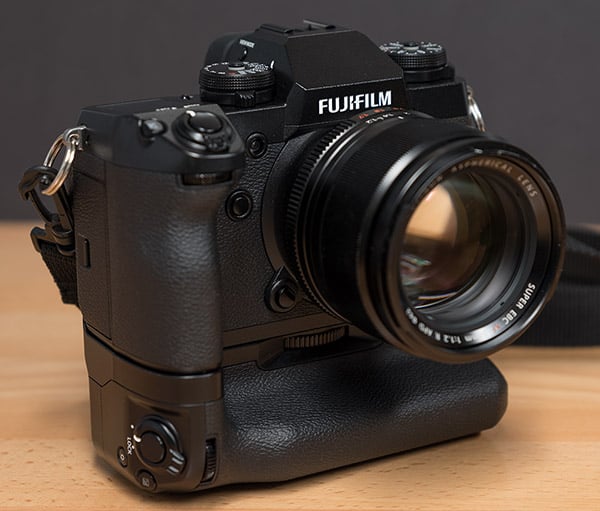
The VPB-XHI Vertical Power Booster Grip, in addition to increasing battery life considerably, has a few tricks up its sleeve. The grip is weather-resistant, like the body, and provides space for two additional NP-W126S batteries. It includes an array of buttons: shutter release, focus lever, AE-L, AF-ON, command dial, Q button and Fn buttons. It also includes a headphone socket so that sound can be monitored while recording video. Further, the grip includes a socket for direct recharging.
There is also a new Wide Eyecup EC-XH W accessory. This eyecup covers a broader area around the eyepiece which blocks out additional light, and the eyecup can be rotated in 90-degree increments, allowing it to be used with either eye, and for shooting vertically or horizontally.

Video: DCI 4K has come to the Fujifilm X Series
The X-H1 is the first Fujifilm camera to offer DCI 4K (4096 x 2160) video recording, and it includes internal F-log recording, making it the most pro-oriented video camera of any X Series camera to date. Further, it offers dynamic range recording settings up to 400%, which Fujifilm states offers approximately 12 stops of dynamic range. For the highest quality video, you can record video at a maximum bit rate of 200 Mbps. Further, audio has not been ignored, the X-H1 includes a new high-quality internal microphone (24 bit/48 kHz).
Looking more at the video recording options, the camera offers DCI 4K and 4K UHD (3840 x 2160) recording at up to 24 and 30 frames per second, respectively, with clip durations limited to about 15 minutes. If you want a higher frame rate, you need to reduce your recording quality to 1920 x 1080 (Full HD), which allows for 60 fps recording via normal modes and 120 fps via the special high-speed recording mode, with clip limits of about 20 and 6 minutes respectively. The high-speed mode allows for slow-motion videos with 1/2, 1/4 and 1/5 speed playback. There's also a 2K (2048 x 1080) mode at up to 60 fps with a 20 minute limit, as well as HD (1280 x 720) at up to 60 fps with a 30 minute limit. Video file format is MOV (MPEG-4 AVC / H.264) with LPCM stereo audio.

Ports and Connectivity
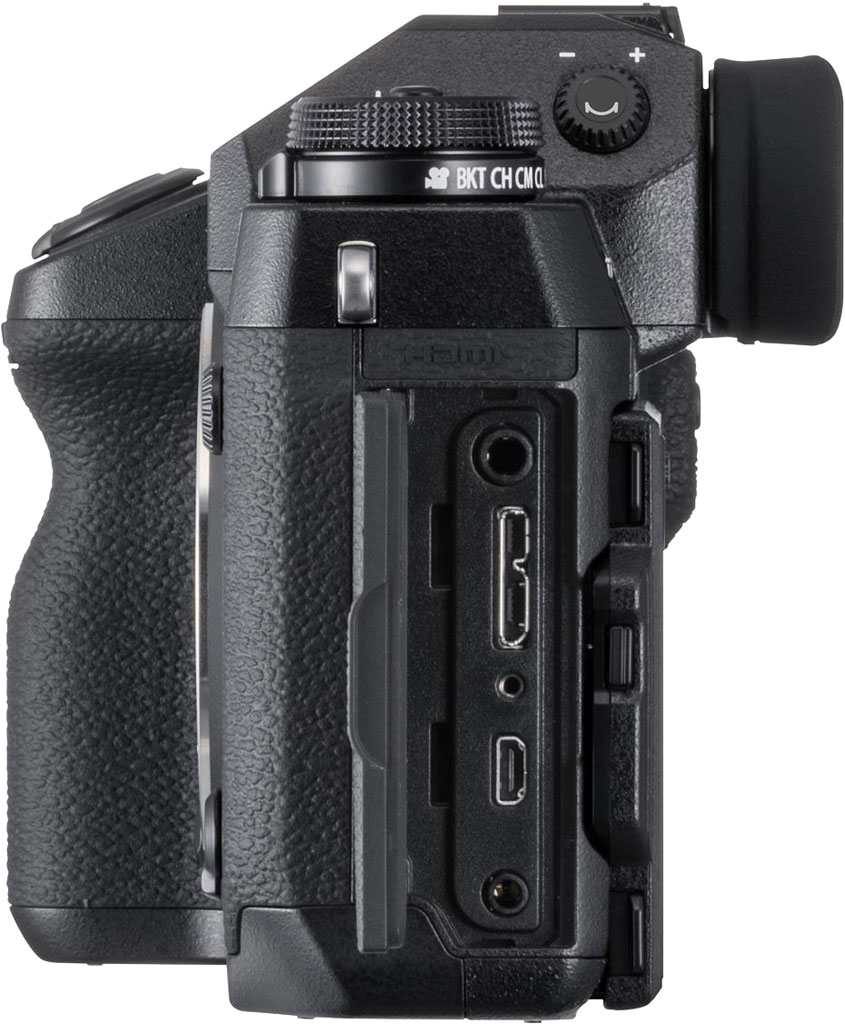
There are numerous ports on the X-H1, including a hot shoe on the top of the camera, a PC sync socket on the front, a USB 3.0 Micro-B port, a Micro (Type-D) HDMI port, a 2.5mm remote release jack, and a 3.5mm external mic jack.
The X-H1 also has dual SD card slots, both offering UHS-II compatibility.
For wireless connectivity, the X-H1 offers built-in Wi-Fi and Bluetooth. The Bluetooth is Ver 4.0 (Bluetooth Low Energy).
Fuji X-H1 Price and Availability
The Fujifilm X-H1 will be available starting March 1. The camera will sell body-only for US$1,899.95 and CAD $2,449.99. Accessories included are: NP-W126S battery pack, BC-W126 battery charger, EF-X8s hoe-mount flash unit, shoulder strap, body cap, strap clip, protective cover, clip attaching tool, hot shoe cover, grip connector cover, sync terminal cover, cable protector, and an Owner's manual. The X-H1 will also be available in a kit with the Vertical Power Booster Grip, which will sell for $2,199.95 and $2,799.99 in the US and Canada, respectively.
Image Quality
Below are crops from our laboratory Still Life target comparing Fuji X-H1 image quality to its less expensive sibling, the X-T2, as well as against several recent premium interchangeable lens cameras: the Nikon D500, Olympus E-M1 II, Panasonic GH5 and Sony A7 III. The Sony A7 Mark III is the only full-frame model in this comparison, however we decided to include it because at the time of writing it is selling for the same price as the X-H1, and because of Fujifilm's claim that their X-Trans APS-C sensors produce image quality that can rival full-frame Bayer-filtered sensors.
NOTE: These images are from best quality JPEGs straight out of the camera, at default settings including noise reduction and using the camera's actual base ISO (not extended ISO settings). All cameras in this comparison were shot with our very sharp reference lenses. Clicking any crop will take you to a carrier page where you can click once again to access the full resolution image as delivered straight from the camera. For those interested in working with the RAW files involved, click these links to visit each camera's respective sample image thumbnail page: Fuji X-H1, Fuji X-T2, Nikon D500, Olympus E-M1 II, Panasonic GH5, and Sony A7 III -- links to the RAW files appear beneath those for the JPEG images, wherever we have them. And remember, you can always go to our world-renowned Comparometer to compare the Fuji X-H1 to any camera we've ever tested!
Fujifilm X-H1 vs Fujifilm X-T2 at Base ISO
 |  |
 |  |
 |  |
Fujifilm X-H1 at ISO 200 | Fujifilm X-T2 at ISO 200 |
Above, we compare the X-H1 to its less expensive sibling, the X-T2, which shares the same sensor and processor hardware. As expected, image quality is very similar at base ISO with both cameras providing great image quality, though we do see the X-H1's image is just a bit sharper here. This is mostly due to the lenses used, though, as we had to retire our Fujinon 60mm f/2.4 lens which is a "focus by wire" design that was no longer focusing reliably. We will probably switch to the Fujinon 56mm f/1.2 in the long term, but in the meantime the X-H1 shots above were taken with the Fujinon 90mm f/2. Still, it appears Fuji has tweaked default JPEG processing, with a revised tone curve that produces brighter upper midtones and highlights, and slightly higher saturation of greens and reds. | |
Fujifilm X-H1 vs Nikon D500 at Base ISO
|  |
|  |
|  |
Fujifilm X-H1 at ISO 200 | Nikon D500 at ISO 100 |
Here we compare the Fuji X-H1 to the 20.7-megapixel APS-C Nikon D500 at base ISO. The 24-megapixel X-H1 does resolve a bit more detail than the Nikon, however the D500 produces a slightly crisper image with higher contrast which is especially noticeable in the red-leaf swatch, though sharpening halos are more evident from the Nikon around high-contrast edges. Noise levels are low from both cameras here at base ISO, however keep in mind the higher base ISO of the Fuji. Both cameras offer great color, though the Fuji's appears a little more accurate overall. | |
Fujifilm X-H1 vs Olympus E-M1 II at Base ISO
|  |
|  |
|  |
Fujifilm X-H1 at ISO 200 | Olympus E-M1 II at ISO 200 |
Above we compare the Bayer-filtered Micro Four Thirds Olympus E-M1 Mark II to the X-Trans-filtered APS-C X-H1. You would think the 24-megapixel X-H1 would have a noticeable resolution advantage over the 20-megapixel E-M1 II here, but both cameras have similar resolutions along the vertical axis (4000 vs 3888 pixels) which is how this scene is framed, so the resolution difference is very minor and mostly boils down to different demosaicing algorithms and processing. Luminance noise appears higher from the Fuji, but chrominance noise is higher from the Olympus. The Olympus produces a crisper image with higher contrast, though default sharpening also appears to be a bit stronger. The X-H1 actually resolves more fine detail in our red-leaf swatch even though contrast is lower, while the E-M1 II renders it smoother but with less fine detail, however the Olympus does better with thread pattern in the pink fabric. Both offer great color, but reds and greens are little more saturated from the Fuji. | |
Fujifilm X-H1 vs Panasonic GH5 at Base ISO
|  |
|  |
|  |
Fujifilm X-H1 at ISO 200 | Panasonic GH5 at ISO 200 |
Here, we compare the X-H1 to another high-performance 20-megapixel Micro Four Thirds camera, the Panasonic GH5. Again, not much difference against the 24-megapixel Fuji X-T2 in terms of captured resolution due to the different aspect ratios. The GH5 image is however a little more natural-looking, with some areas such as the fabrics showing better detail, while the X-H1 image is a bit sharper and contrastier overall. The red-leaf pattern is more faithfully reproduced by the Fuji, however again that's partially because the Panasonic is reproducing more of the fine thread pattern which breaks up the leaf pattern a bit. Colors are also just a little more accurate from the Fuji. | |
Fujifilm X-H1 vs Sony A7 III at Base ISO
|  |
|  |
|  |
Fujifilm X-H1 at ISO 200 | Sony A7 III at ISO 100 |
Above we compare the 24-megapixel APS-C X-H1 to the new 24-megapixel full-frame Sony A7 III. This isn't really a fair comparison, but the A7 III body lists for a similar price, and Fuji has claimed their X-Trans APS-C sensors offer image quality comparable to full-frame cameras. Here, the Sony produces a sharper, crisper image with better detail and lower noise, however there are noticeable moiré patterns in the red-leaf swatch. The Sony reproduces many of the offset printing colors in the mosaic crop and resolves much more of the fine thread pattern in the fabrics, but overall color is warmer and generally more pleasing from the Fuji. | |
Fujifilm X-H1 vs Fujifilm X-T2 at ISO 1600
 |  |
 |  |
 |  |
Fujifilm X-H1 at ISO 1600 | Fujifilm X-T2 at ISO 1600 |
Again, we see slightly sharper, crisper results from the X-H1, while noise levels appear very similar. The tone curve used by the X-H1 continues to produce a brighter overall image despite both images having near identical middle-gray levels (which is how we try to expose these shots). Subtle detail in our tricky red-leaf swatch appears to be just slightly better defined from the X-T2, though. | |
Fujifilm X-H1 vs Nikon D500 at ISO 1600
|  |
|  |
|  |
Fujifilm X-H1 at ISO 1600 | Nikon D500 at ISO 1600 |
Here at ISO 1600, the Nikon's rendering is much softer than it was at base ISO, while the X-H1's is only slightly softer, and the Fuji continues to resolve more detail in most areas. While contrast is still much higher in the red-leaf swatch, the D500's default noise reduction has blurred away more of the subtle detail than the X-H1. Luminance noise is however a bit higher from the X-H1, which is not unexpected thanks to its smaller pixels. | |
Fujifilm X-H1 vs Olympus E-M1 II at ISO 1600
|  |
|  |
|  |
Fujifilm X-H1 at ISO 1600 | Olympus E-M1 II at ISO 1600 |
The Fuji X-H1 starts to pull away from the Olympus E-M1 II here at ISO 1600, with much lower chroma noise and fewer noise reduction artifacts, though luma noise is higher and a little coarser. The Olympus E-M1 II's default noise reduction starts to distort and flatten subtle detail in the mosaic crop and especially in the red-leaf fabric. | |
Fujifilm X-H1 vs Panasonic GH5 at ISO 1600
|  |
|  |
|  |
Fujifilm X-H1 at ISO 1600 | Panasonic GH5 at ISO 1600 |
The GH5 compares fairly well with the X-H1 here at ISO 1600, producing an image with lower noise while holding onto almost as much detail, except in our troublesome red-leaf swatch where the Fuji does much better with fine detail. Overall contrast and color continue to be better from the X-H1. | |
Fujifilm X-H1 vs Sony A7 III at ISO 1600
|  |
|  |
|  |
Fujifilm X-H1 at ISO 1600 | Sony A7 III at ISO 1600 |
Unsurprisingly, the full-frame Sony A7 III out-performs the X-H1 here at ISO 1600, with a crisper, cleaner and more detailed image overall, although moiré patterns and area/frequency-dependent noise reduction artifacts interfere with subtle detail in the red-leaf swatch. Colors are still warmer and more pleasing from the Fuji, though. | |
Fujifilm X-H1 vs Fujifilm X-T2 at ISO 3200
 |  |
 |  |
 |  |
Fujifilm X-H1 at ISO 3200 | Fujifilm X-T2 at ISO 3200 |
Again, very similar image quality here at ISO 3200 between the two siblings, with the X-H1 continuing to provide a brighter, contrastier and slightly more saturated image. | |
Fujifilm X-H1 vs Nikon D500 at ISO 3200
|  |
|  |
|  |
Fujifilm X-H1 at ISO 3200 | Nikon D500 at ISO 3200 |
Once again, we see the Fuji X-H1 holds onto more detail than the Nikon D500 here at ISO 3200, though the D500 continues to produce higher contrast with more obvious sharpening halos. Luma noise levels are again a bit higher from the X-H1 but chroma noise is lower, and overall the X-H1 produced the better image here. | |
Fujifilm X-H1 vs Olympus E-M1 II at ISO 3200
|  |
|  |
|  |
Fujifilm X-H1 at ISO 3200 | Olympus E-M1 II at ISO 3200 |
The Fuji X-H1 is the overall winner here at ISO 3200, with better detail and fewer noise reduction artifacts than the Olympus E-M1 II. Luminance noise from the X-H1 does appear a little higher, but chrominance noise is lower, and the Fuji hangs on to more fine detail in most areas. Colors remain warmer and a little more pleasing from the Fuji as well. | |
Fujifilm X-H1 vs Panasonic GH5 at ISO 3200
|  |
|  |
|  |
Fujifilm X-H1 at ISO 3200 | Panasonic GH5 at ISO 3200 |
The Fuji X-H1 comes out ahead in this comparison as well. The Fuji image looks more refined and natural in areas of fine detail while the Panasonic's area-specific noise reduction tends to distort or blur fine elements a bit more than the Fuji. Luminance noise in flatter areas is lower from the Panasonic, but noise reduction artifacts are more visible compared to the Fuji's more film-like noise grain structure. The Fuji does significantly better with subtle detail in our red-leaf swatch, even though contrast is a little lower. | |
Fujifilm X-H1 vs Sony A7 III at ISO 3200
|  |
|  |
|  |
Fujifilm X-H1 at ISO 3200 | Sony A7 III at ISO 3200 |
The A7 III continues to produce a crisper, more contrasty and detailed image than the X-H1 here at ISO 3200. Noise levels are indeed lower from the full-frame Sony, though less natural-looking noise reduction artifacts can be seen in flatter areas. Overall, the Sony A7 III still comes out ahead here when viewed at 100% like this, but there is no denying the X-H1 does amazingly well for an APS-C camera. | |
Fujifilm X-H1 vs. Fujifilm X-T2, Nikon D500, Olympus E-M1 II, Panasonic GH5, Sony A7 III
 |  |  |  |  |  |
 |  |  |  |  |  |
 |  |  |  |  |  |
| Fujifilm X-H1 ISO 200 ISO 3200 ISO 6400 | Fujifilm X-T2 ISO 200 ISO 3200 ISO 6400 | Nikon D500 ISO 100 ISO 3200 ISO 6400 | Olympus E-M1 II ISO 200 ISO 3200 ISO 6400 | Panasonic GH5 ISO 200 ISO 3200 ISO 6400 | Sony A7 III ISO 100 ISO 3200 ISO 6400 |
| Detail comparison. High-contrast detail is also important, pushing the camera in different ways, so we like to look at it, too. The X-H1 performs very similar to its predecessor here, with both able to fully resolve the line pattern inside the lettering even at ISO 6400, and with the only noticeable differences being contrast and color. The X-H1 compares well to the Olympus E-M1 II and Panasonic GH5, with both Micro Four Thirds models dropping off in image quality more quickly as ISO rises. The APS-C D500 produces higher contrast across ISOs, but the Nikon isn't able to resolve quite as much detail as the X-H1, and it generates the most obvious sharpening halos. The Sony A7 III is easily the overall winner here with great detail and contrast, and the least image degradation as sensitivity climbs, though that's not a surprise given its full-frame sensor. Its default processing is arguably the most sophisticated as well, maintaining excellent detail, contrast and crispness while producing very few sharpening artifacts. | |||||
Very nice 30 x 40 inch prints all the way up to ISO 800; a pleasing 8 x 10 inch print at ISO 12,800; and a usable 5 x 7 at ISO 51,200.
 ISO 100 through 800 images look nearly identical, with tons of sharp, fine detail and vibrant, pleasing colors, each making excellent prints up to 30 x 40 inches -- the largest print size we test. Despite the range of ISOs here, there is very little visible noise to negatively impact print size. Up to ISO 400, images are extremely clean when it comes to noise, and ISO 800 shows just the faintest hint of noise in the flat shadow areas of our test target scene, but not enough to affect print size. Prints at 30 x 40 inches push the resolving power of the X-H1's 24-megapixel sensor; we can see a tiny amount of pixelation at very close inspection, but that's not an issue at normal viewing distance for prints of this size. Wonderful print quality all-around at these ISOs, particularly for an APS-C camera!
ISO 1600 prints from the X-H1 continue to perform very well for large sizes, offering a nice 24 x 36-inch print. We do, nevertheless, see visible noise in the shadow areas of our test scene at this ISO. However, the noise itself does little to negatively affect fine detail and color reproduction.
ISO 3200 images start to display a drop in fine detail due to the increase in noise. However, prints still manage to look great up impressively large sizes; a 16 x 20 inch print in this case. A 20 x 30-inch print also looks quite nice, but there's just bit too much noise for us to call it here; this size could work for less critical applications or with careful post-processing.
ISO 6400 prints look great up to 11 x 14 inches. The increase in noise and drop in fine detail hurts printing at larger sizes, but this is still an impressively large print for an APS-C camera at this ISO sensitivity.
ISO 12,800 images top out with a very pleasing 8 x 10 print -- a rare feat for a crop-sensor camera. At this size, noise is very well controlled, and detail in most areas is still crisp and clear. Colors still appear rich and vibrant, as well, despite the high ISO.
ISO 25,600 prints almost squeaked by at 8 x 10 inches, too, but the noise was simply a bit too strong. We're happy to call it at 5 x 7 inches, though, which look quite nice at this sensitivity. For less critical applications, though, we think the next print size up could work.
ISO 51,200 images, despite being two stops past the X-H1's highest native ISO setting, still manage to produce usable prints, at both 4 x 6 and 5 x 7 inches. Noise is obviously quite strong and makes printing at larger sizes inadvisable, but the fact that this camera offers usable prints at every ISO is quite remarkable.
As we saw with the earlier Fuji X-T2, the Fujifilm X-H1 does a remarkably great job at print-making. Fuji's latest 24-megapixel APS-C X-Trans sensor and X Processor Pro really work well together for capturing images with lots of detail, while also controlling noise at higher ISOs. And despite having the same imaging hardware as the X-T2, the new flagship X-H1 manages to surpass the earlier camera in some notable print quality sizes. The X-H1 manages wonderfully large 30 x 40-inch prints all the way to ISO 800, instead of ISO 400 like the X-T2. Further, ISO 1600 sees a print size jump, going up to 24 x 36 inches, instead of 16 x 20. Past this, print quality sizes match the X-T2 pretty closely; an 11 x 14 at ISO 6400, a nice 8 x 10 at ISO 12,800 and a usable 5 x 7 at ISO 25,600. At the maximum extended high ISO of 51,200, however, the X-H1 offers a slight improvement, with a nice 5 x 7-inch print, too.
Field Test Part I
Fujifilm X-H1 Field Test Part I
Is the X-H1 the best-designed X Series camera yet?
 Introduction
The Fujifilm X-H1 is the company’s newest flagship X Series camera. The “H” stands for “high performance,” per Fujifilm, and the specifications and overall design of the camera backs up their claim. With a revised design, improved video specs and bumps to performance in numerous areas, the X-H1 certainly looks to be the most capable and versatile X Series camera to date.
However, beneath the surface, how many changes are there? Let’s take a look at the Fujifilm X-H1 and how it performs in the real world across three Field Tests. This first Field Test will look at the design of the camera, the new optional battery grip, the image sensor as well as image quality and the flexibility of the RAW files. The second Field Test will explore shooting modes, metering, wireless connectivity, film simulations, autofocus and performance. The third Field Test will be all about video, including the enhanced 4K video functionality of the X-H1.
Fujifilm X-H1 Field Test Part II
Putting the X-H1’s improved autofocus and performance to the test
 Shooting Experience
The Fujifilm X-H1 offers a pleasing overall shooting experience, thanks in part to the redesigned and very nice, ergonomic body, but I am also a big fan of the overall user experience with the camera. If you are unfamiliar with Fujifilm X Series cameras, they typically rely upon a combination of camera dials and dials on the lenses for setting the shooting mode rather than using a simple PASM mode dial. For example, to shoot in manual mode on the X-H1, you can set the shutter speed dial to a specific exposure time or you can set it to “T” and dial in a manual shutter speed using a command dial. You then set aperture using a dedicated dial on the lens itself or by using a separate command dial. This method of working with a specific shutter speed dial and then an aperture ring on a lens is distinct in this day and age, and I find it to be an enjoyable way to shoot.
Moving on to metering, the X-H1 does a pretty good job in many lighting conditions, although I have found it — and other Fujifilm cameras — to come up a bit short with its low-light metering, particularly with respect to auto white balance. The X-H1 tends to underexpose and produce cooler images in dim light. Fortunately, it’s quite consistent, so you can predictably rely upon exposure compensation, which is accessed by a dedicated exposure compensation button on the top of the camera, right near the shutter release.
Fujifilm X-H1 Field Test Part III
The X-H1 has new video features, but is it a great video camera?

In the previous Field Tests, I discussed the Fuji X-H1 mostly in terms of a stills camera. While my discussions of design and usability apply to using the X-H1 for video in addition to stills shooting, my discussion of autofocus, performance and image quality was, so far, solely relative to shooting photographs. In this final X-H1 Field Test, I will be exclusively discussing its video features, performance and overall video quality.
More so than any previous Fujifilm cameras, the X-H1 is designed to be a true multimedia camera. Fujifilm blends together high-end photo capabilities and video performance into a single camera. Does the X-H1 succeed with this lofty goal?
Video
The Fujifilm X-H1 has a dedicated movie setting menu, which is nice, because it allows you to alter various shooting settings independently for stills and video recording. While I won’t list the full assortment of settings you can adjust in the movie mode, a few of them are particularly notable, such as being able to choose separate Film Simulation, dynamic range, white balance and other image quality parameters for movie recording. Further, you can also select different focus area and autofocus settings for movies.
Read Field Test Part III
Read Field Test Part III
Field Test Part II
Is the X-H1 the best-designed X Series camera yet?
Introduction
The Fujifilm X-H1 is the company's newest flagship X Series camera. The "H" stands for "high performance," per Fujifilm, and the specifications and overall design of the camera backs up their claim. With a revised design, improved video specs and bumps to performance in numerous areas, the X-H1 certainly looks to be the most capable and versatile X Series camera to date.

However, beneath the surface, how many changes are there? Let's take a look at the Fujifilm X-H1 and how it performs in the real world across three Field Tests. This first Field Test will look at the design of the camera, the new optional battery grip, the image sensor as well as image quality and the flexibility of the RAW files. The second Field Test will explore shooting modes, metering, wireless connectivity, film simulations, autofocus and performance. The third Field Test will be all about video, including the enhanced 4K video functionality of the X-H1.
Key Features and Specs
- Fujifilm's new flagship X Series camera
- Revised camera design
- Improved ruggedness and durability
- New electronic viewfinder
- Tilting touchscreen display
- 24.3-megapixel APS-C X-Trans CMOS III image sensor
- X-Processor Pro image processing engine
- Up to 14 frames per second continuous shooting
- 325-point autofocus
- New "Eterna" Film Simulation
- DCI 4K recording at 24 fps
- 4K UHD video at 30 fps
- Internal F-log recording
- Built-in Wi-Fi and Bluetooth
Camera Body and Handling
In the case of the X-H1, a brand-new Fujifilm X Series camera line means an all-new design as well. While many features and internals are similar to other high-end X Series cameras, such as the image sensor and image processor, the design of the X-H1 is very different. There are of course some similarities, such as physical ISO and shutter speed dials on the top deck of the camera, but much has been redesigned and revised.

The differences between the X-H1 and a camera like the X-T2 are apparent as soon as you pick up the camera. The X-H1 has a much deeper and larger front grip, which feels very good in the hands. It feels more robust and substantial than other X Series cameras I've used. I'm a big fan of this change, but others who value compact cameras may not be as enamored by the larger camera body.
The X-H1 feels like a professional camera with its large grip and ample physical controls, however, some aspects of the camera don't feel as refined and high-end in real-world use. For example, the shutter release button, which sports a brand-new mechanism and feel, is very sensitive. Almost too sensitive. The travel distance between focusing and capturing an image is so short as to be somewhat distracting as you're getting used to it. It's frustrating to accidentally trigger the shutter. As a side note, the X-H1 can be set to back-button autofocus via its dedicated rear AF-ON button, which is a very nice option. Another issue is that unless you lock the ISO dial, the drive mode dial beneath it is tricky to rotate without accidentally changing the ISO setting. Sure, the solution is right there, you can lock the ISO dial, but I was surprised how easily the ISO dial moved when not locked.

A big change for the X-H1 is one which will be familiar to GFX owners: the new sub-display on the top of the camera. The display shows user-selected shooting information specific to photo and video recording. When shooting stills, the default arrangement displays shutter speed, aperture, exposure compensation, ISO, shooting mode, image size, white balance, and film simulation. I like this arrangement, but additional options include: movie mode, frames remaining, recording time, none, photometry, drive mode, focus mode, image quality, battery level, card slot options, shutter type and dynamic range. The screen has an illumination button and you can set the background color to black or white. It's an excellent addition to the camera, in my opinion, as I regularly utilize the top displays on cameras in the field.
New electronic viewfinder
The OLED electronic viewfinder is also new in the X-H1, now including 3.69 million dots of resolution. That's a lot of dots! However, the X-H1's higher-resolution EVF has a bit less magnification than the lower-resolution EVF in the X-T2 -- 0.75x versus 0.77x. The magnification is ample, nonetheless, and the resolution is impressive, but I noticed a bit of keystone distortion in the EVF that can be distracting at times. The refresh rate of the EVF is 100 frames per second, which is perfectly fine in my opinion, and the EVF offers a 100% field of view. Fujifilm claims that the display lag is just 0.005s, which I certainly can't verify, but I will say that the EVF feels very good in real-world use. It's so good that I often forget it's an EVF. With that said, you obviously get the nice bonuses of an EVF, such as a customizable display, the ability to zoom in, view playback through the EVF and can also preview exposure and color. Additionally, the camera's eye sensor is snappier than the one on the X-T2, and the EVF is 300 cd/m brighter too, which makes it more enjoyable to use.

Tilting display
The X-H1 has a tilting, 3-inch rear display sporting 1,040,000 dots of resolution and is the same display as found on the X-T2. The touchscreen display looks quite nice, and the articulation mechanism feels pretty solid although the tilting range is somewhat limited. You can tilt it up and down fine -- although not 180 degrees upward -- but the side to side tilt is only 45 degrees. On the plus side, the display looks great and works quite well in bright light.
Optional vertical grip
Available by itself for $1,899, the X-H1 is also being sold in a kit with a vertical power grip and extra batteries for $2,199. I was able to test the gripped version, and it's excellent. The grip allows for easy portrait-orientation shooting and includes many buttons and controls, including a "Boost" mode switch (more on that in a subsequent Field Test). The grip has its own autofocus point joystick, AF-ON and AE-L buttons, dual command dials, Q button and exposure compensation button in addition to the shutter release. The grip also has a headphone port -- which the camera itself doesn't have -- and an AC power input for easy charging/power, even while shooting.

The grip is very comfortable, and the extra battery life is welcome. The only issue I have with the grip is that it makes it difficult to tilt the display upward. You can still get it to tilt by going for the lower left corner of the display, but it feels better to tilt it via the bottom edge of the display, where there's a little cutout in the camera body. I don't know why the grip doesn't have a cutout like the camera body itself, it seems like an oversight. Other than that, the grip is great, and I highly recommend purchasing the X-H1 kit with the grip. It's worth it if you do vertical shooting or need long battery life.

Ruggedness
The X-H1 not only looks and feels better, but it's built better too. According to Fuji, the handmade-in-Japan camera has a 25 percent thicker magnesium alloy chassis than the X-T2 and also includes 68 points of weather sealing. As a note, the new optional grip has an additional 26 points of weather sealing. Further, the X-H1 is more scratch resistant overall as the camera has a new coating, which has an 8H hardness rating, up from 5H on the X-T2. In my time with the camera, it worked very well in freezing and snowy conditions, and I would trust the weather sealing on it, based on my experience.
Overall
Overall, the X-H1 has a very good design. There are a few aspects that I feel can be improved, including the drive mode dial and the shutter release, but Fuji has done a very good job designing and beefing up the X-H1. The highlights are the revised grip design and the very good electronic viewfinder. Further, the new top display is useful, and its customization features are top-notch. Ergonomically, the X-H1 is my favorite X Series camera I've used, although I have not used every model in the lineup.
In-body image stabilization
In a first for an X Series camera, the new Fujifilm X-H1 has in-body image stabilization. The 5-axis IBIS system works with all Fujinon lens, but it doesn't work the same way with every lens nor provide the same amount of compensation. Depending on the lens attached and whether the lens itself has optical image stabilization, the camera disables some of the axes of in-camera stabilization. The camera offers a maximum of 5.5 stops of correction but not every lens is rated for the same amount of compensation.

Overall though, the image stabilization works well, as I expected. This is unsurprising given that the camera's IBIS system performs 10,000 calculations per second on a dedicated processing system.
Image Sensor and Image Quality
The X-H1 uses the same 24.3-megapixel X-Trans CMOS III sensor as other flagship Fujifilm products, such as the X-T2 and X-Pro2. In fact, it also uses the same X-Processor Pro image processor, so the entire imaging pipeline is unchanged. This isn't necessarily a bad thing, however, as the other cameras certainly deliver good images. However, it's somewhat surprising that a new flagship camera comes with an imaging pipeline that's a couple years old.

With that said, the X-H1 certainly delivers the goods when it comes to image quality. Photos are sharp, detailed and deliver good color, which is further customizable through the easy to use Film Simulations.
Looking closer at sharpness, the camera's X-Trans sensor does a nice job of capturing fine detail as well as balancing sharpness with good edges when looking at untouched JPEG files. You will almost always get better detail with less artifacts if you carefully process RAW files, but it's important that a camera produces nice JPEG files straight from the camera. As you can see in the image with the accompanying 100 percent crop below, the X-H1 does a great job at resolving fine details. However, I do think that the in-camera sharpening is a tad heavy-handed. In the second 100 percent crop, you can see some odd-looking edges in the reflection on the water, which has a rather "digital" appearance.

 |
| XF 10-24mm f/4: 21mm (31mm eq.), f/10, 1/250s, ISO 200 100% crop from a straight-from-the-camera JPEG file. Click for full-size image. Click here for RAW image. The X-H1 does a good job of resolving very fine details and the in-camera processing brings out a lot of sharpness. |
 |
| XF 10-24mm f/4: 21mm (31mm eq.), f/10, 1/250s, ISO 200 100% crop from a straight-from-the-camera JPEG file. Click for full-size image. Click here for RAW image. However, the in-camera processing can also be a bit aggressive, as you can see some rough edges and artifacts in the reflections on the water. |
The X-H1 delivers good high ISO images, too. In the night image below, which was captured at ISO 3200, we can see that the straight-from-the-camera JPEG file doesn't have much visible noise, even when viewed at 100 percent. While there is some fine detail loss due to the somewhat aggressive in-camera noise reduction, the image file still looks quite good and would easily make a nice print without any processing.


When working with the X-H1 RAW files, there is quite a bit of flexibility. Highlight recovery is generally quite good, even above base ISO, and the X-H1 offers good shadow recovery performance. Further, the camera is ISO invariant, as we will discuss further in Field Test Part II, where I'll look at the camera's built-in dynamic range settings.
Speaking of dynamic range, the X-H1 performs well here too. The camera offers a wide tonal range and when combined with the good RAW file flexibility, the X-H1 proves to be very versatile.
 |
| XF 100-400mm f/4.5-5.6: 400mm (600mm eq.), f/5.6, 1/500s, ISO 800 Click for full-size image. Click here for RAW image. RAW file processed in Adobe Camera Raw. I reduced the highlights and you can see that the X-H1 does a good job of retaining highlight details. |

Overall, the Fujifilm X-H1 produces nice images with good detail across a wide range of ISO settings and delivers the necessary file flexibility and editing latitude which enthusiasts and professionals demand. The X-H1 isn't breaking new ground in the image quality department, but the 24-megapixel sensor that performed well for the X-T2 and X-Pro2 continues to perform well with the X-H1.
Field Test Part I Summary
The Fujifilm X-H1 makes a strong first impression
What I like so far:
- Revised camera design
- Excellent electronic viewfinder
- Great top display
- Good image quality
What I don't like so far:
- Stacked ISO and drive mode dials are tedious
- The tilting display is difficult to use when the vertical grip is attached
- In-camera sharpening is a bit aggressive
So far, the Fujifilm X-H1 has impressed me in numerous ways. Starting with the camera body design, the X-H1 has certainly received an ergonomic upgrade, including a large front grip. The new electronic viewfinder is also excellent, as is the new "sub display" on the top of the camera. I am not as big a fan of the new shutter release button, however, as I consider its travel distance to be too short and the button itself a bit too sensitive. This is something that takes a little getting used to.

Inside the camera, there is not a whole lot that's new. The camera is still using a 24-megapixel X-Trans CMOS III image sensor and X-Processor Pro image processor. While it would have been nice if the imaging pipeline had been updated, the camera is not in dire need of improvement with respect to image quality, and it shows a good amount of resolving power and high ISO prowess. Overall, the X-H1 is impressive when it comes to design and image quality.
In the next Field Test, I will be exploring the shooting experience in greater depth, including a look at the revised autofocus performance and how the X-H1 handles faster-paced shooting situations. Stay tuned to Imaging Resource for more on the Fujifilm X-H1.
Field Test Part III
Putting the X-H1's improved autofocus and performance to the test
Recap of Field Test Part I
In my first Fujifilm X-H1 Field Test, I discussed the new camera's design and its overall handling before diving into its image quality. If you haven't yet read Part I, head over there now. To recap, the camera is my favorite X Series camera to use in the field due to its revised design and ergonomics. However, the internals of the camera aren't as fresh and exciting, as the X-H1 uses the same imaging pipeline as the X-Pro2 and X-T2, which produces good, but not groundbreaking, image quality.
In this second Field Test, I will be discussing the X-H1's shooting experience, modes, Film Simulations, wireless functionality, autofocus and performance.

Shooting Experience
The Fujifilm X-H1 offers a pleasing overall shooting experience, thanks in part to the redesigned and very nice, ergonomic body, but I am also a big fan of the overall user experience with the camera. If you are unfamiliar with Fujifilm X Series cameras, they typically rely upon a combination of camera dials and dials on the lenses for setting the shooting mode rather than using a simple PASM mode dial. For example, to shoot in manual mode on the X-H1, you can set the shutter speed dial to a specific exposure time or you can set it to "T" and dial in a manual shutter speed using a command dial. You then set aperture using a dedicated dial on the lens itself or by using a separate command dial. This method of working with a specific shutter speed dial and then an aperture ring on a lens is distinct in this day and age, and I find it to be an enjoyable way to shoot.
Moving on to metering, the X-H1 does a pretty good job in many lighting conditions, although I have found it -- and other Fujifilm cameras -- to come up a bit short with its low-light metering, particularly with respect to auto white balance. The X-H1 tends to underexpose and produce cooler images in dim light. Fortunately, it's quite consistent, so you can predictably rely upon exposure compensation, which is accessed by a dedicated exposure compensation button on the top of the camera, right near the shutter release.
 |
| XF 10-24mm f/4 R OIS: 10mm (15mm eq.), f/4.0, 8s, ISO 200, +1.33EV Click for full-size image. Click here for RAW image. While the scene needed +1.33 exposure compensation (+1 would have likely worked okay too) the X-H1 didn't do a great job with the white balance in the dim scene. |
Accessible via a dedicated button, the Quick Menu (Q Menu) is very useful when shooting. The menu, which is touch-friendly, has sixteen rectangular panels that can be customized and changed both in terms of order and content. The default arrangement works quite well and includes: custom setting, AF mode, dynamic range, white balance, noise reduction, image size, image quality, film simulation, highlight tone, shadow tone, color, sharpness, self-timer, face/eye detection, flash function and EVF/LCD brightness. Some of the other items you can put in the Q Menu include mic level adjustments, shutter type, MF assist, flash function setting, AF-C custom setting and much more.
 |
| XF 10-24mm f/4 R OIS: 10mm (15mm eq.), f/7.1, 1/500s, ISO 200 In-camera panorama. Click for full-size image. The X-H1's in-camera panorama mode is easy to use and works fairly well, although you can see some evidence of stitching if you look near the sun in the sky. |
Film Simulations: New Film Simulation is meant for video but the overall suite remains excellent
Film Simulations are one of my favorite features of Fujifilm cameras. While not wholly different from something like a picture style or some other image quality profile in non-Fuji cameras, there seems to be a special quality to the implementation of Film Simulation in Fujifilm cameras. The X-H1 includes the current standard assortment: Provia, Velvia, Astia, Classic Chrome, PRO Neg. Hi, PRO Neg. Std, Acros, Monochrome and Sepia with a new addition, Eterna/Cinema, which as is alluded to by its name, is aimed at video. Eterna includes subdued colors and deep shadows, and rather than enhancing the standard memory colors, such as blue and green, it makes them less saturated and more natural, while most cameras tend to do the opposite.
Wireless
The X-H1 includes built-in Wi-Fi and Bluetooth connectivity. However, I could not get the Bluetooth to work with my iPhone X and the Fujifilm iOS app. I'm not sure if it was user error or something wrong with the app or camera, but in any case, I could not get the issue sorted out before I needed to return the camera. Nonetheless, I was able to connect over Wi-Fi and the functionality was fine, but not overly impressive.
As is standard with connected Fujifilm cameras, the app offers remote transfer and remote capture options. The remote capture functionality is okay provided that you have the camera in the correct shooting mode before you connect the camera. Once connected, you must disconnect for the app to recognize any changes you make on the camera itself. Fortunately, you can control a fair bit through the app itself, including ISO, Film Simulation, white balance, flash mode, self-timer, shutter speed, aperture and more.

The touch autofocus proved somewhat sluggish, requiring a second or two to move once you tapped the display, and the live view quality itself is not excellent, even when the camera was only a few feet away from my connected device. Overall, the connectivity features are good but not outstanding.
Autofocus: Same overall system, but revisions lead to improved performance

While the hybrid phase/contrast detect autofocus system in the X-H1 is basically the same as the one found in the X-T2, including the same total number of autofocus points (325) and zone focusing areas (91), there are important improvements to overall performance.
Firstly, the X-H1 has an improved low-light limit for phase detect autofocus. In fact, it's said to be 1.5 stops better than the X-T2. I can safely say that the X-H1's low-light autofocus is the best of any Fujifilm camera I've used, and it's noticeably faster and more accurate in dim lighting conditions. Further, the autofocus algorithms have been improved for better continuous autofocus performance and autofocus accuracy while zooming a lens. When used with the 100-400mm telephoto zoom, the X-H1 was excellent in not only finding focus, but maintaining it as the subject moved or I zoomed the lens.
While I was unable to test it, the X-H1 also has an improved minimum usable aperture, which has gone from f/8 to f/11, meaning that it can be used with the 100-400mm lens even with a 2x teleconverter.

 |
| XF 100-400mm f/4.5-5.6 R LM OIS WR: 400mm (600mm eq.), f/5.6, 1/500s, ISO 2000 100% crop from the above image. Click for full-size image. Click here for RAW image. Not only is the high ISO image quality pretty good here, the X-H1's ability to focus accurately on a small portion of an already small subject is quite impressive. The scene was made more challenging by the snowfall, but that didn't slow the X-H1 down at all. |
When I had the chance to talk to the product manager for the X-H1, I was told that the X-H1 performed better in internal testing with respect to focus success rate than the X-T2. It showed particular improvement in low-light autofocus testing. I certainly found this to be the case in my own time with the camera. This is due not only to improved algorithms, but also due to changes in how the camera reads and processes focusing information from phase-detect pixels. Whereas the X-T2 reads from the three different types of pixels (horizontal, vertical and independent) in different orders depending upon the situation, the X-H1 gathers and uses information from the three channels concurrently, leading to better performance in low contrast and low light situations and also when the subject features fine textures. With respect to the latter situation, the X-H1 did very well when focusing on birds, whose feathers, of course, feature very fine textures.
The X-H1 also offers Face Detection and Eye Autofocus and even lets you select between the left and right eye. In my experience, the X-H1 came up a bit short here, at least when compared to high-end Sony mirrorless cameras. The Face Detection was okay, although it did tend to focus on the nose, and the Eye Detect was spotty during stills shooting. I don't think I'd rely upon this mode for critical applications or when using a lens with a shallow depth of field.
 |
| XF 56mm f/1.2 R APD: f/1.2, 1/250s, ISO 320 Click for full-size image. Click here for RAW image. The Face Detect AF and Eye AF features on the X-H1 work fairly well, but they aren't as fast or as consistent as using a small single point and keeping it over your subject's eye. |
A usability feature that is much better in the real world, however, is the autofocus joystick control. This joystick works really well at offering quick, direct access to autofocus points and zones. It's nice to be able to control the autofocus area using a dedicated control.
Overall, the X-H1 certainly delivers the promised improved autofocus performance, particularly when shooting in low-light situations. I was impressed with the camera's AF joystick control, and its overall ability to focus quickly and accurately.
Performance
Driven by its X-Processor Pro image processor, the X-H1 delivers good performance that is comparable to that of the X-T2. The X-H1 can shoot at up to 14 frames per second when using its electronic shutter and 8 frames per second when using the mechanical shutter. The electronic shutter tops out at 1/32,000s, and the mechanical shutter goes to a still-impressive (and more typical) 1/8,000s.

The X-H1 feels snappy in real-world use, and its buffer depths proved sufficient for my shooting, although some sports or wildlife photographers may find the depths a bit lacking. The X-H1's buffer is rated for 80, 31 and 26 frames when using the mechanical shutter to record JPEG, lossless compressed RAW and uncompressed RAW images, respectively.
An area of some weakness for the X-H1, at least when it isn't paired with the optional Vertical Power Booster Grip, is battery life. With a single battery, the X-H1 is rated for around 310 shots, and you will certainly want an extra battery for any extended shooting. The grip doesn't just add two batteries and increase battery life to around 900 frames, it also increases the continuous shooting speeds to 11 fps when using the mechanical shutter -- provided you enable "Boost" mode on the battery grip. (Note: you can shoot at 11 fps without the grip if you switch to electronic shutter.) Considering these two positives, as I mentioned in my first Field Test, the X-H1 kit with the vertical grip and pair of extra batteries is well worth the price of admission. The X-H1 is designed to provide the best performance in the X Series lineup, so why not make it be even better with the grip?
Field Test Part II Summary
The Fujifilm X-H1 is a fast and capable flagship camera
What I like so far:
- Excellent Film Simulations
- Improved low-light autofocus speed and accuracy
- Impressive continuous shooting speeds
- "Boost" mode is great all-around

What I don't like so far:
- Eye AF isn't very fast
- Buffer depths are not quite as good as some competitors
Using the Fujifilm X-H1 in the real world is an enjoyable experience. The camera provides a good user experience, a nice menu design and plenty of shooting modes. Further, the camera has very good autofocus performance and shooting speeds. While the camera's buffer depth is not amazing, its overall speed and responsiveness is certainly impressive. Add in Fujifilm's excellent Film Simulation modes and you have yourself a high-performance camera that is versatile and fun to use.
In my final upcoming Field Test, I will be discussing the camera's video features and performance before wrapping up with my overall thoughts on the X-H1.
Field Test Part IV
The X-H1 has new video features, but is it a great video camera?
by Jeremy Gray | Posted 05/02/2018
In the previous Field Tests, I discussed the Fuji X-H1 mostly in terms of a stills camera. While my discussions of design and usability apply to using the X-H1 for video in addition to stills shooting, my discussion of autofocus, performance and image quality was, so far, solely relative to shooting photographs. In this final X-H1 Field Test, I will be exclusively discussing its video features, performance and overall video quality.
More so than any previous Fujifilm cameras, the X-H1 is designed to be a true multimedia camera. Fujifilm blends together high-end photo capabilities and video performance into a single camera. Does the X-H1 succeed with this lofty goal?
Video
The Fujifilm X-H1 has a dedicated movie setting menu, which is nice, because it allows you to alter various shooting settings independently for stills and video recording. While I won’t list the full assortment of settings you can adjust in the movie mode, a few of them are particularly notable, such as being able to choose separate Film Simulation, dynamic range, white balance and other image quality parameters for movie recording. Further, you can also select different focus area and autofocus settings for movies.
Generally speaking, the X-H1’s suite of video features and performance is quite similar to the X-T2. However, the X-H1 includes additional video features and performance that offers a handful of minor improvements, some of which may prove very important for certain users.
Like the X-T2, the X-H1 records 4K video, but unlike the X-T2, the X-H1 can record 4K for 15 minutes at a time, an improvement of the measly five-minute 4K record time of the X-T2. Further, the X-H1 has built-in image stabilization, which makes recording handheld video much easier and generally works quite well. The X-H1 also adds internal F-Log recording, a new Eterna Film Simulation and separate dynamic range settings for video.
Some weaknesses of prior Fujifilm cameras have not been addressed with the X-H1, however, including the lack of a headphone jack in the camera body itself — although one is available via the vertical power grip — and poor battery life when recording video. In fact, the battery is rated for only 35 minutes of video recording. And while I cannot speak to the X-T2 with respect to video autofocus, I can say that the X-H1 comes up a little short.
Expanding further upon autofocus, I found the AF system to be sluggish and indecisive when recording video. The camera makes many small adjustments even when focus appears fine, which can lead to a distracting look to the video and in some cases, a lot of focusing sounds. On the other hand, I do find that the touchscreen works fairly well for moving the focus point because it is quiet and responsive. In fact, you can use the touchscreen for many controls with the X-H1, including shutter speed, aperture, exposure compensation, ISO, microphone settings, volume and more. Arguably less user-friendly is that video recording is started and stopped using the shutter release as there is no dedicated movie record button, which means you cannot simply shoot a still while recording video using the shutter button as you can with some other cameras.
On the plus side, the video quality itself is quite good. The 4K UHD video and DCI 4K (a new and differentiating feature to the X-H1) look very good. You can record 4K UHD (3840 x 2160) video at up to 30 frames per second and DCI 4K (4096 x 2160) at up to 24 fps. Granted, there is some moiré here and there with fine details, but by and large, video quality is detailed and pleasing to look at. The video quality is also good through much of the ISO range. At ISO 200, there is good fine detail, contrast, color and dynamic range. In the test video below, pay close attention to the backlit petal sticking up from the front-facing purple tulip. The details in this petal are very fine and are a good reference point as ISO increases, thereby requiring additional noise reduction. You can also note how the contrast changes with increases in ISO and how the highlight details become more washed out.
At ISO 1600, we see more visible noise starting to appear, particularly in smoother areas of the frame and in the shadows. Further, the finer details in the petal are no longer visible. At ISO 3200, the noise is visible throughout the entire frame and fine details are further reduced. At ISO 6400, 12,800 and 25,600, the video becomes noisier and more washed out. By 25,600, the video quality is simply not good.
Video certainly looks pleasing at ISO 800, which is the minimum ISO speed for DR 400% video recording, which you can see samples of below. With DR 400% enabled for video, Fujifilm states that you can record with up to 12 stops of dynamic range.
New to the X-H1 is the Eterna Film Simulation. This preset generally flattens the look of video, reducing overall saturation and contrast. It’s not simply reducing vibrancy, however, it also changes how the camera renders certain memory colors such as blue and green, making them appear more natural and less like what you get from most cameras, which tend to oversaturate these colors. I like Eterna for video, and it certainly has a “cinematic” look in my opinion, although that’s obviously subjective.
In addition to 4K resolution, you can record in the X-H1’s 2K (2048 x 1080) or Full HD (1920 x 1080) options at up to 60 fps or in a new high-speed recording mode, which allows for 120 fps shooting and slow-motion playback as slow as 1/5 speed.
The X-H1 offers numerous other interesting features, including clean HDMI out with 4:2:2 8-bit video (compared to the 4:2:0 internal recording), 200Mbps bitrate for high-quality video and a higher-quality built-in microphone (24-bit, 48 kHz).
The X-H1’s video features and improvements may not justify selling your X-T2 to get an X-H1, but you can easily make the case that it’s a notably better video camera than the X-T2. However, when compared to its competition, the X-H1 is not an obvious choice for filmmakers as it still doesn’t pack the same punch as similarly-priced offerings from Sony and Panasonic, in particular. However, if your focus is split between stills and video, the X-H1 should fit the bill. The video quality is quite good, and it offers a lot of very nice features.
Field Test Part III Summary
Good 4K video quality and numerous new features
What I liked:
- Good 4K video quality
- High-speed mode works well
- Numerous ways to capture video with good dynamic range
- Internal F-Log recording
What I disliked:
- Video battery life is not very good
- No built-in headphone jack
- No dedicated movie record button
For videographers, the Fujifilm X-H1 may not be a perfect choice due to poor battery life and mediocre autofocus. However, its video quality is good and it offers a wide assortment of features, making it a great choice for someone who needs both good stills and video performance.
 |
Overall Field Test Summary
The X-H1 is Fujifilm’s best X Series camera
What I like best:
- Great ergonomics and overall user experience
- Very good image quality
- Film Simulations are as good as ever
- Fast continuous shooting speeds
- In-body image stabilization
- Good autofocus for stills
- Many video features including 4K recording
What I like least:
- Occasionally excessive in-camera image processing
- Eye AF and Face Detect AF are underwhelming
- Buffer depths are fairly shallow for a fast, pro-oriented camera
- Video recording limits are frustrating
- Poor battery life, especially for video
Overall, the Fujifilm X-H1 is a very good camera. Compared to the X-T2, the X-H1 includes many similar features and specs, but it improves upon the X-T2 in a lot of small ways that add up to a superior overall camera. There are still weaknesses, however, but they are limited. There are competing cameras at similar price points which do a lot of what the X-H1 does and in some areas better. Personally, I am a big fan of the overall user experience of Fujifilm cameras and love the JPEG images the camera produces, while also producing very good and flexible RAW files, to boot. Ultimately, the X-H1 is the best X Series camera Fujifilm has released and while it is not groundbreaking, it is very well-rounded and versatile.
Video
by Jaron Schneider
Posted: 07/25/2018
The Fuji X-H1 is like a complicated relationship. There is so much to love about it. The form factor, the quality of the footage, the lens options… but then there is also a lot that just really frustrates the heck out of you. OK, maybe it was just my complicated relationships. Anyway, when it comes to video, there is a heck of a lot that the X-H1 does right, and considering this is the first Fuji camera that is actually touted as a serious video-making device, that’s actually quite laudable. For the first shot off the bow, it’s does quite a bit that impresses even the most stubborn of video camera reviewers. But it’s a mixed bag, for as mentioned, despite getting a lot right, goodness is this camera frustrating to operate!
As a note, this is my first time ever shooting with a Fuji camera, so go easy on me Fuji fans (I know there are many of you out there).
Body Design
As far as handling and build quality are concerned, I have no complaints with the X-H1. It is relatively light weight, it feels good in hand, and buttons are easy to find and operate. From what I have heard from my colleagues, one of the features found on Fuji cameras that they like is the dual command dial design, where one dial controls the ISO and the other is the shutter speed. I think for stills photography this is kind of nice, and there are advantages to it for video as well. For example, the shutter speed must be dialed into a range of options on the command dial, and then it can be fine tuned inside that range from the dial behind the top-facing LCD.
For example, if you want to be at 1/400 second shutter speed, you have to be set to either the 250x or 500 on the command dial, and then toggle up or down to get to 400 from there. But in the case of being set to 250x, the camera will not let you drop below 1/160 second or go above 1/400 second. You’re tied to stay between the two shutter speed options that surround 250x on the dial (in this case, 125 below and 500 above).
At first this felt like an unnecessary step that would slow me down, but the more I thought about it, the more I considered the benefits of this layout. Shooting at high shutter speeds at regular frame rates (from 24 to 60 frames per second) can look really bad. Ideally, you want your shutter speed to be double your frame rate, but in a pinch you can dip as low as the frame rate (so if you’re at 24p, you can dip all the way down to 1/30s). You can also slightly go above double the frame rate as well, but if you go too fast you end up with very jittery, choppy-looking footage. With this setup, the camera will help you stay within a very specific zone, so you don’t accidentally exceed or go under the shutter speeds you should be for ideal footage.
So while at first I found the need of looking up and turning a dial and then fine tuning within a range to be annoying, I actually learned to appreciate it after extended use.
Moving on, other design choices I liked on the X-H1 include a rear joystick and an easy-to-find quick menu button. Compared to other cameras on the market, there is a distinct lack of buttons on the X-H1. There is no Fn button, no additional custom function buttons, and aside from that aforementioned Quick Menu button, nothing to launch you into a specific camera feature other than the Play button. I like how clean this makes the camera, but I couldn’t help but think this would limit the usability of the camera for quickly adjusting modes or creating custom functions for specific tasks. You can remap nearly all the buttons on the camera to whatever you like, but there aren’t many to use overall.
Battery Grip
For serious video shooters, this camera is probably useless to you without the battery grip. Unlike with most battery grips for just about every other camera, the X-H1 battery grip is not just for a few extra hours of shooting thanks to two more batteries. No, this grip actually makes the camera function better. Without the grip, 4K recording is limited to just 15 minutes per clip, and there is no headphone jack on the camera itself, instead being relegated to the grip base.
If you can get over the frustrating fact that Fuji is basically forcing you to buy this thing if you want to take video shooting seriously with this camera, the battery grip is pretty well designed. Most battery grips require a battery-shaped piece to go up into the camera’s original battery housing in order to operate, and leaves you with a total of two batteries powering the camera. The Fuji is different, letting you keep the original battery inside the camera and just screwing into the base of the X-H1. When you have the battery grip in place, you’re working with a total of 3 possible batteries instead of 2. That’s smart design. I was originally worried about battery life, but with the battery grip you can expect several hours of shooting without too much concern. And if you’re shooting video, you’re going to be using the battery grip because you basically have to. So if you have all the right hardware, you’re in good shape.
Capture Settings
Fuji did not take the easy route when deciding what capture settings to include in the X-H1: there are a ton. Not only are there multiple aspect ratios on top of multiple frame rate options with this camera, but nearly every one of those options has an additional bitrate option associated with it. For example, shooting in regular 4Kp24 offers 200 Mb/sec, 100 Mb/sec or 50 Mb/sec options.
That kind of freedom of choice is great, but unfortunately the Fuji can only capture internally at 4:2:0 8-bit, and 4:2:2 8-bit with an external recorder. No 10-bit in either case, which makes the inclusion of F-Log less powerful than it could have been.
- 4096 x 2160p (Cinema 4K): 23.98/24 fps (50, 100, 200 Mb/s MOV via MPEG-4)
- 3840 x 2160p (4K UHD): 23.98/24/25/29.97 fps (50, 100, 200 Mb/s MOV via MPEG-4)
- 2048 x 1080p (DCI 2K): 23.98/24/25/29.97/50/59.94 fps (50, 100 Mb/s MOV via MPEG-4)
- 1920 x 1080p: 23.98/24/25/29.97/50/59.94/100/120 fps (200 Mb/s MOV via MPEG-4)
- 1280 x 720p: 23.98/24/25/29.97/50/59.94 fps (50 Mb/s MOV via MPEG-4)
When shooting in the high frame rate modes like 120 fps, sound is not recorded and the resulting video(s) will be in slow motion automatically without you having to slow it down in post.
You may notice that there is no 60p available in either 4K UHD or Cinema 4K, and that’s disappointing. You can capture up to 60p in 2048 x 1080p and up to 120p in standard 1080p, but it’s 2018 and I expect my video cameras to capture some form of slow motion in 4K now. To not have it puts this camera in a considerable disadvantage when compared to products from, for example, Panasonic.
Another tidbit of note is that to my naked eye, the quality difference between 4K shot at 50 Mb/s and 200 Mb/s is negligible, if there is any at all. I’ve pixel peeped, squinted, and stared at three clips taken with identical settings except for the megabit rate, and I cannot for the life of me see a difference. Not in sharpness, not in gradation of color or shadows, nothing. This is highly peculiar since the file size difference is less than half when you compare 200 Mb/s to 50 Mb/s. What additional data is it capturing to balloon the file size? I am not sure. I’m personally still hesitant to shoot less than the absolute maximum a camera offers, but in this case you would likely be safe to shoot at 50 Mb/s if you are trying to save space on a card. Footage, honestly, looks the same either way.
Video Quality and Camera Usability
So to this point, I’ve pretty much had nothing but good things to say about the X-H1, and that even surprised me honestly. For what is Fuji’s first real attempt at a serious X Series video camera, thus far there are very few things to complain about.
As far as video quality goes, the 4K and high frame rate 1080p footage look outstanding. Looking at video captured on the X-H1 makes me smile, it’s that good. Sharp, crisp, with great color rendition (with any of the film simulations) and just a pleasing overall visual experience made me feel like Fuji really knocked it out of the park.
As far as ISO performance goes, I’d say this camera is best up to ISO 6400, after which things start to go downhill fast. The 12800 and High ISO options both look just terrible, so stay far away from those. In video mode, your minimum ISO is 200 in any of the film simulations, and when shooting in Log that goes up to 800. Pretty standard there, but I do wish the minimum ISO went lower when shooting outside of Log.
Fuji put in this Dynamic Range booster feature into the X-H1, which at first glance appears to boost the shadows when shooting in the black-crushing Standard profile (more on that in a bit). However, upon further inspection, all that did was increase the minimum ISO. So I tested it by just changing the ISO myself, and I cannot with any confidence state that it does anything different than just manually boosting the ISO. I took the same shot in Dynamic Range ‘normal,’ 200% and 400% and did the exact same thing by manually changing the ISOs to 200, 400 and 800, respectively. Side by side, they looked identical. Perhaps this mode does something for stills, but in video it can be wholly ignored.
I think it is worth talking a bit about the film simulations you can shoot with on the X-H1, since those simulations are one of the major talking points about why you would want to shoot with a Fuji to begin with. I will say that overall, they are better than the default “looks” you get on any other camera. The Standard/Provia profile can seriously crush blacks though, so be careful when shooting there as to not lose important shadow detail. You get 11 different looks, including F-Log, and each of them is relatively unique. What one will show as a purple flower, another will do a more nuanced lavender, and another blue.
For F-Log, it’s nice that it was included, but I personally had a very hard time grading it. Even downloading the official Eterna Lut direct from Fujifilm resulted in footage I didn’t find particularly pleasing. This is just a personal note though, and I think that the resulting footage is actually what a lot of people are going for. Just not me.
So all this is, for the most part, great right? It would be, except a good body design and excellent video footage honestly aren’t the most important parts of what makes a video camera good. If a body design is bad, you can build a cage around it. If the video footage isn’t top quality, you can still make up for that with a great story and excellent acting. Are they important? Absolutely, but to me camera usability is just as, if not more, important.
What you cannot fix about a camera are niggling annoyances, firmware glitches and strange, nay, actually bizarre, software design choices.
Here are my biggest gripes with the X-H1 in no particular order:
Shutter release/record button is super sensitive. The record button goes on and off and doesn’t have any kind of auditory warning option. On other cameras, I typically turn this on because I want to have a confirmation that the camera has started or stopped recording, limiting the number of accidental captures I may get and eventually have to delete. It should be on by default, but in the case of the X-H1 a sound does not exist at all. Though there is one for stills, there is no option to turn one on for video. Light taps on the shutter button, which is also the video record button since this camera does not feature a dedicated video record button, feels almost the same as full press. In that same grain, you may want to turn off the “tap-to-record” function (controlling video recording via the touchscreen), too as well since that is easy to trip accidentally. I have quite a few clips where it’s just 2 or 3 minutes of accidental footage because of all this.
The manual focus assist implementation isn’t the best. For those uninitiated, Manual Focus Assist is a feature that will zoom you in to 200% or so when you use the manual focus ring on a lens with Autofocus turned off. It is designed for you to be able to dial-in focus on a subject without necessarily relying on focus peaking (or in the case of Canon cameras that don’t have focus peaking, it’s the only way to actually assure a subject is in focus). For every other camera on the market, a half press of the shutter button knocks you out of the magnified view (unless it’s a manually activated Assist like on Canon DSLRs, but for every automatic MF Assist this holds true). Not here. You have to hit the display button specifically or it never takes you out of the MF assist, even when recording. At least with Canon DSLRs, you can’t start recording unless you back out of the MF Assist mode.
The EVF isn’t great. The quality of the EVF is way… more pixelated? Blocky? It’s less clean than the rear LCD. It’s hard to explain, but I found myself squinting into the EVF, which is never a good thing.
Focus peaking can be spotty. It’s awesome that this is an included feature with the X-H1, but unfortunately it is not super reliable, especially at wide angles. In some scenes, no focus peaking assist of any kind appeared on the screen, despite it being set to “RED” and “HIGH.” I was shooting a white scene (my hallway) and couldn’t see anything being shown as “in focus” no matter how much I racked focus. It was not only bizarre, but totally unhelpful. Additionally, focus peaking must be individually set from the video mode to the photo mode, for some reason. Kind of an annoying additional step.
There is no zebra feature. Zebra is a camera feature that shows you what is potentially blown out/overexposed. It’s a feature lot of videographers rely on, so it’s a shame it’s not an option on the X-H1.
Several key buttons are unlabeled, and there is a lack of custom function buttons. You can pretty much remap every button on this camera to whatever you like, but since most of them are doing tasks you already need, it’s not like you really can do much with this feature. Because there are no additional custom function buttons, you’re pretty limited on what you can tell the X-H1 you want quick access to without sacrificing something else you probably need. I also found it very annoying that the camera doesn’t label the buttons around the menu button out of the box. One of those buttons activates white balance, and it took me forever to figure this out (we had to read the manual; something I rarely do for anything). So in short, the camera seems intuitive at first, but then once you try and go beyond the surface level usage, it starts to frustrate with its limitations and design choices.
There is rolling shutter. I’m not normally one to care much about rolling shutter, but I did think it was worth mentioning that I noticed it here on the X-H1.
Recording timer counts down, not up. I don’t know about other shooters, but I personally prefer to know how long a clip is versus how much I have left to shoot on a card. Preferably, I want both somewhere on the camera. With the X-H1, you only get a countdown indicator (like 29m 32sec remaining) as you record. It’s challenging to keep track of how long a specific clip is, and because this method is less precise, the amount of time recording remaining fluctuates by a second or two every time you finish a clip.
I had some weird SD card issues. I have a ton of SD cards, and I have a ton of really fast SD cards. No matter what card I used, if I turned the camera off and left it and then turned it back on later, about 50% of the time the camera would have a write error on that card and be unable to shoot more video. The fix? Simply removing the card and putting in a new one, or even just removing and replacing the same card once more. I can’t explain it, and I won’t attempt to.
Summary
Pros:
- Video captured on the X-H1 looks crisp, clean and beautiful. Greens look especially vibrant.
- Nice form factor
- Great battery life (when using three batteries with the grip)
- Tons of capture options
- Includes F-Log
- Includes focus peaking
- Rear LCD is crisp and clear
- The dual command dial layout of Fujifilm cameras works well in video, keeping you within acceptable shutter speeds
Cons:
- If you’re shooting video, you have to buy the grip. Without it, the camera is severely gimped and has no headphone jack
- There is no dedicated video record button
- The shutter button is too sensitive, which means frequent accidental clip capture. Also, there is no audio notification that you have started or stopped recording
- Focus peaking can be spotty and less accurate at wider angles
- No zebras
- EVF seems low quality and slightly delayed
- Many design decisions seem to have been made without knowledge of what video shooters need, such as a lack of zebra, no headphone jack on the main body, and a poor implementation of manual focus assist
- Lacks 10-bit capture: Only records internally at 4:2:0 8-bit, and external recorder only increases it to 4:2:2 8-bit
- Overall finicky firmware (SD card writing issues)
I’m kind of at an impasse with the X-H1. On one hand, looking at footage captured on the camera is bliss. Clips are beautiful. The camera itself, as far as handling and build quality are concerned, is great. The camera, in general, is not hard to operate and it offers little things that make shooting video better (though it’s hard to say if these were done on purpose). The huge number of aspect ratios, frame rates and bitrates is great, and the film simulations and inclusion of F-Log deserves applause.
On the other hand, the camera can be very frustrating when it come to using it in a professional video workflow. If there was ever a camera that felt like video was added on as an afterthought, it’s the X-H1. Most of the features that more serious video shooters demand (zebras, dedicated capture buttons, additional custom function buttons, accurate focus peaking, a headphone jack, etc.) were either not included or hastily added on via the battery grip. Actually shooting with the X-H1 is a practice in patience and “serenity now.”
But if you really like the Fujifilm interface and that’s all you’ve known, you probably won’t care about any of this. The fact that a great stills camera like the X-H1 is also a very good video camera will be enough for you. But, it’s probably not going to convert anyone who currently loves Panasonic, Sony or Canon cameras for video work.
Technical Info
We had the chance to learn more about the X-H1 at an exclusive Fujifilm event in Los Angeles
Last week I headed west to Los Angeles for a Fujifilm event centered around their new X-H1 camera. You can read our preview below for the full list of new features and specifications. This section will be focused on the nitty-gritty details and offer some additional insight into the camera's design and what separates it from Fujifilm's other X Series cameras, with the X-T2 in particular.
The event kicked off with a meeting with Jun Watanabe, who is part of Fujifilm's Optical Device and Electronic Imaging Products department. Watanabe was the product planner for the X-H1, so there is no better source for the inside scoop on the new flagship camera. Speaking of "flagship," the presentation was started by conveying that the "H" in the X-H1 model name stands for "high performance" and that the camera is aimed at professional still and video shooters.

The first section of the presentation was focused on the new camera body, which has been designed to be more reliable and durable. The camera has a 25% thicker magnesium alloy than the X-T2, and Watanabe pointed out that the camera is twice as strong as the X-T2. Further, the X-H1 is handmade in Japan, something which is becoming rarer as companies work to keep manufacturing costs down. Regarding weather sealing, the body itself has 68 points of weather sealing, and the optional power grip has 26 itself.
We previously knew that the X-H1 has a stronger lens mount, but we learned that it has reinforced ribs around the mount and that this is due in large part to the upcoming XF 200mm f/2 lens, which will be heavier than previous Fujinon X Series lenses. In addition to the stronger mount, the camera is coated with a more durable material too. In terms of hardness, the X-H1 has an 8H rating, while the X-T2 is a 5H (a car's clear coat is typically around 4H). The X-H1 should certainly be more scratch resistant than other Fujifilm X Series cameras. The coating has larger particles, which is not only readily apparent when looking at the camera but it also feels different, much more like the GFX 50S than the X-T2. It wasn't as simple as just changing the paint during the manufacturing process, however, the larger particles for the coating required different painting methods in order to achieve an even coating on the X-H1.
The similarities between the medium-format GFX and the X-H1 don't end there. The X-H1 has the same style of top display as the GFX, although users can now select between light and dark backgrounds on the customizable display. Further, the X-H1 has a much larger grip than the X-T2 and has a shape not unlike the GFX. When looking at the X-H1 and GFX side by side, they have many similarities in shape and styling, including a wide thumb grip and relocated Q button. If you've read my Field Tests for the GFX, you'd know that I am a huge fan of how that camera feels in the hands, so any borrowing of ergonomic design on the part of the X-H1 is a big win in my book.

While I was unable, due to the nature of the event, to test out the X-H1's imaging performance, I was able to hold it and shoot with it a bit. (If you want image samples, don't worry, we will be receiving the camera at our lab shortly). The new shutter release features a leaf spring switch that was described by Watanabe as "more delicate." He hit the nail on the head there, it's certainly delicate. Too delicate, in my opinion. The travel distance from focusing to shooting is very short and while this allows for slightly faster shooting, it also leads to accidental shooting when you're trying to acquire focus. This issue can be alleviated by utilizing the new AF-ON button on the rear of the camera for back button focus.
Speaking of the rear of the camera, the AE-L and AF-ON buttons are both to the left of the rear command dial. On the X-T2, the command dial is situated between two buttons. By putting the two buttons next to each other, they can be pressed simultaneously. This is a nice design change and good attention to detail. Attention to detail is prevalent throughout the design of the camera and its overall functionality. The buttons are larger and more convex, and there's a dedicated menu system now just for video shooting.
Further, the top dials have been made larger and have a different shape than the X-T2's dials. The dials feel good, by the way. The new higher-resolution electronic viewfinder now sits 3 millimeters further back too, which means your nose is less likely to inadvertently press against the rear touchscreen. The eye sensor now automatically disables when you tilt the rear LCD, eliminating one of the biggest frustrations I have with cameras with tilting displays and eye sensors. The corners of the camera body have been rounded off to allow for more comfortable handholding. Even one of the strap holes has been moved to allow for a more enjoyable shooting experience. Now that's getting into the nitty gritty of camera design!
Looking closer at the new EVF, the eye sensor's reaction time has been reduced from 0.4 seconds on the X-T2 to 0.15 seconds on the X-H1. That's not a huge difference in absolute terms, but it's a relatively large improvement and does matter in real-world use. The new EVF is also 300 cd/m brighter and with the included wide eyecup, you should have no issues getting a good, bright look through the viewfinder.

Another big upgrade is in-body image stabilization, a first for a Fujifilm X Series camera. The 5-axis IBIS works with every Fujinon lens, including ones with OIS built-in. Depending on the OIS lens, the camera uses different axes of its in-body stabilization, ranging from 1 to 4. Currently, only the new XF 80mm Macro lens handles four axes of stabilization via the lens itself. The maximum number of stops of shake correction provided by the X-H1 is 5.5, which is achieved with the XF 35mm f/1.4 R lens. What particularly interested me about Watanabe's section on the IBIS system is that Fujifilm had to concentrate heavily on manufacturing precision. In fact, the sensor mounted surface and the IBIS system need to be parallel within the order of a micron. Every unit is tested for this flatness during manufacturing, and it's an incredibly precise process.
Relying upon the same X-Processor Pro as the X-T2 and other recent Fujifilm cameras, the new in-body image stabilization has some interesting impacts on the camera's overall performance. You may have noticed that the X-H1 has a smaller buffer depth than the X-T2, for example, and Watanabe stated this is due to the processing demands of the IBIS, which makes 10,000 calculations per second. The IBIS system has a pair of dedicated processors, but it still places demands on the rest of the camera's available computing power. The memory map in the X-H1 has been redesigned and this impacts performance. Likely a worthwhile trade-off for most.
In other respects, performance has been improved. Considering autofocus in particular, the X-H1 has a new algorithm and has improved low-light and continuous AF. There are four times as many areas surrounding each autofocus point on the X-H1 than the X-T2, and the camera simultaneously handles data from three types of pixel readings: horizontal, vertical and independent. The first two are good for low contrast and low light autofocus, and the latter pixel reading is good for fine textures -- all areas in which the X-H1 should better than the X-T2, which uses different pixel readings in different orders depending upon the camera's scene recognition system.
During Fujifilm's internal testing, the X-H1 hit focus 75% of the time in low-light AF testing scenario. The X-T2, on the other hand, managed only a 57% success rate. Overall, the X-H1 performed to satisfaction 85% of the time versus 81% of the time for the X-T2. Further, the X-H1 performs better when using AF-C and zooming due to redesigned algorithm curves.
Let's move on to video, which proved to not only be a large area of emphasis for the X-H1 in marketing materials, but also took up a large chunk of Watanabe's presentation. The X-H1 can record DCI 4K video, a first for an X Series camera, and it can do so at a bit rate of 200Mbps with internal log recording (F-log). The camera records 4:2:2 8-bit video via HDMI out and 4:2:0 video internally.
The camera's 15-minute 4K recording limit may seem a bit short when compared to some of the competition, but achieving the 15-minute limit required design changes in the X-H1's heatsink. The new copper heatsink is big, taking up nearly the full height and width of the main body area, which you can see it in the image below:

Another change in the X-H1 is the new Eterna Film Simulation. Whereas cameras often increase the blue tones of memory colors to make things like the sky appear more vibrant, Eterna moves memory colors in the opposite direction, giving the image a more subdued, cinematic and neutral look. Users wanted a Film Simulation that was easier to work with during post-processing but looked good straight from the camera. Whereas in still photography, you need to deliver a message in a single frame and therefore might want more vivid colors and more pop in your photo, Watanabe remarked that for video, the demands on individual frames are different and you don't need to rely on vibrancy and contrast as much to deliver a story or message.
In a sample video we watched, they appear to have hit the mark. Based on Fujicolor Eterna 500, a negative film stock, the Eterna film simulation has soft tones in shadow and highlight areas and can deliver 12 stops of dynamic range when the camera is set to DR 400%. Further, a new LUT based on the Eterna Film Simulation will be available for download when the X-H1 launches.
Autofocus has been improved for video, as well. The wobbling effect that is common with hybrid AF systems that incorporate contrast-detect autofocus has been reduced with the X-H1 as the camera now averages subject positions over time rather than reacting to every small shift when using AF-C. This results in much more natural-looking video. Face Detect is also now possible when recording 4K video, despite the increased processing required, in part due to the new large heatsink.