



Overview
Overview and Technical Info by Mike Tomkins
Posted 08/01/2013
Field Test by David Schloss
Posted 11/13/2013

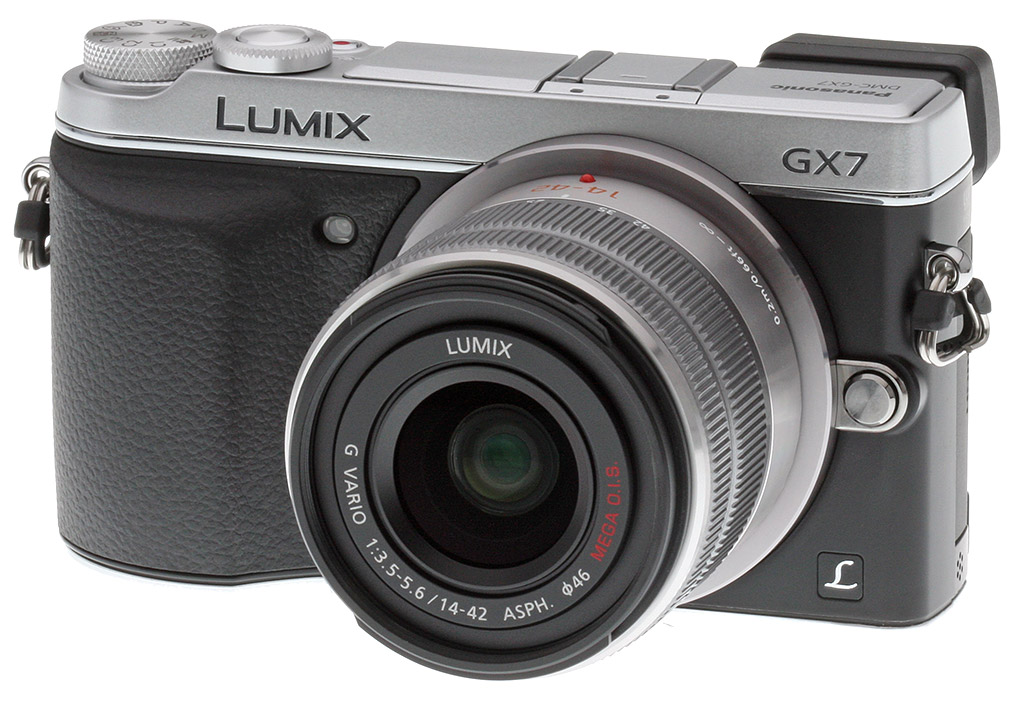
The Panasonic GX7 compact system camera follows in the footsteps of 2011's DMC-GX1 mirrorless, and like that camera, its mission is to provide a worthy street shooter for the enthusiast photographer. Thanks to a mirror-free design, the GX7 pares off most of the bulk of a DSLR, but it's still big enough to include a comfortable handgrip and the array of controls experienced photographers expect. And unlike many mirrorless cameras which retain an SLR-like design aesthetic, the GX7 cuts a more unassuming profile not unlike that of a rangefinder camera.
The GX7 is no mere level-up with a few more megapixels: Many of the most important features are brand-new. Largely due to a more comfortable handgrip and a built-in electronic viewfinder, the Panasonic GX7 has grown in size a little though it's still very compact. Key among the new features of the Lumix GX7 are the pairing of both a tilting LCD monitor, and a tilting electronic viewfinder. The latter in particular will likely prove popular with the GX7's target demographic.

Framing through a viewfinder -- even an electronic one -- gives you a much greater sense of attachment to your subject than does the arm's-length framing used for smartphones and entry-level cameras. And by building the viewfinder into the design, rather than making it an optional accessory, Panasonic ensures that you'll always have it with you when you need it. Better still -- and unlike almost all built-in viewfinders -- the Panasonic GX7's finder tilts, too. That means you needn't lose the connection with your subject when shooting from a lower angle.
Inside, the Panasonic GX7 features a brand-new image sensor that provides a big step forwards in image quality. Resolution is unchanged at 16 megapixels, but the new chip features a redesigned structure for both photodiodes and microlenses. And in a first for the Lumix mirrorless line, that sensor is mounted on a movable platter, allowing it to offer in-body image stabilization as well.
Throw in modern features such as both Wi-Fi connectivity to help get your photos off the camera and onto the web, plus handy Near Field Communications connectivity that makes the process of pairing camera and smartphone painless, and you've got a very compelling offering indeed.
Buy the Panasonic GX7 at one of Imaging Resource's trusted affiliates:
- Adorama: Panasonic GX7 w/ 14-42mm kit (US$1098); Panasonic GX7 body-only (US$998)
- Amazon: Panasonic GX7 w/ 14-42mm kit (US$1098); Panasonic GX7 body-only (US$998)
- B&H: Panasonic GX7 w/ 14-42mm kit (US$1098); Panasonic GX7 body-only (US$998)

Walkthrough. The Panasonic Lumix GX7 sports a handsome new design that -- in the U.S. market, at least -- is available only in a two-tone finish. Silver-colored plates top and bottom bookend a black-finished mid section that's largely wrapped in textured rubber. Beneath, the GX7's body is crafted from die-cast magnesium alloy. Compared to its predecessor, the Panasonic GX7 sports a much more prominent, wider handgrip that's nicely contoured for your fingers to wrap around.
The GX7 has grown in both size and weight, but not unduly so, given that it must fit in quite a few features which were absent from its predecessor. These include an electronic viewfinder, articulation mechanisms for both the viewfinder and LCD, and the sensor shift mechanism used to provide in-camera shake reduction.
At 4.8 x 2.8 x 2.1 inches, the GX7 is about 0.2 inches wider, 0.1 inches taller, and 0.5 inches deeper than was the GX1. It's still a handy half-inch less tall and 0.7 inch less thick than a full-sized mirrorless like the Lumix G6, however, although the width is identical.
Compared to the smallest digital SLR on the market -- the Canon SL1 -- the Panasonic is about 0.2 inches wider, but 0.8 inches shorter, and 0.6 inches less deep. The advantage in size, then, is significant even before you attach a lens.

Seen from the front, the Panasonic Lumix DMC-GX7 is an altogether more handsome camera than the GX1. The lens mount has moved closer to the left-hand edge of the camera (as seen from the rear), making way for the new, larger hand grip. Indeed, the lens release button is now almost flush with the leftmost edge of the GX7's body. The move has left no room for the AF assist lamp on this side, either, and so it has jumped across the lens, and now rests in the top of the textured rubber handgrip.

Moving to the top, the Panasonic GX7 shows its enthusiast aspirations with a brand-new control on the top deck -- a second control dial encircling the Shutter button. This new Front dial answers a request we made in our review of the GX1, and we're thrilled that Panasonic listened! Another nod to the GX7's credentials is that the dedicated -- and frankly, wasted, on an enthusiast camera -- Intelligent Auto button is gone. The iA mode is still there, should you want it, but now lives more sensibly on the Mode dial.
And there's been quite a bit more rearrangement of the top deck, besides. The new built-in, tilting viewfinder sits at the very leftmost end of the GX7's body, and that placement has dictated that the popup flash strobe jump across to the other side of the hot shoe. Making way for the relocated flash, the stacked Mode dial and Power lever have moved all the way to the right-hand end of the top deck. The Record button used to capture movies, meanwhile, now sits snug against the rear of the combined Shutter button and Front dial.

The changes don't stop there, either. The rear of the camera is also significantly different. Most visible are the new electronic viewfinder, and the tilting LCD monitor. Panasonic has also added two new controls, and relocated several others.
To the left of the Rear dial, the AF/AE Lock button is encircled by a new Focus mode switch. Directly beneath is the Function 1 button, which also serves as the Quick Menu button. These functions previously resided in the four-button group around the Four-way controller, and in their absence, the Play button has moved into this group. The Function 2 button -- which previously shared a space with the AF/AE Lock button -- now has its own spot, and alongside it is a new Function 3 button. (Fn2 also serves as a Delete button in Playback mode, and backs out of menus; Fn3 acts as a Wi-Fi button in Playback mode.) And believe it or not, there's also a new Function 4 button, which also serves double duty as a viewfinder control. (The viewfinder also includes a proximity sensor, allowing it to be switched automatically.)
The remaining rear-panel controls are largely unchanged, although the Flash Release control is now a mechanical slider, rather than a button. One very nice touch, by the way, is that the Power lever beneath the Mode dial now wraps around to the rear of the camera, within easy reach of a flick of the thumb.

And finally, we come to the Panasonic GX7's side panels. The right side is now featureless, and the cover over the camera's connectivity now sits on the left-hand end, instead. The move is, again, quite sensible. Previously, you couldn't plug a cable into the camera and then hold the handgrip, but with the cables sprouting from the left side of the GX7's body, the handgrip remains available.

Shooting with the Panasonic GX7
by David Schloss
 |
Lumix G 20mm lens; f/2.0; 1/8,000s; base ISO (200) |
| On a country road. The GX7 paired with a fast prime lens is a pleasurable experience indeed. |
Panasonic is on a roll. This year, the company has released a string of Micro Four Thirds cameras that truly take advantage of the format's compact size and light weight for go-anywhere convenience, while also delivering photos that rival systems with larger sensors. The Panasonic GX7 is the much-anticipated successor to the GX1 -- the company apparently skipped numbers two thru six to slot the camera ahead of its more affordable G6 and GF6 models.
The GX7 takes the Goldilocks approach. In terms of size, it fits in right between the company's mid-level G6 and entry-level GF6, but its performance puts it in between the G6 and flagship GH3. (Though you could very well argue that for stills, the GX7 surpasses the GH3.) It's not too big, it's not too small, and it delivers excellent performance -- it's just right!

For my hand, Panasonic has always made the most pleasing designs with grips that err on the side of bulbous rather than skimpy. I'm the kind of photographer who hates camera straps, and so the Micro Four Thirds bodies appeal to me because they can easily be tucked inside a teeny courier bag, where I can also stuff several lenses, diapers for my kid, and a jacket. My shooting style is a grab-and-go one, where I need a firm purchase on the camera in order to keep from dropping it on my foot.
Some companies like to minimize the size of their cameras by reducing the bulk of the grip. Panasonic seems to understand that the grip actually needs to be larger if the body is smaller -- it's the chief system for connecting with the camera.
There's a lot to love about the GX7, and love it I do, especially when taken in context with the many other fixed-lens compacts and mirrorless models I've reviewed recently. In the past months, I've shot the aforementioned, Micro Four Thirds Panasonic Lumix G6 and GF6, the high-end Panasonic LF1 point-and-shoot, and the pro-level mirrorless Olympus OM-D E-M1. I have also tested a couple of APS-C sensored models, including the enthusiast-level Fuji X100s and the beginner-oriented Sony NEX-3N. In terms of performance, image quality and value, the Lumix GX7 is the model that I'd plunk down my own money to buy.
I can hear you scratching your heads. I've tried the Olympus OM-D E-M1 and the Fuji X100s -- and the Panasonic GX7 would be my choice? Don't these cameras provide some better features and possibly better image quality? Yes, and the reason for my decision might take a bit of explaining.

Design. The Panasonic Lumix DMC GX7 is of the yet-another-retro-styled-camera design, and in fact I think it's safe to accept the fact that the retro look -- solid magnesium alloy chassis with brushed chrome-styled finish and leatherette grip -- is the new normal for enthusiast-level camera systems.
Not quite compact, not quite bulky, the GX7 doesn't skimp on design to fit a certain size. I'm a big fan of "form follows function" design, and with the GX7 it does. Lens-free, it weighs under one pound and measures under five inches on the longest side, both great. But there's a protruding electronic viewfinder on the back which changes the dimensions a bit.
Controls. The back of the camera features a tilting 3-inch LCD screen and a nice combination of buttons. There's the typical four-way control pad, playback button, and a button to toggle between viewing options. There are also four (count 'em, four!) programmable function buttons, a pop-up flash release control, and a focus-mode switch that surrounds the AF/AE lock button. The 1.04-million dot LCD screen integrates nicely into the body of the camera, and functions as a touchscreen that can be used to change the position and size of the focus points, trigger the shutter and, of course, access the menus. (Of note: an additional five function keys are accessible via the LCD screen, as well.) My only regret with the tilting monitor is that it can only be pivoted up or down, making it less useful for live view with portrait-orientation photography, and unhelpful for selfies.
Just below the power switch sits a rear control dial that works in concert with the front control dial encircling the shutter release button. This second control dial puts the GX7 in a rarified category, a compact, enthusiast body that has many of the features pros want. In too many cameras there are compromises (no front control dial, for example), but in the GX7 there is redundancy and an overabundance of features. Take the flash as a perfect example. I mentioned that the GX7 has a built-in flash (albeit a rather weak one), but it also has a dedicated hot shoe. Use the small built-in flash for snapshots or pick up a more powerful unit for full-on photography.
In addition to the flash and hot shoe, the top deck of the GX7 is home to a Mode dial, which may seem pretty standard except that it features three custom positions, and a machined, diamond-knurled finish. It's satisfyingly tight to turn. Finally up top is a dedicated Movie button that sits between the Shutter button/Front control dial, and the AF/MF switch on the back.

Tilting EVF. Also on the top of the camera, protruding beyond the rear of the body, resides the camera's tilting electronic viewfinder. Let me repeat that key word again: tilting. The EVF pivots up to 90 degrees to enable low-level photography, in a style reminiscent of an old medium-format camera.
The field-sequential EVF also boasts 100% field-of-view coverage and 1280 x 720 pixel resolution, with excellent color reproduction that delivers nearly 100% Adobe RGB coverage. So not only does the GX7 provide provide a tilting feature that's rarely seen on cameras today, but it's also one of the most vivid, viewable EVFs I've ever used. That is, when you have the brightness set to the right level -- I'll talk a bit more about this later.
The rest of the camera is pretty minimalist -- there's a lens-release switch on the front but nothing else. Overall, the GX7 features lots of buttons where you want them, and none where you don't.
Sensor. Inside the cameras are a few changes as well, with a brand-new sensor that offers in-camera image stabilization. This is new for Panasonic; the company usually provides stabilization via image stabilization-equipped lenses, but with in-body stabilization the camera can now reduce motion blur with any lens. In practice, this was great with long exposure shots, especially when pairing the camera with the relatively slow kit lens. It was possible to shoot under much more extreme conditions, thanks to the built-in stabilization. Sadly, it doesn't work in video mode. That's odd, since the GX7 has better video chops than a camera like the Olympus OM-D E-M1, which boasts an excellent five-axis stabilization system for both stills and video.
There are still 16 million pixels on the new sensor, just like that in the GX1, but it now has redesigned microlenses and photodiodes, making it more sensitive to light and better able to handle saturation. The GX7 shares the same Venus Engine image processor with the G6, for similarly excellent reduction in noise and artifacts. ISO sensitivity is excellent, ranging from a base ISO of 200 up to 25,600, with extended ISO 125 available. (See more of my take on image quality, below.) And the GX7 boasts an excellent top shutter speed of 1/8,000s.
Panasonic GX7 - G Vario 14-42 II kit lens across a range of ISOs |
 |
| f/5.3; 1/1,300s; ISO 200 |
 |
f/4.5; 1/60s; ISO 800 |
 |
| f/4.5; 1/50s; ISO 1600 |
| GX7 kit lens. These shots showcase the quality of the 14-42mm II kit lens that ships with the GX7. It's a bit better than average for a kit lens, and it's offered for just $100 extra bundled with the camera. |
User interface and operation. Newcomers to the GX7 may likely think that -- at default settings -- the viewfinder is vastly too dark, as I originally did. And for the first few hours of shooting I wasn't sure how to change the brightness for the EVF. With most cameras that feature an EVF, there's a separate menu control for it and for the LCD monitor. With the GX7, however, the control is shared by both monitor and viewfinder -- it intelligently switches to controlling EVF brightness when looking through the viewfinder and it switches back to the LCD brightness when looking at the LCD. It's logical once you know how it works, but perhaps a little confusing initially.

Otherwise, though, the excellent menu system continues to be one of the highlights of the Lumix cameras. Aside from the Sony NEX lineup, in my opinion, Panasonic MFT models have the best menu layout and functionality in their class. The menu interface is clean and clear, with large, easy to read text and choices that are outlined in white so that the user always knows which feature is being controlled. The menus offer real-time scrolling help and also a feature that's a personal favorite, the ability to have the display resume at the last selected setting when returning to the menu.
That's great because many interfaces return to the top level when the menu is dismissed, requiring the photographer to hunt back down several nested levels to change the previously adjusted setting. General enthusiast photographers can leave the camera as-is and have a great shooting experience while more advanced photographers can set deep-level changes to tweak the operation.
Custom modes. Unlike even a lot of professional cameras, the GX7 has three Custom settings on the Mode dial, as well as the Program, Aperture-priority, Shutter-priority, and Manual exposure modes that enable a photographer to program the camera for different shooting situations. I like to leave my camera set so that C1 disables autofocus on the shutter release, and sets it instead to the AE/AF lock button. I combine that with an AF-F or AF-C setting for the focusing system, and the result is a camera that mimics my pro body. As long as I hold the AE/AF lock button the camera will track focus, but as soon as I let go of the button the cameras stays focused on the last point.
When I want to jump back to normal shooting, I simply turn the dial back to one of the PASM settings, or to another Custom setting. Unlike some pro bodies where the custom features have to be programmed in the menu and actuated by switching the custom mode in the menu, with the GX7 I simply turn the dial to a custom position, make my changes and then any time I return to that custom setting the changes are in place.
Focus peaking. There are a host of other gee-whiz features on the GX7. Switch it over to manual focus mode and the camera adjusts focus (if using a lens with a focus ring) by turning the dial while simultaneously displaying a zoomed focus target. This picture-in-picture, focus peaking display really provides a level of critical focus that's just not possible with most DSLR cameras and really shows the versatility of a mirrorless camera and smart interface design.
Since the LCD touchscreen is active during focusing, it's even possible to drag around the zoomed picture to keep it out of the way of the subject. Couple this camera with a macro lens and the benefits of mirrorless technology really come to the fore. There's an unprecedented level of focus control available for macro shooters.
 |
Lumix G 20mm lens; f/4.5; 1/1,600s; ISO 200 |
| Attention to focus. The GX7 provides a good selection of tools, such as picture-in-picture display, to help achieve precise focus -- even in a crowd. |
ISO control. Another great feature of the Lumix GX7 is its control over automatic ISO sensitivity. Many cameras provide a way to set the upper limit for ISO and the lowest acceptable shutter speed, but these settings are usually buried a few levels deep in the menus. While it's certainly possible to dig through the menu to set these, Panasonic has added the ability to change the upper limit at any point while the ISO controls are active, simply by turning the front dial.
In practice, this makes for some quick and precise adjustments. Usually I want to limit the upper bound for sensitivity to the lowest level possible under a given lighting condition. Let's say, for example, that ISO 3200 gives me an exposure of 1/15th of a second (which I can easily handhold), I don't want the camera going to ISO 6400 to provide 1/30th because I'd rather have the lower level of noise.
But sometimes it's more important to capture something at a higher ISO. A good example is when pets or children are playing inside under lower light. A shutter speed of 1/15th at ISO 3200 won't do me much good. The normal solution to this would be to take the camera off Auto ISO, and manually dial in a much higher ISO, but that would mean that all of my shots would be at that higher ISO. Some cameras allow you to adjust the upper limit though the menus, but with the GX7 I can adjust it on-screen while shooting, simply by pressing the ISO button and turning the front dial.
This sets the upper sensitivity limit, but the camera will still try to capture at the lowest ISO possible for the shot. If I make the upper limit ISO 25,600 the camera will still try for ISO 12,800 or 6400, etc. first, if possible, only bumping up to the higher ISO when the shutter speed would be too slow. It seems like such a little thing to make this change, but really it's a smart move and it shows the attention Panasonic is paying to their users.
 |
Lumix G 20mm lens; f/3.5; 1/40s; ISO 1600 |
 |
Lumix G 20mm lens; f/2.2; 1/6,400s; ISO 12,800 |
| Shooting indoors. Above are a couple of indoor shots pairing the GX7 with the Lumix G 20mm prime lens. The first image is taken at a fairly standard indoor ISO of 1600, while the lamp is shot with the relatively high ISO of 12,800. |
Autofocus and performance. I've noted in previous Panasonic reviews how good the autofocus is in their cameras. Even the high-end Olympus OM-D E-M1 doesn't feel that much snappier. Partially that's because of the success of Panasonic's face-detection autofocus. Whatever the engineers are doing in their Venus Engine image processors, it works terrifically, always locking right onto a subject. When too many faces are in the frame, I like to switch to the 23-area focus zone -- the camera always seems to know what I want to concentrate on. In very rare instances I switch over to pinpoint focus mode, or use the LCD touchscreen to target a subject, but generally the camera just knows what to focus on and stays on that subject.
The GX7 features a novel way to help speed up the performance -- an electronic shutter mode, which you can select to use instead of the mechanical shutter, either to be ninja-quiet or to maximize burst shooting. You can shoot up to 40 frames per second in burst mode -- at a reduced resolution, of course -- while the electronic shutter is switched on, and the results are quite good. And you can even squeak out about 8 RAW frames per second at full resolution, or 10.7fps in JPEG. You don't want to be shooting anything large that crosses the frame, though -- say, a white picket fence or trees shot from a moving car -- as the electronic shutter can cause considerable rolling shutter effect, bending your subject. Regular continuous burst shooting on the GX7 is about 5fps, which is decent, though not as blazing-fast as the Olympus E-M1. I found the delay while the buffer filled in these cases to be pretty minimal.

Lenses. I shot the DMC-GX7 with the companion kit Lumix G Vario 14-42mm f/3.5-5.6 II MEGA O.I.S. lens. Since this lens has built-in image stabilization, the body's IS system is disabled in favor of the lens-based vibration dampening when this glass is mounted. My take on kit lenses has always been the same: They often bring out the worst in a camera. The 14-42mm lens isn't bad, per se, but it's not great either. What you get is a decent zoom lens with a relatively slow maximum aperture. The result is a lens that works best in brightly lit scenes.
Start photographing in lower light and you run into the issue that the lens has a maximum aperture of f/3.5 only at the widest setting, falling to f/5.6 at full zoom. Couple that with a Micro Four Thirds sensor that is more prone to low-light noise than larger sensors and you get a compounded effect on image quality. For cameras at lower price points, this isn't a big deal. Take a $400 camera and pair it with the kit lens and you've got a nice combo. After all, the photographer with a $400 kit probably expects a different level of quality than the photographer with the $1,000 camera. That said, this kit lens only costs you $100, so it's not that big of a deal even if you plan on buying additional lenses.
A camera like the GX7 wants to be paired with a better lens, though. Luckily I was able to oblige, testing the recently released Lumix G 20mm f/1.7 II lens, which was mostly a cosmetic upgrade to an already excellent optic (and also a kit option for the GX7 in some locations outside the U.S. market). Photos taken with the Panasonic 20mm were dramatically better in low light than with the 14-42mm, and the wider aperture also allowed for images to display some nice background blur. The 20mm lens also significantly slims downs the form factor of the camera, making it really shine as a street photography tool. Small, lightweight and sharp as a tack, the Lumix 20mm f/1.7 II is a must-have at this level of photography, especially since it only costs about US$400.

Image quality. Considering the limitations of the Micro Four Thirds format (the small sensors tend to create noisier images than those created with a larger sensor, all other things being equal) the GX7 produces some of the nicest images I've evaluated in the format, though maybe not quite as nice as the Olympus OM-D E-M1.
Reviewing my test shots, it's immediately clear to me which images on the camera are from the kit lens and which are from the 20mm f/1.7. Regardless of the lens, however, images from the GX7 proved to be sharp, crisp and vibrant. Blues and greens are especially pleasing, and the camera does a tremendous job with skin tones.
Like all Micro Four Thirds cameras, the GX7 has some issues with noise in high ISO and low-light shots, relatively speaking, but it exhibits some of the lowest levels of distracting artifacts of any of the MFT models I've reviewed. Part of this is due to the new sensor in the GX7, and part of it is the image processing engine that's borrowed from the G6. Exposure seems generally spot-on with the GX7, and in fact I never left the standard metering mode. Between the built-in exposure and compensation adjustment (performed with the front control dial), I always got the exposure I was looking for.
 |
Lumix G 20mm lens; f/1.8; 1/60s; ISO 400 |
| Shallow depth of field. Once again, the GX7 paired with the Panasonic 20mm f/1.7 II lens provides excellent shallow depth of field for shooting interesting fall foliage compositions. |
One area where the GX7 seems to have issues that previous Lumix models did not is in panoramas. In several of my test Creative Panorama shots, the left side of the panorama ended up being severely overexposed and striped with vertical lines -- it looks like an inkjet printer running out of ink. Perhaps this is an issue of the auto-stitching not being able to keep up with the speed of the pan (although it didn't warn me it was too fast), or the range of exposures being too great for the combined shot. I couldn't replicate it perfectly each time, though I could predict it would happen when shooting panoramas against a blue sky with a wide range of exposure between the start and end of the panorama.
| Panasonic GX7 - Panoramas: The good and the not so good |
 |
 |
| Taking it all in. Not all panoramas I attempted passed military muster due to exposure issues, but the top one certainly did. Perhaps the issue could be fixed with a future firmware upgrade. |
Video. The video quality of Panasonic's Micro Four Thirds cameras has a reputation for being excellent, and the GX7 is no exception. It can record Full HD (1080p) video at up to 60p (as well as 30p and 24p), with an ISO sensitivity of 3200 (up from ISO 1600 on the GX1). In addition, full PASM exposures can be used while filming. The videos I shot with the GX7 were sharp, smooth and pleasing, across the board.
All of this makes the omission of an external microphone port more confusing to me. Maybe it means that Panasonic didn't think the GX7 user would be a serious videographer who would use an external mic, but it seems like such a small addition that would make a lot of people happy.
Stay tuned for a more in-depth review of the Panasonic GX7's video capabilities and quality.
Wi-Fi. In 2012, many manufacturers were tacking on Wi-Fi sharing capabilities almost as an afterthought to keep up with the demands of consumers. Most implementations proved to be quite lacking and clunky. This year, however, we've seen camera makers step up their games, making Wi-Fi easier to use and also packing in quite a few useful features. The GX7 not only boasts robust Wi-Fi functionality that includes remote shooting controlled by a connected device, but also offers Near Field Communication to make connection with Android devices as simple as a physical tap between a camera and a phone loaded with Panasonic's Image App.
I must admit that I'd never paired a camera and smartphone with NFC, and it took me some time to figure out. Unfortunately, the GX7 manual doesn't explain if you have to turn the camera's Wi-Fi on or not, and I had to use trial and error to figure that out. (You don't; the camera enables Wi-Fi for you.) Once paired, the camera would remember my smartphone and allow either sharing or remote control after a successful tap. Pairing a camera and device the old-fashioned way, meanwhile, by creating a local Wi-Fi network with the phone and typing in a password generated by the camera was simple as pie. That's the route Apple users will have to take, since the company doesn't support NFC.
Once paired, image sharing proved to be quite easy and intuitive, though the Panasonic app's design was a tad clunky. It's important to have this image transfer capability these days, but it's not a very sexy process. On the other hand, remote shooting the GX7 with the smartphone turned out to be a lot of fun. Touch focus proved to be extremely precise, and I was easily able to toggle between three different subjects sitting close together on my desk with no problems -- and spot-on results. You can also shoot in any of the four PASM exposure modes -- though you have to manually set the camera to a given mode before you can shoot in it via the connected smartphone -- as well as shoot in burst modes. Again, I found the Panasonic Image App to be somewhat disjointed in presentation, but still not too difficult to navigate.

Why the GX7 for me? At the outset of this review I stated that the GX7 would be my go-to camera if I had to pony up and buy a Micro Four Thirds system, and in fact I'd select it over bodies I've tested such as the Olympus E-M1, the Fuji X100s, Panasonic G6 and the Sony NEX-3N. To clarify, this doesn't mean that I'd pick the GX7 over any other camera system if price were no object, but of the ones I've reviewed, it's the clear winner in terms of what it delivers for the price.
So why am I so gung-ho on the GX7? It combines precisely the photographic aspects I keep hoping to find in a single camera, and lives up to its hype. The X100S is a great camera, but it's limited by its fixed lens and it didn't perform as well as I'd hoped (above the X100 in particular, a camera I owned). Meanwhile, I found the Olympus OM-D E-M1 be a high-performing, pro-level camera, but overkill for my Micro Four Thirds needs. I already own a pro DSLR, and so the GX7's lesser size and weight and its performance is perfect for outings and day trips where I don't want to lug my five-pound DSLR kit around -- especially when the pro kit makes some subjects uncomfortable.
 |
Lumix G Vario 14-42mm II lens; f/5.2; 1/200s; ISO 200 |
| In the field. The Lumix G Vario 14-42mm II bundled with the GX7 is a slightly better-than-average kit lens, capable of delivering interesting shots. |
The reason the GX7 wins for me over other models, including its cousin, the Panasonic G6, has to do with the reaction that subjects have to the camera. Take any DSLR-looking body (including the E-M1, though it's indeed quite a bit smaller) and a candid subject starts to get nervous. Their body language changes. I saw this repeatedly when I was recently on a corporate shoot for a TV show where I was working with the contestants. Take out the large camera and people pose. Take out a small(ish) camera and people relax.
Additionally, some of the mirrorless cameras I've tested take the smaller-is-better approach too far and eliminate features in favor of a more compact, consumer-oriented package. That's no good either, as I still want pro-quality controls in a system that presents me with a more convenient alternative to my bulky DSLR gear. And not only does the Panasonic GX7 deliver a great deal of advanced photographic capabilities, it also captures great photos and videos -- especially when it's paired with a good lens.
To sum it up, the GX7 seems to have been designed around my exact shooting style and needs -- and I think many advanced amateurs or pros will agree with me. At US$1,000, it's a pricier camera than many Micro Four Thirds offerings, but it also hits a sweet spot that balances size, format, feature set, user interface and both still and video image quality like few other cameras can. That's why I think it's arguably the best value for an enthusiast-geared mirrorless camera on the market today.
Panasonic GX7 Review -- Tech Info
by Mike Tomkins

The new, movable sensor. At the heart of the GX7 is a brand-new 16 megapixel Live MOS image sensor, which can produce images at a sensitivity of up to ISO 25,600 max.
We've mentioned previously that it's now mounted on a movable platter, and so provides for sensor-shift image stabilization. It's designed to be "nearly as effective" as the company's lens-based MEGA O.I.S system. If you mount a stabilized lens, though, the in-lens stabilization will take over, and the sensor shift system will be locked in place. The big advantage of the
in-body system is that it will work with all of your otherwise-unstabilized lenses. There's no price premium for stabilization with each lens purchase, because you bought stabilization along with the camera. At longer focal lengths where optical stabilization typically works better, however, you can still choose to buy a stabilized lens. You get the best of both worlds, and that's great news!
The system will, incidentally, work with third-party lenses, or lenses mounted via an adapter, but you'll need to manually enter the focal length in this case. It's also important to note that the body-based stabilization system is not used for video capture.
Upgraded image quality. The GX7 has been designed to deliver a significant improvement in image quality. This comes thanks to changes in both the image sensor, and in the way images are processed as compared to the earlier Panasonic GX1. The new sensor is key, however. Although size and resolution are unchanged, the GX7 sports larger photodiodes that can collect more photons before becoming saturated. According to Panasonic, this change has increased the saturation level by 10%. There's also a new, higher microlens structure, and this is said to have increased sensitivity by 10%, as well as improving light collection towards the edges of the array. (And that means less vignetting.)

The readout circuitry -- both in the pixel itself and in the readout amplifiers -- has also been improved, and we understand there's been around a 25% improvement in signal to noise ratio, along with a 10% improvement in detail reproduction.
Noise reduction, too, has been improved, courtesy of the same Venus Engine image processor used in the Lumix G6. A new algorithm removes low and high-frequency noise separately, working on the raw image data. For JPEG images, there is another round of noise reduction performed after the JPEG conversion process. Also of note is that the detection area used by the noise reduction algorithm has grown from just 13 x 13 pixels to a much more generous 128 x 128 pixels, giving better information for it to work from.
Panasonic engineered the GX7 to improve gradation in dark areas due to improved signal processing, as well as the greater dynamic range you'd expect given the improved well depth.
The processor also improves performance. Along with the claimed improvements in image quality, Panasonic also promises greater performance from the latest-generation Venus Engine. Burst shooting is now possible at up to 5.6 frames per second for JPEG, or 5.0 fps for raw, according to our lab testing, and with an electronic shutter can reach as high as 40 fps. Even with autofocus tracking enabled, Panasonic says that you can shoot images at 4.3 frames per second, a slight improvement over the 4.2 fps claimed for the GX1 with focus locked. We measured startup time at around 0.9 seconds.

Focusing. The Panasonic GX7's Micro Four Thirds lens mount might be unchanged, but there are a fair few tweaks to its focusing capabilities. As in the Panasonic G6 before it, the GX7's new image sensor and Venus Engine processor allow sensor data read out at a whopping 240 frames per second, and the lens drive mechanism can respond at the same rate, for faster contrast detection autofocusing.
You can still use the touch screen to indicate a subject for autofocus, and thanks to the proximity sensor in the new electronic viewfinder, the GX7 also offers Eye-Start AF that starts focusing as soon as you put your eye to the viewfinder.
The low-light limit for autofocus has been improved from -3 EV to -4 EV, which is less than the light available from a full moon at an altitude above 40°.

There's also a new picture-in-picture display available in pinpoint autofocus mode, which helps you retain your framing while confirming the precision of your focus lock, with a magnification from 3x to 6x possible.
When focusing manually, you can magnify from 3x to 10x in 0.1x increments, and the focus peaking function has been improved beyond that in the Lumix G6. You now have a choice of blue, yellow, or green peaking indications, and the peaking level can be set to standard, high, or off using the touchscreen.
Exposure. There's been an important improvement here, too. Where the GX1 was limited to a fastest shutter speed of 1/4,000 second, the GX7 offers a wide range from 1/8,000 to 60 seconds, plus bulb to a maximum of two minutes.

Better display options. As we've mentioned previously, two of the most important changes in the Panasonic GX7 can be found in its built-in tilting electronic viewfinder and articulated LCD panel.
The EVF tilts upwards some 90 degrees, and has a high resolution of 1,280 x 720 pixels. It's a field sequential (or time-multiplexed) display, as we've seen in the company's EVF units in the past, and so at any given time, all pixels are showing just one color -- red, green, or blue. The colors alternate, providing full color at every pixel location. Panasonic says that the display has approximately 100% Adobe RGB gamut coverage, for better color rendition.
Magnification is 0.7x, and there's a 100% field of view. The EVF has an eye proximity sensor used to enable the display, and optionally, to start autofocus when you raise the camera to your eye. Another option is a viewfinder eyecup, part number DMW-EC1GU. This has an elastic material for enhanced comfort, whether you're viewing with your naked eye or with eyeglasses.

The LCD panel, meanwhile, is the same unit used in the Lumix G6. It has a high resolution of 720 x 480 pixels (1,036,800 RGB dots), and uses in-cell touch sensing for a slimmer overall package and reduced glare. (In-cell touch screens don't add an additional layer to the LCD panel.)
Compared to the unit in the GX1, Panasonic says the newer display has 25% lower power consumption at any given brightness level, as well as a 20% wider field of view.
More creative options. Panasonic has also expanded the creative options on offer in the GX7. You can now choose from Monochrome, Gritty Mono, and Silky Mono modes, and add color filters applied during monochrome conversion -- either yellow, orange, or red. It's also possible to adjust highlights and shadows independently, and you can apply more filter effects to panoramas than ever before, with both silky and gritty mono now available for panoramic pictures.
Another interesting feature is the new Silent mode, which enables the electronic shutter, turns off AF operation sounds, and disables both the AF assist lamp and flash strobe, all in a single setting. Handy!
Movie mode has been updated, too. It's not just still imaging that has gotten the love from Panasonic. Movie shooting has also been improved. Resolution still tops out at 1,920 x 1,080 pixels, or Full HD, but with a higher maximum frame rate of 60p, or 60 progressive-scan frames per second. (The GX1 was limited to 60i capture, or 60 interlaced fields per second.) There's also a choice of 30p or a movie-like 24p at full resolution. These rates are for US cameras; in Europe, 60i and 60p are replaced by 50i/50p, and 30p by 25p; the 24p rate is retained.
Panasonic says that the better image sensor means that it need only bind four pixels to create each pixel in the final movie, rather than six pixels as in the G6. The mixing is performed in 1 x 4 pixel lines, rather than 2x2 blocks, and the image processor performs low-pass filtering on the resulting data as it comes off-chip.
The maximum sensitivity for videos is now limited to ISO 3200, rather than the earlier ISO 1600 limit of the GX1, and full PASM exposure modes are now supported.
Maximum continuous recording time for AVCHD format is approximately 140 minutes with the 14-42mm kit lens, and approximately 130 minutes with the 20mm lens. Actual total recording time will be less at about 70 and 65 minutes respectively, with operations such as power cycling, starting/stopping recording, and zooming included. Maximum continuous recording time is limited to 29 minutes 59 seconds in Europe and some Asian areas to satisfy tariff restrictions, though, while continuous recording in MP4 format is limited 29 minutes 59 seconds or up to 4GB.

Wireless that's simple to use. Panasonic has also revisited its connectivity options in the Lumix GX7, adding both 2.4GHz 802.11b/g/n Wi-Fi and Near Field Communications wireless connectivity.
NFC is there to make it easier to get your photos onto a smart device for instant sharing. Simply hold your NFC-compatible phone or tablet to the camera briefly, and the NFC connection is established automatically, then used to pair the devices via Wi-Fi without user intervention. It couldn't be simpler, and it's a shame that iOS users will miss out, because Apple so far has resisted adopting the technology. If you own an iOS device, you'll pair the Wi-Fi manually, and then use a free app to transfer data, just as Android users will do.
With Panasonic's free Image App, you can also remotely shoot both photos and video from a smartphone or tablet, with a smooth 30fps live preview. You can not only adjust exposure settings, but also you can use focusing peaking and zoom (when a Power Zoom lens is mounted).

And wired connectivity, too. As you'd expect, the wireless connectivity is supplemented with a selection of wired ports. You can choose from USB 2.0 High Speed data, Type-C Mini HDMI high-def video output compatible with VIERA Link remote control, an NTSC standard-def audio/video output, and a 2.5mm wired remote jack. There's no external microphone connectivity, though -- audio comes from an onboard stereo mic located in front of the flash strobe.

Storage and power. The Panasonic GX7 stores images and movies on Secure Digital cards, including SDHC, SDXC, and UHS-I types. (SDHC and SDXC cards boost capacity over standard types, while UHS-I cards are faster than standard ones. Hence, with the GX7 you're well-covered for both types.)
Power comes from a 7.2V, 1,025 mAh lithium ion battery pack. It's rated as good for 350 shots on a charge using the H-FS1442A kit lens. Switch to the H-HS020A optic, which is a prime lens, and you should be able to eke out some 320 shots on a charge.
Buy the Panasonic GX7 at one of Imaging Resource's trusted affiliates:
- Adorama: Panasonic GX7 w/ 14-42mm kit (US$1098); Panasonic GX7 body-only (US$998)
- Amazon: Panasonic GX7 w/ 14-42mm kit (US$1098); Panasonic GX7 body-only (US$998)
- B&H: Panasonic GX7 w/ 14-42mm kit (US$1098); Panasonic GX7 body-only (US$998)
Panasonic GX7 Review -- Image Quality Comparison
Below are crops comparing the Panasonic GX7 with the Panasonic GX1, Fuji X-E1, Olympus E-P5, Panasonic GH3 and Sony NEX-6.
NOTE: These images are best quality JPEGs straight out of the camera, at default settings including noise reduction and using the actual base ISO (not extended ISO settings). All cameras in this comparison were shot with our very sharp reference lenses.
Panasonic GX7 versus Panasonic GX1 at base ISO
 |
 |
 |
 |
 |
 |
Panasonic GX7 at ISO 200 |
Panasonic GX1 at ISO 160 |
Not much difference between the GX7 and its predecessor here at base ISO, other than subtle differences in detail in some of the fabric swatches. The GX1 exhibits higher contrast in the red fabric swatch, while the GX7 is slightly sharper in the pink swatch. Stay tuned, as higher ISOs should begin to show more in the way of differences between the two. |
|
Panasonic GX7 versus Fuji X-E1 at base ISO
|
 |
|
 |
|
 |
Panasonic GX7 at ISO 200 |
Fuji X-E1 at ISO 200 |
Contrast is a little low in the X-E1's red-leaf swatch, but detail is better with less blurring from noise reduction. On the other hand, the GX7 was able to resolve some of the threads in the pink swatch, and it left some of the color in the mosaic tile that's actually there (a result of the offset printing process), which the X-E1 eliminated. Still, great results overall from both cameras at base ISO. |
|
Panasonic GX7 versus Olympus E-P5 at base ISO
|
 |
|
 |
|
 |
Panasonic GX7 at ISO 200 |
Olympus E-P5 at ISO 200 |
With the same size sensor size and virtually the same resolution, it's no surprise these two perform similarly. The E-P5 arguably produces better clarity in the bottle crop and the mosaic tile crop, though its images do look more processed, while the GX7 has slightly better contrast and detail in the red-leaf fabric swatch. |
|
Panasonic GX7 versus Panasonic GH3 at base ISO
|
 |
|
 |
|
 |
Panasonic GX7 at ISO 200 |
Panasonic GH3 at ISO 200 |
The GH3 is a first cousin of the GX7, with the same size sensor and virtually the same resolution, but housed in a DSLR-styled body and optimized for video. At default settings, the GH3 certainly appears to yield slightly sharper images here at base ISO across all three crops above, especially in the red fabric swatch which tends to confuse all but full- frame sensors. |
|
Panasonic GX7 versus Sony NEX-6 at base ISO
|
 |
|
 |
|
 |
Panasonic GX7 at ISO 200 |
Sony NEX-6 at ISO 100 |
With virtually the same resolution but a larger sensor with a lower base ISO, the NEX-6 looks impressive here at ISO 100, with crisper results across the board -- most notably in the mosaic tile detail and the fabric swatches, though its images do have a slightly more processed look. We'll see a bit later if this trend continues as ISO rises. |
|
Panasonic GX7 versus Panasonic GX1 at ISO 1600
 |
 |
 |
 |
 |
 |
Panasonic GX7 at ISO 1600 |
Panasonic GX1 at ISO 1600 |
The above comparisons are a great example of what a difference two years can make where technology is concerned. At base ISO these two looked almost identical, yet here at ISO 1600 the differences are immediately apparent, especially in the GX1's inability to resolve fine detail in the mosaic tile or pink fabric swatch. But the GX7 is already starting to show noise processing artifacts, most noticeable as fragmenting in the bottle crop and mild blotchiness in the mosaic tiles. |
|
Panasonic GX7 versus Fuji X-E1 at ISO 1600
|
 |
|
 |
|
 |
Panasonic GX7 at ISO 1600 |
Fuji X-E1 at ISO 1600 |
This is where the X-E1's larger (APS-C) X-Trans sensor comes to the rescue. Notice how much nicer the bottle, mosaic and red-leaf fabric look from the X-E1, with better detail and fewer artifacts. The GX7 does slightly better in the pink fabric swatch, but otherwise it's no match for the X-E1 here. |
|
Panasonic GX7 versus Olympus E-P5 at ISO 1600
|
 |
|
 |
|
 |
Panasonic GX7 at ISO 1600 |
Olympus E-P5 at ISO 1600 |
The E-P5 begins to show more obvious noise reduction and sharpening artifacts here, with somewhat similar fragmenting in the bottle image and blotchiness in the mosaic and pink fabric. We'd call it a fairly close race, with the GX7 and E-P5 areas scoring about the same for overall image quality. |
|
Panasonic GX7 versus Panasonic GH3 at ISO 1600
|
 |
|
 |
|
 |
Panasonic GX7 at ISO 1600 |
Panasonic GH3 at ISO 1600 |
Similar results here, and a closer race than at base ISO, as the strain on these Four Thirds sensors start to show as ISO rises. The GX7 does a slightly better job at controlling chroma noise, but that results in a softer red-leaf swatch. |
|
Panasonic GX7 versus Sony NEX-6 at ISO 1600
|
 |
|
 |
|
 |
Panasonic GX7 at ISO 1600 |
Sony NEX-6 at ISO 1600 |
The NEX-6's larger APS-C sensor gathers more light and does somewhat better as ISO rises (particularly in the red-leaf swatch), though its images continue to have a more processed looked than the GX7's. |
|
Panasonic GX7 versus Panasonic GX1 at ISO 3200
 |
 |
 |
 |
 |
 |
Panasonic GX7 at ISO 3200 |
Panasonic GX1 at ISO 3200 |
As we also saw at ISO 1600, the newer sensor and processing technology helps the GX7 handily win out over its predecessor here with much better detail, less smudging and color bleeding, and improved color as well. |
|
Panasonic GX7 versus Fuji X-E1 at ISO 3200
|
 |
|
 |
|
 |
Panasonic GX7 at ISO 3200 |
Fuji X-E1 at ISO 3200 |
Again the differences are astounding as ISO rises when the GX7's Four Thirds sensor is pitted against Fuji's APS-C X-Trans sensor. The crops from the X-E1 are amazingly good for this ISO, while the GX7's are only passable in comparison. |
|
Panasonic GX7 versus Olympus E-P5 at ISO 3200
|
 |
|
 |
|
 |
Panasonic GX7 at ISO 3200 |
Olympus E-P5 at ISO 3200 |
Both Micro Four Thirds cameras here show different signs of unwanted noise reduction artifacts, and neither have particularly pleasing results when compared to the X-E1. The GX7's images are a bit noisier but show slightly better detail. Perhaps a slight nod overall to the E-P5 for its cleaner, punchier images. |
|
Panasonic GX7 versus Panasonic GH3 at ISO 3200
|
 |
|
 |
|
 |
Panasonic GX7 at ISO 3200 |
Panasonic GH3 at ISO 3200 |
As with ISO 1600, similar results here from these two first cousins, but a slight nod to GX7 for better detail in the mosaic crop, and to the GH3 for slightly better rendering in the fabric swatches. |
|
Panasonic GX7 versus Sony NEX-6 at ISO 3200
|
 |
|
 |
|
 |
|
Panasonic GX7 at ISO 3200
|
Sony NEX-6 at ISO 3200 |
The NEX-6's luminance noise is a little coarser and its images are more heavily processed with lower chroma noise, but overall we'd say it still outperforms the GX7 here at ISO 3200, although perhaps not quite as handily as you would expect. |
|
Detail: Panasonic GX7 versus Panasonic GX1, Fuji X-E1, Olympus E-P5, Panasonic GH3 and Sony NEX-6.
 |
 |
 |
 |
 |
 |
 |
 |
 |
 |
 |
 |
 |
 |
 |
 |
 |
 |
| Panasonic GX7 ISO 200 ISO 3200 ISO 6400 |
Panasonic GX1 ISO 160 ISO 3200 ISO 6400 |
Fuji X-E1 ISO 200 ISO 3200 ISO 6400 |
Olympus E-P5 ISO 200 ISO 3200 ISO 6400 |
Panasonic GH3 ISO 200 ISO 3200 ISO 6400 |
Sony NEX-6 ISO 100 ISO 3200 ISO 6400 |
| Detail comparison. Based on the comparison analysis in the above tables, we would expect the two APS-C sensored cameras to fare better here at resolving high contrast detail, but that's not necessarily the case. All perform fairly well at base ISO with some producing higher contrast than others, no big surprise there. The Sony however leaves false colors between fine lines and the Fuji struggles a bit with desaturated letters in the red text, along with minor demosaicing errors in smaller fonts. By ISO 3200 the E-P5, GH3 and NEX-6 start to pull away from the pack, but the GX7 still does well, doing better than the GX1. These results are similar at ISO 6400, with the E-P5 and the NEX-6 doing a rather remarkable job with fine detail for such a high ISO, but the GX7 is not far behind, continuing to do noticeably better than its predecessor. | |||||
Panasonic GX7 Review -- Print Quality
Very good 24 x 36 inch prints at ISO 125/200; a nice 13 x 19 at ISO 1600; a good 4 x 6 at ISO 12,800.
 ISO 125/200 prints are very good at 24 x 36 inches, with sharp detail and nice, popping colors. Wall display prints are possible up to 30 x 40 inches.
ISO 400 shots look quite good at 20 x 30 inches, with good sharpness in finely detailed areas.
ISO 800 prints look good at 16 x 20 inches. As is the case with most cameras in this class, subtle contrast detail is starting to fade by this ISO setting in our tricky target red swatch, but it still makes for a good overall print.
ISO 1600 makes a nice 13 x 19 inch print, with only mild softening in the red channel.
ISO 3200 tends to be the turning point for most Four Thirds-sensored cameras, as is the case here, and requires a reduction to 8 x 10 inches due mostly to noise in flatter areas.
ISO 6400 prints have enough detail for a decent 8 x 10 inch prints for less critical applications, and a 5 x 7 inch print for our official "good" rating.
ISO 12,800 yields a good 4 x 6 for this ISO and sensor type.
ISO 25,600 prints at 4 x 6 are a bit too watercolored-looking to make our "good" standard, but still retain full color and would be usable for many less critical applications.
The Panasonic GX7 stands its ground in the print quality department, besting its predecessor the GX1 by a print size across many of the available ISO settings, and performing fairly well as compared to many of its competitors. 24 x 36 inch images at ISOs 125 and 200 are quite sharp, and yet it's nice to know that you can print a reasonable 4 x 6 for the relatives even at ISO 12,800.
In the Box
The Panasonic GX7 retail box (kitted with a 14-42mm lens, as tested) ships with the following items:
- Panasonic GX7 camera body
- Lumix G Vario 14-42mm f/3.5-5.6 II lens (if purchased in a kit)
- DMW-BLFG10E Lithium-ion battery pack
- Battery charger
- Body cap
- Lens caps (if purchased in a kit)
- Shoulder strap
- USB cable
- CD-ROM with SilkyPix software
Recommended Accessories
- Extra DMW-BLFG10E battery pack for extended outings
- Large capacity SDHC/SDXC memory card. These days, 16GB is a good tradeoff between cost and capacity for a consumer DSLR, but if you plan to capture HD movie clips or shoot in RAW format, look for larger cards with Class 6 or faster ratings.
- Extra lenses, especially the Lumix 20mm f/1.7, 45-200mm f/4-5.6, or higher-end 12-35mm f/2.8 and 35-100mm f/2.8
- External shoe mount flash (DMW-FL220, FL360L, or FL500), or other accessory flash
- DMW-AC8 AC power adapter with DMW-DCC11 DC coupler
- DMW-RSL1 wired remote release cable
- DMW-EC1 eyecup
- DMW-MA1 adaptor (if you own any Four Thirds lenses)
- DMW-TA1 tripod adapter (if you plan to shoot with large Micro Four Thirds or adapted Four Thirds lenses)
- Small-to-medium size camera bag
Panasonic GX7 Review -- Conclusion
| Pro: | Con: |
|---|---|
|
|
We've been long waiting for a Micro Four Thirds model with advanced features that does just about everything well at a reasonable price, and the Panasonic GX7 was worth the wait. Other enthusiast-oriented cameras we've reviewed lately have been excellent, but have made calculated sacrifices in one area or another. The Panasonic GH3, for example, delivers exceptional video quality and good stills, but it's a bit large for a mirrorless camera, a bit daunting for the average enthusiast shooter, and a bit more expensive. On the other hand, the Olympus E-M1 captures perhaps the best still images in its class, but its video capabilities are limited, and the camera comes in at about a US$400-$500 premium over the GX7. And stepdown Micro Four Thirds cameras such as the Panasonic G6 or Olympus E-PL5 just don't offer as much as useful functionality as the Panasonic GX7 does.
The GX7 boasts a sharp, retro design with a two-tone, silver-and-black finish and rubberized textured grip, and a solid overall magnesium alloy construction. It's packed with well-made physical controls and includes a tiltable -- yes, tiltable (up to 90 degrees) -- electronic viewfinder with exceptional resolution and color reproduction, as well as a 3-inch tiltable LCD touchscreen that's more useful than most. Among its buttons and dials are four function buttons and three custom slots on the Mode dial (not to mention other custom functions within the camera's menu system), all of which provide immense customizability and flexibility for advanced photographers. What's more, the GX7's user interface is refreshingly clear and intuitive, unlike other models' systems where you can drown in confusion once you dive into the menus.
The compact system camera hosts a new 16-megapixel Live MOS sensor that produces very good still image quality. It bests that of its predecessor, the excellent Panasonic GX1, in terms of detail, dynamic range and high ISO performance, while also providing in-body sensor shift image stabilization. In addition, the GX7 steps up with Full HD video recording capability with frame rates up to 60p and stereo audio for shooting sharp, smooth movies. Unfortunately, the camera doesn't have an external mic or headphone jack, perhaps the only notable flaw on this camera.
The only other problems we discovered in reviewing and testing the GX7 were relatively minor, ranging from a weak built-in flash (thankfully, there's a hot shoe!) to occasionally poor Creative Panorama shots when the exposure across the pan was too great for the camera to process. Otherwise, the Panasonic GX7 handles virtually everything an advanced photographer would it expect it to, and handles it rather well. It's a great value, too, offering most of the features and functionality of high-end, flagship Micro Four Thirds models, but without any pro-level overkill. There's no question: The Panasonic GX7 is a clear Dave's Pick.
Follow Imaging-Resource.com on Twitter!
Optics
The Panasonic GX7 is available bundled with the Lumix G VARIO 14-42mm f/3.5-5.6 II OIS lens. The test images shown on most other pages of these test results were taken with the very sharp Olympus Zuiko 50mm f/2 prime lens, so we use this page to explore kit lens performance.
14-42mm II Lens Test Results
Zoom Lens
A typical zoom ratio for a kit lens, with average performance.


The 14-42mm II kit lens has a 35mm-equivalent focal length of about 28-82mm, a result of the GX7's 2x "crop factor." Results at full wide angle are pretty good at f/8, with sharp detail across most of the frame, though with hints of flare around bright objects. Extreme corners exhibit mild blurring and minor coma distortion, though this scene isn't great for judging corner performance (see below for lab results). Chromatic aberration is well-controlled, because the GX7 suppresses it. At full telephoto and f/8, the lens is a little softer across the frame with lower contrast, though performance is not bad for an inexpensive kit lens (Panasonic is only charging ~$100 more for the lens when bundled with the camera). The GX7's 2x digital zoom works fairly well, but 4x shows a lot of chroma noise and some interpolation artifacts, so digital magnification that high should be avoided except for very small prints.
Macro
A larger than average minimum area, with good detail. Flash exposure is a little dim.


The Panasonic Lumix DMC-GX7's macro performance will depend entirely on the lens in use. However, with the 14-42mm kit lens, the Panasonic GX7 captured a larger than average minimum area measuring 3.68 x 2.76 inches (93 x 70 millimeters). Detail is good across much of the frame at f/8, though corners are quite soft. (Most lenses have some additional softening in the corners at macro distances.) The popup flash throttled down a bit too much at this distance, resulting in a slightly dim exposure. Still, that's better than being way overexposed as some cameras do.
Geometric Distortion
Low geometric distortion with the 14-42mm kit lens in JPEGs, though strong distortion at wide angle in uncorrected RAW files.
| In-Camera JPEG: Barrel distortion at 14mm is 0.4 percent |
 |
| In-Camera JPEG: Pincushion distortion at 42mm is 0.3 percent |
 |
In camera JPEGs, the Panasonic GX7's 14-42mm kit lens produces about 0.4 percent barrel distortion at wide angle, which is much less than average and hardly noticeable in its images. Pincushion distortion at full telephoto is about 0.3 percent, also lower-than-average and not very noticeable. This is the tendency for the lens to bend straight lines outward (like a barrel -- usually at wide-angle).
| Uncorrected RAW: Barrel distortion at 14mm is 2.1% |
 |
| Uncorrected RAW: Pincushion distortion at 42mm is 0.3% |
 |
To see how much correction is taking place in the camera, we converted matching RAW files from the same test shots with dcraw, which does not correct for distortion. As can be seen above, the actual barrel distortion at wide angle is quite high at about 2.1%, while pincushion at telephoto remains the same at about 0.3%. We expect this for smaller interchangeable lenses though, so it's nothing to be concerned about unless you are using a RAW converter which does not understand the embedded "opcodes" to perform distortion corrections automatically. Most RAW converters these days (including Adobe Camera Raw and SilkyPix) are capable of applying distortion correction automatically, as specified by the manufacturer. There is however going to be some loss of resolution in the corners as a result of such correction, because pixels in the corners of the frame are being "stretched" to correct for the distortion. Obviously, a lens that doesn't require such correction, and is also sharp in the corners to begin with would be preferable, but relaxing constraints on distortion brings other benefits in the lens design, such as a more compact design.
Chromatic Aberration and Corner Sharpness
Low levels of chromatic aberration from the kit lens in JPEGs. Uncorrected RAW files show higher amounts. Some soft corners even stopped down to f/8.
| Maximum Aperture | |
 |
 |
| 14mm @ f/3.5: Upper left C.A.: Low Softness: Moderately soft |
14mm @ f/3.5: Center C.A.: Very low Softness: Sharp |
 |
 |
| 42mm @ f/5.6: Lower right C.A.: Low Softness: Soft |
42mm @ f/5.6: Center C.A.: Low Softness: Slightly soft |
Chromatic Aberration. Chromatic aberration in the corners with the Panasonic GX7's 14-42mm kit lens is low to very low in JPEGs. The camera's processor does a pretty good job of reducing CA in JPEGs (see below for uncorrected RAW). At wide angle, color fringing gradually reduces in brightness and width as it approaches the center of the image, where it is almost non-existent. At full telephoto, some reddish fringing remains, even in the center.
Corner Softness. The Panasonic GX7's 14-42mm kit lens produced soft corners with reduced contrast in all four corners wide-open at f/3.5, though softness doesn't extend very far into the frame. The center is fairly sharp. At full telephoto, corners are fairly sharp on the left-hand-side, but the ones on the right are softer with lower contrast, and the center is also somewhat soft with lower contrast.
Vignetting. Some moderate corner shading ("vignetting") is noticeable from the difference in brightness of the center versus corner crops above.
| f/8 Aperture | |
 |
 |
| 14mm @ f/8: Upper left C.A.: Low Softness: Moderately soft |
14mm @ f/8: Center C.A.: Very low Softness: Sharp |
 |
 |
| 42mm @ f/8: Lower right C.A.: Low Softness: Slightly soft |
42mm @ f/8: Center C.A.: Very low Softness: Fairly sharp |
F/8: Stopped down to f/8, corner sharpness improved only slightly at wide angle (much of the softness is likely due to the strong distortion correction). At full telephoto, contrast and sharpness improved but the bottom right corner is still softer than the others. Vignetting (corner shading) improved quite a bit, but is still somewhat noticeable.
| Chromatic Aberration Suppression | |
 |
 |
| 14mm @ f/3.5: Upper left: Camera JPEG |
14mm @ f/3.5: Upper left: Uncorrected RAW |
 |
 |
| 42mm @ f/5.6: Upper left: Camera JPEG |
42mm @ f/5.6: Upper left: Uncorrected RAW |
Chromatic Aberration Suppression. As mentioned above, the Panasonic GX7 applies lateral chromatic aberration correction to its JPEGs, as uncorrected RAW files show fairly bright green/magenta coloration at wide angle and blue/red fringing at telephoto. RAW files converted with the bundled SilkyPix software or Adobe Camera Raw are automatically corrected for lateral chromatic aberration and geometric distortion, so we used dcraw for the uncorrected conversions above right.
Shading Compensation
The Panasonic GX7 features optional Shading Compensation to reduce vignetting in JPEG images.
 |
 |
||
| 14mm @ f/3.5 | 42mm @ f/5.6 | ||
| Shading Compensation: | Off (default) | On | |
Mouse over the links above to compare thumbnails, and click on the links to load the full resolution images.
As you can see, the Panasonic GX7's Shading Compensation reduces corner shading with the 14-42mm kit lens, so it's a useful feature. Shading Compensation is off by default, not available when shooting video or when burst rate is set to SH, and is not available with all lenses. It may also produce more visible noise in the periphery at higher ISOs.
Overall, about average performance for a kit lens, but given Panasonic is only charging about US$100 for it when purchased with the camera, it's actually a pretty good value.
Viewfinder Test Results
Accuracy
Excellent coverage accuracy from the EVF and LCD monitor.


The Panasonic GX7's EVF and LCD monitor proved quite accurate in record mode, showing essentially 100% coverage with our low-distortion Olympus 50mm f/2 reference lens. Excellent results here.
The images above were taken from our standardized test shots. For a collection of more pictorial photos, see our Panasonic Lumix DMC-GX7 Photo Gallery .
Exposure
Color
Saturation & Hue Accuracy
Slightly lower-than-average mean saturation levels, with average hue accuracy.
 |
||
|
ISO Sensitivity
|
||
| In the diagram above, the squares show the original color, and the circles show the color that the camera captured. More saturated colors are located toward the periphery of the graph. Hue changes as you travel around the center. Thus, hue-accurate, highly saturated colors appear as lines radiating from the center. Mouse over the links to compare results at different ISOs, and click on the links for larger images. | ||
Saturation. The Panasonic GX7 produces slightly lower mean saturation levels compared most cameras at default settings. Mean saturation is 106.5% (6.5% oversaturated) at the base ISO of 200, which drops off after ISO 1,600 to 101.3% at ISO 25,600. The Lumix GX7 pushes dark red and dark blues a fair bit and some other colors slightly, but undersaturates yellow, aqua and cyan. Most consumer digital cameras produce color that's more highly saturated (more intense) than found in the original subjects. This is simply because most people like their color a bit brighter than life.
Skin tones. Here, the Panasonic GX7 does fairly well, producing natural-looking Caucasian skin tones with a slight push towards pink when either Auto or Manual white balance is used, giving a healthy appearance. Darker skin tones have a small nudge towards orange, but overall results are pretty good. Where oversaturation is most problematic is on Caucasian skin tones, as it's very easy for these "memory colors" to be seen as too bright, too pink, too yellow, etc.
Hue. The Panasonic GX7 shifts orange toward yellow and cyan toward blue, but most other hue shifts are quite minor. The typical yellow to green shift and desaturation is still present, though not as pronounced as some prior Panasonic models. The GX7's mean "delta-C" color error after correction for saturation is 4.91 for JPEGs at the base ISO of 200 (125 is an extended ISO). That's about average these days, and color error remains fairly stable throughout the ISO range, rising just slightly with ISO. Hue is "what color" the color is.
Saturation Adjustment
The Panasonic GX7 lets you adjust image saturation in eleven steps each, giving unusually fine control over the effect. The saturation setting also has little effect on contrast, which is good.
| Saturation Adjustment Examples | ||
 |
 |
 |
| -5 | 0 | +5 |
The table above shows results with the default as well as the two "extreme" saturation settings. Click on any thumbnail above, then click again to see the full-sized image.


Sensor
Exposure and White Balance
Indoors, incandescent lighting
Warm colors with Auto and Incandescent white balance setting. Best color balance with the Manual setting, a little cool with 2,600 Kelvin. Average positive exposure compensation required.


Indoors, under normal incandescent lighting, color balance is quite warm with the Auto white balance setting. Results with the Incandescent setting are also much too warm, with a slightly stronger orange-yellow cast. The Manual setting produced very accurate results, while the 2,600 Kelvin setting which should match the color temperature of our lights is a bit too cool with a very slight bluish cast. The Panasonic GX7 required +0.3 EV exposure compensation here, about average for this shot. (Our test lighting for this shot is a mixture of 60 and 100 watt household incandescent bulbs, a pretty yellow light source, but a very common one in typical home settings here in the U.S.)
Outdoors, daylight
Slightly cool colors overall, with a tendency toward high contrast under harsh lighting. About average exposure accuracy.
Outdoors, the Panasonic GX7 performed well, with good though slightly cool color in the Far-field shot. Skintones are fairly realistic in our "Sunlit" Portrait shot, with a healthy-looking push of pinks and reds which is preferable to too flat or yellow. Exposure accuracy is about average, as the camera required +0.7 EV compensation for our "Sunlit" Portrait shot to keep facial tones reasonably bright. That's about average for this shot. Despite the bright appearance, very few highlights were actually blown in the mannequin's white shirt which is excellent, though there are some very deep shadows. The default exposure is a bit dim for the Far-field shot, but as a result there are no blown highlights, though there are some very deep shadows that are a bit noisy and posterized. Default contrast is on the high side, but that's how most consumers prefer their photos.
See full set of test images with explanations
See thumbnails of all test and gallery images
Resolution
Very high resolution, ~ 2,300 lines of strong detail.


In camera JPEGs, our laboratory resolution chart reveal sharp, distinct line patterns to about 2,300 lines per picture height horizontally, and about 2,300 lines in the vertical direction. (Some might argue for higher, but aliasing artifacts begin to appear before that.) Complete extinction of the pattern occured just after 2,800 lines both horizontally and vertically. We weren't able to extract significantly more high-contrast resolution by processing the Panasonic GX7's RW2 file using Adobe Camera Raw, and the ACR conversion also shows some color moiré which is practically nonexistent in the camera JPEG.
Use these numbers to compare with other cameras of similar resolution, or use them to see just what higher resolution can mean in terms of potential detail.
See full set of test images with explanations
See thumbnails of all test and gallery images
Sharpness & Detail
Very good sharpness overall, with just minor edge-enhancement artifacts on high-contrast subjects. Mild to moderate noise suppression visible in the shadows even at base ISO.


Sharpness. The Panasonic GX7 captures sharp, detailed images overall. Some minor edge enhancement artifacts are visible on high-contrast subjects such as the "halos" along the thicker branches and pine cones in the crop above left, but default sharpening here is fairly conservative compared to some consumer-oriented models. Edge enhancement creates the illusion of sharpness by enhancing colors and tones right at the edge of a rapid transition in color or tone.
Detail. The crop above right shows the effect of noise suppression in the form of smudging of individual strands together in the darker areas of the model's hair, as well as in areas with low local contrast. Still, this is pretty good noise versus detail processing performance for a 16-megapixel Micro Four Thirds model, leaving plenty of detail intact instead of blurring much of it away in an attempt to hide noise. Noise-suppression systems in digital cameras tend to flatten-out detail in areas of subtle contrast. The effects can often be seen in shots of human hair, where the individual strands are lost and an almost "watercolor" look appears.
RAW vs In-Camera JPEGs
As noted above, the Panasonic GX7 produces sharp in-camera JPEGs with good detail. As is almost always the case, quite a bit more detail can be obtained from carefully processing RAW files than can be seen in the in-camera JPEGs, with fewer sharpening artifacts to boot. Take a look below, to see what we mean:
 |
|||
In the table above, mousing over a link at the bottom will load the corresponding crop in the area above, and clicking on the link will load the full resolution image.
The first crop from the left is from an in-camera Fine JPEG at default settings. The second is a raw file converted with SilkyPix 3.1 SE (the converter/editor Panasonic bundles with their RAW-capable cameras), using default settings. The third crop is also a RAW conversion done with SilkyPix but with noise reduction and sharpening set as low as they go within the editor, and then sharpened using SilkyPix's output unsharp masking feature set to 350%, a radius of 0.3 pixels, and a threshold of 0. Adobe Camera Raw 8.2 was used for the ACR conversion at right. Default settings were used for conversion, though no sharpening was applied in ACR. The image was then sharpened in Photoshop using the same sharpening settings as we used with SilkyPix.
As you can see, the in-camera JPEG contains pretty good fine detail. SilkyPix however had trouble with the pine needles, flattening them out and making them look reminiscent of a watercolor painting when viewed up close. It's likely doing some fairly heavy-handed noise reduction under the hood which can't be disabled. The results we got using SilkyPix are a bit disappointing, but we must confess we didn't experiment with different settings for very long, so you may be able to do better. The ACR conversion extracted the most detail, but also shows more noise, especially in areas with little detail such as the sky. You can always turn up the luminance noise reduction (default of zero was used here), or process the files in your favorite noise reduction program or plugin if you find the noise objectionable. Bottom line, though, as is usually the case shooting in RAW mode provides better detail, color, and control than in-camera JPEGs when using a good converter.
ISO & Noise Performance
Excellent high ISO performance for a Micro Four Thirds model.
|
Default Noise Reduction
|
||
 |
 |
 |
| ISO 125 | ISO 200 | ISO 400 |
 |
 |
 |
| ISO 800 | ISO 1,600 | ISO 3,200 |
 |
 |
|
| ISO 6,400 | ISO 12,800 | ISO 25,600 |
The Panasonic GX7's images are very detailed and clean at ISOs 125 (extended) and 200, with only minor luminance and chrominance noise detectable in the shadows. ISO 400 is also quite detailed, though a touch more noise can be seen. ISO 800 shows stronger noise reduction blurring some very fine detail in the process, though overall detail remains very good. ISO 1,600 is of course a little noisier, but fine detail still pretty good. What looks to be a sudden increase in sharpening likely to make up for stronger noise reduction makes luminance noise more obvious with a bit of a crystalline peppered effect at ISO 3,200. At ISO 6,400 and above, the crystalline effect becomes progressively stronger while fine detail is reduced to the point where very little fine detail is left at ISO 25,600. Chroma noise also becomes progressively stronger and objectionable at ISO 6,400 and above.
Overall, though, high ISO performance is excellent for a Micro Four Thirds model, with a noticeable improvement over the GX1, particularly in JPEGs. Although Panasonic leaves a little more noise in GX7 JPEGs than Olympus does, we'd say high ISO performance is very similar to class-leading MFT models such as the E-M1 when comparing RAW files. We're of course pixel-peeping to an extraordinary extent here, since 1:1 images on an LCD screen have little to do with how those same images will appear when printed. See the Print Quality section below for our evaluation of maximum print sizes at each ISO setting.
A note about focus for this shot: We shoot this image at f/4, usually using one of three very sharp reference lenses (70mm Sigma f/2.8 macro for most cameras, 60mm f/2.8 Nikkor macro for Nikon bodies without a drive motor, and Olympus Zuiko 50mm f/2.0 for Four Thirds and Micro Four Thirds bodies). To insure that the hair detail we use for making critical judgements about camera noise processing and detail rendering is in sharp focus at the relatively wide aperture we're shooting at, the focus target at the center of the scene is on a movable stand. This lets us compensate for front- or back-focus by different camera bodies, even those that lack micro-focus adjustments. This does mean, though, that the focus target itself may appear soft or slightly out of focus for bodies that front- or back-focused with the reference lens. We know this; if you click to view the full-size image for one of these shots and notice that the focus target is fuzzy, you don't need to email and tell us. :-) The focus target position will have been adjusted to insure that the rest of the scene is focused properly.
Extremes: Sunlit, dynamic range and low light tests
Somewhat high default contrast but with good dynamic range. Very good low-light performance.


Sunlight. The Panasonic GX7 did well with the deliberately harsh lighting of this test. Contrast is a little high at its default setting, but dynamic range is good. We felt the +0.7 EV exposure is the best compromise here. Although skin tones around the eyes are a bit dark, we prefer it to the +1.0 EV exposure overall, because there are very few clipped highlights. It's really the photographer's choice here as to which direction to go in. For those Panasonic GX7 owners that are going to want to just print an image with little or no tweaking, the +1.0 image would probably produce a better-looking face uncorrected. The bottom line though, is that the Panasonic GX7 performed well with the wide dynamic range of this shot, better than prior models.
Because digital cameras are more like slide film than negative film (in that they tend to have a more limited tonal range), we test them in the harshest situations to see how they handle scenes with bright highlights and dark shadows, as well as what kind of sensitivity they have in low light. The shot above is designed to mimic the very harsh, contrasty effect of direct noonday sunlight, a very tough challenge for most digital cameras. (You can read details of this test here.)
Dynamic Range Analysis
A key parameter in a digital camera is its Dynamic Range, the range of brightness that can be faithfully recorded. At the upper end of the tonal scale, dynamic range is dictated by the point at which the RGB data "saturates" at values of 255, 255, 255. At the lower end of the tonal scale, dynamic range is determined by the point at which there ceases to be any useful difference between adjacent tonal steps. Note the use of the qualifier "useful" in there: While it's tempting to evaluate dynamic range as the maximum number of tonal steps that can be discerned at all, that measure of dynamic range has very little relevance to real-world photography. What we care about as photographers is how much detail we can pull out of the shadows before image noise becomes too objectionable. This, of course, is a very subjective matter, and will vary with the application and even the subject matter in question. (Noise will be much more visible in subjects with large areas of flat tints and subtle shading than it would in subjects with strong, highly contrasting surface texture.)
What makes most sense then, is to specify useful dynamic range in terms of the point at which image noise reaches some agreed-upon threshold. To this end, Imatest computes a number of different dynamic range measurements, based on a variety of image noise thresholds. The noise thresholds are specified in terms of f-stops of equivalent luminance variation in the final image file, and dynamic range is computed for noise thresholds of 1.0 (low image quality), 0.5 (medium image quality), 0.25 (medium-high image quality) and 0.1 (high image quality). For most photographers and most applications, the noise thresholds of 0.5 and 0.25 f-stops are probably the most relevant to the production of acceptable-quality finished images, but many noise-sensitive shooters will insist on the 0.1 f-stop limit for their most critical work. A full discussion of all the data Imatest produces is really beyond the scope of this review: Visit the Imatest website for details of what the program measures, how it performs its computations, and how to interpret its output.
 JPEG. The graph at right (click for a larger version) was generated using Imatest's dynamic range analysis for an in-camera Panasonic GX7 JPEG file with a nominally-exposed density step target (Stouffer 4110). At default settings and native base ISO of 200, the results show 10.1 f-stops of total dynamic range and that score remains all the way to the "High" quality level. From the chart in the top left, we can see roll-off at the highlight end of the tone curve is gradual, but for shadows it isn't as well-behaved with abrupt clipping to black as well as steps which are spaced apart, which could lead to some visible gradation in very deep shadows. Still, these scores are actually pretty good for a Micro Four Thirds model, and an improvement over the GX1 at the Medium through High Quality levels. Note, that this measurement has a margin of error of about 1/3 f-stop, so differences of less than 0.33 can be ignored when comparing results to other models.
 RAW. The graph at right is from the same Stouffer 4110 stepchart image captured as a raw (.RW2) file, processed with Adobe Camera Raw using the Auto setting, then tweaked from there for best results. As can be seen, the score at the highest quality level decreased significantly compared to the in-camera JPEG, from 10.1 to 7.32 f-stops, though total dynamic range increased from 10.1 to 13.2 f-stops with a much better behaved tonal curve at the shadow end. The results here are very good for a Micro Four Thirds model and much better than the GX1 which had roughly the same score at the highest quality level, but much lower scores at lower quality levels. It's worth noting here is that ACR's default noise reduction settings reduced overall noise somewhat (see the plot in the lower left-hand corner) relative to the levels in the in-camera JPEG, which would tend to boost the dynamic range numbers for the higher quality thresholds.
Contrast Adjustment
The camera's contrast adjustment was at least some help in handling the harsh lighting.
|
Minimum Contrast
|
|
 |
 |
| Contrast set to lowest, +0.7 EV |
Contrast set to lowest, Auto Exposure |
The Panasonic GX7's lowest contrast setting does a good job bringing out detail in the shadows and darker midtones, but it does little did little to preserve clipped highlight detail in the "Sunlit" Portrait shot. (The default Far-field shot had few highlights clipped to begin with.) Overall, pretty good performance.
| Contrast Adjustment Examples | ||
|
 |
 |
| -5 | 0 | +5 |
Like saturation, the Panasonic GX7 offers 11(!) contrast settings, providing more than the usual latitude in this adjustment. The table above shows results with the default as well as the two "extreme" contrast settings. Click on any thumbnail above, then click again to see the full-sized image.
| Face Detection | ||
 |
 |
 |
| Aperture Priority, 0 EV, f/8 Face Detection Off |
Aperture Priority, 0 EV, f/8 Face Detection On |
iAuto, 0 EV, f/2.5 |
Face Detection
Like most cameras these days, the Panasonic GX7 has the ability to detect faces (up to 15 in a scene), and adjust exposure and focus accordingly. As you can see from the examples above, face detection improved exposure in both Aperture Priority at f/8, and in iAuto mode where the camera had control over aperture, and automatically applied Intelligent D-Range.


Panasonic's Intelligent Dynamic Range
The above shots are examples of Panasonic's Intelligent Dynamic Range Control (or iD-Range) at work, with no exposure compensation. Note that the camera does not take multiple shots and merge them as HDR mode does (see below). It's a system that adjusts local contrast and exposure more akin to Nikon's Active D-lighting, Canon's Automatic Lighting Optimization or Sony's Dynamic Range Optimization.
There are three levels of iD-Range available on the Panasonic GX7: Low, Standard and High, plus Auto and Off. It's automatically invoked in iAuto and some scene modes and manually selectable in PASM modes. Here, you can see darker midtones and shadows were progressively boosted as the strength was increased, without blowing many highlights in the process. Nice.
|
Far-field HDR Examples
|
||||
|
|
||||
HDR mode
Here, you can see the Panasonic GX7's High Dynamic Range mode at work with our Far-field shot. HDR mode takes three images at different exposures and combines them to increase dynamic range. Mouse over the links, and click on them the view the full resolution files. We liked Auto and +/-1 the best for this scene, as higher settings didn't work very well with +/-2 actually making shadows a bit darker and +/-3 dimming the entire image. Notice the double images and ghosting of objects or people moving between frames. Also notice the angle of view is narrower in the HDR images, likely because the images have been cropped and upsized during the optional auto alignment process.
| 1 fc 11 lux |
1/2 fc 5.5 lux |
1/4 fc 2.7 lux |
1/8 fc 1.3 lux |
1/16 fc 0.67 lux |
1/16fc No NR |
|
|---|---|---|---|---|---|---|
| ISO 125 |
 1.6 s f2.8 |
 3.2 s f2.8 |
 6 s f2.8 |
 13 s f2.8 |
 25 s f2.8 |
 25 s f2.8 |
| ISO 200 |
 1 s f2.8 |
 2 s f2.8 |
 4 s f2.8 |
 8 s f2.8 |
 15 s f2.8 |
 15 s f2.8 |
| ISO 400 |
 0.5 s f2.8 |
 1 s f2.8 |
 2 s f2.8 |
 4 s f2.8 |
 8 s f2.8 |
 8 s f2.8 |
| ISO 800 |
 1/4 s f2.8 |
 0.5 s f2.8 |
 1 s f2.8 |
 2 s f2.8 |
 4 s f2.8 |
 4 s f2.8 |
| ISO 1600 |
 1/8 s f2.8 |
 1/4 s f2.8 |
 0.5 s f2.8 |
 1 s f2.8 |
 2 s f2.8 |
 2 s f2.8 |
| ISO 3200 |
 1/15 s f2.8 |
 1/8 s f2.8 |
 1/4 s f2.8 |
 0.5 s f2.8 |
 1 s f2.8 |
 1 s f2.8 |
| ISO 6400 |
 1/30 s f2.8 |
 1/15 s f2.8 |
 1/8 s f2.8 |
 1/4 s f2.8 |
 0.5 s f2.8 |
 0.5 s f2.8 |
| ISO 12800 |
 1/60 s f2.8 |
 1/30 s f2.8 |
 1/15 s f2.8 |
 1/8 s f2.8 |
 1/4 s f2.8 |
 1/4 s f2.8 |
| ISO 25600 |
 1/125 s f2.8 |
 1/60 s f2.8 |
 1/30 s f2.8 |
 1/15 s f2.8 |
 1/8 s f2.8 |
 1/8 s f2.8 |
Low Light. The Panasonic Lumix DMC-GX7 performed well in our low light tests, able to capture bright images down to the lowest light level we test at, at all ISO settings. The darkest level equates to about 1/16 the brightness of average city street lighting at night, so the Panasonic GX7 should be able to take well-exposed photos in almost any environment in which you can see well enough to walk around in.
Using default noise reduction setting, noise is well-controlled up to ISO 6,400. We didn't notice any significant issues with hot pixels, banding (pattern noise) or heat blooming.
Automatic color balance was a little cool particularly at lower light levels, but not bad.
The camera's autofocus system was able to focus on our subject down to below the 1/16 foot-candle light level unassisted with an f/2.8 lens (albeit with some hunting), which is excellent, especially for a camera with contrast-detect autofocus. The Panasonic GX7 does have a focus-assist light option which allows it to autofocus in total darkness, as long as the subject is within range and has sufficient contrast.
How bright is this? The one foot-candle light level that this test begins at roughly corresponds to the brightness of typical city street-lighting at night. Cameras performing well at that level should be able to snap good-looking photos of street-lit scenes.
NOTE: This low light test is conducted with a stationary subject, and the camera mounted on a sturdy tripod. Most digital cameras will fail miserably when faced with a moving subject in dim lighting. (For example, a child's ballet recital or a holiday pageant in a gymnasium.) Thanks to their phase-detect AF systems, digital SLRs tend to do much better than point & shoots, but you still shouldn't expect a quick autofocus lock with moving subjects. The GX7 uses contrast-detect autofocus, as is found in most point & shoot cameras, so its low-light focusing ability may be less than that of some SLRs with phase-detect systems. That said, though, the larger, more sensitive pixels of the GX7's sensor do better under dim lighting than do the tiny pixels of most point & shoots, (A useful trick is to just prop the camera on a convenient surface, and use its self-timer to release the shutter. This avoids any jiggling from your finger pressing the shutter button, and can work quite well when you don't have a tripod handy.)
Output Quality
Very good 24 x 36 inch prints at ISO 125/200; a nice 13 x 19 at ISO 1600; a good 4 x 6 at ISO 12,800.
 ISO 125/200 prints are very good at 24 x 36 inches, with sharp detail and nice, popping colors. Wall display prints are possible up to 30 x 40 inches.
ISO 400 shots look quite good at 20 x 30 inches, with good sharpness in finely detailed areas.
ISO 800 prints look good at 16 x 20 inches. As is the case with most cameras in this class, subtle contrast detail is starting to fade by this ISO setting in our tricky target red swatch, but still makes for a good overall print.
ISO 1,600 makes a nice 13 x 19 inch print, with only mild softening in the red channel.
ISO 3,200 tends to be the turning point for most Four Thirds sensored cameras, as is the case here, and requires a reduction to 8 x 10 inches due mostly to noise in flatter areas.
ISO 6,400 prints have enough detail for a decent 8 x 10 inch prints for less critical applications, and a 5 x 7 inch print for our official "good" rating.
ISO 12,800 yields a good 4 x 6 for this ISO and sensor type.
ISO 25,600 prints at 4 x 6 are a bit too watercolored looking to make our "good" standard, but still retain full color and would be usable for many less critical applications.
The Panasonic GX7 stands its ground in the print quality department, besting its predecessor the GX1 by a print size across many of the available ISO settings, and performing fairly well as compared to many of its competitors. 24 x 36 inch images at ISOs 125 and 200 are quite sharp, and yet it's nice to know that you can print a reasonable 4 x 6 for the relatives even at ISO 12,800.
Testing hundreds of digital cameras, we've found that you can only tell just so much about a camera's image quality by viewing its images on-screen. Ultimately, there's no substitute for printing a lot of images and examining them closely. For this reason, we now routinely print sample images from the cameras we test on our Canon Pro9000 Mark II studio printer, and on the Canon Pixma MP610 here in the office. (See the Canon Pixma Pro9000 Mark II review for details on that model.)
The images above were taken from our standardized test shots. For a collection of more pictorial photos, see our Panasonic Lumix DMC-GX7 Photo Gallery .
Not sure which camera to buy? Let your eyes be the ultimate judge! Visit our Comparometer(tm) to compare images from the Panasonic Lumix DMC-GX7 with those from other cameras you may be considering. The proof is in the pictures, so let your own eyes decide which you like best!
Performance
Timing and Performance
Generally very good to excellent speed for a Compact System Camera.
| Startup/Shutdown | ||
|---|---|---|
|
Power on |
~0.9 second
|
Time it takes to turn on and capture a shot. |
|
Shutdown |
~2.1 seconds
|
How long it takes camera to turn off before you can remove the memory card. |
|
Buffer clearing time |
8 seconds after
20 Large/Fine JPEGs* |
Worst case buffer clearing time. -- This is the delay after a set of shots before you can remove the card. |
|
6 seconds after
9 RAW files* |
||
|
9 seconds after
8 RAW+ L/F JPEG files* |
||
| 19 seconds after 80 4MP JPEGs* |
||
|
*Note: Buffer clearing times measured with a SanDisk Extreme Pro 95MB/sec UHS-I SDHC card. Slower cards will produce correspondingly slower clearing times. Slow cards may also limit length of bursts in continuous mode. ISO sensitivity and noise reduction settings can also affect cycle times and burst mode performance.
|
||
Startup time was faster-than average at 0.9 second with firmware v1.1 (with older firmware, it varied from about one to as much as three seconds). Shutdown was a bit slow, though, at 2.1 seconds. Buffer clearing times were good with a fast UHS-1 card.
| Mode Switching | ||
|---|---|---|
| Play to Record, |
~0.6 second
|
Time until first shot is captured. |
| Record to Play |
~0.7 second
|
Time to display a large/fine file immediately after capture. |
| Display |
~0.3 second
|
Time to display a large/fine file already on the memory card. |
Mode switching was fast.
| Shutter Response (Lag Time) | ||
|---|---|---|
|
Full Autofocus, |
0.192 second
|
Time from fully pressing shutter button to image capture, with the lens already at the proper focal distance setting. (All AF timing done with the bundled Panasonic 14-42mm kit lens.) |
|
Full Autofocus, |
0.232 second
|
Time from fully pressing shutter button to image capture, with the lens already at the proper focal distance setting. |
|
Full Autofocus, |
0.310 second
|
Time from fully pressing shutter button to image capture, with the lens already at the proper focal distance setting, auto flash enabled. |
| Continuous AF |
0.195 second
|
This mode usually shows no speed increase with our static subject; we have no way to measure performance with moving subjects. |
| Manual Focus |
0.096 second
|
For most cameras, shutter lag is less in manual focus than autofocus, but usually not as fast as when the camera is "prefocused". |
|
Prefocused |
0.081 second
|
Time to capture, after half-pressing and holding shutter button. |
|
Prefocused, |
0.110 second
|
Time to capture, after half-pressing and holding shutter button. |
The Panasonic GX7's autofocus was very fast, especially for a camera that uses contrast detection. The GX7 produced full-autofocus shutter lag (with the subject at a fixed distance) of 0.192 second using 1-area (center) AF with the 14-42mm kit lens, which is faster than the GX1's 0.259s, and faster than most consumer DSLRs as well. 23-area AF was very slightly slower at 0.232 second, but that's still fast. Enabling the flash increased lag to 0.310 second, but that's still pretty fast. Shutter lag was 0.194 second in continuous mode AF. When manually focused, the GX7's lag time dropped to 0.096 second. The GX7's prefocused shutter lag time of 0.081 second which while quick, is a bit slower than average. Interestingly, enabling the Electronic Shutter increased prefocused shutter lag to 0.11 second.
To minimize the effect of different lens' focusing speed, we test AF-active shutter lag with the lens already set to the correct focal distance.
| Cycle Time (shot to shot) | ||
|---|---|---|
|
Single Shot mode |
0.47 second
|
Time per shot, averaged over 20 shots, with no signs of slowing, 2 seconds to clear. |
|
Single Shot mode |
0.48 second
|
Time per shot, averaged over 13 shots, 8 seconds to clear. |
|
Single Shot mode |
0.56 second
|
Time per shot, averaged over 14 shots, 16 seconds to clear. |
|
Early shutter |
No
|
Some cameras don't snap another shot if you release and press the shutter too quickly in Single Shot mode, making "No" the preferred answer. |
|
Continuous H |
0.18 second (5.6 frames per second);
20+ frames total; 3 seconds to clear* |
Time per shot, averaged over 20 shots, with no signs of slowing. |
|
Continuous H |
0.09 second (10.7 frames per second);
20+ frames total; 8 seconds to clear* |
Time per shot, averaged over 20 shots, with no signs of slowing. |
|
Continuous H |
0.20 second (5.0 frames per second);
10 frames total; 9 seconds to clear* |
Time per shot, averaged over buffer length of 10 frames, then slows to an average of 1.01s or 0.99 fps. |
|
Continuous H |
0.13 second (8.0 frames per second);
9 frames total; 6 seconds to clear* |
Time per shot, averaged over buffer length of 8 frames, then slows to an average of about 0.54s or 1.87 fps. |
|
Continuous H |
0.20 second (5.0 frames per second);
9 frames total; 7 seconds to clear* |
Time per shot, averaged over buffer length of 9 frames, then slows to an average of about 0.68s or 1.47 fps. |
|
Continuous H |
0.12 second (8.1 frames per second);
8 frames total; 9 seconds to clear* |
Time per shot, averaged over buffer length of 8 frames, then slows to an average of about 0.61s or 1.164 fps. |
|
Super HS mode |
0.03 second (40 frames per second);
80 frames total; 19 seconds to clear* |
Time per shot, averaged over buffer size of 80 shots. |
|
Flash Recycling |
4.0 seconds
|
Flash at maximum output. |
|
*Note: Buffer clearing times measured with a SanDisk Extreme Pro 95MB/sec UHS-I SDHC card. Slower cards will produce correspondingly slower clearing times. Slow cards may also limit length of bursts in continuous mode. ISO sensitivity and noise reduction settings can also affect cycle times and burst mode performance.
|
||
Single-shot cycle times were very good, and a bit faster than the GX1. We measured 0.47 second for large/fine JPEGs, 0.48 second for RAW and 0.56 second for RAW+L/F JPEGs.
Continuous High Speed "H" mode was slower-than-average these days, but faster than the GX1's, at about 5.6 frames per second for JPEGs, and about 5 fps for RAW or RAW+JPEG files, compared to the GX1's 4.1 frames per second. Please note that Live View is not available during a burst in H mode.
With the electronic shutter option enabled, though, burst rate increased to 10.7 fps for L/F JPEGs, 8 fps for RAW and 8.1 fps for RAW+JPEG files, which is excellent. In Super HS mode which also uses electronic shutter, we managed 40 frames-per-second, though resolution is only 4 megapixels in that mode. Panasonic warns that using the electronic shutter can lead to distortion in moving subjects and other side-effects, though, so keep that in mind.
Full resolution buffer depths were generous for large/fine JPEGs, at over 20 frames, but when shooting RAW files buffer size dropped to 10 frames, and 9 for RAW+L/F JPEGs. This is on the shallow side for an enthusiast model, but about the same as the GX1's. Buffer depth dropped slightly with the Electronic Shutter mode's faster burst speeds, to 9 RAW and 8 RAW+JPEG, though when shooting just JPEGs, the camera did not slow down after 20 frames. Buffer depth in Super HS mode was a very generous 80 frames.
Buffer clearing was fairly quick for full-res images, ranging from 3 to 9 seconds depending on the file type and mode, though clearing after 80 4MP frames took a leisurely 19 seconds.
The flash recycled after a full discharge in 4 seconds, which is a bit slower than average for its class.
| Download Speed | ||
|---|---|---|
| Windows Computer, USB 2.0 |
9,288 KBytes/sec
|
Typical Values: |
Download speeds were fast, quick enough that you probably won't feel the need for a separate card reader, even with large memory cards. (Note that this test was performed with a SanDisk Extreme Pro 95MB/sec UHS-I SDHC card: Slower cards would likely show slower transfer times.)
Bottom line, the Panasonic GX7's performance is very good overall for a CSC. Startup is fast (with firmware v1.1), mode switching is fast, and autofocus is fast. Full resolution burst speed with the mechanical shutter is mediocre, but very fast with the electronic shutter enabled. Buffer depths are excellent with JPEGs, though somewhat shallow with RAW files.
Battery Life
Average battery life for a Compact System Camera.
| Operating Mode | Battery Life |
|---|---|
|
Still Capture, CIPA standard
(H-FS1442A lens) |
350 shots
|
|
Still Capture, CIPA standard
(H-H020A lens) |
320 shots
|
The Panasonic GX7 uses a custom rechargeable lithium-ion battery pack for power, and comes with both a single battery and charger. The CIPA rated 320-350 shots per charge depending on the lens is about average for a Compact System Camera, but much lower than a typical digital SLR when using the SLR's optical viewfinder. We strongly recommend getting a second battery for your GX7 if you plan any extended outings.
The table above shows the number of shots the camera is capable of (on a fully-charged rechargeable battery), based on CIPA battery-life and/or manufacturer standard test conditions.
(Interested readers can find an English translation of the CIPA DC-002 standards document here. (180K PDF document))
Flash
Panasonic GX7 Flash
Flash Test Results
Coverage and Range
A small, weak flash with uneven coverage at wide angle. Above average positive exposure compensation required.


Coverage. Flash coverage is rather uneven at wide angle, leaving the corners of our flash target image darker at 14mm, thought that's not unusual. Some of the corner shading can also attributable to the lens itself. Coverage is more uniform at full telephoto (42mm), though our target is quite dim.
Exposure. Indoors under incandescent background lighting, the Panasonic GX7's flash underexposed our indoor portrait scene at ISO 200, despite the +1.0 EV flash exposure compensation used. (An average of +0.7 EV is normally needed for this shot.) You'll likely need to boost ISO (or enable Auto ISO) for typical indoor shots. The camera's slow-sync flash mode required no compensation to produce a bright shot, though the longer shutter time resulted in a much warmer cast from the ambient background lighting.
| Flash Range: Wide Angle | |||||
|---|---|---|---|---|---|
| 6 ft | 7 ft | 8 ft | 9 ft | 10 ft | 11 ft |
 1/60 sec f3.5 ISO 200 |
 1/60 sec f3.5 ISO 200 |
 1/60 sec f3.5 ISO 200 |
 1/60 sec f3.5 ISO 200 |
 1/60 sec f3.5 ISO 200 |
 1/60 sec f3.5 ISO 200 |
| 12 ft | 13 ft | 14 ft | 15 ft | 16 ft | |
 1/60 sec f3.5 ISO 200 |
 1/60 sec f3.5 ISO 200 |
 1/60 sec f3.5 ISO 200 |
 1/60 sec f3.5 ISO 200 |
 1/60 sec f3.5 ISO 200 |
|
| Flash Range: Telephoto | |||||
|---|---|---|---|---|---|
| 6 ft | 7 ft | 8 ft | 9 ft | 10 ft | 11 ft |
 1/60 sec f5.6 ISO 200 |
 1/60 sec f5.6 ISO 200 |
 1/60 sec f5.6 ISO 200 |
 1/60 sec f5.6 ISO 200 |
 1/60 sec f5.6 ISO 200 |
 1/60 sec f5.6 ISO 200 |
| 12 ft | 132 ft | 14 ft | 15 ft | 16 ft | |
 1/60 sec f5.6 ISO 200 |
 1/60 sec f5.6 ISO 200 |
 1/60 sec f5.6 ISO 200 |
 1/60 sec f5.6 ISO 200 |
 1/60 sec f5.6 ISO 200 |
|
ISO 200 Range. At full wide angle, flash exposures are usable out to about 8 feet, with brightness decreasing gradually with distance from there. At full telephoto, flash exposures started out quite dim at 6 feet (as expected), and brightness fell off rapidly from there.
| Manufacturer-Specified Flash Range | |
|---|---|
| Wide Angle | Telephoto |
 6.6 feet ISO 200 |
 4.1 feet ISO 200 |
Manufacturer-Specified Flash Range Test. The Panasonic GX7's built-in flash has a Guide Number of 5m at ISO 100, or 7m at ISO 200. That works out to about 6.6 feet at f/3.5 and 4.1 feet at f/5.6, the maximum apertures the kit lens has at full wide angle and telephoto respectively. As you can see above, the Panasonic GX7 produced a good flash exposure at the rated distance at wide angle (the flash target is just slightly overexposed), but results at 42mm are quite dim. Given the results at wide angle are bright, we'd say that Panasonic's GN rating is credible. Our standard test method for flash range uses either a fixed setting of ISO 200, to provide a fair basis of comparison between cameras. We've now also begun shooting two shots using the manufacturer-specified camera settings, at the range the company claims for the camera (at Auto ISO if so specified), to assess the validity of the specific claims.
High ISO Noise Reduction
Panasonic GX7 High ISO Noise Reduction
The Panasonic GX7 offers eleven(!) settings for noise reduction, ranging from -5 to +5. The user manual doesn't state at which ISO noise reduction kicks in, so we've started with ISO 125 (extended) to find out.
See for yourself how the Panasonic GX7's "0" (default), "-2" and "-5" High ISO NR settings compare to RAW without noise reduction under daylight-balanced lighting. (Note that these RAW images also have no sharpening applied, so they are softer than camera JPEGs at low ISOs.) Click on any of the crops below to see the corresponding full-sized image.
| High ISO Noise Reduction Comparison Daylight-balanced illumination |
||||
|
"0"
|
"-2"
|
"-5"
|
RAW (no NR)
|
|
|
I
S O 1 2 5 |
 |
 |
 |
 |
 |
 |
 |
 |
|
 |
 |
 |
 |
|
|
"0"
|
"-2"
|
"-5"
|
RAW (no NR)
|
|
|
I
S O 2 0 0 |
 |
 |
 |
 |
 |
 |
 |
 |
|
 |
 |
 |
 |
|
|
"0"
|
"-2"
|
"-5"
|
RAW (no NR)
|
|
|
I
S O 4 0 0 |
 |
 |
 |
 |
 |
 |
 |
 |
|
 |
 |
 |
 |
|
|
"0"
|
"-2"
|
"-5"
|
RAW (no NR)
|
|
|
I
S O 8 0 0 |
 |
 |
 |
 |
 |
 |
 |
 |
|
 |
 |
 |
 |
|
|
"0"
|
"-2"
|
"-5"
|
RAW (no NR)
|
|
|
I
S O 1 6 0 0 |
 |
 |
 |
 |
 |
 |
 |
 |
|
 |
 |
 |
 |
|
|
"0"
|
"-2"
|
"-5"
|
RAW (no NR)
|
|
|
I
S O 3 2 0 0 |
 |
 |
 |
 |
 |
 |
 |
 |
|
 |
 |
 |
 |
|
|
"0"
|
"-2"
|
"-5"
|
RAW (no NR)
|
|
|
I
S O 6 4 0 0 |
 |
 |
 |
 |
 |
 |
 |
 |
|
 |
 |
 |
 |
|
|
"0"
|
"-2"
|
"-5"
|
RAW (no NR)
|
|
|
I
S O 1 2 8 0 0 |
 |
 |
 |
 |
 |
 |
 |
 |
|
 |
 |
 |
 |
|
|
"0"
|
"-2"
|
"-5"
|
RAW (no NR)
|
|
|
I
S O 2 5 6 0 0 |
 |
 |
 |
 |
 |
 |
 |
 |
|
 |
 |
 |
 |
|
As you can see, all of the Panasonic GX7's noise reduction settings apply noise suppression at all ISOs, even the "-5" setting. The "-2" and "-5" setting do apply progressively less luminance noise suppression than the default, but as you can see, chroma noise is still fairly aggressively suppressed at all settings.
Pricing and availability
Available since September 2013, the Panasonic GX7 comes in two-tone (black-and silver) in the U.S. market for a list price of around US$1,000 body-only, or $1,100 bundled with the Lumix G Vario 14-42mm f/3.5-5.6 II kit lens. As of November 2013, street prices for either version are around US$100 below list. In some overseas markets, an all-black version of the body is available.