

Overview
Nikon D3X Overview
by Michael R. Tomkins, Dave Etchells and Siegfried Weidelich
Posted: 11/30/08
Update 12/20/09: Test Shots posted! Click on the Samples tab to see all our test images.
Update 05/25/09: Full Test Results posted!
Update 06/15/09: Added Design and Operation pages, plus RAW page.
Update 7/23/09: Final tweaks to the review, all review sections and Conclusion finalized
In 2007, Nikon offered pro photographers a new option for full-frame digital photography (and a chance to make their old Nikon glass fully usable again): the Nikon D3 digital SLR. A little over a year later, Nikon will give photographers a chance to push those old lenses to the limit with a new camera -- one that creates a tie for the title of the highest-resolution 35mm full-frame digital SLR on the market.
For its first full-frame digital SLR, Nikon took a balanced approach with a camera that offered excellent overall performance, but didn't significantly raise the bar in resolution. With the D3X, Nikon has made its mark on the high-res full-frame market with 24.5-megapixel resolution -- tying with Sony's flagship Alpha DSLR-A900. (While Sony lists the A900 as having 24.6 megapixels, the final image size is identical to that of Nikon's D3X -- the slight 0.1 megapixel discrepancy coming down to a difference in how the two companies count effective megapixels.) With identical resolution, the difference between these two heavyweights will come down to the remaining feature set of each camera. Meanwhile, in quite a turn of events, Nikon's tradition rival, Canon, is left lagging a fair way behind resolution-wise with its flagship EOS-1Ds Mark III still sitting on 21.1 megapixels.
 Nikon's D3X isn't a one-trick pony though -- there's a lot more to this camera than just resolution. Full-resolution frame rate might not win awards at five frames per second, but given the very high resolution it's certainly not what we'd call "slow" either. Drop the resolution to 10.5 megapixels in DX crop mode, and the Nikon D3X will yield a fairly impressive seven frames per second. That's only two frames per second behind the D3's full-resolution speed, and could prove handy when raw speed is more important than resolution -- at least, if you don't mind the 1.6x crop that accompanies the speed. ISO sensitivity ranges from 100 to 1,600, plus extension to Lo-1 (50) and Hi-2 (6,400).
The Nikon D3X has a range of features that will be familiar to D3 (and in some cases, D300) shooters: 14-bit or optional 12-bit A/D conversion, Nikon's Scene Recognition System, a 51-point AF system, In-camera Lateral Chromatic Aberration Correction, optic-by-optic autofocus fine-tuning, and a slightly improved version of Active D-Lighting. There's also the same gorgeous 922,000-pixel, 3-inch LCD from the D3 / D300, and to truly take advantage of this, Nikon has also included its useful Live View shooting modes in the D3X as well.
Befitting its flagship status and market-leading resolution, Nikon has set launch pricing for the Nikon D3X digital SLR at $7,999.95, the same price at which Canon launched its 21.1-megapixel EOS-1Ds Mark III a little over a year ago.
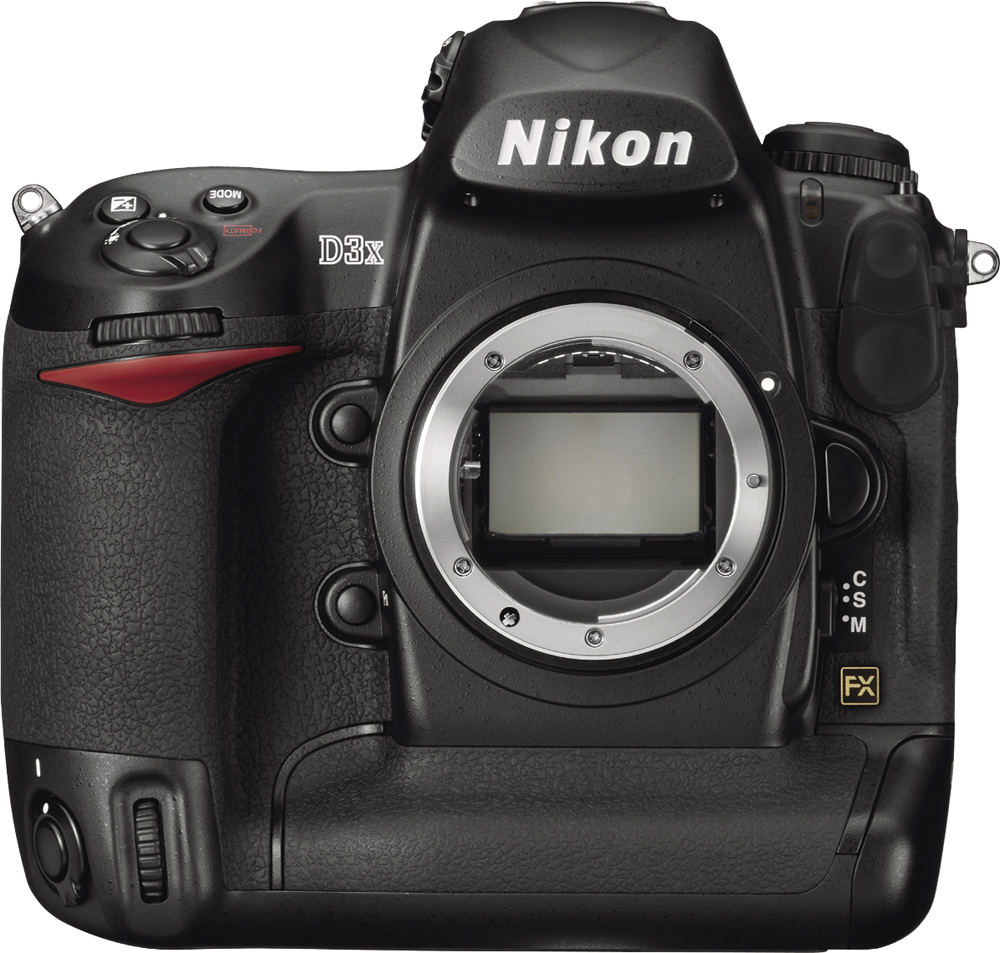
Look and Feel. If you're familiar with Nikon's previous D3 digital SLR, you'll be right at home with the Nikon D3X. Short of the different model number, the D3X is basically identical to its sibling. D2x users will be comfortable too, as the Nikon D3 / D3X body design features only evolutionary design changes with which they'll quickly become familiar. Given that there's no noticeable difference with the Nikon D3, the remainder of this section will focus on changes from the D2x.

Compared to the D2x, the pentaprism housing of the D3 / D3X is notably larger, and the white ambient light sensor which used to reside above the Nikon logo is no longer a part of the design. The red accent on the grip has been restyled as well. The cover over the Flash and Remote Terminal has a one-piece design, and the gold FX logo in the lower right corner indicates that this is a Nikon full-frame digital SLR.

There are only a few changes to the Nikon D3 / D3X's control arrangement compared to the D2x. Nikon has replaced the Enter button with an OK button, and they've moved the speaker below it to the rear Status LCD. The LCD panel has grown from 2.5 to 3 inches, with a significant improvement in resolution: now 640 x 480 pixels. It's hard to appreciate this improvement, but D2x users will notice the change immediately when they see an image on the screen. The AE/AF Lock button has been shrunk and dropped down a bit, making it easier to distinguish from the AF-ON button, which in the D2x used to be right next to it. The two rear Command dials are set at a slight angle to match the orientation of the thumb's pivot point when holding the Nikon D3 / D3X; a nice ergonomic change. The vertical, or secondary AF-ON button in the lower right corner has been moved from below the Command dial to above it. Without holding the camera, it's tough to know which will be preferable. The old location did make it easier to press the button accidentally. Sadly, there is no plastic screen cover for the Nikon D3 / D3X.

Finally, on the top panel the Metering selector dial has moved back a bit compared to its position on the D2x, and the Mode and EV compensation buttons have changed shape. The hot shoe design has also changed slightly.
 Body. The Nikon D3X is identical in size to its sibling the Nikon D3, sharing essentially the same body with that camera. The D3X's external dimensions are 6.2 x 6.2 x 3.4 inches (159.5 x 157 x 87.5mm). Heft is also near-identical to that of the D3, with the D3X coming in just a slight 0.7 oz (20g) lighter for a body-only weight of 2.7 pounds (1,220g). As with the D3, the exterior shell of the Nikon D3X is made of magnesium alloy, and is sealed against dust and water.
LCD. As you might expect, the Nikon D3X retains the excellent 3-inch, high-resolution LCD previously featured in the D3 and D300 models. At approximately 922,000 dots, the D3X's LCD resolution matches the highest available in any current digital SLR. As LCDs have increased in size, the value of higher resolution has become clear. You can more easily check focus, sometimes even without zooming in. When you do zoom in, you're left in no doubt that you got the focus right.
The pixel resolution in more familiar terms is 640 x 480, with each pixel being comprised of three adjacent dots: red, green and blue. But even counting the three horizontal dots as one pixel, that's still 266 pixels per inch -- significantly finer resolution than your computer screen. The result is a remarkably smooth, crisp, and sharp view of your images. Menus look like they're printed on photographic paper. The D3X's LCD has a wide 170 degree viewing angle, and offers a 100% view whether looking at captured images or framing in Live View mode.

Metering sensor. Nikon brings its venerable 1,005-area metering sensor to bear on an old problem: AF tracking.
Autofocus. Also held over from the D3 is Nikon's Multi-CAM 3500FX autofocus system, which offers 51 "precision focus" AF points. Of these, 15 are cross-type points, sensitive to both horizontal and vertical lines. The Multi-CAM system can be set to four modes on the Nikon D3X, including 9-area, 21-area, 51-area, and 51-area with 3D tracking. In this latter mode, the Nikon D3X's EXPEED processor takes account not only of data from the AF sensor, but also from the 1,005-area RGB metering sensor. With this extra information, the AF system can better select and track a subject, even when it leaves the AF area.
Fine-tuning. If we've discovered anything reviewing lenses on SLRgear.com, it's that lenses and bodies don't always match. Sometimes they focus in front of the subject, sometimes they focus behind the subject, regardless of what the AF system says. Camera companies are starting to acknowledge this, building in adjustments to compensate for front- and back-focusing problems. The Nikon D3X inherits a system from the D3 that allows it to separately store adjustments for up to 20 lens types. Not individual lenses by serial number, mind you, so note that if you have several of one type of lens, the Nikon D3X will only load compensation information for the individual lens with which compensation was initially set. If you have only one of each specific type of lens though, you'll have no problem.
Live View. "Live View" has become a reasonably common feature among current digital SLRs, and since its D3 and D300 models, Nikon has provided what is to our eyes one of the more useful and usable DSLR Live View functions to date. What makes Nikon's Live View mode so effective are the two options it provides for autofocus operation. Traditional DSLR phase-detection AF sensors are blocked whenever a camera raises its reflex mirror to expose the imaging sensor. Since the imaging sensor constantly streams data for the LCD display during Live View operation, this means the mirror must be continuously held up while Live View mode is being used. Hence, the first focusing mode requires a brief interruption to the live view display -- during which time the camera drops the mirror, focuses, and then flips the mirror back up to resume viewing of the refocused scene. This is fine for relatively static scenes, but the resulting delay in focusing -- not to mention the interruption to your view of the scene -- can make it difficult to get a good shot if your subject is in motion or requires precise timing.


Called Live View (Tripod mode), the second mode is the real charm, and uses contrast-detect autofocus driven from the imaging sensor. Instead of flipping mirrors, the Nikon D3X simply reads data off the CMOS image sensor and evaluates how abruptly light to dark (or dark to light) transitions happen on the image plane. Contrast-detect AF isn't nearly as fast as phase-detect (which is why the shutter response of most digicams is so much slower than most digital SLRs), but at least Nikon's D3X can focus without interrupting the Live View display. Nikon chose the name "Tripod Mode" for a reason though: the camera must be mounted on a tripod for contrast detection autofocus to work well, because the sensor isn't quite fast enough to handle the camera or subject moving while the AF operation is under way. For moving subjects and the fastest focusing you'll want to stick with the optical viewfinder, but it's nice to have the Live View option (and the choice of AF modes) when your subjects allow its use.
There are two added benefits of the Live View (Tripod mode) over the more traditional phase-detection autofocus. Because it's working with data coming from the main image sensor, contrast detection autofocus rules out any potential issues with front- or back-focusing. Given adequate light and a relatively static subject, the point of focus should be determined accurately regardless of issues with individual lenses. This is somewhat less of an issue since the Nikon D3X allows fine-tuning of up to 20 lens types, but can still prove an advantage if you have a large selection of lenses, or perhaps share lenses from a pool of "identical" lenses (since the fine-tuning is specific to the lens type, and not the specific serial number). Also, when using Live View (Tripod mode), you can move the AF point anywhere you want within the frame area -- even right out to the extreme edges. The Nikon D3X also provides up to a 10x zoom in Live View mode, providing excellent focus discrimination when focusing manually. This is pretty key, as less than 10x magnification really doesn't do the trick for getting the focus set right. At 10x though, we can pretty well nail the focus every time.
The Nikon D3X includes the ability to control the camera from a computer remotely, and that includes receiving a Live View image from the camera. You can focus, adjust settings, and fire, all from a computer. What's more, you can do it via cable or WiFi connection, with the optional WiFi adapters. You do require Nikon's Camera Control Pro software to enable this feature, an optional extra that will cost around $60 at the time of this writing.
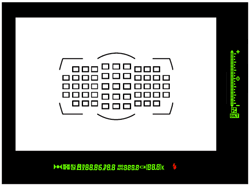 Viewfinder. Of course, where you'll find the real speed of an SLR is through the optical viewfinder. The Nikon D3X's inherits the Nikon D3's pentaprism viewfinder, which delivers 100 percent frame coverage, 0.7x magnification at 50mm and -1 diopter, an 18mm eyepoint, and diopter adjustment range of -3 to +1. The AF points are arrayed in an oval, similar to what we've seen on the Canon 1D-series. You can read more about the D3's viewfinder here.
Sensor. The big news with the Nikon D3X is its brand new imager: a 24.5-effective-megapixel, full-frame, 35mm-sized CMOS sensor that yields double the pixel count of Nikon's D3. In terms of horizontal / vertical linear resolution, this equates to an increase of about 42% over the D3's sensor. Measuring 35.9 x 24mm, the sensor size is not the exact dimension of a 35mm frame, which measures 36 x 24mm, but it's very close. As an aside, it's also not quite the same size as the sensor used in the D3, which was 36 x 23.9mm. The native pixel dimension of a D3X image is 6,048 x 4,032, and the pixel size is 5.94 microns - down from 8.45 microns in the D3. (We initially noted that the Nikon D3X sensor had 5.49 micron pixels. This was due to a typo in information provided by Nikon, which has now been corrected.) From the fact that Nikon is not claiming to manufacture the sensor itself, it can be inferred that it has partnered with another company for the actual manufacture of the chip to Nikon specification. As with its past DSLRs, Nikon is remaining very tight-lipped about the actual manufacturer of the sensor used in the D3X, stating only that it is an "original Nikon design," and that no other company will ever be able to use it, nor will it appear in any other camera in the marketplace.
Note: Realizing there was still a lot of speculation about the origins of the D3X's sensor, Nikon has since clarified with this statement: "The Nikon D3X's 24.5-megapixel FX-format (35.9 x 24.0mm) CMOS sensor was developed expressly for the D3X in accordance with Nikon's stringent engineering requirements and performance standards, with final production executed by Sony. Featuring refined low-noise characteristics, 12 and 14 bit output, Live View capability and more, the D3X's unique sensor design was carefully blueprinted to perform in perfect concert with proprietary Nikon technologies including EXPEED Image Processing and the Scene Recognition System. Meticulous efforts allowed the sensor to become one of the many essential components and technologies which contribute to the D3X's superior image fidelity."
 In terms of sensor type and absolute dimensions, the Sony Exmor sensor used in that company's flagship Alpha DSLR-A900 model is very similar; it too is a 35.9 x 24mm CMOS imager. Although Sony lists its camera as having 24.6-megapixel resolution, the image size of 6,048 x 4,032 pixels is identical -- the two companies just have a slightly different way of calculating effective resolution numbers. Nikon's D3X hence places right alongside Sony at the very top of the field among current 35mm full frame digital SLRs, at least in terms of resolution. Both Canon's flagship EOS-1Ds Mark III and EOS 5D Mark III lag behind somewhat in this area, with effective resolutions of 21.1 and 21.0 megapixels respectively. However, with 5.9 micron pixels, the Nikon D3X and Sony A900 have a smaller pixel size, while Canon's slightly lower-res cameras both have 6.4 micron pixels.
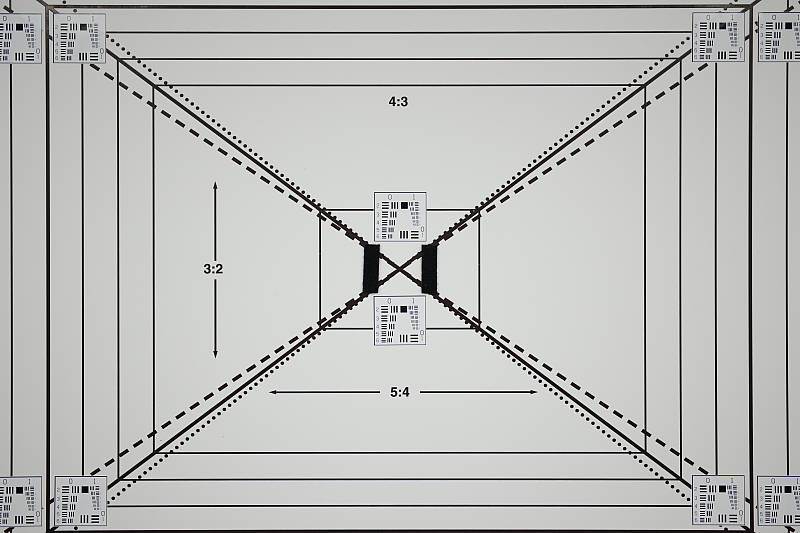
The Nikon D3X's sensor has a 12-channel readout, which allows it to move data off the sensor at a blistering pace. Probably due to the higher resolution and the much greater demands this makes on the imaging pipeline, the Nikon D3X is rather slower than the incredibly speedy D3; but it's really no slouch when you consider the amount of data whizzing around. The Nikon D3X is capable of capturing up to five frames per second at the full 24.5-megapixel sensor resolution. When using the 10.5-megapixel "DX crop" mode -- which is set automatically when using DX-format lenses, and can be manually set with other lenses -- this increases to a fairly swift seven frames per second. At the time of this writing, we are still waiting on confirmation of the burst depth in either mode. There's also a 5:4 crop mode for taking 8x10-format images, which should be helpful for portrait and event photographers, and equates to a maximum resolution of 20.4 megapixels.
 Shutter. The Nikon D3's carbon fiber / Kevlar hybrid shutter mechanism is retained for the Nikon D3X, and plays a part in enabling the swift seven frames per second shooting offered in DX mode. The shutter mechanism is rated for a lifetime of some 300,000 cycles. Expected shutter lag is in the region of 40 milliseconds.

Expeed. Nikon's proprietary processor makes a number of sophisticated in-camera processes possible.
Processor. The Nikon D3X uses an EXPEED processor, as in the previous D3. The name is being used on all Nikon's digital cameras going forward from the D3 / D300, including the Coolpix point & shoot line. Nikon doesn't specify the exact model or speed of processor in each camera, though, so we can't state with certainty if the D3X's processor is completely identical to that of the D3. The processor in the D3X has a 16-bit pipeline and is the engine for processing the 14-bit color data from analog to digital at such a rapid rate. It also enables such impressive features as the Scene Recognition System, in-camera Lateral Chromatic Aberration Correction, and Active D-Lighting, detailed below.
Scene Recognition System. Nikon's Matrix metering system went through quite an overhaul for the D3, and gained a new name in the process: the Scene Recognition System. A new diffraction grating over the 1,005 area metering sensor allowed more accurate detection of color and brightness. At the same time, new firmware was capable of more complete analysis of scenes, improving white balance, focus tracking, and exposure. One of the chief benefits of the Scene Recognition System was highlight analysis, designed to prevent blown highlights in common situations by adjusting the tone curve to compensate. The Nikon D3X inherits the improved Scene Recognition System functionality from its sibling.
Active D-Lighting. D-Lighting has proven a popular post-processing feature in Nikon's consumer digital SLRs, as well as some of the company's point & shoot models. It's a quick software process that attempts to overcome underexposed images, and bring detail out of shadows. An improved version of D-Lighting appeared in the Nikon D3 and D300, including optimization of image contrast, helping to prevent overprocessing of shadows and flattening of overall image contrast. As with the Scene Recognition System, the D3X inherits Active D-Lighting from the D3 and D300 -- but this time with a slight improvement, in that as well as the previous High, Normal, Low or Off settings, the D3X will also offer an Extra-High setting, or the ability to automatically choose the D-Lighting strength on the fly.
Lateral Chromatic Aberration Correction. While other cameras have had lens distortion processing built-in, notably the Olympus E-1, none until Nikon's D3 and D300 did the processing based on the distortion detected in the image. Past cameras (and most distortion-correction software) simply looked at which lens was mounted and perhaps the focal length if it was a zoom lens, and then applied a pre-set amount of correction; no image analysis actually took place. Nikon's Lateral Chromatic Aberration correction offered a more sophisticated approach, thanks to power of the camera's EXPEED processor, by actually analyzing each image after capture and fixing the chromatic aberration detected therein before saving the JPEG file. Cameras with full-frame, high-resolution sensors place a greater demand on lenses, and hence Lateral Chromatic Aberration correction could prove a particularly interesting feature on the D3X.
Vignette Control. Another interesting feature is Vignette Control, first seen in firmware upgrade v1.11 for the D3, and then in the Nikon D700. Three levels are available that attempt to reduce the effects of corner shading with certain lenses. Designed for G and D Nikkor lenses, not DX or PC lenses, users can choose from High, Normal, Low, and Off for this setting. You can't see the results in Live View, nor can the Vignette Control be applied to multiple exposures. As with the chromatic aberration discussed in the previous section, vignetting is more likely to be an issue with full-frame digital imaging -- hence this could prove a very worthwhile feature.
Picture Control. Nikon has standardized its Picture Control system so that camera settings for tone, saturation, brightness, and sharpening can be set and ported to other Nikon digital SLRs. The D3 was the first camera compatible with the option, and the Nikon D3X likewise follows the standard.
 Storage, battery, and connectivity. The Nikon D3X can hold two CompactFlash cards, and write to them in three different ways. First, fill one and image storage switches to the next card. Next, you can record the same data to both simultaneously. Third, you can write RAW to one and JPEG to the other. The Nikon D3X is also capable of writing to UDMA-capable cards, for faster read and write performance.
Like the D3, the Nikon D3X is compatible with the lithium-ion EN-EL4 and ships with the EN-EL4a, an 11.1v, 2,500mAh battery. Battery life is expected to be just slightly better in the D3X as compared to the D3, with a CIPA rating of 4,400 shots for the newer camera versus 4,300 shots for its sibling. The D3X's battery is charged via the Quick Charger MH-22.
Photographers interested in geotagging their images might be interested in the optionally available Nikon GP-1 GPS unit, which mounts on the camera's hot shoe, or clips to the neck strap, and attaches via the 10-pin remote terminal. Note that the GP-1 GPS unit isn't specific to the D3X; other Nikon SLRs including the D200, D3, D300, D700, and D90 are all compatible as well.
New/upgraded features on the Nikon D3X compared to the D3:
- 24.5-megapixel FX-format CMOS sensor (D3 used 12.1-megapixel FX-format CMOS sensor)
- Exact sensor dimensions are 35.9 x 24.0mm (D3 sensor was 36.0mm x 23.9mm)
- Pixel size is now 5.94µm (was 8.45µm)
- Up to 5 fps continuous-mode speed at full resolution (down from 9 fps)
- Up to 7 fps in 10.5-megapixel DX crop mode (down from 11 fps in 5.1-megapixel High-Speed crop mode, but this crop is only 1.6 megapixels and 2 fps below the D3's native resolution / full-frame speed)
- ISO from 100 to 1,600, can be extended ISO 50 to 6,400 (was 200 to 6,400, expandable 100 to 25,600)
- New "Auto" and "Extra-High" Active D-Lighting settings for real-time highlight and shadow correction, as well as previous High, Normal, Low or Off
- Improved battery life, now 4,400 shots to CIPA testing standards (was 4,300 shots)
- Slight weight decrease to 43.0 ounces / 1,220 grams (was 43.7 ounces / 1,240 grams)
The 12.1-megapixel D3 will continue to be produced. It lists for US$4999.95.
In the Box
Compactly packaged in the Nikon D3X's capacious bronze box are:
- Nikon D3X body
- EN-EL4a Rechargeable lithium-ion battery
- MH-22 Quick Charger
- UC-E4 USB Cable
- EG-D2 Audio Video Cable
- AN-D3X Camera Strap
- BF-1A Body Cap
- BS-2 Accessory Shoe Cap
- DK-17 Eyepiece
- BL-4 Battery Chamber Cover
- USB Cable Clip
- Software Suite CD-ROM
Recommended Accessories
- Huge capacity CompactFlash memory card. For the D3X, you should consider a pair of high speed UDMA cards (the D3X has two card slots) to take full advantage of the camera's UDMA capability, offering transfer speeds as high as 45MB/second.
- SB-900 Speedlight Flash
- WT-4a Wireless Transmitter
- Type E Focusing Screen
- DK-17M Magnifying Eyepiece
- EH-6 AC Adapter
- Capture NX 2 Software
- Camera Control Pro 2 Software
- Image Authentication Software
Nikon D3X Conclusion
| Pro: | Con: |
|---|---|
|
|
Early on in our evaluation of it, one fact became unequivocally clear: The Nikon D3X produces the highest image quality of any camera we've tested to date. As we proceeded with our evaluation and completed the analysis of our test images, nothing appeared to challenge that conclusion: Its combination of resolution, color fidelity, and noise performance puts it at the very top of its class. Not only does the Nikon D3X sport an amazing 24.5 megapixels of resolution, it manages to wring more detail out of those pixels (particularly in its NEF-format RAW files) than anything else out there. The D3X also offers surprising speed, capable of 5 frames/second at full resolution, and up to 7.5 frames/second in its 10.5 megapixel DX crop mode. And then there's build quality: The D3X is built like the proverbial tank; well-suited to most anything a busy pro might care to dish out to it. The high-end SLR market often seems like a perpetual game of leapfrog, but for now, the Nikon D3X sits at the top of the heap, as the ultimate digital SLR. To say that it's a five-star Dave's Pick seems hardly enough...

Design
Nikon D3X Design
Roll-over the various controls and features with your mouse for a brief description. Note: Rollovers are best viewed with the latest versions Firefox, Safari, or Opera browsers, or Internet Explorer 6 or earlier.

Nikon D3X Front View. If you've seen the D3, then you've seen the D3X. The standard Nikon F-mount once again surrounds a full-size mirror, and the FX logo in the lower right corner denotes Full Frame.

Nikon D3X Left View. The battery unlocks with a twist and pull to the left. Rubber flaps cover the camera's electrical ports, and a metal strap ring hangs from a steel lug just off the Nikon D3X's left shoulder.

Nikon D3X Right View. The dioptric adjustment knob and AF area selector dial can be seen in this view, as well as the battery door and vertical shutter release. A locking ring around the button prevents accidental activation.

Nikon D3X Top View. Buttons and controls are identical to the D3.

Nikon D3X Back View. Control layout is identical to the D3 on the back, too.

Nikon D3X Bottom View. The bottom features only the metal tripod mount and a rubberized surface.
Operation
Nikon D3X Operation
Like other Nikon DSLRs, the user interface on the Nikon D3X is straightforward and simple to use, and almost identical to that of the D3. The LCD menu is a six-tab system that divides up functions between Playback, Shooting, Custom Settings, Setup, Retouch and My Menu. While many of the camera's options can be accessed via the excellent "plain English" menu system, all the most common shooting controls are available via the camera's external buttons and knobs. You can also program the operation of some of the buttons, to configure the camera for your particular shooting requirements. Nikon makes a big deal of their digital SLR's "cameraness," defined as how well/easily they function as cameras, and the D3X embodies that philosophy.
Nikon D3X Top Panel LCD
 As with most higher-end Nikon DSLRs, the D3X's top-panel data readout LCD communicates a lot of information about current camera settings, and provides an interface for setting many camera functions, when used in conjunction with the various buttons and Command Dials. You can also use the main LCD to adjust many of the same settings, but using the top LCD saves power and can be more convenient when the camera is below eye level. The illustrations below show the meaning of the various icons and readouts in this display.

1 |
Shutter speed
|
13
|
Battery indicator
|
|
Exposure compensation value
|
14
|
Frame count
|
|
|
Number of shots in exposure and flash bracketing sequence
|
Preset white balance recording indicator
|
||
|
Number of shots in WB bracketing sequence
|
Manual lens number
|
||
|
Number of intervals for interval timer
|
15
|
"K" appears when memory remains for over 1000 shots
|
|
|
Focal length (non-CPU lens)
|
16
|
Flash value (FV) lock indicator
|
|
|
ISO sensitivity
|
17
|
Flash sync indicator
|
|
|
2
|
Shutter-speed lock icon
|
18
|
Clock battery indicator
|
| 33 |
Flexible program indicator
|
19
|
GPS connection indicator
|
4 |
Exposure mode
|
20
|
Focus mode indicator
|
5 |
Flash mode
|
21
|
Interval timer indicator
|
6 |
Shooting menu bank
|
22
|
Multiple exposure indictor
|
7 |
Custom settings bank
|
23
|
Aperture lock icon
|
8 |
Memory card indicator (slot 1)
|
24
|
Image comment indicator
|
| 29 |
Memory card indicator (slot 2)
|
25
|
"Beep" indicator
|
|
10
|
Number of exposures remaining
|
26
|
Exposure compensation indicator
|
|
Number of shots remaining before buffer fills
|
27
|
Exposure and flash bracketing indicator
|
|
|
Capture mode indicator
|
28
|
White-balance bracketing indicator
|
|
11 |
Aperture stop indicator
|
29
|
Electronic analog exposure display
|
12 |
Aperture (f-number)
|
Exposure compensation
|
|
|
Aperture (number of stops)
|
Exposure and flash bracketing progress indicator
|
||
|
Exposure and flash bracketing increment
|
WB bracketing progress indicator
|
||
|
WB bracketing increment
|
PC connection indicator
|
||
|
Number of shots per internal
|
Tilt indicator
|
||
|
Maximum aperture (non-CPU lenses)
|
|||
|
PC mode indicator
|
Nikon D3X Rear Control Panel LCD
 Like other Nikon professional models, the Nikon D3X also has a rear Control Panel LCD. It is identical to the D3's. The illustrations below show the meaning of the various icons and readouts in this display mode.

1 |
Image quality (JPEGs)
|
6
|
"K" appears when memory remains for over 1,000 shots
|
2 |
"Remaining" indicator
|
Color temperature indicator
|
|
3 |
Image size
|
7
|
Memory card slot indicators
|
4 |
ISO sensitivity indicator
|
Image quality
|
|
|
Auto ISO sensitivity indicator
|
8
|
White balance bracketing indicator
|
|
5 |
ISO sensitivity
|
9
|
Voice memo recording indicator (shooting mode)
|
|
ISO sensitivity (high/low gain)
|
10
|
Voice memo status indicator
|
|
|
Number of exposures remaining
|
11
|
Voice memo recording mode
|
|
|
Length of voice memo
|
12
|
White balance
|
|
|
White balance fine-tuning
|
White balance fine-tuning indicator
|
||
|
White balance preset number
|
|||
|
Color temperature
|
|||
|
PC mode indicator
|
Nikon D3X Main LCD
 Shooting Information
Like other more recent Nikon digital SLRs, the D3X has the ability to display shooting info and settings on the rear LCD. The rear LCD is larger and in color (with selectable color scheme), so some prefer to use it over the top LCD, at the expense of battery life. It's nice that Nikon gives you the choice.
The illustrations below show the meaning of the various icons and readouts in this display mode. Compared to the D3, the D3X adds Copyright Information and Vignette Control indicators.

|
1
|
Exposure mode
|
18
|
Clock battery indicator
|
|
2
|
Flexible program indicator
|
19
|
FV lock indicator
|
3 |
Shutter speed lock icon
|
20
|
Interval timer indicator
|
|
4
|
Shutter speed
|
21
|
Image comment indicator
|
|
Exposure compensation value
|
22
|
Copyright information indicator
|
|
|
Number of shots in exposure and flash bracketing sequence
|
23
|
"Beep" indicator
|
|
|
Number of shots in WB bracketing sequence
|
24
|
Exposure compensation indicator
|
|
|
Focal length (non-CPU lens)
|
25
|
Battery indicator
|
|
5 |
Multiple exposure indicator
|
26
|
Exposure and flash bracketing indicator
|
6 |
Aperture lock icon
|
WB bracketing indicator
|
|
7 |
Aperture (f-number)
|
27
|
Focus mode indicator
|
|
Aperture (number of stops)
|
28
|
Long exposure noise reduction indicator
|
|
|
Exposure and flash bracketing increment
|
29
|
Color space indicator
|
|
|
WB bracketing increment
|
30
|
Picture Control indicator
|
|
|
Maximum aperture (non-CPU lenses)
|
31
|
Active D-Lighting indicator
|
|
|
8
|
Aperture stop indicator
|
32
|
High ISO noise reduction indicator
|
|
9
|
Number of exposures remaining
|
33
|
Vignette control
|
|
10
|
"K" (memory remains for over 1000 exposures)
|
34
|
Release mode (single frame/continuous) indicator
|
|
11
|
Frame count
|
Continuous shooting speed
|
|
|
Manual lens number
|
35
|
Auto-area AF indicator
|
|
|
12
|
Memory card indicator (slot 2)
|
Focus points indicator
|
|
|
13
|
Memory card indicator (slot 1)
|
AF-area mode indicator
|
|
|
14
|
Custom settings bank
|
3D-tracking indicator
|
|
|
15
|
Shooting menu bank
|
36
|
Image area indicator
|
|
16
|
Flash sync indicator
|
37
|
GPS connection indicator
|
|
17
|
Flash mode
|
38
|
Electronic analog exposure display
|
Nikon D3X Virtual Horizon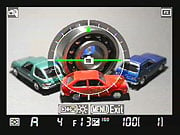 A really neat feature of the D3X (as well as the D3 and D700) is the virtual horizon gauge. It uses sensors in the body to detect the orientation of the camera and display a virtual horizon, similar to an aircraft instrument. This is useful for critical alignment of subjects such as buildings, the horizon, etc. With the use of the FUNC button, the electronic analog scales in the viewfinder can also display the amount of tilt, so that you don't need to take your eye off the subject to check the camera angle. Pressing the "info" button allows you to overlay the virtual horizon in Live View mode (as shown in the screenshot to the right.)
Nikon D3X Playback mode Playback mode is entered by pressing the playback button on the top left corner of the back panel. The D3X's playback mode provides a great deal of information about your pictures after you've shot them. A variety of playback displays can be cycled through using the up/down arrows on the multi-selector, including showing the image with file information (with optional highlight warning and focus point display), RGB histogram, three screens with overlaid shooting and image parameter information (an additional GPS info screen is available when a GPS device was used when the image was captured), and an overview display with basic shooting data and luminance histogram. The screenshot animation at right shows the sequence when the down arrow is used to cycle through the available screens. And if you find this amount of information overwhelming, you can add or remove the displays as you see fit.
 As you'd expect, the Nikon D3X offers a comprehensive RGB histogram display mode. Histogram displays are common on professional digital cameras (and many amateur models now), regarded as almost mandatory by many pros for evaluating exposure levels. A histogram is simply a graph of how many pixels there are in the image at each brightness level. The brightness is the horizontal axis, running from black at the left to white at the right. The height of the graph shows the relative number of pixels having each brightness level. This sort of display is very handy for determining under- or overexposure. Ideally, the histogram would stretch across the entire width of the display, using the full range of brightness values available. An underexposed image will have a histogram with all the data lumped on the left-hand side, with nothing reaching all the way to the right. Likewise, an overexposed image will have all the data lumped on the right hand side. Clipped highlights are shown by blinking any highlights that are saturated in any of the color channels. It does this by taking the nearly-white areas on the LCD and toggling them between white and black. Highlights can also be displayed separately for each color channel by selecting R, G, or B in this display.
 Of course the Nikon D3X also lets you zoom out to quickly find and select images, or magnify them for closer inspection on its gorgeous 3-inch, 922K pixel LCD. You have the normal 4- or 9-image thumbnail displays available by pressing the thumbnail/zoom out button, and you can magnify them up to approximately 27x for large, 20x for medium and 13x for small images, using the zoom-in button. Once magnified, you can scroll around the image using the multi-selector to examine critical detail and framing. You can also program the multi-selector center button to automatically zoom in on the active focus point with a preset the initial zoom setting (low, medium, or high), to make focus verification faster and more convenient.
To return the Nikon D3X to shooting mode, simply press the playback button again, or half-press the shutter button.
Optics
Nikon D3X Optics
Lens Compatibility
The Nikon D3X is compatible with a wide variety of Nikkor (and third-party) lenses, some dating back to the 1970's. There are some exceptions however. See the table below (provided courtesy of Nikon USA) for details.


Non-CPU Lenses

Non-CPU Lens Data: The camera being able to register data for up to 9 lens types.
In a digital SLR camera, the Optics heading would seem to have more to do with the attached lens than the camera itself. The camera body is responsible for autofocus, though, so it makes sense to talk about autofocus technology here on the "Optics" tab of this review. In the case of the Nikon D3X it turns out that the camera-side of the equation has a lot more to do with image quality than is generally the case.
Nikon D3X Autofocus
Autofocus is an area where Nikon in the past has often been perceived as lagging behind their primary competitor, Canon. Whether they actually have or not, in terms of actual autofocus performance is a matter of fierce debate between loyalists of the respective systems, but there has been no question that Canon's high-end models at least had more AF points than competing designs from Nikon.
With the advent of the Nikon D3 (and D300), Nikon has finally pulled ahead in the AF-point derby, and possibly in the AF-performance race as a whole. We doubt that sheer number of AF-points is so critical, but having a high number opens new opportunities.
The most obvious difference is that the Nikon D3X, D3, D700 and and D300 now sport no fewer than 51 "precision focus" AF points spread across the frame. (More on that "precision" designation below.) That's just the tip of the iceberg, though, as there are a lot of other changes in the inner workings of the new Multi-CAM 3500FX AF system.
The new AF system also raises the number of cross-type sensors, with a total of 15 AF points sensitive to both horizontal and vertical detail.
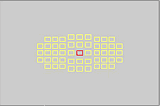
| Nikon D3X AF Point Selection Options | ||
 |
 |
 |
| 51-point | 21-point | 9-point |
The Multi-CAM 3500 AF system offers 9-area, 21-area, 51-area, and 51-area with 3D tracking modes. There's also an option that lets you choose a single active point from a selection of 11, as an aid to users transitioning from the D200's system, or those using both D200 the newer bodies simultaneously.
The reference to "3D tracking" above alludes to the most unusual feature of the Nikon D3X's AF system, namely the use of the 1,005-pixel RGB exposure sensor to assist in tracking moving subjects. This is one of those innovations that make you wonder why someone didn't think of it earlier. It's evident that only Nikon was poised to make a move like this, as they're the only SLR maker using such a high resolution sensor in their evaluative AE system. As far as we know, they're also the only ones using an RGB sensor for evaluative metering, something with adds to its usefulness for object recognition.
Tracking autofocus systems are surprisingly adept at interpreting the rather limited data from a handful of AF sensors, and using it to intelligently track moving objects. If you think about it, the amount of information the AF system has at its disposal is very limited: All it has to work with are approximate subject distances at a handful of AF points across the frame. By interpreting changes in the data coming from each, the AF system attempts to pick a subject from the background, then determine the subject's direction and speed.
In fact, AF systems lack almost all the things that our own visual systems use to discriminate objects with: Color, tone, shape and subject size. It's really amazing that AF tracking works as well as it does.
Metering sensor. Nikon brings its venerable 1,005-area metering sensor to bear on an old problem: AF tracking.
With the D3X, the Nikon engineers have used the data from the 1,005 pixel RGB exposure sensor to help guide the camera's autofocus decisions. We'll have to see how this pans out in actual shooting situations, but the potential is huge. While the RGB sensor provides no distance information, it has much more resolution than even the greatly expanded array of AF points on the new AF sensor. As discussed in the section of this report that covers the AE system, the AE system also incorporates a new Diffractive Optical Element (DOE) designed to improve the effective resolution of the RGB sensor. The 1,005 element AE sensor also captures both tone and color information, which should make it easier to discern where objects are in the field of view and how they're moving.
The net result should be more sure-footed and accurate tracking of subjects as they move about the frame. The relatively high resolution of the RGB sensor should let the camera determine the subject's location more precisely, and therefore develop more accurate measurements and predictions of its motion.
In our discussions with Nikon staff, it also appears that the RGB sensor is contributing some tracking information even when the subject has moved outside the area covered by the AF sensors. At first this didn't seem to make sense. What good would it do to know where the subject is if there aren't any AF sensors there to tell the camera how far away it is, or how fast it's going? It turns out that there are a number of ways the AE sensor could help the AF system outside the active AF area; in my discussions with Nikon engineers, though, I learned that the primary purpose for out-of-area tracking is to reduce the time required by the AF system to re-acquire the subject.

As the diagram above shows, the 1,005 element RGB sensor covers a somewhat greater portion of the frame than do the 51 active AF points. (When I asked the engineers just what portion of the frame area the RGB AE sensor covered, however, they politely but firmly declined to say.) The wandering red line drawn on the figure shows the path followed by a hypothetical subject during a continuous burst of exposures. Note that a portion of the subject's path (the part between the two blue "X" marks) is outside the active AF area, yet still within the area covered by the 1,005 pixel sensor. In previous Nikon AF systems, and those of competing manufacturers, the AF system would have no idea where the subject was once it passed beyond the active AF area. As a result, it would take more time to re-acquire the subject when it re-entered the active AF area near the bottom of the frame. In the Nikon D3X, D3, D700 and D300 though, the AF system will remain aware of the position of the subject, even if it doesn't know its range while it's outside the AF area. When it re-enters the AF area, the camera can quickly determine its range, and doesn't need to spend any processing cycles figuring out which AF point is covering it.
It's easy to imagine how this capability could help in the tracking of difficult subjects: While I'm sure it's less of a problem for pro shooters, I myself have often encountered situations in sports or wildlife shooting where it was a challenge to keep a rapidly- or erratically-moving subject framed within the AF area. If the camera were able to track such subjects when they wandered slightly outside the AF area, I'd expect I'd have had more "keepers" when I came back from the shooting sessions.
This edge-of-frame tracking ability isn't a panacea though. While the engineers declined to say just how much of the frame the RGB sensor covered (and I did press them on this point), it seems that it doesn't extend too far beyond the edges of the AF array. In our discussions, they were clear that the system could only track objects a small distance outside the AF area. They seemed much more emphatic about the impact of improved tracking accuracy within the active AF area than outside it. Still, the ability to reduce re-acquisition time, even in a limited percentage of cases, is a very worthwhile feature. In the case of the D300, the Matrix metering sensor is likely to cover almost the entire frame, so the D300 has a slight advantage.
One question of course, is why Nikon waited so long to develop such an AF system. After all, the 1,005 element RGB sensor has been in use in Nikon SLRs for something like 10 years now. When I asked the engineers about this, they said that a key factor was the speed of the CPU used for camera management, the chip that handles autofocus, autoexposure, and user interface operation, as opposed to image processing. The control processor used in recent Nikon SLRs is considerably faster than similar processors in earlier models, and now has sufficient throughput to do meaningful image processing with the 1,005 element sensor data in real-time, where earlier units did not. Secondarily, the newly-added Diffractive Optical Element brings greater imaging precision to the 1,005-element sensor, permitting more accurate discrimination and localization of objects within the AE area.
These days, most improvements in camera functionality are incremental, basically taking what had been done before, only now doing it a bit faster, a little more precisely, etc. In contrast, Nikon's use of RGB exposure sensor data to assist AF operation stands out as a more radical innovation, bringing an entirely new approach to the problem of AF tracking, different from any we've seen before. It's a very clever idea, but we won't know how successful it is until we hear the experience of practicing photographers using the new system in the field.
Nikon D3X AF "Fine Tuning"
The microscopic pixel dimensions of modern digital sensors have placed more extreme demands on autofocus accuracy than was ever the case in the film era. This has revealed a lot of shortcomings in autofocus systems, not the least of which have been the frequent "near-miss" mismatches between particular lens/camera combinations. A lens that focuses fine on one body may front-focus on another and back-focus on a third. Change bodies and the problem may move to another lens.

AF Fine Tuning: You can make micro-focus adjustments for up to 20 lenses, or adjust the body (default).
Ideally, there'd be a way to tell the camera to tweak its focus forward or back just a tad, depending on the lens you were using. In fact, this is just what the Nikon D3X provides: You can register up to 20 different lens "types" with the camera (more on "types" in a moment), and make micro-adjustments to the AF system for each.
This is an area where Nikon has followed Canon's lead. The Canon EOS-1D Mark III first introduced the idea of AF micro-adjustment when it was introduced back in late February 2007. Both can keep track of 20 different "registered" lenses.
What does lens "type" mean here? Basically, a lens "type" is a lens model. For instance, if you have a 70-200mm f/2.8 and a 100mm f/2.8 Micro, the camera would recognize each lens when it was attached to the camera, and automatically load the appropriate fine-tuning setting. If you had two 70-200mm f/2.8s though, the camera would have no way to distinguish between them, and would load the same fine-tuning settings for either one.
While there may be some photographers (particularly pros) who have more than 20 lenses in their kits, the 20-lens "fine-tuning library" will cover the needs of the vast majority of shooters. It also appears that the Nikon D3X's fine-tuning system can recognize lens types, regardless of who manufactured them. This is a huge step forward in focus accuracy, giving photographers the tools they need to maintain and calibrate their own equipment.
Autofocus differences between the Nikon D3X and the D3?
The Nikon D3X and D3 supposedly both use the same Multi-CAM 3500 AF engine, but our tests showed that the D3x was noticeably slower at recognizing accurate focus than was the D3. We have no explanation for this, but the results were confirmed in multiple tests. We'll ask Nikon about this, to see if they can shed any light on the differences in our measurements between the two cameras.
Dust Reduction
Unfortunately, the Nikon D3X offers no mechanical (ultra-sonic) dust reduction. We're not sure why, as other manufacturers of full-frame DSLR bodies have managed to include this feature. Only Nikon's "Image Dust Off" software solution is provided, where a dust reference photo can be taken and then utilized in Capture NX2 (optional) to remove dust in image post-processing. That said, we've found in-camera dust-removal systems less than perfectly effective. You're still going to need to use a sensor-cleaning kit fairly often, so the advantage of in-body dust removal is perhaps less than it might seem.
Lens Test Results
The D3X does not ship with a standard "kit" lens, so this section left blank intentionally. We use a Sigma 70mm f/2.8 Macro lens in our laboratory testing, as our tests on SLRgear.com have revealed it to be one of the sharpest lenses we've tested.
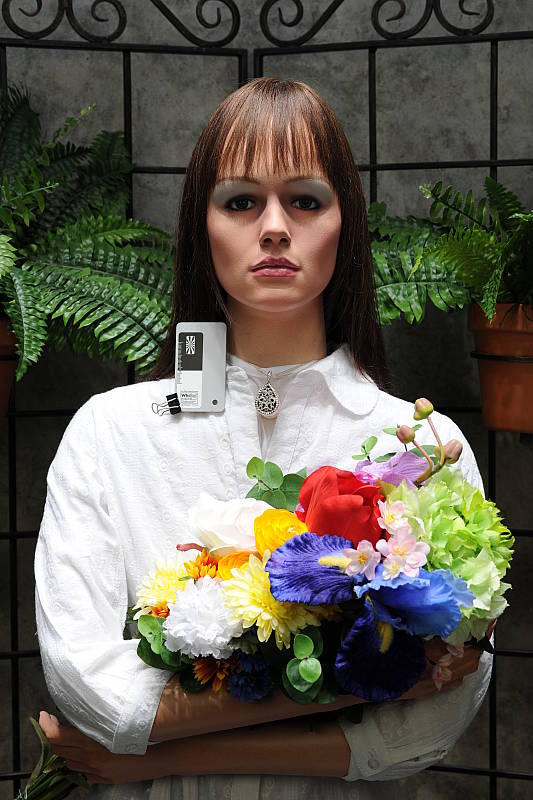
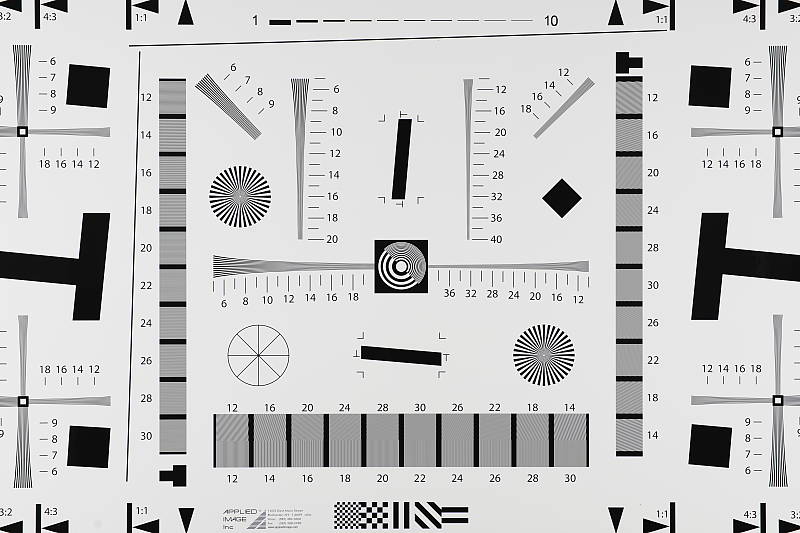
The images above were taken from our standardized test shots. For a collection of more pictorial photos, see our Nikon D3X Photo Gallery .
Exposure
Nikon D3X Exposure
 Exposure Modes. Being a professional SLR, the D3X dispenses with Auto and Scene modes, and only gives you a choice between Program AE, Manual, Aperture Priority, and Shutter Priority exposure modes with shutter speeds from 1/8,000 to 30 seconds available, as well as a Bulb setting for longer exposures. As we've come to expect, while in Program AE mode, you can rotate the Command dial to select different combinations of aperture and shutter speed settings than those normally chosen by the autoexposure system. (That is, if the automatic program would have chosen 1/125-second and f/5.6, you could instead direct the camera to use 1/60 at f/8 or 1/30 at f/11, to get greater depth of field.) This feature, referred to as a "Flexible Program" mode, is a very handy option for those times when you need some measure of increased control, but still want the camera to do most of the work for you. You can also set the exposure step size for adjusting the shutter speed, to 1/3, 1/2, or one full EV unit, through the Custom Settings menu.
A useful feature when using Manual exposure mode is the electronic analog exposure display visible in both the viewfinder and LCD readouts. This shows the amount an image will be over- or underexposed, based on the settings you have selected, and helps you find the best exposure for the subject. I also liked the Command Lock feature (activated by pressing the Command Lock button on the top panel while rotating one of the command dials one click) which locks the shutter speed and/or aperture setting so that it is not accidentally changed when using the Command dial for another purpose. (If you set either the shutter speed or aperture before activating the Command Lock function on the D3X, a "lock" icon will appear next to the corresponding setting in both the viewfinder and data readout displays, and that setting can't be changed until you change the Command Lock option for that function.)
Sensor. As previously mentioned, the big news with the Nikon D3X is its brand new imager: a 24.5-effective-megapixel, full-frame, 35mm-sized CMOS sensor that yields double the pixel count of Nikon's D3. In terms of horizontal / vertical linear resolution, this equates to an increase of about 42% over the D3's sensor. Measuring 35.9 x 24mm, the sensor size is not the exact dimension of a 35mm frame, which measures 36 x 24mm, but it's very close. As an aside, it's also not quite the same size as the sensor used in the D3, which was 36 x 23.9mm. The native pixel dimension of a D3X image is 6,048 x 4,032, and the pixel size is 5.94 microns - down from 8.45 microns in the D3. From the fact that Nikon is not claiming to manufacture the sensor itself, it can be inferred that it has partnered with another company for the actual manufacture of the chip to Nikon specification. As with its past DSLRs, Nikon is remaining very tight-lipped about the actual manufacturer of the sensor used in the D3X, stating only that it is an "original Nikon design," and that no other company will ever be able to use it, nor will it appear in any other camera in the marketplace.
Realizing there was initially a lot of speculation about the origins of the D3X's sensor, Nikon has since clarified with this statement: "The Nikon D3X's 24.5-megapixel FX-format (35.9 x 24.0mm) CMOS sensor was developed expressly for the D3X in accordance with Nikon's stringent engineering requirements and performance standards, with final production executed by Sony. Featuring refined low-noise characteristics, 12 and 14 bit output, Live View capability and more, the D3X's unique sensor design was carefully blueprinted to perform in perfect concert with proprietary Nikon technologies including EXPEED Image Processing and the Scene Recognition System. Meticulous efforts allowed the sensor to become one of the many essential components and technologies which contribute to the D3X's superior image fidelity."
In terms of sensor type and absolute dimensions, the Sony Exmor sensor used in that company's flagship Alpha DSLR-A900 model is very similar; it too is a 35.9 x 24mm CMOS imager. Although Sony lists its camera as having 24.6-megapixel resolution, the image size of 6,048 x 4,032 pixels is identical -- the two companies just have a slightly different way of calculating effective resolution numbers. Nikon's D3X thus places right alongside Sony at the very top of the field among current 35mm full frame digital SLRs, at least in terms of resolution. Both Canon's flagship EOS-1Ds Mark III and EOS 5D Mark III lag behind somewhat in this area, with effective resolutions of 21.1 and 21.0 megapixels respectively. However, with 5.9 micron pixels, the Nikon D3X and Sony A900 have a smaller pixel size, while Canon's slightly lower-res cameras both have 6.4 micron pixels.
The earlier note about the D3x's sensor being an "original Nikon design" and that no other company will ever be able to use it may explain the dramatically higher image quality (particularly at high ISOs) of the D3x vs Sony's own A900 SLR, despite Sony being the fabricator of both chips.
Shutter. The Nikon D3's carbon fiber / Kevlar hybrid shutter mechanism is retained for the Nikon D3X, and plays a part in enabling the swift seven frames per second shooting offered in DX mode. The shutter mechanism is self-diagnostic, and is rated for a lifetime of some 300,000 cycles. Shutter lag (prefocused) is 45 milliseconds, according to our test measurements.
EXPEED. Nikon's proprietary processor.
Processor. The Nikon D3X uses an EXPEED processor, as in the previous D3. The name is being used on all Nikon's digital cameras going forward from the D3 / D300, including the Coolpix point & shoot line. Nikon doesn't specify the exact model or speed of processor in each camera, though, so we can't state with certainty if the D3X's processor is completely identical to that of the D3. The processor in the D3X has a 16-bit pipeline and is the engine for processing the 14-bit color data from analog to digital at such a rapid rate. It also enables such impressive features as the Scene Recognition System, in-camera Lateral Chromatic Aberration Correction, and Active D-Lighting, detailed below.
Metering Sensor. Nikon's venerable 1,005-pixel RGB sensor.
 Exposure Metering. Nikon has one of the most sophisticated and flexible metering systems on the market today. Like most SLRs, there are three main metering modes: Matrix, Center-Weighted, and Spot metering. Where Nikon's system differs is in the capability of these modes. Nikon's matrix metering is called 3D Color Matrix II, as it takes color as well as subject distance into account. (Note that the distance-recognition requires the use CPU-equipped lenses.) It covers a wide area of the frame. The D3X's Center-Weighted metering mode can be adjusted to give a weight of 75% to an 8, 12, 15, or 20mm dia. circle in center of frame, or an average of the entire frame. Spot meters a 4mm dia. circle (about 1.5% of frame) centered on the active focus area. (Most DSLRs only meter the very center of the frame in Spot metering mode, in the D3x, the metering spot can follow the active AF point around the frame.) There is an option in the B6 Custom menu that will allow you to fine-tune for optimal exposure in each of the metering modes separately. Exposure can be tuned from -1 EV to +1 EV in steps of 1/6 EV, and the exposure compensation icon is not displayed when this is in effect. The 1,005-pixel RGB metering sensor also serves to ascertain automatic white-balance, and provides assistance for focus tracking when the subject leaves the AF sensor area. A dedicated metering mode selector is provided for rapid changes of modes without resorting to menus.
 Exposure Lock. The AE-L/AF-L button locks the exposure and/or autofocus, useful for off-center subjects in tricky lighting. It can be programmed for AE lock, AF lock, AE + AF lock, or various other functions via the custom menu. You can also program the button to toggle instead of requiring the button to be held.
 Exposure Compensation. Exposure compensation on the D3X is adjustable from -5 to +5 exposure equivalents (EV) in 1/3, 1/2 or 1 EV step increments, and is controllable in all exposure modes. (Though in Manual exposure mode, only the exposure information shown in the electronic analog exposure display is affected; actual shutter speed and aperture do not change.) The D3X also offers what the company calls "Easy exposure compensation", where the exposure compensation button does not have to be pressed before turning a dial to adjust EV compensation in Program, Aperture-priority or Shutter-priority modes, and where the previous value is remembered after the exposure meter turns off. The Auto Bracketing feature on the Nikon D3X takes as many as nine shots of the same subject with varying exposure values determined either by the photographer in Manual mode or by the camera in all other modes. Exposure settings for bracketing can vary up to -4 to +4 EV (values are added to the already chosen exposure compensation value), with step sizes of 1/3, 1/2, 2/3 or 1 EV unit, and the bracketing biased toward either underexposure, overexposure, or centered around the main exposure value. Through the Custom Settings menu, you can designate whether the bracketing sequence adjusts the ambient exposure, the flash exposure, both flash and ambient exposures, or white balance, and the bracketing order can also be specified.
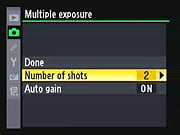 Multiple Exposures. The D3X supports multiple exposures (not to be confused with image overlay in the Retouch menu, which allows you to combine any images after they have been recorded). In Multiple Exposure mode, up to 10 successive images can be recorded in the same frame, and there is an Auto gain feature which will adjust exposure of each frame according to the number of frames (examples would be 1/2 gain for 2 frames, 1/3 for 3 frames, etc.) Nikon recommends to turn Auto gain off if the background is dark. If Single Frame drive mode is selected, the shutter release needs to be pressed for each image. If Continuous High or Continuous Low mode is selected, the camera will record all exposures in a single burst.
Scene Recognition System. Nikon's Matrix metering system went through quite an overhaul for the D3, and gained a new name in the process: the Scene Recognition System. A new diffraction grating over the 1,005 area metering sensor allowed more accurate detection of color and brightness. At the same time, new firmware was capable of more complete analysis of scenes, improving white balance, focus tracking, and exposure. One of the chief benefits of the Scene Recognition System was highlight analysis, designed to prevent blown highlights in common situations by adjusting the tone curve to compensate. The Nikon D3X inherits the improved Scene Recognition System functionality from its sibling.
 ISO Sensitivity. ISO ranges from 100 to 1,600 and can be extended down to ISO 50 (Lo 1), and up to ISO 6,400 (Hi 2). On the D3, ISO range was 200 to 6,400, expandable 100 to 25,600. ISO can be adjusted in 1/3, 1/2 or 1 EV steps, depending on Custom Menu b1. Nikon's excellent Auto ISO feature is carried over as well, which allows you to set both the upper ISO limit as well as the minimum shutter speed (selectable from 1s to 1/4000s) required before ISO is increased automatically. While it doesn't quite equal the D3's incredible high-ISO capability, we were very pleasantly surprised by the quality of the D3x's images shot at high ISO values, particularly in light of its much greater pixel density.
 White Balance. The D3X offers the usual white balance settings: Auto, six presets consisting of Incandescent, Fluorescent, Direct Sunlight, Flash, Cloudy, Shade; a manual mode where white-balance is determined from a white or grey card, and a Kelvin temperature setting which is selectable from 2,500 to 10,000K in 31 steps. The Fluorescent preset has seven sub-settings consisting of Sodium Vapor (2,700K), Warm-white (3,000K), White (3,700K), Cool White (4,200K), Day White (5,000K), Daylight (6,500K), and High Temperature Mercury Vapor (7,200K); and the manual setting allows up to four custom white-balance measurements to be stored. All the presets and manual settings are tweakable via a 2D fine-tuning grid display as shown on the right. The D3X also supports White Balance bracketing, where two to nine frames can be bracketed with Blue or Amber white balance bias increments of 5, 10 or 15 mireds.
 Active D-Lighting. D-Lighting has proven a popular post-processing feature in Nikon's consumer digital SLRs, as well as some of the company's point & shoot models. It's a quick software process that attempts to overcome underexposed images, and bring detail out of shadows. An improved version of Active D-Lighting appeared in the Nikon D3 and D300, including optimization of image contrast, helping to prevent over-processing of shadows and flattening of overall image contrast. As with the Scene Recognition System, the D3X inherits Active D-Lighting from the D3 and D300 -- but this time with a slight improvement, in that as well as the previous High, Normal, Low or Off settings, the D3X also offers an Extra-High setting, or the ability to let the camera automatically choose the Active D-Lighting strength on the fly.
Lateral Chromatic Aberration Correction. While other cameras have had lens distortion processing built-in in the past, notably the Olympus E-1, none until Nikon's D3 and D300 did the processing based on the distortion detected in the image. Past cameras (and most distortion-correction software) simply looked at which lens was mounted and perhaps the focal length if it was a zoom lens, and then applied a pre-set amount of correction; no image analysis actually took place. Nikon's Lateral Chromatic Aberration correction offered a more sophisticated approach, thanks to power of the camera's EXPEED processor, by actually analyzing each image after capture and fixing the chromatic aberration detected therein before saving the JPEG file. Cameras with full-frame, high-resolution sensors place a greater demand on lenses, and hence Lateral Chromatic Aberration correction proves a particularly useful feature on the D3X. There are no settings for this feature; it's always enabled for JPEGs. (And the D3x's RAW files correctly have no distortion processing applied to them.)
 Vignette Control. Another interesting feature is Vignette Control, first seen in firmware upgrade v1.11 for the D3, and then in the Nikon D700. Three levels are available that attempt to reduce the effects of corner shading with certain lenses. Designed for G and D Nikkor lenses, not DX or PC lenses, users can choose from High, Normal, Low, and Off for this setting. You can't see the results in Live View, nor can the Vignette Control be applied to multiple exposures. As with the chromatic aberration discussed in the previous section, vignetting is more likely to be an issue with full-frame digital imaging -- hence this is a very worthwhile feature.
 Picture Control. Nikon has standardized its Picture Control system so that camera settings for sharpening, contrast, brightness, saturation and hue can be finely adjusted and ported to other Nikon digital SLRs that support the system. The D3 was the first camera compatible with the option, and the Nikon D3X likewise follows the standard. There are four presets called Standard, Neutral Vivid and Monochrome, plus up to nine custom presets can be defined, named, saved and copied. Sharpness can be adjusted in ten steps, along with an Auto setting; contrast, saturation and hue can be adjusted in seven steps, while hue is adjustable in three steps. There is also a five-step "Quick Adjust" setting which exaggerates or mutes the effect without having to adjust each slider individually. When Monochrome Picture Control is selected, Hue and Saturation are replaced by Filter Effects and Toning respectively. Filter Effects offers Off, Yellow, Orange, Red, and Green settings, while Toning offers B&W, Sepia, Cyanotype, Red, Yellow, Green, Blue Green, Blue, Purple Blue and Red Purple settings.
Noise Reduction. The D3X offers four levels of high ISO noise reduction: Off, Low, Normal and High. For Low, Normal and High settings, noise reduction is performed at ISO 500 and higher. When set to Off, minimal noise reduction is performed at ISO 2000 and above. No high ISO noise reduction is performed on RAW files (other than on the embedded JPEG thumbnail). The D3X also offers long exposure noise reduction. When set to On, the camera takes a second exposure for the same duration with the shutter closed, and subtracts the "dark frame" from the first, to reduce hot-pixel and amp noise for exposures longer than 8 seconds.
Release Modes.  The D3X's release modes are selected by a dial, located on the top panel, on the left side. Single Frame (S) mode takes one shot each time the shutter-release is pressed. The Nikon D3X's Continuous High (CH) mode is rated by Nikon for up to 5 frames per second for a total of 44 Large/Fine JPEG or 24 12-bit RAW (lossless compression) before the buffer fills and the camera slows. Of course, the number of consecutive shots could be limited by CompactFlash space, if your memory card(s) are nearly full. Also, when shooting JPEGs of a very complex scene with a lot of sharp, fine detail, the resulting images may also compress less and result in lower buffer capacities. For 14-bit RAW files, the frame rate drops to only 1.8 frames per second, which is a bit of a surprise, as the D3 managed full speed when it was used in 14-bit mode. In DX crop mode, the D3X's maximum frame rate in Continuous High mode jumps to 7 frames per second for JPEGs or 12-bit RAW files, but drops to about 2.6 frames per second for 14-bit RAW. Through the D3X's d2 Custom menu, you can program the maximum shooting speed in Continuous High mode to 5, 6 or 7 fps (valid only for DX crop mode, as the maximum frame rate for other formats is limited to 5 fps), and Continuous Low from 1, 2, 3, 4 or 5 fps. The maximum burst size can also be programmed in the d3 Custom menu, with values ranging from 1 to 130.
The camera's Release Mode dial also accesses the Self-Timer mode, which can open the shutter 2, 5, 10 or 20 seconds after the shutter button is pressed, as well as Live View mode, and Mirror Up mode. Live View simply switches the camera to Live View mode. In Live View mode, press the shutter once to initially raise the mirror and open the shutter; each time you press it after that captures an image (momentarily dropping the mirror) and then returns the camera to the Live View state again. Mirror Up is used to minimize blur due to minute vibrations caused by mirror slap. When activated, the first press of the shutter release raises the mirror, while a second press trips the shutter.
 Interval Timer Mode. Another useful feature on the Nikon D3X that first appeared all the way back on the D2H is Interval Timer mode, which facilitates time-lapse photography by taking a series of images at preset intervals. You can set the starting and ending times for the series, as well as the amount of time between shots and the total number of shots to be captured. This is a good way to capture a timeline of slower events, such as clouds passing across the sky, tidal changes, a flower opening, etc.
The images above were taken from our standardized test shots. For a collection of more pictorial photos, see our Nikon D3X Photo Gallery .
Not sure which camera to buy? Let your eyes be the ultimate judge! Visit our Comparometer(tm) to compare images from the Nikon D3X with those from other cameras you may be considering. The proof is in the pictures, so let your own eyes decide which you like best!
Performance
Nikon D3X Performance
Timing and Performance
Generally good speed for a 25-megapixel pro SLR, though autofocus is a bit slow.
|
Startup/Shutdown
|
||
|
Power on
to first shot |
0.3 second
|
Time it takes for camera to turn on. (Very fast, difficult to measure.)
|
|
Shutdown
|
0.3 second
|
How long it takes camera to turn off before you can remove the memory card. (Very fast, difficult to measure.)
|
|
JPEG Single-Shot clearing times
|
||
|
Buffer clearing time
Large Fine FX JPEG |
17.2 seconds
(after 29 FX JPEGs) |
Worst case buffer clearing time. -- This is the delay after a set of shots before you can remove the card. Some cameras won't shut down until the buffer is cleared. (*See note about memory card speeds at bottom of table below.)
|
|
Buffer clearing time
Large Fine DX JPEG |
11.4 seconds
(after 58 DX JPEGs) |
|
|
JPEG Continuous-mode clearing times
|
||
|
Buffer clearing time
Large Fine FX JPEG |
35 seconds
(after 29 FX JPEGs) |
Worst case buffer clearing time. -- This is the delay after a set of shots before you can remove the card. Some cameras won't shut down until the buffer is cleared. (*See note about memory card speeds at bottom of table below.)
|
|
Buffer clearing time
Large Fine DX JPEG |
57 seconds
(after 48 DX JPEGs) |
|
|
12-bit RAW clearing times
|
||
|
Buffer clearing time
12-bit RAW (uncompressed) |
38.2 seconds
(after 21 RAW FX frames) 29.47 seconds (after 29 RAW DX frames) |
Worst case buffer clearing time. (*See note about card speeds below.)
|
|
Buffer clearing time
12-bit RAW (Lossless compressed) |
19 seconds
(after 23 RAW FX frames) 13 seconds (after 35 RAW DX frames) |
|
|
Buffer clearing time
12-bit RAW (Lossy compressed) |
19 seconds
(after 26 RAW FX frames) 14 seconds (after 43 RAW DX frames) |
|
|
14-bit RAW clearing times
|
||
|
Buffer clearing time
14-bit RAW (uncompressed) |
41.7 seconds
(after 20 RAW FX frames) 29.7 seconds (after 29 RAW DX frames) |
Worst case buffer clearing time. (*See note about card speeds below.)
|
|
Buffer clearing time
14-bit RAW (Lossless compressed) |
19 seconds
(after 25 RAW FX frames) 12 seconds (after 38 RAW DX frames) |
|
|
Buffer clearing time
14-bit RAW (Lossy compressed) |
19 seconds
(after 29 RAW FX frames) 13 seconds (after 52 RAW DX frames) |
|
|
TIFF buffer clearing times
|
||
|
Buffer clearing time
TIFF |
83 seconds (!)
(after 22 TIFF frames) |
Worst case buffer clearing time. (*See note about card speeds below.)
|
|
*Note: Buffer clearing times measured with a SanDisk Extreme IV 16GB CompactFlash card. Slower cards will produce correspondingly slower clearing times.
|
||
Startup and shutdown times are average for a pro SLR. Buffer clearing time depends on the image size and quality, burst length and the speed of memory card used. With a fast memory card, buffer clearing is pretty fast, particularly considering the size of the files involved, and the depth of the buffer memory.
|
Mode Switching
|
||
|
Play to Record,
first shot |
0.3 second
|
Time until first shot is captured.
|
|
Record to play
|
0.8 second
|
Time to display a large/fine file immediately after capture.
|
|
Display
recorded image |
0.5 second
|
Time to display a large/fine file already on the memory card.
|
Mode switching is quite fast, though Record to Play is a bit sluggish for a pro model.
|
Shutter Response (Lag Time)
|
||
|
Full Autofocus
Single-Area AF Optical Viewfinder (Sigma lens) |
0.161 second
|
Time from fully pressing shutter button to image capture using optical viewfinder, with a Sigma 70mm f/2.8 EX DG Macro lens. There was only 4% variation in this test, with times ranging from 0.150s to 0.170s.
|
|
Full Autofocus
Single-Area AF Optical Viewfinder (Nikkor lens) |
0.183 second
|
Time from fully pressing shutter button to image capture using optical viewfinder, with a Nikkor 24-70mm f/2.8 lens. There was 7% variation in lag times with this lens, with times ranging from 0.163s to 0.206s.
|
|
Full Autofocus
Auto-Area AF Optical Viewfinder |
0.435 second
|
Time from fully pressing shutter button to image capture using optical viewfinder, with a Sigma 70mm f/2.8 EX DG Macro lens. There was only ~8% variation in our iterations, ranging from 0.413s to 0.458s.
|
|
Full Autofocus
Single-Area AF Live View Hand-Held Mode |
0.426 second
|
Time from fully pressing shutter button to image capture, using Live View "Hand-Held" (phase-detect) mode. There was ~14% variation in our iterations, ranging from 0.344s to 0.522s.
|
|
Full Autofocus
Auto-Area AF Live View Hand-Held Mode |
0.606 second
|
Time from fully pressing shutter button to image capture, using Live View "Hand-Held" (phase-detect) mode. There was only 4% variation here, with times ranging from 0.559s to 0.644s.
|
|
Full Autofocus
Live View Tripod Mode |
n/a
|
When using Live View "Tripod" (contrast-detect) mode, autofocus is performed using the AF-On button. The time required to focus varies wildly with the lens in use and how far the lens elements have to travel to achieve focus. With a fast-acting lens already in focus, the lag time is about 1.2 seconds. With a slow lens and a large amount of focus travel, times can stretch as long as 8 seconds.
|
|
Continuous AF
Single-Area AF Release Priority Optical Viewfinder |
0.073 second
|
This mode usually shows no speed increase with our static subject; we have no way to measure performance with moving subjects. In this case, though, the AF speed improved dramatically vs single-shot AF, with our stationary subject, but likely because "release priority" means the camera doesn't wait for the AF-complete signal before firing. There was ~9% variation in our iterations, ranging from 0.062s to 0.081s.
|
|
Continuous AF
Auto-Area AF Release Priority Optical Viewfinder |
0.349 second
|
This mode usually shows no speed increase with our static subject; we have no way to measure performance with moving subjects. Here again, there was a noticeable improvement in shutter lag vs single-shot AF with our stationary target. The numeric increase was similar, but it amounted to a smaller percentage gain than in the single-area case. There was ~9% variation in our iterations, ranging from 0.305s to 0.409s.
|
|
Prefocused
Optical Viewfinder |
0.045 second
|
Time to capture, after half-pressing and holding shutter button. There was essentially zero variation between iterations. (We time down to 1/1000 second, and every measurement came in at 0.045 second.)
|
|
Prefocused
Live View Hand-Held Mode |
0.045 second
|
Time to capture, after half-pressing and holding shutter button, using Live View Hand-Held (phase-detect) mode. There was virtually no variation between iterations.
|
|
Prefocused
Live View Tripod Mode |
0.418 second
|
Time from fully pressing shutter button to image capture, using Live View "Tripod" (contrast-detect) mode. Autofocus is performed using the AF-On button, and is not included in this number. There was only 5% variation.
|
|
Manual focus
Optical Viewfinder |
0.050 second
|
For most cameras, shutter lag is less in manual focus than autofocus, but usually not as fast as when the camera is "prefocused". There was ~8% variation between iterations, ranging from 0.045s to 0.058s.
|
When testing the D3X's ability to determine that it's properly focused when shooting the same target multiple times (with no change of focus setting between iterations, to remove the impact of lens AF speed), we oddly found it a bit slow for a professional model. The D3X required 161 milliseconds for full AF in single-area mode (center point selected), and 486 milliseconds in Auto-area AF mode, where the original D3 required only 85 milliseconds and 470 milliseconds, respectively. Given our measurements, you'll definitely not want to use auto-area AF mode for sports shooting or other fast-paced action.
When set to continuous AF mode, the single-point AF time improved dramatically, to 73ms, but that's likely because the release-priority setting we used meant the camera wasn't waiting for the AF system to signal that it had completed its job . When prefocused or manually focused, shutter lag was much faster, at only 45 and 50 milliseconds respectively.
The D3X's two Live View modes add considerable delay, but the "Hand-Held" mode is faster than some other implementations we've tested recently. The "Hand-Held" mode which uses the same "mirror-down" phase difference AF method employed when using the optical viewfinder has full AF shutter lag of 0.426 second, roughly 2.5 times the optical viewfinder lag. This increased to 0.606 second when using Auto-area AF mode.
The "Tripod" Live View mode lag was about the same, at 0.418 seconds, but focusing is performed separately using the AF-On button, so focusing time is not included in that figure. It's easy to see why Nikon chose to call this "Tripod" mode: It's really only going to be useful for still-life subjects, with the camera pretty immobile. The time it takes to achieve focus depends heavily on how far the lens elements have to travel, but even when it's simply refocusing on a previously-acquired subject, it takes about 1.2 seconds with a fast-operating lens. When a slower lens has to rack from infinity to close focus, the AF time in Tripod mode can easily stretch to 8 seconds or more.
|
Cycle Time (shot to shot), JPEG
|
||
|
Single Shot mode
Large Fine JPEG |
0.23 second
|
Time per shot, averaged over 20 shots.
|
|
Single Shot mode
Small Basic JPEG |
0.21 second
|
Time per shot, averaged over 20 shots.
|
|
Early shutter
penalty? |
Yes(?)
|
Some cameras refuse to snap another shot if you release and press the shutter too quickly in Single Shot mode, making "No" the preferred answer. The D3x was so fast from shot to shot that it was hard to press the shutter button fast enough to beat the next shot. When we did, though, we found that the camera wouldn't fire again until we released and re-pressed.
|
|
Continuous mode
Large Fine FX JPEG |
0.20 second
(5.01 frames/sec); 31 frames total; 18 seconds to clear* |
Time per shot, averaged over 31 shots.
|
|
Continuous mode
Large Fine DX JPEG |
0.14 second
(7.04 frames/sec); >>20 frames total; 5 seconds to clear* |
Time per shot, averaged over 20 shots.
|
|
12-bit RAW Cycle Time - FX (Full-Frame) Mode
|
||
|
Single Shot mode
12-bit FX RAW |
0.25 second
|
Time per shot, averaged over 20 shots.
|
|
Single Shot mode
12-bit FX RAW + L/F JPEG |
0.27 second
|
Time per shot, averaged over 20 shots.
|
|
Continuous mode
12-bit FX RAW Lossless Compressed |
0.20 second
(5.00 frames/sec); 23 frames total; 19 seconds to clear* |
Time per shot, averaged over 22 shots.
|
|
Continuous mode
12-bit FX RAW Compressed |
0.20 second
(5.00 frames/sec); 26 frames total; 19 seconds to clear* |
Time per shot, averaged over 26 shots.
(Lossy RAW compression sometimes helps buffer capacity slightly over uncompressed.) |
|
Continuous mode
12-bit FX RAW Uncompressed |
0.20 second
(5.00 frames/sec); 21 frames total; 38.2 seconds to clear* |
Time per shot, averaged over 21 shots.
|
|
Continuous mode
12-bit FX RAW (Lossless) + L/F JPEG |
0.20 second
(5.00 frames/sec); 20 frames total; 32 seconds to clear* |
Time per shot, averaged over 20 shots.
|
|
12-bit RAW Cycle Time - DX (Cropped) Mode
|
||
|
Continuous mode
12-bit DX RAW Lossless Compressed |
0.14 second
(7.03 frames/sec); 35 frames total; 13 seconds to clear* |
Time per shot, averaged over 20 shots.
|
|
Continuous mode
12-bit DX RAW Compressed |
0.14 second
(7.03 frames/sec); 43 frames total; 14 seconds to clear* |
Time per shot, averaged over 20 shots.
(Lossy RAW compression sometimes helps buffer capacity slightly over uncompressed.) |
|
Continuous mode
12-bit DX RAW Uncompressed |
0.14 second
(7.03 frames/sec); 29 frames total; 29.5 seconds to clear* |
Time per shot, averaged over 20 shots.
|
|
14-bit RAW Cycle Time - FX (Full-Frame) Mode
|
||
|
Single Shot mode
14-bit FX RAW |
0.51 second
|
Time per shot, averaged over 24 shots.
|
|
Continuous mode
14-bit FX RAW Lossless compressed |
0.51 second
(1.96 frames/sec); 25 frames total; 19 seconds to clear* |
Time per shot, averaged over 20 shots.
|
|
Continuous mode
14-bit FX RAW Compressed |
0.51 second
(1.96 frames/sec); 29 frames total; 19 seconds to clear* |
(In our tests at least, compression didn't help buffer capacity in 14-bit mode.)
Time per shot, averaged over 20 shots. |
|
Continuous mode
14-bit FX RAW Uncompressed |
0.51 second
(1.96 frames/sec); 20 frames total; 42 seconds to clear* |
Time per shot, averaged over 20 shots.
|
|
Continuous mode
14-bit FX RAW (Lossless) + L/F JPEG |
0.51 second
(1.96 frames/sec); 24 frames total; 19 seconds to clear* |
Time per shot, averaged over 20 shots.
|
|
14-bit RAW Cycle Time - DX (Cropped) Mode
|
||
|
Continuous mode
14-bit DX RAW Lossless compressed |
0.36 second
(2.81 frames/sec); 38 frames total; 12 seconds to clear* |
Time per shot, averaged over 20 shots.
|
|
Continuous mode
14-bit DX RAW Compressed |
0.36 second
(2.81 frames/sec); 52 frames total; 13 seconds to clear* |
(In our tests at least, compression didn't help buffer capacity in 14-bit mode.)
Time per shot, averaged over 20 shots. |
|
Continuous mode
14-bit DX RAW Uncompressed |
0.36 second
(2.81 frames/sec); 29 frames total; 30 seconds to clear* |
Time per shot, averaged over 20 shots.
|
|
Flash Cycle Time
|
||
|
Flash recycling
|
n/a
|
(No internal flash)
|
|
*Note: Buffer clearing times measured with a SanDisk Extreme IV CompactFlash card. Slower cards will produce correspondingly slower clearing times. Slow cards may also limit length of bursts in continuous mode. ISO sensitivity and noise reduction settings can also affect cycle times and burst mode performance.
|
||
Single-shot cycle time performance is very good for a pro SLR model, at about 0.23 second between shots in large/fine JPEG mode, a bit slower in 12-bit RAW mode at 0.25 second, and a lot slower in 14-bit RAW mode, at 0.51s per frame. The Nikon D3x is so fast between shots that we had a hard time actually hitting the shutter button before the camera was ready, but when we did, we found that the D3x did indeed "penalize" us for doing so, requiring us to release and re-press the shutter button in order to snap the next shot.
The story was similar in Continuous mode. The Nikon D3X met its advertised 5 frames/second when shooting full-frame (FX mode) JPEGs or 12-bit RAWs, but slowed to only 1.96 frames/second in 14-bit RAW mode. DX crop mode was quite a bit faster at just over 7 frames/second with large/fine JPEGs and 12-bit RAWs, but dropped to 2.81 frames/second for 14-bit RAW.
Buffer depths were very good though, with 31 frames in Full-Frame Large/Fine JPEG mode, 25 frames in 12-bit RAW (losslessly compressed) and 25 frames in 14-bit RAW mode (also losslessly compressed). Buffer depth in DX mode increases in rough proportion to the change in megapixel count.
|
Download speed
|
||
|
Windows Computer, USB 2.0
|
11,264 KBytes/sec
|
Typical Values:
Less than 600=USB 1.1; 600-770=USB 2.0 Low; More than 770=USB 2.0 High |
Download speeds were very fast. (Measured in Mass Storage mode.)
Overall, the D3X has good speed for a 25-megapixel pro SLR, but surprisingly, some areas lagged a little compared to the D3. Autofocus is significantly slower than the D3, which supposedly uses the same AF system, and 14-bit RAW mode is a lot slower than 12-bit, which wasn't the case for the D3.
Battery and Storage Capacity
Battery
Outstanding battery life for an SLR lithium-ion design.
| Test Conditions | Number of Shots |
|
Lithium-ion rechargeable battery,
|
4,400 |
|
Lithium-ion rechargeable battery,
Live View |
n/a |
The Nikon D3X uses a custom rechargeable lithium-ion battery pack for power, and comes with both a single battery and charger. The rated 4,400 shots per charge using the optical viewfinder is well above average for a pro SLR, (but keep in mind the D3X does not have a built-in flash, so that's one reason why the number is so high). Unfortunately, Nikon does not seem to publish battery life results for when Live View mode is used, but it's a safe bet that it's considerably shorter. (Again, we don't have specific measurements, but did notice that the battery seemed to use up its charge much more rapidly when we were shooting in Live View mode.)
The table above shows the number of shots the camera is capable of on fully-charged battery, based on CIPA battery-life and/or manufacturer standard test conditions.
(Interested readers can find an English translation of the CIPA DC-002 standards document here. (180K PDF document))
Storage
The Nikon D3X stores its photos on CompactFlash memory cards (dual slots are provided), and no card is included with the camera. The chart below shows how many images can be stored on a 2GB card at each size/quality setting. Notes: JPEG compression set to Image Quality Priority, LLC = lossless compressed.
|
Image Capacity vs Resolution/Quality 2GB Memory Card |
Fine | Normal | Basic |
12-bit
RAW (LLC) |
14-bit
RAW (LLC) |
TIFF | |
| 6,048 x 4,032 |
Images
(Avg size) |
93 22 MB |
186 11 MB |
368 5.6 MB |
50 41 MB |
38 53 MB |
26 77 MB |
|
Approx.
Comp. |
3:1 | 7:1 | 13:1 | 0.9:1 | 0.8:1 | 0.9:1 | |
| 4,544 x 3,024 |
Images
(Avg size) |
164 12.5 MB |
326 6.3 MB |
640 3.2 MB |
- | - | - |
|
Approx.
Comp. |
3:1 | 7:1 | 13:1 | - | - | - | |
| 3,024 x 2,016 |
Images
(Avg size) |
368 5.6 MB |
730 2.8 MB |
1,428 1.4 MB |
- | - | - |
|
Approx.
Comp. |
3:1 | 7:1 | 13:1 | - | - | - | |
We strongly recommend buying a large capacity CompactFlash card. You should probably consider at least a 4GB card, if not a 8GB or 16GB one, to give yourself extra space for extended outings, especially if you plan on doing a lot of RAW shooting. (Check the shopping link above, cards are cheap these days, so there's no reason to skimp -- But definitely consider faster cards for this camera, to reduce buffer clearing times.)
Imaging
Nikon D3X Image Quality
Color
Saturation & Hue Accuracy
Fairly accurate and pleasing color with minor oversaturation of strong reds, blues and greens.
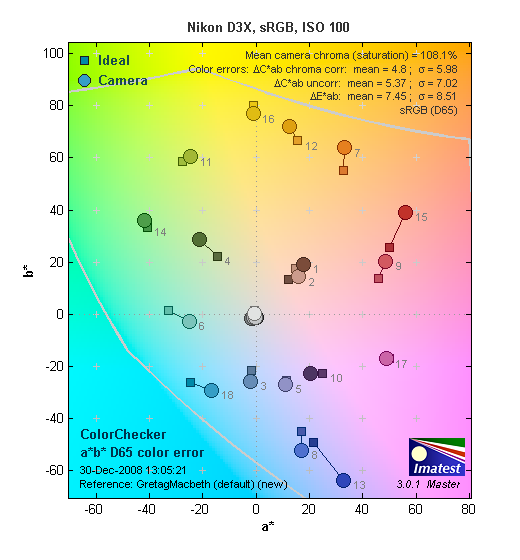 |
| In the diagram above, the squares show the original color, and the circles show the color that the camera captured. More saturated colors are located toward the periphery of the graph. Hue changes as you travel around the center. Thus, hue-accurate, highly saturated colors appear as lines radiating from the center. Click for a larger image. |
Saturation. The Nikon D3X pushes reds, blues and some oranges and greens just a little, while undersaturating some cyans and purples very slightly, but overall, saturation is very good. Most consumer digital cameras produce color that's more highly saturated (more intense) than found in the original subjects. This is simply because most people like their color a bit brighter than life. Pro-oriented models like the D3x tend to have more accurate saturation levels.
Skin tones. Here, the Nikon D3X also did quite well, producing natural-looking skin tones, though just slightly on the pink side. Where oversaturation is most problematic is on Caucasian skin tones, as it's very easy for these "memory colors" to be seen as too bright, too pink, too yellow, etc.
Hue. The Nikon D3X showed a few small color shifts relative to the correct mathematical translation of colors in its subjects, but had very good accuracy overall. Most noticeable was a slight shift in reds toward orange, with some very minor shifts in greens, blues and cyans as well. Hue is "what color" the color is.
Saturation Adjustment
The Nikon D3X has a total of seven saturation settings available, three above and three below the default saturation. This covers a very wide range of saturation levels, about as wide a range as you're likely to find photographically relevant, apart from special effects that are arguably better achieved in software. The fine steps between settings mean you can program the camera to just the level of saturation you prefer. Nice. (It's also nice that color saturation has little effect on greyscale contrast, something that's not always the case.)
| Saturation Adjustment Examples | ||
 |
 |
 |
| -3 | 0 | +3 |
The table above shows results with the default as well as the two extreme saturation settings. Click on any thumbnail above, then click again to see the full-sized image.


Sensor
Exposure and White Balance
Indoors, incandescent lighting
Very warm results with Auto and Incandescent white balance settings, though excellent color with the 2,600 Kelvin and Manual. Slightly higher than average positive exposure compensation required.


Indoors, under normal incandescent lighting, color balance was very warm with the Auto white balance setting; we really expect better from an SLR selling at this price point. (But, quite honestly, very seldom see it.) The Incandescent setting was a bit better, but still on the warm side. (Like other Nikon models, the D3X's Incandescent setting appears to be color-balanced for professional studio lighting, rather than the warmer household incandescent lights most US consumers have in their homes. This is normal for a professional SLR. You can use the D3X's excellent manual adjustment capabilities to tweak the incandescent setting to better match whatever lighting you're personally faced with.) The Manual setting produced the most accurate results, though the 2,600 Kelvin setting wasn't far off the mark either. Both seemed just a touch on the cool side to our eyes, but here again, the D3x gives you ample ability to fine-tune its white balance however you like. The Nikon D3X required slightly more than average positive exposure compensation here, at +0.7 EV. (Most cameras required about +0.3 EV compensation for this shot.) Our test lighting for this shot is a mixture of 60 and 100 watt household incandescent bulbs, a pretty yellow light source, but a very common one in typical home settings here in the U.S.
Outdoors, daylight
Good color overall, though a tendency toward a warm cast and slightly high contrast under harsh lighting. Slightly higher than average exposure compensation required.
Outdoors, the Nikon D3X tended toward a warmer color balance, though overall color was generally quite good. The D3X required +1.0 EV exposure compensation to keep the model's face from being too dim in the "Sunlit" portrait shot on the left. This is slightly more positive compensation we're accustomed to seeing among digital cameras for this shot. The D3X's default contrast is a little high, producing some washed-out highlights in the model's shirt and flowers, as well as some deep shadows below the bouquet, but the D3X does better than the majority of cameras in this regard. The far-field shot of the house came out just about right, with very few clipped highlights and lost shadows at the D3X's default exposure setting. An excellent performance here. The D3X's contrast and Active D-Lighting settings do help tame the highlights quite a bit, see below for examples of this.
(And yes, we do know that pros would expose these shots differently, exposing to hold detail in the highlights, and then adjusting the tone curve on the computer to bring the rest of the image into balance. We shot these examples the way we did, in order to be consistent with the rest of our camera tests, including tests of consumer models. Consumers generally expose for the midtones, and let highlights and shadows fall where they may. You can check the Nikon D3x thumbnails index to see how the Indoor Portrait test looks with a range of exposure compensation settings.)
See full set of test images with explanations
See thumbnails of all test and gallery images
Resolution
Very high resolution, about 2,800 to 2,900 lines of strong detail from in-camera JPEG, about the same from RAW files.


Our laboratory resolution chart revealed sharp, distinct line patterns down to about 2,900 lines per picture height horizontally, and about 2,800 lines in the vertical direction. Extinction didn't occur until past 3,600(!) lines.We weren't able to extract much more resolution by processing the D3X's NEF using Adobe Camera Raw, though there were fewer artifacts than the JPEGs near the resolution limits. (The D3x's default sharpening for JPEGs is really a bit too high, leaves halos around high-contrast objects. Shoot with the in-camera sharpening set to 0 or 1 to avoid these.) Use these numbers to compare with other cameras of similar resolution, or use them to see just what higher resolution can mean in terms of potential detail.
See full set of test images with explanations
See thumbnails of all test and gallery images
Sharpness & Detail
Sharp images overall, but some edge-enhancement artifacts on high-contrast subjects. Exquisite detail with only minor noise suppression visible in the shadows.


Sharpness. The Nikon D3X captures sharp images overall, but some of our shots showed quite a few halos around high-contrast edges. The standard shot above left doesn't show these too much, but the our studio targets did much more so. (You'll really see these artifacts in subjects including bold, printed text.) This is class-leading performance, and may in part be due to the unique low-pass filter Nikon designed for the D3X's sensor. Edge enhancement creates the illusion of sharpness by enhancing colors and tones right at the edge of a rapid transition in color or tone.
Detail. The crop above right shows really impressive detail with only minor noise suppression artifacts in the darkest areas of the model's hair. The camera's overall response here is much better than average. Noise-suppression systems in digital cameras tend to flatten-out detail in areas of subtle contrast. The effects can often be seen in shots of human hair, where the individual strands are lost and an almost "watercolor" look appears.
RAW vs In-Camera JPEGs
As noted above, the Nikon D3X produces sharp in-camera JPEGs using a good prime lens (in this case, the Nikkor 50mm f/1.8D, stopped down). As is almost always the case, even more detail can be obtained from carefully processing RAW files than can be seen in the in-camera JPEGs. Take a look below, to see what we mean:

In the table above, mousing over a link at the bottom will load the corresponding crop in the area above, and clicking a link will load the full resolution file. Examples include in-camera Fine JPEG, RAW file processed through View NX using default settings, and RAW file processed through Adobe Camera Raw (5.3 beta), then sharpened in Photoshop, using USM at 300%, radius=0.3 pixel. As you can see, View NX offers a tiny bit more detail than the in-camera JPEG, while the ACR conversion delivers much more, with much less coarsening of the finest elements due to the sharpening operator.
ISO & Noise Performance
Low noise except at the highest sensitivity settings, really excellent preservation of subtle detail relative to ISO level.
|
Default High ISO Noise Reduction
|
 |
 |
 |
| ISO 50 | ISO 100 | ISO 200 |
 |
 |
 |
| ISO 400 | ISO 800 | ISO 1600 |
 |
 |
|
| ISO 3200 | ISO 6400 | |
The Nikon D3X produced low image noise overall. Images are quite clean from ISO 50 all the way through 400. We start to see the beginnings of a very fine, tight "grain" pattern at ISO 800, and the image softens just slightly, but detail is still excellent, with very little chroma noise. The grain is slightly more evident at ISO 1,600, and the image softens a bit more, but detail continues to remain strong. At ISO 3,200, detail loss becomes more noticeable as noise reduction blurs subtly contrasting detail, however results are still very good. At ISO 6,400, noise grain is coarser and blurring stronger, resulting in a noticeable drop in detail. There's also some chroma noise in the shadows and mid-tones, but less than you'd expect at this sensitivity, especially at such a high pixel count.
A really excellent performance overall, especially for a camera with a 25-megapixel sensor. (Consider the extreme extent to which we're pixel-peeping here: Most computer monitors have something less than 100 pixels/inch. Printed at 100 pixels/inch, a D3x image would be over 60 inches wide. Given that, the noise levels and "loss of sharpness" we see in its images at ISO 6,400 is really pretty minimal, relative to any reasonable sizes its images might be printed at.)
As always, see the Print Quality section below, to see how we think this noise performance translates into practical print sizes at each ISO setting.
Extremes: Sunlit and low light tests
Very high resolution with strong overall detail, slightly high default contrast. Excellent low-light performance, great exposures to the lowest limits of our test, and the autofocus worked that low as well, even without an AF-assist light.


Sunlight. The Nikon D3X produced slightly high contrast with some washed-out highlights and deep shadows under the deliberately harsh lighting of the test above. However, highlight and shadow detail were both pretty good. The model's face was a little dim at the +0.7 EV setting, so we preferred the image with +1.0 EV of exposure compensation, which resulting in some blown highlights in the shirt and flowers, but not to the extent we're used to seeing. The shot at +0.7EV almost perfectly preserved detail in the shirt; the only significantly blown out detail is in the red channel in the orange flower, and to a lesser extent in the red flower itself. At the other end of the tonal scale, there's good detail present pretty far into the shadows, although the very darkest shadow areas become plugged and posterized. That's nit picking though, you have to go really far into the shadows to see those problems. (In real life, of course, be sure to use fill flash in situations like the one shown above; it's better to shoot in the shade when possible.)
Because digital cameras are more like slide film than negative film (in that they tend to have a more limited tonal range), we test them in the harshest situations to see how they handle scenes with bright highlights and dark shadows, as well as what kind of sensitivity they have in low light. The shot above is designed to mimic the very harsh, contrasty effect of direct noonday sunlight, a very tough challenge for most digital cameras. (You can read details of this test here.)
Contrast Adjustment
We really like it when a camera gives us the ability to adjust contrast and saturation to our liking. It's even better when those adjustments cover a useful range, in steps small enough to allow for precise tweaks. As was the case with its saturation adjustment, the Nikon D3X's contrast setting meets both challenges very well.
|
Minimum Contrast
|
|
 |
 |
| Contrast set to lowest, +1.0 EV |
Contrast set to lowest, Auto Exposure |
At its lowest contrast setting, the Nikon D3X did a good job of preserving highlight detail, while maintaining fairly natural-looking skin tones, and holding nice detail in the shadows. The camera still lost highlight detail in the model's shirt and flowers, though shadow detail improved greatly, with significantly less posterization and plugging. In retrospect, it would have been better if we shot the contrast series at +0.7 EV, as that would have preserved a good bit more highlight detail. The D3X captured very good color outdoors, though again, just slightly on the warm side. Overall, good results here.
| Contrast Adjustment Examples | ||
|
 |
 |
| -3 | 0 | +3 |
The table above shows results with the default as well as the two extreme contrast settings. While you can see the extremes, it's hard to really evaluate contrast on small thumbnails like these, so click on any thumbnail to go to the full-size image. The Nikon D3X's contrast adjustment worked well, with very little effect on color saturation. Contrast and saturation are actually fairly closely coupled adjustments, it's a good trick to be able to vary one with out the other changing as well. As usual, Nikon did a good job here, and the fine-grained contrast steps make it easy to select just the amount of contrast you want.
|
Active D-Lighting
|
||
 |
 |
 |
|
Off (default)
|
Low
|
Normal
|
 |
 |
 |
 |
 |
 |
|
Highlight Retention
|
||
 |
 |
 |
|
Shadow Detail
|
||
 |
 |
 |
|
Shadow Detail, Brightened (significantly) in Photoshop
(Levels control, highlight slider down to 50) |
||
 |
 |
|
|
High
|
Extra High
|
|
 |
 |
|
 |
 |
|
|
Highlight Retention
|
||
 |
 |
|
|
Shadow Detail
|
||
 |
 |
|
|
Shadow Detail, Brightened (significantly) in Photoshop
(Levels control, highlight slider down to 50) |
||
Nikon's Active D-Lighting
The five shots above show the results with Active D-Lighting at "Off ", "Low", "Normal", "High" and "Extra High", the full range of settings. As you can see from the crops, fewer highlights in the shirt (and flowers are clipped) as the setting is increased, although a minor price is paid in the very deepest shadows, in the form of increased noise and some posterization. (There's no free lunch: If the camera is devoting more of its available dynamic range to rendering highlights, there's less left to handle the shadows.) Note that these are very deep shadows that we're looking at above. Lighter shadows show very little noise increase, at least that was visible to our eyes with this test subject.
This sort of tonal-range adjustment is very tricky to do and have the results come out natural-looking. Nikon's been refining their D-Lighting algorithms for several years now, and the results show it: Even the "Extra High" setting above produces a very natural-looking image.
|
More Active D-Lighting Examples
|
||
|
Far Field
|
||
 |
 |
 |
| Off | Low | Normal |
 |
 |
|
| High | Extra High | |
|
Still Life
|
||
 |
 |
 |
| Off | Low | Normal |
 |
 |
|
| High | Extra High | |
The D3X's Active D-Lighting can result in undesired results when applied to subjects with a more normal tonal range. The white trim in the house shot has a bluish tint to it at higher settings, and the Still Life shots look a tad overexposed and somewhat flat at the higher settings.
Images with normal contrast will tend to look flat when dynamic-range extension technology is applied to them, simply because the range of available subject tones is being compressed into a smaller percentage of the available output tonal range. - So use Active D-Lighting judiciously, it's not a "universal enhancifier" for your images. Use it on high-contrast subjects, leave it off for subjects having more normal tonal ranges.
| 1 fc 11 lux |
1/2 fc 5.5 lux |
1/4 fc 2.7 lux |
1/8 fc 1.3 lux |
1/16 fc 0.67 lux |
1/16fc No NR |
|
|---|---|---|---|---|---|---|
| ISO 50 |
 4 sec f2.8 |
 8 sec f2.8 |
 20 sec f2.8 |
 25 sec f2.8 |
 30 sec f2.8 |
 30 sec f2.8 |
| ISO 100 |
 2.5 sec f2.8 |
 5 sec f2.8 |
 10 sec f2.8 |
 13 sec f2.8 |
 30 sec f2.8 |
 30 sec f2.8 |
| ISO 200 |
 1.3 sec f2.8 |
 2.5 sec f2.8 |
 5 sec f2.8 |
 6 sec f2.8 |
 15 sec f2.8 |
 15 sec f2.8 |
| ISO 400 |
 0.6 sec f2.8 |
 1.3 sec f2.8 |
 2.5 sec f2.8 |
 3 sec f2.8 |
 8 sec f2.8 |
 8 sec f2.8 |
| ISO 800 |
 0.3 sec f2.8 |
 0.6 sec f2.8 |
 1.3 sec f2.8 |
 1.6 sec f2.8 |
 4 sec f2.8 |
 4 sec f2.8 |
| ISO 1600 |
 1/6 sec f2.8 |
 0.3 sec f2.8 |
 0.6 sec f2.8 |
 0.8 sec f2.8 |
 2 sec f2.8 |
 2 sec f2.8 |
| ISO 3200 |
 1/13 sec f2.8 |
 1/6 sec f2.8 |
 0.3 sec f2.8 |
 0.4 sec f2.8 |
 1 sec f2.8 |
 1 sec f2.8 |
| ISO 6400 |
 1/25 sec f2.8 |
 1/13 sec f2.8 |
 1/6 sec f2.8 |
 1/5 sec f2.8 |
 0.5 sec f2.8 |
 0.5 sec f2.8 |
Low light. The Nikon D3X performed very well on the low-light test, capturing usable images at the lowest light level (1/16 foot-candle), even with the lowest sensitivity setting (ISO 50). Noise naturally increases as ISO goes up and light levels go down, but remains remarkably low up to ISO 1,600. At ISO 3,200, noise is more noticeable but still a good bit better than average. At ISO 6,400, noise is moderate but no "hot" pixels appear, and there is only a slight hint of some vertical banding. (Really a pretty exceptional performance, given the high pixel count and very low light level.) Color balance had a bluish-magenta cast to it with the Auto white balance setting, but remained fairly consistent up to the highest ISOs. The rightmost column in the series above shows the results with the D3X's long-exposure NR turned off.
The camera's autofocus system was able to focus on the subject at less than the 1/16 foot-candle light level unassisted (and that's a good thing, as the D3X does not have a built-in AF assist lamp). Also (as always), keep in mind that the longer shutter speeds here absolutely demand the use of a tripod to prevent any blurring from camera movement. (A useful trick is to just prop the camera on a convenient surface, and use its self-timer to release the shutter. This avoids any jiggling from your finger pressing the shutter button, and can work quite well when you don't have a tripod handy.)
How bright is this? The one foot-candle light level that this test begins at roughly corresponds to the brightness of typical city street-lighting at night. Cameras performing well at that level should be able to snap good-looking photos of street-lit scenes.
NOTE: This low light test is conducted with a stationary subject, and the camera mounted on a sturdy tripod. Most digital cameras will fail miserably when faced with a moving subject in dim lighting. (For example, a child's ballet recital or a holiday pageant in a gymnasium.) Digital SLRs like the Nikon D3X do much better than point & shoots, but you still shouldn't expect a quick autofocus lock with moving subjects.
Output Quality
Print Quality
Exceptional print quality, good color, sharp prints up to 30x40 inches from camera JPEGs. High-ISO shots are surprisingly clean, ISO 6,400 is surprisingly clean at 16x20, with just a little noise in the shadows and some loss of subtle subject detail.

Looks amazing at 30x40 from ISO 50 to 400.
Shows minor softening at ISO 800, with some noise in the shadows at 30x40.
ISO 1,600 shows more luminance noise and some loss of detail 30x40, but looks a lot better at 24x36.
ISO 3,200 shots are rough, but usable at 24x36, but return to quite good at 16x20 inches.
ISO 6,400 images show a noticeable boost in saturation, and there's minor luminance noise in the shadows, but detail is still quite good at 16x20.
Printed output from the Nikon D3x was simply extraordinary: Looking at in-camera JPEGs, the D3x clearly edged out its primary full-frame competitors (the Canon EOS-5D MarkII and Sony A900) in the detail department, and we felt that its noise character at high ISOs was also slightly better than the 5DmkII and significantly better than the A900. (That last is very much a subjective judgement; your preferences in noise behavior might lead you to side with the 5D Mark II, but there's no question that files from the D3x make exceptionally high quality prints.)
Working from RAW files, the detail contest was closer, but the D3x still edged out both competitors mentioned above, if only by a small amount.
We found that the D3x's default sharpening setting for JPEGs led to some over-sharpening of the output, which also obscured the very finest detail. Shooting at its lowest sharpness setting and then sharpening after the fact in Photoshop or other imaging program produces better results. For the ultimate, it's definitely worth your while to work from its NEF-format RAW files. Working in Adobe Camera Raw (our default RAW converter, due to its wide availability and very broad support for different camera models) revealed significantly more fine detail than we found in the D3x's JPEGs, regardless of the in-camera sharpening used. That said, the D3x's default sharpening setting produced JPEGs that looked quite sharp straight from the camera, and print sizes as large as 30x40 inches would be usable for wall display.
At higher ISOs, the D3x's images held together remarkably well. At ISO 6,400, 16x20 inches is probably about as large as most users would want to go, as the noise in shadow areas began to be noticeable at that size, and detail was lost in areas of subtle contrast. This is really excellent performance from a camera with this much resolution: At very high ISOs like this, the Sony A900 ceases to be serious competition to the other cameras, but the Canon 5D Mark II still gives it a good run for the money. We liked the noise pattern from the D3x somewhat more than that from the 5D Mark II, because the former was a bit tighter-grained, and the D3x preserves slightly more subtle detail at its normal noise reduction setting. With both cameras' NR options set to Low, the noise increases in both their images, but the spread between the two increases, the D3x's noise being less obtrusive, while it also does a very noticeably better job preserving subtle detail.
In terms of color, while the D3x's color accuracy wasn't quite as high as that of the Canon 5D Mark II, it was still very accurate. Amateur shooters moving up from consumer-level SLRs may find the D3X's highly accurate color a little dull compared to what they've become accustomed to on their lower-end cameras: Most consumer cameras pump up saturation to make brighter, punchier photos that consumers tend to prefer, so the D3x's more accurate color may seem dull by comparison. (Except for the reds and blues, both of which are still a little hot.) The D3x's color saturation adjustment offers fine-grained adjustments over a nice range of control, though, so you can tweak the D3X's color to exactly match your personal preferences.
Finally, as we've been pointing out lately, remember that we're holding digital SLRs like the Nikon D3X to a somewhat higher standard with these printed results than we do point-and-shoot digital cameras: As glowing as our remarks above are about the D3X, we're actually judging it more harshly than we would a consumer camera that competes with other cameras in the $150-300 price range.
Testing hundreds of digital cameras, we've found that you can only tell just so much about a camera's image quality by viewing its images on-screen. Ultimately, there's no substitute for printing a lot of images and examining them closely. For this reason, we now routinely print sample images from the cameras we test on our Canon Pro9000 studio printer, and on the Canon iP5200 here in the office. (See the Canon Pixma Pro9000 review for details on that model.)
Viewfinder
Nikon D3X Viewfinder
 The D3X's
optical viewfinder is big, bright, and beautiful. The pentaprism design
features 100% frame coverage, 0.7x magnification at 50mm and -1
diopter, an 18 mm eyepoint, and diopter adjustment range of -3 to +1.
If you just look at the specs, you might think that the D3X's optical VF
is a step backward from that of the D2Xs. After all, the D3X's
viewfinder is rated at only 0.7x magnification factor, vs. the 0.86x of
earlier models. You have to stop and take into account the fact that
that's 0.7x relative to a full-frame sensor though, so the net effect
is something like a 70% bigger view of the world. This is immediately
apparent when you look through the D3X's viewfinder: The view is very
wide, and if you wear eyeglasses, you'll likely find that you need to
press your lenses against the eyecup in order to take in the entire
frame at once.
The D3X's
optical viewfinder is big, bright, and beautiful. The pentaprism design
features 100% frame coverage, 0.7x magnification at 50mm and -1
diopter, an 18 mm eyepoint, and diopter adjustment range of -3 to +1.
If you just look at the specs, you might think that the D3X's optical VF
is a step backward from that of the D2Xs. After all, the D3X's
viewfinder is rated at only 0.7x magnification factor, vs. the 0.86x of
earlier models. You have to stop and take into account the fact that
that's 0.7x relative to a full-frame sensor though, so the net effect
is something like a 70% bigger view of the world. This is immediately
apparent when you look through the D3X's viewfinder: The view is very
wide, and if you wear eyeglasses, you'll likely find that you need to
press your lenses against the eyecup in order to take in the entire
frame at once.
A built-in eye-piece shutter is provided for self-timer or live view mode. The Nikon D3X ships with a Type B BriteView Clear Matte VI focusing screen, but also accepts a Type E screen with etched grid-lines. (There's no provision for grid lines to be projected onto the viewfinder screen, as with some other Nikon SLRs.)
The graphic and table below shows what information is displayed in D3X's viewfinder.

|
1
|
12-mm reference circle for center-weighted
metering
|
15
|
"K" (appears when memory remains for over 1000 frames)
|
|
2
|
AF area brackets
|
16
|
Flash ready indicator
|
|
3
|
Focus points
|
17
|
FV lock indicator
|
|
Spot metering targets
|
18
|
Flash sync indicator
|
|
|
4
|
Focus indicator
|
19
|
Aperture stop indicator
|
|
5
|
Metering
|
20
|
Battery indicator
|
|
6
|
Autoexposure (AE) lock
|
21
|
Electronic analog exposure display
|
|
7
|
Exposure mode
|
Exposure compensation display
|
|
|
8
|
Shutter speed lock icon
|
Tilt indicator
|
|
|
9
|
Shutter speed
|
22
|
Exposure compensation indicator
|
|
10
|
Aperture lock icon
|
23
|
Exposure and flash bracketing indicator
|
|
11
|
Aperture (f-number)
|
|
|
|
Aperture (number of stops)
|
|
|
|
|
12
|
ISO sensitivity indicator
|
|
|
|
Auto ISO sensitivity indicator
|
|
|
|
|
13
|
ISO sensitivity
|
|
|
|
14
|
Frame count
|
|
|
|
Number of exposures remaining
|
|
|
|
|
Number of shots remaining before buffer fills
|
|
|
|
|
Preset white balance recording indicator
|
|
|
|
|
Exposure compensation value
|
|
|
|
|
PC mode indicator
|
|
|
Image Areas
The Nikon D3X is unusual in that you can not only use it as a full-frame SLR, but also as a reduced-frame one. In fact, there are two cropped-frame modes available, one with a 5:4 aspect ratio (corresponding to an area on the sensor of 30.0 x 23.9 mm), the other a 3:2 aspect ratio, but with the frame size reduced to match that of Nikon's DX-format cameras. (A 23.5 x 15.6 mm frame, vs the full "FX" format size of 36.0 x 23.9 mm.) While we wouldn't personally find the 5:4 ratio useful, it's quite possible that photographers working on specific assignments calling for a more square format would want to take advantage of that aspect ratio. The "DX" frame size is handy for taking advantage of Nikon's many excellent DX-format lenses. In fact, the camera can be set to automatically switch to DX mode when a DX-format lens is attached to it. You can rapidly select between crop modes by pressing and holding the Fn button on the front of the camera while simultaneously turning the main command dial on the rear. With a 24.5 megapixel sensor, the D3X has a more generous 10.5-megapixels available in DX mode (the D3 retained only 5.1-megapixels in DX mode).
When the D3X is shooting in a format other than full-frame FX mode, a
translucent LCD in the viewfinder partially masks the inactive portions
of the frame. The illustrations below show the viewfinder display in
5:4 and DX modes.


AF Areas
Like its sibling the D3, the D3X features Nikon's Multi-CAM3500FX, a 51-point AF system. The fifteen points in the center of the frame (3 columns x 5 rows) act as cross-type sensors at apertures of f/5.6 and larger. This is quite a benefit for photographers needing to shoot with slower zoom lenses, or large teles on teleconverters. (Something that will more likely be required, given the lack of a crop factor when using the D3X in FX mode.) Strapping on Nikon's 1.4x teleconverter won't quite get you back to the same field of view as you'd have with the same lens on an APS-C body like the D300. - Many sports and nature photographers accustomed to the longer reach of their lenses on DX-format bodies are going to find themselves reaching for their teleconverters more frequently with the D3X.)
The Nikon D3X doesn't force you to use all 51 AF points if you don't want to though: Custom Menu option A8 lets you select between the full 51-point array and an 11-point arrangement that mimics the layout of the D2x's AF system. Shooters acquainted with the D2x may elect to use the 11-point AF layout out of familiarity, but we think most users will just stick with the full 51-point array. The illustrations below show the two AF arrays in the full FX-format viewfinder window.


One last point about the D3X's AF system: The AF point display is provided by the same "overlay" LCD that does the frame masking. Points illuminate only when they're active, rather than always being present, as is the case when they're engraved onto the focusing screen. The advantage of the LCD-based approach is that there's nothing to obscure your view of the subject when the points aren't lit up. (A definite consideration with such a large number of AF points.)
Viewfinder Test Results
Coverage
Excellent accuracy with both the optical viewfinder and LCD monitor's Live View mode.


The Nikon D3X's optical viewfinder proved extremely accurate, with about 99% coverage when measured with our Sigma 70mm f/2.8 macro test lens. The coverage of the LCD in Live View mode was about 100%. Excellent performance.
Live View
Nikon D3X Live View

In Live View (Handheld mode) the LCD display echoes the optical viewfinder. You can move the AF point around the screen in Single point or Dynamic AF area modes, but the 51-point AF does not reveal chosen AF points.
The Nikon D3X features Live View, or the ability to see a live image from the camera's sensor on the LCD. The D3X offers two options for autofocus operation during Live View. The first Live View (Handheld mode) is the most common type. Because the traditional AF sensors are blocked when you flip up the mirror for Live View mode, you have to drop the mirror to focus, then flip it back for Live View. There's added delay in this mode versus using the optical viewfinder, to be sure, and a blackout for as long as it takes for the D3X to focus. On the other hand, this mode provides much faster autofocus performance than Tripod mode, which uses contrast-detect autofocus.

In Live View (Tripod mode) you can move the AF point around the screen in small increments...
The Nikon D3X's second mode is called "Live View (Tripod mode)," this mode uses contrast detect autofocus, driven from the imaging sensor. Instead of flipping mechanical switches, the Nikon D3X simply reads data off the CMOS image sensor and evaluates how abruptly light to dark (or dark to light) transitions happen on the image plane. Contrast-detect AF isn't nearly as fast as phase-detect (which is why the shutter response of most digicams is so much slower than most digital SLRs), but at least it can focus without interrupting the Live View display.

...and use the zoom buttons on the back of the camera to move in up to 13x to focus.
As an added benefit, because it's working with data coming from the main image sensor, Tripod mode lets you move the AF point anywhere you want within the frame area, right out to the extreme edges. AF operation in this mode is unfortunately quite slow, so they really mean it when they call it Tripod mode. You can use it handheld, but you won't get the best results, and either camera or subject movement during the AF cycle may prevent the camera from focusing altogether.

Live View mode offers a number of overlay options by pressing the "Info" button. These including shooting info, shooting info off, framing guides, shooting info with live histogram (tripod mode) and virtual horizon.
The Nikon D3X also provides up to a 13x zoom in Live View mode: Combined with the superb LCD screen, this provides excellent focus discrimination when focusing manually. This is pretty important, as less than about 10x magnification really doesn't do the trick for getting the focus set right, but at 13x we felt we could pretty well nail the focus every time. (Still not good enough for us in our lens testing over on SLRgear, but we felt it was more than adequate for normal photographic use.)
Both the new Nikon and Canon SLRs include the ability to control the camera from a computer remotely, and that includes receiving a Live View image from the camera. You can focus, adjust settings, and fire, all from a computer. What's more, you can do it via cable or WiFi connection, with the optional WiFi adapters.
The new Nikons require optional Camera Control Pro software to enable this feature. Software for this feature is bundled with Canon DSLRs.
Flash
Nikon D3X Flash
 The D3X's flash capabilities are identical to those of the D3. Like most professional SLRs, the Nikon D3X doesn't have a built-in flash, but rather is designed to work with external strobe systems, or Nikon Speedlights. The camera features an external flash hot-shoe mounted on top of its pentaprism housing, as well as a secondary PC Sync socket on the front-right of the camera, under a protective cover.
  The Flash mode button on top left of the camera, together with the main (rear) command dial is used to access the five sync modes, which include Front Curtain Sync, Slow Sync, Rear Curtain Sync / Slow Rear Curtain Sync (in Aperture Priority and Program modes), Red-Eye Reduction, and Red-Eye Reduction with Slow Sync. Just as these modes sound, the Nikon D3X times the flash exposure to coincide with either the opening or closing of the shutter. Red-Eye Reduction simply means that a small pre-flash fires before the full-strength flash to eliminate the effects of Red-Eye in portraits. The Slow Sync setting times the flash with a slower shutter speed (as slow as 30s), which in turn allows more ambient light into the frame. The Nikon D3X's maximum X-sync speed is 1/250s, though shutter speeds as fast as 1/8,000s are possible in FP High-Speed sync mode with flash units that support that mode.
The SB-900 Speedlight
By far the most advanced flash unit announced by Nikon (or anyone else that we know of, for that matter) to date, the SB-900 offers a number of new features and enhancements compared to its predecessor, the SB-800. These include an expanded zoom coverage, auto-switching between FX and DX formats, user-uploadable firmware and improved user interface. See the complete list below.

The Nikon SB-900 offers a range of advanced features, including an advanced wireless control system by which multiple SB-900, SB-800 and SB-600 Speedlights can be controlled from a single master unit, with full wireless control over relative exposure levels between units, and full "i-TTL" through-the-lens metering. (Read our Nikon Creative Lighting System review, based on the original SB-800, for a description of how -- and how well -- it works. The article includes a video demonstrating an SB-800 and pair of SB-600s in action.) Other features include Auto FP high-speed sync, flash color information communication for improved color accuracy, a flash value ("FV") exposure lock, and modelling flash.

As with the SB-800, one of the most technologically impressive aspects of the SB-900 is its use of Nikon's Advanced Data Communication system, which uses rapid pulses of the flash units during the pre-flash metering period to pass setup and exposure information between multiple units. With this system, you can control four independent sets of compatible Speedlights wirelessly from the camera itself. The four groups consist of the Speedlight attached to the camera (the master), and three separate sets of remote units, each of which can consist of any number of SB-900, SB-800 and SB-600 units for the ultimate in lighting flexibility. Settings for each group of Speedlights are made via the control panel and large LCD panel on the Master unit attached to the camera. It deserves repeating that all Speedlights in all groups can operate in i-TTL mode for completely automatic flash exposures, including relative exposure differences dialed-in for each group from the Master controller. (You can also run different groups in different flash modes if you'd like, setting two groups to i-TTL, and another to Manual mode, for instance.)
When you press the shutter button, the Master fires each group of Speedlights in turn, collecting exposure information via the camera's TTL metering system. This exposure information is then integrated by the Nikon D3X, power levels are set for all groups, and the shutter and Speedlights are fired for the exposure itself. If it sounds like there's a lot going on, it's because there is, but the whole process takes only as much time as does the normal pre-exposure metering flash from a conventional "smart" strobe unit.
It's hard to overstate how effortless the SB-900 makes multi-flash setups. If you've ever had to climb up and down a ladder or crawl behind a set a few dozen times to get flash levels set properly, you'll immediately understand the benefit of being able to set the exposure levels for up to 3 groups of remote strobes, without leaving the camera.
Wireless TTL multi-flash functionality is only part of the story though, as the SB-900 offers a range of new features as well. Here's a list, compiled from Nikon's marketing materials:
- Streamlined Controls and Menus: The Rotary Select Dial sets key flash functions quickly -- a prominent Master and Remote control switch simplifies wireless operation. A larger LCD screen is easy to read, even in direct sunlight, and photographers can assign "My Menu" hotkeys for quicker access to commonly used functions.
- FX/DX Format Identification: Automatic FX/DX switching optimizes the light distribution angle, to increase range when shooting with DX camera bodies.
- Expanded Auto Power Zoom Coverage: The Nikon SB-900 provides zoom coverage from 17-200mm in the FX-format and 12-200mm coverage in the DX-format.
- Choose from 3 Light Distribution Patterns: Improve light quality by selecting Standard for general illumination, Center-weighted for portraits, or Even for groups or interiors.
- User-friendly Firmware Updating: Allows uploading of performance enhancement developments to the SB-900 with select Nikon digital SLR cameras.
- Color Gel Filter Identification: The SB-900 automatically identifies mounted color gel filters and adjusts the camera's auto white-balance setting with select Nikon digital SLR cameras.
- Faster Recycle Times: The Nikon SB-900 offers a quick recycle time of 4.0 seconds (at full power) with four Alkaline AA batteries, which drops to a mere 2.3 seconds (at full power) while using four rechargeable NiMH batteries -- about 25 percent faster than the SB-800 with its fifth battery attachment. The optional SD9 Battery Pack boosts flash recycle time to a mere one second (at full power). For faster recycling or all-day shooting, the SD9 accepts up to eight AA batteries.
- Improved AF Assist Beam: The Nikon SB-900 aids auto focus with a broader AF assist beam that covers a wide 20-105mm FX focal length range, that is matched to all of the Nikon D3X, D3, D700 and D300's 51 focus points.
- Enhanced Bounce and Swivel Range: The bounce and swivel capability of the Nikon SB-900 has been expanded to include: tilt up to 90 degrees, down minus 11 degrees, and a full 180-degree swivel left or right, allowing more creativity for on or off camera use, or as a remote Speedlight.
- Flash Tube Overheat Protection: An added measure of safety is provided for sustained high-speed bursts.
- Drip-proof Mounting Foot Cover (Water Guard): for enhanced moisture protection (optional).
It's no stretch to say that the Nikon SB-900 is by far the most impressive flash system we've seen to date. It makes wireless, TTL-metered, multi-flash photography easy, which is quite an accomplishment.
A full treatment of the Nikon wireless flash system's capabilities is beyond the scope of this review (which after all, is meant to be about the Nikon D3X), but you can read more about it in our Nikon Creative Lighting System review, which also contains a video describing how we used Nikon SB-800 and SB-600 flashes in combination with a pair of portable light boxes for on-the-scene product photography at PMA 2005.
High ISO Noise Reduction
Nikon D3X High ISO Image Quality
The Nikon D3X offers four high-ISO noise-reduction settings, allowing you a lot of flexibility in choosing how you want to make the trade-off between subject detail and noise levels. See for yourself how the noise reduction works under daylight lighting. Click on any of the crops below to see the corresponding full-sized image.
| Nikon D3X High ISO Noise Reduction Comparison Simulated Daylight |
||||
|
High ISO Noise Reduction Setting
|
||||
|
HINR=Off
|
HINR=Low
|
HINR=Normal
|
HINR=High
|
|
| I S O 8 0 0 |
 |
 |
 |
 |
 |
 |
 |
 |
|
 |
 |
 |
 |
|
|
HINR=Off
|
HINR=Low
|
HINR=Normal
|
HINR=High
|
|
| I S O 1 6 0 0 |
 |
 |
 |
 |
 |
 |
 |
 |
|
 |
 |
 |
 |
|
|
HINR=Off
|
HINR=Low
|
HINR=Normal
|
HINR=High
|
|
| I S O 3 2 0 0 |
 |
 |
 |
 |
 |
 |
 |
 |
|
 |
 |
 |
 |
|
|
HINR=Off
|
HINR=Low
|
HINR=Normal
|
HINR=High
|
|
| I S O 6 4 0 0 |
 |
 |
 |
 |
 |
 |
 |
 |
|
 |
 |
 |
 |
|
The above crops show the effects of the four levels of High ISO Noise Reduction available on the Nikon D3X.
But how does the D3x compare to other compact, hi-resolution full-frame SLRs? See the comparison with the Sony A900 below.
| Nikon D3X vs Sony A900 High ISO NR Simulated Daylight |
||||
|
|
NikonD3X
|
Sony A900
|
High ISO Noise Reduction Setting
|
|
|
HINR=Off
|
HINR=Normal
|
HINR=Off
|
HINR=On
|
|
| I S O 8 0 0 |
|
|
 |
N/A - No High ISO NR applied |
|
|
 |
N/A - No High ISO NR applied |
|
|
|
 |
N/A - No High ISO NR applied |
|
|
|
Nikon D3X
|
Sony A900
|
||
|
HINR=Off
|
HINR=Normal
|
HINR=Off
|
HINR=On
|
|
| I S O 1 6 0 0 |
|
|
 |
 |
|
|
 |
 |
|
|
|
 |
 |
|
|
|
Nikon D3X
|
Sony A900
|
||
|
HINR=Off
|
HINR=Normal
|
HINR=Off
|
HINR=On
|
|
| I S O 3 2 0 0 |
|
|
 |
 |
|
|
 |
 |
|
|
|
 |
 |
|
|
|
Nikon D3X
|
Sony A900
|
||
|
HINR=Off
|
HINR=Normal
|
HINR=Off
|
HINR=On
|
|
| I S O 6 4 0 0 |
|
|
 |
 |
|
|
 |
 |
|
 |
|
 |
 |
|
The crops above compare the Nikon D3X's JPEG High ISO performance (ISO 800 through 6,400) to that of the Sony A900, which has the same pixel-count (24.5-megapixels), there really isn't much competition, the Nikon D3x easily outperforms the A900. (But there's of course the issue that the D3x is about 2.5x the price of the A900...)
Even though they aren't in the same price class, lots of folks no doubt wonder how Nikon D3X compares to the Canon 5D Mark II. See the comparison below.
| Nikon D3X vs Canon 5D Mark II High ISO NR Simulated Daylight |
||||
|
|
Nikon D3X
|
Canon 5D Mark II
|
High ISO Noise Reduction Setting
|
|
|
HINR=Off
|
HINR=Normal
|
HINR=Off
|
HINR=Normal
|
|
| I S O 8 0 0 |
|
|
 |
 |
|
|
 |
 |
|
|
|
 |
 |
|
|
|
Nikon D3X
|
Canon 5D Mark II
|
||
|
HINR=Off
|
HINR=Normal
|
HINR=Off
|
HINR=Normal
|
|
| I S O 1 6 0 0 |
|
|
 |
 |
|
|
 |
 |
|
|
|
 |
 |
|
|
|
Nikon D3X
|
Canon 5D Mark II
|
||
|
HINR=Off
|
HINR=Normal
|
HINR=Off
|
HINR=Normal
|
|
| I S O 3 2 0 0 |
|
|
 |
 |
|
|
 |
 |
|
|
|
 |
 |
|
|
|
Nikon D3X
|
Canon 5D Mark II
|
||
|
HINR=Off
|
HINR=Normal
|
HINR=Off
|
HINR=Normal
|
|
| I S O 6 4 0 0 |
|
|
 |
 |
|
|
 |
 |
|
|
|
 |
 |
|
The crops above compare the Nikon D3X'a JPEG High ISO performance (ISO 800 through 6,400) to that of the Canon 5D Mark II, another much more affordable alternative.
It's clear that both cameras are absolutely top performers. The crops above also show subtly different approaches to noise reduction and detail handling. Even with its High ISO NR disabled, it's clear that the Canon 5D Mark II is still applying a fair bit of luminance noise reduction, which generates cleaner-looking images, but at some cost to fine detail in areas of subtle contrast. (It still does very well with higher-contrast detail, as in the circular scale shown in the last set of crops at each ISO setting.) With High ISO NR off, the 5D Mark II also shows a bit more chroma noise than does the Nikon D3X at the same setting. Increasing the NR setting to "Normal" for both cameras reduces both chrominance and luminance noise in both. Nikon leaves a bit more (very fine-grained) luminance noise in the D3X's images, but also preserves subtle detail a bit better (as seen in the fabric swatches).
Imatest Results
Nikon D3X Imatest Results
We routinely use Norman Koren's excellent "Imatest" analysis program for quantitative, thoroughly objective analysis of digicam test images. I highly recommend it to our technically-oriented readers, as it's far and away the best, most comprehensive analysis program I've found to date.
My comments below are just brief observations of what we see in the Imatest results. A full discussion of all the data Imatest produces is really beyond the scope of this review: Visit the Imatest web site for a full discussion of what the program measures, how it performs its computations, and how to interpret its output.
Here's some of the results produced by Imatest for the Nikon D3X:
| sRGB Accuracy Comparison |
||||
|
Nikon
D3X |
Nikon
D3 |
Canon
1Ds Mk III |
Canon
5D Mark II |
Sony
A900 |
| Click a camera name above to see its color accuracy map | ||||
The Nikon D3X showed very good color accuracy overall. Hue accuracy was quite good, with only small shifts relative to mathematically correct colors Average saturation was 108.1% (oversaturated by 8.1%, mostly in the deep blues and reds, with just a little in some greens). Average "delta-C" color error was only 4.8 after correction for saturation, which is low, though not quite as good as the Canons in the group, but better than the D3's score. All in all, a very good color response for an SLR. Mouse over the links below the illustration above to compare results with competing models.
Adobe RGB Accuracy Comparison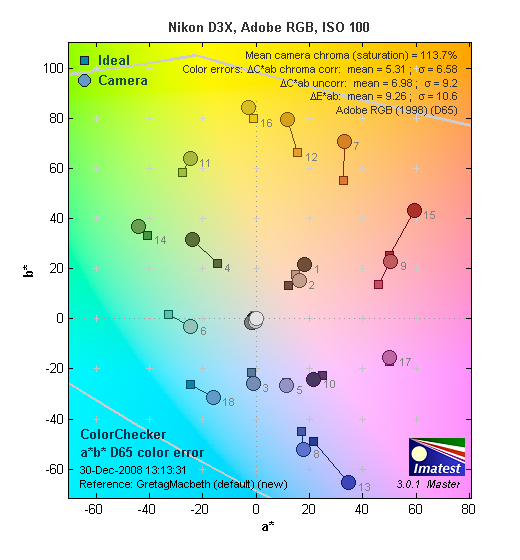 |
||||
Using the Adobe RGB color space (which provides a much wider gamut, or range of colors that can be expressed), the Nikon D3X delivers more highly saturated color, with an average saturation of 113.7% and average saturation-corrected hue error of 5.31 "delta-C" units. These are good results, but not quite as good as sRGB. (We very commonly see some over-saturation in SLRs when shooting in the Adobe RGB space.) Interestingly, though, the Canon models that showed better color accuracy than the D3x in sRGB mode do somewhat worse in the Adobe RGB color space. - And the Sony A900, which did worse in sRGB is better in Adobe RGB. Again, mouse over the links below the illustration above to compare results with competing models.
Color Analysis
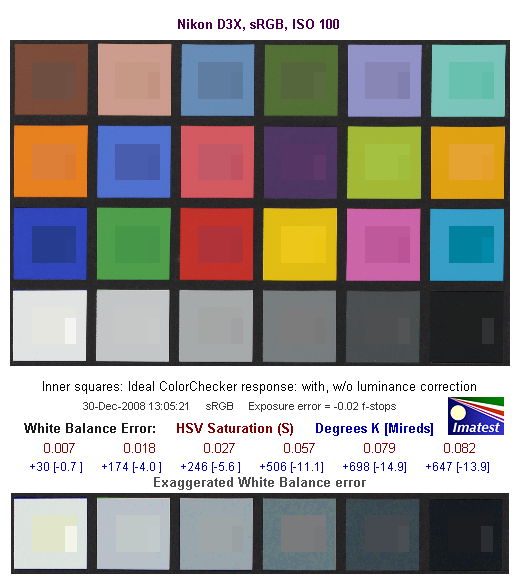
This image shows how the Nikon D3X actually rendered the colors of the MacBeth chart, compared to a numerically ideal treatment. In each color swatch, the outer perimeter shows the color as actually captured by the camera, the inner square shows the numerically ideal color, after correcting for the luminance of the photographed chart (as determined by a second-order curve fit to the values of the gray swatches), and the small rectangle inside the inner square shows the numerically ideal color, without any luminance correction. This image shows the D3X's very good hue accuracy, as well as a gamma curve that results in an overexposure of some colors, notably cyans, reds, blues and some greens. (We've seen this in a wide range of cameras, increasing the "punch" of images by brightening saturated colors a little, while actually keeping both the hue and saturation level very close to technically accurate values.)
Noise Analysis

There's a lot in this particular graph, a lot more than we have room to go into here. (This set of plots has also changed a little in the more recent versions of Imatest. Some of the plots that were shown here previously are now shown in other Imatest output. Since we largely focus on the Noise Spectrum plot, we'll only show the graphic above, which includes that plot.)
In comparing these graphs with those from competing cameras, we've found that the Noise Spectrum graph at lower right is the most important. Cameras that manage to shift their noise spectrum to higher frequencies have much finer-grained noise structures, making their noise less visually objectionable. In the graph above, this would show up as a noise spectrum curve that remained higher on the right side, representing higher noise frequencies. The champion at this was (and still is) the Canon EOS-1Ds Mark II, which produced remarkably fine-grained image noise, even at very high ISOs.
Here, we see the results at ISO 50, which is a low-side extension of the normal ISO range for the D3X. The luminance curve is exceptionally flat (meaning luminance noise is very fine-grained), however the blue color channel exhibits much higher noise values. (This is quite unusual, we more commonly see the green channel noise being the lowest, and the red noise curve tracking that of the blue channel more closely.) Because the overall noise levels are slow low, we normally can't see noise shown on this graph at low ISOs, but in the case of the Nikon D3x operating below its official ISO range, we do see some blotchiness in the blue channel on some of the dark grey patches of the MacBeth chart. (Do note, though, that ISO 50 is below the official range for the camera.)

Here are the results at the Nikon D3X's base ISO of 100. Again, the luminance curve is quite flat and the D3X does a good job of keeping plenty of the noise energy at high frequencies. All three RGB channels are higher than the luminance, this time the red channel being the highest. Still, the Nikon D3X noise levels are very low at low ISO (as you can see in the lower left graph, which shows noise levels vs target brightness), with a frequency spectrum that has more energy on the higher frequency (right-hand) side of the curve than do most cameras. As with the ISO 50 results, though, we do see some blotchiness in the red, green, and blue channels dark grey patches of the MacBeth chart, so minor points off for that.

Above is the same set of noise data at ISO 3,200. Here, the luminance channel of the Noise Spectrum graph has a dramatic shift toward the left-hand, lower-frequency side than at ISO 100, coarsening the "grain" of the image noise patterns quite a bit relative to the results at lower ISOs, but the grain size still appears impressively small to the eye. The color channels follow the luminance much more closely, except at the very low end of the frequency spectrum, no doubt due to the default noise reduction taking place. Overall noise is still quite low; surprisingly so for such a high-resolution sensor. (Compared to the Canon 5D Mark II at ISO 3,200, the D3x's overall noise levels are a little higher, but its images are also noticeably more crisp, revealing more detail.)

Here's the same set of noise data at ISO 6,400. Very similar to ISO 3,200, with a larger shift to the left indicating a coarser "grain" caused by the D3X's noise reduction attempts to blur out the noise. Note however the peak RMS noise (lower left chart) and Pixel noise (upper right) have jumped from about about 0.17 to 0.24 f-stops and about 2.5 to 3.5 % respectively. Comparing again against the Canon EOS-5D Mark II, there's less difference in overall noise level, but the difference in sharpness persists. (We suspect that comparisons done with similar levels of in-camera sharpening would reveal that the two cameras are in fact very close to each other in noise performance.)

This chart compares the Nikon D3X's luminance noise performance over a range of ISOs against that of other current, full frame cameras, using default settings. While we continue to show noise plots of this sort because readers ask for them, we each time point out that the noise magnitude is only a small part of the story, the grain pattern being much more important. In the case of the Nikon D3X, the magnitude of the image noise starts out about the same as the competition at ISO 50, but increases at ISO 100, remaining slightly higher than all but the A900 at all ISOs. This is a good example of how misleading these charts can be as at ISOs 3200 and 6400, luminance noise levels are virtually the same as the Sony A900, but when comparing images from the two cameras, it's clear than the D3X has at least a 1-stop advantage over the A900 in terms of noise. Keep in mind these are at default settings, so the shape and positions of the curves will be influenced by your settings.
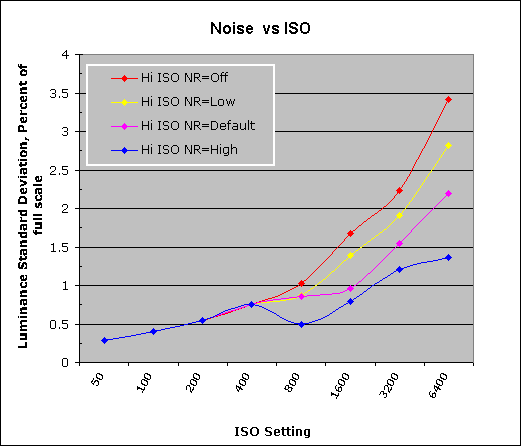
The graph above shows the luminance noise magnitude using the four levels of high-ISO noise reduction available on the Nikon D3X. Since high ISO noise reduction is not performed under ISO800, results at ISO50 through 400 are identical.
All in all, the Nikon D3X delivered some pretty amazing noise levels, particularly considering its smaller pixel dimensions.
Nikon D3X Dynamic Range Analysis
A key parameter in a digital camera is its Dynamic Range, the range of brightness that can be faithfully recorded. At the upper end of the tonal scale, dynamic range is dictated by the point at which the RGB data "saturates" at values of 255, 255, 255. At the lower end of the tonal scale, dynamic range is determined by the point at which there ceases to be any useful difference between adjacent tonal steps. Note the use of the qualifier "useful" in there: While it's tempting to evaluate dynamic range as the maximum number of tonal steps that can be discerned at all, that measure of dynamic range has very little relevance to real-world photography. What we care about as photographers is how much detail we can pull out of the shadows before image noise becomes too objectionable. This, of course, is a very subjective matter, and will vary with the application and even the subject matter in question. (Noise will be much more visible in subjects with large areas of flat tints and subtle shading than it would in subjects with strong, highly contrasting surface texture.)
What makes most sense then, is to specify useful dynamic range in terms of the point at which image noise reaches some agreed-upon threshold. To this end, Imatest computes a number of different dynamic range measurements, based on a variety of image noise thresholds. The noise thresholds are specified in terms of f-stops of equivalent luminance variation in the final image file, and dynamic range is computed for noise thresholds of 1.0 (low image quality), 0.5 (medium image quality), 0.25 (medium-high image quality) and 0.1 (high image quality). For most photographers and most applications, the noise thresholds of 0.5 and 0.25 f-stops are probably the most relevant to the production of acceptable-quality finished images, but many noise-sensitive shooters will insist on the 0.1 f-stop limit for their most critical work.
The image below shows the test results from Imatest for an in-camera JPEG file from the Nikon D3X with a nominally-exposed density step target (Stouffer 4110), and the D3X's Active D-Lighting function set to Off.

These are very good results for in-camera JPEGs, near the top of the results from other recent SLRs we've tested. The tone curve shows excellent gradation in highlights, but the shadow end trails off much more abruptly.

Enabling Active D-Lighting at its lowest setting improves the score to 7.91 EV at the highest quality level, but overall dynamic range has dropped a bit from 8.4 EV to 8.29 EV.

Increasing Active D-Lighting a notch to its Normal setting reduces the score to 7.52 EV at the highest quality, but overall dynamic range has increased to 8.72 EV.
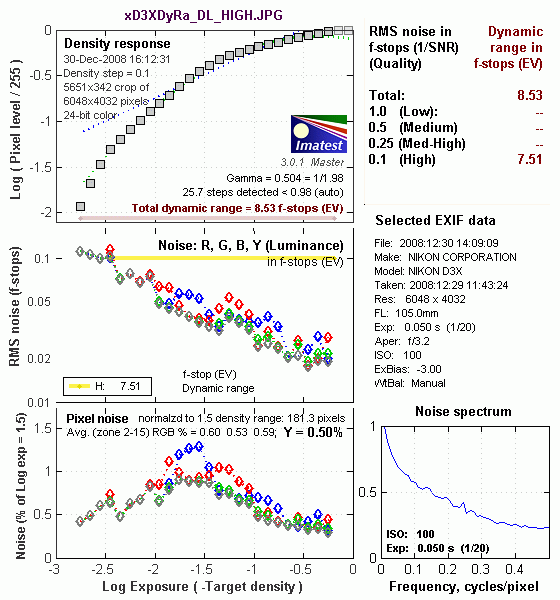
Increasing Active D-Lighting to the High setting has little effect, actually reducing the highest quality score a bit, back to 7.51 EV.

Increasing Active D-Lighting to the maximum Extra High setting reduced the score at the highest quality level to 7.23 EV, but overall dynamic range increased to 9.01 EV.
Overall, given the relatively minor effect on the tone curve here, we suspect that the D3X's Advanced D-Lighting function isn't being triggered by the particular (and unusual) distribution of tonality in the density step wedge used for this test. Note, too, though, that tweaking the tone curve can't actually increase the dynamic range, it can only shift how much emphasis is placed on highlights vs shadows.

Processing the D3X's RAW (NEF) files through Adobe Camera Raw (ACR) version 5.3 beta improved dynamic range dramatically to 9.64 stops at the best quality level, and by more than 3 stops total. ACR's automatic settings were used, then manually tweaked for slightly better results. Worth noting here is that ACR's default noise reduction settings reduced the average noise relative to the levels in the in-camera JPEG. ACR also shifted slightly more of the noise energy into lower spatial frequencies.
Dynamic Range, the bottom line:
The net result was that the D3X JPEGs with Advanced D-Lighting Off came in just above the middle of the pack, but near the top with it was turned to Low. Dynamic range from ACR processed RAW file was outstanding, at the very top of the heap.
To get some perspective, here's a summary of the Nikon D3X's dynamic range performance, and how it compares to other digital SLRs that we also have Imatest dynamic range data for. (Results are arranged in order of decreasing dynamic range at the "High" quality level.):
| Dynamic Range (in f-stops) vs Image Quality (At camera's base ISO) (Blue = RAW via ACR, Yellow=Camera JPEG, Green=Current Camera) |
||||
| Model | 1.0 (Low) |
0.5 (Medium) |
0.25 (Med-High) |
0.1 (High) |
| Nikon D3X (Adobe Camera Raw 5.3b) |
-- | -- | 11.1 | 9.64 |
| Nikon D700 (Adobe Camera Raw 4.5) |
12.1 | 11.6 | 10.6 | 9.51 |
| Sony A900 (Adobe Camera Raw 4.6b) |
-- | 12.1 | 10.7 | 9.36 |
| Nikon D90 (Adobe Camera Raw 4.6b) |
12.1 | 11.8 | 10.7 | 9.27 |
| Fujifilm S3 Pro (Adobe Camera Raw 2) |
12.1 | 11.7 | 10.7 | 9.00 |
| Nikon D40x (Adobe Camera Raw 4.1) |
12.0 | 10.9 | 10.3 | 8.90 |
| Canon 5D Mark II (Adobe Camera Raw 5.2) |
-- | 10.8 | 10.0 | 8.89 |
| Canon EOS-1Ds Mark III (Adobe Camera Raw 4.5) |
11.5 | 10.7 | 9.96 | 8.84 |
| Nikon D3 (Adobe Camera Raw 4.5) |
11.7 | 11.0 | 10.0 | 8.75 |
| Canon EOS-1D Mark III (Adobe Camera Raw 4.5) |
11.7 | 10.7 | 9.99 | 8.73 |
| Pentax K20D (Adobe Camera Raw 4.5) |
11.4 | 10.6 | 9.82 | 8.56 |
| 8.5 Stops | ||||
| Nikon D300 (Adobe Camera Raw 4.3.1) |
11.4 | 10.9 | 9.87 | 8.45 |
| Sony A200 (Adobe Camera Raw 4.3.1) |
11.6 | 10.4 | 9.82 | 8.43 |
| Nikon D60 (Adobe Camera Raw 4.4.1) |
11.6 | 10.5 | 9.74 | 8.31 |
| Nikon D40 (Adobe Camera Raw 4.1) |
11.9 | 10.9 | 9.89 | 8.30 |
| Canon EOS-1Ds Mark III (Camera JPEG) |
10.9 | 10.2 | 9.71 | 8.23 |
| Pentax K100D (Adobe Camera Raw 3.6) |
11.3 | 10.3 | 9.51 | 8.23 |
| Pentax K200D (Adobe Camera Raw 4.4.1) |
-- | 10.5 | 9.54 | 8.19 |
| Pentax K10D (Adobe Camera Raw 3.7) |
10.6 | 10.0 | 9.29 | 8.19 |
| Sony A100 (Adobe Camera Raw 3.4) |
11.3 | 10.5 | 9.69 | 8.16 |
| Canon EOS-1Ds Mark II (Adobe Camera Raw 3) |
11.2 | 10.3 | 9.40 | 8.14 |
| Canon EOS 50D (Adobe Camera Raw 4.6) |
11.2 | 10.5 | 9.49 | 8.06 |
| Nikon D40x (Camera JPEG) |
10.8 | 10.0 | 9.42 | 8.04 |
| Canon Rebel XSi (Camera JPEG) (ALO on by default) |
11.3 | 10.1 | 9.34 | 8.01 |
| 8.0 Stops | ||||
| Fujifilm S3 Pro (Camera JPEG) |
-- | 9.90 | 9.40 | 7.94 |
| Nikon D3X (Camera JPEG) Advanced D-Lighting LOW) |
-- | -- | -- | 7.91 |
| Sony A350 (Adobe Camera Raw 4.4) |
11.6 | 10.5 | 9.61 | 7.89 |
| Canon EOS-1D Mark III (Camera JPEG) |
-- | 10.2 | 9.70 | 7.88 |
| Canon Rebel XS (Adobe Camera Raw 4.5) |
-- | 10.3 | 9.27 | 7.88 |
| Nikon D3 (Camera JPEG) |
-- | -- | -- | 7.87 |
| Canon Digital Rebel XTi (Adobe Camera Raw 3.6) |
10.8 | 9.88 | 9.18 | 7.84 |
| Canon EOS 5D (Adobe Camera Raw 3) |
11.0 | 10.4 | 9.21 | 7.83 |
| Canon EOS 50D (Camera JPEG) (ALO Off ) |
-- | 9.64 | 9.17 | 7.83 |
| Nikon D90 (Camera JPEG) |
-- | -- | -- | 7.77 |
| Canon EOS 40D (Adobe Camera Raw 4.2) |
11.2 | 10.1 | 9.26 | 7.72 |
| Canon Rebel XSi (Adobe Camera Raw 4.4.1) |
10.6 | 9.95 | 9.10 | 7.68 |
| Canon EOS 50D (Camera JPEG) (ALO STD by default) |
-- | -- | 8.90 | 7.68 |
| Nikon D700 (Camera JPEG) |
-- | -- | 9.05 | 7.67 |
| Canon 5D Mark II (Camera JPEG) (ALO STD) |
10.6 | 9.68 | 8.98 | 7.66 |
| Canon EOS-5D (Camera JPEG) |
10.2 | 9.68 | 8.82 | 7.65 |
| Olympus E-3 (Adobe Camera Raw 4.3) |
10.3 | 10.1 | 9.29 | 7.64 |
| Canon 5D Mark II (Camera JPEG) (ALO Off) |
-- | 9.67 | 8.96 | 7.62 |
| Nikon D60 (Camera JPEG) |
10.5 | 9.62 | 8.89 | 7.62 |
| Nikon D200 (Adobe Camera Raw 3) |
10.6 | 9.65 | 8.96 | 7.61 |
| Nikon D80 (Adobe Camera Raw 3.6) |
11.1 | 10.4 | 9.42 | 7.51 |
| 7.5 Stops | ||||
| Olympus E-500 (Adobe Camera Raw 3) |
10.7 | 9.97 | 8.90 | 7.46 |
| Olympus E-510 (Adobe Camera Raw 4.1) |
10.0 | 9.43 | 8.64 | 7.46 |
| Pentax K10D (Camera JPEG) |
-- | 9.49 | 8.88 | 7.44 |
| Nikon D300 (Camera JPEG) |
-- | -- | 8.70 | 7.44 |
| Olympus E-420 (Adobe Camera Raw 4.1.1) |
10.0 | 9.61 | 8.65 | 7.44 |
| Nikon D2Xs (Adobe Camera Raw 3.6) |
10.6 | 9.90 | 8.93 | 7.42 |
| Canon EOS 40D (Camera JPEG) |
10.6 | 9.52 | 8.78 | 7.42 |
| Nikon D3X (Camera JPEG) (Advanced D-Lighting OFF) |
-- | -- | -- | 7.37 |
| Nikon D50 (Camera JPEG) |
10.7 | 9.93 | 8.70 | 7.36 |
| Panasonic DMC-G1 (Adobe Camera Raw 5.2) |
10.7 | 9.78 | 8.70 | 7.32 |
| Sony A900 (Camera JPEG) (DRO off by default ) |
10.2 | 9.75 | 8.49 | 7.31 |
| Sony A200 (Camera JPEG) (DRO on by default) |
10.4 | 9.43 | 8.91 | 7.29 |
| Canon EOS 20D (Camera JPEG) |
10.3 | 9.66 | 8.85 | 7.29 |
| Canon EOS 30D (Camera JPEG) |
10.3 | 9.50 | 8.57 | 7.29 |
| Nikon D40 (Camera JPEG) |
10.4 | 9.80 | 8.89 | 7.28 |
| Sony A900 (Camera JPEG) (DRO on) |
10.1 | 9.76 | 8.47 | 7.26 |
| Canon Rebel XS (Camera JPEG) |
10.3 | 9.4 | 8.61 | 7.22 |
| Olympus E-520 (Adobe Camera Raw 4.5) |
11.0 | 9.46 | 8.70 | 7.20 |
| Sony A350 (Camera JPEG) (DRO on by default) |
10.3 | 9.55 | 8.85 | 7.19 |
| Nikon D80 (Camera JPEG) |
10.1 | 9.43 | 8.48 | 7.12 |
| Canon Digital Rebel XT (Camera JPEG) |
10.3 | 9.51 | 8.61 | 7.11 |
| Nikon D200 (Camera JPEG) |
-- | 9.07 | 8.36 | 7.11 |
| Panasonic DMC-G1 (Camera JPEG, iExposure = Low) |
-- | 9.29 | 8.50 | 7.09 |
| Panasonic DMC-G1 (Camera JPEG, iExposure = Standard) |
-- | 9.30 | 8.54 | 7.07 |
| Olympus E-300 (Camera JPEG) |
10.8 | 9.26 | 8.48 | 7.07 |
| Olympus E-410 (Adobe Camera Raw 4.1) |
10.2 | 9.40 | 8.24 | 7.05 |
| Olympus E-500 (Camera JPEG) |
10.0 | 9.14 | 8.16 | 7.05 |
| Canon Digital Rebel XTi (Camera JPEG) |
9.83 | 9.10 | 8.27 | 7.04 |
| Canon EOS-1Ds Mark II (Camera JPEG) |
10.3 | 9.38 | 8.60 | 7.04 |
| Panasonic DMC-G1 (Camera JPEG, iExposure = High) |
10.3 | 9.23 | 8.54 | 7.04 |
| Panasonic DMC-G1 (Camera JPEG, iExposure = Off) |
-- | 9.33 | 8.52 | 7.03 |
| Pentax K200D (Camera JPEG) |
-- | 9.50 | 8.30 | 7.01 |
| 7.0 Stops | ||||
| Canon Digital Rebel (Camera JPEG) |
10.1 | 9.11 | 8.47 | 6.97 |
| Nikon D2Xs (Camera JPEG) |
9.82 | 8.98 | 8.23 | 6.97 |
| Panasonic DMC-L10 (Adobe Camera Raw 4.2) |
10.4 | 9.34 | 8.48 | 6.91 |
| Sigma DP1 (Camera JPEG) |
-- | 8.95 | 8.13 | 6.91 |
| Pentax *istDs (Camera JPEG) |
10.2 | 10.0 | 8.87 | 6.90 |
| Sony A100 (Camera JPEG) |
10.2 | 9.24 | 8.39 | 6.89 |
| Pentax K100D (Camera JPEG) |
10.3 | 9.30 | 8.39 | 6.73 |
| Pentax K20D (Camera JPEG) |
10.2 | 9.21 | 8.09 | 6.66 |
| 6.5 Stops | ||||
| Nikon D2x (Camera JPEG) |
-- | 8.93 | 7.75 | 6.43 |
| Olympus E-3 (Camera JPEG) |
9.32 | 9.06 | 8.50 | 6.42 |
| Panasonic DMC-L10 (Camera JPEG) |
-- | 8.94 | 8.00 | 6.38 |
| Olympus E-420 (Camera JPEG) |
9.18 | 8.82 | 7.93 | 6.37 |
| 6.0 Stops | ||||
| Olympus E-410 (Camera JPEG) |
-- | -- | 7.60 | 5.99 |
| Nikon D70s (Camera JPEG) |
9.84 | 8.69 | 7.46 | 5.85 |
| Nikon D70 (Camera JPEG) |
9.81 | 8.76 | 7.58 | 5.84 |
| Olympus E-520 (Camera JPEG) |
9.32 | 8.68 | 7.74 | 5.74 |
| < 5.0 Stops | ||||
| Olympus E-510 (Camera JPEG) |
7.70 | 7.16 | 5.87 | 3.55 |
The results shown in the table are interesting. One of the first things that struck me when I initially looked at test data for a wide range of d-SLRs, was that here again, purely analytical measurements don't necessarily correlate all that well with actual photographic experience. There's no question that the Fuji S3 Pro (at the time) deserved its place atop the list, as its unique "SR" technology does indeed deliver a very obvious improvement in tonal range in the highlight portion of the tonal scale. I was surprised to see the analytical results place the Olympus E-300 as highly as they did, given that our sense of that camera's images was that they were in fact noisier than those of many other d-SLRs that we looked at. In the other direction, I was quite surprised to see the Nikon D2x place as low on the listings as it did, given that we found that camera's shadow detail to be little short of amazing.
One thing that's going on here though, is that we tested each camera at its lowest (base) ISO setting, which should produce best-case noise levels. This is in fact what many photographers will be most interested in, but it does perhaps place some of the Nikons (like the D40) at a disadvantage, as their lowest ISO setting is 200, as compared to the ISO 100 settings available on most other models.
With the preceding as caveats, what we can say about the Nikon D3X's dynamic range is that it's quite good, but perhaps a third of a stop or so below the current best of the field. This roughly matches what we felt we were seeing in its images - It does a very good job, particularly with highlights, but plugs the very darkest shadows somewhat. - But keep in mind that we're splitting hairs, and talking about very deep shadows indeed.
Nikon D3X Resolution Chart Test Results

The chart above shows consolidated results from spatial frequency response measurements in both the horizontal and vertical axes. The "MTF 50" numbers tend to correlate best with visual perceptions of sharpness, so those are what I focus on here. The uncorrected resolution figures are 2,807 line widths per picture height in the horizontal direction (corresponding to the vertically-oriented edge), and 2,728 lines along the vertical axis (corresponding to the horizontally-oriented edge), for a combined average of 2,767 LW/PH. Correcting to a "standardized" sharpening with a one-pixel radius increased both vertical and horizontal resolution, resulting in an average of 3,212 LW/PH, which is very good, though not quite as high as we found with the Sony A900. (It could be that the D3x's oversharpening of its default JPEGs is what's causing this result: Its uncorrected resolution numbers are higher than those of the A900, while its corrected numbers are lower.)
To see what's going on, refer to the plots below, which show the actual edge profiles for both horizontal and vertical edges, in both their original and corrected forms. Here, you can see that there is fairly conservative in-camera sharpening applied (almost ideal bumps at the top ends, but no noticeable bumps at the bottom ends of the black edge profile curves). Imatest reports that the horizontal direction (vertical edge) is "undersharpened" by 9.69% while the vertical direction (horizontal edge) is undersharpened by 10.6%. This strikes us as a bit of a misnomer, since the D3x's edges are clearly oversharpened to begin with. Lower sharpening would likely produce higher corrected resolution numbers, but Imatest is just looking at how much the slope of the intensity profile across an edge increases in response to the "standardized" sharpening. (As usual, for the ultimate in fine detail from the Nikon D3x, begin with a RAW file and a good RAW converter, rather than a JPEG.)


RAW Files
Nikon D3X RAW Image Quality
We've recently started looking at RAW files converted with dcraw, an excellent freeware raw converter. dcraw usually offers timely support for the latest cameras, but more importantly, it does not apply any noise-reduction, sharpening or other corrections such as geometric distortion correction to the output files. (We found that Adobe Camera Raw still applies some limited noise-reduction when its NR settings are set to zero, and it also applies other corrections depending on the make and model of the camera). There will always be differences between RAW converters, in terms of the sort of de-mosaicing algorithms they use (the processes by which they convert the separate Red, Green, and Blue data sets to an array of full-color RGB pixels), but dcraw seems to use a fairly generic algorithm that delivers good sharpness with relatively few artifacts, and can be counted on to not apply any noise reduction if you don't want it to. (That said, looking at the ISO 25,600 example from the 5D Mark II below, it's clear that dcraw's de-mosaicing approach does have some tendency to produce rectilinear artifacts in response to high noise levels.)
Below are crops from Nikon D3X RAW files compared to RAW files from other 21+ megapixel digital SLRs, converted with dcraw.
| Nikon D3X vs Canon 5D Mark II, Canon 1Ds Mark III, and Sony A900 RAW (via dcraw), no Noise Reduction, no Sharpening Simulated Daylight |
||||
|
|
Nikon
D3X |
Canon 5D
Mark II |
Canon 1Ds
Mark III |
Sony
Alpha A900 |
| I S O 5 0 |
 |
 |
 |
N/A, ISO 50 not supported. |
 |
 |
 |
 |
 |
 |
| I S O 1 0 0 |
 |
 |
 |
 |
 |
 |
 |
 |
|
 |
 |
 |
 |
|
| I S O 2 0 0 |
 |
 |
 |
 |
 |
 |
 |
 |
|
 |
 |
 |
 |
|
| I S O 4 0 0 |
 |
 |
 |
 |
 |
 |
 |
 |
|
 |
 |
 |
 |
|
| I S O 8 0 0 |
 |
 |
 |
 |
 |
 |
 |
 |
|
 |
 |
 |
 |
|
| I S O 1 6 0 0 |
 |
 |
 |
 |
 |
 |
 |
 |
|
 |
 |
 |
 |
|
| I S O 3 2 0 0 |
 |
 |
 |
 |
 |
 |
 |
 |
|
 |
 |
 |
 |
|
| I S O 6 4 0 0 |
 |
 |
N/A,
ISO 6,400 not supported. |
 |
 |
 |
 |
||
 |
 |
 |
||
| I S O 1 2 8 0 0 |
N/A,
ISO 12,800 not supported. |
 |
N/A,
ISO 12,800 not supported. |
N/A,
ISO 12,800 not supported. |
 |
||||
 |
||||
| I S O 2 5 6 0 0 |
N/A,
ISO 25,600 not supported. |
 |
N/A,
ISO 25,600 not supported. |
N/A,
ISO 25,600 not supported. |
 |
||||
 |
||||
|
|
Nikon
D3X |
Canon 5D
Mark II |
Canon 1Ds
Mark III |
Sony
Alpha A900 |
The crops above compare the Nikon D3X RAW noise performance to that of the Canon 5D Mark II, Canon 1Ds Mark III, and Sony A900, across their entire ISO ranges. Noise levels from the four cameras are pretty similar up to and including ISO 400. At ISO 800, we see the two Canons and the Nikon pull away from the Sony by just a hair. At ISO 1600 and above, the Sony appears to be behind the others by roughly a full stop in terms of noise, but the other three are closely matched. At ISO 6,400, the 5D Mark II seems to slightly outperform the D3x, but it's very, very close.
A lot of our readers no doubt are wondering how the D3X, 5D Mark II and Sony A900 compare to the D3. Below are crops comparing high ISO RAW files, resized to the D3's image size using Photoshop's Bicubic interpolation. (The Sony A900's high ISO noise reduction was set to Off; the rest of the cameras do not apply noise reduction to RAW files by default.)
| Nikon D3 vs Nikon D3X, Canon 5D Mark II, and Sony A900 RAW (via dcraw), no Noise Reduction, no Sharpening, Resized to D3 image dimensions using Bicubic interpolation, Simulated Daylight |
||||
|
|
Nikon
D3 |
Nikon
D3X |
Canon 5D
Mark II |
Sony
Alpha A900 |
| I S O 4 0 0 |
 |
 |
 |
 |
 |
 |
 |
 |
|
 |
 |
 |
 |
|
| I S O 8 0 0 |
 |
 |
 |
 |
 |
 |
 |
 |
|
 |
 |
 |
 |
|
| I S O 1 6 0 0 |
 |
 |
 |
 |
 |
 |
 |
 |
|
 |
 |
 |
 |
|
| I S O 3 2 0 0 |
 |
 |
 |
 |
 |
 |
 |
 |
|
 |
 |
 |
 |
|
| I S O 6 4 0 0 |
 |
 |
 |
 |
 |
 |
 |
 |
|
 |
 |
 |
 |
|
| I S O 1 2 8 0 0 |
 |
N/A,
ISO 12,800 not supported. |
 |
N/A,
ISO 12,800 not supported. |
 |
 |
|||
 |
 |
|||
| I S O 2 5 6 0 0 |
 |
N/A,
ISO 25,600 not supported. |
 |
N/A,
ISO 25,600 not supported. |
 |
 |
|||
 |
 |
|||
|
|
Nikon
D3 |
Nikon
D3X |
Canon 5D
Mark II |
Sony
Alpha A900 |
In the crops above, it's clear that the Nikon D3 is still the high ISO noise champ (as well as the D700, as they share the same sensor), but the added resolution of the higher megapixel cameras is readily evident even after resizing down to the D3's image dimensions, at least at lower ISOs.
Shooting Modes
Nikon D3X Modes and Menus
Capture Modes
The Nikon D3X doesn't have a mode dial, but instead has a mode button. The current exposure mode is displayed on the LCD and viewfinder and can be changed by pressing this button and rotating the main (rear) command dial. Available exposure modes are: P (Programmed Auto), S (Shutter Priority), A (Aperture Priority) or M (Manual). Like all pro Nikons, the D3X doesn't offer any scene modes.
Programmed Auto: Lets the camera control the shutter speed and aperture settings, although you can vary its choices by turning the Command dial (that is, you can increase or decrease the aperture the camera has chosen, and the camera will vary the shutter speed to maintain the same overall exposure value. Once you've chosen an offset in the aperture/shutter combination, the camera will continue to control the exposure automatically, while maintaining the aperture/shutter bias you've selected.) This ability to select a persistent bias for the exposure system is very useful, in many cases more so than conventional Aperture or Shutter Priority metering (see below). This is because the "tweaked" Program AE will track even radical changes in subject lighting, not being constrained to a single aperture or shutter speed.
Aperture Priority: Allows you to set the aperture value while the camera automatically selects the appropriate shutter speed. Available apertures will vary with the lens in use.
Shutter Speed Priority: Allows you to set the shutter speed value while the camera automatically selects the appropriate aperture. Shutter speeds range from 1/8,000 to 30 seconds in this mode.
Manual: Lets you select both the aperture value and shutter speed, and increases the shutter speed range to include a Bulb setting for exposures longer than 30 seconds. The currently selected flash sync speed can also be selected as the shutter speed in this setting.
Menus
Pressing the Menu button provides access to the camera's full menu system. See below for menu details.
Playback Menu

(Click to view the complete Playback Menu matrix.)
| Playback Menu Options | |||
|
Top-Level
Selection |
Second-Level
|
Third-Level
|
Notes
|
|
Delete
|
- Selected
|
- Selected Image
|
Deletes pictures from the camera memory card. Hidden and protected images will not be deleted.
|
|
- All
|
- Slot 1
- Slot 2 |
||
|
Playback Folder
|
- NCD3X
- All - Current |
|
Select a folder for playback.
|
|
Hide Image
|
- Select/set
|
- Selection screen
|
Reveal or hide selected images.
|
|
- Deselect all?
|
- Reveal all hidden images?
- Yes - No |
||
|
Display Mode
|
- Done
|
Basic photo info
- Focus point Detailed photo info |
Allows you to select what shooting information is displayed with the picture during playback.
|
|
Copy Image(s)
|
- Slot 1 Select image(s)
|
- Select folder screen
- Deselect all - Select all images - Select protected images |
Allows you to copy images from the card in slot 1 to the card in slot 2.
|
|
- Slot 2 Select destination folder
|
- Select folder by number
- Select folder from list |
||
|
- Copy images?
|
- Copy images?
- Yes - No |
||
|
Image Review
|
- On
- Off |
|
Allows you to choose if you want to see your picture displayed right after it is shot.
|
|
After Delete
|
- Show next
- Show previous - Continue as before |
|
Lets you choose which remaining picture will be displayed after a picture is deleted.
|
|
Rotate Tall
|
- On
- Off |
|
Allows pictures that were shot in portrait orientation to be rotated correctly on the LCD monitor.
|
|
Slide Show
|
- Start
|
- OK
|
Allows you to create a slide show of existing pictures with your choice of interval between pictures. Hidden pictures will not be displayed.
|
|
- Frame interval
|
- 2 s
- 3 s - 5 s - 10 s |
||
|
- Audio playback
|
- On
- Off |
||
|
Print Set (DPOF)
|
- Select/set
|
- Select image screen
|
Allows you to select which pictures to print on a DPOF compatible printer.
|
|
- Deselect all?
|
- Remove print marking from all images?
- Yes - No |
||
Shooting Menu

(Click to view the complete Shooting Menu matrix.)
| Shooting Menu Options | |||
|
Top-Level
Selection |
Second-Level
|
Third-Level
|
Notes
|
|
Shooting Menu Bank
|
- A
- B - C - D |
- Rename screen
|
This allows you to set up 4 different menu banks and lets you customize these options to your liking. These options stay set when you turn the camera off. The names can be changed if needed.
|
|
- Rename
|
- A
- B - C - D |
||
|
Reset Shooting menu
|
- Yes |
|
Restores default settings to the shooting menu.
|
|
Active Folder
|
- New folder number
|
- 100-999
|
Choose the active folder name where your images will be stored.
|
|
- Select folder
|
- 101NCD3X
|
||
|
File Naming
|
- sRGB
- Adobe RGB |
- File naming screen
|
This is used to rename the file names used by sRGB or Adobe RGB.
|
|
Slot 2
|
- Overflow
- Backup - RAW Slot 1 - JPEG Slot 2 |
|
This is used to define how the Compact Flash slot 2 is to be used.
|
|
Image Quality
|
- NEF (RAW) + JPEG fine
- NEF (RAW) + JPEG normal - NEF (RAW) + JPEG basic - NEF (RAW) - TIFF (RGB) - JPEG fine - JPEG normal - JPEG basic |
|
Choose the type of file you want to capture.
|
|
Image Size
|
- Large
6048x4032; 24.4 M - Medium 4544x3024; 13.7 M - Small 3024x2016; 6.1 M |
|
Choose the images size you want to capture.
|
|
Image Area
|
- Auto DX crop
|
- On
- Off |
Choose the images size you want to capture. If you choose smaller than full frame format it will mask off the shooting area in the viewfinder.
|
|
- Choose image area
|
- FX format (36x24)
- DX format (24x16) - 5:4 (30x24) |
||
|
JPEG Compression
|
- Size priority
- Optimal quality |
|
Compress images based on a fixed size or on the best quality.
|
|
NEF (RAW)?recording
|
- Type
|
- Lossless compressed
- Compressed - Uncompressed |
Choose the type and bit depth of the Raw images you want to capture.
|
|
- NEF (RAW) bit depth
|
- 12-bit
- 14-bit |
||
|
White Balance
|
- Auto
- Incandescent - Fluorescent (7) - Direct Sunlight - Flash - Cloudy - Shade - Choose color temp. - Preset manual |
- Adjustment screen (all modes except "Choose color temp" which allows you to choose color temp from 2,500K to 10,000K)
|
Adjusts the white balance to match the conditions you are shooting in.
|
|
Set Picture Control
|
- Standard
- Neutral - Vivid - Monochrome |
- Quick adjust or Grid screen
- Sharpening - Contrast - Brightness - Saturation - Hue |
Set the picture control option for various intensities of color or to black and white.
Adjustment of these values can be done with either a grid type process or with the quick adjust values screen. Up to 99 custom picture controls can be saved to a memory card. |
|
Manage Picture Control
|
- Save/edit
|
- Standard
- Neutral - Vivid - Monochrome |
Adjustment of these values can be done with either a grid type process or with the quick adjust values screen.
|
|
- Rename
|
- C1 Unused
- C2 Unused - C3 Unused - C4 Unused - C5 Unused - C6 Unused - C7 Unused |
||
|
- Delete
|
- C1 Unused
- C2 Unused - C3 Unused - C4 Unused - C5 Unused - C6 Unused - C7 Unused |
||
|
- Load/save
|
- Copy to camera
- Delete from card - Copy to card - C1 Unused - C2 Unused - C3 Unused - C4 Unused - C5 Unused - C6 Unused - C7 Unused |
||
|
Color Space
|
- sRGB
- Adobe |
|
Color space determines the amount of color in your pictures.
|
|
Active D-Lighting
|
- Auto
- Extra High - High - Normal - Low - Off |
|
This will help preserve the details in light and dark areas of the picture. Shadows and highlights.
|
|
Vignette Control
|
- High
- Normal - Low - Off |
This option helps reduce corner shading or "vignetting" in JPEGs. Also tags NEFs for similar processing in Capture NX2 software.
|
|
|
Long Exp. NR
|
- On
- Off |
|
Turns on the Noise Reduction for images taken with a shutter speed of greater than one second.
|
|
High ISO NR
|
- High
- Normal - Low - Off |
|
Selects the amount of Noise Reduction when using an ISO of 500 or greater.
|
|
ISO Sensitivity Settings
|
- ISO sensitivity
|
- LO 1
- 100 - 200 - 400 - 800 - 640 - 800 - 1600 - Hi 1 - Hi 2 |
This adjusts many settings dealing with ISO sensitivity. See the manual for details. Note: These options are variable depending on the b1 Custom setting for ISO sensitivity step value.
|
|
- ISO Sensitivity auto control
|
- On
- Off |
||
|
- Maximum sensitivity
|
- 200
- 400 - 800 - 1600 - Hi 1 - Hi 2 |
||
|
- Minimum shutter speed
|
- 1/4000 s
- 1/3200 s - 1/2500 s - 1/2000 s - 1/1600 s - 1/1250 s - 1/1000 s - 1/800 s - 1/640 s - 1/500 s - 1/400 s - 1/320 s - 1/250 s - 1/200 s - 1/160 s - 1/125 s - 1/100 s - 1/80 s - 1/60 s - 1/50 s - 1/40 s - 1/30 s - 1/15 s - 1/8 s - 1/4 s - 1/2 s - 1 s |
||
|
Live View
|
- Live View Mode
|
- Hand-held
- Tripod |
Allows you to select which mode of Live view you want to use. You can also select the frame advance rate.
|
|
- Release Mode
|
- S Single frame
- CL Continuous low-speed - CH Continuous high-speed |
||
|
Multiple Exposure
|
- Done
|
- OK
|
Allows you to do from 2 to 10 multiple exposures.
|
|
- Number of shots
|
- 2 - 10 shots
|
||
|
- Auto gain
|
- On
- Off |
||
|
Interval Timer Shooting
|
- Choose start time
- Now |
|
Allows you to set the start time, the interval between shots and the number of shots to capture.
|
|
- Start time
|
- Start time
- Interval - Select intvls X no. of shots - On - Off |
||
Custom Settings Menu

(Click to view the complete Custom Settings matrix.)
| Custom Menu Options | |||
|
Top-Level
Selection |
Second-Level
|
Third-Level |
Notes
|
|
Custom Setting Bank
|
- A
- B - C - D |
- Rename screen
|
Custom settings can be stored in four separate custom banks. You can switch between them at any time and rename them.
|
|
- Rename
|
- A
- B - C - D |
||
|
Reset Custom Settings
|
- Yes
- No |
|
Restores custom settings to their default values.
|
|
A- Autofocus
|
- a1 AF-C priority selection
|
- Release
- Release + focus - Focus |
These custom menu functions control all aspects of the Autofocus system. See manual for greater detail.
|
|
- a2 AF-S priority selection
|
- Release
- Focus |
||
|
- a3 Dynamic AF area
|
- 9 points
- 21 points - 51 points - 51 points (3D tracking) |
||
|
- a4 Focus tracking w/lock-on
|
- Long
- Normal - Short - Off |
||
|
- a5 AF activation
|
- Shutter/AF-ON
- AF-ON only |
||
|
- a6 Focus point Illumination
|
- Manual focus mode
- On - Off - Continuous mode - On - Off - Focus point brightness - +2 Extra high - +1 High - 0 Normal - -1 Low |
||
|
- a7 Focus point wrap-around
|
- Wrap
- No wrap |
||
|
- a8 AF point selection
|
- AF51 51 points
- AF11 11 points |
||
|
- a9 AF-ON button
|
- AF-ON
- AE/AF lock - AE lock only - AE lock (Reset on release) - AE lock (hold) - AF lock only |
||
|
- a10 Vertical AF-ON button
|
- Same as AF-ON
- AF-ON - AE/AF lock - AE lock only - AE lock (Reset on release) - AE lock (hold) - AF lock only |
||
|
B- Metering/Exposure
|
- b1 ISO sensitivity step value
|
- 1/3 step
- 1/2 step - 1 step |
These custom menu functions control all aspects of the Metering/Exposure system. See manual for greater detail.
|
|
- b2 EV steps for exposure cntrl.
|
- 1/3 step
- 1/2 step - 1 step |
||
|
- b3 EV steps for exposure comp
|
- 1/3 step
- 1/2 step - 1 step |
||
|
- b4 Easy exposure compensation
|
- On (Auto reset)
- On - Off |
||
|
- b5 Center-weighted area
|
- 8 mm
- 12 mm - 15 mm - 20 mm - Average |
||
|
- b6 Fine tune optimal exposure
|
- Exposure compensation icon is not displayed when exposure is altered from the default value. Continue?
- Yes - No |
||
|
C- Timers/AE Lock
|
- c1 Shutter-release button AE-L
|
- On
- Off |
These custom menu functions control all aspects of the Self-timer and AE lock. See manual for greater detail.
|
|
- c2 Auto meter-off delay
|
- 4s
- 6s - 8s - 16s - 30s - 1 min. - 5 min. - 10 min. - 30 min. - No Limit |
||
|
- c3 Self-timer delay
|
- 2 s
- 5 s - 10 s - 20 s |
||
|
- c4 Monitor off delay
|
- 10 s
- 20 s - 1 min. - 5 min. - 10 min. |
||
|
D- Shooting/Display
|
- d1 Beep
|
- High
- Low - off |
These custom menu functions control all aspects of the Shooting/Display system. Shooting speeds available depends on other settings including image area. See manual for greater detail.
|
|
- d2 shooting speed
|
- Continuous high-speed:
- 7 fps - 6 fps - 5 fps - Continuous low-speed: - 5 fps - 4 fps - 3 fps - 2 fps - 1 fps |
||
|
- d3 Max. continuous release
|
- Select 1-130
|
||
|
- d4 File number sequence
|
- On
- Off - Reset |
||
|
- d5 Control panel/viewfinder
|
- Rear control panel:
- ISO sensitivity - Exposures remaining - Viewfinder display: - Frame count - Exposures remaining |
||
|
- d6 Shooting info display
|
- Auto
- Manual: -?Dark on Light - Light on Dark |
||
|
- d7 LCD illumination
|
- On
- Off |
||
|
- d8 Exposure delay mode
|
- On
- Off |
||
|
E- Bracketing/Flash
|
- e1 Flash sync speed
|
- 1/250 s (Auto FP)
- 1/250 s - 1/200 s - 1/160 s - 1/125 s - 1/100 s - 1/80 s - 1/60 s |
These custom menu functions control all aspects of the Bracketing/flash system. See manual for greater detail.
|
|
- e2 Flash shutter speed
|
- 1/60 s
- 1/30 s - 1/15 s - 1/8 s - 1/4 s - 1/2 s - 1 s - 2 s - 4 s - 8 s - 15 s - 30 s |
||
|
- e3 Modeling flash
|
- On
- Off |
||
|
- e4 Auto bracketing set
|
- AE & flash
- AE only - Flash only - WB bracketing |
||
|
- e5 Auto bracketing (Mode M)
|
- Flash / speed
- Flash / speed / aperture - Flash / aperture - Flash only |
||
|
- e6 Bracketing order
|
- MTR > under > over
- Under > MTR > over |
||
|
F- Controls
|
- f1 Multi selector center button
|
- Shooting mode:
- Select center focus point - Not used - Playback mode: - Live view: |
These custom menu functions control all aspects of the external Controls system. See manual for greater detail.
Firmware version 2.00 added new choose image area and shooting menu bank options.
|
|
- f2 Multi selector
|
- Reset meter-off delay
- Do nothing |
||
|
- f3 Photo info/playback
|
- Info (left/right) / Playback (up/down)
- Info (up/down) / Playback (left/right) |
||
|
- f4 Assign FUNC. button
|
- FUNC. button press:
- Preview - FV lock - AE/AF lock - AE lock only - AE lock (Reset on release) - AE lock (Hold) - AF lock only - Flash off - Bracketing burst - Matrix metering - Center-weighted - Spot metering - Virtual horizon - Playback - Access top item in My Menu - None - FUNC. button + dials: - Choose image area (FX/DX/5:4) - Choose image area (FX/DX/) - 1 step spd/aperture - Choose non-CPU lens number - Focus point -selection - Shooting menu bank - Dynamic AF area - None |
||
|
- f5 Assign preview button
|
- Preview button press:
- Preview - FV lock - AE/AF lock - AE lock only - AE lock (Reset on release) - AE lock (Hold) - AF lock only - Flash off - Bracketing burst - Matrix metering - Center-weighted - Spot metering - Virtual horizon - Playback - Access top item in My Menu - None - Preview + command dials: - Choose image area (FX/DX/5:4) - Choose image area (FX/DX/) - 1 step spd/aperture - Choose non-CPU lens number - Shooting menu bank - Dynamic AF area - None |
||
|
- f6 Assign AE-L/AF-L button
|
- AE-L/AF-L button press:
- Preview - FV lock - AE/AF lock - AE lock only - AE lock (Reset on release) - AE lock (Hold) - AF lock only - AF-ON - Flash off - Bracketing burst - Matrix metering - Center-weighted - Spot metering - Virtual horizon - Playback - Access top item in My Menu - None - AE-L/AF-L + command dials: - Choose image area (FX/DX/5:4) - Choose image area (FX/DX/) - Choose non-CPU lens number - Shooting menu bank - Dynamic AF area - None |
||
|
- f7 Customize command dials
|
- Reverse rotation
- Yes - No - Change main/sub - On - On (Mode A) - Off - Aperture setting - Sub-command dial - Aperture ring - Menus and playback - On - Off |
||
|
- f8 Release button to use dial
|
- Yes
- No |
||
|
- f9 No memory card?
|
- Lock Release locked
- OK Enable release |
||
|
- f10 Reverse indicators
|
- + 0 - display
- - 0 + display |
||
Setup Menu

(Click to view the complete Setup Menu matrix.)
| Setup Menu Options | |||
|
Top-Level
Selection |
Second-Level
|
Third-Level
|
Notes
|
|
Format Memory Card
|
- Slot 1:
- Slot 2: |
- Yes
- No - Yes |
Formats camera memory card.
|
|
LCD Brightness
|
- -3 to +3 adjustment
|
|
Adjusts LCD brightness darker or lighter 3 arbitrary units each way.
|
|
Lock Mirror Up for Cleaning
|
- Start
|
|
This locks the mirror up to allow manual cleaning of the imaging sensor.
|
|
Video Mode
|
- NTSC
- PAL |
|
Selects the video output mode for display on a TV.
|
|
HDMI
|
- Auto
- 480p (progressive) - 576p (progressive) - 720p (progressive) - 1080i (interlaced) |
|
High Definition Multimedia Interface. Allows pictures to be played back on High Definition TVs and monitors with the appropriate cable (not supplied).
|
|
World Time
|
- Time zone
|
- Graphical time zone selector
|
Selects the time zone and date format that you want to use and sets the camera to use Daylight Savings time or not.
|
|
- Date and time
- Date format - Daylight saving time |
- YMD and HMS
- YMD, MDY, DMY - On - Off |
||
|
Language
|
- German
- English - Spanish - Finnish - French - Italian - English - Dutch - Polish - Portuguese - Russian - Swedish - Traditional Chinese - Simplified Chinese - Japanese - Korean |
|
Selects the language that the camera will use.
|
|
Image Comment
|
- Done
|
- OK
|
Allows comments to be added to a picture.
|
|
- Input comment
|
- Data entry screen
|
||
|
- Attach comment
|
- Set
|
||
|
Auto Image Rotation
|
- On
- Off |
|
Decides if the camera will automatically orient your picture properly for viewing during playback.
|
|
Voice Memo
|
- Off
|
- OK
|
Records a voice memo.
|
|
- 5s On (Auto and manual)
|
- 5 s
- 10 s - 20 s - 30 s - 45 s - 60 s |
||
|
- Manual only
|
- OK
|
||
|
Voice Memo overwrite
|
- Disable
- Enable |
|
Allows overwriting of a voice memo for the most recent photograph.
|
|
Voice Memo button
|
- Press and hold
- Press to start/stop |
|
Allows you to specify how the Voice memo button is activated.
|
|
Audio output
|
- Via speaker
|
- Speaker volume 1-5
|
Allows you to select how the audio output is to be played back.
|
|
- HDMI/audio-video output
|
|
||
|
- Off
|
|
||
|
USB
|
- Mass Storage
- MTP/PTP |
|
Selects a connection option to a computer or a Pictbridge printer.
|
|
Dust Off Ref Photo
|
- Start
|
- Take photo of bright featureless white object 10cm from lens. Focus will be set to infinity
|
Captures the reference data used to filter out dust electronically.
|
|
Battery Info
|
- Batt. meter %
- Pic. meter (nnn) - Calibration - Charging life |
|
Gives very detailed information about battery condition, age and shots fired on this battery.
|
|
Wireless Transmitter
|
- Mode
- Transfer settings - Device info - Device settings |
|
Select various settings for use with a wireless network.
|
|
Image Authentication
|
- On
- Off |
|
Allows you to turn image authentication on for photos about to be taken for detection by Nikon's image authentication software.
|
|
Copyright Information
|
- Done
- Artist - Copyright - Attach copyright information checkbox |
Allows you attach a copyright string to image files. Artist name can be up to 36 characters while Copyright can be 54 characters.
|
|
|
Save/Load Settings
|
- Save settings
- Load settings |
|
Allows you to Save specific settings to the memory card. These are described in the manual.
|
|
GPS
|
- Auto Meter off
|
- Enable
- Disable |
When a GPS unit is connected to the camera it can record latitude, longitude, altitude, time and heading information. See manual for specific GPS units the camera has been tested with.
|
|
- Position
|
|
||
|
Virtual horizon
|
- Horizon display
|
|
Displays a virtual horizon. This is based on data from the cameras orientation sensor.
|
|
Non-CPU Lens Data
|
- Done
|
|
Allows you specify data for lenses without CPU's to allow them to use some functions of CPU equipped lenses. Up to 9 lenses can be entered. See manual for full details.
|
|
- Lens Number
|
-1 thru 9
|
||
|
- Focal Length
|
-6 thru 4000
|
||
|
- Maximum aperture
|
-F1.2 thru F22
|
||
|
AF Fine Tune
|
- Af fine tune
|
- On
- Off |
Allows you to enter focus correction factors to fine tune focusing with lenses that you define via this menu. See manual for full details.
|
|
- Saved value
|
- + or - 20 units
|
||
|
- Default
|
- + or - 20 units
|
||
|
- List saved values
|
- Lens, Lens number
|
||
|
Firmware Version
|
- A
|
-Version
|
Displays which firmware version the camera is using.
|
|
- B
|
-Version
|
||
Retouch Menu
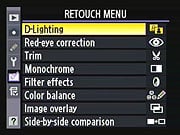
(Click to view the complete Retouch Menu matrix.)
| Retouch Menu Options | |||
|
Top-Level
Selection |
Second-Level
|
Third-Level
|
Notes
|
|
D-Lighting
|
- Picture selection
|
- Normal
- High - Low |
Adjusts the D-lighting to brighten shadows. |
|
Red-Eye Correction
|
- Picture selection
|
|
Allows you to remove Red-eye from your pictures. It saves the new picture and retains the old one.
|
|
Trim
|
- Picture selection
|
- Trim screen
|
Allows you to crop a picture. It saves the new picture and retains the old one.
|
|
Monochrome
|
- Black-and-white
- Sepia - Cyanotype |
- Selection screen
|
Allows you to copy pictures to black and white, sepia or cyanotype.
|
|
Filter Effects
|
- Skylight
- Warming |
- Selection screen
|
Selects the time that an image is displayed on the LCD monitor after the picture is taken.
|
|
Color Balance
|
- Selection window
|
- Adjustment screen
|
Allows you to change the color balance via the adjustment window.
|
|
Image Overlay
|
- Selection window
|
- Image overlay screen
|
Allows you to take 2 Raw images and combine them into a third picture.
|
|
Side-By-Side Comparison
|
- Selection window
|
- Comparison screen
|
This option does not appear on the menu screen until you select an image that has already been retouched. Once it is selected you press the Menu button and this option will be there. It lets you compare your retouched image with your original image.
|
My Menu
(Click to view the My Menu matrix.)
| My Menu Options | |||
|
Top-Level
Selection |
Second-Level
|
Third-Level
|
Notes
|
|
Delete
|
- Selected
|
- Selection screen
|
Allows you to delete either selected photos or all the photos on the memory card.
|
|
- All
|
- Slot 1
- Slot 2 |
||
|
Add Items
|
- Playback menu
|
- Delete
- Playback folder - Hide image - Display mode - Copy image(s) - Image review - After delete - Rotate tall - Slide show - Print set (DPOF) |
This let you add options to create a customized list of options.
|
|
- Shooting menu
|
- Shooting Menu Bank
- Reset Shooting Menu - Active Folder - File Naming - Slot 2 - Image Quality - Image Size - Image Area - JPEG Compression - NEF(RAW_ recording - White Balance - Set Picture Control - Manage Picture Control - Color Space - Active D-Lighting - Vignette Control - Long Exp. NR - High ISO NR - ISO Sensitivity settings - Live View - Multiple Exposure - Interval Timer Shooting |
||
|
- Custom setting menu
|
- Custom Setting Bank
- Reset Custom Settings - A Autofocus - B Metering/exposure - C Timers/AE lock - D Shooting/display - E Bracketing/flash - F Controls |
||
|
- Setup menu
|
- Format Memory Card
- LCD Brightness - Lock Mirror up for cleaning - Video mode - HDMI - World time - Language - Image comment - Auto image rotation - Voice memo - Voice memo overwrite - Voice memo button - Audio output - USB - Dust off ref photo - Battery info - Wireless transfer - Image authentication - Save/Load settings - Image comment - GPS - Virtual horizon - Non-CPU lens data - AF fine tune - Firmware version |
||
|
- Retouch menu
|
- D-Lighting
- Red-eye correction - Trim - Monochrome - Color balance - Image overlay - Side-by side comparison - Image comment - Auto image rotation - Voice memo - Voice memo overwrite - Voice memo button - Audio output - USB - Dust off ref photo - Battery info - Wireless transfer - Image authentication - Save/Load settings - Image comment - GPS |
||
|
Remove Items
|
- Select Item
- Done - Delete |
Select the item(s) you wish to delete, then select Done to delete.
|
This let you remove options from your customized list of options.
|
|
Rank Items
|
- Menu of items
- Move - OK |
Select item and move it using Up or Down on the multi-selector.
|
This lets you change the order of options in your customized list of options.
|
|
Choose Tab
|
- My Menu
- Recent settings |
- OK
|
This option lets you use the D3X 'My Menu' selection or the older 'Recent settings' selection, allowing the user to access the twenty most recent setting changes made.
|
Comparison
Nikon D3X compared to other full-frame "Pro" DSLRs
The chart below compares the Nikon D3X with the Canon 1Ds Mark III and Sony A900. What we've done below is presented something of a hybrid comparison between these three models. A red cell means that a given camera performs below the other two, a green cell means that it performs better than the other two, and a yellow cell means it falls between the other two. In cases where two cameras share a superior capability, both cells will be colored green.
| NikonD3X vs other Full Frame "Pro" DSLRs | ||||
|
Manufacturer
|
Canon
|
Nikon
|
Sony | |
|
Model
|
EOS 1Ds Mark III
|
D3X
|
DSLR-A900 | |
|
Imaging
System |
Sensor Manufacturer
|
Canon
|
Nikon design
fabricated by Sony |
Sony
|
|
Sensor Type
|
CMOS
|
CMOS
|
CMOS
|
|
|
Color Filter Array
|
RGB
|
RGB
|
RGB
|
|
|
Total Megapixels
|
21.9
|
25.7
|
25.7
|
|
|
Effective Megapixels
|
21.1
|
24.5
|
24.6
|
|
|
Effective Sensor Size (mm)
|
36.0 x 24.0
|
35.9 x 24.0
|
35.9 x 24.0
|
|
|
Pixel Pitch (µm)
|
6.4
|
5.94
|
5.94
|
|
|
Focal Length Multiplier (approx.)
|
1.0x
|
1.0x
|
1.0x
|
|
|
Image Processor
|
Dual Digic III
|
EXPEED
|
Dual BOINZ
|
|
|
Viewfinder
|
Type
|
Eye-level pentaprism
|
Eye-level pentaprism
|
Eye-level pentaprism
|
|
Coverage
|
100%
|
100%
|
100%
|
|
|
Magnification (-1 diopter with 50mm lens at infinity)
|
0.76x
|
0.74x
|
0.74x
|
|
|
Eyepoint (mm)
|
20
|
18
|
20
|
|
|
Dioptric Adjustment Range (diopters)
|
-3.0 to +1.0
|
-3.0 to +1.0
|
-3.0 to +1.0
|
|
|
Focusing Screen
|
Interchangeable,
(11 types, sold separately), Standard focusing screen: Ec-C IV |
Interchangeable,
Type B BriteView Clear Matte VI provided |
Interchangeable,
Spherical Acute Matte focusing screen (type G) provided, Type L (grid) and Type M (super-spherical acute matte) available |
|
|
Built-in Eyepiece Shutter
|
Yes | Yes | Yes | |
|
Viewfinder
Info Display |
AF (AF points, focus confirmation light, point selection mode, registration), Exposure (metering mode, spot metering area, shutter speed, aperture, manual exposure, AE lock, ISO speed, exposure level, exposure warning), Flash (flash ready, high-speed sync, FE lock, flash exposure level), Image (JPEG recording, RAW recording, shots remaining, maximum burst, white balance correction, memory card information), battery check
|
AF (AF points, focus confirmation, focus range-finder), Exposure (exposure mode, shutter speed, shutter speed lock, aperture, aperture lock, aperture stop, ISO speed, Auto ISO, AE lock, exposure level, center-weighted metering circle, metering mode), Flash information (flash ready, flash exposure compensation, flash sync, FV lock), Image information (maximum burst, space on card, white balance recording), battery status, tilt indicator
|
AF (AF points, focus confirmation, manual focus), 16:9 area, APS-C crop area, Exposure (shutter speed, aperture, aperture, EV scale, AE lock, exposure level, spot metering circle), Flash information (flash ready, flash exposure compensation, wireless flash, high-speed sync), Image information (maximum burst, shake warning, SteadyShot level, aspect ratio
|
|
|
Depth of Field Preview
|
Enabled with depth-of-field preview button
|
Enabled with depth-of-field preview button
|
Enabled with depth-of-field preview button
|
|
|
Recording
System |
Recording Media / Slot Type
|
Dual Type I and II
CF cards UDMA-compliant supported; (USB v.2.0 hard drive, via optional Wireless File Transmitter WFT-E4A) |
Dual Type I and II CF cards
UDMA-compliant supported Wireless Transmitter WT-4A supported |
CF Card (Type I and II, UDMA-compliant CF cards supported )
and Memory Stick Duo slot |
|
Compatible File System
|
FAT 16 / FAT 32
|
FAT 16 / FAT 32
|
FAT 16 / FAT 32
|
|
|
Recording Formats
|
RAW, sRAW, (CR2), JPEG
|
RAW 12-bit or 14-bit (uncompressed, lossless compressed or compressed NEF), TIFF (32-bit), JPEG
|
RAW, cRAW (ARW), JPEG
|
|
|
A/D conversion
|
14-bit
|
14-bit
|
12-bit
|
|
|
Dynamic Range Optimization Modes
|
Yes
(Highlight Tone Priority, on/off) |
Yes
(Advanced D-Lighting, 5 settings plus off) |
Yes
(D-Range Optimization, 7 settings plus off) |
|
|
Maximum Resolution
|
5,616 x 3,744
|
6,048 x 4,032 |
6,048 x 4,032
|
|
|
Reduced Resolutions (JPEG only)
|
4,992 x 3,328
4,080 x 2,720 2,784 x 1,856 |
4,544 x 3,024 5:4 format (30 x 24): DX format (24 x 16): |
4,400 x 2,936
3,024 x 2,016 16:9: APS-C: |
|
|
RAW + JPEG Recording
|
Yes, selectable JPEG resolution / compression
|
Yes, selectable JPEG resolution / compression
|
Yes, selectable JPEG resolution / compression
|
|
|
Processing Parameters,
Color Space & White Balance |
User-Selectable Color Space
|
Yes
sRGB + Adobe RGB |
Yes
sRGB + Adobe RGB |
Yes
sRGB + Adobe RGB |
|
WB settings
|
Auto, Daylight, Shade, Cloudy, Tungsten Light, White Fluorescent Light, Flash, five Custom WB settings (1-5), user-set Color Temperature, five Personal White Balance PC-1 to PC-5
|
Auto, Direct Sunlight, Cloudy, Shade, Fluorescent, Incandescent, Flash, Custom, Color Temperature setting
|
Auto, Daylight, Shade, Cloudy, Tungsten, Fluorescent, Flash, 3 Custom, Color Temperature setting
|
|
|
Manual Color Temperature Setting Range
|
2,500 ~ 10,000K
|
2,500 ~ 10,000K
|
2,500 ~ 9,900K
|
|
|
WB Adjustment Range
|
Blue/Amber and/or Magenta/Green bias
±9 steps |
Blue/Amber and/or Magenta/Green bias
±6 steps 5 mireds per step |
Blue/Amber and/or Magenta/Green bias
±9 steps |
|
|
Adjustable High ISO NR (levels)
|
Yes,
(on/off) |
Yes
(3, plus off) |
Yes (3, plus off) |
|
|
Phase
Detection Autofocus System |
Type
|
TTL-AREA-SIR
AF-dedicated CMOS sensor |
TTL phase detection by Nikon Multi-CAM3500FX autofocus module
|
TTL phase detection by CCD line sensors
|
|
# of Focusing Points (Focusing Point Type)
|
45-point (19 high-precision cross-type AF points plus 26 Assist AF points)
|
51-point (15 cross-type, 36 line-type)
|
9-point (1 center dual cross-type, 8 line-type, plus 10 line-type assist AF points)
|
|
|
Superimposed Focus Point Display
|
Yes
|
Yes
|
Yes
|
|
|
AF Working Range
|
EV -1 ~ 18
|
EV -1 ~ 19
|
EV 0 ~ 18
|
|
|
AF-assist Beam
|
None. Emitted by EX-series Speedlite or optional ST-E2 Speedlite Transmitter
|
None. Emitted by Speedlight or commander
|
Yes
Bright LED |
|
|
AF Servo Modes
|
Auto, One-Shot AF, Predictive AI Servo AF, AI Focus AF, Manual Focus (MF)
|
Single (S), Continuous (C), Manual Focus (M)
|
Single (AF-S), Auto (AF-A), Continuous (AF-C), Direct Manual Focus (DMF), Manual Focus (MF)
|
|
|
AF Area Modes
|
Single point (19 points, 9 inner points, 9 outer points), Auto area
|
Single point, Auto area, Dynamic area (9-points, 21-points, 51-points, or 51-points with 3D-tracking)
|
Wide, Spot, Local (9 local focus areas selectable)
|
|
|
Focus Tracking
|
Focus tracking automatically activated by subject status in AI Focus or AI Servo mode
|
Focus tracking automatically activated by subject status
|
Focus tracking automatically activated by subject status
|
|
|
Exposure
Control |
Shooting Modes
|
Program AE (shiftable), Shutter speed-priority AE, Aperture-priority AE, Manual
|
Program AE (shiftable), Shutter-priority AE, Aperture-priority AE, Manual mode
|
Auto, Program AE (shiftable), Shutter-priority AE, Aperture-priority AE, Manual mode, 3 Custom settings
|
|
Metering Zones
|
63
|
1,005
|
40
|
|
|
Metering Modes
|
Evaluative metering (linked to all AF points), Partial metering (approx. 8.5%), Spot metering (approx. 2.4%; center, AF point or 8 multi-spot), Center-weighted average
|
3D Color Matrix Metering II; Center-weighted: Weight of 75% given to 8, 12, 15, or 20mm dia. circle in center of frame, or average of the entire frame; Spot: Meters 4mm dia. circle (about 1.5% of frame) centered on active focus area
|
Multi-segment, Center-weighted average, Spot
|
|
|
Metering System Working Range (with 50mm f/1.4 lens, ISO 100)
|
EV 0 ~ 20
|
EV 0 ~ 20
EV 2 ~ 20 (Spot metering) |
EV 0 ~ 20
EV 2 ~ 20 (Spot metering) |
|
|
ISO Range / Extended
|
100 ~ 1600 / 50, 3200
|
100 ~ 1600 / 50, 6400
|
200 ~ 3200 / 100, 6400
|
|
|
Exposure Compensation
|
+/-3 EV in 1/2 or 1/3 EV increments
|
+/- 5EV in 1/2 or 1/3 EV increments
|
+/-3 EV in 1/2 or 1/3 EV increments
|
|
|
Automatic Exposure Bracketing
|
2,3,5 or 7 exposures, +/-3 EV in 1/2 or 1/3 EV steps
|
2 to 9 exposures, +/- 5 EV in increments of 1/3, 1/2, 2/3 or 1 EV
|
3 or 5 exposures, +/- 3 EV in increments of 1/3, 1/2, 2/3, 1 or 2 EV
|
|
|
Shutter
Speeds,
Frame Rate, Shutter Lag |
Shutter Type
|
Electronically-controlled focal-plane shutter; rated for 300K actuations
|
Electronically-controlled focal-plane shutter; rated for 300K actuations
|
Electronically-controlled focal-plane shutter; rated for 150K actuations
|
|
Shutter Speed Range
|
1/8000 ~ 30 sec. (1/2 or 1/3EV increments) and bulb
|
1/8000 ~ 30 sec. (1/2 or 1/3EV increments) and bulb
|
1/8000 ~ 30 sec. (1/2 or 1/3EV increments)
and bulb
|
|
|
Maximum Frames Per Second / Buffer depth
|
5 fps / 6 large/fine JPEG or 6 RAW frames
|
5 fps / 44 large/fine JPEG or 24 12-bit RAW frames
(about 1.96 fps in 14-bit RAW mode); 7.03 fps in DX crop mode (2.81 fps in 14-bit RAW DX mode) |
5 fps / 11 large/fine JPEG or 13 RAW frames
|
|
|
Shutter lag, full AF (sec.)
|
0.070
|
0.161
|
0.183
|
|
|
Shutter lag, prefocus (sec.)
|
0.045
|
0.045
|
0.072
|
|
|
Flash
|
Built-in Flash / Guide Number at ISO 100.
|
No
|
No
|
No
|
|
Max flash x-sync speed. (sec.)
|
1/250
|
1/250
|
1/250
(1/200 with SteadyShot active) |
|
|
PC Sync Terminal
|
Yes
|
Yes
|
Yes
|
|
|
Playback
System |
LCD Size / Pixel Count
|
3.0 in. LCD /
230,000 pixels |
3.0 in. LCD /
921,600 pixels |
3.0 in. LCD /
921,600 pixels |
|
Enlarged Playback / Scroll
|
Up to 10x / Yes
|
Up to 27x / Yes
|
Up to 19x / Yes
|
|
|
LCD Monitor Brightness Adjustment Range
|
7 steps
|
7 steps
|
7 steps
|
|
|
Automatic Rotation for Vertical Shots
|
Yes
|
Yes
|
Yes
|
|
|
Extensive In-camera Image Editing
|
No
|
Yes,
Trim, D-Lighting, Color Balance, Image Overlay, Side-by-Side Comparison, Filter Effects, Monochrome, Red-eye correction |
No
|
|
|
Other
Features
|
Live View mode
|
Yes
Manual Focus only |
Yes
Phase- and Contrast-detect modes |
No
(but has "Intelligent Preview") |
|
Computer Connection
|
USB 2.0 High-Speed, PTP-compliant
|
USB 2.0 High-Speed, PTP-compliant
|
USB 2.0 High-Speed, PTP-compliant
|
|
|
Direct Printing (PictBridge compliant printers)
|
Yes
|
Yes
|
Yes
|
|
|
Menu Languages (US model)
|
18 (English, German, French, Dutch, Danish, Portuguese, Finnish, Italian, Norwegian, Swedish, Spanish, Greek, Russian, Polish, Simplified/Traditional Chinese, Korean, Japanese)
|
15 (Chinese [Simplified and Traditional], Dutch, English, Finnish, French, German, Italian, Japanese, Korean, Polish, Portuguese, Russian, Spanish, Swedish)
|
6 (English, French, Spanish, Italian, Japanese, Chinese)
|
|
|
Camera Default Reset
|
Yes
|
Yes
|
Yes
|
|
|
Custom Functions (Quantity)
|
Yes (57)
|
Yes (44)
|
Yes (16)
|
|
|
Remote Control
|
Yes, N3-type
|
Yes, 10-pin terminal
|
Yes, wired and wireless
|
|
|
Info LCD Panel / Illumination
|
Yes / Yes (dedicated button)
|
Yes / Yes (power switch)
|
Yes / Yes (dedicated button)
|
|
|
Ultrasonic sensor dust-removal function
|
Yes
|
No
|
Yes
|
|
|
Eye-start AF
|
No
|
No
|
No
|
|
|
Anti-Shake
(Sensor shift) |
No
|
No
|
Yes
|
|
|
Movie Mode
|
No
|
No
|
No
|
|
|
HDMI output
|
No
|
Yes
|
Yes
|
|
|
AF micro- adjustment
|
Yes,
20 lenses |
Yes,
20 lenses |
Yes,
30 lenses |
|
| Virtual Horizon |
No | Yes | No | |
| C.A. Reduction |
No | Yes | No | |
|
Vignette Correction
|
No | Yes | No | |
|
Body
|
Construction
|
Magnesium Alloy
|
Magnesium Alloy
|
Magnesium Alloy
|
|
Dust and weather resistant
|
Yes
|
Yes
|
Yes
|
|
|
Power
System
|
Battery Compatibility
|
LP-E4
|
EN-EL4a, EN-EL4
|
NP-FM500H,
optional battery grip |
|
CIPA Rated Shooting Capacity at 23°C/73°F
|
1,800
|
4,400
|
880
|
|
|
Dimensions
& Weight
|
Dimensions (WxHxD, mm)
|
156 x 159.6 x 79.9
|
159.5 x 157 x 87.5
|
156 x 117 x 82
|
|
Weight (body only)
|
1205g / 42.5 oz.
|
1220g / 43 oz.
|
850g / 30 oz.
|
|
|
Operational
Environment |
Operating Temperature Range
|
0 ~ 40°C / 32 ~ 104°F
|
0 ~ 40°C / 32 ~ 104°F
|
0 ~ 40°C / 32 ~ 104°F
|
|
Operating Humidity Range
|
< 85%
|
< 85%
|
< 85%
|
|
|
Lens Compatibility
|
Lens Mount / Compatibility
|
Canon EF, TS-E, and MP-E lenses (EF-S lenses not supported)
|
Nikon F-Mount
(FX, DX, AF, AF-S, AI lenses supported) |
Sony Alpha / Konica Minolta Maxxum AF
|
| APS-C Crop Mode? |
No, APS-C lenses not supported |
Yes | Yes, (metering may not be accurate) |
|
|
M.S.R.P.
|
Body only
|
US$8,000
|
US$8,000
|
US$3,000
|
Press Release
NIKON UNVEILS A DIGITAL MASTERPIECE: THE D3X DIGITAL SLR
With Extreme 24.5-Megapixel Resolution, Processed Image Files Exceeding 138 MB, Five Frame-per-Second Burst Speed and Nikon Core Technologies, the D3X Ushers in a New Level of Image Quality
MELVILLE, N.Y. (Nov. 30, 2008) –Nikon Inc. today announced the D3X, an FX-format digital SLR featuring extreme 24.5-megapixel resolution and superb low-noise capabilities, which provides professional photographers with commercial-quality image performance in a familiar and extraordinarily versatile D-SLR form factor. In conjunction with the groundbreaking Nikon FX-format D3, the D3X tops off a collection of flagship level, rugged, professional caliber digital single lens reflex cameras engineered to excel in all types of professional photographic disciplines from photojournalism and sideline sports, to commercial in-studio applications.
The foundation of the enhanced performance of the D3X is its FX-format, 24.5-megapixel (6048 x 4032) CMOS sensor providing commercial, high fashion, fine art and landscape photographers with the extreme resolution, dynamic range, color depth, detail and sharpness that clients demand. Whether creating catalogs, magazine covers, billboards or gallery prints, the large 5.49-micron pixel size and high signal to noise ratio produces vibrant images with breathtaking image fidelity while reducing lost highlights and shadows, and ensuring smoother tone reproduction with minimized noise. With full resolution shooting speeds of up to five frames-per-second (fps), and 14-bit files, that when processed are approximately 138 MB, the D3X offers today's photographic artists an extreme level of performance and versatility ready for demanding assignments in the studio or on location.
“In 2007, the 12.1-megapixel FX-format D3 delivered groundbreaking digital SLR image quality, coupled with incomparable high ISO, low noise performance and high-speed handling. In doing so, the D3 broke photographic barriers, enabling photographers to work in ways never before possible,” said Edward Fasano, general manager for Marketing, SLR Systems Products at Nikon Inc. “Now, the new 24.5-megapixel FX-format D3X D-SLR provides the extreme resolution and high dynamic range capabilities needed to meet the extraordinary needs of photographic disciplines such as high fashion, commercial advertising and fine art. The D3X delivers this remarkable capability while fitting seamlessly within the Nikon system, taking full advantage of Nikon’s world-renowned collection of NIKKOR lenses and Speedlights.”
Image Quality Takes Center Stage
To re-emphasize the importance of image quality above all else, the D3X delivers an incredible level of digital SLR performance to provide photographers with extremely high resolution, exceptional dynamic range, phenomenal total gradation and outstanding color reproduction. Image files can be recorded as TIFF, JPEG or NEF (RAW) formats in either 12- or 14-bit compressed or uncompressed formats, and recorded to UDMA compatible CompactFlash™ cards for optimum speed. Photographers can save image files directly to the dual card slots as overflow, backup, or as separate file formats to different cards. Building on the D3X's flexibility, users have the creative option to shoot in the 5:4 crop mode with 20.4-megapixel resolution, the ideal format for creating 8 x 10-inch portraits. While using DX-format lenses, faster continuous shooting of up to seven frames per second can be achieved at a resolution of 10.5 megapixels.
The exceptionally low noise of the D3X is essential to any professional commercial application, and it provides photographers with an ISO range of 100 to 1600, expandable to 50 (Lo-1) and 6400 (Hi-2). The ultra smooth tones and lack of grain at ISO 1600 as well as at low sensitivity settings result in smooth, natural skin tones and exacting detail that, before the D3X, required larger and far costlier studio-bound camera systems.
Advanced Technologies, Meticulously Executed
In a commercial setting or on location, imaging professionals need high performance in both speed and processing. The Nikon D3X can shoot at up to five fps at full resolution or up to seven fps in DX crop mode, allowing photographers to catch the split-second difference in a model’s expression or capture all of the action in a sequence. Just like the D3, the D3X achieves a start-up time of a mere 0.12 seconds and a shutter release time lag of 0.04 seconds.
The D3X’s speed, as well as high levels of performance, leverages Nikon core technologies including a newly enhanced EXPEEDTM Image Processing System, specially designed for the D3X to provide superior image quality, faster processing speeds and lower power consumption. This advanced system is able to achieve extremely precise color reproduction for a broad spectrum of hues, in addition to vivid saturation and smooth gradation. What’s more, Nikon’s advanced noise processing function is engineered to minimize noise at all sensitivities and operate seamlessly without interfering with other image color parameters.
The D3X also features Nikon’s exclusive Scene Recognition System, which continuously analyzes information from the 1,005-pixel RGB light sensor, to further refine auto exposure, auto white balance and autofocus calculations. This results in flattering portraits and awe-inspiring landscapes that portray accurate color and fine details. Nikon's exclusive 3D Color Matrix Metering II helps ensure accurate exposures, even in the most challenging lighting conditions. Instantly evaluating each scene before capture, input data from the system's sensor is automatically referenced against an internal database of more than 30,000 images derived from actual photographs to calculate correct exposure values. Active D-Lighting, used in combination with 3D Matrix Metering II, helps to determines proper exposure, and creates realistic contrast while compensating for lost shadows and highlights. Prior to shooting, users can choose from Extra High, High, Normal, Low or Off settings, as well as an Auto mode.
Additionally, the D3X features Nikon’s exclusive Multi-CAM 3500FX focus module, with 51 AF points, 15 cross type sensors and 36 horizontal sensors that easily track and lock onto moving subjects, delivering the same fast and accurate AF performance that helped make the D3 immediately successful. Users can select any of the AF points, making it easy to consistently attain accurate focus right on a subject’s eyes, frame after frame. Additionally, three AF-area modes – Single point, Dynamic-area AF and Auto-area AF – are available to maximize the use of the 51 focus points by selecting the most suitable one to match subject conditions. AF is also available in one of two Live View modes optimized for the studio, including a phase detection handheld mode and a tripod mode. This feature allows the user to zoom in up to 27x on the LCD screen to ensure critical focus. While in Live View, the graphic indication of a virtual horizon is also available, making it easier than ever to confirm camera orientation.
To further ensure each photographer's ability to balance their personal style, Nikon’s Picture Control System enables users to adjust their images to pre-set parameters such as Standard, Neutral, Vivid and Monochrome that apply tweaks to image sharpening, tone compensation, brightness, overall tone and saturation. Photographers have creative control over these image parameters with the use of up to nine available customizable presets.
Synchronizing Both Form and Function
Engineered for real-world functionality, the D3X retains a rugged shell with moisture, dust and shock resistance that has become a hallmark of flagship Nikon D-SLRs, while preserving the usability and ergonomics that allow the camera to remain an extension of the photographer’s vision. Attention to detail goes so far as to include a self-diagnostic shutter system that is tested to exceed 300,000 cycles for maximum durability and longevity. The camera’s body also maintains the resilient magnesium alloy construction and form factor of the D3, promoting consistent Nikon system synergy.
A bright and accurate viewfinder offers 100 percent coverage with 0.7x magnification. The body also houses Nikon’s acclaimed 3.0-inch super density LCD screen, now relied upon by so many photographers. The high-resolution 920,000-dot screen is viewable at wide angles up to 170 degrees, and will allow photographers to quickly zoom in to confirm critical focus. Users can also output the video signal to an external display via HDMI to allow client viewing. Thanks to incredibly efficient internal circuitry, the D3X can capture up to 4400* shots per single charge of the camera’s Lithium ion battery.
System Strength Withstands the Test of Time
The D3X is fully compatible with Nikon’s Creative Lighting System (CLS) to give photographers a mobile lighting solution that is easy to manage. To further enhance mobility, the D3X is compatible with Nikon’s GP-1 GPS receiver to gather information such as latitude, longitude, altitude and date of shooting. Photographers can easily shoot tethered via USB, or use the WT-4a wireless transmitter to send images wirelessly when speed and mobility are essential. D3X users will also enjoy the system strength of more than 50 genuine NIKKOR lenses that provide outstanding sharpness and high resolution across a broad range of focal lengths.
Price and Availability
The Nikon D3X will be available at Nikon Authorized Professional Dealers starting December 2008, and will be available for an estimated selling price of $7999.95.**
About Nikon
Nikon, At the Heart of the Image™. Nikon Inc. is the world leader in digital imaging, precision optics and photo imaging technology and is globally recognized for setting new standards in product design and performance for its award-winning consumer and professional photographic equipment. Nikon Inc. distributes consumer and professional digital SLR cameras, NIKKOR optics, Speedlights and system accessories; Nikon COOLPIX® compact digital cameras; COOLSCAN® digital film scanners; 35mm film SLR cameras; Nikon software products and Nikon sports and recreational optics. For the second consecutive year, Nikon D Series digital SLR cameras are recognized as “Highest in Customer Satisfaction with digital SLR cameras, Two Years in a Row, Tied in 2008.” according to the J.D. Power and Associates 2007 and 2008 Digital Camera Usage and Satisfaction StudiesSM. Nikon Corporation, the parent company of Nikon Inc., recently celebrated its 75th anniversary of NIKKOR optics and announced the production of over 45 million NIKKOR SLR interchangeable lenses. For more information, dial (800) NIKON-UX or visit http://www.nikonusa.com, which links all levels of photographers to the Web's most comprehensive photo learning and sharing communities.
# # #
* Based on CIPA Standards
** Estimated selling price listed is only an estimate. Actual prices are set by dealers and are subject to change at any time.