

Overview
by Shawn Barnett, Mike Tomkins, Dave Etchells, and Zig Weidelich
Hands-on Preview: 01/05/2012

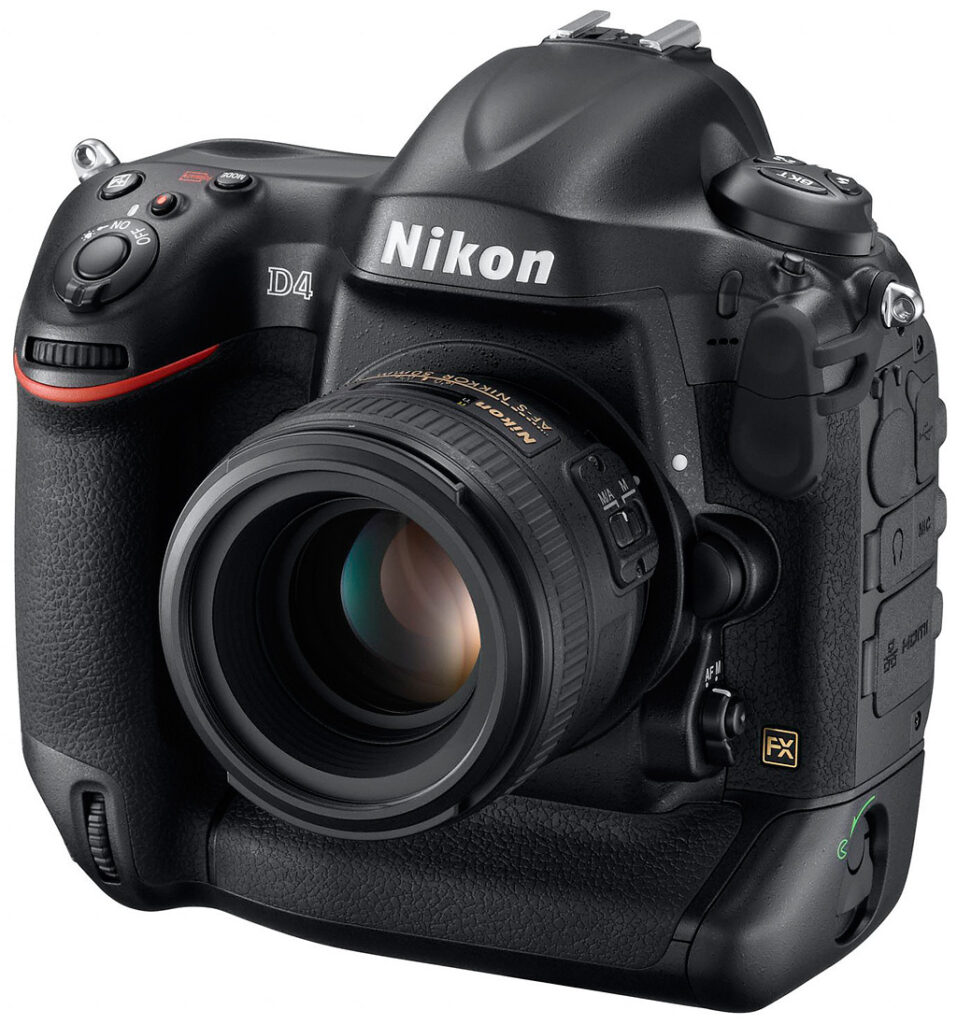
Nikon's professional workhorse digital SLR camera gets more than a single-digit upgrade to its model number in the new D4. Though encased in a body of similar size and shape to its predecessors, the Nikon D4 now uses a 16.2-megapixel full-frame CMOS sensor backed up by a new EXPEED 3 image processor. Nikon expects the combination to deliver very high dynamic range and low noise across a wide range of ISO settings.
But the improvements don't stop there. Largely eliminating the need for a flashlight in low-light situations, many of the Nikon D4's buttons are illuminated; a great idea for a high-end camera whose key feature is excellent performance in low light. Indeed, while standard ISO settings range from 100 to 12,800, that can be extended to 50 on the low end and 204,800 on the high side. Pretty impressive.
Other new items on the Nikon D4 include a 3.2-inch LCD with VGA resolution, the ability to enlarge images up to 46x, and an ambient light sensor to automatically brighten or dim the screen based on lighting conditions. The 51-point AF array improves sensitivity to -2 EV, and can accommodate lenses up to f/8. Video is also upgraded from the D3S's 720p to 1080p at 30fps. There's a whole lot more to the Nikon D4, which we'll cover in the Technical section below.
Nearly the same size as the D3S, the Nikon D4 is only a fraction of an inch shorter, measuring 6.3 x 6.2 x 3.6 inches (160 x 156.5 x 90.5mm), and it weighs 47.3 ounces (2.95 pounds; 1,340g) body-only with battery and XQD memory card. Overall feel in the hand is similar to the D3S, but there are many cosmetic and ergonomic differences to the Nikon D4 worthy of note.

We won't go over every contour that's changed, because nearly every one has changed, at least on the front. Overall, the Nikon D4's body itself is more contoured, with fewer flat surfaces; still, most items are placed similarly enough that seasoned D3S users will still feel at home.
Though they've moved a little, the monaural microphone, Self-timer lamp, Function button, Depth of Field preview button, and lens release buttons are in the same positions on the Nikon D4. The AF switch has changed a bit, though. The old CSM arrangement goes away in favor of the D7000's AF switch. A two-position collar switch selects between AF and MF, and the button in the middle works in conjunction with the Nikon D4's rear Command dial to set AF mode and AF area.


One of the key changes we noticed was the relationship between the Shutter button and the Sub-Command dial. Not only have they more aggressively sloped the Nikon D4's Shutter release, and canted the front dial upward a bit, they moved it back toward the center of the body, making it less of a stretch to move your index finger between the dial and Shutter button. Indeed, we noted no stretching when moving between the two controls on the Nikon D4, while the Sub-Command dial on the D3S requires more movement. We even have to reposition our other fingers downward to make room for our index finger to access the dial, and the new grip shape pushes the fingers down just enough. Less effort means faster adjustments on the Nikon D4. We like that.

Two of the buttons on the left of the Nikon D4 remain the same, but the Command Lock button is replaced by the Metering mode button; note the lack of a Metering Mode dial on the right of the pentaprism housing. The Drive mode dial is also shielded in the front, whereas it was open on past models. This makes changes more deliberate, requiring two fingers instead of just one. With the D3S you can press the button and rotate the Drive mode dial accidentally with just one finger. Top right you'll note a new button with a red dot, just behind the Nikon D4's Shutter release: the dedicated Movie Record button.

In addition to the Multi-Selector found on the D3S, the Nikon D4 now includes not one but two Sub-Multi-Selectors, or joysticks, used primarily to quickly select autofocus points. The second Sub-Multi-Selector is positioned for quick access while holding the Nikon D4 vertically. Long a feature on Canon pro and prosumer digital SLRs, these joysticks are nice to have (Canon's 1Dx also features two of these nifty joysticks).

Let it be. Flipping the illumination switch now lights more than the top and rear LCDs: several of the main buttons are also backlit.
The upper Sub-Multi-Selector can also be programmed to function as AE/AF Lock buttons (note the absence of a dedicated AE/AF Lock button), and their function can be locked with the Lock switch.

Vertical thumb grip.
Live view mode also has its own collar switch with a button in the center. The switch selects between Movie and Still Record modes, and the center Lv button activates Live view mode.
Most other buttons and controls work the same as the D3S, as does the Rear Status LCD and Memory Card access door. The vertical thumbgrip has been shored up noticeably, and a new Function button appears behind the vertical grip's shutter release (not pictured here).
Just beneath the left strap lug is a new circular port for the new WT-5A 802.11n Wireless Transmitter, which draws its power from the camera. Also new and much anticipated by videographers is a headphone jack for monitoring recordings.
Nikon D4 Q&A
Eager for more information on Nikon's latest professional SLR? Got a question left unanswered after reading our hands-on preview? We've conducted a Q&A session with Steve Heiner, Senior Technical Manager, and Lindsay Silverman, Senior Product Manager, both at Nikon USA, live from the show floor at the Consumer Electronics Show in Las Vegas, Nevada. The session took place on Monday, January 9th 2012, so unfortunately it's too late to ask your own questions, but read on--somebody else may have already asked for you!
Nikon D4 Technical Information

Sensor. The Nikon D4 is based around a newly-developed FX-format CMOS image sensor with an effective resolution of 16.2 megapixels, up from the 12.1 megapixel chips used in the earlier D3 and D3S models. Total resolution of the Nikon-developed sensor, which has dimensions of 36.0 x 23.9 millimeters, is 16.6 megapixels. The design features gapless microlenses and an anti-reflective coating, and has a pixel size of 7.3 microns, down from 8.45 microns in the D3 and D3S.
In the sensor's native 3:2 aspect ratio, the Nikon D4 outputs images at resolutions up to 4,928 x 3,280 pixels. There are also two cropped 3:2 aspect ratio modes which yield an effective 1.2x or 1.5x focal length crop, and a 5:4 aspect ratio mode which uses the full height of the image sensor, but trims the sides. In all modes, there are three resolution options available.

Processor. Output from the D4's new image sensor is handled by the company's latest-generation EXPEED 3 image processor, quite a step forward from the EXPEED processors of the D3 and D3S. This allows an improvement in performance versus the earlier models, even though sensor resolution has been increased. The D4 has a 16-bit imaging pipeline.
Sensitivity. The Nikon D4 offers a standard ISO sensitivity range of 100 to 12,800 equivalents, unchanged at the top end from the D3S' maximum sensitivity, but returning to the ISO 100 base sensitivity of the original D3. It's also possible to extend the ISO sensitivity range to an impressively wide ISO 50 - 204,800 equivalents. ISO sensitivity step sizes of 1/3, 1/2, or 1 EV are available across the entire range from 50 to 25,600 equivalents, with 1 EV steps above this point.
The D4 also offers an Auto ISO function, which now takes into account the mounted lens type, automatically selecting higher shutter speeds when the attached lens has a longer focal length. It's possible to manually skew the Auto ISO function towards faster or slower shutter speeds, with five step control.
Performance. As well as providing the processing power to extend the camera's sensitivity range despite the higher sensor resolution, the D4's EXPEED 3 image processor enables an increase in burst shooting performance. It's now possible to shoot full-resolution raw or JPEG images at up to ten frames per second with autofocus and autoexposure. By locking the AF and AE from the first shot, this can be increased still further to 11 full-res frames per second. Burst depth is 200 frames when using JPEG Basic quality, 182 for Normal and 170 for Fine.
The Nikon D4 starts up in approximately 0.12 seconds, and has a claimed shutter release lag of 0.042 seconds.
Optics. The Nikon D4 provides a Nikon F-mount with autofocus coupling and contacts. As you'd expect, the Nikon D4 is compatible with almost every F-mount lens made since 1977, although some lens types will have a few limitations.
Displays. On the rear panel of the Nikon D4 is a new 3.2-inch diagonal LCD panel that's just slightly larger than the 3.0-inch panel of the D3 and D3S. Total resolution of the scratch-resistant panel is unchanged from the earlier unit at 921,600 dots, which equates to 307,200 pixels in a 640 x 480 (VGA) array. Also unchanged is the wide 170-degree viewing angle both horizontally and vertically and 100% frame coverage.
The D4's LCD now includes an auto brightness adjustment using an ambient brightness sensor, saving the user needing to adjust LCD brightness manually as ambient conditions change. It's possible to zoom in up to 46x on the monitor, to check critical focus.
Of course, the D4 also has both top-panel and rear-panel monochrome status displays, just as found in its predecessors.

Viewfinder. There's also a new eye-level pentaprism viewfinder whose coverage is 100% when used in uncropped FX 3:2 aspect ratio mode, and 97% when in the 1.2x or DX cropped modes. For the cropped FX 5:4 aspect ratio mode, coverage is 100% vertically, but only 97% horizontally. When shooting in modes other than the native FX-format 3:2 aspect ratio, a translucent LCD in the viewfinder of Nikon's D4 partially masks the inactive portions of the frame. The viewfinder has 0.7x magnification at 50mm and -1 diopter, an 18mm eyepoint, and a diopter adjustment range of -3 to +1m-1, all unchanged from the D3 and D3S. The only significant difference from the earlier viewfinder design is that this one is quite a bit less tall, reducing the size of the viewfinder prism hump, and is coated with a new thermal shield finish.
Illuminated controls. Photographers who do a lot of low-light shooting will be pleased to find that key controls on the rear of the Nikon D4 are now backlit, making it much easier to tell which buttons you're pressing, even in total darkness.

Focusing. The Nikon D4 debuts the next-generation version of Nikon's 51-point autofocus module, now dubbed Advanced Multi-CAM 3500FX. The new sensor has an improved working range of -2 to +19 EV (ISO 100, 20°C/68°F), and adds a Focus Release mode which uses focus priority for the first frame, and then release priority for subsequent frames.
Of the 51 points arrayed across the sensor, 15 points located at the center are cross-type, sensitive to both horizontal and vertical detail, and nine of these work at apertures up to f/8 with compatible Nikkor lenses mounted on the TC14E or TC17E teleconverters, while the centermost point works at up to f/8 with compatible Nikkor lenses and the TC20E teleconverter. (The remainder work as cross-type sensors to f/5.6 or lower.)
Thanks to the new color matrix metering sensor, which is also used for scene detection, the D4 is said to offer dramatically improved 3D tracking performance, able to track much smaller subjects with reduced tracking error. Other improvements include the ability to see which supporting autofocus points are being used in Dynamic AF mode at the touch of a button, and to have the camera retain the orientation of selected AF points when the camera is rotated.
As well as using the full 51 points of the AF array, it's also possible to select single-point, 9-point, or 21-point modes. Again thanks to the increased resolution of the matrix metering sensor, the D4 now offers face detection autofocus even when shooting through the viewfinder.
Another improvement related to AF is the addition of a quick AF mode selector on the front panel near the lens mount, like that on the D7000, whose outer collar rotates to select auto or manual focus, and selects the AF mode when the center of the selector is pressed while the command dial is rotated. There are also two new joystick-style sub-selectors on the rear panel used to select autofocus points in either landscape or portrait orientations.
Shutter / Mirror. The Nikon D4 offers shutter speeds ranging from 1/8,000 to 30 seconds, in steps of 1/3, 1/2, or 1 EV, as well as a bulb position. Flash x-sync is at 1/250 second. The self diagnostic shutter unit is said to have a rated life of 400,000 cycles, and includes a mirror balancer that reduces bounce, improving autofocus performance and reducing mirror blackout.

Exposure. As mentioned previously, the Nikon D4 has a new metering sensor with 91,000 pixel resolution. The 3D Color Matrix Metering III metering mode compares metered scenes to a large in-camera database of scene types, before determining exposure variables, and it can now take account of the positions of up to 16 human faces in the image frame even when shooting using the optical viewfinder. (Previously, face detection required use of live view.)
Other metering modes include center-weighted (which either gives a 75% weight to an area of 8, 12, 15, or 20mm at the center of the frame or averages the entire frame), and spot (which meters on a 4mm / 1.5% circle at the center of the frame.)
The Nikon D4 provides an exposure compensation range of -5 to +5 EV, set in increments of 1/3, 1/2, or 1 EV. Additionally, it's possible to bracket anywhere from two to nine frames, in steps of 1/3, 1/2, 2/3, or 1 EV, both for flash and available-light exposures.
White balance. Nikon has also improved white balance performance in the D4, which should now yield more reliable results in general, and also includes an option to retain the warmth of incandescent lighting in Auto mode, something we've seen from quite a few other manufacturers, following on from Pentax's Color Temperature Enhancement feature in the K-7 prosumer SLR. Direct Kelvin white balance has also been improved, and now offers finer-grained 10-Kelvin steps.
As well as Auto, four Custom positions, and Kelvin, there are a selection of twelve preset modes. White balance presets include incandescent, fluorescent (7 types), direct sunlight, flash, cloudy, and shade. White balance can also be bracketed with the D4 saving two to nine copies of each image with varied white balance.
Flash. The Nikon D4 includes both an ISO 518 standard flash hot shoe with sync and data contacts and a safety lock, and an ISO 519 standard sync terminal with locking thread. i-TTL flash exposures are metered using the new 91,000 pixel metering sensor. As you'd expect, the D4 supports Nikon's Creative Lighting System. The SB-910, SB-900, SB-800, or SB-700 Speedlights can be used as a master flash, the SU-800 Wireless Speedlight Commander as commander, and the SB-600 or SB-R200 Speedlights function as remotes.

Creative. Although it's clearly a camera aimed at professionals, the Nikon D4 adds a feature that is more common on consumer SLRs: high dynamic range photography. Although some will doubtless still prefer to do their HDR merges on a computer for the ultimate control, there's no question that in certain situations HDR can be a great tool in-camera as well. The Nikon D4's HDR mode captures two exposures with 3EV difference in exposures, and combines them into a single image. It's not clear if this includes microalignment capability, but three smoothing levels are available: low, medium, or high.
As you'd expect, there's also Nikon's Active D-Lighting function, which tweaks the tone curve for more balanced exposures. The D4's Active D-Lighting function includes one additional strength level beyond those in the D3S, which is Extra High. Active D-Lighting can be bracketed, with anywhere from two to five frames saved with the ADL strength varying between frames.
The D4 also includes Nikon's Picture Controls function, which offers six presets--Standard, Neutral, Vivid, Monochrome, Portrait, Landscape--and the ability for the user to customize these and port settings between camera bodies. There's now a dedicated button on the camera for access to picture controls, making it easier to change modes to suit your subject.
Tilt sensor. As with its predecessors, the Nikon D4 includes a dual-axis level sensor, used to provide a Virtual Horizon function that helps ensure level horizons and parallel verticals. The rear-panel LCD can show a gauge similar to an aircraft attitude indicator, while the viewfinder and top-panel LCDs can be used to show side-to-side roll.

Mic and monitor. Now you can hear what you're recording thanks to the headphone jack on the Nikon D4.
Video. Nikon has clearly put a lot of work into making the D4 a more attractive proposition for videographers, and there are a raft of changes in this area. The Nikon D4 can now capture Full HD (1080p; 1,920 x 1,080 pixel) video at either 24 or 30 frames per second (25fps for PAL), where its predecessor was limited to 720p at 24 fps. At 720p (1,280 x 720 pixel) resolution, a rate of 60 frames per second is possible (50fps for PAL). Video can either be shot using data from pixels across the entire width of the image sensor in FX mode, or with either a 1.5x (DX-format) / 2.7x focal length crop, taking data from the center of the imager, without affecting the video resolution.
The Nikon D4 allows shutter speed, aperture, and ISO sensitivity to be changed during recording, as required to adapt to changes in ambient lighting or yield the desired cinematic effect. There's also full-time contrast detection autofocus capability, operating either in face detection, wide area, normal, or subject tracking modes, as well as the ability to focus manually. Nikon notes that the D4's fast readout has reduced the likelihood of rolling shutter (aka jello effect.)
Videos are recorded using H.264 / MPEG-4 AVC format compression with B-frame macroblocks and linear PCM audio, a combination that's said to allow more accurate storage with lighter-weight file sizes. Maximum clip length is 20 minutes at high quality, 29 minutes 59 seconds at normal quality. Although there's a dedicated Movie record button, it's possible to configure the D4 to use the Shutter button to start and stop recording, allowing a greater range of accessories to control recording.

Audio levels for the built-in monaural microphone can be adjusted automatically or manually in a 30-step range, while external stereo mics have a 20-step adjustment range, and the levels for either can be monitored on the camera's LCD display. Additionally, the Nikon D4 includes a standard 3.5mm stereo audio output, allowing headphones to be connected to the camera for live monitoring of captured audio.
Even more unusually, it's possible to have the live feed piped to the D4's HDMI port as an uncompressed full HD signal, allowing it to be recorded using an external device and/or routed to an external monitor. If desired, this signal can be mirrored on the camera's own LCD display at the same time. Note that when streaming to the HDMI port, the D4 doesn't write to the CF or XQD card slots, however.
One last video feature of note is the ability to select a frame rate and shooting interval for time-lapse photography, and then have the results saved as a video that plays back at speeds ranging from 24x to 36,000x.

Environmental sealing. As you'd expect for a pro-level Nikon body, the Nikon D4's tank-like magnesium alloy body is fully sealed and gasketed throughout, to protect against moisture, dust and dirt, and electromagnetic interference.
Dust reduction. Of course, as an interchangeable-lens camera, the lens mount itself is a potential entry-point for dust, and the D4 includes a dust removal function achieved using vibration of the optical low-pass filter. The Nikon D4 can also capture a reference image which determines the location of dust on the image sensor, and can be used to retouch photos to remove this dust, using Nikon's optional Capture NX 2 software.

Ports. Upper left is the new port for the wireless transmitter, then USB, headphone jack, mic, Ethernet, and HDMI.
Connectivity. The Nikon D4 has an uncommonly wide range of external connectivity, even by pro SLR standards. Connections include USB High-Speed data, a Type-C mini HDMI high definition video output, an RJ-45 wired Ethernet port (100Base-T), a ten-pin remote terminal (also used to attached compatible GPS devices), a 3.5mm stereo microphone jack (with support for plug-in power), and a 3.5mm stereo headphone jack (for monitoring audio during video capture). All the new ports on the side of the Nikon D4 leave no room for the older composite A/V output, however.

Wireless file transmitter. The Nikon D4 is also compatible with a new wireless file transmitter, the WT-5A. This allows images to be transferred directly from the camera to an FTP server or computer on the wireless network, and transfer can be initiated automatically or manually. The WT-5A draws its power from the camera body via a new port beneath the strap lug on the left side of the camera body, and compared to the WT-4A, offers higher-speed 802.11n compatibility, linked release of up to ten cameras from a single camera body, and remote operation using Nikon Camera Control Pro 2 software.
Nikon notes that it is also developing a mobile application to control the camera using the WT-5A, including the ability to trip the shutter and record video remotely.
Note that the Nikon D4 also supports the older WT-4A file transmitter, for photographers who don't need the new features and would rather keep their existing transmitter.
GPS. As mentioned previously, the Nikon D4 can be connected to a GPS receiver, allowing geotagging of images as they're captured. As well as Nikon's own GP-1 hotshoe-mounted GPS receiver, the D4 is also compatible with NMEA0183 version 2.01 or 3.01-compliant GPS receivers, which can be connected to the camera using an optional MC-35 GPS adapter cord and the receiver's own connector cable with 9-pin D-sub connector.

Storage. The Nikon D4 has dual flash card slots, and can be configured to write images simultaneously to both cards, write raws to one card and JPEGs to the other, or use one card as primary and the second as an overflow when the first card is filled up. Unlike its predecessors, though, only one of the slots accepts CompactFlash cards (Type-I only, including UDMA-7 cards). The other slot accepts the just-announced XQD-format memory cards, which are a next-gen format introduced by the CompactFlash Association in early December 2011.
XQD cards are based on the PCI Express interface, and offer significant speed advantages over standard CompactFlash. (They're also a bit smaller in terms of width and height, although they're a little thicker than a Type-I CF card.) Using XQD cards, the D4 should be able to write about a third more frames in a burst than with standard CF.
The D4 can write either 12-bit or 14-bit raw images with lossless or lossy compression, or completely uncompressed. It can also save images as RGB TIFF files, Baseline-compliant JPEGs at 1:4, 1:8 or 1:16 compression levels, or as both raw and JPEG formats at the same time. A nice plus for wire service photographers is that the D4 can generate IPTC data in-camera, instead of at download time, streamlining the tagging process.

Power. The Nikon D4 draws power from a rechargeable EN-EL18 lithium-ion battery, rather than the EN-EL4 / EN-EL4a pack of its predecessors. The new battery is rated at about 22Wh (2,000mAh at 10.8v). CIPA testing shows that the EN-EL18 battery will deliver up to 2,600 shots per charge. The D4's battery is charged via the Quick Charger MH-26, and an EH-6b AC Adapter can be used to power the D4, requiring the EP-6 Power Supply Connector.
Pricing and availability. US-market availability for the Nikon D4 is currently slated for late February 2012. Suggested retail pricing should be approximately US$6,000.
Follow Imaging-Resource.com on twitter!
Optics
The Nikon D4 does not ship with a standard "kit" lens, so we don't have any lens test results. We do however have viewfinder accuracy test results below.
Viewfinder Test Results
Coverage
Excellent accuracy with both the optical viewfinder and LCD monitor in Live View mode.


The Nikon D4's optical viewfinder proved very accurate, with essentially 100% coverage (we measured 99.9%) when tested with our Sigma 70mm f/2.8 reference lens. The camera's Live View LCD mode was also extremely accurate, with 100% coverage in our measurements. Excellent performance.
The images above were taken from our standardized test shots. For a collection of more pictorial photos, see our Nikon D4 Photo Gallery .
Exposure
Color
Saturation & Hue Accuracy
Good color and accurate saturation.
 |
||||
|
ISO Sensitivity
|
||||
| In the diagram above, the squares show the original color, and the circles show the color that the camera captured. More saturated colors are located toward the periphery of the graph. Hue changes as you travel around the center. Thus, hue-accurate, highly saturated colors appear as lines radiating from the center. Mouse over the links to compare ISOs and click for larger versions. | ||||
Saturation. The Nikon D4 pushes dark blues and some darker greens moderately, but actually undersaturates yellow, light green and cyan tones slightly. Overall, saturation levels are quite accurate, only 4.7% oversaturated at ISO 100, which is lower than most SLRs. The D4's default saturation generally increases with ISO, except at 204,800, where it is slightly lower. Most consumer digital cameras produce color that's more highly saturated (more intense) than found in the original subjects. This is simply because most people like their color a bit brighter than life.
Skin tones. The Nikon D4's Caucasian skin tones looked realistic in outdoor lighting using auto white balance, just slightly on the pale side. (Likely because the camera doesn't pump reds as much as most.) Manual white balance produced slightly pinker results. Where oversaturation is most problematic is on Caucasian skin tones, as it's very easy for these "memory colors" to be seen as too bright, too pink, too yellow, etc.
Hue. The Nikon D4 showed a few small color shifts relative to the mathematically precise translation of colors in its subjects, but its overall color accuracy was good. Reds were shifted slightly toward orange, cyan was shifted toward blue, and there were slight shifts in orange, green and purple, but shifts were relatively minor. (The cyan to blue shift is very common among the digital cameras we test; we think it's a deliberate choice by camera engineers to produce better-looking sky colors.) Mean "delta-C" color error at base ISO was 4.87 after correction for saturation, which is about average for a professional SLR these days. Hue is "what color" the color is.
Saturation Adjustment
The Nikon D4 lets you adjust the image saturation and contrast in seven steps each, brightness in three steps, hue in seven steps and sharpening in ten steps. There are also Auto settings for saturation, contrast and sharpening. As can be seen below, the saturation adjustment worked very well, providing a reasonably fine-grained adjustment over a useful range of control. The saturation adjustment also has almost no impact on contrast. That's how a saturation control should work, but we've often found interactions between saturation adjustments and image contrast (and vice versa) on the cameras we test.
| Saturation Adjustment Examples | ||||
 |
 |
 |
 |
 |
| -3 | -1 | 0 | +1 | +3 |
The series of shots above shows results with several different saturation adjustment settings, showing the minimum step size around the default, as well as both extremes. There is also an Auto setting available that produced results very similar to the default for this scene. See the Thumbnails index page for more (look for the files named D4OUTBSATx.JPG). Click on any thumbnail above to see the full-sized image.


Sensor
Exposure and White Balance
Indoors, incandescent lighting
Very warm results with Auto and Incandescent white balance, though excellent color balance with Manual and 2,600 Kelvin settings. About average exposure compensation required.*


Indoors, in common incandescent lighting, color balance was very warm and reddish with the Auto white balance setting. (We'd say unacceptably so.) The Incandescent setting was also too warm and yellowish for our tastes. (Some users may prefer this look, though, as being more representative of the original lighting.) The Manual white balance setting produced accurate results, as did the 2,600 Kelvin color temperature setting (which matches the temperature of our lights in this scene). The Nikon D4 required about average exposure compensation for this shot (+0.3 EV). Our test lighting for this shot is a mixture of 60 and 100 watt household incandescent bulbs, a pretty yellow light source, but a very common one in typical home settings here in the U.S.
* Note: These shots were captured with a Sigma 70mm f/2.8 macro lens, one of the sharpest lenses we've ever tested on SLRgear.com. We use Sigma 70mm lenses in most of our studio test shots because they are so sharp and are available for most major platforms. For some reason, though, on some (but not all) Nikon bodies, the Sigma causes the camera's exposure system to overexpose by somewhere between one third of a stop and a full stop depending on the aperture. The D4 is one such body (as was the D7000, D90 and D300S), as the exposure compensation settings actually used in the images above are lower than normal for this shot. Accordingly, the comments regarding exposure compensation required have been adjusted to match results we achieved with a Nikkor lens. Other than this exposure shift, the Sigma 70mm performs very well on Nikon bodies, so we continue to use it as our "reference" lens, due to its excellent optical qualities.
Outdoors, daylight
Good color and exposure outdoors, but somewhat high default contrast. Options like Active D-Lighting and contrast adjustment are a help when faced with tough conditions like these.

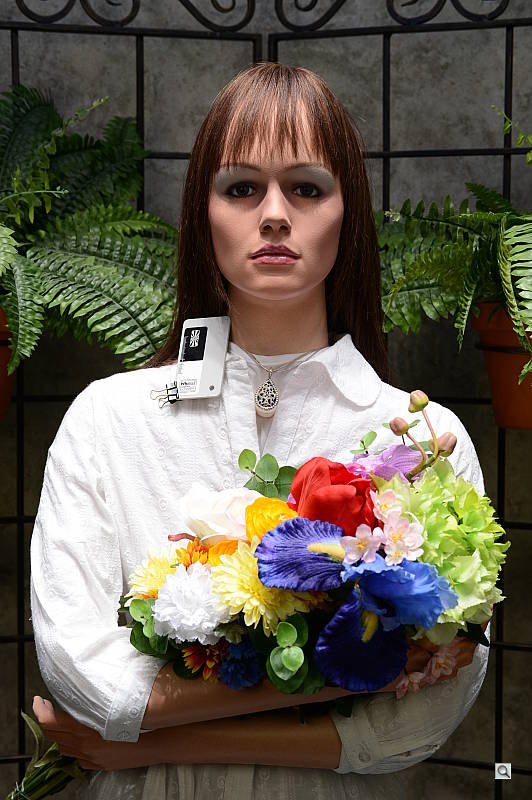
The Nikon D4 handled tough outdoor lighting under harsh sunlight reasonably well, producing good overall exposure and color. We found skin tones a touch pale in our "Sunlit" Portrait shot with Auto white balance though, so we preferred Manual WB. Default contrast was on the high side (as most users prefer), so a few highlights were clipped in the model's shirt, pendant and some of the flowers while darker shadows were quite deep, though shadow noise is quite clean if a little yellow/green in this shot. No exposure compensation (0 EV*) was required to keep the mannequin's face reasonably bright, which is much better the +0.7 EV average for this scene. The Far-field shot was well exposed at 0 EV, with only a few highlights clipped in white areas. Again, detail in the shadows was very good, and shadow noise very low.
See full set of test images with explanations
See thumbnails of all test and gallery images
Resolution
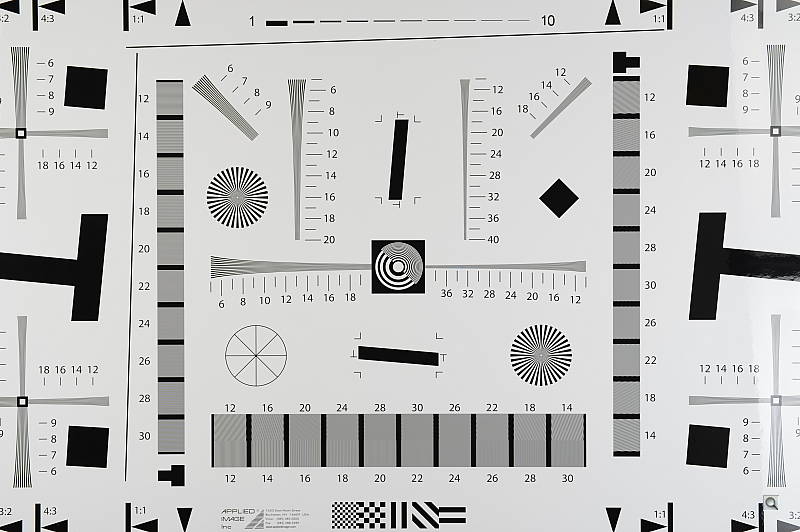
Very high resolution, ~2,100 to ~2,200 lines of strong detail from JPEGs, about the same from converted RAW files.


Our laboratory resolution chart revealed sharp, distinct line patterns down to about 2,100 lines per picture height in the horizontal direction, and about 2,200 lines per picture height in the vertical direction in JPEGs. (Some might argue for higher, but aliasing artifacts begin to appear at those resolutions.) Complete extinction of the pattern didn't occur until around 2,600 to 2,800 lines. We weren't able to extract much more resolution with RAW files processed through Adobe Camera Raw 6.7 rc1. We did notice the ACR conversion contained much more color moiré than the in-camera images so the camera's processing is doing a pretty good job. Use these numbers to compare with other cameras of similar resolution, or use them to see just what higher resolution can mean in terms of potential detail.
See full set of test images with explanations
See thumbnails of all test and gallery images
Sharpness & Detail
Very good detail with relatively minor edge-enhancement on high-contrast subjects. Minimal noise suppression artifacts at base ISO.


Sharpness. The Nikon D4 produced sharp, detailed images for a 16-megapixel sensor, with only minor edge enhancement artifacts visible on high-contrast subjects such as the larger branches in the crop above left. Overall, default sharpness is good, if a little on the conservative side (as most pros would prefer). Edge enhancement creates the illusion of sharpness by enhancing color and tonal differences right at the edge of a rapid transition in color or tone.
Detail. The crop above right shows only minimal detail loss due to noise suppression, as the darker areas of the model's hair show a lot of detail. Individual strands are still distinguishable even in the lighter shadows, though they begin to merge as shadows deepen, and in places where the tone and color of adjacent strands is very close. All in all, a very good performance here. Noise-suppression systems in digital cameras tend to flatten-out detail in areas of subtle contrast. The effects can often be seen in shots of human hair, where the individual strands are lost and an almost "watercolor" look appears.
RAW vs In-Camera JPEGs
As noted above, the Nikon D4 does a pretty good job at capturing lots of detail in JPEGs A little more detail can be obtained from carefully processing RAW files, though, without introducing additional artifacts. Take a look below, to see what we mean:


In the table above, mousing over a link at the bottom will load the corresponding crop in the area above, and clicking the link will load the full resolution image. Examples were shot at ISO 100, and compare an in-camera Fine JPEG to the matching RAW file processed through Adobe Camera Raw (ACR) version 6.7 rc1. For the converted image, we found best results by disabling sharpening in ACR, and sharpening instead in Photoshop with 250% unsharp masking with a 0.3 pixel radius, though some may prefer slightly lighter sharpening.
As is frequently the case, the demosaicing in Adobe Camera Raw and sharpening in Photoshop deliver finer detail than the camera. Looking very closely at the images, ACR extracts a bit more detail that wasn't present in the JPEGs from the camera itself, but the main difference is in the fineness of the rendering. While they don't look as crisp, the Nikon rendering is smoother-looking and if you look very closely, there's less visible noise, though noise is by no means an issue with the D4. Still, we'd personally go the Adobe (or other high-quality third-party RAW converter) route here if we were concerned about making the sharpest-looking print possible from the D4's files. That said, the D4's in-camera JPEGs are really quite good, and you can always try adjusting in-camera sharpening to your tastes.
ISO & Noise Performance
Excellent handling of noise vs detail to ISO 3,200, with good performance up to ISO 12,800.
| Noise Reduction = Default | ||
 |
 |
 |
| ISO 50 | ISO 100 | ISO 200 |
 |
 |
 |
| ISO 400 | ISO 800 | ISO 1,600 |
 |
 |
 |
| ISO 3,200 | ISO 6,400 | ISO 12,800 |
 |
 |
 |
| ISO 25,600 | ISO 51,200 | ISO 102,400 |
 |
||
| ISO 204,800 | ||
The Nikon D4's JPEG noise performance is slightly improved over its predecessor, the D3S, which is a remarkable achievement given the smaller photosites. Images are very clean at ISOs 50 through 800, which just a touch of luminance noise becoming more visible in the shadows as ISO increases. Performance at ISOs 1,600 and 3,200 is very good, with excellent detail retention despite slightly higher noise. Detail is still very good at ISO 6,400, with a tight film-like noise "grain" and very little fine detail lost to noise reduction, though chroma noise is more noticeable. At ISO 12,800, subject detail is still quite good, much better than average at such a high ISO. ISO 25,600 is noticeably less detailed than those at lower sensitivity levels, with more visible noise reduction artifacts, though still usable. ISO 51,200 and above show a lot more chroma noise, in the form of yellow and purple blotches which also shifts white balance towards yellow. Some horizontal banding is also noticeable at ISO 51,200 and up.
Of course, the impact of noise and detail loss are highly dependent on the size the photos are printed at, and pixel-peeping on-screen has surprisingly little relationship to how the images look when printed: See the Print Quality section below for recommended maximum print sizes at each ISO.
A note about focus for this shot: We shoot this image at f/4, using one of three very sharp reference lenses (70mm Sigma f/2.8 macro for most cameras, 60mm f/2.8 Nikkor macro for Nikon bodies without a drive motor, and Olympus Zuiko 50mm f/2.0 for Four Thirds and Micro Four Thirds bodies). To insure that the hair detail we use for making critical judgements about camera noise processing and detail rendering is in sharp focus at the relatively wide aperture we're shooting at, the focus target at the center of the scene is on a movable stand. This lets us compensate for front- or back-focus by different camera bodies, even those that lack micro-focus adjustments. This does mean, though, that the focus target itself may appear soft or slightly out of focus for bodies that front- or back-focused with the reference lens. If you click to view the full-size image for one of these shots and notice that the focus target is fuzzy, you don't need to email and tell us about it; we already know it. :-) The focus target position will simply have been adjusted to insure that the rest of the scene is focused properly.
Extremes: Sunlit, dynamic range and low light tests
Very high resolution with good highlight and shadow detail. Excellent low-light performance, capable of capturing bright images in near darkness.


Sunlight:
The Nikon D4 handled the deliberately harsh lighting fairly well in the above test. Though contrast is a little high, highlight and shadow detail are very good. The camera's contrast adjustment also did a good job of decreasing overall contrast without producing strong color variations; see the section below. The default "0 EV" exposure* did the best job here, though the mannequin's eyes were a bit dim. (Most pros would likely prefer the 0 EV exposure here, as lighter exposures clipped too many highlights, though some may prefer the +0.3 EV for printing straight from the camera.) A few highlights were blown in the model's shirt and flowers at 0 EV, but fewer than we're used to seeing, while good detail was preserved in the shadows with lower than average noise. Note that these shots were captured with the Nikon D4's Active D-Lighting control set to its default of "Off." See below for how Active D-Lighting and contrast settings help with hot highlights and deep shadows.
Because digital cameras are more like slide film than negative film (in that they tend to have a more limited tonal range), we test them in the harshest situations to see how they handle scenes with bright highlights and dark shadows, as well as what kind of sensitivity they have in low light. The shot above is designed to mimic the very harsh, contrasty effect of direct noonday sunlight, a very tough challenge for most digital cameras. (You can read details of this test here. In actual shooting conditions, be sure to use fill flash in situations like the one shown here; it's better to shoot in open shade whenever possible.)
Contrast Adjustment
We really like it when a camera gives us the ability to adjust contrast and saturation to our liking. It's even better when those adjustments cover a useful range, in steps small enough to allow for precise tweaks. Just as with its saturation adjustment, the Nikon D4's contrast setting meets both challenges, the contrast steps actually being a little finer than those for saturation, and thus even more to our liking.
| Minimum Contrast | |
 |
 |
| Contrast set to lowest, 0 EV |
Contrast set to lowest, 0 EV |
At its lowest contrast setting, the D4 did a good job of preserving highlight detail, maintaining natural-looking skin tones, and bringing nice detail out of the shadows. Overall, very good results here, especially when the contrast setting is tweaked. (This is a really tough shot; the Nikon D4 does a better than average job handling it.)
| Contrast Adjustment Examples | ||||
|
 |
 |
 |
 |
| -3 | -1 | 0 | +1 | +3 |
The series of shots above shows results with several different contrast adjustment settings, showing the minimum step size around the default, as well as both extremes. There is also an Auto setting available. While you can see the extremes, it's hard to really evaluate contrast on small thumbnails like these, click on any thumbnail to go to the full-size image.
One very nice feature of Nikon's contrast adjustment is that it has very little effect on color saturation. Contrast and saturation are actually fairly closely coupled, it's a good trick to be able to vary one with out the other changing as well. As usual, Nikon did a good job here.
Active D-Lighting
Active D-Lighting attempts to preserve detail in both highlights and shadows in high-contrast situations, while maintaining moderate levels of contrast. The series of shots below show the effect of the various Active D-Lighting settings available on the Nikon D4 on our high-contrast "Sunlit" Portrait scene. Note that Active D-Lighting is different from the Retouch menu's D-Lighting, as it is performed during image capture instead of after. (It does affect only JPEG images though, Nikon very properly doesn't apply tonal adjustments like this to RAW file data. NEF files, however, are tagged so that Nikon software can automatically apply the effect when converted.)
|
"Sunlit" Portrait Active D-Lighting (0 EV)
|
|
 |
ADL Settings: Off (Default) Auto Low Normal High Extra High 1 Extra High 2 |
 |
|
Mouse over the links to see how the various levels of Active D-Lighting affects our "Sunlit" Portrait shot at default exposure. Click on a link to get to the full-res image. (Active D-Lighting's effect can be a little subtle in shots like those above, so we decided to use a mouse-over to better show how each setting compares.)
As you can see from the thumbnail images and histograms above, higher settings of Active D-Lighting did a very good job at preserving highlights while bringing up shadows and deeper midtones, without making the image look too flat. Normally, there is a noise penalty to be paid for boosting shadows, but noise levels in the shadows are very low with this sensor, so increased shadow noise is not much of a concern here.
See below for how Active D-Lighting worked with our Far-field shot.
| Far-field Active D-Lighting (0 EV) | |||
 |
|||
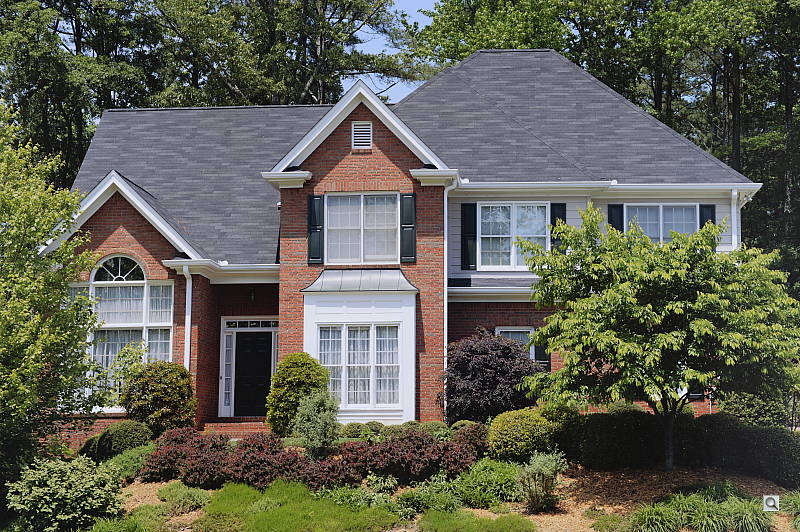
Here are the results with our Far-field shot. As you can see, Active D-Lighting brought up shadow detail while holding on to highlights. Also note the slight blue cast in the white trim of the house as the strength of Active D-Lighting is increased. The Auto setting did a pretty good job here.
HDR Mode
The D4 marks the second Nikon SLR to offer an in-camera high-dynamic-range imaging function (the D5100 was the first), something we've seen in several DSLRs from competing manufacturers for a while now. When enabled, the D4 captures two images with one push of the shutter button, one underexposed and one overexposed and combines them in-camera to produce a high-dynamic-range JPEG. (RAW format is not supported). We don't believe the Nikon D4 performs micro-alignment of the two images even though the user manual warns of possible cropping. If it is, it can only correct for very small amounts of camera movement between shots, and so Nikon recommends the use of a tripod. Obviously moving subjects should also be avoided.
|
"Sunlit" Portrait HDR (0 EV)
|
|
|
|
HDR Settings: Off (Default) 1 EV S=Med 2 EV S=Med 3 EV S=Low 3 EV S=Med 3 EV S=High |
|
|
Like the D5100, the Nikon D4 allows you to set the exposure differential between the two images from 1, 2 or 3 EV, and there's an Auto setting where the camera decides. There is also an option to adjust the amount of "smoothing" that is applied to the boundaries between the two images, with selections of Low, Medium and High. One difference from the D5100 is the D4 adds an option to capture a Single HDR image as well as an On/Off toggle for shooting a series of HDR images. (The D5100 only offers On/Off.)
Mouse over the links above to see how various levels of HDR affects our "Sunlit" Portrait shot and click on a link to get to the full-res image. As you can see, the higher levels make quite a difference to the overall exposure by opening up shadow detail and toning-down highlights while at the same time reducing shadow noise, but lower levels of smoothing can lead to artificial looking shadows around bright objects or halos and glowing around dark ones. Colors can also be adversely affected in HDR mode, such as a drop in saturation. Still, it's a useful feature for capturing static scenes with dynamic range that exceeds the sensor for those not willing to use manual HDR techniques (bracketing exposure and then combining images while post-processing).
Dynamic Range
A key parameter in a digital camera is its Dynamic Range, the range of brightness that can be faithfully recorded. At the upper end of the tonal scale, dynamic range is dictated by the point at which the RGB data "saturates" at values of 255, 255, 255. At the lower end of the tonal scale, dynamic range is determined by the point at which there ceases to be any useful difference between adjacent tonal steps. Note the use of the qualifier "useful" in there: While it's tempting to evaluate dynamic range as the maximum number of tonal steps that can be discerned at all, that measure of dynamic range has very little relevance to real-world photography. What we care about as photographers is how much detail we can pull out of the shadows before image noise becomes too objectionable. This, of course, is a very subjective matter, and will vary with the application and even the subject matter in question. (Noise will be much more visible in subjects with large areas of flat tints and subtle shading than it would in subjects with strong, highly contrasting surface texture.)
What makes most sense then, is to specify useful dynamic range in terms of the point at which image noise reaches some agreed-upon threshold. To this end, Imatest computes a number of different dynamic range measurements, based on a variety of image noise thresholds. The noise thresholds are specified in terms of f-stops of equivalent luminance variation in the final image file, and dynamic range is computed for noise thresholds of 1.0 (low image quality), 0.5 (medium image quality), 0.25 (medium-high image quality) and 0.1 (high image quality). For most photographers and most applications, the noise thresholds of 0.5 and 0.25 f-stops are probably the most relevant to the production of acceptable-quality finished images, but many noise-sensitive shooters will insist on the 0.1 f-stop limit for their most critical work. A full discussion of all the data Imatest produces is really beyond the scope of this review: Visit the Imatest website for details of what the program measures, how it performs its computations, and how to interpret its output.
 JPEG. The graph at right (click for a larger version) was generated using Imatest's dynamic range analysis for an in-camera D4 JPEG file with a nominally-exposed density step target (Stouffer 4110). At default settings and base ISO, the graph shows 10.8 f-stops of total dynamic range, with 7.86 f-stops at the "High" quality level. These are very good numbers for in-camera JPEGs. Compared to the Nikon D7000 which was Nikon's top dynamic range performer before the D4 was released, the D4 scored slightly lower at the "High" quality level (7.86 vs 7.97 f-stops), though total dynamic range scored better (10.8 vs 10.0 f-stops). Note though that this measurement has a margin of error of about 1/3 f-stop, so differences of less than 0.33 can be ignored.
 RAW. The graph at right is from the same Stouffer 4110 stepchart image captured as a RAW (.NEF) file, processed with Adobe Camera Raw using the Auto setting. The Nikon D4's RAW file scored 1.8 f-stops more in total dynamic range than the JPEG (12.6 vs 10.8 f-stops) and the score at the highest quality level increased 2.34 f-stops from 7.86 to 10.2 f-stops. This is an excellent score, among the best cameras we've tested to date. Again, results are very similar to those of the Nikon D7000, with nearly the same High Quality score (10.2 vs 10.1 f-stops) though the D4 scored higher in total dynamic range (12.6 vs 12.1 f-stops). It's worth noting here is that ACR's default noise reduction settings reduced overall noise somewhat (see the plot in the lower left-hand corner) relative to the levels in the in-camera JPEG, which would tend to boost the dynamic range numbers for the High Quality threshold. Also, the extreme highlight recovery being performed by ACR here would likely produce color errors in strong highlights of natural subjects.
| 1 fc 11 lux |
1/2 fc 5.5 lux |
1/4 fc 2.7 lux |
1/8 fc 1.3 lux |
1/16 fc 0.67 lux |
1/16fc No NR |
|
|---|---|---|---|---|---|---|
| ISO 50 |
 3 s f2.8 |
 6 s f2.8 |
 13 s f2.8 |
 25 s f2.8 |
 30 s f2.8 |
 30 s f2.8 |
| ISO 100 |
 2 s f2.8 |
 4 s f2.8 |
 8 s f2.8 |
 15 s f2.8 |
 30 s f2.8 |
 30 s f2.8 |
| ISO 200 |
 1 s f2.8 |
 2 s f2.8 |
 4 s f2.8 |
 8 s f2.8 |
 15 s f2.8 |
 15 s f2.8 |
| ISO 400 |
 0.5 s f2.8 |
 1 s f2.8 |
 2 s f2.8 |
 4 s f2.8 |
 8 s f2.8 |
 8 s f2.8 |
| ISO 800 |
 1/4 s f2.8 |
 0.5 s f2.8 |
 1 s f2.8 |
 2 s f2.8 |
 4 s f2.8 |
 4 s f2.8 |
| ISO 1600 |
 1/8 s f2.8 |
 1/4 s f2.8 |
 0.5 s f2.8 |
 1 s f2.8 |
 2 s f2.8 |
 2 s f2.8 |
| ISO 3200 |
 1/15 s f2.8 |
 1/8 s f2.8 |
 1/4 s f2.8 |
 0.5 s f2.8 |
 1 s f2.8 |
 1 s f2.8 |
| ISO 6400 |
 1/30 s f2.8 |
 1/15 s f2.8 |
 1/8 s f2.8 |
 1/4 s f2.8 |
 0.5 s f2.8 |
 0.5 s f2.8 |
| ISO 12800 |
 1/60 s f2.8 |
 1/30 s f2.8 |
 1/15 s f2.8 |
 1/8 s f2.8 |
 1/4 s f2.8 |
 1/4 s f2.8 |
| ISO 25600 |
 1/125 s f2.8 |
 1/60 s f2.8 |
 1/30 s f2.8 |
 1/15 s f2.8 |
 1/8 s f2.8 |
 1/8 s f2.8 |
| ISO 51200 |
 1/250 s f2.8 |
 1/125 s f2.8 |
 1/60 s f2.8 |
 1/30 s f2.8 |
 1/15 s f2.8 |
 1/15 s f2.8 |
| ISO 102400 |
 1/500 s f2.8 |
 1/250 s f2.8 |
 1/125 s f2.8 |
 1/60 s f2.8 |
 1/30 s f2.8 |
 1/30 s f2.8 |
| ISO 204800 |
 1/1000 s f2.8 |
 1/500 s f2.8 |
 1/250 s f2.8 |
 1/125 s f2.8 |
 1/60 s f2.8 |
 1/60 s f2.8 |
Low Light. The Nikon D4 performed very well here, able to capture usable images down to the 1/16 foot-candle light level (about 1/16 as bright as average city street lighting at night), at all ISO settings, though lower light levels at ISO 50 are a bit dim because of the 30 second shutter speed limit (bulb mode is required for longer exposures). As is usually the case, the D4's metering system struggled a bit with getting the exposure right at the lowest levels though, so we used manual exposure for these shots. Color balance with Auto white balance is fairly neutral at higher light levels, but took on an increasingly stronger magenta cast as light levels dropped and ISO increased. Noise is quite low up to ISO 12,800, and even at higher ISOs there's still a lot of detail to work with when high ISO NR is set to "Off" (which still applies some noise filtering at ISO 3,200 and above). The Nikon D4 gives you four options for high ISO noise reduction: Off, Low, Normal, and High, so you have some flexibility in deciding how much noise to trade for detail. Except for the "No NR" shots in the table above, these were all shot using the Normal NR setting, and Long Exposure NR was enabled so it was applied to exposures longer than one second. We didn't find any issues with hot pixels, but some horizontal banding is visible at ISO 25,600 and above. There's also a purple tint emanating from the bottom right at very high ISOs indicating some heat blooming, likely from a warm component nearby. Longer exposures at lower ISOs may show similar heat-blooming discoloration.
The camera's phase-detection autofocus system was able to focus on the subject down to below the 1/16 foot-candle light level unassisted with an f/2.8 lens. The Nikon D4 doesn't have a built-in AF illuminator, but can utilize the AF illuminator found on compatible flash units. In Live View mode, the D4's contrast-detect autofocus was able to focus down to just above the 1/16 foot-candle, which is very good.
(Keep in mind that the longer shutter speeds here demand the use of a tripod to prevent any blurring from camera movement. A useful trick is to just prop the camera on a convenient surface, and use its self-timer to release the shutter. This avoids any jiggling from your finger pressing the shutter button, and can work quite well when you don't have a tripod handy.)
How bright is this? The one foot-candle light level that this test begins at roughly corresponds to the brightness of typical city street-lighting at night. Cameras performing well at that level should be able to snap good-looking photos of street-lit scenes.
NOTE: This low light test is conducted with a stationary subject, and the camera mounted on a sturdy tripod. Most digital cameras will fail miserably when faced with a moving subject in dim lighting. (For example, a child's ballet recital or a holiday pageant in a gymnasium.) Digital SLRs like the Nikon D4 do much better than point & shoots, but you still shouldn't expect a quick autofocus lock with moving subjects.
Output Quality
Print Quality
 ISO 50 through 200 shots look good printed at 30 x 40 inches from normal viewing distances. On close inspection, you can however see slight jaggies. As a result, we think this is the upper limit of this 16-megapixel sensor, although larger prints are possible for wall display purposes.
ISO 400 shots look essentially the same printed at 30 x 40, though there's a hint of soft chroma noise in the shadows, so we'll call 24 x 36 officially "good" here.
ISO 800 images look good at 20 x 30, with a slight softening that's still acceptable and minor noise in flatter areas.
ISO 1,600 images are better at 16 x 20, as slight chroma noise blobs start to form in the shadows and there's a minor loss in sharp detail at 20 x 30. This all tightens back up at 16 x 20 inches.
ISO 3,200 shots are better printed at 13 x 19, thanks to heavier grain in the shadows and continued loss of detail.
ISO 6,400 shots look fairly good at 11 x 14 inches for less critical applications, despite a slight increase in luminance noise in the shadows, but it's 8 x 10s that we can give our official seal of approval to. High-contrast detail is still remarkable at this size, and the red leaf swatch still has very good definition, where most cameras would have resorted to a blurred red field.
ISO 12,800 images are good at 8 x 10, again for less critical applications, despite the continued increase in contrast. At 5 x 7, luminance noise is under control, and detail is very good.
ISO 25,600 shows good detail and controlled shadow noise when printed at 5 x 7, though there is minor noise in the shadows.
ISO 51,200 is a bit rough for printing at 5 x 7, but makes a very good 4 x 6.
ISOs 102,400 and 204,800 are not suitable for printing and are best avoided.
With quite excellent printed results straight out of the camera, the Nikon D4 fulfills Nikon's goal of maintaining impressive low light performance in a high-speed reporter's camera.
Testing hundreds of digital cameras, we've found that you can only tell just so much about a camera's image quality by viewing its images on-screen. Ultimately, there's no substitute for printing a lot of images and examining them closely. For this reason, we now routinely print sample images from the cameras we test on our Canon Pro9000 Mark II studio printer, and on the Pixma MP610 here in the office. (See the Canon Pixma Pro9000 Mark II review for details on that model.)
The images above were taken from our standardized test shots. For a collection of more pictorial photos, see our Nikon D4 Photo Gallery .
Not sure which camera to buy? Let your eyes be the ultimate judge! Visit our Comparometer(tm) to compare images from the Nikon D4 with those from other cameras you may be considering. The proof is in the pictures, so let your own eyes decide which you like best!
Performance
Nikon D4 Performance
Timing and Performance
Generally excellent speed for a pro SLR, though autofocus is somewhat sluggish for its class.
|
Startup/Shutdown
|
||
|
Power on
to first shot |
~0.3 second
|
Time it takes for camera to turn on. (Very fast, difficult to measure.)
|
|
Shutdown
|
~0.2 second
|
How long it takes camera to turn off before you can remove the memory card. (Very fast, difficult to measure.)
|
|
Single-shot clearing times
|
||
|
Buffer clearing time
Large Fine JPEG |
~1 second
(after 20 frames) |
Worst case buffer clearing time. -- This is the delay after a set of shots before you can remove the card. Some cameras won't shut down until the buffer is cleared. (*See note about memory card speeds at bottom of table below.)
|
|
Buffer clearing time
14-bit RAW (Lossless compressed) |
~1 second
(after 20 frames) |
|
|
Buffer clearing time
14-bit RAW + L/F JPEG |
~5 seconds
(after 20 frames) |
|
|
Continuous mode buffer clearing times
|
||
|
Buffer clearing time
L/F JPEG |
~2 seconds
(after 20 frames) |
Worst case buffer clearing time. (*See note about card speeds below.)
|
|
Buffer clearing time
14-bit RAW (Lossless Compressed) |
~10 seconds
(after 20 frames) |
|
|
Buffer clearing time
14-bit RAW + L/F JPEG |
~29 seconds
(after 59 frames) |
|
|
Buffer clearing time
14-bit RAW + L/F JPEG |
~20 seconds
(after 62 frames) 125MB/s XQD |
|
|
*Note: Buffer clearing times measured with a SanDisk Extreme Pro 128GB 100MB/s UDMA 7 CompactFlash card unless otherwise noted. Slower cards will produce correspondingly slower clearing times. Slow cards may also limit length of bursts in continuous mode. ISO sensitivity and noise reduction settings can also affect cycle times and burst mode performance.
|
||
Startup and shutdown times were fast, difficult to measure. Buffer clearing time depends on the image size and quality, burst length and the speed of memory card used, but was generally pretty good with a 100MB/s CompactFlash card. Using a faster 125MB/s XQD card reduced buffer clearing times by almost a third, and also increased burst length slightly.
|
Mode switching
|
||
|
Play to Record,
first shot |
~0.2 second
|
Time until first shot is captured.
|
|
Record to play
|
~0.7 second
|
Time to display a large/fine JPEG file immediately after capture.
|
|
Display
recorded image |
~0.3 second
|
Time to display a large/fine file already on the memory card.
|
Mode switching was quite fast.
|
Shutter Response (Lag Time)
|
||
|
Optical Viewfinder
|
||
|
Full Autofocus
Single Point (Center) AF |
0.208 second
|
Time from fully pressing shutter button to image capture using optical viewfinder. All timing performed with Sigma 70mm f/2.8 EX DG Macro lens.
|
|
Full Autofocus
51-point Auto Area |
0.254 second
|
Time from fully pressing shutter button to image capture using optical viewfinder.
|
|
Continuous AF
Release Priority |
0.043 second
|
This mode usually shows no speed increase with our static subject; we have no way to measure performance with moving subjects.
|
|
Manual focus
Optical Viewfinder |
0.043 second
|
For most cameras, shutter lag is less in manual focus than autofocus, but usually not as fast as when the camera is "prefocused".
|
|
Prefocused
|
0.043 second
|
Time to capture, after half-pressing and holding shutter button.
|
|
Live View
|
||
|
Full Autofocus
|
1.497 seconds
|
Time to capture, after half-pressing shutter button, waiting for focus confirmation, then fully pressing shutter button in Live View mode.
|
|
Prefocused
|
0.197 second
|
Time to capture, after half-pressing and holding shutter button in Live View mode.
|
In terms of the Nikon D4's ability to determine that it's properly focused when shooting the same target multiple times (with no change of focus setting between iteration, to remove the impact of lens AF speed), its speed was a little slow for professional model. The D4 required 0.208 second using single-area center AF mode, and 51-point Auto Area AF lag measured 0.254 second. Some consumer SLRs are actually faster in this test.
In Continuous autofocus mode with release priority, shutter lag was extremely fast, at only 43 milliseconds. We measured the same lag when manually focused, or prefocused, which is very good.
As expected, the Nikon D4's Live View mode adds considerable AF shutter lag. We measured 1.497 seconds for full autofocus which is pretty slow, though faster than previous models. Nikon has eliminated the faster "Hand-held" phase-detect AF mode found on older models, relying on contrast detection (or face detection) autofocus in Live View mode.
Once prefocused, shutter lag in Live View mode was 0.197 second, which is pretty good but still quite a bit slower than using the optical viewfinder.
To minimize the effect of different lens' focusing speed, we test AF-active shutter lag with the lens already set to the correct focal distance. We also use the same Sigma 70mm f/2.8 macro with every camera (on all platforms except Four Thirds/Micro Four Thirds and Nikon consumer models lacking an in-body focus motor), to further reduce variation, and because our tests showed that focus-determination time with this lens was close to the fastest, across multiple camera bodies from different manufacturers. Being an older design with a non-ultrasonic motor, it wouldn't be the fastest at slewing from one focus setting to another, but that's exactly the reason we measure focus determination speed, which is primarily a function of the camera body, vs focus adjustment speed, which is primarily a function of the lens.
|
Cycle time (shot to shot)
|
||
|
Single Shot mode
Large Fine JPEG |
0.41 second
|
Time per shot, averaged over 20 shots.
|
|
Single Shot mode
14-bit RAW |
0.39 second
|
Time per shot, averaged over 20 shots.
|
|
Single Shot mode
14-bit RAW + L/F JPEG |
0.39 second
|
Time per shot, averaged over 20 shots.
|
|
Early shutter
penalty? |
No
|
Some cameras refuse to snap another shot if you release and press the shutter too quickly in Single Shot mode, making "No" the preferred answer.
|
|
Continuous Hi mode
Large Fine JPEG (Optimal quality) |
0.09 second
(11.1 frames/sec); 20 frames total; 2 seconds to clear* |
Time per shot, averaged over buffer length or 20 shots, whichever came first.
|
|
Continuous Hi mode
14-bit RAW (Lossless compressed) |
0.09 second
(11.1 frames/sec); 20 frames total; 10 seconds to clear* |
Time per shot, averaged over buffer length or 20 shots, whichever came first.
|
|
Continuous Hi mode
14-bit RAW (Lossless) + L/F JPEG |
0.09 second
(11.1 frames/sec); 59 frames total; 29 seconds to clear* |
Time per shot, averaged over 59 shot buffer.
|
|
Continuous Hi mode
14-bit RAW (Lossless) + L/F JPEG |
0.09 second
(11.1 frames/sec); 62 frames total; 20 seconds to clear** |
Time per shot, averaged over 62 shot buffer using Sony 125MB/s XQD card.
|
|
Flash recycling
|
n/a
|
Flash at maximum output.
|
|
*Note: Buffer clearing times measured with a SanDisk Extreme Pro 128GB 100MB/s UDMA 7 CompactFlash card except where otherwise noted. Slower cards will produce correspondingly slower clearing times. Slow cards may also limit length of bursts in continuous mode. ISO sensitivity and noise reduction settings can also affect cycle times and burst mode performance.
|
||
Single-shot cycle time performance was good for a pro SLR model, at about 0.4 second per frame no matter the file type.
Continuous Hi-speed modes were very fast. We measured a consistent 11.1 frames per second, a little better than Nikon's 11 fps spec. Note, though, that AF and AE are locked from the first frame in a burst in this mode. Nikon claims up to 10 fps with AF and AE, however we didn't test that as our target is static.
Buffer depths were excellent. While we didn't keep testing to see what the buffer limits were for just JPEG or RAW files, with worst-case RAW + best quality JPEG frames, we got 59 frames before the camera began to slow with a 100MB/s CompactFlash card. This increased slightly to 62 frames with a Sony 125MB/s XQD card. Buffer clearing can be lengthy with such deep buffers, though. We measured 29 seconds after the maximum length RAW + JPEG burst with our 100MB/s CompactFlash card. This reduced to 20 seconds after 62 frames with our 125MB/s XQD card. Like other recent pro-level SLRs, the Nikon D4 makes good use of very fast memory cards.
|
Download speed
|
||
|
Windows Computer, USB 2.0
|
10,809 KBytes/sec
|
Typical Values:
Less than 600=USB 1.1; 600-770=USB 2.0 Low; More than 770=USB 2.0 High |
Download speeds were quite fast, fast enough that you probably won't feel the need for a separate card reader.
Bottom line, the Nikon D4 is extremely fast in most respects, with very fast frame rates, deep buffers for long bursts, and very low shutter lag. Full autofocus speed was slower than average for a professional model, though. Keep in mind however that our AF tests are with static subjects, and we have no way of objectively testing the D4's autofocus acquisition and tracking performance with real-world subjects. Despite the slower-than-average full AF test results, we strongly suspect the D4 performs very well shooting active subjects and sports in the field, as previous Nikon professional models have shown.
Battery
Battery Life
Excellent battery life for a professional SLR.
| Test Conditions | Number of Shots |
|
Lithium-ion rechargeable battery,
(CIPA standard, Optical Viewfinder) |
2,600 |
|
Lithium-ion rechargeable battery,
(CIPA standard, Live View LCD) |
Unknown |
The Nikon D4 uses a custom rechargeable lithium-ion battery pack for power, and comes with both a single battery and charger. The CIPA rated 2,600 shots per charge using the optical viewfinder is excellent for a pro SLR, but keep in mind the D4 does not have a built-in flash which is normally fired for 50% of shots when tested using the CIPA standard. Unfortunately, Nikon does not seem to publish battery life results for when Live View mode is used, but it's a safe bet that it's considerably shorter.
The table above shows the number of shots the camera is capable of on fully-charged battery, based on CIPA battery-life and/or manufacturer standard test conditions.
(Interested readers can find an English translation of the CIPA DC-002 standards document here. (180K PDF document))
Video
Check out the links below for more sample images, videos and image quality analysis:
- Nikon D4 Optics page (Crops from images shot with the camera's kit lens, if sold as a kit)
- Nikon D4 Sample Images page (Index to all standard test shots, with explanations)
- Nikon D4 Thumbnails page (Thumbnails of all shots, including RAWs, with EXIF data)
- Nikon D4 Gallery page (Regular photos taken with the Nikon D4)
These days, movie capture is commonplace even for interchangeable-lens cameras aimed at consumers. For a professional model, it's absolutely obligatory, and as you'd expect, the Nikon D4 offers video recording capabilities with a rich feature set indeed.
As you'd expect of a camera aimed at pros, the Nikon D4 offers both automatic and manual exposure control, and supports both internal and external microphones. It also provides for full-time or single autofocus operations, and manual focusing. It's rarer in offering a headphone jack to monitor audio during capture, and a fairly fine-grained control over both microphone and headphone levels. Even rarer is the ability to capture video remotely via Ethernet or an optional WiFi adapter. Particularly interesting to pros is the opportunity to record an uncompressed video stream via HDMI, for recording on an external device. Perhaps the most unusual feature of all, though, is the ability to smoothly adjust aperture using two front-of-camera buttons, although this only works when recording with an external device. Otherwise, the camera reverts to a stepped aperture that is locked once capture commences.
Nikon D4 Basic Video Specs
- 1080p (1,920 x 1,080) Full HD recording at 30 / 25 / 24 fps
- 720p (1,280 x 720) HD recording at 60 / 50 / 30 / 25 fps
- 640 x 424 SD recording at 30 / 25 fps
- Clips limited to 4GB / 30 minutes, or 20 minutes for 1080p and 720p60/50
- Supports FX-format lenses (but with a curious 1.1x crop) or DX-format lenses (1.5x focal length crop)
- Optional crop function uses centermost 1,920 x 1,080 pixels from sensor, has 2.7x crop equivalent to that of the Nikon 1-mount cameras
- H.264 / MPEG-4 AVC compression, .MOV container
- Uncompressed 8-bit 4:2:2 output via HDMI port, but only when no flash cards are present in the camera body
- Simultaneous display on camera's LCD during uncompressed output, but with added info overlay that's not present on the HDMI feed
- Full-time live autofocus is possible during recording, including tracking and face detection, albeit with actuation noise levels depending on the lens used
- Single-servo auto and manual focus also possible
- AF point position and size can be manually controlled
- Programmed-auto, aperture-priority, or manual exposure (set before recording starts; no shutter-priority)
- Power Aperture function available, but only for uncompressed HDMI output, not when recording on-camera
- Auto ISO sensitivity for program / aperture-priority, with adjustable upper limit (ISO 12,800 or Hi-4 / 204,800)
- Manual ISO sensitivity for manual exposure
- Exposure compensation and lock are both available
- Image stabilization during video capture, if offered by lens
- Picture control system provides creative options
- Monaural audio recording via built-in microphone; stereo recording via external microphone jack
- Audio monitoring via external headphone jack
- Adjustable levels for both mic and headphone, fixed from start of recording
- Time-lapse movie mode available without sound
- Virtual horizon helps get level horizons
- Can record remotely using remote cords, via ethernet or (with optional accessory) via WiFi
- Index marking function makes it quick to return to up to 20 key moments in a movie clip
- Flicker reduction function available
- In-camera movie trimming possible
Nikon D4 Video: Image Size, Frame Rate, and Encoding
The Nikon D4 records movies at three progressive scan resolutions: either 1,920 x 1,080, 1,280 x 720, or 640 x 424 pixels. The highest resolution 1,920 x 1,080 pixel mode is commonly known as Full HD or 1,080p, and has a 16:9 aspect ratio. This offers a choice of three frame rates, nominally listed as 30, 25, and 24 frames per second, although the highest and lowest rates are actually 29.97 and 23.976 fps. As well as the standard field of view, a 2.7x crop is available in this mode. The intermediate 1,280 x 720 pixel resolution also has a 16:9 aspect ratio, and is better known as 720p. These also offers the nominal 30 and 25 frames per second rates, drops the 24 fps rate, and adds two more. A 60fps nominal rate equates to 59.94 fps actually, while the remaining 50 fps rate matches the nominal figure. When the D4's video output is set to the North American NTSC format, the 60fps, 30fps and 24fps movie recording rates are available. If switched to PAL format, the D4 offers a choice of 50, 25, or 24 fps rates. Finally, the non-standard 640 x 424 pixel mode has an approximate 3:2 aspect ratio. With this standard definition mode, recording frame rates are fixed at either 30 fps for NTSC, or 25fps for PAL.
|
Nikon D4: 2.7x Video Crop Mode
|
|---|
For most resolutions and frame rates, recording times are limited to 29 minutes, 59 seconds or four gigabytes per clip, whichever limit is reached first. However, the highest-resolution 1080p modes and the high-framerate 50 / 60 fps 720p modes are limited to a clip length of 20 minutes. If you're shooting in high ambient temperatures, note that like all video-capable DSLRs, the D4 will monitor its internal temperature and cease video capture if a certain threshold is passed, to prevent damage to the sensor and other components. You're given a 30-second window in which to wrap up your shot after the shutdown warning is shown, if this is the case. You'll then need to wait for the camera's internals to cool sufficiently before another video capture can be started.
The Nikon D4 records movies using H.264/MPEG-4 AVC compression with Linear PCM audio, and stores them in .MOV files. Compared to the Motion JPEG format used by some cameras, H.264 is much more conservative of memory card space. It also avoids some of the severe image quality loss suffered by AVCHD cameras, when faced with significant amounts of change in image content between frames. (AVCHD uses a subset of the H.264 standard, which among other things mandates a limit in recording bandwidth, translating into a lesser ability to convey rapidly-changing detail.) The choice of H.264 comes with the requirement of greater processing power, though -- not only from the camera when recording, but also when playing back or editing videos. The more sophisticated encoding used in the H.264 standard requires quite a bit of processor power to pull it apart and put it back together again, so frame-accurate editing of H.264 requires a fast processor and capable editing program. That said, for the target customer, this is unlikely to be an issue; merely something to bear in mind.
Unlike some cameras using AVCHD recording, the Nikon D4's H.264 movies have relatively little lag in response to your starting or stopping recording. That's great news, because it means you're less likely to miss the start of the action, or have to trim the start and end of clips.
In addition to recording in-camera, the Nikon D4 provides another, much more rare option--but only when there are no flash cards in the camera body. If this is the case, the D4 can output an uncompressed, 8-bit, 4:2:2 video feed via the HDMI port, which can then be captured and stored with an external recorder such as an Atomos Ninja or similar. This lets you get at the uncompressed video, and it also provides a way to circumvent the clip length limitations (although you're still subject to sensor heating issues, so if the sensor gets too hot then live view will be stopped.) It's possible to adjust the aperture while outputting via HDMI, as described in the exposure control section below. Note that while the HDMI feed is active in this manner, no informational overlays are added to the output feed. The live view is mirrored on the camera's LCD, where the overlays are shown, letting you confirm settings etc. without affecting the recorded video.
Here's a list showing what to expect for file sizes with the Nikon D4's video recording:
|
Nikon D4 Video Options |
||||||
|---|---|---|---|---|---|---|
|
H.264/MPEG-4 AVC Format (.MOV file container) |
||||||
|
Resolution |
Aspect Ratio |
Quality |
Encoding |
Frame Rate |
Max. Clip Length |
Bitrate
|
|
1,920 x 1,080 |
16:9 |
High |
NTSC |
30p (29.97 fps) |
20 minutes |
24 Mbps |
Normal |
12 Mbps |
|||||
High |
PAL |
25p (25 fps) |
24 Mbps |
|||
Normal |
12 Mbps |
|||||
High |
NTSC / PAL |
24p (23.976 fps) |
24 Mbps |
|||
Normal |
12 Mbps |
|||||
|
1,280 x 720 |
16:9 |
High |
NTSC |
60p (59.94 fps) |
20 minutes |
24 Mbps |
Normal |
12 Mbps |
|||||
High |
PAL |
50p (50 fps) |
24 Mbps |
|||
Normal |
12 Mbps |
|||||
High |
PAL |
30p (29.97 fps) |
29 minutes, |
12 Mbps |
||
Normal |
8 Mbps |
|||||
High |
PAL |
25p (25 fps) |
12 Mbps |
|||
Normal |
8 Mbps |
|||||
|
640 x 424 |
~3:2 |
High |
NTSC |
30p (29.97 fps) |
29 minutes, |
5 Mbps
|
Normal |
3 Mbps |
|||||
High |
PAL |
25p (25 fps) |
5 Mbps |
|||
Normal |
3 Mbps |
|||||
Nikon D4 Sample Videos
Here are some examples of video from the Nikon D4, showing typical results under daylight and night conditions.
|
Nikon D4: Video Samples
|
|---|
Nikon D4 Video-Mode Focusing
The Nikon D4 performs autofocus in live view and movie modes using contrast detection, which operates based on data streaming from the image sensor. It's the same technique referred to as Tripod mode on earlier Nikon SLRs. As in other recent models, the Nikon D4 offers both single-servo and continuous-servo autofocus modes, and the latter bears a different name from its phase-detection equivalent. It's called Full-time Servo AF, or AF-F for short, as opposed to AF-C / Continuous-Servo AF for phase detection AF when shooting stills through the viewfinder. By design, contrast detection autofocus involves some hunting around the point of focus, and can lag behind changes in your subject's focus distance somewhat. If your subject is relatively static, you can instead opt for the Single-servo AF mode, which will still allow you to perform single autofocus operations during video capture by half-pressing the shutter button, or pressing the AF-ON button. Of course, pro videographers will almost certainly prefer to switch off autofocus altogether, and pull focus manually by appropriately setting the Focus-mode selector on the camera's front panel (as well as that on the lens, if applicable).
The D4 offers four AF-area modes for use during movie capture: Face-priority AF, Wide-area AF, Normal-area AF, and Subject-Tracking AF. The Wide and Normal-area modes are self-explanatory, providing two different focus area sizes, which can be manually positioned anywhere within the frame (and even moved during video capture.) Face-priority AF--which can identify up to 35 individual faces within the frame during live view, but an (undisclosed) lesser number during movie capture--will select the closest subject among the group when adjusting focus. This individual will be indicated by a double-yellow frame on the D4's LCD panel. Finally, the Subject-tracking AF function allows you to manually position the point from which autofocus tracking should commence, and to start or stop the function by pressing the center of the multi selector when your subject falls under the AF point. The D4 will then indicate the point at which it is currently tracking the subject with a focus frame that changes between either green to indicate a focus lock, or red to indicate that a focus lock hasn't currently been attained.
Like most interchangeable lens cameras capable of AF during video--and especially those using lenses that were designed for still imaging--the D4 has a tendency to pick up autofocus drive noise quite clearly in the audio track of its movie clips. This can be mitigated by use of an external microphone, and by adjusting the D4's manual gain control, however. You have a useful thirty-step gain control over the internal microphone, and a 20-step control over external mics, but note that you can't adjust the levels during capture. You can also disable audio capture altogether, and rely on an external device to record audio. Alternatively, you can let the D4 control levels automatically.
If AF noise is too much of an issue, you can of course focus manually, and the true manual operation of AF on Nikon's lenses means you can do this more or less silently, simply by being careful about turning the focus ring. (Some interchangeable lens cameras we've tested use "fly-by-wire" focusing, whereby the focus ring only instructs the camera to move the lens elements rather than moving them directly via a mechanical coupling. This can mean that focus operation is still audible, regardless of how slowly you turn the focus ring. With true manual operation of its lenses, the Nikon D4 doesn't have this problem, although it's possible that third-party or older Nikon lenses might produce audible noise while their focus was adjusted.)
As we've noted in other SLR reviews, the good news with focusing for video is that you can get surprisingly good depth of field in video mode by stopping the lens down, thanks to the relatively low resolution of the video image. With a pixel resolution of only 2.1 megapixels in the Nikon D4's highest-resolution 1,080p "Full HD" mode, 0.9 megapixels in 720p HD mode, and just 0.3 megapixels in the standard-definition mode, images that would be unacceptably blurred as 16 megapixel still shots look perfectly fine as video frames. This not only provides greater depth of field at any given aperture, but is also more forgiving of diffraction limiting at very small lens apertures. Diffraction at small apertures means you'd usually want to avoid f/16 or f/22 for still images, but again, the results generally look perfectly fine at video resolutions. Bottom line, with the Nikon D4's lens set to f/16 or f/22 (assuming you're shooting under fairly bright conditions), you'll be surprised by how little focus adjustment is needed during a typical video recording.
Nikon D4 Video Exposure Control
|
Nikon D4: Aperture Control / Depth-of-Field
|
|---|
With the Nikon D4's exposure mode set to program or shutter priority, the main exposure variables--shutter speed, aperture, and ISO sensitivity--all remain under automatic control when recording movies. If the exposure mode is set appropriately, however, you can shoot movies in aperture-priority or manual modes. In all modes except manual, the ISO sensitivity is controlled automatically, although you can adjust the range of sensitivities available: either 200 to 12,800 equivalents, or 200 to 204,800 equivalents (aka Hi 4). The reverse is true of manual mode: ISO sensitivity can't be automatically controlled, and must be manually set. Regardless of exposure mode, user-adjustable exposure variables are locked from the start of video capture.
There is, however, one way to get around this limitation. If you remove the flash cards from the camera as noted previously, and use an external device to record the uncompressed HDMI stream, the Nikon D4 provides what the company terms as a power aperture function. This lets you configure the front-panel Function and Preview buttons to open and close the lens aperture, respectively. Unlike in other shooting modes, this aperture control is stepless. In manual mode, adjusting the aperture will simultaneously brighten or darken the video until you adjust the shutter speed or ISO sensitivity, while in aperture-priority mode, the camera will attempt to keep the same exposure level by adjusting these variables itself. Nikon cautions that there may be some flickering as this occurs. Power Aperture adjustments also produce some aperture mechanism noise that could be picked up by your microphone(s). Still, stepless aperture control is an interesting feature that's extremely rare among video-capable DSLRs. (It's more common on mirrorless models, where manufacturers have designed new optics from the ground up with video capture in mind.)
Regardless of the metering mode selected, movies will always be recorded using Matrix metering, with the Center-weighted and Spot options available only for still image capture. You can, however, adjust exposure compensation within a +/-3.0 EV range, and lock the metered exposure with the sub-selector's center button, if you wish. You can apply Nikon's Picture Controls and adjust white balance for movies, as long as they are selected before recording begins. This is useful if you'd like to for instance record in monochrome, with more saturated colors, emphasising the color of a sunset, etc.
Nikon also offers a flicker reduction feature in the D4, useful for taming flicker induced by fluorescent and mercury-vapor lighting. The camera can attempt to automatically select the correct flicker reduction frequency itself, or you can manually set this to 50 or 60Hz.
Not really an exposure feature per se, but the Nikon D4 also allows you to mark up to twenty 'index' points in each captured video clip. You can then return immediately to these points when editing your movie, if your chosen video editor recognizes the marks, making it quicker to edit clips together if you identify key points at capture time.
Nikon D4 Video: Audio recording

Connectivity. At top left is a 3.5mm stereo headphone jack, allowing live audio monitoring. To the right is a 3.5mm stereo microphone jack, providing an alternative to the built-in monaural mic. At bottom are an ethernet jack and a Type-C Mini HDMI connector.
The Nikon D4 has an internal, monaural microphone comprising three holes located directly beneath the self-timer lamp and adjacent to the flash sync terminal on the camera's front panel. As noted previously, internal mics have a tendency to pick up camera handling and autofocus drive noise on the audio track of captured movie clips. The severity will vary significantly depending on the videographer, and the lens model in use. The D4 also provides for external stereo mics, courtesy of a 3.5mm input jack under a flap on the left side of the camera's body. Simply switching moving to a shoe-mount mic with some form of shock mount can do wonders for your DSLR audio, while moving the mic off camera at a distance can completely resolve the issue. Nikon recommends its ME-1 stereo mic for use with the D4, but you can of course use third party mics too.
Another feature that can help resolve audio problems is the adjustable sensitivity for the microphone. Internal and external mics are adjusted separately, and have varying levels of adjustment possible. For the internal mic, there are thirty sensitivity levels to choose from, along with Auto gain, and Off settings. For external mics, you can choose from Auto, Off, and twenty gain levels. A stereo level display on the LCD provides a 15-step visual cue for whether audio levels are too high, and the top of the scale is indicated in red to catch your attention. Unfortunately, the manually-selected level for either mic is fixed from the start of video capture, so you can't react to unanticipated changes in ambient noise levels without stopping and restarting capture.
A much rarer feature of the D4 is its external headphone jack. This lets you monitor audio levels on the fly during capture, so you should at least have an idea if they're out of whack. Again, levels can be manually adjusted in 30 steps. Nikon doesn't recommend any particular headphone type.
The D4's Linear PCM audio is recorded with a bit depth of 16-bits, and a sampling rate of 48 kHz, plenty enough for good quality audio.
Nikon D4 Time Lapse Movies
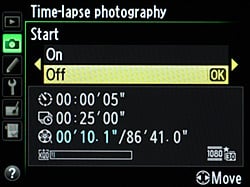
As well as standard movies with or without sound, the Nikon D4 can also assemble time-lapse movies in camera. Time lapse movies are recorded with the resolution and frame rate settings currently configured in the Movie Settings menu, and do not include sound. If the camera is set to manual exposure, it will show variations in ambient light levels faithfully; otherwise the exposure level will vary to cancel them out. Likewise, auto white balance will attempt to correct for changes in light color temperature (perhaps causing color shifts during the time-lapse sequence), while manual white balance will faithfully show changes in ambient light temperature throughout the movie.
Time lapse movies can have a duration of up to seven hours, 59 minutes, and both the interval and shooting time are configured manually. Multi-shot exposure modes aren't available, and nor are live view or bulb shooting. The camera ignores its standby timer, and if power runs out, the movie up to that point will be saved. If autofocus is enabled, frames where a focus lock can't be achieved are skipped. The viewfinder should be covered before exposure starts, and there's a three second delay before the first frame is captured.
Nikon D4 Remote Recording
The Nikon D4 is relatively rare in offering both built-in ethernet connectivity, and support for optional wireless transmitters. It's doubly unusual in allowing for movie recording via either connectivity type. With an Ethernet network configured, or the optional WT-4 or WT-5 wireless transmitter attached, you can record movies remotely via a built-in HTTP server and web browser, or using the optional Camera Control Pro 2 software. You can also upload existing movies from the camera to an FTP server, or to a computer.
If Custom Function g4 is configured appropriately, you can also use an optional remote cord to start movie live view, and to start and end movie capture.
Nikon D4 Movie Recording User Interface
The Nikon D4's movie recording functionality is accessed from Live view mode, by rotating the Live View selector to the Movie position. To start and stop capture, you simply press the red Movie Record button adjacent to the still image Shutter button, while live view is active. A Custom Function allows you to configure the Shutter button to start and stop video capture instead, although by default it simply captures a still image, ending movie capture first if necessary. (It can also be configured to capture a movie-resolution still without interrupting the video capture, if you prefer.)
The D4 groups several settings related to video capture in a dedicated Movie Settings menu, accessed from the last page of the Shooting menu. There are also several movie-related custom functions, grouped in the final page of the Custom Function menu. It also offers limited in-camera movie editing functionality. You can select either a start or end point for a video clip, and save the resulting trimmed video as a new file, and it's also possible to extract single frames from a video. These functions are accessed from the Playback mode's Retouch menu, or while viewing a movie in Playback mode.

| Nikon D4 Shooting Menu Movie Settings | ||
|
Top-Level
Selection |
Second-Level
|
Notes
|
Frame Size / Frame Rate |
- 1,920 x 1,080; 30 fps - 1,920 x 1,080; 25 fps - 1,920 x 1,080; 24 fps - 1,280 x 720; 60 fps - 1,280 x 720; 50 fps - 1,280 x 720; 30 fps - 1,280 x 720; 25 fps - 640 x 424; 30 fps - 640 x 424; 25 fps - 1,920 x 1,080; 30 fps; crop - 1,920 x 1,080; 25 fps; crop - 1,920 x 1,080; 24 fps; crop |
Crop modes have a 2.7x focal length crop. |
Movie Quality |
- High quality - Normal |
|
Microphone |
- Auto sensitivity - Manual sensitivity - Microphone off |
15-step stereo level display shown. Manual sensitivity is 30-step for internal mic, 20-step for external mic.
|
Destination |
- XQD card slot - CF card slot |
Stills are always recorded on primary slot. Remaining time estimate shown at current settings for each slot, if card inserted. |
ISO Sensitivity Range |
- 200 to 12,800 - 200 to Hi 4 |
Hi 4 equates to ISO 204,800
|

| Nikon D4 Shooting Menu Movie Settings | ||
Top-Level Selection |
Second-Level |
Notes |
g1 Assign Fn Button |
- Power aperture (open) - Index marking - View photo shooting info - None |
If set to power aperture, C.Fn g2 is also changed to the same. |
g2 Assign Preview Button |
- Power aperture (close) - Index marking - View photo shooting info - None |
If set to power aperture, C.Fn g1 is also changed to the same. |
g3 Assign sub-selector button |
- Index marking - View photo shooting info - AE/AF lock - AE lock only - AE lock (hold) - AF lock only - None |
|
g4 Assign Shutter Button |
- Take photos - Record movies - Live frame grab |
Live frame grab records a still at movie resolution. |
Rolling Shutter Artifacts ("Jello Effect")
|
Nikon D4: Rolling Shutter Artifacts
|
|---|
Essentially every video capable digital SLR currently on the market exhibits motion-related distortions called rolling shutter artifacts. These are caused because the image data is captured and then read off the chip sequentially by rows, rather being captured all at once. In the case of the Nikon D4, with its variable frame rate, this means that image data for the last row of a given frame is captured and read out anywhere from 1/24th to 1/60th second after the data for the top row was captured. The effect on moving objects is similar to that of a focal plane shutter in an SLR, but more pronounced, because the video frame is read out much more slowly than the slit of a focal plane shutter moves across the sensor.
For a camera that scans video frames vertically (as all do that we're aware of), rolling shutter artifacts will be most noticeable for subjects that are moving rapidly side to side, or when the camera itself is being panned horizontally. Verticals in the scene will appear tilted to the right or left, depending on the direction of camera motion. As an example, consider the case of a camera being panned from left to right, with a flagpole or other vertical object in the middle of the scene when recording for a particular frame begins: If the top of the object was centered horizontally when the first line of the video frame is acquired, by the time the last line of the frame has been captured, the bottom of the object will have shifted to somewhere left of center: As a result, the vertical object would appear to be leaning to the right.
The D4's rolling shutter is most visible at 24 frames per second, less so at 30 frames per second, and by the time you reach the maximum frame rate of 60 fps in 720p mode, very little rolling shutter is present.
Computer Requirements for Viewing HD Video
A typical computer these days has little trouble dealing with still images, but high-definition video can be another matter. Depending on the file format involved, it can take a pretty beefy computer to handle HD-resolution video playback without stuttering or dropping frames. The H.264/MPEG-4 AVC image compression used by the Nikon D4 is one of the more compute-intensive formats, and its 1,920 x 1,080 (1080p) resolution means there's a lot of data in each frame to deal with at full resolution. The net result is that you'll want a relatively recent and powerful computer to play full-res high-def video files from the D4 on your computer. At lower resolutions, the requirements will be more modest. You can, of course, view your movies on an HDTV via the Type-C Mini HDMI output.
High ISO Noise Reduction
Nikon D4 High ISO Noise Reduction
The Nikon D4 offers four High ISO Noise Reduction settings: Off, Low, Normal (default), and High, allowing you quite a bit of flexibility in choosing how you want to make the trade-off between subject detail and noise levels in JPEGs. The Nikon D4 manual doesn't say at what ISO High ISO Noise Reduction begins to be applied, so we've included crops from ISO 50 up here. Note that the Nikon D4 manual does say when Off is selected, noise reduction is only performed at ISO 3,200 and higher, and the amount is less than Low.
See for yourself how the four noise reduction settings work. Click on any of the crops below to see the corresponding full-sized image.
| High ISO Noise Reduction Comparison In-Camera JPEGs Simulated Daylight |
||||
|
Off
|
Low
|
Normal
|
High
|
|
| I S O 5 0 |
 |
 |
 |
 |
 |
 |
 |
 |
|
 |
 |
 |
 |
|
|
Off
|
Low
|
Normal
|
High
|
|
| I S O 1 0 0 |
 |
 |
 |
 |
 |
 |
 |
 |
|
 |
 |
 |
 |
|
|
Off
|
Low
|
Normal
|
High
|
|
| I S O 2 0 0 |
 |
 |
 |
 |
 |
 |
 |
 |
|
 |
 |
 |
 |
|
|
Off
|
Low
|
Normal
|
High
|
|
| I S O 4 0 0 |
 |
 |
 |
 |
 |
 |
 |
 |
|
 |
 |
 |
 |
|
|
Off
|
Low
|
Normal
|
High
|
|
| I S O 8 0 0 |
 |
 |
 |
 |
 |
 |
 |
 |
|
 |
 |
 |
 |
|
|
Off
|
Low
|
Normal
|
High
|
|
| I S O 1 6 0 0 |
 |
 |
 |
 |
 |
 |
 |
 |
|
 |
 |
 |
 |
|
|
Off
|
Low
|
Normal
|
High
|
|
| I S O 3 2 0 0 |
 |
 |
 |
 |
 |
 |
 |
 |
|
 |
 |
 |
 |
|
|
Off
|
Low
|
Normal
|
High
|
|
| I S O 6 4 0 0 |
 |
 |
 |
 |
 |
 |
 |
 |
|
 |
 |
 |
 |
|
|
Off
|
Low
|
Normal
|
High
|
|
| I S O 1 2 8 0 0 |
 |
 |
 |
 |
 |
 |
 |
 |
|
 |
 |
 |
 |
|
|
Off
|
Low
|
Normal
|
High
|
|
| I S O 2 5 6 0 0 |
 |
 |
 |
 |
 |
 |
 |
 |
|
 |
 |
 |
 |
|
|
Off
|
Low
|
Normal
|
High
|
|
| I S O 5 1 2 0 0 |
 |
 |
 |
 |
 |
 |
 |
 |
|
 |
 |
 |
 |
|
|
Off
|
Low
|
Normal
|
High
|
|
| I S O 1 0 2 4 0 0 |
 |
 |
 |
 |
 |
 |
 |
 |
|
 |
 |
 |
 |
|
|
Off
|
Low
|
Normal
|
High
|
|
| I S O 2 0 4 8 0 0 |
 |
 |
 |
 |
 |
 |
 |
 |
|
 |
 |
 |
 |
|
The above crops show the effects of the 4 levels of high ISO noise reduction, under the HMI lighting we use to simulate standard daylight. As you can see, the High ISO Noise Reduction setting has little effect below ISO 3,200, if any. At higher ISOs, the trade-off between detail and noise can easily be seen.
RAW Files
Nikon D4 RAW Image Quality
We used to convert RAW files used for comparison crops with dcraw, an excellent freeware raw converter. Unfortunately, dcraw's author has not been providing timely updates lately, so we have switched to using Adobe Camera Raw with its noise reduction and sharpening options set to zero. We've found conversions made with ACR to be almost identical to dcraw, when dcraw's demosaicing option is set to match ACR's method.
Below are crops from Nikon D4 RAW files compared to RAW files from recent pro-grade digital SLRs:
| Nikon D4 versus Nikon D3S, Nikon D800, and Canon 1D Mark IV RAW, no Noise Reduction, no Sharpening, Simulated Daylight |
||||
|
|
Nikon
D4 |
Nikon
D3S |
Nikon
D800 |
Canon 1D
Mark IV |
| I S O 4 0 0 |
 |
 |
 |
 |
 |
 |
 |
 |
|
 |
 |
 |
 |
|
| I S O 8 0 0 |
 |
 |
 |
 |
 |
 |
 |
 |
|
 |
 |
 |
 |
|
| I S O 1 6 0 0 |
 |
 |
 |
 |
 |
 |
 |
 |
|
 |
 |
 |
 |
|
| I S O 3 2 0 0 |
 |
 |
 |
 |
 |
 |
 |
 |
|
 |
 |
 |
 |
|
| I S O 6 4 0 0 |
 |
 |
 |
 |
 |
 |
 |
 |
|
 |
 |
 |
 |
|
| I S O 1 2 8 0 0 |
 |
 |
 |
 |
 |
 |
 |
 |
|
 |
 |
 |
 |
|
| I S O 2 5 6 0 0 |
 |
 |
 |
 |
 |
 |
 |
 |
|
 |
 |
 |
 |
|
| I S O 5 1 2 0 0 |
 |
 |
N/A,
ISO 51,200 not supported. |
 |
 |
 |
 |
||
 |
 |
 |
||
| I S O 1 0 2 4 0 0 |
 |
 |
N/A,
ISO 102,400 not supported. |
 |
 |
 |
 |
||
 |
 |
 |
||
| I S O 2 0 4 8 0 0 |
 |
N/A,
ISO 204,800 not supported. |
N/A,
ISO 204,800 not supported. |
N/A,
ISO 204,800 not supported. |
 |
||||
 |
||||
|
|
Nikon
D4 |
Nikon
D3S |
Nikon
D800 |
Canon 1D
Mark IV |
Looking at the crops above, the 12.2-megapixel Nikon D3S is still slightly better than the 16.4-megapixel D4 in terms of high ISO noise at the pixel level, however keep in mind that D4's pixel pitch is smaller at 7.3µm versus 8.5µm. The 16-megapixel Canon 1D Mark IV does not perform as well as the D3S or D4 in terms of noise, which is no surprise with its much smaller 5.7µm pixel pitch. Noise at the pixel level is higher from the 36.6-megapixel Nikon D800 with its even smaller 4.7µm pixel pitch, however its significantly higher pixel density offsets much of the noise when printed at the same print size, making the D800 a surprisingly good high ISO performer.
Note that the Canon 1D Mark IV is not a full-frame model like the others (it has a crop-factor of ~1.3x). We hope to add Canon 5D Mark III and 1D X crops here, once we get production models into the lab.