

Overview
Panasonic G9 Overview

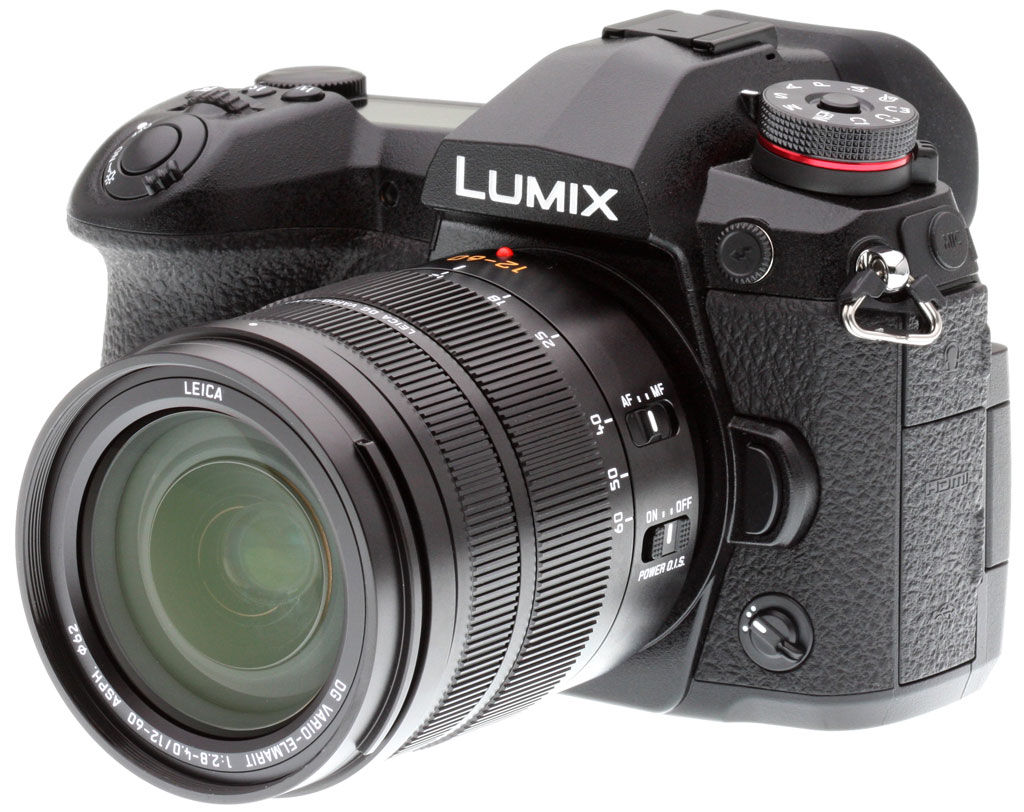
Panasonic has no shortage of experience in the digital camera business. It's been 17 years now since the company first kicked off its Lumix camera line with the simultaneously-launched LC5 and F7 compact cameras in late 2001, and about a decade since the late-2008 launch of its first mirrorless model, the Micro Four Thirds-format Lumix G1. Now, the company brings that experience to bear with perhaps its most exciting camera yet, the Lumix G9, offering much of what impressed us in the more video-oriented GH5 while handily outperforming that camera in the still imaging department, and in a smaller, less expensive body, to boot.
A ground-up redesign with friendlier ergonomics and the best Lumix image quality ever
Following in the footsteps of the popular G7 and G85 (which, in some markets, was actually known as the G8), the G9 is a ground-up redesign aimed at significantly improving both handling and image quality. Based around the GH5's 20-megapixel image sensor with, as is typical these days, no resolution-sapping optical low-pass filter, and with its output handled by the latest-generation Venus Engine image processor, the DC-G9 is said to offer the highest still image quality of any Lumix camera to date!
In particular, Panasonic claims the Lumix G9 will best its predecessors with greater detail and lower noise levels, especially as the sensitivity ramps up, as well as with more effective sharpening, better suppression of ghosts and flare, plus better color control, which should prove especially noticeable in skin tones and blue skies.

And if you need even more detail with relatively static subjects, the G9 also debuts a clever resolution-enhancing multi-shot mode akin to those seen in recent models from its Micro Four Thirds-partner Olympus, as well as in some Pentax DSLRs and the recently-launched Sony A7R III mirrorless camera. Panasonic's High Resolution mode, much like that used by Olympus, captures a total of eight shots in a couple of seconds, and then combines them for saving in RAW or JPEG formats. The final result is an 80.6-megapixel image which packs in significantly more detail than can be captured in a single shot at the camera's native 20.2-megapixel resolution.
A brand-new, much-improved body with SLR-like ergonomics and a take-anywhere nature
Of course, while image quality is key to a good camera, it's not the first thing you're going to notice when you take it out of the box. Compare it to its predecessors and the G9 really grabs your attention with its completely new magnesium-alloy body, which is now not only splashproof and dustproof, but also freezeproof to 14°F (-10°C) too. Its chunkier handgrip up front and much more generous eyecup on back are the most obvious differences from earlier models, but it also sports a whopping 30 dedicated controls, up from 22 in the G85.

The new chassis sports much-improved ergonomics and more than a few new features, with a generously-sized top-deck status LCD, an intuitive rear-panel joystick for AF point selection, and a triplet of dedicated white balance, ISO and exposure compensation buttons within easy reach of your shutter finger. It also features a lockable mode dial which sports a total of three Custom positions, one up from the G85's two positions. And there's a new front-deck function switch which allows you to quickly toggle back and forth between groups of seven different functions.
The rear-panel LCD is essentially unchanged from that of the G85. Its got a 3.0-inch diagonal, and a resolution of 1,040kdots. It's still attached to a side-mounted tilt/swivel mechanism, our favorite among many different LCD articulation mechanisms on the market for its added versatility, making it easy to get shots high in the air or low to the ground, regardless of their orientation.

The G9's new viewfinder offers class-leading magnification
And when you look even more closely, you'll find some less obvious improvements around the G9's body, including dual UHS-II rated SD card slots, and an uprated electronic viewfinder that's still OLED-based with 100% coverage, but now sports a more generous 3,680-kdot panel resolution, huge 0.83x magnification (35mm-equivalent) and 21mm eyepoint (from the viewfinder lens). That's as compared to 2,360 kdots, 0.74x magnification and a 20mm eyepoint in the G85.
And the new finder also allows not just a blackout-free, user-selectable 60fps or 120fps refresh rate (the latter with an impressively minimal lag of just 0.005 seconds), but also allows control over magnification in three steps, should you wish to do so, perhaps because you want to hold your eye a little further from the eyepiece. Really, the only downside of the new EVF is that it has a more abbreviated dioptric correction range of -4 to +3 diopters, down from the -4 to +4 diopter range of the G85's finder.

A noticeably bigger, heftier body, and a brand-new accessory grip
Of course, there's a price to pay for all these added controls and features. While it's still a fair bit smaller than the GH5, the G9 is also significantly larger than was the G85 in every dimension, and it's a fair bit heftier, too.
At 5.4 x 3.8 x 3.6 inches, it's about a third of an inch wider, a third of an inch taller and two thirds of an inch deeper than its predecessor. And compared to the GH5, it's almost identical in width, a quarter of an inch less tall and half an inch less deep. In terms of weight, the 23.2-ounce (loaded and ready without a lens) G9 is a pretty noticeable 5.4 ounces heavier than was the G85, and just 2.4 ounces lighter than the GH5.

And of course, since the body is newer and larger than that of its predecessor, if you're upgrading from the G85, you'll also need to buy a new grip. The DMW-BGG9 grip you'll want is priced at around US$350.
Burst capture performance that's in a whole different league from the G85
If you are upgrading from the G85, though, you may find it rather easy to overlook the need for a new accessory or two here or there. That's because the G9 is going to give you performance that puts it in an entirely different league from the earlier camera.

Where the G85 was limited to around six frames per second with continuous autofocus or a reasonably swift nine to ten fps with focus fixed from the first frame, the Panasonic Lumix G9 will deliver a whopping 20 fps with continuous autofocus, and a seriously impressive 60 frames per second without, when using the electronic shutter. And that's not just at its full 20.2-megapixel resolution in JPEG format, but also when shooting in raw format, and you'll also find a fairly respectable 50-frame buffer for either format.
That level of performance also blows the GH5 out of the water, incidentally. The more expensive (but also more video-centric) flagship model is rated at nine fps with continuous autofocus or 12 fps without (with no speed advantage when using the electronic shutter), though the G9 is rated at those same speeds when using the mechanical shutter. Both cameras have buffer depths rated at about 600 JPEGs or 60 raw frames at 12 fps or slower. (We managed 83 raw and 57 raw+JPEG frames at 12.3 fps in our lab tests.)
Point-dense autofocus that's claimed to deliver industry-leading performance
The G9 sports a new Advanced Depth from Defocus (or Advanced DFD) autofocus system that's closely related to -- but actually said to slightly outperform -- that which we've seen previously in the GH5. As well as more than quadrupling the total number of autofocus points from 49 in the G85 to a whopping 225 in the G9, the new autofocus system is said to better track subject motion and to be less prone to overshooting when camera to subject distance suddenly stops changing, especially when shooting in 4K and 6K Photo modes.
The new AF system also vaults the Lumix G9 to the top of the industry's league tables in terms of single-point autofocus, according to its maker. The time to achieve a focus lock is now said to be as little as 0.04 seconds, just a smidgen faster than the GH5's 0.05 seconds and the G85's 0.07 seconds. In part, the reason for this level of speed is that Panasonic now has the system operating at an extremely swift 480 samples per second.

The G9 also offers an uprated, more powerful stabilization system
The five-axis image stabilization system in the G9 is another area where the camera bests not only its immediate predecessor, but also its flagship sibling. Although it uses the same gyro sensor as in the GH5, the use of new algorithms which take into account data from the accelerometer and even from the image sensor while determining a motion vector to stabilize mean that it can now calculate that vector more accurately. And what that means in the real world is that the system can now offer a manufacturer-claimed 6.5 stop corrective ability, a noticeable step forward from the 5-stop correction offered by the GH5 and G85.
To better stabilize longer lenses, the Panasonic DC-G9 can combine its in-camera, sensor shift-type stabilization system with the built-in optical stabilization system found in some lenses. This system is known as Dual I.S. 2 in Panasonic parlance, and will prove its worth when shooting at longer focal lengths, but you needn't use a lens with Dual I.S. 2 compatibility to gain the image stabilization's full corrective strength at wider angles, as Panasonic literature indicates a corrective strength of 6.5 stops even with unstabilized lenses.

The G9 offers plenty of other improvements, too
Other improvements in the G9 include a new 6K Photo mode as seen previously in the GH5, mirroring in its functionality the earlier 4K Photo function from the G85 which remains available in the newer models as well. In a nutshell, the modes allow you to shoot video footage with a still-friendly shutter speed at 4K or 6K resolution, for high-res 8.3-megapixel or 18-megapixel frame extraction.
The 4K / 6K Photo mode also now offers a pre-burst photo function to allow you to get the shot even if it happened slightly before you pressed the shutter button. And there's a new top electronic shutter speed of 1/32,000-second, and the mechanical shutter, which tops out at 1/8,000-second has a rated life of 200,000 cycles, just as in the flagship GH5.

There's a new night mode which can be applied separately to either the electronic viewfinder or LCD monitor, and which like the similar mode on recent Pentax DSLRs disables all but the red channel of the live view, image review, menus and overlays, so as to ensure the minimum possible disturbance to your night vision. And you can also now configure a 3-10x display enlargement around the selected autofocus point for easier visual confirmation of focus. In addition, you can assign custom functions to a button on your lens, loop from one side of the frame to the other when selecting AF points, and switch between autofocus points automatically when changing from portrait to landscape orientations or vice versa.
Not just stills, but video too
And while it's not aimed at video with quite the same focus as is the GH5 -- most notably, it does have a relatively short 10 minute clip length limit in 50/60p 4K mode, and a 30-minute limit at lower frame rates, it does still support capture of full sensor-width video with no pixel binning or skipping at both 1080p and 4K resolutions. The G9 can, as alluded to just now, record 4K ultra high-def footage at up to 60 frames per second, and Full HD video at up to a whopping 180 fps.
USB charging gives you spectacular battery life on a shoestring budget

For our money, one of the coolest features of the G9 can be found in a rather unexpected area: Power supply.
Like many cameras, it supports charging battery packs in-camera via a USB charger cable, but it also allows USB power supply, with the camera capable of running completely off the power supplied to it from a USB connection. We measured ourselves, and found that the G9 draws some 700-800mA when inactive, and typically stays under 900mA even when under load, only occasionally peaking at one amp.
At those rates, that means you could power the G9 with a 10,000mAh battery pack similar in size to a pack of playing cards and sold for as little as $25 which would give you battery life on the order of 11 hours or so. And with a rather larger 20,000mAh pack (which is about the same weight as two of the Canon LP-E19 batteries used in the EOS 1DX II), you could power the G9 for close to an entire day.

If you want to stretch the battery life even more, you can also activate a new Power Save LVF mode which puts the camera to sleep completely whenever you take the viewfinder away from your eye, and then requires a half-press of the shutter button to bring it back to life. Be doing so, which is easy if you just remind yourself to half-press the shutter button whenever you're raising the camera to your eye, you can more than double the rated battery life from 380 to 920 frames in conditions otherwise similar to the standard CIPA test.
Unusually modern wireless connectivity comes standard in the G9
The G9 includes both Bluetooth and Wi-Fi radios. The Bluetooth radio is a 4.2 Low Energy-unit that keeps power consumption to a gentle sip, allowing for an always-on connection. The Wi-Fi radio is unusual that, at least in some countries, it's both 2.4 and 5GHz-compatible and supports not just the 802.11b/g/n standards, but also the much faster 802.11a/n/ac standards as well.

You can not only remote control the G9 complete with a remote live view feed -- and even wake the camera remotely-- via Wi-Fi, but also remote control it without a live view feed using the much lower-power consumption Bluetooth radio to conserve battery life. Of course, you can also use the Bluetooth connection to your smartphone to geotag your images. And you can copy settings between camera bodies via your smartphone, a nice touch if you need to shoot with a random body assigned from a pool.
Wired connectivity is generously-specified too
And it's not just wireless communication that's unusually well-specified on the G9. The wired connectivity has also been showered with love, with the new model providing a USB 3.0 Micro B connector compatible with the original-spec USB 3.0 SuperSpeed (Gen 1) standard. Catering to external recording and tethered playback, the G9 also has a Type-A HDMI port. Output is 4:2:2 at 8 bits, except for 4K 60p which is 4:2:0. Of course, the G9 includes 3.5mm external stereo mic and headphone jacks, a 2.5mm remote control port, and a PC-sync socket.

Panasonic G9 price and availability
The G9 is officially sold body-only in the US market, though major retailers are offering it bundled with the Leica 12-60mm f/2.8-4 lens as well. The body started shipping from early January 2018 and lists for around US$1,700, however at the time of writing a $400 instant rebate has dropped the price to US$1,300. As mentioned previously, you can expect to pay US$350 for its optionally-available battery grip accessory.
In the Box
The Panasonic G9 retail package (as reviewed) contains the following items:
- Panasonic Lumix DC-G9 body
- DMW-BLF19 7.2V 1860mAh lithium-ion battery pack
- USB-powered dedicated battery charger
- AC/USB adapter
- Body cap
- Eye cup
- Hot shoe cover
- Sync socket cap
- Battery grip connector cover
- USB 2.0 and 3.0 cables
- Shoulder strap
Optics
The Panasonic G9 is normally sold body-only so we have no "kit" lens test results to share with you here.
Below, we present our G9 viewfinder accuracy test results.
Viewfinder Test Results
Accuracy
Excellent coverage from the EVF and LCD monitor.


The Panasonic G9's electronic viewfinder and LCD monitor both proved very accurate in terms of coverage in record mode, showing essentially 100% coverage in our tests. Excellent results here.
The images above were taken from our standardized test shots. For a collection of more pictorial photos, see our Panasonic Lumix DC-G9 Photo Gallery .
Exposure
Color
Saturation & Hue Accuracy
Typical mean saturation levels, with good hue accuracy.
 |
||
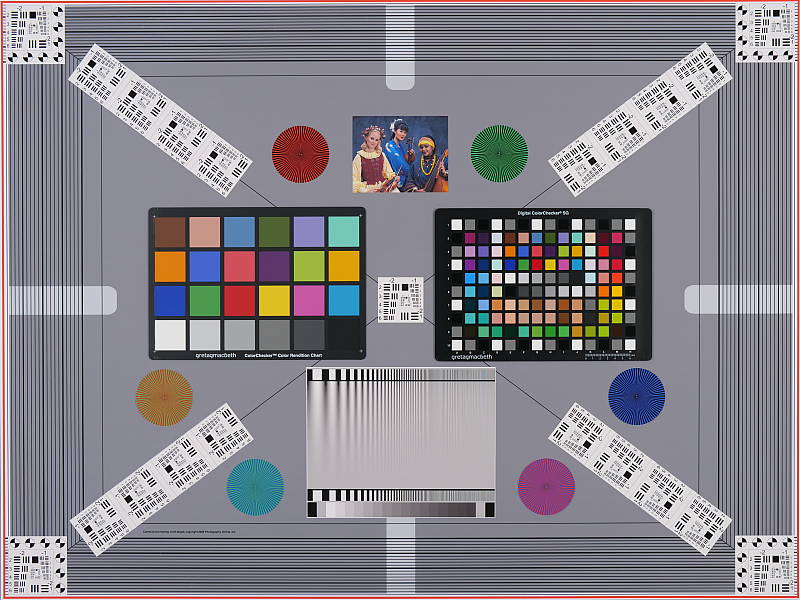
| In the diagram above, the squares show the original color, and the circles show the color that the camera captured at base ISO. More saturated colors are located toward the periphery of the graph. Hue changes as you travel around the center. Thus, hue-accurate, highly saturated colors appear as lines radiating from the center. Click for a larger image. |
Saturation. The Panasonic G9 produced a default mean saturation of about 109.3% (9.3% oversaturated) at the base ISO of 200, which is fairly typical. The Lumix G9 pumps dark blues and dark red moderately, some other colors mildly, but undersaturates yellow a bit more than we'd like. Still, overall default saturation levels are quite pleasing and keep in mind saturation can be adjusted. Most consumer digital cameras produce color that's more highly saturated (more intense) than found in the original subjects. This is simply because most people like their color a bit brighter than life.
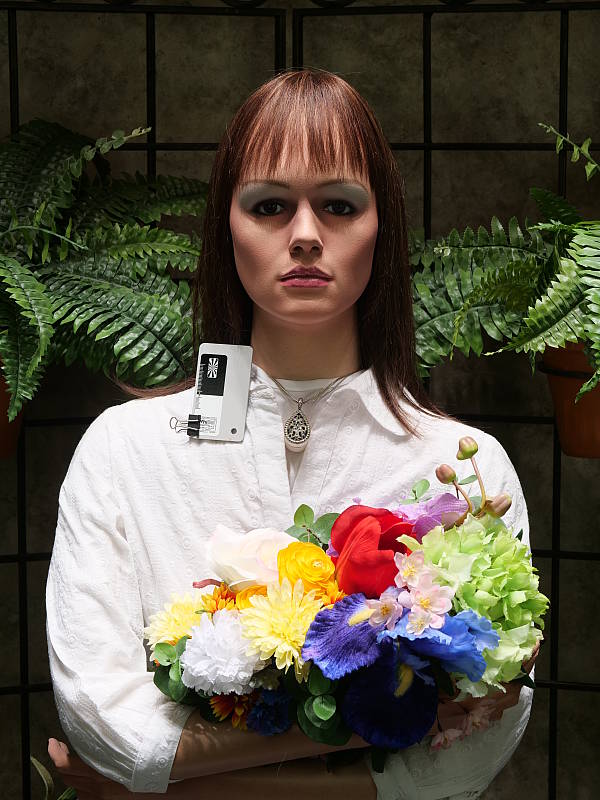
Skin tones. The Panasonic G9 produced natural-looking Caucasian skin tones with a slight boost to pinks with either Auto or Manual white balance in simulated daylight. A good job here. Where oversaturation is most problematic is on Caucasian skin tones, as it's very easy for these "memory colors" to be seen as too bright, too pink, too yellow, etc.
Hue. The Panasonic G9 shifted orange toward yellow moderately and yellow toward green mildly, while cyan was shifted toward blue by quite a bit (for better-looking skies), but other hue shifts were quite minor. The typical Panasonic yellow to green shift and desaturation still exists producing slightly dingy yellows, but it's not as pronounced as some earlier models. The G9's mean "delta-C" color error after correction for saturation was 4.67 at the base ISO of 200 (100 is an extended ISO). That's slightly better than average hue accuracy these days. Hue is "what color" the color is.


Sensor
Exposure and White Balance
Indoors, incandescent lighting
Warm color casts with default Auto and Incandescent white balance settings. Very good color balance with the Manual setting. Average amount of exposure compensation required.


Indoors, under normal incandescent lighting, color balance was warm with the default Auto white balance (AWB) setting, however when AWBc was selected, colors were more neutral though with a slight magenta tint. Results with the Incandescent setting were much too warm, with a strong orange-yellow cast. The Manual (Custom) white balance setting produced very neutral results. The Panasonic G9 required +0.3 EV exposure compensation here, which is about average for this shot. (Our test lighting for this shot is a mixture of 60 and 100 watt household incandescent bulbs, a pretty yellow light source, but a very common one in typical home settings here in the U.S.)
Outdoors, daylight
Natural colors overall, with a tendency toward high contrast under harsh lighting. About average exposure accuracy.
In simulated daylight, the Panasonic G9 performed quite well. Skin tones were realistic in our "Sunlit" Portrait shot, with a healthy-looking pinkish tint. Exposure accuracy was about average, as the camera required +0.7 EV compensation to keep facial skin tones reasonably bright. That's typical for this shot. Despite the bright appearance of the mannequin's white shirt, very few highlights are actually blown which is quite good, though there are some very deep shadows that contain very good detail, but are discolored with a greenish tint.
Native Resolution
~ 2,700 to 2,750 lines of strong detail.


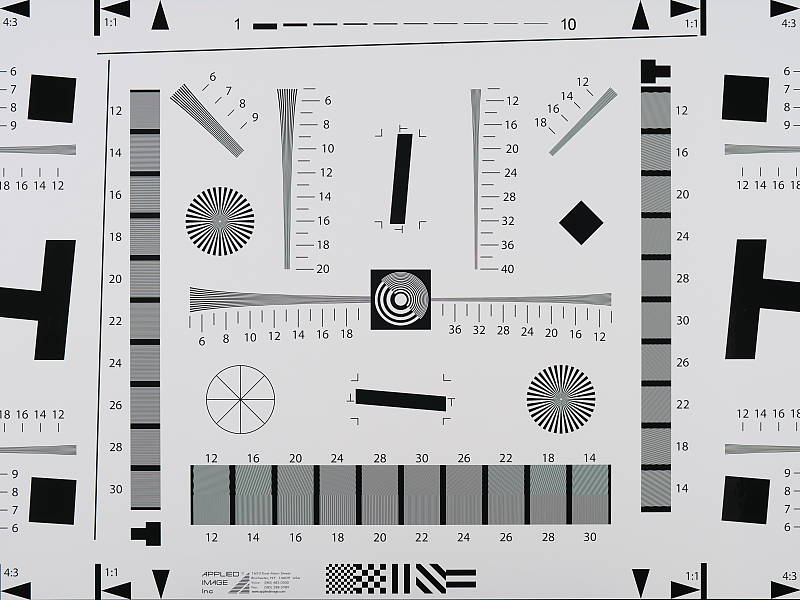
In a best-quality camera JPEG, our laboratory resolution chart reveals sharp, distinct line patterns to just over 2,700 lines per picture height horizontally, and to about 2,750 lines in the vertical direction. (Some might argue for higher, but lines begin to merge and aliasing artifacts begin to interfere at these limits.) Complete extinction of the pattern occurred between 3,500 and 3,600 lines per picture height in both directions. We weren't able to extract significantly more resolution by processing the Panasonic G9's RW2 file using Adobe Camera Raw, and the ACR conversion also shows much higher color moiré which is practically nonexistent in the camera JPEG.
Use these numbers to compare with other cameras of similar resolution, or use them to see just what higher resolution can mean in terms of potential detail.
Sharpness & Detail
Very good sharpness overall, with only minor edge-enhancement artifacts on high-contrast subjects. Signs of mild noise suppression visible in the shadows at base ISO.


Sharpness. The Panasonic G9 captures sharp, detailed images with a sharp lens. Some minor edge enhancement artifacts are visible on high-contrast subjects such as the sharpening "haloes" along the lines and text in the crop above left, but default sharpening appears to be well judged and not too overdone. Edge enhancement creates the illusion of sharpness by enhancing colors and tones right at the edge of a rapid transition in color or tone.
Detail. The crop above right shows relatively mild noise suppression artifacts such as the smudging of individual strands together in the darker areas of the mannequin's hair, as well as in areas with low local contrast. This is very good noise versus detail processing performance for a 20-megapixel Micro Four Thirds model, leaving plenty of detail intact instead of blurring much of it away in an attempt to suppress noise. Do however notice the aliasing artifacts ("jaggies") and demosaicing errors in the hair. This is unfortunately quite common, especially from cameras without an optical low-pass filter like the G9. The G9's context-sensitive anti-noise processing can also produce somewhat unnatural looking artifacts in some cases (as mentioned below), however overall we think it does a great job at holding onto detail while keeping noise in check. Noise-suppression systems in digital cameras tend to flatten-out detail in areas of subtle contrast. The effects can often be seen in shots of human hair, where the individual strands are lost and an almost "watercolor" look appears.
RAW vs In-Camera JPEGs
As noted above, the Panasonic G9 produces sharp in-camera JPEGs with very good detail. As is almost always the case, better detail can be obtained from carefully processing RAW files than can be seen in the in-camera JPEGs, with fewer sharpening artifacts to boot. Take a look below, to see what we mean:
|
Base ISO (200)
|
|
 |
 |
 |
 |
 |
 |
|
Camera JPEG, defaults
|
RAW via Adobe Camera Raw
|
In the table above, we compare an in-camera JPEG taken at base ISO using default noise reduction and sharpening (on the left) to a matching RAW file converted with Adobe Camera Raw 9.1 via DNG Converter 10.4, using default noise reduction with some fairly strong but tight unsharp masking applied in Photoshop (300%, radius of 0.3 pixels, and a threshold of 0).
As you can see, the in-camera JPEG contains very good detail (among the highest we've seen from a MFT camera thus far) with better contrast, however as is usually the case, ACR extracted additional detail, particularly in the red-leaf fabric where it managed to resolve more of the fine thread pattern. (The camera's context-sensitive noise reduction blurred some areas within the fabric more than others producing a less consistent, slightly unnatural-looking rendering.) However, the ACR conversion also contains much higher luminance noise after sharpening, especially noticeable in flatter areas with little detail. You can always turn up the luminance noise reduction (default of zero was used here), though, or process the files in your favorite noise reduction program or plugin if you find the noise objectionable.
Bottom line, though, while the G9's JPEG engine does a very good job and Panasonics are getting better with each iteration, shooting in raw mode and converting them yourself can still yield better detail and provides more control than in-camera JPEGs.
ISO & Noise Performance
Excellent high ISO performance for a Micro Four Thirds model.
|
Default Noise Reduction
|
||
 |
 |
 |
| ISO 100 | ISO 200 | ISO 400 |
 |
 |
 |
| ISO 800 | ISO 1600 | ISO 3200 |
 |
 |
|
| ISO 6400 | ISO 12,800 | ISO 25,600 |
The Panasonic G9's images are very detailed and clean at ISOs 100 (extended) through 400, with only minor luminance and chrominance noise detectable in the shadows. ISO 800 shows slightly higher luminance noise and stronger noise reduction, blurring some very fine detail in the process, though overall detail remains quite strong. ISO 1600 is of course a little noisier and softer, but fine detail is still very good. ISO 3200 shows increased blurring and loss of detail from stronger noise reduction which starts to produce a bit of a digital-looking "crystalline" effect in flatter areas. However chroma noise remains well-controlled. At ISO 6400 and above, noise and noise reduction artifacts become progressively stronger while fine detail is reduced to the point where very little fine detail is left in the hair at the maximum ISO of 25,600. Chroma noise remains well-controlled up to ISO 6400, but some chroma blotching is visible at higher ISOs. There's also a peppered effect at ISO 12,800 and especially ISO 25,600 from darker noise pixels.
Still, high ISO performance overall appears to be excellent for a Micro Four Thirds camera and significantly improved over its predecessor, the G85, despite the smaller pixels. We're of course pixel-peeping to an extraordinary extent here, since 1:1 images on an LCD screen have little to do with how those same images will appear when printed. See the Print Quality section below for our evaluation of maximum print sizes at each ISO setting.
Extremes: Sunlit, dynamic range and low light tests
Somewhat high default contrast but with very good dynamic range. Excellent low-light focus performance.


Sunlight. The Panasonic G9 performed well with the deliberately harsh lighting of this test. Contrast is a little high at its default setting, but dynamic range is quite good in JPEGs. We felt the +0.7 EV exposure is the best compromise here. Although shadows around the eyes are a bit dark, we prefer it to the +1.0 EV exposure overall, as the latter is a bit too bright (although surprisingly few highlights are blown even at +1.0 EV). It's really the photographer's choice here as to which direction to go in. For those Panasonic G9 owners that are going to want to just print an image with little or no tweaking, the +1.0 image would probably produce a better-looking face uncorrected. The bottom line though, is that the Panasonic G9 performed well with the wide dynamic range of this shot even without the use of Intelligent D-Range or Highlight/Shadow tweaks (see below), especially for a Four Thirds sensor.
Because digital cameras are more like slide film than negative film (in that they tend to have a more limited tonal range), we test them in the harshest situations to see how they handle scenes with bright highlights and dark shadows, as well as what kind of sensitivity they have in low light. The shot above is designed to mimic the very harsh, contrasty effect of direct noonday sunlight, a very tough challenge for most digital cameras. (You can read details of this test here.)
| Face Detection | ||
 |
 |
 |
| Off at 0 EV Aperture priority, f/8 |
On at 0 EV Aperture priority, f/8 |
Full Auto f/2 |
Face Detection. Like most cameras these days, the Panasonic G9 has the ability to detect faces, and adjust exposure and focus accordingly. As you can see from the examples above, it worked well, as the center image with face detection enabled is much better exposed for the face without having to use exposure compensation, though some highlights were blown. The Full Auto setting chose Portrait scene mode which selected a larger aperture (f/1.6) for much less depth-of-field and better subject isolation. It too was much brighter than Aperture Priority without face detection, though again, quite a few highlights are blown.

Panasonic's Intelligent Dynamic Range
The above shots are examples of Panasonic's Intelligent Dynamic Range Control (or iD-Range) at work, with no exposure compensation. Note that the camera does not take multiple shots and merge them as HDR mode does (see below). It's a system that adjusts local contrast and exposure more akin to Nikon's Active D-lighting, Canon's Automatic Lighting Optimization or Sony's Dynamic Range Optimization.
There are three levels of iD-Range available on the Panasonic G9: Low, Standard and High, plus Auto and Off. It's automatically invoked in iAuto and manually selectable in PASM modes. Here, you can see enabling iD-Range made a huge difference to the exposure without requiring any exposure compensation (it appears to use smarter metering and detected a face). Auto did a good job here, and darker midtones and shadows were progressively boosted as the strength was increased, although some highlights were blown in the process. As a result, though, noise is a little more visible, but that's expected.
|
Highlight/Shadow Comparison
|
|||
 |
|||
Highlight/Shadow Adjustment
Above, we can see the G9's preset Highlight and Shadow control options at work on our "Sunlit" Portrait test shots. This feature lets you adjust the tone curve using 4 preset options (Standard, Higher Contrast, Lower Contrast and Brighten Shadows), plus it gives you 3 Custom settings which let you adjust the curve on a grid. This gives you individual control of the highlight, midtone and shadow portions of the tone curve, unlike the regular contrast adjustment. Mouse over the links to load the associated thumbnail, and click on the links to visit the full resolution image. (Apologies for the dim images, we should have applied some positive exposure compensation here.)
|
HDR Comparison
|
||||
|
|
||||
HDR mode
Here, you can see the Panasonic G9's High Dynamic Range mode at work. HDR mode takes three images at different exposures and combines them to increase dynamic range. Four settings are available, ranging from Auto to up to +/-3 EV of exposure difference. Mouse over the links, and click on them the view the full resolution files.
Auto and +/-2 EV produced very similar results, while +/-3 dimmed the entire image, so the feature did not work very well for these shots. (Again, we should have used some positive exposure compensation here.) Be aware that double images and ghosting are possible when elements in the scene move between frames. Also notice the angle of view is narrower in the HDR images, likely because the images have been cropped and upsized during the optional auto alignment process.
Dynamic Range Analysis (RAW mode)
While we once performed our own dynamic range measurements based on in-camera JPEGs as well as converted RAW images (when the camera was supported by Adobe Camera Raw), we've switched to using DxO Labs' results from their DxOMark website. As technology advanced, the dynamic range of modern high-end cameras in some cases exceeded the range of the Stouffer T4110 density scale that we used for our own measurements. DxO's approach based on RAW data before demosaicing is also more revealing, because it measures the fundamental dynamic range of the sensor, irrespective of whatever processing is applied to JPEGs, or to RAW data by off-the-shelf conversion software.
In the following, we use DxO's "Print" dynamic range results, which are scaled based on camera resolution. As the name suggests, this scaling corresponds to the situation in which you print at a given size, regardless of how many megapixels the camera might have. (In other words, if you've decided to make a 13x19 inch print, that's the size you're printing, whether the camera's resolution is 16 or 300 megapixels.) Also note that DxO Labs uses a signal-to-noise (SNR) threshold of 1 when defining the lower boundary of acceptable luminance noise in their dynamic range measurements, which corresponds to the "Low Quality" threshold of the Imatest software we used to use for this measurement.
Unfortunately, DxOMark has not yet tested the Panasonic G9 as of this writing, but we'll come back and update this section once they do. In the meantime, Photons to Photos has published results for the G9, and it appears to offer significantly improved dynamic range compared to the GH5, while being comparable to the Olympus E-M1 Mark II.
Low-light Autofocus
The G9's autofocus system was able to focus on our legacy low-contrast AF target down to -4.8 EV unassisted with an f/2.8 lens, and down to about -6 EV with our newer high-contrast target. This is excellent performance, especially for a camera with contrast-detect autofocus. The Panasonic G9 also has a focus-assist light which allows it to autofocus in total darkness, as long as the subject is within range and has sufficient contrast.
NOTE: This low light test is conducted with a stationary subject, and the camera mounted on a sturdy tripod. Most digital cameras will fail miserably when faced with a moving subject in dim lighting. (For example, a child's ballet recital or a holiday pageant in a gymnasium.) Thanks to their phase-detect AF systems, digital SLRs tend to do much better than point & shoots, but you still shouldn't expect a quick autofocus lock with moving subjects. The G9 uses contrast-detect autofocus, as is found in most point & shoot cameras, so its low-light focusing ability may be less than that of some cameras with phase-detect systems. That said, though, the larger, more sensitive pixels of the G9's sensor do better under dim lighting than do the tiny pixels of most point & shoots.
Output Quality
Print Quality
Excellent 30 x 40 inch prints at ISO 100/200; a good 16 x 20 inch print at ISO 800, and a solid 11 x 14 at ISO 3200.
 ISO 100/200 deliver superb prints at 30 x 40 inches, and even larger if your viewing distance allows given the 20-megapixel resolution. The prints provide crisp detail and impressive color rendering, with plenty of three dimensional pop to please discerning eyes. Very pleasing prints overall!
ISO 400 yields a very good 24 x 36 inch print, displaying similar characteristics to the 30 x 40 inch prints at base and extended low ISOs. The larger 30 x 40 inch prints are certainly usable here as well, but mild softening is detected in certain areas of the prints upon close scrutiny, so we'll put our seal of approval on the 24 x 36 inch prints at this gain setting.
ISO 800 prints are quite good at 16 x 20 inches, which is still quite a nice-sized print given the gain is beginning to climb. On close inspection there is a mild softening in the red channel, typical of most cameras by this ISO sensitivity and print size, and just a touch of noise in flatter areas of our test target, but still a very good all-purpose print. It's well worth noting that the 20 x 30 inch prints here are quite usable for wall display purposes and less critical applications as well.
ISO 1600 manages a good 16 x 20 inch print, displaying a touch more visible noise in some areas of our target, but not enough to miss out on our good grade. However, for your most critical printing applications at this gain setting we suggest 13 x 19 inches to be sure.
ISO 3200 sees the strain of cranking the gain increase, as the G9 is only able to manage a workable 11 x 14 inch print. This is still a fairly nice-sized print, but for fine art printing to 13 x 19 inches and higher you obviously won't be able to rely on ISO 3200 or above, as there is simply too much apparent noise at the larger print sizes to yield dependable prints.
ISO 6400 delivers a good 8 x 10 inch print, but there is a noticeable lack of "pop" and richness in color overall, and this is common for most all but full-frame and larger sensors here. For this reason we suggest limiting the G9 to either ISO 1600 or 3200 for critical printing purposes. Still, you can get a good 8 x 10 inch print at this gain setting in a pinch.
ISO 12,800 prints a decent 5 x 7, and that's not too bad given how high this ISO is for this sensor size. At this size the detail is good enough for anything but critical applications, though anything larger begins to show too much in the way of noise and some obvious smearing effects from anti-noise processing.
ISO 25,600 comes very close to allowing a good 4 x 6 inch print, perhaps closer than any MFT camera to date. There is still reasonably full color reproduction and not the typical burnt look that haunts many cameras at this sensitivity, but just not quite enough fine detail to pass our good grade. Still, and more than most crop-sensor cameras, you can get decent results at 4 x 6 inches here for less-critical applications if needed.
Overall, the Panasonic G9 turns in a solid performance for print quality. Given that this camera is marketed for the most part at still photographers, and given its competition with cameras such as the Olympus E-M1 Mark II, the G9 does a good job of holding its own against both that model and the storied Panasonic GH5. You can safely expect very good prints at large sizes up to ISO 1600, and still get useful printed results through ISO 3200. Beyond that, you're not likely to get great printed results for your most important purposes, so heeding these settings in the field will help ensure good printed results.
The images above were taken from our standardized test shots. For a collection of more pictorial photos, see our Panasonic Lumix DC-G9 Photo Gallery .
Not sure which camera to buy? Let your eyes be the ultimate judge! Visit our Comparometer(tm) to compare images from the Panasonic Lumix DC-G9 with those from other cameras you may be considering. The proof is in the pictures, so let your own eyes decide which you like best!
Performance
Timing and Performance
Excellent overall performance.
| Startup/Play to Record | ||
|---|---|---|
| Power on |
~0.9 second
|
Time it takes to turn on and capture a shot. |
|
Play to Record, |
~0.7 second
|
Time until first shot is captured. |
Powering on and taking a shot was fast for a mirrorless camera, at about 0.9 second. Switching from Play to Record mode and taking a shot was a bit faster, at about 0.7 second. Very good performance here for a mirrorless camera, though most DSLRs are faster.
| Shutter Response (Lag Time) | ||
|---|---|---|
| Mechanical Shutter | ||
|
Full Autofocus, |
0.121 second
|
Time from fully pressing shutter button to image capture, with the lens already at the proper focal distance setting. |
| Manual Focus |
0.051 second
|
For most cameras, shutter lag is less in manual focus than autofocus, but usually not as fast as when the camera is "prefocused". |
|
Prefocused |
0.045 second
|
Time to capture, after half-pressing and holding shutter button. |
| Electronic Shutter | ||
|
Full Autofocus, |
0.125 second
|
Time from fully pressing shutter button to image capture, with the lens already at the proper focal distance setting. |
|
Manual Focus |
0.064 second
|
For most cameras, shutter lag is less in manual focus than autofocus, but usually not as fast as when the camera is "prefocused". |
|
Prefocused |
0.064 second
|
Time to capture, after half-pressing and holding shutter button. |
|
Note: All timing performed with a Panasonic Leica DG 12-60mm f/2.8-4 (H-ES12060) zoom lens at medium focal length (~50mm eq.). Performance may vary with other lenses and focal lengths.
|
||
The Panasonic G9's autofocus speed was excellent in our tests, especially for a camera that uses contrast-detect AF. In the lab, the G9 produced a full-autofocus shutter lag (with the subject at a fixed distance) of 0.121 second using 1-area (center) AFS mode with the Panasonic Leica DG 12-60mm f/2.8-4 lens at a focal length of about 25mm (50mm equivalent). That's faster than a lot of pro DSLRs.
Shutter lag in manual focus mode was very low at only 0.051 second, and prefocused shutter lag was even lower at 0.045 second. Very good performance here.
Using the fully electronic shutter option only slowed shutter lag slightly, as you can see in the second half of the table above.
To minimize the effect of different lens' focusing speed, we test AF-active shutter lag with the lens already set to the correct focal distance.
| Cycle Time (shot to shot) | ||
|---|---|---|
|
Single Shot mode |
< 0.3 second
|
Time per shot, averaged over a few frames (we no longer test for buffer depth in single-shot mode). |
|
Single Shot mode |
< 0.3 second
|
Time per shot, averaged over a few frames (we no longer test for buffer depth in single-shot mode). |
|
Early shutter |
No
|
Some cameras don't snap another shot if you release and press the shutter too quickly in Single Shot mode, making "No" the preferred answer. |
|
Continuous H mode (m-shutter) |
0.08 second
(12.1 fps); 600 frames total; 13 seconds to clear* |
Time per shot, averaged over buffer length of 600 frames, then slows to an average of 0.20s or 5.1 fps when buffer is full. |
|
Continuous H mode (m-shutter) |
0.08 second
(12.3 fps); 83 frames total; 14 seconds to clear* |
Time per shot, averaged over buffer length of 83 frames, then slows to an average of 0.38s or 2.6 fps when buffer is full. |
|
Continuous H mode (m-shutter) |
0.08 second
(12.3 fps); 67 frames total; 20 seconds to clear* |
Time per shot, averaged over buffer length of 67 frames, then slows to an average of 0.37s or 2.7 fps when buffer is full. |
|
Continuous SH2 mode (e-shutter) |
0.02 second
(60.0 fps); 50 frames total; 7 seconds to clear* |
Time per shot, averaged over capped buffer length of 50 frames, then stops. |
|
Continuous SH2 mode (e-shutter) |
0.02 second
(60.0 fps); 50 frames total; 14 seconds to clear* |
Time per shot, averaged over capped buffer length of 50 frames, then stops. |
|
Continuous SH2 mode (e-shutter) |
0.02 second
(60.0 fps); 50 frames total; 18 seconds to clear* |
Time per shot, averaged over capped buffer length of 50 frames, then stops. |
| Flash Recycling |
N/A
|
Flash at maximum output. |
|
*Note: Buffer clearing times measured with a 64GB Lexar Professional 2000x (260MB/s write) UHS-II SDXC card. Slower cards can produce correspondingly slower clearing times and may also limit length of bursts in continuous mode. ISO sensitivity and noise reduction settings can also affect cycle times and burst mode performance.
|
||
Single-shot cycle times were so fast that they were difficult to accurately measure as they depend on the tester's nimbleness and ability to maintain an optimum rhythm, so your results may vary. (Note that we no longer test single-shot mode with just RAW files, as the results are usually somewhere in between.)
In Continuous H mode, the fastest mechanical shutter burst mode, the G9 captured images at just over 12 frames-per-second no matter the file type, easily meeting Panasonic's 12 fps spec. Note that autofocus is locked at the first frame of a burst in this mode (AFS). Panasonic claims the G9 can manage up to 9 fps with AF updated between frames (AFC) when using the mechanical shutter, however we did not test that mode in the lab.
In Continuous SH2 mode, the fastest electronic shutter burst mode, the G9 was able to shoot full-resolution images at a blistering 60 frames-per-second no matter the file type, which is truly impressive for the size and resolution of the sensor. Again, this is with AF locked at the first frame. (Panasonic rates Continuous SH1 mode with AFC at 20 fps which is still amazing.)
Buffer depths were outstanding when shooting best quality JPEGs in Continuous H mode, at 600 frames before the camera slowed down with our fast 64GB Lexar Professional 2000x UHS-II SDXC card (rated for 260MB/s writes). Buffer depths fell to 83 RAW frames and 67 RAW+JPEG frames, though that's still very good.
In Continuous SH2 mode at 60 fps, the buffer depth was 50 frames for all file types and the camera stopped capturing after that until the buffer completely cleared. According to Panasonic, buffer depth in SH1 (AFC) mode at 20 fps is also about 50 frames, however we did not confirm that in the lab.
Buffer clearing times were reasonable considering the buffer sizes, taking about 13 seconds for a max length burst of JPEGs, 14 seconds for RAW frames, and about 20 seconds for RAW+JPEG files in Continuous Hi mode. The camera lets you make setting changes, review just-shot images and continue shooting while its buffer is clearing. Buffer clearing was faster in the 60 fps SH2 mode, ranging from about 7 seconds to 18 seconds depending on file type, but as mentioned the camera stops capturing at 50 frames and you can't view just-shot images, however you can adjust settings while it's clearing.
Bottom line, the Panasonic G9's performance is excellent overall, with reasonably fast startup, fast autofocus, low shutter lag, very fast cycle times, amazing burst performance, and generous buffer depths. It compares well with the Olympus E-M1 Mark II flagship as one of the two fastest Micro Four Thirds cameras currently on the market.
Battery
Battery Life
Good battery life for its class, with very flexible power options.
| Operating Mode | Battery Life |
|---|---|
|
Still Capture, CIPA standard
(Monitor / EVF with H-FS12060 lens) |
380 / 400 shots
|
|
Still Capture, CIPA standard
(Monitor / EVF with H-ES12060 lens) |
360 / 380 shots
|
The Panasonic G9 uses a custom DMW-BLF19 rechargeable lithium-ion battery pack for power, and comes with a single battery and a dedicated battery charger. In-camera battery charging and power supply via USB are both supported. Battery life is CIPA-rated for between 360 and 400 shots per charge depending on which display is active and which lens is used. That's slightly above average for a mirrorless camera but not nearly as good as most DSLRs when using their optical viewfinders. However the G9 has a Power Save LVF mode which when enabled, increases battery life to an excellent 890-900 shots per charge according to Panasonic. And the optional DMW-BGG9 power grip can double battery life with a second battery.
The table above shows the number of shots the camera is capable of (on a fully-charged rechargeable battery), based on CIPA battery-life and/or manufacturer standard test conditions.
(Interested readers can find an English translation of the CIPA DC-002 standards document here. (180K PDF document))
Image Quality
Below are crops from our laboratory Still Life target comparing the Panasonic G9's image quality at a few ISOs to its predecessor's, the G85, and against its more video-centric sibling, the GH5, as well as to several competing models at similar price points or in similar categories: the Fuji X-T3, Olympus E-M1 II and Sony A6500.
NOTE: These images are from best quality JPEGs straight out of the camera, at default settings including noise reduction and using the camera's actual base ISO (not extended ISO settings). All cameras in this comparison were shot with our very sharp reference lenses. Clicking any crop will take you to a carrier page where you can click once again to access the full resolution image as delivered straight from the camera. For those interested in working with the RAW files involved, click these links to visit each camera's respective sample image thumbnail page: Panasonic G9, Panasonic G85, Panasonic GH5, Fuji X-T3, Olympus E-M1 II and Sony A6500 -- links to the RAW files appear beneath those for the JPEG images, wherever we have them. And remember, you can always go to our world-renowned Comparometer to compare the Panasonic G9 to any camera we've ever tested!
Panasonic G9 vs Panasonic G85 at Base ISO
 |  |
 |  |
 |  |
Panasonic G9 at ISO 200 | Panasonic G85 at ISO 200 |
Here we compare the G9 to its predecessor, the G85, at base ISO. The G9 not only gets a resolution boost to 20 megapixels over the G85's 16-megapixel sensor, but it also gets improved image processing courtesy of Panasonic's latest generation Venus processor. As you can see, the G9 image has a larger scale and is more detailed from the increased pixel count. We also see improved contrast and more pleasing color from the G9's revised processing. Moiré patterns are more visible from the G9 here in the red-leaf fabric, however both cameras lack an optical low-pass filter, so the G85 can also generate aliasing artifacts, just in different situations because of its lower resolution. Our tricky red-leaf fabric also illustrates the G9's context-sensitive processing, where it retains and even exaggerates the fabric's thread pattern in some areas but not in others, while the G85 produces a smoother rendering with virtually no thread pattern visible (although some of the difference here is just a result of the G85's lower resolving power). | |
Panasonic G9 vs Panasonic GH5 at Base ISO
|  |
|  |
|  |
Panasonic G9 at ISO 200 | Panasonic GH5 at ISO 200 |
These two siblings produce very similar image quality here at base ISO, as both feature OLPF-less 20-megapixel sensors with the same generation Venus image processor. The G9 image is just a bit sharper and slightly more detailed, however be aware we have changed our lab lens and aperture for Micro Four Thirds cameras since the GH5 was shot, moving from a Zuiko 50mm f/2 at f/8 to a Leica Nocticron 42.5mm f/1.2 at f/5.6 which results in slightly sharper images with less diffraction. Thus, the slightly sharper G9 image can be attributed to better optics. | |
Panasonic G9 vs Fujifilm X-T3 at Base ISO
|  |
|  |
|  |
Panasonic G9 at ISO 200 | Fujifilm X-T3 at ISO 160 |
Above we compare the Bayer-filtered MFT Panasonic G9 to the X-Trans-filtered APS-C Fuji X-T3. You might expect the 26-megapixel X-T3 to have a noticeable resolution advantage over the 20-megapixel G9 here, but both cameras have similar dimensions on the vertical axis (4160 vs 3888 pixels) which is how this target is framed, so the resolution difference is very minor and mostly boils down to different demosaicing algorithms and processing. Luminance noise appears a little higher from the X-T3 in flatter areas, but the G9 produces a crisper image with slightly better detail overall. The G9 does noticeably better in most of the fabrics, but it also shows more aliasing artifacts which the XT-3's X-Trans filter helps avoid. Both cameras produce pleasing colors though the Fuji's are warmer. | |
Panasonic G9 vs Olympus E-M1 II at Base ISO
|  |
|  |
|  |
Panasonic G9 at ISO 200 | Olympus E-M1 II at ISO 200 |
Above we compare the G9 to another 20-megapixel MFT camera without an OLPF, the Olympus E-M1 II. At base ISO, the G9 does a slightly better job at rendering fine detail while the E-M1 II image shows more obvious sharpening haloes and is slightly cleaner. Again, be aware we have since changed lab lenses and aperture for MFT cameras, though, giving the G9 a somewhat "unfair" advantage in optics here, though some of the difference in detail is due to the E-M1 II's stronger default noise reduction at base ISO. We know this because the E-M1 II's extended low ISO 64 shot shows significantly more detail in the red-leaf swatch and elsewhere in the target. The sharper optics also likely contribute to moiré patterns in the red-leaf fabric being more visible from the G9 as well, though again the E-M1 II's stronger default noise reduction does blur the leaf and thread patterns quite a bit more than the G9 here at ISO 200. | |
Panasonic G9 vs Sony A6500 at Base ISO
|  |
|  |
|  |
Panasonic G9 at ISO 200 | Sony A6500 at ISO 100 |
Here we compare the 24-megapixel APS-C Sony A6500 to the 20-megapixel MFT G9. At base ISO, the A6500 produces a slightly crisper, more detailed image with almost no sharpening haloes. The A6500 also exaggerates the offset printing coloration in the mosaic label which the G9 appears to attenuate. Fine detail and contrast are much better in our tricky red-leaf swatch from the Sony as well, however moiré patterns are visible from both cameras. Colors are cooler but generally more accurate from the Panasonic. | |
Panasonic G9 vs Panasonic G85 at ISO 1600
 |  |
 |  |
 |  |
Panasonic G9 at ISO 1600 | Panasonic G85 at ISO 1600 |
At ISO 1600, the G9 shows significant improvements in both detail retention and color reproduction over its predecessor, while producing slightly lower luma and chroma noise levels in flatter areas despite its smaller pixels. | |
Panasonic G9 vs Panasonic GH5 at ISO 1600
|  |
|  |
|  |
Panasonic G9 at ISO 1600 | Panasonic GH5 at ISO 1600 |
As expected, we see very similar image quality from these two siblings here at 1600 with just minor differences in color and noise, though again the G9 produced a slightly sharper, more contrasty image thanks to the better optics. | |
Panasonic G9 vs Fujifilm X-T3 at ISO 1600
|  |
|  |
|  |
Panasonic G9 at ISO 1600 | Fujifilm X-T3 at ISO 1600 |
The G9 continues to do a better job rendering fine detail than the X-T3 here at ISO 1600, while at the same time producing much lower luma noise. The Fuji however produces fewer aliasing artifacts and lower chroma noise. Again, colors are noticeably warmer from the Fuji but still pleasing. | |
Panasonic G9 vs Olympus E-M1 II at ISO 1600
|  |
|  |
|  |
Panasonic G9 at ISO 1600 | Olympus E-M1 II at ISO 1600 |
At ISO 1600, the G9 holds onto significantly more fine detail than the E-M1 II. While the sharper lens contributes to the G9's better performance, the E-M1 II's stronger default noise reduction plays a larger roll here, smudging fine detail while still producing higher luma noise in flatter areas, though the Olympus' noise "grain" pattern is tighter and more consistent. | |
Panasonic G9 vs Sony A6500 at ISO 1600
|  |
|  |
|  |
Panasonic G9 at ISO 1600 | Sony A6500 at ISO 1600 |
The G9 competes quite well with the A6500 here at ISO 1600, retaining similar levels of fine detail with lower noise and better color, however sharpening artifacts are more evident. The Sony does noticeably better in our tricky red-leaf swatch though. | |
Panasonic G9 vs Panasonic G85 at ISO 3200
 |  |
 |  |
 |  |
Panasonic G9 at ISO 3200 | Panasonic G85 at ISO 3200 |
Again, the higher-resolution G9 does better at retaining fine detail with improved contrast and color while at the same producing less objectionable noise "grain" in flatter areas. The G9 also produces fewer sharpening artifacts along most edges, however some edges aren't as well defined as from the G85. | |
Panasonic G9 vs Panasonic GH5 at ISO 3200
|  |
|  |
|  |
Panasonic G9 at ISO 3200 | Panasonic GH5 at ISO 3200 |
Once again, just minor differences between the two siblings here at ISO 3200, with the G9 producing slightly better color and contrast. Upon close inspection, noise levels appear a little lower from the G9, and the "grain" pattern is less blocky or "digital-looking" in flatter areas as well. | |
Panasonic G9 vs Fujifilm X-T3 at ISO 3200
|  |
|  |
|  |
Panasonic G9 at ISO 3200 | Fujifilm X-T3 at ISO 3200 |
At ISO 3200, the G9 image appears sharper, contrastier and cleaner, but with more noticeable sharpening haloes. Fine detail is a little better from the X-T3 in our troublesome red-leaf fabric, though both cameras blur it significantly at this ISO. Colors are still warmer from the Fuji. | |
Panasonic G9 vs Olympus E-M1 II at ISO 3200
|  |
|  |
|  |
Panasonic G9 at ISO 3200 | Olympus E-M1 II at ISO 3200 |
This is a pretty close race here at ISO 3200, with the G9 cranking up its default noise reduction more than the E-M1 II compared to ISO 1600. The G9 image has slightly higher contrast and is a bit sharper with more visible sharpening haloes, but both cameras hold onto similar amounts of detail. Luma noise is noticeably higher from the Olympus, though, but it's more fine-grained and film-like in appearance. | |
Panasonic G9 vs Sony A6500 at ISO 3200
|  |
|  |
|  |
Panasonic G9 at ISO 3200 | Sony A6500 at ISO 3200 |
The A6500 image is crisper with better detail here at ISO 3200, but it's also much noisier in the flatter areas, so it's difficult to pick a definitive winner here as it comes down to personal preference. Color remains better from the Panasonic, if a bit cool. | |
Panasonic G9 vs. Panasonic G85, Panasonic GH5, Fujifilm X-T3, Olympus E-M1 II, Sony A6500
 |  |  |  |  |  |
 |  |  |  |  |  |
 |  |  |  |  |  |
| Panasonic G9 ISO 200 ISO 3200 ISO 6400 | Panasonic G85 ISO 200 ISO 3200 ISO 6400 | Panasonic GH5 ISO 200 ISO 3200 ISO 6400 | Fujifilm X-T3 ISO 160 ISO 3200 ISO 6400 | Olympus E-M1 II ISO 200 ISO 3200 ISO 6400 | Sony A6500 ISO 100 ISO 3200 ISO 6400 |
| Detail comparison. High-contrast detail is also important, pushing the camera in different ways, so we like to look at it separately. As you can see, the Panasonic G9 offers improved contrast and detail compared to the G85 across ISOs. As expected, performance is very similar to the GH5, with the only minor differences in color, though some of that just comes down to white balance error. The G9 bests the only other Micro Four Thirds camera in this group at higher ISOs, the Olympus E-M1 II, but keep in mind the updated lens. The G9's performance is competitive with the X-T3's especially as ISO climbs, however the Sony A6500 arguably leads the pack overall by producing excellent detail, contrast and sharpness across ISOs with minimal sharpening haloes. | |||||
Excellent 30 x 40 inch prints at ISO 100/200; a good 16 x 20 inch print at ISO 800, and a solid 11 x 14 at ISO 3200.
ISO 100/200 deliver superb prints at 30 x 40 inches, and even larger if your viewing distance allows given the 20-megapixel resolution. The prints provide crisp detail and impressive color rendering, with plenty of three dimensional pop to please discerning eyes. Very pleasing prints overall!
ISO 400 yields a very good 24 x 36 inch print, displaying similar characteristics to the 30 x 40 inch prints at base and extended low ISOs. The larger 30 x 40 inch prints are certainly usable here as well, but mild softening is detected in certain areas of the prints upon close scrutiny, so we'll put our seal of approval on the 24 x 36 inch prints at this gain setting.
ISO 800 prints are quite good at 16 x 20 inches, which is still quite a nice-sized print given the gain is beginning to climb. On close inspection there is a mild softening in the red channel, typical of most cameras by this ISO sensitivity and print size, and just a touch of noise in flatter areas of our test target, but still a very good all-purpose print. It's well worth noting that the 20 x 30 inch prints here are quite usable for wall display purposes and less critical applications as well.
ISO 1600 manages a good 16 x 20 inch print, displaying a touch more visible noise in some areas of our target, but not enough to miss out on our good grade. However, for your most critical printing applications at this gain setting we suggest 13 x 19 inches to be sure.
ISO 3200 sees the strain of cranking the gain increase, as the G9 is only able to manage a workable 11 x 14 inch print. This is still a fairly nice-sized print, but for fine art printing to 13 x 19 inches and higher you obviously won't be able to rely on ISO 3200 or above, as there is simply too much apparent noise at the larger print sizes to yield dependable prints.
ISO 6400 delivers a good 8 x 10 inch print, but there is a noticeable lack of "pop" and richness in color overall, and this is common for most all but full-frame and larger sensors here. For this reason we suggest limiting the G9 to either ISO 1600 or 3200 for critical printing purposes. Still, you can get a good 8 x 10 inch print at this gain setting in a pinch.
ISO 12,800 prints a decent 5 x 7, and that's not too bad given how high this ISO is for this sensor size. At this size the detail is good enough for anything but critical applications, though anything larger begins to show too much in the way of noise and some obvious smearing effects from anti-noise processing.
ISO 25,600 comes very close to allowing a good 4 x 6 inch print, perhaps closer than any MFT camera to date. There is still reasonably full color reproduction and not the typical burnt look that haunts many cameras at this sensitivity, but just not quite enough fine detail to pass our good grade. Still, and more than most crop-sensor cameras, you can get decent results at 4 x 6 inches here for less-critical applications if needed.
Overall, the Panasonic G9 turns in a solid performance for print quality. Given that this camera is marketed for the most part at still photographers, and given its competition with cameras such as the Olympus E-M1 Mark II, the G9 does a good job of holding its own against both that model and the storied Panasonic GH5. You can safely expect very good prints at large sizes up to ISO 1600, and still get useful printed results through ISO 3200. Beyond that, you're not likely to get great printed results for your most important purposes, so heeding these settings in the field will help ensure good printed results.
Field Test Part I
Field Test Part II
An impressive mirrorless camera with great design & performance

The Panasonic GH5 -- and new GH5S -- clearly offer videographers a ton of great features and performance. They aren't slouches when it comes to still imaging performance either, but the Panasonic G9 appears to deliver many of the great video features of its GH5 siblings while delivering even more impressive imaging performance. Plus, the G9 is compact, comfortable to use and carries a smaller price tag than the GH5 too. On paper, there is a lot to like. Let's see how the G9 does in the real world.
Key Features and Specifications
- Redesigned camera body with top-deck display
- Tilt/swivel touchscreen display
- Electronic viewfinder with 0.83x magnification
- 20.3-megapixel Live MOS Micro Four Thirds image sensor
- Native ISO range of 200-25,600
- 225-point autofocus system
- Up to 20 frames per second with AF-C, 60 fps with AF-S
- In-body image stabilization
- 4K UHD video at up to 60 frames per second
- 6K Photo
- Wi-Fi and Bluetooth connectivity
- $1,699 retail price

Camera Body and Handling
In William Brawley's hands-on first impressions of the Panasonic G9, he went into a lot of detail regarding the G9's ergonomics and handling. I want to add my two cents as everyone's experience with a camera will be a bit different.
With that said, I certainly echo William's sentiments that the G9 feels very secure in the hand. The G9 feels fantastic. The grip is chunky without making the camera huge. It's large for a Micro Four Thirds mirrorless camera, but it is still pretty compact and lightweight without sacrificing anything by way of physical controls. It is like a downsized pro DSLR.
The camera includes convenient dual control dials, both of which rotate nicely. The star of the show for me, however, is the top deck of the camera in general. I do wish that the rear command dial was the same as the top command dial. The top one feels like one you'd find on a high-end DSLR with a heavily-ridged rubber surface. Whereas the rear one is different material and rotates differently. As for the top deck features, it includes white balance, ISO and exposure compensation buttons behind the shutter release and there's a very nice top display as well. The G9 is the first Panasonic mirrorless camera to include the top display, and it's an excellent addition.

The rear of the camera is very good, as well. The touchscreen display tilts and articulates, a great feature when working on a tripod at odd angles or recording video, and there are multiple function buttons provided on the camera, too. Plus, there's a joystick to go with the directional pad. One thing I don't love about the joystick is that you cannot move the AF point diagonally, which is strange, and it can feel a bit finicky with respect to control. It doesn't always feel like my input is correctly registered. With that said, the joystick is still a nice feature and the overall handling of the camera is superb.
Electronic Viewfinder
While the electronic viewfinder falls under the general purview of the camera body and handling, I wanted to go into it in greater detail because it's very good. The OLED electronic viewfinder delivers 100% coverage and has a massive 0.83x magnification (35mm-equivalent). This is a big step up from the G85, for example, which had 0.74x magnification. Not only is the EVF large and crisp, but it also is very fast with a 120 frames per second refresh rate. It's blackout-free, fast and sharp. I couldn't ask for anything more, and I think that the G9 offers one of the best electronic viewfinders I've used, not just for a Micro Four Thirds camera, but in general.
Image Sensor and Image Quality
Utilizing the same 20.3-megapixel sensor as the Panasonic GH5, you'd expect that image quality would be much the same with the G9. However, Panasonic says they've tweaked the image processing to improve image quality. The G9 delivers very nice image quality, particularly at low ISOs, but the in-camera processing still feels a bit heavy-handed at times.
Consider the pair of images below. The first one was shot at ISO 200 and the second at ISO 2000. It shouldn't surprise us that the ISO 200 image has much better fine detail than the ISO 2000 image, but I want to bring attention to the feathers between the eye and the beak in particular. There are a lot of details present in the ISO 200 image that are essentially absent from the ISO 2000 image.


If you zoom out or are making a smaller print, the two images display very similar quality. The G9 does a good job of smoothing out visual noise in areas without fine detail. The G9 also handles colors and dynamic range similarly well at ISO 200 and 2000 in this particular scene. There is slightly better shadow and highlight detail in the ISO 200 file, but if you have a good exposure at the time of capture, the difference isn't large or even likely to be noticeable in many situations.


Let's consider a much higher ISO, ISO 12,800, which is half the G9's maximum native ISO. When viewing the image zoomed out, it doesn't look bad. If you take a closer look, the G9's struggles become evident. The sensor is quite small, so we ought not to expect excellent performance here, but high ISO is going to be a weak area for the G9 when compared its APS-C competition. Looking at the JPEG image, we see detail loss, false color and blotchiness due to the noise reduction. Looking at the RAW image, there's a bit more detail but also considerable noise.


With respect to shadow recovery of RAW files in particular, consider the image below. The first image is the original straight from the camera JPEG image captured with default settings. The second image is a JPEG export of a RAW file which has had +100 Shadows adjustment performed in Adobe Camera Raw and nothing else. You can pull a considerable amount of detail out of the shadows for a Four Thirds sensor. However, you, of course, introduce noise when you do this, but it isn't too bad at all. I'm impressed with the shadow recovery of the G9's files.


And what about highlight detail? Looking at the image below, the RAW-processed version has Adobe Camera Raw defaults plus -100 Highlights adjustment. We can see that the RAW file allowed for considerable recovery in the sky and none of the originally clipped highlights remained clipped.


Overall, the Panasonic G9's 20.3-megapixel sensor delivers great images across a flexible ISO range. At low ISOs, images are sharp and detailed, although they do display some occasional odd artifacts due to the aggressive in-camera JPEG processing. RAW images are versatile, allowing for a good amount of shadow and highlight recovery. Plus, when shooting RAW images, you can control the sharpening yourself and produce better final images. High ISO is the lone weak area for the G9, especially when compared to APS-C cameras, many of which are similar in overall size to the G9 despite their larger sensors.
Autofocus
In what seems to be a trend, the G9 utilizes the same basic autofocus system as the GH5 but is said by Panasonic to actually be better. The Advanced Depth from Defocus (Advanced DFD) autofocus system has 225 autofocus points, which bests the G85's total by 176, and is said to lock autofocus in as little as 0.04 seconds. In the lab, the performance was certainly impressive. In the real-world, I was equally impressed by the G9's autofocus system.
Autofocus is fast and accurate, and it is able to handle very difficult situations. For example, when photographing small, moving birds in amongst tree branches, the G9 was able to stick to its guns very well and maintain good focus on the subject. It wasn't easily deterred by a small element popping in front of the subject and when focus was lost, which is inevitable, it was able to quickly recover.


Continuous autofocus performance, in particular, is very good. The camera is able to reliably track the subject throughout the frame while also quickly recovering from lost focus. This was true with all three lenses I used but was most impressed when shooting with the 100-400mm at 400mm (800mm equivalent). To be able to have quick autofocus at such a focal length is excellent and makes the G9 a particularly flexible and versatile camera.
An aspect of the G9's design that I like is that you can easily switch between AF-S and AF-C via a rotating dial on the rear of the camera. It is easy to reach and is right above the autofocus point joystick. Further, the G9's full suite of autofocus modes is impressive. You can select between face/eye detection, tracking, 225-area, Custom Multi and 1-area when using AF-C, and then when using AF-S, a Pinpoint option becomes available. Pinpoint essentially just zooms in on the selected autofocus area, which works well when you are on a tripod and want to check for precision focus. Regarding Custom Multi, it's a neat little feature that allows you to customize an autofocus area within the frame. This is good if you are shooting in an odd, but repeatable, situation where you want autofocus in a distinct arrangement in the frame.
Overall, the Panasonic G9 delivers excellent autofocus performance and is very fast. Having used the G85, the G9 is a big step up in terms of features, speed and performance. The G85 was already impressive, but the G9 is superb.
Performance
If you think that the Sony A9 delivers impressive performance for a mirrorless camera, you will likely be similarly impressed by the G9. Obviously they are very different cameras in terms of sensor size, but they're not so different in terms of speed. Like the A9, the G9 can also shoot at 20 frames per second with full continuous autofocus -- which, as discussed above, is a pretty impressive AF system -- and 60 frames per second with locked autofocus. That's insane. This does require you to use the electronic shutter, but nonetheless, that type of speed is staggering.

Supposing you want to use the mechanical shutter, you still have access to great performance. The G9 can shoot at just over 12 fps with the mechanical shutter and has an impressive RAW buffer depth of over 80 frames per our laboratory testing. This buffer clears in 14 seconds too, which is good. Of course, performance will vary based on the SD card used, but the G9 does deliver UHS-II support in both of its card slots.
During my real-world testing, the camera was snappy in most situations. The rare time the camera felt slow was when trying to power on the camera and playback images. This process felt sluggish, but during shooting situations, the G9 is a very fast camera. Its battery life is pretty good, too. The G9 is rated for up to 400 shots, which is good for its class, but honestly I think that the camera does a bit better in practice than that, at least based on my experience.
Field Test Part I Summary
Panasonic G9 makes strong first impressions thanks to excellent performance
What I liked:
- Comfortable camera body
- Tilting and articulating touchscreen display
- Very good image quality
- Very good autofocus
- Fast shooting speeds
What I disliked:
- Autofocus joystick is a bit finicky
- Not as compact for a Micro Four Thirds camera as some shooters may desire
- Rear command dial has a loose feel
- In-camera JPEG processing is very aggressive and can produce unnatural edges in images
So far, the Panasonic G9 has excelled in terms of handling and performance. Its image quality is very good, although I find its JPEG processing to be heavy-handed. Autofocus performance and shooting speeds are incredible and certainly high points so far for the G9.

In the next Field Test, I will be looking at the video performance of the Panasonic G9. In a third and final Field Test, I will look closer at shooting modes, the overall shooting experience, and then offer my final thoughts on the camera. Stay tuned for more on the Panasonic G9.
Field Test Part III
A lot of great video features including 4K/60p recording
Recap of Field Test Part I
In my first G9 Field Test, I discussed the camera's ergonomics and handling; image sensor and image quality; performance; autofocus and more. In the second Field Test, I will be discussing the camera's video features and performance. The G9 is a very capable video camera, as we will see, but it's not without its shortcomings. Let's find out how it does on balance compared to its predecessor and competition.
Video
The G9 is a very capable video camera, not only in general but especially for its price point. Priced well under $2,000, the G9 can record 4K video at up to 60 frames per second, which is very impressive and still fairly uncommon for a camera at this price. There is a downside to this 4K/60p video, however, which is that the recording length is limited to 10 minutes. By reducing the frame rate to 30 fps, the G9 can record 30-minute long 4K clips. While many video features are shared between the Panasonic GH5 and the G9, the former does deliver longer 4K/60p clips. The G9 records 4K/60p video at a bitrate up to 150Mbps and 30p video at 100Mbps. The video output tops out at 4:2:0 8-bit quality unless you use the full-size HDMI output, which offers 4:2:2 video at 30p, although it's still 4:2:0 when using 60p.
G9 4K/60p Video 3840 x 2160 video recorded with 12-35mm f/2.8 II lens at 35mm (76mm eq. with 16:9 crop) at 60 frames per second, 1/125s shutter speed, f/8 aperture Download Original (225.2 MB .MP4 File) |
G9 4K/30p Video 3840 x 2160 video recorded with 12-35mm f/2.8 II lens at 35mm (76mm eq. with 16:9 crop) at 30 frames per second, 1/60s shutter speed, f/11 aperture Download Original (136.4 MB .MP4 File) |
That said, the G9 delivers a ton of great features. The camera records using the full width of its sensor, cropping off only the top and bottom of the frame for 16:9 aspect ratio video, and it does not have any pixel binning or skipping at either 4K UHD or Full HD resolutions. Speaking of Full HD recording, the G9 can record 1920 x 1080 video at a very impressive 180 fps.
G9 Full HD High-Speed Video 1920 x 1080 video recorded with 12-35mm f/2.8 II lens at 35mm (76mm eq. with 16:9 crop) at 180 frames per second, automatic shooting settings and locked focus Download Original (180.8 MB .MP4 File) |
Autofocus
In my first Field Test, I discussed how good the G9's autofocus performance is when recording still images, even at high continuous shooting speeds, and its video autofocus is similarly impressive. The camera is quick and decisive with its focus and very rarely hunts once focus has been acquired, at least in good light.
G9 Autofocus Speed Test Video 3840 x 2160 video recorded with 100-400mm lens at various focal lengths at 30 frames per second Download Original (273.8 MB .MP4 File) |
In good light, the autofocus is very good. However, in lower light, there is some occasional hunting. You can see in the video below that the G9, despite the subject being fairly high contrast, struggled slightly with acquiring and maintaining focus.
G9 Low Light Autofocus Test Video 3840 x 2160 video recorded with 12-35mm f/2.8 II lens at various focal lengths at 30 frames per second, f/4.5 aperture, ISO 200 Download Original (167.6 MB .MP4 File) |
The focus modes are highly varied and include touch AF single point mode, fully automatic autofocus and subject tracking. I utilized subject tracking for the eagle video below to ensure that the eye remained in focus and the G9 did a very good job. In the second video below, the G9 did similarly well even when the subject was moving across the entirety of the frame. I was impressed with the subject tracking capabilities, especially considering that the lens was set to a very long focal length in both cases.
G9 4K Video #1 3840 x 2160 video recorded with 100-400mm lens at 300mm (653mm equiv.) at 30 frames per second, f/11, ISO 100 Download Original (447.2 MB .MP4 File) |
G9 Subject Tracking Autofocus Test Video 3840 x 2160 video recorded with 100-400mm lens at 300mm (653mm eq. with 16:9 crop) at 30 frames per second Download Original (569.6 MB .MP4 File) |
Video Quality
The G9 records video across a pretty wide range of ISOs, 100 to 12,800. In the video below, we can see a sample of each. I selected a difficult scene with respect to exposure and dynamic range so that I could more easily see how contrast changed with an increase in ISO. The first thing worth noting is that at ISO 100, which is an extended, non-native ISO setting, the entire scene is a slightly different brightness despite using the same exposure compensation setting during recording. It's not uncommon for extended ISO settings to deliver slightly different dynamic range.
G9 4K ISO Test Video 3840 x 2160 video clips recorded with 12-35mm f/2.8 II lens at 12mm (26mm eq. with 16:9 crop) and with various apertures to match exposure across ISO range. ISO settings are labeled on each clip. Download test video (819.1 MB .MP4 File) |
At low ISOs, the video quality is very good. We get some nice preservation of shadow and highlight detail, and there is good rendition of fine details. At ISO 800, there is some softening of the fine details, but the overall image still looks good. The softening continues at ISO 1600 and starts to produce a sort of blur effect across the entire frame. Contrast and colors are still nice, however, so it's certainly usable. ISO 3200 is similar in many respects but continues to become softer. ISO 6400 and 12800 video show instances of false color and are very soft; I would not use either of them unless it was absolutely necessary.
G9 4K Video #2 3840 x 2160 video recorded with 12-35mm f/2.8 II lens at 21mm (45mm eq.) at 30 frames per second, f/11, ISO 200 Download Original (131.8 MB .MP4 File) |
On a related note, the G9 offers the very useful ability to independently set Auto ISO lower and upper limits for video. It's very nice to have the option to set different auto ISO behavior for still and video recording.
Overall, video quality from the G9 is excellent from ISO 100 to 400, very good at ISO 800, pretty good at ISO 1600 and 3200 and fair at best at ISO 6400 and 12,800. The camera is very capable of producing excellent 4K UHD video footage.
Usability
The fully articulating screen, which is very useful for stills photography, is perhaps even more useful for video recording. The G9 offers live histogram and zebra warnings, which is very nice, especially when recording video. You can start a recording using the dedicated movie record button or the shutter depending on your shooting mode. Touchscreen functionality works great for video, much like it does when shooting stills. You can control exposure parameters with on-screen buttons, which is ideal for times you don't want to introduce audio issues or camera shake by rotating the camera's dials and pressing physical buttons.
Unusual for a fairly compact camera, the G9 has a full-size HDMI output. Via this output, you can playback up to 4K/60p video files, depending on your display, and the G9 also offers fully clean HDMI output.
The G9's image stabilization is excellent, and I'll discuss it further with respect to still images in my third Field Test. In the video below, I shot handheld at 364mm with different image stabilization settings and you can see how dramatic the effect can be, particularly when using electronic image stabilization. Of course, using electronic image stabilization does create a slight crop, which is visible in the video comparison. The crop is not massive, so it is not a big problem, especially as compared to recording shaky handheld video.
G9 Image Stabilization Test Video - Electronic IS On 3840 x 2160 video recorded with 100-400mm lens at 364mm (793mm eq. with 16:9 crop) at 30 frames per second, lens IS enabled and electronic IS enabled Download Original (83.4 MB .MP4 File) |
G9 Image Stabilization Test Video - Electronic IS Off 3840 x 2160 video recorded with 100-400mm lens at 364mm (793mm eq. with 16:9 crop) at 30 frames per second, lens IS enabled and electronic IS disabled Download Original (72 MB .MP4 File) |
Field Test Part II Summary
Not Panasonic's best 4K camera, but still very good
What I liked:
- Very good 4K video quality
- 4K/60p video recording
- Strong autofocus in many situations
- Articulating screen works well during video recording
What I disliked:
- Doesn't quite match the GH5 in terms of video features
- Only a 10-minute clip length when recording 4K/60p video
We saw in my first Field Test that the G9 is a very good stills camera. As it turns out, it's also a very good camera for shooting video. 4K UHD video quality is excellent across a pretty wide range of ISO speeds and autofocus/exposure performance is generally quite good too. Compared to the competition from outside Panasonic, the G9 is great for video. However, within Panasonic's lineup, the GH5 (and GH5S) do have the G9 beat in the video department. While it may top the GH5 with respect to some of its imaging features thanks to improved processing, the G9 does not quite match up with the GH5 across the board for video. Both cameras offer 4K/60p recording, for example, but the GH5 has a longer clip length and higher bit rate. There are other video features present in the GH5 that aren't in the G9, but nonetheless, the G9 delivers a lot to like for its price point. Overall, the G9 is an excellent camera for video, especially if you also desire a very good stills camera.
G9 4K Video #3 3840 x 2160 video recorded with 8-18mm lens at various focal lengths at 30 frames per second, f/8, ISO 200 Download Original (216.3 MB .MP4 File) |
In my next Field Test, I will be concentrating on the shooting experience and shooting modes of the G9, including its high-resolution composite mode, wireless features and much more. I will also look at time-lapse video in the next Field Test. Stay tuned to Imaging Resource for more on the G9.
Field Test Part IV
The G9 includes a plethora of great shooting features
Recap of Field Test Parts I and II
In my first two Field Tests, I focused on the camera's design, image sensor, autofocus, performance and then its use as a video camera. In this third and final Field Test, I will be discussing the shooting experience in greater detail and discuss shooting modes, wireless functionality and more. The Panasonic G9 has a lot of good features, such as time-lapse shooting and 6K Photo, which will be discussed in this Field Test. Finally, I will wrap up my overall thoughts of the Panasonic G9 based on my real-world testing.
Shooting Experience
Metering
While a large part of a camera's shooting experience comprises its design, ergonomics, image quality and autofocus, there are other aspects that matter a lot, too. Metering is an example of this. It's not often I encounter serious issues with a camera's metering system because most cameras work well in that regard. The G9 is one of those cameras. Its 1,728-zone metering system offers intelligent multiple, center-weighted and spot metering modes, with the lattermost being tied to the active autofocus point. Further, the camera has +/- 5 stops of exposure compensation, which is overkill in most cases, but still welcome.
 |
| Leica DG 8-18mm f/2.8-4.0 lens at 10mm (20mm eq.), f/7.1, 1.6s, ISO 200, Auto White Balance. Click for full-size image. Click here for RAW image. This is one of the rare situations in which the G9's metering system struggles, low light shooting. |
In terms of exposure and white balance, the G9's metering system is reliably accurate and worked well. Occasionally, images shot in low light were a bit too blue or too dark, but in most situations, the G9 worked as expected and delivered good images.
Shooting Modes
The Panasonic G9 has an interesting high resolution composite mode. With this mode, the G9 can create 80-megapixel images, which can even be recorded in RAW format. This is achieved by shooting eight separate images with the sensor being very slightly shifted each time. The files are combined in camera to produce the 80-megapixel image. This mode can also be used to create a 40-megapixel RAW image, although I don't particularly see the reason to use it for less than the maximum resolution.

If you're thinking that the mode might not work as well when you have a moving subject because the camera has to capture successive images, then you're right on the money. The mode is great for still subjects and really does do a good job at creating a sharper, larger image file. However, if something is moving in the frame, it looks odd in the final image. It is therefore not useful for, say, sports or wildlife photography. However, it can work well for landscape photography, provided that you don't have any moving objects within the frame, such as water, leaves or clouds.
There are clearly limitations to the mode, which makes sense, but there are also some things to consider when using the mode in addition to the real-world challenges. The camera produces roughly 125 MB files when shooting high-resolution composites, which can be very taxing on your storage and your computer. It's also interesting to consider what an 80-megapixel image from a Micro Four Thirds camera really produces. The files are equivalent to an 80-megapixel file, yes, but the resulting images aren't as sharp or detailed as files from a 50-megapixel Fujifilm GFX 50S or even a full-frame camera such as the Nikon D850.
 |
| Lumix G Vario 12-35mm f/2.8 II lens at 14mm (28mm eq.), f/8.0, 1/400s, ISO 200. Click for full-size image. Click here for RAW image. In this 100% crop, we can see a lot of artifacts in a very still scene. While it's nice to have the extra pixels, I prefer the look of the non-composite shot. |

Ultimately, it's a very neat mode which works well in some situations, but it has limitations. If you have a tripod and your subject is stationary, the mode can work really well and produce higher-quality images than you could get with a single exposure.
Stabilization
The G9 has the same five-axis image stabilization system as the GH5, but thanks to new software algorithms, the camera is able to take the raw data and process it differently, and more effectively, than its sibling camera. In the real-world, Panasonic states that the camera can deliver 6.5 stops of stabilization correction, which is 1.5 more stops than the GH5 and G85 are stated to deliver.
By combining the in-camera image stabilization with the Optical Image Stabilization (OIS) built into some Panasonic lenses, such as the 100-400mm zoom lens, you can use Dual I.S. 2. While I tested the camera's image stabilization primarily with this long lens, Panasonic says that the full corrective strength of the camera's stabilization would better be applied to wider lenses with Dual I.S. 2.
The image stabilization definitely works very well. I was able to shoot at 400mm (800mm equivalent) and achieve shots without motion blur at shutter speeds as low as 1/60s. While I would likely want a faster shutter speed to ensure more sharper shots, such as 1/100s or so, it's impressive to be able to handhold a lens at that focal length and shoot with that slow of a shutter speed.
Wireless
The Panasonic G9 includes built-in Wi-Fi connectivity, which lets you remotely control the camera, transfer images to your smartphone and even view images on a compatible television wirelessly. The connection process is straightforward and the on-screen guides work well.
Once connected, you have a wide variety of options for remote control. In fact, I've long considered Panasonic to offer some of the best wireless features of any camera company. You can control manual focus, you can adjust aperture, white balance, exposure compensation, metering mode, see all the settings you would typically see through the viewfinder or on the camera itself, and much more. You even have access to the Q. Menu and can enable special shooting modes such as High Resolution Composite.

Further, settings changed on the camera body itself are recognized on the application without needing to reconnect the camera. It's all handled very well and the connection proved stable during my testing. While wireless connectivity is not something I use often, for photographers who enjoy wireless remote control or transferring images, the Panasonic G9 performs very well.
6K Photo
We have seen 4K Photo in many Panasonic cameras, but 6K Photo is a more recent addition to their lineup, first seen in the Panasonic GH5. 6K Photo allows you to capture 18-megapixel images (versus 8-megapixels with 4K Photo) at 30 frames per second. You can then extract still frames from within the camera. It works well and is a pretty neat option for capturing fast-moving action.
HDR
The G9 can capture in-camera HDR images as well. One annoying aspect of the HDR mode, and this is not unique to G9, is that you must first disable RAW recording before you can select the HDR mode in the camera's menus. It would be much better if you could simply click HDR and have the camera automatically switch to JPEG recording only and then back to RAW + JPEG, or just RAW, after you're done and have disabled HDR mode.
HDR shooting itself works fairly well and delivers generally natural-looking results with a good dynamic range. In the sample shots below, you can see the original JPEG, the Auto HDR and then an HDR shot with +/- 3 EV, which is the maximum allowable in the camera.


Time-lapse shooting
The G9 includes a very good time-lapse feature, which is located on the camera's mode dial. When you set the camera to record a time-lapse video, you can change settings such as the interval and the number of total shots. Further, you can even schedule the camera to begin shooting at a specified time, which is awesome if you want to set your camera up somewhere and leave it to shoot.
In the video below, I shot 300 frames over a period of 10 minutes, and the frames were then compiled in-camera, with about four minutes of processing time, into a 4K/30p video. A downside to processing in-camera is that you cannot choose to crop it when creating the final time-lapse video, so you end up with a 16:9 video with a 4:3 frame surrounded by vertical black bars on either side. If you want a 16:9 time-lapse video straight from the camera, you need to set the aspect ratio for still photos to 16:9 before shooting because there's no option to crop before processing the time-lapse video in-camera. I like having the full size of the image frame to work with later, so changing the image area before shooting is not necessarily a great alternative for me, personally. You can create up to a 4K/60p video in-camera as well. Further, whether you choose to process the video in-camera or not, the camera records all your still frames separately so you can make your own time-lapse on your computer later if you so desire.
Panasonic G9 4K Time-Lapse Video Time-lapse recorded with 12-35mm f/2.8 II lens at 17mm (34mm equivalent), f/5.6 aperture, ISO 200. 300 shots total over 10 minutes. Video played back at 30 frames per second. Download Original (120 MB .MP4 File) |
Field Test Part III Summary
Many special features make the G9 a very well-rounded camera
What I liked:
- Good metering performance
- Very good wireless functionality
- 4K Photo and 6K Photo work as advertised
- Time-lapse feature works well
What I disliked:
- Multi Shot Composite is limited in its usability and not significantly sharper
- Some modes are difficult to locate in the camera's menu system
- Time-lapse processing in-camera is a bit sluggish
Overall Field Test Summary

Overall, the Panasonic G9 is a very impressive camera. It handles well, shoots nice images, delivers very good performance, records nice 4K video and includes a wide array of neat shooting modes. Ultimately, the Panasonic G9 is a highly versatile camera and definitely one of the best Micro Four Thirds cameras on the market.
Video
by Jaron Schneider
Posted: 06/29/2018
When I see how Panasonic approaches their camera design, I really wish everyone looked at image-making the same way they do. All their modern cameras are really quite excellent at all types of image capture and give both photographers and videographers something to be excited about. Now, the GH5 is a video camera first and photo camera second, while the G9, on the other hand, is a photo camera first and video camera second. But where they differ from others is that the dip between the "first" and "second" is not a steep one. The GH5 makes great photos and, likewise, the G9 makes great videos.
Body Design
If you've ever used a Panasonic Lumix GH5 or GH4, the G9 feels pretty familiar. Aside from a deeper and more robust grip and some buttons being slightly moved around, the camera itself feels pretty much the same. The Quick Menu, which is the handiest default button on Lumix cameras for video shooters, is in a slightly location than on the GH5, down from near the AFS/AFC/MF toggle area to just below the Menu button/wheel. The record button is also different than on the GH cameras, located to the right of the top-facing LCD.
The on/off switch is a more "Nikon-style" than the GH series as well, with the toggle switch around the shutter release button. Speaking of the shutter button, the sensitivity of it seems much, much higher than on the GH series. For those unfamiliar, you can initiate video recording, by default, by either using the record button or the shutter release button. On the GH series, you have to do a solid, firm press on the shutter release to start capture, which is nice because you can do a half-press to confirm autofocus and it prevents you from accidentally starting a recording. On the G9 though, just slightly more than the pressure required for a half-press starts the video recording, which I accidentally initiated at least two or three times per session while shooting with the G9. The sensitivity is way too high, so I recommend turning off the ability to start recording with the shutter button. I actually love having the option to use the shutter button to start recording, but here it's just an inconvenience given how sensitive it is.


One last note: this is a very personal preference, but I don't like the location of the shutter speed adjustment dial on the G9. Rather than technically on the backside of the camera, nestled nicely above the Menu wheel like it is on the GH series, the G9 instead puts it on the top-deck of the camera, and it is not easy to quickly hit without looking down at the camera. To me it feels like an unnecessary change that actually makes using the camera harder to use. In order to reach that dial, my hand has to contort quite a bit and compress on itself, and it's just not comfortable or intuitive.
Capture Settings, Options, Autofocus and the Like
There are only a few video capture options on the G9 (well, few compared to the GH5 which has a ton) but you have everything you need here for basic videography. You have both 24p and 30p, and you also are gifted 60p in both 4K and 1080p resolutions. Additionally, you have some high frame rate options in 1080p at 180 frames per second. You don't get the plethora of iterations on those settings like you do on the GH5, you don't get .MOV file format nor 10 bit capture, and you also don't get V-Log, but as a stills camera first, I'm OK with all that. Besides, against other stills-first cameras on the market, this is easily the most full-featured in terms of video.
Overall, the footage looks crisp, clear and vibrant whether you are in 4K or Full HD. I noticed some very obvious white balance shifts that came as a result of using auto white balance (I eventually turned it off), and through use it seemed a bit more finicky and prone to adjustment mid shot than other Panasonic video cameras I've used. However, it's also possible I was just shooting in environments where such shifts were more noticeable (rapidly moving clouds, interspersing sun, different colors on surfaces).
On that same note, the autofocus was good, but I felt it tried to hunt for an in-focus target too frequently, rather than settling on something for a time before looking again to make sure it was in focus. This, as with the white balance, may have just been my shooting conditions. I eventually opted for manual focus for much of my shooting (as I normally do with video cameras). So, in a few words, the autofocus could be better, and it often doesn't keep focus exactly where you want it.
As mentioned you have three options in 4K: 24p, 30p and 60p. Each of these looks pretty much identical in terms of quality, so feel free to use any of them as you see fit. This is really good news specifically with 60p, since blending slow motion shots with your regular speed shots is going to look very nice, clean and without a visual loss in quality. In Full HD, you have four options: 24p, 30p, 60i and 60p. Side by side with the 4K counterparts, the 1080p footage does not seem to suffer from quality loss like is common with just about every camera out there right now outside of the GH5/GH5S. Panasonic used to have the quality drop problem, like in the GH4, but seems to have solved it in more recent cameras as there appears to be no dip in quality here. This sets the Lumix G9 as one of the few cameras in its category that allows you to shoot in either 4K or 1080p and not be concerned with a quality loss.
Here is a full list of video formats available on the Lumix G9:
- 3840 x 2160p at 23.98/29.97/48/59.94 fps (MP4)
- 1920 x 1080p at 29.97/59.94/180 fps (MP4)
- 1920 x 1080p at 23.98/29.97/59.94 fps (AVCHD)
- 1920 x 1080i at 59.94 fps (AVCHD)
(The above options are for the NTSC version of the G9 sold in North America. The PAL version of the camera adds 50 fps at 3840 x 2160p and 1920 x 1080i, 25 fps at 3840 x 2160p and 1920 x 1080p, but removes 1920 x 1080i at 59.94 fps. High Speed Video on the PAL version adds 150 fps at 1920 x 1080p and 50 fps at 3840 x 2160p.)
Note that the certain Full HD options are only available in AVCHD, which is a very unintuitive format that batches video files into a single file that is, especially on Mac, very hard for beginners to figure out, as the actual video clips themselves are buried in multiple levels of package files and folders on the camera's memory card. If you want to shoot in 1080p24, your only option is to use AVCHD, which is really unfortunate given how annoying the format is. I would recommend sticking to MP4 if possible, but then you would lose out on the 24p functionality. It's kind of a lose-lose situation.
With regard to the high frame rate options, you can select them in the menu separate from the quick menu I generally use for changing frame rates in Panasonic cameras. It isn't listed as a frame rate option, but rather only in the HFR (high frame rate) section. Here, you will see the option to record in 180 fps in 1080p, 60 fps in 4K, and 48 fps in 4K. If you select any of these modes via the HFR menu, you get locked into 100% full auto capture. You cannot adjust any exposure settings, autofocus is not supported, audio is not recorded, and all video is output already in slow motion; in the first two settings (1080p180 & 4Kp60) playback is 30 fps, while in the last option (4Kp48) playback is 24 fps. (On PAL cameras, 1080p150 & 4Kp50 playback at 25 fps.)
Shooting in HFR mode is extremely limiting, and in the case of the 180 fps, not very high quality: The footage is grainy and lacks detail. If you want to shoot in 4K and use the HFR functionality, I highly recommend instead that you capture with the standard 4Kp60 frame rate option rather than through the HFR mode and then slow the footage down yourself in post. 4Kp60 is divisible by both 30 and 24 pretty easily (2x slow, 2.5x slow), so you won't miss the 48 fps option found in the HFR menu. Since you're locked in to whatever the camera deems you should be shooting in when you're in the HFR mode, it's not a functionality I can recommend.
Looking at the ISO performance, it is unfortunately not very impressive, at least not when compared to the GH5 or especially the GH5S. Quality is very good, however, through ISO 3200, but once you get up to 6400 it starts to break down. On the plus side, 6400 and 12800 are the top two highest ISOs available on the G9, so it's not like you have a lot of options given to you above where the ISO shines best. On the downside, this performance is about even with what I expected out of the old GH4, and it really limits what you can do in dark environments where you cannot control the lighting. For a camera that has done very well up to this point, it's quite disappointing to see the G9 stumble here, especially when you can look at the GH5, a camera from this same generation, to see considerably better ISO performance in video.
Summary
Pros:
- Many capture settings, including 4Kp60, which is standout for a camera that is mainly for stills capture
- Excellent video quality across the capture options, with no loss in sharpness/crispness of video from 4K to 1080p capture
- High frame rate options
- Well-designed body, with many buttons and features identical to the popular GH series
Cons:
- Most 1080p options found in the terrible AVCHD video format
- HFR mode forces you into full auto exposure mode
- ISO performance is about at GH4 levels, which is unimpressive in today's market
- Autofocus is at best par for the course, and at worst uninspired
For a camera that has as many cons as pros, you would think I wouldn't recommend it. The thing is, despite its downsides, the G9 is still very nice video camera. Since it's primarily a stills camera, I can't put too much emphasis on the slightly dumbed-down video features. If you wanted a high-powered video camera, Panasonic makes that in the GH5. As an accompaniment to the GH series, the G9 ticks all the right boxes. Footage will match well with the GH5, and the number of capture options is still impressive. Panasonic remains the only company that seems to be willing to pack 4Kp60 into many of their cameras, and for that we should all be grateful. Sure, the G9 is not perfect for making videos, but it will do a pretty darn good job.
Technical Info
A preliminary field test with Panasonic's photo-centric flagship camera

For Panasonic, the GH5 has been a tremendously successful camera, especially for the video creators out there. Packed with professional-level video features, I think many folks forget that it also shoots terrific photographs. With the new Lumix G9, it seems Panasonic themselves feels there is room in their lineup for a second flagship model, one that is, in fact, more focused on still photography as opposed to video -- though it's still packed with lots of video features.
Ahead of its debut, I was able to spend a few days shooting with this new top-tier Micro Four Thirds camera, and wanted to share some of my initial thoughts from the field. And although the camera body is still in the early firmware stages, it feels very stable and bug-free from my experience so far. We've also been given the green light to publish full-resolution images from the camera. (Head over to the G9 Gallery and Lab Samples pages if you want to begin browsing images.) As I said, I've only had a few days to shoot with the G9, so the isn't a comprehensive Field Test, but rather more of "hands-on first impressions" that delves into the camera's ergonomics and design as well as touches on an initial assessment of its image quality and performance. We will, of course, test and compare the camera much more thoroughly in the coming days and weeks, so please stay tuned!

In the hand, the G9 feels really great, with a large, full grip that fits nicely into my hand. Panasonic also used a new leather-like grip material that's a lot more textured than that on the GH5 and really makes it "stick" and feel secure in your hand. Like a lot of flagship cameras, the G9 is certainly not lacking when it comes to physical controls and dials and includes both front and rear control dials as well as a control wheel on the back.
Talking about the design itself for a moment, the G9 is interesting in that it's yet another "large" Micro Four Thirds mirrorless camera. For example, we saw a size increase from the Olympus E-M1 to the Mark II, and the Panasonic GH series has always been fairly large, especially from the GH3 and newer. The GH5, in particular, is practically the same size as a mid-range DSLR such as the Nikon D7500, for example. The G9 follows a similar form-factor. In fact, the hand grip of the G9 feels larger or fuller in my hand than the D7500's. While the G9's heft feels great in the hand -- and helps it stay balanced and more comfortable when using longer, heavier lenses -- I find it interesting that, in a way, it negates the inherent benefit of the Micro Four Thirds system: that of a smaller camera. Now, to be fair, you do get a massive advantage when it comes to the lens system. Micro Four Thirds lenses are far and away significantly smaller than their DSLR counterparts. So while the body of the G9 is not much smaller than that of an average DSLR, the lenses you're carrying around certainly are.

As mentioned, given the G9's larger body size, there's ample room for lots of controls and buttons. The G9 offers numerous Function buttons and the ability to reconfigure most of the controls to suit your shooting style. For example, I assigned the front control dial to adjust aperture or shutter speed, depending on which Priority shooting mode I was in, but then I have the rear thumb control dial assigned for exposure compensation. Meanwhile, I had the rear scroll wheel control set to instantly adjust the size of the AF point or AF point groupings. I was also able to reassign one of the two front-facing Fn buttons (the GH5 only has one front Fn button) as a shortcut to the new High-Res shooting mode, letting me avoid constantly navigating through the menus.

For the first time in a Panasonic mirrorless camera, the G9 sports a top-deck LCD panel, just like a higher-end DSLR. It's a small detail in the grand scheme of things, but I really like having that extra info screen to quickly see important shooting and exposure info. It's something I miss having on other mirrorless cameras. To make room for the LCD panel, Panasonic moved the primary mode dial over to the left of the EVF, and rather than hiding drive mode settings in a menu, the G9 uses a two-tiered control dial: PASM shooting modes on top, with a smaller drive mode dial underneath. Nice.
The G9 also includes the joystick control button that we saw introduced on the GH5. In theory, this is a control I really like, as I use it to quickly move the AF point. However, I'm not a big fan of the feel of the G9's joystick control. For one, there's not a lot of "resistance" to the button press, so it's easy to press accidentally and thus reset the AF point back to the center inadvertently. I also found that it was rather slow to move the AF points in non-linear directions. If you press and hold the joystick control either left or right, or up and down, you can quickly move the AF point in a straight line, but if you want to move it diagonally, it feels very sluggish. In the field, this was annoying, as I often wanted to quickly adjust the position of the AF point to fit a certain composition of a bird or other skittish animal, and I felt like it took longer than necessary to move the AF point across the 225 available AF areas and put it exactly where I wanted it. It felt faster to take the camera down from my eye, tap the screen to the move the AF point, and then move the camera back up to my eye.

Apart from the fiddly joystick control, I really like the G9's design and ergonomics. It feels great in the hand, the magnesium alloy body definitely feels sturdy and rugged, and there are a plethora of physical controls so you can keep shooting and minimize menu diving. The G9's electronic viewfinder is very large and very sharp, giving you a wide, full view of your scene, and the rear LCD is equally crisp with responsive touch functionality. I would have personally preferred a tilting LCD rather than a vari-angle design, but I can adapt.
Battery life, so far, has been excellent. The G9 uses the same beefy battery pack as the GH5, and I found a single battery lasting me an entire day. The G9 also incorporates the battery-saving "Power Save LVF Shooting" mode we first saw in the G85. Like the G85, you need to have a couple parameters set properly to make it work: make sure the EVF's eye sensor is enabled, then toggle through the rear LCD's various display modes to the settings display option. Once set, the eye sensor will automatically detect that the camera is away from your eye after the specified number of seconds you selected and puts the camera into a sleep mode. In practice, this worked very well, and the camera instantly woke back up after half-pressing the shutter release. By comparison, I often let my E-M1 II auto-sleep after a short period of inactivity. Sometimes a half-press of the shutter will wake up the camera, but other times not, and I'll have to power the camera off and on again in order to resume shooting quickly. With the G9, however, the "power save" feature worked perfectly every time, instantly coming back to life when I was ready to shoot.

One of my favorite photo subjects is wildlife, and it often helps being as quiet as possible. One of the benefits to most modern mirrorless cameras is the ability to shoot completely silently thanks to a fully electronic shutter mode. The G9 is no exception. In fact, right out of the box, the G9 lets you start shooting silently even without looking at a menu. On the front of the camera, there's a small two-mode dial switch, which by default toggles between normal shooting mode and an all-silent mode. Flip to Mode 2, and the G9's AF beep is turned off and the electronic shutter is enabled. It's very handy. However, if you want to use the mechanical shutter, the G9's is very quiet already, making a nice, soft "click" when firing a shot and feels very similar to that of the G85.
Although we've just begun our testing of the G9, from the initial batch of images I've shot so far, this new flagship Lumix camera is capable of capturing very pleasing photos with lots of fine detail and fairly impressive high ISO performance. The G9 is also the first Panasonic camera to offer a multi-shot (pixel-shift) High-Resolution mode, offering final images at up to 80.6 megapixels.

The G9 uses the same 20.3MP sensor as the GH5, though Panasonic says the image processing has been fine-tuned for improved image quality. With the camera being so new, the RAW files aren't yet compatible with third-party photo editing software, so I've only made image quality assessments from the JPEGs at this point in time. So far, from what I've seen, G9 images at low ISOs display tons of fine detail. Examining wide landscape images, I was able to zoom-in and see lots of small, minute detail even in far-off objects of the scene, even with standard resolution images.

Although low ISO images can display lots of crisp detail, I found the G9's JPEG images can still have an odd "digital" look. It wasn't obvious in every photo, but sometimes noise reduction processing (even at base ISO) is visible on background out-of-focus areas or other softer or low-contrast areas. Again, I'm basing all this just on in-camera JPEGs (at camera default picture style settings), but it can look a bit unnatural at close-inspection with a kind of artificial-looking smoothing of detail. JPEG sharpening also felt a bit too strong for my taste, depending on the subject.


Like many recent cameras, the G9's sensor does not use an optical low-pass filter, letting it capture more fine detail but at the risk of moiré and other aliasing artifacts. It's likely that the in-camera JPEG processing is designed to remove some of these artifacts, but I was still able to observe it in certain scenes, though not to a severe extent.

Given its Four Thirds sensor, the G9 is at a disadvantage when it comes to high ISO performance and low-light shooting compared to cameras with larger sensors, all else equal. That being said, I was rather impressed with the level of detail I could capture even at ISOs I'd normally avoid with Micro Four Thirds cameras. Over this past weekend, not only did I have to deal with heavy overcast weather conditions, but also using the Panasonic Leica 100-400mm lens in forested areas, which opens to a maximum of f/6.3 at 400mm. Needless to say, I was often cranking the ISO to get usable shots in these situations. As for overall image quality, yes, noise reduction processing is clearly visible in the JPEG images, however, the camera's processing does a really nice job of preserving finer details -- especially higher contrast detail -- while keeping noise under control.

As mentioned earlier, the G9 is the first Lumix camera to offer a pixel-shift High Resolution shooting mode, offering up to an 80.6-megapixel image with both RAW and JPEG files. The G9 takes eight separate frames in quick succession and composites the individual frames together in-camera. Like other pixel-shift high-res modes from other camera makers, the G9's comes with similar limitations, or rather, appropriate use-cases. The high-res mode on the G9 is best suited for still life, architecture or certain landscape subjects without any moving subject matter. Given the multi-shot nature of this shooting mode, if there are moving objects, or you're not shooting from a stationary position, the composite image can contain lots of artifacts from improper stitching.


When done correctly, the G9's High-Res mode captures an amazing level of detail. It is tricky to use; everything has to be perfectly still in order for it to be truly crisp and sharp. Even subtle movement like moving leaves on a tree can come out blurry or improperly composited. But, if you're careful with what you shoot, you can capture some stunning photos.
To finish up, I want to briefly touch on my experience so far with autofocus performance of the G9. As I've said, we've only just started testing the camera, and I, personally, have only shot with the camera for a couple of days, but so far the G9's autofocus performance is quite impressive, especially for single-shot AF (AF-S). Like the GH5, the G9 uses a contrast-detect AF system with "Advanced DFD" technology. Panasonic claims the G9's AF-S autofocus is slightly faster than the GH5's, at 0.04s compared to 0.05s. With AF-S, the G9 focused nearly instantaneously. With both near and far subjects, the G9 acquired accurate focus immediately, and overall, I did not experience any issues regarding single-shot AF.

The G9 adds a handy "AF-Point Scope" feature, which lets you quickly toggle a magnified view around the AF area (both on-screen and in the EVF) to make sure focus is precisely where you want it. By default, the camera assigns this to the top front-facing function button, making it very easy to activate while the camera is still up at your eye. The G9 now also has the ability to remember different AF area positions depending on whether you're shooting vertically or horizontally, which is really nice.
Now, when it comes to Continuous AF performance, this is an area I need to explore further with production-level firmware before I make any definitive judgment calls. The G9 incorporates the GH5's "Advanced DFD" technology but the performance has been tweaked even further, according to Panasonic, and also utilizes two times faster processing -- 480fps calculations compared to 240fps. The updated C-AF system also allows the G9 to shoot up to 20fps with the electronic shutter while continuously focusing -- a major upgrade over the 9fps rate of the GH5.
So far, I've only briefly used C-AF with some small wildlife subjects, and the G9 worked quite well. Now, keep in mind that this was only on subjects that, while moving, were only moving sporadically and over short distances -- nothing was particularly challenging for the camera. I plan to test the G9's C-AF capabilities more thoroughly and with more challenging subjects in an upcoming field test. Panasonic puts some bold claims on its C-AF performance, so it bears a closer look. It will be very interesting to see how the G9 stacks up against phase-detect-capable competitors!

Overall I've been quite impressed with the G9. Its beefy, weather-sealed construction seems large for a Micro Four Thirds camera, but it nevertheless feels great in the hand and balances nicely with big and small lenses alike. Plus, its enthusiast- and pro-level amenities like dual UHS-II card slots, joystick control, top-deck status LCD, excellent battery life and extensive control customization really make the G9 feel like a solid, versatile, flagship camera.
Sporting the same 20MP sensor as the GH5, the overall image quality does not appear drastically different, but the G9 is certainly capable of capturing rich, detailed images at both low and higher ISOs. Our performance testing with production-level firmware is still forth-coming, but so far, the camera feels nimble and fast in my experience. All in all, the G9 is shaping up to be one impressive camera and a nice photo-centric compliment to the video-heavy GH5, and perhaps a true rival to the Olympus E-M1 Mark II.
Hires
The Panasonic G9's new high resolution multi-shot composite mode, much like that used by some Olympus Micro Four Thirds cameras, captures a total of eight shots while performing half-pixel shifts between them, and then combines them into an up to 80.6-megapixel image which packs in significantly more detail than can be captured in a single shot at the camera's native 20.2-megapixel resolution.
Current 20-megapixel Olympus models that support this mode (the E-M1 II and PEN-F) are limited to 50-megapixel in-camera composite JPEGs, though you can generate 80.6-megapixel images from raw files using computer software. Recent Pentax DSLRs as well as the Sony A7R III mirrorless camera also offer pixel-shift high-res composite modes, but both those brands take only four shots and shift entire pixels between frames, so the final image dimensions are the same as the native image size. However detail and color resolution are improved since data is captured for each color separately and thus Bayer interpolation is not required. Unlike Olympus, Panasonic and Pentax models, the Sony A7R III can't combine the four images in-camera, though, requiring software processing of the raw files after the fact on a computer.
The G9 always uses its fully electronic shutter to avoid shutter shock in High Resolution mode, however we did notice it seemed more sensitive to tiny vibrations than other cameras, occasionally producing toothed edges and artifacts even when mounted on a sturdy tripod and employing the 15 second shutter delay feature to let shutter button-press vibrations die down before beginning the sequence. Sometimes it required multiple attempts to get an artifact-free image. And of course, you'll need to have a static subject if you want to avoid motion artifacts.
Shutter speeds supported in this mode are 1 to 1/32,000 sec, minimum aperture is limited to f/11, ISO range is 100 to 1600 and you need to use AF-S or manual focus. Available options in this mode are Picture Size (XL produces 80.6-megapixel images while LL is for 39.9MP at 4:3 aspect ratio; 16:9, 3:2 and 1:1 aspect ratios are also supported), Quality (JPEG, RAW or RAW+JPEG), Simultaneously Record Normal Shot (On/Off), and Shutter Delay (selectable from a range of 1/8s to 30s in 8 steps, plus Off). Flash is not supported in High Resolution mode (nor in any other electronic shutter mode).
Below we compare our Still Life target taken with the G9's 80.6 MP High Resolution mode (firmware v1.1) to the Olympus E-M1 II's High Res Shot mode, as well as to the Pixel Shift modes of the Pentax K-1 II and Sony A7R III, all at base ISO. See our G9 Samples page for additional high resolution shots at ISOs up to 1600.
Panasonic G9 vs Olympus E-M1 II High Res Mode (in-camera JPEG) at Base ISO
 |
|
100% crop from the Panasonic G9 at ISO 200 (in-camera JPEG)
|
 |
|
100% crop from the Olympus E-M1 II at ISO 200 (in-camera JPEG)
|
 |
|
100% crop from the Panasonic G9 at ISO 200 (in-camera JPEG)
|
 |
|
100% crop from the Olympus E-M1 II at ISO 200 (in-camera JPEG)
|
 |
|
100% crop from the Panasonic G9 at ISO 200 (in-camera JPEG)
|
 |
|
100% crop from the Olympus E-M1 II at ISO 200 (in-camera JPEG)
|
Above we compare the G9's 80.6-megapixel in-camera JPEG to the Olympus E-M1 Mark II's 50-megapixel in-camera JPEG. As you can see, the G9's image is much larger in scale as well as more detailed because of the higher resolution. The G9 images also appears crisper in the mosaic crop and fabrics, while both cameras produce visible sharpening haloes as can be seen in the bottle shoulder crop. And of course, color is different which each company's unique color mapping. Looking very closely, the Olympus also shows higher luminance noise levels in flatter areas than the Panasonic (default noise reduction used). Impressive results from both cameras, but the G9 comes out ahead here. |
Panasonic G9 vs Olympus E-M1 II High Res Mode (via Olympus Viewer 3) at Base ISO
|
|
100% crop from the Panasonic G9 at ISO 200 (in-camera JPEG)
|
 |
|
100% crop from the Olympus E-M1 II at ISO 200 (via Olympus Viewer 3)
|
|
|
100% crop from the Panasonic G9 at ISO 200 (in-camera JPEG)
|
 |
|
100% crop from the Olympus E-M1 II at ISO 200 (via Olympus Viewer 3)
|
|
|
100% crop from the Panasonic G9 at ISO 200 (in-camera JPEG)
|
 |
|
100% crop from the Olympus E-M1 II at ISO 200 (via Olympus Viewer 3)
|
Here we decided to compare the G9's 80.6-megapixel in-camera JPEG to an Olympus E-M1 II high-resolution raw file converted with Olympus Viewer 3 software using default settings to generate at 80.6-megapixel JPEG. As expected, this time the scale is very similar (just a slight difference due to framing) but the Panasonic still managed to produce a crisper image with more detail and lower noise. |
Panasonic G9 vs Pentax K-1 II High Res Mode (in-camera JPEG) at Base ISO
|
|
100% crop from the Panasonic G9 at ISO 200 (in-camera JPEG)
|
 |
|
100% crop from Pentax K-1 II Pixel Shift Resolution mode (in-camera JPEG) at ISO 100
|
|
|
100% crop from the Panasonic G9 at ISO 200 (in-camera JPEG)
|
 |
|
100% crop from Pentax K-1 II Pixel Shift Resolution mode (in-camera JPEG) at ISO 100
|
|
|
100% crop from the Panasonic G9 at ISO 200 (in-camera JPEG)
|
 |
|
100% crop from Pentax K-1 II Pixel Shift Resolution mode (in-camera JPEG) at ISO 100
|
|
Above we compare the G9's 80.6-megapixel High Resolution in-camera JPEG to the Pentax K-1 II's in-camera Pixel-Shift JPEG. As mentioned previously, the Pentax K-1 II takes 4 images and shifts them by entire pixels instead of 8 images shifted by half-pixels, so the image size is the same as the K-1 II's native size of 36.2 megapixels. However because no color interpolation is required, the K-1 II's Pixel Shift mode captures noticeably more detail with fewer artifacts than its single-shot mode. In fact, the detail in the K-1 II image rivals and even exceeds that of the G9 image, though it does look a little rough and pixilated. Noise in flatter areas is also higher from the Pentax despite the lower base ISO, but it is very fine-grained. And of course, color response is quite different, with the K-1 II producing a much more saturated image with its default "Bright" image tone. |
Panasonic G9 vs Sony A7R III High Res Mode (via Sony Image Edge) at Base ISO
|
|
100% crop from the Panasonic G9 at ISO 200 (in-camera JPEG)
|
 |
|
100% crop of Sony A7R III Pixel Shift Multi Shooting mode at ISO 100
|
|
|
100% crop from the Panasonic G9 at ISO 200 (in-camera JPEG)
|
 |
|
100% crop of Sony A7R III Pixel Shift Multi Shooting mode at ISO 100
|
|
|
100% crop from the Panasonic G9 at ISO 200 (in-camera JPEG)
|
 |
|
100% crop of Sony A7R III Pixel Shift Multi Shooting mode at ISO 100
|
|
Here we compare the G9's 80.6-megapixel in-camera JPEG with a Sony A7R III Pixel Shift Multi Shooting mode JPEG generated using Sony's free Image Edge software, again using default settings. As mentioned, like the K-1 II, the A7R III takes 4 images, shifting them by entire pixels, so the image size is the same as the camera's native resolution of 42.2 megapixels. Also note that the Sony can't process the Pixel Shift image in-camera, instead saving the 4 raw images for processing on a computer. As you can see, the A7R III image is very crisp and also appears to capture detail that exceeds that of the G9's High Resolution mode, but it too looks a little pixilated with higher noise levels. |
Conclusion
As we write this conclusion, Panasonic has just taken the wraps off their new full-frame cameras, the S1 and S1R. While there's something new and shiny on the horizon, there is still a lot to like in the company's Micro Four Thirds lineup, including the Panasonic G9, which released at the beginning of this year.
The Panasonic G9 is the company's flagship stills-oriented camera and sits above the Panasonic G85. Compared to the G85, the G9 has many advantages including a 20.3-megapixel sensor, for example, the same one used in the Panasonic GH5. Whereas the GH5 appeals more to video shooters, the G9 is aimed more at stills shooters, although they are both very capable hybrid cameras. The G9 also features a larger electronic viewfinder than the G85, dual card slots, faster JPEG shooting, a faster electronic shutter and many other improvements and new features.
Image Quality
The G9 gets a boost in megapixel count from 16 to 20 when compared to 2017's G85. Further, the G9 includes improved image processing thanks to the latest-gen Venus processor. These two improvements add up to noticeably better image quality.
The Panasonic G9 delivers images with good contrast and pleasing color. Due to the lack of an optical low-pass filter, the G9 can produce some aliasing artifacts, but that also means it delivers images with very good fine detail. At its base ISO of 200, the Panasonic G9 captures sharp, detailed images which can hold up nicely against its APS-C competition. Compared to the Olympus E-M1 Mark II, the G9 delivers cleaner images with better sharpness and more nuanced processing. With that said, the G9 was lab-tested with a new lens, so it has a slight advantage over previously-tested MFT cameras in that respect. Overall, though, sharpness from the G9 is very good, with only minor edge-enhancement artifacts around high-contrast subjects.
As you increase the ISO, the G9 pulls further away from the G85. This is due in large part not only to improved hardware, but also the improved software inside the camera. Despite having smaller pixels than the G85, the G9 produces images with less noise at ISO 1600 and beyond.
In our print quality analysis, we found the G9 to produce excellent 30 x 40 inch prints at base ISO, a good 16 x 20 inch print at ISO 800 and a fine 11 x 14 print at ISO 3200. Beyond ISO 3200, quality does degrade quite a bit, knocking acceptable print size down to 8 x 10 at ISO 6400 and 5 x 7 at ISO 12,800. (We don't recommend prints at its top ISO of 25,600.) Given its sensor size and megapixel count, the Panasonic G9 delivered a solid performance in our print quality testing.
Autofocus and Performance
Looking first at how the G9's autofocus did in the lab, it proved to deliver excellent overall performance despite not having any phase-detect pixels. Full-autofocus shutter lag was a mere 0.121 second, which is as fast or faster than many pro-level DSLR cameras.
In the field, the situation was generally positive as well, with the 225-point DFD-powered autofocus system delivering fast and accurate results. The camera occasionally could get confused and lock onto the background, but it was typically able to quickly recover.
With respect to shooting performance, the G9 generally excelled in our lab tests. The camera is fast to power on, capture an image and cycle from shot-to-shot. In terms of continuous shooting, the G9 is a very fast camera. With the mechanical shutter, it can capture RAW and JPEG images at just over 12 frames per second. Buffer depths proved impressive as well, allowing for over 80 RAW frames with 14-second clearing time and 600 JPEG images, which cleared in a similar amount of time. It's worth noting that the G9's shooting speeds when using AF-C drop to 9 fps, which is still quick. When you shoot with the electronic shutter, you can capture full-size RAW and JPEG images at a whopping 60 frames per second, which is extremely fast; when using continuous autofocus, the burst rate drop to a still-impressive 20 fps.
Camera Body and Handling
Similar to the GH5, the G9 has a large front grip that lets you easily grip and hold the camera. It's a comfortable camera to use. The G9 also includes ample physical controls, which makes changing settings on the fly a breeze while in the field.
The G9 is the first Panasonic mirrorless camera to include a top-deck LCD panel, which gives it an appearance similar to a high-end DSLR, although considerably smaller than something like a Nikon D850 or Canon 5D Mark IV. The G9 is essentially a shrunken-down DSLR, while being mirrorless and feeling every bit as capable as larger cameras. Being mirrorless, the G9 relies on an electronic viewfinder, which delivers a 35mm-equivalent magnification of 0.83x. This large viewfinder works very well for composing images and tracking subjects. The G9's EVF refreshes at 120 fps and doesn't have blackout, which we enjoyed a lot out in the field. In fact, at the time of our first Field Test, we found it to be one of the better EVFs out there.
With its dual control dials, comfortable grip, great EVF and considerable number of physical controls, the Panasonic G9 offers a great user experience and is a very well-designed Micro Four Thirds camera.
Video Features and Performance
While the GH5 and GH5S may be the more popular cameras for videographers, that does not mean that the G9 doesn't have video chops. There aren't quite as many modes and features on the G9 as there are on the GH5-series of cameras, but the G9 does offer a lot, including 4K UHD video capture at up to 60 frames per second, which is something not very many cameras offer, let alone ones with these kinds of still photography capabilities and at this price point.
There isn't V-Log, 10-bit video or unlimited recording on the G9, but the footage from the camera is crisp and autofocus proved to be decent, although somewhat prone to hunting even when the subject was in focus. While 4K quality at all three offered frame rates, 24, 30 and 60p, was good, we were similarly impressed with the Full HD video quality, which naturally delivers less resolution than 4K video but still looks nice. The story is not as positive with the high frame-rate video mode, so we recommend shooting at 4K/60p and slowing it down rather than using HFR mode. Similarly, the high ISO video performance is not very impressive, although you can get good-quality video up through ISO 3200. ISO 6,400 is noticeably degraded, so it is best avoided if possible.
Summary
Overall, the Panasonic G9 is a very good Micro Four Thirds camera and is a particularly good stills camera. With that said, despite it being Panasonic's flagship stills-shooting Micro Four Thirds camera, the G9 still has impressive video capabilities, although without all the same features as the GH5. With its DSLR-like design, the G9 is very easy and intuitive to use while delivering high-quality images that can compete against some APS-C cameras.
The Panasonic G9 has many excellent shooting features, great overall performance and is a great value within an overall robust and versatile camera system. There have been a lot of great cameras released since last December, but the Panasonic G9 might be one of the most underrated of the bunch. If you are looking for a stills-focused Panasonic MFT camera, look no further than the Panasonic G9. Without a doubt, the Lumix G9 earns a spot as a Dave's Pick!
Pros
- Same excellent 20-megapixel Four Thirds sensor as GH5
- Improved JPEG processing produces better color, contrast and detail than predecessor
- Fast startup
- Swift single-shot AF performance
- Can autofocus in very low light
- Low shutter lag
- Continuous shooting at up to 60 fps with e-shutter (20 fps with C-AF)
- 12 fps with m-shutter (9 fps with C-AF)
- Generous buffer depths
- Reasonably quick buffer clearing
- In-camera High Res composite mode generates up to 80.6-megapixel images
- Class-leading 0.83x magnification OLED EVF with 100% coverage
- Very effective in-body image stabilization supports Dual IS 2
- Dual SD slots with UHS-II support
- Robust, weather-sealed construction
- Well-designed camera body
- Lots of physical controls
- Top deck status display
- Fully articulating touchscreen LCD
- 4K UHD video capture up to 60p
- Full HD video up to 180p
- Good battery life for its class
- Built-in Wi-Fi and Bluetooth
- USB 3.0 Micro B port
- HDMI Type A port
- Can be powered or charged via USB
- External headphone and mic jacks
Cons
- North American (NTSC) version tested has no PAL video support
- 10 min limit for 4Kp60 video clips, 29:59 limit for other resolutions and framerates
- Does not offer V-Log, 10-bit video or .MOV file recording, all features the GH5 includes
- Unimpressive High Frame Rate video mode
- DFD AF not as capable as leading hybrid systems for continuous AF
- Autofocus joystick didn't always register movement
- DSLR-style design means that the G9 is not quite as compact as some of its Micro Four Thirds competition
- Stills susceptible to moiré and other aliasing artifacts due to lack of OLPF
- Context-sensitive noise reduction and sharpening can lead to some (minor) artifacts in JPEGs
- High-Res mode is very sensitive camera shake
- Flash not supported in High-Res mode
- No built-in flash (common for pro models)