

Overview

---
Special update: The Panasonic GX8 was awarded a Camera of Distinction in the Best Enthusiast Mirrorless Camera category of our 2015 Camera of the Year awards!
---
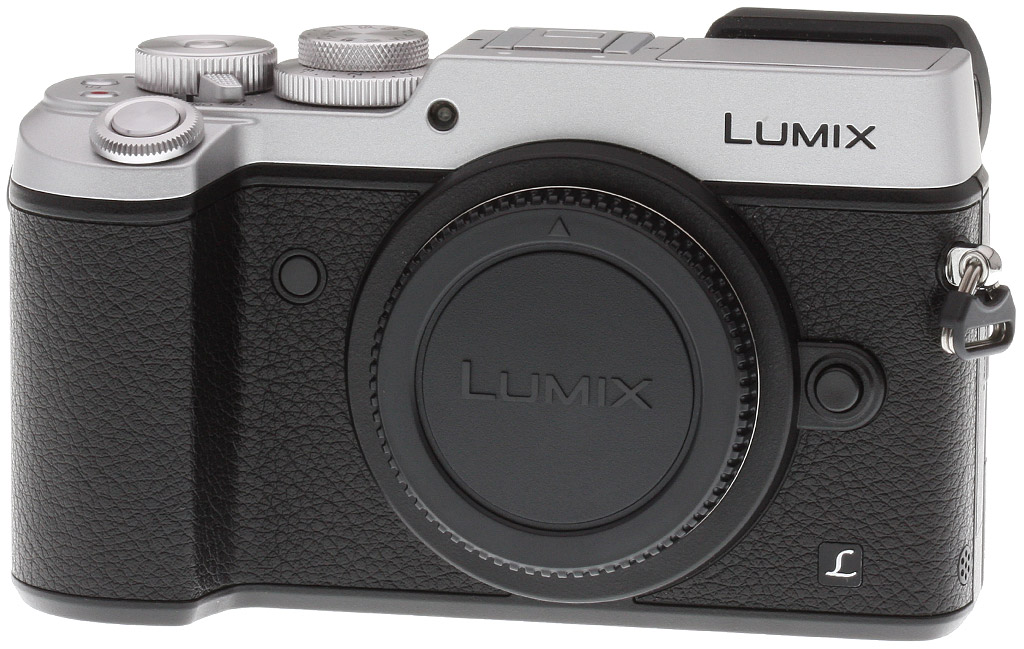
Back in 2013, Panasonic made a big splash with their GX7 rangefinder-esque enthusiast mirrorless camera. Sporting a cool, retro-inspired design and packed with the latest Micro Four Thirds technology and plenty of external controls, the GX7 was, and still is, a high-performance, reasonably-priced and highly portable camera that appeals to advanced photographers. From street photography and landscapes to portraits and general walk-around shooting, the GX7 is a versatile piece of equipment.
The GX8 takes the reins over the well-loved GX7
But now, two years later, Panasonic is taking it up a notch with the larger, more powerful, higher-resolution DMC-GX8. Sitting near the top of the food chain next to Panasonic's professional-level GH4, the new flagship 'GX' model replaces the GX7, and offers a number of serious improvements and enhancements to both image and video quality as well as to image stabilization, build quality and controls.
Big image quality boost with new sensor and processor
At the heart of the Panasonic GX8 is a brand new 20.3-megapixel Digital Live MOS imaging sensor -- the highest resolution 4/3" sensor yet. Upping the resolution and dynamic range performance from their long-used 16MP Live MOS sensor, the GX8 combines this new sensor with the same Venus Engine image processor of the GH4. This combination is said to allow for improved image resolution, tonal gradation and color reproduction, as well as better high ISO noise sensitivity with more natural noise reduction processing.

According to Panasonic, the GX8's improved image resolution is thanks to a combination of the new higher-resolution sensor and the more powerful image processor. The camera has a new "Aperture Filter" that uses more natural edge processing, which aims to more intelligently sharpen parts of an image's details while leaving other, smoother details untouched or not over-sharpened. The GX8 also has diffraction compensation processing, which will help counteract the image softening effects from shooting at small apertures. And the GX8's improved color processing takes a three-pronged approach, separating hue, saturation, and luminosity value adjustments. The new sensor is also said to offer about a 1/3 stop improvement in dynamic range.
High ISO performance is also claimed to be improved. In a high ISO image, after conventional noise reduction is applied, noise can sometimes appear "blocky" and unnatural. With the GX8, Panasonic incorporates a random noise filter to smooth out blocky noise into a more film-like, natural-looking grainy appearance. The GX8's sensitivity can also be extended slightly lower than the GX7's, to ISO 100 equivalent versus 125 for its predecessor.

Capture fast action with better burst and AF performance
Sheer speed is another one of the GX8's hallmark features. Thanks to the added horsepower from its new image processor, the GX8 is able to chew through 20-megapixel images at up to eight frames per second without continuous AF (up to 10fps with electronic shutter), or 6fps with AF-C -- up from the 5fps and 4.3fps on the GX7, respectively. Mechanical shutter speed tops out at 1/8000s, and the GX8 also offers exposures as fast as 1/16,000s using an all-electronic shutter.
While the GX8 still uses contrast-detect autofocus, as opposed to often-snappier hybrid phase-detect AF system used by other manufacturers, the new Panasonic model gains the GH4's highly-regarded Depth From Defocus technology for blazingly quick AF performance with Panasonic lenses. According to the company, the GX8 is able to acquire focus in just 0.07 second, compared to 0.11 second for the traditional contrast-detect-only AF system in the GX7.
Like the G7, the GX8 uses new AF tracking algorithms that combine not only subject color information but also subject size and motion vector to help in subject-tracking prediction. All combined, the GX8 is able to provide up to approximately 200% faster AF tracking compared to the GX7.

Like the earlier GX7, low-light autofocus sensitivity is rated down to -4EV, which are impressively dark focusing conditions. The GX8 also borrows the G7's new Starlight AF mode, which can detect the precise, small contrast differences in stars compared to the night sky for easy focusing.
The GX8 offers a similar array of other autofocus features found in recent Lumix cameras such as the GH4 and G7, including focus peaking, Pinpoint AF and Full Area AF, which lets you focus on anything within the field of view. New to the GX-series, however, is the 49-Area/Custom Multi mode, which lets you freely select a custom group of AF areas as you see fit for the subject you're photographing. Also new to this GX-series is Panasonic's Face/Eye Detection AF, which automatically detects the face and left or right eye of your subject.
The GX8 further borrows other image processing improvements from the recent G7 model, including Clear Retouch (utilizing the touchscreen to select and automatically clone out unwanted objects), creative filter effects while in PASM shooting modes, and expanded in-camera panorama options (the GX7 had only standard 8176 x 1920 panoramas, but now you also have an 8176 x 960 resolution wide angle panorama mode).
Smooth sailing with new Dual I.S. stabilization technology
In addition to its many image quality and performance improvements, the GX8 also introduces some all-new hardware technology not seen in other Lumix cameras: Dual I.S. While the GX7 was the first and only Lumix camera to have in-body image stabilization, the GX8 introduces a dual image stabilization system that combines Panasonic's long-offered lens-based O.I.S. technology with sensor-shift, body-based stabilization.

Similar to how Sony's new 5-axis Image Stabilization works in their new A7 II and A7R II, the Panasonic GX8's Dual I.S. system combines the compensation of lens-based optical image stabilization and in-body sensor-shift stabilization to provide a more powerful, better-performing stabilization system than either I.S. system can deliver alone. According to Panasonic, their O.I.S. lenses correct for two axes of motion, while the sensor shift mechanism can compensate for four, which altogether provides 3.5x better stabilization performance at wide-angle and 1.5x better performance at telephoto compared to the earlier GX7.
The caveat to the GX8's Dual I.S. system is that it needs a compatible Panasonic O.I.S. lens to take full advantage of the system. Nearly all of Panasonic's Lumix lenses are, or will be, compatible, with many current lenses, such as the Nocticron, Leica 45mm macro, 12-35mm f/2.8 and 35-100 f/2.8 already updated through new firmware releases. Only three older zoom lenses from Panasonic's lineup will remain unsupported with the new Dual I.S. system: the 14-45mm f/3.5-5.6 MEGA O.I.S., the 45-200mm f/4-5.6 MEGA O.I.S., and the 100-300mm f/4-5.6 MEGA O.I.S.
Lumix Lens Dual I.S. Lens Compatibility Firmware Update Timeline |
|||
| Lens |
Aug. |
Nov./Dec. |
Feb. |
|
12-35mm / F2.8 ASPH. / POWER O.I.S.
|
X |
||
|
14-42mm / F3.5-5.6 II ASPH. / MEGA O.I.S.
|
X |
||
|
14-140mm / F3.5-5.6 ASPH. / POWER O.I.S.
|
X |
||
|
35-100mm / F2.8 / POWER O.I.S.
|
X |
||
|
30mm / F2.8 ASPH. / MACRO / MEGA O.I.S.
|
X |
||
|
42.5mm / F1.7 ASPH. / POWER O.I.S.
|
X |
||
|
12-32mm / F3.5-5.6 ASPH. / MEGA O.I.S.
|
X |
||
|
35-100mm / F4.0-5.6 ASPH. / MEGA O.I.S.
|
X |
||
|
45-150mm / F4.0-5.6 ASPH. / MEGA O.I.S.
|
X |
||
|
NOCTICRON 42.5mm / F1.2 ASPH. / POWER O.I.S.
|
X |
||
|
MACRO-ELMARIT 45 mm / F2.8 ASPH. / MEGA O.I.S.
|
X |
||
|
PZ 14-42mm / F3.5-5.6 ASPH. / POWER O.I.S.
|
X |
||
|
14-42mm / F3.5-5.6 ASPH. / MEGA O.I.S.
|
X |
||
|
HD 14-140mm / F4.0-5.8 ASPH. / MEGA O.I.S.
|
X |
||
|
PZ 45-175mm / F4.0-5.6 ASPH. / POWER O.I.S.
|
X |
||
|
14-45mm / F3.5-5.6 ASPH. / MEGA O.I.S.
|
Unsupported |
||
|
45-200mm / F4.0-5.6 / MEGA O.I.S.
|
|||
|
100-300mm / F4.0-5.6 / MEGA O.I.S.
|
|||
Of course, for lenses without O.I.S., including various third-party lenses from Olympus, Leica -- including M- and R-mount lenses with Panasonic's DMW-MA2 or MA3 adapter -- or other manufacturers, the GX8 will still offer body-based image stabilization.
Enhanced video capabilities, but GH4 still top dog
For video recording, the Panasonic GX8 offers a version of Dual I.S. here as well. The sensor does not physically move in this case, but the GX8 provides an electronic image stabilization system that works in conjunction with the lens-based 2-axis system for a combined 5-axis Hybrid O.I.S. system. There's a caveat here as well, in that the video Hybrid O.I.S. does not work for 4K recording mode; only Full HD and lower resolutions.

And speaking of 4K, while the Panasonic GX8 is aimed primarily at still photography, it does include both 4K video recording capabilities. And like the G7 and LX100 before it, the GX8 also includes Panasonic's new 4K Photo feature, which offers a variety of 4K video capture modes and the ability to extract 8MP still images from video clips in-camera.

While the GX8 shares the stage as a "flagship" model, the beefier GH4 still reigns supreme as when it comes to video recording features for a Lumix camera, as it offers both Cinema 4K and Ultra HD resolutions, a higher 200Mbps bitrate option, 4:2:2 10/8-bit uncompressed HDMI output with simultaneous internal recording, and a headphone jack -- none of which the GX8 offers.
The GX8, on the other hand, offers only Ultra HD (3840 x 2160) resolution at 30p or 24p (25 and 24p in PAL regions), though it is captured at a bitrate of 100Mbps. The GX8, of course, offers additional video resolutions including 1080/60p at up to 28Mbps. Additional video feature include a choice of MP4 and AVCHD recording formats, 4:2:2 8-bit HDMI output at up to 4K resolution, though without simultaneous internal recording of 4K video, and unlimited video recording (though European countries are still limited to 29:59 minutes). Lastly, unlike the G7 and GH4, the GX8's microphone jack is of the smaller, less common 2.5mm variety that does double-duty as a remote input, which means a Panasonic-brand microphone or a 3.5-to-2.5mm jack adapter will be needed.
Wi-Fi and NFC keeps you connected
As with many modern cameras, the Panasonic GX8 features built-in Wi-Fi and NFC connectivity for easy sharing of images and videos, as well as remote control capabilities with manual exposure and various settings adjustments. By using NFC, if your phone or device supports it, you can quickly tap your mobile device to the camera to establish a connection, but for iOS users, the GX8 offers a QR code interface for somewhat easier setup than fully manual. The GX8 also adds a new "Jump Snap" remote trigger feature that was first introduced on the GF7. Using the phone's built-in accelerometer, the sensor can then trigger the shutter release when it detects a jump -- think jumping group self-portrait shots.

Pricing and Availability
The Panasonic GX8 began shipping in the US market in mid-August for a suggested retail price of US$1,199.99 for the body-only configuration in both an all-black style or a two-toned silver and black version. Panasonic is also offering three kit options in other regions, including a 14-42mm kit lens configuration, a 14-140mm kit and even a kit option with the fast 12-35mm f/2.8 lens. Unfortunately for US consumers, the GX8 is only being offered as a body-only configuration.
In the Box
The Panasonic GX8 retail kit contains the following items:
- Panasonic Lumix DMC-GX8 camera body (in black or silver)
- DMW-BLC12 rechargeable lithium-ion battery pack
- Battery charger
- AC cable
- Body cap
- Hot shoe cover
- USB cable
- Shoulder strap
- Software DVD-ROM
Recommended Accessories
- Large capacity SDHC/SDXC memory card. 32GB Class 10 should be a minimum, UHS-I U3 type recommended.
- Extra Panasonic DMW-BLC12 battery pack (7.2V, 1200mAh) (~US$45)
- Assorted Micro Four Thirds lenses
- Panasonic DMW-FL360L or similar flash unit
- Medium camera case
Comparison Shopping?
The premium mirrorless market has heated up to the point you'll surely need our new camera comparison tool to help keep all the specs sorted out! Clicking on any of the following will take you there, where you can see features, specs, pros and cons listed for virtually any pair of cameras you'd like to compare. Here are a few obvious choices to compare to the Panasonic GX8 to get you started:
Optics
The Panasonic GX8 is sold body-only, so we have no "kit" lens test results to share with you. Below, we present our GX8 viewfinder accuracy test results.
Viewfinder Test Results
Accuracy
Excellent coverage from the EVF and OLED monitor.

The Panasonic GX8's OLED electronic viewfinder and OLED monitor both proved quite accurate in record mode, showing just over 100% coverage with our Olympus 50mm f/2 reference lens. Excellent results here.
The images above were taken from our standardized test shots. For a collection of more pictorial photos, see our Panasonic Lumix DMC-GX8 Photo Gallery .
Exposure
Color
Saturation & Hue Accuracy
Slightly lower than average mean saturation levels, with about average hue accuracy.
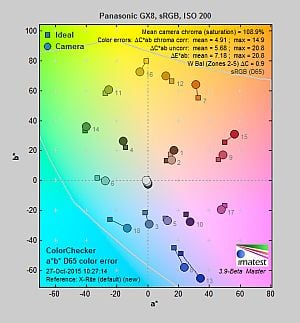 |
||
|
ISO Sensitivity
|
||
| In the diagram above, the squares show the original color, and the circles show the color that the camera captured. More saturated colors are located toward the periphery of the graph. Hue changes as you travel around the center. Thus, hue-accurate, highly saturated colors appear as lines radiating from the center. Mouse over the links to compare results at different ISOs, and click on the links for larger images. | ||
Saturation. The Panasonic GX8 produces images with slightly muted colors compared to most cameras at default settings. Mean saturation is 108.9% (8.9% oversaturated) at the base ISO of 200, which is a bit lower than the typical camera. Saturation is fairly consistent up to ISO 6400, but falls off to a minimum of 92.9% at ISO 25,600. The Lumix GX8 pushes dark blues moderately and some other colors slightly, but undersaturates yellow a bit more than we'd like. Most consumer digital cameras produce color that's more highly saturated (more intense) than found in the original subjects. This is simply because most people like their color a bit brighter than life.
Skin tones. The Panasonic GX8 does fairly well here, producing reasonably natural-looking Caucasian skin tones with only a slight push to pinks, though they can look a little flat and yellow with either Auto or Manual white balance in simulated daylight. Where oversaturation is most problematic is on Caucasian skin tones, as it's very easy for these "memory colors" to be seen as too bright, too pink, too yellow, etc.
Hue. The Panasonic GX8 shifts orange toward yellow and yellow toward green mildly, and cyan is shifted toward blue moderately (for better-looking skies), but most other hue shifts are quite minor. The typical Panasonic yellow to green shift and desaturation is unfortunately noticeable, which makes some yellows look a little dingy. The GX8's mean "delta-C" color error after correction for saturation is 4.91 for JPEGs at the base ISO of 200 (100 is an extended ISO). That's about average these days, and color error remains fairly stable throughout most of the ISO range, with only the highest ISO exhibiting below average hue accuracy. Hue is "what color" the color is.


Sensor
Exposure and White Balance
Indoors, incandescent lighting
Warm colors with Auto and Incandescent white balance setting. Good color balance with the Manual setting. Average positive exposure compensation required.


Indoors, under normal incandescent lighting, color balance is warm with the Auto white balance setting. Results with the Incandescent setting are also too warm, with a slightly stronger orange-yellow cast. The Manual setting produced accurate results, just a hair on the cool side. The Panasonic GX8 required +0.3 EV exposure compensation here, about average for this shot. (Our test lighting for this shot is a mixture of 60 and 100 watt household incandescent bulbs, a pretty yellow light source, but a very common one in typical home settings here in the U.S.)
Outdoors, daylight
Natural colors overall, with a tendency toward high contrast under harsh lighting. About average exposure accuracy.
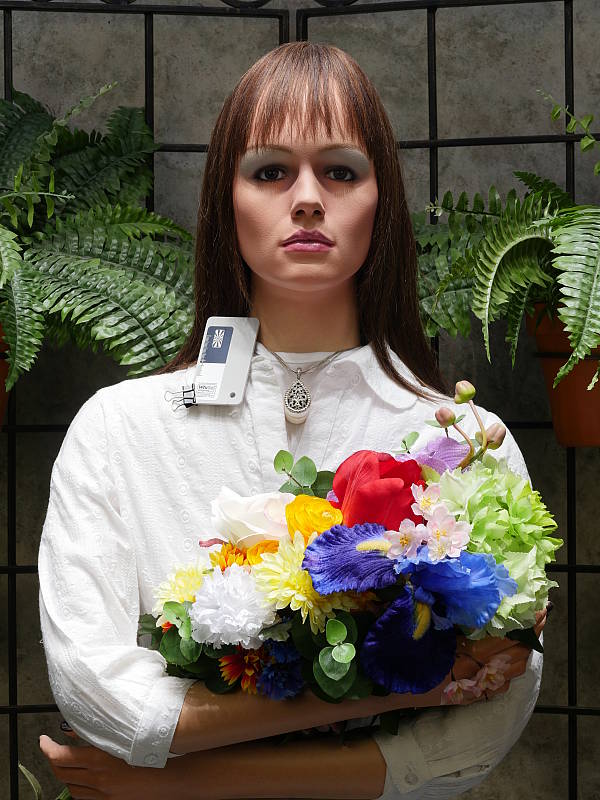
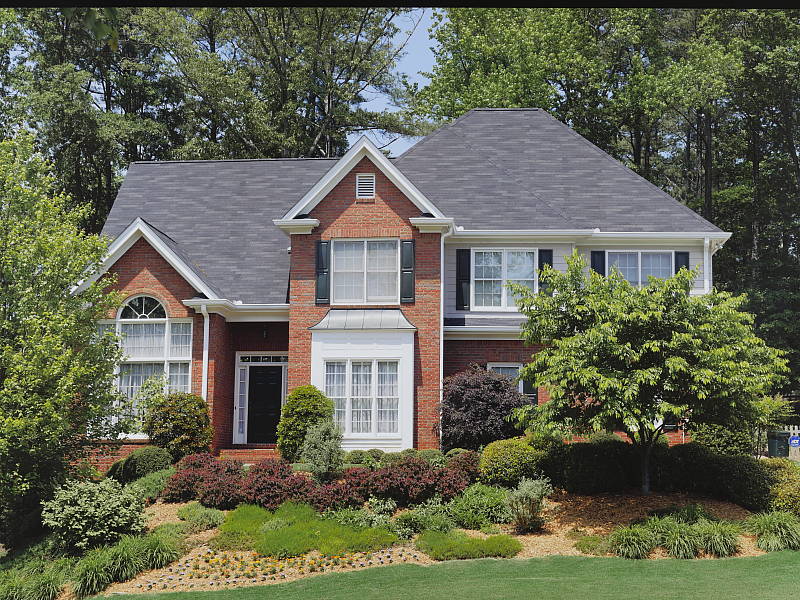
Outdoors, the Panasonic GX8 performed well, with natural-looking though slightly cool colors in the Far-field shot. Skin tones are fairly realistic in our "Sunlit" Portrait shot, but perhaps just a little flat and yellow. Exposure accuracy is about average, as the camera required +0.7 EV compensation for our "Sunlit" Portrait shot to keep facial tones reasonably bright. That's typical for this shot. Despite the bright appearance, very few highlights were actually blown in the mannequin's white shirt which is quite good, though there are some very deep shadows that contain good detail, but are somewhat noisy and discolored. The default exposure is a little dim for the Far-field shot, but as a result there were almost no blown highlights, though again there are some very deep shadows that have good detail but are a bit noisy and discolored.
See full set of test images with explanations
See thumbnails of all test and gallery images
Resolution
~ 2,700 lines of strong detail.
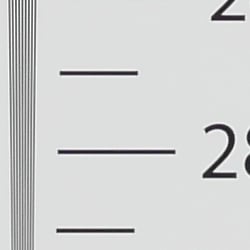

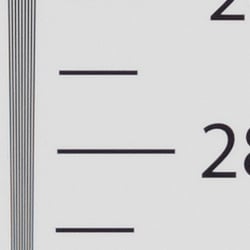
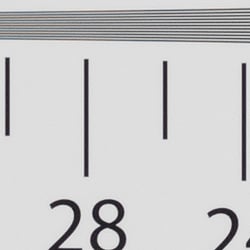
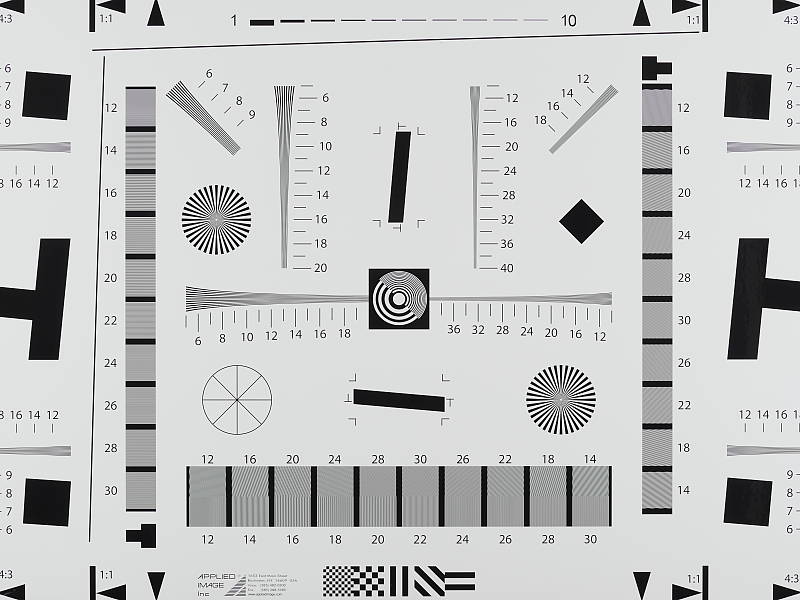
In a camera JPEG, our laboratory resolution chart reveals sharp, distinct line patterns to just over 2,700 lines per picture height horizontally, and to about 2,700 lines in the vertical direction. (Some might argue for higher, but lines begin to merge and aliasing artifacts begin to interfere at these limits.) Complete extinction of the pattern occurs between 3,500 and 3,600 lines per picture height in both directions. We weren't able to extract significantly more high-contrast resolution by processing the Panasonic GX8's RW2 file using Adobe Camera Raw, and the ACR conversion also shows higher color moiré which is practically nonexistent in the camera JPEG.
Use these numbers to compare with other cameras of similar resolution, or use them to see just what higher resolution can mean in terms of potential detail.
See full set of test images with explanations
See thumbnails of all test and gallery images
Sharpness & Detail
Decent sharpness overall, with only minor edge-enhancement artifacts on high-contrast subjects. Mild to moderate noise suppression visible in the shadows even at base ISO.


Sharpness. The Panasonic GX8 captures fairly sharp, detailed images with a sharp lens, though default sharpening is a bit conservative. Some minor edge enhancement artifacts are visible on high-contrast subjects such as the sharpening "halos" along the lines and text in the crop above left, but default sharpening is actually pretty tame, giving some images a slightly soft look compared to cameras that oversharpen. Edge enhancement creates the illusion of sharpness by enhancing colors and tones right at the edge of a rapid transition in color or tone.
Detail. The crop above right shows the effect of noise suppression in the form of smudging of individual strands together in the darker areas of the model's hair, as well as in areas with low local contrast. The GX8 also leaves behind a little more chroma noise than some other brands. Still, this is pretty good noise versus detail processing performance for a 20-megapixel Micro Four Thirds model, leaving plenty of detail intact instead of blurring much of it away in an attempt to hide noise. Noise-suppression systems in digital cameras tend to flatten-out detail in areas of subtle contrast. The effects can often be seen in shots of human hair, where the individual strands are lost and an almost "watercolor" look appears.
RAW vs In-Camera JPEGs
As noted above, the Panasonic GX8 produces fairly sharp in-camera JPEGs with very good detail. As is almost always the case, better detail can be obtained from carefully processing RAW files than can be seen in the in-camera JPEGs, with fewer sharpening artifacts to boot. Take a look below, to see what we mean:
|
Base ISO (200)
|
|
 |
 |
 |
 |
 |
 |
|
Camera JPEG, defaults
|
RAW via Adobe Camera Raw
|
In the table above, we compare an in-camera JPEG taken at base ISO using default noise reduction and sharpening (on the left) to a matching RAW file converted with Adobe Camera Raw 9.1 using default noise reduction with some strong but tight unsharp masking applied in Photoshop (350%, radius of 0.3 pixels, and a threshold of 0).
As you can see, the in-camera JPEG contains very good detail (the highest we've seen from a MFT camera thus far), however as is usually the case, ACR extracted additional detail, particularly in the red-leaf fabric where it managed to resolve some of the thread pattern. And it produced better color. The ACR conversion also shows less chroma noise at default settings, though it does show more luminance noise after sharpening, especially in areas with little detail. You can always turn up the luminance noise reduction (default of zero was used here), or process the files in your favorite noise reduction program or plugin if you find the noise objectionable.
Bottom line, though, as is usually the case, shooting in RAW mode provides better detail, color, and control than in-camera JPEGs when using a good converter.
ISO & Noise Performance
Pretty good high ISO performance for a Micro Four Thirds model.
|
Default Noise Reduction
|
||
 |
 |
 |
| ISO 100 | ISO 200 | ISO 400 |
 |
 |
 |
| ISO 800 | ISO 1600 | ISO 3200 |
 |
 |
|
| ISO 6400 | ISO 12,800 | ISO 25,600 |
The Panasonic GX8's images are very detailed and clean at ISOs 100 (extended) and 200, with only minor luminance and chrominance noise detectable in the shadows. ISO 400 is also very detailed, though a touch more noise can be seen upon close inspection. ISO 800 shows slightly higher luminance noise and stronger noise reduction blurring some very fine detail in the process, though overall detail remains quite good. ISO 1600 is of course a little noisier and softer, but fine detail still good. What looks to be a sudden increase in sharpening likely to make up for stronger noise reduction makes luminance noise more obvious with a bit of a crystalline effect at ISO 3200. At ISO 6400 and above, the crystalline effect becomes progressively stronger while fine detail is reduced to the point where very little fine detail is left in the hair at ISO 25,600. Chroma noise also becomes progressively stronger and objectionable at ISO 6400 and above, and there's a strong peppered effect at ISO 12,800 and 25,600 as well. There's also a noticeable drop in saturation at the highest ISOs.
Still, high ISO performance appears to be pretty good and competitive with most 16-megapixel 4/3" rivals, despite the smaller pixels. We're of course pixel-peeping to an extraordinary extent here, since 1:1 images on an LCD screen have little to do with how those same images will appear when printed. See the Print Quality section below for our evaluation of maximum print sizes at each ISO setting.
A note about focus for this shot: We used to shoot this series at f/4, however depth of field became so shallow with larger, high-resolution sensors that it was difficult to keep important areas of this shot in focus, so we have started shooting it at f/8 for 4/3" and larger sensors, the best compromise between depth of field and sharpness.
Extremes: Sunlit, dynamic range and low light tests
Somewhat high default contrast but with very good dynamic range. Very good low-light performance.


Sunlight. The Panasonic GX8 performed well with the deliberately harsh lighting of this test. Contrast is a little high at its default setting, but dynamic range is pretty good in JPEGs. We felt the +0.7 EV exposure is the best compromise here. Although skin tones around the eyes are a bit dark, we prefer it to the +1.0 EV exposure overall, because very few highlights were clipped. It's really the photographer's choice here as to which direction to go in. For those Panasonic GX8 owners that are going to want to just print an image with little or no tweaking, the +1.0 image would probably produce a better-looking face uncorrected. The bottom line though, is that the Panasonic GX8 performed well with the wide dynamic range of this shot, especially for a Four Thirds sensor. See below for how the Panasonic GX8's sensor performs (RAW mode) in terms of dynamic range.
Because digital cameras are more like slide film than negative film (in that they tend to have a more limited tonal range), we test them in the harshest situations to see how they handle scenes with bright highlights and dark shadows, as well as what kind of sensitivity they have in low light. The shot above is designed to mimic the very harsh, contrasty effect of direct noonday sunlight, a very tough challenge for most digital cameras. (You can read details of this test here.)


Panasonic's Intelligent Dynamic Range
The above shots are examples of Panasonic's Intelligent Dynamic Range Control (or iD-Range) at work, with no exposure compensation. Note that the camera does not take multiple shots and merge them as HDR mode does (see below). It's a system that adjusts local contrast and exposure more akin to Nikon's Active D-lighting, Canon's Automatic Lighting Optimization or Sony's Dynamic Range Optimization.
There are three levels of iD-Range available on the Panasonic GX8: Low, Standard and High, plus Auto and Off. It's automatically invoked in iAuto and manually selectable in PASM modes. Here, you can see darker midtones and shadows were progressively boosted as the strength was increased, without blowing many highlights in the process. As a result, though, noise is a little more visible, especially noticeably in areas with little detail such as the sky.
|
Far-field HDR Examples
|
||||
|
|
||||
HDR mode
Here, you can see the Panasonic GX8's High Dynamic Range mode at work with our Far-field shot. HDR mode takes three images at different exposures and combines them to increase dynamic range. Four settings are available, ranging from Auto to up to +/-3 EV of exposure difference. Mouse over the links, and click on them the view the full resolution files.
Auto and +/-1 EV produced very similar results, while +/-3 dimmed the entire image, so the feature did not work very well for this scene (and we saw the same behavior with our Outdoor Portrait series). Be aware that double images and ghosting is possible when elements in the scene move between frames. Also notice the angle of view is narrower in the HDR images, likely because the images have been cropped and upsized during the optional auto alignment process.
Dynamic Range Analysis (RAW mode)
While we once performed our own dynamic range measurements based on in-camera JPEGs as well as converted RAW images (when the camera was supported by Adobe Camera Raw), we've switched to using DxO Labs' results from their DxOMark website. As technology advanced, the dynamic range of modern high-end cameras in some cases exceeded the range of the Stouffer T4110 density scale that we used for our own measurements. DxO's approach based on RAW data before demosaicing is also more revealing, because it measures the fundamental dynamic range of the sensor, irrespective of whatever processing is applied to JPEGs, or to RAW data by off-the-shelf conversion software.
In the following, we use DxO's "Print" dynamic range results, which are scaled based on camera resolution. As the name suggests, this scaling corresponds to the situation in which you print at a given size, regardless of how many megapixels the camera might have. (In other words, if you've decided to make a 13x19 inch print, that's the size you're printing, whether the camera's resolution is 16 or 300 megapixels.) For the technically-minded, you can find a discussion of the reasoning behind this here on the DxOMark website. Also note that DxO Labs uses a signal-to-noise (SNR) threshold of 1 when defining the lower boundary of acceptable luminance noise in their dynamic range measurements, which corresponds to the "Low Quality" threshold of the Imatest software we used to use for this measurement.

Here, we compare the Panasonic GX8's dynamic range to its predecessor, the GX7, and also to the Samsung NX500, an APS-C mirrorless ILC.
As you can see from the above graph, the GX8's dynamic range is similar to the GX7's up to ISO 1600, however the GX8 has a slight advantage at its extended low setting of 100, with a value of 12.6 EV versus 12.2 EV for the GX7 at ISO 125. Interestingly, the G7X starts to pull away from the GX8 at ISO 3200 and above, with about a 1/2 stop advantage. Also note the GX8's chart doesn't include a separate ISO 12800 and 25600 data points, as the sensor offers the same sensitivity at those settings. (We still see the expected relationship between shutter speed, aperture and ISO sensitivity at ISO 12800 and 25600, but the GX8 is likely applying "digital" amplification during image processing at ISO 25600, hence the missing data point.)
The Panasonic GX8 lags behind the APS-C-sensored Samsung NX500 across the board, with the Samsung offering up to a 1.3 stop advantage at base ISO (13.9 EV vs 12.6), though the Samsung's advantage diminishes at higher ISOs.
Bottom line: Dynamic range is excellent for a Four Thirds sensor, in fact the best tested to date, though as expected, it's not as good as the best APS-C mirrorless rivals.
Click here to visit the DxOMark page for the Panasonic GX8 for more of their test results and additional comparisons.
| 1 fc 11 lux |
1/16 fc 0.67 lux |
1/16 fc No NR |
|
|---|---|---|---|
| ISO 200 |
 1s, f2.8 |
 15s, f2.8 |
 15s, f2.8 |
| ISO 3200 |
 1/15s, f2.8 |
 1s, f2.8 |
 1s, f2.8 |
| ISO 25600 |
 1/125s, f2.8 |
 1/8s, 1 f2.8 |
 1/8s, f2.8 |
Low Light. The Panasonic Lumix DMC-GX8 performed well in our low light tests, able to capture bright images down to the lowest light level we test at. The darkest level equates to about 1/16 the brightness of average city street lighting at night, so the Panasonic GX8 should be able to take well-exposed photos in almost any environment in which you can see well enough to walk around in.
Using default noise reduction setting, noise is low at ISO 200 and well-controlled at ISO 3200, though as you'd expect, noise is quite high at the maximum ISO of 25,600. We didn't notice any significant issues with hot pixels, though with long exposure noise reduction turned off (rightmost column) there were a number of hot pixels visible at base ISO, as well as a lot of brighter pixels in the shadows. We didn't detect any issues with heat blooming and spotted only mild fixed pattern noise at the highest ISO in our tests.
Auto color balance is just a touch cool particularly at lower light levels, but pretty neutral.
The camera's autofocus system was able to focus on our subject down to almost the 1/16 foot-candle light level unassisted with an f/2.8 lens, which is excellent, especially for a camera with contrast-detect autofocus, though the AF speed slowed down quite a bit. The Panasonic GX8 has a focus-assist light which allows it to autofocus in total darkness, as long as the subject is within range and has sufficient contrast.
How bright is this? The one foot-candle light level that this test begins at roughly corresponds to the brightness of typical city street-lighting at night. Cameras performing well at that level should be able to snap good-looking photos of street-lit scenes.
NOTE: This low light test is conducted with a stationary subject, and the camera mounted on a sturdy tripod. Most digital cameras will fail miserably when faced with a moving subject in dim lighting. (For example, a child's ballet recital or a holiday pageant in a gymnasium.) Thanks to their phase-detect AF systems, digital SLRs tend to do much better than point & shoots, but you still shouldn't expect a quick autofocus lock with moving subjects. The GX8 uses contrast-detect autofocus, as is found in most point & shoot cameras, so its low-light focusing ability may be less than that of some SLRs with phase-detect systems. That said, though, the larger, more sensitive pixels of the GX8's sensor do better under dim lighting than do the tiny pixels of most point & shoots.
Output Quality
Print Quality
Very good 30 x 40 inch prints at ISO 100/200; a nice 16 x 20 at ISO 1600; a good 4 x 6 at ISO 12,800.
 ISO 100 and 200 prints are very good at 30 x 40 inches, with rich colors and nice detail. The 20-megapixel sensor allows for one larger print size here at extended low and base ISO than the GX7 and other Micro Four Thirds cameras with 16-megapixel sensors.
ISO 400 yields a nice 24 x 36 inch print, and an excellent 20 x 30. While the 24 x 36 inch print does pass our official "good" rating and delivers a nice print at that size, for most critical applications the 20 x 30" is superb here.
ISO 800 delivers a very solid 16 x 20 inch print, with good detail for this sensitivity and very low noise. 20 x 30's can definitely be used for all but the most critical applications.
ISO 1600 also yields a quality 16 x 20 inch print (!) which is quite good for this sensor size at this sensitivity. There is the typical mild softening of detail in our target red-leaf swatch, and a negligible amount of noise present in a few flatter areas of our target, but still a very respectable print with otherwise good color and detail throughout.
ISO 3200 produces a good 11 x 14 inch print. All contrast detail is now lost in our tricky red-leaf fabric swatch, but good detail and color reproduction is evident throughout the rest of the print.
ISO 6400 shows a dramatic decrease in print quality, which is common for this sensor size and indeed all but the best digital cameras at this ISO sensitivity. 8 x 10's here can be used in a pinch for less critical applications, but we'll pin our "good" seal of approval on 5 x 7 inch prints here.
ISO 12,800 delivers a good 4 x 6 inch print, which is not bad for such a high ISO at this sensor size.
ISO 25,600 images are a bit too muted and "burned" looking to call good printed at our smallest size, and we recommend avoiding this setting for most applications other than very low-resolution web usage.
The Panasonic GX8 with its new 20-megapixel sensor delivers a solid performance in the print quality department. For starters, the increased resolution over its predecessor (and all other Micro Four Thirds models as of this writing) allows for a larger print size of 30 x 40 inches at base and extended low ISOs. Furthermore, the Venus Engine processor ups the IQ game and delivers larger available print sizes at ISOs 400, 1600 and 3200. Therefore, users can expect high quality prints from the Panasonic GX8, and if they remain at ISO 3200 and below they will not be disappointed.
The images above were taken from our standardized test shots. For a collection of more pictorial photos, see our Panasonic Lumix DMC-GX8 Photo Gallery .
Not sure which camera to buy? Let your eyes be the ultimate judge! Visit our Comparometer(tm) to compare images from the Panasonic Lumix DMC-GX8 with those from other cameras you may be considering. The proof is in the pictures, so let your own eyes decide which you like best!
Performance
Timing and Performance
Generally very good performance for a mirrorless ILC.
| Startup/Play to Record | ||
|---|---|---|
|
Power on |
~1.2 seconds
|
Time it takes to turn on and capture a shot. |
|
Play to Record, |
~0.6 second
|
Time until first shot is captured. |
Startup time was a little faster-than-average for a mirrorless camera, and switching from Play to Record and taking a shot was fairly quick.
| Shutter Response (Lag Time) | ||
|---|---|---|
|
Full Autofocus, |
0.177 second
|
Time from fully pressing shutter button to image capture, with the lens already at the proper focal distance setting. |
|
Full Autofocus |
N/A
|
Time from fully pressing shutter button to image capture. Auto Flash enabled. (No built-in or bundled flash.) |
|
Manual Focus |
0.065 second
|
For most cameras, shutter lag is less in manual focus than autofocus, but usually not as fast as when the camera is "prefocused". |
|
Prefocused |
0.058 second
|
Time to capture, after half-pressing and holding shutter button. |
The Panasonic GX8's autofocus speed was very good our tests, especially for a camera that uses contrast detection only. The GX8 produced full-autofocus shutter lag (with the subject at a fixed distance) of 0.177 second using 1-area (center) AF. That's quite good for a mirrorless camera and competitive with most prosumer DSLRs. When manually focused, the GX8's lag time dropped to 0.065 second, also very good. The GX8's prefocused shutter lag time was 0.058 second, also quite fast.
To minimize the effect of different lens' focusing speed, we test AF-active shutter lag with the lens already set to the correct focal distance.
| Cycle Time (shot to shot) | ||
|---|---|---|
|
Single Shot mode |
< 0.3 second
|
Time per shot, averaged over a few frames (we no longer test for buffer depths in single-shot mode). |
|
Single Shot mode |
< 0.3 second
|
Time per shot, averaged over a few frames (we no longer test for buffer depths in single-shot mode). |
|
Early shutter |
Yes
|
Some cameras refuse to snap another shot if you release and press the shutter too quickly in Single Shot mode, making "No" the preferred answer. |
|
Continuous H |
0.12 second (8.26 frames per second);
>300 frames total; 20 seconds to clear* |
Time per shot, with no apparent limit. |
|
Continuous H |
0.13 second (7.94 frames per second);
36 frames total; 22 seconds to clear* |
Time per shot, averaged over buffer length of 36 frames, then slows to an average of 0.60s or 1.66 fps. |
|
Continuous H |
0.13 second (7.94 frames per second);
32 frames total; 39 seconds to clear* |
Time per shot, averaged over buffer length of 32 frames, then slows to an average of about 1.04s or 0.96 fps. |
|
Flash Recycling |
N/A
|
No built-in or bundled flash. |
|
*Note: Buffer clearing times measured with a SanDisk Extreme Pro 95MB/sec UHS-I SDHC card. Slower cards will produce correspondingly slower clearing times. Slow cards may also limit length of bursts in continuous mode. ISO sensitivity and noise reduction settings can also affect cycle times and burst mode performance.
|
||
Single-shot cycle times were so fast that they were difficult to accurately measure as they depend on the tester's dexterity and ability to maintain an optimum rhythm, so your results may vary. (Note that we no longer test single-shot mode with just RAW files, as the results are usually somewhere in between JPEG and RAW+JPEG.)
Continuous High Speed "H" mode burst rate was quite good for its class at 8.3 frames per second for best quality JPEGs, slightly exceeding Panasonic's 8 fps spec. When shooting RAW or RAW+JPEG files, the frame rate dropped only slightly to 7.9 fps, which is still quite good. Note that these burst rates are with single-shot AF mode (AFS). Panasonic claims up to 6 fps with continuous autofocus (AFC). The GX8 also offers Middle Speed (rated at about 6 fps) and Low Speed (rated at 2 fps) modes, however we did not test those modes.
The GX8 has an all-electronic shutter mode which the company says boosts the full-resolution frame rate to 10 fps with AFS, but when we tested it in the lab, it was actually slower than with the mechanical shutter (~7.2 fps for RAW+JPEG mode), so we didn't test with it further. A Super High Speed mode which uses the all-electronic shutter is also available which captures Small JPEGs (5 megapixels at 4:3) at 40 frames per second for up to 120 frames, however we did not test that mode in the lab.
Full-resolution buffer depth was essentially limited only by card capacity when shooting Large/Fine JPEGs. When shooting RAW files buffer depth was 36 frames, and 32 frames when shooting RAW+JPEG files, which is quite generous.
Buffer clearing was pretty slow with a fast 95MB/s UHS-I card, ranging from 20 seconds after a long burst of JPEGs to 39 seconds after a 32-frame burst of RAW+JPEG files. You can however take additional photos and adjust settings while the buffer is clearing. Oddly, there's no mention of UHS-II support for the GX8, but we tried a UHS-II card anyway. Unfortunately it didn't improve buffer depths or clearing times, confirming the UHS-II interface is not supported.
Bottom line, the Panasonic GX8's performance is very good for its class. Startup and mode switching are reasonably fast, while autofocus speed and shutter lag are very good. Burst performance is very good, buffer depths are excellent, however buffer clearing is slow.
Battery Life
Below average battery life.
| Operating Mode | Battery Life |
|---|---|
|
Still Capture, CIPA standard
(Monitor with H-FS14140 or H-HS12035 lens) |
330 shots
|
|
Still Capture, CIPA standard
(EVF with H-FS14140 or H-HS12035 lens) |
310 shots
|
The Panasonic GX8 uses a custom rechargeable lithium-ion battery pack for power, and comes with both a single battery and dedicated battery charger. The CIPA-rated 330 shots per charge when using the monitor and 310 shots with the EVF are below average for a mirrorless ILC (especially for one with no built-in flash), and much lower than a typical DSLR when using an optical viewfinder. We strongly recommend getting a second battery for your GX8 if you plan any extended outings.
The table above shows the number of shots the camera is capable of (on a fully-charged rechargeable battery), based on CIPA battery-life and/or manufacturer standard test conditions.
(Interested readers can find an English translation of the CIPA DC-002 standards document here. (180K PDF document))
Image Quality
Below are crops from our laboratory Still Life target comparing Panasonic GX8 image quality to its predecessor, the GX7, as well as against several premium mirrorless models at similar price points or in similar categories: the Fuji X-T1, Olympus E-M5 II, Samsung NX1 and Sony A6000. (Okay we admit the A6000 isn't at a similar price point being significantly less expensive than the rest, but it's currently Sony's top-of-the-line sub-frame mirrorless, and their least expensive current full-frame mirrorless costs significantly more than the GX8.)
NOTE: These images are from best quality JPEGs straight out of the camera, at default settings including noise reduction and using the camera's actual base ISO (not extended ISO settings). All cameras in this comparison were shot with our very sharp reference lenses. Clicking any crop will take you to a carrier page where you can click once again to access the full resolution image as delivered straight from the camera. For those interested in working with the RAW files involved, click these links to visit each camera's respective sample image thumbnail page: Panasonic GX8, Panasonic GX7, Fuji X-T1, Olympus E-M5 II, Samsung NX1 and Sony A6000 -- links to the RAW files appear beneath those for the JPEG images, wherever we have them. And remember, you can always go to our world-renowned Comparometer to compare the Panasonic GX8 to any camera we've ever tested!
Panasonic GX8 vs Panasonic GX7 at Base ISO
 |  |
 |  |
 |  |
Panasonic GX8 at ISO 200 | Panasonic GX7 at ISO 200 |
Very good image quality from both the 20-megapixel GX8 and 16-megapixel GX7 here at base ISO, though the added resolution does allow the GX8 to resolve a little more detail than the GX7 while also producing slightly lower noise levels. | |
Panasonic GX8 vs Fujifilm X-T1 at Base ISO
|  |
|  |
|  |
Panasonic GX8 at ISO 200 | Fujifilm X-T1 at ISO 200 |
The 16-megapixel APS-C Fuji X-T1 produces cleaner results here at base ISO with brighter colors as well. But the GX8 is able to resolve significantly more detail in most areas of our target including in the mosaic and pink fabric, though the X-T1 actually does better with fine detail in our tricky red-leaf swatch. | |
Panasonic GX8 vs Olympus E-M5 II at Base ISO
|  |
|  |
|  |
Panasonic GX8 at ISO 200 | Olympus E-M5 II at ISO 200 |
The 16-megapixel Olympus E-M5 II produces a brighter, crisper, more contrasty image than the GX8, however sharpening artifacts are much more obvious. Again, the 20-megapixel GX8 is able to resolve a little more detail than the E-M5 II, but its more conservative default processing means its images don't look quite as punchy and vibrant straight out of the camera. | |
Panasonic GX8 vs Samsung NX1 at Base ISO
|  |
|  |
|  |
Panasonic GX8 at ISO 200 | Samsung NX1 at ISO 100 |
At base ISO, the 28-megapixel APS-C Samsung NX1 clearly has an edge in resolving power and sharpness, and it also produced an image with higher contrast and lower noise levels, though keep in mind the Samsung's base ISO is lower. The Samsung did better in the pink fabric and in our tricky red-leaf swatch, but it produced some unsightly moiré patterns which the GX8 did not. | |
Panasonic GX8 vs Sony A6000 at Base ISO
|  |
|  |
|  |
Panasonic GX8 at ISO 200 | Sony A6000 at ISO 100 |
The 24-megapixel APS-C Sony A6000 has a slight resolution advantage, but it isn't resolving significantly more detail in most areas here (the majority of the resolution advantage is in the width of the image because of its wider 3:2 aspect ratio). The A6000's image is however more vibrant, contrasty and crisper without obvious sharpening artifacts, giving its image more "pop". | |
Panasonic GX8 vs Panasonic GX7 at ISO 1600
 |  |
 |  |
 |  |
Panasonic GX8 at ISO 1600 | Panasonic GX7 at ISO 1600 |
Here at ISO 1600, we see the GX8 resolves slightly more detail in most areas than its predecessor, yet it manages to produce similar noise levels despite its smaller pixels. Impressive! Both struggle with fine detail in our tricky red-leaf fabric, though, and Panasonic's area-specific noise reduction does start to introduce artifacts at boundaries where detail changes. | |
Panasonic GX8 vs Fujifilm X-T1 at ISO 1600
|  |
|  |
|  |
Panasonic GX8 at ISO 1600 | Fujifilm X-T1 at ISO 1600 |
The Fuji X-T1's high-ISO performance is amazing for a sub-frame camera, producing a crisper, brighter and cleaner looking image than the GX8 at ISO 1600. Chroma noise levels are much lower from the Fuji yet it does much better with our difficult red-leaf fabric, however luminance noise is higher than the GX8 in the shadows. | |
Panasonic GX8 vs Olympus E-M5 II at ISO 1600
|  |
|  |
|  |
Panasonic GX8 at ISO 1600 | Olympus E-M5 II at ISO 1600 |
This comparison is a tougher call, because the GX8's image looks more natural and less processed in most areas, but doesn't have the vibrancy, crispness and more pleasing colors of the E-M5 II's image. Noise levels from the E-M5 II are lower, but there are more obvious noise reduction artifacts while the GX8's noise is more grainy and film-like, but contains artifacts from area-specific noise reduction at boundaries where detail changes. | |
Panasonic GX8 vs Samsung NX1 at ISO 1600
|  |
|  |
|  |
Panasonic GX8 at ISO 1600 | Samsung NX1 at ISO 1600 |
The Samsung NX1 continues to resolve more detail and produce a crisper image than the GX8 at ISO 1600, but this time noise levels are higher from the NX1, and there are more obvious noise reduction artifacts from the Samsung as well. | |
Panasonic GX8 vs Sony A6000 at ISO 1600
|  |
|  |
|  |
Panasonic GX8 at ISO 1600 | Sony A6000 at ISO 1600 |
The A6000 also continues to produce a crisper, more vibrant image at ISO 1600, but the noise in flatter areas looks a little artificial compared to the more film-like "grain" from the GX8. The Sony appears to produce more detail in the red-leaf swatch, but some of it is false and distorted, though it does do better than the GX8 in the pink fabric. | |
Panasonic GX8 vs Panasonic GX7 at ISO 3200
 |  |
 |  |
 |  |
Panasonic GX8 at ISO 3200 | Panasonic GX7 at ISO 3200 |
At ISO 3200, the GX8 manages to resolve a bit more detail in the mosaic crop while producing noise levels that are lower or comparable to its predecessor, but the GX7 does just a bit better with fine detail in our tricky red-leaf swatch. | |
Panasonic GX8 vs Fujifilm X-T1 at ISO 3200
|  |
|  |
|  |
Panasonic GX8 at ISO 3200 | Fujifilm X-T1 at ISO 3200 |
The Fuji X-T1 continues to impress with its high-ISO performance at ISO 3200, producing a more refined, brighter image that has better detail in most areas, and is almost devoid of chroma noise. The GX8 does better in some high-contrast areas, but the Fuji does better overall, and especially in our red-leaf fabric where the GX8 has blurred away almost all fine detail. | |
Panasonic GX8 vs Olympus E-M5 II at ISO 3200
|  |
|  |
|  |
Panasonic GX8 at ISO 3200 | Olympus E-M5 II at ISO 3200 |
Once again the Olympus produces a crisper, brighter image with better color, though strong noise reduction and more aggressive sharpening leads to more artifacts and a more processed look than the GX8 produces, however the Panasonic's area-specific noise reduction makes some subject boundaries look noisier and rougher. | |
Panasonic GX8 vs Samsung NX1 at ISO 3200
|  |
|  |
|  |
Panasonic GX8 at ISO 3200 | Samsung NX1 at ISO 3200 |
The Samsung NX1 still manages to produce better detail and contrast at ISO 3200, but noise levels are noticeably higher, particularly in the shadows. | |
Panasonic GX8 vs Sony A6000 at ISO 3200
|  |
|  |
|  |
Panasonic GX8 at ISO 3200 | Sony A6000 at ISO 3200 |
At ISO 3200, the Sony produces a cleaner, brighter image overall, but you can tell it's working hard to reduce noise. The GX8's image arguably looks a little more natural, but overall, the Sony produces the more pleasant image even if it does look a little over-processed. Again, much of the apparent detail in the red-leaf swatch from the Sony is highly distorted and false. | |
Panasonic GX8 vs. Panasonic GX7, Fujifilm X-T1, Olympus E-M5 II, Samsung NX1, Sony A6000
 |  |  |  |  |  |
 |  |  |  |  |  |
 |  |  |  |  |  |
| Panasonic GX8 ISO 200 ISO 3200 ISO 6400 | Panasonic GX7 ISO 200 ISO 3200 ISO 6400 | Fujifilm X-T1 ISO 200 ISO 3200 ISO 6400 | Olympus E-M5 II ISO 200 ISO 3200 ISO 6400 | Samsung NX1 ISO 100 ISO 3200 ISO 6400 | Sony A6000 ISO 100 ISO 3200 ISO 6400 |
| Detail comparison. High-contrast detail is also important, pushing the camera in different ways, so we like to look at it, too. The Panasonic GX8, GX7 and the Fuji X-T1 lag behind the Olympus E-M5 II, Samsung NX1 and Sony A6000 when in comes to clarity and contrast here. Fine detail reproduction from the GX8 is however better than its predecessor, the X-T1 and the E-M5 II, however contrast is among the lowest in this group, especially as ISO climbs. | |||||
Very good 30 x 40 inch prints at ISO 100/200; a nice 16 x 20 at ISO 1600; a good 4 x 6 at ISO 12,800.
ISO 100 and 200 prints are very good at 30 x 40 inches, with rich colors and nice detail. The 20-megapixel sensor allows for one larger print size here at extended low and base ISO than the GX7 and other Micro Four Thirds cameras with 16-megapixel sensors.
ISO 400 yields a nice 24 x 36 inch print, and an excellent 20 x 30. While the 24 x 36 inch print does pass our official "good" rating and delivers a nice print at that size, for most critical applications the 20 x 30" is superb here.
ISO 800 delivers a very solid 16 x 20 inch print, with good detail for this sensitivity and very low noise. 20 x 30's can definitely be used for all but the most critical applications.
ISO 1600 also yields a quality 16 x 20 inch print (!) which is quite good for this sensor size at this sensitivity. There is the typical mild softening of detail in our target red-leaf swatch, and a negligible amount of noise present in a few flatter areas of our target, but still a very respectable print with otherwise good color and detail throughout.
ISO 3200 produces a good 11 x 14 inch print. All contrast detail is now lost in our tricky red-leaf fabric swatch, but good detail and color reproduction is evident throughout the rest of the print.
ISO 6400 shows a dramatic decrease in print quality, which is common for this sensor size and indeed all but the best digital cameras at this ISO sensitivity. 8 x 10's here can be used in a pinch for less critical applications, but we'll pin our "good" seal of approval on 5 x 7 inch prints here.
ISO 12,800 delivers a good 4 x 6 inch print, which is not bad for such a high ISO at this sensor size.
ISO 25,600 images are a bit too muted and "burned" looking to call good printed at our smallest size, and we recommend avoiding this setting for most applications other than very low-resolution web usage.
The Panasonic GX8 with its new 20-megapixel sensor delivers a solid performance in the print quality department. For starters, the increased resolution over its predecessor (and all other Micro Four Thirds models as of this writing) allows for a larger print size of 30 x 40 inches at base and extended low ISOs. Furthermore, the Venus Engine processor ups the IQ game and delivers larger available print sizes at ISOs 400, 1600 and 3200. Therefore, users can expect high quality prints from the Panasonic GX8, and if they remain at ISO 3200 and below they will not be disappointed.
Field Test
Great design & great sensor make for a fantastic camera
by Jeremy Gray | Posted 11/17/15

Introduction
The Panasonic Lumix GX8 is Panasonic's new flagship GX-series camera and it includes many improvements over the popular GX7. Compared to the predecessor, the GX8 features a new 20.3-megapixel Four Thirds imaging sensor, improved autofocus performance and a new image processor from the Panasonic GH4 camera, a tilt-swivel screen, and 4K video. While the GX7 is still available for sale, the GX8 has a strong feature set and provides very good performance across the board.

Key Features
- 20.3-megapixel Digital Live MOS Four Thirds sensor
- Tilting OLED EVF and 3" OLED tilt-swivel rear display
- 49-point contrast-detect autofocus system with 0.07s focus acquisition time and new tracking algorithms
- Dual image stabilization
- 1/8000s mechanical shutter speed and 1/16000s electronic shutter speed
- Up to 10fps continuous shooting using the electronic shutter
- Native ISO range of 200-25,600 (expandable to 100-25,600)
- 4K video at up to 30fps
- 4K photo (8-megapixel images captured at up to 30fps)
- Built-in Wi-Fi and NFC
A well-built camera body with many easy-to-use controls
Despite using a Four Thirds sensor, the GX8 is a decent-sized camera. Weighing in at 17.2 ounces (487 grams) with the battery inserted, the GX8 is quite a bit larger than the GX7, but this extra size makes the camera more comfortable to use for extended periods of time, in my opinion, and also affords space for more manual controls and dials. With its deep front grip and numerous physical controls, the GX8 feels excellent to hold and use. The GX8 looks great, too, with styling reminiscent of old rangefinder cameras.
Underneath the rotating mode dial on the top of the camera is the exposure compensation dial. (Editor's Note: Panasonic has since flipped the values on the EV dial, placing positive exposure compensation values toward the front of the camera.) I really like this stacked dial design as it makes efficient use of the space on the camera without sacrificing usability. Further to the right on the top of the camera is a rear dial, the shutter release, and surrounding the shutter release is a front dial. Both the rear and front dials rotate well and provide good tactile feedback. There are also a couple of function buttons on top of the camera (in addition to the ones on the front and back).
The back of the camera is dominated by the GX8's fully-articulating 3" OLED touchscreen. The display looks really nice, even in bright light, and the touchscreen features work well. The articulation range of the display is very impressive, and it's quick and simple to get the display exactly where you want it. The swiveling mechanism itself works well, but it doesn't feel very strong and the display is slightly loose when moving it around. The OLED electronic viewfinder on the GX8 also tilts, which is unusual, but it certainly provides extra utility. To the right of the rear display are a standard variety of easy to reach buttons, including a particularly useful Quick Menu (Q. Menu) button.
Overall, while the GX8 might be a bit large for a camera with a Micro Four Thirds sensor, it handles very well. There is a wealth of control provided to the user and everything is well-placed and designed. The fully-articulating touchscreen is a highlight on an already great camera body. The body itself is also dust- and splash-resistant.

New 20.3-megapixel sensor captures excellent images
The GX8's new 20.3-megapixel Live MOS sensor produces great images. The sensor is the highest-resolution Four Thirds sensor available right now and also provides noise and dynamic range improvements over the GX7's 16-megapixel image sensor. Along with the higher resolution sensor, the GX8 includes a new Aperture Filter that uses more natural edge processing to intelligently sharpen in-focus areas of an image while sharpening smoother, out of focus areas less. There is also diffraction compensation to limit the softening effect of capturing images at small apertures. The GX8 also includes an improved image processor, utilizing the same Venus Engine image processor as Panasonic's flagship GH4 camera. With the improved image processor and image sensor, the GX8 is reported to have better color processing than the GX7 and dynamic range that is about 1/3 stop better than the GX7.

The GX8, with its many features, captures really nice images. Image files contain good detail, smooth transitions, accurate colors, and plenty of freedom to adjust images and maintain good results. After a bit of sharpening and processing, RAW files look very nice. I was also able to push the shadows a fair bit with RAW files and reduce highlights as needed. In addition to Photo Styles like Vivid, Natural, Portrait, and more, the GX8 allows the user to adjust the brightness of dark and bright areas in an image using preset or custom curves, i. Dynamic (automatically adjusts brightness and contrast), and i. Resolution (automatically adjusts sharpness and resolution). These features can certainly improve image quality in certain situations.

The GX8 shines out in the field
With its wealth of controls and great performance, the GX8 handles very well out in the field. Adjusting important shooting settings is easy, and I found that using the touchscreen was quicker for selecting an AF area. When shooting in partially- or fully-automatic shooting modes, the GX8 performs well and provides consistently good results. The GX8 has a new dual image stabilization system as well. While the lenses I used with the GX8 include optical image stabilization, the GX8 itself also has in-body stabilization that is achieved via sensor shift. The new stabilization works really well and allows for sharp images to be captured at impressively slow shutter speeds.

While I touched on how the camera body handled earlier, it is worth noting again that everything feels great when using the GX8. The tilting EVF and the tilt-swivel rear display are very useful out in the field. The EVF itself works really well and provides 0.77x magnification compared to the 0.70x magnification of the EVF on the GX7. Further, the amount of highly-customizable function buttons is impressive. The only handling aspect of the camera that I don't like is that it takes too many steps to move an AF area or point using the camera's buttons (using the touchscreen works fine provided you have the camera stabilized or don't mind pulling it away from your face to interact with the display). With that said, having touch enabled did create some issues for me at times. With the display set to automatically switch between the EVF and the rear display, there were numerous instances when the camera would switch to the display despite me looking through the EVF and then my face would touch the display and move the AF point around. This took a little getting used to.
The GX8 offers multi, center-weighted, and spot metering options, with spot metering thankfully not locked to the center of the frame. Being able to move the spot around the frame is convenient for metering. In most situations, I utilized multi metering, and the performance was good, proving to be consistent and predictable. In widely varied lighting situations, the camera had a slight tendency to overexpose when using multi metering, but with the exposure compensation dial within reach when using the camera, making any necessary exposure compensation adjustments is easy.

When using Intelligent Auto or Intelligent Auto+ (this mode allows you to adjust brightness and color yourself), the GX8 captures pleasing images. In many cases, the camera does opt for a wide aperture and faster shutter speed so if you want a smaller aperture, you will have to use aperture priority or manual shooting modes. Disappointingly, the GX8 records only JPEG files in Intelligent Auto mode, but it can record RAW files in Intelligent Auto+ mode.
There are numerous additional shooting modes on the GX8. Panorama mode is available in 8176 x 1920 and 8176 x 960 resolution options and provides decent results. The final panoramic is not very high resolution, but it can be a useful and neat feature nonetheless. There is also Creative Control mode, which allows you to select from a wide variety of filter effects, including High Dynamic Range and multiple monochrome options. The HDR option is a filter effect rather than a true HDR image, but the GX8 does offer quick exposure bracketing options via the Drive Mode button on the back of the camera. In addition, when recording only JPEG image files, a true HDR option becomes available in the menu. You can set HDR to Auto or to an amount of EV from 1 to 3. The results are pretty good and the GX8 processes the files quickly.

The GX8 has an interesting Clear Retouch feature that allows you to trace unwanted items on an image and then the camera will remove them (in a similar vein to Photoshop's Spot Healing tool). While the feature is a neat idea, it doesn't do a particularly good job except with very small items. It introduces a lot of artifacts and blocky areas to an image. The GX8 also has built-in RAW processing options. You can adjust white balance, exposure compensation, Photo Style, contrast, noise reduction, and a number of other parameters, and then process a RAW file into a JPEG with your selected settings. There is a slight delay when changing settings as the display goes black, but it is overall a smooth experience that makes editing images in-camera really easy and enjoyable. Along with the ability to crop and resize images inside the camera, you can do an impressive amount of editing and processing right on the GX8.

Quick autofocus in many situations
The GX8 uses a contrast detect autofocus system that provides quick and accurate autofocus. Panasonic reports that the GX8 can acquire focus in just 0.07s, compared to the 0.11s acquisition time of the GX7. This is due to the GX8 including the Depth from Defocus technology from the GH4 camera that provides faster autofocus performance when using Panasonic lenses.

The GX8's 49-point autofocus system can be utilized in a wide variety of ways. The GX8 has Face/Eye detection, Tracking, 49-Area, Custom Multi, 1-Area, and Pinpoint AF modes. 49-Area AF mode works well at accurately determining the subject in most situations. It is also the AF mode used in Intelligent Auto shooting mode. Custom Multi AF mode is new to the GX8 and allows you to either choose from a focus area preset such as horizontal line, vertical line, and central pattern or create your own shape. This is a very cool feature.
When using 1-Area AF mode, you can quickly move the AF area around using touch. To move the AF area around using the directional buttons, however, you have to first go into the AF menu by pressing the left directional button and then select 1-Area AF mode to be able to move the area around the frame, which takes much more time than a simple tap on the screen. By enabling direct focus in the custom menu, you can instead move the AF area around by just pressing the directional buttons, but this means that you lose the quick access to the ISO, AF, white balance, and drive menus. I found that using touch is the best way to move the AF area. The AF area covers a really large portion of the frame as well, so you can place the autofocus area pretty much wherever you need it. Pinpoint AF is similar to 1-Area AF mode except that the display zooms in on the focus area for very fine focusing, which can be very useful when working on a tripod and want to get focus on a precise spot.

The continuous autofocus performance of the GX8 is improved over the GX7. The GX8 uses new tracking algorithms that, according to Panasonic, is more than 200% better than that of the GX7. Having not used the GX7, I can't confirm that improvement, but I can say that the GX8 does a very good job with subject tracking. Once the camera has locked onto the subject, it does a good job of keeping the focus area on the subject and maintaining focus as it moves through the frame or moves towards or away from the camera. There is a slight delay, particularly in lower light, but the GX8 is often able to catch back up to the correct subject and reacquire focus.
Good low light performance, but no flash
Panasonic GX8 Noise Comparison 100% Center Crops from RAW images (Click images for full-size files) RAW files resized in Photoshop with default sharpening and noise reduction turned off |
|
 |
|
ISO 200 Full Scene |
|
 |
 |
ISO 200 |
ISO 400 |
 |
 |
ISO 800 |
ISO 1600 |
 |
 |
ISO 3200 |
ISO 6400 |
 |
 |
ISO 12,800 |
ISO 25,600 |
The GX8 has a native ISO range of 200-25,600 and can expand down to ISO 100. It includes a random noise filter to make noise smoother. I found that the GX8 has great overall high ISO performance and produces very usable RAW files all the way up to and including ISO 3200. At ISO 800, noise starts to become visible when viewing image files at full resolution. However, it isn't until ISO 3200 that the visible noise becomes problematic. Even so, images look pretty good at ISO 3200 without any noise reduction applied in post-processing, appearing only slightly less sharp than images captured at ISO 1600, which itself looks only marginally noisier than images taken at ISO 800. At ISO 6400, visible color noise becomes much more apparent and a lot of fine details in the image file are lost. These issues become much more dramatic as you go up to ISO 25,600, which is not an ISO speed that I would ever use with the GX8. Personally, I would like to capture images at ISO 1600 or less for large prints, but I think that ISO 3200 is very capable for small prints and sharing on the web.
The GX8 handles visible noise on JPEG files very well due to its automatic noise reduction. There isn't a standalone noise reduction setting as this is handled among other Picture Styles options. The cost of the GX8 handling visible noise so well automatically is that sharpness decreases dramatically as you increase the ISO. At ISO 1600 and 3200, I think that the JPEG files look pretty good, but fine details start to be lost and there are some blocky areas around edges and fine details when viewing files at 100%. At ISO 6400, JPEG images become really soft and unnatural in appearance. The already compromised appearance at 6400 just gets much poorer at ISO 12,800 and 25,600.

In low light, the autofocus performance is quite impressive. The GX8 is rated to autofocus down to -4 EV. The GX8 also has a starlight AF feature that turns on when the camera displays 'Low' on the display (or EVF). When activated, the camera is able to detect and focus on stars within approximately the central 1/3 of the frame. The camera also has an AF assist lamp for low-light focusing. Unlike the GX7, the GX8 does not have a built-in flash but it does have a hot shoe and a maximum flash sync of 1/250s.
The GX8 performs well in low light overall. I was impressed by its ability to capture good detail at even ISO 3200 without having excessive visible noise. JPEG files manage to avoid the visible noise that affects RAW files, but the downside is that you also lose a lot more detail than you do in the RAW files. I think that the default noise reduction applied by the GX8 is on the excessive side, personally, as I would prefer to have more noise and also more detail when shooting JPEG files at higher ISO speeds.

A quick camera, with a few caveats
The GX8 has impressive speed performance. Without continuous autofocus, the GX8 can shoot at up to 10fps when using the electronic shutter. When using the mechanical shutter, the maximum speed is a still impressive, but slightly slower at 8fps. When shooting with continuous autofocus, the GX8 can shoot at up to 6fps. The buffer depth is pretty good when shooting RAW and RAW+JPEG image files, at 30 and 32 frames respectively. The JPEG buffer depth is limited by your memory card rather than by the camera, as you can shoot JPEG files until you've run out of space. The buffer is somewhat slow to clear RAW files (JPEGs are very quick to clear), but you can still operate the camera and take images while the files are processing.
Good 4K video, but lack of phase detect autofocus is apparent
The GX8 offers video recording up to 4K at 30fps. In addition, the GX8 can record 1080/60p video, and offers both AVCHD and MP4 video formats. Video performance is quite impressive overall, as the camera makes smooth adjustments to both exposure and focus when recording video. However, the continuous autofocus can be somewhat slow to react to a moving subject, perhaps due in part to the GX8 utilizing contrast detect rather than phase detect autofocus. Autofocus tended to stay locked on quite well when a subject moved only slightly during my testing, but it had a tendency to be slow to catch up to a quickly moving subject.
The sensor-based image stabilization available when shooting still images is not available when recording video, but there is a Hybrid I.S. that combines lens stabilization with lens-based I.S. that works for 1080p or lower resolutions (but not available when recording 4K video). The lack of image stabilization when recording video at 4K is unfortunate, but lens-based I.S. still operates in 4K mode. There are other neat features here too, such as full manual control, on-screen adjustments (allowing you to avoid button and dial noises getting picked up in the audio), focus peaking, and flat picture controls (called Cinelike on the camera). You can even tap on the display to select focus, which works quite well when the camera might otherwise be a bit slow to automatically adjust focus.
There is an external mic jack on the GX8, but it is 2.5mm rather than the more common 3.5mm, so you will potentially need an adapter to plug in a standard mic, but it is a nice inclusion nonetheless. The built-in stereo mic does a good job of recording audio, although it seemed very sensitive by default as it picked up my relatively quiet movement out in the field. Another slight issue I had when recording video is that it is difficult to stop a video recording without jostling the camera because the movie record button is smooth against the top of the camera body and requires a firm press.
4K Photo mode is an interesting feature on the GX8 that allows the capture of 8-megapixel images at up to 30fps -- essentially recording still frames from a 4K/30p video. There are numerous 4K Photo modes, including 4K burst, 4K burst s/s, and 4K pre-burst. When using this feature, a 4K burst file will be saved as an MP4. You cannot record RAW images when using 4K Photo mode, but the image quality is still impressive for what it is. There will of course be a trade-off when recording images at 30fps, but the mode is more than capable of delivering good images when the full-resolution continuous shooting just won't cut it.
Panasonic GX8 Video Sample #3 (4K Photo Mode, Burst) 3840 x 2160, 30fps Download Original (58.6 MB .MP4 File) |
Overall, the GX8 has a ton of interesting features for videographers, and it delivers strong performance across its available modes. With full manual controls and on-screen controls, the GX8 has a lot to offer those looking to take control over their video recording. The more automatic video recording options work great as well and provide really solid results for those just looking to easily record great looking video files.
Excellent remote control capabilities
The GX8 makes great use of its Wi-Fi/NFC capabilities through the Panasonic Image App. Connecting the GX8 to the app is easy via Wi-Fi and even easier if using NFC. Once the camera is connected, you are given extensive remote control of the camera. In addition, you can also remotely view and download images from the camera.
Panasonic Image App Screenshots |
|
 |
 |
For remote functions, you have control of pretty much every important aspect of the GX8. You can change metering, white balance, focus mode, drive mode, file quality, and much more. Unlike many cameras I have tested, you can also change settings on the camera without disconnecting the phone, such as changing exposure mode or focus drive mode. The connection itself is stable and the live feed to my phone was good, especially after increasing the picture quality via the application's settings. Using the display for focus and exposure, which can be set independently on the screen, worked well and the focus point did a good job of keeping up with the touch. You can record video from the app as well. Overall, the GX8 may very well have the best remote control capabilities of any camera I've used. It feels full-featured and could prove to be very useful out in the field in certain situations.
Panasonic GX8 Field Test Summary
The GX8 is an excellent successor to the GX7

What I like:
- Lots of manual controls and a deep front grip
- 20.3-megapixel image sensor captures great images
- Autofocus performance is fast in many lighting conditions
- Impressive high ISO performance
- Very good remote control capabilities
What I dislike:
- Moving the AF area without using the touchscreen is too slow by default
- Lack of built-in flash is disappointing
- The movie record button is difficult to press
- No hybrid image stabilization when recording 4K video
The Panasonic GX8 is a fantastic camera. The camera is a pleasure to use, and its performance is great. The new 20.3-megapixel sensor captures high-quality images, and the camera's metering and autofocus performance ensure that you are able to take full advantage of the sensor. The GX8 also handles well in low light, and its high ISO capabilities impressed me. Ultimately, the GX8 takes what made the GX7 great and makes it even better.

High ISO Noise Reduction
Panasonic GX8 Noise Reduction
Like other Panasonic mirrorless cameras, the GX8 offers no fewer than 11(!) noise reduction levels, offering very fine granularity on noise reduction strength, however there doesn't appear to be a way to assign different NR levels to specific ISO ranges as we've seen on some cameras. The Panasonic GX8 user manual doesn't say when noise reduction kicks in, so we've included crops from the entire range of ISOs in the tables below.
See for yourself how the Panasonic GX8's default and -5 (lowest) noise reduction settings compare to RAW without noise reduction under daylight-balanced lighting. (Note that these RAW images also have no sharpening applied, so they're a little softer than camera JPEGs at low ISOs.) Click on any of the crops below to see the corresponding full-sized image.
| High ISO Noise Reduction Comparison Daylight-balanced illumination |
|||
|
Default
|
-5
|
RAW (no NR)
|
|
|
I
S O 1 0 0 |
 |
 |
 |
 |
 |
 |
|
 |
 |
 |
|
|
Default
|
-5
|
RAW (no NR)
|
|
|
I
S O 2 0 0 |
 |
 |
 |
 |
 |
 |
|
 |
 |
 |
|
|
Default
|
-5
|
RAW (no NR)
|
|
|
I
S O 4 0 0 |
 |
 |
 |
 |
 |
 |
|
 |
 |
 |
|
|
Default
|
-5
|
RAW (no NR)
|
|
|
I
S O 8 0 0 |
 |
 |
 |
 |
 |
 |
|
 |
 |
 |
|
|
Default
|
-5
|
RAW (no NR)
|
|
|
I
S O 1 6 0 0 |
 |
 |
 |
 |
 |
 |
|
 |
 |
 |
|
|
Default
|
-5
|
RAW (no NR)
|
|
|
I
S O 3 2 0 0 |
 |
 |
 |
 |
 |
 |
|
 |
 |
 |
|
|
Default
|
-5
|
RAW (no NR)
|
|
|
I
S O 6 4 0 0 |
 |
 |
 |
 |
 |
 |
|
 |
 |
 |
|
|
Default
|
-5
|
RAW (no NR)
|
|
|
I
S O 1 2 8 0 0 |
 |
 |
 |
 |
 |
 |
|
 |
 |
 |
|
|
Default
|
-5
|
RAW (no NR)
|
|
|
I
S O 2 5 6 0 0 |
 |
 |
 |
 |
 |
 |
|
 |
 |
 |
|
The Panasonic GX8's default noise reduction setting provides a good tradeoff between noise and detail at lower ISOs to our eye, but we'd shoot with the lowest setting at higher ISOs and reduce noise ourselves in post-processing (or just shoot RAW). As you can see, the GX8 already applies noise reduction at its lowest (extended) ISO of 100. At the other end of the ISO range, you can see that the GX8 is quite effective at reducing noise, but of course at a cost to fine detail. Also notice that noise reduction impacts fine detail in our difficult red-leaf swatch already at moderately low ISOs.
Tech2
By and large, the new Panasonic GX8 is not all that dissimilar to the earlier GX7, as it maintains the overall rangefinder-esque design with top-left EVF. It is, however, noticeably larger than the earlier model as seen in the comparison image below.

The GX8's dimensions are 5.2 x 3.1 x 2.5 inches (133 x 78 x 64 mm) versus 4.8 x 2.8 x 2.1 inches (123 x 71 x 55 mm) for the GX7. Body-only weight with card and battery is naturally also greater, at 17.2 ounces or 487 grams versus 14.2 ounces or 402 grams.
Bigger body, beefier construction
Everything about the GX8 is bigger and better, in a sense, compared to the GX7: the EVF is substantially larger and higher-resolution with a 2360K-dot OLED screen providing a 0.77x magnification over the 0.7x field-sequential LCD viewfinder in the earlier model; the rear display is now a fully articulated as opposed to the simpler tilting design; and the handgrip is deeper with a repositioned shutter release button and front control dial.
The GX8 is constructed with a magnesium-alloy frame, just like the GX7, that's both durable and lightweight. New for this model, however, is dust- and splash-proof construction. According to Panasonic, the GX8's weather-sealing is on-par with that of the GH4. While Panasonic doesn't go as far as saying it'll stand up to a torrential downpour, the new GX8 should be able to withstand inclement weather much more comfortably than the earlier GX7.
The entire top deck control cluster has been redesigned on the GX8. In addition to the more forward-facing shutter button with surrounding front control dial, the rear control dial has been moved up from the thumbrest area to the top deck as well. There's a slight contour and chamfered edge, which allows your thumb to easily operate the rear dial.
New design looks and feels great, with a couple caveats
We found the camera to be quite comfortable for the most part and indeed noticeably larger and thicker-feeling than the original GX7. The deeper handgrip design is nice and makes for a more secure grip on the body. We did come across one small caveat that we felt worth mentioning. On the GX7, the rear thumb control dial was nearly flush with the back surface of the camera and was positioned right next to your thumb for ease of use. On the GX8, however, the repositioned rear dial is much higher up on the camera body and a bit farther forward onto the center of the camera. We felt that we had to reach a little further with our thumb or at least reposition our hand slightly to get our thumb in place over the thumbrest protrusion. This is far from a deal-breaker in our eyes, but those with smaller hands at least may want to keep this in mind.

The mode dial has been moved off the far corner and toward the center of the camera and now sits atop a large dedicated exposure compensation dial, itself a new feature on the GX8.

Speaking of the dedicated exposure compensation dial, we should note that these product images are of a pre-production model with production firmware installed. The only difference is the orientation of the EV values on the exposure compensation dial, with positive numbering towards the front of the camera and negative towards the back, versus the other way around on our sample. (Image at left shows production orientation.)
Interestingly, and perhaps to the dismay of many, Panasonic has opted for this dual mode dial and exposure compensation dial cluster instead of a built-in pop-up flash. The GX8 still maintains its hot-shoe, though, so those with an external flash unit will be good to go. Note however that an external flash unit is not included in the standard body-only bundle.
Dual Operation Switch offers vast customization
Like we saw on the G7, the thumb or rear control dial surrounds a new Dual Operation Switch. This "switch," which is technically a button, is fully customizable to perform a host of secondary mode and settings adjustments. By default, the rear control dial has a dedicated set of functions depending on the shooting mode, such as aperture or shutter speed adjustments. With a quick press of the Dual Operation Switch, you can quickly and temporarily adjust things like ISO, white balance, drive mode, or Photo Style. Then, simply press the button again, or give the shutter release a quick half-press, and the control dials return to their default functions.
Panasonic has also added a dedicated customizable Function button to the top deck controls, as well as moving the video recording start/stop button over to the far right edge of the top deck.
Rear controls are familiar territory
Moving down to the rear of the camera, the control layout on the right-hand side is largely unchanged compared to the GX7 with the same basic button cluster. Of course, the rear control dial is no longer on the back side of the camera, and instead, the dedicated AF/AE Lock button has been moved over into its place near the thumbrest. The thumbrest itself has been beefed up a bit and protrudes more, which gives your hand a slightly more substantial hold.
Additionally, the thin AF/MF switch that surrounded the AF/AE Lock button on the GX7 has been moved over to below the hot-shoe and resembles more closely the three-way focus mode switch from the GH4. Within this switch, the GX8 offers another customizable Function button.
Get the view from all angles with a big EVF and vari-angle screen

The big new features on the back of the GX8 are, of course, the EVF and rear screen. The larger electronic viewfinder maintains its full 90°-tiltable design and 100% coverage, but that's where the similarities end. Sharing the same 2,360K-dot resolution OLED display as the G7, the GX8's EVF improves upon the G7X (and G7) by providing a much larger image with 0.77x magnification over the 0.7x offered previously, and won't suffer from the reduced resolution and rainbow tearing effect associated with field-sequential LCDs like the one used in the G7X. Also, the eyepoint distance -- that is, how far away from the eyepiece lens you can still see the entire viewfinder image -- is increased to 21mm compared to 17.5mm, which helps improve visibility for those with glasses. The included eyecup itself is also larger to help block stray light, but Panasonic also offers an even larger, deeper replacement eyecup for even further isolation and easier visibility in bright conditions.

The rear screen on the GX8 maintains the same 1,040K-dot resolution, but the screen itself is now an OLED display like the EVF. Also providing 100% coverage in record mode, the capacitive touchscreen is now a fully articulated, vari-angle design as opposed to the up-down tilting design on the GX7. Like the GX7, the new model includes a cool feature called Touch Pad AF, which allows you to simultaneously use the EVF if you want while still moving the AF point around the frame with the rear touchscreen. Ergonomically, this feature is much more convenient now, especially for left-eye dominant users, since the screen can be swung out beside the camera and away from your face while using the EVF.


The left and right sides of the camera are both rather standard, though we do find a small NFC icon indicating where the chip or antenna is located along the right-hand side of the grip.
Like the GX7, the left-hand side features the small flap covering a micro HDMI (Type D) port (although the GX7 had a mini Type-C connector), a multi AV/USB 2.0 port and a 2.5mm microphone/remote jack.
And finally, on the bottom, built into the handgrip, we have the Secure Digital memory card slot, which is compatible with UHS-I SDXC and SDHC memory cards, as well as standard SD cards. Oddly, there's no support for faster UHS-II cards.

The GX8 uses the same rechargeable lithium-ion battery pack as the G7, and not the same battery as the GX7, which might be a bit of a letdown for current GX7 owners looking to upgrade.
The battery pack is CIPA-rated for between 310 and 340 shots per charge depending on the lens mounted and which screen, OLED monitor or EVF, is used, and a dedicated battery charger is included in the bundle. In-camera charging via USB port is not supported.
A pass-through in the compartment door is provided for an optional dummy battery connected to an AC adaptor.

Conclusion
 |
|
88mm equivalent (Lumix 35-100mm f/2.8 at 44mm), f/8, 1/50s, ISO 100
This image has been modified. Click for original image. |
Beefing up the GX7: higher-res sensor & faster processor
Following up on the highly successful GX7, the new Panasonic GX8 offers a similar, retro-ish rangefinder design, but with a number of big technological improvements. Sporting a new 20-megapixel sensor, the GX8 is the highest resolution Micro Four Thirds camera currently on the market. Combined with the GH4’s Venus Engine image processor, the GX8’s image quality capabilities as well as high ISO performance are top-notch for this class of camera.
Very good high ISO performance despite smaller pixel size
Indeed, in both our lab testing and real-world experience, the image quality we saw from the Panasonic GX8 was thoroughly impressive. Despite the smaller pixels with the higher-resolution sensor, high ISO image quality was very good, allowing for larger print sizes at several ISOs compared to the GX7. The fine detail resolving power was also very good, though you can squeeze out a bit more detail using RAW files. The dynamic range performance is very good for this class of camera as well.
 |
|
70mm equivalent (Lumix 35-100mm f/2.8 at 35mm), f/10, 2s, ISO 200
This image has been resized. Click for original image. |
Very fast AF and great burst performance, but slow buffer clearing
On the performance front, the GX8 generally does very well for a mirrorless camera. Autofocus felt nimble and accurate with both single-shot AF and, despite the lack of on-sensor phase-detect, the GX8 does quite well with continuous AF and tracking for still images. Unlike the GX7, the GX8 makes use of their Depth From Defocus technology originally introduced with the GH4. Though our lab testing didn’t show a significant speed boost between a DFD-capable Panasonic lens and a third-party lens, in the real-world, the GX8’s autofocus nevertheless felt very capable, quick and precise.
Burst mode speed is very good, with standard “Continuous High Speed” mode using the mechanical shutter roughly meeting Panasonic’s 8 frames-per-second specification, though the all-electronic shutter mode actually tested slower. Buffer depths are excellent, limited only by card capacity when shooting highest quality JPEGs. When shooting RAW files, buffer depths tested at 36 frames for RAW and 32 frames for RAW+JPEG, which is quite generous. However, buffer clearing is quite slow, taking 20 to 39 seconds to clear maximum length bursts with a fast UHS-I SD card, and the faster UHS-II interface is not supported.
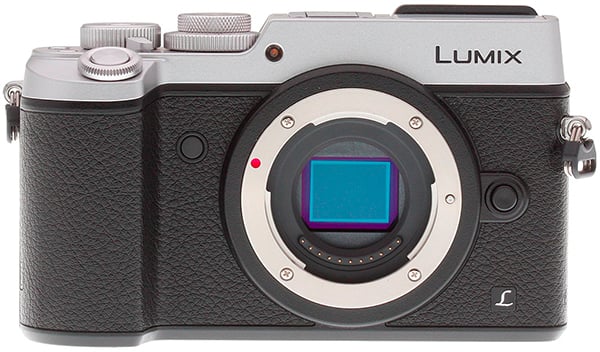 |
Dual I.S. steadies up stills, but 4K video misses the fun
One of the Panasonic GX8’s biggest new features is its enhanced image stabilization technology called Dual I.S. The GX7 was the first Lumix ILC to have body-based image stabilization, though the majority of Panasonic’s lenses feature optical stabilization. With the GX8, however, now these two image stabilization mechanisms can work in conjunction, in a similar fashion to Sony’s recent A7-series 5-axis system. Though we don’t test I.S. in a lab setting, out in the field, it performed very well, allowing for steady handheld shots at slow shutter speeds.
Like many new Panasonic cameras, the GX8 includes 4K video recording, as well as their array of “4K Photo” modes — utilizing the high resolution of 4K video for still images. The image quality of 4K footage from the GX8 is very good, with lots of fine details that we’ve come to expect from Panasonic cameras. However, though we found autofocus to be quite nimble for stills, it felt a bit on the sluggish side for video. The contrast-detect AF system makes it slow to react to moving subjects during video recording, we found. Furthermore, the impressive Dual I.S. system is not fully available for video, though a 5-axis Hybrid I.S. is available, which is a combination the 2-axis lens-based stabilization and a digital stabilization. A further caveat is that, sadly, Hybrid I.S. is only available at 1080p video and lower resolutions; 4K video is limited to just lens-based stabilization.
 |
|
70mm equivalent (Lumix 35-100mm f/2.8 at 35mm), f/11, 1s, ISO 200
This image has been modified. Click for original image. |
Taking what made the GX7 great and making it even better
Overall, the Panasonic GX8 is one impressive camera. Though the body shape feels slightly larger than average, the build quality and ergonomics are fantastic. The articulated LCD and characteristic tilting EVF really make the GX8 a versatile, easy to use camera regardless of where or how you’re positioned. The array of external controls will undoubtedly please advanced users looking for a highly configurable control scheme. It’s small and rugged enough to travel practically anywhere, and its speedy performance lets it capture pretty much all but the most challenging, fast-paced subject matter.
Its high-res sensor makes great images with impressive print quality results, and the GX8 is well-suited for the multimedia power user with a nice array of video features. All said and done, with its new sensor, impressive performance, high quality 4K video, as well as excellent, robust wireless connectivity features, the Panasonic GX8 wears a lot of hats, so to speak, and certainly deserves consideration if you’re in the market for an enthusiast-level mirrorless camera that can practically do it all. Therefore, it’s no surprise that the Panasonic GX8 gets the nod as a Dave’s Pick.
Pros & Cons
- Highest resolution Micro Four Thirds camera yet
- Impressive high ISO performance despite smaller photosites
- Very good dynamic range for its class
- Fast autofocus
- Low shutter lag
- Very fast single-shot cycle times
- Fast ~8fps burst mode with deep buffers
- Autofocuses in very low light
- Accurate EVF and monitor
- Articulated monitor & tilting EVF look great & provide lot of versatility in the field
- Touchscreen interface makes it quick to adjust AF point
- Dual I.S. combines lens and sensor-shift image stabilization
- Great build quality with dust and weather-sealing
- A bit on the large and hefty side, but a very comfortable design with nice hand grip
- Lots of external controls including customizable function buttons
- Dedicated AF mode switch
- Robust wireless features with full remote control capabilities
(Wi-Fi & NFC) - 4K UHD video at 30p/24p
- Ability to extract 8MP stills from 4K video (4K Photo modes)
- 4:2:2 8-bit HDMI output up to 4K, though no simultaneous internal recording of 4K
- Unlimited video recording time (for US-based models)
- Microphone jack, but uses less common 2.5mm plug (doubles as remote jack)
- No built-in flash
- Slow buffer clearing (and does not support UHS-II cards)
- Below average battery life
- No in-camera battery charging
- Warm colors with Auto and Incandescent white balance in tungsten lighting
- Claimed 10fps burst rate with e-shutter was slower than 8fps with mechanical shutter
- Limited image stabilization with 4K video
- Contrast-detect AF somewhat sluggish with video
- No Cinema 4K (4K DCI) option like GH4
- Video bitrates top-out at 100Mbps (no 200Mbps like GH4)
- No headphone jack
- No dedicated drive mode dial
Follow Imaging-Resource.com on Twitter!