



Overview
---
Special update: Wondering when the E-M5 Mark III will finally arrive? So are we!
---

In early 2012, Olympus took its Micro Four Thirds lineup into new territory with the E-M5, which reinvented the company's OM film camera brand as an enthusiast and pro-friendly mirrorless camera for the digital age. The followup E-M1 took over the reins as Olympus' pro-friendly flagship some 18 months later, with the E-M5 remaining in the lineup as the enthusiast's go-to choice, offering plenty of creative possibilities and room to grow as a photographer, but with a very affordable pricetag.
Now, three years after the debut of the E-M5, the E-M5 Mark II arrives, taking the OM-D series back to the forefront with advancements including an uprated, record-making five-stop image stabilization system and a versatile tilt/swivel LCD -- the latter a particularly impressive feat in a dust and splash-proof body. Not that the stabilization system isn't spectacular too. Olympus claims shutter speeds as long as 1/4-second are now hand-holdable.
The E-M5 Mark II is based around the more powerful image processor used in the E-M1, and the manufacturer-claimed 10 frames per second burst rate of the new model is indeed a little up from that of the original camera's 9 fps spec, albeit not quite as fast as that of the E-M1 with continuous autofocus active (5.0 vs 6.5 fps). (Likely, that difference is due to the lack of on-chip phase detection AF pixels in the E-M5 Mark II, something that the E-M1 does feature. The E-M5 does offer more than twice as many AF areas as its predecessor, though, with an 81-area array.)
Curious to see how the E-M5 Mark II performed in the lab? Check out our full performance test results here.

The already-generous array of controls found on the original E-M5 have been supplemented with several new ones. The existing controls, too, have been reworked for better handling, and the electronic viewfinder has gotten a big boost in resolution and magnification to match that of the E-M1.
Video shooters in particular will be thrilled with some of the changes made in the E-M5 Mark II. Although the image stabilization system doesn't offer the full five-stop corrective range for video, it's nonetheless impressively steady, and comes coupled with refined exposure and contrast-detection autofocus algorithms tuned specifically for video capture. The result: smoother focus adjustments with barely any perceptible hunting around the point of focus, and a quick reaction to sudden changes in ambient light levels.
The E-M5 Mark II also provides the ability to choose inter or intra-frame compression with up to 77Mbps bit-rates, and to shoot at up to 60 progressive-scan frames per second. And if you want even more control, uncompressed HDMI output is also possible, as is support for timecode. Also new are built-in microphone and headphone jacks -- the latter not in the camera itself, but in the optional HLD-8G accessory grip. No doubt about it: the E-M5 Mark II looks to offer a big step forward over both the E-M5 and E-M1 in the video department.
Video Image Stabilization Comparison Olympus E-M5 Mark II IBIS vs Panasonic GH4 + 12-35mm lens OIS |
Video fans don't get all the love, though! Still photographers, too, have a nice surprise in store. While the sensor resolution of 16 megapixels is unchanged, the E-M5 Mark II can now shoot in a clever resolution-enhancing mode which produces 40-megapixel (39.9MP) JPEGs or 64-megapixel (63.7MP) raw files! How does it do this? Simply put, it takes eight shots in quick succession, with the sensor position adjusted just half a pixel's distance between each shot. All eight frames are then combined into a single image with greatly increased resolution, the catch being that this trick won't work with moving subjects and a tripod is recommended. A free plug-in for Photoshop CS4 or newer will let you open the 64-megapixel raw files.

For more info on the E-M5 Mark II's high resolution mode including sample images, see our detailed writeup.
And there are plenty more feature tweaks throughout, including some more -- such as built-in Wi-Fi wireless networking connectivity, a 1/8,000 second high-speed mechanical shutter (up to 1/16,000s in Silent Mode with a fully-electronic shutter), tethered shooting support and focus peaking -- inherited from the E-M1. Others, like a new high-gain live view mode intended for shooting stars, are brand new for this camera. Yet despite all the improvements, the E-M5 Mark II costs quite a bit less than did its predecessor at launch just three years ago.
Let's take a closer look around the E-M5 Mark II body, and see what's new!
Olympus E-M5 Mark II Walkaround
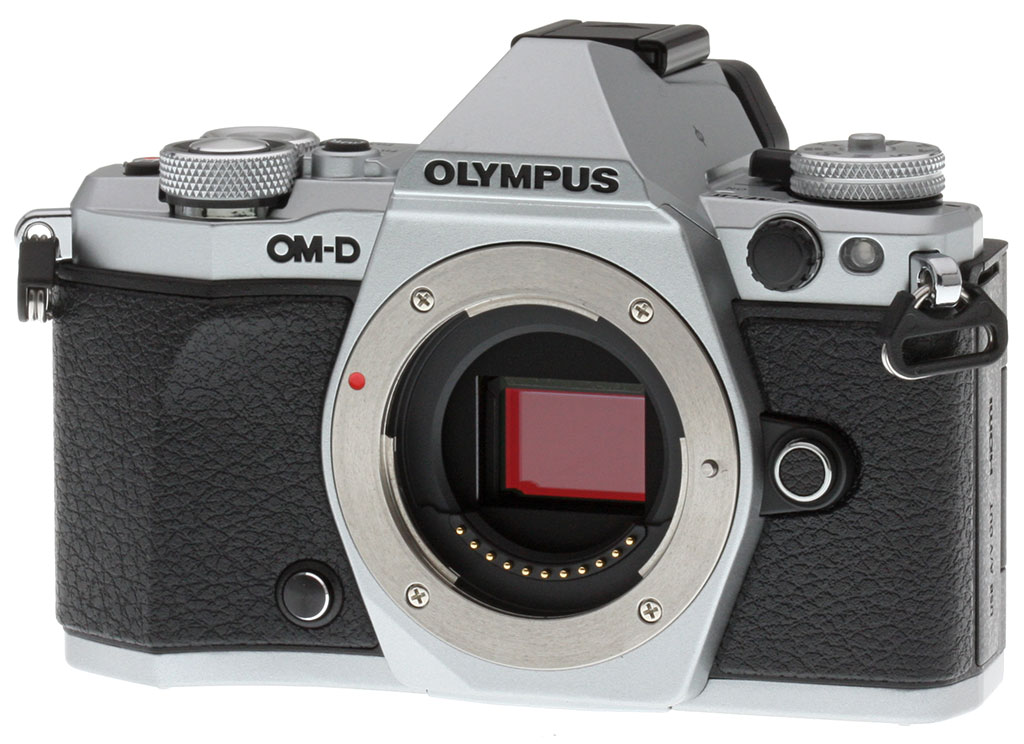
Seen from the front, the E-M5 Mark II looks quite a bit like its predecessor, but there's actually quite a few differences beyond that first glance. For one thing, the top of the hand grip now has a curve towards the lens mount to give your fingers some extra purchase. (By contrast, the E-M5 grip ran vertically for the full height of the camera.)

The AF assist lamp and lens mount release button have also been joined by a couple of new features. Below and just right of the lens mount (as seen from the rear) is a new programmable button that defaults to depth-of-field preview, while just inside of the AF assist lamp is a flash sync terminal, a new addition inherited from the E-M1.
Of course, you could also see the redesigned top-deck controls from in front of the camera, but looking at the top of the E-M5 Mark II makes the changes more obvious.

Perhaps most significantly, the Mode dial now has a central locking button, and sits above the relocated power switch. Jump across the electronic viewfinder hump, and you'll find two additional buttons, both of which can also serve as configurable function buttons. By default, the Function 3 button changes display, something previously achieved with a button on the right side of the viewfinder hump. The new Function 4 button, meanwhile, accesses high dynamic range mode.
To make way for these additions, the rear dial has been moved closer to the right of the camera body, making it a bit easier to reach in the process.

Moving to the rear of the camera, the most obvious change is the E-M5 Mark II's new side-mounted, tilt/swivel display articulation mechanism. The original E-M5 had a simpler tilting mechanism that we find much less versatile. By contrast, the E-M5 Mark II's display will cover a much greater range of shooting angles -- including selfies -- and can also be closed with the display facing inwards for an extra modicum of protection against minor knocks and scrapes.
The Function1 button, visible just right of the electronic viewfinder, is now surrounded by a switch that allows it to serve multiple functions, just as in the E-M1. And with the Power switch now relocated to the top deck, its location at bottom right is taken over by the rehomed Playback button. Curiously, the speaker grille previously found on the left side of the body now sits inside the thumbgrip, a location that makes it fairly easily-covered when shooting, though this may come in handy for quickly muffling the sound without having to mute the camera.
One last change of note is actually a feature omission: The E-M5 Mark II no longer sports the proprietary Accessory Port that was found beneath the flash hot shoe on the earlier E-M5 and E-M1, meaning that these accessories can no longer be used with the E-M5 Mark II. (But then, with Wi-Fi wireless networking, a high-res viewfinder and an external microphone jack all built in, there's little need for these accessories on the E-M5 Mark II.) You can't see it in any of our current product shots, but there's an extra contact in the E-M5 Mark II's hot shoe to power the new bundled FL-LM3 flash.

Moving to the right side of the camera body, the E-M5 Mark II looks much like its predecessor. The most obvious differences are the slightly reprofiled handgrip, and the absence of the display button on the side of the viewfinder hump. The right strap lug has also moved a little further forward on the camera for better balance with a lens attached.

The left side, too, is little-changed. As noted previously, the speaker grille that used to sit near the base of the connectivity compartment door has now been relocated to the rear panel. And if you open that compartment door, you'll find one new connector, with the added microphone jack sitting alongside the existing high-definition HDMI and combined USB / standard-definition composite video outputs.

Finally, we come to the base of the camera. Again, things are much as they were in the original E-M5, with the most notable change in the E-M5 Mark II being a rehoming of the tripod mount to the optical center of the lens, where previously it sat just right of center. In the process, it has also moved a bit further forward, sitting very close to the front of the camera. Behind and slightly to one side is the rubber plug that covers the accessory grip connector, and as in the earlier camera, the E-M5 Mark II also has a locking battery compartment cover.
In the Box
The Olympus E-M5 Mark II U.S. retail package contains the following items:
- OM-D E-M5 Mark II body
- Rechargeable Li-ion battery BLN-1
- Battery charger BCN-1
- Flash FL-LM3
- USB cable
- Shoulder strap
- Olympus Viewer 3 CD-ROM
- Instruction manual
- Limited 1-Year Warranty
Recommended Accessories
- Large capacity SDHC/SDXC memory card. 32GB should be a minimum, and we highly recommend a fast UHS-II card.
- Spare battery BLN-1 for extended shooting sessions
- M.Zuiko lenses, especially the M.Zuiko Pro 12-40mm f/2.8
- Remote cable release RM-UC1
- Medium camera bag
- Micro HDMI cable
Optics
The Olympus E-M5 II is sold body-only, so we have no kit lens test results here. We do however have viewfinder coverage test results below.
Viewfinder Test Results
Accuracy
Very good accuracy from the EVF and LCD monitor.


The Olympus E-M5 II's electronic viewfinder and LCD monitor both proved pretty accurate in record mode, showing about 101% coverage with our Olympus Zuiko Digital 50mm f/2.0 low distortion prime. Coverage is just a tad tight, but still very good.
The images above were taken from our standardized test shots. For a collection of more pictorial photos, see our Olympus OM-D E-M5 II Photo Gallery .
Exposure
Color
Saturation & Hue Accuracy
Realistic colors with very good hue accuracy.
 |
||
|
ISO Sensitivity
|
||
| In the diagram above, the squares show the original color, and the circles show the color that the camera captured. More saturated colors are located toward the periphery of the graph. Hue changes as you travel around the center. Thus, hue-accurate, highly saturated colors appear as lines radiating from the center. Mouse over the links to compare ISOs and click for a larger version. | ||


Saturation. The Olympus E-M5 II pushes darker reds by a fair amount and a few other colors by a small amount, but most colors are pretty close to accurate in terms of saturation. Default mean saturation at base ISO of 200 is 105.8% (5.8% oversaturated), which is a bit lower than average but still higher than actual. Mean saturation remains fairly stable across the ISO range, except at ISOs 12,800 and 25,600 where it falls off noticeably to 103.4% and 98.9% respectively (likely in an attempt to help control chroma noise). Most consumer digital cameras produce color that's more highly saturated (more intense) than what's found in the original subjects. This is simply because most people like their color a bit brighter than life.
Skin tones. The Olympus E-M5 II did very well here when white balance was matched to the lighting, producing pleasant Caucasian skin tones, just slightly on the warm side and not as pinkish as the E-M5. Where oversaturation is most problematic is on Caucasian skin tones, as it's very easy for these "memory colors" to be seen as too bright, too pink, too yellow, etc.
Hue. The Olympus E-M5 II exhibits very good overall hue accuracy, with a better-than-average Delta-C color error after correction for saturation of only 3.94 at base ISO. And hue accuracy is good across the ISO sensitivity range. Hue is "what color" the color is.


Sensor
Exposure and White Balance
Indoors, incandescent lighting
Auto white balance struggled, but good color balance with Incandescent and Manual white balance settings. Average exposure compensation required.


Indoors, under normal incandescent lighting, color balance was much too warm and orange with the default Auto white balance setting. The E-M5 II has a "Keep Warm Color" option for Auto white balance which is On by default. When turned Off, the results were decidedly cool with a cyan tint. Results with the Incandescent setting were not bad, though, just slightly cool and cyan. The Manual setting was quite good, just a touch on the warm side. The Olympus E-M5 II required an average amount of positive exposure compensation here, at +0.3 EV. (Our test lighting for this shot is a mixture of 60 and 100 watt household incandescent bulbs, a pretty yellow light source, but a very common one in typical home settings here in the U.S.)
Outdoors, daylight
Realistic looking colors overall, with good exposure.
Outdoors, the Olympus E-M5 II performed well, with natural colors and good exposure. Skin tones are good but slightly warm and yellow with the Auto white balance setting in our "Sunlit" Portrait shot, so we preferred Manual white balance for is slightly pinker rendering. However skin tones are not overly pink as they were from the E-M5. The Olympus E-M5 II required an average amount of positive exposure compensation (+0.7 EV) to keep the mannequin's eyes relatively bright. Default contrast is a bit high as it is on most cameras, but despite the bright appearance in some areas there are very few blown highlights in the mannequin's shirt and flowers, which is much better than average. And there are few lost shadows as well. The Far-field shot has very good exposure at default settings and almost no blown highlights or lost shadows. Noise in the shadows is fairly low, though there is aggressive noise reduction applied in darker regions. (Note that these shots were taken at ISO 200 as ISO 100 is an extended setting with inferior dynamic range.)
See full set of test images with explanations
See thumbnails of all test and gallery images
Native Resolution
~2,400 lines of strong detail in native resolution JPEG and RAW files.




In-camera JPEGs of our laboratory resolution chart reveals sharp, distinct line patterns down to about 2,400 lines per picture height in the horizontal direction, and about 2,400 lines in the vertical direction, although some fairly strong aliasing is visible well before those limits. Complete extinction of the pattern doesn't occur until about 3,200 to 3,400 lines. Adobe Camera Raw wasn't really able to extract more resolution here but generated far less luminance aliasing, though false colors and color moiré are much more apparent past the limits of resolution. Use these numbers to compare with other cameras of similar resolution, or use them to see just what higher resolution can mean in terms of potential detail.
High-Res Mode Resolution
~3,650 to ~3,700 lines in High-Res JPEGs, over 4,000 lines in High-Res RAW files.


An in-camera 40MP High-Res JPEG of our laboratory resolution chart reveals sharp, distinct lines down to about 3,700 lines per picture height in the horizontal direction, and to about 3,650 lines the vertical direction. While lines begin to fade and merge at those limits, there's only minor luminance moiré, and almost no false colors because all colors in the color filter array are sampled at each pixel location, eliminating the need for standard Bayer color interpolation. Complete extinction of the pattern doesn't occur before the 4,000 line limit of our chart.
Adobe Camera Raw 8.8 supports the E-M5 II's High-Res RAW files, but it produced some denticulated or "toothed"edge artifacts when converting the 64MP file which muddled rendering of the closely spaced fine lines too much, so we decided to use the Olympus plug-in at default settings to convert the ORF file which produced far fewer artifacts. With the plug-in conversion shown above, there's some aliasing at the same resolution as the 40MP in-camera JPEGs, however we do see better definition and more distinct lines all the way to the 4,000 line limit of our chart. We wouldn't call it "strong" detail at 4,000 lines, but if you ignore the minor variations in line width and fading, it's easy to see that all of the lines in the pattern are resolved at the limit of our chart. (We really need to update our resolution chart, but this is the highest resolution version currently available from our supplier Applied Image Inc., so we may have to resort to another type of chart or start shooting the current chart from farther away and then multiplying the observed values.)
See our Exploring the E-M5 II's "High Resolution" mode page for more on the E-M5 II's new high-res mode.
See full set of test images with explanations
See thumbnails of all test and gallery images
Sharpness & Detail
Very sharp images though edge-enhancement artifacts on high-contrast subjects are visible. Mild noise suppression visible in the shadows.


Sharpness. The Olympus E-M5 II captures very sharp images overall, though as is usually the case for most manufacturers, edge enhancement artifacts are visible on high-contrast subjects such as sharpening halos around the lines and lettering in the crop above left when default settings are used. Edge enhancement creates the illusion of sharpness by enhancing colors and tones right at the edge of a rapid transition in color or tone.
Detail. The crop above right shows fairly mild noise suppression artifacts in the darkest areas of the model's hair as base ISO, smudging individual strands together when contrast between them is low, though quite a few individual strands remain visible. Overall detail is very good for a 16-megapixel Micro Four Thirds model. Noise-suppression systems in digital cameras tend to flatten-out detail in areas of subtle contrast. The effects can often be seen in shots of human hair, where the individual strands are lost and an almost "watercolor" look appears.
RAW vs In-Camera JPEGs
As noted above, the Olympus E-M5 II does a great job at capturing lots of fine detail in its JPEGs, but more detail can often be obtained by carefully processing RAW files, while at the same time reducing sharpening artifacts. Take a look below, to see what we mean:
|
Base ISO (200)
|
|
 |
 |
 |
 |
 |
 |
|
Camera JPEG, defaults
|
RAW via Adobe Camera Raw
|
In the table above, we compare an in-camera JPEG taken at base ISO using default noise reduction and sharpening (on the left) to the matching RAW file converted with Adobe Camera Raw 8.8 using default noise reduction with some strong but tight unsharp masking applied in Photoshop (300%, radius of 0.3 pixels, and a threshold of 0).
As you can see, the Adobe Camera Raw conversion contains fine detail superior to the camera's Super Fine JPEG at default settings, especially in the red-leaf swatch where much of the thread pattern is resolved, though it does leave behind more noise at default noise reduction settings. Out of camera JPEGs also have more "pop," with higher contrast, sharpening and saturation. Still, the E-M5 II's JPEG engine does a very good job capturing most of the detail offered by its 16-megapixel sensor, at least at low ISOs. (And its expanded ISO 100 setting does even better, but at the cost of lower dynamic range.)
ISO & Noise Performance
Very good high ISO performance for its class.
|
Default High ISO Noise Reduction
|
 |
 |
 |
| ISO 100 | ISO 200 | ISO 400 |
 |
 |
 |
| ISO 800 | ISO 1600 | ISO 3200 |
 |
 |
 |
| ISO 6400 | ISO 12,800 | ISO 25,600 |
The Olympus E-M5 II's images are quite clean and detailed at ISOs 100 though 400, though there's a minor increase in noise in the shadows as ISO rise within this range. ISO 800 shows a slight drop in overall image quality, but fine detail is still quite strong. At ISO 1600, we see some moderate detail loss due to stronger noise and noise reduction efforts, as well as more visible chroma noise in the shadows, but fine detail is still pretty good. ISO 3200 is the first step in sensitivity where image quality suffers a noticeable drop with much stronger blurring of fine detail. Image quality drops off rapidly at ISO 6400 and above, with stronger noise, visible noise reduction and sharpening artifacts, as well as a shift in color towards green and a drop in saturation.
Overall, though, high ISO noise performance nearly matches the best we've seen from a Micro Four Thirds model thus far, and even competes well with some APS-C rivals. As always, see the Print Quality section below for maximum recommended print sizes at each ISO.
Note that we now shoot this series at f/8 instead of f/4, for increased depth of field (at f/4, it was very difficult to focus for maximum sharpness in the crop area while maintaining consistent focus between models).
Extremes: Sunlit, dynamic range and low light tests
High resolution with very good dynamic range. Very good low-light performance as well.


Sunlight
The Olympus E-M5 II did very well with this difficult shot, requiring the average amount of exposure compensation (+0.7 EV) to keep the mannequin's face bright in this harsh lighting. As mentioned previously, despite the bright appearance of the mannequin's shirt, dynamic range is surprisingly good, with very few highlights blown and good detail in the shadows as well, though very deep shadows do exhibit fairly strong noise reduction and blotchy coloration. Still, performance here is well above average, particularly for a Micro Four Thirds model.
Because digital cameras are more like slide film than negative film (in that they tend to have a more limited tonal range), we test them in the harshest situations to see how they handle scenes with bright highlights and dark shadows, as well as what kind of sensitivity they have in low light. The shot above is designed to mimic the very harsh, contrasty effect of direct noonday sunlight, a very tough challenge for most digital cameras. (You can read details of this test here. In actual shooting conditions, be sure to use fill flash in situations like the one shown here; it's better to shoot in open shade whenever possible.)
| Face Detection | ||
 |
 |
 |
| Off at 0 EV Aperture priority, f/8 |
On at 0 EV Aperture priority, f/8 |
Full Auto f/2 |
Face Detection. Like most cameras these days, the Olympus E-M5 II has the ability to detect faces, and adjust exposure and focus accordingly. As you can see from the examples above, it worked well, as the center image with face detection enabled is much better exposed for the face without having to use exposure compensation. The Full Auto setting worked even better by choosing Portrait scene mode which selected a larger aperture (f/2) and applied i-Enhance and Auto Gradation to reduce strong shadows and highlights. An excellent performance under very difficult lighting such as this.
|
Outdoor Portrait Gradation Comparison
|
|
 |
Gradation Normal (Default) Auto Low Key High Key |
 |
|
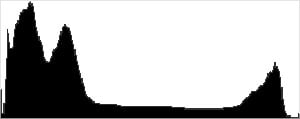
Gradation. Similar to dynamic range optimization systems from other manufacturers, the Olympus E-M5 II's Gradation setting applies local contrast adjustments in an attempt to preserve shadow detail and prevent highlight clipping with the Auto setting. Above are examples of the Normal (default), Auto, Low Key and High Key settings applied to our "Sunlit" Portrait shot with no exposure compensation. Mouse over the links to load the associated thumbnail and histogram, and click on the links to visit the full resolution image.
As you can see, the Low Key setting applies Gradation for making subjects darker (in the thumbnail and histogram above, you can see that the camera shifted levels to the left, darkening the image dramatically), while the High Key setting does the opposite for brighter images (shifting levels to the right so that lighter tones are blown, but darker ones are opened up). The Auto setting did a good job here, boosting shadows and midtones without blowing many highlights, for a much better overall exposure.
|
Far-field Gradation Comparison
|
|||
 |
|||
Above, we can see the Gradation options at work in our Far-field test shot series. Mouse over the links to load the associated thumbnail, and click on the links to visit the full resolution image.
|
High Dynamic Range
|
|||
|
|
|||
HDR setting: |
|||
High Dynamic Range. The E-M5 II's in-camera HDR feature works by combining four shots at different exposures. Two strength settings are available: HDR1 and HDR2, with the later providing a more extreme result. ISO is fixed to 200, and slowest shutter speed is 1 second (4 seconds total).
Above, you can see the E-M5 II's in-camera HDR mode at work with our Far-field shot. HDR1 did a pretty good job brightening shadows and toning down highlights, though you can probably do better by using the bracketing mode and combining the images yourself in software. HDR2 mode looked overprocessed and was too bright with blown-out highlights as well as soft details and more visible noise.
Notice that the HDR images are not cropped compared to the non-HDR image, which can imply the camera does not microalign the source images, or at least can't compensate for much camera motion. This is pretty much confirmed by the user manual which says to use a tripod for HDR shots, potentially making this mode less useful than those offered by some other manufacturers, however we found we were able to capture some HDR images hand-held with no alignment issues.
Dynamic Range Analysis (RAW mode)
A key parameter in a digital camera is its Dynamic Range, the range of brightness that can be faithfully recorded. At the upper end of the tonal scale, dynamic range is dictated by the point at which the RGB data "saturates" at values of 255, 255, 255. At the lower end of the tonal scale, dynamic range is determined by the point at which there ceases to be any useful difference between adjacent tonal steps. Note the use of the qualifier "useful" in there: While it's tempting to evaluate dynamic range as the maximum number of tonal steps that can be discerned at all, that measure of dynamic range has very little relevance to real-world photography. What we care about as photographers is how much detail we can pull out of the shadows before image noise becomes too objectionable. This, of course, is a very subjective matter, and will vary with the application and even the subject matter in question. (Noise will be much more visible in subjects with large areas of flat tints and subtle shading than it would in subjects with strong, highly contrasting surface texture.)
While we once performed our own dynamic range measurements based on in-camera JPEGs as well as converted RAW images (when the camera was supported by Adobe Camera Raw), we've switched to using DxO Labs' results from their DxOMark website. As technology advanced, the dynamic range of modern high-end cameras in some cases exceeded the range of the Stouffer T4110 density scale that we used for our own measurements. DxO's approach based on RAW data before demosaicing is also more revealing, because it measures the fundamental dynamic range of the sensor, irrespective of whatever processing is applied to JPEGs, or to RAW data by off-the-shelf conversion software.
In the following, we use DxO's "Print" dynamic range results, which are scaled based on camera resolution. As the name suggests, this scaling corresponds to the situation in which you print at a given size, regardless of how many megapixels the camera might have. (In other words, if you've decided to make a 13x19 inch print, that's the size you're printing, whether the camera's resolution is 16 or 300 megapixels.) For the technically-minded, you can find a discussion of the reasoning behind this here on the DxOMark website. Also note that DxO Labs uses a signal-to-noise (SNR) threshold of 1 when defining the lower boundary of acceptable luminance noise in their dynamic range measurements, which corresponds to the "Low Quality" threshold of the Imatest software we used to use for this measurement.

Here, we compare the Olympus E-M5 II's dynamic range to its predecessor, the E-M5, as well as to a popular APS-C competitor, the Sony A6000.
As you can see from the above graph (click for a larger image), the Olympus E-M5 II's dynamic range is very similar to the E-M5's, ranging from 12.4 EV at base ISO to 6.7 EV at maximum ISO. This is only a very slight improvement, and well within the margin of error for this test.
The Sony A6000 does have a noticeable advantage at both base ISO (about 13.1 vs 12.4 EV) and high ISOs (for example, about 7.5 vs 6.7 EV at ISO 12,800), but they are otherwise fairly close, which is remarkable given the E-M5 II's smaller Four Thirds sensor.
Bottom line: Although it hasn't improved significantly from its predecessor, the E-M5 Mark II offers excellent dynamic range for a Micro Four Thirds camera.
Click here to visit the DxOMark page for the Olympus E-M5 II for more of their test results and additional comparisons.
| 1 fc 11 lux |
1/16 fc 0.67 lux |
1/16fc No NR |
|
|---|---|---|---|
| ISO 200 |
 1s, f2.8 |
 15s, f2.8 |
 15s, f2.8 |
| ISO 3200 |
 1/15s, f2.8 |
 1s, f2.8 |
 1s, f2.8 |
| ISO 25600 |
 1/125s, f2.8 |
 1/8s, f2.8 |
 1/8s, f2.8 |
Low Light
The Olympus E-M5 II performed quite well in low lighting, capturing bright exposures at the lowest light level we test (1/16 foot-candle), even at base ISO. Noise is low at ISO 200 and well-controlled at ISO 3200, though the top ISO 25,600 is noisy and is probably best avoided except for small prints or web images. We didn't notice any significant issues with pattern noise, heat blooming or hot pixels.
White balance was fairly neutral using the Auto setting, just slightly cool.
The camera's autofocus system was able to focus on our subject down to below the 1/16 foot-candle light level unassisted with an f/2.8 lens (albeit slowly), which is excellent, and in total darkness with the aid of its focus assist lamp.
How bright is this? The one foot-candle light level that this test begins at roughly corresponds to the brightness of typical city street-lighting at night. Cameras performing well at that level should be able to snap good-looking photos of street-lit scenes.
NOTE: This low light test is conducted with a stationary subject, and the camera mounted on a sturdy tripod. Most digital cameras will fail miserably when faced with a moving subject in dim lighting. (For example, a child's ballet recital or a holiday pageant in a gymnasium.) Thanks to their phase-detect AF systems, digital SLRs tend to do much better than point & shoots, but you still shouldn't expect a quick autofocus lock with moving subjects. The E-M5 II uses contrast-detect autofocus as is found in most point & shoot cameras, so its low-light focusing ability is less than that of most SLRs with phase-detect systems. That said, though, the larger, more sensitive pixels of the E-M5 II's sensor do better under dim lighting than do the tiny pixels of most point & shoots, (A useful trick is to just prop the camera on a convenient surface, and use its self-timer to release the shutter. This avoids any jiggling from your finger pressing the shutter button, and can work quite well when you don't have a tripod handy.)
Output Quality
Print Quality
Excellent prints up to 24 x 36 inches at base ISO and extended low ISO 100; impressively large 30 x 40 inches and larger for the special High-Res Mode at ISO 200; at ISO 1600, the camera produces a nice 16 x 20 inch print; and acceptable prints are viable all the way up to ISO 25,600 topping out at 4 x 6 inches.
 ISO 100/200 images both display excellent detail and vibrant colors, and can be used for prints up to 24 x 36 inches. The 16MP Four Thirds sensor is pushed to the limit at this print size, and you can see some minor pixelation upon very close inspection, however at a normal viewing distance for such a large print, the resolution is more than capable.
High-Res Mode, ISO 200: As expected, the extra detail captured by the E-M5 Mark II's High-Res Mode allows for some very impressive prints. At ISO 200, 24 x 36 inch prints are no sweat and look fantastic. We'd go further and say prints at 30 x 40 inches and larger are definitely suitable, with tons of fine detail and practically zero pixelation, even at close inspection.
ISO 400/800 both look very similar and make fantastic prints up to 20 x 30 inches. ISO 400 shows crisp fine details and vibrant colors. While ISO 800 displays perhaps a hint more luminance noise in the shadows, it doesn't affect the print size capabilities at this ISO.
ISO 1600 prints look great up to 16 x 20 inches. Higher contrast fine detail still looks really nice, as do colors, however, lower contrast detail is softened somewhat by noise and noise reduction processing.
ISO 3200 images are capable of producing nice 13 x 19 inch prints, with 11 x 14 prints looking even better. Visible luminance noise is still well-controlled, but NR processing does reduce fine detail further.
ISO 6400 prints look great up to 8 x 10, and still display a good amount of detail with pleasing colors.
ISO 12,800 images start to look a bit soft in terms of fine detail at close inspection, however prints up to 5 x 7 inches are still acceptable.
ISO 25,600 prints display noticeable noise and noise reduction processing, which makes any prints larger than 4 x 6 inches too soft and too low on detail to get the acceptable mark from us.
The new Olympus E-M5 Mark II maintains the high marks we gave its predecessor when it comes to print quality performance. We're able to push the 16-megapixel sensor to the limit and still get some excellent large and wall-mountable prints from this compact, Micro Four Thirds mirrorless camera. At base ISO and the expanded low ISO 100 setting, the E-M5 II manages excellent prints up to 24 x 36 inches. With the new High-Res Mode introduced on this camera, however, the resulting files let us really crank up the print size, with superb prints up to 30 x 40 inches and larger. At the mid-range on the ISO scale, such as ISO 1600-3200, the camera produces very nice 16 x 20 and 13 x 19 inch prints, respectively. Finally, even at the extreme ISO sensitivities, the E-M5 Mark II still manages to produce usable prints, with an acceptable 5 x 7 inch print at ISO 12,800 and a 4 x 6 at ISO 25,600.
The images above were taken from our standardized test shots. For a collection of more pictorial photos, see our Olympus OM-D E-M5 II Photo Gallery .
Not sure which camera to buy? Let your eyes be the ultimate judge! Visit our Comparometer(tm) to compare images from the Olympus OM-D E-M5 II with those from other cameras you may be considering. The proof is in the pictures, so let your own eyes decide which you like best!
Performance
Timing and Performance
Excellent performance in our tests.
| Startup/Play to Record | ||
|---|---|---|
| Power on |
~0.8 second
|
Time it takes to turn on and capture a shot. |
|
Play to Record, |
~0.5 second
|
Time until first shot is captured. |
Powering on and taking a shot was fast for a mirrorless camera, at about 0.8 second. Switching from Play to Record mode and taking a shot was a bit faster, at about 0.5 second. Very good performance here, though some DSLRs are faster.
| Shutter Response (Lag Time) | ||
|---|---|---|
|
Full Autofocus, |
0.137 second
|
Time from fully pressing shutter button to image capture, with the lens already at the proper focal distance setting. (All AF timing tested with Olympus 45mm f/1.8 ED M.Zuiko prime lens.) |
|
Full Autofocus, |
0.339 second
|
Time from fully pressing shutter button to image capture, with the lens already at the proper focal distance setting, Auto flash enabled. (With the new FL-LM3 bundled flash.) |
| Manual Focus |
0.068 second
|
For most cameras, shutter lag is less in manual focus than autofocus, but usually not as fast as when the camera is "prefocused". |
|
Prefocused |
0.046 second
|
Time to capture, after half-pressing and holding shutter button. |
Looking at the Olympus E-M5 II's ability to determine that it's properly focused when shooting the same target multiple times using AF-S (single-shot AF) mode using the center AF point (our standard test), full autofocus shutter lag was very fast at only 0.137 second with our Olympus 45mm f/1.8 ED M.Zuiko prime lens. With the FL-LM3 bundled flash attached and enabled, full AF shutter lag increased to 0.339 second as a result of preflash metering.
Manual focus lag was quite low at only 0.068 second, and prefocused shutter lag was 0.046 second, also very fast.
To minimize the effect of different lens' focusing speed, we test AF-active shutter lag with the lens already set to the correct focal distance.
| Single-Shot Cycle Time, Burst Mode and Flash Recycling | ||
|---|---|---|
|
Single Shot mode |
0.73 second
|
Average time per shot. |
|
Single Shot mode |
0.76 second
|
Average time per shot. |
|
Early shutter |
No
|
Some cameras don't snap another shot if you release and press the shutter too quickly in Single Shot mode, making "No" the preferred answer. |
|
Continuous H mode |
0.10 second (9.68 frames per second);
22 frames total; 6 seconds to clear* |
Time per shot, averaged over buffer length of 22 frames, then slows to an average of 3.26 fps when buffer is full. |
|
Continuous H mode |
0.10 second (9.72 frames per second);
15 frames total; 6 seconds to clear* |
Time per shot, averaged over buffer length of 15 frames, then slows to an average of 2.71 fps when buffer is full. |
|
Continuous H mode |
0.10 second (9.76 frames per second);
13 frames total; 12 seconds to clear* |
Time per shot, averaged over buffer length of 13 frames, then slows to an average of 1.56 fps when buffer is full. |
| Flash Recycling |
4.5 seconds
|
Flash at maximum output. |
|
*Note: Buffer clearing times measured with a SanDisk Extreme Pro 95 MB/sec UHS-I card. Slower cards will produce correspondingly slower clearing times. Slow cards may also limit length of bursts in continuous mode. ISO sensitivity and noise reduction settings can also affect cycle times and burst mode performance.
|
||
In single-shot mode, cycle times were good for its class, at an average of about 0.73 seconds for Large/Super Fine JPEGs and 0.76 seconds for RAW+L/SF JPEGs. (Note that we no longer test single-shot mode with just RAW files as results will be between JPEG and RAW+JPEG, and we no longer test buffer depth in single-shot mode either.)
In Continuous H mode (the E-M5 II's highest-speed full-res burst mode), the E-M5 II captured 22 Large/Super Fine JPEG frames at about 9.7 frames-per-second, 15 RAW frames at 9.7 fps, and 13 RAW+JPEG frames at 9.8 fps before the camera slowed with our fast UHS-I card. Very good performance here, and pretty close to Olympus' 10 fps spec. Note that AF and AE are locked at the first frame of a burst in this mode. There is also a 5 fps Continuous L mode, however we did not test that mode.
Buffer depths were good but not great, ranging from 22 frames when shooting best quality JPEGs, to 13 frames when shooting RAW+JPEG frames before the camera slowed down. (Note that our target was designed to be difficult to compress, so buffer depths with real-world images may be greater, particularly when shooting JPEGs.) Clearing was fairly fast, taking only 6 seconds for max length bursts of JPEGs or RAW files, increasing to 12 seconds for RAW+JPEG.
The Olympus FL-LM3 bundled flash took 4.5 seconds on average to recycle after a full power discharge, which is on the slow side.
Since the E-M5 II is UHS-II compliant, we retested continuous mode buffer depths with our SanDisk Extreme Pro UHS-II SDHC card, and here are the results:
| Burst Mode with UHS-II Card | ||
|---|---|---|
|
Continuous H mode |
0.10 second (10.37 frames per second);
18 frames total; 3 seconds to clear* |
Time per shot, averaged over buffer length of 18 frames, then slows to an average of 5.95 fps when buffer is full. |
| Continuous H mode |
0.10 second (10.40 frames per second);
13 frames total; 6 seconds to clear* |
Time per shot, averaged over buffer length of 13 frames, then slows to an average of 5.23 fps when buffer is full. |
|
Continuous H mode |
0.10 second (10.34 frames per second);
13 frames total; 6 seconds to clear* |
Time per shot, averaged over buffer length of 13 frames, then slows to an average of 2.80 fps when buffer is full. |
|
*Note: Buffer clearing times measured with a SanDisk Extreme Pro 280MB/sec UHS-II card.
|
||
Interestingly, switching to a UHS-II card sped up the frame rate slightly but also reduced buffer depths somewhat for JPEGs and RAW files, however it cut buffer clearing times in half for JPEGs and RAW+JPEG files. The buffer-full rate was also improved to being quite usable for JPEGs or RAWs at about 6 and 5.2 fps respectively.
Bottom line, the Olympus E-M5 II's performance is generally excellent, with reasonably fast startup, very fast autofocus, low shutter lag, fast burst performance and decent buffer depths. Performance is actually similar to the flagship E-M1, except buffer depths aren't nearly as generous and the E-M1 does better with continuous autofocus performance thanks to its on-chip phase-detect AF pixels.
Battery
Battery Life
Below average battery life for its class.
| Operating Mode | Battery Life |
|---|---|
|
Still Capture,
(CIPA standard) |
310 shots
|
|
Still Capture,
(Quick Sleep Mode enabled) |
750 shots
|
The Olympus E-M5 II uses a custom BLN-1 rechargeable lithium-ion battery pack for power, and comes with a single battery and a dedicated battery charger. Battery life is CIPA-rated for 310 shots per charge, which is a bit below average for its class. But the E-M5 II has a Quick Sleep Mode which when enabled, increases battery life to an excellent 750 shots per charge according to Olympus' testing using CIPA test standards. And an optional power grip is also available to double battery life with a second battery.
The table above shows the number of shots the camera is capable of (on a fully-charged rechargeable battery), based on CIPA battery-life and/or manufacturer standard test conditions.
(Interested readers can find an English translation of the CIPA DC-002 standards document here. (180K PDF document))
Image Quality
Below are crops from our laboratory Still Life target comparing the Olympus E-M5 II vs. the Olympus E-M5, Olympus E-M1, Panasonic GH4, Nikon D7200 and Sony A7. These models include the E-M5 II's direct predecessor and its most fully-featured sibling, the nearest Micro Four Thirds rival, a similarly-priced APS-C DSLR, and the most affordable full-frame mirrorless camera (which has, of late, been selling at a similar price to that of the E-M5 II).
NOTE: These images are best quality JPEGs straight out of the camera, at default settings including noise reduction and using the camera's actual base ISO (not extended ISO settings). All cameras in this comparison were shot with our very sharp reference lenses. Clicking any crop will take you to a carrier page where you can click once again to access the full resolution image as delivered straight from the camera.
For those interested in working with the RAW files involved: click these links to visit each camera's respective sample image thumbnail page: Olympus E-M5 II, Olympus E-M5, Olympus E-M1, Panasonic GH4, Nikon D7200 and Sony A7 -- links to the RAW files appear beneath those for the JPEG images, wherever we have them.
Want to compare the feature-set of these cameras? We've prepared A vs. B comparisons for you -- click these links to see the Olympus E-M5 II vs. Olympus E-M5, Olympus E-M5 II vs. Olympus E-M1, Olympus E-M5 II vs. Panasonic GH4, Olympus E-M5 II vs. Nikon D7200, and Olympus E-M5 II vs. Sony A7.
And remember, you can always go to our world-renowned Comparometer to compare images shot with the Olympus E-M5 II side-by-side against any camera we've ever tested!
Olympus E-M5 II vs Olympus E-M5 at Base ISO
 |  |
 |  |
 |  |
Olympus E-M5 II at ISO 200 | Olympus E-M5 at ISO 200 |
Although its sensor is newly-designed, the Olympus E-M5 II shares the same 16.1-megapixel resolution as its predecessor. Hence, we weren't expecting a big step at base sensitivity, and nor is there one. There's perhaps a touch more sharpening than the E-M5 applied, and the E-M5 II has slightly lower contrast in the difficult red fabric swatch, but all things considered these cameras are very similar at ISO 200. | |
Olympus E-M5 II vs Olympus E-M1 at Base ISO
|  |
|  |
|  |
Olympus E-M5 II at ISO 200 | Olympus E-M1 at ISO 200 |
Much like the E-M5, the Olympus E-M1 has the same sensor size and resolution as does the newer E-M5 II, but again, it's a different sensor. The E-M5 II looks to use a touch more aggressive sharpening, but otherwise there's little difference at base ISO. | |
Olympus E-M5 II vs Panasonic GH4 at Base ISO
|  |
|  |
|  |
Olympus E-M5 II at ISO 200 | Panasonic GH4 at ISO 200 |
Panasonic, too, uses the same sensor resolution for its competing Micro Four Thirds camera. To our eye, there's more of a difference than there is between the Olympus models, however. Most notably, the Panasonic GH4 defaults to a much lower level of sharpening than does the E-M5 II. Its image also looks just a touch muddy, with lower contrast overall. It handles the red swatch a little better though, yielding more contrast in this hard-to-render fabric, but shows a bit less detail in the pink swatch. | |
Olympus E-M5 II vs Nikon D7200 at Base ISO
|  |
|  |
|  |
Olympus E-M5 II at ISO 200 | Nikon D7200 at ISO 100 |
With the Nikon D7200, we have a more interesting comparison on our hands. With 24.2 megapixels versus the E-M5 II's 16.1 megapixels, Nikon picks up quite a bit more detail. The result is an image that looks sharper even though the level of sharpening is actually a bit lower. | |
Olympus E-M5 II vs Sony A7 at Base ISO
|  |
|  |
|  |
Olympus E-M5 II at ISO 200 | Sony A7 at ISO 100 |
The same is also true in comparison to the Sony A7, which gives a crisper, less sharpened result than does the E-M5 II. However, while the full-frame Sony does a much better job with contrast in the red swatch, it also shows a fair bit of moiré. | |
Olympus E-M5 II vs Olympus E-M5 at ISO 1600
 |  |
 |  |
 |  |
Olympus E-M5 II at ISO 1600 | Olympus E-M5 at ISO 1600 |
Jumping up to ISO 1600, there's a little bit more difference between the E-M5 II and its predecessor. Both cameras show the effects of noise processing, with some blotchiness especially visible in the fine patterns of the mosaic label. To our eye, the original E-M5 holds onto just slightly more detail than does its successor. And once again, the E-M5 II shows lower contrast in that troublesome red swatch. | |
Olympus E-M5 II vs Olympus E-M1 at ISO 1600
|  |
|  |
|  |
Olympus E-M5 II at ISO 1600 | Olympus E-M1 at ISO 1600 |
At ISO 1600, both the E-M5 II and flagship E-M1 lose some detail in the mosaic label. Both also lose most detail in the red fabric swatch. We'll call this one a draw. | |
Olympus E-M5 II vs Panasonic GH4 at ISO 1600
|  |
|  |
|  |
Olympus E-M5 II at ISO 1600 | Panasonic GH4 at ISO 1600 |
Again, there's a pretty clear difference between Olympus and Panasonic's processing. The GH4 still looks a little muddy and lower-contrast overall, but holds onto more detail in the mosaic label. Its treatment of the fabric swatches is slightly better, too. However, the E-M5 II cleans up the bottles and background a little better, with chroma noise a bit more noticeable from the GH4. | |
Olympus E-M5 II vs Nikon D7200 at ISO 1600
|  |
|  |
|  |
Olympus E-M5 II at ISO 1600 | Nikon D7200 at ISO 1600 |
Raise the sensitivity to ISO 1600, and the Nikon D7200's larger sensor area is offset by its greater resolution. The result is a surprisingly similar performance to that of the Olympus E-M5 II. To our eye, Olympus derives just a little more detail from the fabric swatches, but Nikon does just slightly better with the mosaic label. | |
Olympus E-M5 II vs Sony A7 at ISO 1600
|  |
|  |
|  |
Olympus E-M5 II at ISO 1600 | Sony A7 at ISO 1600 |
Pit the E-M5 II against the Sony A7 at ISO 1600, and the advantage of that roomy full-frame sensor becomes clear. Olympus simply can't keep up with the Sony here, extracting far less detail. However, the Sony A7 still has difficulty with moiré in the red swatch. | |
Olympus E-M5 II vs Olympus E-M5 at ISO 3200
 |  |
 |  |
 |  |
Olympus E-M5 II at ISO 3200 | Olympus E-M5 at ISO 3200 |
By the time we reach ISO 3200, the Olympus E-M5 II and its predecessor have lost almost all fine detail in the fabric swatches, and the difficult red swatch in particular is almost flat. The E-M5 II does just slightly better with the bottles, and the original E-M5 has a slight edge in the mosaic label. Really, though, this has to be called a tie. | |
Olympus E-M5 II vs Olympus E-M1 at ISO 3200
|  |
|  |
|  |
Olympus E-M5 II at ISO 3200 | Olympus E-M1 at ISO 3200 |
The same is true when compared to the E-M1: At ISO 3200, there's no significant difference in rendering between these cameras. | |
Olympus E-M5 II vs Panasonic GH4 at ISO 3200
|  |
|  |
|  |
Olympus E-M5 II at ISO 3200 | Panasonic GH4 at ISO 3200 |
The Panasonic GH4 still seems to have a very slight detail advantage at ISO 3200, but it's not one we'd write home about. And overall, given the lower contrast of the GH4's image, we'd have to say we prefer the E-M5 II's shot overall. | |
Olympus E-M5 II vs Nikon D7200 at ISO 3200
|  |
|  |
|  |
Olympus E-M5 II at ISO 3200 | Nikon D7200 at ISO 3200 |
The comparison between the E-M5 II and D7200 is surprisingly close at ISO 3200. Its larger sensor allows it to hold onto just a little more detail in the mosaic label, and perhaps a touch more in the fabric swatches. It's impressive just how close Olympus comes to matching its rival despite its deficit in sensor size, though. | |
Olympus E-M5 II vs Sony A7 at ISO 3200
|  |
|  |
|  |
Olympus E-M5 II at ISO 3200 | Sony A7 at ISO 3200 |
Once we reach ISO 3200, there's simply no contest between the Micro Four Thirds-based Olympus E-M5 II and the full-frame Sony A7. Yes, there's still a little moiré in the red crop for the latter, but in every other respect the Sony's huge advantage in terms of sensor size bests its rival. | |
Olympus E-M5 II vs. Olympus E-M5, Olympus E-M1, Panasonic GH4, Nikon D7200, Sony A7
 |  |  |  |  |  |
 |  |  |  |  |  |
 |  |  |  |  |  |
| Olympus E-M5 II ISO 200 ISO 3200 ISO 6400 | Olympus E-M5 ISO 200 ISO 3200 ISO 6400 | Olympus E-M1 ISO 200 ISO 3200 ISO 6400 | Panasonic GH4 ISO 200 ISO 3200 ISO 6400 | Nikon D7200 ISO 100 ISO 3200 ISO 6400 | Sony A7 ISO 100 ISO 3200 ISO 6400 |
| Detail comparison. Save for the Panasonic GH4's lower contrast, which is easily corrected in Photoshop or by tweaking settings, all of these cameras turn in a good performance at base sensitivity. With that said, the larger-sensored D7200 and A7 give the best results, with less noticeable sharpening halos. As sensitivity climbs, the Sony A7's big full-frame sensor gives it a clear edge, but the D7200 falls back within reach of the Olympus cameras. And really, it's difficult to say any of these three Olympus models betters its siblings, despite the slight differences in their sensors. | |||||
Olympus E-M5 II Print Quality
Excellent prints up to 24 x 36 inches at base ISO and extended low ISO 100; impressively large 30 x 40 inches and larger for the special High-Res Mode at ISO 200; at ISO 1600, the camera produces a nice 16 x 20 inch print; and acceptable prints are viable all the way up to ISO 25,600 topping out at 4 x 6 inches.
ISO 100/200 images both display excellent detail and vibrant colors, and can be used for prints up to 24 x 36 inches. The 16MP Four Thirds sensor is pushed to the limit at this print size, and you can see some minor pixelation upon very close inspection, however at a normal viewing distance for such a large print, the resolution is more than capable.
High-Res Mode, ISO 200: As expected, the extra detail captured by the E-M5 Mark II's High-Res Mode allows for some very impressive prints. At ISO 200, 24 x 36 inch prints are no sweat and look fantastic. We'd go further and say prints at 30 x 40 inches and larger are definitely suitable, with tons of fine detail and practically zero pixelation, even at close inspection.
ISO 400/800 both look very similar and make fantastic prints up to 20 x 30 inches. ISO 400 shows crisp fine details and vibrant colors. While ISO 800 displays perhaps a hint more luminance noise in the shadows, it doesn't affect the print size capabilities at this ISO.
ISO 1600 prints look great up to 16 x 20 inches. Higher contrast fine detail still looks really nice, as do colors, however, lower contrast detail is softened somewhat by noise and noise reduction processing.
ISO 3200 images are capable of producing nice 13 x 19 inch prints, with 11 x 14 prints looking even better. Visible luminance noise is still well-controlled, but NR processing does reduce fine detail further.
ISO 6400 prints look great up to 8 x 10, and still display a good amount of detail with pleasing colors.
ISO 12,800 images start to look a bit soft in terms of fine detail at close inspection, however prints up to 5 x 7 inches are still acceptable.
ISO 25,600 prints display noticeable noise and noise reduction processing, which makes any prints larger than 4 x 6 inches too soft and too low on detail to get the acceptable mark from us.
The new Olympus E-M5 Mark II maintains the high marks we gave its predecessor when it comes to print quality performance. We're able to push the 16-megapixel sensor to the limit and still get some excellent large and wall-mountable prints from this compact, Micro Four Thirds mirrorless camera. At base ISO and the expanded low ISO 100 setting, the E-M5 II manages excellent prints up to 24 x 36 inches. With the new High-Res Mode introduced on this camera, however, the resulting files let us really crank up the print size, with superb prints up to 30 x 40 inches and larger. At the mid-range on the ISO scale, such as ISO 1600-3200, the camera produces very nice 16 x 20 and 13 x 19 inch prints, respectively. Finally, even at the extreme ISO sensitivities, the E-M5 Mark II still manages to produce usable prints, with an acceptable 5 x 7 inch print at ISO 12,800 and a 4 x 6 at ISO 25,600.
Field Test
Field Test Part II
Hot off the press, Olympus' enthusiast mirrorless shoots the sights in beautiful Bermuda
By Mike Tomkins | Posted: 02/25/2015

A change of scenery: My first Field Test for the Olympus E-M5 II was shot on a press trip to the beautiful island of Bermuda.
(ISO 200, 1/200 sec., 14-150mm f/4.0-5.6 lens @ 25mm f/6.3)
As a technology journalist and camera reviewer these last 16 years, I'm fortunate that I get to shoot with a lot of great gear in my line of work. Sometimes, though, finding new and attractive subjects can be a challenge -- especially living as I do in a fairly small East Tennessee town that, for the last couple of weeks, has been coated in an unusually generous and long-lasting layer of snow and ice.
Thankfully, shortly before the near-arctic conditions hit, Olympus invited journalists from a number of print and online publications for a short trip to the British overseas territory of Bermuda, an opportunity for some one-on-one time with its brand-new OM-D E-M5 Mark II compact system camera -- and I was lucky to be among their number. And boy, did Olympus ever have some beautiful locations in store for us, as you can see throughout this report, and in my Olympus E-M5 II gallery!
If anything, I faced the opposite problem to that with which I sometimes struggle: So many great shots and interesting subjects that I had a hard time whittling them down to a manageable gallery for my first Field Test! During a three-night stay in Bermuda, I shot close to 1,100 raw+JPEG photos, flooding my notebook hard drive with some 23 gigabytes of brand-new data.
Day One's itinerary on the Olympus press trip -- after breakfast and our first chance to get hands-on with the E-M5 II -- took us inside a 10-acre keep dating back to the 1800s, part of Bermuda's historic Royal Naval Dockyard. Now home to the National Museum of Bermuda and the Bermuda Maritime Museum, it was a picturesque location with great views towards Bermuda's North Lagoon, and packed with interesting artifacts documenting the last 500 years of Bermudian history.
First order of business, once I'd wolfed down some food, was to familiarize myself with the E-M5 II. Thankfully, with narrow roads and low speed limits, the 20-mile drive to the museum took the best part of three-quarters of an hour, giving me time to come to grips with the contents of my camera bag. And that's a good thing, too, because I had access to a pretty comprehensive kit. My Olympus E-M5 II body came accompanied by three lenses, a teleconverter and an external flash strobe.

My three lenses were the just-announced M.Zuiko Digital ED 14-150mm f4.0-5.6 II zoom -- an update of the earlier version with added weather-sealing and improved coatings -- plus the M.Zuiko ED 12-40mm f2.8 PRO and the M.Zuiko ED 40-150mm f2.8 PRO. Coupled with these, I had the compact little M.Zuiko Digital 1.4x Teleconverter MC-14, which took that bright 40-150mm optic out to a maximum of 210mm with an effective f/3.9 maximum aperture.

(ISO 200, 1/100 sec., 14-150mm f/4.0-5.6 lens @ 39mm f/5.6)
Rounding out the package, I had the FL-600R flash strobe to throw a little more light on my subjects. Note, though, that I didn't have access to the tiny FL-LM3 tilt/swivel flash strobe that ships by default in the E-M5 II kit. I did get to see one in person (and found it impressively small, thanks in part to the fact that it draws power from the camera body), but at the time it was the only sample in the country and hence being treated like gold dust. Now that the E-M5 II is available in the US market, I'll endeavor to see if I can get my hands on one before filing my second Field Test.
As you'd expect of a camera aimed at enthusiast and even some professional use, the Olympus E-M5 II is beautifully built, a really solid piece of gear with not the slightest hint of flex or panel creak. The new tilt/swivel LCD screen is a very nice touch that makes the E-M5 II a more versatile camera than its predecessor, and the change to a locking Mode dial as in the E-M1 -- locked on the first press, and unlocked with a second press -- was another change I was thrilled to see.
With no less than 24 external controls covering almost every surface of its compact body, the E-M5 II is perhaps a little intimidating until you've spent some time shooting with it. The controls are for the most part comfortable and easy to reach, and they quickly become second nature -- just expect a bit of a steep learning curve initially, if you're not coming to the E-M5 II from its predecessor.

(ISO 200, 1/400 sec., 12-40mm f/2.8 lens @ 34mm f/2.8)
The twin control dials, though, I felt could use a stronger click detent. As-is, they're quite easy to bump and turn by mistake, and I quickly learned to double-check this hadn't happened every time I brought the camera to my eye. And I was also somewhat perplexed by the location of the speaker, right at the base of the thumb grip in perhaps the one place you're most likely to accidentally cover it. You can still hear audio with it covered, but it'd be easy to forget and think your audio levels were insufficient when reviewing a just-shot clip with your thumb covering the grip.
Those are all relatively minor niggles, though. All things considered, I found the E-M5 II a very comfortable camera to shoot with, and it felt well-balanced with the lenses I had on hand. After quickly resetting the camera to its defaults, and then dialing in my standard review-shooting options (three-shot bracketing with raw+JPEG filetypes), I headed off to get a few shots and a baseline idea of what to expect from the E-M5 II.
After a few shots in the National Museum grounds which showed plenty of detail for a 16-megapixel camera, I headed into one of the dimly-lit halls of exhibits for some lower-light shooting and an idea of how the newly-uprated image stabilization system performed. My initial results were slightly hit and miss, with some shots hand-holdable at impressively low shutter speeds, but occasional shots surprising me with some motion blur at speeds I would have expected to be able to hand-hold without problem. After some playing, I came to the conclusion that I actually seemed to get better results without the viewfinder quite pressed to my eye.


The other new feature I was really excited to try as soon as possible was the Olympus E-M5 II's new High Res Shot mode, which combines eight sequential exposures into a single shot with much higher 40-megapixel resolution. I'd brought along my own Feisol Traveler CT-3441S tripod, and set up in front of an impressively complex clock movement that once operated in the Great Store House, for a side-by-side comparison of the standard 16-megapixel and multi-shot 40-megapixel modes with the same subject and framing. There was simply no comparison -- the 40-megapixel shot showed far more fine detail, and is going to make this camera very exciting indeed if you're a still-life photographer or shoot fairly static scenes such as landscapes!

(ISO 200, 1/2,000 sec., 40-150mm f/2.8 lens @ 100mm f/2.8)
Returning outdoors, fortune was clearly smiling down on us, because not long after we'd arrived at the National Museum, so too had some much-welcomed blue skies. And good thing, too, because Olympus had a special treat lined up for us next -- a private show at Dolphin Quest Bermuda, followed by the chance to swim with the dolphins ourselves!
To say that shooting the dolphins was a tough challenge would be quite the understatement. For the most part, I used the 40-150mm f/2.8 to try and frame fairly tightly, sometimes coupling it with the MC-14 teleconverter for an even closer view. Predicting just where and when the dolphins would jump was pretty challenging, though, and my reflexes aren't the best. (And bear in mind that I'd been hands-on with the E-M5 II for perhaps two or three hours at this point, so I was still learning its ins and outs as well.) With that said, I came away with some shots I was very proud of, despite some very fast-moving and (for me, at least) rather unpredictable subjects.
I was particularly pleased with the shot below, water sheeting off the dolphin, surrounded by a sparkling spray that's catching the sunlight. Sure, it could use a little work, perhaps cropping in tighter, leveling the horizon and bringing the shadows up some, but we present photos straight out of the camera here so that you can judge the camera's capabilities, rather than our editing chops. Suffice to say, I think a tweaked-and-cropped copy of this shot will be going up on my office wall at some point!
 |
Soon to be featured on my office wall: It needs the shadows brought up, straightening and cropping, but I'm very happy with this leaping dolphin shot, especially given how unpredictable and tough-to-capture I found the dolphins. |
After swimming with the dolphins -- a once-in-a-lifetime experience which I highly recommend if you ever get the opportunity -- we visited the Dockyard Glassworks and Bermuda Rum Cake Factory. With a crowd of assembled press in a relatively small space -- and not the most photogenic of backgrounds -- I only took a few shots of the glassblowing process and some of the finished works, which you can see in the gallery, before we headed back to the hotel.
Day two started with a trip to the Unfinished Church, a Bermuda tourist attraction whose construction started in 1874, and as the name would suggest, was never completed. Structural problems with the ruin mean that it's mostly kept locked up, but we were given special permission to shoot the remaining structure both inside and out.

Probably my favorite shot in the Unfinished Church was that shown above: a camera bag discarded by one of the many photographers poring over every inch of the ruin. A low overcast softened the shadows, and the resulting image wouldn't look out of place in an ad for the bag. I was also rather taken by some of the arches, and the brick and stone pillars, all constructed since the mid-1870s and now heavily weathered. And here and there, tiny little bits of vegetation struggled to gain a grip in every crack and crevice, a testament to Bermuda's foliage-friendly climate.

The Dramatic Tone filter definitely lived up to its billing, adding some drama to this cemetery shot.
(ISO 200, 1/250 sec., 12-40mm f/2.8 lens @ 12mm f/5.0)
Even more visually impressive, though, was the nearby St. Peter's Church, parts of which date back to just a decade after Bermuda's settlement in 1609. Tiny but extremely pretty, the church sits in the middle of a cemetery filled with notables from the island's early history, as well as those whose lives ended on ships visiting the area. One particular tombstone, covered in lichen and dating back to 1846, caught my eye.
After trying a number of different angles and effects, I settled on the E-M5 II's Dramatic Tone filter for a shot framed very low to the ground, the tilt/swivel LCD screen helping save me from getting down in the dirt myself. The wizened remains of a cedar that was once used as the church's belfry, and which was toppled in a hurricane a dozen years ago, added a rather dramatic accent in the top right corner. While the final image looked a little more dramatic on the Olympus' display than it did once I got it on my PC, I'm still rather pleased with the result.
With some time to kill before lunch, I headed down towards the harborfront and Bermuda's cruise ship terminal, the latter rather sleepy in the tourist off-season. With quite a breeze building up, the harbor was filled with whitecaps, and provided a rather lively backdrop for everything from jet-skis and sailing boats to a gigantic deep-ocean vessel called the Seabed Prince, one of whose sister vessels recently salvaged almost 110 tonnes of silver from a World War II wreck at a staggering depth of 4,700 meters.
 |
Stormy seas: My tripod literally tried to walk away when I set it up without the camera mounted, so strong and gusty were the winds. I braced it with my hand to get a usable shot with the framing I wanted. |
As well as the Seabed Prince, one sailing boat in particular caught my eye, and framing either vessel reasonably tightly necessitated both the 40-150mm f/2.8 lens and MC-14 teleconverter, a combination which I mounted on my Feisol tripod. Given the strong, gusty wind -- powerful enough that once I extended my tripod that it started to "walk" away from me while I was fiddling with attaching its quick-release plate to the mount on the lens -- I gently pressed down on the tripod with my hand to help steady it while framing the images above and below. The results were quite satisfying, with the choppy seas providing some life and visual interest to the shots.

And then it was time to hit the road once more, this time headed for the Crystal Cave, another popular tourist attraction. The cave stretches for a third of a mile beneath Hamilton Parish, connected via underground waterways to the nearby Harrington Sound. It's not the most colorful location, but it's none the less spectacular for that fact, with much of the cave system accessible only via pontoons floating above deep, crystal-clear pools full of stalagmites that formed long before the sea level rose, flooding the caves.
I took the Crystal Cave as another opportunity for a test of the E-M5 II's stabilization system, partly of necessity -- with the pontoons moving beneath us, shooting tripod-mounted simply wasn't possible much of the time. Bearing in mind my earlier experiences, I shot at arm's length rather than with the viewfinder to my eye, and managed usable exposures to as slow as 1/8th second.

And finally, we rounded out our last full day in Bermuda with a light-painting session on the beach. A number of light sources were on hand, including glowsticks, laser-pointers, and my personal favorite, some steel wool that was set alight and then whirled on the end of a short cord to create a shower of glowing embers. Sadly, our chosen beach for the session was far, far too windy, so we ended up at a rather smaller and less photogenic beach adjacent to the hotel.
No matter, though, because in the brief time before the tide came in too far -- the sea was literally lapping around the bottom of my tripod -- and the rain started falling, I got several pretty cool shots shooting manually in Olympus' clever Live Time mode. (If you're not familiar with it, this mode occasionally reads out the sensor during exposure, allowing you to see your image gradually building up on the LCD monitor.)
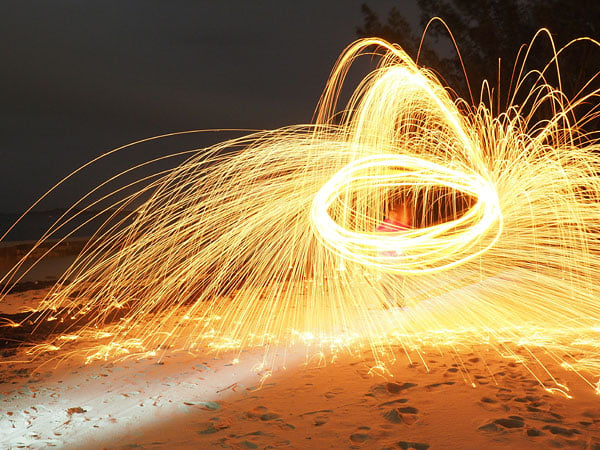
My best-composed image, shown above, was actually my very first test-shot. Unfortunately, I focused a little too close to the camera by mistake, and somebody switched a flashlight on during the exposure. A second attempt, shot with our fire-whirling model standing on a crumbling, storm-damaged pier was perhaps a little too tightly-framed, but nice and sharp. I'd have loved to play longer, were it not for the encroachment of both tide and rain!

And that's where my trip to Bermuda, sadly, had to reach its end -- just slightly prematurely. The following morning, I awoke to both strong winds and rain, and while I had plenty of time before my flight and the Olympus gear was more than up to the task of shooting out in the elements, I didn't fancy a long and uncomfortable journey home in wet clothes.
It's not the end of my time with the E-M5 II, though, because I still have plenty more I want to look at. Now I'm back home in Knoxville, Tennessee I'm planning on shooting at higher sensitivities and some longer exposures, as well as trying out the E-M5 II's overhauled video capture capabilities. If you have any features you want tested, or requests for anything you'd like checked while I still have the camera in my hands, please do sound off in the comments below!

Field Test Part III
It's time for golden hour videos and nighttime shooting
By Mike Tomkins | Posted: 03/16/2015

An evening's shooting: At the end of my first Field Test, I promised some high ISO / low-light shooting. True to my word, I took the E-M5 II out for an evening in downtown Knoxville, predominantly shooting high ISO.
(ISO 4000, 1/100 sec., 12-40mm f/2.8 lens @ 15mm f/2.8)
Recently, I had the pleasure of shooting with the Olympus E-M5 II compact system camera on a whirlwind trip to Bermuda, an experience that became the basis for the first part of my E-M5 II Field Test. (If you've not already read that report, you'll find it here.) With the trip over all too soon, I brought the camera back home with me to Knoxville to wrap things up.
In my first Field Test, I promised that I'd take a look at video capture and high ISO shooting on my return home, as well as trying some more long-exposure photography. A few days ago, I headed to downtown Knoxville, prepped and ready for an evening's shooting.
I started off right as the golden hour landed, with my first goal being to shoot some daylight video. In its pre-launch press briefings for the E-M5 II, Olympus had emphasized three video features for which it felt the most progress had been made, and I wanted to test all three.
Key among the video changes is the Olympus E-M5 II's more powerful image stabilization, which comes alongside a smoother and more responsive autofocus system, and better-tuned autoexposure.
Looking to try all three in a single video, I headed towards Knoxville's Volunteer Landing, where the footbridge that takes pedestrians across busy Neyland Drive sits next to a deeply shaded carpark. Panning to follow traffic turning onto Walnut Street gave an idea of how the E-M5 II handled subject motion, then the entry to the carpark provided a good subject on which the camera could focus as I walked towards the entry of the car park to test the stabilization. Finally, a quick turn into the carpark let me see how the exposure metering handled a sudden change in the brightness of the scene.

Shooting with the M.Zuiko ED 12-40mm f2.8 PRO lens mounted and set to the 40mm position (or 80mm equivalent) ensured that this would be quite a challenging test for the stabilization system, and indeed it was. While it did a pretty good job of steadying motion from my walk towards the end of the bridge, the E-M5 II's video still showed a little camera shake, as well as a tendency to jump around a little as the sensor reached the limits of its travel and returned to the centered position. (This was particularly noticeable as I turned to enter the garage.)
Daytime video: With image stabilization enabled, the Olympus E-M5 II did a pretty good job of steadying camera shake as I panned upwards and then walked across a pedestrian overpass into a nearby carpark. There was definitely still some shake visible, though, and quite a few times I hit the limit of the sensor travel, resulting in a sudden change in framing. |
Switching off IS, though, made clear what an impressive feat this level of stabilization was. Without the stabilization system active, my video was extremely shaky indeed, an absolutely night-and-day difference from that shot with stabilization enabled.
Partly that shakiness was down to the fact that I was lugging a heavy camera bag along with me, and I'm sure I could have gotten quite a bit more stable video in the first place had someone been free to keep an eye on my camera gear. (And with smoother video in the first place, the stabilized video would've likely been near-hiccup free.) Ah, to have an assistant to carry my gear at times like these!
Unstabilized video: After disabling image stabilization, it became obvious that the E-M5 II had managed a minor miracle to provide reasonably well-stabilized video. Shooting at 80mm-equivalent and lugging a heavy camera bag on one shoulder, I was struggling to hold the camera remotely steady, to the point where the autofocus system even got confused by my shakiness. |
Focus adjustment in the video was pretty smooth and responsive, other than occasional, very brief hiccups as the stabilization system reached its limits. To better test the system, though, I shot a separate video just to test the autofocus performance, alternating between selecting nearby and distant subjects using the touch panel. While a little focus hunting is still noticeable -- mostly in the areas of out-of-focus blur, where the bokeh visibly changed as the camera hunted around the point of focus -- the focus adjustment was pretty quick and confident. This is certainly a camera that makes it easy for less experienced videographers to manage some great-looking focus pulls.
Touch autofocus: The Olympus E-M5 II's autofocus algorithms have been refined, and often I couldn't see any noticeable focus hunting in my final videos. Here, with an extreme difference in subject difference, there's a little hunting noticeable, mostly in the out-of-focus areas of the shot, but even so it's a lot less noticeable than with many cameras. |
Returning to that first video, I was also quite impressed by how smoothly the E-M5 II adjusted both exposure and white balance as I moved into the artificially-lit garage. I'm more of a still photographer than a videographer, but I can certainly see this camera being a great tool if you are, especially with a little practice to minimize the amount of camera shake that the stabilization system needs to correct. Shooting at wider angle (and without carrying your gear while you're capturing video), you really can get results that look as if you're using a Steadicam!

By now, the sun was setting, so it was time to switch to some still image capture at higher sensitivities. I decided to stick with the same 12-40mm f/2.8 lens, as it provided a good range of coverage for some downtown street shooting.

(ISO 8000, 1/80 sec., 12-40mm f/2.8 lens @ 40mm f/2.8)
I set the camera up in Aperture-priority mode, and cranked the sensitivity up, shooting anywhere from ISO 4000 to 25,600 equivalents, sensitivities I hadn't really needed to use during the Bermuda trip.
At the highest sensitivities, things were clearly a step too far for anything more than relatively small prints, but if I restricted myself to ISO 12,800 or below, I was pretty pleased with the results straight out of the camera.
Sadly, DxO Labs' excellent Optics Pro denoising engine wasn't available to see how much further I could take things, as that app doesn't yet support the E-M5 II. (The company is currently forecasting support to land from May 2015.)
Even without Optics Pro's PRIME denoising engine, though, relatively subtle details survived the E-M5 II's in-camera noise reduction. For example, in the shot below, look just below center at the left side of the image, and you'll see that the chain-link fence beneath the deck of Calhoun's restaurant is quite visible, and at frame right, the tiny registration number on the houseboat is also quite readable.
For an ISO 8000 image shot handheld and well after the sun had completely set, this really struck me as pretty impressive. Doubly so with a camera that's as compact and yet feature-rich as this one.

Having gotten a good selection of high ISO shots -- and the last of the twilight having almost completely been extinguished -- I switched to shooting some long exposures. I'd actually left my tripod in the car, thinking I'd walk back there before dark, so I braced the camera against railings, lamp posts and the like, leaving image stabilization enabled. The result was tack-sharp exposures of several seconds, and my favorite shot of the group is that shown below. The sky glow really helps the buildings stand out, and I love the contrast between the warm glow of the street lights in the foreground and the cool evening sky.

Having ticked off my checkboxes for daytime video, high ISO and one more long exposure, I headed back to the car for my tripod, and one last item -- night video. Setting up on Knoxville's Gay Street, I shot the clip below. Video quality under city street lighting was pretty good, and the E-M5 II's full-time autofocus wasn't confused by the traffic and panning motion, as quite a few cameras seem to be. Detail wasn't the best I've seen, but bricks in the buildings across the road were easily visible, and there was little in the way of untoward aliasing or false-color artifacts. All things considered, a pretty decent performance.
Night video: A pretty good effort here, for a camera which (as far as I'm aware, anyway) doesn't feature full-sensor readout. Aliasing and false color are fairly minimal, and the autofocus system isn't confused by the moving traffic and my pan across the subject. |
And with that last item crossed off the checklist, it was time to pack up the E-M5 II and return it to Olympus. I have to say, I did so with a touch of sadness -- I've greatly enjoyed shooting with this camera, and loved it for its excellent build quality, relatively compact nature and top-notch ergonomics. Most of all, though, I'm thrilled with some great photos that I captured in my time with the E-M5 II, especially during my time in Bermuda.

If you're looking for an enthusiast-friendly mirrorless camera that doesn't skimp on features, I highly recommend putting the Olympus E-M5 II on your shortlist. (And doubly so if you're already a Micro Four Thirds shooter with a stock of M.Zuiko glass in your camera bag!)

Flash
Olympus E-M5 II Flash
 |
The E-M5 Mark II comes bundled with the new Olympus FL-LM3 compact flash unit which is splash and dustproof, and capable of bounce/swivel. It features a Guide Number (GN) of 9 meters at ISO 100 and derives its power from the camera body. It is compatible only with the E-M5 II as of this writing. See below for our test results with this flash. |
Bundled Flash Test Results
Coverage, Exposure and Range
A somewhat weak flash with narrow and uneven coverage. Above average exposure compensation required.
| Coverage |
|---|
 |
|
12mm
|
Coverage. Flash coverage with the new Olympus FL-LM3 bundled flash is narrow and uneven at wide angle (12mm), leaving very dark corners in our flash coverage test image, though keep in mind 24mm-equivalent is wider than most kit lenses. We no longer test at full telephoto is coverage is invariably better, making wide angle the worst case.


Exposure. Indoors under incandescent background lighting, the Olympus E-M5 II's bundled flash produced a reasonably bright result from our indoor portrait scene at ISO 200 when +1.0 EV flash exposure compensation used. (An average of +0.7 EV is normally needed for this shot.) The camera's slow-sync flash mode required only +0.3 EV compensation to produce a reasonably bright shot (and higher values made no difference). Interestingly, the longer shutter time (1/13s vs 1/60s) did not result in the orange cast from the ambient background lighting we normally see even with Auto white balance.
| Manufacturer-Specified Flash Range |
|---|
 7.5 feet, f/5.6, ISO 200 |
Manufacturer Specified Flash Test. The Olympus FL-LM3 bundled flash has a Guide Number (GN) of 9 meters at ISO 100. That works out to about 7.5 feet at f/5.6 and ISO 200. In the shot above, the FL-LM3 did not quite perform to Olympus' GN spec in terms of range, producing a somewhat dim exposure at the calculated distance, aperture and ISO.
High ISO Noise Reduction
Olympus E-M5 II High ISO Noise Reduction
The Olympus E-M5 II offers four settings for noise reduction, or "Noise Filter" as the company calls it: "Off", "Low", "Standard" and "High". The user manual doesn't state at which ISO noise reduction kicks in, so we've started with ISO 100 (extended) to find out.
See for yourself how the Olympus E-M5 II's "Standard" and "Off" High ISO NR settings compare to RAW without noise reduction under daylight-balanced lighting. (Note that these RAW images also have no sharpening applied, so they are softer than camera JPEGs at low ISOs.) Click on any of the crops below to see the corresponding full-sized image.
| High ISO Noise Reduction Comparison Daylight-balanced illumination |
|||
|
"Standard"
|
"Off"
|
RAW (no NR)
|
|
|
I
S O 1 0 0 |
 |
 |
 |
 |
 |
 |
|
 |
 |
 |
|
|
"Standard"
|
"Off"
|
RAW (no NR)
|
|
|
I
S O 2 0 0 |
 |
 |
 |
 |
 |
 |
|
 |
 |
 |
|
|
"Standard"
|
"Off"
|
RAW (no NR)
|
|
|
I
S O 4 0 0 |
 |
 |
 |
 |
 |
 |
|
 |
 |
 |
|
|
"Standard"
|
"Off"
|
RAW (no NR)
|
|
|
I
S O 8 0 0 |
 |
 |
 |
 |
 |
 |
|
 |
 |
 |
|
|
"Standard"
|
"Off"
|
RAW (no NR)
|
|
|
I
S O 1 6 0 0 |
 |
 |
 |
 |
 |
 |
|
 |
 |
 |
|
|
"Standard"
|
"Off"
|
RAW (no NR)
|
|
|
I
S O 3 2 0 0 |
 |
 |
 |
 |
 |
 |
|
 |
 |
 |
|
|
"Standard"
|
"Off"
|
RAW (no NR)
|
|
|
I
S O 6 4 0 0 |
 |
 |
 |
 |
 |
 |
|
 |
 |
 |
|
|
"Standard"
|
"Off"
|
RAW (no NR)
|
|
|
I
S O 1 2 8 0 0 |
 |
 |
 |
 |
 |
 |
|
 |
 |
 |
|
|
"Standard"
|
"Off"
|
RAW (no NR)
|
|
|
I
S O 2 5 6 0 0 |
 |
 |
 |
 |
 |
 |
|
 |
 |
 |
|
As you can see, all E-M5 II noise reduction settings apply noise suppression at all ISOs, even the "Off" setting. The "Off" setting does apply less luminance noise suppression than the default, but as you can see, chroma noise is still fairly aggressively suppressed at all settings.
It's interesting to see that JPEGs at the low extended ISO 100 setting show much better detail in the red-leaf fabric than at ISO 200, a much bigger difference than the ISO 100 and 200 RAW files show. It seems Olympus is concerned with showing slightly higher chroma noise at ISO 200 versus 100 in its JPEGs.
Technical Info
Olympus E-M5 II Technical Info
Sensor
Olympus has based the OM-D E-M5 II mirrorless camera around a 16.1-megapixel, Four Thirds-format Live MOS image sensor, just as in the original E-M5. It's not the same chip, though -- the company describes it as having been redesigned, and the total pixel count has climbed from 16.9 to 17.2 megapixels.
Processor
Output from the new image sensor is handled by a TruePic VII-branded image processor, also an upgrade from the TruePic VI chip used in the original E-M5.
Performance
Together, the pairing of sensor and processor allow a manufacturer-claimed performance of 10 frames per second with focus locked from the first frame, or five frames per second with continuous autofocus tracking enabled. Both are noticeably swifter than the manufacturer-claimed 9 fps of the original E-M5 with focus locked, or 4.2 fps with continuous AF.
Sensitivity
By default, the Olympus E-M5 II offers a sensitivity range of ISO 200 to 25,600 equivalents, unchanged from the range provided by the original E-M5. Also unchanged is the ability to extend the sensitivity to ISO 100 on the low end, a feature that was added to the earlier camera via a firmware update in January 2014.
Optics
As you'd expect, the Olympus E-M5 II features a Micro Four Thirds lens mount, compatible with a wide range of lenses from Olympus and its Micro Four Thirds partner companies. In the US market, it will be sold body-only, with no kit lens options provided. (But of course, that just means you can choose whichever lenses would be most useful to you.)
Image stabilization
When the original Olympus E-M5 launched, it featured an interesting image stabilization system with five-axis correction capability. The E-M5 II builds on that with a greater corrective ability than in the past.
The original E-M5's stabilization system had a manufacturer-claimed five-stop corrective ability, but that was to an in-house measurement. To CIPA testing standards, the company tells us that the E-M5 would have merited a 3.5-stop correction.
Thanks to refined algorithms and a better gyro sensor, the E-M5 II can now manage a 5-stop correction to CIPA testing standards, greatly increasing your chances of a sharp, usable image at extremely low shutter speeds or longer focal lengths. Note that the CIPA measurement is made at 50mm equivalent, using the M.Zuiko Digital ED 12-50mm F3.5-6.3 EZ lens.
Focusing
Like the E-M5 before it, the Olympus E-M5 II relies solely on a speedy implementation of contrast-detection autofocus, branded as "Frequency Acceleration Sensor Technology," or "FAST" AF for short. Compared to the system used in the E-M5, there have been several improvements, however.
Perhaps most significantly for still image capture, the number of focus points available to the user has been increased from 35 to 81, allowing much finer-grained focus point positioning. As in the earlier camera, this can be increased to over 800 possible focus points with magnified-frame autofocus active. (You now have a choice of 3x magnification, as well as the existing 5x, 7x, 10x or 14x magnification of the E-M5, incidentally.)
For video capture, meanwhile, the focus algorithms have been altered so that they work in a more logical manner. The requirements of still and video capture autofocus are actually quite different, when you stop to think about it, so the change is quite logical. In still capture, you just want to focus as quickly as possible so that you don't miss a fleeting moment, but for video, an abrupt focus change with visible hunting is unsightly.
What Olympus has done with the E-M5 II's video mode is to use a slower, subtler hunting motion, with the slight wobble around the point of focus that's common to all contrast-detection systems now almost imperceptible. It takes just slightly longer to lock focus, so wouldn't be conducive to still imaging, but for video the result looks much better.
Don't take this to mean that the AF system is slow to respond for video, incidentally: The opposite is true. In our informal testing of the E-M5 II, AF response in video mode was still very quick indeed -- it's just the final hunting motion that's achieved over a longer time.
Other focus features of the Olympus E-M5 II include an AF assist illuminator to help with focusing on nearby subjects in low ambient light, an eye detection AF function (with the ability to select which eye to focus on, or simply the nearer eye), a choice of AF target size, and a peaking function with adjustable intensity and color settings.
Weather sealing
Another feature retained from its predecessor is the Olympus E-M5 II's robust weather and dust-resistant design. Although no specification is provided for the number of seals in its magnesium-alloy body, Olympus says the camera can safely be used in rain or dusty environments when coupled with one of the eight weather-sealed M. Zuiko digital lenses currently on the market or the company's lens roadmap. These include all M.Zuiko Pro lenses, as well as the M.Zuiko Premium ED 60mm F2.8 Macro, M.Zuiko ED 14-150mm F4.0-5.6 II, and M.Zuiko ED 12-50mm F3.5-6.3 EZ.
The Olympus E-M5 II body is also freezeproof to 14 degrees Fahrenheit / -10 degrees Celsius.
Dust reduction
Of course, even with a dust-resistant design, some dust is inevitably going to enter the camera body during lens changes, or when shooting with lenses that lack environmental sealing. To help handle this, the E-M5 II includes Olympus' Supersonic Wave Filter dust reduction system, which functions every time the camera is switched on using a piezoelectronic element to shake dust free from the sensor cover glass, from where it is then captured by an adhesive membrane beneath the image sensor.
Viewfinder
The Olympus E-M5 II's electronic viewfinder is a big step forwards from that of the original E-M5 in several important ways. First, the total dot count has been increased from 1.44 million to 2.36 million dots. Viewfinder magnification has also been increased, varying from 1.30 to 1.48x, depending on viewfinder mode. By contrast, the E-M5 II viewfinder had a magnification of 0.92 to 1.15x, depending on VF mode. And eyepoint has increased from 18 to 21mm from the rear lens surface, meaning that your eye needn't be quite as close to be able to see the entire viewfinder image.
The viewfinder eyecup is still removable, and can be swapped for the larger EP-16 eyecup if you're an eyeglass-wearer, while a -4 to +2m-1 dioptric adjustment is also available should you prefer to look through the finder directly without your glasses. And to help out in difficult ambient light, a +/- 7-step brightness adjustment is available, complete with an automatic setting that will vary the brightness for you as the camera deems necessary.
Articulated, touch-sensitive display
In place of the 610,000 dot Organic LED monitor used in the original E-M5, the Olympus E-M5 II uses a 3:2-aspect, 1,037k-dot LCD panel with the same three-inch diagonal measurement as that of its predecessor.
The articulation mechanism for the display has been completely rethought, and is now much more versatile. Impressively for a weather-sealed camera, it uses a side-mounted tilt/swivel design that allows for viewing from most angles -- even portrait-orientation images shot low to the ground or over your head, and (although it's probably not a huge use-case in an enthusiast-grade camera) also caters to selfie-shooters, since the screen can be swiveled for viewing from in front of the camera. One further advantage over the E-M5's tilt-only screen is that the display on the E-M5 II can be closed facing inwards towards the camera body, providing a degree of protection against minor bumps, scrapes and smudges.
As in the original E-M5, the E-M5 II's display is overlaid with an eletrostatic capacitance-type touch panel, much the same as you'd find on your smartphone. This allows for quick-and-easy focus point selection, and you can also control quite a range of features through the screen, including a touch shutter function. In video mode, there's a new slide-out touch panel which provides access to exposure, zoom (if using a power zoom lens) and focus controls during video capture.
Compared to that in the original E-M5, the Olympus E-M5 II's monitor provides finer-grained seven-step control over both brightness and color temperature. It still retains the vivid / natural color tone options from the earlier camera, as well.
Exposure
The Olympus E-M5 II offers a full complement of exposure modes include Program, Aperture-priority, Shutter-priority and Manual, as well as user-friendly Intelligent Auto and Scene modes. Also to be found on the Mode dial are a dedicated Movie mode, Art filter functions, and Photo Story modes.
Exposures are determined using 324-area Digital ESP Multi-pattern metering by default, with center-weighted average or spot metering options available. In spot metering mode, you can also opt for highlight or shadow-priority options. The metering system has a working range of EV-2 to 20, and +/-5.0EV of exposure compensation is available in 1/3, 1/2, or 1 EV steps for still imaging. (Movies have a curtailed +/-3.0EV compensation range.) An autoexposure lock function is also provided, using either a half-press of the Shutter button, or as an option on one of the configurable Function buttons.
Shutter speeds range from 1/8,000 to 60 seconds, plus Bulb or Time functions. In Time exposure, shutter speeds of one, twom four, eight, 15, 20, 25 or 30 minutes are possible. To reduce shock from the focal-plane shutter, you can select a silent shooting mode with electronic front and rear-curtain shutter, or an anti-shock mode with electronic front-curtain shutter which completes the exposure with the mechanical focal-plane shutter.
A total of 13 white balance modes are provided: either Auto, seven preset white balance modes (Sunny, Shadow, Cloudy, Incandescent, Fluorescent, Underwater and Flash), four Manual white balance modes, or a Custom mode set between 2,000 and 14,000 Kelvin. In all but the Custom mode, you can also tune white balance within a +/- 7 step range Amber / Blue and Green / Magenta axes.
Scene modes on offer include Portrait, e-Portrait, Landscape, Landscape+Portrait, Sport, Hand-held Starlight, Night, Night+Portrait, Children, High Key, Low Key, DIS mode, Macro, Nature Macro, Candle, Sunset, Documents, Panorama, Fireworks, Beach & Snow, Fisheye Converter, Wide Converter, Macro Converter, Panning and 3D. This last mode is for capturing 3D still images with the Panasonic LUMIX G 12.5mm / F12 (H-FT012) lens, which captures side-by-side images in a single frame using dual objective optics.
Flash
There is no built-in flash strobe on the Olympus E-M5 II, but a new FL-LM3 flash strobe that seats on the top-deck flash hot shoe is included in the product bundle. There's also a sync terminal on the front of the camera.
Priced at US$60 if bought separately -- although there's no need to do this unless you lose or break the bundled strobe, as it isn't backwards-compatible with older bodies due to the use of an extra pin to communicate with the camera -- this compact strobe has a guide number of 9.1 meters at ISO 100, and is both dustproof and splashproof.
Despite trim dimensions of just 1.7 x 1.9 x 1.5 inches and a weight of just 1.8 ounces, it nevertheless includes a 90-degree tilt and 360-degree swivel function for bounce flash. Coverage is 12mm (or 24mm-equivalent on a 35mm body), and no recharge time is stated.
The bundled strobe can be used to control either the FL-300R or FL-600R strobes wirelessly in four channels and four groups, with optical communications between the strobes -- that is to say, they communicate by low-powered pulses of the strobes themselves. Power comes from the camera body, with no batteries in the bundled strobe itself.
Flash sync is possible at 1/250 second, or as high as 1/8,000 second in Super FP mode. With wireless remote control, flash sync falls to 1/160 second.
Creative
The Olympus E-M5 II offers a generous selection of creative tools to help capture your artistic vision. Exposures can be bracketed within a two, three or five-frame range in 0.3, 0.7 or 1EV steps, or a seven-frame range with 0.3 or 0.7EV step sizes. You can also bracket three frames for sensitivity, white balance or flash, and bracket the camera's Art Filter functions.
A wide selection of Art Filters are provided, including Pop Art, Soft Focus, Pale & Light Color, Light Tone, Grainy Film, Pin Hole, Diorama, Cross Process, Gentle Sepia, Dramatic Tone, Key Line, WaterColor, Vintage and Partial Color. For each of these, a variety of options are available to further tweak results to your tastes.
You can also shoot and merge high dynamic range imagery in-camera, with two HDR effect types provided, or bracket images while leaving the merging process for your computer for greater control.
Olympus' unusual Photo Story function is also included. This essentially allows you to shoot multiple images and then combine them side-by-side in-camera to create a single image with one of a wide selection of different layouts.
Long-exposure fans will appreciate the Live Bulb and Live Composite functions. Live Bulb allow you to view the progress of a long-exposure as it's being captured, so you can judge the right moment to close the shutter at your desired exposure level, while Live Composite builds your exposure based on the brightest value recorded for any given pixel location, for example preventing brighter foreground subjects from washing out while you're capturing light or star trails in the background.
You can also shoot in interval mode (2 to 999 frames with an interval of one second to 24 hours), have interval sequences merged in-camera to create a time-lapse movie, overlay multiple images to create a multiple-exposure shot (optionally, from an existing raw file as a starting point), and correct for keystoning in-camera.
And if you're a stickler for level horizons or parallel verticals, the presence of a dual-axis level gauge will help you keep things on an even keel.
Video
Olympus has made some pretty significant steps forward on the video front with the E-M5 II. Perhaps key to these for consumer and enthusiast videographers, for our money, is its improved autofocus algorithms. We've already discussed these in the Focusing section above, but recapping briefly, new algorithms mean that despite the use of a contrast detection AF system, focus changes are smooth and confident, yet hunting is next to imperceptible.
The improved image stabilization, discussed above in the Image Stabilization section, is another nice boon that should yield noticeably less shaky video, reducing your need to rely on aftermarket solutions like Steadicams and their ilk. Autoexposure performance has also been tuned, and better reacts to sudden changes in scene brightness, such as when you move the camera from outdoors to indoors, for example.
Also new is a choice of All-I intraframe or IPB interframe compressions formats. This lets you prioritize image quality and editability with intraframe compression, or more compact file sizes with interframe compression. With that said, if you want to use the highest possible frame rates, the choice will be made for you. At the maximum resolution of Full HD (1,920 x 1,080 pixels), intraframe compression is only available at rates of 30, 25 or 24 frames per second, while interframe compression also allows 60 or 50 frames per second capture. At HD (1,280 x 720 pixel) resolution, you can choose from any of the above frame rates with either All-I or IPB compression.
Wireless connectivity
New to the E-M5 II is Wi-Fi wireless networking connectivity, allowing the camera to be paired to your Android or iOS smartphone or tablet. Once connected, you can control the camera remotely (including a live view feed), and you can also share images and movies with up to four smart devices simultaneously.
As it has done in the past, Olympus has forgone near-field communications tech for easy pairing, instead opting for the display of a QR code on the camera's display. To pair, you use the built-in camera of your smart device to capture the QR code, and the devices then pair automatically. It's perhaps not quite as elegant as NFC pairing, but it likely saves a little cost, and has the advantage that it also works on Apple iOS devices.
Although there's no built-in GPS receiver in the E-M5 II, you can piggyback off your smartphone's GPS radio if you want to geotag your shots (and don't mind reducing the phone's battery life, of course.)
Wired connectivity
Wired connections on the Olympus E-M5 II include USB 2.0 High Speed data, NTSC / PAL standard-definition video output (which shares the same connector as USB), Type-D Micro HDMI high-definition video output, a flash hot shoe and sync terminal, and 3.5mm stereo microphone jack. Courtesy of the optional HLD-8G external grip (included as part of the optional HLD-8 power battery holder), you can also add a 3.5mm headphone connector for audio levels monitoring, and a DC input connector to use the camera on mains power.
The USB terminal is compatible with the RM-UC1 remote release cable, and also allows tethered shooting via a Windows / Mac OS-compatible application called Olympus Capture.
Storage
The Olympus E-M5 II stores images and movies on a single SD memory card slot, compatible with higher-capacity SDHC and SDXC cards, as well as higher-speed UHS-I and UHS-II cards. It's also Eye-Fi card compatible, although with in-camera support for Wi-Fi wireless networking, there would seem to be little reason to use an Eye-Fi card.
Power
The E-M5 II draws power from a single BLN-1 lithium-ion rechargeable battery pack. Courtesy of the optional HLD-8 power battery holder, you can add a second BLN-1 battery pack for double the battery life, or connect an AC adapter for mains power.
Battery life to CIPA testing standards is 310 shots on a charge by default, but can be extended to 750 shots using the Quick Sleep mode which powers down the camera after several seconds of inactivity.
Tech2
Exploring the E-M5 II's "High Resolution" mode
by Dave Etchells and Dave Pardue
Table of Contents |
|---|
For photographers interested in shooting high resolution imagery for landscapes, architecture or studio product photography, the E-M5 II comes equipped with a special high resolution mode designed to yield a 40 megapixel JPEG image competitive with those available from 36MP full-frame cameras like the Nikon D810 and Sony A7R, and a 64-megapixel RAW file. Really? A camera with a 16-megapixel sensor is going to somehow output 40/64-megapixel files? From our first briefing on this mode, we've been impatiently waiting to put it to the test in our lab! After all, the Sony A7R was our overall Camera of the Year for 2013, and the Nikon D810 won that honor just last year, so this is a rather bold claim for a Micro Four Thirds camera to make!
Before looking at the results (OK -- go peek if you'd like and then come back here) let's take a quick glance at the mechanics of this feat. It's actually pretty clever; one of those things you wonder why it hadn't been done already, once you learn what they're doing. First and foremost, be advised that you must use a tripod in order to take advantage of this new mode, and your subject(s) must be motionless unless you're deliberately aiming for odd motion blur effects.

In High Resolution mode, the E-M5 II fires eight sequential images across a roughly one-second time period using the electronic shutter, while at the same time using its voice coil-powered sensor-shift image stabilization system to move the sensor very slightly between shots. The net result is eight images, shifted by sub-pixel amounts from each other, that are then combined into the final super-res image. The end result is either a 40-megapixel JPEG file or that JPEG plus a 64-megapixel ORF file and a 16MP ORI file (not yet supported in common post-processing software). The 64MP ORF file can only be processed with a special Photoshop plug-in, which we haven't seen yet as of this writing.
As you'll see below, one positive side effect of the E-M5 II's "oversampling" of the image is that it pretty much completely eliminates moiré. The multiple exposures also significantly reduce image noise at the ISO 1600 limit imposed in this mode. The overall results are flat-out amazing, subject only to the limitation of completely stationary camera and subject.
OK, let's get to the fun part: the comparisons!
[Editor's note: all crops are from in-camera JPEGs with default settings. The E-M5 II images have been slightly down-sampled in order to show a similar size for the comparisons. Clicking on any image will take you to the straight-from-the-camera lab test image. You may also access the RAW files for most of these from each camera's lab samples page.]
 |
Olympus E-M5 II at base ISO |
 |
Nikon D810 at base ISO |
 |
Sony A7R at base ISO |
All three models show incredible detail in the fabric swatches of our test target. The A7R is likely applying a bit more default JPEG sharpening, though the crisp detail works well in these areas. And yet, both full frame 36MP cameras exhibit obvious moiré patterns in the red fabric swatch, where the E-M5 II which also doesn't have an AA filter has none at all. This makes the comparison a lot more intriguing. |
 |
Olympus E-M5 II at base ISO |
 |
Nikon D810 at base ISO |
 |
Sony A7R at base ISO |
The small lettering and fine lines of the ruler are strikingly clear in the E-M5 II image. Each camera exhibits minor haloing from sharpening, but the clarity from the E-M5 II in most areas is impressive. |
 |
 |
Olympus E-M5 II at base ISO |
Nikon D810 at base ISO |
Product photographers will likely find this comparison eye-opening, as the E-M5 II is able to extract a great deal of detail from these peppercorns! (Best pinch your nose before getting too close.) |
|
 |
 |
Olympus E-M5 II at base ISO |
Nikon D810 at base ISO |
Similar to the peppercorns, the E-M5 II also pulls an amazing amount of detail from these fabric swatches! You can clearly see most all of the thread patterns in the cloth. |
|
 |
 |
Olympus E-M5 II at base ISO |
Nikon D810 at base ISO |
Similar to the first comparison in this series, both cameras yield images with good overall clarity, with the D810 yielding a bit better contrast and depth. And yet, the E-M5 II displays no trace of the obvious moiré found in the D810 crop in the green part of the label. (Not to pick on the D810; we've seen this moiré with a number of high-resolution cameras.) |
|
Update: Based on a helpful reader request, below are true 1:1 crops to show the E-M5 II at the full 40mp alongside the D810 at 36.3mp:
 |
Olympus E-M5 II at base ISO (full 40mp 1:1 crop) |
 |
Nikon D810 at base ISO |
This comparison shows the E-M5 II as delivered from the in-camera JPEG at the full 40mp resolution at a 1:1 crop. This is with default sharpening, but for anyone interested in seeing the lowest sharpening setting please click here. |
In high-resolution mode, the E-M5 limits your ISO choices to a maximum of 1600. Let's take a look at that; the results are again surprising.
 |
 |
Olympus E-M5 II at ISO 1600 |
Nikon D810 at ISO 1600 |
Most sub-frame cameras begin to display obvious noise in shadowy areas of our target as ISO climbs to 1600 and higher, but the E-M5 II displays just a trace more here than the D810, which is legendary for its high ISO performance. Its clarity in the mosaic tiles is also just a shade better in some areas from the E-M5 II. |
|
The conclusion from our lab testing is that the Olympus E-M5 II's new high resolution shot mode is truly ground-breaking for applications involving shooting non-moving imagery from a tripod. Landscape photographers, architectural photographers and studio product photographers can rejoice! It's flat-out amazing to see this kind of performance from such a compact, affordable camera!
Exploring the E-M5 Mark II's High-Res Shot Mode RAW files
by William Brawley and Dave Etchells
The High-Res Shot mode on the new Olympus E-M5 II offers not only 40-megapixel JPEGs (39.9MP, 7296 x 5472 pixels), but also the option of very high-resolution 64-megapixel RAW files (63.7MP or 9216 x 6912 pixels). Olympus provides a free High-Res Shot plug-in for 64-bit Adobe Photoshop CS5 and newer (note that we were originally told CS4 and newer), to allow for editing to your heart's content. Below are some conversions we've made with it as well as some initial impressions using it.
In use, for all intents and purposes, the Olympus PS plug-in takes the place of the Adobe Camera Raw intermediary step that you'd see when opening a RAW file in Photoshop, and provides a similar, though vastly limited set of adjustments options such as exposure compensation, white balance, contrast, sharpness, and saturation. The plug-in also allows for both single image and batch file processing. Once processed, the RAW file can be opened and further adjusted in Photoshop just like any other converted RAW image file.

Now for our side-by-side comparisons. While our previous comparisons of JPEGs compared to the Nikon D810, its 36-megapixel resolution images are noticeably different to the E-M5 II's 64-megapixel high-res RAW images. Here, we instead opted to compare to the Pentax 645Z, which produces 51.1-megapixel images, the highest native-resolution camera we've tested thus far. In the 100% crops below, one set of crops are displayed with minimum sharpening and no additional post-processing performed to give you an idea of the relative sharpness between the two cameras, while the second pair shows images with some unsharp mask sharpening applied in Photoshop.
(Note: Click the Olympus image crops below to download the full-size converted JPEG files. We're also providing links to their respective RAW files. As of this posting, the Olympus High Res Shot Raw Photoshop Plug-in is available to download, but one must input a valid serial number for an E-M5 II in order to initiate the download. The Pentax 645Z crops below link to their corresponding RAW files.)
 |
E-M5 II High-Res RAW, Base ISO -- Plug-in Sharpness: -2 (minimum), no unsharp mask Click image above for full-sized JPEG shown or here for RAW file. |
 |
Pentax 645Z RAW, Base ISO -- Adobe Camera Raw with no NR or sharpening |
 |
E-M5 II High-Res RAW, Base ISO -- Plug-in Sharpness 0 (default), USM: 250%, radius 0.3 pixels Click here to download the RAW file. |
 |
Pentax 645Z RAW, Base ISO -- ACR with no NR or sharpening, USM: 250%, radius 0.3 |
|
With sharpening turned down to a minimum in the plug-in (though it still applies some sharpening), the E-M5 II's 64-megapixel image is noticeably softer than the 645Z's image with no sharpening applied. Both were shot with sharp prime lenses at f/8, and while f/8 may not be the optimal aperture for the Micro Four Thirds E-M5 II, it produced the sharpest JPEG images from the camera and plug-in in an aperture series test we performed. Also note that both cameras do not have AA filters. However, with default sharpening applied in the plug-in, as well as an equal amount of Unsharp Mask sharpening applied in Photoshop, the E-M5 II's 64-megapixel image sharpens up nicely, and starts to resemble the 645Z's 51-megapixel image in the red fabric. It's still not quite as detailed as the medium format camera, but it's close which is amazing for such a small and relatively inexpensive camera! |
 |
E-M5 II High-Res RAW, Base ISO -- Plug-in Sharpness: -2 (minimum), no unsharp mask Click here to download the RAW file. |
 |
Pentax 645Z RAW, Base ISO -- ACR with no NR or sharpening |
 |
E-M5 II High-Res RAW, Base ISO -- Plug-in Sharpness: 0, USM: 250%, radius 0.3 Click here to download the RAW file. |
 |
Pentax 645Z RAW, Base ISO --ACR with no NR or sharpening, USM: 250%, radius 0.3 |
|
The E-M5 II image with lowest sharpening is again quite soft, but so is the 645Z's. (In this case, the lens used on the 645Z is likely not as sharp out near the edges of the image where these crops are taken.). However, both cameras easily resolve most if not all the detail offered in these crops (though the 645Z shows a bit of aliasing).
|
 |
 |
E-M5 II High-Res Shot RAW, Base ISO Plug-in Sharpness: -2 (minimum), no unsharp mask Click here to download the RAW file. |
Pentax 645Z RAW, Base ISO ACR with no NR or sharpening |
 |
 |
E-M5 II High-Res Shot RAW, Base ISO Sharpness: 0, USM: 250%, radius 0.3 Click here to download the RAW file. |
Pentax 645Z RAW, Base ISO No ACR sharpening, USM: 250%, radius 0.3 |
|
Again, the 51-megapixel 645Z out-resolves the E-M5 II's High-Res RAW conversion, but there's no denying the amount of detail from both cameras is incredible.
|
|
 |
 |
E-M5 II High-Res Shot RAW, Base ISO Plug-in Sharpness: -2 (minimum), no unsharp mask Click here to download the RAW file. |
Pentax 645Z RAW, Base ISO ACR with no NR or sharpening |
 |
 |
E-M5 II High-Res Shot RAW, Base ISO Sharpness: 0, USM: 250%, radius 0.3 Click here to download the RAW file. |
Pentax 645Z RAW, Base ISO No ACR sharpening, USM: 250%, radius 0.3 |
|
As we found in the in-camera JPEG image comparison with the Nikon D810, the Olympus E-M5 II's RAW High-Res Shot mode does exceptionally well at capturing very fine, lower contrast detail such as in this yellow fabric swatch at base ISO. |
|
 |
 |
E-M5 II High-Res Shot RAW, Base ISO Plug-in Sharpness: -2 (minimum), no unsharp mask Click here to download the RAW file. |
Pentax 645Z RAW, Base ISO ACR with no NR or sharpening |
 |
 |
E-M5 II High-Res Shot RAW, Base ISO Sharpness: 0, USM: 250%, radius 0.3 Click here to download the RAW file. |
Pentax 645Z RAW, Base ISO No ACR sharpening, USM: 250%, radius 0.3 |
These crops are very interesting. Here, we can see the Pentax is able to at least begin to resolve the halftone dots in the green Samuel Smith logo (along with producing some moiré), while the E-M5 II can't begin to resolve them at all, producing instead what looks to be an almost solid color. (The logo's background pattern consists of very small black dots printed on cyan with yellow dots used to produce green where they overlap the cyan.) No aperture we tried (from f/2.8 to f/8) was able to begin resolving any of dots with the E-M5 II, so diffraction limiting is not to blame. That raises the question of whether the 64-megapixel RAW files really offers any additional usable detail over the 40-megapixel JPEGs. See the next set of crops for a partial answer to that. |
|
|
 |
E-M5 II High-Res Shot RAW, Base ISO Sharpness: 0, USM: 250%, radius 0.3 Click here to download the RAW file. |
E-M5 II High-Res Shot JPEG, Base ISO Sharpness: USM: 250%, radius 0.3 Click for full-res JPEG image. |
Here's what happened when we upsampled the camera's 40-megapixel JPEG file (right) to match the 64-megapixel size of the RAW file (left). We used Photoshop's "Preserve Details (enlargement)" interpolation, and added the same 250%, 0.3 pixel radius USM afterwards. The result has somewhat more prominent sharpening halos, but to our eyes there in fact doesn't seem to be any more detail to speak of. Perhaps one could get better results by working from a minimum-sharpening JPEG and then using sequential sharpening steps afterward, but honestly, we don't have time to try every combination and permutation of upsampling and sharpening; we have a backlog of other testing and review work calling us! We do encourage readers to experiment on their own, though, since all of the files you'd need to work with are available either via the links above and/or on the E-M5 II's thumbnails page. (On the thumbnails page, the 5 digits following "SLI" are the ISO level. Files ending in just _HR.JPG are the from-camera 40 MP JPEG images. Files with "rawPlugin" in their names are 64 MP JPEGs converted from the RAW files with Olympus' special Photoshop plug-in. Filenames with strings in them like Sharp-2, Sharp0, or Sharp2 refer to the sharpening settings in the plug-in, ranging from -2 to +2, with 0 being the default. Images we've applied unsharp masking to will have USM in the file string, with the decimal number being the radius in pixels, and the large integer number being the percentage. Overall, it seems likely that the reason the E-M5 II makes 40 MP JPEG images in its high-res mode is because Olympus determined that that size captured all the useful detail the camera was recording. The 64 MP RAW files size seems consistent with the idea of most faithfully recording information coming off the sensor in its least-perturbed state. (It's four frames of 16-MP information; however they're doing the interpolation and data-combining from the 8 frames captured.) Whatever the case, it's clear that the Olympus OM-D E-M5 II is capable of recording an amazing amount of detail, while simultaneously eliminating color moiré artifacts. That could make it a really excellent camera at a rock-bottom price for commercial product photography. We encourage our readers to have at it with the files we've provided, and share crops of your results in the comments below, if you think you've hit on a processing combination that extracts more information. |
|
 |
E-M5 II High-Res RAW, Base ISO -- Plug-in Sharpness: -2 (minimum), no unsharp mask Click here to download the RAW file. |
 |
Pentax 645Z RAW, Base ISO -- ACR with no NR or sharpening |
 |
E-M5 II High-Res RAW, Base ISO -- Plug-in Sharpness: 0, USM: 250%, radius 0.3
Click here to download the RAW file. |
 |
Pentax 645Z RAW, Base ISO --ACR with no NR or sharpening USM: 250%, radius 0.3 |
|
Again, the 645z is on the edge of resolving the halftone dots in the bottle labels, while the E-M5 II's 64MP RAW mode does not. But, the patterns you see in the 645z's versions are actually moiré patterns, not the halftone dots themselves. The E-M5 II's high-resolution images appear to be completely free of moiré.
|
In High-Res Shot mode, the E-M5 II limits your ISO choices to a maximum of 1600. Let's take a look at that again, this time with RAW files.
 |
 |
|
E-M5 II High-Res Shot RAW, ISO 1600
Plug-in Sharpness: -2 (minimum), no unsharp mask Click here to download the RAW file. |
Pentax 645Z RAW, ISO 1600
ACR with no NR or sharpening |
 |
 |
|
E-M5 II High-Res Shot RAW, ISO 1600
Plug-in Sharpness: -2 (minimum), no unsharp mask Click here to download the RAW file. |
Pentax 645Z RAW, ISO 1600
ACR with no NR or sharpening |
|
Here, again we see the much softer image from the E-M5 II, and we can also see the Olympus plug-in version is almost devoid of chroma noise. However it's pretty obvious the plug-in is applying noise reduction, further reducing sharpness and detail compared to base ISO. To confirm this, we converted the high-res RAW files with dcraw below, which turns out to already support deconvolution processing (as do other free, third-party raw converters based on dcraw, such as UFRaw and RawTherapee). |
|
 |
 |
|
E-M5 II High-Res Shot RAW, ISO 1600
Dcraw with no NR or sharpening |
Pentax 645Z RAW, ISO 1600
Dcraw with no NR or sharpening |
 |
 |
|
E-M5 II High-Res Shot RAW, ISO 1600
Dcraw with no NR or sharpening |
Pentax 645Z RAW, ISO 1600
Dcraw with no NR or sharpening |
|
Above, we've converted both ISO 1600 RAW files using dcraw to level the playing field. As suspected, dcraw conversions reveal chroma noise is actually a bit higher than the Pentax 645Z, confirming that the plug-in applies noise reduction, though it's still amazing that a 4/3"-type sensor can produce such low noise levels compared to a medium format camera! Unfortunately, the plug-in does not provide any control over noise reduction, at least not the pre-release version that we tested. Below are links to dcraw conversions at all ISOs supported by High-Res mode: • ISO 100 • ISO 200 • ISO 400 • ISO 800 • ISO 1600• |
|
The conclusion from our testing with High-Res RAW files is that although the Olympus E-M5 II's new High Resolution Shot mode doesn't produce files with as much detail as some (larger and much more expensive) cameras with lower native resolutions like the Pentax 645Z, it is still truly ground-breaking for applications involving shooting non-moving imagery from a tripod. Landscape photographers, architectural photographers and studio product photographers can rejoice! It's flat-out amazing to see this kind of performance from such a compact, affordable camera. Stay tuned, as we'll take it out into the real world and run it through its paces there as well.
How'd they do that? A little technical aside from Dave Etchells:
Right off the bat, I'm sure everyone is going to be asking how you can in any meaningful sense get a 40-megapixel image out of a 16-megapixel sensor. After all, the image sensor is looking at the world as a grid of 16 million little windows, and any subject detail within each of those windows is averaged together. The image comparisons above are pretty telling, but how can they tease out that kind of detail, if the sensor only has 16 megapixels to begin with? I mean, the subject detail within a given pixel could be half white and half black, or the whole area a medium gray, and the sensor would have no way of knowing the difference.
Well, the camera has no way of knowing what's going on at a sub-pixel level, unless it moves the sensor around a bit and watches what happens. Imagine the case just mentioned, where we have a sharp black/white boundary in the subject (let's make it a vertical edge, for the sake of illustration) which happens to be exactly straddled by a sensor pixel. As noted, that pixel is going to see a middle gray. But what happens if we shifted the sensor a half-pixel left and right? Shift it one way, and the pixel will be all the way on the black side, so it will "see" black. Shift it a half-pixel the other way, and it'll be all the way on the white side, so it will "see" white. Knowing that the three images were grabbed with a half-pixel shift in between, the camera can infer that there must have been an abrupt black/white transition in the subject, centered on the location of the original pixel.
The case of a simple black/white transition is easy to figure out, but what happens when there's all sorts of tonal and color detail changing across the image? How can you sort all that out? It turns out there's some fancy math to do just this; the technique is called deconvolution. It's been in common use for several years now, originally developed for use in reflection seismology, but used extensively in many forms of imaging. NASA in particular has used it to sharpen and correct images from planetary spacecraft and even the Hubble Space Telescope (before it got its corrective "goggles" installed). It's also been used in microscope imaging, and in fact by Olympus themselves. Here's an example from Olympus' own microscopy site, showing the original image on the left, the processed one on the right. It's pretty amazing how much fine detail can be extracted from a fuzzy image!

So that explains what's likely going on inside the Olympus OM-D E-M5 II. As someone who was involved with image processing as far back as 1977 or so, it's amazing that this capability can now be built into a compact, portable camera. (The E-M5 II almost certainly has way more processing power than NASA "supercomputers" from the '70s!)
Conclusion
| Pro: | Cons: |
|---|---|
|
|
In early 2012, Olympus ignited a passion for mirrorless cameras in many photographers with the debut of the Olympus E-M5. Resurrecting the company's historic OM-D brandname, the E-M5 positively packed in the features in a compact body that truly delivered on the promise of a mirror-free design. Although it was later bumped from its flagship position by the top-of-the-line E-M1, the E-M5 hs left its successor with some might big shoes to fill.
With the OM-D E-M5 II, Olympus has clearly not shied away from that task. Although its sensor seems quite closely-related to that in its siblings, the E-M5 II has brought some very worthwhile upgrades in other areas. Key among these for many will be its headline-grabbing multi-shot high-resolution mode, which while a bit obscure to enable for the first time is very easy to use and extracts an amazing amount of detail from your subjects. It's a bit of a shame to realize that you're limited only to shooting static scenes from a tripod in this mode, but when your subject is completely still and you've the time to set up your tripod, it really is worth the effort.
The E-M5 II's overhauled electronic viewfinder, through which you'll likely be doing most of your shooting, is roomy and crystal-clear. No, it's still not quite the equal of the optical viewfinder on a DSLR, but it's surprisingly close and offers some significant benefits of its own, such as the ability to preview exposure or tweak settins with the finder to your eye. And when you're shooting at arm's length, the side-mounted tilt/swivel LCD monitor is incredibly versatile, helping you frame from almost any angle.
Add in features like Wi-Fi wireless networking and tethered shooting support, and it's clear that the E-M5 II packs in all the features your heart could desire, whether you're an experienced photographer or an enthusiastic amateur looking for room to grow. But then, that's obvious even just at a glance: The dust-and-weather sealed body is absolutely packed with no less than 24 external controls. At first, that can seem a bit intimidating, but once you get to know this camera, it's ergonomics are for the most part excellent -- all save for a couple of too-easily-bumped dials, anyway. Shooting with the Olympus E-M5 II quickly becomes second nature.
And it's not just a great stills camera, either. The Olympus E-M5 II has some surprisingly good video chops, as well, packing in everything from impressively capable image stabilization, autofocus and autoexposure controls during shooting to external microphone and headphone connectivity. (Albeit, with the latter requiring you purchase and mount an external grip.)
Perhaps where the Olympus E-M5 II impressed us most was when we had to crank up the sensitivity to shoot in low light, though. Its high ISO performance belies its Micro Four Thirds sensor size, and actually manages to rival some APS-C sensor-based cameras! All things considered, this is one heck of a package, and at a very competitive price as well. It is, perhaps, one of the best arguments yet we've seen for the rise of the mirrorless camera!
No two ways about it: If you're shopping for a capable all-rounder camera that doesn't skimp on features, and you want a tank-like build without the size and weight of a high-end DSLR, the Olympus E-M5 II should definitely be near the top of your shortlist. A clear Dave's Pick, the Olympus E-M5 II takes the OM-D series to the next level!
Follow Imaging-Resource.com on Twitter!
Pros
- Excellent handling in a compact, weather-sealed body
- Crisp, roomy electronic viewfinder
- Image quality that can take the fight to APS-C DSLRs
- Unique high-res mode lets it bat far above its weight for static scenes
- Extremely fast 10 fps burst shooting, Excellent video feature set
Cons
- Control dials are easily bumped
- Below-average battery life at default settings
- Buffer depths for raw shooters are a bit limited
- 16-megapixel sensor resolution feels dated
- Weak bundled flash strobe