



Overview
Overview by William Brawley
Posted: 04/05/2016

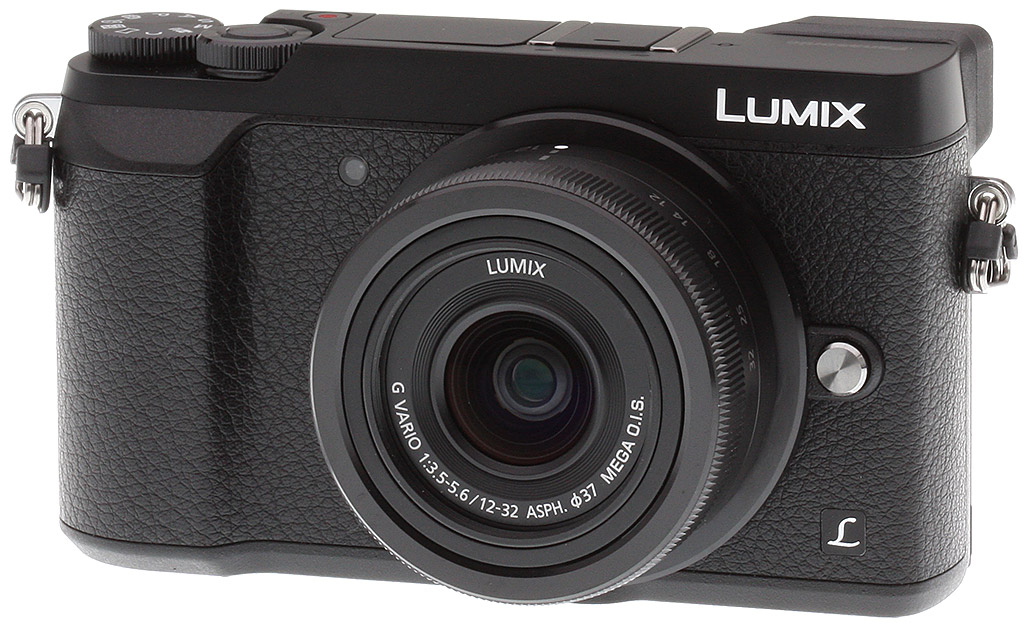
Say hello to the GX8's little brother, the Panasonic GX85 -- or the GX7 Mark II if you're in Japan, or the GX80 in Europe and the rest of the world. Despite being smaller and lighter than the GX8, the Panasonic GX85 is nevertheless still an enthusiast-level mirrorless camera packed to the brim with the latest and greatest technology and high performance features. The Panasonic GX85 includes a lot of the premium features of its larger GX8 sibling, but also provides a few twists and unique features all its own that make it a rather impressive and capable camera in an easy-to-carry design.
Not as high-res as the GX8, but the Panasonic GX85 is sharper
While the GX8 maintains the top spot in Panasonic's Micro Four Thirds lineup in terms of sensor resolution at 20 megapixels, the new Lumix GX85 incorporates a more familiar 16-megapixel Live MOS sensor, similar to the earlier GX7. There is, however, a twist: no optical low-pass filter, which is a first for Panasonic. Combined with a new Venus Engine image processor, the GX85's AA-filter-less sensor yields better per-pixel sharpness.

The lack of an optical low-pass filter, as we've seen on a number of other recent cameras, can result in additional resolving power. However, there is an increased risk of moiré and other aliasing artifacts appearing in the images of certain subjects, such as fine repeating lines and meshes, certain fabrics and other man-made structures, for example. These are often difficult to remove in post-processing, so being mindful of what subjects you're photographing is important.
It's quite interesting to see the lack of an optical low-pass filter making its way to more and more general-use cameras, rather than pricier, higher-resolution professional-level niche models. According to Panasonic, the Venus Engine image processor inside the GX85 has been specifically designed to help combat moiré, false color and other aliasing artifacts, and in our testing we found it did a pretty good job suppressing artifacts, though some aliasing artifacts are still visible depending on the subject. This is to be expected, though, as seen from other cameras without an AA filter.

Panasonic GX85's new shutter design aims to reduce shutter shock
Say goodbye to shutter shock? It appears so. For improvements to sharpness and overall image quality, the Panasonic GX85 also sports a new electromagnetic shutter unit, which helps reduce internal vibrations. Shutter shock has long been a source of issues for mirrorless and DSLR cameras, especially when shooting around a slower range of shutter speeds -- and amplified further when shooting with longer and longer lenses.
The Panasonic GX85's all new electromagnetic shutter mechanism utilizes dual solenoids rather than a traditional motor and spring assembly. A spring-actuated shutter mechanism can induce noticeable vibrations upon firing, which could lead to blurry images when photographing at certain shutter speeds. With the dual solenoid design in the Panasonic GX85, the camera is able to control the acceleration and deceleration of the shutter curtains thereby reducing vibrations of the shutter's opening and closing motion. This allows for sharper images at problematic shutter speeds. Panasonic claims around a 90 percent reduction in shutter shock vibrations compared to a traditional spring-actuated shutter mechanism. And this new shutter design has the added benefit of being much quieter than a traditional one, too, which is excellent when shooting in sound-sensitive environments.
Image customization galore with lots of creative filters
The camera sports an array of image customization settings, including separate controls for image saturation, contrast, sharpness and the level of noise reduction as we've come to expect from Panasonic. The GX85 also introduces a new "L Monochrome" Photo Style in addition to the standard Monochrome Photo Style, which offers a deeper black appearance and adds realistic gradation similar to black and white film. For further image customization, there are a total of 22 Creative Control filter modes that are now also available in PASM shooting modes. You can then adjust various parameters of these filters, combine multiple filters, as well as record both a "filtered" image and an unaltered one simultaneously.

As for ISO sensitivity, the Panasonic GX85 is rather straightforward. As with other recent Panasonic cameras, the GX85 features a native ISO range of 200 to 25,600, with an extended low ISO of 100. Not surprisingly, the GX85 offers both RAW and JPEG image capture, plus with its new on-board RAW development feature, you have the flexibility to shoot all in RAW and then easily process your shots into JPEGs after the fact, making use of the GX85's array of creative options, all in-camera.
Despite its size, the Panasonic GX85 packs a lot of horsepower
Cameras seem to get smaller and smaller while still managing to have rather impressive performance specs, and the Panasonic GX85 follows this trend. For starters, like many recent Panasonic cameras, the GX85 incorporates Depth From Defocus technology into its contrast-detect autofocusing system enabling super-quick and accurate AF speed. According to Panasonic, the GX85 is able to focus in around 0.07 seconds, and despite the lack of on-sensor phase-detect, AF tracking performance is said to be notably improved -- approximately a 200% improvement over the GX7.
Further, the camera's autofocus system works in both good lighting and dim -- and we mean really dim. Like the earlier GX7 and GX8, low-light autofocus sensitivity is rated down to -4EV, which are impressively dark focusing conditions. The GX85 also includes Panasonic's Starlight AF mode, which can detect the precise, small contrast differences in stars compared to the night sky for easy focusing.
The Panasonic GX85 offers a similar array of other autofocus features found in recent Lumix cameras including focus peaking, Pinpoint AF, and Full Area AF, letting you focus on anything within the field of view. The GX85 also includes the 49-Area/Custom Multi mode, which lets you freely select a custom group of AF areas as you see fit for the particular subject. The camera also has Face/Eye Detection AF that automatically detects the face and left or right eye of your subject.

For capturing fast action, the GX85 is capable of 8 frames per second with focus locked at the first frame. If you want continuous focusing, the burst rate drops slightly to a still-respectable 6fps, which is in-line with the earlier Panasonic GX8's performance specs. As with the GX8, this camera also lets you opt for an all-electronic shutter mode, which bumps the AF-S burst rate up to a handy 10fps. There's also a Super High-speed burst mode at a whopping 40 frames per second, though it only captures JPEGs at a much lower 4-megapixel resolution. See the Performance page to see how the GX85 fared in our lab.
Mechanical shutter speed tops out at 1/4000s (compared to 1/8000s for the GX8), but the GX85 maintains the fast maximum 1/16,000s shutter speed when using the all-electronic shutter.
In addition to the preexisting exposure and white balance bracketing features, the GX85 offers a new Focus Bracketing option. The Panasonic GX85 can shoot up to a maximum of 999 frames, each with a different focus point. You can also select from five different step sizes (in other words, how big of an increment to automatically adjust the focus between each frame). For shots where focus is critical, such as portraiture or macro photography, this could be a very handy feature. The Lumix GX85 also introduces a new Aperture Bracketing feature, in which a series of images are captured with varying depths of field.
The Panasonic GX85 also borrows other image processing improvements from the GX8, including Clear Retouch and expanded in-camera panorama options (the GX7 had only standard 8176 x 1920 (horizontal) or 2560 x 7680 (vertical) panoramas, but the GX85 now also has an 8176 x 960 or 1280 x 7680 resolution wider angle panorama mode), and the stitching seems more reliable than the GX7 as well.
Panasonic GX85 offers 5-axis Dual IS for photos & 4K video
Like its bigger brother, the GX85 sports Panasonic's Dual I.S. system which combines both sensor-shift image stabilization and lens-based optical image stabilization. However, some improvements have been made, as the GX85 now has 5-axis Dual I.S. rather than just the 4-axis system of the GX8. With the addition of roll correction on the body-based I.S. system, the GX85 is now able to better compensate for larger vibrations and handheld cameras movements -- up to 4-stops of correction according to Panasonic. For multimedia producers, you'll be pleased to know that this new 5-axis Dual I.S. system is compatible with both stills and video modes, including 4K video -- the GX8 has a more limited Hybrid I.S. system in video modes, with no in-camera stabilization when shooting 4K video.

4K is useful for much more than just video
Speaking of 4K, the new Panasonic GX85 offers loads of exciting features surrounding its 4K capabilities, particularly with regard to 4K Photo modes. Starting with the video features, the Panasonic GX85 is capable of capturing 4K UHD (3840 x 2160) video at both 30p and 24p, as well as a variety of Full HD and HD frame rates.

The GX85 captures video in either MP4 or AVCHD formats, however 4K is only available in MP4 mode. Though not as robust a selection of formats and bitrates as the video heavy-hitter GH4, the GX85 still offers 4K video at a high quality 100Mbps bitrate. Bitrates for Full HD and HD videos aren't nearly as high. For MP4, 1080/60p is captured at 28Mbps, 1080/30p at 20Mbps, and 720/30p at just 10Mbps. For AVCHD videos, 1080/60 is pegged at 28Mbps, and both 30p and 24p options top-out at 24Mbps.
Continuous sustained 4K video recording is unlimited for the NTSC-region model. The camera will continuously record videos until the file size reaches 4GB, at which point a new file will automatically be created, although playback will be seamless.

Along with the new creative filter options now available in PASM stills modes, video capture can also make use of all the special effects and various creative filters. Some modes, however, like the simulated tilt-shift Miniature effect for example, cannot be used with 4K, and instead default back down to 1080/60p.
One new video trick that the GX85 offers is a new 4K Live Cropping feature. The camera is able to utilize the entire sensor area, but only capture a smaller 4K-sized frame within that area. What this allows is an all-digital, programmable and automated panning and zooming feature while recording video -- think in-camera "Ken Burns Effect." You can set start and end points for panning, or the end zoom framing, and the camera will smooth and automatically capture 4K video with these pre-programmed "movements."
However, 4K is much more than just for video. With 4K's 8-megapixel frame resolution, a variety of still photo features are now possible, as well. One of the major features of the Panasonic GX85 is 4K Photo, which lets you extract stills from a 30fps clip of 4K footage. Offering a variety of capture timing methods, the GX85's 4K Photo modes are great for fast action, sports and other hard-to-time moments. Instead of shooting an 8 or 10fps burst of still frames, you can capture 4K video at 30fps and easily pull still frames after the fact. If you're okay with the drop in resolution (16MP to 8MP 4K), the 4K Photo feature is a great way the make sure you don't miss the important moment.

Building upon the camera's 4K Photo technology, the GX85 also incorporates Panasonic's new Post Focus feature, allowing you to select the frame with your preferred area of focus after the fact. In essence, at the press of the shutter button, the camera records a small clip of 4K footage while simultaneously sweeping the focus during the clip. You can then tap on the screen to pick the area of the shot to be in sharp focus and save that particular frame as a separate image.
The Panasonic GX85 also offers the 4K-based Light Composition mode, which continuously captures a 4K video stream, but only records new brighter pixels into a single final composition shots. What this allows is easier capturing of long-duration fireworks images and other nighttime scenes.
While the video-related featureset seems rather robust on the Panasonic GX85, there's one -- or two, rather -- big downsides that might make you think twice about using the GX85 for certain video applications: there's no external microphone jack or headphone jack. Audio capture only comes by way of the small stereo microphone ports on top of the camera in front of the hot-shoe. This could be a deal-breaker for those needing more control over their audio quality.
GX85: High quality construction, great size & comfortable
In terms of size and shape, the new Panasonic GX85 shares a lot in common with the earlier GX7. Right off the bat you'll notice its much smaller, more svelte design compared to its rather beefier brother, the Panasonic GX8. The GX8 took a noticeable step up in size after the GX7, and the GX85 shrinks things down a bit while still maintaining a very comfortable, easy to operate design and control scheme.

Build quality is excellent, simply put. The camera feels extremely stiff and durable without any creaks or flimsy buttons. The Panasonic GX85 maintains the tilting LCD rear display design of the GX7 rather than the articulated flip-out screen of the GX8, and the hinges on the tilting LCD are quite stiff and feel very sturdy.
Compared to the GX7, the new Panasonic GX85 appears more or less very similar. The major differences don't pop out immediately, but the GX85 does away with the tilting EVF of the GX8 and GX7 in favor of a fixed one. It keeps the same 2.76M-dot effective field-sequential EVF as the GX7, and still provides 100 percent frame coverage with a 1.39x / 0.7x (35mm eq.) magnification. And like the GX7, the Panasonic GX85 includes a built-in pop-up flash though it's a little weaker with a Guide Number of 4.2m (ISO 100) versus 5.0m for the GX7, as well as a flash hot-shoe.

The other noticeable design change on the Panasonic GX85 is the lack of the dedicated rotating focus mode thumb switch. The AF/AE Lock button remains in relatively the same location, but now you'll need to access the menus or Quick Menu in order to change the focus mode. The rest of the controls cluster on the rear of the camera is more or less the same apart from some small changes. The camera still sports a total of four customizable Function buttons to reassign as needed.
As with the earlier GX-series cameras, the Panasonic GX85 features dual control dials for quick setting and/or exposure adjustments. The rear thumbrest dial also functions as a pressable button, which by default, is helpfully assigned to exposure compensation.
Power, storage & connectivity
The Panasonic GX85 derives its power from a proprietary 7.2v 1025mAh lithium-ion battery pack, which is CIPA-rated for 290 shots on a charge with the LCD, and 270 shots with the EVF, when using the 12-32mm kit lens. The GX85 bundle includes an AC adapter, for in-camera charging via the USB port. A Micro (Type-D) HDMI port is also provided.
Images and movies are stored on Secure Digital cards, including SDHC and SDXC types, and UHS-I types are supported (UHS Speed Class 3 required for 4K recording).

As with many modern cameras, the Panasonic GX85 includes built-in Wi-Fi connectivity, however, unlike the GX7 and GX8, this new model does not include NFC technology. Once connected via Wi-Fi, users can connect their iOS or Android devices using the Panasonic Image App for easy sharing of images and videos, as well as remote control capabilities with manual exposure and various settings adjustments.
Price & Availability
Offered in both a two-toned silver and black model as well as an all-black color, the Panasonic GX85 began shipping in May 2016 bundled with the retracting, ultra-compact 12-32mm f/3.5-5.6 ASPH MEGA OIS LUMIX G VARIO zoom lens for US$799.99.
Comparison Shopping?
Not sure which mirrorless camera is right for you? Try our camera comparison tool to help keep all the specs sorted out! Here are a few obvious choices to compare to the Panasonic GX85 to get you started:
In the Box
The Panasonic GX85 retail kit w/12-32mm lens package (as reviewed) contains the following items:
- Panasonic Lumix DMC-GX85 Camera Body
- Panasonic Lumix G Vario 12-32mm f/3.5-5.6 ASPH Lens
- Hot Shoe Cover
- Body Cap
- DMW-BLG10 Rechargeable Lithium-Ion Battery Pack (7.2V, 1025mAh)
- AC Adapter
- USB Cable
- Shoulder Strap
- Limited 1-Year Warranty
Recommended Accessories
- Large capacity SDHC/SDXC memory card. 16GB UHS-I should be a minimum (UHS Speed Class 3 required for 4K recording).
- Extra Panasonic DMW-BLG10 Rechargeable Lithium-ion Battery Pack (~US$50)
- Small to medium camera case
Optics
The Panasonic GX85 is sold bundled with the very compact Lumix G VARIO 12-32mm f/3.5-5.6 OIS lens. This is the same lens sold with the GM1, so please refer to our GM1 Review Optics page, and our full test on SLRgear.com to see how this lens performs. Below, we present our GX85 viewfinder accuracy test results.
Viewfinder Test Results
Accuracy
Excellent coverage from the EVF and LCD monitor.


The Panasonic GX85's electronic viewfinder and LCD monitor both proved quite accurate for framing in record mode, showing just over 100% coverage with our Olympus 50mm f/2 reference lens. Excellent results here.
The images above were taken from our standardized test shots. For a collection of more pictorial photos, see our Panasonic Lumix DMC-GX85 Photo Gallery .
Exposure
Color
Saturation & Hue Accuracy
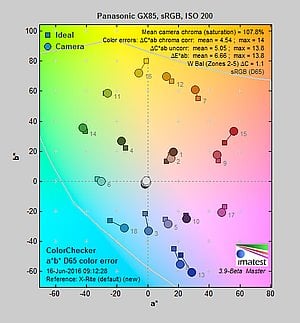
Slightly lower than average mean saturation levels, with about average hue accuracy.
 |
||
|
ISO Sensitivity
|
||
|
In the diagram above, the squares show the original color, and the circles show the color that the camera captured. More saturated colors are located toward the periphery of the graph. Hue changes as you travel around the center. Thus, hue-accurate, highly saturated colors appear as lines radiating from the center. Mouse over the links to compare results at different ISOs, and click on the links for larger images.
|
||


Saturation. The Panasonic GX85 produces images with slightly muted colors compared to most cameras at default settings. Mean saturation is 107.8% (7.8% oversaturated) at the base ISO of 200, which gradually falls to a minimum of 103.3% at ISO 25,600. The Lumix GX85 pushes dark red and dark blues moderately and some other colors slightly, but undersaturates yellow moderately, and aqua and cyan slightly. Most consumer digital cameras produce color that's more highly saturated (more intense) than found in the original subjects. This is simply because most people like their color a bit brighter than life.
Skin tones. Here, the Panasonic GX85 does fairly well, producing natural-looking Caucasian skin tones with a slight push towards pink when Auto white balance is used, giving a healthy appearance. Darker skin tones have a small nudge towards orange, but overall results are pretty good. Where oversaturation is most problematic is on Caucasian skin tones, as it's very easy for these "memory colors" to be seen as too bright, too pink, too yellow, etc.
Hue. The Panasonic GX85 shifts orange toward yellow, yellow toward green, and cyan toward blue, but most other hue shifts are quite minor. The yellow to green shift along with the desaturation can unfortunately produce some dingy-looking yellows as we've seen from some prior Lumix models. The GX85's mean "delta-C" color error after correction for saturation is 4.54 for JPEGs at the base ISO of 200 (100 is an extended ISO). That's close to average these days, and color error remains quite stable throughout the ISO range. Hue is "what color" the color is.


Sensor
Exposure and White Balance
Indoors, incandescent lighting
Somewhat warm colors with Auto and Incandescent white balance setting. Good color balance with the Manual setting. Average positive exposure compensation required.


Indoors, under normal incandescent lighting, color balance is a little warm and reddish with the Auto white balance setting, but results here are actually better then most. Results with the Incandescent setting are warmer, with a stronger orange-yellow cast. The Manual setting produced very accurate results. The Panasonic GX85 required +0.3 EV exposure compensation here, about average for this shot. (Our test lighting for this shot is a mixture of 60 and 100 watt household incandescent bulbs, a pretty yellow light source, but a very common one in typical home settings here in the U.S.)
Outdoors, daylight
Natural colors overall, with a tendency toward high contrast under harsh lighting. About average exposure accuracy.
Outdoors, the Panasonic GX85 performed well, with natural-looking though slightly cool color in the Far-field shot. Skin tones are fairly realistic in our "Sunlit" Portrait shot, with a healthy-looking push of pinks and reds when Auto white balance is used, which is preferable to too flat or yellow. Exposure accuracy is about average, as the camera required +0.7 EV compensation for our "Sunlit" Portrait shot to keep facial tones reasonably bright. That's typical for this shot. Despite the bright appearance, only a few highlights were actually blown in the mannequin's white shirt which is quite good, though there are some very deep shadows that are quite clean, but discolored and posterized. The default exposure is just slightly dim for the Far-field shot, however as a result there are very few blown highlights, though again there are some very deep shadows that are discolored and posterized. Default contrast is on the high side, but that's how most consumers prefer their photos.
See full set of test images with explanations
See thumbnails of all test and gallery images
Resolution
~2,350 to ~2,450 lines of strong detail.


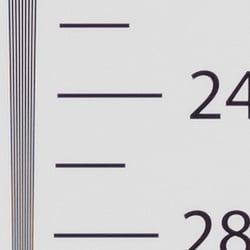

An in-camera best quality JPEG of our laboratory resolution chart reveals sharp, distinct line patterns up to about 2,450 lines per picture height horizontally, and about 2,350 lines in the vertical direction. (Some might argue for higher, but aliasing artifacts start to interfere and lines begin to merge at these limits.) Complete extinction of the pattern occurs between 3,300 lines and 3,300 lines. We weren't able to extract significantly more high-contrast resolution by processing the Panasonic GX85's RW2 file using Adobe Camera Raw, and the ACR conversion also shows much more color moiré which is practically nonexistent in the camera JPEG.
Use these numbers to compare with other cameras of similar resolution, or use them to see just what higher resolution can mean in terms of potential detail.
See full set of test images with explanations
See thumbnails of all test and gallery images
Sharpness & Detail
Very good sharpness overall, with minor edge-enhancement artifacts on high-contrast subjects. Mild to moderate noise suppression visible in the shadows even at base ISO.


Sharpness. The Panasonic GX85 captures sharp, detailed images, thanks in part to the lack of an optical low-pass filter. Some minor edge enhancement artifacts are visible in high-contrast subjects such as the sharpening "halos" along the lines and text in the crop above left, but default sharpening here is fairly typical for consumer-oriented models, and not too overdone. Edge enhancement creates the illusion of sharpness by enhancing colors and tones right at the edge of a rapid transition in color or tone.
Detail. The crop above right shows the effect of noise suppression in the form of smudging of individual strands together in the darker areas of the model's hair, as well as in areas with low local contrast, although chroma noise is well-controlled. This is good noise versus detail processing performance for a 16-megapixel Micro Four Thirds model, leaving lots of fine detail intact instead of blurring much of it away in an attempt to hide noise. Noise-suppression systems in digital cameras tend to flatten-out detail in areas of subtle contrast. The effects can often be seen in shots of human hair, where the individual strands are lost and an almost "watercolor" look appears.
RAW vs In-Camera JPEGs
As noted above, the Panasonic GX85 produces sharp in-camera JPEGs with good detail. As is almost always the case, better detail can be obtained from carefully processing RAW files than can be seen in the in-camera JPEGs, with fewer sharpening artifacts to boot. Take a look below, to see what we mean:
|
Base ISO (200)
|
|
 |
 |
 |
 |
 |
 |
|
Camera JPEG, defaults
|
RAW via Adobe Camera Raw
|
In the table above, we compare an in-camera JPEG taken at base ISO using default noise reduction and sharpening (on the left) to a matching RAW file converted with Adobe Camera Raw 9.1 via DNG Converter 9.6 using default noise reduction with some strong but tight unsharp masking applied in Photoshop (300%, radius of 0.3 pixels, and a threshold of 0).
As you can see, the in-camera JPEG contains very good detail, however ACR extracted additional detail, particularly in the red-leaf fabric where it managed to resolve some of the fine thread pattern. The ACR conversion however shows much more luminance noise after sharpening, especially in flatter areas with little detail. You can always turn up the luminance noise reduction (default of zero was used here), or process the files in your favorite noise reduction program or plugin if you find the noise objectionable. Bottom line, though, as is usually the case shooting in RAW mode provides better detail, color, and control than in-camera JPEGs when using a good converter.
ISO & Noise Performance
Great high ISO performance for a Micro Four Thirds model.
|
Default Noise Reduction
|
||
 |
 |
 |
| ISO 100 | ISO 200 | ISO 400 |
 |
 |
 |
| ISO 800 | ISO 1600 | ISO 3200 |
 |
 |
 |
| ISO 6400 | ISO 12,800 | ISO 25,600 |
The Panasonic GX85's images are very detailed and clean at ISOs 100 (extended) and 200, with only minor luminance noise detectable in the shadows. ISO 400 is also quite detailed, though a touch more noise and blurring from noise reduction can be seen. ISO 800 shows stronger noise reduction, blurring some very fine detail in the process, though overall detail remains very good and chroma noise is low. ISO 1600 is of course a little noisier, but fine detail is still pretty good and chroma noise is still well-controlled, but the GX85's area-specific noise reduction does leave some edges a bit rough and noisy. ISO 3200 shows a larger drop in image quality with noticeably less detail and more noise reduction artifacts. At ISO 6400, a crystalline effect starts to appear, chroma noise in the form of purple and yellow blotches starts to become objectionable and a lot of fine detail is blurred away. Image quality drops off quickly at ISO 12,800 and above, with stronger noise and noise reduction artifacts leaving little fine detail intact.
We're of course pixel-peeping to an extraordinary extent here, since 1:1 images on an LCD screen have little to do with how those same images will appear when printed. See the Print Quality section below for our evaluation of maximum print sizes at each ISO setting.
Note that we now shoot this series at f/8 instead of f/4, for increased depth of field (at f/4, it was very difficult to focus for maximum sharpness in the crop area while maintaining consistent focus between models).
Extremes: Sunlit, dynamic range and low light tests
Somewhat high default contrast but with decent dynamic range. Excellent low-light performance, able to capture images and autofocus in very low light.


Sunlight. The Panasonic GX85 did fairly well with the deliberately harsh lighting of this test. Contrast is a little high at its default setting, but dynamic range is decent in JPEGs. We felt the +0.7 EV exposure is the best compromise here. Although skin tones around the eyes are a bit dark, we prefer it to the +1.0 EV exposure overall, because there are fewer clipped highlights. It's really the photographer's choice here as to which direction to go in. For those Panasonic GX85 owners that are going to want to just print an image with little or no tweaking, the +1.0 image would probably produce a better-looking face uncorrected. The bottom line though, is that the Panasonic GX85 performed fairly well with the wide dynamic range of this shot, though not as good as some competitors. See below for how the Panasonic GX85's sensor performs (RAW mode) in terms of dynamic range.
Because digital cameras are more like slide film than negative film (in that they tend to have a more limited tonal range), we test them in the harshest situations to see how they handle scenes with bright highlights and dark shadows, as well as what kind of sensitivity they have in low light. The shot above is designed to mimic the very harsh, contrasty effect of direct noonday sunlight, a very tough challenge for most digital cameras. (You can read details of this test here.)
| Face Detection | ||
 |
 |
 |
| Aperture Priority, 0 EV, f/8 Face Detection Off |
Aperture Priority, 0 EV, f/8 Face Detection On |
iAuto, 0 EV, f/2.2 |
Face Detection. Like most cameras these days, the Panasonic GX85 has the ability to detect faces (up to 15 in a scene), and adjust exposure and focus accordingly. As you can see from the examples above, face detection improved exposure in both Aperture Priority at f/8, and in iAuto mode where the camera had control over aperture, and automatically applied Intelligent D-Range (see below).
Panasonic's Intelligent Dynamic Range
The above shots are examples of Panasonic's Intelligent Dynamic Range Control (or iD-Range) at work, with no exposure compensation. Note that the camera does not take multiple shots and merge them as HDR mode does (see below). It's a system that adjusts local contrast and exposure more akin to Nikon's Active D-lighting, Canon's Automatic Lighting Optimization or Sony's Dynamic Range Optimization.
There are three levels of iD-Range available on the Panasonic GX85: Low, Standard and High, plus Auto and Off. It's automatically invoked in iAuto and some scene modes and manually selectable in PASM modes. Here, you can see darker midtones and shadows were progressively boosted as the strength was increased, without blowing many highlights in the process.
|
Far-field HDR Examples
|
||||
|
|
||||
HDR mode
Here, you can see the Panasonic GX85's High Dynamic Range mode at work with our Far-field shot. HDR mode takes three images at different exposures and combines them to increase dynamic range. Mouse over the links, and click on them the view the full resolution files.
Auto did a good job, producing results similar to +/-2 EV which was arguably the best for this scene, while +/-3 dimmed the entire image. Notice the double images and ghosting of leaves, the flag or people moving between frames. Also notice the angle of view is narrower in the HDR images, likely because the images have been cropped and upsized during the optional auto alignment process.
Dynamic Range Analysis (RAW mode)
While we once performed our own dynamic range measurements based on in-camera JPEGs as well as converted RAW images (when the camera was supported by Adobe Camera Raw), we've switched to using DxO Labs' results from their DxOMark website. As technology advanced, the dynamic range of modern high-end cameras in some cases exceeded the range of the Stouffer T4110 density scale that we used for our own measurements. DxO's approach based on RAW data before demosaicing is also more revealing, because it measures the fundamental dynamic range of the sensor, irrespective of whatever processing is applied to JPEGs, or to RAW data by off-the-shelf conversion software.
In the following, we use DxO's "Print" dynamic range results, which are scaled based on camera resolution. As the name suggests, this scaling corresponds to the situation in which you print at a given size, regardless of how many megapixels the camera might have. (In other words, if you've decided to make a 13x19 inch print, that's the size you're printing, whether the camera's resolution is 16 or 300 megapixels.) For the technically-minded, you can find a discussion of the reasoning behind this here on the DxOMark website. Also note that DxO Labs uses a signal-to-noise (SNR) threshold of 1 when defining the lower boundary of acceptable luminance noise in their dynamic range measurements, which corresponds to the "Low Quality" threshold of the Imatest software we used to use for this measurement.

Here, we compare the Panasonic GX85's (known as the GX80 in Europe) dynamic range (in orange) to its predecessor, the GX7 (yellow), and also to the Sony A6300 (red), a state-of-the-art APS-C mirrorless camera.
As you can see from the above graph, the GX85's dynamic range is similar to the GX7's overall, but slightly better at low ISOs, peaking at about 12.6 EV at ISO 100 versus 12.2 EV for the GX7. Interestingly, the predecessor catches up at ISO 1600 and actually does a little bit better at higher ISOs, though you'll likely be hard-pressed to see a difference in real-world shots.
Unsurprisngly, the 24-megapixel APS-C Sony A6300 scored better across the board, with a peak dynamic range of 13.7 EV at base ISO, and the lead increases to a peak of about 1.6 EV at ISO 25,600, and the GX85 doesn't even offer an ISO 51,200 setting.
Still, dynamic range is very good for a Four Thirds sensor, though obviously not as good as the best APS-C mirrorless rivals.
Click here to visit the DxOMark page for the Panasonic GX85 for more of their test results and additional comparisons.
| 1 fc 11 lux |
1/16 fc 0.67 lux |
1/16 fc No NR |
|
|---|---|---|---|
| ISO 200 |
 1s, f2.8 |
 15s, f2.8 |
 15s, f2.8 |
| ISO 3200 |
 1/15s, f2.8 |
 1s, f2.8 |
 1s, f2.8 |
| ISO 25600 |
 1/125s, f2.8 |
 1/8s, 1 f2.8 |
 1/8s, f2.8 |
Low Light. The Panasonic Lumix DMC-GX85 performed well in our low light tests, able to capture bright images down to the lowest light level we test at. The darkest level equates to about 1/16 the brightness of average city street lighting at night, so the Panasonic GX85 should be able to take well-exposed photos in almost any environment in which you can see well enough to walk around in.
Using default noise reduction setting, noise is low at ISO 200 and well-controlled at ISO 3200 with a very fine, tight noise "grain", though as you'd expect, noise is quite high at the maximum ISO of 25,600 which should probably be avoided except in emergencies.
We didn't notice any significant issues with hot pixels, though with long exposure noise reduction turned off (rightmost column) there were a lot of slightly brighter pixels in the shadows at ISO 200, as well as a few hot pixels. We didn't detect any issues with heat blooming or fixed pattern noise, but be aware that the maximum exposure supported by the GX85 is 120 seconds, which doesn't make it a good camera for long exposures.
Automatic color balance is just a touch cool particularly at lower light levels, but pretty neutral.
LL AF: The camera's autofocus system was able to focus on our low-contrast AF subject down to well below the 1/16 foot-candle light level unassisted with an f/2.8 lens (0.05 lux or -5.6 EV), which is excellent, especially for a camera with contrast-detect autofocus. And with our high-contrast AF target, it was able to focus so low that we couldn't accurately measured the light level. The Panasonic GX85 also has a focus-assist light which allows it to autofocus in total darkness, as long as the subject is within range and has sufficient contrast. Excellent results here.
How bright is this? The one foot-candle light level that this test begins at roughly corresponds to the brightness of typical city street-lighting at night. Cameras performing well at that level should be able to snap good-looking photos of street-lit scenes.
NOTE: This low light test is conducted with a stationary subject, and the camera mounted on a sturdy tripod. Most digital cameras will fail miserably when faced with a moving subject in dim lighting. (For example, a child's ballet recital or a holiday pageant in a gymnasium.) Thanks to their phase-detect AF systems, digital SLRs tend to do much better than point & shoots, but you still shouldn't expect a quick autofocus lock with moving subjects. The GX85 uses contrast-detect autofocus, as is found in most point & shoot cameras, so its low-light focusing ability may be less than that of some SLRs with phase-detect systems. That said, though, the larger, more sensitive pixels of the GX85's sensor do better under dim lighting than do the tiny pixels of most point & shoots.
Output Quality
Print Quality
Excellent 24 x 36 inch prints at ISO 100/200; Good 16 x 20 inch print at ISO 800; and a nice 8 x 10 at ISO 3200
 ISO 100 and 200 prints look excellent at 24 x 36 inches, with rich colors and very good fine detail and sharpness. At 16 megapixels, pushing the size to 30 x 40 inches will work fine for wall display prints, but the resolution isn't high enough to warrant our good grade at that size for critical uses.
ISO 400 is also quite good at 24 x 36 inches, displaying virtually no evidence of ISO strain at this print size. The 20 x 30 inch print here looks excellent, with terrific fine detail.
ISO 800 delivers a print of 20 x 30 inches that is fine for less critical applications, with only minor issues such as typical softening of fine detail in certain areas of our test target and a mild trace of noise in some flatter areas. The 16 x 20 inch print tightens this up nicely and delivers a print that definitely warrants our "good" seal.
ISO 1600 yields a 16 x 20 inch print that comes close to passing our good grade, and is certainly fine for less critical applications. A reduction in size to 13 x 19 inches does the trick and produces a very good print for this ISO, with full color reproduction and nice fine detail for this gain setting.
ISO 3200 shows a marked decrease in image quality for available print sizes. While the 11 x 14 inch print here can be used for less critical purposes or in a pinch, a reduction to 8 x 10 inches is recommended to assure a good quality print that's reasonably untainted by noise reduction artifacts. Contrast detail is now mostly lost in our tricky red-leaf fabric swatch, which is typical for most crop-sensor cameras at this point, but noise is well-controlled at this print size, and there's plenty of fine detail still present elsewhere.
ISO 6400 images pass our good rating at a fairly modest 5 x 7 inches. The 8 x 10's here are not too bad, but there's not enough fine detail left after noise processing to pass our good grade. They're usable for less critical applications though.
ISO 12,800 prints at 4 x 6 inches are just a bit too muted and soft to pass our good grade for prints, though they're certainly usable for general purpose printing.
ISO 25,600 does not provide a usable print and this gain setting is best avoided.
The Panasonic GX85 performs solidly as expected in the print quality department, yielding useful print sizes from low extended and base ISO up to ISO 3200. After this the quality falls considerably, so for critical printing, setting the ISO limit in the menu to a maximum of ISO 3200 will ensure you can count on good prints depending on the desired print size and how much you crop your image before printing. At 16MP, the GX85 isn't able to compete with the 20MP GX8 which can produce 30 x 40 inch prints at the lower ISOs, and it loses to its popular big brother at a few ISOs as the gain rises. But at a lower price point and a trimmed down size, this is understandable and the Panasonic GX85 still packs a good I.Q. punch up to ISO 3200.
The images above were taken from our standardized test shots. For a collection of more pictorial photos, see our Panasonic Lumix DMC-GX85 Photo Gallery .
Not sure which camera to buy? Let your eyes be the ultimate judge! Visit our Comparometer(tm) to compare images from the Panasonic Lumix DMC-GX85 with those from other cameras you may be considering. The proof is in the pictures, so let your own eyes decide which you like best!
Performance
Timing and Performance
Generally good performance for a mirrorless ILC.
| Startup/Play to Record | ||
|---|---|---|
|
Power on |
~0.9 second
|
Time it takes to turn on and capture a shot. |
|
Play to Record, |
~0.6 second
|
Time until first shot is captured. |
Startup time was a little faster-than-average for a mirrorless camera, and switching from Play to Record and taking a shot was fairly quick.
| Shutter Response (Lag Time) | ||
|---|---|---|
|
Full Autofocus, |
0.192 second
|
Time from fully pressing shutter button to image capture, with the lens already at the proper focal distance setting. |
|
Full Autofocus |
0.423 second
|
Time from fully pressing shutter button to image capture. Auto Flash enabled. |
|
Manual Focus |
0.065 second
|
For most cameras, shutter lag is less in manual focus than autofocus, but usually not as fast as when the camera is "prefocused". |
|
Prefocused |
0.064 second
|
Time to capture, after half-pressing and holding shutter button. |
The Panasonic GX85's autofocus speed was very good our tests, especially for a camera that uses contrast-detect AF only. The GX85 produced full-autofocus shutter lag (with the subject at a fixed distance) of 0.192 second using 1-area (center) AF. That's quite good for a mirrorless camera and competitive with most prosumer DSLRs. Enabling the flash increased lag to 0.423 second to account for pre-flash metering, though that's still pretty fast.
When manually focused, the GX85's lag time dropped to 0.065 second, also very good. The GX85's prefocused shutter lag time was 0.064 second, which is pretty fast.
To minimize the effect of different lens' focusing speed, we test AF-active shutter lag with the lens already set to the correct focal distance.
| Cycle Time (shot to shot) | ||
|---|---|---|
|
Single Shot mode |
0.44 second
|
Time per shot, averaged over a few frames (we no longer test for buffer depths in single-shot mode). |
|
Single Shot mode |
0.43 second
|
Time per shot, averaged over a few frames (we no longer test for buffer depths in single-shot mode). |
|
Early shutter |
Yes
|
Some cameras refuse to snap another shot if you release and press the shutter too quickly in Single Shot mode, making "No" the preferred answer. |
|
Continuous H |
0.12 second
(8.40 fps); Unlimited frames(?); 9 seconds to clear* |
Time per shot, with no apparent limit (>200 frames). |
|
Continuous H |
0.15 second
(6.71 fps); 53 frames total; 21 seconds to clear* |
Time per shot, averaged over buffer length of 53 frames, then slows to an average of 0.63s or 1.60 fps. |
|
Continuous H |
0.15 seconds
(6.72 fps); 44 frames total; 38 seconds to clear* |
Time per shot, averaged over buffer length of 44 frames, then slows to an average of about 0.79s or 1.27 fps with a lot of variation. |
|
Continuous H |
0.09 second
(10.53 fps); Unlimited frames(?); 13 seconds to clear* |
Time per shot, with no apparent limit (>200 frames). |
|
Continuous H |
0.09 second
(10.59 fps); 44 frames total; 21 seconds to clear* |
Time per shot, averaged over buffer length of 44 frames, then slows to an average of 0.51s or 1.97 fps with a lot of variation. |
|
Continuous H |
0.09 second
(10.60 fps); 40 frames total; 38 seconds to clear* |
Time per shot, averaged over buffer length of 40 frames, then slows to an average of about 0.58s or 1.74 fps with a lot of variation. |
|
Super HS mode |
0.03 second
(40.0 fps); 120 frames total; 11 seconds to clear* |
Time per shot, averaged over max buffer size of 120 shots. |
|
Flash Recycling |
2.0 seconds
|
No built-in or bundled flash. |
|
*Note: Buffer clearing times measured with a SanDisk Extreme Pro 95MB/sec UHS-I SDHC card. Slower cards will produce correspondingly slower clearing times. Slow cards may also limit length of bursts in continuous mode. ISO sensitivity and noise reduction settings can also affect cycle times and burst mode performance.
|
||
Single-shot cycle times were just over 0.4 seconds for JPEG or RAW+JPEG, which is pretty good. (Note that we no longer test single-shot mode with just RAW files, as the results are usually somewhere in between JPEG and RAW+JPEG.)
Continuous High Speed "H" mode burst speed with the mechanical shutter was quite good for its class, measured at 8.4 frames per second for best quality JPEGs, exceeding Panasonic's 8 fps spec. When shooting RAW or RAW+JPEG files, the frame rate did drop to 6.7 fps, but that's still not bad. Note that these burst rates are with single-shot AF mode (AFS). Panasonic claims up to 6 fps with continuous autofocus (AFC). The GX85 also offers Middle Speed (rated at about 6 fps) and Low Speed (rated at 2 fps) modes, however we did not test those modes in the lab.
The GX85 has an all-electronic shutter mode which the company says boosts the full-resolution frame rate to 10 fps with AFS, and in the lab the GX85 managed just over that, between 10.5 and 10.6 frames per second depending on the file type. Interestingly, there was no drop in speed when shooting RAW or RAW+JPEG like we saw with the mechanical shutter.
A Super High Speed mode which uses the all-electronic shutter is also available which captures Small JPEGs (4 megapixels at 4:3) at 40 frames per second for up to 120 frames.
We did however notice burst performance was very sensitive to aperture used, more so than most cameras we've tested. Even stopping down slightly would reduce burst speed, sometimes significantly. (The above burst tests were performed with the kit lens at max aperture.)
Full-resolution buffer depth was essentially limited only by card capacity when shooting Large/Fine JPEGs (we tested just past 200 frames with no signs of slowing). When shooting RAW files buffer depth was 53 frames, and 44 frames when shooting RAW+JPEG files, which is quite generous. Buffer depths dropped slightly to 44 and 40 frames respectively with the faster electronic shutter mode.
Buffer clearing was reasonably fast when shooting best quality JPEGs with a fast 95MB/s UHS-I card, at between 9 and 13 seconds depending on the mode, but clearing times were quite long when shooting RAW files, ranging from 21 seconds after a burst of RAW frames to 38 seconds after a burst of RAW+JPEG frames. You can however take additional photos and adjust settings while the buffer is clearing.
Bottom line, the Panasonic GX85's performance is very good for its class. Startup and mode switching are reasonably fast, while autofocus speed and shutter lag are very good. Burst performance is very good, buffer depths are excellent, however buffer clearing is slow when shooting RAW or RAW+JPEG files.
Battery Life
Below average battery life.
| Operating Mode | Battery Life |
|---|---|
|
Still Capture, CIPA standard
(Monitor with H-FS12032 kit lens) |
290 shots
|
|
Still Capture, CIPA standard
(EVF with H-FS12032 kit lens) |
270 shots
|
The Panasonic GX85 uses a custom rechargeable lithium-ion battery pack for power, and comes with a single battery, a USB/AC Adapter, and USB cable for in-camera charging. The CIPA-rated 290 shots per charge when using the monitor and 270 shots with the EVF are below average for a mirrorless ILC, and much lower than a typical DSLR when using an optical viewfinder. We strongly recommend getting a second battery for your GX85 if you plan any extended outings.
The table above shows the number of shots the camera is capable of (on a fully-charged rechargeable battery), based on CIPA battery-life and/or manufacturer standard test conditions.
(Interested readers can find an English translation of the CIPA DC-002 standards document here. (180K PDF document))
Image Quality
Below are crops from our laboratory Still Life target comparing Panasonic GX85 image quality to its predecessor, the GX7, as well as against several models at similar price points or in similar categories: the Panasonic LX100, Fuji X-T10, Olympus E-M10 II and Sony A6000. (We realize the LX100 is a fixed-lens camera and all the others are ILCs, but it's currently offered for less than the GX85 kit and also supports 4K video, so it's a viable alternative for those that don't need or want interchangeable lenses.)
NOTE: These images are from best quality JPEGs straight out of the camera, at default settings including noise reduction and using the camera's actual base ISO (not extended ISO settings). All interchangeable lens cameras in this comparison were shot with our very sharp reference lenses. Clicking any crop will take you to a carrier page where you can click once again to access the full resolution image as delivered straight from the camera. For those interested in working with the RAW files involved, click these links to visit each camera's respective sample image thumbnail page: Panasonic GX85, Panasonic GX7, Panasonic LX100 Fuji X-T10, Olympus E-M10 II and Sony A6000 -- links to the RAW files appear beneath those for the JPEG images, wherever we have them. And remember, you can always go to our world-renowned Comparometer to compare the Panasonic GX85 to any camera we've ever tested!
Panasonic GX85 vs Panasonic GX7 at Base ISO
 |  |
 |  |
 |  |
Panasonic GX85 at ISO 200 | Panasonic GX7 at ISO 200 |
Here we compare the Panasonic GX85 to its predecessor, the GX7, at base ISO. While resolution has not changed, it's immediately apparent the GX85 delivers a sharper, crisper image with slightly better detail, thanks to the lack of an optical low-pass filter which the GX7 has. However, the GX7 does show fewer aliasing artifacts whereas moiré and jaggies can be more easily seen from the GX85. The GX85's image is also slightly cleaner, with lower noise in flatter areas. Colors are also slightly more pleasing from the GX85 with less of shift to green in yellows, however the GX7 does a better job with pinks as the GX85 renders them a bit too magenta. | |
Panasonic GX85 vs Panasonic LX100 at Base ISO
|  |
|  |
|  |
Panasonic GX85 at ISO 200 | Panasonic LX100 at ISO 200 |
We decided to compare the Panasonic GX85 to the LX100 as the latter has been discounted to less than the price of the GX85 at time of writing, despite its fast f/1.7-2.8 24-75mm equivalent fixed lens (the GX85 is kited with the much slower f/3.5-5.6 24-64mm eq. interchangeable lens). The GX85 does resolve more detail than the LX100, partially because the LX100 only uses about 12.7 megapixels of its 16-megapixel sensor (which is why objects appear smaller from the LX100 when viewed at 100% like this). The LX100 also has an optical low-pass filter which softens the image very slightly compared to the GX85, though some of the difference can likely also be attributed to the lens. Color is more pleasing from the GX85 and noise is also a little lower. | |
Panasonic GX85 vs Fujifilm X-T10 at Base ISO
|  |
|  |
|  |
Panasonic GX85 at ISO 200 | Fujifilm X-T10 at ISO 200 |
At base ISO, the Panasonic GX85 captures more detail than the Fuji X-T10. There are a least a couple of reasons for this: 1) The Fuji' X-T10 3:2 aspect ratio sensor actually has fewer pixels on the vertical axis, giving the 4:3 GX85 a slight advantage in resolution when framed vertically like this, and 2) The demosaicing required for the X-Trans sensor's unique color filter doesn't do as well with certain types of fine detail. The Fuji X-T10 also applies less aggressive default sharpening which gives its images a softer look. Colors are however more pleasing from the Fuji, noise levels (particularly chroma noise) are lower, and the X-T10 manages to resolve fine detail in our tricky red-leaf swatch better, though contrast is lower. | |
Panasonic GX85 vs Olympus E-M10 II at Base ISO
|  |
|  |
|  |
Panasonic GX85 at ISO 200 | Olympus E-M10 II at ISO 200 |
Like the GX85, the 16-megapxiel Olympus E-M10 II also does not have an OLPF to maximize sharpness at the risk of higher aliasing artifacts. Here at base ISO we see both cameras offer very similar resolving power, but the E-M10 II's default processing is a bit more aggressive, with stronger sharpening, higher contrast and brighter, more pleasant colors, giving the Olympus image more "pop". The E-M10 II's noise reduction also appears to be slightly stronger, producing slightly lower noise but at the cost of reduced detail in some areas, such as in our red-leaf swatch. | |
Panasonic GX85 vs Sony A6000 at Base ISO
|  |
|  |
|  |
Panasonic GX85 at ISO 200 | Sony A6000 at ISO 100 |
The 24-megapixel Sony A6000 with its APS-C sized sensor out-resolves the 16-megapixel Four Thirds sensor of the GX85, while producing a crisper image with fewer sharpening artifacts thanks to a very weak (or no) optical low-pass filter combined with Sony's more advanced JPEG processing. Overall color and contrast are a little better from the Sony as well. | |
Panasonic GX85 vs Panasonic GX7 at ISO 1600
 |  |
 |  |
 |  |
Panasonic GX85 at ISO 1600 | Panasonic GX7 at ISO 1600 |
The Panasonic GX85's OLPF-less sensor continues to pay dividends here at ISO 1600, producing a sharper image than its predecessor, with fewer sharpening artifacts and less visible noise, likely because default sharpening was dialed back. However, minor aliasing artifacts continue to be more evident from the GX85. | |
Panasonic GX85 vs Panasonic LX100 at ISO 1600
|  |
|  |
|  |
Panasonic GX85 at ISO 1600 | Panasonic LX100 at ISO 1600 |
The GX85 continues to resolve a bit more detail than the LX100 at ISO 1600, but the difference is more subtle now. Noise levels remain lower from the GX85, as does its improved color reproduction. | |
Panasonic GX85 vs Fujifilm X-T10 at ISO 1600
|  |
|  |
|  |
Panasonic GX85 at ISO 1600 | Fujifilm X-T10 at ISO 1600 |
The Panasonic GX85 continues to resolve more detail in most areas of our Still Life target, though the Fuji continues to deliver a smoother image with more pleasing colors, and fine detail in our tricky red-leaf swatch is much better from the X-T10. Luma noise levels are roughly comparable, but the Fuji continues to produce lower chroma noise. | |
Panasonic GX85 vs Olympus E-M10 II at ISO 1600
|  |
|  |
|  |
Panasonic GX85 at ISO 1600 | Olympus E-M10 II at ISO 1600 |
At ISO 1600, the Olympus E-M10 II produces a crisper, smoother, more vibrant image but noise reduction artifacts in the form of mottling or blotches are generally more evident. The GX85 produces fewer artifacts in areas with fine detail, but its area-specific noise reduction does leave some edges a bit rough and noisy. Both cameras struggle with our tricky red-lead swatch, but the GX85 retains a bit more detail. | |
Panasonic GX85 vs Sony A6000 at ISO 1600
|  |
|  |
|  |
Panasonic GX85 at ISO 1600 | Sony A6000 at ISO 1600 |
The A6000 is still able to resolve more detail at ISO 1600 with slightly lower noise, but the image looks more processed compared to the GX85, with stronger noise reduction artifacts and more obvious signs of areas-specific noise reduction along high-contrast edges. The A6000 gives the impression it does better in the red-leaf swatch, but much of the detail is distorted and false instead of just blurred. | |
Panasonic GX85 vs Panasonic GX7 at ISO 3200
 |  |
 |  |
 |  |
Panasonic GX85 at ISO 3200 | Panasonic GX7 at ISO 3200 |
At ISO 3200, the GX85 manages to produce a slightly sharper more contrasty image, but revised noise reduction impacts fine detail a bit more than the GX7. Chroma noise in particular is much lower from the GX85, which has the side-effect of smearing fine detail in our red-leaf swatch more than the GX7. | |
Panasonic GX85 vs Panasonic LX100 at ISO 3200
|  |
|  |
|  |
Panasonic GX85 at ISO 3200 | Panasonic LX100 at ISO 3200 |
The GX85 still manages to capture a bit more detail than the LX100, but the more obvious resolution advantage we saw at lower ISOs is somewhat diminished due to noise. The GX85 continues to produce brighter, more pleasing colors. | |
Panasonic GX85 vs Fujifilm X-T10 at ISO 3200
|  |
|  |
|  |
Panasonic GX85 at ISO 3200 | Fujifilm X-T10 at ISO 3200 |
Here at ISO 3200, the Fuji X-T10's rendition is more faithful than the GX85's, with better detail, fewer noise reduction artifacts, and brighter, more pleasing colors, though its image still looks a bit softer overall in comparison. | |
Panasonic GX85 vs Olympus E-M10 II at ISO 3200
|  |
|  |
|  |
Panasonic GX85 at ISO 3200 | Olympus E-M10 II at ISO 3200 |
Similar to what we saw at ISO 1600, the E-M10 II produces a smoother, more contrasty and vibrant image at ISO 3200, but fine details are more mottled by strong noise reduction that doesn't appear to be area-specific. | |
Panasonic GX85 vs Sony A6000 at ISO 3200
|  |
|  |
|  |
Panasonic GX85 at ISO 3200 | Sony A6000 at ISO 3200 |
The Sony A6000's resolution advantage is still evident at ISO 3200, and overall color and contrast are still better, but stronger noise reduction artifacts give the image a more artificial, processed look, particularly in flatter areas. | |
Panasonic GX85 vs. Panasonic GX7, Panasonic LX100, Fujifilm X-T10, Olympus E-M10 II, Sony A6000
 |  |  |  |  |  |
 |  |  |  |  |  |
 |  |  |  |  |  |
| Panasonic GX85 ISO 200 ISO 3200 ISO 6400 | Panasonic GX7 ISO 200 ISO 3200 ISO 6400 | Panasonic LX100 ISO 200 ISO 3200 ISO 6400 | Fujifilm X-T10 ISO 200 ISO 3200 ISO 6400 | Olympus E-M10 II ISO 200 ISO 3200 ISO 6400 | Sony A6000 ISO 100 ISO 3200 ISO 6400 |
| Detail comparison. High-contrast detail is also important, pushing the camera in different ways, so we like to look at it, too. Here, the Panasonic GX85 performed slightly better than its predecessor in terms of fine detail, particularly at higher ISOs, though contrast is similar or perhaps even a bit lower . Contrast and detail are however better than both the Panasonic LX100 and Fuji X-T10 at all three ISOs. The Olympus E-M10 II produced noticeably higher contrast, though detail suffered a bit at ISO 6400. The Sony A6000 easily out-performed this group in terms of detail and contrast, however at ISO 6400, it produced more obvious false colors. | |||||
Panasonic GX85 Print Quality Analysis
Excellent 24 x 36 inch prints at ISO 100/200; Good 16 x 20 inch print at ISO 800; and a nice 8 x 10 at ISO 3200.
ISO 100 and 200 prints look excellent at 24 x 36 inches, with rich colors and very good fine detail and sharpness. At 16 megapixels, pushing the size to 30 x 40 inches will work fine for wall display prints, but the resolution isn't high enough to warrant our good grade at that size for critical uses.
ISO 400 is also quite good at 24 x 36 inches, displaying virtually no evidence of ISO strain at this print size. The 20 x 30 inch print here looks excellent, with terrific fine detail.
ISO 800 delivers a print of 20 x 30 inches that is fine for less critical applications, with only minor issues such as typical softening of fine detail in certain areas of our test target and a mild trace of noise in some flatter areas. The 16 x 20 inch print tightens this up nicely and delivers a print that definitely warrants our "good" seal.
ISO 1600 yields a 16 x 20 inch print that comes close to passing our good grade, and is certainly fine for less critical applications. A reduction in size to 13 x 19 inches does the trick and produces a very good print for this ISO, with full color reproduction and nice fine detail for this gain setting.
ISO 3200 shows a marked decrease in image quality for available print sizes. While the 11 x 14 inch print here can be used for less critical purposes or in a pinch, a reduction to 8 x 10 inches is recommended to assure a good quality print that's reasonably untainted by noise reduction artifacts. Contrast detail is now mostly lost in our tricky red-leaf fabric swatch, which is typical for most crop-sensor cameras at this point, but noise is well-controlled at this print size, and there's plenty of fine detail still present elsewhere.
ISO 6400 images pass our good rating at a fairly modest 5 x 7 inches. The 8 x 10's here are not too bad, but there's not enough fine detail left after noise processing to pass our good grade. They're usable for less critical applications though.
ISO 12,800 prints at 4 x 6 inches are just a bit too muted and soft to pass our good grade for prints, though they're certainly usable for general purpose printing.
ISO 25,600 does not provide a usable print and this gain setting is best avoided.
The Panasonic GX85 performs solidly as expected in the print quality department, yielding useful print sizes from low extended and base ISO up to ISO 3200. After this the quality falls considerably, so for critical printing, setting the ISO limit in the menu to a maximum of ISO 3200 will ensure you can count on good prints depending on the desired print size and how much you crop your image before printing. At 16MP, the GX85 isn't able to compete with the 20MP GX8 which can produce 30 x 40 inch prints at the lower ISOs, and it loses to its popular big brother at a few ISOs as the gain rises. But at a lower price point and a trimmed down size, this is understandable and the Panasonic GX85 still packs a good I.Q. punch up to ISO 3200.
Field Test Part I
Field Test Part II
Taking this trim yet power-packed camera to Mexico
By Eamon Hickey | Posted: 09/01/2016
As a big fan of what I'll call small-but-serious cameras, I was definitely interested in testing out the Panasonic GX85. On paper, it promises to pack a whole lot of shooting power into a pretty compact body. The question is: how does it measure up in real-life shooting?

Packing the GX85 for Mexico
As it happened, just as the Panasonic GX85 arrived at my doorstep, I was getting ready to visit friends in Mexico City, so I tossed it in my backpack with all my other essentials (laptop, cell phone accessories, Kindle, passport, and a dozen other tchotckes). With the very small 12-32mm f/3.5-5.6 kit lens and the tiny charger, it took up very little space in my bag it's a great size for traveling. In the Overview section of this review, we noted not only the compact dimensions of the GX85, but also the comfortable design. I'll second those impressions, as well as the sense that the GX85 feels very well built despite its small size. One additional thing I'd note is that the camera is a little heavier than I expected, no doubt a by-product of its solid construction.
Versatile and fairly complete controls but minor auto ISO shortcomings
In my first couple of days shooting around Mexico City, I tried to get a feel for the Panasonic GX85's control system, with an eye to how well it worked for quick, spontaneous street shooting. As we mentioned, it has twin control wheels, as well as a slew of other controls and custom buttons. I was easily able to set up the GX85 to shoot quickly, with good control over exposure and focus, in several different modes. I shot in aperture-priority mode and in manual exposure mode, using auto ISO on many shots and also 3-shot exposure bracketing in many situations. I also activated the live histogram. With these tools, I had no trouble getting good exposures and sharp focus quickly in all situations.
I especially liked the smart way the GX85 gave me access to the autoexposure bracketing controls: by pushing the thumbwheel in you can directly activate bracketing and change its parameters (number of shots and bracketing increments). All that said, I'll mention two minor disappointments: you can't set a custom minimum shutter speed when using auto ISO in aperture priority, and you can't use autoexposure compensation when using auto ISO in manual exposure mode. Both of these are useful advanced refinements for the auto ISO feature (and available on many competing cameras), and I wish the GX85 had them.
 |
12-32mm f/3.5-5.6 G X Vario: 14mm, f/5.6, 1/400s, ISO 200 |
A combination of back-button AF and 3-shot bracketing helped me set-up and capture this shot of contrasting transportation modes in Mexico City. |
 |
12-32mm f/3.5-5.6 G X Vario: 19mm, f/5.6, 1/60s, ISO 640 |
The GX85's tilting LCD helped me shoot unobtrusively at this art installation in the Biblioteca de Mexico. (What look like framed photos are actually video screens playing short video loops.) |
 |
12-32mm f/3.5-5.6 G X Vario: 32mm, f/5.6, 1/80s, ISO 1000, +1EV |
The GX85's tilting LCD made it easy to get a ground-level view of these handsome gents. |
I also set the Panasonic GX85 for back-button autofocus, as I do with every camera that I use if this feature is available. It worked well for me on the GX85, but the position of the AE/AF lock button, which is the most natural one to use for back-button AF, isn't perfect activating it and the shutter release simultaneously required a slightly cramped grip for me. Although I find that using back-button AF with a single AF patch is the best way to precisely control an autofocus system, the GX85 provides no less than six different AF-area modes for refining AF operation, as we detailed in the Overview section. It's an extremely flexible system that should satisfy the preferences of almost any photographer, and in my tests the Eye/Face Detect and Tracking AF-area modes did a good job of identifying and sticking with my intended subjects.
As we've already noted, the Panasonic GX85 provides a ton of options overall for controlling its features, numerous customizable function buttons, and three custom memory banks. Although this makes for a fairly deep and complex menu system, it let me set up the camera to work fast and efficiently across a very wide range of shooting styles and situations.
 |
12-32mm f/3.5-5.6 G X Vario: 22mm, f/5.6, 1/60s, ISO 500
|
I was a little concerned about camera shake at 1/60 for this image of backlit portraits of Mexican poet Octavio Paz. But it's sharp, perhaps owing partly to the GX85's 5- axis stabilization. |
GX85: Plenty of viewing and composing options in a small package
I firmly believe that having both a viewfinder and an LCD for viewing is a huge plus, and I'm impressed with how the Panasonic GX85 manages to stuff both into its compact frame. The magnification on the electronic viewfinder is not that high — i.e. the finder image is a bit small — but the EVF is fairly sharp, and I can see the entire image, plus my settings, with my glasses on. It's been great to have it available in several situations where bright sunlight made the LCD harder to see.
That's been fairly rare, though, because the LCD on the Panasonic GX85 has worked well for me even in fairly bright light. The tilting action on the LCD is somewhat stiff, but otherwise I have no complaints. It has a useful range of tilt, and it's sharp — I've used it for probably 90% of the pictures I've taken with the GX85.
 |
12-32mm f/3.5-5.6 G X Vario: 32mm, f/5.6, 1/80s, ISO 500, +1EV |
I switched to the EVF to frame this mid-day portrait of friends in Mexico City. |
 |
12-32mm f/3.5-5.6 G X Vario: 32mm, f/5.6, 1/80s, ISO 640 |
I used back-button AF in S-AF mode to focus-and-recompose for this shot of an evening nap in Parque Mexico. |
 |
35-100mm f/2.8 G X Vario: 51mm, f/5.6, 1/60s, ISO 400 |
With just one quick turn of the mode dial, I used the GX85's custom settings bank to grab this shot of a Bronx rainbow only a few seconds after I spotted it (and before it started to fade). |
GX85: Lovely 4K video and a good set of Wi-Fi features
One beautiful evening in Mexico City, I happened across a violinist and some dancers in Parque Mexico, which gave me a great opportunity to try out the Panasonic GX85's 4K video recording. I set my exposure manually (the GX85 provides extensive exposure and focus controls in video mode), using the live histogram to judge my settings. And I focused using back-button AF and the single AF mode. The resulting 4K footage looks beautiful to my eye, but you can judge for yourself. Although I haven't shot any telephoto video, all my test clips with the GX85 have also been very stable — the 5-axis image stabilization seems to work extremely well at typical focal lengths.
Panasonic GX85 4K Sample Video: 3,840 x 2,160, 30 fps, H.264, MP4 Download Original (827.7MB MP4) |
Dancers in Parque Mexico in 4K. (Pardon my rookie mistake of zooming slightly mid-clip, and forcing a refocus in a couple of spots. Definitely operator error.) |
Heading home
Back home in New York, I ran the Panasonic GX85 through its Wi-Fi connection paces. My honest experience is that there's not much to choose from in the Wi-Fi functions of most higher end cameras these days, and the GX85 seems roughly on par with its rivals. Setting up a Wi-Fi connection to my iPhone 6 is relatively easy and works consistently and reliably, but it remains a multi-step procedure (as it is with every camera I've tested). Once connected, the Panasonic Image App allows you to browse the camera's memory card, transfer photos to your phone, and control the GX85 remotely. It all works fast and well, and the remote control capability is fairly extensive, including the ability to set bracketing parameters, select Photo Styles, change focus modes, and more. I'd say the GX85's Wi-Fi capability is as good as you'd expect in an advanced camera these days but nothing particularly exceptional.

In part 2 of my field test I'll take a look at the GX85's performance and talk about my experiences using the Olympus M.Zuiko 12mm f/2 and the Panasonic G X Vario 35-100mm f/2.8 lenses.
Field Test Part III
A whole lot of advanced performance packed into a compact body
By Eamon Hickey | Posted: 09/14/2016
Panasonic GX85 offers fast all-around performance and surprisingly good autofocus
I’ve now shot with the Panasonic GX85 in a wide variety of situations from travel and street shooting to sports, and I’ve had no complaints about its responsiveness at all. It shoots fast; controls respond quickly; shutter lag is minimal; and I’ve never hit any limits on the buffer when shooting bursts. It’s just a speedy shooting machine, as an advanced camera should be.
 |
Olympus M.Zuiko 12mm f/2: 24mm-equivalent, f/4.5, 1/160s, ISO 200, -1EV |
The Olympus M.Zuiko 12mm lens came in handy for some street scenes. |
For most of my everyday shooting, I use the S-AF autofocus mode, and it has worked great on the Panasonic GX85 -- fast and decisive. Panasonic claims that the GX85’s autofocus is improved in low light, and I don’t doubt this. I’ve used it in very dark situations indoors and at night with almost no focus hunting and only a slight slowdown in AF speed. In all my shooting, I had total confidence in the GX85’s S-AF performance.
To test how well the Panasonic GX85 does with moving subjects -- i.e. in C-AF mode -- I went to East River Park to shoot runners, bicyclists, and Frisbee players. I shot mostly with the Panasonic G X Vario 35-100mm f/2.8 ASPH lens, and I used it wide open at f/2.8 to put the maximum stress on AF accuracy. Although my tests were certainly not exhaustive, I was impressed with how well the GX85 can follow action. I used the Medium burst speed of 6 frames-per-second, which is the fastest setting that still allows live view of the scene. My hit rate was well over 50%, using both the single-area AF patch and the Custom Multi AF area. The camera did better with the predictable motion of bicyclists (all cameras do), but it also did a perfectly credible job with the much less predictable Frisbee players.
 |
Lumix G X Vario 35-100mm f/2.8: 200mm-equivalent, f/2.8, 1/800s, ISO 200 |
This is part of a 25-image sequence with a better than 90% in-focus hit rate. C-AF with 1-area AF Area Mode. |
The significant drawback to action shooting with the GX85 is one that’s shared by all electronic viewing cameras that I’ve tested: the live view that you see in the EVF or LCD is not exactly real-time -- it lags slightly behind the real-life action -- and that makes it tricky to track fast moving subjects and keep them centered in the frame. Compared to other electronic viewing cameras I’ve used, the GX85 isn’t the worst, but it’s not exceptionally good either.
I also did brief separate tests of the Tracking AF-area mode and the Eye/Face Detect modes, and both did a good job of sticking with my intended subject. Eye Detect AF has evolved into a useful technology, and the Panasonic GX85 does it well.
 |
Lumix G X Vario 35-100mm f/2.8: 200mm-equivalent, f/2.8, 1/1000s, ISO 200 |
In New York, ya' gotta' have style. From a sequence with over 90% in-focus hit rate. C-AF with 1-Area AF Area Mode. (This image has been cropped. Click image for original.) |
The GX85 sports 5-axis image stabilization, and it works in both still photo and video recording modes. In my informal tests, it allowed me to pretty consistently get sharp handheld shots at shutter speeds up to about 3 stops slower than I would have been able to manage without it. Although I don’t have a way to quantify the benefit, my impression is that it works very well for video, too -- and I did shoot some telephoto video clips using the 35-100mm lens that would have been impossible without good image stabilization.
 |
Lumix G X Vario 35-100mm f/2.8: 200mm-equivalent, f/5.6, 1/1300s, ISO 200 |
The G X Vario 35-100mm lens let me reach across the Hudson River for another shot of contrasting transportation modes. (This image has levels tweaked. Click image for original.) |
4K Photo, Focus Bracketing, and other interesting tricks
Special features abound on the Panasonic GX85 -- several of them tied to the camera’s 4K video recording capability -- so I spent a fair bit of time exploring a few of them to see if I could learn some new tricks. One is Focus Bracketing, which we described in the Overview section. It was fairly easy to set up, although the step, or focus increment, setting is just a magnitude number (ranging from 1 to 5), so it’s hard to know how much it will actually change the focus between each shot. I guess a GX85 owner would learn how big an effect the increment settings have through trial-and-error. I tried the feature out on a flower shot, and it worked well. The Lumix GX85 fired through the sequence of 7 full-res shots very quickly, and looking at the pictures later, I had a range of useful choices in terms of where the focus was distributed across the flower. I could see myself using this feature for macro work, although I doubt I’d use it for anything else.
 |
In this shot from a 7-shot focus bracket sequence, the focus has been shifted backwards from the originally detected focus plane. More of the flower is sharp in this shot, compared to the unshifted image from the sequence. |
 |
Lumix G X Vario 35-100mm f/2.8: 144mm-equivalent, f/2.8, 1/160s, ISO 500 |
Click above image to see 100% crops from 2 images in a 7-shot focus bracket sequence. In the one labeled "+2" the focus has been shifted rearwards from the originally acquired focus plane (shown in the crop labeled "0"). More of the flower is sharp in the shifted image, but the nearest petal has blurred. |
Another special feature on the Panasonic GX85 is 4K Photo, also described in the Overview section. This was my first time experimenting with this feature, and I tried it several times on different kinds of action. My impressions are mixed. At first, I thought it might be useful to shoot sports action, so I tested it on some pickup basketball players. But the camera’s tracking autofocus doesn’t work very well in 4K Photo mode, and I had a lot of out-of-focus frames. So next I went looking for action scenes where the subject isn’t moving all that much in relation to me but where 30 frames-per-second could be useful. I had a few ideas, and tested it on a group of birds (to catch the moment when they all simultaneously take flight), and on some dogs play-fighting (to catch the moment of peak action). Again, spotty AF performance hurt my success rate here, but I think with some more practice and experimentation I could use this feature to get a lot of interesting shots that would be much harder to consistently accomplish with slower frame rates. Almost anything where the location of the action is predictable or not changing rapidly would be a good candidate.
 |
Lumix G X Vario 35-100mm f/2.8: 90mm-equivalent, f/2.8, 1/500s, ISO 800 |
4K Photo Burst mode gave me about 50 finely delineated facial expressions to
choose from here. (But it didn't work well for most of my other basketball sequences.) |
I also compared the quality of the Panasonic GX85’s 4K photos to duplicate images shot in normal photo mode, then downsized to the same pixel dimensions. The standard photos are a little sharper and less prone to artifacts, but in most cases the difference is not huge. However, with certain subjects, especially at ISOs above 400, I got some 4K Photo frames with obvious smearing artifacts, which I can’t really explain. Scrolling through 4K Photo clips on the camera’s LCD in order to pick out individual frames to save is a bit tedious, but Panasonic has done the best I could expect with the interface. Scrolling is fast, and you can instantly magnify a frame to check focus or scene details. It’s just that for every second of action you recorded, you have 30 frames to look at.
Post-Focus is another 4K-related special feature on the Panasonic GX85, which, again, we described in the Overview section. It’s a pretty imaginative use of 4K video recording for taking still photos, and it worked perfectly well in my test shots. As an engineering feat, I admire it. But this is one feature that I could not imagine ever using for a real-life practical purpose. At best, it would be only marginally more convenient than taking a couple of extra standard shots with varying focus positions, and those standard shots would be higher resolution, with overall better quality.

Firmware v1.1 adds in-camera Focus Stacking!
By Dave Pardue | Posted: 10/19/2016
Using 4K Photo technology similar to that used in their Post Focus feature, Focus Stacking allows you to render as much of an image in focus as you'd like, while leaving the remaining foreground and/or background out of focus. With firmware v1.1 announced in late September, Panasonic has now brought this cool little feature to the Panasonic GX85.
For GX85 owners wanting to try this out, you'll first want to upgrade your firmware of course, and once upgraded go into your menu under the camera icon and select the "Post Focus" option and set it to "ON". Choose a scene to shoot, preferably a still scene while using a tripod. Half-press to focus on your desired focus point and then fire the shutter. You will now see focus points dance through the image, and the clip takes about a second to capture.
It's now created a MP4 file of the sequence, and you're ready to process the image. Note that like Post Focus and 4K Photo, the resulting MP4 file isn't standard 4K dimensions when shooting the GX85 in 4:3 mode -- it's 3328 x 2496 pixels versus 3840 x 2160 pixels for 4K UHD video. This gives a pixel count very similar to a 4K video frame (8.3 megapixels), but in the sensor's native 4:3 aspect ratio.
From the play menu, access the file, which will have "4K" in the icon at the top and will also say "Post Focus Play". Tapping on that icon will take you into the post-focus options. From there, hit Fn3 and you'll be asked whether you want the camera to merge the scene for you (auto) or whether you'd like to choose the "range" to be in focus prior to the merge. For "auto" just press it, wait about a minute for processing, and your image will be ready for you. For range, you'll use the Fn1 button and the arrow keys to set the range using focus points, and then you'll press enter when ready for the camera to work its magic.
Below are three examples from the same still life scene, shot with the Nocticron 42.5mm f/1.2 lens at f/2.8 on a tripod. It's all the same "shot" (or series of 4K frames to be more precise) but processed internally in three different ways.
 |
Auto: You'll note that "auto" did not choose to make the entire scene in sharp focus, leaving the shirt in the far background nicely de-focused. It did, however, choose to keep most of the subject matter nice and sharp. |
 |
Medium-wide ("Wide"): For this shot I selected focus points from the first coin in the center to the key near the back. As a result, the 4-shilling note is only partially in focus. It allows most of the items to at least have some detail, while still having some depth overall. |
 |
Narrow: For this shot I chose a narrow range just before and after the cicada bug in the center. The result is a nice, narrow range allowing both shells on either side of him to be fully in focus, but yet still allowing for the shallow DOF otherwise provided by the Nocticron at f/2.8 from close range. This is perhaps the coolest use of this feature to me, whereby you can really dial it in precisely to only the subject or subjects you want sharp, and yet fully retaining the otherwise nice bokeh! (Click images to access the full-resolution versions.) |
So there's a brief introduction to Focus Stacking with the GX85 via the firmware v1.1 upgrade. Note that you can't achieve true full-resolution images nor capture RAW files (the "raw" file in this case is an MP4, if you will) but you do achieve an amazing amount of control over the focus potential of your final image. And best of all, you can create virtually as many different varieties as you want, from super-shallow to practically everything in focus.
Now back to our regularly scheduled field test...
Sharp lenses; no problem to lug around with the GX85
The Panasonic GX85 body that I tested came with the LUMIX G Vario 12-32mm / F3.5-5.6 ASPH kit lens. I’ve used this lens before, and liked it. It’s extraordinarily small and covers a focal length that I find extremely useful. Check out our review of this lens to get more information on its excellent performance, which is very impressive for such a small and inexpensive optic.

As I mentioned, I also received a Panasonic G X Vario 35-100mm f/2.8 Power OIS lens. We reviewed this lens and gave it extremely high praise for its sharpness and overall optical quality. For me, its compact size and reasonable weight have been a big plus -- it’s exceptionally easy to carry around, yet gives you very useful telephoto capability and decent ability to throw backgrounds out of focus. I did almost all my sports and action photography with it, and it focused very quickly and quietly on the GX85.
I also used the Olympus M.Zuiko 12mm f/2 lens on several of my shoots. Like the lenses I already mentioned, we reviewed the M.Zuiko 12mm extremely favorably, and it remains a favorite of mine, partly because of its innovative clutch mechanism for switching between auto and manual focus. I used it for some street images as well as a handful of architectural shots. It worked perfectly on the Panasonic GX85 with very quick and decisive autofocus and apparently seamless in-body image stabilization. The focus clutch works normally on the GX85, as well.
Underscoring the portability benefits of the Micro Four Thirds system, I often carried the Panasonic GX85 and all three lenses in a single compact fanny pack.

Gain in-camera raw development, lose the shutter shock
Check out the Image Quality Comparison section of this review for an in-depth look at the Panasonic GX85's image quality and print quality. I’ll just add my overall impression, plus a couple of small notes. My test shots look top-notch -- exactly what I would expect from a good 16-megapixel Micro Four Thirds sensor with no OLPF. I also have the impression that Panasonic’s default JPEG processing has improved compared to the earliest Panasonic cameras I used a few years back -- the color and tonality of out-of-camera JPEGs from the GX85 look nice to my eye, for the most part.
As we noted in the Overview, Panasonic is touting a new shutter design for the GX85 that is meant to reduce or eliminate shutter shock. I did not attempt a controlled test of this, but I shot over 500 images distributed fairly randomly at shutter speeds from 1/30 to 1/200, and only a tiny handful show any kind of unexplained softness. As far as I can tell, shutter shock is not something to worry about with the GX85.
 |
Olympus M.Zuiko 12mm f/2: 24mm-equivalent, f/4.0, 1/60s, ISO 320, +1EV |
Converted from raw in camera with several adjustments, including: L-Monochrome; Red Filter; Highlights -4;
Contrast +2. |
I also made use of the Panasonic GX85’s new in-camera raw development feature to test a few different processing treatments, including the new L-Monochrome Photo Style. I don’t think it’s a make-or-break feature, but I like the ability to develop raw images in camera -- you can experiment with multiple different looks even if you don’t have your computer handy, then upload them to social media via a Wi-Fi connection to your smartphone if you get something you like. Panasonic’s raw development implementation is pretty good, offering a wide range of adjustments and a fairly intuitive interface. Finally, on the handful of images where I tried it, the L-Monochrome Photo Style looks good -- I think I would generally prefer it to the standard Monochrome style.

The Panasonic GX85's new Wide Panorama mode also worked well, with the ability to capture up to 360 degrees, though vertical resolution is quite low at only 960 pixels versus 1920 for Standard mode (both modes capture up to 8176 pixels horizontally).

Summing it up
After shooting more than 1,000 images with it, I’d say the Panasonic GX85 definitely does what it sets out to do: pack a whole lot of advanced photo power and performance into a really compact package. I’d feel very comfortable using the GX85 as my main camera, confident that I could tackle 95% of the shooting situations I’d ever encounter. For a critical sports assignment, I’d probably go with a DSLR (due only to the EVF/LCD lag issue), but for everything else I can think of, the Panasonic GX85 is a great performer in a deceptively small package.
Flash
Panasonic GX85 Flash

Built-in Flash Test Results
Coverage and Range
A fairly weak flash with narrow coverage. Less than average positive exposure compensation required.

Coverage. Flash coverage is rather uneven at wide angle, leaving the corners of our flash target image quite dark at 12mm, thought that's not unusual, especially for a wider than average kit lens. Some of the corner shading can also attributable to the lens itself. We no longer test flash coverage at telephoto, as it is invariably better.

Exposure. Indoors under incandescent background lighting, the Panasonic GX85's flash underexposed our indoor portrait scene at our standard aperture of f/4, even with Auto ISO which selected ISO 800. However, with +0.3 EV flash exposure compensation (which is less than average for this shot), the GX85 produced a good exposure. Shutter speed was 1/60s, which is good and should help avoid motion blur with most portrait shots, though results were quite warm from the somewhat high ISO and ambient lighting.
| Manufacturer-Specified Flash Range |
|---|
 4.9 feet , ISO 200, f/4 |
Manufacturer-Specified Flash Range Test. The Panasonic GX85's built-in flash has a Guide Number of 4.2m at ISO 100. That works out to a range of about 4.9 feet at f/4 and ISO 200. As you can see above, the Panasonic GX85 produced a good exposure at the rated distance, which means Panasonic's flash rating is credible.
Gallery Spl
by Dave Pardue | Posted: 04/05/2016
Our initial GX85 sample was in beta form, but we were assured by Panasonic that it's OK to shoot and post real-world images for our readers. (Note: We've since got a production-level GX85 so gallery images without the Beta Sample Image warning are from the production version.) For a variety of different looks I grabbed the 12-32mm kit lens along with the Panasonic 35-100mm f/2.8, the Panasonic 100-400mm f/4-6.3 Leica G, the Sigma 60mm f/2.8 Art and the Olympus 7-14mm f/2.8 and headed out into the Atlanta springtime.
Having recently shot with the GX8 along with the new 100-400mm f/4-6.3 Leica, the slightly smaller size of the GX85 was a welcome change for most lenses. The GX8 is still better for larger lenses like to the 100-400mm though, as it's simply a better all-around balance. But for the majority of lenses, the GX85 is more than enough to strike a good balance.

[Notes: Images have been cropped, resized to fit this page and slightly adjusted in post, primarily to balance shadows and highlights when needed. Clicking any image will take you to a carrier page, where you'll have access to the full resolution image as delivered straight from our Beta sample GX85, in addition to EXIF data. RAW files are also available to download in our Panasonic GX85 Gallery page.]

My next initial thought regarding this camera is how nicely the new shutter mechanism sounds. This new electromagnetic shutter, as mentioned above, is intended to reduce dreaded "shutter shock". We'll be performing side-by-side tests to bring you more data and evaluation on this, but I can report now that it's quite a soothing sound compared to the louder clacks some of us are more accustomed to.
This feature is just one upgrade on the GX85 intended to improve overall image quality and sharpness. Yet another is the removal of the optical low-pass filter, which have traditionally been used to minimize distracting moiré, but which have tended to rob some sharpness from the resulting fine detail.


Moving now to a few longer zoom lenses, we have examples with both the Panasonic 35-100mm f/2.8, a lens that pairs magnificently well on the GX85 for balance. And we also pair it with the newer Panasonic 100-400mm f/4-6.3, which is currently the only MFT lens that can zoom to an equivalent 800mm focal length. Stay tuned, as we'll bring you more examples from this combination in our shutter shock testing.


See more images in our Panasonic GX85 Gallery!
Gallery Spl2
By Dave Pardue
A few months ago we brought you an initial gallery sampling with the Panasonic GX85 while still in pre-production firmware status. Now we have full production firmware, and with our lab shooting and First Shots now completed, we wanted to circle back and bring you a real-world gallery sampling with this now updated production-grade sample.
For this batch I turned once again to the tried-and-true Panasonic 35-100mm f/2.8, a very versatile sports lens that received high marks from our test lab. I also paired the GX85 with the latest lens offering out of the Panasonic gate, the 12mm f/1.4 Summilux, as well as one of the ultimate portrait lenses for Micro Four Thirds, the 42.5mm f/1.2 Nocticron. Lastly, I tried my hand with the svelte and versatile 12-32mm f/3.5-5.6 kit lens.
Let the games begin!
We'll begin this sampling with a handful of action shots using the 35-100mm f/2.8 at a local swim meet. Catching swimmers in action isn't the toughest of sports to nail focus, but with the shallow depth of field afforded by this lens when zoomed in a bit and wide open at f/2.8, achieving critical focus for the moving subjects is a necessity. I found this lens to be an excellent pairing on the GX85 for overall balance and weight, quite the comfortable and professional package to be carrying about for extended shooting (like a 4-hour swim meet in the Atlanta summer heat).
Panasonic GX85: Action Photography

[Notes: Images have been cropped, resized to fit this page and slightly adjusted in post, primarily to balance shadows and highlights when needed. Clicking any image will take you to a carrier page, where you'll have access to the full resolution image as delivered straight from the GX85, in addition to EXIF data. RAW files are also available for download in our Panasonic GX85 Gallery page.]


We'll head now to portrait shooting, using primarily the 85mm equivalent, super-bright "Nocticron" lens, and remaining at f/1.2 and f/1.4 for the most part, although there are some examples when stopped down on our GX85 gallery page. I also used the 35-100mm f/2.8 for a portrait, because, well... why not? There are also plenty of additional portraits in the gallery with that lens as well.
The GX85 is the first Panasonic to come without an optical lowpass filter, so for portrait and landscape photographers this promises a bit more sharpness and clarity when desired. So while you don't get the higher resolution as offered by the GX8's 20mp (for anyone who wants that much) you do get the additional detail from stripping away the OLPF. Of course, as most of you know, this comes at the cost of potentially introducing moir into your images, but that's generally only an issue with subjects such as architecture, and sometimes certain fabric patterns as well.
Panasonic GX85: Portrait Work


The first shot in this next landscape section is with the diminutive 12-32mm kit lens. It's so small and light that it brings the GX85 into a different camera bag league, but is quite capable of delivering the goods for images such as this one. Then it's on to using the most versatile lens in the arsenal, the 35-100mm f/2.8, who insisted on cameos for most of these sections. And the last image shows the GX85 paired with the newest member of the Panasonic lens bunch, the 12mm f/1.4 Summilux. For anyone who's not yet read about this lens, it's the widest and brightest rectilinear lens made for the MFT mount that can employ autofocus.
Panasonic GX85: Landscape Shooting


So there are three common real-world use cases for a versatile camera like this one, and we'll conclude this article with a few general-purpose type uses.
Panasonic GX85: All purpose photography


Summing it up from a first experience
So far, the Panasonic GX85 shines in the real world, across the board for a variety of shooting scenarios. Our sample is now on the way to one of our most senior and experienced reviewers, Eamon Hickey. We'll have you a full Field Test from Eamon, as he takes the GX85 and a few choice lenses to Mexico, so stay tuned for more to come.
See more images in our Panasonic GX85 Gallery
Conclusion
Panasonic GX85 packs a lot of features and performance into a compact body
As our reviewer Eamon Hickey stated, he's a big fan of what he calls "small-but-serious cameras," and the Panasonic GX85 definitely fits the bill. Panasonic has managed to pack a lot of their latest-and-greatest tech and features into the GX85, including in-body 5-axis Dual Image Stabilization, a built-in EVF, a tilting LCD with touchscreen, a flash, a hot shoe, 4K video and photo capture, and built-in Wi-Fi just to name a few, while keeping the design relatively compact and comfortable to use.
Performance is very good as well, with low shutter lag, relatively fast autofocus, an 8 frames-per-second full-resolution burst mode (10 fps with electronic shutter), and generously deep buffers (unlimited for JPEGs, 40+ for RAW). See our Performance page for details.

Eamon also found that tracking autofocus was impressive for a contast-detect-only AF system, thanks to Panasonic's subject recognition and Depth from Defocus technology, though it's still not as good as most phase-detect or hybrid AF systems. The Panasonic GX85 was however able to autofocus in extremely low light on our low-contrast AF target in the lab (we measured down to -5.6 EV), and lower than we could measure accurately with our high-contrast target. Outstanding.
Our only real complaints on the performance front were slow buffer clearing when shooting RAW or RAW+JPEG files (however you can take additional photos and adjust settings while the buffer is clearing), a relatively slow 1/160s flash x-sync speed, and mediocre battery life.
Panasonic GX85 produces sharp images
The Panasonic GX85's image quality is very good and on par with most recent Micro Four Thirds cameras, especially when shooting RAW files. No, it doesn't have the highest resolution currently available from a 4/3" sensor (20 megapixels), but the GX85's 16-megapixel AA-filter-less sensor offers noticeably better sharpness than prior Panasonic models with an optical low-pass filter, without a dramatic increase in aliasing artifacts.
High ISO performance and dynamic range are good, comparable to other recent 16-megapixel Micro Four Thirds models, though as expected, not as good as most APS-C cameras.
And while we haven't tested specifically for blurring due to shutter shock, the Panasonic GX85's new electromagnetic shutter mechanism appears to be an effective counter-measure to that common issue.
Panasonic GX85 has good ergonomics with only minor quibbles
The Panasonic GX85 also features plenty of external controls for its size, including dual front and rear control dials with the rear one pressable as an exposure compensation button; dedicated ISO, white balance, drive mode and AF mode buttons, a dedicated movie record button, an AF/AE lock button, and no less than 4 programmable function buttons. The camera also feels very well-built and sturdy despite its small size.
That said, our reviewer did note two minor operational disappointments: you can't set a custom minimum shutter speed when using auto ISO, and you can't use exposure compensation when using auto ISO in manual exposure mode. Both of these are useful advanced refinements for the auto ISO feature (and available on many competing cameras), and he wished the GX85 had them. Eamon also wasn't crazy about the position of the AE/AF lock button, which is the most natural one to use for back-button AF he prefers to use, finding it required a slightly cramped grip.
Eamon also found that the EVF was a bit small, and that display lag can make tracking moving subjects tricky (also true with the LCD), although he noted the GX85's isn't the worst electronic view camera he's used in that regard. The EVF also exhibits color tearing or shimmering thanks to its field-sequential display, which can be distracting for some users.
Panasonic GX85 Video: 4K with no recording limit
The Panasonic GX85 is capable of capturing 4K UHD (3840 x 2160) video at both 30p and 24p at 100Mbps with no artificial clip length limit, at least for the NTSC version. Full HD video at up to 60p is also available, as are lower resolutions at 30p. 4K footage looks to be excellent quality, and the 5-axis image stabilization worked extremely well at typical focal lengths, however there are some downsides. 4K video has about a 1.1x crop compared to Full HD, and the GX85 does not have external microphone and headphone jacks nor does it support any V-Log profiles, which will disappoint video enthusiasts.
Other 4K-related features include clever Live Cropping and Post Focus modes, but Eamon was less impressed with the GX85's 4K Photo mode, as he found autofocus couldn't track moving subjects very well at 30 frames per second, and image quality wasn't always as good as downsizing photos captured at full resolution. Still, 4K Photo is a useful feature in some situations.
Panasonic has recently added in-camera Focus Stacking via the firmware v1.1 update, which adds yet another nifty 4K feature. You can read more about it by clicking here.
Summary
The Panasonic GX85 truly does pack a whole lot of advanced features and performance into a compact, portable package, and all for a fair price. And while it's not perfect (no camera is), it's currently one of the best all-around Micro Four Thirds cameras on the market for those looking for a small yet powerful interchangeable lens camera. As such, we have no reservations recommending the Panasonic GX85 and awarding it a definite Dave's Pick.
Pros
- Crisper, more detailed images than prior 16-megapixel models thanks to the lack of an optical low-pass filter
- Good high ISO performance and dynamic range, competitive with the best 16-megapxiels MFT cameras
- Dual 5-axis image stabilization works well for stills and video
- New electromagnetic shutter helps avoid shutter shock
- Very compact kit lens with decent performance for its size and cost
- Generally good ergonomics and controls
- Feels well-built despite its small size
- Built-in EVF
- Tilting touchscreen LCD
- Quick startup
- Fast autofocus
- Able to autofocus in extremely low light
- Good cycle times
- 8fps burst mode with mechanical shutter
- Electronic shutter mode offers very fast burst modes, quiet operation and shutter speeds up to 1/16,000s
- Generous buffer depths
- Built-in flash
- Hot shoe
- Excellent 4K video
- Clever use of 4K capture including Post Focus and Focus Stacking
- Built-in Wi-Fi works well (but no NFC)
- USB charging
- Good bang for the buck
Cons
- Below average battery life
- EVF exhibits noticeable lag and color tearing
- Lack of an optical low-pass filter can result in aliasing artifacts
- No external mic or headphone jacks
- Slow buffer clearing when shooting bursts of RAW or RAW+JPEG files
- Weak built-in flash
- Slow 1/160s x-sync shutter speed
- Limited Auto ISO configurability
- 4K Photo not as useful as expected
- No wired remote jack (but remote control is supported via Wi-Fi)
Follow Imaging-Resource.com on Twitter!