

Overview
Canon 5D Mark II Overview
Reviewed by Shawn Barnett, Dave Etchells, and Zig Weidelich
Review Date: 01/20/2009
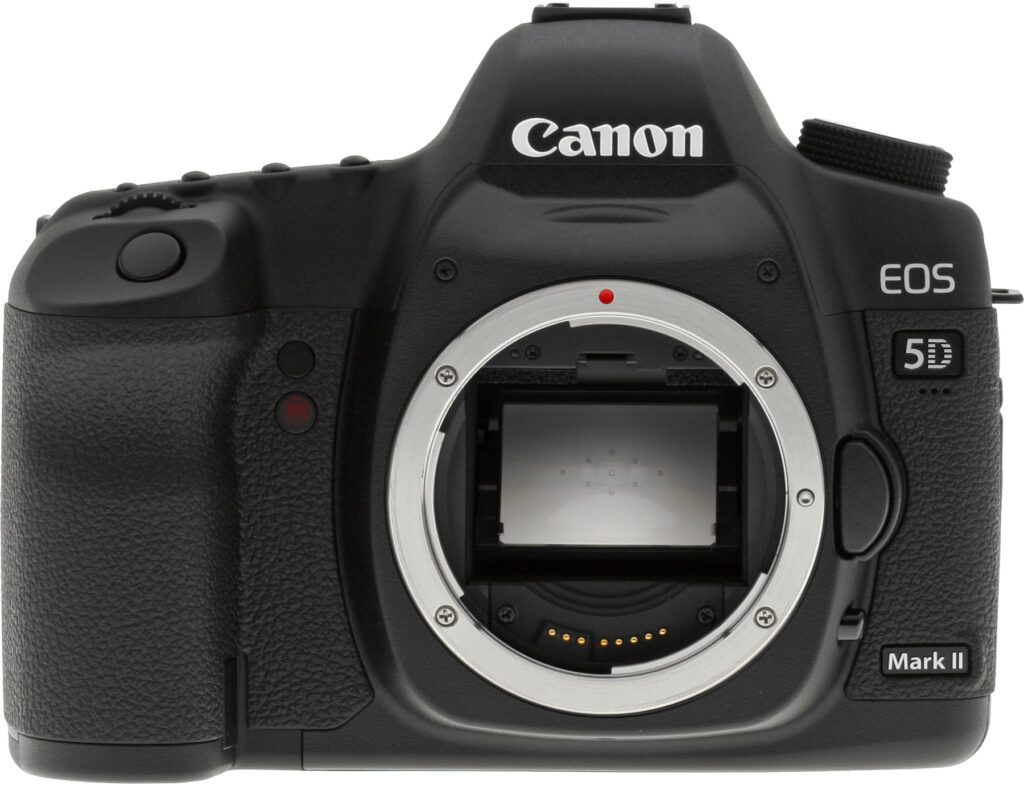
The Canon EOS-5D Mark II raises the standards of the entire EOS line, as it is the first EOS digital SLR camera to offer both still and video capture. The Canon 5D Mark II also includes most of the hardware and software upgrades that the company introduced on the Canon 50D.
Its upgrades are welcome, because though the Canon 5D leads the race for overall image quality for many photographers, it lags behind in a few key areas, most of which improve with the 5D Mark II.
Though no one at Imaging-Resource.com would say that 12.8 megapixels is insufficient, the new 21.1-megapixel sensor will likely be a welcome upgrade, especially to professional photographers who already use a 5D. Sony's latest digital SLR, the A900, raised expectations for high-end digital SLR performance, at least in terms of resolution, and the Canon EOS 5D Mark II indeed outperforms that camera in terms of its noise-to-detail ratio at high ISO.
Canon also takes on the Nikon D3 and D700 with this new high-resolution sensor, as the 5D Mark II also offers an expanded ISO range from 50 to 25,600. While the former two cameras achieve 100 to 25,600 expanded, they do it at 12.1 megapixels.
Canon has also included the new DIGIC 4 processor, capable of handling the extremely large 14-bit RAW images at the new high speed of 3.9 frames per second.
The new 920,000-dot LCD introduced on the Canon 50D also makes it over to the new Canon 5D Mark II, something the new 5D's competitors also have in their arsenal. The 5D Mark II also shares the Live View features found on the 50D, complete with contrast-detect autofocus and silent shutter modes.
 Many of the other features that debuted on the Canon 50D are included in the 5D Mark II, but one major new feature that probably should have made it into the 50D makes its stand instead in the 5D Mark II: HD video capture. That's right, this high-end digital SLR can capture movies at 1920 x 1080 pixels at 30 frames per second. We'd have expected them to have this in the 50D simply to go up against Nikon's D90, which can do 720p video, but that'll have to wait until the next version, perhaps.
The Canon 5D Mark II is quite a camera, one that seems to trump the other two full-frame digital SLR cameras in this price range. Indeed, the fact that its expected body-only pricing will be $2,699, $300 less than the Sony A900 and Nikon D700, makes the 5D Mark II that much more appealing. The Canon EOS-5D Mark II is slated to ship at the end of November 2008. Canon will also offer a kit that includes a 24-105mm Canon L lens for a price tag of $3,499. See the User Report below for the full story.
Canon 5D Mark II
User Report
by Shawn Barnett, with Mike Tomkins
Called a Premium digital SLR at its introduction, the original Canon EOS 5D has aged significantly over the last three years. Nevertheless, it's still regarded by many as the best image-maker on the market in its class, with a remarkably smooth tone curve. Indeed, I said that images from the EOS 5D had an intangible quality that was difficult to quantify. Everything has a more "real" look to it, a truer representation, such that you feel like you could reach out and touch the object or person photographed.
Has Canon maintained that ethereal quality? So much has changed in the market since 2004, it's a good question. Nikon has thrown down the gauntlet in several areas of image quality, especially in terms of high ISO performance, that it would be understandable if Canon had to abandon the surprisingly good tone curve exhibited by the 5D.
Since there is no way to measure the unmeasurable, I'll have to leave it to you whether the Canon 5D Mark II maintains the same level of magic, but what's sure is that Canon's attention to the high ISO issue has produced a camera whose high resolution images stand up to substantial enlargement even at the highest settings. The 5D Mark II also gives you plenty of freedom to play confidently with ISO settings, moving with confidence up to ISO 800 with nearly no loss of detail and ridiculously low chroma noise, especially considering the 21.1-megapixel sensor size.
The Canon 5D Mark II is aimed at the high end of the enthusiast market, less so at the "doctor/lawyer" crowd we placed the 5D with. It's also aimed at the professional photographer looking for a smaller body. Today there are far more photographers willing to pay for a serious digital SLR camera, and the Canon EOS 5D delivers.
The Canon 5D Mark II is also a pleasure to use, feeling every bit a premium digital SLR, yet with the ease of a Canon 50D.
Look and feel. The appearance of the Canon EOS 5D Mark II is all business, just like the rest of the cameras in this enthusiast lineup. Controls are almost perfectly placed, and will be familiar to owners of just about any Canon camera in its class dating back to the Canon 20D.
The body-only weight of the 5D Mark II is 1.78 pounds (810g), and dimensions are 6 x 4.5 x 3 inches (152 x 113.5 x 75mm). These measurements are essentially identical to the original Canon 5D.
The camera is substantial, but not so bulky that it's hard to hold for those with medium-sized hands. The heft definitely adds to the 5D Mark II's stability when shooting, and the big grip has a notch to help guide your hand to the perfect position every time. Those with smaller hands might find the 5D Mark II a bit cumbersome.

From the front, the 5D Mark II has a slight redesign, with less of a nod to the 1D aesthetic, particularly around the pentaprism housing. Three new elements stand out, though. The first is the new infrared remote control sensor that appears right below the self-timer light (between the grip and the lens mount). This feature has been missing from all of Canon's high-end digital SLRs until now, confined to the Rebel series. So instead of purchasing a rather limiting cable or an expensive remote control unit, you can buy an RC-1 or RC-5 remote control for under $30.
Just beneath the 5D badge are three holes for the Movie mode's monaural microphone. Below that is the Mark II logo that clearly distinguishes this model from the last. I also like the grippy surface on this side of the camera, combined with a flat front, which makes it easier to hold the camera with the left when checking images or making settings.
One other item to consider when looking at the front of the Canon 5D Mark II is that big mirror inside. It's a full frame camera, equal in size to 35mm film. As great as that is, existing owners of more recent Canon hardware will have to leave their EF-S lenses out of the equation when considering a Canon EOS 5D Mark II as their next camera, because EF-S lenses won't even mount on the Mark II. Their short back focus design sticks into the camera body so much that it would get hit by the large mirror; as such, the camera won't accept the lenses at all.
Notably missing from the Canon 5D Mark II is a pop-up flash, something we were happy to see on the Nikon D700 full-frame digital SLR. Even for pros, a small flash in a pinch is a welcome option.
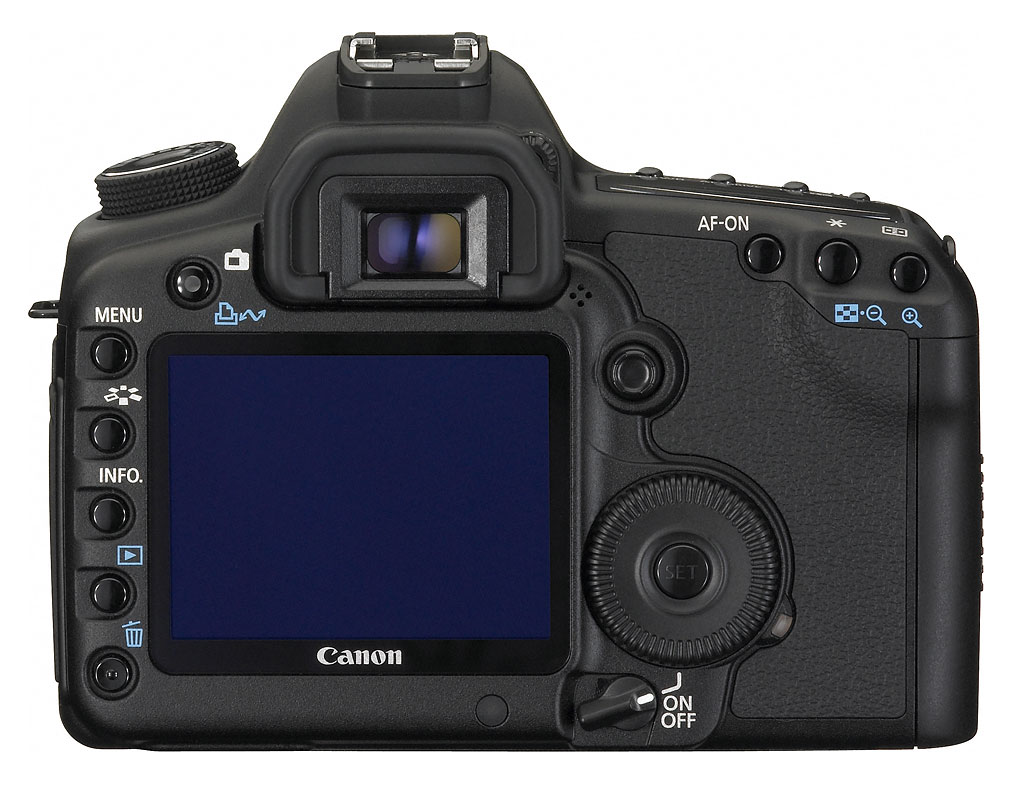
The larger 3-inch LCD pushed only a few items around on this decidedly large camera: the four buttons to the left have moved closer to the edge, and they're joined by the delete button (marked by a trashcan icon). The power switch, too, got nudged right a bit. Just right of the optical viewfinder are four holes for the speaker, where you can listen to audio recorded in Movie mode. The Print/Share button just left of the optical viewfinder also serves as the Live View mode toggle button. And the AF-ON button that first appeared on the Canon 40D arrives on the 5D Mark II. Also note the seal around the hot shoe, designed to mate with the Canon 580EX II to keep water out.
One bit that puts the Canon 5D Mark II into the premium category is the small light sensor that appears just right of the power switch, which adjusts the LCD brightness based on the ambient light.
The thumbgrip on the back is also large and textured for an excellent hold.

From the top we get a view of the finest kit lens Canon has ever bundled with a camera, the image-stabilized Canon EF 24-105mm f/4 L IS zoom lens. (Click here to see our review of this lens on SLRgear.com). The Canon 5D, like its competitors, has no Scene modes, though it does have three custom modes where you can store your own settings. Another new addition from the Canon 50D is the new Creative Auto mode, which allows the user to adjust the Flash, resolution, drive mode, and Picture Style, as well as shoot RAW. A special menu lets you adjust aperture settings in terms of desired background blur, and exposure times in terms of whether you want the image darker or brighter.
The control buttons to the right, appearing above the Status LCD have been reshuffled and regrouped from their positions on the original 5D, with Metering and White balance bundled on the first button, AF and Drive modes on the second button, and ISO and EV compensation on the third button. The Status LCD light button has been moved from first position near the pentaprism to fourth. It might be that the larger pentaprism inside made this move necessary, as the Canon 50D's illumination button didn't move.

Larger viewfinder. Click for callouts.
Viewfinder. The viewfinder in the Canon 5D Mark II has a bigger pentaprism, and now offers 98% coverage instead of 96%, along with a 21mm eyepoint instead of 20mm. Owners of the original Canon 5D will also need to know that along with the viewfinder improvements comes a change to a newer series of interchangeable screens.
I still find that the 5D Mark II's viewfinder vignettes somewhat when I look through it, but it is indeed larger than the original 5D. It's also surprisingly larger than the Nikon D700; though the D700's viewfinder is more comfortable to use. Finally, the 5D Mark II's viewfinder is smaller than the 1Ds Mark III and Sony A900, by about the same amount.
LCD. The Canon EOS 5D Mark II's LCD display has also been upgraded to the same unit used in the Canon 50D, which has a resolution of 920,000 dots, a 160-degree viewing angle, and Canon's triple coatings that aim to reduce glare, smudges, and scratches. Though at first the blue reflection is unfamiliar, it is superior in sunlight to some other displays on the market, including the original 5D's clear LCD glass.

Extra AF points.
Autofocus system. The autofocus sensor from the original Canon 5D has been carried over in the new 5D Mark II, still offering nine user-addressable autofocus points (one cross-type) and 6 non-addressable assist points, but the 5D Mark II autofocus system does include the lens micro-adjustment and light source detection functions we've seen on the company's other recent digital SLRs, so there are AF improvements even if the sensor itself hasn't been overhauled.
In use, I found the AF system to be quite good for portraits and other work, though it's hard to get used to the array's concentration in the center of the frame. The same AF-array dimensions are used in the Canon 50D, where the array seems huge, but on the 5D Mark II, most of the 35mm frame area remains uncovered.
Autofocus is fast, though, with full autofocus and image capture taking only 0.206 second. Focus speed varies by lens, of course, but the 5D Mark II's computation and slewing speed is among the fastest I've used. There's an advantage to having fewer AF points when it comes to computational speed, to be sure, as the 51-point AF system on the Nikon D300 and D700 can delay while the camera analyses the scene, while the 5D Mark II is quite a bit snappier.

Live View. Click image for callouts.
Live View. The Canon 5D Mark II also bests the original 5D by offering a live view function which is similar to that seen on the recent Canon 50D digital SLR, including a face-detection mode.
Though I advocate using the optical viewfinder most often when shooting the Canon 5D Mark II, Live View still has its uses, particularly when working on a tripod. But like other recent digital SLR offerings, the Canon EOS 5D Mark II offers two modes for focusing in Live View mode, one of which is faster than the other. Note that both modes are quite a bit slower than autofocusing via the optical viewfinder, hence my recommendation to use the optical viewfinder by default.
In both modes, you have to press the AF-ON button on the back of the 5D Mark II to autofocus. If you only press the shutter release, the camera will not focus. This takes some getting used to.
Quick mode. The first Live View focusing mode uses the traditional SLR method of flipping the mirror back down to use the phase-detect autofocus sensors for focusing. This can indeed be quicker so long as you put one of the nine AF points over an area with good contrast that enables fast focusing.

New to the system is that the selected AF points light up after the mirror flips back up to tell you which areas are in focus, rather than leaving that to guesswork as the Rebel XSi does. Autofocus in this mode is quite a bit slower than with the optical viewfinder, but faster than Live mode.

Live mode. Contrast-detect mode is called Live mode, because the Canon 5D Mark II does its focusing with the data that comes live from the sensor. You get a rectangle that you can move around the screen with the Multi-controller. When you press the AF-ON button, the Canon 5D Mark II focuses and changes the gray rectangle to green. You can zoom in either five or 10 times to confirm focus, the zoom following the AF point. It takes many seconds to focus in this mode, between 2.24 to 7.32 seconds in our testing. A histogram can also be overlaid over the image, though it's a shame that the histogram is still opaque, blocking so much of the image, rather than translucent as other companies have managed.

Live Face mode. We've all seen face detection by now, and if you've seen Canon's face detection on a simpler digital camera, you know about how well it detects faces on the Canon 5D Mark II: quite well. Autofocus is a lot slower on the 5D Mark II, however, as it has to process a lot more data to judge focus, and move far larger optics than are found in a digicam; but it's not bad. It'll take a few seconds to focus at times, especially when handheld. Sometimes faster, sometimes slower. The system can track far more faces than other systems we've seen at this point, though, at up to 35 forward-looking faces.
If the Canon 5D Mark II detects more than one face, it adds two arrows around the frame it's placed around its top-priority face, telling you that you can turn the Quick Command dial to select another face as the priority.
Interface. The Canon 5D Mark II's interface is mostly inherited from the Canon EOS 50D. It includes a tabbed menu that you can navigate with either the Main dial and the Quick Control dial or the Multi-controller joystick. The Main dial moves among tabs regardless of your position in the menu, and the Quick Control dial moves up and down through the menu items. The Multi-controller moves through the tabs when pressed left and right, and moves up and down when pressed up and down. Pressing down on the Multi-controller or Set button (in the middle of the Quick Control dial) confirms selections.
It's a well-evolved menu system that is easy to learn.
Canon kept the top deck status display, which is good for me, because I still use that by default; but the new rear menu is also handy for making changes as well, especially when the camera is mounted on a tripod. I'm not always happy with it, as it doesn't always respond how I think it should. Sometimes moving down doesn't take you to the place you think it should, instead requiring several different direction changes to reach the control you need. But overall, I'm glad it's there as a live menu, rather than just a static display.
Modes. Like the original 5D, the 5D Mark II has no special Scene modes as are found on the Canon 50D and Rebel series cameras. Instead, the 5D Mark II emphasizes the basics: Program, Shutter (Tv for Time Value), Aperture (Av for Aperture value), Manual, and Bulb.
In addition to the green zone mode, or Full Auto, there's a Creative Auto mode as seen on the EOS 50D. The CA mode is a cross between the Auto and Program modes. When set to CA mode, the Canon 5D Mark II allows the user to adjust the Flash, resolution, drive mode, and Picture Style. Setting aperture and exposure are converted to easier concepts of background blur (blurred or sharp), and exposure level (darker or brighter) with a slider that's adjusted with the Quick Control dial. The more complex exposure decisions remain under automatic control in CA mode. The exposure slider is the more useful, standing in as a more comprehensible EV adjustment for new users.
Canon has also improved upon the single Custom mode offered on the 5D to include three Custom modes on the 5D Mark II. All of these new modes can be accessed directly on the camera's mode dial.
Speed boost. The Canon EOS-5D Mark II gets a mild speed boost over its 3 fps predecessor, being rated as able to shoot images at 3.9 frames per second. Our measurements come up with 3.89, which is close enough for us. That's not bad considering how many bits it's moving thanks to its 21.1-megapixel sensor. Burst depth varies depending on whether you're using a standard or UDMA CompactFlash card. And since the 5D Mark II is compatible with UDMA through mode 6, the buffer clearing speeds could get faster. For UDMA cards, the 5D Mark II allows unlimited burst depth when shooting large / fine JPEGs, or as many as 14 Raw files; slightly shorter than the 17 Raw file burst possible in the original 5D, but then that's perhaps understandable given the higher burst speed and vastly higher image resolutions and resulting file sizes. Non-UDMA CompactFlash burst depth in Raw mode is only just slightly shorter, at 13 frames.
Variable RAW. The Canon 5D Mark II also offers a Variable Raw mode as seen in some of the company's past cameras. Given the huge 21.1-megapixel resolution, it's likely to be used quite often by photographers who don't need the vast file sizes but want the 5D Mark II's other features. The reduced Variable RAW sizes are approximately ten and five megapixels respectively, and are assembled from the full image frame without any cropping.
A few other useful features seen on Canon's past EOS 50D and carried over here are High ISO Noise Reduction (adjustable in four steps), an Auto Lighting Optimizer (again offering four steps), and perhaps most importantly for a full-frame digital SLR, Lens Peripheral Illumination Correction, or vignetting correction.
Sensor. Compared to the image sensor from the original Canon 5D, the pixel pitch in the 5D Mark II's imager has dropped from 8.2µm to 6.4µm -- the same as that of the 1Ds Mark III's sensor, as well as the EOS 20D's sensor, and the hardware architecture is also identical to that of the pro camera. However, the Canon 5D II's sensor sports new RGB color filters with an improved transmission rate.

A couple of improvements from the Canon 50D's image sensor also make their way into the 5D Mark II's imager: an improvement in the per-pixel, light-sensitive area, and nearly gapless microlenses. They've also improved the output amplifier to enable faster transfers, as well as a 30 fps HD movie output without heating up the sensor, and Canon tells us that there are other unspecified improvements to the way the image is developed on-chip. These changes are all said to come together to mean a cleaner signal that requires less amplification. According to our test results, Canon's engineers got it right, as the Canon 5D Mark II produces impressive images.
Storage and battery. The Canon 5D Mark II uses a standard CompactFlash Type I and II slot, but it supports UDMA Mode 6, which isn't even available on the market yet. Current UDMA cards support data transfer of up to 45MB per second, but when the Mode 6 cards arrive, they'll support up to 133MB per second.
 The bigger news for the entire EOS line is the 5D Mark II's new Intelligent lithium-ion battery pack. Though it looks a lot like the old BP-511A that's still in the 50D, the 5D Mark II's LP-E6 has greater capacity (1,800mAh) and intelligence built in. While Sony has had these types of packs for some time, Canon's cameras have been quite a bit less informative about the battery status until the camera was close to running out.
 The LP-E6 is even more informative than past systems, reporting battery life with six levels on the battery icon, and one percent increments in the Battery Info menu. The number of shots fired since last recharge is also recorded and accessible through the same menu, and the overall expected battery life is also tracked, giving an indication of when a battery has reached the end of its usable life. Since each battery has a unique serial number, this status can be displayed on the Canon 5D Mark II, making it easier to pick the best batteries from your arsenal on an important or longer shoot. It's quite a leap for the EOS system, and I'm hoping we'll see it on all future EOS cameras.
The new battery also has new recessed contacts, so it requires a new charger, the LC-E6 in the Americas, which includes the flip out prongs, and the LC-E6A which instead includes a power cord matched to the common power supplies in other regions.
Battery and Wireless grips. There's a new vertical battery grip, the BG-E6, which can accept either two LP-E6 batteries or a tray of AA batteries. There's also a new WFT-E4A wireless transmitter, which is essentially a clone of the WFT-E3A unit compatible with the Canon 40D and 50D, but with updates to support the power and connection requirements of the EOS 5D II camera body. This wireless transmitter allows you to attach either a GPS or a USB storage device.

Twig inventory. I'm not sure why I liked this big tree, but now I'm enjoying the fact that, if I wanted to, I could count every twig on this tree, thanks to the incredible detail recorded through the EF 24-105mm f/4 L lens at f/8.
Shooting with the 5D Mark II. If you've shot with any Canon EOS SLR for the past 20 years, you'll be quite familiar with the controls on the Canon 5D Mark II. They are laid out very well, making for a very utilitarian design whose true beauty is only discovered when you start to shoot.
Were it not for my familiarity with the Canon EOS design, the only criticism I'd give to the 5D Mark II is the location of its power switch, which is poorly located beneath the Quick Control dial. However, as I say, anyone familiar with EOS design will be accustomed to this oddity. I'm far more comfortable with the power switch around the shutter button, as it is on most Nikon SLRs. But that aside, I have to say it's all very easy to get used to.

Dark corner. I was pleased with the detail I found in this relatively dark corner of this Smith Family Plantation house. Normally I'd avoid ISO 6,400, but I flipped to it with confidence.
ISO is probably the setting I change most often, and I can do it with either the rear status display, the top status display, or the LED display in the viewfinder. I probably use each method about equally. When I need to make a change in a hurry while still composing through the viewfinder, the ISO button is easy to find on the top deck, just a half-inch behind the shutter button. Once pressed, I just turn the Main Command dial to make the change and the numbers change in the viewfinder. When I check and make my initial settings before I begin shooting, I alternate between the other two status displays. I'm more accustomed to using the top deck LCD, but find myself drawn to the colorful display on the back. The good feature is choice and versatility, since the creative photographer often looks at his camera from several directions depending on what and how he's shooting.
I've already said, but it bears repeating, that the AF cluster is probably the biggest adjustment a shooter switching from one of Canon's APS-C-sized digital SLRs will have to make. I think a lot more such people will and ought to make this move, but I think the caution is important. You'll have to adjust the way you shoot. It really is quite something to have a camera's AF system covering most of your frame. Even though I generally shoot with the center point, when shooting candids I will sometimes lean on Mulit-point AF systems to just make the best guess for me. Guesses were pretty reliable with the APS-C designs, but with a full-frame sensor, you not only have more to consider in the frame overall, the existing sensors, especially the center point, cover a far smaller percentage of the subject per point.
Add that the 5D Mark II's extremely high resolution full-frame sensor demands more from these lenses than ever before, and you start to see why getting focus right is so critical. The very narrow depth of field offered when shooting a closeup portrait indoors means that getting the eye instead of the eyebrow in focus will make or break a picture. I'm very grateful for the 5D Mark II's AF Microadjustment feature, because I was able to dial in several lenses before a recent shoot to ensure that my shots were indeed spot on, because I had a bad experience with the original 5D at times, especially when shooting portraits.

Spot-on. I was pleasantly surprised that though the depth of field in this shot was very narrow, it's right on his eye.
My first shot with the 5D Mark II illustrates the point nicely. It's not particularly noteworthy as a photograph, but I like it all the same. Click (twice) to see the full-size version, and you'll see that my son's eye is the only sharp point of focus on his face, as well as the halo of his hair right within the same plane. It's a good illustration of the problem one has when shooting wide open with any prime lens, as well as the main reason one chooses to shoot with a prime lens. The color balance is very cold on this image, but that was accurate for the light, so it's hard to fault the camera.
Also worth noting is how the image is framed a little more loosely than I normally would like. It's because I knew I had my EF 85mm f/1.8 attached, and expected that I'd need to be a little further back than I actually needed to be, because I'm used to how this lens performs on a cropped sensor. That's another adaptation you'll have to make when switching to or adding a 5D Mark II to your arsenal: your expectations for each full-frame lens before you pull it from the bag. I'd have done better with a 135mm lens for this subject, as that's about the equivalent of an 85mm lens on a Canon cropped sensor.

Live View makes it possible. Framing this down-angle shot would have required a ladder and very good balance, but the 5D Mark II's live view made it easy. Move the contrast-detect AF area to any one of the faces, and the rest was easy. Except having to get up and down between each shot (note the red face on the bearded photographer).
Handy View. Another good example of Live View's utility was when I shot our family portrait for this past holiday. Though I wish I had a taller tripod, it was good I didn't, because there was very little room in the basement, and I could just see the Live View on the LCD at that height and angle. I could have used a longer focal length and a taller tripod, but the main feature to see here is just the extraordinary detail. And yes, I did crop and touch up this shot before posting it here, since it features yours truly and I'm just not that honest.
Sports? Unless your timing is already well-developed, I don't recommend the Canon 5D Mark II for sports photography, despite its six additional autofocus points to help with focus tracking. Most of us need a faster frame rate than 3.9 per second. As such, I did not do any sports shooting with the 5D Mark II.
However, if you really want to capture sports with the 5D Mark II, why not try its HD movie mode?
Movie mode is what makes the Canon EOS 5D Mark II unique among other EOS digital SLRs: the addition of 1080p high definition video recording capability. Able to record 1,920 x 1,080 pixels or 640 x 480 pixels, both at 30 frames per second, this is a huge update compared to the original EOS-5D. The Canon 5D Mark II is limited to either a four gigabyte file size, or 29 minutes and 59 seconds of elapsed recording time.
The Canon 5D Mark II records its videos as .MOV files, using MPEG-4 compression. These files contain PCM audio sampled at 44Khz -- either recorded on the digital SLR's built-in mono microphone, or courtesy of a standard stereo microphone mini-jack. The Canon 5D Mark II is capable of offering both the Lens Peripheral Illumination Correction and Auto Lighting Optimizer functions for its movie capture mode as well as for stills. The same is not true of the camera's still image High ISO Noise Reduction function, however.

Movie sample. Click to download 52.3MB .MOV file. Note: This 1080p movie is only likely to play on fast, modern computers, with more recent movie players.
In use, though, the 5D Mark II's movie mode isn't as easy as a fully automated camcorder. It doesn't autofocus "live" on the fly as most will be accustomed to, and sudden changes of exposure level can cause momentary interruptions in the recorded video stream as the camera works to adjust settings. Exposure is also set automatically, including shutter speed (from 1/30 to 1/125), aperture and ISO sensitivity. You can use EV compensation to adjust exposure up and down, and focus manually by turning the focusing ring on the lens, but it's best to do these things before you begin recording, because making these adjustments makes noise that the microphone will pick up, and can cause camera movement whether on or off a tripod.
So unfortunately, you can't replace your camcorder outright with the Canon 5D like you can with some more conventional digital cameras. But what you can do is pretty impressive if you think of movie making like a photographer would. The best movies, in fact feature films, are made in small snippets that are cut together later to make the final story. Not unlike a wedding album. You're just planning and capturing more moments as video snapshots instead of still images. But it takes some practice.
The advantage you have is the ability to use wide angle and telephoto optics the like of which would cost you many thousands of dollars to duplicate on a high-end video camera. What you can do with bokeh (out of focus areas) to isolate your subjects from background and foreground, especially with short to long telephoto lenses, is pretty impressive. Fast lenses will also open up some interesting indoor and night cinematography opportunities to the fastidious video artist.
Note that the Canon 5D Mark II's video also suffers from the same Jello-effect we saw on the Nikon D90. It's an effect produced by the top-to-bottom linear method that the camera uses to draw an image off the sensor. If you pan rapidly, vertical lines in the image will appear to lean in the opposite direction of the pan. Pan back and forth rapidly and the entire image shakes like Jello.
Movie snap. One other notable movie-related point is that the Canon EOS-5D II offers a "movie snap" function. Essentially, it has separate shutter buttons for movie and still image recording, and if the user presses the still image shutter during movie recording, the camera will capture a full-resolution still image without ceasing to record the movie. It also inserts the still image into the movie, rather than leaving a blank frame. This concept will be quite familiar to those who use a Canon PowerShot S5 IS. It'll also remind you of spy movies where someone is taking dossier pictures of some suspect through a camera lens.
HDMI output. There's a Mini-HDMI output port for viewing images on a high-definition display, and you can obviously also watch your movies this way. The output is 1080i (interlaced), not 1080p (progressive), whereas the 5D Mark II's movie files themselves are captured and saved in 1080p, which is preferred. No cable is included, unfortunately, so you'll need a Mini-HDMI to HDMI cable, or an adapter.
Canon 5D Mark II Image quality
Canon 5D Mark II vs Canon 1Ds Mark III @ ISO 3,200
The Canon 5D Mark II's image quality is remarkable. High ISO performance is improved over the Canon 1Ds Mark III, as is the ISO range (the latter stopped at ISO 3,200). As such, we'll compare their ISO 3,200 images.
 |
 |
| Canon 5D Mark II ISO 3,200 |
Canon 1Ds Mark III ISO 3,200 |
|
On the left we see how much cleaner the shadow areas are, and indeed even the oil inside is clear on the 5D Mark II image. On the right, however, though chroma noise and contrast are higher, and the detail in the word MAS is a little more crisp. In most of Canon's digital SLRs, but especially pro cameras, Canon has been leaving image improvement to the photographer, but now the company is clearly leaning toward making JPEGs cleaner than before. It's probably a better approach, because most pros who will tweak on a computer will shoot RAW, while the non-tweakers just need a good image fast.
|
|
Canon 5D Mark II vs Nikon D700 @ ISO 12,800
For me, the real intrigue with these new SLRs capable of quality high ISO performance is whether they'll help you get the shot in low light without significant damage to detail from noise and noise suppression activity. So though it's comparing the 5D Mark II's 21-megapixel sensor to the Nikon D700's 12-megapixel sensor, it's interesting to see what you get from each JPEG file.
 |
 |
 |
 |
|
 |
| Canon 5D Mark II ISO 12,800 |
Nikon D700 ISO 12,800 |
|
Naturally you get a larger image from the 5D Mark II, since its sensor is almost twice the pixel count as the Nikon D700. Viewed at 100% it's surprising that both sensors deliver a similar level of detail after noise suppression is applied and the JPEG is created. The 5D Mark II leaves a few more black dots behind than the D700's image. Once cleaned up a bit more, or translated from RAW, I'm sure the Canon's higher resolution would ensure a slightly larger printed image, but the results are still quite comparable.
Out of curiosity, I resized the D700 image to roughly match the pixel dimensions of the 5D Mark II image using Photoshop's Bicubic Sharper, with a 0.3/100% Unsharp Mask, and the detail is still comparable, if a little softer (see bottom right image). When shooting at higher ISOs, the real test is whether you have enough detail to work with after the fact, and it seems that both cameras do quite well. Lest it seem like I'm trying to advocate for the D700, the impressive bit is that the Canon 5D with its smaller pixels and noise suppression active does as well as it does against the Nikon D700's far larger pixels. Both cameras will deliver sufficient detail at higher ISOs than most any other camera for the money. Remember, though, that the D700's other key advantage is the ability to capture up to eight frames per second at full-frame with the battery pack, while the 5D Mark II is limited to 3.9 fps. So it really comes down to what you're looking for in a digital SLR. |
|
Canon 5D Mark II vs Sony A900 @ ISO 6,400
Next we have to compare the Canon 5D Mark II's highest common ISO with the Sony A900 and Nikon D3x, since these are its most obvious competitors at this resolution, at least as of this writing. Starting with the A900:
 |
 |
 |
 |
| Canon 5D Mark II ISO 6,400 |
Sony A900 ISO 6,400 |
|
In the case of the Sony A900, higher resolution does not support higher ISO quality. Either the Sony's 24.6-megapixel sensor's smaller pixels can't gather sufficient light for better performance, or the anti-noise processing technology hasn't caught up to what Canon and Nikon are doing at the moment. Though I'm still a strong admirer of the A900's image quality at ISO 800 and below, it's clearly not the camera to bring along for handheld low-light shots.
|
|
Canon 5D Mark II vs Nikon D3x @ ISO 6,400
The Nikon D3x just came out, which we've assumed shared a sensor design with the Sony A900, so its full-frame quality is also worth looking at next to the Canon 5D Mark II.
|
 |
|
 |
| Canon 5D Mark II ISO 6,400 |
Nikon D3x ISO 6,400 |
|
Talk about erroneous assumptions! Now you have to ask yourself how the Nikon D3x could possibly use the same sensor design as the A900, when it outperforms even the Canon 5D Mark II at its highest ISO setting. Those who have been belly-aching about the D3x's $8,000 price point should pipe down. Still, the 5D Mark II does compare well considering its $2,700 price and video capability. And though it seems clear that the D3x's 24.5-megapixel sensor could go to higher ISO settings, the Canon 5D Mark II can go two stops higher and still capture reasonable detail in low light.
|
|
Resolution. 21 megapixels is sufficient that you really needn't worry about the slight softness to the Canon 5D Mark II's JPEGs when viewed at 100 percent onscreen. You'll be very happy with prints from the camera at up to 24x36 inches. Of course you can get much more resolution and detail if you shoot RAW and develop the file with a program like the included Digital Photo Pro, Adobe Photoshop's Camera RAW, or Bibble Pro.
See the Sensor section on the Image Quality tab of this review for much more on the Canon 5D Mark II's superb performance.
Black dots. Shortly after the Canon EOS 5D Mark II shipped, users began reporting a strange "black dot" error, where small points of light were rendered with an accompanying black dot just to the right. We didn't see the phenomena until we took a special photo to demonstrate the issue. It took several lighting, lens, and ISO changes to get a shot that showed the effect. Note that these elements are very small in the frame, and you are unlikely to see them except when the image is enlarged significantly.


In December of 2008, Canon announced that they were aware of the problem and working on a fix, and on January 7, 2009, they released a firmware update to address the problem. Above you see the before and after shots, taken from the same location with all the same settings.
A banding issue related to the sRAW1 format was also fixed with the firmware update, but we do not have before and after shots for that.
Appraisal. The Canon 5D Mark II is one amazing photographic tool, designed and built to be used by serious photographers, without a lot to distract from making great pictures. That's the beauty of the line, and one of the key carry-overs from the 5D itself: elegant utility borrowed from the Canon 20D and 40D designs, combined with revolutionary image quality brought down from Canon's professional line of cameras.
It doesn't have the highest resolution on the market, but the Canon 5D Mark II does more with what it has than we've seen at this price range and size. The difference between 21.1 megapixels and 24.6 really isn't that large, so even if you were to stick to the lower ISO range, the 5D Mark II is a bargain compared to the Sony A900. It also delivers more pixels at lower resolution than the more expensive Nikon D700, though they are pretty well similarly competent at higher ISO settings. Yes, it is bested by the Nikon D3x, but at less than half the price, who's surprised?
Each of the sub-$3,000 full-frame digital SLRs offers its own unique strength. The Nikon D700 may "only" be 12.1 megapixels, but it can fire off eight frames per second, and has some very impressive high-ISO performance. The Sony A900 offers astonishingly high resolution, at 24.6 megapixels, and yet still cranks out a respectable five frames per second. And the Canon 5D Mark II has very high resolution of 21.1 megapixels with the added benefit of HD movie capture. Unless you need high speed capture, and a 30fps HD movie is out of the question, the Canon 5D Mark II appears to offer the best of both of its competitors, with high resolution capture and excellent high ISO performance. Your needs and your lens collection will help decide which way you lean; the big story is that for the first time you have a choice.
Canon 5D Mark II Basic Features
- 21.1-megapixel CMOS sensor
- 3.9 frames per second
- 3.0-inch LCD with 920,000 pixels
- Top Status LCD
- ISO range from 50 to 25,600
- Shutter speeds from 30 seconds to 1/8,000 second
- Compact Flash Type I and II UDMA slots
- Lithium-ion battery
- 6.0 x 4.5 x 3.0 in (152 x 114 x 75mm)
- 2.02 pounds (920g) with battery and card, but no lens
Canon 5D Mark II Special Features
- DIGIC 4 image processor for faster image processing
- 14-bit A/D conversion for finer color gradation
- 1080p HD video recording at 30 fps
- Built-in microphone
- 3.5mm stereo mini jack for attaching external mic
- Supports UDMA cards for future transfer speeds of up to 133MB/sec
- Shutter rated for 150,000 shots
- Better moisture sealing
- Peripheral Illumination Correction fixes vignetting for many lenses
- EOS Integrated Cleaning System to reduce the negative effects of dust
- Bigger optical viewfinder
- New focusing screens
- Improved AF sensor compensates for focus errors due to different light sources
- AF Microadjustment setting lets you tune lenses to be their sharpest
- Dirt, smudge, and glare resistant LCD cover glass
- Face detection autofocus picks out the closest face and even allows you to move among up to 35 faces
- New battery offers greater capacity and safer contacts, as well as data exchange with the camera to track number of shots and battery strength
- Mini-HDMI video output port
- Accepts battery grip for easier vertical shooting and greater battery life
- Accepts Wireless File Transmitter grip for connectivity to WiFi networks, LANs, GPS units, and USB drives
- Auto Lighting Optimizer helps retain shadow detail
- Highlight Tone Priority helps maintain highlight detail
In the Box
The retail package contains the following items:
- 5D Mark II body
- Body cap
- Battery
- Battery cap LP-E6
- Charger LC-E6
- Camera strap
- USB cable
- AV cable
- Software CD 19.1
- Instructions CD
- Manuals
- Pocket guide
- Other literature
Recommended Accessories
- Extra LP-E6 battery
- Large capacity CompactFlash memory card (These days, 8GB is a about right if you're going to shoot JPEGs; if you shoot JPEG+RAW, though, or movies, think 16GB or higher.)
- Camera bag
Canon 5D Mark II Conclusion
| Pro: | Con: |
|---|---|
|
|
The Canon 5D Mark II is indeed a premium digital SLR. It's not just the very high resolution that makes it stand out, but the excellent high ISO performance, effectively giving you the freedom to shoot handheld in conditions where you'd normally need a flash or a tripod.
Improvements over the original 5D abound, including a bigger viewfinder image, faster frame rate, a larger image buffer, and a faster data path. Nearly all of the new features from other recent models have also been added, including a two-motor shutter and mirror arrangement, silent shutter mode, a comprehensive Live View mode, multi-stage noise suppression options, and several features designed to improve common problems, like blown highlights, plugged shadows, and vignetting. Two minor options pile on to make the 5D Mark II even more premium: a built-in remote control sensor and an ambient light sensor to automatically adjust the LCD.
The addition of High-Definition movie mode opens up new avenues for enterprising photographers, giving them the ability to capture video snippets as well as high resolution photographs, enhancing what they can offer to their clients. Since the advent of Live View, it's been an obvious play, and this is the best implementation we've seen. It's important to note that this is still a tool for photographers, though, and doesn't yet replace the ease of the most basic camcorder, because it lacks autofocus; and significant exposure changes can result in momentary gaps in the video. Still, video hobbyists have seldom had so much optical variety at their disposal for so little money.
When the original 5D debuted three years ago, it wasn't clear why most enthusiasts would want such a camera. Though it captured excellent, high resolution images, it was slower and bigger and more expensive. Today the market has changed significantly, and it's clear that the market is ready for full-frame digital SLRs that can turn out high image quality. High quality is one thing, but being a camera that can deliver high quality over a wide range of lighting conditions and different ISO settings is what makes the Canon 5D Mark II such a compelling choice, and a clear Dave's Picks.
Design
Canon EOS 5D Mark II Design
Roll-over the various controls and features with your mouse for a brief description. Note: Rollovers are best viewed with the latest versions Firefox, Safari, or Opera browsers, or Internet Explorer 6 or earlier.

Canon 5D Mark II Front. Compared to the 5D, the Mark II's front adds a microphone (just below the 5D badge) for movie audio recording, and an IR remote receiver (just above the self-timer lamp). Note the leather-like grip surface on both the grip and the left side, which makes holding the camera much easier.

Canon 5D Mark II Left. A Mini-HDMI output has been added, as well as a jack for an external stereo microphone.

Canon 5D Mark II Right. Not much has changed here. Pull the CompactFlash card door to the rear first, then it swings open.

Canon 5D Mark II Top. The 5D Mark II re-arranges the four top mode buttons, plus the mode dial adds Creative Auto and two Custom settings.

Canon 5D Mark II Back. The 5D's 2.5-inch, 230K-pixel LCD has been replaced with a 3.0-inch LCD with 920K-pixel resolution. Buttons on the back have been re-arranged also. The Print/Share button enables Live View mode when the camera is in record mode. The 5D's Jump button is gone while a Picture Style selection and AF-ON buttons have been added. There's also a tiny speaker to the bottom-right of the viewfinder, and an ambient light sensor below the LCD.

Canon 5D Mark II Bottom. Compared to the 5D, the extension system terminal at the bottom-right is new, and is used to connect to the wireless grip.
Operation
Canon EOS 5D Mark II Operation
The Canon EOS 5D Mark II has an enhanced interface compared to the 5D, with both the traditional monochrome Status LCD, a viewfinder LED display, and a new rear Status display that can be brought up on the 3-inch LCD. A Status display has also been added to Live View mode, including a live histogram.
The control layout has changed compared to the 5D. The top panel buttons have be re-arranged, and have different combinations of assignments. The AF/WB button has become Metering/WB, Drive/ISO has become AF/Drive, and the Metering/Flash Compensation button has become ISO/Flash Compensation. The top panel LCD backlight button has also been moved from the top-left to the top-right of the top panel LCD. The Exposure Mode dial adds a new Creative Auto setting, as well as two additional Custom settings. (See the Modes & Menus tab for more details on exposure modes.) The rear-panel controls have been rearranged to make room for the larger LCD, and one button has been added. The Jump button has been removed to make room for a Picture Style button, the Print/Share button now also serves as a Live View button, a new AF-ON button is provided for starting autofocus without the use of the shutter button, and the Delete button has been moved from below the LCD to the left-hand side. See the Design tab for more details on control placement and function.
Canon EOS 5D Mark II Top-Panel LCD Display
 The Canon 5D Mark II features a top-panel LCD display, which reports practically all of the camera's main exposure and menu settings. The display is black and white, and only shows the settings that are applicable during use, though the illustration below shows the full range of settings that can appear. (Illustration courtesy Canon USA.) There is a backlight button to the top-right of the display for viewing the LCD in dark conditions.
New for the 5D Mark II compared to the 5D are the enhanced Battery Check display (with four segments and six levels instead of just two segments and four levels), Highlight Tone Priority icon, ISO Speed display, IR Remote Control and two-second Self-Timer icons.

Canon EOS 5D Mark II Record Mode Displays
When the INFO button is pressed, the 5D Mark II's rear-panel LCD monitor also offers a status display, similar to ones found on models without a top status LCD. The image below shows callouts for all the information shown in this shooting display. (Illustration courtesy Canon USA.)

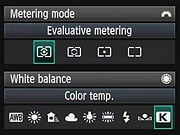
The 5D Mark II also has the ability to adjust settings directly from this display using the Multi-controller joystick. The image below shows callouts for the "Quick Menu," as Canon calls it. (Illustration courtesy Canon USA.)

| Canon EOS 5D Mark II Record Displays | ||
 |
 |
 |
|
Record mode display is activated with a press of the INFO button, and is deactivated when you press the shutter button halfway.
|
Pressing the INFO button turns the display into a quick menu, where the displayed settings can be selected with the Multi-controller, and adjusted directly with the Quick control dial.
|
You can also use the SET button, which displays the dedicated menu for a function.
|
Additionally, the EOS 5D Mark II's rear-panel LCD monitor can be used as a viewfinder, via the camera's Live View mode (see the Viewfinder tab). A sampling of exposure information appears on-screen, and if the Exposure Simulation option is enabled, the image display reflects what the expected exposure outcome will be. An optional histogram can display, but unfortunately it isn't translucent, completely blocking that upper right quadrant.
Canon EOS 5D Mark II Playback Mode Displays
The display mode used in Record Review is the same as was last used in Playback mode, or you can hit the DISP button to cycle to a different mode. Likewise, in Playback mode, you can cycle between the available display options by pressing the DISP button repeatedly. You can also select between the normal luminance-based histogram and the new RGB histogram option via a Playback-mode menu item.
| Canon EOS 5D Mark II Playback Displays | ||
 |
 |
 |
|
Normal playback mode display, shows shutter speed, aperture and file number; pressing the INFO button adds the frame number and image size/quality.
|
Pressing the INFO button a second time cycles through several displays including a screen with one luminance histogram.
|
A third press brings up another display with both an RGB and a luminance histogram.
|
 |
 |
 |
|
You can zoom out to thumbnail views, the standard display moving through screens with 4-up, 9-up, and 9-up with the ability to jump through images on the card 9 at a time by turning the Main command dial.
|
There's the usual ability to zoom in on the subject, with the location of the current zoomed view within the full frame shown in the little navigator window in the lower right.
|
We like that you can step between images while maintaining the zoomed display. This makes it easy to compare focus or other fine details from one shot to the next.
|
Optics
Canon 5D Mark II Optics
Lens Compatibility
 The Canon 5D Mark II will work with pretty much any EF-mount lens ever made, however it is not compatible with the special EF-S lenses designed for cameras with APS-C size sensors. Designed with a smaller image circle (the area covered by the image on the film/sensor plane), EF-S lenses tend to be smaller and lighter than full-frame models with the same focal length and maximum aperture. EF-S lenses can't be used on full-frame Canon cameras, nor on their models with 1.3x crop factors, like the current EOS-1D Mark III.
The full-frame sensor on the Canon 5D Mark II means there is no "crop factor" for this camera, or that the "focal length multiplier" is 1x, the same as 35mm film.
The Canon EF 24-105mm f/4L IS lens that ships as part of the optional Canon 5D Mark II kit in the US has much better build quality than most kit lenses bundled with SLRs these days (such as the 18-55mm that shipped with the Canon Rebels), and has a longer zoom range as well. On a full-frame body like the 5D Mark II, it's wider than the 18-55mm, performed very well in our tests on SLRgear.com, and comes with image stabilization, a very worthwhile feature to have. It's priced at an average of $960 on its own, so the $3,499 suggested price of the kit reflects about $160 savings over buying them separately. To see more on this lens, visit our SLRgear.com review on the 24-105mm IS lens by clicking here. Be sure to click on the Blur Index charts for an interactive look at how the lens performs across its range of apertures and zoom settings on both full-frame and APS-C bodies, as well as our reports on its chromatic aberration, vignetting, and distortion characteristics.
AF sensor arrangement.
Autofocus Improvements
The autofocus sensor from the original Canon 5D has been carried over in the new 5D Mark II. While still offering nine user-addressable autofocus points (one cross-type in the center) and six non-addressable assist points (with three center AF points sensitive to f/2.8 lenses), the 5D Mark II autofocus system does include the lens micro-adjustment (for up to 20 lenses), and light source detection functions we've seen on the company's other recent high-end digital SLRs, so there are autofocus improvements even if the sensor itself hasn't been overhauled.
Light source detection addresses the problems some (many?) AF systems have with artificial light sources that flicker. The problem can arise as the AF system evaluates the data coming from the AF sensor, flicker in the lighting that's imperceptible to the human eye can cause the AF sensor to misjudge the location of the sharpest details within the frame. Here's Canon's explanation of the problem and its solution, taken from their EOS 50D and 5D Mark II White Paper:
"Improved precision over previous AF systems stems from each camera’s ability to adjust for different light sources while calculating focusing distance. Here’s how it works: during Phase Detection AF, the AF engine rapidly measures the density of horizontal and vertical details in a scene and the camera processor uses this data to determine where the sharpest edges and details are located. When found, the AF is locked on target. But under fluorescent lighting and some other artificial lighting sources, a rapid, imperceptible flickering of the light occurs along with sudden color temperature shifts. These tend to throw off the density measurements and therefore the accuracy of the AF calculations. In both the EOS 50D and EOS 5D Mark II, the type of lighting is taken into effect, and readings are averaged and processed with the help of the super-fast DIGIC 4 Image Processor. The result is improved AF accuracy and speed when shooting under lighting conditions that could fool the AF systems found on earlier Canon and competitive models alike."
It's not clear whether the averaging of AF sensor readings goes on all the time, or only when the camera detects a particular type of lighting. If it's all the time one might think that this would slow the AF system somewhat, in exchange for it being faster and more accurate under fluorescent light sources. On the other hand, that wouldn't explain the fact that the 5D's single-point AF speed is lower than that of the 50D.
AF-Assist Illuminator
The Canon 5D Mark II does not provide an AF-assist illuminator built into the body. Canon normally uses the flash for AF assist on their DSLRs, but the 5D Mark II has no built-in flash. It instead relies on the AF assist lamp built-into most Speedlite external flash units.
Dust Reduction Technology
First introduced on the Canon Rebel XTi, Canon's system-wide approach to reducing the impact of dust on the image sensor is also included on the Canon 5D Mark II. From the beginning, every DSLR has offered a sensor-cleaning mode, in which the mirror is locked up and the shutter opened to permit the sensor to be cleaned with compressed air, a solvent-carrying swab or other means. As the market has matured and more DSLRs have found their way into the hands of novice users, it has become clear that some automated way of dealing with sensor cleaning is needed.
A key feature of Digital SLRs is the ability for the user to easily swap lenses. This expands creative options enormously, but every time a lens is removed, dust from the environment is free to enter the camera body. From there, it's only a matter of time before some of it makes its way to the surface of the sensor where it casts shadows that appear as dark blobs in your images. In truth, it's the anti-aliasing filter that collects dust, rather than the sensor itself, but common parlance refers to "sensor cleaning." For the sake of familiarity, we'll generally refer to sensor cleaning here, but will make mention of the anti-alias or low-pass filter as seems appropriate.
The principal approach other manufacturers have used to deal with dust has been to make the system self-cleaning, by rapidly vibrating either the anti-aliasing filter itself or a protective cover glass lying above it, to shake loose adhering dust particles. Once dislodged, a strip of sticky material at the bottom of the sensor cavity or mirror box catches and holds them. This approach was pioneered by Olympus, but has since been adopted by Canon, Nikon, Pentax, and Sony.
In typical fashion, Canon's camera engineers took a comprehensive look at the issue of sensor contamination, and came up with a multifaceted, system-wide approach to reducing the impact of dust on users' photographs.

Canon's approach uses a vibratory cleaning method as a primary part of the overall strategy, but they've introduced several refinements as well. Here's what they've done:
Shooting Priority: Shutter Button Overrides Cleaning Cycle
It's critical for a digital camera to power up and be able to capture the first shot quickly, to avoid missing the action when first starting up. Some cameras with integrated cleaning systems can take a second or two for the cleaning cycle to complete before they're ready to capture an image. To avoid this problem, the Canon 5D Mark II aborts its normal power-on cleaning cycle as soon as the user touches the shutter button. This insures that you won't miss a critical shot.
Special Shutter Coating/Construction
It turns out that only some of the dust that appears in DSLR images comes from outside the camera: As they age, normal wear and tear can make shutter curtains shed microscopic particles that eventually end up on the sensor. In the Canon 5D Mark II, Canon has carried forward a special shutter-curtain coating designed used in other recent models to greatly reduce the shedding of particles.
Along with the specially treated shutter, Canon has also begun using a different plastic in their DSLR body caps, one less prone to creating shavings that can drop into the mirror box.
Split Anti-Aliasing Filter
Rather than introducing a separate cover glass into the optical chain, Canon has split the Canon 5D Mark II'S anti-aliasing filter into two parts. One element sits right above the sensor, while the other is positioned further away. It's this outer element that's vibrated during the cleaning cycle.
In describing the technology, Canon notes that the outer anti-aliasing element is positioned further from the sensor surface (a millimeter or so) than is normally the case. This greater distance reduces the effect of any dust that does adhere, by making the shadow cast by each dust particle larger and softer-edged.
Anti-Static Coating
Previous models in Canon's SLR lineup used an anti-static coating on the anti-alias filter to make it harder for dust to gain a foothold in the first place. Canon developed a new fluorine-based coating for the 50D, which purportedly improves this dust resistance property, and this new coating has been used in the 5D Mark II as well. Dust particles frequently carry static charges, so the anti-static coating avoids one of the key mechanisms by which dust particles adhere.
Dust Delete Image Processing
No matter how good an automatic cleaning system, there are going to be some stubborn dust particles that it can't dislodge. To deal with these, the Canon 5D Mark II has the ability to shoot a dust reference photo, and then transfer that information to Canon's Digital Photo Professional software, which can use it to eliminate the shadows cast by dust particles on the images.
This sort of image processing to eliminate dust isn't an entirely new development, it's been a feature of Nikon's Capture software for some time. Canon's implementation has some additional wrinkles that make it somewhat more useful, though. Primary among these is that Canon's "Dust Delete" processing works for both JPEG and RAW format files. (Nikon's works only with RAW images.) This really expands the utility of the anti-dust processing, and makes it more accessible to amateur users who shoot exclusively or primarily in JPEG format.

Canon's anti-dust approach is also different in that the dust map ("Dust Delete data") that the software uses to perform its magic is stored in the headers of the JPEG or RAW files created by the camera. There's thus no need to keep track of a separate dust image file, the information is always available in the file headers, assuming you've actually performed the dust-mapping process. You can update the Dust Delete data any time you think the camera might have been exposed to dust, or after you've manually cleaned the sensor. The latest dust map is automatically incorporated into the EXIF headers of all JPEG images, or the headers of any RAW files from that point going forward. While we don't have any technical details on how the dust map is stored, Canon claims that the encoding scheme used for it is very efficient, so the dust map information adds very little to the file size.

The screenshots above show the steps in capturing a Dust Delete reference image. Starting in the upper left from Shooting Menu Screen 2, selecting Dust Delete Data produces a screen that shows when the last Dust Delete reference image was captured. Selecting OK on this screen initiates a cleaning cycle, after which the camera prompts you to take a picture of a blank white surface. (The camera automatically defocuses the lens and sets the aperture appropriately, to produce the best possible dust image.) The camera then processes this data, and reports whether it was successful or not. If the surface you used to capture the image wasn't sufficiently uniform, you'll get an error message, but if the image was good, you'll see the confirmation screen as shown above in step 6. The Dust Delete Data just generated will now be included in the headers of any JPEG or RAW images captured, until you decided to capture a new dust reference image.
We don't have any quantitative way of evaluating dust-removal systems, but based on Canon's description of it, their anti-dust technology does appear to go a step or two beyond anything else currently on the market, providing a more comprehensive solution to the problem of dust in DSLR images than we've seen to date.
Don't count on the anti-dust system to do everything, though.
Despite the many advances in Canon's anti-dust technology, though, we feel compelled to point out that we've thus far seen no anti-dust system that completely eliminates the need for sensor cleaning. Sooner or later, you're going to need to clean your sensor, so we strongly recommend purchasing a good-quality sensor cleaning kit right along with your DSLR. Automated anti-dust systems like Canon's will certainly help with some of the dust, typically the dust that the nylon brush-based cleaning systems can also handle. Inevitably, though, you'll eventually encounter dust that sticks to the sensor's cover glass tenaciously; dust that only a wet/dry cleaning approach can remove. We ourselves use and recommend products from Copper Hill, which we've found to be both highly effective and among the most reasonably priced on the market. Check out their Basic Kit or Basic Kit w/SensorKlear for complete, cost-effective solutions.
The Canon 5D Mark II is sold in the US as body only, or in a kit bundled with the Canon EF 24-105mm f/4L IS USM lens. The images below were shot with the 24-105mm lens.
Kit Lens Test Results
Zoom
Good performance with the EF 24-105mm f/4L IS (Image Stabilized) kit lens.


The Canon 5D Mark II is offered with an EF 24-105mm f/4L IS USM kit lens, with an optical zoom range of ~4.4x, and a focal length that goes much wider than most kit lenses. (Most SLR kit lenses start at 18mm but are designed for sub-frame sensors only, translating to about 28mm after the crop factor is taken into account.) Details are reasonably sharp across most of the frame at 24mm, though corners are slightly soft, and moderate chromatic aberration is noticeable. Some corner shading ("vignetting") is also noticeable at wide angle. Results at full telephoto are similar with softness in the corners and again, moderate levels of chromatic aberration. Vignetting isn't as pronounced at full telephoto, but the pincushion distortion is quite noticeable in this shot, as the straight lines in the house cover a larger portion of the frame. We really liked this lens when we tested it for SLRgear a while back (see our Canon 24-105mm IS review for those details), and apart from the issues mentioned above, it seems to be up to the demands of a full-frame 21MP sensor, but just. All in all, the EF 24-105mm IS has above average performance for a kit lens, especially for one that goes so wide on a full-frame body, and the image stabilization will come in handy in hand-held, low-light situations.
Macro
A larger than average area (for an SLR kit lens), with somewhat soft detail.

As with zoom performance, the Canon 5D Mark II's macro performance will depend entirely on the lens in use. However, with the 24-105mm IS kit lens set to 105mm, the 5D Mark II captured a larger than average size minimum area measuring 5.98 x 3.98 inches (152 x 101 millimeters). Detail was a little soft at the center, with strong blurring in the corners from field curvature of the lens. (Most lenses have some softening in the corners at macro distances.) You'll definitely want a dedicated macro lens, if you plan on much close-up shooting with the Canon 5D Mark II.
Geometric Distortion
Very high barrel distortion at wide angle, slightly higher than average pincushion at telephoto with the 24-105mm IS kit lens.
| Barrel distortion at 24mm is 1.4 percent |
 |
| Pincushion at 105mm is 0.3 percent |
 |
The Canon 5D Mark II's 24-105mm IS kit lens produced about 1.4 percent barrel distortion at wide-angle, which is much higher than average among the cameras we've tested, and quite noticeable. Unfortunately, this is a fairly common trait in higher ratio, wide angle SLR lenses, and it's harder to control on full-frame lenses than those made for cameras with sub-frame sensors. At the telephoto end, the 0.3 percent pincushion distortion is a little higher than average, and also noticeable in some shots. This is the tendency for the lens to bend straight lines outward (like a barrel -- usually at wide-angle) or inward (like a pincushion -- usually at telephoto).
Chromatic Aberration
Moderate and bright at both wide-angle and telephoto with the 24-105mm IS kit lens.


Chromatic aberration in the corners with the Canon 5D Mark II's 24-105mm kit lens is quite evident at the 24mm setting. It's less distinguished by its width (6-7 pixels) and more by its brightness. At 105mm telephoto, this distortion is almost as noticeable. Keep in mind that higher resolution sensors will tend to show more lateral CA than lower resolution ones. This is because the same amount of fringing spans more pixels, so CA appears worse when viewing at 100% than the same lens on a lower megapixel body. That said, though, the CA from the 24-105mm is plainly visible in the corners of 8x10 inch prints made from the Canon 5D Mark II's images. (This distortion is visible as a slight colored fringe around the objects at the edges of the field of view on the resolution target.)
Corner Sharpness
Moderate blurring in the corners of the frame at both zoom settings with the kit lens.


The Canon 5D Mark II's 24-105mm IS kit lens produced moderately soft corners in a few shots, at both wide-angle and telephoto settings. There is also quite a bit of corner shading (or "vignetting") as you can see from the darker corner crops. Keep in mind these are crops from images taken with the lens "wide open", at f/4, and that corner sharpness and shading generally improve when the lens is stopped-down from its maximum aperture. Also, keep in mind that the crops above were taken with the 5D Mark II's Peripheral Illumination Correction disabled; see the section following for the results of this very effective in-camera adjustment.
Corner Shading
Moderately high corner shading, but Peripheral Illumination Correction is quite effective.


As mentioned previously, the Canon 5D Mark II's 24-105mm IS kit lens suffers from quite a bit of corner shading or "vignetting". The 5D Mark II has a feature to address this issue though, something Canon calls "Peripheral Illumination Correction". As you can see from the above images, it is very effective at correcting corner shading in JPEGs. The supplied Digital Photo Professional software can apply the same correction to RAW files. The 5D Mark II contains peripheral illumination correction data for about 25 lenses, and you can register data for other Canon lenses using the Canon EOS utility software. Because the system requires correction data to be registered, third-party lenses are not officially supported.
The images above were taken from our standardized test shots. For a collection of more pictorial photos, see our Canon EOS 5D Mark II Photo Gallery .
Exposure
Canon EOS 5D Mark II Exposure
The Canon 5D Mark II provides more control functionality than you may expect from a professional model, leaving you the choice of going on fully automatic settings, or making fine-tuned adjustments as desired. Standard exposure modes include the usual Program, Aperture-Priority, Shutter-Priority, and full Manual modes, as well as three Custom modes, which users can program for quick access to their favorite functions. Unlike Canon's consumer and prosumer SLR modes, there are no "Image Zone" exposure modes such as Portrait, Landscape, Close-up, Sports, Night Portrait, etc. These modes preset a variety of camera parameters to make it easier for non-expert photographers to achieve good exposures in a variety of standard shooting situations, but are rarely used by the pros. The 5D Mark II does however offer full Auto mode, turning the Canon 5D Mark II into a very easy to use point-and-shoot camera, albeit a very capable one.
 Added to the 5D Mark II is Canon's new "Creative Auto" mode, which attempts to make complex photographic functions like depth-of-field easier to use. The camera controls focus and general exposure, but leaves it up to the user to adjust the level to which background elements are in focus, and whether to freeze or blur motion.
The Aperture Priority and Shutter Priority modes work much the same as on any other camera, allowing you to adjust one exposure variable while the Canon 5D Mark II selects the other for the best exposure. Program mode keeps both variables under automatic control, while Manual mode gives you full control over everything. There is also a Bulb mode for manually controlled long exposures. The Automatic Depth-of-Field mode (A-DEP) found on the 50D is not provided; it was also excluded on the original Canon 5D.
The Canon 5D Mark II has also inherited some new exposure and image quality features found on other late-model Canon prosumer SLRs. They include: Highlight Tone Priority mode (on/off), which helps to preserve highlights in high-contrast scenes, Auto Lighting Optimization (4 levels), which performs contrast and brightness adjustments automatically, user adjustable High ISO Noise Reduction (4 levels), user adjustable Long Exposure Noise Reduction (on/auto/off), and Peripheral Illumination Correction (on/off), which compensates for corner shading/vignetting caused by the lens. The face detection Live View mode also optimizes exposure (and focus) for human faces detected within a scene. See the test results section of this review to see how effective these new features are.
Metering Modes
Exposure metering options include 35-zone Evaluative, Partial (8% of viewfinder at center), Spot (3.5% of viewfinder at center), and Center-weighted options.


The Canon 5D Mark II's Exposure Compensation setting allows the user to increase or decrease the metered exposure by up to two stops positively or negatively, in one-third or one-half EV increments. Flash exposure can be adjusted independently also between +/- 2 stops.
White Balance Options
 The Canon 5D Mark II offers a full range of White Balance settings, including six presets, an Auto setting, a Custom setting, and a Kelvin temperature setting. The six presets include Daylight, Shade, Cloudy, Tungsten, Fluorescent, and Flash. The Custom setting bases color balance on a previous exposure, meaning you can snap an image of a white card and then base the color temperature on that image. The temperature setting ranges from 2,500 to 10,000 Kelvin. A White Balance bracketing option snaps only one image, then writes three successive files from that single image. Bracketing steps are from -/+ 3 stops in whole-stop increments. (Each stop corresponds to five mireds of a color conversion filter, for a total range of +/- 15 mireds. This corresponds to about a +/- 500K shift at a normal daylight color temperature of 5,500K.)
 The WB Bracketing is set on the same grid as the White Balance correction grid. Fairly sophisticated, the white balance correction tool lets you shift the color balance toward more or less green, amber, magenta, or blue, using a +/-9 step grid format. You move a highlighted square through the grid to adjust the color balance. It's a useful interface design that greatly extends the camera's color corrective abilities.
 The Canon 5D Mark II also offers a Picture Style option through the LCD menu, which lets you select from Standard, Portrait, Landscape, Neutral, Faithful, Monochrome, or three User Defined settings. In each of the preset modes, the contrast, saturation, sharpness, and tone are set for specific conditions. The three User Defined options let you manually adjust each variable, then save it as a custom parameter. Finally, you can set the camera's color space to sRGB or Adobe RGB.
ISO Sensitivity Options
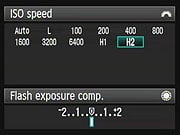 The Canon 5D Mark II offers regular ISO equivalents of 100, 200, 400, 800, 1,600, 3,200, and 6,400 with the option to use fractional settings in 1/3-EV increments (100, 125, 160...). The 5D Mark II also offers two additional expanded range ISO settings: "H1" is equivalent to ISO 12,800 and "H2" takes the camera to 25,600. A "L" setting is provided for ISO 50 equivalent. An Auto setting is also provided, which can range from 100-3,200 in most exposure modes, but is fixed to ISO 400 in M and B modes.
An automatic exposure bracketing (AEB) feature lets you set the total exposure variation (across three shots) at anywhere from +/- one-third or one-half EV, all the way up to +/- 2 EV. The nice part is that the automatic variation is centered around whatever level of manual exposure compensation you have dialed in. Thus, you could manually set a positive exposure compensation of 0.7 EV, and then have the camera give you a variation of +/- 2/3 EV around that point.
AE/FE Lock (" * " button)
The Canon 5D Mark II has the same simplified AE Lock button as the 50D, which unbundled the AF Lock feature from the old button on the older EOS cameras like the 20D and 30D. Marked with an asterisk (*) symbol, the AE Lock button simply holds the exposure at one setting while you recompose the image. It's very useful when spot metering, but also when dealing with subjects where you want to draw your exposure from one place, while autofocusing on another. Pressing the button with an external flash mounted activates the FE Lock (Flash Exposure) function, which fires the flash and locks the proper exposure for the following frame.
AF-ON button
The AF-ON button allows you to set focus before depressing the shutter button. With Custom Functions, you can reprogram the behavior of the AF-ON button, as well as swap functions with the AE/FE Lock button. Autofocus action can either replicate that of the standard half-press of the shutter button, or be transferred completely to the AF-ON button, making the shutter button responsible for controlling AE lock only.
The AF-ON button also controls autofocus operations in Live View mode. The Canon 5D Mark II now has two styles of autofocus operation in Live View mode: the standard phase detection method, which requires the reflex mirror to be briefly swung back into the optical path, thus disrupting the live view briefly, or a contrast detection method which does not. Both methods have their advantages and disadvantages, but the contrast-detect method offers an uninterrupted user experience. A third method incorporates a face detection into the contrast detection method, offering the face-detecting mode of autofocus now commonly seen on consumer point-and-shoot cameras.
Continuous Shooting Mode and Self-Timer
 The Canon 5D Mark II's Continuous Shooting mode is rated by Canon at 3.9 frames per second in continuous mode, for a total of 78 Large/Fine JPEG, 13 RAW or 8 RAW + Large/Fine JPEG shots before the buffer fills. These results come when using a regular CompactFlash card; the 5D Mark II is capable of using UDMA CompactFlash cards, and doing so improves the buffer throughput of the camera. With a UDMA card, the Canon 5D Mark II can shoot up to 310 Large/Fine JPEG shots before the buffer fills; the number of RAW images increases slightly to 14 while RAW + Large/Fine JPEG remains unchanged at 8 frames. The number of consecutive shots could be limited by CompactFlash space, if your memory card is nearly full. Also, when shooting JPEGs of a very complex scene with a lot of sharp, fine detail may also compress less and result in lower buffer capacities.
The camera's Drive setting also accesses two Self-Timer modes, which open the shutter 10 or 2 seconds after the Shutter button is pressed, giving you time to dash around in front of the camera. A Remote Control mode works with wired and wireless remote units as well.
Silent Shooting Mode
Canon has added two optional modes to reduce noise in Live View mode. Called "Silent Modes," the first leaves the first shutter curtain open while you shoot up to the maximum 3.8 frames per second. The second mode is a single shot mode which spreads the sounds out, not re-opening the shutter until you release the shutter button.
First a little explanation. Regardless of the camera, at high speeds, a mechanical shutter never fully exposes the sensor. On the 5D Mark II, in order to get a fast exposure above 1/200 second (the X-sync on the 5D Mark II), the second curtain has to follow right behind the first, creating a slit that moves across the sensor. Well, it turns out that the 5D Mark II's sensor can simulate the first part of this mechanical slit by starting to scanning the pixels in a line from top to bottom. Then the second curtain does have to come into play to close off the slit and finish the exposure. That means you can open both mirror and shutter once to enter Live View mode, then fire off 3.8 frames with only the sound of the second shutter, because the mirror and first curtain don't move.
Mode 1 is quite fast, with less noise and vibration, both because the mirror's not flapping around (it's locked up in Live View mode, and because of the electronic first curtain trick.
The other quiet mode, Mode 2, is more about spreading the sounds out. It's a single-shot mode, regardless of what Drive mode you have set before you enter Live View. Just press and hold the shutter down. All you hear is a quick "tick." That's the second curtain shutting. The image appears onscreen for two seconds, and then the screen goes black, because the second curtain is still closed. Hold the shutter for as long as you like. When you decide to release it, the rest of the camera functions will run, resetting for the next shot, and Live View will return to the LCD. These reset sounds are also pretty quiet, so I'm sure Mode 2 would be helpful when photographing wildlife.
The images above were taken from our standardized test shots. For a collection of more pictorial photos, see our Canon EOS 5D Mark II Photo Gallery .
Not sure which camera to buy? Let your eyes be the ultimate judge! Visit our Comparometer(tm) to compare images from the Canon EOS 5D Mark II with those from other cameras you may be considering. The proof is in the pictures, so let your own eyes decide which you like best!
Performance
Canon 5D Mark II Performance
Timing and Performance
Very good speeds for a 21-megapixel prosumer digital SLR.
| Startup/Shutdown |
||
| Power on |
0.4 second | Time it takes to turn on and capture a shot. (Short enough that it's hard to measure.) |
| Shutdown |
~0 second | How long it takes camera to turn off before you can remove the memory card. |
|
Buffer clearing time
|
1.4 seconds after 34 large/fine JPEGs* |
Worst case buffer clearing time. -- This is the delay after a set of shots before you can remove the card.
|
| 0.5 second after 20 small/normal JPEGs* | ||
| 12 seconds after 14 RAW files* | ||
| 13.5 seconds after 10 RAW+JPEG files* | ||
|
*Note: Buffer clearing times measured with a SanDisk 4GB Ducati Extreme CF card. Slower cards will produce correspondingly slower clearing times. Slow cards may also limit length of bursts in continuous mode. ISO sensitivity and noise reduction settings can also affect cycle times and burst mode performance.
|
||
Fast startup and shut-down times, fast enough that they're difficult to measure. Enabling sensor cleaning on shut-down adds about 2.5 second delay. Buffer clearing times are quite good, but depend on the image quality, size and speed of the memory card. (Card speed affects clearing times dramatically: A normally very fast Kingston 266x card produced a worst-case buffer clearing time of 33 seconds, vs 13.5 seconds for a SanDisk Ducati Extreme card.)
| Mode Switching | ||
|---|---|---|
| Play to Record, |
(too fast to measure) | Time until first shot is captured. |
| Record to play |
1.0 second | Time to display a large/fine file immediately after capture. |
| Display |
0.4 second | Time to display a large/fine file already on the memory card. |
Mode switching times are good, though Record to play is a bit sluggish.
| Shutter Response (Lag Time) | ||
|---|---|---|
| Full Autofocus |
0.206 second
|
Time from fully pressing shutter button to image capture. (All AF timing measured with Sigma 70mm f/2.8 Macro lens. - One that cameras seem able to judge focus very quickly with, even if its mechanical AF drive is slower when it actually comes to changing the focus.) |
|
Full Autofocus |
0.175 second
|
Time from fully pressing shutter button to image capture. The Auto-area AF improves shutter lag slightly, which is quite unusual. |
| Prefocused |
0.082 second
|
Time to capture, after half-pressing and holding shutter button. |
|
Continuous AF
Single-point AF Optical Viewfinder |
0.265 second
|
This mode usually shows no speed increase with our static subject; we have no way to measure performance with moving subjects. In the 5D Mark II, continuous AF was slower in single-point AF mode, but faster with multi-area AF. (See below.)
|
|
Continuous AF Auto-Area AF Optical Viewfinder |
0.158 second
|
This mode usually shows no speed increase with our static subject; we have no way to measure performance with moving subjects. |
|
Manual Focus Optical Viewfinder |
0.118 second
|
For most cameras, shutter lag is less in manual focus than autofocus, but usually not as fast as when the camera is "prefocused". |
|
Full Autofocus
Live View "Quick Mode" (Phase Detect) |
~0.47 second
|
This is phase-detect autofocus, the camera drops the mirror to focus, then raises it to grab the shot. You must focus separately with AF-On button first, then press the shutter button. This was the fastest time we could manage, hitting the shutter button as soon as we released the AF-On button.
|
|
Full Autofocus
Live View "Live Mode" (Contrast Detect) |
1.189 seconds
|
This is contrast-detect autofocus, the camera reads Live View data from the image sensor to determine focus. As with phase detect AF in Live View mode, you must focus separately with the AF-On button first, then press the shutter button. Surprisingly little variation between iterations.
|
|
Prefocused |
0.119 second
|
Time to capture, after camera has been focused using the AF-On button, in Live View mode. (Phase/Contrast Detect AF doesn't matter here, that only affects the focusing time, not the lag from shutter release to exposure.) |
Full autofocus shutter response was pretty good at 0.206 second using our standard single-point AF test, though not as fast as the 50D. Letting the camera choose the focus point in multi-area AF mode actually decreased lag slightly to 0.175 second on average, more closely approaching the E50's performance. "Prefocusing" the camera by half-pressing and holding down the shutter button before the final exposure results in a lag time of only 0.082 second. Manual focus was slower, at 0.118 second, and lag with continuous focus was 0.265 second in single-point mode, and 0.158 second in multi-point auto-area AF mode. For most cameras we test, single-area AF mode is almost always faster than any multi-area options, but with the Canon 5D Mark II, multi-area AF was faster instead.
Lag time in Live View mode can vary all over the map. Full AF in Live View mode is not supported directly, since pressing the shutter button does not initiate autofocus; the AF-On button must be used. Once focused, the shutter lag is 0.119 second, a little slower than when using the optical viewfinder, but not dramatically so. We did find the 5D Mark II's Live View AF a little awkward, as it required pressing the AF-On button first, rather than just pressing the shutter button, as when using the optical viewfinder.
| Cycle Time (shot to shot) | ||
|---|---|---|
| Single Shot mode |
0.35 second | Time per shot, averaged over 20 shots, 1.4 seconds to clear.* |
| Single Shot mode |
0.37 second | Time per shot, averaged over 20 shots, 0.5 second to clear.* |
|
Single Shot mode |
0.37 second |
Time per shot, averaged over 14 shots, 12 seconds to clear.* |
|
Single Shot mode
RAW + Large/Fine JPEG |
0.35 second |
Time per shot, averaged over 10 shots, 13.5 seconds to clear.* |
| Early shutter |
No | Some cameras don't snap another shot if you release and press the shutter too quickly in Single Shot mode, making "No" the preferred answer. |
|
Continuous mode |
0.26 second (3.89 frames per second); 75 frames total; 7 seconds to clear |
Time per shot, averaged over 20 shots. Buffer capacity was 75 frames, using our noise target. |
|
Continuous mode |
0.26 second (3.89 frames per second); 20+ frames total; 1 second to clear* |
Time per shot, averaged over 20 shots (buffer capacity was more than 20 shots). |
| Continuous mode |
0.26 second (3.89 frames per second); 11 frames total; 12.5 secs to clear* |
Time per shot, averaged over buffer length of 11 frames, then slows to about 1.74s or 0.58 fps. |
|
Continuous mode |
0.26 second (3.87 frames per second); 8 frames total; 13.5 secs to clear* |
Time per shot, averaged over buffer length of 8 frames, then slows to 2.41s or 0.42/ fps. |
| Flash recycling |
n/a (No built-in flash) |
Flash at maximum output. |
|
*Note: Buffer clearing times measured with a SanDisk 4GB Ducati Extreme CF card. Slower cards will produce correspondingly slower clearing times. Slow cards may also limit length of bursts in continuous mode. ISO sensitivity and noise reduction settings can also affect cycle times and burst mode performance.
|
||
Shot-to-shot cycle times in single-shot mode were quite fast for such large files, at about 0.4 second for any quality. Buffer length was 34 shots for large/fine JPEGs, but dropped to 14 for RAW and 10 for RAW+JPEG.
Continuous mode speeds are a bit sluggish compared to competing models, at about 3.89 frames per second. Measured buffer depths were 75 for large/fine JPEGs, 11 frames for RAW mode and 8 frames for RAW+JPEG. (Note that in our cycle time testing we shoot a target consisting of a fine-grained digital noise pattern, designed to be very hard to compress. This gives us worst-case buffer capacity numbers: You're likely to see greater buffer capacity when shooting more normal subjects.)
| Download Speed | ||
|---|---|---|
| Windows Computer, USB 2.0 |
8,361 KBytes/sec |
Typical Values: |
Connected to a computer or printer with USB 2.0, download speeds are very fast. (The speed above was measured with a SanDisk 4GB Ducati Extreme CF card, slower cards will likely produce slower download speeds.)
Bottom line, the Canon 5D Mark II is quite fast in just about every aspect of its operation, though a little slower in some aspects than competing 20+ megapixel full-frame models.
Battery and Storage Capacity
Battery
Good battery life for a lithium-ion SLR design, but Live View burns a lot more power than normal shooting with the optical VF.
| Operating Mode | Number of Shots |
|---|---|
|
Lithium-ion Rechargeable Battery,
(CIPA standard, Optical Viewfinder) |
850
|
|
Lithium-ion Rechargeable Battery,
(CIPA standard, Live View LCD) |
200
|
The Canon 5D Mark II uses a custom rechargeable lithium-ion battery for power, and ships with a charger. Although battery life is good, we recommend you pick up a spare battery and keep it freshly charged and on-hand for extended outings, and especially if you plan on using Live View mode a lot. Also, keep in mind the 5D Mark II doesn't have a built-in flash, so these numbers are not comparable with models that do, as using the flash for 50% of shots (as per the CIPA standard) would result in a lower rating.
The table above shows the number of shots the camera is capable of (on a fully-charged rechargeable battery), based on CIPA battery-life and/or manufacturer standard test conditions.
(Interested readers can find an English translation of the CIPA DC-002 standards document here. (180K PDF document))
Storage
The Canon 5D Mark II accepts CompactFlash memory cards, and does not ship with a card.
| Image Capacity with 1GB Memory Card |
Fine | Normal | RAW | RAW + L/F JPG |
|
|---|---|---|---|---|---|
|
5,616 x 3,744 (JPG, RAW) |
Images (Avg Size) |
163 6.3 MB |
318 3.2 MB |
31 33 MB |
26 39.4 MB |
|
Approx.
Comp. |
10:1 | 20:1 | 1.1:1 | - | |
|
4,080 x 2,720 (JPG) |
Images (Avg Size) |
266 3.9 MB |
502 2.0 MB |
- |
- |
|
Approx.
Comp. |
9:1 | 16:1 | - | - | |
| 3,861 x 2,574 (sRAW1) |
Images
(Avg Size) |
- | - | 53 19.3 MB |
- |
|
Approx.
Comp. |
- | - | 0.9:1 | - | |
|
2,784 x 1,856 (JPG, sRAW2) |
Images (Avg Size) |
461 2.2 MB |
843 1.2 MB |
75 13.7 MB |
- |
|
Approx.
Comp. |
7:1 | 13:1 | 0.7:1 | - | |
We strongly recommend buying a large capacity CompactFlash memory card at least a 4GB card, preferably a 8 or 16GB one, to give yourself extra space for extended outings, or when shooting RAW or movie files. (Check the shopping link above, cards are really cheap these days, so no reason to skimp.)
Imaging
Canon 5D Mark II Image Quality
Color
Saturation & Hue Accuracy
Accurate color with minor oversaturation of strong reds and blues.
 |
| In the diagram above, the squares show the original color, and the circles show the color that the camera captured. More saturated colors are located toward the periphery of the graph. Hue changes as you travel around the center. Thus, hue-accurate, highly saturated colors appear as lines radiating from the center. Click for a larger image. |
Saturation. The Canon 5D Mark II pushes reds, blues and some oranges and greens just a little, while undersaturating some cyans and purples very slightly, but overall, saturation is almost spot-on. Most consumer digital cameras produce color that's more highly saturated (more intense) than found in the original subjects. This is simply because most people like their color a bit brighter than life. Pro-oriented models tend to have more accurate saturation levels.
Skin tones. Here, the Canon 5D Mark II also did quite well, producing natural-looking skin tones. Where oversaturation is most problematic is on Caucasian skin tones, as it's very easy for these "memory colors" to be seen as too bright, too pink, too yellow, etc.
Hue. The Canon 5D Mark II showed a few small color shifts relative to the correct mathematical translation of colors in its subjects, but had really excellent accuracy overall. (It's one of the most hue-accurate cameras we've tested to date.) Most noticeable was a slight shift in reds toward orange, with some very minor shifts in greens, blues and cyans as well. Hue is "what color" the color is.
Saturation Adjustment
The Canon 5D Mark II has a total of nine saturation settings available, four above and four below the default saturation. This covers a very wide range of saturation levels, about as wide a range as you're likely to find photographically relevant, apart from special effects that are arguably better achieved in software. The fine steps between settings mean you can program the camera to just the level of saturation you prefer. Nice. (It's also nice that color saturation has little effect on greyscale contrast, something that's not always the case.)
| Saturation Adjustment Examples | ||
 |
 |
 |
| -4 | 0 | +4 |
The table above shows results with the default as well as the two extreme saturation settings. Click on any thumbnail above, then click again to see the full-sized image.


Sensor
Exposure and White Balance
Indoors, incandescent lighting
Very warm results with Auto and Incandescent white balance settings, though good color with the 2,600 Kelvin and Manual. Average positive exposure compensation required.


Indoors, under normal incandescent lighting, color balance was very warm with the Auto white balance setting; we really expect better from an SLR selling at this price point. The Incandescent setting was better, but still on the warm side. (Like other Canon models, the 5D Mark II's Incandescent setting appears to be color-balanced for professional studio lighting, rather than the warmer household incandescent lights most US consumers have in their homes. This is normal for a professional SLR, but a bit of a pain for consumers. Still, you can use the 5D Mark II's excellent manual adjustment capabilities to tweak the incandescent setting to better match whatever lighting you're personally faced with.) The Manual setting produced the most accurate results, though the 2,600 Kelvin setting wasn't far off the mark either. The Canon 5D Mark II required an average amount of positive exposure compensation here, at +0.3 EV. (Many digital cameras reproduce the blue flowers here with a purplish tint, so the Canon 5D Mark II actually performs a little better than average here.) Our test lighting for this shot is a mixture of 60 and 100 watt household incandescent bulbs, a pretty yellow light source, but a very common one in typical home settings here in the U.S.
Outdoors, daylight
Bright colors overall, though a tendency toward a warm cast and slightly high contrast under harsh lighting. Slightly higher than average exposure compensation required.
Outdoors, the Canon 5D Mark II tended toward a warmer color balance, though overall color was generally quite good. The 5D Mark II required +1.0 EV exposure compensation to keep the model's face from being too dim in the "Sunlit" portrait shot on the left. This is slightly more positive compensation we're accustomed to seeing among digital cameras for this shot. The far-field shot of the house came out just a bit hot at the 5D Mark II's default exposure setting. The 5D Mark II's default contrast is a little high, producing some washed-out highlights and dark shadows under the deliberately harsh lighting of our "Sunlit" portrait shot, but the 5D Mark II does better than most in this regard. The camera's contrast and highlight tone priority settings do help tame the highlights quite a bit, see below for examples of this.
See full set of test images with explanations
See thumbnails of all test and gallery images
Resolution
Very high resolution, 2,000 ~ 2,200 lines of strong detail from in-camera JPEG, about the same from RAW file processed through Adobe Camera Raw.



Our laboratory resolution chart revealed sharp, distinct line patterns down to about 2,200 lines per picture height horizontally, and about 2,000 lines in the vertical direction. Total extinction didn't occur until past 4,000(!) lines, but lines began to merge at about 2,600 lines horizontally and vertically (results from 2X target above are multiplied by 2). We weren't able to extract much more resolution by processing the 5D Mark II's CR2 files using Adobe Camera Raw, although there were fewer artifacts than the JPEGs near the resolution limits. Use these numbers to compare with other cameras of similar resolution, or use them to see just what higher resolution can mean in terms of potential detail.
See full set of test images with explanations
See thumbnails of all test and gallery images
Sharpness & Detail
Slightly soft images overall, though almost no edge-enhancement artifacts on high-contrast subjects. Some minor noise suppression visible in the shadows.


Sharpness. The Canon 5D Mark II captures slightly soft images overall, though very few edge enhancement artifacts are visible on high-contrast subjects such as the crop above left. This indicates default sharpening is somewhat conservative. Edge enhancement creates the illusion of sharpness by enhancing colors and tones right at the edge of a rapid transition in color or tone.
Detail. The crop above right shows some minor noise suppression artifacts in the darkest areas of the model's hair, though quite a few individual strands are visible in the lighter shadows. The camera's overall response here is better than average. Noise-suppression systems in digital cameras tend to flatten-out detail in areas of subtle contrast. The effects can often be seen in shots of human hair, where the individual strands are lost and an almost "watercolor" look appears.
RAW vs In-Camera JPEGs
As noted above, the Canon 5D Mark II produces slightly soft in-camera JPEGs. As is almost always the case, more detail can be obtained from carefully processing RAW files than can be seen in the in-camera JPEGs. Take a look below, to see what we mean:
In the table above, mousing over a link at the bottom will load the corresponding crop in the area above, and clicking a link will load the full resolution file. Examples include in-camera Fine JPEG, a RAW file processed through Canon's Digital Photo Professional (DPP) software at default settings, and the same RAW file processed through Adobe Camera Raw (ACR) version 5.2, then sharpened in Photoshop. (For the Canon 5D Mark II's images, I found best results with 500% unsharp masking with an 0.3 pixel radius.)
Note: we reshot this with a Canon 50mm f/1.8 at f/8, but found the results weren't markedly better than the above shot taken with the 24-105mm kit lens, so the slight softness is not due to the lens.
ISO & Noise Performance
Low noise except at the highest sensitivity settings, excellent preservation of subtle detail relative to ISO level.
|
Default High ISO Noise Reduction
|
 |
 |
 |
| ISO 50 | ISO 100 | ISO 200 |
 |
 |
 |
| ISO 400 | ISO 800 | ISO 1600 |
 |
 |
 |
| ISO 3200 | ISO 6400 | ISO 12800 |
 |
||
| ISO 25600 | ||
The Canon 5D Mark II produced low image noise overall. Images are quite clean from ISO 50 all the way through 400. We start to see the beginnings of a very fine, tight "grain" pattern at ISO 800, and the image softens just slightly, but detail is still excellent, with very little chroma noise. The grain is slightly more evident at ISO 1,600, and the image softens a bit more, but detail continues to remain strong. At ISO 3,200, detail loss becomes more noticeable as noise reduction blurs subtly contrasting detail, however results are still excellent. At ISO 6,400, noise grain is coarser and blurring stronger, resulting in a noticeable drop in detail. There's also some chroma noise in the shadows and mid-tones, but less than you'd expect at this sensitivity, especially at such a high pixel count. Noise and the effects of noise reduction really become an issue at ISO 12,800 and 25,600, though, with bright noise pixels, increased chroma noise, some horizontal banding and a slight shift in overall color balance. Still, a really excellent performance overall, especially for a camera with a 21-megapixel sensor. As always, see the Print Quality section below, to see how we think this noise performance translates into practical print sizes at eachISO setting.
Extremes: Sunlit and low light tests
Very high resolution with strong overall detail, slightly high default contrast. Excellent low-light performance, great exposures to the lowest limits of our test, and the autofocus worked that low as well, even without an AF-assist light.


Sunlight. The Canon 5D Mark II produced slightly high contrast with some washed-out highlights and deep shadows under the deliberately harsh lighting of the test above. However, highlight and shadow detail were both actually quite good. The model's face was a little dim at the +0.7 EV setting, so we preferred the image with +1.0 EV of exposure compensation, which actually resulted in surprisingly good highlight detail. There were some blown highlights in the shirt, broach and flowers, but not to the extent we're used to seeing. The shot at +0.7EV almost perfectly preserved detail in the shirt; the only significantly blown out detail is in the red channel in the orange flower, and to a lesser extent in the red flower itself. At the other end of the tonal scale, there's good detail present pretty far into the shadows, although the very darkest shadow areas become plugged and posterized. That's picking at nits, though, you have to go really far into the shadows to see those problems. (In real life, of course, be sure to use fill flash in situations like the one shown above; it's better to shoot in the shade when possible.)
Because digital cameras are more like slide film than negative film (in that they tend to have a more limited tonal range), we test them in the harshest situations to see how they handle scenes with bright highlights and dark shadows, as well as what kind of sensitivity they have in low light. The shot above is designed to mimic the very harsh, contrasty effect of direct noonday sunlight, a very tough challenge for most digital cameras. (You can read details of this test here.)
Contrast Adjustment
We really like it when a camera gives us the ability to adjust contrast and saturation to our liking. It's even better when those adjustments cover a useful range, in steps small enough to allow for precise tweaks. As was the case with its saturation adjustment, the Canon 5D Mark II's contrast setting meets both challenges very well.
|
Minimum Contrast
|
|
 |
 |
| Contrast set to lowest, +1.0 EV |
Contrast set to lowest, Auto Exposure |
At its lowest contrast setting, the Canon 5D Mark II did an excellent job of preserving highlight detail, maintaining fairly natural-looking skin tones, and holding nice detail in the shadows. The camera lost essentially no detail at all in the model's shirt; the only part of the image that was blown out was a few areas in the orange flower, in the red channel. Shadow detail is also improved, with significantly less posterization and plugging. The 5D Mark II captured good color outdoors, though again, just slightly on the warm side. Overall, very good results here, especially when the contrast setting is tweaked.
| Contrast Adjustment Examples | ||
|
 |
 |
| -4 | 0 | +4 |
The table above shows results with the default as well as the two extreme contrast settings. While you can see the extremes, it's hard to really evaluate contrast on small thumbnails like these, so click on any thumbnail to go to the full-size image. The Canon 5D Mark II's contrast adjustment worked well, with very little effect on color saturation. Contrast and saturation are actually fairly closely coupled adjustments, it's a good trick to be able to vary one with out the other changing as well. As usual, Canon did a good job here.
|
Highlight Tone Priority
|
|
 |
 |
|
Off (default)
|
On
|
 |
 |
|
Highlight Retention
|
|
 |
 |
|
Shadow Detail
|
|
 |
 |
|
Shadow Detail, Brightened in Photoshop
(Levels control, midtone slider down to 3.98) |
|
Canon's Highlight Tone Priority
The two shots above show the results with Highlight Tone Priority "Off "and "On". As you can see from the crops, fewer highlights in the shirt and yellow flowers are clipped, although a minor price is paid in the very deepest shadows. (There's no free lunch: If the camera is devoting more of its available dynamic range to rendering highlights, there's less left to handle the shadows.) Note that these are really deep shadows that we're looking at above. Lighter shadows and quarter tones show very little noise increase, at least that was visible to our eyes with this test subject.
|
More Highlight Tone Priority Examples
|
|
 |
 |
| Off | On |
 |
 |
| Off | On |
The 5D Mark II's Highlight Tone Priority can result in undesired results when applied to subjects with a more normal tonal range, but here, it did much better than the 50D with the same Still Life scene. It worked quite well for the high-contrast outdoor house shot as well, where HTP preserved most of highlights in the white trim that were lost with it Off.
| Automatic Lighting Optimization | ||
 |
 |
 |
 |
 |
 |
| Low | Standard | High |
 |
||
 |
||
| Off | ||
Automatic Lighting Optimization
The Canon 5D Mark II offers three levels of ALO, plus "Off" (the same as in the 50D). All four shots above were taken with the same exposure settings. When we first tested this feature on the Canon XSi, we found relatively little effect from the Automatic Lighting Optimization option on this shot. With the 5D Mark II, however, the various ALO settings do make a noticeable difference. ALO has the effect of shifting shadows and mid-tones in the histograms to the right, lightening the overall image without clipping too many additional highlights.
|
Face Detection
|
|
 |
 |
|
Off (0.0 EV)
|
On (0.0 EV)
|
Face Detection
The Canon 5D Mark II's face detection (available in Live View mode only) did a pretty good job of automatically adjusting exposure (and focus) for the model's face. Both the shots above were taken with no exposure compensation (0.0 EV), but the camera automatically dropped the shutter speed from 1/70s to 1/40s to better expose for the face when face detection was turned on.
| 1 fc 11 lux |
1/2 fc 5.5 lux |
1/4 fc 2.7 lux |
1/8 fc 1.3 lux |
1/16 fc 0.67 lux |
1/16 fc 0.67 lux XNR |
|
|---|---|---|---|---|---|---|
| ISO 50 |
 3.2 sec f2.8 |
 6.3 sec f2.8 |
 12.7 sec f2.8 |
 22.6 sec f2.8 |
 32 sec f2.8 |
 32 sec f2.8 |
| ISO 100 |
 1.7 sec f2.8 |
 3.2 sec f2.8 |
 6.3 sec f2.8 |
 11.3 sec f2.8 |
 16 sec f2.8 |
 16 sec f2.8 |
| ISO 200 |
 0.8 sec f2.8 |
 1.6 sec f2.8 |
 3.2 sec f2.8 |
 5.7 sec f2.8 |
 8.7 sec f2.8 |
 9.5 sec f2.8 |
| ISO 400 |
 0.4 sec f2.8 |
 0.8 sec f2.8 |
 1.6 sec f2.8 |
 2.8 sec f2.8 |
 4 sec f2.8 |
 4.4 sec f2.8 |
| ISO 800 |
 1/5 sec f2.8 |
 0.4 sec f2.8 |
 0.8 sec f2.8 |
 1.4 sec f2.8 |
 2 sec f2.8 |
 2.2 sec f2.8 |
| ISO 1600 |
 1/10 sec f2.8 |
 1/5 sec f2.8 |
 0.4 sec f2.8 |
 0.7 sec f2.8 |
 1 sec f2.8 |
 1 sec f2.8 |
| ISO 3200 |
 1/19 sec f2.8 |
 1/10 sec f2.8 |
 1/5 sec f2.8 |
 0.4 sec f2.8 |
 0.5 sec f2.8 |
 0.5 sec f2.8 |
| ISO 6400 |
 1/38 sec f2.8 |
 1/20 sec f2.8 |
 1/10 sec f2.8 |
 1/6 sec f2.8 |
 1/4 sec f2.8 |
 1/4 sec f2.8 |
| ISO 12800 |
 1/76 sec f2.8 |
 1/40 sec f2.8 |
 1/20 sec f2.8 |
 1/11 sec f2.8 |
 1/8 sec f2.8 |
 1/8 sec f2.8 |
| ISO 25600 |
 1/152 s f2.8 |
 1/81 sec f2.8 |
 1/40 sec f2.8 |
 1/23 sec f2.8 |
 1/16 sec f2.8 |
 1/15 sec f2.8 |
Low light. The Canon 5D Mark II performed very well on the low-light test, capturing usable images at the lowest light level (1/16 foot-candle), even with the lowest sensitivity setting (ISO 50). Noise naturally increases as ISO goes up and light levels go down, but remains remarkably low up to ISO 1,600. At ISO 3,200, noise is more noticeable but still a good bit better than average. At ISO 6,400, noise is moderate and bright pixels appear, along with some horizontal banding. Noise, bright pixels and banding are quite evident at ISOs 12,800 and 25,600. Color balance looked a bit warm with the Auto white balance setting, but remained fairly consistent up to the highest ISOs. The rightmost column in the series above shows the results with the 5D Mark II's long-exposure NR turned off.
The camera's autofocus system was able to focus on the subject at less than the 1/16 foot-candle light level unassisted (and that's a good thing, as the 5D Mark II does not have a built-in AF assist lamp). We did, however, find that some of the shots in the Low Light series shown above were a little out of focus, despite the fact that the camera confirmed focus for every shot. You therefore may need to watch your focus when shooting in very dark conditions: The brightest light level above (1 footcandle or ~11 lux) roughly corresponds to typical city street-lighting at night. - So the darker levels get pretty dim indeed. Other than landscape or architectural photography, it's thus highly likely that you'd be using a flash (and thus have access to a bright AF-assist light) in such dark conditions. If you're shooting with available light under very dark conditions, you may want to grab a few shots, to give the focus system the opportunity to give you a sharp image. Also (as always), keep in mind that the longer shutter speeds here absolutely demand the use of a tripod to prevent any blurring from camera movement. (A useful trick is to just prop the camera on a convenient surface, and use its self-timer to release the shutter. This avoids any jiggling from your finger pressing the shutter button, and can work quite well when you don't have a tripod handy.)
| 1/16 fc 0.67 lux HINR Off |
1/16 fc 0.67 lux HINR Low |
1/16 fc 0.67 lux HINR Norm |
1/16 fc 0.67 lux HINR High |
|
|---|---|---|---|---|
| ISO 50 |
 32 sec f2.8 |
 32 sec f2.8 |
 32 sec f2.8 |
| ISO 100 |
 17.4 sec f2.8 |
 16 sec f2.8 |
 17.4 sec f2.8 |
| ISO 200 |
 8.7 sec f2.8 |
 8 sec f2.8 |
8.7 sec f2.8 |
 8 sec f2.8 |
| ISO 400 |
 4.4 sec f2.8 |
 4 sec f2.8 |
 4.4 sec f2.8 |
| ISO 800 |
 2.2 sec f2.8 |
 2.2 sec f2.8 |
2 sec f2.8 |
 2.2 sec f2.8 |
| ISO 1600 |
 1.1 sec f2.8 |
 1.1 sec f2.8 |
1 sec f2.8 |
 1.1 sec f2.8 |
| ISO 3200 |
 0.6 sec f2.8 |
 0.5 sec f2.8 |
 0.5 sec f2.8 |
| ISO 6400 |
 0.3 sec f2.8 |
 0.3 sec f2.8 |
1/4 sec f2.8 |
 0.3 sec f2.8 |
| ISO 12800 |
 1/8 sec f2.8 |
 1/8 sec f2.8 |
 1/8 sec f2.8 |
| ISO 25600 |
 1/16 sec f2.8 |
 1/16 sec f2.8 |
 1/16 sec f2.8 |
High ISO/Low Light Noise Reduction. The table above shows the effect of the Canon 5D Mark II's four available levels of High ISO Noise Reduction at the lowest light level we test. (These were actually the result of minor mistake: We don't normally run a NR series like this as part of the low-light test, just show results at the lowest light level with long-exposure NR turned on or off. Once we shot these, though, we figured we might as well share them with our readers.) Results here are similar to those at higher ISOs: Images up to ISO 6,400 are surprisingly clean, but noise gets the upper hand at ISO 12,800 and 25,600 (particularly in the red and blue channels).
How bright is this? The one foot-candle light level that this test begins at roughly corresponds to the brightness of typical city street-lighting at night. Cameras performing well at that level should be able to snap good-looking photos of street-lit scenes.
NOTE: This low light test is conducted with a stationary subject, and the camera mounted on a sturdy tripod. Most digital cameras will fail miserably when faced with a moving subject in dim lighting. (For example, a child's ballet recital or a holiday pageant in a gymnasium.) Digital SLRs like the Canon 5D Mark II do much better than point & shoots, but you still shouldn't expect a quick autofocus lock with moving subjects.
Output Quality
Print Quality
Exceptional print quality, good color, sharp 24x36 inch prints from camera JPEGs (with a little unsharp masking). High-ISO shots are surprisingly clean, ISO 6,400 is good up to about 13x19, albeit with a little noise in the shadows and some loss of subtle subject detail.
 We kept running out of superlatives to describe the Canon 5D Mark II's printed output: These are some of the cleanest, highest-quality images we've seen yet from a digital camera. In-camera JPEGs are a little soft looking, due in part to conservative in-camera sharpening, but likely also in part to noise-reduction processing, even at low ISO settings. Adobe Camera Raw (our default RAW converter, due to its wide availability and very broad support for different camera models) reveals significantly more fine detail, particularly in areas of subtle subject contrast. Sharpening the in-camera JPEGs helps a little, but for best results doing that, you'd need to first dial down the sharpening that the Canon 5D Mark II applies to its JPEG files: At the default setting, it tends to leave slight halos around contrasting objects, coarsening the detail somewhat and making it difficult for post-processing to extract any more.
Working from RAW files, we thought that 24x36 inch prints would be very acceptable for viewing at any sort of normal distance: We could see softness in them when we looked at them really closely, but at normal viewing distances of anything greater than a foot or so, they looked crisp and highly detailed. The in-camera JPEGs looked OK printed at 24x36, but were a little soft: Fine for wall display if people wouldn't view them too closely, but soft-looking at close viewing distances.
At higher ISOs, the 5D Mark II's images held together surprisingly well. For 13x19 inch prints, ISO 6,400(!) was about the limit, as the noise in shadow areas began to be noticeable at that size, and detail was obliterated in areas of subtle contrast. This is really a remarkable performance from a camera with this much resolution: Comparing their images side by side, prints from the Canon 5D Mark II at ISO 6,400 were quite comparable (similar or slightly higher luminance noise, lower chroma noise, a bit softer overall) than those of the EOS-1Ds Mark III at ISO 3,200.
ISO 12,800 from camera JPEGs was a bit rough (lots of chroma noise with some horizontal banding) no matter what size we printed at. You might be able to use it for subjects with a lot of texture (which would tend to hide the chroma noise and banding somewhat), or with heavy processing of RAW files via good third-party noise-reduction software, but the chroma banding could be tricky to deal with in shadow areas with a flat tint. (As seen in the light shadows behind some of the bottles in our Still Life test shot.
Detail throughout the ISO range stayed pretty strong, although we did notice that the red fabric swatch that gives other cameras such fits in trying to hold its detail is now also causing trouble for the 5D Mark II's noise reduction: The 1Ds Mark III managed to hold the tone-on-tone detail of that swatch pretty well at high ISO settings, but the improved chroma noise performance of the 5D Mark II's NR system apparently requires sacrificing detail in that particular fabric swatch.
In terms of color, we certainly found nothing to complain about, as the Canon 5D Mark II has about the most accurate color rendering we've seen in a digital camera to date. Amateur shooters moving up from consumer-level SLRs may find the 5D Mark II's highly accurate color a little dull compared to what they've become accustomed to on their lower-end cameras: Most consumer cameras pump up saturation to make brighter, punchier photos that consumers tend to prefer, so the 5D's more accurate color may seem dull by comparison. (Except for the reds, which are still a little hot.) Thanks to a fine-grained saturation adjustment with a nice range of control, though, you can tweak the 5D Mark II's color to exactly match your personal preferences.
Finally, as we've been pointing out lately, remember that we're holding digital SLRs like the Canon 5D Mark II to a somewhat higher standard with these printed results than we do point-and-shoot digital cameras: As glowing as our remarks above are about the 5D Mark II, we're actually judging it more harshly than we would a consumer camera that competes with other cameras in the $150-300 price range.
Testing hundreds of digital cameras, we've found that you can only tell just so much about a camera's image quality by viewing its images on-screen. Ultimately, there's no substitute for printing a lot of images and examining them closely. For this reason, we now routinely print sample images from the cameras we test on our Canon Pro9000 studio printer, and on the Canon iP5200 here in the office. (See the Canon Pixma Pro9000 review for details on that model.)
Viewfinder
Canon 5D Mark II Optical Viewfinder
 The Canon 5D Mark II offers a fairly accurate optical viewfinder, which Canon says provides about 98% frame accuracy (we measured 97%), a slight improvement over the 5D's 96% coverage. Most other specifications remain the same as the 5D: a pentaprism design with 0.71x magnification (-1m-1 with 50mm lens at infinity) and a diopter adjustment range of -3.0 to +1.0m-1. The 5D Mark II's eyepoint of approximately 21mm (measured from eyepiece lens center) has also improved slightly over the 5D's 20mm.
Within the viewfinder display is an array of available AF points, as well as a lower information readout reporting basics such as exposure compensation, exposure settings, focus status, etc. See below illustration (courtesy of Canon USA) for details.

Compared to the Canon 5D, the 5D Mark II's viewfinder display adds Battery check, ISO speed, Highlight tone priority, and Monochrome shooting mode indicators. The other optical viewfinder information is identical.
Focusing Screens. As with the 5D, the 5D Mark II has two optional screens available. The first screen shown below is the standard screen that comes with every 5D Mark II. The second offers a grid for aligning your subjects, and the third is what Canon calls Super Precision Matte, which is meant for lenses with maximum apertures under f/2.8. This latter screen will allow for more precise manual focusing when used with these faster lenses, but it will darken if used with slower lenses. The two optional screens are priced at $45 each.
 |
 |
 |
| Eg-A: the standard screen | Eg-D: the grid | Eg-S: Super Precision Matte |
|
(Note, these images are of the 40D screens, but the 5D Mark II screens are very similar.)
|
||
Viewfinder Test Results
Accuracy
Good accuracy from the optical viewfinder, excellent accuracy from the LCD in Live View mode.


The Canon 5D Mark II's optical viewfinder proved fairly accurate, showing about 97% coverage. This is good coverage for a non-professional digital SLR, almost matching Canon's specification of 98%. (Probably within the margin of error for this measurement.) Live View mode using the LCD was very accurate, providing 100% coverage.
Live View
Canon EOS 5D Mark II Live View
In addition to the EOS 5D Mark II's optical viewfinder, the camera features a Live View mode for its rear-panel LCD monitor. Becoming more popular among digital SLRs these days, the Live View mode lets you use the LCD monitor as a large viewfinder, and offers an exposure simulation option which displays the expected outcome of your chosen exposure settings. The Canon 5D did not have a Live Live mode.
The Canon 5D Mark II Live View display offers a lot of information in terms of settings displayed (see illustration below, courtesy of Canon USA), and also offers three autofocus modes: "Quick mode," which employs the normal phase-detection scheme used when using the optical viewfinder, contrast-detect autofocus called "Live mode," which uses image-sensor data, an a face detection option called "Live face detection mode," which also uses sensor data. Contrast and face detection is slower than phase-detection, but doesn't require mirror flips to use the phase-detection AF sensor, and can be more accurate as well.

Like a larger version of the optical viewfinder display, the Live View display reports the exposure information along the bottom of the screen, with additional settings overlaid to the left and right, as well as the selected focus area(s).
| Canon EOS 5D Mark II Live View options | |
 |
 |
|
Live View mode includes a display with no information, a display with minimal information across the bottom, and one with a grid.
|
Pressing the INFO button cycles through the two additional available displays, including a live RGB histogram. (Note: these shots taken from the Canon 50D.)
|
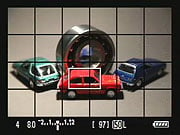 |
 |
|
Another grid option (Grid 2) is also available via the Live View function setting in the Setup menu.
|
Setting options are shown or overlaid when adjusted, and resulting changes are simulated (here, the effect of exposure compensation is simulated).
|
 |
 |
|
When using phase-detect AF mode, an overlay of the available focus points normally seen in the optical viewfinder is shown when selecting an area. Pressing the AF button on the top deck allows you to switch among AF modes. Here we're about to switch from AF Quick to AF Live.
|
The active points are highlighted in red after a brief delay for focusing.
(Note: this shot taken from the Canon 50D.) |
 |
 |
|
With contrast-detect AF, the focus area can be moved around freely on the screen.
|
The focus area is highlighted in green when focused, just like a Canon digicam.
|
 |
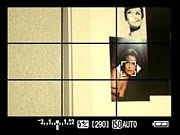 |
|
The Canon 5D Mark II's face detection AF at work. Turning the Quick Control dial switches between faces if more than one is detected (note small arrows in photo at right indicating that another face is available).
(Note: these shots taken from the Canon 50D.) |
|
 |
 |
|
Pressing the zoom button zooms in to display what's in the center box.
|
Pressing the zoom button again zooms into 10x magnification, great for fine focusing. You can move the zoomed area around in the box, using the legend as a guide.
|
Most useful in Live View mode is the ability to zoom, as shown above. You can move the zoomed area around the screen to verify focus wherever you need it most.
Flash
Canon 5D Mark II Mark II Flash
 Like its predecessor, the EOS 5D Mark II does not offer a built-in flash, but instead features a top-mounted hot-shoe as well as a PC sync terminal (rated for under 250 volts trigger voltage). The hot-shoe includes a waterproof seal around the base, designed to mate with the Canon 580EX II's seal, which is integrated into the flash's locking mechanism. This keeps water from seeping into this important electrical connection during wet conditions.
The Canon 5D Mark II gives you excellent control over flash exposure, allowing you to adjust flash and ambient exposure independently of each other, in one-half or one-third EV increments. This makes it very easy to balance flash and ambient lighting for more natural-looking pictures. The Canon 5D Mark II uses E-TTL II control for compatible external flashes. E-TTL II is only available when the camera is paired with more recent Canon EX-series strobes.
A nice touch is the Flash Exposure Lock button (which also functions as an AE Lock button). It fires the flash under manual control before the actual exposure, to determine the proper exposure settings. This struck me as very handy, akin to the more conventional autoexposure lock function for handling difficult ambient lighting conditions. A Flash Exposure Compensation feature controls the flash exposure +/- 2 stops in 1/2 or 1/3-stop increments.
Several of the more impressive features of the Canon flash system depend on the dedicated EX-series Speedlites. Among these are true FP (focal plane) flash sync, flash exposure bracketing with external flash units, flash modeling, and E-TTL II exposure control. FP sync requires a flash unit to provide uniform light output for a relatively long period of time, which the flash achieves by pulsing its high speed strobe multiple times as the two shutter curtains travel across the sensor plane, revealing only a small section of the sensor at a time. Uniform, long-duration flash pulses like this permit use of shutter speeds as high as the 1/8,000-second maximum that the Canon 5D Mark II is capable of. This can be invaluable when you want to exclude ambient light from the exposure. (FP sync mode is referred to as "high speed" mode on the Canon 550EX, 580EX, and 580EX II flash units.)
Here's the rundown on Canon Speedlites and their compatibility with the Canon 5D Mark II:
| Speedlite Model | On-Camera Capability | E-TTL Wireless Compatibility |
| 580EX II | All, E-TTL II, Thyristor | Master or Slave |
| 580EX | All, E-TTL II | Master or Slave |
| 550EX | All, E-TTL II | Master or Slave |
| 540EZ | Manual operation only | None |
| 480EG | External auto plus manual operation | None |
| 430EX II | All, E-TTL II | Slave only |
| 430EX | All, E-TTL II | Slave only |
| 430EZ | Manual operation only | None |
| 420EX | All | Slave Only |
| 420EZ | Manual operation only | None |
| 380EX | All | None |
| 220EX | All | None |
| 200E | Not Compatible | None |
| 160E | Not Compatible | None |
| MR-14EX Macro Ring | All | Master Only |
| MT-24EX | All | Master Only |
| ST-E2 transmitter | E-TTL, attach to camera | Master Only |
| Non-dedicated shoe-mount units | Manual operation only | n/a |
| Studio strobe packs | Manual operation only, connect via threaded PC sync socket on camera body | n/a |
You'll note the references to "E-TTL remote" capabilities in the table above. Canon's Speedlite system permits TTL flash metering with multiple remote units, and even allows you to set differential power ratios between the slaved units, over a six-stop flash exposure range.
The "Flash Modeling" feature of the 550EX, 580EX, and 580EX II Speedlites is quite useful. With a 550EX or 580EX connected to the Canon 5D Mark II, pressing the camera's Depth of Field Preview button causes the Speedlite to fire at 70 flashes per second for about one second. This creates the illusion of a constant light source for your eyes, letting you preview the lighting on your subject when the flash fires. VERY handy, and likely to save lots of shoot/check/reshoot time!
The "X-sync" speed of the Canon 5D Mark II is 1/200-second. When used with higher-powered studio strobe systems, Canon recommends a maximum shutter speed of 1/60-second or slower, to accommodate the time/intensity profile of such units.
A final benefit of the dedicated Canon Speedlites is that they carry powerful autofocus assist illuminators that can extend the range of the built-in AF assist light found on a typical Canon SLR built-in flash. For example, the AF assist beam on the 550EX is rated as good to about 50 feet, versus the roughly 13 feet of the pulse flash from a Canon 50D. (As mentioned above though, note that the ST-E2 wireless sync transmitter can also be used for AF assist during non-flash photography, a handy trick.)
Canon's E-TTL II flash exposure system also works with certain lenses to include object distance data into its calculations so it can adjust the flash power accordingly. A preflash is fired and the resulting readings compared to the ambient light reading for each of the camera's 35 metering zones from just prior to the flash, to identify and compensate for specular objects (that is, very reflective surfaces). In instances where most cameras would underexpose an image because of a reflective object in the frame, the Canon 5D Mark II will ignore the brighter areas and expose the subject correctly in most instances. This is designed to help shooters like event photographers -- especially wedding photographers, whose cameras are constantly forced to balance a bright white dress against all manner of reflective materials on the clothing of others, in addition to the usually black tuxedos of the groomsmen.
 The Canon 5D Mark II can also control some aspects of an external flash from the Flash Control menu. The appropriate Flash mode for your model flash can be set. You can select 1st or 2nd curtain synchronisation. Flash Exposure Bracketing can be selected, for capturing three successive photos with an exposure range of +/- 3 EV. Here you can set Flash Exposure Compensation, and set E-TTL II to Evaluative or Average metering. You can also set the flash to not fire when mounted and powered on, which is useful for using the flash as an AF-assist beam only. Slow-sync mode is automatically enabled in shutter-priority or manual exposure modes, and can be set to "Auto", "1/200-1/60 sec. Auto" or "1/200 sec. (fixed)" in aperture-priority mode via Custom Function I-7.
High ISO Noise Reduction
Canon 5D Mark II High ISO Image Quality
The Canon 5D Mark II offers four high-ISO noise-reduction settings, allowing you quite a bit of flexibility in choosing how you want to make the trade-off between subject detail and noise levels. See for yourself how the noise reduction works under daylight lighting. Click on any of the crops below to see the corresponding full-sized image.
| Canon 5D Mark II High ISO Noise Reduction Comparison Simulated Daylight |
||||
|
High ISO Noise Reduction Setting
|
||||
|
HINR=Off
|
HINR=Low
|
HINR=Normal
|
HINR=High
|
|
| I S O 4 0 0 |
 |
 |
 |
 |
 |
 |
 |
 |
|
 |
 |
 |
 |
|
|
HINR=Off
|
HINR=Low
|
HINR=Normal
|
HINR=High
|
|
| I S O 8 0 0 |
 |
 |
 |
 |
 |
 |
 |
 |
|
 |
 |
 |
 |
|
|
HINR=Off
|
HINR=Low
|
HINR=Normal
|
HINR=High
|
|
| I S O 1 6 0 0 |
 |
 |
 |
 |
 |
 |
 |
 |
|
 |
 |
 |
 |
|
|
HINR=Off
|
HINR=Low
|
HINR=Normal
|
HINR=High
|
|
| I S O 3 2 0 0 |
 |
 |
 |
 |
 |
 |
 |
 |
|
 |
 |
 |
 |
|
|
HINR=Off
|
HINR=Low
|
HINR=Normal
|
HINR=High
|
|
| I S O 6 4 0 0 |
 |
 |
 |
 |
 |
 |
 |
 |
|
 |
 |
 |
 |
|
|
HINR=Off
|
HINR=Low
|
HINR=Normal
|
HINR=High
|
|
| I S O 1 2 8 0 0 |
 |
 |
 |
 |
 |
 |
 |
 |
|
 |
 |
 |
 |
|
|
HINR=Off
|
HINR=Low
|
HINR=Normal
|
HINR=High
|
|
| I S O 2 5 6 0 0 |
 |
 |
 |
 |
 |
 |
 |
 |
|
 |
 |
 |
 |
|
The above crops show the effects of the four levels of High ISO Noise Reduction available on the Canon 5D Mark II.
But how does the 5D Mark II compare to other compact, hi-resolution full-frame SLRs? See the comparison with the Sony A900 below.
| Canon 5D Mark II vs Sony A900 High ISO NR Simulated Daylight |
||||
|
|
Canon 5D Mark II
|
Sony A900
|
High ISO Noise Reduction Setting
|
|
|
HINR=Off
|
HINR=Normal
|
HINR=Off
|
HINR=On
|
|
| I S O 8 0 0 |
|
|
 |
N/A - No High ISO NR applied |
|
|
 |
N/A - No High ISO NR applied |
|
|
|
 |
N/A - No High ISO NR applied |
|
|
|
Canon 5D Mark II
|
Sony A900
|
||
|
HINR=Off
|
HINR=Normal
|
HINR=Off
|
HINR=On
|
|
| I S O 1 6 0 0 |
|
|
 |
 |
|
|
 |
 |
|
|
|
 |
 |
|
|
|
Canon 5D Mark II
|
Sony A900
|
||
|
HINR=Off
|
HINR=Normal
|
HINR=Off
|
HINR=On
|
|
| I S O 3 2 0 0 |
|
|
 |
 |
|
|
 |
 |
|
|
|
 |
 |
|
|
|
Canon 5D Mark II
|
Sony A900
|
||
|
HINR=Off
|
HINR=Normal
|
HINR=Off
|
HINR=On
|
|
| I S O 6 4 0 0 |
|
|
 |
 |
|
|
 |
 |
|
|
|
 |
 |
|
The crops above compare the Canon 5D Mark II's JPEG High ISO performance (ISO 800 through 3,200) to that of the Sony A900, the current, full-frame resolution king (24.5-megapixels). The Sony A900 may have bested it in terms of number of pixels, but it's clear that the 5D Mark II holds a marked edge on high ISO performance. Note that the Sony A900 does not offer ISO's above 6,400.
Even though they aren't in the same price class, lots of folks no doubt wonder how 5D Mark II compares to the Nikon D3X. See the comparison below.
| Canon 5D Mark II vs Nikon D3X High ISO NR Simulated Daylight |
||||
|
|
Canon 5D Mark II
|
Nikon D3X
|
High ISO Noise Reduction Setting
|
|
|
HINR=Off
|
HINR=Normal
|
HINR=Off
|
HINR=Normal
|
|
| I S O 8 0 0 |
|
|
 |
 |
|
|
 |
 |
|
|
|
 |
 |
|
|
|
Canon 5D Mark II
|
Nikon D3X
|
||
|
HINR=Off
|
HINR=Normal
|
HINR=Off
|
HINR=Normal
|
|
| I S O 1 6 0 0 |
|
|
 |
 |
|
|
 |
 |
|
|
|
 |
 |
|
|
|
Canon 5D Mark II
|
Nikon D3X
|
||
|
HINR=Off
|
HINR=Normal
|
HINR=Off
|
HINR=Normal
|
|
| I S O 3 2 0 0 |
|
|
 |
 |
|
|
 |
 |
|
|
|
 |
 |
|
|
|
Canon 5D Mark II
|
Nikon D3X
|
||
|
HINR=Off
|
HINR=Normal
|
HINR=Off
|
HINR=Normal
|
|
| I S O 6 4 0 0 |
|
|
 |
 |
|
|
 |
 |
|
|
|
 |
 |
|
The crops above compare the Canon 5D Mark II's JPEG High ISO performance (ISO 800 through 6,400) to that of the Nikon D3X, Nikon's new flagship pro DSLR.
It's clear that both cameras are absolutely top performers. The crops above also show subtly different approaches to noise reduction and detail handling. Even with its High ISO NR disabled, it's clear that the Canon 5D Mark II is still applying a fair bit of luminance noise reduction, which generates cleaner-looking images, but at some cost to fine detail in areas of subtle contrast. (It still does very well with higher-contrast detail, as in the circular scale shown in the last set of crops at each ISO setting.) With High ISO NR off, the 5D Mark II also shows a bit more chroma noise than does the Nikon D3X at the same setting. Increasing the NR setting to "Normal" for both cameras reduces both chrominance and luminance noise in both. Nikon leaves a bit more (very fine-grained) luminance noise in the D3X's images, but also preserves subtle detail a bit better (as seen in the fabric swatches).
We also looked at the Canon EOS-5D Mark II's high-ISO image quality for images saved as RAW files. Rather than making this page longer yet, though, we've set up a separate page for samples of converted RAW images.
Imatest Results
Canon 5D Mark II Imatest Results
We routinely use Norman Koren's excellent "Imatest" analysis program for quantitative, thoroughly objective analysis of digicam test images. I highly recommend it to our technically-oriented readers, as it's far and away the best, most comprehensive analysis program I've found to date.
My comments below are just brief observations of what we see in the Imatest results. A full discussion of all the data Imatest produces is really beyond the scope of this review: Visit the Imatest web site for a full discussion of what the program measures, how it performs its computations, and how to interpret its output.
Here's some of the results produced by Imatest for the Canon 5D Mark II:
| sRGB Accuracy Comparison |
||||
The Canon 5D Mark II showed excellent color accuracy overall. Hue accuracy was exceptional, with only small shifts relative to mathematically correct colors Average saturation was 105.3% (oversaturated by only 5.3%, mostly in the deep blues and reds, with just a little in some greens). Average "delta-C" color error was only 3.94 after correction for saturation, which is very low, and the best score of the group. (Hard to say without exhaustive checking, but this may very well be the best delta-C score we've ever seen.) All in all, an excellent color response for an SLR. Mouse over the links below the illustration above to compare results with competing models.
Adobe RGB Accuracy Comparison |
||||
Using the Adobe RGB color space (which provides a much wider gamut, or range of colors that can be expressed), the Canon 5D Mark II delivers more highly saturated color, with an average saturation of 112.5% and average saturation-corrected hue error of 5.59 "delta-C" units. These are good results, but not quite as good as sRGB. (We very commonly see some over-saturation in SLRs when shooting in the Adobe RGB space.) Again, mouse over the links below the illustration above to compare results with competing models.
Color Analysis
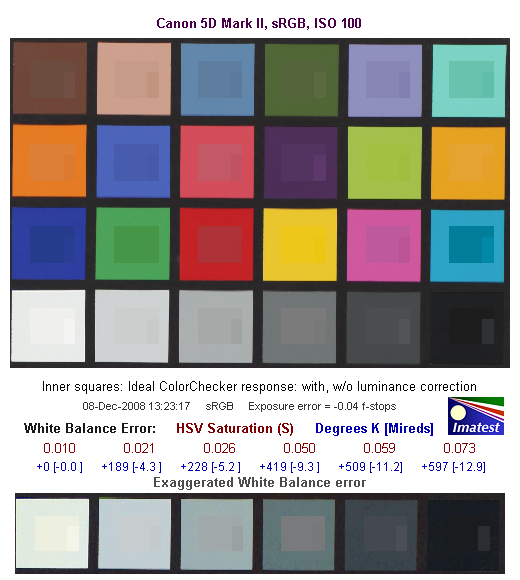
This image shows how the Canon 5D Mark II actually rendered the colors of the MacBeth chart, compared to a numerically ideal treatment. In each color swatch, the outer perimeter shows the color as actually captured by the camera, the inner square shows the numerically ideal color, after correcting for the luminance of the photographed chart (as determined by a second-order curve fit to the values of the gray swatches), and the small rectangle inside the inner square shows the numerically ideal color, without any luminance correction. This image shows the 5D Mark II's very good hue accuracy, as well as a gamma curve that results in an overexposure of some colors, notably cyans, reds, blues and some greens. (We've seen this in a wide range of cameras, increasing the "punch" of images by brightening saturated colors a little, while actually keeping both the hue and saturation level very close to technically accurate values.)
Noise Analysis

There's a lot in this particular graph, a lot more than we have room to go into here. (This set of plots has also changed a little in the more recent versions of Imatest. Some of the plots that were shown here previously are now shown in other Imatest output. Since we largely focus on the Noise Spectrum plot, we'll only show the graphic above, which includes that plot.)
In comparing these graphs with those from competing cameras, I've found that the Noise Spectrum graph at lower right is the most important. Cameras that manage to shift their noise spectrum to higher frequencies have much finer-grained noise structures, making their noise less visually objectionable. In the graph above, this would show up as a noise spectrum curve that remained higher on the right side, representing higher noise frequencies. The champion at this was (and still is) the Canon EOS-1Ds Mark II, which produced remarkably fine-grained image noise, even at very high ISOs.
Here, we see the results at ISO 50, which is as a low extension of the normal ISO range for the 5D Mark II. The luminance curve is fairly flat (meaning luminance noise is very fine-grained), however the color channels exhibit higher noise values, especially the blue and green channels at lower frequencies. (This is quite unusual, we more commonly see the green channel noise being the lowest, and the red noise curve tracking that of the blue channel more closely.) Still, overall noise levels are so low that the chroma noise was not noticeable except with extreme pixel peeping.

Here are the results at the 5D Mark II's base ISO of 100. Again, the luminance curve is quite flat and the 5D Mark II does a good job of keeping plenty of the noise energy at high frequencies. The RGBchannels are again higher than the luminance, especially the blue channel. Still, the Canon 5D Mark II noise levels are very low at low ISO (as you can see in the lower left graph, which shows noise levels vs target brightness), with a frequency spectrum that has more energy on the higher frequency (right-hand) side of the curve than do most cameras.

Above is the same set of noise data at ISO 3,200. Here, the luminance channel of the Noise Spectrum graph has a dramatic shift toward the left-hand, lower-frequency side than at ISO 100, coarsening the "grain" of the image noise patterns quite a bit. The color channels follow the luminance much more closely, except at the very low end of the frequency spectrum, no doubt due to the default noise reduction taking place. At this ISO, we see the red-channel noise becoming dominant at the lowest spatial frequencies, manifesting in the images (in combination with the blue channel noise) as red- to purple-colored splotchiness. Overall noise is still pretty low, however.

Here's the same set of noise data at ISO 6,400. Very similar to ISO 3,200, with a similar shift to the left indicating a coarser "grain" caused by the 5D Mark II's noise reduction attempts to blur out the noise. Note however the peak RMS noise (lower left chart) and Pixel noise (upper right) has jumped from about 0.12 to 0.2 f-stops and 2 to 3 % respectively.

Here's the same set of noise data at ISO 12,800. Very similar to ISO 6,400, with slightly more shift to the left indicating even coarser "grain". Note again the progressively higher noise levels in the lower left-hand and upper right-hand plots.

Here's the same set of noise data at ISO 25,600. Again, note the much higher noise levels.

This chart compares the Canon 5D Mark II's luminance noise performance over a range of ISOs against that of other current, full frame cameras, using default settings. While we continue to show noise plots of this sort because readers ask for them, we each time point out that the noise magnitude is only a small part of the story, the grain pattern being much more important. In the case of the Canon 5D Mark II, the magnitude of the image noise starts out about the same as the competition at ISO 50, then remains lower at all ISOs except when compared to the Nikon D700, where it's slightly higher below ISO 1600 and above ISO6400, however they follow one another fairly closely all the way to ISO 25,600. This is really a remarkable result considering how much smaller the 5D Mark II's photosites are compared to the D700's. Keep in mind these are at default settings, so the shape and positions of the curves will be influenced by your settings.
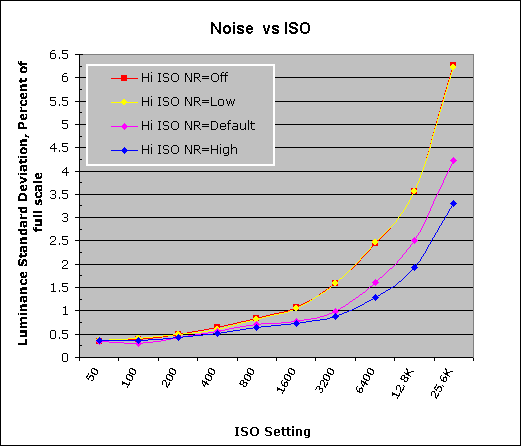
The graph above shows the luminance noise magnitude using the four levels of high-ISO noise reduction available on the Canon 5D Mark II. It's worth noting that while the "Low" setting doesn't seem to have much effect when looking at the chart, it is clear from the images that most of the noise reduction at the "Low" setting is happening to the chrominance channels.
All in all, the Canon 5D Mark II delivered some pretty spectacular noise levels, particularly considering its smaller pixel dimensions. Canon staff had told us that they felt the 5D Mark II's image quality is the highest of any camera they've produced to date, a fact certainly borne out in our tests.
Canon 5D Mark II Dynamic Range Analysis
A key parameter in a digital camera is its Dynamic Range, the range of brightness that can be faithfully recorded. At the upper end of the tonal scale, dynamic range is dictated by the point at which the RGB data "saturates" at values of 255, 255, 255. At the lower end of the tonal scale, dynamic range is determined by the point at which there ceases to be any useful difference between adjacent tonal steps. Note the use of the qualifier "useful" in there: While it's tempting to evaluate dynamic range as the maximum number of tonal steps that can be discerned at all, that measure of dynamic range has very little relevance to real-world photography. What we care about as photographers is how much detail we can pull out of the shadows before image noise becomes too objectionable. This, of course, is a very subjective matter, and will vary with the application and even the subject matter in question. (Noise will be much more visible in subjects with large areas of flat tints and subtle shading than it would in subjects with strong, highly contrasting surface texture.)
What makes most sense then, is to specify useful dynamic range in terms of the point at which image noise reaches some agreed-upon threshold. To this end, Imatest computes a number of different dynamic range measurements, based on a variety of image noise thresholds. The noise thresholds are specified in terms of f-stops of equivalent luminance variation in the final image file, and dynamic range is computed for noise thresholds of 1.0 (low image quality), 0.5 (medium image quality), 0.25 (medium-high image quality) and 0.1 (high image quality). For most photographers and most applications, the noise thresholds of 0.5 and 0.25 f-stops are probably the most relevant to the production of acceptable-quality finished images, but many noise-sensitive shooters will insist on the 0.1 f-stop limit for their most critical work.
The image below shows the test results from Imatest for an in-camera JPEG file from the Canon 5D Mark II with a nominally-exposed density step target (Stouffer 4110), and the 5D Mark II's Auto Lighting Optimizer function set to Off (the default is Standard).

These are very good results for in-camera JPEGs, near the top of the results from other recent SLRs we've tested. The tone curve shows excellent gradation in highlights, but the shadow end trails off a bit more abruptly.

Enabling ALO at its lowest setting improves the score just slightly, to 7.65 EV at the highest quality level, but overall dynamic range has dropped a bit from 10.9 EV to 10.6 EV. Interestingly, setting ALO to Low gave a more gradual approach to saturation in the highlights, but increasing it to Standard (see below) reduced this effect somewhat.

Increasing ALO a notch to its Standard setting improves the score just slightly again, to 7.66 EV at the highest quality, and overall dynamic range has increased back to 10.9 EV.

Increasing ALO to the maximum setting of Strong has little effect, actually reducing the highest quality score a bit, back to 7.65 EV.
Overall, given the relatively minor effect on the tone curve here, we suspect that the 5D's ALO function isn't being triggered by the particular (and unusual) distribution of tonality in the density step wedge used for this test.

Although the tone curve looks pretty good with Highlight Tone Priority enabled, the Imatest score is actually lower than with it disabled, because of the additional noise at ISO 200 (see the lower left plot), as well as the fact that more of the camera's available tonal range is being used to give the very flat tone curve in the highlights.
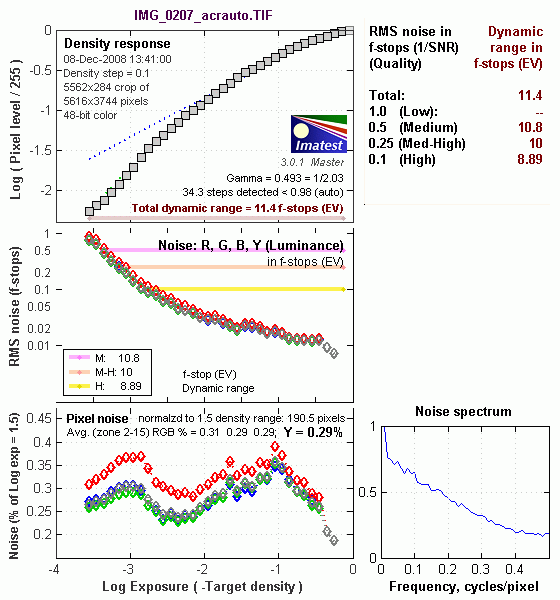
Our standard RAW converter (Adobe Camera Raw, version 5.2) was able to extract quite a bit more dynamic range (by almost 1.25 f-stop) than any of the in-camera JPEGs, with a score of 8.89 f-stops at the highest quality level. These are excellent results, as the Canon 5D Mark II's dynamic range score really benefits from ACR's default noise reduction. (Do note, though, that the level of manipulation done to achieve the results above will result in severe color artifacts on color images: This level of dynamic range is really only achievable on monochrome images.)
Dynamic Range, the bottom line:
The net result was that the 5D Mark II JPEGs came in near the top of most other DSLR models we've tested recently, and results from ACR processed RAW files were even better, only surpassed by a handful of others the highest quality level. An excellent performance.
To get some perspective, here's a summary of the Canon 5D Mark II's dynamic range performance, and how it compares to other digital SLRs that we also have Imatest dynamic range data for. (Results are arranged in order of decreasing dynamic range at the "High" quality level.):
| Dynamic Range (in f-stops) vs Image Quality (At camera's base ISO) (Blue = RAW via ACR, Yellow=Camera JPEG, Green=Current Camera) |
||||
| Model | 1.0 (Low) |
0.5 (Medium) |
0.25 (Med-High) |
0.1 (High) |
| Nikon D700 (Adobe Camera Raw 4.5) |
12.1 | 11.6 | 10.6 | 9.51 |
| Sony A900 (Adobe Camera Raw 4.6b) |
-- | 12.1 | 10.7 | 9.36 |
| Nikon D90 (Adobe Camera Raw 4.6b) |
12.1 | 11.8 | 10.7 | 9.27 |
| Fujifilm S3 Pro (Adobe Camera Raw 2) |
12.1 | 11.7 | 10.7 | 9.00 |
| Nikon D40x (Adobe Camera Raw 4.1) |
12.0 | 10.9 | 10.3 | 8.90 |
| Canon 5D Mark II (Adobe Camera Raw 5.2) |
-- | 10.8 | 10.0 | 8.89 |
| Canon EOS-1Ds Mark III (Adobe Camera Raw 4.5) |
11.5 | 10.7 | 9.96 | 8.84 |
| Nikon D3 (Adobe Camera Raw 4.5) |
11.7 | 11.0 | 10.0 | 8.75 |
| Canon EOS-1D Mark III (Adobe Camera Raw 4.5) |
11.7 | 10.7 | 9.99 | 8.73 |
| Pentax K20D (Adobe Camera Raw 4.5) |
11.4 | 10.6 | 9.82 | 8.56 |
| 8.5 Stops | ||||
| Nikon D300 (Adobe Camera Raw 4.3.1) |
11.4 | 10.9 | 9.87 | 8.45 |
| Sony A200 (Adobe Camera Raw 4.3.1) |
11.6 | 10.4 | 9.82 | 8.43 |
| Nikon D60 (Adobe Camera Raw 4.4.1) |
11.6 | 10.5 | 9.74 | 8.31 |
| Nikon D40 (Adobe Camera Raw 4.1) |
11.9 | 10.9 | 9.89 | 8.30 |
| Canon EOS-1Ds Mark III (Camera JPEG) |
10.9 | 10.2 | 9.71 | 8.23 |
| Pentax K100D (Adobe Camera Raw 3.6) |
11.3 | 10.3 | 9.51 | 8.23 |
| Pentax K200D (Adobe Camera Raw 4.4.1) |
-- | 10.5 | 9.54 | 8.19 |
| Pentax K10D (Adobe Camera Raw 3.7) |
10.6 | 10.0 | 9.29 | 8.19 |
| Sony A100 (Adobe Camera Raw 3.4) |
11.3 | 10.5 | 9.69 | 8.16 |
| Canon EOS-1Ds Mark II (Adobe Camera Raw 3) |
11.2 | 10.3 | 9.40 | 8.14 |
| Canon EOS 50D (Adobe Camera Raw 4.6) |
11.2 | 10.5 | 9.49 | 8.06 |
| Nikon D40x (Camera JPEG) |
10.8 | 10.0 | 9.42 | 8.04 |
| Canon Rebel XSi (Camera JPEG) (ALO on by default) |
11.3 | 10.1 | 9.34 | 8.01 |
| 8.0 Stops | ||||
| Fujifilm S3 Pro (Camera JPEG) |
-- | 9.90 | 9.40 | 7.94 |
| Sony A350 (Adobe Camera Raw 4.4) |
11.6 | 10.5 | 9.61 | 7.89 |
| Canon EOS-1D Mark III (Camera JPEG) |
-- | 10.2 | 9.70 | 7.88 |
| Canon Rebel XS (Adobe Camera Raw 4.5) |
-- | 10.3 | 9.27 | 7.88 |
| Nikon D3 (Camera JPEG) |
-- | -- | -- | 7.87 |
| Canon Digital Rebel XTi (Adobe Camera Raw 3.6) |
10.8 | 9.88 | 9.18 | 7.84 |
| Canon EOS 5D (Adobe Camera Raw 3) |
11.0 | 10.4 | 9.21 | 7.83 |
| Canon EOS 50D (Camera JPEG) (ALO Off ) |
-- | 9.64 | 9.17 | 7.83 |
| Nikon D90 (Camera JPEG) |
-- | -- | -- | 7.77 |
| Canon EOS 40D (Adobe Camera Raw 4.2) |
11.2 | 10.1 | 9.26 | 7.72 |
| Canon Rebel XSi (Adobe Camera Raw 4.4.1) |
10.6 | 9.95 | 9.10 | 7.68 |
| Canon EOS 50D (Camera JPEG) (ALO STD by default) |
-- | -- | 8.90 | 7.68 |
| Nikon D700 (Camera JPEG) |
-- | -- | 9.05 | 7.67 |
| Canon 5D Mark II (Camera JPEG) (ALO STD) |
10.6 | 9.68 | 8.98 | 7.66 |
| Canon EOS-5D (Camera JPEG) |
10.2 | 9.68 | 8.82 | 7.65 |
| Olympus E-3 (Adobe Camera Raw 4.3) |
10.3 | 10.1 | 9.29 | 7.64 |
| Canon 5D Mark II (Camera JPEG) (ALO Off) |
-- | 9.67 | 8.96 | 7.62 |
| Nikon D60 (Camera JPEG) |
10.5 | 9.62 | 8.89 | 7.62 |
| Nikon D200 (Adobe Camera Raw 3) |
10.6 | 9.65 | 8.96 | 7.61 |
| Nikon D80 (Adobe Camera Raw 3.6) |
11.1 | 10.4 | 9.42 | 7.51 |
| 7.5 Stops | ||||
| Olympus E-500 (Adobe Camera Raw 3) |
10.7 | 9.97 | 8.90 | 7.46 |
| Olympus E-510 (Adobe Camera Raw 4.1) |
10.0 | 9.43 | 8.64 | 7.46 |
| Pentax K10D (Camera JPEG) |
-- | 9.49 | 8.88 | 7.44 |
| Nikon D300 (Camera JPEG) |
-- | -- | 8.70 | 7.44 |
| Nikon D2Xs (Adobe Camera Raw 3.6) |
10.6 | 9.90 | 8.93 | 7.42 |
| Canon EOS 40D (Camera JPEG) |
10.6 | 9.52 | 8.78 | 7.42 |
| Nikon D50 (Camera JPEG) |
10.7 | 9.93 | 8.70 | 7.36 |
| Panasonic DMC-G1 (Adobe Camera Raw 5.2) |
10.7 | 9.78 | 8.70 | 7.32 |
| Sony A900 (Camera JPEG) (DRO off by default ) |
10.2 | 9.75 | 8.49 | 7.31 |
| Sony A200 (Camera JPEG) (DRO on by default) |
10.4 | 9.43 | 8.91 | 7.29 |
| Canon EOS 20D (Camera JPEG) |
10.3 | 9.66 | 8.85 | 7.29 |
| Canon EOS 30D (Camera JPEG) |
10.3 | 9.50 | 8.57 | 7.29 |
| Nikon D40 (Camera JPEG) |
10.4 | 9.80 | 8.89 | 7.28 |
| Sony A900 (Camera JPEG) (DRO on) |
10.1 | 9.76 | 8.47 | 7.26 |
| Canon Rebel XS (Camera JPEG) |
10.3 | 9.4 | 8.61 | 7.22 |
| Sony A350 (Camera JPEG) (DRO on by default) |
10.3 | 9.55 | 8.85 | 7.19 |
| Nikon D80 (Camera JPEG) |
10.1 | 9.43 | 8.48 | 7.12 |
| Canon Digital Rebel XT (Camera JPEG) |
10.3 | 9.51 | 8.61 | 7.11 |
| Nikon D200 (Camera JPEG) |
-- | 9.07 | 8.36 | 7.11 |
| Panasonic DMC-G1 (Camera JPEG, iExposure = Low) |
-- | 9.29 | 8.50 | 7.09 |
| Panasonic DMC-G1 (Camera JPEG, iExposure = Standard) |
-- | 9.30 | 8.54 | 7.07 |
| Olympus E-300 (Camera JPEG) |
10.8 | 9.26 | 8.48 | 7.07 |
| Olympus E-410 (Adobe Camera Raw 4.1) |
10.2 | 9.40 | 8.24 | 7.05 |
| Olympus E-500 (Camera JPEG) |
10.0 | 9.14 | 8.16 | 7.05 |
| Canon Digital Rebel XTi (Camera JPEG) |
9.83 | 9.10 | 8.27 | 7.04 |
| Canon EOS-1Ds Mark II (Camera JPEG) |
10.3 | 9.38 | 8.60 | 7.04 |
| Panasonic DMC-G1 (Camera JPEG, iExposure = High) |
10.3 | 9.23 | 8.54 | 7.04 |
| Panasonic DMC-G1 (Camera JPEG, iExposure = Off) |
-- | 9.33 | 8.52 | 7.03 |
| Pentax K200D (Camera JPEG) |
-- | 9.50 | 8.30 | 7.01 |
| 7.0 Stops | ||||
| Canon Digital Rebel (Camera JPEG) |
10.1 | 9.11 | 8.47 | 6.97 |
| Nikon D2Xs (Camera JPEG) |
9.82 | 8.98 | 8.23 | 6.97 |
| Panasonic DMC-L10 (Adobe Camera Raw 4.2) |
10.4 | 9.34 | 8.48 | 6.91 |
| Sigma DP1 (Camera JPEG) |
-- | 8.95 | 8.13 | 6.91 |
| Pentax *istDs (Camera JPEG) |
10.2 | 10.0 | 8.87 | 6.90 |
| Sony A100 (Camera JPEG) |
10.2 | 9.24 | 8.39 | 6.89 |
| Pentax K100D (Camera JPEG) |
10.3 | 9.30 | 8.39 | 6.73 |
| Pentax K20D (Camera JPEG) |
10.2 | 9.21 | 8.09 | 6.66 |
| 6.5 Stops | ||||
| Nikon D2x (Camera JPEG) |
-- | 8.93 | 7.75 | 6.43 |
| Olympus E-3 (Camera JPEG) |
9.32 | 9.06 | 8.50 | 6.42 |
| Panasonic DMC-L10 (Camera JPEG) |
-- | 8.94 | 8.00 | 6.38 |
| Olympus E-420 (Camera JPEG) |
9.18 | 8.82 | 7.93 | 6.37 |
| 6.0 Stops | ||||
| Olympus E-410 (Camera JPEG) |
-- | -- | 7.60 | 5.99 |
| Nikon D70s (Camera JPEG) |
9.84 | 8.69 | 7.46 | 5.85 |
| Nikon D70 (Camera JPEG) |
9.81 | 8.76 | 7.58 | 5.84 |
| < 5.0 Stops | ||||
| Olympus E-510 (Camera JPEG) |
7.70 | 7.16 | 5.87 | 3.55 |
The results shown in the table are interesting. One of the first things that struck me when I initially looked at test data for a wide range of d-SLRs, was that here again, purely analytical measurements don't necessarily correlate all that well with actual photographic experience. There's no question that the Fuji S3 Pro deserves its place atop the list, as its unique "SR" technology does indeed deliver a very obvious improvement in tonal range in the highlight portion of the tonal scale. I was surprised to see the analytical results place the Olympus E-300 as highly as they did, given that our sense of that camera's images was that they were in fact noisier than those of many other d-SLRs that we looked at. In the other direction, I was quite surprised to see the Nikon D2x place as low on the listings as it did, given that we found that camera's shadow detail to be little short of amazing.
One thing that's going on here though, is that we tested each camera at its lowest (base) ISO setting, which should produce best-case noise levels. This is in fact what many photographers will be most interested in, but it does perhaps place some of the Nikons (like the D40) at a disadvantage, as their lowest ISO setting is 200, as compared to the ISO 100 settings available on most other models.
With the preceding as caveats, what we can say about the Canon 5D Mark II's dynamic range is that it's quite good, but perhaps a third of a stop or so below the current best of the field. This roughly matches what we felt we were seeing in its images - It does a very good job, particularly with highlights, but plugs the very darkest shadows somewhat. - But keep in mind that we're splitting hairs, and talking about very deep shadows indeed.
Canon 5D Mark II Resolution Chart Test Results

The chart above shows consolidated results from spatial frequency response measurements in both the horizontal and vertical axes. The "MTF 50" numbers tend to correlate best with visual perceptions of sharpness, so those are what I focus on here. The uncorrected resolution figures are 2,529 line widths per picture height in the horizontal direction (corresponding to the vertically-oriented edge), and 2,587 lines along the vertical axis (corresponding to the horizontally-oriented edge), for a combined average of 2,558 LW/PH. Correcting to a "standardized" sharpening with a one-pixel radius increased both vertical and horizontal resolution, resulting in an average of 2,835 LW/PH, a little lower than you'd expect for a 21-megapixel camera.
To see what's going on, refer to the plots below, which show the actual edge profiles for both horizontal and vertical edges, in both their original and corrected forms. Here, you can see that there is fairly conservative in-camera sharpening applied (almost ideal bumps at the top ends, but no noticeable bumps at the bottom ends of the black edge profile curves). Imatest reports that the horizontal direction (vertical edge) is "undersharpened" by 4.68% while the vertical direction (horizontal edge) is undersharpened by 10.2%. Professionals and serious amateurs prefer this to oversharpening, and the 5D Mark II's images respond fairly well to the use of strong/tight sharpening post-exposure in Photoshop or some other image editor, although the over/undershoot shown in the profiles below does limit the sharpening that you can apply. (As usual, you should be able to extract a good bit more fine detail if you begin with a RAW file, rather than a JPEG.)
The over/undershoot in the profiles and the extent of its lateral spread underscores the minor exception we take to Imatest's definition of "optimal" sharpening: Imatest appears to be focusing (no pun intended) on the slope of the curve and the amount (height) of the overshoot, without considering its lateral extent. The 5D Mark II isn't bad in this regard, but the lateral extent of its sharpening artifacts does somewhat limit what you can do with sharpening in post-processing.


RAW Files
Canon 5D Mark II RAW Image Quality
We've recently started looking at RAW files converted with dcraw, an excellent freeware raw converter. dcraw usually offers timely support for the latest cameras, but more importantly, it does not apply any noise-reduction, sharpening or other corrections such as geometric distortion correction to the output files. (We found that Adobe Camera Raw still applies some limited noise-reduction when its NR settings are set to zero, and it also applies other corrections depending on the make and model of the camera). There will always be differences between RAW converters, in terms of the sort of de-mosaicing algorithms they use (the processes by which they convert the separate Red, Green, and Blue data sets to an array of full-color RGB pixels), but dcraw seems to use a fairly generic algorithm that delivers good sharpness with relatively few artifacts, and can be counted on to not apply any noise reduction if you don't want it to. (That said, looking at the ISO 25,600 example from the 5D Mark II below, it's clear that dcraw's de-mosaicing approach does have some tendency to produce rectilinear artifacts in response to high noise levels.)
Below are crops from Canon 5D Mark II RAW files compared to RAW files from other 21+ megapixel digital SLRs, converted with dcraw.
| Canon 5D Mark II vs Canon 1Ds Mark III, Nikon D3X and Sony A900 RAW (via dcraw), no Noise Reduction, no Sharpening Simulated Daylight |
||||
|
|
Canon 5D
Mark II |
Canon 1Ds
Mark III |
Nikon
D3X |
Sony
Alpha A900 |
| I S O 5 0 |
 |
 |
 |
N/A, ISO 50 not supported. |
 |
 |
 |
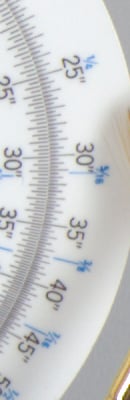 |
 |
 |
| I S O 1 0 0 |
 |
 |
 |
 |
 |
 |
 |
 |
|
 |
 |
 |
 |
|
| I S O 2 0 0 |
 |
 |
 |
 |
 |
 |
 |
 |
|
 |
 |
 |
 |
|
| I S O 4 0 0 |
 |
 |
 |
 |
 |
 |
 |
 |
|
 |
 |
 |
 |
|
| I S O 8 0 0 |
 |
 |
 |
 |
 |
 |
 |
 |
|
 |
 |
 |
 |
|
| I S O 1 6 0 0 |
 |
 |
 |
 |
 |
 |
 |
 |
|
 |
 |
 |
 |
|
| I S O 3 2 0 0 |
 |
 |
 |
 |
 |
 |
 |
 |
|
 |
 |
 |
 |
|
| I S O 6 4 0 0 |
 |
N/A,
ISO 6,400 not supported. |
 |
 |
 |
 |
 |
||
 |
 |
 |
||
| I S O 1 2 8 0 0 |
 |
N/A,
ISO 12,800 not supported. |
N/A,
ISO 12,800 not supported. |
N/A,
ISO 12,800 not supported. |
 |
||||
 |
||||
| I S O 2 5 6 0 0 |
 |
N/A,
ISO 25,600 not supported. |
N/A,
ISO 25,600 not supported. |
N/A,
ISO 25,600 not supported. |
 |
||||
 |
||||
|
|
Canon 5D
Mark II |
Canon 1Ds
Mark III |
Nikon
D3X |
Sony
Alpha A900 |
The crops above compare the Canon 5D Mark II's RAW noise performance to that of the Canon 1Ds Mark III, Nikon D3X and Sony A900, across their entire ISO ranges. Noise levels from the four cameras are pretty similar up to and including ISO 400. At ISO 800, we see the two Canons and the Nikon pull away from the Sony by just a hair. At ISO 1600 and above, the Sony appears to be behind the others by roughly a full stop in terms of noise.
Some of you are no doubt wondering if the Canon EOS 5D Mark II has dethroned the Nikon D3 and D700 as the high ISO kings. In the table below, we compare high ISO crops from Canon 5D Mark II RAW files resized to 12-megapixels as well as 5D Mark II sRAW1 crops (10-megapixels), to Nikon D3 and D700 (12-megapixels) RAW file crops.
| Canon 5D Mark II vs Nikon D3 and D700 RAW (via dcraw), no Noise Reduction, no Sharpening Simulated Daylight |
||||
|
|
Canon 5D Mark II,
Resized RAW |
Canon 5D Mark II
sRAW1 |
Nikon D3
RAW |
Nikon D700
RAW |
| I S O 8 0 0 |
 |
 |
 |
 |
 |
 |
 |
 |
|
 |
 |
 |
 |
|
| I S O 1 6 0 0 |
 |
 |
 |
 |
 |
 |
 |
 |
|
 |
 |
 |
 |
|
| I S O 3 2 0 0 |
 |
 |
 |
 |
 |
 |
 |
 |
|
 |
 |
 |
 |
|
| I S O 6 4 0 0 |
 |
 |
 |
 |
 |
 |
 |
 |
|
 |
 |
 |
 |
|
| I S O 1 2 8 0 0 |
 |
 |
 |
 |
 |
 |
 |
 |
|
 |
 |
 |
 |
|
| I S O 2 5 6 0 0 |
 |
 |
 |
 |
 |
 |
 |
 |
|
 |
 |
 |
 |
|
|
|
Canon 5D Mark II
Resized RAW |
Canon 5D Mark II
sRAW1 |
Nikon D3
RAW |
Nikon D700
RAW |
To our eyes, the Nikon D3 and D700 still have superior high ISO performance, though the Canon 5D Mark II does amazingly well considering the smaller pixel size. The Canon 5D Mark II's sRAW1 files are cleaner than its full sized files, but they don't contain as much detail as resized 5D Mark II full-res RAW files, or the Nikon D3 or D700 RAW files. They seem to have either have some NR applied, or the interpolation process used to generate the smaller files is causing loss of fine detail and larger chroma noise blotches.
Shooting Modes
Canon EOS 5D Mark II Modes and Menus
 The Mode dial on the left side of the Canon EOS 5D Mark II's top panel lets you select various exposure modes, with a number of additions compared to the 5D. Being a model targeted at professionals and serious enthusiasts, just like the 5D, the 5D Mark II does not offer any scene mode, but it does offer the new Creative Auto (CA) mode (see description below). Other settings consist of Full Automatic, Programmed Auto Exposure, Shutter Priority, Aperture Priority, full Manual Exposure, and Bulb. There are also three Camera User settings (up from one on the 5D), for registering up to three banks of settings for quick recall.
Here's a description of each of the shooting modes:
 Full Automatic
Mode: Full Automatic is indicated on the Mode dial by a green rectangular outline. In this mode, the camera makes all exposure decisions with the exception of image quality. Autofocus mode is set to AI Focus. (AI Focus evaluates subject movement, automatically sets either one-shot AF or AI Servo AF automatically.) Drive mode is set to Single Shot, ISO is set to Auto, and the metering mode is set to Evaluative.
Full Automatic
Mode: Full Automatic is indicated on the Mode dial by a green rectangular outline. In this mode, the camera makes all exposure decisions with the exception of image quality. Autofocus mode is set to AI Focus. (AI Focus evaluates subject movement, automatically sets either one-shot AF or AI Servo AF automatically.) Drive mode is set to Single Shot, ISO is set to Auto, and the metering mode is set to Evaluative.
 Creative Auto Mode: Canon has added their new exposure mode called Creative Auto (or "CA"). The CA mode is a cross between the green zone and program mode.
 When set to CA mode, the 5D Mark II allows the user to adjust picture style, motor drive, and exposure compensation, as well as to use the program shift function and select between RAW or JPEG file formats, but the rest of the more complex features remain under automatic control. The 5D Mark II's rear-panel LCD display offers text help for each setting while in CA mode, for example prompting the user as to whether they want to blur the background with program shift, or make the picture brighter / darker with exposure compensation, etc.
 Program AE: This is the first mode in the Creative Zone of the Mode dial. Program AE works similarly to the Full Automatic exposure mode, but allows more control over the exposure variables. Aperture and shutter speed are automatically selected by the camera, but you can bias the exposure to larger or smaller apertures by turning the Main dial, which will change the combination of aperture and shutter speed so as to maintain the same exposure value, but with a different combination of aperture/shutter speed.
 Shutter-Priority
AE: This mode allows you to manually set the shutter speed anywhere from
1/8,000 to 30 seconds, while the camera chooses the best corresponding aperture
setting. You have control over all other exposure variables, including exposure
compensation.
Shutter-Priority
AE: This mode allows you to manually set the shutter speed anywhere from
1/8,000 to 30 seconds, while the camera chooses the best corresponding aperture
setting. You have control over all other exposure variables, including exposure
compensation.
 Aperture-Priority
AE: The opposite of Shutter-Priority mode, Aperture-Priority AE allows you
to set the lens aperture (with available apertures depending on the lens in
use), while the camera selects the most appropriate shutter speed. Again, you
have control over all other exposure variables, including exposure compensation.
Aperture-Priority
AE: The opposite of Shutter-Priority mode, Aperture-Priority AE allows you
to set the lens aperture (with available apertures depending on the lens in
use), while the camera selects the most appropriate shutter speed. Again, you
have control over all other exposure variables, including exposure compensation.
 Manual Exposure: This mode provides the same range of exposure control as the other Creative Zone exposure modes (except for exposure compensation), but lets you control both shutter speed and lens aperture independently.
 Bulb: In this mode, the shutter stays open as long as the shutter button is pressed. This is useful for long exposures such as night scenes, fireworks, and astrophotography. The top Status display reports the elapsed time, from one to 999 seconds, as the exposure progresses. The use of an RS-80N3 Remote Switch or TC-80N3 Timer Remote Controller is recommended.
 ,
,  ,
,  Camera User
Settings Modes: These three final settings on the Mode dial allow you to save three individual sets of camera settings for quick recall. Useful when shooting an event with multiple light sources, such as a wedding and reception, these custom modes let you register camera settings for specific conditions and easily go between modes. You can save most of the camera's shooting mode options as well as the Custom Function settings. Settings are registered as C1, C2, or C3 through the Camera User Setting menu.
Camera User
Settings Modes: These three final settings on the Mode dial allow you to save three individual sets of camera settings for quick recall. Useful when shooting an event with multiple light sources, such as a wedding and reception, these custom modes let you register camera settings for specific conditions and easily go between modes. You can save most of the camera's shooting mode options as well as the Custom Function settings. Settings are registered as C1, C2, or C3 through the Camera User Setting menu.
Playback Mode This mode is entered by pressing the Play button on the back panel. Playback mode lets you erase images, protect them, or set them up for printing on DPOF-compatible devices. You can also view images in an index display, enlarge images to 10x, view a slide show of all captured images, or rotate an image. The Info button activates an information display, which reports the exposure settings for the image and graphs the exposure values on a small histogram.
Canon EOS5D Mark II Menu Details
Below are 5D Mark II menu options and their descriptions. Click on the image to see a matrix of screen shots showing the full menu layout.
Record Menu 1:

| Record Menu Options: Screen 1 | |||
|
Top-Level
Selection |
Second-Level
|
Third-Level
|
Notes
|
|
Quality
|
- 5616 x 3744, Fine
- 5616 x 3744, Normal - 4080 x 2720, Fine - 4080 x 2720, Normal - 2784 x 1856, Fine - 2784 x 1856, Normal - RAW + JPEG - RAW -sRAW1 (3861 x 2574) -sRAW2 (2784 x 1856) -sRAW1 + JPEG -sRAW2 + JPEG |
|
Select image size and quality combination.
The 5D Mark II has two small RAW (sRAW) options, sRAW1 and sRAW2. You can select any size and quality JPEG when shooting RAW + JPEG or sRAW1/2 + JPEG. |
|
Beep
|
-On
-Off |
|
Turns all camera beep sounds on or off
|
|
Shoot w/o Card
|
-On
-Off |
|
If on, the camera will fire the shutter even without a memory card
|
|
Review Time
|
-Off
-2 sec. -4 sec. -8 sec. -Hold |
|
If off, the camera does not display the captured image after capture, otherwise the image appears for the designated time.
Hold setting displays the image until the auto power off time elapses. |
|
Peripheral Illumination Correction
|
-Enable
-Disable |
|
If on, the camera corrects for corner shading "vignetting" in JPEGs, depending on which lens is detected (therefore, probably won't work with third-party lenses).
|
Record Menu 2:

| Record Menu Options: Screen 2 | |||
|
Top-Level
Selection |
Second-Level
|
Third-Level
|
Notes
|
|
Exposure Comp./AEB (Auto Exposure Bracketing)
|
-Select EV variable
|
|
Step sizes from 0.3 to 2.0 EV, total range covers +/-2 EV, maximum span for a single series is +/-2 EV, but you can now go up to 4 stops darker or brighter from the recommended exposure.
|
|
White Balance
|
-Auto
-Daylight -Shade -Cloudy -Incandescent -Fluorescent -Flash -Custom -Kelvin Temperature (2,500 to 10,000) |
|
|
|
Custom WB
|
-Choose image for reference, then set white balance
|
|
|
|
White Balance Shift/BKT
|
-Set the color shift on a two-dimensional grid (Green/Magenta, Blue/Amber)
- Choose bracket (+/-3 Magenta and Green, +/-3 Blue and Amber) |
|
|
|
Color Space
|
-sRGB
-Adobe RGB |
|
|
|
Picture Style
|
-Standard
-Portrait -Landscape -Neutral -Faithful -Monochrome -User Def. 1 -User Def. 2 -User Def. 3 |
-Sharpness (arbitrary units from 0 to 7)
-Contrast (9 units from - to +) -Saturation (9 units from - to +) -Color Tone (9 units from - to +) |
Monochrome has Filter and Toning effect instead of Saturation and Color Tone.
|
|
Dust Delete Data
|
-Cancel
-OK |
|
Captures a reference image for the dust reduction system, showing where dust is present on the sensor. Dust shadows can then be automatically removed from the images when they're processed through Canon's software.
|
Playback Menu 1:

| Playback Menu Options: Screen 1 | |||
|
Top-Level
Selection |
Second-Level
|
Third-Level
|
Notes
|
|
Protect Images
|
-Set
|
|
Sets or removes protection mark. Protected images can only be deleted by reformatting the memory card.
|
|
Rotate
|
-Set
|
|
Rotates selected image clockwise, either 90 or 270 degrees
|
|
Erase Images
|
-Select and erase images
-All images in folder -All images on card |
-Erase
-Cancel |
Erases images.
|
|
Print Order
|
-Sel. Image
-By -All image -Setup |
Sel. Image:
-Select image By: All image: |
Marks images on the memory card for later printing on a DPOF (Digital Print Order Format) compatible printer.
|
|
Transfer Order
|
-Sel. Image
-By -All image |
Sel. Image:
-Select image By: All image: |
For transferring images to a computer. (Computer
must be running Canon's EOS Utility software.)
|
Playback Menu 2:

| Playback Menu Options: Screen 2 | |||
|
Top-Level
Selection |
Second-Level
|
Third-Level
|
Notes
|
|
Highlight Alert
|
-Disable
-Enable |
|
Enables a blinking highlight display in Playback mode
|
|
AF Point Display
|
-Disable
-Enable |
|
If Enabled, the AF point used to set focus appears in red in the image display
|
|
Histogram
|
-Brightness
-RGB |
|
RGB option displays individual histograms for each color channel, brightness shows only a single graph.
|
|
Slide Show
|
-Select images
-Setup -Start |
-All images
-Folder -Date -Play time |
Sets up Slide Show feature. Users can choose to play all folders, one folder, or just photos taken on a particular date. The Menu button stops playback.
|
|
Image Jump w/ dial
|
-1 image
-10 images -100 images -Screen -Date -Folder -Movies -Stills |
|
Selects how image jump works using the Main Dial.
|
Setup Menu 1:
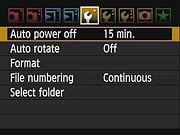
| Setup Menu Options: Screen 1 | |||
|
Top-Level
Selection |
Second-Level
|
Third-Level
|
Notes
|
|
Auto Power Off
|
- 1 min.
- 2 min. - 4 min. - 8 min. -15 min. -30 min. - Off |
|
|
|
Auto Rotate
|
-On (Record, Display)
- On (Display) -Off |
|
Record, Display - vertical images are rotated on both the camera's LCD and on the computer. (In applications that understand "Rotate" tags in the files' EXIF headers.)
Display - vertical images are only rotated on the computer. |
|
Format
|
-Cancel
-OK |
|
Erases all files on card, even protected ones
|
|
File Numbering
|
-Continuous
-Auto Reset -Manual Reset |
|
Continuous numbers image files sequentially.
Auto Reset resets the numbering every time a card is formatted or a new card inserted. Manual Reset resets numbering at any time to 0001. |
|
Select Folder
|
-Select existing
-Create |
|
Creates new folders.
|
|
WFT Settings
|
|
|
Displayed only when WFT-E4/E4A wireless file transmitter is attached.
|
|
Recording func.+media select
|
|
|
Displayed only when WFT-E4/E4A wireless file transmitter is in use.
|
Setup Menu 2:

| Setup Menu Options: Screen 2 | |||
|
Top-Level
Selection |
Second-Level
|
Third-Level
|
Notes
|
|
LCD Brightness
|
-Auto
-Manual (7 levels) |
-Set
-OK |
Auto uses ambient light sensor to set brightness automatically. Manual allows setting brightness level from dark to bright in seven steps
|
|
Date/Time
|
-Set Date
-Set Time -Set Display Format |
|
|
|
Language
|
-English
-German -French -Dutch -Danish -Portuguese -Finnish -Italian -Ukrainian -Norwegian -Swedish -Spanish -Greek -Russian -Polish -Czech -Hungarian -Romanian -Turkish -Arabic -Thai -Simplified Chinese -Traditional Chinese -Korean -Japanese |
|
|
|
Video System
|
-NTSC
-PAL |
|
|
|
Sensor Cleaning
|
-Auto Cleaning
-Clean Now -Clean Manually |
|
Auto Cleaning setting automatically enables cleaning when camera is turned off or on (adds about 1 sec. to time)
Clean Now activates cleaning Clean Manually locks up the mirror for manual cleaning. |
|
Live View/Movie func. set.
|
-LV func. setting
-Grid Display -Silent Shoot -Metering Timer -AF mode -Movie rec. size -Sound recording |
LV function Settings
-Disable -Stills only -Still+movie Grid Display Silent Shoot Metering Timer AF mode Movie rec. size Sound recording |
Silent Shoot Mode 1 lowers sound when shooting in Live View mode.
Silent Shoot Mode 2 delays the shooting sound. Silent Shoot Disable mode is for shooting with a TS-E lens or extension tube. Sets how long the meter is on while Live View is active. - Quick mode uses phase detection - Live mode uses contrast detection - Live face detect mode uses face detection |
Setup Menu 3:

| Setup Menu Options: Screen 3 | |||
|
Top-Level
Selection |
Second-Level
|
Third-Level
|
Notes
|
|
Battery Info.
|
-Register -Delete info. |
Displays battery type and serial number, remaining capacity, shutter count and recharge performance. Keeps track of multiple registered batteries via serial number. | |
|
INFO Button
|
-Normal Display
-Camera Setting -Shoot Func. |
|
Normal Display shows the standard image information display.
Camera Setting shows all of the camera settings used to create the image (such as Picture Style, Color Space, etc.). Shooting Functions shows the more basic shooting modes, such as exposure variables, ISO, White Balance, etc. |
|
External Speedlight Control
|
-Flash function settings
-Flash C.Fn. Setting -Clear all Speedlight C.Fn.'s |
Flash function settings
-Flash mode -Shutter sync. -FEB -Flash exp. comp -E-TTL II -Flash firing Flash C.Fn. Setting Clear all Speedlight C.Fn's |
Controls an array of flash settings for attached external flash unit.
|
|
Camera User Setting
|
-Register
-Clear Settings |
Register
-Mode dial C1 -Mode dial C2 -Mode dial C3 |
Registers the current camera settings to one of three available modes.
|
|
Clear Settings
|
|
|
Resets all camera settings to default.
|
|
Firmware Version
|
-Update firmware version
|
|
Updates firmware version if a properly-prepared CF card is in place
|
Custom Functions Menu:

| Custom Function Menu Options | |||
|
Top-Level
Selection |
Second-Level
|
Third-Level
|
Notes
|
|
C.Fn I: Exposure
|
-C.Fn. I-1 Exposure Level Increments
-C.Fn.I-2 ISO Speed Setting Increments -C.Fn.I-3 ISO Expansion -C.Fn. I-4 Bracketing Auto Cancel -C.Fn. I-5 Bracketing Sequence -C.Fn. I-6 Safety Shift -C.Fn. I-7 Flash Sync. Speed in Av Mode |
C.Fn. I-1 Exposure Level
Increments
-0: 1/3-Stop -1: 1/2-Stop C.Fn.I-2 ISO Speed Setting Increments C.Fn.I-3 ISO Expansion C.Fn. I-4 Bracketing Auto Cancel C.Fn. I-5 Bracketing Sequence C.Fn. I-6 Safety Shift C.Fn. I-7 Flash Sync. Speed in Av Mode |
C.Fn.I-3 ISO Expansion option On adds "H1" 12,800 and "H2" 25,600 ISO and "L" 50 ISOsettings
C.Fn. I-6 Safety Shift Enable option automatically shifts exposure if brightness changes suddenly. |
|
C.Fn. II: Image
|
-C.Fn. II-1 Long Exposure Noise Reduction
-C.Fn. II-2 High ISO Speed Noise Reduction -C.Fn. II-3 Highlight Tone Priority -C.Fn. II-4 Auto Lighting Optimizer |
C.Fn. II-1 Long Exposure
Noise Reduction
-0: Off -1: Auto -2: On C.Fn. II-2 High ISO Speed Noise Reduction C.Fn. II-3 Highlight Tone Priority C.Fn. II-4 Auto Lighting Optimizer |
C.Fn. II-3 Highlight Tone Priority
Enable option automatically improves highlight detail
|
|
C.Fn.III: Auto focus/Drive
|
-C.Fn. III-1 Lens Drive when AF Impossible
-C.Fn. III-2 Lens AF Stop Button Function -C.Fn. III-3 AF Point Selection Method -C.Fn. III-4 Superimposed Display -C.Fn. III-5 AF-Assist Beam Firing -C.Fn. III-6 Mirror Lockup -C.Fn. III-7 AF Point Areas Expansion -C.Fn. III-8 AF Microadjustment |
C.Fn. III-1 Lens Drive
when AF Impossible
-0: Focus Search On -1: Focus Search Off C.Fn. III-2 Lens AF Stop Button Function C.Fn. III-3 AF Point Selection Method C.Fn. III-4 Superimposed Display C.Fn. III-5 AF-Assist Beam Firing C.Fn. III-6 Mirror Lockup C.Fn. III-7 AF Point Area Expansion C.Fn. III-7 AF Microadjustment |
C.Fn. III-1 Lens Drive when
AF Impossible option tells camera to continue to try and achieve focus
or stop, useful with super telephoto lenses
|
|
C.Fn.IV: Operation/Others
|
-C.Fn. IV-1 Shutter Button/AF-On Button
-C.Fn. IV-2 AF-On/AE Lock Button Switch -C.Fn. IV-3 SET Button when Shooting -C.Fn. IV-4 Dial Direction during Tv/Av -C.Fn.IV-5 Focusing Screen -C.Fn. IV-6 Add Original Decision Data |
C.Fn. IV-1 Shutter Button/AF-On
Button
-0: Metering+AF Start -1: Metering+AF Start/AF Stop -2: Metering Start/Metering+AF Start -3: AE Lock/Metering + AF Start -4: Metering + AF Start/Disable C.Fn. IV-2 AF-On/AE Lock Button Switch C.Fn. IV-3 Assign Set Button C.Fn. IV-4 Dial Direction during Tv/Av C.Fn.IV-5 Focusing Screen C.Fn. IV-6 Add Original Decision Data |
C.Fn.IV-5 Focusing Screen Eg-A option is Standard Precision Matte, Eg-D option is Precision Matte with Grid, and Eg-S option is Super Precision Matte
C.Fn. IV-6 Add Original Decision Data On option appends data to verify an original image. |
|
Clear All Custom Functions (C.Fn.)
|
|
|
|
My Menu:

| My Menu Options | |||
|
Top-Level
Selection |
Second-Level
|
Third-Level
|
Notes
|
|
Register
|
-(Full list of options that can exist in My Menu)
|
|
|
|
Sort
|
|
|
Changes the order of registered items in My
Menu
|
|
Delete
|
|
|
|
|
Delete All Items
|
|
|
|
|
Display from My Menu
|
-Enable
-Disable |
|
When Enabled, the My Menu tab is
displayed first when pressing the Menu button
|
Sraw
Canon 5D Mark II sRAW
Some of you have been wondering what the effect of the resampling done by the camera to generate the smaller sRAW files has on noise and detail, so we've taken some sRAW1 and sRAW2 shots of our Still Life target and converted them with dcraw. In the table below, you can compare the difference of sRAW1 (10-megpixel) and sRAW2 (5.2-megapixel) files to the full resolution files also converted with dcraw. Note that dcraw performs no noise-reduction or sharpening. Also note that these shots were taken with firmware version 1.0.6. Click on the thumbnail to view the dcraw converted file, or click on the link to download the corresponding .CR2 file.
Depending on your browser, you can download the images by clicking on the links, or by right-clicking on the links and selecting "Save Target As...", or similar. Some browsers change the file extension to .TIFF. In that case, just rename to .CR2 after downloading. You can see the full set of in-camera JPEG shots, including exposure information extracted from the EXIF file headers, on the Thumbnail index page.
NOTE: Many of these are very large files (12+ megabytes each). They're here for you to use, but please be considerate of our bandwidth; don't just download everything willy-nilly. - Thanks!


Comparison
EOS 5D Mark II vs other Canon full-frame DSLRs
The chart below compares the EOS 5D Mark II with some other current Canon full-frame cameras. What we've done below is presented something of a hybrid comparison between these three models. A red cell means that a given camera performs below the other two, a green cell means that it performs better than the other two, and a yellow cell means it falls between the other two. In cases where two cameras share a superior capability, both cells will be colored green.
| EOS 5D Mark II vs other Canon FF DSLRs | ||||
|
Manufacturer
|
Canon
|
Canon
|
Canon | |
|
Model
|
EOS 5D
|
EOS 5D Mark II
|
EOS-1Ds Mark III | |
|
Imaging
System |
Sensor Manufacturer
|
Canon
|
Canon
|
Canon
|
|
Sensor Type
|
CMOS
|
CMOS
|
CMOS
|
|
|
Color Filter Array
|
RGB
|
RGB
|
RGB
|
|
|
Total Megapixels
|
12.8
|
22.0
|
21.9
|
|
|
Effective Megapixels
|
13.3
|
21.1
|
21.1
|
|
|
Effective Sensor Size (mm)
|
35.8 x 23.9
|
36.0 x 24.0
|
36.0 x 24.0
|
|
|
Pixel Pitch (µm)
|
8.2
|
6.4
|
6.4
|
|
|
Focal Length Multiplier (approx.)
|
~1.0x
|
1.0x
|
1.0x
|
|
|
Image Processor
|
DIGIC II
|
DIGIC IV
|
Dual DIGIC III
|
|
|
Viewfinder
|
Type
|
Eye-level pentaprism
|
Eye-level pentaprism
|
Eye-level pentaprism
|
|
Coverage
|
96%
|
98%
|
100%
|
|
|
Magnification (-1 diopter with 50mm lens at infinity)
|
0.71x
|
0.71x
|
0.75x
|
|
|
Eyepoint (mm)
|
20
|
21
|
20
|
|
|
Dioptric Adjustment Range (diopters)
|
-3.0 to +1.0
|
-3.0 to +1.0
|
-3.0 to +1.0
|
|
|
Focusing Screen
|
Interchangeable,
Ee-A standard focusing screen provided |
Interchangeable,
Eg-D: Grid lines, Eg-S [point of Focus], Eg-A standard focusing screen provided |
Interchangeable,
Standard screen: EC-C IV; Interchangeable with EC-series screens from all previous EOS-1 series cameras |
|
|
Viewfinder
Info Display |
AF (AF points, focus confirmation light), Exposure (shutter speed, aperture, spot metering circle, exposure level, AE lock, exposure compensation, AEB level), Flash (flash ready, red-eye reduction lamp on, high-speed sync, FE lock, FEB shooting, flash exposure compensation, insufficient flash warning during FE lock), White balance correction, Maximum burst, CF card full warning, CF card error warning, No CF card warning
|
AF (AF points, focus confirmation light), Exposure (shutter speed, aperture, ISO speed, AE lock, exposure level, spot metering circle), Flash information (flash ready, flash exposure compensation, High-speed sync, FE lock), Image information (Highlight tone priority, monochrome shooting, maximum burst, white balance correction, CF card information), battery information
|
AF (AF points, focus confirmation light, point selection mode, registration), Exposure (metering mode, spot metering area, shutter speed, aperture, manual exposure, AE lock, ISO speed, exposure level, exposure warning), Flash (flash ready, high-speed sync, FE lock, flash exposure level), Image (JPEG recording, RAW recording, shots remaining, maximum burst, white balance correction, memory card information), Battery check
|
|
|
Depth of Field Preview
|
Enabled with depth-of-field preview button
|
Enabled with depth-of-field preview button
|
Enabled with depth-of-field preview button
|
|
|
Recording
System |
Recording Media / Quantity / Slot Type
|
CF Card Type I and II
|
CF Card Type I and II, UDMA-compliant CF cards, via external media (USB v.2.0 hard drive, via optional Wireless File Transmitter WFT-E4A)
|
CF Card Type I and II, SD/SDHC Memory Card (1 slot each), and/or External media (USB v.2.0 hard drive, via optional Canon WFT-E2A transmitter), compatible with UDMA-compliant CF cards, and SDHC SD cards
|
|
Compatible File System
|
FAT 16 / FAT 32
|
FAT 16 / FAT 32
|
FAT 16 / FAT 32
|
|
|
Recording Formats
|
RAW (CR2), JPEG
|
RAW, sRAW1, sRAW2 (CR2), JPEG, MOV
|
RAW, sRAW (CR2); JPEG
|
|
|
A/D conversion
|
12-bit
|
14-bit
|
14-bit
|
|
|
Highlight Tone Priority Mode
|
No
|
Yes
|
Yes
|
|
|
Maximum Resolution
|
4,368 x 2,912
|
5,616 x 3,744
|
5,616 x 3,744
|
|
|
Reduced Resolutions (JPEG only)
|
3,168 x 2,112
2,496 x 1,664 |
4,080 x 2,720
2,784 x 1,856 |
4,992 x 3,328
4,080 x 2,720 2,784 x 1,856 |
|
|
RAW + JPEG Recording
|
Yes, selectable JPEG resolution / compression
|
Yes, selectable JPEG resolution / compression
|
Yes, selectable JPEG resolution / compression
|
|
|
Processing Parameters,
Color Space & White Balance |
User-Selectable Color Space
|
Yes
sRGB + Adobe RGB |
Yes
sRGB + Adobe RGB |
Yes
sRGB + Adobe RGB |
|
WB settings
|
Auto, Daylight, Shade, Cloudy/Twilight/Sunset, Tungsten Light, White Fluorescent Light, Flash, Custom, Color Temperature setting
|
Auto, Daylight, Shade, Cloudy, Tungsten Light, White Fluorescent Light, Flash, Custom, Color Temperature setting
|
Auto, Daylight, Shade, Cloudy, Tungsten Light, White Fluorescent Light, Flash, five Custom WB settings (1-5), user-set Color Temperature, five Personal White Balance PC-1 to PC-5
|
|
|
Manual Color Temperature Setting Range
|
2,800 ~ 10,000K
|
2,500 ~ 10,000K
|
2,500 ~ 10,000K
|
|
|
WB Adjustment Range
|
White Balance Correction: Blue/Amber bias +/- 9 levels
Magenta/Green bias +/- 9 levels |
White balance correction: +/-9 stops in full-stop increments; Blue/amber bias or Magenta/Green bias possible
|
Blue/Amber bias and/or Magenta/Green bias +/- 9 levels; manually set by user
|
|
|
Auto Lighting Optimizer (Levels)
|
No
|
Yes (3)
|
No | |
|
Peripheral Light Correction
|
No
|
Yes
|
No | |
|
Adjustable High ISO NR (levels)
|
No
|
Yes (3)
|
Yes (on/off) | |
|
Autofocus
System |
Type
|
TTL-CT-SIR AF-dedicated CMOS Sensor
|
TTL-CT-SIR AF-dedicated CMOS sensor
|
TTL-AREA-SIR
AF-dedicated CMOS sensor |
|
# of Focusing Points (Focusing Point Type)
|
9-point (1 center high-precision cross-type, 8 line-type, plus 6 line-type assist AF points)
|
9-point (1 center high-precision cross-type, 8 line-type, plus 6 line-type assist AF points), light source detection
|
45-point (19 high-precision cross-type AF points plus 26 assist AF points)
|
|
|
Superimposed Focus Point Display
|
Yes
|
Yes
|
Yes
|
|
|
AF Working Range
|
EV -0.5 ~ 18
|
EV -0.5 ~ 18
|
EV -1 ~ 18
|
|
|
AF-assist Beam
|
None. Emitted by EX-series Speedlite or optional ST-E2 Speedlite Transmitter
|
None. Emitted by EX-series Speedlite or optional ST-E2 Speedlite Transmitter
|
None. Emitted by EX-series Speedlite or optional ST-E2 Speedlite Transmitter
|
|
|
One-shot AF
|
Yes
|
Yes
|
Yes
|
|
|
Predictive AI Servo AF
|
Yes
|
Yes
|
Yes
|
|
|
Exposure
Control |
Shooting Modes
|
Program AE (shiftable), Shutter speed-priority AE, Aperture-priority AE, Full Auto, E-TTL II autoflash program AE, Manual
|
Program AE (shiftable), Shutter-priority AE, Aperture-priority AE, Creative Auto, Full auto, E-TTL II autoflash program AE, Manual
|
Program AE (shiftable), Shutter speed-priority AE, Aperture-priority AE, E-TTL II program AE, Manual
|
|
Metering Zones
|
35
|
35
|
63
|
|
|
Metering Modes
|
Evaluative metering (linked to all AF points), Partial metering (approx. 8%; center), Spot metering (approx. 3.5%; center), Center-weighted average
|
Evaluative metering (linked to all AF points), Partial metering (approx. 8%; center), Spot metering (approx. 3.5%; center), Center-weighted average
|
Evaluative metering (linked to all AF points), Partial metering (approx. 8.5%), Spot metering (approx. 2.4%; center, AF point or 8 multi-spot), Center-weighted average
|
|
|
Metering System Working Range (with 50mm f/1.4 lens, ISO 100)
|
EV 1 ~ 20
|
EV 1 ~ 20
|
EV 0 ~ 20
|
|
|
ISO Range / Extended
|
100 ~ 1600 / 50, 3200
|
100 ~ 6400 / 50, 25600
|
100 ~ 1600 / 50, 3200
|
|
|
Exposure Compensation
|
+/-2 EV in 1/2 or 1/3 EV increments
|
+/-2 EV in 1/2 or 1/3 EV increments
|
+/-3 EV in 1/2 or 1/3 EV increments
|
|
|
Automatic Exposure Bracketing
|
+/-2 EV in 1/2 or 1/3 EV steps
|
+/-2 EV in 1/2 or 1/3 EV steps
|
+/-3 EV in 1/2 or 1/3 EV steps
|
|
|
Shutter
Speeds,
Frame Rate, Shutter Lag |
Shutter Type
|
Electronically-controlled focal-plane shutter; rated for 100K actuations
|
Electronically-controlled focal-plane shutter; rated for 150K actuations
|
Electronically-controlled focal-plane shutter; rated for 300K actuations
|
|
Shutter Speed Range
|
1/8000 ~ 30 sec. (1/2 or 1/3EV increments) and bulb
|
1/8000 ~ 30 sec. (1/2 or 1/3EV increments) and bulb
|
1/8000 ~ 30 sec. (1/2 or 1/3EV increments)
and bulb
|
|
|
Maximum Frames Per Second / Buffer depth
|
3.02 fps / 98 large/fine JPEG or 17 RAW frames
|
3.89 fps / 75 large/fine JPEG or 11 RAW frames
|
5 fps / 6 large/fine JPEG or 6 RAW frames
|
|
|
Shutter lag, full AF (sec.)
|
0.149
|
0.206
|
0.070
|
|
|
Shutter lag, prefocus (sec.)
|
0.078
|
0.082
|
0.045
|
|
|
Flash
|
Built-in Flash / Guide Number at ISO 100.
|
No
|
No
|
No
|
|
Max flash x-sync speed. (sec.)
|
1/200
|
1/200
|
1/250
|
|
|
PC Sync Terminal
|
Yes
|
Yes
|
Yes
|
|
|
Playback
System |
LCD Size / Pixel Count
|
2.0 in. LCD /
230,000 pixels |
3.0 in. LCD /
921,600 pixels |
3.0 in. LCD /
230,000 pixels |
|
Enlarged Playback / Scroll
|
1.5~10x / Yes
|
1.5~TBDx / Yes
|
1.5~10x / Yes
|
|
|
LCD Monitor Brightness Adjustment Range
|
5 steps
|
7 steps
|
7 steps
|
|
|
Automatic Rotation for Vertical Shots
|
Yes
|
Yes
|
Yes
|
|
|
Other
Features
|
Live View mode
|
No
|
Yes
Phase- and Contrast-detect modes, Face detection, Exposure simulation |
Yes
Manual focus only, Exposure simulation |
|
Computer Connection
|
USB 2.0 High-Speed, PTP-compliant
|
USB 2.0 High-Speed, PTP-compliant
|
USB 2.0 High-Speed, PTP-compliant
|
|
|
Direct Printing (PictBridge compliant printers)
|
Yes
|
Yes
|
Yes
|
|
|
Menu Languages
|
15 (English, German, French, Dutch, Danish, Finnish, Italian, Norwegian, Swedish, Spanish, Russian, Simplified/Traditional Chinese, Korean, Japanese)
|
25 (English, German, French, Dutch, Danish, Portuguese, Finnish, Italian, Norwegian, Swedish, Spanish, Greek, Russian, Polish, Czech, Hungarian, Romanian, Ukraine, Turkish, Arabic, Thai, Simplified/Traditional Chinese, Korean, Japanese)
|
18 (English, German, French, Dutch, Danish, Portuguese, Finnish, Italian, Norwegian, Swedish, Spanish, Greek, Russian, Polish, Simplified/Traditional Chinese, Korean, Japanese)
|
|
|
Camera Default Reset
|
Yes
|
Yes
|
Yes
|
|
|
Custom Functions (Quantity)
|
Yes (21)
|
Yes (25)
|
Yes (57)
|
|
|
Remote Control
|
N3-type remote control, wirelesss (LC-E5)
|
N3-type remote control, wireless (RC-1, RC-5, LC-E5)
|
N3-type remote control, wireless (LC-5)
|
|
|
Info LCD Panel / Illumination
|
Yes / Yes (dedicated button)
|
Yes / Yes (dedicated button)
|
Yes / Yes (dedicated button)
|
|
|
Ultrasonic sensor dust-removal function
|
No
|
Yes
|
Yes
|
|
|
Eye-start AF
|
No
|
No
|
No
|
|
|
Anti-Shake
(Sensor shift) |
No
|
No
|
No
|
|
|
Movie Mode?
|
No
|
Yes,
HD (1920 x 1080 pixels, 30fps) or SD (640 x 480 pixels, 30fps), up to 4GB per clip |
No
|
|
|
HDMI output
|
No
|
Yes
|
No
|
|
|
AF micro- adjustment
|
No
|
Yes
|
Yes
|
|
|
Body Structure
|
Body Cover/Chassis
|
Magnesium Alloy /
Stainless Steel |
Magnesium Alloy /
Stainless Steel |
Magnesium Alloy /
Magnesium Alloy |
|
Dust and weather resistant
|
Yes
|
Yes,
(improved over 5D) |
Yes
|
|
|
Power
System
|
Battery Compatibility
|
Main: BP-511A / BP-514 / BP-511 / BP-512
Backup: CR2016 |
Main: LP-E6
Backup: CR1616 |
Main: LP-E4
Backup: CR2025 |
|
CIPA Rated Shooting Capacity at 23°C/73°F
|
800
|
850
|
1800
|
|
|
Dimensions
& Weight
|
Dimensions (WxHxD, mm)
|
152 x 113 x 75
|
152 x 113.5 x 75
|
156 x 159.6 x 79.9
|
|
Weight (body only)
|
810g / 28.6 oz.
|
810g / 28.6 oz.
|
1205g / 42.5 oz.
|
|
|
Operational
Environment |
Operating Temperature Range
|
0 ~ 40C / 32 ~ 104F
|
0 ~ 40C / 32 ~ 104F
|
0 ~ 45°C / 32 ~ 113°F
|
|
Operating Humidity Range
|
< 85%
|
< 85%
|
< 85%
|
|
|
Lens Compatibility
|
Lens Mount / Compatibility
|
Canon EF, TS-E, and MP-E lenses (except EF-S lenses)
|
Canon EF, TS-E, and MP-E lenses (except EF-S lenses)
|
Canon EF, TS-E, and MP-E lenses (except EF-S lenses)
|
EOS 5D Mark II vs other Manufacturers' full-frame DSLRs
The chart below compares the EOS 5D Mark II with the Nikon D700 and Sony A900 "compact" full-frame DSLRs.
| Sony A900 vs other "compact" Full Frame DSLRs | ||||
|
Manufacturer
|
Canon
|
Nikon
|
Sony | |
|
Model
|
EOS 5D Mark II
|
D700
|
DSLR-A900 | |
|
Imaging
System |
Sensor Manufacturer
|
Canon
|
Sony
|
Sony
|
|
Sensor Type
|
CMOS
|
CMOS
|
CMOS
|
|
|
Color Filter Array
|
RGB
|
RGB
|
RGB
|
|
|
Total Megapixels
|
22.0
|
12.87
|
25.7
|
|
|
Effective Megapixels
|
21.1
|
12.1
|
24.6
|
|
|
Effective Sensor Size (mm)
|
36.0 x 24.0
|
36.0 x 23.9
|
35.9 x 24.0
|
|
|
Pixel Pitch (µm)
|
6.4
|
8.5
|
5.9
|
|
|
Focal Length Multiplier (approx.)
|
1.0x
|
1.0x
|
1.0x
|
|
|
Image Processor
|
DIGIC IV
|
EXPEED
|
Dual BOINZ
|
|
|
Viewfinder
|
Type
|
Eye-level pentaprism
|
Eye-level pentaprism
|
Eye-level pentaprism
|
|
Coverage
|
98%
|
95%
|
100%
|
|
|
Magnification (-1 diopter with 50mm lens at infinity)
|
0.71x
|
0.72x
|
0.74x
|
|
|
Eyepoint (mm)
|
21
|
18
|
20
|
|
|
Dioptric Adjustment Range (diopters)
|
-3.0 to +1.0
|
-3.0 to +1.0
|
-3.0 to +1.0
|
|
|
Focusing Screen
|
Interchangeable,
Eg-A standard focusing screen provided, Eg-D: Grid lines, Eg-S (point of Focus) available |
Fixed
Type B BriteView Clear Matte VI, with on-demand grid lines |
Interchangeable,
Spherical Acute Matte focusing screen (type G) provided, Type L (grid) and Type M (super-spherical acute matte) available |
|
|
Built-in Eyepiece Shutter
|
No | Yes | Yes | |
|
Viewfinder
Info Display |
AF (AF points, focus confirmation light), Exposure (shutter speed, aperture, ISO speed, AE lock, exposure level, spot metering circle), Flash information (flash ready, flash exposure compensation, High-speed sync, FE lock), Image information (Highlight tone priority, monochrome shooting, maximum burst, white balance correction, CF card information), battery information
|
AF (AF points, focus confirmation, focus range-finder), on-demand framing grid, Exposure (exposure mode, shutter speed, shutter speed lock, aperture, aperture lock, aperture stop, ISO speed, Auto ISO, AE lock, exposure level, center-weighted metering circle, metering mode), Flash information (flash ready, flash exposure compensation, flash sync, FV lock), Image information (maximum burst, space on card, white balance recording), battery status, tilt indicator
|
AF (AF points, focus confirmation, manual focus), 16:9 area, APS-C crop area, Exposure (shutter speed, aperture, aperture, EV scale, AE lock, exposure level, spot metering circle), Flash information (flash ready, flash exposure compensation, wireless flash, high-speed sync), Image information (maximum burst, shake warning, SteadyShot level, aspect ratio
|
|
|
Depth of Field Preview
|
Enabled with depth-of-field preview button
|
Enabled with depth-of-field preview button
|
Enabled with depth-of-field preview button
|
|
|
Recording
System |
Recording Media / Slot Type
|
CF Card Type I and II, UDMA-compliant CF cards supported; (USB v.2.0 hard drive, via optional Wireless File Transmitter WFT-E4A)
|
Type I CF card
UDMA-compliant supported Wireless Transmitter WT-4A supported |
Dual CF Card (Type I and II, UDMA-compliant CF cards supported )
Memory Stick Duo slots |
|
Compatible File System
|
FAT 16 / FAT 32
|
FAT 16 / FAT 32
|
FAT 16 / FAT 32
|
|
|
Recording Formats
|
RAW, sRAW1, sRAW2 (CR2), JPEG, MOV
|
RAW 12-bit or 14-bit (uncompressed, lossless compressed or compressed NEF), TIFF (32-bit), JPEG
|
RAW, cRAW (ARW), JPEG
|
|
|
A/D conversion
|
14-bit
|
14-bit
|
12-bit
|
|
|
Dynamic Range Optimization Modes
|
Yes
(Highlight Tone Priority, on/off) |
Yes
(Advanced D-Lighting, 4 settings plus off) |
Yes
(D-Range Optimization, 7 settings plus off) |
|
|
Maximum Resolution
|
5,616 x 3,744
|
FX format (36 x 24): DX format (24 x 16): |
6,048 x 4,032
|
|
|
Reduced Resolutions (JPEG only)
|
4,080 x 2,720
2,784 x 1,856 |
FX format (36 x 24): DX format (24 x 16): |
4,400 x 2,936
3,024 x 2,016 16:9: APS-C: |
|
|
RAW + JPEG Recording
|
Yes, selectable JPEG resolution / compression
|
Yes, selectable JPEG resolution / compression
|
Yes, selectable JPEG resolution / compression
|
|
|
Processing Parameters,
Color Space & White Balance |
User-Selectable Color Space
|
Yes
sRGB + Adobe RGB |
Yes
sRGB + Adobe RGB |
Yes
sRGB + Adobe RGB |
|
WB settings
|
Auto, Daylight, Shade, Cloudy, Tungsten Light, White Fluorescent Light, Flash, Custom, Color Temperature setting
|
Auto, Direct Sunlight, Cloudy, Shade, Fluorescent, Incandescent, Flash, Custom, Color Temperature setting
|
Auto, Daylight, Shade, Cloudy, Tungsten, Fluorescent, Flash, 3 Custom, Color Temperature setting
|
|
|
Manual Color Temperature Setting Range
|
2,500 ~ 10,000K
|
2,500 ~ 10,000K
|
2,500 ~ 9,900K
|
|
|
WB Adjustment Range
|
Blue/Amber and/or Magenta/Green bias
±9 steps |
Blue/Amber and/or Magenta/Green bias
±6 steps 5 mireds per step |
Blue/Amber and/or Magenta/Green bias
±9 steps |
|
|
Vignette Correction
|
Yes
|
Yes
|
No | |
|
Adjustable High ISO NR (levels)
|
Yes
(3, plus off) |
Yes
(4, plus off) |
Yes (4, plus off) |
|
|
Phase
Detection Autofocus System |
Type
|
TTL-CT-SIR AF-dedicated CMOS sensor
|
TTL phase detection by Nikon Multi-CAM3500FX autofocus module
|
TTL phase detection by CCD line sensors
|
|
# of Focusing Points (Focusing Point Type)
|
9-point (1 center high-precision cross-type, 8 line-type, plus 6 line-type assist AF points), light source detection
|
51-point (15 cross-type, 36 line-type)
|
9-point (1 center dual cross-type, 8 line-type, plus 10 line-type assist AF points)
|
|
|
Superimposed Focus Point Display
|
Yes
|
Yes
|
Yes
|
|
|
AF Working Range
|
EV -0.5 ~ 18
|
EV -1 ~ 19
|
EV 0 ~ 18
|
|
|
AF-assist Beam
|
None. Emitted by EX-series Speedlite or optional ST-E2 Speedlite Transmitter
|
Yes
Bright incandescent lamp |
Yes
Bright LED |
|
|
AF Servo Modes
|
Auto, One-Shot AF, Predictive AI Servo AF, AI Focus AF, Manual Focus (MF)
|
Single (S), Continuous (C), Manual Focus (M)
|
Single (AF-S), Auto (AF-A), Continuous (AF-C), Direct Manual Focus (DMF), Manual Focus (MF)
|
|
|
AF Area Modes
|
Single point, Auto area
|
Single point, Auto area, Dynamic area (9-points, 21-points, 51-points, or 51-points with 3D-tracking)
|
Wide, Spot, Local (9 local focus areas selectable)
|
|
|
Focus Tracking
|
Focus tracking automatically activated by subject status in AI Focus or AI Servo mode
|
Focus tracking automatically activated by subject status
|
Focus tracking automatically activated by subject status
|
|
|
Exposure
Control |
Shooting Modes
|
Auto, Creative Auto, Program AE (shiftable), Shutter-priority AE, Aperture-priority AE, Manual, Bulb, 3 Custom settings
|
Program AE (shiftable), Shutter-priority AE, Aperture-priority AE, Manual mode
|
Auto, Program AE (shiftable), Shutter-priority AE, Aperture-priority AE, Manual mode, 3 Custom settings
|
|
Metering Zones
|
35
|
1,005
|
40
|
|
|
Metering Modes
|
Evaluative metering (linked to all AF points), Partial metering (approx. 8%; center), Spot metering (approx. 3.5%; center), Center-weighted average
|
3D Color Matrix Metering II, Center-weighted: Weight of 75% given to 8, 12, 15, or 20mm dia. circle in center of frame, Spot: Meters 3mm dia. circle (about 1.5% of frame) centered on active focus area
|
Multi-segment, Center-weighted average, Spot
|
|
|
Metering System Working Range (with 50mm f/1.4 lens, ISO 100)
|
EV 1 ~ 20
|
EV 0 ~ 20
EV 2 ~ 20 (Spot metering) |
EV 0 ~ 20
EV 2 ~ 20 (Spot metering) |
|
|
ISO Range / Extended
|
100 ~ 6400 / 50, 25600
|
200 ~ 6400 / 100, 25600
|
200 ~ 3200 / 100, 6400
|
|
|
Exposure Compensation
|
+/-2 EV in 1/2 or 1/3 EV increments
|
+/- 5EV in 1/2 or 1/3 EV increments
|
+/-3 EV in 1/2 or 1/3 EV increments
|
|
|
Automatic Exposure Bracketing
|
3 exposures, +/-2 EV in 1/2 or 1/3 EV steps
|
2 to 9 exposures, +/- 5 EV in increments of 1/3, 1/2, 2/3 or 1 EV
|
3 or 5 exposures, +/- 3 EV in increments of 1/3, 1/2, 2/3, 1 or 2 EV
|
|
|
Shutter
Speeds,
Frame Rate, Shutter Lag |
Shutter Type
|
Electronically-controlled focal-plane shutter; rated for 150K actuations
|
Electronically-controlled focal-plane shutter; rated for 150K actuations
|
Electronically-controlled focal-plane shutter; rated for 150K actuations
|
|
Shutter Speed Range
|
1/8000 ~ 30 sec. (1/2 or 1/3EV increments) and bulb
|
1/8000 ~ 30 sec. (1/2 or 1/3EV increments) and bulb
|
1/8000 ~ 30 sec. (1/2 or 1/3EV increments)
and bulb
|
|
|
Maximum Frames Per Second / Buffer depth
|
3.9 fps / 78 large/fine JPEG or 13 RAW frames
(manufacturer's spec) |
5 fps / 100 JPEG or 23 12-bit RAW or 20 14-bit RAW frames
up to 8 fps with optional MB-D10 battery pack (manufacturer's spec) |
5 fps / 105 large/fine JPEG or 12 RAW frames
(manufacturer's spec) |
|
|
Shutter lag, full AF (sec.)
|
TBD
|
0.197
|
0.183
|
|
|
Shutter lag, prefocus (sec.)
|
TBD
|
0.045
|
0.072
|
|
|
Flash
|
Built-in Flash / Guide Number at ISO 100.
|
No
|
Yes, (GN 12)
can act as Wireless Commander |
No
|
|
Max flash x-sync speed. (sec.)
|
1/200
|
1/250
|
1/250
(1/200 with SteadyShot active) |
|
|
PC Sync Terminal
|
Yes
|
Yes
|
Yes
|
|
|
Playback
System |
LCD Size / Pixel Count
|
3.0 in. LCD /
921,600 pixels |
3.0 in. LCD /
921,600 pixels |
3.0 in. LCD /
921,600 pixels |
|
Enlarged Playback / Scroll
|
Up to TBDx / Yes
|
Up to 27x / Yes
|
Up to 19x / Yes
|
|
|
LCD Monitor Brightness Adjustment Range
|
7 steps
|
7 steps
|
7 steps
|
|
|
Automatic Rotation for Vertical Shots
|
Yes
|
Yes
|
Yes
|
|
|
Extensive In-camera Image Editing
|
No
|
Yes,
D-Lighting, Red-eye Correction,Trim, Monochrome, Filter Effects, Color Balance, Image Overaly |
No
|
|
|
Other
Features
|
Live View mode
|
Yes
Phase- and Contrast-detect modes, Face detection, Exposure simulation |
Yes
Phase- and Contrast-detect modes |
No
(but has "Intelligent Preview") |
|
Computer Connection
|
USB 2.0 High-Speed, PTP-compliant
|
USB 2.0 High-Speed, PTP-compliant
|
USB 2.0 High-Speed, PTP-compliant
|
|
|
Direct Printing (PictBridge compliant printers)
|
Yes
|
Yes
|
Yes
|
|
|
Menu Languages (US model)
|
25 (English, German, French, Dutch, Danish, Portuguese, Finnish, Italian, Norwegian, Swedish, Spanish, Greek, Russian, Polish, Czech, Hungarian, Romanian, Ukraine, Turkish, Arabic, Thai, Simplified/Traditional Chinese, Korean, Japanese)
|
15 (Chinese [Simplified and Traditional], Dutch, English, Finnish, French, German, Italian, Japanese, Korean, Polish, Portuguese, Russian, Spanish, Swedish)
|
6 (English, French, Spanish, Italian, Japanese, Chinese)
|
|
|
Camera Default Reset
|
Yes
|
Yes
|
Yes
|
|
|
Custom Functions (Quantity)
|
Yes (25)
|
Yes (50)
|
Yes (16)
|
|
|
Remote Control
|
Yes, wired and wireless
|
Yes, 10-pin terminal
|
Yes, wired and wireless
|
|
|
Info LCD Panel / Illumination
|
Yes / Yes (dedicated button)
|
Yes / Yes (power switch)
|
Yes / Yes (dedicated button)
|
|
|
Ultrasonic sensor dust-removal function
|
Yes
|
Yes
|
Yes
|
|
|
Eye-start AF
|
No
|
No
|
No
|
|
|
Anti-Shake
(Sensor shift) |
No
|
No
|
Yes
|
|
|
Movie Mode?
|
Yes,
HD (1920 x 1080 pixels, 30fps) or SD (640 x 480 pixels, 30fps), up to 4GB per clip |
No
|
No
|
|
|
HDMI output
|
Yes
|
Yes
|
Yes
|
|
|
AF micro- adjustment
|
Yes,
20 lenses, body |
Yes,
12 lenses |
Yes,
30 lenses |
|
| Virtual Horizon |
No | Yes | No | |
| C.A. Reduction |
No | Yes | No | |
|
Body
|
Construction
|
Magnesium Alloy
|
Magnesium Alloy
|
Magnesium Alloy
|
|
Dust and weather resistant
|
Yes
|
Yes
|
Yes
|
|
|
Power
System
|
Battery Compatibility
|
LP-E6,
optional battery grip |
EN-EL3e,
optional battery grip |
NP-FM500H,
optional battery grip |
|
CIPA Rated Shooting Capacity at 23°C/73°F
|
850
(no flash) |
1000
(50% flash) |
880
(no flash) |
|
|
Dimensions
& Weight
|
Dimensions (WxHxD, mm)
|
152 x 114 x 75
|
147 x 123 x 77
|
156 x 117 x 82
|
|
Weight (body only)
|
810g / 28.6 oz.
|
995g / 35.1 oz.
|
850g / 30 oz.
|
|
|
Operational
Environment |
Operating Temperature Range
|
0 ~ 40C / 32 ~ 104F
|
0 ~ 40°C / 32 ~ 104°F
|
0 ~ 40C / 32 ~ 104F
|
|
Operating Humidity Range
|
< 85%
|
< 85%
|
< 85%
|
|
|
Lens Compatibility
|
Lens Mount / Compatibility
|
Canon EF, TS-E, and MP-E lenses (EF-S lenses not supported)
|
Nikon F-Mount
(FX, DX, AF, AF-S, AI lenses supported) |
Sony Alpha / Konica Minolta Maxxum AF
|
| APS-C Crop Mode? |
No, APS-Clenses not supported |
Yes | Yes, (metering may not be accurate) |
|
|
M.S.R.P.
|
Body only
|
US$2,700
|
US$3,000
|
US$3,000
|
Press Release
CANON U.S.A. INTRODUCES THE HIGHLY ANTICIPATED EOS 5D MARK II DSLR CAMERA FEATURING FULL-FRAME HD VIDEO CAPTURE
The Canon EOS 5D Mark II Escalates Full-Frame Digital SLR Photography to the Next Level with HD Movie Recording Capabilities, DIGIC 4 Imaging Processor, and 21.1 Megapixel Resolution
LAKE SUCCESS, N.Y., September 17, 2008 – Canon U.S.A., Inc., a leader in digital imaging, today introduced the EOS 5D Mark II Digital SLR camera, the long-awaited successor to Canon's highly popular EOS 5D, introduced in 2005. Building upon the qualities that made the EOS 5D camera so successful, Canon has coupled the creative power of a full-frame CMOS sensor in a relatively compact and affordable camera body, together with groundbreaking HD video capture that opens the door to a much wider range of imaging possibilities for photographers. Along with the ability to capture full HD video clips at 1920 x 1080 resolution, Canon's EOS 5D Mark II Digital SLR camera features a 21.1-megapixel full frame 24 x 36mm CMOS sensor, DIGIC 4 imaging processor and significantly lower noise, with an expanded sensitivity range from ISO 50 to ISO 25,600.
"The anticipation surrounding the launch of this camera model has exceeded our greatest expectations, and we believe our loyal customers will be awed by the level of innovation and features built into the new EOS 5D Mark II Digital SLR. Once they have the chance to experience the camera, we believe they will agree that it was worth the wait," stated Yuichi Ishizuka, senior vice president and general manager, Consumer Imaging Group, Canon U.S.A.
Among the many advancements in Canon's new EOS 5D Mark II camera is the Company's proprietary DIGIC 4 Imaging Processor that powers the camera's fast 14-bit analog-to-digital conversion for smooth color tones and exceptional gradation. The Canon EOS 5D Mark II Digital SLR offers a full-frame 24 x 36mm, 21.1 megapixel CMOS sensor and continuous shooting at 3.9 frames per second (fps) for an unlimited number of full-resolution JPEGs to the capacity of the memory card or up to 14 RAW images in a single burst when using a UDMA CF card. The camera includes a 15-point Autofocus (AF) sensor with nine selectable AF points plus six additional Assist AF points (three center AF points sensitive to f/2.8 lenses) with enhanced light source detection and AF microadjustment for greater autofocus performance. The EOS 5D Mark II camera also features a large, clear 3.0-inch Clear View LCD screen with 920,000 dot/VGA resolution, four times the pixel count of the EOS 5D camera's 2.5-inch screen, for enhanced clarity and color when viewing images. The new camera is equipped with a high-performance, high-magnification optical viewfinder providing 98 percent coverage, giving a new dimension to the saying, "what you see is what you get." Professional photographers will also appreciate the enhanced 150,000-cycle shutter durability of the EOS 5D Mark II camera.
Canon, the first company to introduce a full-frame digital camera, has improved the EOS 5D Mark II Digital SLR camera's newly developed full-frame CMOS image sensor. Utilizing proprietary Canon technology, the Company has reduced noise and expanded the sensitivity of the CMOS sensor up to ISO 25600, which is three full stops higher than the ISO 3200 limit of the original EOS 5D camera. Although the individual pixel dimensions of the EOS 5D Mark II camera are the same as the 21.1-megapixel CMOS sensor used in the EOS-1Ds Mark III digital SLR, the new sensor incorporates an improved output amplifier and a more advanced color filter that improves light transmission while retaining excellent color reproduction. By applying the same kind of advancements in sensor design and image processing technology as the recently introduced EOS 50D camera, but at higher resolution and with larger pixels, the EOS 5D Mark II achieves the highest level of image quality of any EOS Digital SLR released to date.
With the combination of its improved CMOS image sensor and the powerful new DIGIC 4 image processor, the Canon EOS 5D Mark II camera provides ISO speeds from ISO 100 up to ISO 6400 in 1/3-stop increments, along with two high-speed settings - H1 and H2 - of ISO 12800 and ISO 25600, respectively, as well as a low-speed setting of ISO 50. The full-frame sensor maximizes the performance of Canon EF lenses, the world's largest selection of autofocus lenses.
HD and SD Video Capture Canon has taken its expertise in imaging, photography and video capture technology to a new level with the EOS 5D Mark II Digital SLR. Answering the question of where SLR technology is going next, the EOS 5D Mark II features 16:9 Full HD video capture at 1920 x 1080 pixels and 30 fps as well as 4:3 standard TV quality (SD) video capture at 640 x 480 pixels and 30 fps, both capabilities appearing for the first time in a Canon SLR camera. Video capture is part of the camera's Live View function, using the Picture Style that has been set for Live View still image shooting. This allows skilled photographers and cinematographers to adjust image sharpness, contrast, color saturation and white balance, and have those settings apply to the movie image. When recording video, the camera's rear LCD screen can be letter-boxed by a semi-transparent border to match the aspect ratio of the movie recording size. Moreover, the EOS 5D Mark II camera's HD video capability enables new levels of creative expression through its unfettered access to the complete line of more than 60 Canon EF lenses, which provide an incredible variety of visual effects including everything from ultra-wide-angle and fish-eye to macro and super-telephoto, including many large-aperture L-series professional lenses that can keep the main subject in razor-sharp focus while blurring the background beyond recognition.
The EOS 5D Mark II will record video up to 4GB per clip or a maximum continuous movie capture time of 29 minutes and 59 seconds, whichever comes first. Depending on the level of detail in the scene, a 4GB memory card can record approximately 12 minutes of video at full HD resolution or approximately 24 minutes in standard definition.i Video clips are recorded in .MOV format using an MPEG-4 video compression and sound is recorded using linear PCMii without compression. The new camera features an input terminal for external stereo microphones as well as a built-in monaural microphone for convenience. To help show off those fantastic movies as well as still photos, the EOS 5D Mark II camera includes an HDMI (High-Definition Multimedia Interface) output to display crisp, clear images on a High-Definition TV.
Live View Shooting For both still images and video, the Canon EOS 5D Mark II camera features Live View, one of the most sought after features in digital SLRs today. The 5D Mark II features three Live View AF modes - Quick, Live and Face Detection Live mode - for capturing either still photos or video, each with its own attributes. Quick mode automatically sets One-Shot AF using the camera's phase detection AF system. It also allows users to select the AF point, even while the Live View image is displayed. Although the camera's reflex mirror must be lowered briefly to take an AF measurement in Quick mode, it is the fastest way to set focus automatically when the 5D Mark II camera is set for Live View.
Live mode uses contrast-detection AF with the image sensor and here, as with Quick mode, users can change the AF point using the Multi-controller. Face Detection Live mode uses contrast AF to recognize human faces. When multiple faces are detected, the largest face closest to the center of the frame is targeted as the AF point. While Live View is engaged users can still change settings including the AF mode (Quick, Live, Face Detection Live mode), drive mode, ISO speed, Picture style, White Balance, and more.
Peripheral Illumination Correction The Canon EOS 5D Mark II Digital SLR camera automatically conducts peripheral illumination correction when shooting JPEG images, a function that previously could only be accomplished through post-image processing using software such as Canon's Digital Photo Professional, which Canon supplies at no extra charge. Peripheral illumination correction evens brightness across the image field, making an image of a blue sky even toned throughout and reducing light fall-off at image edges. This new feature essentially eliminates one of the limitations of previous full-frame digital SLRs.
Auto Lighting Optimizer Canon's enhanced Auto Lighting Optimizer technology helps ensure each picture's subject is clearly visible by analyzing image brightness and automatically adjusting dark areas in images so that they appear brighter. This function is ideal in high-contrast situations such as urban landscapes captured on sunny days, where the tops of buildings are brightly lit while street level details are obscured by heavy shadows. In this type of scene, the 5D Mark II camera's Auto Lighting Optimizer technology preserves accurate exposure of the highlights while opening up the shadow areas for a more pleasing tonal rendition.
Canon's New Creative Auto Mode Recently introduced with the new EOS 50D, Canon's "CA" Creative Full Auto setting can also be found on the EOS 5D Mark II Digital SLR camera's mode dial. This setting allows users to make image adjustments such as aperture or shutter speed through an easy-to-understand navigation screen on the camera's LCD menu, allowing them to "blur the background" or "lighten or darken the image." These easy-to-understand image options allow photographers to experiment with image options while still shooting in an automatic mode.
Two Small RAW Formats For photographers seeking the flexibility and creative possibilities of shooting RAW format images, without the large file size, the Canon EOS 5D Mark II Digital SLR camera offers two more manageable file size options with sRAW1 and sRAW2 recording formats. At the sRAW1 setting, resolution is 10.0-megapixels with a file size that is approximately 25 percent smaller than a standard 21.1-megapixel RAW image. With the sRAW2 setting, resolution is 5.2 megapixels at less than half the file size of a standard RAW image, retaining all of the flexibility and creative possibilities associated with full-size, conventional RAW images. Wedding and portrait photographers, in particular, will appreciate the options of variable resolution and file size which allow them to fine-tune the 5D Mark II's operation for their specific needs.
Silent Shooting in Live View Canon has equipped the EOS 5D Mark II with two Silent Shooting modes in Live View which will prove particularly helpful to law enforcement officials, and for behind-the-scenes shooting on movie sets. In Mode 1, the camera will shoot with the mechanical shutter open at the beginning of the exposure, using the electronic 1st-curtain function of the CMOS sensor and a reduced shutter-cocking noise, allowing multiple shots to be taken with minimal noise. In Mode 2, to minimize shutter noise during single frame photography, shutter cocking does not occur until the shutter button returns to the half-way position after shooting.
EOS Integrated Cleaning System With the introduction of the EOS 5D Mark II camera, the entire Canon EOS system is now equipped with the highly acclaimed EOS Integrated Cleaning System. The Self-Cleaning Sensor Unit for the Canon EOS 5D Mark II has been upgraded with a fluorine coating on the low-pass filter for better dust resistance.
Pricing and Availability The Canon EOS 5D Mark II Digital SLR camera is compatible with Canon EF lenses and is scheduled for delivery by the end of November. The EOS 5D Mark II will be sold in a body-only configuration at an estimated retail price of $2,699iii. It will additionally be offered in a kit version with Canon's EF 24-105mm f/4L IS USM zoom lens at an estimated retail price of $3,499iv.
New EF 24mm f/1.4L II USM Lens The new EF 24mm f/1.4L II USM lens is the successor to Canon's EF 24mm f/1.4L USM professional wide-angle lens released in 1997. Targeting professional photographers, the new EF 24mm f/1.4L II USM lens has been introduced to address the advancements high-resolution digital SLR cameras with re-designed optics and use of a new anti-reflection lens coating called SWC (Sub-Wavelength Structure Coating) to minimize ghosting and flare. Features such as dustproof and waterproof construction that have been adopted make this a high-performance lens with specifications that respond to the demands of professional users. A welcome complement to the EOS 5D Mark II Digital SLR camera, the EF 24mm f/1.4L II USM lens is scheduled to be in stores this December at an estimated retail price of $1,699v.
About Canon U.S.A., Inc. Canon U.S.A., Inc. delivers consumer, business-to-business, and industrial imaging solutions. Its parent company, Canon Inc. (NYSE:CAJ), a top patent holder of technology, ranked third overall in the U.S. in 2007†, with global revenues of $39.3 billion, is listed as one of Fortune's Most Admired Companies in America and is on the 2007 BusinessWeek list of "Top 100 Brands." To keep apprised of the latest news from Canon U.S.A., sign up for the Company's RSS news feed by visiting www.usa.canon.com/pressroom.
# # #
† IFI Patent Intelligence Press Release, January 2008
All referenced product names, and other marks, are trademarks of their respective owners. Specifications and availability are subject to change without notice.
- According to Canon's standard test methods.
- A method of converting audio and other analog signals into digital data. It is recorded without any compression.
- Pricing subject to change at any time. Actual prices are determined by individual dealers and may vary.
- Pricing subject to change at any time. Actual prices are determined by individual dealers and may vary.
- Pricing subject to change at any time. Actual prices are determined by individual dealers and may vary.