
Need a 4K Monitor for Photo and Video Editing? This BenQ Is 38% Off

Imaging Resource is reader-supported. When you buy through links on our site, we may earn an affiliate commission. How this works.
On this page
Table of Contents
 Why We Like the BenQ Creative Pro PD2706U
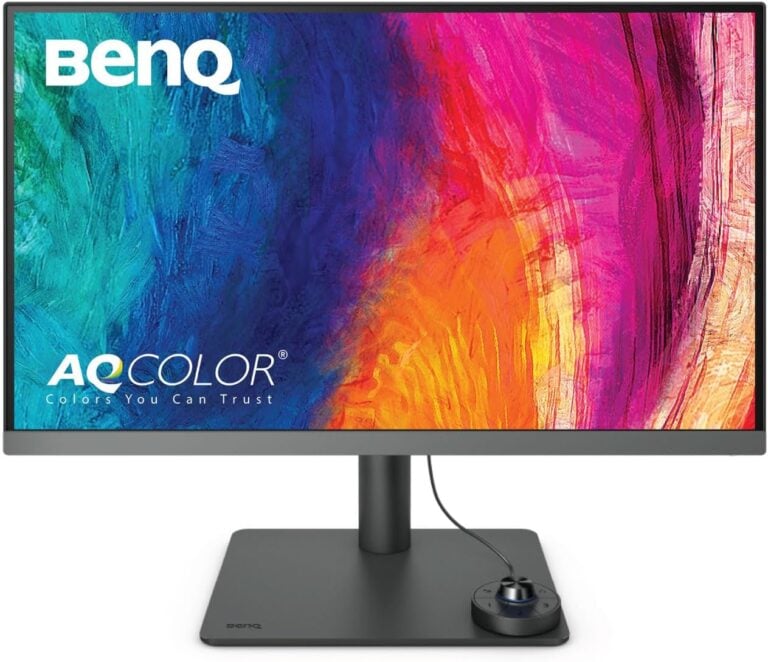
A good monitor can make a noticeable difference when editing photos, producing videos, or working with detailed graphics. BenQ’s Creative Pro PD2706U is a 27-inch 4K display designed for creative professionals, combining factory-calibrated color performance with useful workstation features. Its USB-C connectivity, ergonomic stand, and dedicated Hotkey Puck G2 controller make it a practical addition to a home or professional editing setup.
BenQ PD2706U Mac-Ready 27” Monitor
View deal at AmazonPrice when we checked, Nov 2, 2026. Prices change often. We may earn a commission when you buy through these links.
Amazon currently has the PD2706U for $399.99, a 38% discount from its implied regular price of approximately $645. If you’ve been considering upgrading to a 4K creative display, this deal is worth a look.

BenQ PD2706U Mac-Ready 27” Monitor
Streamline Mac workflows with USB-C (90W) and Hotkey Puck for efficient control, while 4K, 95% P3, dual Pantone validation, Calman varified ensure accurate results. BenQ… Uniformity and factory calibration deliver trusted color, so you can create and deliver with confidence.
Why We Like the BenQ Creative Pro PD2706U
The PD2706U features a 27-inch IPS panel with a 3840 x 2160 resolution, giving you plenty of screen detail for editing high-resolution photographs, reviewing video footage, and working with complex timelines. BenQ factory-calibrates the display for color accuracy, with a Delta E below 3, and it covers 100% of the sRGB and Rec. 709 color spaces, along with 95% of DCI-P3. These specifications make it suitable for a range of photography, graphic design, and video production workflows.
Mac users also get BenQ’s M-Book mode, which is designed to provide color characteristics closer to those of compatible MacBook displays. This can help create a more consistent viewing experience when using the monitor alongside a MacBook. The display also supports multiple color modes, allowing you to switch between different workflows depending on whether you’re editing photographs, working with video, or handling general desktop tasks.
One of the more convenient accessories is the Hotkey Puck G2, a physical controller that lets you access display settings and switch between color modes without repeatedly navigating the monitor’s on-screen menu. The stand offers height adjustment, tilt, swivel, and a 90-degree pivot for portrait orientation. Connectivity is another strong point, with a USB-C port supporting up to 90W power delivery, allowing you to connect a compatible laptop, transfer data, and charge it through a single cable.
What to Consider Before Buying
Although the PD2706U supports HDR10, its peak brightness of approximately 400 nits limits its ability to reproduce the intense highlights and contrast of more advanced HDR displays. It’s better suited to SDR editing and general creative work than professional HDR mastering. Its IPS panel also won’t deliver the deep blacks and contrast ratios of OLED displays, so keep that in mind if you frequently work with dark scenes.
The monitor’s color accuracy and wide color coverage make it useful for many creative applications, but professionals working on color-critical print production may still want a display with more extensive calibration controls and support for specialized print workflows. Consider your output requirements before treating it as a reference-grade display. For most photographers, designers, and video editors working in common color spaces, however, it offers a useful combination of resolution, connectivity, and ergonomics.
BenQ PD2706U Mac-Ready 27” Monitor
View deal at AmazonPrice when we checked, Nov 2, 2026. Prices change often. We may earn a commission when you buy through these links.
BenQ PD2706U Mac-Ready 27” Monitor
View deal at AmazonPrice when we checked, Nov 2, 2026. Prices change often. We may earn a commission when you buy through these links.
More deals
 ASUS ProArt PA278QV2 27-Inch Monitor Drops to $199 at Amazon
 Neewer FS600B Deal: Get 87,100 Lux of Brightness for Under $450
 Save 10% on DJI’s Osmo Pocket 4 With Magnetic Fill Light
 Need Fast, Portable Storage? This SanDisk 2TB SSD Is on Sale
 Save 20% on Nikon’s Z 50 Mirrorless Camera With Two Zoom Lenses
 Love the Look of Film Cameras? Nikon’s Z f Drops Under $2000 on Amazon
More in Deals
DealsNeewer FS600B Deal: Get 87,100 Lux of Brightness for Under $4502 Nov 2026DealsSave 10% on DJI’s Osmo Pocket 4 With Magnetic Fill Light2 Nov 2026DealsNeed Fast, Portable Storage? This SanDisk 2TB SSD Is on Sale2 Nov 2026DealsSave 20% on Nikon’s Z 50 Mirrorless Camera With Two Zoom Lenses30 Oct 2026DealsLove the Look of Film Cameras? Nikon’s Z f Drops Under $2000 on Amazon30 Oct 2026 DealsTamron 28-75mm F/2.8 G2 Lens Drops to $799 at Amazon30 Oct 2026